1
PIC book
Previous page
Table of contents
Chapter overview
PIC microcontrollers
Next page
for beginners,too!
Author: Nebojsa Matic
Paperback - 252 pages (May 15, 2000)
Dimensions (in inches): 0.62 x 9.13 x 7.28
PIC microcontrollers; low-cost computers-in-a-chip; allows
electronics designers and hobbyists add intelligence and
functions that mimic big computers for almost any electronic
product or project.
The purpose of this book is not to make a microcontroller expert
out of you, but to make you equal to those who had someone to
go to for their answers.
In this book you can find:
Practical connection samples for
Relays, Optocouplers, LCD's, Keys, Digits, A to D Converters, Serial communication etc.
Introduction to microcontrollers
Learn what they are, how they work, and how they can be helpful in your work.
Assembler language programming
How to write your first program, use of macros, addressing modes....
Instruction Set
Description, sample and purpose for using each instruction........
MPLAB program package
How to install it, how to start the first program, following the program step by step in the simulator....
Contents
CHAPTER I INTRODUCTION TO MICROCONTROLLERS
Introduction
History
Microcontrollers versus microprocessors
1.1
1.2
1.3
1.4
1.5
1.6
1.7
Memory unit
Central processing unit
Buses
Input-output unit
Serial communication
Timer unit
Watchdog
http://www.mikroelektronika.co.yu/english/product/books/PICbook/0_Uvod.htm (1 of 5) [4/2/2003 16:17:25]
PIC book
1.8 Analog to digital converter
1.9 Program
CHAPTER II MICROCONTROLLER PIC16F84
Introduction
CISC, RISC
Applications
Clock/instruction cycle
Pipelining
Pin description
2.1
2.2
2.3
2.4
2.5
2.6
2.7
2.8
Clock generator - oscillator
Reset
Central processing unit
Ports
Memory organization
Interrupts
Free timer TMR0
EEPROM Data memory
CHAPTER III INSTRUCTION SET
Introduction
Instruction set in PIC16Cxx microcontroller family
Data Transfer
Arithmetic and logic
Bit operations
Directing the program flow
Instruction execution period
Word list
CHAPTER IV ASSEMBLY LANGUAGE PROGRAMMING
Introduction
Sample of a written program
Control directives
●
●
●
●
●
●
4.1
4.2
4.3
4.4
4.5
4.6
define
include
constant
variable
set
equ
http://www.mikroelektronika.co.yu/english/product/books/PICbook/0_Uvod.htm (2 of 5) [4/2/2003 16:17:25]
PIC book
●
●
4.7 org
4.8 end
Conditional instructions
●
●
●
●
●
●
●
4.9 if
4.10 else
4.11 endif
4.12 while
4.13 endw
4.14 ifdef
4.15 ifndef
Data directives
●
●
●
●
●
4.16
4.17
4.18
4.19
4.20
cblock
endc
db
de
dt
Configurating a directive
●
●
4.21 _CONFIG
4.22 Processor
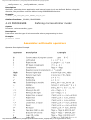
Assembler arithmetic operators
Files created as a result of program translation
Macros
CHAPTER V MPLAB
Introduction
5.1
5.2
5.3
5.4
5.5
5.6
5.7
5.8
Installing the MPLAB program package
Introduction to MPLAB
Choosing the development mode
Designing a project
Designing new assembler file
Writing a program
MPSIM simulator
Toolbar
CHAPTER VI THE SAMPLES
Introduction
6.1 The microcontroller power supply
6.2 Macros used in programs
http://www.mikroelektronika.co.yu/english/product/books/PICbook/0_Uvod.htm (3 of 5) [4/2/2003 16:17:25]
PIC book
●
●
Macros WAIT, WAITX
Macro PRINT
6.3 Samples
●
●
●
●
●
●
●
●
●
●
Light Emitting Diodes
Keyboard
Optocoupler
❍ Optocouplering the input lines
❍ Optocouplering the output lines
Relays
Generating a sound
Shift registers
❍ Input shift register
❍ Output shift register
7-segment Displays (multiplexing)
LCD display
12-bit AD converter
Serial communication
APPENDIX A INSTRUCTION SET
APPENDIX B NUMERIC SYSTEMS
Introduction
B.1 Decimal numeric system
B.2 Binary numeric system
B.3 Hexadecimal numeric system
APPENDIX C GLOSSARY
http://www.mikroelektronika.co.yu/english/product/books/PICbook/0_Uvod.htm (4 of 5) [4/2/2003 16:17:25]
PIC book
Send us a comment about a
book
Subject :
Cooment about book PIC microcontrollers
Name :
State :
USA
E-mail :
Your message:
Submit
Reset
© C o p y r i g h t 2 0 0 1. m i k r o E l e k t r o n i k a. All Rights Reserved. For any comments contact webmaster.
http://www.mikroelektronika.co.yu/english/product/books/PICbook/0_Uvod.htm (5 of 5) [4/2/2003 16:17:25]
Chapter 1 - Introduction to Microprocessors
Previous page
Table of contents
Chapter overview
Next page
CHAPTER 1
Introduction to Microcontrollers
Introduction
History
Microcontrollers versus microprocessors
1.1
1.2
1.3
1.4
1.5
1.6
1.7
1.8
1.9
Memory unit
Central processing unit
Buses
Input-output unit
Serial communication
Timer unit
Watchdog
Analog to digital converter
Program
Introduction
Circumstances that we find ourselves in today in the field of microcontrollers had their
beginnings in the development of technology of integrated circuits. This development has made
it possible to store hundreds of thousands of transistors into one chip. That was a prerequisite
for production of microprocessors , and the first computers were made by adding external
peripherals such as memory, input-output lines, timers and other. Further increasing of the
volume of the package resulted in creation of integrated circuits. These integrated circuits
contained both processor and peripherals. That is how the first chip containing a microcomputer
, or what would later be known as a microcontroller came about.
History
It was year 1969, and a team of Japanese engineers from the BUSICOM company arrived to
United States with a request that a few integrated circuits for calculators be made using their
projects. The proposition was set to INTEL, and Marcian Hoff was responsible for the project.
Since he was the one who has had experience in working with a computer (PC) PDP8, it occured
to him to suggest a fundamentally different solution instead of the suggested construction. This
solution presumed that the function of the integrated circuit is determined by a program stored
in it. That meant that configuration would be more simple, but that it would require far more
memory than the project that was proposed by Japanese engineers would require. After a
while, though Japanese engineers tried finding an easier solution, Marcian's idea won, and the
first microprocessor was born. In transforming an idea into a ready made product , Frederico
Faggin was a major help to INTEL. He transferred to INTEL, and in only 9 months had
succeeded in making a product from its first conception. INTEL obtained the rights to sell this
integral block in 1971. First, they bought the license from the BUSICOM company who had no
http://www.mikroelektronika.co.yu/english/product/books/PICbook/1_Poglavlje.htm (1 of 9) [4/2/2003 16:17:33]
Chapter 1 - Introduction to Microprocessors
idea what treasure they had. During that year, there appeared on the market a microprocessor
called 4004. That was the first 4-bit microprocessor with the speed of 6 000 operations per
second. Not long after that, American company CTC requested from INTEL and Texas
Instruments to make an 8-bit microprocessor for use in terminals. Even though CTC gave up
this idea in the end, Intel and Texas Instruments kept working on the microprocessor and in
April of 1972, first 8-bit microprocessor appeard on the market under a name 8008. It was able
to address 16Kb of memory, and it had 45 instructions and the speed of 300 000 operations per
second. That microprocessor was the predecessor of all today's microprocessors. Intel kept
their developments up in April of 1974, and they put on the market the 8-bit processor under a
name 8080 which was able to address 64Kb of memory, and which had 75 instructions, and the
price began at $360.
In another American company Motorola, they realized quickly what was happening, so they put
out on the market an 8-bit microprocessor 6800. Chief constructor was Chuck Peddle, and
along with the processor itself, Motorola was the first company to make other peripherals such
as 6820 and 6850. At that time many companies recognized greater importance of
microprocessors and began their own developments. Chuck Peddle leaved Motorola to join MOS
Technology and kept working intensively on developing microprocessors.
At the WESCON exhibit in United States in 1975, a critical event took place in the history of
microprocessors. The MOS Technology announced it was marketing microprocessors 6501 and
6502 at $25 each, which buyers could purchase immediately. This was so sensational that
many thought it was some kind of a scam, considering that competitors were selling 8080 and
6800 at $179 each. As an answer to its competitor, both Intel and Motorola lowered their prices
on the first day of the exhibit down to $69.95 per microprocessor. Motorola quickly brought suit
against MOS Technology and Chuck Peddle for copying the protected 6800. MOS Technology
stopped making 6501, but kept producing 6502. The 6502 was a 8-bit microprocessor with 56
instructions and a capability of directly addressing 64Kb of memory. Due to low cost , 6502
becomes very popular, so it was installed into computers such as: KIM-1, Apple I, Apple II,
Atari, Comodore, Acorn, Oric, Galeb, Orao, Ultra, and many others. Soon appeared several
makers of 6502 (Rockwell, Sznertek, GTE, NCR, Ricoh, and Comodore takes over MOS
Technology) which was at the time of its prosperity sold at a rate of 15 million processors a
year!
Others were not giving up though. Frederico Faggin leaves Intel, and starts his own Zilog Inc.
In 1976 Zilog announced the Z80. During the making of this microprocessor, Faggin made a
pivotal decision. Knowing that a great deal of programs have been already developed for 8080,
Faggin realized that many would stay faithful to that microprocessor because of great
expenditure which redoing of all of the programs would result in. Thus he decided that a new
processor had to be compatible with 8080, or that it had to be capable of performing all of the
programs which had already been written for 8080. Beside these characteristics, many new
ones have been added, so that Z80 was a very powerful microprocessor in its time. It was able
to address directly 64 Kb of memory, it had 176 instructions, a large number of registers, a
built in option for refreshing the dynamic RAM memory, single-supply, greater speed of work
etc. Z80 was a great success and everybody converted from 8080 to Z80. It could be said that
Z80 was without a doubt commercially most successful 8-bit microprocessor of that time.
Besides Zilog, other new manufacturers like Mostek, NEC, SHARP, and SGS also appeared. Z80
was the heart of many computers like Spectrum, Partner, TRS703, Z-3 .
In 1976, Intel came up with an improved version of 8-bit microprocessor named 8085.
However, Z80 was so much better that Intel soon lost the battle. Altough a few more
processors appeared on the market (6809, 2650, SC/MP etc.), everything was actually already
decided. There weren't any more great improvements to make manufacturers convert to
something new, so 6502 and Z80 along with 6800 remained as main representatives of the 8bit microprocessors of that time.
Microcontrollers versus Microprocessors
Microcontroller differs from a microprocessor in many ways. First and the most important is its
functionality. In order for a microprocessor to be used, other components such as memory, or
http://www.mikroelektronika.co.yu/english/product/books/PICbook/1_Poglavlje.htm (2 of 9) [4/2/2003 16:17:33]
Chapter 1 - Introduction to Microprocessors
components for receiving and sending data must be added to it. In short that means that
microprocessor is the very heart of the computer. On the other hand, microcontroller is
designed to be all of that in one. No other external components are needed for its application
because all necessary peripherals are already built into it. Thus, we save the time and space
needed to construct devices.
1.1 Memory unit
Memory is part of the microcontroller whose function is to store data.
The easiest way to explain it is to describe it as one big closet with lots of drawers. If we
suppose that we marked the drawers in such a way that they can not be confused, any of their
contents will then be easily accessible. It is enough to know the designation of the drawer and
so its contents will be known to us for sure.
Memory components are exactly like that. For a certain input we get the contents of a certain
addressed memory location and that's all. Two new concepts are brought to us: addressing and
memory location. Memory consists of all memory locations, and addressing is nothing but
selecting one of them. This means that we need to select the desired memory location on one
hand, and on the other hand we need to wait for the contents of that location. Beside reading
from a memory location, memory must also provide for writing onto it. This is done by
supplying an additional line called control line. We will designate this line as R/W (read/write).
Control line is used in the following way: if r/w=1, reading is done, and if opposite is true then
writing is done on the memory location. Memory is the first element, and we need a few
operation of our microcontroller .
1.2 Central Processing Unit
Let add 3 more memory locations to a specific block that will have a built in capability to
multiply, divide, subtract, and move its contents from one memory location onto another. The
part we just added in is called "central processing unit" (CPU). Its memory locations are called
registers.
http://www.mikroelektronika.co.yu/english/product/books/PICbook/1_Poglavlje.htm (3 of 9) [4/2/2003 16:17:33]
Chapter 1 - Introduction to Microprocessors
Registers are therefore memory locations whose role is to help with performing various
mathematical operations or any other operations with data wherever data can be found. Look at
the current situation. We have two independent entities (memory and CPU) which are
interconnected, and thus any exchange of data is hindered, as well as its functionality. If, for
example, we wish to add the contents of two memory locations and return the result again back
to memory, we would need a connection between memory and CPU. Simply stated, we must
have some "way" through data goes from one block to another.
1.3 Bus
That "way" is called "bus". Physically, it represents a group of 8, 16, or more wires
There are two types of buses: address and data bus. The first one consists of as many lines as
the amount of memory we wish to address, and the other one is as wide as data, in our case 8
bits or the connection line. First one serves to transmit address from CPU memory, and the
second to connect all blocks inside the microcontroller.
As far as functionality, the situation has improved, but a new problem has also appeared: we
have a unit that's capable of working by itself, but which does not have any contact with the
outside world, or with us! In order to remove this deficiency, let's add a block which contains
several memory locations whose one end is connected to the data bus, and the other has
connection with the output lines on the microcontroller which can be seen as pins on the
electronic component.
http://www.mikroelektronika.co.yu/english/product/books/PICbook/1_Poglavlje.htm (4 of 9) [4/2/2003 16:17:33]
Chapter 1 - Introduction to Microprocessors
1.4 Input-output unit
Those locations we've just added are called "ports". There are several types of ports : input,
output or bidiectional ports. When working with ports, first of all it is necessary to choose which
port we need to work with, and then to send data to, or take it from the port.
When working with it the port acts like a memory location. Something is simply being written
into or read from it, and it could be noticed on the pins of the microcontroller.
1.5 Serial communication
Beside stated above we've added to the already existing unit the possibility of communication
with an outside world. However, this way of communicating has its drawbacks. One of the basic
drawbacks is the number of lines which need to be used in order to transfer data. What if it is
being transferred to a distance of several kilometers? The number of lines times number of
kilometers doesn't promise the economy of the project. It leaves us having to reduce the
number of lines in such a way that we don't lessen its functionality. Suppose we are working
with three lines only, and that one line is used for sending data, other for receiving, and the
third one is used as a reference line for both the input and the output side. In order for this to
work, we need to set the rules of exchange of data. These rules are called protocol. Protocol is
therefore defined in advance so there wouldn't be any misunderstanding between the sides that
are communicating with each other. For example, if one man is speaking in French, and the
other in English, it is highly unlikely that they will quickly and effectively understand each other.
Let's suppose we have the following protocol. The logical unit "1" is set up on the transmitting
line until transfer begins. Once the transfer starts, we lower the transmission line to logical "0"
for a period of time (which we will designate as T), so the receiving side will know that it is
receiving data, and so it will activate its mechanism for reception. Let's go back now to the
transmission side and start putting logic zeros and ones onto the transmitter line in the order
from a bit of the lowest value to a bit of the highest value. Let each bit stay on line for a time
period which is equal to T, and in the end, or after the 8th bit, let us bring the logical unit "1"
back on the line which will mark the end of the transmission of one data. The protocol we've
just described is called in professional literature NRZ (Non-Return to Zero).
http://www.mikroelektronika.co.yu/english/product/books/PICbook/1_Poglavlje.htm (5 of 9) [4/2/2003 16:17:33]
Chapter 1 - Introduction to Microprocessors
As we have separate lines for receiving and sending, it is possible to receive and send data
(info.) at the same time. So called full-duplex mode block which enables this way of
communication is called a serial communication block. Unlike the parallel transmission, data
moves here bit by bit, or in a series of bits what defines the term serial communication comes
from. After the reception of data we need to read it from the receiving location and store it in
memory as opposed to sending where the process is reversed. Data goes from memory through
the bus to the sending location, and then to the receiving unit according to the protocol.
1.6 Timer unit
Since we have the serial communication explained, we can receive, send and process data.
However, in order to utilize it in industry we need a few additionally blocks. One of those is the
timer block which is significant to us because it can give us information about time, duration,
protocol etc. The basic unit of the timer is a free-run counter which is in fact a register whose
numeric value increments by one in even intervals, so that by taking its value during periods T1
and T2 and on the basis of their difference we can determine how much time has elapsed. This
is a very important part of the microcontroller whose understnding requires most of our time.
1.7 Watchdog
One more thing is requiring our attention is a flawless functioning of the microcontroller
during its run-time. Suppose that as a result of some interference (which often does occur in
industry) our microcontroller stops executing the program, or worse, it starts working
incorrectly.
http://www.mikroelektronika.co.yu/english/product/books/PICbook/1_Poglavlje.htm (6 of 9) [4/2/2003 16:17:33]
Chapter 1 - Introduction to Microprocessors
Of course, when this happens with a computer, we simply reset it and it will keep working.
However, there is no reset button we can push on the microcontroller and thus solve our
problem. To overcome this obstacle, we need to introduce one more block called watchdog. This
block is in fact another free-run counter where our program needs to write a zero in every time
it executes correctly. In case that program gets "stuck", zero will not be written in, and counter
alone will reset the microcontroller upon achieving its maximum value. This will result in
executing the program again, and correctly this time around. That is an important element of
every program to be reliable without man's supervision.
1.8 Analog to Digital Converter
As the peripheral signals usually are substantially different from the ones that microcontroller
can understand (zero and one), they have to be converted into a pattern which can be
comprehended by a microcontroller. This task is performed by a block for analog to digital
conversion or by an ADC. This block is responsible for converting an information about some
analog value to a binary number and for follow it through to a CPU block so that CPU block can
further process it.
Finnaly, the microcontroller is now completed, and all we need to do now is to assemble it into
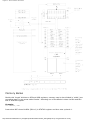
an electronic component where it will access inner blocks through the outside pins. The picture
below shows what a microcontroller looks like inside.
Physical configuration of the interior of a microcontroller
Thin lines which lead from the center towards the sides of the microcontroller represent wires
connecting inner blocks with the pins on the housing of the microcontroller so called bonding
lines. Chart on the following page represents the center section of a microcontroller.
http://www.mikroelektronika.co.yu/english/product/books/PICbook/1_Poglavlje.htm (7 of 9) [4/2/2003 16:17:33]
Chapter 1 - Introduction to Microprocessors
Microcontroller outline with its basic elements and internal connections
For a real application, a microcontroller alone is not enough. Beside a microcontroller, we need
a program that would be executed, and a few more elements which make up a interface logic
towards the elements of regulation (which will be discussed in later chapters).
1.9 Program
Program writing is a special field of work with microcontrollers and is called "programming". Try
to write a small program in a language that we will make up ourselves first and then would be
understood by anyone.
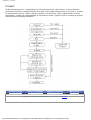
START
REGISTER1=MEMORY LOCATION_A
REGISTER2=MEMORY LOCATION_B
PORTA=REGISTER1 + REGISTER2
END
http://www.mikroelektronika.co.yu/english/product/books/PICbook/1_Poglavlje.htm (8 of 9) [4/2/2003 16:17:33]
Chapter 1 - Introduction to Microprocessors
The program adds the contents of two memory locations, and views their sum on port A. The
first line of the program stands for moving the contents of memory location "A" into one of the
registers of central processing unit. As we need the other data as well, we will also move it into
the other register of the central processing unit. The next instruction instructs the central
processing unit to add the contents of those two registers and send a result to port A, so that
sum of that addition would be visible to the outside world. For a more complex problem,
program that works on its solution will be bigger.
Programming can be done in several languages such as Assembler, C and Basic which are most
commonly used languages. Assembler belongs to lower level languages that are programmed
slowly, but take up the least amount of space in memory and gives the best results where the
speed of program execution is concerned. As it is the most commonly used language in
programming microcontrollers it will be discussed in a later chapter. Programs in C language
are easier to be written, easier to be understood, but are slower in executing from assembler
programs. Basic is the easiest one to learn, and its instructions are nearest a man's way of
reasoning, but like C programming language it is also slower than assembler. In any case,
before you make up your mind about one of these languages you need to consider carefully the
demands for execution speed, for the size of memory and for the amount of time available for
its assembly.
After the program is written, we would install the microcontroller into a device and run it. In
order to do this we need to add a few more external components necessary for its work. First
we must give life to a microcontroller by connecting it to a power supply (power needed for
operation of all electronic instruments) and oscillator whose role is similar to the role that heart
plays in a human body. Based on its clocks microcontroller executes instructions of a program.
As it receives supply microcontroller will perform a small check up on itself, look up the
beginning of the program and start executing it. How the device will work depends on many
parameters, the most important of which is the skillfulness of the developer of hardware, and
on programmer's expertise in getting the maximum out of the device with his program.
Previous page
Table of contents
Chapter overview
© Copyright 1999. mikroElektronika. All Rights Reserved. For any comments contact webmaster.
http://www.mikroelektronika.co.yu/english/product/books/PICbook/1_Poglavlje.htm (9 of 9) [4/2/2003 16:17:33]
Next page
Chapter 2 - Microcontroller PIC16F84
Previous page
Table of contents
Chapter overview
Next page
CHAPTER 2
Microcontroller PIC16F84
Introduction
CISC, RISC
Applications
Clock/instruction cycle
Pipelining
Pin description
2.1
2.2
2.3
2.4
2.5
2.6
2.7
2.8
Clock generator - oscillator
Reset
Central processing unit
Ports
Memory organization
Interrupts
Free timer TMR0
EEPROM Data memory
Introduction
PIC16F84 belongs to a class of 8-bit microcontrollers of RISC architecture. Its general structure
is shown on the following map representing basic blocks.
Program memory (FLASH)- for storing a written program.
Since memory made in FLASH technology can be programmed and cleared more than once, it
makes this microcontroller suitable for device development.
EEPROM - data memory that needs to be saved when there is no supply.
It is usually used for storing important data that must not be lost if power supply suddenly stops.
For instance, one such data is an assigned temperature in temperature regulators. If during a loss
of power supply this data was lost, we would have to make the adjustment once again upon
return of supply. Thus our device looses on self-reliance.
RAM - data memory used by a program during its execution.
In RAM are stored all inter-results or temporary data during run-time.
PORTA and PORTB are physical connections between the microcontroller and the outside world.
Port A has five, and port B eight pins.
FREE-RUN TIMER is an 8-bit register inside a microcontroller that works independently of the
program. On every fourth clock of the oscillator it increments its value until it reaches the
maximum (255), and then it starts counting over again from zero. As we know the exact timing
between each two increments of the timer contents, timer can be used for measuring time which
is very useful with some devices.
CENTRAL PROCESSING UNIT has a role of connective element between other blocks in the
http://www.mikroelektronika.co.yu/english/product/books/PICbook/2_01Poglavlje.htm (1 of 5) [4/2/2003 16:17:37]
Chapter 2 - Microcontroller PIC16F84
microcontroller. It coordinates the work of other blocks and executes the user program.
CISC, RISC
It has already been said that PIC16F84 has a RISC architecture. This term is often found in
computer literature, and it needs to be explained here in more detail. Harvard architecture is a
newer concept than von-Neumann's. It rose out of the need to speed up the work of a
microcontroller. In Harvard architecture, data bus and address bus are separate. Thus a greater
flow of data is possible through the central processing unit, and of course, a greater speed of
work. Separating a program from data memory makes it further possible for instructions not to
have to be 8-bit words. PIC16F84 uses 14 bits for instructions which allows for all instructions to
be one word instructions. It is also typical for Harvard architecture to have fewer instructions than
von-Neumann's, and to have instructions usually executed in one cycle.
Microcontrollers with Harvard architecture are also called "RISC microcontrollers". RISC stands for
Reduced Instruction Set Computer. Microcontrollers with von-Neumann's architecture are called
'CISC microcontrollers'. Title CISC stands for Complex Instruction Set Computer.
Since PIC16F84 is a RISC microcontroller, that means that it has a reduced set of instructions,
http://www.mikroelektronika.co.yu/english/product/books/PICbook/2_01Poglavlje.htm (2 of 5) [4/2/2003 16:17:37]
Chapter 2 - Microcontroller PIC16F84
more precisely 35 instructions . (ex. Intel's and Motorola's microcontrollers have over hundred
instructions) All of these instructions are executed in one cycle except for jump and branch
instructions. According to what its maker says, PIC16F84 usually reaches results of 2:1 in code
compression and 4:1 in speed in relation to other 8-bit microcontrollers in its class.
Applications
PIC16F84 perfectly fits many uses, from automotive industries and controlling home appliances to
industrial instruments, remote sensors, electrical doorlocks and safety devices. It is also ideal for
smart cards as well as for battery supplied devices because of its low consumption.
EEPROM memory makes it easier to apply microcontrollers to devices where permanent storage of
various parameters is needed (codes for transmitters, motor speed, receiver frequencies, etc.).
Low cost, low consumption, easy handling and flexibility make PIC16F84 applicable even in areas
where microcontrollers had not previously been considered (example: timer functions, interface
replacement in larger systems, coprocessor applications, etc.).
In System Programmability of this chip (along with using only two pins in data transfer) makes
possible the flexibility of a product, after assembling and testing have been completed. This
capability can be used to create assembly-line production, to store calibration data available only
after final testing, or it can be used to improve programs on finished products.
Clock / instruction cycle
Clock is microcontroller's main starter, and is obtained from an external component called an
"oscillator". If we want to compare a microcontroller with a time clock, our "clock" would then be a
ticking sound we hear from the time clock. In that case, oscillator could be compared to a spring
that is wound so time clock can run. Also, force used to wind the time clock can be compared to
an electrical supply.
Clock from the oscillator enters a microcontroller via OSC1 pin where internal circuit of a
microcontroller divides the clock into four even clocks Q1, Q2, Q3, and Q4 which do not overlap.
These four clocks make up one instruction cycle (also called machine cycle) during which one
instruction is executed.
Execution of instruction starts by calling an instruction that is next in string. Instruction is called
from program memory on every Q1 and is written in instruction register on Q4. Decoding and
execution of instruction are done between the next Q1 and Q4 cycles. On the following diagram
we can see the relationship between instruction cycle and clock of the oscillator (OSC1) as well as
that of internal clocks Q1-Q4. Program counter (PC) holds information about the address of the
next instruction.
Pipelining
http://www.mikroelektronika.co.yu/english/product/books/PICbook/2_01Poglavlje.htm (3 of 5) [4/2/2003 16:17:37]
Chapter 2 - Microcontroller PIC16F84
Instruction cycle consists of cycles Q1, Q2, Q3 and Q4. Cycles of calling and executing instructions
are connected in such a way that in order to make a call, one instruction cycle is needed, and one
more is needed for decoding and execution. However, due to pipelining, each instruction is
effectively executed in one cycle. If instruction causes a change on program counter, and PC
doesn't point to the following but to some other address (which can be the case with jumps or
with calling subprograms), two cycles are needed for executing an instruction. This is so because
instruction must be processed again, but this time from the right address. Cycle of calling begins
with Q1 clock, by writing into instruction register (IR). Decoding and executing begins with Q2, Q3
and Q4 clocks.
TCY0 reads in instruction MOVLW 55h (it doesn't matter to us what instruction was executed,
because there is no rectangle pictured on the bottom).
TCY1 executes instruction MOVLW 55h and reads in MOVWF PORTB.
TCY2 executes MOVWF PORTB and reads in CALL SUB_1.
TCY3 executes a call of a subprogram CALL SUB_1, and reads in instruction BSF PORTA, BIT3. As
this instruction is not the one we need, or is not the first instruction of a subprogram SUB_1
whose execution is next in order, instruction must be read in again. This is a good example of an
instruction needing more than one cycle.
TCY4 instruction cycle is totally used up for reading in the first instruction from a subprogram at
address SUB_1.
TCY5 executes the first instruction from a subprogram SUB_1 and reads in the next one.
Pin description
PIC16F84 has a total of 18 pins. It is most frequently found in a DIP18 type of case but can also
be found in SMD case which is smaller from a DIP. DIP is an abbreviation for Dual In Package.
SMD is an abbreviation for Surface Mount Devices suggesting that holes for pins to go through
when mounting, aren't necessary in soldering this type of a component.
http://www.mikroelektronika.co.yu/english/product/books/PICbook/2_01Poglavlje.htm (4 of 5) [4/2/2003 16:17:37]
Chapter 2 - Microcontroller PIC16F84
Pins on PIC16F84 microcontroller have the following meaning:
Pin
Pin
Pin
Pin
Pin
Pin
Pin
Pin
Pin
Pin
Pin
Pin
Pin
Pin
Pin
Pin
Pin
Pin
no.1 RA2 Second pin on port A. Has no additional function
no.2 RA3 Third pin on port A. Has no additional function.
no.3 RA4 Fourth pin on port A. TOCK1 which functions as a timer is also found on this pin
no.4 MCLR Reset input and Vpp programming voltage of a microcontroller
no.5 Vss Ground of power supply.
no.6 RB0 Zero pin on port B. Interrupt input is an additional function.
no.7 RB1 First pin on port B. No additional function.
no.8 RB2 Second pin on port B. No additional function.
no.9 RB3 Third pin on port B. No additional function.
no.10 RB4 Fourth pin on port B. No additional function.
no.11 RB5 Fifth pin on port B. No additional function.
no.12 RB6 Sixth pin on port B. 'Clock' line in program mode.
no.13 RB7 Seventh pin on port B. 'Data' line in program mode.
no.14 Vdd Positive power supply pole.
no.15 OSC2 Pin assigned for connecting with an oscillator
no.16 OSC1 Pin assigned for connecting with an oscillator
no.17 RA2 Second pin on port A. No additional function
no.18 RA1 First pin on port A. No additional function.
Previous page
Table of contents
Chapter overview
Next page
© Copyright 1999. mikroElektronika. All Rights Reserved. For any comments contact webmaster.
http://www.mikroelektronika.co.yu/english/product/books/PICbook/2_01Poglavlje.htm (5 of 5) [4/2/2003 16:17:37]
Chapter 2 - Microcontroller PIC16F84
Previous page
Table of contents
Chapter overview
Next page
2.1 Clock generator - oscillator
Oscillator circuit is used for providing a microcontroller with a clock. Clock is needed so that
microcontroller could execute a program or program instructions.
Types of oscillators
PIC16F84 can work with four different configurations of an oscillator. Since configurations with
crystal oscillator and resistor-capacitor (RC) are the ones that are used most frequently, these are
the only ones we will mention here. Microcontroller type with a crystal oscillator has in its
designation XT, and a microcontroller with resistor-capacitor pair has a designation RC. This is
important because you need to mention the type of oscillator when buying a microcontroller.
XT Oscillator
Crystal oscillator is kept in metal housing
with two pins where you have written down
the frequency at which crystal oscillates. One
ceramic capacitor of 30pF whose other end is
connected to the ground needs to be
connected with each pin.
Oscillator and capacitors can be packed in
joint case with three pins. Such element is
called ceramic resonator and is represented
in charts like the one below. Center pins of
the element is the ground, while end pins are
connected with OSC1 and OSC2 pins on the
microcontroller. When designing a device,
the rule is to place an oscillator nearer a
microcontroller, so as to avoid any
interference on lines on which microcontroller
is receiving a clock.
RC Oscillator
In applications where great time precision is not necessary, RC oscillator offers additional savings
during purchase. Resonant frequency of RC oscillator depends on supply voltage rate, resistance
R, capacity C and working temperature. It should be mentioned here that resonant frequency is
also influenced by normal variations in process parameters, by tolerance of external R and C
components, etc.
http://www.mikroelektronika.co.yu/english/product/books/PICbook/2_02Poglavlje.htm (1 of 3) [4/2/2003 16:17:41]
Chapter 2 - Microcontroller PIC16F84
Above diagram shows how RC oscillator is connected with PIC16F84. With value of resistor R being
below 2.2k, oscillator can become unstable, or it can even stop the oscillation. With very high
value of R (ex.1M) oscillator becomes very sensitive to noise and humidity. It is recommended
that value of resistor R should be between 3 and 100k. Even though oscillator will work without an
external capacitor(C=0pF), capacitor above 20pF should still be used for noise and stability. No
matter which oscillator is being used, in order to get a clock that microcontroller works upon, a
clock of the oscillator must be divided by 4. Oscillator clock divided by 4 can also be obtained on
OSC2/CLKOUT pin, and can be used for testing or synchronizing other logical circuits.
Following a supply, oscillator starts oscillating. Oscillation at first has an unstable period and
amplitude, but after some period of time it becomes stabilized.
To prevent such inaccurate clock from influencing microcontroller's performance, we need to keep
the microcontroller in reset state during stabilization of oscillator's clock. Above diagram shows a
typical shape of a signal which microcontroller gets from the quartz oscillator following a supply.
http://www.mikroelektronika.co.yu/english/product/books/PICbook/2_02Poglavlje.htm (2 of 3) [4/2/2003 16:17:41]
Chapter 2 - Microcontroller PIC16F84
Previous page
Table of contents
Chapter overview
Next page
© Copyright 1999. mikroElektronika. All Rights Reserved. For any comments contact webmaster.
http://www.mikroelektronika.co.yu/english/product/books/PICbook/2_02Poglavlje.htm (3 of 3) [4/2/2003 16:17:41]
Chapter 2 - Microcontroller PIC16F84
Previous page
Table of contents
Chapter overview
Next page
2.2 Reset
Reset is used for putting the microcontroller into a 'known' condition. That practically means that
microcontroller can behave rather inaccurately under certain undesirable conditions. In order to
continue its proper functioning it has to be reset, meaning all registers would be placed in a
starting position. Reset is not only used when microcontroller doesn't behave the way we want it
to, but can also be used when trying out a device as an interrupt in program execution, or to get a
microcontroller ready when reading in a program.
In order to prevent from bringing a
logical zero to MCLR pin accidentally
(line above it means that reset is
activated by a logical zero), MCLR has
to be connected via resistor to the
positive supply pole. Resistor should be
between 5 and 10K. This kind of
resistor whose function is to keep a
certain line on a logical one as a
preventive, is called a pull up.
Microcontroller PIC16F84 knows several sources of resets:
a) Reset during power on, POR (Power-On Reset)
b) Reset during regular work by bringing logical zero to MCLR microcontroller's pin.
c) Reset during SLEEP regime
d) Reset at watchdog timer (WDT) overflow
e) Reset during at WDT overflow during SLEEP work regime.
The most important reset sources are a) and b). The first one occurs each time a power supply is
brought to the microcontroller and serves to bring all registers to a starting position initial state.
The second one is a product of purposeful bringing in of a logical zero to MCLR pin during normal
operation of the microcontroller. This second one is often used in program development.
During a reset, RAM memory locations are not being reset. They are unknown during a power up
and are not changed at any reset. Unlike these, SFR registers are reset to a starting position initial
state. One of the most important effects of a reset is setting a program counter (PC) to zero
(0000h) , which enables the program to start executing from the first written instruction.
Reset at supply voltage drop below the permissible (Brown-out
Reset)
Impulse for resetting during voltage voltage-up is generated by microcontroller itself when it
detects an increase in supply Vdd (in a range from 1.2V to 1.8V). That impulse lasts 72ms which
is enough time for an oscillator to get stabilized. These 72ms are provided by an internal PWRT
timer which has its own RC oscillator. Microcontroller is in a reset mode as long as PWRT is active.
However, as device is working, problem arises when supply doesn't drop to zero but falls below
the limit that guarantees microcontroller's proper functioning. This is a likely case in practice,
http://www.mikroelektronika.co.yu/english/product/books/PICbook/2_03Poglavlje.htm (1 of 2) [4/2/2003 16:17:42]
Chapter 2 - Microcontroller PIC16F84
especially in industrial environment where disturbances and instability of supply are an everyday
occurrence. To solve this problem we need to make sure that microcontroller is in a reset state
each time supply falls below the approved limit.
If, according to electrical specification, internal reset circuit of a microcontroller can not satisfy the
needs, special electronic components can be used which are capable of generating the desired
reset signal. Beside this function, they can also function in watching over supply voltage. If
voltage drops below specified level, a logical zero would appear on MCLR pin which holds the
microcontroller in reset state until voltage is not within limits that guarantee correct functioning.
Previous page
Table of contents
Chapter overview
Next page
© Copyright 1999. mikroElektronika. All Rights Reserved. For any comments contact webmaster.
http://www.mikroelektronika.co.yu/english/product/books/PICbook/2_03Poglavlje.htm (2 of 2) [4/2/2003 16:17:42]
Chapter 2 - Microcontroller PIC16F84
Previous page
Table of contents
Chapter overview
Next page
2.3 Central Processing Unit
Central processing unit (CPU) is the brain of a microcontroller. That part is responsible for finding
and fetching the right instruction which needs to be executed, for decoding that instruction, and
finally for its execution.
Central processing unit connects all parts of the microcontroller into one whole. Surely, its most
important function is to decode program instructions. When programmer writes a program,
instructions have a clear form like MOVLW 0x20. However, in order for a microcontroller to
understand that, this 'letter' form of an instruction must be translated into a series of zeros and
ones which is called an 'opcode'. This transition from a letter to binary form is done by translators
such as assembler translator (also known as an assembler). Instruction thus fetched from
program memory must be decoded by a central processing unit. We can then select from the table
of all the instructions a set of actions which execute a assigned task defined by instruction. As
instructions may within themselves contain assignments which require different transfers of data
from one memory into another, from memory onto ports, or some other calculations, CPU must be
connected with all parts of the microcontroller. This is made possible through a data bus and an
address bus.
Arithmetic Logic Unit (ALU)
Arithmetic logic unit is responsible for performing operations of adding, subtracting, moving (left
or right within a register) and logic operations. Moving data inside a register is also known as
'shifting'. PIC16F84 contains an 8-bit arithmetic logic unit and 8-bit work registers.
http://www.mikroelektronika.co.yu/english/product/books/PICbook/2_04Poglavlje.htm (1 of 6) [4/2/2003 16:17:45]
Chapter 2 - Microcontroller PIC16F84
In instructions with two operands, ordinarily one operand is in work register (W register), and the
other is one of the registers or a constant. By operand we mean the contents on which some
operation is being done, and a register is any one of the GPR or SFR registers. GPR is an
abreviation for 'General Purposes Registers', and SFR for 'Special Function Registers'. In
instructions with one operand, an operand is either W register or one of the registers. As an
addition in doing operations in arithmetic and logic, ALU controls status bits (bits found in STATUS
register). Execution of some instructions affects status bits, which depends on the result itself.
Depending on which instruction is being executed, ALU can affect values of Carry (C), Digit Carry
(DC), and Zero (Z) bits in STATUS register.
http://www.mikroelektronika.co.yu/english/product/books/PICbook/2_04Poglavlje.htm (2 of 6) [4/2/2003 16:17:45]
Chapter 2 - Microcontroller PIC16F84
STATUS Register
bit 0 C (Carry) Transfer
Bit that is affected by operations of addition, subtraction and shifting.
1= transfer occured from the highest resulting bit
0=transfer did not occur
http://www.mikroelektronika.co.yu/english/product/books/PICbook/2_04Poglavlje.htm (3 of 6) [4/2/2003 16:17:45]
Chapter 2 - Microcontroller PIC16F84
C bit is affected by ADDWF, ADDLW, SUBLW, SUBWF instructions.
bit 1 DC (Digit Carry) DC Transfer
Bit affected by operations of addition, subtraction and shifting. Unlike C bit, this bit represents
transfer from the fourth resulting place. It is set by addition when occurs carry from bit3 to bit4,
or by subtraction when occurs borrow from bit4 to bit3, or by shifting in both direction.
1=transfer occured on the fourth bit according to the order of the result
0=transfer did not occur
DC bit is affected by ADDWF, ADDLW, SUBLW, SUBWF instructions.
bit 2 Z (Zero bit) Indication of a zero result
This bit is set when the result of an executed arithmetic or logic operation is zero.
1=result equals zero
0=result does not equal zero
bit 3 PD (Power-down bit)
Bit which is set whenever power supply is brought to a microcontroller as it starts running, after
each regular reset and after execution of instruction CLRWDT. Instruction SLEEP resets it when
microcontroller falls into low consumption/usage regime. Its repeated setting is possible via reset
or by turning the supply on, or off . Setting can be triggered also by a signal on RB0/INT pin,
change on RB port, completion of writing in internal DATA EEPROM, and by a watchdog, too.
1=after supply has been turned on
0= executing SLEEP instruction
bit 4 TO Time-out ; Watchdog overflow.
Bit is set after turning on the supply and execution of CLRWDT and SLEEP instructions. Bit is reset
when watchdog gets to the end signaling that something is not right.
1=overflow did not occur
0=overflow did occur
bit6:5 RP1:RP0 (Register Bank Select bits)
These two bits are upper part of the address for direct addressing. Since instructions which
address the memory directly have only seven bits, they need one more bit in order to address all
256 bytes which is how many bytes PIC16F84 has. RP1 bit is not used, but is left for some future
expansions of this microcontroller.
01=first bank
00=zero bank
bit 7 IRP (Register Bank Select bit)
Bit whose role is to be an eighth bit for indirect addressing of internal RAM.
1=bank 2 and 3
0=bank 0 and 1 (from 00h to FFh)
STATUS register contains arithmetic status ALU (C, DC, Z), RESET status (TO, PD) and bits for
selecting of memory bank (IRP, RP1, RP0). Considering that selection of memory bank is
controlled through this register, it has to be present in each bank. Memory bank will be discussed
in more detail in Memory organization chapter. STATUS register can be a destination for any
instruction, with any other register. If STATUS register is a destination for instructions which affect
Z, DC or C bits, then writing to these three bits is not possible.
OPTION register
http://www.mikroelektronika.co.yu/english/product/books/PICbook/2_04Poglavlje.htm (4 of 6) [4/2/2003 16:17:45]
Chapter 2 - Microcontroller PIC16F84
bit 0:2 PS0, PS1, PS2 (Prescaler Rate Select bit)
These three bits define prescaler rate select bit. What a prescaler is and how these bits can affect
the work of a microcontroller will be explained in section on TMR0.
bit 3 PSA (Prescaler Assignment bit)
Bit which assigns prescaler between TMR0 and watchdog.
1=prescaler is assigned to watchdog
0=prescaler is assigned to a free-run timer TMR0
bit 4 T0SE (TMR0 Source Edge Select bit)
If it is allowed to trigger TMR0 by impulses from the pin RA4/T0CKI, this bit determines whether
this will be to the falling or rising edge of a signal.
1=falling edge
0=rising edge
bit 5 TOCS (TMR0 Clock Source Select bit)
This pin enables free-run timer to increment its state either from internal oscillator on every ¼ of
oscillator clock, or through external impulses on RA4/T0CKI pin.
1=external impulses
0=1/4 internal clock
bit 6 INTEDG (Interrupt Edge Select bit)
If interrupt is enabled possible this bit will determine the edge at which an interrupt will be
activated on pin RB0/INT.
1=rising edge
0=falling edge
bit 7 RBPU (PORTB Pull-up Enable bit)
This bit turns on and off internal 'pull-up' resistors on port B.
1= "pull-up" resistors turned off
0= "pull-up" resistors turned on
Previous page
Table of contents
Chapter overview
Next page
http://www.mikroelektronika.co.yu/english/product/books/PICbook/2_04Poglavlje.htm (5 of 6) [4/2/2003 16:17:45]
Chapter 2 - Microcontroller PIC16F84
© Copyright 1999. mikroElektronika. All Rights Reserved. For any comments contact webmaster.
http://www.mikroelektronika.co.yu/english/product/books/PICbook/2_04Poglavlje.htm (6 of 6) [4/2/2003 16:17:45]
Chapter 2 - Microcontroller PIC16F84
Previous page
Table of contents
Chapter overview
Next page
2.4 Ports
Port refers to a group of pins on a microcontroller which can be accessed simultaneously, or on
which we can set the desired combination of zeros and ones, or read from them an existing status.
Physically, port is a register inside a microcontroller which is connected by wires to the pins of a
microcontroller. Ports represent physical connection of Central Processing Unit with an outside
world. Microcontroller uses them in order to monitor or control other components or devices. Due
to functionality, some pins have twofold roles like PA4/TOCKI for instance, which is simultaneously
the fourth bit of port A and an external input for free-run counter. Selection of one of these two
pin functions is done in one of the configurational registers. An illustration of this is the fifth bit
T0CS in OPTION register. By selecting one of the functions the other one is disabled.
All port pins can be defined as input or output, according to the needs of a device that's being
developed. In order to define a pin as input or output pin, the right combination of zeros and ones
must be written in TRIS register. If at the appropriate place in TRIS register a logical "1" is
written, then that pin is an input pin, and if the opposite is true, it's an output pin. Every port has
its proper TRIS register. Thus, port A has TRISA at address 85h, and port B has TRISB at address
86h.
PORTB
PORTB has 8 pins joined to it. The appropriate register for direction of data is TRISB at address
86h. Setting a bit in TRISB register defines the corresponding port pin as an input pin, and
resetting a bit in TRISB register defines the corresponding port pin as the output pin. Each pin on
PORTB has a weak internal pull-up resistor (resistor which defines a line to logic one) which can be
activated by resetting the seventh bit RBPU in OPTION register. These 'pull-up' resistors are
automatically being turned off when port pin is configured as an output. When a microcontroller is
started, pull-up's are disabled.
Four pins PORTB, RB7:RB4 can cause an interrupt which occurs when their status changes from
http://www.mikroelektronika.co.yu/english/product/books/PICbook/2_05Poglavlje.htm (1 of 2) [4/2/2003 16:17:47]
Chapter 2 - Microcontroller PIC16F84
logical one into logical zero and opposite. Only pins configured as input can cause this interrupt to
occur (if any RB7:RB4 pin is configured as an output, an interrupt won't be generated at the
change of status.) This interrupt option along with internal pull-up resistors makes it easier to
solve common problems we find in practice like for instance that of matrix keyboard. If rows on
the keyboard are connected to these pins, each push on a key will then cause an interrupt. A
microcontroller will determine which key is at hand while processing an interrupt It is not
recommended to refer to port B at the same time that interrupt is being processed.
The above example shows how pins 0, 1, 2, and 3 are declared for input, and pins 4, 5, 6, and 7
for output.
PORTA
PORTA has 5 pins joined to it. The corresponding register for data direction is TRISA at address
85h. Like with port B, setting a bit in TRISA register defines also the corresponding port pin as an
input pin, and clearing a bit in TRISA register defines the corresponding port pin as an output pin.
The fifth pin of port A has dual function. On that pin is also situated an external input for timer
TMR0. One of these two options is chosen by setting or resetting the T0CS bit (TMR0 Clock Source
Select bit). This pin enables the timer TMR0 to increase its status either from internal oscillator or
via external impulses on RA4/T0CKI pin.
Example shows how pins 0, 1, 2, 3, and 4 are declared to be input, and pins 5, 6, and 7 to be
output pins.
Previous page
Table of contents
Chapter overview
Next page
© Copyright 1999. mikroElektronika. All Rights Reserved. For any comments contact webmaster.
http://www.mikroelektronika.co.yu/english/product/books/PICbook/2_05Poglavlje.htm (2 of 2) [4/2/2003 16:17:47]
Chapter 2 - Microcontroller PIC16F84
Previous page
Table of contents
Chapter overview
Next page
2.5 Memory organization
PIC16F84 has two separate memory blocks, one for data and the other for program. EEPROM
memory and GPR registers in RAM memory make up a data block, and FLASH memory makes up a
program block.
Program memory
Program memory has been realized in FLASH technology which makes it possible to program a
microcontroller many times before it's installed into a device, and even after its installment if
eventual changes in program or process parameters should occur. The size of program memory is
1024 locations with 14 bits width where locations zero and four are reserved for reset and
interrupt vector.
Data memory
Data memory consists of EEPROM and RAM memories. EEPROM memory consists of 64 eight bit
locations whose contents is not lost during loosing of power supply. EEPROM is not directly
addressible, but is accessed indirectly through EEADR and EEDATA registers. As EEPROM memory
usually serves for storing important parameters (for example, of a given temperature in
temperature regulators) , there is a strict procedure for writing in EEPROM which must be followed
in order to avoid accidental writing. RAM memory for data occupies space on a memory map from
location 0x0C to 0x4F which comes to 68 locations. Locations of RAM memory are also called GPR
registers which is an abbreviation for General Purpose Registers. GPR registers can be accessed
regardless of which bank is selected at the moment.
SFR registers
Registers which take up first 12 locations in banks 0 and 1 are registers of specialized function
assigned with certain blocks of the microcontroller. These are called Special Function Registers.
http://www.mikroelektronika.co.yu/english/product/books/PICbook/2_06Poglavlje.htm (1 of 5) [4/2/2003 16:17:50]
Chapter 2 - Microcontroller PIC16F84
Memory Banks
Beside this 'length' division to SFR and GPR registers, memory map is also divided in 'width' (see
preceding map) to two areas called 'banks'. Selecting one of the banks is done via RP0 and RP1
bits in STATUS register.
Example:
bcf STATUS, RP0
Instruction BCF clears bit RP0 (RP0=0) in STATUS register and thus sets up bank 0.
http://www.mikroelektronika.co.yu/english/product/books/PICbook/2_06Poglavlje.htm (2 of 5) [4/2/2003 16:17:50]
Chapter 2 - Microcontroller PIC16F84
bsf STATUS, RP0
Instruction BSF sets the bit RP0 (RP0=1) in STATUS register and thus sets up bank1.
Usually, groups of instructions that are often in use, are connected into one unit which can easily
be recalled in a program, and whose name has a clear meaning, so called Macros. With their use,
selection between two banks becomes more clear and the program itself more legible.
BANK0 macro
Bcf STATUS, RP0
Endm
;Select memory bank 0
BANK1 macro
Bsf STATUS, RP0
Endm
;Select memory bank 1
Locations 0Ch - 4Fh are general purpose registers (GPR) which are used as RAM memory.
When locations 8Ch - CFh in Bank 1 are accessed, we actually access the exact same
locations in Bank 0. In other words , whenever you wish to access one of the GPR
registers, there is no need to worry about which bank we are in!
Program Counter
Program counter (PC) is a 13 bit register that contains the address of the instruction being
executed. By its incrementing or change (ex. in case of jumps) microcontroller executes program
instructions step-by-step.
Stack
PIC16F84 has a 13-bit stack with 8 levels, or in other words, a group of 8 memory locations of 13 bits width with special function. Its basic role is to keep the value of program counter after a jump
from the main program to an address of a subprogram . In order for a program to know how to go
back to the point where it started from, it has to return the value of a program counter from a
stack. When moving from a program to a subprogram, program counter is being pushed onto a
stack (example of this is CALL instruction). When executing instructions such as RETURN, RETLW
or RETFIE which were executed at the end of a subprogram, program counter was taken from a
stack so that program could continue where was stopped before it was interrupted. These
operations of placing on and taking off from a program counter stack are called PUSH and POP,
and are named according similar instructions on some bigger microcontrollers.
In System Programming
In order to program a program memory, microcontroller must be set to special working mode by
bringing up MCLR pin to 13.5V, and supply voltage Vdd has to be stabilized between 4.5V to 5.5V.
Program memory can be programmed serially using two 'data/clock' pins which must previously
be separated from device lines, so that errors wouldn't come up during programming.
Addressing modes
RAM memory locations can be accessed directly or indirectly.
Direct Addressing
Direct Addressing is done through a 9-bit address. This address is obtained by connecting 7th bit
of direct address of an instruction with two bits (RP1, RP0) from STATUS register as is shown on
the following picture. Any access to SFR registers can be an example of direct addressing.
http://www.mikroelektronika.co.yu/english/product/books/PICbook/2_06Poglavlje.htm (3 of 5) [4/2/2003 16:17:50]
Chapter 2 - Microcontroller PIC16F84
Bsf STATUS, RP0 ;Bankl
movlw 0xFF
;w=0xFF
movwf TRISA
;address of TRISA register is taken from
;instruction movwf
Direct addressing
Indirect Addressing
Indirect unlike direct addressing does not take an address from an instruction but makes it with
the help of IRP bit of STATUS and FSR registers. Addressed location is accessed via INDF register
which in fact holds the address indicated by a FSR. In other words, any instruction which uses
INDF as its register in reality accesses data indicated by a FSR register. Let's say, for instance,
that one general purpose register (GPR) at address 0Fh contains a value of 20. By writing a value
of 0Fh in FSR register we will get a register indicator at address 0Fh, and by reading from INDF
register, we will get a value of 20, which means that we have read from the first register its value
without accessing it directly (but via FSR and INDF). It appears that this type of addressing does
not have any advantages over direct addressing, but certain needs do exist during programming
which can be solved smoothly only through indirect addressing.
http://www.mikroelektronika.co.yu/english/product/books/PICbook/2_06Poglavlje.htm (4 of 5) [4/2/2003 16:17:50]
Chapter 2 - Microcontroller PIC16F84
An of such example can be sending a set of data via serial communication, working with buffers
and indicators (which will be discussed further in a chapter with examples), or erasing a part of
RAM memory (16 locations) as in the following instance.
Reading data from INDF register when the contents of FSR register is equal to zero returns the
value of zero, and writing to it results in NOP operation (no operation).
Previous page
Table of contents
Chapter overview
Next page
© Copyright 1999. mikroElektronika. All Rights Reserved. For any comments contact webmaster.
http://www.mikroelektronika.co.yu/english/product/books/PICbook/2_06Poglavlje.htm (5 of 5) [4/2/2003 16:17:50]
Chapter 2 - Microcontroller PIC16F84
Previous page
Table of contents
Chapter overview
Next page
2.6 Interrupts
Interrupts are a mechanism of a microcontroller which enables it to respond to some events at the
moment when they occur, regardless of what microcontroller is doing at the time. This is a very
important part, because it provides connection between a microcontroller and environment which
surrounds it. Generally, each interrupt changes the program flow, interrupts it and after executing an
interrupt subprogram (interrupt routine) it continues from that same point on.
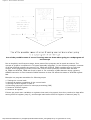
One of the possible sources of an interrupt and how it affects the main program
Control register of an interrupt is called INTCON and is found at 0Bh address. Its role is to allow or
disallowed interrupts, and in case they are not allowed, it registers single interrupt requests through
its own bits.
INTCON Register
http://www.mikroelektronika.co.yu/english/product/books/PICbook/2_07Poglavlje.htm (1 of 7) [4/2/2003 16:17:55]
Chapter 2 - Microcontroller PIC16F84
bit 0 RBIF (RB Port Change Interrupt Flag bit) Bit which informs about changes on pins 4, 5, 6 and 7
of port B.
1=at least one pin has changed its status
0=no change occured on any of the pins
bit 1 INTF (INT External Interrupt Flag bit) External interrupt occured.
1=interrupt occured
0=interrupt did not occur
If a rising or falling edge was detected on pin RB0/INT, (which is defined with bit INTEDG in OPTION
register), bit INTF is set. Bit must be cleared in interrupt subprogram in order to detect the next
interrupt.
bit 2 T0IF (TMR0 Overflow Interrupt Flag bit) Overflow of counter TMR0.
1= counter changed its status from FFh to 00h
0=overflow did not occur
Bit must be cleared in program in order for an interrupt to be detected.
bit 3 RBIE (RB port change Interrupt Enable bit) Enables interrupts to occur at the change of status
of pins 4, 5, 6, and 7 of port B.
1= enables interrupts at the change of status
0=interrupts disabled at the change of status
If RBIE and RBIF were simultaneously set, an interrupt would occur.
bit 4 INTE (INT External Interrupt Enable bit) Bit which enables external interrupt from pin RB0/INT.
1=external interrupt enabled
0=external interrupt disabled
If INTE and INTF were set simultaneously, an interrupt would occur.
bit 5 T0IE (TMR0 Overflow Interrupt Enable bit) Bit which enables interrupts during counter TMR0
overflow.
1=interrupt enabled
0=interrupt disabled
If T0IE and T0IF were set simultaneously, interrupt would occur.
Bit 6 EEIE (EEPROM Write Complete Interrupt Enable bit) Bit which enables an interrupt at the end
of a writing routine to EEPROM
1=interrupt enabled
0=interrupt disabled
If EEIE and EEIF (which is in EECON1 register) were set simultaneously , an interrupt would occur.
Bit 7 GIE (Global Interrupt Enable bit) Bit which enables or disables all interrupts.
1=all interrupts are enabled
0=all interrupts are disabled
PIC16F84 has four interrupt sources:
1.
2.
3.
4.
Termination of writing data to EEPROM
TMR0 interrupt caused by timer overflow
Interrupt during alteration on RB4, RB5, RB6 and RB7 pins of port B.
External interrupt from RB0/INT pin of microcontroller
http://www.mikroelektronika.co.yu/english/product/books/PICbook/2_07Poglavlje.htm (2 of 7) [4/2/2003 16:17:55]
Chapter 2 - Microcontroller PIC16F84
Generally speaking, each interrupt source has two bits joined to it. One enables interrupts, and the
other detects when interrupts occur. There is one common bit called GIE which can be used to
disallow or enable all interrupts simultaneously. This bit is very useful when writing a program
because it allows for all interrupts to be disabled for a period of time, so that execution of some
important part of a program would not be interrupted. When instruction which resets GIE bit was
executed (GIE=0, all interrupts disallowed), any interrupt that remained unsolved should be ignored.
Interrupts which remained unsolved and were ignored, are processed when GIE bit (GIE=1, all
interrupts allowed) would be cleared. When interrupt was answered, GIE bit was cleared so that any
additional interrupts would be disabled, return address was pushed onto stack and address 0004h
was written in program counter - only after this does replying to an interrupt begin! After interrupt is
processed, bit whose setting caused an interrupt must be cleared, or interrupt routine would
automatically be processed over again during a return to the main program.
Keeping the contents of important registers
Only return value of program counter is stored on a stack during an interrupt (by return value of
program counter we mean the address of the instruction which was to be executed, but wasn't
because interrupt occured). Keeping only the value of program counter is often not enough. Some
registers which are already in use in the main program can also be in use in interrupt routine. If they
were not retained, main program would during a return from an interrupt routine get completely
different values in those registers, which would cause an error in the program. One example for such
a case is contents of the work register W. If we suppose that main program was using work register
W for some of its operations, and if it had stored in it some value that's important for the following
instruction, then an interrupt which occurs before that instruction would change the value of work
register W which would directly be influenced the main program.
Procedure of recording important registers before going to an interrupt routine is called PUSH, while
the procedure which brings recorded values back, is called POP. PUSH and POP are instructions with
some other microcontrollers (Intel), but are so widely accepted that a whole operation is named after
them. PIC16F84 does not have instructions like PUSH and POP, and they have to be programmed.
http://www.mikroelektronika.co.yu/english/product/books/PICbook/2_07Poglavlje.htm (3 of 7) [4/2/2003 16:17:55]
Chapter 2 - Microcontroller PIC16F84
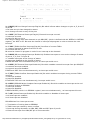
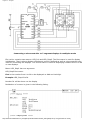
One of the possible cases of errors if saving was not done when going to a subprogram of
an interrupt
Due to simplicity and frequent usage, these parts of the program can be made as macros. The
concept of a Macro is explained in "Program assembly language". In the following example, contents
of W and STATUS registers are stored in W_TEMP and STATUS_TEMP variables prior to interrupt
routine. At the beginning of PUSH routine we need to check presently selected bank because
W_TEMP and STATUS_TEMP are found in bank 0. For exchange of data between these registers,
SWAPF instruction is used instead of MOVF because it does not affect the status of STATUS register
bits.
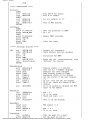
Example is a program assembler for following steps:
1.
2.
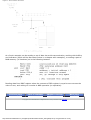
3.
4.
5.
6.
Testing the current bank
Storing W register regardless of the current bank
Storing STATUS register in bank 0.
Executing interrupt routine for interrupt processing (ISR)
Restores STATUS register
Restores W register
If there are some more variables or registers that need to be stored, then they need to be kept after
storing STATUS register (step 3), and brought back before STATUS register is restored (step 5).
http://www.mikroelektronika.co.yu/english/product/books/PICbook/2_07Poglavlje.htm (4 of 7) [4/2/2003 16:17:55]
Chapter 2 - Microcontroller PIC16F84
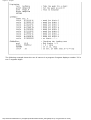
The same example can be realized by using macros, thus getting a more legible program. Macros
that are already defined can be used for writing new macros. Macros BANK1 and BANK0 which are
explained in "Memory organization" chapter are used with macros 'push' and 'pop'.
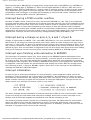
External interrupt on RB0/INT pin of microcontroller
http://www.mikroelektronika.co.yu/english/product/books/PICbook/2_07Poglavlje.htm (5 of 7) [4/2/2003 16:17:55]
Chapter 2 - Microcontroller PIC16F84
External interrupt on RB0/INT pin is triggered by rising signal edge (if bit INTEDG=1 in OPTION<6>
register), or falling edge (if INTEDG=0). When correct signal appears on INT pin, INTF bit is set in
INTCON register. INTF bit (INTCON<1>) must be reset in interrupt routine, so that interrupt wouldn't
occur again while going back to the main program. This is an important part of the program which
programmer must not forget, or program will constantly go into interrupt routine. Interrupt can be
turned off by resetting INTE control bit (INTCON<4>).
Interrupt during a TMR0 counter overflow
Overflow of TMR0 counter (from FFh to 00h) will set T0IF (INTCON<2>) bit. This is very important
interrupt because many real problems can be solved using this interrupt. One of the examples is time
measurement. If we know how much time counter needs in order to complete one cycle from 00h to
FFh, then a number of interrupts multiplied by that amount of time will yield the total of elapsed
time. In interrupt routine some variable would be incremented in RAM memory, value of that variable
multiplied by the amount of time the counter needs to count through a whole cycle, would yield total
elapsed time. Interrupt can be turned on/off by setting/resetting T0IE (INTCON<5>) bit.
Interrupt during a change on pins 4, 5, 6 and 7 of port B
Change of input signal on PORTB <7:4> sets RBIF (INTCON<0>) bit. Four pins RB7, RB6, RB5 and
RB4 of port B, can trigger an interrupt which occurs when status on them changes from logic one to
logic zero, or vice versa. For pins to be sensitive to this change, they must be defined as input. If any
one of them is defined as output, interrupt will not be generated at the change of status. If they are
defined as input, their current state is compared to the old value which was stored at the last reading
from port B. Interrupt can be turned on/off by setting/resetting RBIE bit in INTCON register.
Interrupt upon finishing write-subroutine to EEPROM
This interrupt is of practical nature only. Since writing to one EEPROM location takes about 10ms
(which is a long time in the notion of a microcontroller), it doesn't pay off to a microcontroller to wait
for writing to end. Thus interrupt mechanism is added which allows the microcontroller to continue
executing the main program, while writing in EEPROM is being done in the background. When writing
is completed, interrupt informs the microcontroller that writing has ended. EEIF bit, through which
this informing is done, is found in EECON1 register. Occurrence of an interrupt can be disabled by
resetting the EEIE bit in INTCON register.
Interrupt initialization
In order to use an interrupt mechanism of a microcontroller, some preparatory tasks need to be
performed. These procedures are in short called "initialization". By initialization we define to what
interrupts the microcontroller will respond, and which ones it will ignore. If we do not set the bit that
allows a certain interrupt, program will not execute an interrupt subprogram. Through this we can
obtain control over interrupt occurrence, which is very useful.
The above example shows initialization of external interrupt on RB0 pin of a microcontroller. Where
we see one being set, that means that interrupt is enabled. Occurrence of other interrupts is not
allowed, and all interrupts together are disallowed until GIE bit is keeping to one.
The following example shows a typical way of handling interrupts. PIC16F84 has only one location
where the address of an interrupt subprogram is stored. This means that first we need to detect
which interrupt is at hand (if more than one interrupt source is available), and then we can execute
that part of a program which refers to that interrupt.
http://www.mikroelektronika.co.yu/english/product/books/PICbook/2_07Poglavlje.htm (6 of 7) [4/2/2003 16:17:55]
Chapter 2 - Microcontroller PIC16F84
Return from interrupt routine can be accomplished with instructions RETURN, RETLW and
RETFIE. It is recommended that instruction RETFIE be used because that instruction is the
only one which automatically sets the GIE bit which allows new interrupts to occur.
Previous page
Table of contents
Chapter overview
Next page
© Copyright 1999. mikroElektronika. All Rights Reserved. For any comments contact webmaster.
http://www.mikroelektronika.co.yu/english/product/books/PICbook/2_07Poglavlje.htm (7 of 7) [4/2/2003 16:17:55]
Chapter 2 - Microcontroller PIC16F84
Previous page
Table of contents
Chapter overview
Next page
2.7 Free-run timer TMR0
Timers are usually most complicated parts of a microcontroller, so it is necessary to set aside more
time for their explaining. With their application it is possible to create relations between a real
dimension such as "time" and a variable which represents status of a timer within a microcontroller.
Physically, timer is a register whose value is continually increasing to 255, and then it starts all over
again: 0, 1, 2, 3, 4...255....0,1, 2, 3......etc.
This incrementing is done in the background of everything a microcontroller does. It is up to
programmer to "think up a way" how he will take advantage of this characteristic for his needs. One of
the ways is increasing some variable on each timer overflow. If we know how much time a timer
needs to make one complete round, then multiplying the value of a variable by that time will yield the
total amount of elapsed time.
PIC16F84 has an 8-bit timer. Number of bits determines what value timer counts to before starting to
count from zero again. In the case of an 8-bit timer, that number is 256. A simplified scheme of
relation between a timer and a prescaler is represented on the previous diagram. Prescaler is a name
for the part of a microcontroller which divides oscillator clock before it will reach logic that increases
timer status. Number which divides a clock is defined through first three bits in OPTION register. The
highest divisor is 256. This actually means that only at every 256th clock, timer value would increase
http://www.mikroelektronika.co.yu/english/product/books/PICbook/2_08Poglavlje.htm (1 of 5) [4/2/2003 16:17:58]
Chapter 2 - Microcontroller PIC16F84
by one. This provides us with the ability to measure longer timer periods.
After each count up to 255, timer resets its value to zero and starts with a new cycle of counting to
255. During each transition from 255 to zero, T0IF bit in INTCOM register is set. If interrupts are
allowed to occur, this can be taken advantage of in generating interrupts and in processing interrupt
routine. It is up to programmer to reset T0IF bit in interrupt routine, so that new interrupt, or new
overflow could be detected. Beside the internal oscillator clock, timer status can also be increased by
the external clock on RA4/TOCKI pin. Choosing one of these two options is done in OPTION register
through T0CS bit. If this option of external clock was selected, it would be possible to define the edge
of a signal (rising or falling), on which timer would increase its value.
In practice, one of the typical example that is solved via external clock and a timer is counting full
turns of an axis of some production machine, like transformer winder for instance. Let's wind four
metal screws on the axis of a winder. These four screws will represent metal convexity. Let's place
http://www.mikroelektronika.co.yu/english/product/books/PICbook/2_08Poglavlje.htm (2 of 5) [4/2/2003 16:17:58]
Chapter 2 - Microcontroller PIC16F84
now the inductive sensor at a distance of 5mm from the head of a screw. Inductive sensor will
generate the falling signal every time the head of the screw is parallel with sensor head. Each signal
will represent one fourth of a full turn, and the sum of all full turns will be found in TMR0 timer.
Program can easily read this data from the timer through a data bus.
The following example illustrates how to initialize timer to signal falling edges from external clock
source with a prescaler 1:4. Timer works in "polig" mode.
The same example can be realized through an interrupt in the following way:
Prescaler can be assigned either timer TMR0 or a watchdog. Watchdog is a mechanism which
microcontroller uses to defend itself against programs getting stuck. As with any other electrical
circuit, so with a microcontroller too can occur failure, or some work impairment. Unfortunately,
microcontroller also has program where problems can occur as well. When this happens,
microcontroller will stop working and will remain in that state until someone resets it. Because of this,
watchdog mechanism has been introduced. After a certain period of time, watchdog resets the
microcontroller (microcontroller in fact resets itself). Watchdog works on a simple principle: if timer
overflow occurs, microcontroller is reset, and it starts executing a program all over again. In this way,
reset will occur in case of both correct and incorrect functioning. Next step is preventing reset in case
of correct functioning, which is done by writing zero in WDT register (instruction CLRWDT) every time
it nears its overflow. Thus program will prevent a reset as long as it's executing correctly. Once it gets
stuck, zero will not be written, overflow of WDT timer and a reset will occur which will bring the
microcontroller back to correct functioning again.
http://www.mikroelektronika.co.yu/english/product/books/PICbook/2_08Poglavlje.htm (3 of 5) [4/2/2003 16:17:58]
Chapter 2 - Microcontroller PIC16F84
Prescaler is accorded to timer TMR0, or to watchdog timer trough PSA bit in OPTION register. By
clearing PSA bit, prescaler will be accorded to timer TMR0. When prescaler is accorded to timer TMR0,
all instructions of writing to TMR0 register (CLRF TMR0, MOVWF TMR0, BSF TMR0,...) will clear
prescaler. When prescaler is assigned to a watchdog timer, only CLRWDT instruction will clear a
prescaler and watchdog timer at the same time . Prescaler change is completely under programmer's
control, and can be changed while program is running.
There is only one prescaler and one timer. Depending on the needs, they are assigned
either to timer TMR0 or to a watchdog.
OPTION Control Register
Bit 0:2 PS0, PS1, PS2 (Prescaler Rate Select bit)
The subject of a prescaler, and how these bits affect the work of a microcontroller will be covered in
section on TMR0.
bit 3 PSA (Prescaler Assignment bit)
Bit which assigns prescaler between TMR0 and watchdog timer.
1=prescaler is assigned to watchdog timer.
0=prescaler is assigned to free timer TMR0
bit 4 T0SE (TMR0 Source Edge Select bit)
If trigger TMR0 was enabled with impulses from a RA4/T0CKI pin, this bit would determine whether it
would be on the rising or falling edge of a signal.
1=falling edge
0=rising edge
bit 5 T0CS (TMR0 Clock Source Select bit)
This pin enables a free-run timer to increment its value either from an internal oscillator, i.e. every
1/4 of oscillator clock, or via external impulses on RA4/T0CKI pin.
1=external impulses
0=1/4 internal clock
bit 6 INTEDG (Interrupt Edge Select bit)
If occurrence of interrupts was enabled, this bit would determine at what edge interrupt on RB0/INT
pin would occur.
1= rising edge
0= falling edge
http://www.mikroelektronika.co.yu/english/product/books/PICbook/2_08Poglavlje.htm (4 of 5) [4/2/2003 16:17:58]
Chapter 2 - Microcontroller PIC16F84
bit 7 RBPU (PORTB Pull-up Enable bit)
This bit turns internal pull-up resistors on port B on or off.
1='pull-up' resistors turned on
0='pull-up' resistors turned off
Previous page
Table of contents
Chapter overview
Next page
© Copyright 1999. mikroElektronika. All Rights Reserved. For any comments contact webmaster.
http://www.mikroelektronika.co.yu/english/product/books/PICbook/2_08Poglavlje.htm (5 of 5) [4/2/2003 16:17:58]
Chapter 2 - Microcontroller PIC16F84
Previous page
Table of contents
Chapter overview
Next page
2.8 EEPROM Data memory
PIC16F84 has 64 bytes of EEPROM memory locations on addresses from 00h to 63h those can be
written to or read from. The most important characteristic of this memory is that it does not loose
its contents during power supply turned off. That practically means that what was written to it will
be remaining even if microcontroller is turned off. Data can be retained in EEPROM without power
supply for up to 40 years (as manufacturer of PIC16F84 microcontroller states), and up to 10000
cycles of writing can be executed.
In practice, EEPROM memory is used for storing important data or some process parameters.
One such parameter is a given temperature, assigned when setting up a temperature regulator to
some process. If that data wasn't retained, it would be necessary to adjust a given temperature
after each loss of supply. Since this is very impractical (and even dangerous), manufacturers of
microcontrollers have began installing one smaller type of EEPROM memory.
EEPROM memory is placed in a special memory space and can be accessed through special
registers. These registers are:
• EEDATA at address 08h, which holds read data or that to be written.
• EEADR at address 09h, which contains an address of EEPROM location being accessed.
• EECON1 at address 88h, which contains control bits.
• EECON2 at address 89h. This register does not exist physically and serves to protect EEPROM
from accidental writing.
EECON1 register at address 88h is a control register with five implemented bits.
Bits 5, 6 and 7 are not used, and by reading always are zero. Interpretation of EECON1 register
bits follows.
EECON1 Register
bit 0 RD (Read Control bit)
Setting this bit initializes transfer of data from address defined in EEADR to EEDATA register. Since
time is not as essential in reading data as in writing, data from EEDATA can already be used
further in the next instruction.
1=initializes reading
0=does not initialize reading
bit 1 WR (Write Control bit)
Setting of this bit initializes writing data from EEDATA register to the address specified trough
EEADR register.
1=initializes writing
0=does not initialize writing
bit 2 WREN (EEPROM Write Enable bit) Enables writing to EEPROM
If this bit was not set, microcontroller would not allow writing to EEPROM.
1=writing allowed
http://www.mikroelektronika.co.yu/english/product/books/PICbook/2_09Poglavlje.htm (1 of 3) [4/2/2003 16:18:00]
Chapter 2 - Microcontroller PIC16F84
0=writing disallowed
bit 3 WRERR (Write EEPROM Error Flag ) Error during writing to EEPROM
This bit was set only in cases when writing to EEPROM had been interrupted by a reset signal or
by running out of time in watchdog timer (if it's activated).
1=error occured
0=error did not occur
bit 4 EEIF (EEPROM Write Operation Interrupt Flag bit) Bit used to inform that writing data to
EEPROM has ended.
When writing has terminated, this bit would be set automatically. Programmer must clear EEIF bit
in his program in order to detect new termination of writing.
1=writing terminated
0=writing not terminated yet, or has not started
Reading from EEPROM Memory
Setting the RD bit initializes transfer of data from address found in EEADR register to EEDATA
register. As in reading data we don't need so much time as in writing, data taken over from
EEDATA register can already be used further in the next instruction.
Sample of the part of a program which reads data in EEPROM, could look something like the
following:
After the last program instruction, contents from an EEPROM address zero can be found in working
register w.
Writing to EEPROM Memory
In order to write data to EEPROM location, programmer must first write address to EEADR register
and data to EEDATA register. Only then is it useful to set WR bit which sets the whole action in
motion. WR bit will be reset, and EEIF bit set following a writing what may be used in processing
interrupts. Values 55h and AAh are the first and the second key whose disallow for accidental
writing to EEPROM to occur. These two values are written to EECON2 which serves only that
purpose, to receive these two values and thus prevent any accidental writing to EEPROM memory.
Program lines marked as 1, 2, 3, and 4 must be executed in that order in even time intervals.
Therefore, it is very important to turn off interrupts which could change the timing needed for
executing instructions. After writing, interrupts can be enabled again .
Example of the part of a program which writes data 0xEE to first location in EEPROM memory
could look something like the following:
http://www.mikroelektronika.co.yu/english/product/books/PICbook/2_09Poglavlje.htm (2 of 3) [4/2/2003 16:18:00]
Chapter 2 - Microcontroller PIC16F84
It is recommended that WREN be turned off the whole time except when writing data to
EEPROM, so that possibility of accidental writing would be minimal.
All writing to EEPROM will automatically clear a location prior to writing a new!
Previous page
Table of contents
Chapter overview
Next page
© Copyright 1999. mikroElektronika. All Rights Reserved. For any comments contact webmaster.
http://www.mikroelektronika.co.yu/english/product/books/PICbook/2_09Poglavlje.htm (3 of 3) [4/2/2003 16:18:00]
Chapter 3 - Instruction Set
Previous page
Table of contents
Chapter overview
Next page
CHAPTER 3
Instruction Set
Introduction
Instruction set in PIC16Cxx microcontroller family
Data Transfer
Arithmetic and logic
Bit operations
Directing the program flow
Instruction execution period
Word list
Introduction
We have already mentioned that microcontroller is not like any other integrated circuit. When they
come out of production most integrated circuits are ready to be built into devices which is not the
case with microcontrollers. In order to "make" microcontroller perform a task, we have to tell it
exactly what to do, or in other words we must write the program microcontroller will execute. We
will describe in this chapter instructions which make up the assembler, or lower-level program
language for PIC microcontrollers.
Instruction Set in PIC16Cxx Microcontroller Family
Complete set which includes 35 instructions is given in the following table. A reason for such a small
number of instructions lies primarily in the fact that we are talking about a RISC microcontroller
whose instructions are well optimized considering the speed of work, architectural simplicity and
code compactness. The only drawback is that programmer is expected to master "uncomfortable"
technique of using a reducedt set of 35 instructions.
Data transfer
Transfer of data in a microcontroller is done between work (W) register and an 'f' register that
represents any location in internal RAM (regardless whether those are special or general purpose
registers).
First three instructions (look at the following table) provide for a constant being written in W register
(MOVLW is short for MOVe Literal to W), and for data to be copied from W register onto RAM and
data from RAM to be copied onto W register (or on the same RAM location, at which point only the
status of Z flag changes). Instruction CLRF writes constant 0 in 'f ' register, and CLRW writes
constant 0 in register W. SWAPF instruction exchanges places of the 4-bit nibbles field inside a
register.
http://www.mikroelektronika.co.yu/english/product/books/PICbook/3_Poglavlje.htm (1 of 4) [4/2/2003 16:18:03]
Chapter 3 - Instruction Set
Arithmetic and logic
Of all arithmetic operations, PIC like most microcontrollers supports only subtraction and addition.
Flags C, DC and Z are set depending on a result of addition or subtraction, but with one exception:
since subtraction is performed like addition of a negative value, C flag is inverse following a
subtraction. In other words, it is set if operation is possible, and reset if larger number was
subtracted from a smaller one.
Logic unit of PIC has capability of performing operations AND, OR, EX-OR, complementing (COMF)
and rotation (RLF and RRF).
Instructions which rotate the register contents move bits inside a register through flag C by one
space to the left (toward bit 7), or to the right (toward bit 0). Bit which "comes out" of a register is
written in flag C, and value of C flag is written in a bit on the "opposite side" of the register.
Bit operations
Instructions BCF and BSF do setting or cleaning of one bit anywhere in the memory. Even though
this seems like a simple operation, it is executed so that CPU first reads the whole byte, changes
one bit in it and then writes in the entire byte at the same place.
Directing a program flow
Instructions GOTO, CALL and RETURN are executed the same way as on all other microcontrollers,
only stack is independent of internal RAM and limited to eight levels.
'RETLW k' instruction is identical with RETURN instruction, except that before coming back from a
subprogram a constant defined by instruction operand is written in W register. This instruction
enables us to design easily the Look-up tables (lists). Mostly we use them by determining data
position on our table adding it to the address at which the table begins, and then we read data from
that location (which is usually found in program memory).
Table can be formed as a subprogram which consists of a series of 'RETLW k' instructions, where 'k'
constants are members of the table.
We write the position of a member of our table in W register, and using CALL instruction we call a
subprogram which creates the table. First subprogram line ADDWF PCL, f adds the position of a W
register member to the starting address of our table, found in PCL register, and so we get the real
data address in program memory. When returning from a subprogram we will have in W register the
contents of an addressed table member. In a previous example, constant 'k2' will be in W register
following a return from a subprogram.
RETFIE (RETurn From Interrupt - Interrupt Enable) is a return from interrupt routine and differs from
a RETURN only in that it automatically sets GIE (Global Interrupt Enable) bit. Upon an interrupt, this
bit is automatically cleared. As interrupt begins, only the value of program counter is put at the top
of a stack. No automatic storing of register values and status is provided.
Conditional jumps are synthesized into two instructions: BTFSC and BTFSS. Depending on a bit
status in 'f' register that is being tested, instructions skip or don't skip over the next program
http://www.mikroelektronika.co.yu/english/product/books/PICbook/3_Poglavlje.htm (2 of 4) [4/2/2003 16:18:03]
Chapter 3 - Instruction Set
instruction.
Instruction Execution Period
All instructions are executed in one cycle except for conditional branch instructions if condition was
true, or if the contents of program counter was changed by some instruction. In that case, execution
requires two instruction cycles, and the second cycle is executed as NOP (No Operation). Four
oscillator clocks make up one instruction cycle. If we are using an oscillator with 4MHz frequency,
the normal time for executing an instruction is 1 µs, and in case of conditional branching, execution
period is 2 µs.
Word list
f
W
b
d
label
TOS
[]
<>
any memory location in a microcontroller
work register
bit position in 'f' register
destination bit
group of eight characters which marks the beginning of a part of the program
top of stack
option
bit position inside register
http://www.mikroelektronika.co.yu/english/product/books/PICbook/3_Poglavlje.htm (3 of 4) [4/2/2003 16:18:03]
Chapter 3 - Instruction Set
*1 If I/O port is source operand, status on microcontroller pins is read
*2 If this instruction is executed on TMR register and if d=1, prescaler assigned to that timer will
automatically be cleared
*3 If PC was modified, or test result =1, instruction was executed in two cycles.
Previous page
Table of contents
Chapter overview
Next page
© Copyright 1999. mikroElektronika. All Rights Reserved. For any comments contact webmaster.
http://www.mikroelektronika.co.yu/english/product/books/PICbook/3_Poglavlje.htm (4 of 4) [4/2/2003 16:18:03]
http://www.mikroelektronika.co.yu/english/product/books/PICbook/4_Poglavlje.htm
Previous page
Table of contents
Chapter overview
Next page
CHAPTER 4
Assembly Language Programming
Introduction
An example writting program
Control directives
●
●
●
●
●
●
●
●
4.1
4.2
4.3
4.4
4.5
4.6
4.7
4.8
define
include
constant
variable
set
equ
org
end
Conditional instructions
●
●
●
●
●
●
●
4.9 if
4.10 else
4.11 endif
4.12 while
4.13 endw
4.14 ifdef
4.15 ifndef
Data directives
●
●
●
●
●
4.16
4.17
4.18
4.19
4.20
cblock
endc
db
de
dt
Configurating a directive
●
●
4.21 _CONFIG
4.22 Processor
Assembler arithmetic operators
http://www.mikroelektronika.co.yu/english/product/books/PICbook/4_Poglavlje.htm (1 of 15) [4/2/2003 16:18:10]
http://www.mikroelektronika.co.yu/english/product/books/PICbook/4_Poglavlje.htm
Files created as a result of program translation
Macros
Introduction
The ability to communicate is of great importance in any field. However, it is only possible if both
communication partners know the same language, i.e follow the same rules during
communication. Using these principles as a starting point, we can also define communication that
occurs between microcontrollers and man . Language that microcontroller and man use to
communicate is called "assembly language". The title itself has no deeper meaning, and is
analogue to names of other languages , ex. English or French. More precisely, "assembly
language" is just a passing solution. Programs written in assembly language must be translated
into a "language of zeros and ones" in order for a microcontroller to understand it. "Assembly
language" and "assembler" are two different notions. The first represents a set of rules used in
writing a program for a microcontroller, and the other is a program on the personal computer
which translates assembly language into a language of zeros and ones. A program that is
translated into "zeros" and "ones" is also called "machine language".
The process of communication between a man and a microcontoller
Physically, "Program" represents a file on the computer disc (or in the memory if it is read in a
microcontroller), and is written according to the rules of assembler or some other language for
microcontroller programming. Man can understand assembler language as it consists of alphabet
signs and words. When writing a program, certain rules must be followed in order to reach a
desired effect. A Translator interprets each instruction written in assembly language as a series
of zeros and ones which have a meaning for the internal logic of the microcontroller.
Lets take for instance the instruction "RETURN" that a microcontroller uses to return from a subprogram.
When the assembler translates it, we get a 14-bit series of zeros and ones which the
microcontroller knows how to interpret.
Example: RETURN 00 0000 0000 1000
Similar to the above instance, each assembler instruction is interpreted as corresponding to a
series of zeros and ones.
The place where this translation of assembly language is found, is called an "execution" file. We
will often meet the name "HEX" file. This name comes from a hexadecimal representation of that
file, as well as from the suffix "hex" in the title, ex. "test.hex". Once it is generated, the execution
file is read in a microcontroller through a programmer.
An Assembly Language program is written in a program for text processing (editor) and is
http://www.mikroelektronika.co.yu/english/product/books/PICbook/4_Poglavlje.htm (2 of 15) [4/2/2003 16:18:10]
http://www.mikroelektronika.co.yu/english/product/books/PICbook/4_Poglavlje.htm
capable of producing an ASCII file on the computer disc or in specialized surroundings such as
MPLAB - to be explained in the next chapter.
Assembly language
Basic elements of assembly language are:
●
●
●
●
●
Labels
Instructions
Operands
Directives
Comments
Labels
A Label is a textual designation (generally an easy-to-read word) for a line in a program, or
section of a program where the micro can jump to - or even the beginning of set of lines of a
program. It can also be used to execute program branching (such as Goto .......) and the program
can even have a condition that must be met for the Goto instruction to be executed. It is
important for a label to start with a letter of the alphabet or with an underline "_". The length of
the label can be up to 32 characters. It is also important that a label starts in the first clumn.
Instructions
Instructions are already defined by the use of a specific microcontroller, so it only remains for us
to follow the instructions for their use in assembly language. The way we write an instruction is
also called instruction "syntax". In the following example, we can recognize a mistake in writing
because instructions movlp and gotto do not exist for the PIC16F84 microcontroller.
http://www.mikroelektronika.co.yu/english/product/books/PICbook/4_Poglavlje.htm (3 of 15) [4/2/2003 16:18:10]
http://www.mikroelektronika.co.yu/english/product/books/PICbook/4_Poglavlje.htm
Operands
Operands are the instruction elements for the instruction is being executed. They are usually
registers or variables or constants.
Comments
Comment is a series of words that a programmer writes to make the program more clear and
legible. It is placed after an instruction, and must start with a semicolon ";".
Directives
A directive is similar to an instruction, but unlike an instruction it is independent on the
microcontroller model, and represents a characteristic of the assembly language itself. Directives
are usually given purposeful meanings via variables or registers. For example, LEVEL can be a
designation for a variable in RAM memory at address 0Dh. In this way, the variable at that
address can be accessed via LEVEL designation. This is far easier for a programmer to understand
than for him to try to remember address 0Dh contains information about LEVEL.
An example of a writting program
The following example illustrates a simple program written in assembly language respecting the
basic rules.
When writing a program, beside mandatory rules, there are also some rules that are not written
down but need to be followed. One of them is to write the name of the program at the beginning,
what the program does, its version, date when it was written, type of microcontroller it was
written for, and the programmer's name.
http://www.mikroelektronika.co.yu/english/product/books/PICbook/4_Poglavlje.htm (4 of 15) [4/2/2003 16:18:10]
http://www.mikroelektronika.co.yu/english/product/books/PICbook/4_Poglavlje.htm
Since this data isn't important for the assembly translator, it is written as comments. It should be
noted that a comment always begins with a semicolon and it can be placed in a new row or it can
follow an instruction.
After the opening comment has been written, the directive must be included. This is shown in the
example above.
In order to function properly, we must define several microcontroller parameters such as: - type
of oscillator,
- whether watchdog timer is turned on, and
- whether internal reset circuit is enabled.
All this is defined by the following directive:
_CONFIG _CP_OFF&_WDT_OFF&PWRTE_ON&XT_OSC
When all the needed elements have been defined, we can start writing a program.
First, it is necessary to determine an address from which the microcontroller starts, following a
power supply start-up. This is (org 0x00).
The address from which the program starts if an interrupt occurs is (org 0x04).
Since this is a simple program, it will be enough to direct the microcontroller to the beginning of a
program with a "goto Main" instruction.
The instructions found in the Main select memory bank1 (BANK1) in order to access TRISB
register, so that port B can be declared as an output (movlw 0x00, movwf TRISB).
The next step is to select memory bank 0 and place status of logic one on port B (movlw 0xFF,
movwf PORTB), and thus the main program is finished.
We need to make another loop where the micro will be held so it doesn't "wander" if an error
http://www.mikroelektronika.co.yu/english/product/books/PICbook/4_Poglavlje.htm (5 of 15) [4/2/2003 16:18:10]
http://www.mikroelektronika.co.yu/english/product/books/PICbook/4_Poglavlje.htm
occurs. For that purpose, one infinite loop is made where the micro is retained while power is
connected. The necessary "end" at the end of each program informs the assembly translator that
no more instructions are in the program.
Control directives
4.1 #DEFINE
Exchanges one part of text for another
Syntax:
#define<text> [<another text>]
Description:
Each time <text> appears in the program , it will be exchanged for <another text >.
Example:
#define turned_on 1
#define turned_off 0
Similar directives: #UNDEFINE, IFDEF,IFNDEF
4.2 INCLUDE
Include an additional file in a program
Syntax:
#include <file_name>
#include "file_name"
Description:
An application of this directive has the effect as though the entire file was copied to a place where
the "include" directive was found. If the file name is in the square brackets, we are dealing with a
system file, and if it is inside quotation marks, we are dealing with a user file. The directive
"include" contributes to a better layout of the main program.
Example:
#include <regs.h>
#include "subprog.asm"
4.3 CONSTANT
designation
Gives a constant numeric value to the textual
Syntax:
Constant <name>=<value>
Description:
Each time that <name> appears in program, it will be replaced with <value>.
Example:
Constant MAXIMUM=100
Constant Length=30
Similar directives: SET, VARIABLE
4.4 VARIABLE
designation
Gives a variable numeric value to textual
Syntax:
Variable<name>=<value>
http://www.mikroelektronika.co.yu/english/product/books/PICbook/4_Poglavlje.htm (6 of 15) [4/2/2003 16:18:10]
http://www.mikroelektronika.co.yu/english/product/books/PICbook/4_Poglavlje.htm
Description:
By using this directive, textual designation changes with particular value.
It differs from CONSTANT directive in that after applying the directive, the value of textual
designation can be changed.
Example:
variable level=20
variable time=13
Similar directives: SET, CONSTANT
4.5 SET
Defining assembler variable
Syntax:
<name_variable>set<value>
Description:
To the variable <name_variable> is added expression <value>. SET directive is similar to EQU,
but with SET directive name of the variable can be redefined following a definition.
Example:
level set 0
length set 12
level set 45
Similar directives: EQU, VARIABLE
4.6 EQU
Defining assembler constant
Syntax:
<name_constant> equ <value>
Description:
To the name of a constant <name_constant> is added value <value>
Example:
five equ 5
six equ 6
seven equ 7
Similar instructions: SET
4.7 ORG
Defines an address from which the program is stored
in microcontroller memory
Syntax:
<label>org<value>
Description:
This is the most frequently used directive. With the help of this directive we define where some
part of a program will be start in the program memory.
Example:
Start org
0×00
movlw 0xFF
movwf PORTB
The first two instructions following the first 'org' directive are stored from address 00, and the
other two from address 10.
http://www.mikroelektronika.co.yu/english/product/books/PICbook/4_Poglavlje.htm (7 of 15) [4/2/2003 16:18:10]
http://www.mikroelektronika.co.yu/english/product/books/PICbook/4_Poglavlje.htm
4.8 END
End of program
Syntax:
end
Description:
At the end of each program it is necessary to place 'end' directive so that assembly translator
would know that there are no more instructions in the program.
Example:
.
.
movlw 0xFF
movwf PORTB
end
Conditional instructions
4.9 IF
Conditional program branching
Syntax:
if<conditional_term>
Description:
If condition in <conditional_term> was met, part of the program which follows IF directive would
be executed. And if it wasn't, then the part following ELSE or ENDIF directive would be executed.
Example:
if level=100
goto FILL
else
goto DISCHARGE
endif
Similar directives: #ELSE, ENDIF
4.10 ELSE
The alternative to 'IF' program block with
conditional terms
Syntax:
Else
Description:
Used with IF directive as an alternative if conditional term is incorrect.
Example:
If time< 50
goto SPEED UP
else goto SLOW DOWN
endif
Similar instructions: ENDIF, IF
4.11 ENDIF
End of conditional program section
http://www.mikroelektronika.co.yu/english/product/books/PICbook/4_Poglavlje.htm (8 of 15) [4/2/2003 16:18:10]
http://www.mikroelektronika.co.yu/english/product/books/PICbook/4_Poglavlje.htm
Syntax:
endif
Description:
Directive is written at the end of a conditional block to inform the assembly translator that it is
the end of the conditional block
Example:
If level=100
goto LOADS
else
goto UNLOADS
endif
Similar directives: ELSE, IF
4.12 WHILE
Execution of program section as long as
condition is met
Syntax:
while<condition>
.
endw
Description:
Program lines between WHILE and ENDW would be executed as long as condition was met. If a
condition stopped being valid, program would continue executing instructions following ENDW line.
Number of instructions between WHILE and ENDW can be 100 at the most, and number of
executions 256.
Example:
While i<10
i=i+1
endw
4.13 ENDW
End of conditional part of the program
Syntax:
endw
Description:
Instruction is written at the end of the conditional WHILE block, so that assembly translator would
know that it is the end of the conditional block
Example:
while i<10
i=i+1
endw
Similar directives: WHILE
4.14 IFDEF
was defined
Execution of a part of the program if symbol
Syntax:
ifdef<designation>
Description:
If designation <designation> was previously defined (most commonly by #DEFINE instruction),
instructions which follow would be executed until ELSE or ENDIF directives are not would be
http://www.mikroelektronika.co.yu/english/product/books/PICbook/4_Poglavlje.htm (9 of 15) [4/2/2003 16:18:10]
http://www.mikroelektronika.co.yu/english/product/books/PICbook/4_Poglavlje.htm
reached.
Example:
#define test
.
ifdef test ;how the test was defined
......; instructions from these lines would execute
endif
Similar directives: #DEFINE, ELSE, ENDIF, IFNDEF, #UNDEFINE
4.15 IFNDEF
was defined
Execution of a part of the program if symbol
Syntax:
ifndef<designation>
Description:
If designation <designation> was not previously defined, or if its definition was erased with
directive #UNDEFINE, instructions which follow would be executed until ELSE or ENDIF directives
would be reached.
Example:
#define test
..........
#undefine test
..........
ifndef test ;how the test was undefined
..... .; instructions from these lines would execute
endif
Similar directives: #DEFINE, ELSE, ENDIF, IFDEF, #UNDEFINE
Data Directives
4.16 CBLOCK
Defining a block for the named constants
Syntax:
Cblock [<term>]
<label>[:<increment>], <label>[:<increment>]......
endc
Description:
Directive is used to give values to named constants. Each following term receives a value greater
by one than its precursor. If <increment> parameter is also given, then value given in
<increment> parameter is added to the following constant.
Value of <term> parameter is the starting value. If it is not given, it is considered to be zero.
Example:
Cblock 0x02
First, second, third
endc
;first=0x02, second=0x03, third=0x04
cblock 0x02
first : 4, second : 2, third
endc
;first=0x06, second=0x08, third=0x09
Similar directives: ENDC
http://www.mikroelektronika.co.yu/english/product/books/PICbook/4_Poglavlje.htm (10 of 15) [4/2/2003 16:18:10]
http://www.mikroelektronika.co.yu/english/product/books/PICbook/4_Poglavlje.htm
4.17 ENDC
End of constant block definition
Syntax:
endc
Description:
Directive was used at the end of a definition of a block of constants so assembly translator could
know that there are no more constants.
Similar directives: CBLOCK
4.18 DB
Defining one byte data
Syntax:
[<label>]db <term> [, <term>,.....,<term>]
Description:
Directive reserves a byte in program memory. When there are more terms which need to be
assigned a byte each, they will be assigned one after another.
Example:
db 't', 0×0f, 'e', 's', 0×12
Similar instructions: DE, DT
4.19 DE
Defining the EEPROM memory byte
Syntax:
[<term>] de <term> [, <term>,....., <term>]
Description:
Directive is used for defining EEPROM memory byte. Even though it was first intended only for
EEPROM memory, it could be used for any other location in any memory.
Example:
org H'2100'
de "Version 1.0" , 0
Similar instructions: DB, DT
4.20 DT
Defining the data table
Syntax:
[<label>] dt <term> [, <term>,........., <term>]
Description:
Directive generates RETLW series of instructions, one instruction per each term.
Example:
dt "Message", 0
dt first, second, third
Similar directives: DB, DE
Configurational directives
4.21 _CONFIG
Setting the configurational bits
Syntax:
http://www.mikroelektronika.co.yu/english/product/books/PICbook/4_Poglavlje.htm (11 of 15) [4/2/2003 16:18:10]
http://www.mikroelektronika.co.yu/english/product/books/PICbook/4_Poglavlje.htm
_ _config<term> or_ _config<address>,<term>
Description:
Oscillator, watchdog timer application and internal reset circuit are defined. Before using this
directive, the processor must be defined using PROCESSOR directive.
Example:
_CONFIG _CP_OFF&_WDT_OFF&_PWRTE_ON&_XT_OSC
Similar directives: _IDLOCS, PROCESSOR
4.22 PROCESSOR
Defining microcontroller model
Syntax:
Processor <microcontroller_type>
Description:
Instruction sets the type of microcontroller where programming is done.
Example:
processor 16F84
Assembler arithmetic operators
Operator Description Example
http://www.mikroelektronika.co.yu/english/product/books/PICbook/4_Poglavlje.htm (12 of 15) [4/2/2003 16:18:10]
http://www.mikroelektronika.co.yu/english/product/books/PICbook/4_Poglavlje.htm
Files created as a result of program translation
As a result of the process of translating a program written in assembler language we get files like:
●
●
●
Executing file (Program_Name.HEX)
Program errors file (Program_Name.ERR)
List file (Program_Name.LST)
The first file contains translated program which was read in microcontroller by programming. Its
contents can not give any information to programmer, so it will not be considered any further.
The second file contains possible errors that were made in the process of writing, and which were
noticed by assembly translator during translation process. Errors can be discovered in a "list" file
as well. This file is more suitable though when program is big and viewing the 'list' file takes
longer.
The third file is the most useful to programmer. Much information is contained in it, like
information about positioning instructions and variables in memory, or error signalization.
Example of 'list' file for the program in this chapter follows. At the top of each page is stated
information about the file name, date when it was translated, and page number. First column
contains an address in program memory where a instruction from that row is placed. Second
column contains a value of any variable defined by one of the directives : SET, EQU, VARIABLE,
CONSTANT or CBLOCK. Third column is reserved for the form of a translated instruction which PIC
is executing. The fourth column contains assembler instructions and programmer's comments.
Possible errors will appear between rows following a line in which the error occured.
http://www.mikroelektronika.co.yu/english/product/books/PICbook/4_Poglavlje.htm (13 of 15) [4/2/2003 16:18:10]
http://www.mikroelektronika.co.yu/english/product/books/PICbook/4_Poglavlje.htm
http://www.mikroelektronika.co.yu/english/product/books/PICbook/4_Poglavlje.htm (14 of 15) [4/2/2003 16:18:11]
http://www.mikroelektronika.co.yu/english/product/books/PICbook/4_Poglavlje.htm
At the end of the "list" file there is a table of symbols used in a program. Useful element of 'list'
file is a graph of memory utilization. At the very end, there is an error statistic as well as the
amount of remaining program memory.
Macros
Macros are a very useful element in assembly language. They could briefly be described as "user
defined group of instructions which will enter assembler program where macro was called". It is
possible to write a program even without using macros. But with their use written program is
much more readable, especially if more programmers are working on the same program together.
Macros have the same purpose as functions of higher program languages.
How to write them:
<label> macro [<argument1>,<argument2>,......<argumentN>]
........
.......
endm
From the way they were written, we could be seen that macros can accept arguments, too which
is also very useful in programming. Whenever argument appears in the body of a macro, it will be
replaced with the <argumentN> value.
Example:
The above example shows a macro whose purpose is to place on port B the ARG1 argument that
was defined while macro was called. Its use in the program would be limited to writing one line:
ON_PORTB 0xFF , and thus we would place value 0xFF on PORTB. In order to use a macro in the
program, it is necessary to include macro file in the main program with instruction include
"macro_name.inc". Contents of a macro is automatically copied onto a place where this instruction
was written. This can be best seen in a previous list file where file with macros "bank.inc" was
copied below the line #include"bank.inc"
Previous page
Table of contents
Chapter overview
Next page
© Copyright 1999. mikroElektronika. All Rights Reserved. For any comments contact webmaster.
http://www.mikroelektronika.co.yu/english/product/books/PICbook/4_Poglavlje.htm (15 of 15) [4/2/2003 16:18:11]
Chapter 5 - MPLAB
Previous page
Table of contents
Chapter overview
Next page
CHAPTER 5
MPLAB
Introduction
5.1
5.2
5.3
5.4
5.5
5.6
5.7
5.8
Installing the MPLAB program package
Introduction to MPLAB
Choosing the development mode
Designing a project
Designing new assembler file
Writing a program
MPSIM simulator
Toolbar
Introduction
MPLAB is a Windows program package that makes writing and developing a program easier. It
could best be described as developing environment for some standard program language that is
intended for programming a PC computer. Some operations which were done from the instruction
line with a large number of parameters until the discovery of IDE "Integrated Development
Environment" are now made easier by using the MPLAB. Still, our tastes differ, so even today
some programmers prefer the standard editors and compilers from instruction line. In any case,
the written program is legible, and well documented help is also available.
5.1 Installing the program -MPLAB
MPLAB consists of several parts:
- Grouping the projects files into one project (Project Manager)
http://www.mikroelektronika.co.yu/english/product/books/PICbook/5_01Poglavlje.htm (1 of 10) [4/2/2003 16:18:18]
Chapter 5 - MPLAB
- Generating and processing a program (Text Editor)
- Simulator of the written program used for simulating program function on the microcontroller.
Besides these, there are support systems for Microchip products such as PICStart Plus and ICD (In
Circuit Debugger). As this book does not cover these , they will be mentioned only as options.
Minimal computer requirements for staring the MPLAB are:
·
·
·
·
·
·
PC compatible computer 486 or higher
Microsoft Windows 3.1x or Windows 95 and new versions of the Windows operating system
VGA graphic card
8MB memory (32MB recommended)
20MB space on hard disc
Mouse
In order to start the MPLAB we need to install it first. Installing is a process of copying MPLAB files
from the CD onto a hard disc of your computer. There is an option on each new window which
helps you return to a previous one, so errors should not present a problem or become a stressful
experience. Installment itself works much the same as installment of most Windows programs.
First you get the Welcome screen, then you can choose the options followed by installment itself,
and, at the end, you get the message which says your installed program is ready to start.
Steps for installing MPLAB:
1.
2.
3.
4.
5.
6.
7.
Start-up the Microsoft Windows
Put the Microchip CD disc into CD ROM
Click on START in the bottom left corner of the screen and choose the RUN option
Click on BROWSE and select CD ROM drive of your computer.
Find directory called MPLAB on your CD ROM
Click on SETUP.EXE and then on OK .
Click again on OK in your RUN window
Installing begins after these seven steps. The following pictures explain the meaning of certain
installment steps.
http://www.mikroelektronika.co.yu/english/product/books/PICbook/5_01Poglavlje.htm (2 of 10) [4/2/2003 16:18:18]
Chapter 5 - MPLAB
Welcome screen at the beginning of MPLAB installment
At the very beginning, it is necessary to select those MPLAB components we will be working with.
Since we don't have any original Microchip hardware components such as programmers or
emulators, we will only install MPLAB environment, Assembler, Simulator and the instructions.
http://www.mikroelektronika.co.yu/english/product/books/PICbook/5_01Poglavlje.htm (3 of 10) [4/2/2003 16:18:18]
Chapter 5 - MPLAB
Selecting components of MPLAB developing environment
As it is assumed you will work in Windows 95 ( or a newer operating system), everything in
connection with DOS operating system has been taken out during selection of assembler
language. However, if you still wish to work in DOS, you need to deselect all options connected
with Windows, and choose the components appropriate for DOS.
Selecting the assembler and the operating system
http://www.mikroelektronika.co.yu/english/product/books/PICbook/5_01Poglavlje.htm (4 of 10) [4/2/2003 16:18:18]
Chapter 5 - MPLAB
Like any other program, MPLAB should be installed into some directory. This option could be
moved into any directory on any hard disc of your computer. If you didn't have a more pressing
need, it should be left at selected place.
Choosing the directory where MPLAB will be installed
Users who have already had MPLAB (older version than this one) need the following option.
The purpose of this option is to save copies of all files which will be modified during a changeover
to a new MPLAB version. In our case we should leave selected NO because of presumption that
this is your first installment of MPLAB on your computer.
http://www.mikroelektronika.co.yu/english/product/books/PICbook/5_01Poglavlje.htm (5 of 10) [4/2/2003 16:18:18]
Chapter 5 - MPLAB
Option for users who are installing a new version over an already installed MPLAB
Start menu is a group of program pointers, and is selected by clicking on START option in the
lower left corner of the screen. Since MPLAB will be started from here, we need to leave this
option as it is.
Adding the MPLAB to the start menu
http://www.mikroelektronika.co.yu/english/product/books/PICbook/5_01Poglavlje.htm (6 of 10) [4/2/2003 16:18:18]
Chapter 5 - MPLAB
Location that will be mentioned from here on, has to do with a part of MPLAB whose explanation
we don't need to get into. By selecting a special directory , MPLAB will keep all files in connection
with the linker in a separate directory.
Determining a directory for linker files
Every Windows program has system files usually stored in a directory containing Windows
program. After a number of different installments, the Windows directory becomes overcrowded
and too big. Thus, some programs allow for their system files to be kept in same directories with
programs. MPLAB is an example of such program, and the bottom option should be selected.
http://www.mikroelektronika.co.yu/english/product/books/PICbook/5_01Poglavlje.htm (7 of 10) [4/2/2003 16:18:18]
Chapter 5 - MPLAB
Selecting a directory for system files
After all of the above steps, installment begins by clicking on 'Next'.
Screen prior to installment
Installment doesn't take long, and the process of copying the files can be viewed on a small
http://www.mikroelektronika.co.yu/english/product/books/PICbook/5_01Poglavlje.htm (8 of 10) [4/2/2003 16:18:18]
Chapter 5 - MPLAB
window in the right corner of the screen.
Installment flow
After installment have been completed, there are two dialog screens, one for the last minute
information regarding program versions and corrections, and the other is a welcome screen. If
text files (Readme.txt) have opened, they would need to be closed.
http://www.mikroelektronika.co.yu/english/product/books/PICbook/5_01Poglavlje.htm (9 of 10) [4/2/2003 16:18:18]
Chapter 5 - MPLAB
Last minute information regarding program versions and corrections.
By clicking on Finish, installment of MPLAB is finished.
Previous page
Table of contents
Chapter overview
Next page
© Copyright 1999. mikroElektronika. All Rights Reserved. For any comments contact webmaster.
http://www.mikroelektronika.co.yu/english/product/books/PICbook/5_01Poglavlje.htm (10 of 10) [4/2/2003 16:18:18]
Chapter 5 - MPLAB
Previous page
Table of contents
Chapter overview
Next page
5.2 MPLAB
Following the installment procedure, you will get a screen of the program itself. As you can see,
MPLAB looks like most of the Windows programs. Near working area there is a "menu" (upper blue
colored area with options File, Edit..etc.), "toolbar" (an area with illustrations the size of small
squares), and status line on the bottom of the window. There is a rule in Windows of taking some
of the most frequently used program options and placing them below the menu, too. Thus we can
access them easier and speed up the work. In other words, what you have in the toolbar you also
have in the menu.
The screen after starting the MPLAB
The purpose of this chapter is for you to become familiar with MPLAB developing environment and
with basic elements of MPLAB such as:
Choosing a developing mode
Designing a project
Designing a file for the original program
Writing an elementary program in assembler program language
Translating a program into executive code
Starting the program
http://www.mikroelektronika.co.yu/english/product/books/PICbook/5_02Poglavlje.htm (1 of 2) [4/2/2003 16:18:20]
Chapter 5 - MPLAB
Opening a new window for a simulator
Opening a new window for variables whose values we watch (Watch Window)
Saving a window with variables whose values we are watching
Setting the break points in a simulator (Break point)
Preparing a program to be read in a microcontroller can boil down to several basic steps:
Previous page
Table of contents
Chapter overview
Next page
© Copyright 1999. mikroElektronika. All Rights Reserved. For any comments contact webmaster.
http://www.mikroelektronika.co.yu/english/product/books/PICbook/5_02Poglavlje.htm (2 of 2) [4/2/2003 16:18:20]
Chapter 5 - MPLAB
Previous page
Table of contents
Chapter overview
Next page
5.3 Choosing the development mode
Setting a developing mode is necessary so that MPLAB can know what tools will be used to
execute the written program. In our case, we need to set up the simulator as a tool that's being
used. By clicking on OPTIONS---> DEVELOPMENT MODE, a new window will appear as in the
picture below:
Setting a developing mode
We should select the 'MPLAB-SIM Simulator' option because that is where the program will be
tried out. Beside this option, the 'Editor Only' option is also available. This option is used only if we
want to write a program and by programmer write' hex file' in a microcontroller. Selection of the
microcontroller model is done on the right hand side. Since this book is based on the PIC16F84,
this model should be selected.
Usually when we start working with microcontrollers, we use a simulator. As the level of
knowledge will have increased, program will be written in a microcontroller right after translation.
Our advice is that you always use the simulator. Though program will seem to develop slower, it
will pay off in the end.
Previous page
Table of contents
Chapter overview
© Copyright 1999. mikroElektronika. All Rights Reserved. For any comments contact webmaster.
http://www.mikroelektronika.co.yu/english/product/books/PICbook/5_03Poglavlje.htm [4/2/2003 16:18:21]
Next page
http://www.mikroelektronika.co.yu/english/product/books/PICbook/5_04Poglavlje.htm
Previous page
Table of contents
Chapter overview
Next page
5.4 Designing a project
In order to start writing a program you need to create a project first. By clicking on PROJECT -->
NEW PROJECT you are able to name your project and store it in a directory of your choice. In the
picture below, a project named 'test.pjt' is being created and stored in c:\PIC\PROJEKTS\
directory.
This directory is chosen because authors had such directory set up of on their computer. Generally
speaking, directory with files is usually placed in a larger directory whose name is unmistakably
associated with its contents.
Opening a new project
After naming the project, click on OK. New window comes up as in the next picture.
http://www.mikroelektronika.co.yu/english/product/books/PICbook/5_04Poglavlje.htm (1 of 4) [4/2/2003 16:18:24]
http://www.mikroelektronika.co.yu/english/product/books/PICbook/5_04Poglavlje.htm
Adjusting project elements
Using a mouse click on "test [.hex]" which activates 'Node properties' option in the bottom right
corner of a window. By clicking on it you get the following window.
http://www.mikroelektronika.co.yu/english/product/books/PICbook/5_04Poglavlje.htm (2 of 4) [4/2/2003 16:18:24]
http://www.mikroelektronika.co.yu/english/product/books/PICbook/5_04Poglavlje.htm
Defining parameters of MPASM assembler
From the picture we see that there are many different parameters. Each kind corresponds to one
parameter in "Command line" . As memorizing these parameters is very uncomfortable, even
forbidding for beginners, graphic adjustment has been introduced. From the picture we see which
options need to be turned on. By clicking on OK we go back to previous window where "Add node"
is an active option. By clicking on it we get the following window where we name our assembler
program. Let's name it "Test.asm" since this is our first program in MPLAB.
http://www.mikroelektronika.co.yu/english/product/books/PICbook/5_04Poglavlje.htm (3 of 4) [4/2/2003 16:18:24]
http://www.mikroelektronika.co.yu/english/product/books/PICbook/5_04Poglavlje.htm
Opening a new project
By clicking on OK we go back to the starting window where we see added an assembler file.
Assembler file added
By clicking on OK we return to MPLAB environment.
Previous page
Table of contents
Chapter overview
Next page
© Copyright 1999. mikroElektronika. All Rights Reserved. For any comments contact webmaster.
http://www.mikroelektronika.co.yu/english/product/books/PICbook/5_04Poglavlje.htm (4 of 4) [4/2/2003 16:18:24]
Chapter 5 - MPLAB
Previous page
Table of contents
Chapter overview
Next page
5.5 Designing a new assembler file (writing a new
program)
When "project" part of the work is finished, we need to start writing a program. In other words,
new file must be opened, and will be named "test.asm". In our case, file has to be named
"test.asm" because in projects which have only one file (such as ours), name of the project and
name of the source file have to be the same.
New file is opened by clicking on FILE>NEW. Thus we get a text window inside MPLAB work space.
New assembler file opened
New window represents a file where program will be written. Since our assembler file has to be
named "test.asm", we will name it so. Naming is done (as with all Windows programs) by clicking
on FILE>SAVE AS. Then we get a window like the following picture.
http://www.mikroelektronika.co.yu/english/product/books/PICbook/5_05Poglavlje.htm (1 of 2) [4/2/2003 16:18:26]
Chapter 5 - MPLAB
Naming and saving a new assembler file
When we get this window, we need to write 'test.asm' below 'File name:', and click on OK. After
that, we will see 'test.asm' file name at the top of our window.
Previous page
Table of contents
Chapter overview
Next page
© Copyright 1999. mikroElektronika. All Rights Reserved. For any comments contact webmaster.
http://www.mikroelektronika.co.yu/english/product/books/PICbook/5_05Poglavlje.htm (2 of 2) [4/2/2003 16:18:26]
Chapter 5 - MPLAB
Previous page
Table of contents
Chapter overview
Next page
5.6 Writing a program
Only after all of the preceding operations have been completed we are able to start writing a
program. Since a simple program has already been written in "Assembly Language Programming"
section of the book, so we will use that same program here, too.
Program has to be written to a window that's opened, or copied from a disc, or taken from
MikroElektronika Internet presentation using options copy and paste. When the program is copied
to "test.asm" window, we can use PROJECT -> BUILD ALL command (if there were no errors), and
a new window would appear as in the next picture.
http://www.mikroelektronika.co.yu/english/product/books/PICbook/5_06Poglavlje.htm (1 of 2) [4/2/2003 16:18:28]
Chapter 5 - MPLAB
Window with messages following a translation of assembler program
We can see from the picture that we get "test.hex" file as a result of translation process, that
MPASMWIN program is used for translation, and that there is one message. In all that information,
the last sentence in the window is the most important one because it shows whether translation
was successful or not. 'Build completed successfully' is a message stating that translation was
successful and that there were no errors.
In case an error shows up, we need to double click on error message in 'Build Results' window.
This would automatically transfer you to assembler program and to the line where the error was.
Previous page
Table of contents
Chapter overview
Next page
© Copyright 1999. mikroElektronika. All Rights Reserved. For any comments contact webmaster.
http://www.mikroelektronika.co.yu/english/product/books/PICbook/5_06Poglavlje.htm (2 of 2) [4/2/2003 16:18:28]
Chapter 5 - MPLAB
Previous page
Table of contents
Chapter overview
Next page
5.7 MPSIM Simulator
Simulator is part of MPLAB environment which provides a better insight into the workings of a
microcontroller. Trough a simulator, we can monitor current variable values, register values and
status of port pins. Truthfully, simulator does not have the same value in all programs. If a
program is simple (like the one given here as an example), simulation is not of great importance
because setting port B pins to logic one is not a difficult task. However, simulator can be of great
help with more complicated programs which include timers, different conditions where something
happens and other similar requirements (especially with mathematical operations). Simulation, as
the name indicates "simulates the work of a microcontroller". As microcontroller executes
instructions one by one, simulator is conceived - programmer moves through a program step-bystep (line-by-line) and follows what goes on with data within a microcontroller. When writing is
completed, it is a good trait to, programmer's first check his program in a simulator, and then
runs it out in a real situation. Unfortunately, as with many other good habits, man overflows this
one too, more or less. Reasons for this are partly personality, and partly lack of good simulators.
First thing we need to do, as in a real situation, is to reset a microcontroller with DEBUG > RUN >
RESET command. This command results in bold line positioned at the beginning of a program, and
program counter is positioned at zero which can be seen in status line (pc: 0x00).
Beginning of program simulation, resetting a microcontroller
One of the main characteristics of a simulator is the ability to view register status within a
microcontroller. These registers are also called special function registers, or SFR registers.
We can get a window with SFR registers by clicking on WINDOW->SPECIAL FUNCTION
REGISTERS, or on SFR icon.
Beside SFR registers, it is useful to have an insight into file registers. Window with file registers
can be opened by clicking on WINDOW->FILE REGISTERS.
http://www.mikroelektronika.co.yu/english/product/books/PICbook/5_07Poglavlje.htm (1 of 2) [4/2/2003 16:18:32]
Chapter 5 - MPLAB
If there are variables in the program, it is good to watch them, too. To each variable is assigned
one window (Watch Windows) by clicking on WINDOW->WATCH WINDOWS.
Simulator with open windows for SFR registers, file registers and variables.
The next command in a simulator is DEBUG>RUN>STEP which starts our steping through the
program. The same command could have been assigned from a keyboard with <F7> key
(generally speaking, all significant commands have keys assigned on the keyboard).
By using the F7 key, program is executed step-by-step. When we get to a macro, file containing a
macro is opened (Bank.inc), and we proceed to go through a macro. In a SFR registers window we
can observe how W register receives value 0xFF and delivers it to port B. By clicking on F7 key
again, we don't achieve anything because program has arrived to an "infinite loop". Infinite loop is
a term we will meet often. It represents a loop from which a microcontroller can not get out until
interrupt occurs (if it is used in a program), or until a microcontroller would be reset.
Previous page
Table of contents
Chapter overview
Next page
© Copyright 1999. mikroElektronika. All Rights Reserved. For any comments contact webmaster.
http://www.mikroelektronika.co.yu/english/product/books/PICbook/5_07Poglavlje.htm (2 of 2) [4/2/2003 16:18:32]
Chapter 5 - MPLAB
Previous page
Table of contents
Chapter overview
Next page
5.8 Toolbar
Since MPLAB has more than one component, each of the components has its own toolbar.
However, there is a toolbar which is some compilation of all toolbars, and can serve as a
commonly used toolbar. This toolbar is enough for our needs, and it will be explained in more
detail. In the picture below, we can see a toolbar we need with a brief explanation of each icon.
Because of the limited format of this book, this toolbar is shown as a hanging toolbar. Generally, it
is placed horizontally below the menu, over the entire length of the screen.
Universal toolbar with brief explanations of the icons
Toolbar icon description
If the current toolbar for some reason does not respond to a click on this icon, the next
one appears. Changeover is repeated so that on the fourth click we will get the same
toolbar again.
Icon for opening a project. Project opened in this way contains all screen adjustments
and adjustment of all elements which are crucial to the current project.
http://www.mikroelektronika.co.yu/english/product/books/PICbook/5_08Poglavlje.htm (1 of 3) [4/2/2003 16:18:38]
Chapter 5 - MPLAB
Icon for saving a project. Saved project will keep all window adjustments and all
parameter adjustments. When we read in a program again, everything will return to
the screen as when the project was closed.
Searching for a part of the program, or words is operation we need when searching
through bigger assembler or other programs. By using it, we can find quickly a part of
the program, label, macro, etc.
Cutting a part of the text out. This one and the following three icons are standard in all
programs that deal with processing textual files. Since each program is actually a
common text file, those operations are useful.
Copying a part of the text. There is a difference between this one and the previous
icon. With cut operation, when you cut a part of the text out, it disappears from the
screen (and from a program) and is copied afterwards. But with copy operation, text is
copied but not cut out, and it remains on the screen.
When a part of the text is copied, it is moved into a part of the memory which serves
for transferring data in Windows operational system. Later, by clicking on this icon it
can be 'pasted' in the text where the cursor is.
Saving a program (assembler file).
Start program execution in full speed. It is recognized by appearance of a yellow status
line. With this kind of program execution, simulator executes a program in full speed
until it is interrupted by clicking on the red traffic light icon.
Stop program execution in full speed. After clicking on this icon, status line becomes
gray again, and program execution can continue step by step.
Step by step program execution. By clicking on this icon, we begin executing an
instruction from the next program line in relation to the current one.
Skip requirements. Since simulator is still a software simulation of real work, it is
possible to simply skip over some program requirements. This is especially handy with
instructions which are waiting for some requirement following which program can
proceed further. That part of the program which follows a requirement is the part that's
interesting to a programmer.
Resetting a microcontroller. By clicking on this icon, program counter is positioned at
the beginning of a program and simulation can start.
By clicking on this icon we get a window with a program, but this time as program
memory where we can see which instruction is found at which address.
With the help of this icon we get a window with the contents of RAM memory of a
microcontroller.
By clicking on this icon, window with SFR register appears. Since SFR registers are
used in every program, it is recommended that in simulator this window is always
active.
If a program contains variables whose values we need to keep track of (ex. counter), a
window needs to be added for each of them, which is done by using this icon.
When certain errors in a program are noticed during simulation process, program has
to be corrected. Since simulator uses HEX file as its input, so we need to translate a
program again so that all changes would be transferred to a simulator. By clicking on
this icon, entire project is translated again, and we get the newest version of HEX file
for the simulator.
Previous page
Table of contents
Chapter overview
Next page
http://www.mikroelektronika.co.yu/english/product/books/PICbook/5_08Poglavlje.htm (2 of 3) [4/2/2003 16:18:38]
Chapter 5 - MPLAB
© Copyright 1999. mikroElektronika. All Rights Reserved. For any comments contact webmaster.
http://www.mikroelektronika.co.yu/english/product/books/PICbook/5_08Poglavlje.htm (3 of 3) [4/2/2003 16:18:38]
Chapter 6 - Samples
Previous page
Table of contents
Chapter overview
Next page
CHAPTER 6
The Samples
Introduction
6.1 Supplying the microcontroller
6.2 Macros used in programs
●
●
Macros WAIT, WAITX
Macro PRINT
6.3 Samples
●
●
●
●
●
●
●
●
●
●
Light-emitting diodes - LEDs
Keyboard
Optocoupler
❍ Optocouplering the input lines
❍ Optocouplering the output lines
Relays
Generating a sound
Shift registers
❍ Input shift register
❍ Output shift register
7-segment Displays (multiplexing)
LCD display
12-bit AD converter
Serial communication
Introduction
Examples given in this chapter will show you how to connect the PIC microcontroller with other
peripheral components or devices when developing your own microcontroller system. Each
example contains detailed description of the hardware part with electrical outline and comments
about the program. All programs can be taken directly from the from 'MikroElektronika' internet
presentation.
Supplying the microcontroller
Generally speaking, the correct voltage supply is of utmost importance for the proper functioning
of the microcontroller system. It can easily be compared to a man breathing in the air. It is more
http://www.mikroelektronika.co.yu/english/product/books/PICbook/6_01Poglavlje.htm (1 of 2) [4/2/2003 16:18:40]
Chapter 6 - Samples
likely that a man who is breathing in fresh air will live longer than a man who's living in a polluted
environment.
For a proper function of any microcontroller, it is necessary to provide a stable source of supply, a
sure reset when you turn it on and an oscillator. According to technical specifications by the
manufacturer of PIC microcontroller, supply voltage should move between 2.0V to 6.0V in all
versions. The simplest solution to the source of supply is using the voltage stabilizer LM7805
which gives stable +5V on its output. One such source is shown in the picture below.
In order to function properly, or in order to have stable 5V at the output (pin 3), input voltage on
pin 1 of LM7805 should be between 7V through 24V. Depending on current consumption of device
we will use the appropriate type of voltage stabilizer LM7805. There are several versions of
LM7805. For current consumption of up to 1A we should use the version in TO-220 case with the
capability of additional cooling. If the total consumption is 50mA, we can use 78L05 (stabilizer
version in small TO - 92 packaging for current of up to 100mA).
Previous page
Table of contents
Chapter overview
Next page
© Copyright 1999. mikroElektronika. All Rights Reserved. For any comments contact webmaster.
http://www.mikroelektronika.co.yu/english/product/books/PICbook/6_01Poglavlje.htm (2 of 2) [4/2/2003 16:18:40]
Chapter 6 - Samples
Previous page
Table of contents
Chapter overview
Next page
Macros used in programs
Examples given in the following sections of this chapter often use macros WAIT, WAITX and
PRINT, so they will be explained in more detail.
Macros WAIT, WAITX
File Wait.inc contains two macros WAIT and WAITX. Through these macros it is possible to assign
time delays in different intervals. Both macros use the overflow of counter TMR0 as a basic
interval. By changing the prescaler we can change the length of the overflow interval of the
counter TMR0.
http://www.mikroelektronika.co.yu/english/product/books/PICbook/6_02Poglavlje.htm (1 of 4) [4/2/2003 16:18:43]
Chapter 6 - Samples
If we use the oscillator (resonator) of 4MHz, for prescaler values 0, 1, and 7 that divide the basic
clock of the oscillator, the interval followed by an overflow of timer TMR0 will be 0.512, 1.02 and
65.3 mS. Practically, that means that the biggest delay would be 256x65.3mS which is equal to
16.72 seconds.
In order to use macros in the main program it is necessary do declare variables wcycle and
prescWAIT as will be done in examples which follow in this chapter.
Macro WAIT has one argument. The standard value assigned to prescaler of this macro is 1
(1.02mS), and it can not be changed.
WAIT timeconst_1
timeconst_1 is number from 0 to 255. By multiplying that number with the overflow time period
we get the total amount of the delay: TIME=timeconst_1 x 1.02mS.
Example: WAIT .100
Example shows how to make a delay of 100x1.02mS, or total of 102mS.
Unlike macro WAIT, macro WAITX has one more argument that can assign prescaler value. Macro
WAITX has two arguments:
Timeconst_2 is number from 0 to 255. By multiplying that number with the overflow time period
we get the total amount of the delay:
TIME=timeconst_1 x 1.02mS x PRESCext
PRESCext is number from 0 to 7 which sets up the relationship between a clock and timer TMR0.
Example: WAITX .100,7
Example shows how to make a delay of 100x65.3 mS, or total of 653mS.
Macro PRINT
Macro PRINT is found in Print.inc file. It makes it easy to show a string of data on one of the
output devices such as : LCD, RS232, matrix printer...etc. The easiest way to form a series is by
using a dt (define table) directive. This instruction stores a series of data into program memory as
a group of retlw instructions whose operand is data from the string.
http://www.mikroelektronika.co.yu/english/product/books/PICbook/6_02Poglavlje.htm (2 of 4) [4/2/2003 16:18:43]
Chapter 6 - Samples
How one such sequence is formed by using dt instruction is shown in the following example:
org 0x00
goto Main
String movwf PCL
String1 dt "this is 'ASCII' string"
String2 dt "Second string"
End
Main
movlw .5
call String
:
First instruction after label Main writes the position of a member of the string in w register. We
jump with instruction call onto label string where position of a member of the string is added to
the value of the program counter: PCL=PCL+W. Next we will have in the program counter an
address of retlw instruction with the desired member of the string. When this instruction is
executed, member of the string will be in w register, and address of the instruction that executed
after the call instruction will be in the program counter. End label is an elegant way to mark the
address at which the string ends.
Macro PRINT has five arguments:
PRINT macro Addr, Start, End, Var, Out
Addr is an address where one or more strings (which follow one by one) begin.
Start is an address of the first member of the string
End is an address where the string ends
Var is the variable which has a role of showing (pointing ) the members of the string
Out is an argument we use to send the address of existing subprograms assigned to output
devices such as : LCD, RS-232, etc.
http://www.mikroelektronika.co.yu/english/product/books/PICbook/6_02Poglavlje.htm (3 of 4) [4/2/2003 16:18:43]
Chapter 6 - Samples
Macro PRINT writes out a string of ASCII caracters for 'MikroElektronika' on LCD display.
The string takes up one part of program memory beginning at address 0x03.
Previous page
Table of contents
Chapter overview
Next page
© Copyright 1999. mikroElektronika. All Rights Reserved. For any comments contact webmaster.
http://www.mikroelektronika.co.yu/english/product/books/PICbook/6_02Poglavlje.htm (4 of 4) [4/2/2003 16:18:43]
Chapter 6 - Samples
Previous page
Table of contents
Chapter overview
Next page
Samples
Light-Emitting Diodes - LEDs
LEDs are surely one of the most commonly used elements in electronics. LED is an abbreviation
for 'Light Emitting Diode'. When choosing a LED, several parameters should be looked at:
diameter, which is usually 3 or 5 mm (millimeters), working current which is usually about 10mA
(It can be as low as 2mA for LEDs with high efficiency - high light output), and color of course,
which can be red or green though there are also orange, blue, yellow....
LEDs must be connected around the correct way, in order to emit light and the current-limiting
resistor must be the correct value so that the LED is not damaged or burn out (overheated). The
positive of the supply is taken to the anode, and the cathode goes to the negative or ground of the
project (circuit). In order to identify each lead, the cathode is the shorter lead and the LED "bulb"
usually has a cut or "flat" on the cathode side. Diodes will emit light only if current is flowing from
anode to cathode. Otherwise, its PN junction is reverse biased and current won't flow. In order to
connect a LED correctly, a resistor must be added in series that to limit the amount of current
through the diode, so that it does not burn out. The value of the resistor is determined by the
amount of current you want to flow through the LED. Maximum current flow trough LED was
defined by manufacturer. High-efficiency LEDs can produce a very good output with a current as
low as 2mA.
To determine the value of the dropper-resistor, we need to
know the value of the supply voltage. From this we subtract
the characteristic voltage drop of a LED. This value will range
from 1.2v to 1.6v depending on the color of the LED. The
answer is the value of Ur. Using this value and the current we
want to flow through the LED (0.002A to 0.01A) we can work
out the value of the resistor from the formula R=Ur/I.
LEDs are connected to a microcontroller in two ways. One is to turn them on with logic zero, and
other to turn them on with logic one. The first is called NEGATIVE logic and the other is called
POSITIVE logic. The above diagram shows how they are connected for POSITIVE logic. Since
POSITIVE logic provides a voltage of +5V to the diode and dropper resistor, it will emit light each
time a pin of port B is provided with a logic 1 (1 = HIGH output). NEGATIVE logic requires the LED
to be turned around the other way and the anodes connected together to the positive supply.
When a LOW output from the microcontroller is delivered to the cathode and resistor, the LED will
illuminate.
http://www.mikroelektronika.co.yu/english/product/books/PICbook/6_03Poglavlje.htm (1 of 3) [4/2/2003 16:18:45]
Chapter 6 - Samples
Connecting LED diodes to PORTB microcontroller
The following example initializes port B as output and sets logic one to each pin of port B to turn
on all LEDs.
http://www.mikroelektronika.co.yu/english/product/books/PICbook/6_03Poglavlje.htm (2 of 3) [4/2/2003 16:18:45]
Chapter 6 - Samples
Previous page
Table of contents
Chapter overview
Next page
© Copyright 1999. mikroElektronika. All Rights Reserved. For any comments contact webmaster.
http://www.mikroelektronika.co.yu/english/product/books/PICbook/6_03Poglavlje.htm (3 of 3) [4/2/2003 16:18:45]
Chapter 6 - Samples
Previous page
Table of contents
Chapter overview
Next page
Keyboard
Keyboards are mechanical devices used to execute a break or make connection between two
points. They come in different sizes and with different purposes. Keys that are used here are also
called "dip-keys". They are soldered directly onto a printed board and are often found in
electronics. They have four pins (two for each contact) which give them mechanical stability.
Example of connecting keys to microcontroller pins.
Key function is simple. When we press a key, two contacts are joined together and connection is
made. Still, it isn't all that simple. The problem lies in the nature of voltage as an electrical
dimension, and in the imperfection of mechanical contacts. That is to say, before contact is made
or cut off, there is a short time period when vibration (oscillation) can occur as a result of
unevenness of mechanical contacts, or as a result of the different speed in pressing a key (this
depends on person who presses the key). The term given to this phenomena is called SWITCH
(CONTACT) DEBOUNCE. If this is overlooked when program is written, an error can occur, or the
program can produce more than one output pulse for a single key press. In order to avoid this, we
can introduce a small delay when we detect the closing of a contact. This will ensure that the
press of a key is interpreted as a single pulse. The debounce delay is produced in software and the
length of the delay depends on the key, and the purpose of the key. The problem can be partially
solved by adding a capacitor across the key, but a well-designed program is a much-better
answer. The program can be adjusted until false detection is completely eliminated.
In some case a simple delay will be adequate but if you want the program to be attending to a
number of things at the same time, a simple delay will mean the processor is "doing-nothing" for a
long period of time and may miss other inputs or be taken away from outputting to a display.
The solution is to have a program that looks for the press of a key and also the release of a key.
The macro below can be used for keypress debounce.
http://www.mikroelektronika.co.yu/english/product/books/PICbook/6_04Poglavlje.htm (1 of 3) [4/2/2003 16:18:47]
Chapter 6 - Samples
The above macro has several arguments that need to be explained:
TESTER macro HiLo, Port, Bit, Delay, Address
HiLo can be '0' or '1' which represents rising or falling edge where service subprogram will be
executed when you press a key.
Port is a microcontroller's port to which a key is connected. In the case of a PIC16F84
microcontroller, it can be PORTA or PORTB.
Bit is port's pin to which the key is connected.
Delay is a number from 0 to 255, used to assign the time needed for key debounce detection contact oscillation - to stop. It is calculated as TIME = Delay x 1ms.
Address is the address where the micro goes after a key is detected. The sub-routine at the
address carries out the required instruction for the keypress.
Example 1: TESTER 0, PORTA, 3, .100, Tester1_above
Key-1 is connected to RA0 (the first output of port A) with a delay of 100 microseconds and a
reaction to logic zero. Subprogram that processes key is found at address of label Tester1_above.
Example2: TESTER 0, PORTA, 2, .200, Tester2_below
Key-2 is connected to RA1 (the second output of port A) with 200 mS delay and a reaction to logic
one. Subprogram that processes key is found at address of label Tester2_below.
The next example shows the use of macros in a program. TESTER.ASM turns LED on and off. The
LED is connected to the seventh output of port B. Key-1 is used to turn LED on. Key-2 turns LED
off.
http://www.mikroelektronika.co.yu/english/product/books/PICbook/6_04Poglavlje.htm (2 of 3) [4/2/2003 16:18:47]
Chapter 6 - Samples
Previous page
Table of contents
Chapter overview
Next page
© Copyright 1999. mikroElektronika. All Rights Reserved. For any comments contact webmaster.
http://www.mikroelektronika.co.yu/english/product/books/PICbook/6_04Poglavlje.htm (3 of 3) [4/2/2003 16:18:47]
Chapter 6 - Samples
Previous page
Table of contents
Chapter overview
Next page
Optocoupler
Optocoupler combine a LED and photo-transistor in the same case. The purpose of an optocoupler
is to separate two parts of a circuit.
This is done for a number of reasons:
●
●
●
Interference. One part of a circuit may be in a location where it picks up a lot of
interference (such as from electric motors, welding equipment, petrol motors etc.) If the
output of this circuit goes through an optocoupler to another circuit, only the intended
signals will pass through the optocoupler. The interference signals will not have enough
"strength" to activate the LED in the optocoupler and thus they are eliminated. To protect a
section of the device. Typical examples are industrial units with lots of interferences which
affect signals in the wires. If these interferences affect the function of control section, errors
will occur and the unit will stop working.
Simultaneous separation and intensification of a signal. A signal as low as 3v is able
to activate an optocoupler and the output of the optocoupler can be connected to an input
line of a microcontroller. The microcontroller requires an input swing of 5v and in this case
the 3v signal is amplified to 5v. It can also be used to amplify the current of a signal. See
below for use on the output line of a microcontroller for current amplification.
High Voltage Separation. Optocouplers have inherent high voltage separation qualities.
Since the LED is completely separate from the photo-transistor, optocouplers can exhibit
voltage isolation of 3kv or higher.
Optocouplers can be used as input or output device. They can have additional functions such as
Schmitt triggering (the output of a Schmitt trigger is either 0 or 1 - it changes slow rising and
falling waveforms into definite low or high values). Optocouplers are packaged as a single unit or
in groups of two or more in one housing. They are also called PHOTO INTERRUPTERS where a
spoked wheel is inserted in a slot between the LED and phototransistor and each time the light is
interrupted, the transistor produces a pulse.
Each optocoupler needs two supplies in order to function. They can be used with one supply, but
the voltage isolation feature is lost.
Optocoupler on an input line
The way it works is simple: when a signal arrives, the LED within the optocoupler is turned on,
and it shines on the base of a photo-transistor within the same case. When the transistor is
activated, the voltage between collector and emitter falls to 0.5V or less and the microcontroller
sees this as a logic zero on its RA4 pin.
The example below is a counter, used for counting products on production line, determining motor
speed, counting the number of revolutions of an axis etc.
Let the sensor be a micro-switch. Each time the switch is closed, the LED is illuminated. The LED
'transfers' the signal to the phototransistor and the operation of the photo-transistor delivers a
LOW to input RA4 of a microcontroller. A program in the microcontroller will be needed to prevent
false counting and an indicator connected to any of the outputs of the microcontroller will shows
the current state of the counter.
http://www.mikroelektronika.co.yu/english/product/books/PICbook/6_05Poglavlje.htm (1 of 3) [4/2/2003 16:18:52]
Chapter 6 - Samples
Input line optocoupler example
http://www.mikroelektronika.co.yu/english/product/books/PICbook/6_05Poglavlje.htm (2 of 3) [4/2/2003 16:18:52]
Chapter 6 - Samples
Optocoupler on an output line
An Optocoupler can be used to separate the output signal of a microcontroller from an output
device. This may be needed for high voltage separation or current amplification. The output of
some microcontrollers is limited to 25mA. The optocoupler will take the low-current signal from
the microcontroller and it's output transistor will drive a LED or relay, as shown below:
Output line optocoupler example
The program for this example is simple. By delivering a logic '1' to the fourth pin of port A, the
LED will be turned on and the transistor will be activated in the optocoupler. Any device connected
to the output of the optocoupler will be activated. The transistor current-limit is about 250mA.
Previous page
Table of contents
Chapter overview
Next page
© Copyright 1999. mikroElektronika. All Rights Reserved. For any comments contact webmaster.
http://www.mikroelektronika.co.yu/english/product/books/PICbook/6_05Poglavlje.htm (3 of 3) [4/2/2003 16:18:52]
Chapter 6 - Samples
Previous page
Table of contents
Chapter overview
Next page
The Relay
The relay is an electromechanical device, which transforms an electrical signal into mechanical
movement. It consists of a coil of insulated wire on a metal core, and a metal armature with one
or more contacts.
When a supply voltage was delivered to the coil, current would flow and a magnetic field would be
produced that moves the armature to close one set of contacts and/or open another set. When
power is removed from the relay, the magnetic flux in the coil collapses and produces a fairly high
voltage in the opposite direction. This voltage can damage the driver transistor and thus a reversebiased diode is connected across the coil to "short-out" the spike when it occurs.
Connecting a relay to the microcontroller via a transistor
Many microcontrollers cannot drive a relay directly and so a driver transistor is required. A HIGH
on the base of the transistor turns the transistor ON and this activates the relay. The relay can be
connected to any electrical device via the contacts.
The 10k resistor on the base of the transistor limits the current from the microcontroller to that
required by the transistor. The 10k between base and the negative rail prevents noise on the base
from activating the relay. Thus only a clear signal from the microcontroller will activate the relay.
http://www.mikroelektronika.co.yu/english/product/books/PICbook/6_06Poglavlje.htm (1 of 4) [4/2/2003 16:18:54]
Chapter 6 - Samples
Connecting the optocoupler and relay to a microcontroller
A relay can also be activated via an optocoupler which at the same time amplifies the current
related to the output of the microcontroller and provides a high degree of isolation. High current
optocouplers usually contain a 'darlington' output transistor to provide high output current.
Connecting via an optocoupler is recommended especially for microcontroller applications, where
motors are activated as the commutator noise from the motor can get back to the microcontroller
via the supply lines. The optocoupler drives a relay and the relay activates the motor.
The figure below shows the program needed to activate the relay, and includes some of the
already discussed macros.
http://www.mikroelektronika.co.yu/english/product/books/PICbook/6_06Poglavlje.htm (2 of 4) [4/2/2003 16:18:54]
Chapter 6 - Samples
http://www.mikroelektronika.co.yu/english/product/books/PICbook/6_06Poglavlje.htm (3 of 4) [4/2/2003 16:18:54]
Chapter 6 - Samples
Previous page
Table of contents
Chapter overview
Next page
© Copyright 1999. mikroElektronika. All Rights Reserved. For any comments contact webmaster.
http://www.mikroelektronika.co.yu/english/product/books/PICbook/6_06Poglavlje.htm (4 of 4) [4/2/2003 16:18:54]
Chapter 6 - Samples
Previous page
Table of contents
Chapter overview
Next page
Generating a sound
A Piezo diaphragm can be added to an output line of a microcontroller to deliver a "speaker"
tones, beeps and signals.
It is important to know there are two main types of piezo sound-emitting devices. One has active
components inside the case and only requires a DC supply for the "speaker" to emit a tone or
beep. Generally the tones or beeps emitted by these "speaker" or "beepers" cannot be changed they are fixed by the internal circuitry. This is not the type we are discussing in this article.
The other type consists of a piezo diaphragm and requires a signal to be delivered to it for it to
function. Depending on the frequency of the waveform, the output can be a tone, tune, alarm or
even voice messages.
In order for them to work we must deliver a cycle consisting of a HIGH and LOW. It is the change
from HIGH to LOW or LOW to HIGH that causes the diaphragm to "dish" (move) to produce the
characteristic "tinny" sound. The waveform can be a smooth change from one value to the other
(called a sinewave) or a fast change (called a SQUARE WAVE). A computer is ideal for producing a
square wave. The square wave delivery produces a slightly harsher output.
Connecting a piezo diaphragm is very simple. One pin is connected to the negative rail and the
other to an output of a microcontroller, as shown in the diagram below. This will deliver a 5v
waveform to the piezo diaphragm. To produce a higher output, the waveform must be increased
and this requires a driver transistor and inductor.
Connecting a piezo diaphragm to a microcontroller
As with a key, you can employ a macro that will deliver a BEEP ROUTINE into a program when
needed.
BEEP macro freq , duration:
freq: frequency of the sound. The higher number produces higher frequency
http://www.mikroelektronika.co.yu/english/product/books/PICbook/6_07Poglavlje.htm (1 of 4) [4/2/2003 16:18:57]
Chapter 6 - Samples
duration: sound duration. The higher the number, the longer the sound.
Example 1: BEEP 0xFF, 0x02
The output of the piezo diaphragm has the highest frequency and duration at 2 cycles per 65.3mS
which gives 130.6 mS
Example2: BEEP 0x90, 0x05
The output of the piezo diaphragm has a frequency of 0x90 and duration of 5 cycles per 65.3mS.
It is best to determine these macro arguments through experimentation and select the sound that
best suits the application.
The following is the BEEP Macro listing:
http://www.mikroelektronika.co.yu/english/product/books/PICbook/6_07Poglavlje.htm (2 of 4) [4/2/2003 16:18:57]
Chapter 6 - Samples
The following example shows the use of a macro in a program. The program produces two
melodies which are obtained by pressing T1 or T2. Some of the previously discussed macros are
included in the program.
http://www.mikroelektronika.co.yu/english/product/books/PICbook/6_07Poglavlje.htm (3 of 4) [4/2/2003 16:18:57]
Chapter 6 - Samples
Previous page
Table of contents
Chapter overview
Next page
© Copyright 1999. mikroElektronika. All Rights Reserved. For any comments contact webmaster.
http://www.mikroelektronika.co.yu/english/product/books/PICbook/6_07Poglavlje.htm (4 of 4) [4/2/2003 16:18:57]
Chapter 6 - Samples
Previous page
Table of contents
Chapter overview
Next page
Shift registers
There are two types of shift registers: input and output. Input shift registers receive data in
parallel, through 8 lines and then send it serially through two lines to a microcontroller. Output
shift registers work in the opposite direction; they receive serial data and on a "latch" line
signal, they turn it into parallel data. Shift registers are generally used to expand the number of
input-output lines of a microcontroller. They are not so much in use any more though, because
most modern microcontrollers have a large number of input/output lines. However, their use with
microcontrollers such as PIC16F84 is very important.
Input shift register 74HC597
Input shift registers transform parallel data into serial data and transfer it to a microcontroller.
Their working is quite simple. There are four lines for the transfer of data: clock, latch, load and
data. Data is first read from the input pins by an internal register through a 'latch' signal. Then,
with a 'load' signal, data is transferred from the input latch register to the shift register, and from
there it is serially transferred to a microcontroller via 'data' and 'clock' lines.
An outline of the connection of the shift register 74HC597 to a micro, is shown below.
http://www.mikroelektronika.co.yu/english/product/books/PICbook/6_08Poglavlje.htm (1 of 7) [4/2/2003 16:19:01]
Chapter 6 - Samples
How to connect an input shift register to a microcontroller
In order to simplify the main program, a macro can be used for the input shift register. Macro
HC597 has two arguments:
HC597 macro Var, Var1
Var variable where data from shift register input pins is transferred
Var1 loop counter
Example: HC597 data, counter
Data from the input pins of the shift register is stored in data variable. Timer/counter variable is
used as a loop counter.
Macro listing:
http://www.mikroelektronika.co.yu/english/product/books/PICbook/6_08Poglavlje.htm (2 of 7) [4/2/2003 16:19:01]
Chapter 6 - Samples
Example of how to use the HC597 macro is given in the following program. Program receives data
from a parallel input of the shift register and moves it serially into the RX variable of the
microcontroller. LEDs connected to port B will indicate the result of the data input.
http://www.mikroelektronika.co.yu/english/product/books/PICbook/6_08Poglavlje.htm (3 of 7) [4/2/2003 16:19:01]
Chapter 6 - Samples
Output shift register
Output shift registers transform serial data into parallel data. On every rising edge of the clock,
the shift register reads the value from data line, stores it in temporary register, and then repeats
this cycle 8 times. On a signal from 'latch' line, data is copied from the shift register to input
http://www.mikroelektronika.co.yu/english/product/books/PICbook/6_08Poglavlje.htm (4 of 7) [4/2/2003 16:19:01]
Chapter 6 - Samples
register, thus data is transformed from serial into parallel data.
An outline of the 74HC595 shift register connections is shown on the diagram below:
Connecting an output shift register to a microcontroller
Macro used in this example is found in hc595.inc file, and is called HC595.
Macro HC595 has two arguments:
HC595 macro Var, Var1
Var variable whose contents is transferred to outputs of shift register.
Var1 loop counter
Example: HC595 Data, counter
The data we want to transfer is stored in data variable, and counter variable is used as a loop
counter.
http://www.mikroelektronika.co.yu/english/product/books/PICbook/6_08Poglavlje.htm (5 of 7) [4/2/2003 16:19:01]
Chapter 6 - Samples
An example of how to use the HC595 macro is given in the following program. Data from variable
TX is serially transferred to shift register. LEDs connected to the parallel output of the shift
register will indicate the state of the lines. In this example value 0xCB (1100 1011) is sent so that
the eighth, seventh, fourth, second and first LEDs are illuminated.
http://www.mikroelektronika.co.yu/english/product/books/PICbook/6_08Poglavlje.htm (6 of 7) [4/2/2003 16:19:01]
Chapter 6 - Samples
Previous page
Table of contents
Chapter overview
Next page
© Copyright 1999. mikroElektronika. All Rights Reserved. For any comments contact webmaster.
http://www.mikroelektronika.co.yu/english/product/books/PICbook/6_08Poglavlje.htm (7 of 7) [4/2/2003 16:19:01]
Chapter 6 - Samples
Previous page
Table of contents
Chapter overview
Next page
Seven-Segment Display (multiplexing)
The segments in a 7-segment display are arranged to form a single digit from 0 to F as shown in
the animation:
We can display a multi-digit number by connecting additional displays. Even though LCD displays
are more comfortable to work with, 7-segment displays are still standard in the industry. This is
due to their temperature robustness, visibility and wide viewing angle. Segments are marked with
non-capital letters: a, b, c, d, e, f, g and dp, where dp is the decimal point.
The 8 LEDs inside each display can be arranged with a common cathode or common anode. With a
common cathode display, the common cathode must be connected to the 0V rail and the LEDs
are turned on with a logic one. Common anode displays must have the common anode connected
to the +5V rail. The segments are turned on with a logic zero.
The size of a display is measured in millimeters, the height of the digit itself (not the housing, but
the digit!). Displays are available with a digit height of 7,10, 13.5, 20, or 25 millimeters. They
come in different colors, including: red, orange, and green.
The simplest way to drive a display is via a display driver. These are available for up to 4
displays.
Alternatively displays can be driven by a microcontroller and if more than one display is required,
the method of driving them is called "multiplexing."
The main difference between the two methods is the number of "drive lines." A special driver may
need only a single "clock" line and the driver chip will access all the segments and increment the
display.
If a single display is to be driven from a microcontroller, 7 lines will be needed plus one for the
decimal point. For each additional display, only one extra line is needed.
To produce a 4, 5 or 6 digit display, all the 7-segment displays are connected in parallel.
The common line (the common-cathode line) is taken out separately and this line is taken low for
a short period of time to turn on the display.
Each display is turned on at a rate above 100 times per second, and it will appear that all the
displays are turned on at the same time.
As each display is turned on, the appropriate information must be delivered to it so that it will give
the correct reading.
Up to 6 displays can be accessed like this without the brightness of each display being affected.
Each display is turned on very hard for one-sixth the time and the POV (persistence of vision) of
our eye thinks the display is turned on the whole time.
All the timing signals for the display are produced by the program, the advantage of a
microcontroller driving the display is flexibility.
The display can be configured as an up-counter, down-counter, and can produce a number of
messages using letters of the alphabet that can be readily displayed.
The example below shows how to dive two displays.
http://www.mikroelektronika.co.yu/english/product/books/PICbook/6_09Poglavlje.htm (1 of 5) [4/2/2003 16:19:03]
Chapter 6 - Samples
Connecting a microcontroller to 7-segment displays in multiplex mode
File Led.inc contains two macros: LED_Init and LED_Disp2. The first macro is used for display
initialization. That is where display refreshment period is defined as well as microcontroller pins
used for connecting the displays. The second macro is used for displaying numbers from 0 to 99
on two displays.
Macro LED_Disp2 has one argument:
LED_Disp2 first macro
first is the number from 0 to 99 to be displayed on Msd and Lsd digit.
Example: LED_Disp12 0x34
Number 34 will be shown on the display
Realization of a macro is given in the following listing.
http://www.mikroelektronika.co.yu/english/product/books/PICbook/6_09Poglavlje.htm (2 of 5) [4/2/2003 16:19:03]
Chapter 6 - Samples
http://www.mikroelektronika.co.yu/english/product/books/PICbook/6_09Poglavlje.htm (3 of 5) [4/2/2003 16:19:03]
Chapter 6 - Samples
The following example shows the use of macros in a program. Program displays number '21' in
two 7-segment digits.
http://www.mikroelektronika.co.yu/english/product/books/PICbook/6_09Poglavlje.htm (4 of 5) [4/2/2003 16:19:03]
Chapter 6 - Samples
Previous page
Table of contents
Chapter overview
Next page
© Copyright 1999. mikroElektronika. All Rights Reserved. For any comments contact webmaster.
http://www.mikroelektronika.co.yu/english/product/books/PICbook/6_09Poglavlje.htm (5 of 5) [4/2/2003 16:19:03]
Chapter 6 - Samples
Previous page
Table of contents
Chapter overview
Next page
LCD Display
More microcontroller devices are using 'smart
LCD' displays to output visual information. The
following discussion covers the connection of a
Hitachi LCD display to a PIC microcontroller.
LCD displays designed around Hitachi's LCD
HD44780 module, are inexpensive, easy to use,
and it is even possible to produce a readout
using the 8 x 80 pixels of the display. Hitachi
LCD displays have a standard ASCII set of
characters plus Japanese, Greek and
mathematical symbols.
A 16x2 line Hitachi HD44780 display
Each of the 640 pixels of the display must be accessed individually and this is done with a number
of surface-mount driver/controller chips mounted on the back of the display. This saves an
enormous amount of wiring and controlling so that only a few lines are required to access the
display to the outside world. We can communicate to the display via an 8-bit data bus or 4-bit
data bus.
For a 8-bit data bus, the display requires a +5V supply plus 11 I/O lines. For a 4-bit data bus it
only requires the supply lines plus seven extra lines. When the LCD display is not enabled, data
lines are tri-state which means they are in a state of high impedance (as though they are
disconnected) and this means they do not interfere with the operation of the microcontroller when
the display is not being addressed.
The LCD also requires 3 "control" lines from the microcontroller.
The Enable (E) line allows access to the display through R/W and RS lines. When this line is low,
the LCD is disabled and ignores signals from R/W and RS. When (E) line is high, the LCD checks
the state of the two control lines and responds accordingly.
The Read.Write (R/W) line determines the direction of data between the LCD and microcontroller.
When it is low, data is written to the LCD. When it is high, data is read from the LCD.
With the help of the Register select (RS) line, the LCD interprets the type of data on data lines.
When it is low, an instruction is being written to the LCD. When it is high, a character is being
written to the LCD.
Logic status on control lines:
E
0 Access to LCD disabled
1 Access to LCD enabled
R/W 0 Writing data to LCD
1 Reading data from LCD
RS
0 Instruction
1 Character
Writing data to the LCD is done in several steps:
Set R/W bit to low
Set RS bit to logic 0 or 1 (instruction or character)
Set data to data lines (if it is writing)
Set E line to high
Set E line to low
Read data from data lines (if it is reading)
http://www.mikroelektronika.co.yu/english/product/books/PICbook/6_10Poglavlje.htm (1 of 11) [4/2/2003 16:19:08]
Chapter 6 - Samples
Reading data from the LCD is done in the same way, but control line R/W has to be high. When we
send a high to the LCD, it will reset and wait for instructions. Typical instructions sent to LCD
display after a reset are: turning on a display, turning on a cursor and writing characters from left
to right.
When the LCD is initialized, it is ready to continue receiving data or instructions. If it receives a
character, it will write it on the display and move the cursor one space to the right. The Cursor
marks the next location where a character will be written. When we want to write a string of
characters, first we need to set up the starting address, and then send one character at a time.
Characters that can be shown on the display are stored in data display (DD) RAM. The size of
DDRAM is 80 bytes.
The LCD display also possesses 64 bytes of CharacterGenerator (CG) RAM. This memory is used for characters
defined by the user. Data in CG RAM is represented as an 8bit character bit-map.
Each character takes up 8 bytes of CG RAM, so the total
number of characters, which the user can define is eight. In
order to read in the character bit-map to the LCD display, we
must first set the CG RAM address to starting point (usually
0), and then write data to the display. The definition of a
'special' character is given in the picture .
Before we access DD RAM after defining a special character, the program must set the DD RAM
address. Writing and reading data from any LCD memory is done from the last address which was
set up using set-address instruction. Once the address of DD RAM is set, a new written character
will be displayed at the appropriate place on the screen.
Until now we discussed the operation of writing and reading to an LCD as if it were an ordinary
memory. But this is not so. The LCD controller needs 40 to 120 microseconds (uS) for writing and
reading. Other operations can take up to 5 mS. During that time, the microcontroller can not
access the LCD, so a program needs to know when the LCD is busy. We can solve this in two
ways.
One way is to check the BUSY bit found on data line D7. This is not the best method because
http://www.mikroelektronika.co.yu/english/product/books/PICbook/6_10Poglavlje.htm (2 of 11) [4/2/2003 16:19:08]
Chapter 6 - Samples
LCD's can get stuck, and program will then stay forever in a loop checking the BUSY bit. The other
way is to introduce a delay in the program. The delay has to be long enough for the LCD to finish
the operation in process. Instructions for writing to and reading from an LCD memory are shown
in the previous table.
At the beginning we mentioned that we needed 11 I/O lines to communicate with an LCD.
However, we can communicate with an LCD through a 4-bit data bus. Thus we can reduce the
total number of communication lines to seven. The wiring for connection via a 4-bit data bus is
shown in the diagram below. In this example we use an LCD display with 2x16 characters, labelled
LM16X212 by Japanese maker SHARP. The message 'character' is written in the first row: and two
special characters '~' and '}' are displayed. In the second row we have produced the word
'mikroElektronika'.
Connecting an LCD display to a microcontroller
File LCD.inc contains a group of macros for use when working with LCD displays.
http://www.mikroelektronika.co.yu/english/product/books/PICbook/6_10Poglavlje.htm (3 of 11) [4/2/2003 16:19:08]
Chapter 6 - Samples
http://www.mikroelektronika.co.yu/english/product/books/PICbook/6_10Poglavlje.htm (4 of 11) [4/2/2003 16:19:08]
Chapter 6 - Samples
http://www.mikroelektronika.co.yu/english/product/books/PICbook/6_10Poglavlje.htm (5 of 11) [4/2/2003 16:19:08]
Chapter 6 - Samples
http://www.mikroelektronika.co.yu/english/product/books/PICbook/6_10Poglavlje.htm (6 of 11) [4/2/2003 16:19:08]
Chapter 6 - Samples
Macro for LCD support
LCDinit macro used to initialize port connected to LCD. LCD is configured to work in four-bit
mode.
Example: LCDinit
LCDchar LCDarg Write ASCII character. Argument is ASCII caracter.
Example: LCDChar 'd'
LCDw Write character found in W register.
Example: movlw 'p'
LCDw
LCDcmd LCDcommand Sending command instructions
Example: LCDcmd LCDCH
LCD_DDAdr DDRamAddress Set DD RAM address.
Example: LCD_DDAdr .3
LCDline line_num Set cursor to the beginning of 1st or 2nd row
Example: LCDline 2
When working with a microcontroller the numbers are presented in a binary form.
As such, they cannot be displayed on a display. That's why it is necessary to change the numbers
from a binary system into a decimal system so they can be easily understood. Listings of two
macros LCDval_08 and LCDval_16 are given below.
Macro LCDval_08 converts an eight-bit binary number into a decimal number from 0 to 255 and
displays it on the LCD display. It is necessary to declare the following variables in the main
program: TEMP1, TEMP2, LO, LO_TEMP, Bcheck. An eight-bit binary number is found in variable
LO. When a macro was executed, the decimal equivalent of its number would be displayed on the
LCD display. The leading zeros before the number will not be displayed.
http://www.mikroelektronika.co.yu/english/product/books/PICbook/6_10Poglavlje.htm (7 of 11) [4/2/2003 16:19:08]
Chapter 6 - Samples
Macro LCDval_16 converts 16-bit binary number into decimal number from 0 to 65535 and
displays it on LCD display. The following variables need to be declared in the main program:
TEMP1, TEMP2, TEMP3, LO, HI, LO_TEMP, HI_TEMP, Bcheck. A 16-bit binary number is found in
variables LO and HI. When a macro was executed, a decimal equivalent of this number would be
displayed on LCD display. The leading zeros before the number would not be displayed.
http://www.mikroelektronika.co.yu/english/product/books/PICbook/6_10Poglavlje.htm (8 of 11) [4/2/2003 16:19:08]
Chapter 6 - Samples
http://www.mikroelektronika.co.yu/english/product/books/PICbook/6_10Poglavlje.htm (9 of 11) [4/2/2003 16:19:08]
Chapter 6 - Samples
The main program is a demonstration of using the LCD display and generate new characters. At
the beginning of a program, we need to declare variables LCDbuf and LCDtemp used by
subprograms for the LCD as well as the microcontroller port connected to the LCD.
The program writes the message 'characters:' on the first row and shows two special characters
'~' and '}'. In the second row, 'mikroElektronika' is displayed.
http://www.mikroelektronika.co.yu/english/product/books/PICbook/6_10Poglavlje.htm (10 of 11) [4/2/2003 16:19:08]
Chapter 6 - Samples
Previous page
Table of contents
Chapter overview
Next page
© Copyright 1999. mikroElektronika. All Rights Reserved. For any comments contact webmaster.
http://www.mikroelektronika.co.yu/english/product/books/PICbook/6_10Poglavlje.htm (11 of 11) [4/2/2003 16:19:08]
Chapter 6 - Samples
Previous page
Table of contents
Chapter overview
Next page
12-bit Analog to Digital converter
Since everything in the microcontroller world is represented with "0's" and "1's", how do we cater
for a signal that is 0.5 or 0.77?
Most of the world outside a computer consists of analogue signals. Apart from speech and music,
there are many quantities that need to be fed into a computer. Humidity, temperature, air
pressure, colour, turbidity, and methane levels, are just a few.
The answer is to take a number of digital lines and combine them so they can "read" an analogue
value. An analogue value is any value between 0 and 1. You can also call it a "fractional value."
All the above quantities must now be converted to a value between 0 and 1 so they can be fed
into a computer.
This is the broad concept. It becomes a little more complex in application.
If we take 8 lines and arrange than so they accept binary values, the total count will be 256 (this
is obtained by a count to 255 plus the value 0).
If we connect these 8 lines into a "black box," they will be called output lines and so we must
provide a single input line. With this arrangement we can detect up to 255 increments between
"0" and "1." This black box is called a CONVERTER and since we are converting from Analogue to
Digital, the converter is called an A-to-D converter or ADC.
AD converters can be classified according to different parameters. The most important
parameters are precision and mode of data transfer. As to precision, the range is: 8-bit, 10bit, 12-bit, 14-bit, 16-bit. Since 12-bit conversion is an industrial standard, the example we have
provided below was done with a 12-bit ADC. The other important parameter is the way data is
transferred to a microcontroller. It can be parallel or serial. Parallel transmission is faster.
However, these converters are usually more expensive. Serial transmission is slower, but in terms
of cost and fewer input lines to a microcontroller, it is the favourite for many applications.
Analogue signals can sometimes go above the allowed input limit of an ADC. This may damage the
converter. To protect the input, two diodes are connected as shown in the diagram. This will
protect from voltages above 5V and below 0V.
In our example we used a LTC1286 12-bit ADC (Linear Technology). The converter is connected to
the microcontroller via three lines: data, clock and CS (Chip Select). The CS line is used to select
an input device as it is possible to connect other input devices (eg: input shift register, output shift
register, serial ADC) to the same lines of the microcontroller.
The circuit below shows how to connect an ADC, reference and LCD display to a micro. The LCD
display has been added to show the result of the AD conversion.
http://www.mikroelektronika.co.yu/english/product/books/PICbook/6_11Poglavlje.htm (1 of 6) [4/2/2003 16:19:11]
Chapter 6 - Samples
Connecting an AD converter with voltage reference to a microcontroller
The Macro used in this example is LTC86 and is found in LTC1286.inc file.
http://www.mikroelektronika.co.yu/english/product/books/PICbook/6_11Poglavlje.htm (2 of 6) [4/2/2003 16:19:11]
Chapter 6 - Samples
The LTC86 Macro has three arguments:
LTC86 macro Var_LO, Var_HI, Var
Var_LO variable is where the result of lower byte conversion is stored
Var_HI variable is where the result of higher byte conversion is stored
Var loop counter
Example: LTC86 LO, HI, Count
The four bits of the highest value are in variable HI, and first eight bits of conversion result are in
variable LO. Count is an assistant variable to count the passes through loops.
The following example shows how macros are used in the program. The program reads the value
from an ADC and displays it on the LCD display. The result is given in quantums. Eg: for 0V the
http://www.mikroelektronika.co.yu/english/product/books/PICbook/6_11Poglavlje.htm (3 of 6) [4/2/2003 16:19:11]
Chapter 6 - Samples
result is 0, and for 5V it is 4095.
http://www.mikroelektronika.co.yu/english/product/books/PICbook/6_11Poglavlje.htm (4 of 6) [4/2/2003 16:19:11]
Chapter 6 - Samples
http://www.mikroelektronika.co.yu/english/product/books/PICbook/6_11Poglavlje.htm (5 of 6) [4/2/2003 16:19:11]
Chapter 6 - Samples
Previous page
Table of contents
Chapter overview
Next page
© Copyright 1999. mikroElektronika. All Rights Reserved. For any comments contact webmaster.
http://www.mikroelektronika.co.yu/english/product/books/PICbook/6_11Poglavlje.htm (6 of 6) [4/2/2003 16:19:11]
Chapter 6 - Samples
Previous page
Table of contents
Chapter overview
Next page
Serial Communication
SCI is an abbreviation for Serial Communication Interface and, as a special subsystem, it exists on
most microcontrollers. When it is not available, as is the case with PIC16F84, it can be created in
software.
As with hardware communication, we use standard NRZ (Non Return to Zero) format also known
as 8 (9)-N-1, or 8 or 9 data bits, without parity bit and with one stop bit. Free line is defined as
the status of logic one. Start of transmission - Start Bit, has the status of logic zero. The data
bits follow the start bit (the first bit is the low significant bit), and after the bits we place the Stop
Bit of logic one. The duration of the stop bit 'T' depends on the speed of transmission and is
adjusted according to the needs of the transmission. For the transmission speed of 9600 baud, T
is 104 uS.
1. CD (Carrier Detect)
2. RXD (Receive Data)
3. TXD (Transmit Data)
4. DTR (Data terminal Ready)
5. GND (Ground)
6. DSR (Data Set Ready)
7. RTS (Request To Send)
8. CTS (Clear To Send)
9. RI (Ring Indicator)
Pin designations on RS232 connector
In order to connect a microcontroller to a serial port on a PC computer, we need to adjust the
level of the signals so communicating can take place. The signal level on a PC is -10V for logic
zero, and +10V for logic one. Since the signal level on the microcontroller is +5V for logic one,
and 0V for logic zero, we need an intermediary stage that will convert the levels. One chip
specially designed for this task is MAX232. This chip receives signals from -10 to +10V and
converts them into 0 and 5V.
The circuit for this interface is shown in the diagram below:
http://www.mikroelektronika.co.yu/english/product/books/PICbook/6_12Poglavlje.htm (1 of 6) [4/2/2003 16:19:14]
Chapter 6 - Samples
Connecting a microcontroller to a PC via a MAX232 line interface chip.
File RS232.inc contains a group of macros used for serial communication.
http://www.mikroelektronika.co.yu/english/product/books/PICbook/6_12Poglavlje.htm (2 of 6) [4/2/2003 16:19:14]
Chapter 6 - Samples
http://www.mikroelektronika.co.yu/english/product/books/PICbook/6_12Poglavlje.htm (3 of 6) [4/2/2003 16:19:14]
Chapter 6 - Samples
Using the macro:
RS232init Macro for initializing RB0 pin and line for transmitting data (TX-pin).
Example: RS232init
SEND S_string Sending ASCII character. Argument is ASCII sign.
Example: SEND 'g'
SENDw Sending data found in W register.
Example: movlw 't'
SENDw
RECEIVE macro in interrupt routine receives data for RS232 and stores it in RXD register
Example:
At the beginning of the main program, we need to declare variables RS_TEMP1, RE_TEMP2, TXD,
RXD and TX pin on microcontroller. After resetting a microcontroller the program sends a greeting
message to PC computer: $ PIV16F84 on line $, and is ready to receive data from RX line.
We can send and receive data from PC computer from some communication program. When
microcontroller receives data, it will send a message: Character received from PIC16F84: x, thus
confirming that reception was successful.
http://www.mikroelektronika.co.yu/english/product/books/PICbook/6_12Poglavlje.htm (4 of 6) [4/2/2003 16:19:14]
Chapter 6 - Samples
Main program:
http://www.mikroelektronika.co.yu/english/product/books/PICbook/6_12Poglavlje.htm (5 of 6) [4/2/2003 16:19:14]
Chapter 6 - Samples
Previous page
Table of contents
Chapter overview
Next page
© Copyright 1999. mikroElektronika. All Rights Reserved. For any comments contact webmaster.
http://www.mikroelektronika.co.yu/english/product/books/PICbook/6_12Poglavlje.htm (6 of 6) [4/2/2003 16:19:14]
Appendix A - Instruction Set
Previous page
Table of contents
Chapter overview
Next page
Appendix A
Instruction Set
Introduction
Appendix contains all instructions presented separately with examples for their use. Syntax,
description and its effects on status bits are given for each instruction.
●
●
●
●
●
●
●
●
●
●
●
●
●
●
●
●
●
●
●
●
●
●
●
●
●
●
●
●
●
●
●
●
●
●
A.1 MOVLW
A.2 MOVWF
A.3 MOVF
A.4 CLRW
A.5 CLRF
A.6 SWAPF
A.7 ADDLW
A.8 ADDWF
A.9 SUBLW
A.10 SUBWF
A.11 ANDLW
A.12 ANDWF
A.13 IORLW
A.14 IORWF
A.15 XORLW
A.16 XORWF
A.17 INCF
A.18 DECF
A.19 RLF
A.20 RRF
A.21 COMF
A.22 BCF
A.23 BSF
A.24 BTFSC
A.25 BTFSS
A.26 INCFSZ
A.27 DECFSZ
A.28 GOTO
A.29 CALL
A.30 RETURN
A.31 RETLW
A.32 RETFIE
A.33 NOP
A.34 CLRWDT
http://www.mikroelektronika.co.yu/english/product/books/PICbook/A_Dodatak.htm (1 of 21) [4/2/2003 16:19:25]
Appendix A - Instruction Set
●
A.35 SLEEP
A.1 MOVLW
A.2 MOVWF
A.3 MOVF
Write constant in W register
Copy W to f
Copy f to d
http://www.mikroelektronika.co.yu/english/product/books/PICbook/A_Dodatak.htm (2 of 21) [4/2/2003 16:19:25]
Appendix A - Instruction Set
A.4 CLRW
Write 0 in W
A.5 Write 0 in f
http://www.mikroelektronika.co.yu/english/product/books/PICbook/A_Dodatak.htm (3 of 21) [4/2/2003 16:19:25]
Appendix A - Instruction Set
A.6 SWAPF
Copy the nibbles from f to d crosswise
A.7 ADDLW
Add W to a constant
http://www.mikroelektronika.co.yu/english/product/books/PICbook/A_Dodatak.htm (4 of 21) [4/2/2003 16:19:25]
Appendix A - Instruction Set
A.8 ADDWF
Add W to f
A.9 SUBLW
Subtract W from a constant
http://www.mikroelektronika.co.yu/english/product/books/PICbook/A_Dodatak.htm (5 of 21) [4/2/2003 16:19:25]
Appendix A - Instruction Set
A.10 SUBWF
Subtract W from f
A.11 ANDLW
Logic AND W with constant
http://www.mikroelektronika.co.yu/english/product/books/PICbook/A_Dodatak.htm (6 of 21) [4/2/2003 16:19:25]
Appendix A - Instruction Set
A.12 ANDWF
A.13 IORLW
Logic AND W with f
Logic OR W with constant
http://www.mikroelektronika.co.yu/english/product/books/PICbook/A_Dodatak.htm (7 of 21) [4/2/2003 16:19:25]
Appendix A - Instruction Set
A.14 IORWF
Logic OR W with f
A.15 XORLW
Logic exclusive OR W with constant
http://www.mikroelektronika.co.yu/english/product/books/PICbook/A_Dodatak.htm (8 of 21) [4/2/2003 16:19:25]
Appendix A - Instruction Set
A.16 XORWF
A.17 INCF
Logic exclusive OR W with f
Increment f
http://www.mikroelektronika.co.yu/english/product/books/PICbook/A_Dodatak.htm (9 of 21) [4/2/2003 16:19:25]
Appendix A - Instruction Set
A.18 DECF
Decrement f
http://www.mikroelektronika.co.yu/english/product/books/PICbook/A_Dodatak.htm (10 of 21) [4/2/2003 16:19:25]
Appendix A - Instruction Set
A.19 RLF
Rotate f to the left through CARRY
http://www.mikroelektronika.co.yu/english/product/books/PICbook/A_Dodatak.htm (11 of 21) [4/2/2003 16:19:25]
Appendix A - Instruction Set
A.20 RRF
Rotate f to the right through CARRY
http://www.mikroelektronika.co.yu/english/product/books/PICbook/A_Dodatak.htm (12 of 21) [4/2/2003 16:19:25]
Appendix A - Instruction Set
A.21 COMF
Complement f
http://www.mikroelektronika.co.yu/english/product/books/PICbook/A_Dodatak.htm (13 of 21) [4/2/2003 16:19:25]
Appendix A - Instruction Set
A.22 BCF
Reset bit b in f
A.23 BSF
Set bit b in f
http://www.mikroelektronika.co.yu/english/product/books/PICbook/A_Dodatak.htm (14 of 21) [4/2/2003 16:19:25]
Appendix A - Instruction Set
A.24 BTFSC
Test bit b in f, skip if it = 0
A.25 BTFSS
Test bit b in f, skip if =1
http://www.mikroelektronika.co.yu/english/product/books/PICbook/A_Dodatak.htm (15 of 21) [4/2/2003 16:19:25]
Appendix A - Instruction Set
A.26 INCFSZ
Increment f, skip if=0
A.27 DECFSZ
Decrement f, skip if = 0
http://www.mikroelektronika.co.yu/english/product/books/PICbook/A_Dodatak.htm (16 of 21) [4/2/2003 16:19:25]
Appendix A - Instruction Set
A.28 GOTO
A.29 CALL
Jump to address
Call a program
http://www.mikroelektronika.co.yu/english/product/books/PICbook/A_Dodatak.htm (17 of 21) [4/2/2003 16:19:25]
Appendix A - Instruction Set
A.30 RETURN
Return from a subprogram
A.31 RETLW Return from a subprogram with constant in W
http://www.mikroelektronika.co.yu/english/product/books/PICbook/A_Dodatak.htm (18 of 21) [4/2/2003 16:19:25]
Appendix A - Instruction Set
A.32 RETFIE
A.33 NOP
Return from interrupt routine
No operation
A.34 CLRWDT
Initialize watchdog timer
http://www.mikroelektronika.co.yu/english/product/books/PICbook/A_Dodatak.htm (19 of 21) [4/2/2003 16:19:25]
Appendix A - Instruction Set
A.35 SLEEP
Previous page
Stand by mode
Table of contents
Chapter overview
Next page
http://www.mikroelektronika.co.yu/english/product/books/PICbook/A_Dodatak.htm (20 of 21) [4/2/2003 16:19:25]
Appendix A - Instruction Set
© Copyright 1999. mikroElektronika. All Rights Reserved. For any comments contact webmaster.
http://www.mikroelektronika.co.yu/english/product/books/PICbook/A_Dodatak.htm (21 of 21) [4/2/2003 16:19:25]
Appendix B - Numeric Systems
Previous page
Table of contents
Chapter overview
Next page
Appendix B
Numeric Systems
Introduction
B.1 Decimal numeric system
B.2 Binary numeric system
B.3 Hexadecimal numeric system
Conclusion
Introduction
It was always difficult for people to accept the fact that some things differ from them or their way
of thinking. That is probably one of the reasons why numeric systems which differ from a decimal
are still hard to understand. Still, whether we want it or not, reality is different. Decimal numeric
system that people use in everyday life is so far behind the binary system used by millions of
computers around the world.
Each numeric system are based on some basis. With a decimal numeric system, that basis is 10,
with binary 2, and with a hexadecimal system 16. The value of each decimal is determined by its
position in relation to the whole number represented in the given numeric system. The sum of
values of each decimal gives the value of the whole number. Binary and hexadecimal numeric
systems are especially interesting for the subject of this book. Beside these, we will also discuss a
decimal system, in order to compare it with the other two. Even though a decimal numeric system
is a subject we are well acquainted with, we will discuss it here because of its relatedness to other
numeric systems.
B.1 Decimal numeric system
Decimal numeric system is defined by its basis 10 and decimal space that is counted from right to
left, and consists of numbers 0,1, 2, 3, 4, 5, 6, 7, 8, 9. That means that the end right digit of the
total sum is multiplied by 1, next one by 10, next by 100, etc.
Example:
http://www.mikroelektronika.co.yu/english/product/books/PICbook/B_Dodatak.htm (1 of 6) [4/2/2003 16:19:30]
Appendix B - Numeric Systems
Operations of addition, subtraction, division, and multiplication in a decimal numeric system are
used in a way that is already known to us, so we won't discuss it further.
B.2 Binary numeric system
Binary numeric system differs in many aspects from the decimal system we are used to in our
everyday lives. Its numeric basis is 2, and each number can have only two values, '1' or '0'.
Binary numeric system is used in computers and microcontrollers because it is far more suitable
for processing than a decimal system. Usually, binary number consists of binary digits 8, 16 or 32,
and it is not important in view of the contents of our book to discuss why. It will be enough for
now to adopt this information.
Example:
10011011 binary number with 8 digits
In order to understand the logic of binary numbers, we will consider an example. Let's say that we
have a small chest with four drawers, and that we need to tell someone to bring something from
one of the drawers to us. Nothing is more simple, we will say left side, bottom (drawer), and the
desired drawer is clearly defined. However, if we had to do this without the use of instructions like
left, right, beneath, above, etc., then we would have a problem. There are many solution to this
problem, but we should look for one that is most beneficent and practical! Lets designate rows
with A, and types with B. If A=1, it refers to the upper row of drawers, and for A=0, bottom row.
Similarly with columns, B=1 represents the left column, and B=0, the right (next picture). Now it
is already easier to explain from which drawer we need something. We simply need to state one of
the four combinations: 00, 01, 10 or 11. This characteristic naming of each drawer individually is
nothing but binary numeric representation, or conversion of common numbers from a decimal into
binary form. In other words, references like "first, second, third and fourth" are exchanged with
"00,01, 10 and 11".
What remains is for us to get acquainted with logic that is used with binary numeric system, or
how to get a numeric value from a series of zeros and ones in a way we can understand, of
course. This procedure is called conversion from a binary to a decimal number.
Example:
http://www.mikroelektronika.co.yu/english/product/books/PICbook/B_Dodatak.htm (2 of 6) [4/2/2003 16:19:30]
Appendix B - Numeric Systems
As you can see, converting a binary number into a decimal number is done by calculating the
expression on the left side. Depending on the position in a binary number, digits carry different
values which are multiplied by themselves, and by adding them we get a decimal number we can
understand. Let's further suppose that there are few marbles in each of the drawers: 2 in the first
one, 4 in the second drawer, 7 in the third and 3 in the fourth drawer. Let's also say to the one
who's opening the drawers to use binary representation in answer. Under these conditions,
question would be as follows: "How many marbles are there in 01?", and the answer would be:
"There are 100 marbles in 01." It should be noted that both question and the answer are very
clear even though we did not use the standard terms. It should further be noted that for decimal
numbers from 0 to 3 it is enough to have two binary digits, and that for all values above that we
must add new binary digits. So, for numbers from 0 to 7 it is enough to have three digits, for
numbers from 0 to 15, four, etc. Simply said, the biggest number that can be represented by a
binary digit is the one obtained when basis 2 is graded onto a number of binary digits in a binary
number and thus obtained number is decremented by one.
Example:
This means that it is possible to represent decimal numbers from 0 to 15 with 4 binary digits,
including numbers '0' and '15', or 16 different values.
Operations which exist in decimal numeric system also exist in a binary system. For reasons of
clarity and legibility, we will review addition and subtraction only in this chapter.
Basic rules that apply to binary addition are:
Addition is done so that digits in the same numeric positions are added, similar to the decimal
numeric system. If both digits being added are zero, their sum remains zero, and if they are '0'
and '1', result is '1'. The sum of two ones gives two, in binary representation it will be a zero, but
with transferring '1' to a higher position that is added to digits from that position.
Example:
http://www.mikroelektronika.co.yu/english/product/books/PICbook/B_Dodatak.htm (3 of 6) [4/2/2003 16:19:30]
Appendix B - Numeric Systems
We can check whether result is correct by transferring these number to decimal numeric system
and by performing addition in it. With a transfer we get a value 10 as the first number, value 9 as
the second, and value 19 as the sum. Thus we have proven that operation was done correctly.
Trouble comes when sum is greater than what can be represented by a binary number with a
given number of binary digits. Different solutions can be applied then, one of which is expanding
the number of binary digits in the sum as in the previous example.
Subtraction, like addition is done on the same principle. The result of subtraction between two
zeros, or two ones remains a zero. When subtracting one from zero, we have to borrow one from
binary digit which has a higher value in the binary number.
Example:
By checking the result as we did with addition, when we translate these binary numbers we get
decimal numbers 10 and 9. Their difference corresponds to number 1 which is what we get in
subtraction.
B.3 Hexadecimal numeric system
Hexadecimal numeric system has a number 16 as its basis. Since the basis of a numeric system is
16, there are 16 different digits that can be found in a hexadecimal number. Those digits are "0,
1, 2, 3, 4, 5, 6, 7, 8, 9, A, B, C, D, E, F". Letters A, B, C, D, E and F are nothing but values 10, 11,
12, 13, 14 and 15. They are introduced as a replacement to make writing easier. As with a binary
system, here too, we can determine with same formula what is the biggest decimal number we
can represent with a specific number of hexadecimal digits.
Example: With two hexadecimal digits
Usually, hexadecimal number is written with a prefix "$" or "0x" ,or suffix"h" , to emphasize the
numeric system. Thus, number A37E would be written more correctly as $A37E, 0xA37E, or
A37Eh. In order to translate a hexadecimal number into a binary numeric system it is not
necessary to perform any calculation but simple exchange of hexadecimal digits with binary digits.
Since the maximum value of a hexadecimal number is 15, that means that it is enough to use 4
binary digits for one hexadecimal digit.
Example:
By checking, that is transferring both numbers into decimal numeric system, we get a number 228
http://www.mikroelektronika.co.yu/english/product/books/PICbook/B_Dodatak.htm (4 of 6) [4/2/2003 16:19:30]
Appendix B - Numeric Systems
which proves the accuracy of our action.
In order to get a decimal equivalent of a hexadecimal number, we need to multiply each digit of a
number with number 16 which is gradated by the position of that digit in hexadecimal number.
Example:
Addition is, like in two preceding examples, performed in a similar manner.
Example:
We need to add corresponding number digits. If their sum is equal 16, write 0 and transfer one to
the next higher place. If their sum is greater than 16, write value above and transfer 1 to the next
higher digit.Eg. if sum is 19 (19=16+3) write 3 and transfer 1 to the next higher place. By
checking, we get 14891 as the first number, and second is 43457. Their sum is 58348, which is a
number $E3EC when it is transferred into a decimal numeric system. Subtraction is an identical
process to previous two numeric systems. If the number we are subtracting is smaller, we borrow
from the next place of higher value.
Example:
By checking this result, we get values 11590 for the first number and 5970 for the second, where
their difference is 5620, which corresponds to a number $15F4 after a transfer into a decimal
numeric system.
Conclusion
Binary numeric system is still the one that is most in use, decimal the one that's easiest to
understand, and a hexadecimal is somewhere between those two systems. Its easy conversion to
a binary numeric system and easy memorization make it, along with binary and decimal systems,
one of the most important numeric systems.
http://www.mikroelektronika.co.yu/english/product/books/PICbook/B_Dodatak.htm (5 of 6) [4/2/2003 16:19:30]
Appendix B - Numeric Systems
Previous page
Table of contents
Chapter overview
© Copyright 1999. mikroElektronika. All Rights Reserved. For any comments contact webmaster.
http://www.mikroelektronika.co.yu/english/product/books/PICbook/B_Dodatak.htm (6 of 6) [4/2/2003 16:19:30]
Next page
Appendix C - Glossary
Previous page
Table of contents
Chapter overview
Next page
Appendix C
Glossary
Introduction
●
●
●
●
●
●
●
●
●
●
●
●
●
●
●
●
●
●
●
●
●
●
Microcontroller
I/O pin
Software
Hardware
Simulator
ICE
EPROM Emulator
Assembler
HEX file
List file
Source File
Debugging
ROM, EPROM, EEPROM, FLASH, RAM
Addressing
ASCII
Carry
Code
Byte, Kilobyte, Megabyte
Flag
Interrupt vector or interrupts
Programmer
Product
Introduction
Since all the fields of man's activity are regularly based on adequate and already adopted
terms (through which other notions and definitions become), so in the field of microcontrollers we
can single out some frequently used terms. Ideas are often connected so that correct
understanding of one notion is needed in order to get acquainted with one or more of the other
ideas.
Microcontroller
Microprocessor with peripherals in one electronic component.
http://www.mikroelektronika.co.yu/english/product/books/PICbook/C_Dodatak.htm (1 of 4) [4/2/2003 16:19:32]
Appendix C - Glossary
I/O pin
External microcontroller's connector pin which can be configured as input or output. In most cases
I/O pin enables a microcontroller to communicate, control or read information.
Software
Information that microcontroller needs in order to be able to function. Software can not have any
errors if we want the program and a device to function properly. Software can be written in
different languages such as: Basic, C, pascal or assembler. Physically, that is a file on computer
disc.
Hardware
Microcontroller, memory, supply, signal circuits and all components connected with
microcontroller.
The other way of viewing this (especially if it's not working) is, that, hardware is something you
can kick.
Simulator
Software package for PC which simulates the internal function of microcontroller. It is ideal for
checking software routines and all the parts of the code which do not have over demanding
connections with an outside world. Options are installed to watch the code, movement around the
program back and forth step by step, and debugging.
ICE
ICE (In Circuit Emulator), internal emulator, very useful part of the equipment which connects a
PC instead of microcontroller on a device that is being developed. It enables software to function
on the PC computer, but to appear as if a real microcontroller exists in the device. ICE enables you
to move through program in real time, to see what is going on in the microcontroller and how it
communicates with an outside world.
EPROM Emulator
EPROM Emulator is a device which does not emulate the entire microcontroller like ICE emulator,
but it only emulates its memory. It is mostly used in microcontrollers that have external memory.
By using it we avoid constant erasing and writing of EPROM memory.
Assembler
Software package which translates source code into a code which microcontroller can understand.
It contains a section for discovering errors. This part is used when we debug a program from
errors made when program was written.
HEX file
This is a file made by assembler translator when translating a source file, and has a form
"understood" by microcontrollers. A continuation of the file is usually File_name.HEX where the
name HEX file comes from.
List file
This is a file made by assembler translator and it contains all instructions from source file with
addresses and comments programmer has written. This is a very useful file for keeping track of
errors in the program. File extension is LST which is where its name comes from.
Source File
http://www.mikroelektronika.co.yu/english/product/books/PICbook/C_Dodatak.htm (2 of 4) [4/2/2003 16:19:32]
Appendix C - Glossary
File written in the language understood by man and assembler translator. By translating the
source file, we get HEX and LIST files.
Debugging
Error made in writing a program, which error we are not aware of. Errors can be quite simple such
as typing errors, and quite complex such as incorrect use of program language. Assembler will find
most of these errors and report them to '.LST' file. Other errors will need to be searched for by
trying it out and watching how device functions.
ROM, EPROM, EEPROM, FLASH, RAM
Types of memories we meet with microcontroller use. First one can not be erased, what you write
in it once, stays forever, and can not be erased. The second is erasable with UV lamp. Third one
can be erased electrically, using voltage which microcontroller operates on. Fourth one is
electrically erasable, but unlike EEPROM memory it does not have such a great number of cycles
of writing and erasing at memory locations. Fifth one is fast, but it does not hold back the
contents as the previous when there is supply shortage. Thus, program is not stored in it, but it
serves for different variables and inter-results.
Addressing
Determines and designates certain memory locations.
ASCII
Short for "American Standard Code for Information Interchange". It is widely accepted type of
coding where each number and letter have their eight-bit code.
Carry
Transfer bit connected with arithmetic operations
Code
File, or section of a file which contains program instructions.
Byte, Kilobyte, Megabyte
Terms designating amounts of information. The basic unit is a byte, and it has 8 bits. Kilobyte has
1024 bytes, and mega byte has 1024 kilobytes.
Flag
Bits from a status register. By their activation, programmer is informed about certain actions.
Program activates its response if necessary.
Interrupt vector or interrupts
Location in microcontroller memory. Microcontroller takes from this location information about a
section of the program that is to be executed as an answer to some event of interest to
programmer and device.
Programmer
Device which makes it possible to write software in microcontroller memory, thus enabling the
microcontroller to work independently. It consists of the hardware section usually connected with
one of the ports and software section used on the computer as a program.
http://www.mikroelektronika.co.yu/english/product/books/PICbook/C_Dodatak.htm (3 of 4) [4/2/2003 16:19:32]
Appendix C - Glossary
Product
Product development is a combination of luck and experience. Short terms, or time-limits for
production should be avoided because even with most simple assignments, much time is needed
to develop and improve. When creating a project, we need time, quiet, logical mind and most
importantly, a thorough understanding of consumer's needs. Typical course in creating a product
would have the following algorithm.
Previous page
Table of contents
Chapter overview
© Copyright 1999. mikroElektronika. All Rights Reserved. For any comments contact webmaster.
http://www.mikroelektronika.co.yu/english/product/books/PICbook/C_Dodatak.htm (4 of 4) [4/2/2003 16:19:32]
Next page