1
nl
ow
D
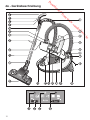
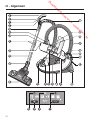
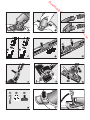
Opening the air inlet valve (dia. 21, 22
+ 23)
(not on models with radio-controls on
the handle)
m
fro
w
w
^ Press the - foot control to change to
"Min.", the lowest power setting.
d
de
oa
^ Press the + control to change to
"Turbo", the highest power setting.
en
It is easy to reduce the suction power
for a short time, e.g. to prevent rugs or
other objects being sucked into the
vacuum cleaner.
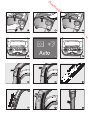
Radio-control handle with Automatic
(dia. 19 + 20)
^ Open the air inlet valve far enough to
reduce the suction power.
When the vacuum cleaner is switched
on with the On/Off foot control s, the
Stand-by - indicator on the vacuum
cleaner will light up yellow.
The floorhead will be easier to
manoeuvre. Close the valve when you
are ready to use full power again.
^ Press the Stand-by button - on the
handle.
^ When vacuuming, pull the cleaner
behind you on its wheels. You can
stand it upright for vacuuming stairs
and curtains etc.
After that, the vacuum cleaner will
switch on at the setting which was used
previously.
^ Press the + button to select a higher
suction power level.
^ Press the - button to select a lower
suction power level.
Auto = suction power is automatically
adjusted for the type of floor
being vacuumed, see dia. 17.
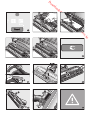
Warning: Do not use the "Auto"
setting to vacuum lightweight
materials or curtains. These could be
sucked in and possibly damaged.
e
.b
The first time the vacuum cleaner is
switched on, the highest power setting
will be selected automatically.
re
The Stand-by indicator - on the
vacuum cleaner will go out.
or
nb
de
an
.v
w
After that, the vacuum cleaner will
switch on at the setting which was used
previously.
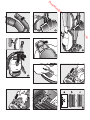
During vacuuming (dia. 24 + 25)
Warning: When vacuuming
especially fine dust, e.g. sawdust,
sand, plaster, flour, talcum powder
etc., electrostatic charges build up
naturally. Under certain conditions
these charges will be released. To
avoid the unpleasant effects of
these discharges, a metal inlay has
been incorporated into the
underside of the handle. Please
make sure that you keep your hand
in constant contact with this metal
strip during vacuuming.
Pauses in use (dia. 19)
(for models with radio controls on the
handle)
To pause the vacuum cleaner during
operation:
^ Press the Stand-by button - on the
handle.
39