1
Gimo1.book Page 7 Monday, October 13, 2003 10:44 AM
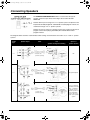
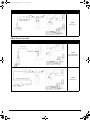
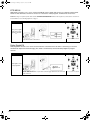
Digital Audio Players
White
Red
Miniplug-to-Dual-RCA cable
(available separately)
Signal:
Analog stereo
Press the ANALOG button on your
decoder, or the ANALOG button on your
remote control to select an ANALOG input
(ANALOG 1, ANALOG 2 or ANALOG 3).
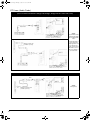
Video Game Consoles
Sony® PlayStation®, Sony PlayStation 2, Nintendo® GameCube® and Microsoft® Xbox®
Using an optical connection
Optical cable
Signal:
DTS, Dolby Digital, or
Digital (PCM) stereo
Press the DIGITAL button on your decoder,
or the OPTICAL button on your remote
control to select an OPTICAL input
(OPTICAL 1, OPTICAL 2 or OPTICAL 3).
Using an analog connection
White
Red
Signal:
Analog stereo
AV cable (available separately)
Press the ANALOG button on your
decoder, or the ANALOG button on your
remote control to select an ANALOG input
(ANALOG 1, ANALOG 2 or ANALOG 3).
7