1
WorkForce® WF-7010 User's Guide
Contents
WorkForce WF-7010 User's Guide ............................................................................................................. 9
Product Basics ..........................................................................................................................................
Printer Parts Locations .......................................................................................................................
Printer Parts - Top .........................................................................................................................
Printer Parts - Back........................................................................................................................
Printer Parts - Inside ......................................................................................................................
Printer Parts - Control Panel Buttons and Lights ...........................................................................
The Power Off Timer ..........................................................................................................................
Changing the Power Off Timer Setting - Windows.........................................................................
Changing the Power Off Timer Setting - Mac OS X .......................................................................
10
10
10
11
12
13
13
14
15
Loading Paper ...........................................................................................................................................
Loading Paper for Documents............................................................................................................
Loading Paper for Photos...................................................................................................................
Loading Envelopes.............................................................................................................................
Paper Loading Capacity .....................................................................................................................
Available EPSON Papers...................................................................................................................
Borderless Paper Type Compatibility .................................................................................................
Paper or Media Type Settings ............................................................................................................
Setting the Paper Size for Each Source .............................................................................................
Setting the Paper Size for Each Source - Windows.......................................................................
Setting the Paper Size for Each Source - Mac OS X .....................................................................
17
17
22
27
32
33
36
37
38
38
40
Printing From a Computer ........................................................................................................................
Printing with Windows ........................................................................................................................
Selecting Basic Print Settings - Windows ......................................................................................
Paper Source Options - Windows .............................................................................................
Print Quality Options - Windows ...............................................................................................
Multi-Page Printing Options - Windows.....................................................................................
Selecting Double-sided Printing Settings - Windows .....................................................................
Double-sided Printing Options - Windows.................................................................................
Print Density Adjustments - Windows .......................................................................................
43
43
43
46
46
46
47
49
50
3
Selecting Additional Layout and Print Options - Windows ............................................................. 50
Custom Color Correction Options - Windows............................................................................ 51
Additional Settings Options - Windows ..................................................................................... 53
Selecting a Printing Preset - Windows........................................................................................... 53
Printing Your Document or Photo - Windows ................................................................................ 54
Selecting Default Print Settings - Windows.................................................................................... 55
Changing the Language of the Printer Software Screens ......................................................... 56
Changing Automatic Update Options ............................................................................................ 57
Printing with Mac OS X 10.5, 10.6, or 10.7......................................................................................... 58
Selecting Basic Print Settings - Mac OS X 10.5/10.6/10.7............................................................. 59
Paper Source Options - Mac OS X 10.5/10.6/10.7.................................................................... 63
Print Quality Options - Mac OS X 10.5/10.6/10.7 ...................................................................... 63
Print Options - Mac OS X 10.5/10.6/10.7 .................................................................................. 64
Selecting Page Setup Settings - Mac OS X 10.5/10.6/10.7 ........................................................... 64
Selecting Print Layout Options - Mac OS X 10.5/10.6/10.7 ........................................................... 65
Sizing Printed Images - Mac OS X 10.5/10.6/10.7......................................................................... 66
Selecting Double-sided Printing Settings - Mac OS X 10.5/10.6/10.7 ........................................... 66
Double-sided Printing Options and Adjustments - Mac OS X ................................................... 68
Managing Color - Mac OS X 10.5/10.6/10.7 .................................................................................. 69
Color Matching and Color Options - Mac OS X 10.5/10.6/10.7 ................................................. 70
Printing Your Document or Photo - Mac OS X 10.5/10.6/10.7 ....................................................... 71
Checking Print Status - Mac OS X 10.5/10.6/10.7 .................................................................... 72
Selecting Printing Preferences - Mac OS X 10.5/10.6/10.7 ........................................................... 73
Printing Preferences - Mac OS X 10.5/10.6/10.7 ...................................................................... 74
Printing with Mac OS X 10.4............................................................................................................... 74
Selecting Page Setup Settings - Mac OS X 10.4 ........................................................................... 75
Selecting Basic Print Settings - Mac OS X 10.4............................................................................. 76
Paper Source Options - Mac OS X 10.4.................................................................................... 79
Print Quality Options - Mac OS X 10.4 ...................................................................................... 79
Print Options - Mac OS X 10.4 .................................................................................................. 80
Selecting Print Layout Options - Mac OS X 10.4 ........................................................................... 80
Sizing Printed Images - Mac OS X 10.4......................................................................................... 81
Selecting Double-sided Printing Settings - Mac OS X 10.4 ........................................................... 81
4
Managing Color - Mac OS X 10.4 ..................................................................................................
Color Options - Mac OS X 10.4.................................................................................................
Selecting Printing Preferences - Mac OS X 10.4 ...........................................................................
Printing Preferences - Mac OS X 10.4 ......................................................................................
Printing Your Document or Photo - Mac OS X 10.4 .......................................................................
Checking Print Status - Mac OS X 10.4 ....................................................................................
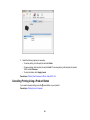
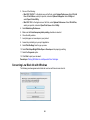
Cancelling Printing Using a Product Button........................................................................................
83
83
84
84
85
85
86
Replacing Ink Cartridges .......................................................................................................................... 87
Check Cartridge Status ...................................................................................................................... 87
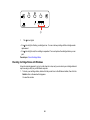
Checking Cartridge Status Lights .................................................................................................. 87
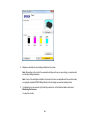
Checking Cartridge Status with Windows...................................................................................... 88
Checking Cartridge Status with Mac OS X .................................................................................... 91
Purchase EPSON Ink Cartridges ....................................................................................................... 92
Ink Cartridge Part Numbers ........................................................................................................... 92
Removing and Installing Ink Cartridges.............................................................................................. 93
Printing With Black Ink and Expended Color Cartridges .................................................................... 96
Printing With Expended Color Cartridges - Windows .................................................................... 97
Printing With Expended Color Cartridges - Mac OS X 10.5/10.6/10.7 ........................................... 97
Conserving Low Black Ink with Windows ........................................................................................... 98
Adjusting Print Quality............................................................................................................................
Print Head Maintenance...................................................................................................................
Print Head Nozzle Check.............................................................................................................
Checking the Nozzles Using the Product Buttons...................................................................
Checking the Nozzles Using a Computer Utility......................................................................
Print Head Cleaning ....................................................................................................................
Cleaning the Print Head Using the Product Buttons................................................................
Cleaning the Print Head Using a Computer Utility...................................................................
Print Head Alignment...................................................................................................................
Aligning the Print Head Using a Computer Utility ....................................................................
Cleaning the Paper Path ..................................................................................................................
100
100
100
100
102
105
105
106
109
109
112
Cleaning and Transporting the Product ................................................................................................ 113
Cleaning the Product........................................................................................................................ 113
Transporting the Product.................................................................................................................. 113
5
Solving Problems ....................................................................................................................................
Checking for Software Updates........................................................................................................
Printer Light Status...........................................................................................................................
Running a Printer Check ..................................................................................................................
Solving Setup Problems ...................................................................................................................
Noise After Ink Installation ...........................................................................................................
Software Installation Problems ....................................................................................................
Solving Network Problems ...............................................................................................................
Network Software Cannot Find Product on a Network.................................................................
Cannot Print Over a Network.......................................................................................................
Printing a Network Status Sheet..................................................................................................
Solving Paper Problems...................................................................................................................
Paper Feeding Problems.............................................................................................................
Paper Jam Problems Inside the Product .....................................................................................
Paper Jam Problems in the Cassette ..........................................................................................
Paper Jam Problems in the Duplexer ..........................................................................................
Paper Ejection Problems .............................................................................................................
Solving Problems Printing from a Computer ....................................................................................
Nothing Prints ..............................................................................................................................
Noise Occurs, But Nothing Prints ................................................................................................
Noise When Product Sits for a While...........................................................................................
Product Icon Does Not Appear in Windows Taskbar ...................................................................
Error After Cartridge Replacement ..............................................................................................
Printing is Slow ............................................................................................................................
Solving Page Layout and Content Problems....................................................................................
Inverted Image ............................................................................................................................
Too Many Copies Print ................................................................................................................
Blank Pages Print ........................................................................................................................
Incorrect Margins on Printout.......................................................................................................
Incorrect Characters Print............................................................................................................
Incorrect Image Size or Position..................................................................................................
Solving Print Quality Problems.........................................................................................................
White or Dark Lines in Printout ....................................................................................................
6
115
115
115
117
119
119
119
120
120
120
121
121
122
122
124
127
129
129
129
130
130
131
131
132
133
133
133
134
134
135
135
136
136
Blurry or Smeared Printout ..........................................................................................................
Faint Printout or Printout Has Gaps .............................................................................................
Grainy Printout.............................................................................................................................
Incorrect Colors ...........................................................................................................................
Slanted Printout ...........................................................................................................................
When to Uninstall Your Product Software ........................................................................................
Uninstalling Printing Software - Windows ....................................................................................
Uninstalling Product Software - Mac OS X ..................................................................................
Where to Get Help............................................................................................................................
137
138
139
140
140
141
141
142
142
Technical Specifications ........................................................................................................................
Windows System Requirements ......................................................................................................
Mac System Requirements ..............................................................................................................
Printing Specifications......................................................................................................................
Paper Specifications ........................................................................................................................
Printable Area Specifications ...........................................................................................................
Ink Cartridge Specifications..............................................................................................................
Dimension Specifications .................................................................................................................
Electrical Specifications ...................................................................................................................
Environmental Specifications ...........................................................................................................
Interface Specifications ....................................................................................................................
Network Interface Specifications ......................................................................................................
Safety and Approvals Specifications ................................................................................................
144
144
145
145
145
147
148
149
149
150
150
150
150
Notices .....................................................................................................................................................
FCC Compliance Statement.............................................................................................................
Software Notices ..............................................................................................................................
Trademarks ......................................................................................................................................
Copyright Notice...............................................................................................................................
A Note Concerning Responsible Use of Copyrighted Materials...................................................
Default Delay Times for Power Management for EPSON Products ............................................
Copyright Attribution ....................................................................................................................
151
151
152
155
156
156
156
157
7
WorkForce WF-7010 User's Guide
Welcome to the WorkForce WF-7010 User's Guide.
9
Product Basics
See these sections to learn about the basic features of your product.
Printer Parts Locations
The Power Off Timer
Printer Parts Locations
See these sections to identify the parts on your printer.
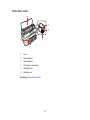
Printer Parts - Top
Printer Parts - Back
Printer Parts - Inside
Printer Parts - Control Panel Buttons and Lights
Parent topic: Product Basics
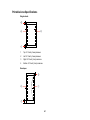
Printer Parts - Top
1
Control panel
2
Output tray
3
Output tray extension
4
Paper stopper
5
Feeder guard
10
6
Edge guides on paper cassette
7
Tray release button
Parent topic: Printer Parts Locations
Printer Parts - Back
1
USB port
2
Ethernet LAN port
3
AC inlet
4
Duplexer
Parent topic: Printer Parts Locations
11
Printer Parts - Inside
1
Cover
2
Paper cassette 1
3
Paper cassette 2
4
Print head (do not remove)
5
Cartridge holder
6
Cartridge cover
Parent topic: Printer Parts Locations
12
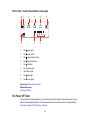
Printer Parts - Control Panel Buttons and Lights
1
The
power light
2
The
power button
3
The
network status button
4
The
paper feed button
5
The
ink button
6
The
cancel button
7
The Ethernet light
8
The
paper light
9
The
ink out lights
Parent topic: Printer Parts Locations
Related references
Printer Light Status
The Power Off Timer
The product turns off automatically if it is not used for a period of time after it enters sleep mode. You can
adjust the time period before power off, but increasing the time reduces the product's energy efficiency.
Changing the Power Off Timer Setting - Windows
13
Changing the Power Off Timer Setting - Mac OS X
Parent topic: Product Basics
Changing the Power Off Timer Setting - Windows
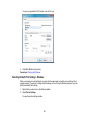
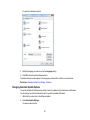
You can use the printer software to change the time period before the printer turns off automatically.
1. Do one of the following:
• Windows 7: Click
and select Devices and Printers. Right-click your product name and select
Printer Properties.
• Windows Vista: Click
and select Control Panel. Click Printer under Hardware and Sound,
right-click your product name, and select Properties.
• Windows XP: Click Start and select Printers and Faxes. (Or open the Control Panel, select
Printers and Other Hardware if necessary, and select Printers and Faxes.) Right-click your
product name and select Properties.
2. Click the Optional Settings tab, then click Printer Settings.
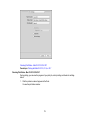
You see the Printer Settings screen:
14
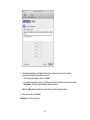
3. Select the time period you want as the Power Off Timer setting.
4. Click Apply.
5. When you see the confirmation message, click Yes, then close the Printer Settings window.
Parent topic: The Power Off Timer
Changing the Power Off Timer Setting - Mac OS X
You can use the printer software to change the time period before the printer turns off automatically.
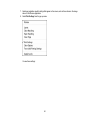
1. Do one of the following:
• Mac OS X 10.6/10.7: In the Apple menu or the Dock, select System Preferences. Select Print &
Fax or Print & Scan, select your product, and select Options & Supplies. Select Utility and
select Open Printer Utility.
• Mac OS X 10.4/10.5: In the Apple menu or the Dock, select System Preferences. Select Print &
Fax, select your product, and select Open Print Queue or Print Queue. Select Utility.
15
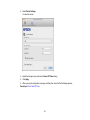
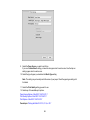
2. Select Printer Settings.
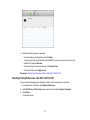
You see this screen:
3. Select the time period you want as the Power Off Timer setting.
4. Click Apply.
5. When you see the confirmation message, click Yes, then close the Printer Settings window.
Parent topic: The Power Off Timer
16
Loading Paper
Before you print, load paper for the type of printing you will do.
Loading Paper for Documents
Loading Paper for Photos
Loading Envelopes
Paper Loading Capacity
Available EPSON Papers
Borderless Paper Type Compatibility
Paper or Media Type Settings
Setting the Paper Size for Each Source
Loading Paper for Documents
You can print documents on a variety of paper types and sizes. You can load custom paper sizes in
Cassette 1 only.
1. Close the output tray, if necessary.
17
2. Pull out the paper cassette and remove the paper cassette cover.
3. Slide the edge guides outward.
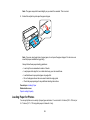
Note: If you are using legal-size paper or larger, press the tray release button and extend the paper
cassette.
18
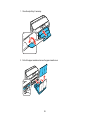
4. Slide the edge guide shown below to your paper size.
19
5. Load a stack of paper, printable side down, against the edge guide as shown.
Note: Make sure the paper is loaded against the edge guide and not sticking out from the end of the
cassette.
20
6. Slide the edge guides against the paper, but not too tightly.
Note: Make sure the paper fits beneath the top edges of the guide.
Caution: To prevent paper feeding problems, make sure you do not load too much paper in the
cassette.
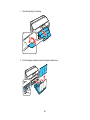
7. Gently replace the paper cassette cover and insert the paper cassette.
21
Note: The paper may slide forward slightly as you insert the cassette. This is normal.
8. Extend the output tray and open the paper stopper.
Note: If you are using legal-size or longer paper, do not open the paper stopper. Do not remove or
insert the paper cassette during printing.
Always follow these paper loading guidelines:
• Load only the recommended number of sheets.
• Load paper short edge first, no matter which way your document faces.
• Load letterhead or pre-printed paper top edge first.
• Do not load paper above the arrow mark inside the edge guide.
• Check the paper package for any additional loading instructions.
Parent topic: Loading Paper
Related references
Paper Loading Capacity
Loading Paper for Photos
You can print photos on a variety of paper types and sizes. You can load 4 × 6 inches (102 × 152 mm) or
5 × 7 inches (127 × 178 mm) photo paper in Cassette 1 only.
22
1. Close the output tray, if necessary.
2. Pull out the paper cassette and remove the paper cassette cover.
23
3. Slide the edge guides outward.
4. Slide the edge guide shown below to your paper size.
24
5. Load photo paper, printable side down, against the edge guide as shown.
Note: Make sure the paper is loaded against the edge guide and not sticking out from the end of the
cassette.
25
6. Slide the edge guides against the paper, but not too tightly.
Note: Make sure the paper is loaded against the edge guide and not sticking out from the end of the
cassette and that the paper fits beneath the top edges of the guide.
Caution: To prevent paper feeding problems, make sure you do not load too much paper in the
cassette.
7. Gently replace the paper cassette cover and insert the paper cassette.
Note: The paper may slide forward slightly as you insert the cassette. This is normal.
26
8. Extend the output tray and open the paper stopper.
Note: Do not open the paper stopper for legal size paper or larger.
Always follow these paper loading guidelines:
• Load only the recommended number of sheets.
• Load paper short edge first, no matter which way your document faces.
• Do not load paper above the arrow mark inside the edge guide.
• Check the paper package for any additional loading instructions.
Parent topic: Loading Paper
Related references
Paper Loading Capacity
Loading Envelopes
You can print on plain paper envelopes in this size: No. 10 (4.1 × 9.5 inches [105 × 241 mm]) You can
load No. 10 size envelopes in Cassette 1 only.
27
1. Close the output tray, if necessary.
2. Pull out the paper cassette and remove the paper cassette cover.
28
3. Slide the edge guides outward.
4. Slide the edge guide shown below to your envelope size.
29
5. Load envelopes, printable side down, against the edge guide as shown.
Note: Make sure the envelopes are loaded against the edge guide and not sticking out from the end
of the cassette.
6. Slide the edge guides against the envelopes, but not too tight.
30
Note: Make sure the envelopes fit beneath the top edges of the guide.
Caution: To prevent paper feeding problems, make sure you do not load too many envelopes in the
cassette.
7. Gently replace the paper cassette cover and insert the paper cassette.
Note: The envelopes may slide forward slightly as you insert the cassette. This is normal.
31
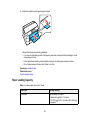
8. Extend the output tray and open the paper stopper.
Always follow these paper loading guidelines:
• If you have trouble loading a stack of envelopes, press each envelope flat before loading it or load
one envelope at a time.
• If print quality declines when printing multiple envelopes, try loading one envelope at a time.
• Do not load envelopes that are curled, folded, or too thin.
Parent topic: Loading Paper
Related references
Paper Loading Capacity
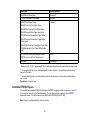
Paper Loading Capacity
Note: For custom paper sizes, load 1 sheet.
Paper type
Loading capacity
Plain paper
Approximately 250 sheets*, **
30 sheets for Legal (8.5 × 14 inches
[216 × 357 mm]) to 13 × 19 inches (330 × 483 mm)
sized paper***
32
Paper type
Loading capacity
EPSON Bright White Paper
200 sheets**
EPSON Presentation Paper Matte
80 sheets
EPSON Photo Paper Glossy
20 sheets
EPSON Premium Photo Paper Glossy
EPSON Ultra Premium Photo Paper Glossy
EPSON Premium Photo Paper Semi-gloss
EPSON Premium Presentation Paper Matte
EPSON Premium Presentation Paper Matte
Double-sided
EPSON Ultra Premium Presentation Paper Matte
EPSON Brochure & Flyer Paper Matte Doublesided
EPSON Photo Quality Self-adhesive Sheets
1 sheet
EPSON Iron-on Cool Peel Transfer paper
Envelopes
10 envelopes
* Based on 20-lb (75 g/m2) paper weight. Do not load paper above the arrow mark inside the edge guide.
** For one-sided printing or two-sided printing with the auto duplexer . For manual two-sided printing,
load up to 30 sheets.
*** For one-sided printing or two-sided printing with the auto duplexer. For manual two-sided printing,
load 1 sheet.
Parent topic: Loading Paper
Available EPSON Papers
You can purchase genuine EPSON ink and paper at EPSON Supplies Central at www.epson.com/ink3
(U.S. sales) or www.epson.ca (Canadian sales). You can also purchase supplies from an EPSON
authorized reseller. To find the nearest one, call 800-GO-EPSON (800-463-7766).
Note: Paper (or media) availability varies by country.
33
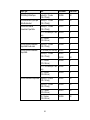
Paper Type
Size
Part number
Sheet count
EPSON Bright White Paper
Letter (8.5 × 11 inches
[216 × 279 mm])
S041586
500
EPSON Brochure & Flyer Paper
Matte Double-sided
Letter (8.5 × 11 inches
[216 × 279 mm])
S042384
150
EPSON Ultra Premium
Presentation Paper Matte
Letter (8.5 × 11 inches
[216 × 279 mm])
S041341
50
11.7 × 16.5 inches (297 × 420
mm)
S041343
50
13 × 19 inches
(330 × 483 mm)
S041339
50
EPSON Premium Presentation
Paper Matte Double-sided
Letter (8.5 × 11 inches
[216 × 279 mm])
S041568
50
EPSON Premium Presentation
Paper Matte
8 × 10 inches (203 × 254 mm)
S041467
50
Letter (8.5 × 11 inches
[216 × 279 mm])
S041257
50
S042180
100
11 × 14 inches
(279 × 356 mm)
S041468
50
11.7 × 16.5 inches (297 × 420
mm)
S041260
50
13 × 19 inches
(330 × 483 mm)
S041263
50
Legal (8.5 × 14 inches
[216 × 357 mm])
S041067
100
Letter (8.5 × 11 inches
[216 × 279 mm])
S041062
100
11 × 17 inches
(279 × 432 mm)
S041070
100
13 × 19 inches
(330 × 483 mm)
S041069
100
EPSON Presentation Paper Matte
34
Paper Type
Size
Part number
Sheet count
EPSON Photo Paper Glossy
4 × 6 inches (102 × 152 mm)
S041809
50
S042038
100
S041141
20
S041649
50
S041271
100
11 × 17 inches
(279 × 432 mm)
S041156
20
13 × 19 inches
(330 × 483 mm)
S044143
20
4 × 6 inches (102 × 152 mm)
S041808
40
S041727
100
5 × 7 inches (127 × 178 mm)
S041464
20
8 × 10 inches (203 × 254 mm)
S041465
20
Letter (8.5 × 11 inches
[216 × 279 mm])
S042183
25
S041667
50
11 × 14 inches
(279 × 356 mm)
S041466
20
11 × 17 inches
(279 × 432 mm)
S041290
20
11.7 × 16.5 inches (297 × 420
mm)
S041288
20
13 × 19 inches
(330 × 483 mm)
S041289
20
Letter (8.5 × 11 inches
[216 × 279 mm])
EPSON Premium Photo Paper
Glossy
35
Paper Type
Size
Part number
Sheet count
EPSON Ultra Premium Photo
Paper Glossy
4 × 6 inches (102 × 152 mm)
S042181
60
S042174
100
5 × 7 inches (127 × 178 mm)
S041945
20
8 × 10 inches (203 × 254 mm)
S041946
20
Letter (8.5 × 11 inches
[216 × 279 mm])
S042182
25
S042175
50
4 × 6 inches (102 × 152 mm)
S041982
40
Letter (8.5 × 11 inches
[216 × 279 mm])
S041331
20
13 × 19 inches
(330 × 483 mm)
S041327
20
A4 (8.3 × 11.7 inches
[210 × 297 mm])
S041106
10
S041153
10
EPSON Premium Photo Paper
Semi-gloss
EPSON Photo Quality Selfadhesive Sheets
EPSON Iron-on Cool Peel Transfer Letter (8.5 × 11 inches
paper
[216 × 279 mm])
Parent topic: Loading Paper
Borderless Paper Type Compatibility
You can print borderless photos on compatible paper types in compatible sizes:
Borderless Paper Types
• EPSON Brochure & Flyer Paper Matte Double-sided
• EPSON Ultra Premium Presentation Paper Matte
• EPSON Premium Presentation Paper Matte
• EPSON Premium Presentation Paper Matte Double-sided
• EPSON Ultra Premium Photo Paper Glossy
• EPSON Premium Photo Paper Semi-gloss
• EPSON Premium Photo Paper Glossy
• EPSON Photo Paper Glossy
36
Borderless Paper Sizes
• 4 × 6 inches (102 × 152 mm)
• 5 × 7 inches (127 × 178 mm)
• 8 × 10 inches (203 × 254 mm)
• Letter (8.5 × 11 inches [216 × 279 mm])
• 16:9 wide (4 × 7.1 inches [102 × 181 mm])
• 11.7 × 16.5 inches (297 × 420 mm)
• 13 × 19 inches (330 × 483 mm)
Parent topic: Loading Paper
Paper or Media Type Settings
For this paper
Select this paper Type or Media Type setting
Plain paper
Plain Paper/Bright White Paper
EPSON Bright White Paper
EPSON Presentation Paper Matte
EPSON Photo Quality Self-adhesive Sheets
EPSON Iron-on Cool Peel Transfer paper
EPSON Ultra Premium Photo Paper Glossy
Ultra Premium Photo Paper Glossy
EPSON Premium Photo Paper Glossy
Premium Photo Paper Glossy
EPSON Photo Paper Glossy
Photo Paper Glossy
EPSON Premium Photo Paper Semi-gloss
Premium Photo Paper Semi-Gloss
EPSON Premium Presentation Paper Matte
Premium Presentation Paper Matte
EPSON Premium Presentation Paper Matte
Double-sided
EPSON Brochure & Flyer Paper Matte Doublesided
EPSON Ultra Premium Presentation Paper Matte
Envelopes
Envelope
37
For this paper
Select this paper Type or Media Type setting
Cardstock up to 68 lb
Thick-Paper
Parent topic: Loading Paper
Setting the Paper Size for Each Source
You can set the paper size for each paper source using your printer software. The settings apply to all
print jobs sent to the product.
Setting the Paper Size for Each Source - Windows
Setting the Paper Size for Each Source - Mac OS X
Parent topic: Loading Paper
Setting the Paper Size for Each Source - Windows
You can change the default paper size for each source in Windows.
1. Do one of the following:
• Windows 7: Click
and select Devices and Printers. Right-click your product name, and select
Printer properties.
• Windows Vista: Click
and select Control Panel. Click Printer under Hardware and Sound,
right-click your product name, and select Properties.
• Windows XP: Click Start and select Printers and Faxes. (Or open the Control Panel, select
Printers and Other Hardware if necessary, and select Printers and Faxes.) Right-click your
product name and select Properties.
2. Click the Optional Settings tab.
3. Click Printer Settings.
You see this screen:
38
4. Select the paper size you loaded in each paper source as the Paper Size Loaded.
• If you loaded one of these paper sizes, select the size you loaded:Letter (8.5 × 11 inches
[216 × 279 mm]), Legal (8.5 × 14 inches [216 × 357 mm]), A4 (8.3 × 11.7 inches [210 × 297 mm]),
4 × 6 inches (102 × 152 mm), 5 × 7 inches (127 × 178 mm), 8 × 10 inches (203 × 254 mm), 16:9
wide (4 × 7.1 inches [102 × 181 mm]), A3 (11.7 × 16.5 inches [297 × 420 mm]), 11 × 17 inches
(279 × 432 mm), or 13 × 19 inches (330 × 483 mm).
• If you loaded one of these paper sizes or a user-defined size in Cassette 1, select Others as the
Paper Size Loaded setting: 3.5 × 5 inches (89 × 127 mm), 11 × 14 inches (279 × 356 mm),
Envelope No. 10 (4.1 × 9.5 inches [105 × 241 mm]), A6 (4.1 × 5.8 inches [105 × 148 mm]), or Half
Letter (5.5 × 8.5 inches [140 × 279 mm]).
5. If you want the printer software to warn you if you try to print with the wrong paper size, select the
Paper Size Notice checkbox.
Note: If you turn on Paper Size Notice, your product will prevent you from printing with the wrong
paper size settings. If you turn this option off and you try to print with the wrong settings, your
39
product will print even if the image size exceeds the printable area, and your printout may be
smudged.
6. Click Apply.
7. When you see the confirmation message, click Yes.
8. Close the Printer Settings window.
Parent topic: Setting the Paper Size for Each Source
Related tasks
Selecting Basic Print Settings - Windows
Setting the Paper Size for Each Source - Mac OS X
You can change the default paper size for each source in Mac OS X.
1. Do one of the following:
• Mac OS X 10.6/10.7: In the Apple menu or the Dock, select System Preferences. Select Print &
Fax or Print & Scan, select your product, and select Options & Supplies. Select Utility and
select Open Printer Utility.
• Mac OS X 10.4/10.5: In the Apple menu or the Dock, select System Preferences. Select Print &
Fax or Print & Scan, select your product, and select Open Print Queue or Print Queue. Select
Utility.
2. Click the Printer Settings button.
You see this screen:
40
3. Select the paper size you loaded in each paper source as the Paper Size Loaded.
• If you loaded one of these paper sizes, select the size you loaded:Letter (8.5 × 11 inches
[216 × 279 mm]), Legal (8.5 × 14 inches [216 × 357 mm]), A4 (8.3 × 11.7 inches [210 × 297 mm]),
4 × 6 inches (102 × 152 mm), 5 × 7 inches (127 × 178 mm), 8 × 10 inches (203 × 254 mm), 16:9
wide (4 × 7.1 inches [102 × 181 mm]), A3 (11.7 × 16.5 inches [297 × 420 mm]), 11 × 17 inches
(279 × 432 mm), or 13 × 19 inches (330 × 483 mm).
• If you loaded one of these paper sizes or a user-defined size in Cassette 1, select Others as the
Paper Size Loaded setting: 3.5 × 5 inches (89 × 127 mm), 11 × 14 inches (279 × 356 mm),
Envelope No. 10 (4.1 × 9.5 inches [105 × 241 mm]), A6 (4.1 × 5.8 inches [105 × 148 mm]), or Half
Letter (5.5 × 8.5 inches [140 × 279 mm]).
4. If you want the printer software to warn you if you try to print with the wrong paper size, select the
Paper Size Notice checkbox.
Note: If you turn on Paper Size Notice, your product will prevent you from printing with the wrong
paper size settings. If you turn this option off and you try to print with the wrong settings, your
41
product will print even if the image size exceeds the printable area, and your printout may be
smudged.
5. Click Apply.
6. When you see the confirmation message, click Yes.
7. Close the Printer Settings window.
Parent topic: Setting the Paper Size for Each Source
Related tasks
Selecting Basic Print Settings - Mac OS X 10.5/10.6/10.7
Selecting Basic Print Settings - Mac OS X 10.4
42
Printing From a Computer
Before printing documents or photos from your computer, make sure you have set up your product and
installed its software as described on the Start Here sheet.
Note: If you have an internet connection, it is a good idea to check for updates to your product software
on Epson's support website.
Printing with Windows
Printing with Mac OS X 10.5, 10.6, or 10.7
Printing with Mac OS X 10.4
Cancelling Printing Using a Product Button
Printing with Windows
You can print with your product using any Windows printing program, as described in these sections.
Selecting Basic Print Settings - Windows
Selecting Double-sided Printing Settings - Windows
Selecting Additional Layout and Print Options - Windows
Selecting a Printing Preset - Windows
Printing Your Document or Photo - Windows
Selecting Default Print Settings - Windows
Changing Automatic Update Options
Parent topic: Printing From a Computer
Selecting Basic Print Settings - Windows
Select the basic settings for the document or photo you want to print.
1. Open a photo or document for printing.
2. Select the print command in your application.
Note: You may need to select a print icon on your screen, the Print option in the File menu, or
another command. See your application's help utility for details.
43
3. If necessary, select your product name as the printer you want to use.
Note: You may also need to select Properties or Preferences to view your print settings.
You see the Main tab of your printer settings window:
4. For the Paper Source setting, select the cassette that you want to print from. If you use the Auto
Select setting, you need to set a paper size for each source. See the topic on setting the paper size
for each source.
5. Select the size of the paper you loaded as the Document Size setting.
Note: You can also select the User-Defined setting to create a custom paper size. (Custom paper
sizes are only available for Cassette 1.)
44
6. Select the orientation of your document.
Note: If you are printing an envelope, select Landscape.
7. Select the type of paper you loaded as the Paper Type setting.
Note: The setting may not exactly the name of your paper. Check the paper type settings list for
details.
8. Select the Quality setting that matches the print quality you want to use.
9. Select a Color option:
• To print a color document or photo, select the Color setting.
• To print text and graphics in black or shades of gray, select the Black/Grayscale setting.
10. To print on both sides of the paper, select the 2-Sided Printing checkbox and select the options you
want.
11. To print multiple pages on one sheet of paper, or print one image on multiple sheets of paper, select
one of the settings in the Multi-Page menu and select the printing options you want.
12. To print multiple copies and arrange their print order, select the Copies options.
13. To preview your job before printing, select Print Preview.
14. To save your print job as a project that can be modified and combined with other print jobs, select
Job Arranger Lite.
15. To reduce noise during printing when you select Plain Paper/Bright White Paper, select Quiet
Mode.
Paper Source Options - Windows
Print Quality Options - Windows
Multi-Page Printing Options - Windows
Parent topic: Printing with Windows
Related references
Paper or Media Type Settings
Related tasks
Setting the Paper Size for Each Source - Windows
Printing Your Document or Photo - Windows
Selecting Double-sided Printing Settings - Windows
45
Paper Source Options - Windows
You can select any of the available options in the Paper Source menu to print from paper loaded in that
source.
Auto Select
Automatically selects the paper source based on the selected paper size.
Paper Cassette 1
Selects the paper in cassette 1 as the paper source.
Paper Cassette 2
Selects the paper in cassette 2 as the paper source.
Parent topic: Selecting Basic Print Settings - Windows
Print Quality Options - Windows
You can select any of the available Quality options to fine-tune the quality of your print. Some settings
may be unavailable, depending on the paper type and border setting you have chosen.
Fast Economy
For the fastest printing with draft quality.
Economy
For fast printing with reduced quality.
Normal
For everyday text and image printing.
Fine
For text and graphics with good quality and print speed.
Quality
For photos and graphics with good quality and print speed.
High Quality
For photos and graphics with high print quality.
Best Quality
For the best print quality, but the slowest print speed.
Parent topic: Selecting Basic Print Settings - Windows
Multi-Page Printing Options - Windows
You can select any of the available options in the Multi-Page menu to set up your multi-page print job.
46
2-Up and 4-Up
Prints 2 or 4 pages on one sheet of paper. Click the Page Order button to select page layout and
border options.
2×1 Poster, 2×2 Poster, 3×3 Poster, 4×4 Poster
Prints one image on multiple sheets of paper to create a larger poster. Click the Settings button to
select image layout and guideline options.
Parent topic: Selecting Basic Print Settings - Windows
Selecting Double-sided Printing Settings - Windows
You can print on both sides of the paper by selecting the 2-Sided Printing checkbox on the Main tab.
Note: Some options may be pre-selected or unavailable, depending on other settings you have chosen
or if you are accessing the product over a network.
1. Select the 2-Sided Printing checkbox.
2. If the Auto checkbox is not automatically selected, do one of the following:
• Select the Auto checkbox to automatically print your double-sided print job.
• Deselect the Auto checkbox to print your double-sided print job manually by printing one side and
flipping the paper over to print the other side (recommended for paper types that do not support
automatic duplexing).
3. Click the Settings button.
You see this window:
47
4. Select the double-sided printing options you want to use.
5. Click OK to return to the Main tab.
6. Click the Print Density button.
You see this window:
48
7. Select the type of document you are printing as the Document Type setting. The software
automatically sets the Adjustments options for that document type.
8. If you selected the User-Defined document type, select the Adjustments options you want to use.
9. Click OK to return to the Main tab.
10. Print a test copy of your double-sided document to test the selected settings.
11. Follow any instructions displayed on the screen during printing.
Double-sided Printing Options - Windows
Print Density Adjustments - Windows
Parent topic: Printing with Windows
Double-sided Printing Options - Windows
You can select any of the available options on the 2-Sided Printing Settings window to set up your
double-sided print job.
Binding Edge Options
Select a setting that orients double-sided print binding in the desired direction.
Binding Margin Options
Select options that define a wider margin to allow for binding.
Create Folded Booklet Options
Select the Booklet checkbox and a binding option to print double-sided pages as a booklet.
Parent topic: Selecting Double-sided Printing Settings - Windows
49
Print Density Adjustments - Windows
When you select the User-Defined setting, you can select any of the available options on the Print
Density Adjustment window to adjust the print quality of your double-sided print job.
Print Density
Sets the level of ink coverage for double-sided printing.
Increase Ink Drying Time
Sets the amount of time required for drying ink after printing on one side of the paper before printing
the other side in double-sided printing to prevent ink smearing.
Parent topic: Selecting Double-sided Printing Settings - Windows
Selecting Additional Layout and Print Options - Windows
You can select a variety of additional layout and printing options for your document or photo on the More
Options tab.
50
1. To change the size of your printed document or photo, select the Reduce/Enlarge Document
checkbox and select one of these sizing options:
• Select the Fit to Page option to size your image to fit the paper you loaded. Select the size of the
your document or photo as the Document Size setting, and the size of your paper as the Output
Paper setting.
• Select the Zoom to option to reduce or enlarge your document or photo by a specific percentage.
Select the percentage in the % menu.
2. Select one of the following Color Correction options:
• Select Automatic to automatically adjust the sharpness, brightness, contrast, and color saturation
for your image.
• Select Custom and click the Advanced button to manually adjust the color correction settings or
turn off color management in your printer software.
3. To add a watermark to your printout, select Watermark settings.
4. Select any of the Additional Settings options to customize your print.
Custom Color Correction Options - Windows
Additional Settings Options - Windows
Parent topic: Printing with Windows
Related tasks
Printing Your Document or Photo - Windows
Custom Color Correction Options - Windows
You can select any of the available options in the Color Correction window to customize the image colors
for your print job.
51
Color Controls
Lets you select a Color Mode setting, individual settings for Brightness, Contrast, Saturation, and
Density, and individual color tones. If you select the Adobe RGB color mode, you can also adjust the
midtone density using the Gamma setting.
Fix Photo
Improves the color, contrast, and sharpness of flawed photos.
Note: Fix Photo uses a sophisticated face recognition technology to optimize photos that include
faces. For this to work, both eyes and the nose must be visible in the subject's face. If your photo
includes a face with an intentional color cast, such as a statue, you may want to turn off Fix Photo to
retain the special color effects.
ICM
Lets you manage color using installed color printing profiles.
No Color Adjustment
Turns off color management in your printer software so you can manage color using only your
application software.
52
Parent topic: Selecting Additional Layout and Print Options - Windows
Additional Settings Options - Windows
You can select any of the Additional Settings options to customize your print. Some options may be preselected or unavailable, depending on other settings you have chosen.
Rotate 180º
Prints the image rotated 180º from its original orientation.
High Speed
Speeds up printing, but may reduce print quality.
Mirror Image
Flips the printed image left to right.
Edge Smoothing
Smooths jagged edges in low-resolution images such as screen captures or images from the Web.
Fix Red-Eye
Reduces or removes red-eye in photos.
Parent topic: Selecting Additional Layout and Print Options - Windows
Selecting a Printing Preset - Windows
For quick access to common groups of print settings, you can select a printing preset on the Main or
More Options tab.
Note: You can create your own preset by clicking the Add/Remove Presets button.
1. Click the Main or More Options tab.
You see the available Printing Presets options on the left:
53
Note: Printing presets may vary depending on model.
2. Place your cursor over a Printing Presets option to view its list of settings.
3. Use any of the available options on the screen to control your printing presets.
4. To choose an option for printing, select it.
5. Click OK.
Parent topic: Printing with Windows
Printing Your Document or Photo - Windows
Once you have selected your print settings, you are ready to save your settings and print.
1. Click OK to save your settings.
54
You see your application's Print window, such as this one:
2. Click OK or Print to start printing.
Parent topic: Printing with Windows
Selecting Default Print Settings - Windows
When you change your print settings in a program, the changes apply only while you are printing in that
program session. If you want to change the print settings you use in all your Windows programs, you can
select new default print settings.
1. Right-click the product icon in the Windows taskbar.
2. Select Printer Settings.
You see the printer settings window:
55
3. Select the print settings you want to use as defaults in all your Windows programs.
4. Click OK.
These settings are now the defaults selected for printing. You can still change them as needed for
printing in any program session.
Changing the Language of the Printer Software Screens
Parent topic: Printing with Windows
Changing the Language of the Printer Software Screens
You can change the language used on the Windows printer software screens.
1. Right-click the product icon in the Windows taskbar.
2. Select Printer Settings.
You see the printer settings window.
3. Click the Maintenance tab.
56
You see the maintenance options:
4. Select the language you want to use as the Language setting.
5. Click OK to close the printer software window.
The printer software screens appear in the language you selected the next time you access them.
Parent topic: Selecting Default Print Settings - Windows
Changing Automatic Update Options
Your printer software for Windows automatically checks for updates to the product driver and firmware.
You can change how often the software checks for updates or disable this feature.
1. Right-click the product icon in the Windows taskbar.
2. Select Auto Update Settings.
You see a window like this:
57
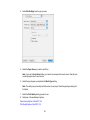
3. Do one of the following for each type of update:
• To change how often the software checks for updates, select a setting in the Check every menu.
• To disable the automatic update feature, select the Never option.
4. Click Apply.
5. Click OK to exit.
Note: If you choose to disable the automatic update feature, it's a good idea to periodically check for
updates.
Parent topic: Printing with Windows
Related tasks
Checking for Software Updates
Printing with Mac OS X 10.5, 10.6, or 10.7
You can print with your product using any Mac OS X printing program, as described in these sections.
Selecting Basic Print Settings - Mac OS X 10.5/10.6/10.7
58
Selecting Page Setup Settings - Mac OS X 10.5/10.6/10.7
Selecting Print Layout Options - Mac OS X 10.5/10.6/10.7
Sizing Printed Images - Mac OS X 10.5/10.6/10.7
Selecting Double-sided Printing Settings - Mac OS X 10.5/10.6/10.7
Managing Color - Mac OS X 10.5/10.6/10.7
Printing Your Document or Photo - Mac OS X 10.5/10.6/10.7
Selecting Printing Preferences - Mac OS X 10.5/10.6/10.7
Parent topic: Printing From a Computer
Selecting Basic Print Settings - Mac OS X 10.5/10.6/10.7
Select the basic settings for the document or photo you want to print.
1. Open a photo or document for printing.
2. Select the print command in your application.
Note: You may need to select a print icon on your screen, the Print option in the File menu, or
another command. See your application's help utility for details.
3. Select your product as the Printer setting.
4. If necessary, click the arrow next to the Printer setting or the Show Details button to expand the
print window.
You see the expanded printer settings window for your product:
59
Note: The print window may look different, depending on the version of Mac OS X and the
application you are using.
5. Select the Copies and Pages settings as necessary.
Note: If you do not see these settings in the print window, check for them in your application before
printing.
6. Select the page setup options: Paper Size and Orientation.
Note: If you do not see these settings in the print window, check for them in your application before
printing. They may be accessible by selecting Page Setup from the File menu.
60
7. Select any application-specific settings that appear on the screen, such as those shown in the image
above for the Preview application.
8. Select Print Settings from the pop-up menu.
You see these settings:
61
9. Select the Paper Source you wish to print from.
If you use the Auto Select setting, you need to set a paper size for each source. See the topic on
setting a paper size for each source.
10. Select the type of paper you loaded as the Media Type setting.
Note: The setting may not exactly match the name of your paper. Check the paper type settings list
for details.
11. Select the Print Quality setting you want to use.
12. Select any of the available print options.
Paper Source Options - Mac OS X 10.5/10.6/10.7
Print Quality Options - Mac OS X 10.5/10.6/10.7
Print Options - Mac OS X 10.5/10.6/10.7
Parent topic: Printing with Mac OS X 10.5, 10.6, or 10.7
62
Related references
Paper or Media Type Settings
Related tasks
Setting the Paper Size for Each Source - Mac OS X
Selecting Page Setup Settings - Mac OS X 10.5/10.6/10.7
Printing Your Document or Photo - Mac OS X 10.5/10.6/10.7
Paper Source Options - Mac OS X 10.5/10.6/10.7
You can select any of the available options in the Paper Source menu to print from paper loaded in that
source.
Auto Select
Automatically selects the paper source based on the selected paper size.
Paper Cassette 1
Selects the paper in cassette 1 as the paper source.
Paper Cassette 2
Selects the paper in cassette 2 as the paper source.
Parent topic: Selecting Basic Print Settings - Mac OS X 10.5/10.6/10.7
Print Quality Options - Mac OS X 10.5/10.6/10.7
You can select any of the available Print Quality options to fine-tune the quality of your print. Some
settings may be unavailable, depending on the paper type and border setting you have chosen.
Fast Economy
For the fastest printing with draft quality.
Economy
For fast printing with reduced quality.
Normal
For everyday text and image printing.
Fine
For text and graphics with good quality and print speed.
Quality
For photos and graphics with good quality and print speed.
High Quality
For photos and graphics with high print quality.
63
Best Quality
For the best print quality, but the slowest print speed.
Parent topic: Selecting Basic Print Settings - Mac OS X 10.5/10.6/10.7
Print Options - Mac OS X 10.5/10.6/10.7
You can select any of the print options to customize your print. Some options may be unavailable,
depending on other settings you have chosen.
Expansion
If you selected a borderless paper size setting, adjusts the image expansion settings to control
printing at the edges of borderless prints.
Grayscale
Prints text and graphics in black or shades of gray.
Mirror Image
Flips the printed image left to right.
Note: If you select the Min option for the Expansion setting, you may see white borders on your printed
photo.
Parent topic: Selecting Basic Print Settings - Mac OS X 10.5/10.6/10.7
Selecting Page Setup Settings - Mac OS X 10.5/10.6/10.7
Depending on your application, you may be able to select the paper size and orientation settings from
the print window.
Note: If you do not see these settings in the print window, check for them in your application before
printing. They may be accessible by selecting Page Setup from the File menu.
64
1. Select the size of the paper you loaded as the Paper Size setting. If you are printing a borderless
photo, select a paper size with a Borderless option. You may also select Manage Custom Sizes to
create a custom paper size. Custom paper sizes are only available for Cassette 1.
Note: You must select a compatible borderless paper type and size to print borderlessly. Check the
borderless paper compatibility list for details.
2. Select the orientation of your document or photo as shown in the print window.
Note: If you are printing an envelope, select the
icon.
Note: You can reduce or enlarge the size of the printed image by selecting Paper Handling from the
pop-up menu and selecting a scaling option.
Parent topic: Printing with Mac OS X 10.5, 10.6, or 10.7
Selecting Print Layout Options - Mac OS X 10.5/10.6/10.7
You can select a variety of layout options for your document or photo by selecting Layout from the popup menu on the print window.
65
• To print multiple pages on one sheet of paper, select the number of pages in the Pages per Sheet
pop-up menu. To arrange the print order of the pages, select a Layout Direction setting.
• To print borders around each page on the sheet, select a line setting from the Border pop-up menu.
• To invert or flip the printed image, select the Reverse page orientation or Flip horizontally settings.
Parent topic: Printing with Mac OS X 10.5, 10.6, or 10.7
Sizing Printed Images - Mac OS X 10.5/10.6/10.7
You can adjust the size of the image as you print it by selecting Paper Handling from the pop-up menu
on the Print window.
• To print only selected pages in a multi-page document, select an option from the Pages to Print popup menu.
• To adjust the order in which pages are printed, select an option from the Page Order pop-up menu.
• To scale the image to fit on a specific paper size, select the Scale to fit paper size checkbox and
select a paper size from the Destination Paper Size pop-up menu.
Parent topic: Printing with Mac OS X 10.5, 10.6, or 10.7
Selecting Double-sided Printing Settings - Mac OS X 10.5/10.6/10.7
You can print on both sides of the paper by selecting Two-sided Printing Settings from the pop-up
menu on the print window.
66
Note: Some options may be pre-selected or unavailable, depending on other settings you have chosen
or if you are accessing the product over a network. This screen may be different, depending on the
version of Mac OS X you are using.
1. Select one of the Two-sided Printing options.
67
2. Select the type of document you are printing as the Document Type setting. The software
automatically sets the Adjustments options for that document type.
3. If necessary, customize the Adjustments settings as instructed on the screen.
4. Print a test copy of your double-sided document to test the selected settings.
5. Follow any instructions displayed on the screen during printing.
Double-sided Printing Options and Adjustments - Mac OS X
Parent topic: Printing with Mac OS X 10.5, 10.6, or 10.7
Double-sided Printing Options and Adjustments - Mac OS X
You can select any of the available options in the Two-sided Printing Settings or Output Settings
pop-up menu to set up your double-sided print job.
Two-sided Printing Options
Long-Edge binding
Orients double-sided printed pages to be bound on the long edge of the paper.
68
Short-Edge binding
Orients double-sided printed pages to be bound on the short edge of the paper.
Adjustments
Print Density
Sets the level of ink coverage for double-sided printing.
Increased Ink Drying Time
Sets the amount of time required for drying ink after printing on one side of the paper before printing
the other side in double-sided printing.
Parent topic: Selecting Double-sided Printing Settings - Mac OS X 10.5/10.6/10.7
Managing Color - Mac OS X 10.5/10.6/10.7
You can adjust the Color Matching and Color Options settings to fine-tune the colors in your printout, or
turn off color management in your printer software.
1. Select Color Matching from the pop-up menu in the print window.
2. Select one of the available options.
69
3. Select Color Options from the pop-up menu in the print window.
Note: The available settings on the Color Options menu depend on the option you selected on the
Color Matching menu.
4. Select one of the available options.
Color Matching and Color Options - Mac OS X 10.5/10.6/10.7
Parent topic: Printing with Mac OS X 10.5, 10.6, or 10.7
Color Matching and Color Options - Mac OS X 10.5/10.6/10.7
You can select from these settings on the Color Matching and Color Options menus.
Color Matching Settings
EPSON Color Controls
Lets you manage color using controls in your printer software, or turn off color management.
ColorSync
Prints using standard color profiles for your product and paper to help match image colors. You can
customize the conversion method and filter settings on the ColorSync pop-up menu in the print
window.
70
Color Options Settings
Manual Settings
Lets you select manual color adjustments. Click the arrow next to Advanced Settings and select
settings for Brightness, Contrast, Saturation, and individual color tones. You can also select a color
Mode setting for printing photos and graphics. If you select the Adobe RGB color mode, you can also
adjust the midtone density using the Gamma setting.
Fix Photo
Improves the color, contrast, and sharpness of flawed photos.
Note: Fix Photo uses a sophisticated face recognition technology to optimize photos that include
faces. For this to work, both eyes and the nose must be visible in the subject's face. If your photo
includes a face with an intentional color cast, such as a statue, you may want to turn off Fix Photo to
retain the special color effects.
Fix Red-Eye
Reduces or removes red-eye in photos.
Off (No Color Adjustment)
Turns off color management in your printer software so you can manage color using only your
application software.
Parent topic: Managing Color - Mac OS X 10.5/10.6/10.7
Printing Your Document or Photo - Mac OS X 10.5/10.6/10.7
Once you have selected your print settings, you are ready to print.
Click Print at the bottom of the print window.
71
Checking Print Status - Mac OS X 10.5/10.6/10.7
Parent topic: Printing with Mac OS X 10.5, 10.6, or 10.7
Checking Print Status - Mac OS X 10.5/10.6/10.7
During printing, you can view the progress of your print job, control printing, and check ink cartridge
status.
1. Click the printer icon when it appears in the Dock.
You see the print status window:
72
2. Select the following options as necessary:
• To cancel printing, click the print job and click Delete.
• To pause a print job, click the print job and click Hold. To resume a print job, click the print job
marked "Hold" and click Resume.
• To pause printing for all queued print jobs, click Pause Printer.
• To check ink status, click Supply Levels.
Parent topic: Printing Your Document or Photo - Mac OS X 10.5/10.6/10.7
Selecting Printing Preferences - Mac OS X 10.5/10.6/10.7
You can select printing preferences that apply to all the print jobs you send to your product.
1. In the Apple menu or the Dock, select System Preferences.
2. Select Print & Fax or Print & Scan, select your product, and select Options & Supplies.
3. Select Driver.
You see this screen:
73
4. Select any of the available printing preferences.
5. Click OK.
Printing Preferences - Mac OS X 10.5/10.6/10.7
Parent topic: Printing with Mac OS X 10.5, 10.6, or 10.7
Printing Preferences - Mac OS X 10.5/10.6/10.7
You can select from these settings on the Driver tab.
Skip Blank Page
Ensures that your product does not print pages that contain no text or images.
Quiet Mode
Lessens noise during printing when you select Plain Paper/Bright White Paper as the paper Type or
Media Type setting.
High Speed Printing
Speeds up printing, but may reduce print quality.
Parent topic: Selecting Printing Preferences - Mac OS X 10.5/10.6/10.7
Printing with Mac OS X 10.4
You can print with your product using any Mac OS X printing program, as described in these sections.
74
Selecting Page Setup Settings - Mac OS X 10.4
Selecting Basic Print Settings - Mac OS X 10.4
Selecting Print Layout Options - Mac OS X 10.4
Sizing Printed Images - Mac OS X 10.4
Selecting Double-sided Printing Settings - Mac OS X 10.4
Managing Color - Mac OS X 10.4
Selecting Printing Preferences - Mac OS X 10.4
Printing Your Document or Photo - Mac OS X 10.4
Parent topic: Printing From a Computer
Selecting Page Setup Settings - Mac OS X 10.4
Select the page setup settings for the document or photo you want to print.
1. Open a photo or document for printing.
2. Select the Page Setup command in your application.
Note: You may need to select a print icon on your screen, the Page Setup option in the File menu,
or another command. See your application's help utility for details.
3. Select your product as the Format for setting.
75
4. Select the size of the paper you loaded as the Paper Size setting. If you are printing a borderless
photo, select a paper size with a (Borderless) option. You can also select Manage Custom Sizes
to create a custom paper size. (Custom paper sizes are only available for Cassette 1.)
Note: You must select a compatible borderless paper type and size to print borderlessly. Check the
borderless paper compatibility list for details.
5. Select the orientation of your document or photo as shown in the page setup window.
Note: If you are printing an envelope, select the
icon.
6. To reduce or enlarge the size of the printed image, select a different Scale setting.
7. Click OK to close the window.
Parent topic: Printing with Mac OS X 10.4
Related references
Borderless Paper Type Compatibility
Related tasks
Selecting Basic Print Settings - Mac OS X 10.4
Selecting Basic Print Settings - Mac OS X 10.4
Select the basic settings for the document or photo you want to print.
1. Select the print command in your application.
Note: You may need to select a print icon on your screen, the Print option in the File menu, or
another command. See your application's help utility for details.
76
2. Select your product as the Printer setting.
3. Select the Copies and Pages settings as necessary.
Note: If you do not see these settings in the print window, check for them in your application before
printing. In some applications, you may need to select Advanced before you can see these settings.
77
4. Select Print Settings from the pop-up menu.
5. Select the Paper Source you wish to print from .
Note: If you use the Auto Select setting, you need to set a paper size for each source. See the topic
on setting a paper size for each source.
6. Select the type of paper you loaded as the Media Type setting.
Note: The setting may not exactly match the name of your paper. Check the paper type settings list
for details.
7. Select the Print Quality setting you want to use.
8. Select any of the available print options.
Paper Source Options - Mac OS X 10.4
Print Quality Options - Mac OS X 10.4
78
Print Options - Mac OS X 10.4
Parent topic: Printing with Mac OS X 10.4
Related references
Paper or Media Type Settings
Related tasks
Setting the Paper Size for Each Source - Mac OS X
Printing Your Document or Photo - Mac OS X 10.4
Paper Source Options - Mac OS X 10.4
You can select any of the available options in the Paper Source menu to print from paper loaded in that
source.
Auto Select
Automatically selects the paper source based on the selected paper size.
Paper Cassette 1
Selects the paper in cassette 1 as the paper source.
Paper Cassette 2
Selects the paper in cassette 2 as the paper source.
Parent topic: Selecting Basic Print Settings - Mac OS X 10.4
Print Quality Options - Mac OS X 10.4
You can select any of the available Print Quality options to fine-tune the quality of your print. Some
settings may be unavailable, depending on the paper type and border setting you have chosen.
Fast Economy
For the fastest printing with draft quality.
Economy
For fast printing with reduced quality.
Normal
For everyday text and image printing.
Fine
For text and graphics with good quality and print speed.
Quality
For photos and graphics with good quality and print speed.
High Quality
For photos and graphics with high print quality.
79
Best Quality
For the best print quality, but the slowest print speed.
Parent topic: Selecting Basic Print Settings - Mac OS X 10.4
Print Options - Mac OS X 10.4
You can select any of the print options to customize your print. Some options may be unavailable,
depending on other settings you have chosen.
Expansion
If you selected a borderless paper size setting, adjusts the image expansion settings to control
printing at the edges of borderless prints.
Grayscale
Prints text and graphics in black or shades of gray.
Mirror Image
Lets you flip the printed image horizontally.
Note: If you select the Min option for the Expansion setting, you may see white borders on your printed
photo.
Parent topic: Selecting Basic Print Settings - Mac OS X 10.4
Selecting Print Layout Options - Mac OS X 10.4
You can select layout options for multi-page documents by selecting Layout from the pop-up menu on
the print window.
80
• To print multiple pages on one sheet of paper, select the number of pages in the Pages per Sheet
pop-up menu. To arrange the print order of the pages, select a Layout Direction setting.
• To print borders around each page on the sheet, select a line setting from the Border pop-up menu.
Parent topic: Printing with Mac OS X 10.4
Sizing Printed Images - Mac OS X 10.4
You can adjust the size of the image as you print it by selecting Paper Handling from the pop-up menu
on the print window.
• To adjust the order in which pages are printed, select one of the Page Order options.
• To print only selected pages in a multi-page document, select one of the Print options.
• To scale the image to fit on a specific paper size, select the Scale to fit paper size option and select a
paper size from the pop-up menu.
Parent topic: Printing with Mac OS X 10.4
Selecting Double-sided Printing Settings - Mac OS X 10.4
You can print on both sides of the paper by selecting Two-sided Printing Settings from the pop-up
menu on the print window.
81
Note: Some options may be pre-selected or unavailable, depending on other settings you have chosen
or if you are accessing the product over a network.
1. Select one of the Two-sided Printing options.
2. Select the type of document you are printing as the Document Type setting. The software
automatically sets the Adjustments options for that document type.
82
3. If necessary, customize the Adjustments settings as instructed on the screen.
4. Print a test copy of your double-sided document to test the selected settings.
5. Follow any instructions displayed on the screen during printing.
Parent topic: Printing with Mac OS X 10.4
Related references
Double-sided Printing Options and Adjustments - Mac OS X
Managing Color - Mac OS X 10.4
You can adjust the Color Options settings to fine-tune the colors in your printout, or turn off color
management in your printer software.
1. Select Color Options from the pop-up menu in the print window.
2. Select one of the available options.
Color Options - Mac OS X 10.4
Parent topic: Printing with Mac OS X 10.4
Color Options - Mac OS X 10.4
You can select from these settings on the Color Options menu.
Manual Settings
Lets you select manual color adjustments. Click the arrow next to Advanced Settings and select
settings for Brightness, Contrast, Saturation, and individual color tones. You can also select a color
Mode setting for printing photos and graphics. If you select the Adobe RGB color mode, you can also
adjust the midtone density using the Gamma setting.
83
ColorSync
Prints using standard color profiles for your product and paper to help match image colors. You can
customize the conversion method and filter settings on the ColorSync pop-up menu in the print
window.
Off (No Color Adjustment)
Turns off color management in your printer software so you can manage color using only your
application software.
Parent topic: Managing Color - Mac OS X 10.4
Selecting Printing Preferences - Mac OS X 10.4
You can select various printing preferences from the Extension Settings menu.
1. Select Extension Settings from the pop-up menu in the print window.
2. Select any of the available printing preferences.
Printing Preferences - Mac OS X 10.4
Parent topic: Printing with Mac OS X 10.4
Printing Preferences - Mac OS X 10.4
You can select from these options on the Extension Settings menu.
Skip Blank Page
Ensures that your product does not print pages that contain no text or images.
High Speed Printing
Speeds up printing, but may reduce print quality.
84
Parent topic: Selecting Printing Preferences - Mac OS X 10.4
Printing Your Document or Photo - Mac OS X 10.4
Once you have selected your print settings, you are ready to print.
Click Print at the bottom of the print window.
Checking Print Status - Mac OS X 10.4
Parent topic: Printing with Mac OS X 10.4
Checking Print Status - Mac OS X 10.4
During printing, you can view the progress of your print job, control printing, and check ink cartridge
status.
1. Click the printer icon when it appears in the Dock.
You see the print status window:
85
2. Select the following options as necessary:
• To cancel printing, click the print job and click Delete.
• To pause printing, click the print job and click Hold. To resume printing, click the print job marked
"Hold" and click Resume.
• To check ink status, click Supply Levels.
Parent topic: Printing Your Document or Photo - Mac OS X 10.4
Cancelling Printing Using a Product Button
If you need to cancel printing, press the
cancel button on your product.
Parent topic: Printing From a Computer
86
Replacing Ink Cartridges
When an ink cartridge is expended, you need to replace it.
You may also need to replace a cartridge that is more than six months old, if your printouts do not look
their best, even after cleaning and aligning the print head.
Note: Please dispose of your used EPSON branded ink cartridges responsibly and in accordance with
local requirements. If you would like to return your used ink cartridges to Epson for proper disposal,
please go to www.epson.com/recycle for more information.
Check Cartridge Status
Purchase EPSON Ink Cartridges
Removing and Installing Ink Cartridges
Printing With Black Ink and Expended Color Cartridges
Conserving Low Black Ink with Windows
Check Cartridge Status
Your product and its printing software will let you know when an ink cartridge is low or expended.
Checking Cartridge Status Lights
Checking Cartridge Status with Windows
Checking Cartridge Status with Mac OS X
Parent topic: Replacing Ink Cartridges
Checking Cartridge Status Lights
You can check the status of your ink cartridges by checking the lights on your product.
87
1
The
ink out lights
• If an ink out light is flashing, a cartridge is low. You can continue printing until the cartridge needs
replacement.
• If an ink out light is red, the cartridge is expended. You must replace the cartridge before you can
print.
Parent topic: Check Cartridge Status
Checking Cartridge Status with Windows
A low ink reminder appears if you try to print when ink is low, and you can check your cartridge status at
any time using a utility on your Windows computer.
1. To check your cartridge status, double-click the product icon in the Windows taskbar, then click the
Details button in the window that appears.
You see this window:
88
2. Replace or reinstall any ink cartridge indicated on the screen.
Note: Depending on the color of the expended cartridge and how you are printing, you may be able
to continue printing temporarily.
Note: If any of the cartridges installed in the product is broken, incompatible with the product model,
or improperly installed, EPSON Status Monitor will not display an accurate cartridge status.
3. To disable the low ink reminder, right-click the product icon in the Windows taskbar and select
Monitoring Preferences.
You see this window:
89
4. Deselect the See Low Ink Reminder alerts checkbox at the bottom of the screen.
5. To disable promotional offers, deselect the Display Epson Offers checkbox.
Parent topic: Check Cartridge Status
90
Checking Cartridge Status with Mac OS X
You can check the status of your ink cartridges using a utility on your Mac.
1. Do one of the following:
• Mac OS X 10.6/10.7: In the Apple menu or the Dock, select System Preferences. Select Print &
Fax or Print & Scan, select your product, and select Options & Supplies. Select Utility and
select Open Printer Utility.
• Mac OS X 10.4/10.5: In the Apple menu or the Dock, select System Preferences. Select Print &
Fax, select your product, and select Open Print Queue or Print Queue. Select Utility.
2. Select EPSON Status Monitor.
You see this window:
91
3. Do the following as necessary:
• You can update the ink cartridge status by clicking Update.
• Replace or reinstall any ink cartridge indicated on the screen.
Note: If any of the cartridges installed in the product is broken, incompatible with the product model,
or improperly installed, EPSON Status Monitor will not display an accurate cartridge status.
Parent topic: Check Cartridge Status
Related tasks
Removing and Installing Ink Cartridges
Purchase EPSON Ink Cartridges
You can purchase genuine EPSON ink and paper at EPSON Supplies Central at www.epson.com/ink3
(U.S. sales) or www.epson.ca (Canadian sales). You can also purchase supplies from an EPSON
authorized reseller. To find the nearest one, call 800-GO-EPSON (800-463-7766).
Note: We recommend that you use genuine EPSON cartridges and do not refill them. The use of other
products may affect your print quality and could result in printer damage.
The printer ships with full cartridges and part of the ink from this first set of cartridges is used for priming
the printer. Yields vary considerably based on images printed, print settings, paper type, frequency of
use, and temperature. For print quality, a variable amount of ink remains in the cartridge after the
"replace cartridge" indicator comes on.
Ink Cartridge Part Numbers
Parent topic: Replacing Ink Cartridges
Ink Cartridge Part Numbers
Use these part numbers when you order or purchase new ink cartridges, and use the cartridges within
six months of installing them.
Ink color
Part number
High-capacity
Extra High-capacity
Black
126
127
Cyan
126
127
92
Ink color
Part number
High-capacity
Extra High-capacity
Magenta
126
127
Yellow
126
127
Parent topic: Purchase EPSON Ink Cartridges
Removing and Installing Ink Cartridges
Make sure you have your replacement cartridges handy before you begin. You must install new
cartridges immediately after removing the old ones.
Caution: Leave your old cartridges in the printer until you are ready to replace them to prevent the print
head nozzles from drying out. Do not open ink cartridge packages until you are ready to install the ink.
Cartridges are vacuum packed to maintain reliability.
1. Turn on your product.
2. If an ink cartridge is low, the ink out light on the control panel flashes and a message appears on
your computer screen. The ink out light remains illuminated if the cartridge is completely
expended. Note which cartridges need to be replaced.
3. Open the cover.
93
4. Open the cartridge cover.
Note: Dispose of used cartridges carefully. Do not take the used cartridge apart or try to refill it.
Warning: If ink gets on your skin, wash it thoroughly with soap and water. If ink gets into your eyes,
flush them immediately with water. If ink gets into your mouth, spit it out and see a doctor right away.
Keep ink cartridges out of the reach of children.
5. Squeeze the tab on the cartridge and lift the cartridge straight up to remove it.
94
6. Gently shake the ink cartridge horizontally for about five seconds as shown.
Caution: Do not remove any labels or seals, or ink will leak.
7. Remove the cartridge from the package.
Caution: Do not touch the green chip on the cartridge. Install the new cartridge immediately after
removing the old one; if you do not, the print head may dry out and be unable to print.
8. Insert the new cartridge into the holder and push it down until it clicks into place.
95
9. Close the cartridge cover and push it down until it clicks into place. When you are finished, close the
cover.
Note: Do not turn off the printer during ink replacement.
If you remove a low or expended ink cartridge, you cannot re-install and use the cartridge.
Caution: If you remove an ink cartridge for later use, protect the ink supply area from dirt and dust and
store it in the same environment as the printer. The valve in the ink supply port is designed to contain
any excess ink, but do not touch the ink supply port or surrounding area. Always store ink cartridges with
the label facing up; do not store cartridges upside-down.
Parent topic: Replacing Ink Cartridges
Related concepts
Purchase EPSON Ink Cartridges
Printing With Black Ink and Expended Color Cartridges
When a color ink cartridge is expended, you can temporarily continue printing from your computer using
black ink. Replace the expended color cartridge as soon as possible for future printing.
Note: You cannot print with expended color ink cartridges using your product's control panel.
96
Printing With Expended Color Cartridges - Windows
Printing With Expended Color Cartridges - Mac OS X 10.5/10.6/10.7
Parent topic: Replacing Ink Cartridges
Printing With Expended Color Cartridges - Windows
If you see a message during printing telling you that you can temporarily print in black ink with an
expended color cartridge, you can cancel your print job and select settings to print on plain paper or on
an envelope.
1. Click Stop or Cancel Print to cancel your print job.
Note: If the message screen appears on another computer on a network, you may need to cancel
the print job using the product control panel.
2. Load plain paper or an envelope in your product.
3. Access the print settings in your print application.
4. Click the Main tab.
5. Select Plain Paper/Bright White Paper or Envelope as the paper type setting.
6. Select the Black/Grayscale checkbox.
7. Click OK.
8. Print your document.
EPSON Status Monitor 3 displays a print message.
9. Click Print in Black to print your document.
Parent topic: Printing With Black Ink and Expended Color Cartridges
Printing With Expended Color Cartridges - Mac OS X 10.5/10.6/10.7
If printing stops, you can cancel your print job and select settings to temporarily print with only black ink
on plain paper or on an envelope.
1. Click the printer icon in the Dock.
2. If you see a message telling you that you can temporarily print with only black ink, click the Delete
icon to cancel your print job.
Note: If the message screen appears on another computer on a network, you may need to cancel
the print job using the product control panel.
97
3. Do one of the following:
• Mac OS X 10.6/10.7: In the Apple menu or the Dock, select System Preferences. Select Print &
Fax or Print & Scan, select your product, and select Options & Supplies. Select Utility and
select Open Printer Utility.
• Mac OS X 10.5: In the Apple menu or the Dock, select System Preferences. Select Print & Fax,
select your product, and select Open Print Queue. Select Utility.
4. Select Monitoring Preferences.
5. Make sure the Permit temporary black printing checkbox is selected.
6. Close the utility window.
7. Load plain paper or an envelope in your product.
8. Access the print settings in your print application.
9. Select Print Settings from the pop-up menu.
10. Select Plain Paper/Bright White Paper or Envelope as the paper type setting.
11. Select the Grayscale option.
12. Click Print to print your document.
Parent topic: Printing With Black Ink and Expended Color Cartridges
Conserving Low Black Ink with Windows
The following window appears when black ink runs low and there is more color ink.
98
Note: The window appears only when you have selected Plain Paper/Bright White Paper as the paper
type setting, and depends on other selected print settings.
• Click Yes to use a mixture of color inks to create black, or No to continue using the remaining black ink
for the document you are printing.
• Click Disable this feature to continue using the remaining black ink.
Note: If you disable this feature, it remains disabled unless you reinstall the printer software.
Parent topic: Replacing Ink Cartridges
99
Adjusting Print Quality
If your print quality declines, you may need to run a utility to clean or align the print head.
If running these utilities does not solve the problem, you may need to replace the ink cartridges.
Print Head Maintenance
Cleaning the Paper Path
Print Head Maintenance
If your printouts become too light, or you see dark or light bands across them, you may need to clean the
print head nozzles. Cleaning uses ink, so clean the nozzles only if print quality declines.
You can check for clogged nozzles before you clean them so you don’t clean them unnecessarily.
Note: You cannot clean the print head if an ink cartridge is expended, and may not be able to clean it
when a cartridge is low. You must replace the cartridge first.
Print Head Nozzle Check
Print Head Cleaning
Print Head Alignment
Parent topic: Adjusting Print Quality
Related topics
Replacing Ink Cartridges
Print Head Nozzle Check
You can print a nozzle check pattern to check for clogged nozzles.
Checking the Nozzles Using the Product Buttons
Checking the Nozzles Using a Computer Utility
Parent topic: Print Head Maintenance
Checking the Nozzles Using the Product Buttons
You can check the print head nozzles using the buttons on your product.
1. Load a few sheets of plain paper in the product.
2. Turn off the product.
100
3. Hold down the ink button as you press the power button to turn the product back on. Hold down
both buttons until the power light begins to flash, then release the buttons.
4. Check the printed pattern to see if there are gaps in the lines.
Print head is clean
Print head needs cleaning
5. If there are no gaps, the print head is clean and you can continue printing.
If there are gaps or the pattern is faint, clean the print head.
101
Parent topic: Print Head Nozzle Check
Related topics
Replacing Ink Cartridges
Checking the Nozzles Using a Computer Utility
You can check the print head nozzles using a utility on your Windows or Mac computer.
1. Load a few sheets of plain paper in the product.
2. Do one of the following:
• Windows: Right-click the product icon in the Windows taskbar.
• Mac OS X 10.6/10.7: In the Apple menu or the Dock, select System Preferences. Select Print &
Fax or Print & Scan, select your product, and select Options & Supplies. Select Utility and
select Open Printer Utility.
• Mac OS X 10.4/10.5: In the Apple menu or the Dock, select System Preferences. Select Print &
Fax, select your product, and select Open Print Queue or Print Queue. Select Utility.
3. Select Nozzle Check.
You see one of these windows:
102
103
4. Click Print.
5. Check the printed pattern to see if there are gaps in the lines.
Print head is clean
Print head needs cleaning
104
6. If there are no gaps, click Finish.
If there are gaps or the pattern is faint, clean the print head.
Parent topic: Print Head Nozzle Check
Related concepts
Print Head Cleaning
Related topics
Replacing Ink Cartridges
Print Head Cleaning
If print quality has declined and the nozzle check pattern indicates clogged nozzles, you can clean the
print head.
Note: You cannot clean the print head if an ink cartridge is expended, and may not be able to clean it
when a cartridge is low. You must replace the cartridge first.
Cleaning the Print Head Using the Product Buttons
Cleaning the Print Head Using a Computer Utility
Parent topic: Print Head Maintenance
Related topics
Replacing Ink Cartridges
Cleaning the Print Head Using the Product Buttons
You can clean the print head using the buttons on your product.
1. Make sure no product lights are indicating errors.
2. Load a few sheets of plain paper in the product.
3. Hold down the
ink button for 3 seconds to start the cleaning cycle, which lasts around 1 minute.
105
The power light flashes throughout the cleaning cycle and stays on when the cleaning cycle is
finished.
Caution: Never turn off the product during a cleaning cycle or you may damage it.
4. Run a nozzle check to confirm that the print head is clean.
If you don’t see any improvement after cleaning the print head up to 4 times, turn off the product and wait
at least 6 hours. Then try cleaning the print head again. If quality still does not improve, one of the ink
cartridges may be old or damaged and needs to be replaced.
Parent topic: Print Head Cleaning
Related topics
Replacing Ink Cartridges
Cleaning the Print Head Using a Computer Utility
You can clean the print head using a utility on your Windows computer or Mac.
106
1. Load a few sheets of plain paper in the product.
2. Do one of the following:
• Windows: Right-click the product icon in the Windows taskbar.
• Mac OS X 10.6/10.7: In the Apple menu or the Dock, select System Preferences. Select Print &
Fax or Print & Scan, select your product, and select Options & Supplies. Select Utility and
select Open Printer Utility.
• Mac OS X 10.4/10.5: In the Apple menu or the Dock, select System Preferences. Select Print &
Fax, select your product, and select Open Print Queue or Print Queue. Select Utility.
3. Select Head Cleaning.
You see one of these windows:
107
4. Select the cleaning cycle you want to run, based on the nozzle check pattern.
5. Click Start to begin the cleaning cycle.
The power light flashes throughout the cleaning cycle and stays on when the cleaning cycle is
finished.
Caution: Never turn off the product during a cleaning cycle or you may damage it.
6. When the power light stops flashing and remains on, you can check to see if the nozzles are
clean; click Print Nozzle Check Pattern and click Print.
7. Check the printed pattern to see if there are gaps in the lines.
Print head is clean
108
Print head needs cleaning
• If there are no gaps, click Finish.
• If there are gaps or the pattern is faint, click Clean to clean the print head again.
Parent topic: Print Head Cleaning
Related topics
Replacing Ink Cartridges
Print Head Alignment
If your printouts become grainy or blurry, you notice misalignment of vertical lines, or you see dark or
light horizontal bands, you may need to align the print head.
Note: Banding may also occur if your print head nozzles need cleaning.
Aligning the Print Head Using a Computer Utility
Parent topic: Print Head Maintenance
Related concepts
Print Head Cleaning
Aligning the Print Head Using a Computer Utility
You can align the print head using a utility on your Windows computer or Mac.
1. Load a few sheets of plain paper in the product.
2. Do one of the following:
• Windows: Right-click the product icon in the Windows taskbar.
• Mac OS X 10.6/10.7: In the Apple menu or the Dock, select System Preferences. Select Print &
Fax or Print & Scan, select your product, and select Options & Supplies. Select Utility and
select Open Printer Utility.
• Mac OS X 10.4/10.5: In the Apple menu or the Dock, select System Preferences. Select Print &
Fax, select your product, and select Open Print Queue or Print Queue. Select Utility.
109
3. Select Print Head Alignment.
4. Click Next, then click Print to print an alignment sheet.
Note: Do not cancel printing while you are printing a head alignment pattern.
You see one of these windows:
110
5. Check the printed pattern and follow the instructions on the screen to choose the number
representing the best printed pattern for each set.
• After choosing each pattern number, click Next.
• If no patterns are aligned in one or more of the sets, choose the closest one in each set and click
Realignment. Then print another alignment sheet and check it.
Note: Click Skip (where available) if you want to skip a particular alignment sheet.
6. When you are done, click Finish.
Parent topic: Print Head Alignment
111
Cleaning the Paper Path
If you see ink on the back of a printout, you can clean the paper path to remove any excess ink.
1. Load a few sheets of plain paper in the paper cassette.
2. Press the
paper feed button to load and eject paper.
3. Repeat as necessary until the paper comes out clean.
Parent topic: Adjusting Print Quality
112
Cleaning and Transporting the Product
If your product gets dirty or you need to move it some distance, follow the instructions in these sections.
Cleaning the Product
Transporting the Product
Cleaning the Product
To keep your product working at its best, you should clean it several times a year.
Caution: Do not use a hard brush, benzine, alcohol, or paint thinner to clean the product or you may
damage it. Do not place anything on top of the cover or use the cover as a writing surface, or it could get
permanently scratched. Do not use oil or other lubricants inside the product or let water get inside.
1. Turn off the product.
2. Unplug the power cable.
3. Disconnect any connected cables.
4. Remove the paper from the paper cassette or cassettes.
5. Clean the paper cassette or cassettes using a soft brush.
6. Clean the outer case with a soft cloth dampened with a mild detergent.
Note: Close the output tray when you are not using the product.
Parent topic: Cleaning and Transporting the Product
Transporting the Product
If you need to ship your product or transport it a long distance, prepare it for transportation as follows.
1. Turn off the product.
2. Unplug the power cable.
3. Disconnect any connected cables.
4. Remove all the paper from the product.
113
5. Close the paper support, and output tray as shown.
6. Pack the product in its original box or one of a similar size using the protective materials that came
with it.
7. Keep the product level during transportation; otherwise the ink may leak.
If print quality has declined when you print again in a new location, clean and align the print head.
Parent topic: Cleaning and Transporting the Product
114
Solving Problems
Check these sections for solutions to problems you may have using your product.
Checking for Software Updates
Printer Light Status
Running a Printer Check
Solving Setup Problems
Solving Network Problems
Solving Paper Problems
Solving Problems Printing from a Computer
Solving Page Layout and Content Problems
Solving Print Quality Problems
When to Uninstall Your Product Software
Where to Get Help
Checking for Software Updates
Periodically, it's a good idea to check Epson's support website for free updates to your product software.
You can select Download the Latest Software from the Home screen of this manual or visit Epson's
driver download site (U.S. downloads or Canadian downloads).
With Windows, your printer software automatically checks for updates. You can also manually update
the software by selecting Software Update or Driver Update here:
• Right-clicking the product icon in the Windows taskbar
• On the Maintenance tab in the printer settings window
• In the EPSON program group under your product name
Parent topic: Solving Problems
Printer Light Status
You can often diagnose problems with your printer by checking the printer lights.
115
Lights
1
power
2
Ethernet
3
paper
4
ink out
Light status
Condition/solution
The
The printer is turned on.
power light is on
The power light is
flashing
The printer is busy. Wait for the
off the printer.
The
Paper may be out. Load more paper in the cassette and press the
feed button to continue.
paper light is on
power light to stop flashing before turning
If multiple sheets have fed, press the
paper
paper feed button to eject the paper.
The paper size selected may not match any of the sizes set for the paper
sources. Press the paper feed button to clear the error, and select the right
paper size.
If the paper cassette is not installed, install it and press the
button.
116
paper feed
Light status
Condition/solution
The paper light is
flashing
Paper has jammed in the printer. Check in the cassette, inside the printer,
and in the duplexer to remove the jammed paper. Then press the paper
feed button to clear the error.
The power, ink out,
and paper light are
flashing
The cover is open. Close the cover.
An ink out light is
flashing
An ink cartridge is low. Make sure you have a replacement cartridge.
An
An ink cartridge is expended or not installed correctly. Replace the indicated
cartridge. Make sure the cartridge is installed correctly
ink out light is on
All lights are flashing
Printer error. Check in the cassette, inside the printer, and in the duplexer to
remove the jammed paper. Turn the printer off and then back on again. If the
error does not clear, contact Epson.
The black and yellow
ink out lights are
flashing
The firmware update has failed, and the printer is in recovery mode. Visit
Epson's support website at www.epson.com/support (U.S.) or
www.epson.ca/support (Canada) for instructions on repeating the firmware
update.
The paper and ink
out lights are flashing
alternately
The ink pads are near or at the end of their service life. Contact Epson for
support. (To continue printing, press the paper button.)
Parent topic: Solving Problems
Related references
Paper Jam Problems Inside the Product
Paper Jam Problems in the Cassette
Paper Jam Problems in the Duplexer
Where to Get Help
Related topics
Loading Paper
Replacing Ink Cartridges
Running a Printer Check
Running a printer check helps you determine if the printer is operating properly.
117
1. Turn off the printer.
2. Disconnect any connected interface cables.
3. Load plain paper.
4. Hold down the ink button as you press the power button to turn the printer back on. Hold down
both buttons until the power light begins to flash, then release the buttons.
The printer begins printing a nozzle check pattern.
5. Do the following, depending on the results of the printer check:
• If the page prints and the nozzle check pattern is complete, the printer is operating properly. Any
printing problem you may have could be caused by your computer, cable, software, or selected
print settings. Check the other solutions in this section or try uninstalling and reinstalling your
printer software.
• If the page prints but the nozzle check pattern has gaps, clean or align the print head.
• If the page does not print, the printer may have a problem. Check the other solutions in this book.
If they do not work, contact Epson.
Parent topic: Solving Problems
118
Related concepts
Print Head Cleaning
Print Head Alignment
When to Uninstall Your Product Software
Related references
Where to Get Help
Solving Setup Problems
Check these sections if you have problems while setting up your product.
Noise After Ink Installation
Software Installation Problems
Parent topic: Solving Problems
Noise After Ink Installation
If you hear noises from your product after installing ink, try these solutions:
• Make sure you removed the foam and plastic protective materials from inside the product.
• The first time you install ink cartridges, the product must prime its print head. Wait until priming
finishes before you turn off the product, or it may prime improperly and use excess ink the next time
you turn it on. Your product is finished priming the print head when the power light stops flashing.
• If the product's print head stops moving or making noise, and the charging process has not finished
after 6 minutes, turn off your product. Turn it back on and check to see if charging is still in progress. If
it is still in progress, contact Epson for help.
Parent topic: Solving Setup Problems
Software Installation Problems
If you have problems while installing your product software, try these solutions:
• Make sure your product is turned on and the USB cable is securely connected at both ends. If you still
have problems installing software, disconnect the cable and carefully follow the instructions on the
Start Here sheet. Also make sure your system meets the requirements for your operating system.
• Close any other programs, including screen savers and virus protection software, and install your
product software again.
• In Windows, make sure your product is selected as the default printer and the correct port is shown in
the printer properties.
119
• If you see any error message or your software does not install correctly in Windows, you may not have
software installation privileges. Contact your System Administrator.
Parent topic: Solving Setup Problems
Related concepts
When to Uninstall Your Product Software
Related references
Windows System Requirements
Mac System Requirements
Solving Network Problems
Check these solutions if you have problems setting up or using your product on a network.
Network Software Cannot Find Product on a Network
Cannot Print Over a Network
Printing a Network Status Sheet
Parent topic: Solving Problems
Network Software Cannot Find Product on a Network
If EpsonNet Setup cannot find your product on a network, try these solutions:
• Make sure your product is turned on and connected to your network. Verify connection using your
product control panel.
• If necessary, reinstall your product software and try running EpsonNet Setup again.
Parent topic: Solving Network Problems
Related concepts
When to Uninstall Your Product Software
Cannot Print Over a Network
If you cannot print over a network, try these solutions:
• Make sure that your product is turned on.
• Make sure you install your product's network software as described in your product documentation.
• Print a network status sheet and verify that the network settings are correct. If the network status is
Disconnected, check any cable connections and turn your product off and then on again.
120
• If you are using TCP/IP, make sure the product's IP address is set correctly for your network. If your
network does not assign IP addresses using DHCP, set the IP address manually.
• Check your wired LAN router or access point to see if the LED for the port to which your product is
connected is on or flashing. If the link LED is off, try the following:
• Make sure the Ethernet cable is securely connected to your product and to your router, access
point, switch, or hub.
• Try connecting your product to a different port or a different router, access point, switch, or hub.
• Try connecting with a different Ethernet cable.
• Try printing to your product from another computer on the network.
Parent topic: Solving Network Problems
Related tasks
Printing a Network Status Sheet
Printing a Network Status Sheet
You can print a network status sheet to help you determine the causes of any problems you may have
using your product on a network.
To print the status sheet, press the network status button on the product. Examine the settings shown
on the network status sheet to diagnose any problems you have.
Parent topic: Solving Network Problems
Solving Paper Problems
Check these sections if you have problems using paper with your product.
Paper Feeding Problems
Paper Jam Problems Inside the Product
Paper Jam Problems in the Cassette
Paper Jam Problems in the Duplexer
Paper Ejection Problems
Parent topic: Solving Problems
121
Paper Feeding Problems
If you have problems feeding paper, try these solutions:
• If paper does not feed correctly, remove and reload it against the right side of the cassette and adjust
the edge guides. Make sure the paper stack is not above the tab on the edge guides inside the
cassette.
• If multiple pages feed at once, remove the paper, fan the edges to separate the sheets, and reload it.
• Do not load more than the recommended number of sheets.
• If paper jams when you print on both sides of the paper, try loading fewer sheets.
• For best results, follow these guidelines:
• Use new, smooth, high-quality paper that is not curled, creased, old, too thin, or too thick.
• Load paper in the cassette printable side down.
• Do not load paper with holes punched in it.
• Follow any special loading instructions that came with the paper.
Parent topic: Solving Paper Problems
Related references
Paper Jam Problems Inside the Product
Paper Jam Problems in the Cassette
Paper Jam Problems in the Duplexer
Paper Loading Capacity
Related topics
Loading Paper
Paper Jam Problems Inside the Product
If paper has jammed inside the product, try these solutions:
1. Cancel the print job from your computer, if necessary.
2. Open the cover.
122
3. Remove any paper inside, including torn pieces.
Note: Do not touch the flat, white cable inside the product.
4. Close the cover.
123
5. If any jammed paper remains near the output tray, carefully remove it.
6. Press the
paper feed button to resume printing.
Parent topic: Solving Paper Problems
Paper Jam Problems in the Cassette
If paper has jammed in the cassette, try this solution:
1. Close the output tray.
124
2. Pull out the paper cassette.
3. Remove any jammed paper inside the cassette.
4. Remove any paper jammed inside the cassette slot.
125
5. Carefully follow all paper loading instructions when you load new paper.
6. Replace the paper cassette.
7. Press the
paper feed button to resume printing.
Parent topic: Solving Paper Problems
126
Paper Jam Problems in the Duplexer
If paper has jammed in the duplexer (rear unit), try these solutions:
1. Cancel the print job from your computer, if necessary.
2. Squeeze the buttons to release the rear cover and remove it from your product.
3. Carefully remove the jammed paper.
4. If paper is jammed in the duplexer, remove the paper as shown.
127
5. Squeeze the buttons on the duplexer as you press it into place on your product.
6. Press the
paper feed button to resume printing.
Parent topic: Solving Paper Problems
128
Paper Ejection Problems
If you have problems with paper ejecting properly, try these solutions:
• If paper does not eject fully, you may have set the wrong paper size. Cancel printing using the product
control panel, then press the paper feed button to eject the paper. Remove any paper remaining in
the product. Select the correct size when you reprint.
• If paper is wrinkled when it ejects, it may be damp or too thin. Load new paper and be sure to select
the correct paper type setting in your printer software when you reprint.
Parent topic: Solving Paper Problems
Related references
Paper Jam Problems Inside the Product
Paper Jam Problems in the Cassette
Paper Jam Problems in the Duplexer
Paper or Media Type Settings
Related tasks
Cancelling Printing Using a Product Button
Solving Problems Printing from a Computer
Check these sections if you have problems while printing from your computer.
Nothing Prints
Noise Occurs, But Nothing Prints
Noise When Product Sits for a While
Product Icon Does Not Appear in Windows Taskbar
Error After Cartridge Replacement
Printing is Slow
Parent topic: Solving Problems
Nothing Prints
If you have sent a print job and nothing prints, try these solutions:
• Make sure your product is turned on.
• Make sure any interface cables are connected securely at both ends.
• If you connected your product to a USB hub, make sure it is a first-tier hub. If it still does not print,
connect your product directly to your computer instead of the hub.
129
• Run a product check to see if a test page prints. If the test page prints, check to see if your product
software is installed correctly.
• In Windows, make sure your product is selected as the default printer.
• In Windows, clear any stalled print jobs from the Windows Spooler:
• Windows 7: Click
and select Devices and Printers. Right-click your product name, select See
what's printing, select your product name again if necessary, right-click the stalled print job, click
Cancel, and click Yes.
• Windows Vista: Click
and select Control Panel. Click Printer under Hardware and Sound,
right-click your product name, select Open, right click the stalled print job, click Cancel, and click
Yes.
• Windows XP: Click Start and select Printers and Faxes. (Or open the Control Panel, select
Printers and Other Hardware if necessary, and select Printers and Faxes.) Right-click your
product name, select Open, right-click the stalled print job, click Cancel, and click Yes.
Parent topic: Solving Problems Printing from a Computer
Related tasks
Running a Printer Check
Noise Occurs, But Nothing Prints
If your product makes a printing noise, but nothing prints, try these solutions:
• Run a print head nozzle check to see if any of the nozzles are clogged. Then clean the print head, if
necessary.
• Your product will not operate properly while tilted at an angle. Place it on a flat, stable surface that
extends beyond the base of the product in all directions.
Parent topic: Solving Problems Printing from a Computer
Noise When Product Sits for a While
Your product is performing routine maintenance. This is normal.
Parent topic: Solving Problems Printing from a Computer
130
Product Icon Does Not Appear in Windows Taskbar
If you do not see your product icon in the Windows taskbar, first try restarting your computer. If that does
not work, try this solution:
1. Do one of the following:
• Windows 7: Click
and select Devices and Printers.
• Windows Vista: Click
, select Control Panel, and click Printer under Hardware and Sound.
• Windows XP: Click Start and select Printers and Faxes. (Or open the Control Panel, select
Printers and Other Hardware if necessary, and Printers and Faxes.)
2. Right-click your product name, select Printing Preferences, and select your product name again if
necessary.
3. Click the Maintenance tab.
4. Click the Extended Settings button.
5. Select Enable EPSON Status Monitor 3, then click OK.
6. Click the Monitoring Preferences button.
7. Click the Shortcut Icon box.
8. Click OK to close the open program windows.
Parent topic: Solving Problems Printing from a Computer
Error After Cartridge Replacement
If you see an error light or error message after you replace an ink cartridge, follow these steps:
1. Remove and reinsert the ink cartridge you replaced, making sure to push it all the way into its slot.
2. Complete the ink cartridge installation steps.
Parent topic: Solving Problems Printing from a Computer
Related topics
Replacing Ink Cartridges
131
Printing is Slow
If printing becomes slow, try these solutions:
• Make sure your system meets the requirements for your operating system. If you are printing a highresolution image, you may need more than the minimum requirements. If necessary, increase your
system's memory.
• If you are using Windows 7, close the Devices and Printers window before you print.
• Clear space on your hard drive or run a defragmentation utility to free up existing space.
• Close any programs you are not using when you print.
• If your product is connected to a USB hub, connect it directly to your computer instead.
• If printing becomes slower after printing continuously for a long time, the product may have
automatically slowed down to protect the print mechanism from overheating or becoming damaged.
Let the product rest with the power on for 30 minutes, then try printing again.
For the fastest printing, select the following settings in your product software:
• Make sure the paper type setting matches the type of paper you loaded.
• Turn on any high speed settings in your product software.
• Select a lower print quality setting.
• Windows: Click the Maintenance tab, select Speed & Progress or Extended Settings, and select
the following settings:
• High Speed Copies
• Always spool RAW datatype
• Page Rendering Mode
• Print as Bitmap
Parent topic: Solving Problems Printing from a Computer
Related references
Windows System Requirements
Mac System Requirements
Paper or Media Type Settings
Related tasks
Selecting Basic Print Settings - Windows
Selecting Basic Print Settings - Mac OS X 10.5/10.6/10.7
132
Selecting Basic Print Settings - Mac OS X 10.4
Solving Page Layout and Content Problems
Check these sections if you have problems with the layout or content of your printed pages.
Inverted Image
Too Many Copies Print
Blank Pages Print
Incorrect Margins on Printout
Incorrect Characters Print
Incorrect Image Size or Position
Parent topic: Solving Problems
Inverted Image
If your printed image is inverted unexpectedly, try these solutions:
• Turn off any mirror or inversion settings in your printing application.
• Turn off the Mirror Image, Flip horizontally, or Reverse page orientation settings in your printer
software. (This option has different names, depending on your operating system version.)
Note: Leave these options turned on when you print on EPSON Iron-on Cool Peel Transfer paper, if
available for your product.
Parent topic: Solving Page Layout and Content Problems
Related tasks
Selecting Basic Print Settings - Windows
Selecting Basic Print Settings - Mac OS X 10.5/10.6/10.7
Selecting Basic Print Settings - Mac OS X 10.4
Selecting Additional Layout and Print Options - Windows
Too Many Copies Print
Make sure that the Copies setting in your printing program or printer software is not set for multiple
copies.
Parent topic: Solving Page Layout and Content Problems
133
Related tasks
Selecting Basic Print Settings - Windows
Selecting Basic Print Settings - Mac OS X 10.5/10.6/10.7
Selecting Basic Print Settings - Mac OS X 10.4
Selecting Additional Layout and Print Options - Windows
Blank Pages Print
If blank pages print unexpectedly, try these solutions:
• Make sure you selected the correct paper size settings in your printing program and printer software.
• If a blank page exists in a document you are printing and you want to skip printing it, select the Skip
Blank Page setting in your printer software.
• Run a print head nozzle check to see if any of the nozzles are clogged. Then clean the print head, if
necessary.
• Make sure your product is selected as the printer in your printing program.
Parent topic: Solving Page Layout and Content Problems
Related concepts
Print Head Nozzle Check
Print Head Cleaning
Related tasks
Selecting Basic Print Settings - Windows
Selecting Basic Print Settings - Mac OS X 10.5/10.6/10.7
Selecting Printing Preferences - Mac OS X 10.5/10.6/10.7
Selecting Basic Print Settings - Mac OS X 10.4
Selecting Printing Preferences - Mac OS X 10.4
Incorrect Margins on Printout
If your printed page has incorrect margins, try these solutions:
• Make sure you selected the correct paper size settings in your printing program and printer software.
• Make sure you selected the correct margins for your paper size in your printing program.
• Make sure your paper is positioned correctly for feeding into the printer.
You can use the preview option in your printer software to check your margins before you print.
134
Parent topic: Solving Page Layout and Content Problems
Related tasks
Selecting Basic Print Settings - Windows
Selecting Basic Print Settings - Mac OS X 10.5/10.6/10.7
Selecting Basic Print Settings - Mac OS X 10.4
Related topics
Loading Paper
Incorrect Characters Print
If incorrect characters appear in your prints, try these solutions before reprinting:
• Make sure any cables are securely connected at both ends.
• In Windows, delete all print jobs from the Windows Spooler:
• Windows 7: Click
and select Devices and Printers. Right-click your product name, select See
what's printing, select your product name again if necessary, right-click the stalled print job, click
Cancel, and click Yes.
• Windows Vista: Click
and select Control Panel. Click Printer under Hardware and Sound,
right-click your product name, select Open, right click the stalled print job, click Cancel, and click
Yes.
• Windows XP: Click Start and select Printers and Faxes. (Or open the Control Panel, select
Printers and Other Hardware if necessary, and select Printers and Faxes.) Right-click your
product name, select Open, right-click the stalled print job, click Cancel, and click Yes.
• Make sure your product is selected as the printer in your printing program.
• If your product is connected to a USB hub, connect it directly to your computer instead.
Parent topic: Solving Page Layout and Content Problems
Incorrect Image Size or Position
If your printed image is the wrong size or in the wrong position, try these solutions:
• Make sure you selected the correct paper size and layout settings in your printing program and printer
software.
• Make sure your paper is positioned correctly for feeding into the printer.
You can use the preview option in your printer software to check your margins before you print.
135
Parent topic: Solving Page Layout and Content Problems
Related tasks
Selecting Basic Print Settings - Windows
Selecting Additional Layout and Print Options - Windows
Selecting Basic Print Settings - Mac OS X 10.5/10.6/10.7
Selecting Print Layout Options - Mac OS X 10.5/10.6/10.7
Selecting Page Setup Settings - Mac OS X 10.4
Selecting Print Layout Options - Mac OS X 10.4
Solving Print Quality Problems
Check these sections if your printouts have problems with print quality, but your image looks fine on your
computer screen.
White or Dark Lines in Printout
Blurry or Smeared Printout
Faint Printout or Printout Has Gaps
Grainy Printout
Incorrect Colors
Slanted Printout
Parent topic: Solving Problems
White or Dark Lines in Printout
If you notice white or dark lines in your prints (also called banding), try these solutions before you reprint:
• Run a nozzle check to see if any of the print head nozzles are clogged. Then clean the print head, if
necessary.
• Make sure the paper type setting matches the type of paper you loaded.
• Make sure you loaded the printable side of the paper facedown in the cassette.
• Turn off any high speed settings in your product software.
• Align the print head.
• You may need to replace the ink cartridges.
Parent topic: Solving Print Quality Problems
136
Related concepts
Print Head Cleaning
Print Head Alignment
Related references
Paper or Media Type Settings
Related tasks
Selecting Additional Layout and Print Options - Windows
Selecting Printing Preferences - Mac OS X 10.5/10.6/10.7
Selecting Printing Preferences - Mac OS X 10.4
Blurry or Smeared Printout
If your printouts are blurry or smeared, try these solutions:
• Make sure your paper is not damp, curled, old, or loaded faceup in one of the cassettes (the printable
side should be facedown).
• Use a support sheet with special paper, or load special paper one sheet at a time.
• Make sure your paper meets the specifications for your product.
• Use EPSON papers to ensure proper saturation and absorption of genuine EPSON inks.
• Make sure the paper type setting in your product software matches the type of paper you loaded.
• Remove each sheet from the output tray as it is printed.
• Avoid handling printouts on glossy paper right after printing to allow the ink to set.
• Turn off any high speed settings in your product software.
• If you print on both sides of a sheet of paper, smudges may appear on the reverse side of heavily
saturated or dark images. If one side of a sheet will contain a lighter image or text, print that side first.
Adjust the Print Density and/or Ink Drying Time settings.
• Run a nozzle check to see if any of the print head nozzles are clogged. Then clean the print head, if
necessary.
• Align the print head.
• Clean the paper path.
Note: Your product will not operate properly while tilted at an angle. Place it on a flat, stable surface that
extends beyond the base of the product in all directions.
137
Parent topic: Solving Print Quality Problems
Related concepts
Print Head Cleaning
Print Head Alignment
Related references
Available EPSON Papers
Paper Specifications
Related tasks
Selecting Basic Print Settings - Windows
Selecting Additional Layout and Print Options - Windows
Selecting Basic Print Settings - Mac OS X 10.5/10.6/10.7
Selecting Printing Preferences - Mac OS X 10.5/10.6/10.7
Selecting Basic Print Settings - Mac OS X 10.4
Selecting Printing Preferences - Mac OS X 10.4
Selecting Double-sided Printing Settings - Windows
Selecting Double-sided Printing Settings - Mac OS X 10.5/10.6/10.7
Selecting Double-sided Printing Settings - Mac OS X 10.4
Cleaning the Paper Path
Related topics
Loading Paper
Faint Printout or Printout Has Gaps
If your printouts are faint or have gaps, try these solutions:
• Run a nozzle check to see if any of the print head nozzles are clogged. Then clean the print head, if
necessary.
• The ink cartridges may be old or low on ink, and you may need to replace them.
• Make sure the paper type setting matches the type of paper you loaded.
• Make sure your paper is not damp, curled, old, or loaded faceup in the cassette (the printable side
should be facedown).
• Align the print head.
• Clean the paper path.
Parent topic: Solving Print Quality Problems
138
Related concepts
Print Head Cleaning
Related tasks
Selecting Basic Print Settings - Windows
Selecting Basic Print Settings - Mac OS X 10.5/10.6/10.7
Selecting Basic Print Settings - Mac OS X 10.4
Cleaning the Paper Path
Related topics
Replacing Ink Cartridges
Grainy Printout
If your printouts are grainy, try these solutions:
• Make sure you loaded the printable side of the paper facedown in the cassette.
• Select a higher print quality setting and turn off any high speed settings in your product software.
• Run a nozzle check to see if any of the print head nozzles are clogged. Then clean the print head, if
necessary.
• Align the print head.
• You may need to increase the image resolution or print a smaller size; see your software
documentation.
Parent topic: Solving Print Quality Problems
Related concepts
Print Head Alignment
Related tasks
Selecting Basic Print Settings - Windows
Selecting Additional Layout and Print Options - Windows
Selecting Basic Print Settings - Mac OS X 10.5/10.6/10.7
Selecting Printing Preferences - Mac OS X 10.5/10.6/10.7
Selecting Basic Print Settings - Mac OS X 10.4
Selecting Printing Preferences - Mac OS X 10.4
Related topics
Loading Paper
139
Incorrect Colors
If your printouts have incorrect colors, try these solutions:
• Make sure the Black/Grayscale or Grayscale setting is not selected in your printer software.
• Run a nozzle check to see if any of the print head nozzles are clogged. Then clean the print head, if
necessary.
• The ink cartridges may be old or low on ink, and you may need to replace them.
• Your printed colors can never exactly match your on-screen colors. However, you can use a color
management system to get as close as possible. Try using the color management options in your
printer software.
• For best results, use genuine EPSON ink and paper.
Parent topic: Solving Print Quality Problems
Related concepts
Print Head Cleaning
Related references
Available EPSON Papers
Related tasks
Selecting Basic Print Settings - Windows
Selecting Basic Print Settings - Mac OS X 10.5/10.6/10.7
Managing Color - Mac OS X 10.5/10.6/10.7
Selecting Basic Print Settings - Mac OS X 10.4
Managing Color - Mac OS X 10.4
Related topics
Replacing Ink Cartridges
Slanted Printout
If your printouts are slanted, try these solutions:
• Slide the edge guides against the edges of the paper.
• Select a higher print quality setting in your printer software.
• Align the print head.
• Make sure the product is not printing while tilted or at an angle.
Parent topic: Solving Print Quality Problems
140
Related tasks
Selecting Basic Print Settings - Windows
Selecting Basic Print Settings - Mac OS X 10.5/10.6/10.7
Selecting Basic Print Settings - Mac OS X 10.4
Related topics
Loading Paper
When to Uninstall Your Product Software
If you have a problem that requires you to uninstall and re-install your software, follow the instructions for
your operating system.
Uninstalling Printing Software - Windows
Uninstalling Product Software - Mac OS X
Parent topic: Solving Problems
Uninstalling Printing Software - Windows
You can uninstall and then re-install your printer software to solve certain problems.
1. Turn off the product.
2. Disconnect any interface cables.
3. Click
or Start, and select All Programs or Programs.
4. Select EPSON, select your product, then click EPSON Printer Software Uninstall.
Note: If you see a User Account Control window, click Yes or Continue.
5. In the next window, select your product and click OK. Then follow any on-screen instructions to
uninstall your printer software and utilities.
6. Restart your computer, then see the Start Here sheet to re-install your software.
Note: If you find that re-installing your product software does not solve a problem, contact Epson.
Parent topic: When to Uninstall Your Product Software
141
Uninstalling Product Software - Mac OS X
In most cases, you do not need to uninstall your product software before re-installing it. However, you
can download the Uninstall Center utility from the Epson support website to uninstall your product
software as described here.
Note: If you find that re-installing your product software does not solve a problem, contact Epson.
1. To download the Uninstall Center utility, visit the Epson download site (U.S. downloads or Canadian
downloads).
2. Follow the instructions on the screen to install the Uninstall Center.
3. Quit all applications currently running on your Mac.
4. Double-click the Uninstall Center icon.
5. Select the checkbox for each software program you want to uninstall.
6. Click Uninstall.
7. Follow the on-screen instructions to uninstall the software.
8. To reinstall your product software, see the Start Here sheet for instructions.
Note: If you uninstall the printer driver and your product name remains in the Print & Fax or Print & Scan
window, select your product name and click the – (remove) icon to remove it.
Parent topic: When to Uninstall Your Product Software
Where to Get Help
If you need to contact Epson for technical support services, use the following support options.
Internet Support
Visit Epson's support website at www.epson.com/support (U.S.) or www.epson.ca/support (Canada) for
solutions to common problems. You can download drivers and documentation, get FAQs and
troubleshooting advice, or e-mail Epson with your questions.
Speak to a Support Representative
Before you call Epson for support, please have the following information ready:
• Product name
• Product serial number (located on a label on the product)
142
• Proof of purchase (such as a store receipt) and date of purchase
• Computer configuration
• Description of the problem
Then call:
• U.S.: (562) 276-4382, 6 AM to 8 PM, Pacific Time, Monday through Friday, and 7 AM to 4 PM, Pacific
Time, Saturday
• Canada: (905) 709-3839, 6 AM to 8 PM, Pacific Time, Monday through Friday
Days and hours of support are subject to change without notice. Toll or long distance charges may
apply.
Purchase Supplies and Accessories
You can purchase genuine EPSON ink and paper at EPSON Supplies Central at www.epson.com/ink3
(U.S. sales) or www.epson.ca (Canadian sales). You can also purchase supplies from an EPSON
authorized reseller. To find the nearest one, call 800-GO-EPSON (800-463-7766).
Parent topic: Solving Problems
143
Technical Specifications
These sections list the technical specifications for your product.
Note: Epson offers a recycling program for end of life products. Please go to www.epson.com/recycle for
information on how to return your products for proper disposal.
Windows System Requirements
Mac System Requirements
Printing Specifications
Paper Specifications
Printable Area Specifications
Ink Cartridge Specifications
Dimension Specifications
Electrical Specifications
Environmental Specifications
Interface Specifications
Network Interface Specifications
Safety and Approvals Specifications
Windows System Requirements
To use your product and its software, your computer should use one of these operating systems:
• Microsoft Windows 7
• Windows Vista
• Windows XP Professional x64 Edition
• Windows XP SP1 or higher
Note: Visit Epson's support website at www.epson.com/support (U.S.) or www.epson.ca/support
(Canada) for the latest in compatibility and drivers for your product.
Parent topic: Technical Specifications
144
Mac System Requirements
To use your product and its software, your Mac should use one of these operating systems:
• Mac OS X 10.4.11
• Mac OS X 10.5.8
• Mac OS X 10.6.x
• Mac OS X 10.7.x
Note: Visit Epson's support website at www.epson.com/support (U.S.) or www.epson.ca/support
(Canada) for the latest in compatibility and drivers for your product.
Parent topic: Technical Specifications
Printing Specifications
Paper path
Paper cassette, front entry
Sheet feeder capacity
Approximately 250sheets at 17 to 24 lb (70 to 90 g/m2)
Parent topic: Technical Specifications
Paper Specifications
Use paper under normal conditions:
• Temperature: 59 to 77 ºF (15 to 25 ºC)
• Humidity: 40 to 60% RH
Note: Since the quality of any particular brand or type of paper may be changed by the manufacturer at
any time, Epson cannot guarantee the quality of any non-EPSON brand or type of paper. Always test a
sample of paper stock before purchasing large quantities or printing large jobs.
145
Single-sheets
Size
A4 (8.3 × 11.7 inches [210 × 297 mm])
A6 (4.1 × 5.8 inches [105 × 148 mm])
Letter (8.5 × 11 inches [216 × 279 mm])
Legal (8.5 × 14 inches [216 × 357 mm])
4 × 6 inches (102 × 152 mm)
5 × 7 inches (127 × 178 mm)
8 × 10 inches (203 × 254 mm)
3.5 × 5 inches (89 × 127 mm)
16:9 wide (4 × 7.1 inches [102 × 181 mm])
Half Letter (5.5 × 8.5 inches [140 × 279 mm])
13 × 19 inches (330 × 483 mm)
Paper types
Plain paper and paper distributed by Epson
Thickness
0.003 to 0.004 inch (0.08 to 0.11mm)
Weight
17 lb (64 g/m2) to 24 lb (90 g/m2)
Envelopes
Size
No. 10 (4.1 × 9.5 inches [105 × 241 mm])
Paper types
Plain bond paper
Weight
20 lb (75 g/m2) to 24 lb (90 g/m2)
Parent topic: Technical Specifications
146
Printable Area Specifications
Single sheets
1
Top: 0.12 inch (3 mm) minimum
2
Left: 0.12 inch (3 mm) minimum
3
Right: 0.12 inch (3 mm) minimum
4
Bottom: 0.12 inch (3 mm) minimum
Envelopes
147
1
Left: 0.12 inch (3 mm) minimum
2
Bottom: 0.20 inch (5 mm) minimum
3
Top: 0.20 inch (5 mm) minimum
4
Right: 0.78 inch (20 mm) minimum
Parent topic: Technical Specifications
Ink Cartridge Specifications
Note: We recommend that you use genuine EPSON cartridges and do not refill them. The use of other
products may affect your print quality and could result in printer damage.
The printer ships with full cartridges and part of the ink from this first set of cartridges is used for priming
the printer. Yields vary considerably based on images printed, print settings, paper type, frequency of
use, and temperature. For print quality, a variable amount of ink remains in the cartridge after the
"replace cartridge" indicator comes on.
Color
Black, Cyan, Magenta, Yellow
Cartridge life
Opened package: 6 months
Unopened package: do not use if the date on the package has
expired
Temperature
Storage: –4 to 104 ºF (–20 to 40 ºC)
1 month at 104 ºF (40 ºC)
Ink freezes at 8.6 ºF (–13 ºC)
Ink thaws and is usable after 3 hours at 77 ºF (25 ºC)
Note: For best printing results, use up a cartridge within 6 months of opening the package.
Parent topic: Technical Specifications
Related references
Ink Cartridge Part Numbers
148
Dimension Specifications
Height
Stored: 11.2 inches (284 mm)
Printing: 15.1 inches (383 mm)
Width
Stored: 18.1 inches (460 mm)
Printing: 18.1 inches (460 mm)
Depth
Stored: 16.5 inches (420 mm)
Printing: 25.7 inches (654 mm)
Weight
24.0 lb (10.9 kg)
(without ink cartridges)
Parent topic: Technical Specifications
Electrical Specifications
Power supply rating
100 to 240 V
Input voltage range
90 to 264 V
Rated frequency range
50/60 Hz
Input frequency range
49.5/60.5 Hz
Rated current
0.5/0.25 A
Power consumption
Printing: 23 W (ISO/IEC24712)
(Approximate)
Ready mode: 6.0 W
Sleep mode: 3.0 W
Power off mode: 0.3 W
Parent topic: Technical Specifications
149
Environmental Specifications
Temperature
Operating: 50 to 95 ºF (10 to 35 ºC)
Storage: –4 to 104 ºF (–20 to 40 ºC)
1 month at 104 ºF (40 ºC)
Humidity
Operating: 20 to 80% RH
(non-condensing)
Storage: 5 to 85% RH
Parent topic: Technical Specifications
Interface Specifications
Interface type
Hi-Speed USB (Device Class for computers)
Parent topic: Technical Specifications
Network Interface Specifications
Ethernet standard
100 BASE-TX/10BASE-T
Parent topic: Technical Specifications
Safety and Approvals Specifications
United States
Safety: UL60950-1
EMC: FCC part 15 Subpart B class B
Canada
Safety: CAN/CSA C22.2 No. 60950-1
EMC: CAN/CSA-CEI/IEC CISPR 22 Class B
Parent topic: Technical Specifications
150
Notices
Check these sections for important notices about your product.
Note: Epson offers a recycling program for end of life products. Please go to www.epson.com/recycle for
information on how to return your products for proper disposal.
FCC Compliance Statement
Software Notices
Trademarks
Copyright Notice
FCC Compliance Statement
For United States Users
This equipment has been tested and found to comply with the limits for a Class B digital device, pursuant
to Part 15 of the FCC Rules. These limits are designed to provide reasonable protection against harmful
interference in a residential installation. This equipment generates, uses, and can radiate radio
frequency energy and, if not installed and used in accordance with the instructions, may cause harmful
interference to radio or television reception. However, there is no guarantee that interference will not
occur in a particular installation. If this equipment does cause interference to radio and television
reception, which can be determined by turning the equipment off and on, the user is encouraged to try to
correct the interference by one or more of the following measures:
• Reorient or relocate the receiving antenna.
• Increase the separation between the equipment and receiver.
• Connect the equipment into an outlet on a circuit different from that to which the receiver is connected.
• Consult the dealer or an experienced radio/TV technician for help.
WARNING
The connection of a non-shielded equipment interface cable to this equipment will invalidate the FCC
Certification or Declaration of this device and may cause interference levels which exceed the limits
established by the FCC for this equipment. It is the responsibility of the user to obtain and use a shielded
equipment interface cable with this device. If this equipment has more than one interface connector, do
not leave cables connected to unused interfaces. Changes or modifications not expressly approved by
the manufacturer could void the user’s authority to operate the equipment.
151
For Canadian Users
This Class B digital apparatus meets all requirements of the Canadian Interference-Causing Equipment
Regulations.
Cet appareil numérique de la classe B respecte toutes les exigences du Règlement sur le materiel
brouilleur du Canada.
Parent topic: Notices
Software Notices
OPEN SOURCE SOFTWARE LICENSE
1. This printer product includes open source software programs listed in Section 6) according to the
license terms of each open source software program.
2. We provide the source code of the GPL Programs, LGPL Programs and Apple Public Source License
Programs (each is defined in Section 6) until five (5) years after the discontinuation of same model of
this printer product. If you desire to receive the source code above, please contact Epson customer
support for your region. You shall comply with the license terms of each open source software
program.
3. The open source software programs are WITHOUT ANY WARRANTY; without even the implied
warranty of MERCHANTABILITY AND FITNESS FOR A PARTICULAR PURPOSE. See the license
agreements of each open source software program for more details, which are described in OSS.pdf
on your Printer Software CD.
4. OpenSSL toolkit
This printer product includes software developed by the OpenSSL project for use in the OpenSSL
Toolkit (http://www.openssl.org/).
This product includes cryptographic software written by Eric Young ([email protected]).
5. The license terms of each open source software program are described in OSS.pdf on your Printer
Software CD.
6. The list of open source software programs which this printer product includes are as follows.
GNU GPL
This printer product includes the open source software programs which apply the GNU General Public
License Version 2 or later version ("GPL Programs").
The list of GPL Programs:
base-passwd-3.5.7
152
busybox-1.2.2.1
ifupdown-0.6.8
kernel-2.6.18
lsp-arm-versatile926ejs-2.6.18_pro500
module-init-tools-3.2pre1
mount-2.12
net-tools-1.60
netbase-4.29
psmisc-21.5
readline-libs-5.0
sysvinit-2.86
udev-0.093
udhcp 0.9.8cvs20050124-5
util-linux-2.12
GNU LGPL
This printer product includes the open source software programs which apply the GNU Lesser General
Public License Version 2 or later version ("LGPL Programs").
The list of LGPL Programs:
uclibc-0.9.29
libusb-libs-0.1.12
zeroconf 0.6.1-1
Apple Public Source License
This printer product includes the open source software programs which apply the Apple Public Source
License Version1.2 or its latest version ("Apple Public Source License Programs").
Apple Public Source License Programs:
Bonjour
Net-SNMP license
This printer product includes the open source software program "Net-SNMP" which applies the terms
and conditions provided by owner of the copyright to the "Net-SNMP".
153
OpenSSL License/Original SSLeay License
This printer product includes the open source software program "OpenSSL toolkit" which applies the
license terms of OpenSSL License and Original SSLeay License.
BSD License (Berkeley Software Distribution License)
This printer product includes the open source software programs which apply the Berkeley Software
Distribution License ("BSD Programs").
The list of BSD Programs:
busybox-1.2.2.1
util-linux-2.12
mount-2.12
mvlutils-2.8.4
netkit-ftp-0.17
netkit-base-0.17
portmap-5beta
Sun RPC License
This printer product includes the open source software programs which apply the Sun RPC License
("Sun RPC Programs").
The list of Sun RPC Programs:
busybox- 1 .2.2.1
netkit-inetd-0.17
portmap-5beta
TCP Wrappers license
This printer product includes the open source software program "TCP Wrappers" which applies the
terms and conditions provided by owner of the copyright to the "TCP Wrappers".
"TCP Wrappers" Program:
libwrap-libs-7.6
libncurses license
This printer product includes the open source software program "libncurses" which applies the terms and
conditions provided by owner of the copyright to the "libncurses".
"libncurses" Program :
154
libncurses-5.4
linux-ftpd license
This printer product includes the open source software program "linux-ftpd" which applies the terms and
conditions provided by owner of the copyright to the "linux-ftpd".
"linux-ftpd" Program:
linux-ftpd-0.17
ARC4 license
This printer product includes the open source software program "ARC4" which applies the terms and
conditions provided by owner of the copyright to the "ARC4".
"ARC4" Program:
ARC4
SHA1 license
This printer product includes the open source software program "SHA1" which applies the terms and
conditions provided by owner of the copyright to the "AES".
"SHA1" Program:
SHA1
Parent topic: Notices
Trademarks
EPSON®, Supplies Central®, and WorkForce® are registered trademarks, EPSON ConnectTM is a
trademark, and EPSON Exceed Your Vision is a registered logomark of Seiko Epson Corporation.
EPSON StoreSM is a service mark of Epson America, Inc.
General Notice: Other product names used herein are for identification purposes only and may be
trademarks of their respective owners. Epson disclaims any and all rights in those marks.
Parent topic: Notices
155
Copyright Notice
All rights reserved. No part of this publication may be reproduced, stored in a retrieval system, or
transmitted in any form or by any means, electronic, mechanical, photocopying, recording, or otherwise,
without the prior written permission of Seiko Epson Corporation. The information contained herein is
designed only for use with this EPSON product. Epson is not responsible for any use of this information
as applied to other products.
Neither Seiko Epson Corporation nor its affiliates shall be liable to the purchaser of this product or third
parties for damages, losses, costs, or expenses incurred by purchaser or third parties as a result of:
accident, misuse, or abuse of this product or unauthorized modifications, repairs, or alterations to this
product, or (excluding the U.S.) failure to strictly comply with Seiko Epson Corporation's operating and
maintenance instructions.
Seiko Epson Corporation shall not be liable for any damages or problems arising from the use of any
options or any consumable products other than those designated as Original EPSON Products or
EPSON Approved Products by Seiko Epson Corporation.
Seiko Epson Corporation shall not be held liable for any damage resulting from electromagnetic
interference that occurs from the use of any interface cables other than those designated as EPSON
approved Products by Seiko Epson Corporation.
This information is subject to change without notice.
A Note Concerning Responsible Use of Copyrighted Materials
Default Delay Times for Power Management for EPSON Products
Copyright Attribution
Parent topic: Notices
A Note Concerning Responsible Use of Copyrighted Materials
Epson encourages each user to be responsible and respectful of the copyright laws when using any
EPSON product. While some countries' laws permit limited copying or reuse of copyrighted material in
certain circumstances, those circumstances may not be as broad as some people assume. Contact your
legal advisor for any questions regarding copyright law.
Parent topic: Copyright Notice
Default Delay Times for Power Management for EPSON Products
This product will enter sleep mode after a period of nonuse. The time interval has been set at the factory
to ensure that the product meets Energy Star standards of energy efficiency, and cannot be modified by
the consumer.
156
Parent topic: Copyright Notice
Copyright Attribution
© 2012 Epson America, Inc.
3/12
CPD-34380R2
Parent topic: Copyright Notice
157