1
Turning the Power on
When you turn the power on, the status of the printer and optional device(s) is checked before
printing is enabled.
1
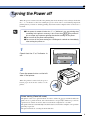
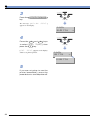
Press in the power button on the
left side of the printer.
When the printer is on, the top of the power
button is level with the surface of the printer.
When the printer is turned on, the operation
panel indicators and the display comes on
and the status of the printer and optional
device(s) is self-diagnosed.
If the results of the self-diagnosis are normal,
printing is enabled. The オンライン
indicator, the 印刷可 indicator and the
selected paper feed indicator come on and
the message [00 インサツ カノウ]
appears on the display.
00 インサツ カノウ
印刷可
メッセージ
A4
ジョブ
動作モード
ジョブキャンセル
ユーティリティ
セットアップ
給紙選択
リセット/実行
オンライン
排出
The following information appears on the display.
Printing enabled, no
printing data being
processed
2
00 インサツ カノウ
A4
Currently selected
paper feed size