1
Dell™ Dimension™ 4300S
w w w. d e l l . c o m | s u p p o r t . d e l l . c o m
HINT: A HINT indicates important information that helps you make better
use of your computer.
NOTICE: A NOTICE indicates either potential damage to hardware or loss of
data and tells you how to avoid the problem.
CAUTION: A CAUTION indicates a potential for property damage,
personal injury, or death.
For a complete list of abbreviations and acronyms, see the Tell Me How help
file. To access help files, see page 28.
____________________
Information in this document is subject to change without notice.
© 2001 Dell Computer Corporation. All rights reserved.
Reproduction in any manner whatsoever without the written permission of Dell Computer
Corporation is strictly forbidden.
Trademarks used in this text: Dell, the DELL logo, Dimension, Inspiron, Latitude, OptiPlex, Dell
Precision, DellPlus, and DellNet are trademarks of Dell Computer Corporation; Intel and Pentium
are registered trademarks of Intel Corporation; Microsoft and Windows are registered
trademarks of Microsoft Corporation.
Other trademarks and trade names may be used in this document to refer to either the entities
claiming the marks and names or their products. Dell Computer Corporation disclaims any
proprietary interest in trademarks and trade names other than its own.
This product incorporates copyright protection technology that is protected by method claims of
certain U.S. patents and other intellectual property rights owned by Macrovision Corporation
and other rights owners. Use of this copyright protection technology must be authorized by
Macrovision Corporation, and is intended for home and other limited viewing uses only unless
otherwise authorized by Macrovision Corporation. Reverse engineering or disassembly is
prohibited.
October 2001
P/N 6K797
Rev. A00
Safety Instructions
. . . . . . . . . . . . . . . . . . . . . . . . .
When Using Your Computer
. . . . . . . . . . . . . . . . . . .
Ergonomic Computing Habits
. . . . . . . . . . . . . . . . . .
When Working Inside Your Computer
. . . . . . . . . . . . . .
Protecting Against Electrostatic Discharge
. . . . . . . . . . .
9
9
10
12
13
1 Setting Up
Attaching and Removing the Computer Stand .
Connecting a Printer
. . . . . . . . . . . . . . . . . . . . . . . .
18
18
. . . . . . . . . . . . . . . . . . . . . . . . . .
20
Installing the Printer Driver
. . . . . . . . . . . . . . . . . . .
Transferring Information to a New Computer
(Windows XP only) . . . . . . . . . . . . . .
20
. . . . . . . . . . .
21
. . . . . . . . . . . . . .
22
. . . . . . . . . . . . . . . . . . . . .
22
. . . . . . . . . . . . . . . . . . . . . . . . . .
22
Setting Up a Home and Office Network
(Windows XP only) . . . . . . . . . . .
Turning Off the Computer
Windows XP
16
. . . . . . . . . . . . . . . . . . . . . . . . .
Parallel Printer
USB Printer
. . . . . . . . . .
. . . . . . . . . . . . . . . . . . . . . . . . .
22
. . . . . . . . . . . . . . . . . . . . . . . . . .
26
Windows 2000
2 Solving Problems
Finding Solutions
Accessing Help Files
Power Problems .
. . . . . . . . . . . . . . . . . . . . . . . .
28
. . . . . . . . . . . . . . . . . . . . . . . . . .
28
Contents
3
Start-Up Error Messages
. . . . . . . . . . . . . . . . . . . . .
Video and Monitor Problems
If the screen is blank
. . . . . . . . . . . . . . . . . . .
30
. . . . . . . . . . . . . . . . . . . . . .
30
. . . . . . . . . . . . . . . .
31
. . . . . . . . . . . . . . . . . . .
32
. . . . . . . . . . . . . . . . . . . . . . . . .
33
If the screen is difficult to read .
Sound and Speaker Problems
Printer Problems
. . . . . . . . . .
33
. . . . . . . . . . . . . .
34
Scanner Problems
. . . . . . . . . . . . . . . . . . . . . . . . .
35
Modem Problems
. . . . . . . . . . . . . . . . . . . . . . . . .
36
. . . . . . . . . . . . . . . . . . . . . . . . . .
37
If you cannot print to a parallel port printer
If you cannot print to a USB printer
Mouse Problems
Keyboard Problems
Drive Problems
. . . . . . . . . . . . . . . . . . . . . . . .
38
. . . . . . . . . . . . . . . . . . . . . . . . . .
39
If you cannot save a file to a floppy disk
. . . . . . . . . . . .
If you cannot play a music CD or install a program
from a CD . . . . . . . . . . . . . . . . . . . . .
If you cannot play a DVD movie
40
. . . . . . . . . . . . . . . .
40
. . . . . . . . . . . . . . .
41
. . . . . . . . . . . . . . . .
41
. . . . . . . . . . . . . . . . . . . . . . . . .
42
If you have a hard drive problem
Network Problems
Microsoft® Windows® Error Messages
. . . . . . . . . . . . . .
42
. . . . . . . . . . . . . . . . . . . .
43
. . . . . . . . . . . . . . . . . . . . . . .
43
General Program Problems
A program crashes
A program stops responding
. . . . . . . . . . . . . . . . . .
A solid blue screen appears
44
. . . . . . . . .
44
. . . . . . . . . . . . . . . . . .
44
A program error causes the system to lock up
A program is designed for an earlier Windows
operating system . . . . . . . . . . . . . . .
Contents
39
. . . . . .
If the CD-RW drive stops writing .
4
29
. . . . . . . . .
45
Internet Connection Problems
. . . . . . . . . . . . . . . . . . .
If you have a problem with your Internet connection .
E-Mail Problems
. . . . . .
45
. . . . . . . . . . . . . . . . . . . . . . . . . .
46
. . . . . . . . . . . . . . . .
47
. . . . . . . . . . . . . . . . . . . . . . . . .
47
Resolving Other Technical Problems
Reinstalling Drivers
Using the Windows XP Device Driver Rollback
. . . . . . . . .
Resolving Software and Hardware Incompatibilities
Windows XP
45
49
. . . . . . .
50
. . . . . . . . . . . . . . . . . . . . . . . . . .
50
Windows 2000
. . . . . . . . . . . . . . . . . . . . . . . . .
Using System Restore
. . . . . . . . . . . . . . . . . . . . . . .
Creating a Restore Point
. . . . . . . . . . . . . . . . . . . .
52
53
. . . . . .
54
. . . . . . . . . . . . . . . .
55
. . . . . . . . . . . . . . . . . . . . . .
55
Restoring the Computer to an Earlier Operating State
Undoing the Last System Restore
Reinstalling Windows XP
51
Reinstalling Windows 2000
. . . . . . . . . . . . . . . . . . . .
57
3 Adding Parts
Front and Back View of the Computer
. . . . . . . . . . . . . . .
60
Opening the Computer Cover
. . . . . . . . . . . . . . . . . . .
61
Looking Inside Your Computer
. . . . . . . . . . . . . . . . . . .
63
. . . . . . . . . . . . . . . . . . . . . . . . . .
64
. . . . . . . . . . . . . . . . . . . . . . . . . . . .
65
System Board
Adding Cards
Adding Memory .
. . . . . . . . . . . . . . . . . . . . . . . . . .
Closing the Computer Cover
. . . . . . . . . . . . . . . . . . . .
69
71
Contents
5
4 Appendix
Specifications
. . . . . . . . . . . . . . . . . . . . . . . . . . .
Standard Settings
. . . . . . . . . . . . . . . . . . . . . . . . .
Viewing Settings
. . . . . . . . . . . . . . . . . . . . . . . .
. . . . . . . . . . . . . . . . . . .
80
. . . . . . . . . . . . . . . . . . . . . . .
81
Dell Technical Support Policy (U.S. Only)
. . . . . . . . . . . .
83
. . . . . .
83
. . . . . . . . . . . . . . . . . . . . . . . . . .
84
Definition of "Third-Party" Software and Peripherals
Contact Numbers and Addresses
. . . . . . . . . . . . . . . .
Regulatory Information
98
. . . . . . . . . . . . . . . . . . . . . .
98
FCC Notices (U.S. Only)
Battery Disposal
84
. . . . . . . .
Returning Items for Warranty Repair or Credit .
. . . . . . . . . . . . . . . . . . . .
100
. . . . . . . . . . . . . . . . . . . . . . . .
102
NOM Information (Mexico Only)
. . . . . . . . . . . . . . . .
Limited Warranties and Return Policy
103
. . . . . . .
104
. . . . . . . . . . . . . .
105
Información para NOM (únicamente para México)
One-Year Limited Warranty (U.S. Only)
. . . . . . . . . . . .
105
Two-Year Limited Warranty (U.S. Only)
. . . . . . . . . . . .
107
. . . . . . . . . . .
111
. . . . . . . . . . . .
114
Three-Year Limited Warranty (U.S. Only)
Four-Year Limited Warranty (U.S. Only)
One-Year Limited Warranty (Canada Only)
. . . . . . . . . . .
117
Two-Year Limited Warranty (Canada Only)
. . . . . . . . . . .
119
Three-Year Limited Warranty (Canada Only)
Contents
82
. . . . .
Definition of "Dell-Installed" Software and Peripherals
6
79
79
Clearing Forgotten Passwords
Contacting Dell
78
. . . . . . . . . . . . . . . .
System Setup Program Screens
Replacing the Battery
74
. . . . . . . . . .
122
"Total Satisfaction" Return Policy
(U.S. and Canada Only) . . . . .
. . . . . . . . . . . . . . .
One-Year End-User Manufacturer Guarantee
(Latin America and the Caribbean Only) . . .
Index
. . . . . . . . .
. . . . . . . . . . . . . . . . . . . . . . . . . . . . . . . . . .
126
127
129
Contents
7
8
Contents
Use the following safety guidelines to protect yourself and your computer.
When Using Your Computer
CAUTION: Do not operate your computer with any cover(s)
(including the computer cover, filler brackets, front-panel inserts,
and so on) removed or opened.
•
Your computer is equipped with either an auto-sensing voltage selector
or a manual voltage-selection switch. Computers with an auto-sensing
voltage selector do not have a voltage-selection switch on the back
panel and automatically detect the correct operating voltage.
Computers with a voltage-selection switch on the back panel must be
manually set to operate at the correct operating voltage. To help avoid
damaging a computer with a manual voltage-selection switch, be sure
that the voltage-selection switch is set to match the AC power
available at your location:
–
115 V/60 Hz in most of North and South America and some Far
Eastern countries such as South Korea and Taiwan
–
100 V/50 Hz in eastern Japan and 100 V/60 Hz in western Japan
–
230 V/50 Hz in most of Europe, the Middle East, and the Far East
Also be sure that your monitor and attached devices are electrically
rated to operate with the AC power available in your location.
•
To avoid shorting out your computer when disconnecting a network
cable, first unplug the cable from the network adapter on the back of
your computer, and then from the network jack. When reconnecting a
network cable to your computer, first plug the cable into the network
jack, and then into the network adapter.
9
w w w. d e l l . c o m | s u p p o r t . d e l l . c o m
•
To help avoid possible damage to the system board, wait 5 seconds
after turning off the computer before disconnecting or connecting a
non-USB device from the computer.
•
To help prevent electric shock, plug the computer and device power
cables into properly grounded power sources. These cables are
equipped with 3-prong plugs to help ensure proper grounding. Do not
use adapter plugs or remove the grounding prong from a cable. If you
must use an extension cable, use a 3-wire cable with properly grounded
plugs.
•
To help protect your computer from sudden, transient increases and
decreases in electrical power, use a surge suppressor, line conditioner,
or uninterruptible power supply.
•
Be sure that nothing rests on your computer’s cables and that the
cables are not located where they can be stepped on or tripped over.
•
Do not spill food or liquids on your computer. If the computer gets
wet, contact Dell (see page 84).
•
Do not push any objects into the openings of your computer. Doing so
can cause fire or electric shock by shorting out interior components.
•
Keep your computer away from radiators and heat sources. Also, do not
block cooling vents. Avoid placing loose papers underneath your
computer; do not place your computer in a closed-in wall unit or on a
bed, sofa, or rug.
Ergonomic Computing Habits
CAUTION: Improper or prolonged keyboard use may result in
injury.
CAUTION: Viewing the monitor screen for extended periods of
time may result in eye strain.
For comfort and efficiency, observe the following ergonomic guidelines
when setting up and using your computer:
10
•
Position your computer so that the monitor and keyboard are directly
in front of you as you work. Special shelves are available (from Dell and
other sources) to help you correctly position your keyboard.
•
Set the monitor at a comfortable viewing distance (usually 510 to
610 millimeters [20 to 24 inches] from your eyes).
•
Make sure the monitor screen is at eye level or slightly lower when you
are sitting in front of the monitor.
•
Adjust the tilt of the monitor, its contrast and brightness settings, and
the lighting around you (such as overhead lights, desk lamps, and the
curtains or blinds on nearby windows) to minimize reflections and
glare on the monitor screen.
•
Use a chair that provides good lower back support.
•
Keep your forearms horizontal with your wrists in a neutral,
comfortable position while using the keyboard or mouse
•
Always leave space to rest your hands while using the keyboard or
mouse.
•
Let your upper arms hang naturally at your sides.
•
Sit erect with your feet resting on the floor and your thighs level.
•
When sitting, make sure the weight of your legs is on your feet and not
on the front of your chair seat. Adjust your chair’s height or use a
footrest, if necessary, to maintain proper posture.
•
Vary your work activities. Try to organize your work so that you do not
have to type for extended periods of time. When you stop typing, try
to do things that use both hands.
11
w w w. d e l l . c o m | s u p p o r t . d e l l . c o m
monitor screen at or
below eye level
wrists relaxed
and flat
computer positioned
directly in front of
user
arms at desk
level
feet flat on the
floor
When Working Inside Your Computer
Before you open the computer cover, perform the following steps in the
sequence indicated.
CAUTION: Do not attempt to service the computer yourself,
except as explained in this guide and elsewhere in Dell
documentation. Always follow installation and service
instructions closely.
12
1
Turn off the computer (see page 22).
2
Turn off all devices.
3
Ground yourself by touching an unpainted metal surface at the back of
the computer before touching anything inside your computer.
While you work, periodically touch an unpainted metal surface on the
computer to dissipate any static electricity that might harm internal
components.
4
Disconnect any devices connected to the computer, including the
monitor, from their electrical outlets to reduce the potential for
personal injury or shock. Also, disconnect any telephone or
telecommunication lines from the computer.
5
Disconnect the power cable to your computer, and then press the
power button to ground the system board.
In addition, take note of these safety guidelines when appropriate:
•
When you disconnect a cable, pull on its connector, not on the cable
itself. As you pull connectors apart, keep them evenly aligned to avoid
bending any pins. Also, before you connect a cable, make sure that
both connectors are correctly oriented and aligned.
•
Handle components and cards with care. Don’t touch the components
on a card. Hold a card by its edges or by its metal bracket.
CAUTION: There is a danger of a new battery exploding if it is
incorrectly installed. Replace the battery only with the same or
equivalent type recommended by the manufacturer. Discard used
batteries according to the manufacturer’s instructions.
Protecting Against Electrostatic Discharge
To prevent static damage, discharge static electricity from your body before
you touch anything inside your computer and periodically while you work
inside the computer. You can do so by touching an unpainted metal surface
on the back of the computer.
You can also take the following steps to prevent static damage:
•
Do not remove items from their antistatic packing material until you
are ready to install them in your computer. Just before unwrapping the
antistatic packaging, be sure to discharge static electricity from your
body.
•
When transporting a sensitive component, first place it in an antistatic
container or packaging.
13
14
w w w. d e l l . c o m | s u p p o r t . d e l l . c o m
SECTION 1
Attaching and Removing the Computer Stand
Connecting a Printer
Transferring Information to a New Computer
(Windows XP only)
Setting Up a Home and Office Network
(Windows XP only)
Turning Off the Computer
w w w. d e l l . c o m | s u p p o r t . d e l l . c o m
w w w. d e l l . c o m | s u p p o r t . d e l l . c o m
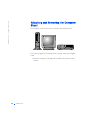
The computer can be used in either a vertical or horizontal position.
To use the computer in a vertical position, you must attach the computer
stand:
1
16
Setting Up
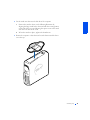
Place the computer on its right side so that the drive bays are at the
bottom.
2
3
Fit the stand onto what was the left side of the computer.
a
Position the stand as shown in the following illustration by
aligning the large round hole in the stand with the securing button
on the side of the cover and aligning the captive screw in the stand
with the screw hole in the cover.
b
When the stand is in place, tighten the thumbscrew.
Rotate the computer so that the stand is at the bottom and the drives
are at the top.
Setting Up
17
w w w. d e l l . c o m | s u p p o r t . d e l l . c o m
To remove the computer stand:
1
Turn the computer over so that the stand is at the top.
2
Loosen the thumbscrew and lift the stand away.
3
Place the computer in a horizontal position.
See the documentation that came with the printer for any recommended
preparation procedures, such as:
•
Removing the packaging
•
Installing the toner or ink cartridge
•
Loading paper
Then follow the instructions that came with the printer to connect it to the
computer. If no information is provided, see the following sections.
Parallel Printer
1
Turn off the computer (see page 22).
NOTICE: Use only a standard IEEE parallel cable measuring 3 m (10 ft) or
less to connect the printer to the computer. Use of a nonstandard cable may
prevent the printer from working.
18
Setting Up
2
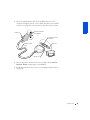
Attach the parallel printer cable to the parallel connector on the
computer and tighten the two screws. Attach the cable to the parallel
connector on the printer and snap the two clips into the two notches.
parallel connector
on computer
screws (2)
parallel connector
on printer
clips (2)
parallel printer
cable
notches (2)
3
Turn on the printer and then turn on the computer. If the Add New
Hardware Wizard window appears, click Cancel.
4
Install the printer driver if necessary (see "Installing the Printer Driver"
on page 20).
Setting Up
19
w w w. d e l l . c o m | s u p p o r t . d e l l . c o m
USB Printer
HINT: You can connect
USB devices while the
computer is turned on.
1
Install the printer driver if necessary (see the following section).
2
Attach the USB printer cable to the USB connector on the computer
and the printer. The USB connectors only fit one way.
HINT: Your computer has
two USB connectors on
the back panel (see
page 61) and two USB
connectors inside the door
on the front panel (see
page 60).
USB connector
USB printer
cable
USB connector
on printer
Installing the Printer Driver
If you need to install a printer driver, insert the printer installation CD into
the CD or DVD drive. Then follow the prompts on the screen using the
instructions that came with the printer.
If your printer installation CD does not automatically run, click the Start
button on the Microsoft® Windows® desktop, click Run, and type
x:\setup.exe (where x is the letter of your CD or DVD drive [usually
drive D]). Then click OK and follow the prompts on your screen. If your
printer installation CD still does not run, check the documentation that
came with your printer for instructions on how to start the printer
installation CD.
If you connect an older printer and it doesn’t work after you install the
driver, access the system setup program (see page 78) and ensure that the
parallel port is set to operate in bidirectional mode.
20
Setting Up
To check if your printer driver is installed on a computer running the
Windows XP operating system, click the Start button, click Control Panel,
click Printers and Other Hardware, and then click View installed printers
or fax printers. If your computer runs Windows 2000, click the Start button,
point to Settings, and then click Printers. If your printer is listed in the
Printers window, the printer is ready to use.
Windows XP provides a Files and Settings Transfer Wizard to move data,
such as e-mails, window sizes, toolbar settings, and Internet bookmarks,
from one computer to another. First you collect the data from the source
computer, and then you import the data to the new computer.
If the source computer uses another Windows operating system, the wizard
can be launched from the Windows XP operating system CD or from a
floppy disk created on the Windows XP computer. You may transfer the
data to the new computer over a network or serial connection, or you may
store it on a removable medium, such as a floppy disk, a Zip disk, or a
writable CD.
1
On the Windows XP computer, click the Start button, point to All
Programs—> Accessories—> System Tools, and then click Files and
Settings Transfer Wizard.
2
On the welcome screen, click Next.
3
On the Which computer is this? screen, select New Computer, and
then click Next.
4
Follow the instructions on the screen.
HINT: The CD that you
need to place in your CD
or DVD drive is titled
Operating System.
Setting Up
21
w w w. d e l l . c o m | s u p p o r t . d e l l . c o m
Windows XP provides a Network Setup Wizard to guide you through the
process of sharing files, printers, or an Internet connection between
computers in a home or small office.
HINT: Selecting the
connection method This
computer connects
directly to the Internet
enables the integrated
firewall provided with
Windows XP.
1
Click the Start button, point to All Programs—>
Accessories—> Communications, and then click Network Setup
Wizard.
2
On the welcome screen, click Next.
3
Click checklist for creating a network.
4
Complete the checklist and required preparations, and then return to
the Network Setup Wizard.
5
Follow the instructions on the screen.
NOTICE: To prevent data loss, you must turn off your computer through the
Start menu rather than by pressing the power button.
HINT: If you are having
difficulty turning off your
computer, see "General
Program Problems” on
page 43.
Windows XP
1
Save and close any open files and exit any open programs.
2
Click the Start button and then click Turn off Computer.
3
Click Turn off.
The computer automatically turns off after the shutdown process
finishes.
4
Turn off your monitor and any other devices connected to power.
Windows 2000
22
Setting Up
1
Save and exit any programs and files you have open.
2
Click the Start button, and then click Shut Down.
3
Click the pull-down menu under What do you want the computer to
do?.
4
Click Shut down and then click OK.
The computer automatically turns off after the shutdown process
finishes.
5
Turn off your monitor and any other devices connected to power.
Setting Up
23
24
Setting Up
w w w. d e l l . c o m | s u p p o r t . d e l l . c o m
SECTION 2
w w w. d e l l . c o m | s u p p o r t . d e l l . c o m
Finding Solutions
Accessing Help Files
Power Problems
Start-Up Error Messages
Video and Monitor Problems
Sound and Speaker Problems
Printer Problems
Scanner Problems
Modem Problems
Mouse Problems
Keyboard Problems
Drive Problems
Network Problems
Microsoft® Windows® Error Messages
General Program Problems
Internet Connection Problems
E-Mail Problems
Resolving Other Technical Problems
Reinstalling Drivers
Resolving Software and Hardware Incompatibilities
Using System Restore
Reinstalling Windows XP
Reinstalling Windows 2000
w w w. d e l l . c o m | s u p p o r t . d e l l . c o m
Sometimes it’s difficult to figure out where to go for answers. Use this chart
to help you quickly find the answers to your questions.
See page 28.
Get technical assistance from
Dell. See page 84.
See page 29.
26
Solving Pr oblems
See page 30.
See page 32.
See page 33.
See page 36.
See page 37.
See page 38.
See page 39.
See page 42.
See page 35.
See page 42.
See page 43.
See page 45.
See page 46.
See page 47.
Solving Pr oblems
27
w w w. d e l l . c o m | s u p p o r t . d e l l . c o m
TO A C C E S S T H E Tell Me How H E L P F I L E
Microsoft® Windows® XP
1 Click the Start button, and then click Help and Support.
2 Click User and system guides, and then click User’s guides.
3 Click Tell Me How.
Windows 2000
Click the Start button, point to Programs, point to User’s Guides, and then click
Tell Me How.
TO A C C E S S H E L P I N W I N D O W S X P
1 Click the Start button, and then click Help and Support.
2 Type a word or phrase that describes your problem, and then click the arrow
icon.
3 Click the topic that describes your problem, and then click Display.
4 Follow the instructions shown on the screen.
TO A C C E S S H E L P I N W I N D O W S 2 0 0 0
1 Click the Start button, and then click Help.
2 Click the Search tab.
3 Type a word or phrase that describes your problem, and then click List Topics.
4 Click the topic that describes your problem, and then click Display.
5 Follow the instructions shown on the screen.
HINT: See the Tell Me
How help file for
information on the
standby mode.
C H E C K T H E P O W E R L I G H T — When the power light is lit or blinking, the
computer has power. If the power light is blinking, the computer is in standby
mode—press a key on the keyboard or move the mouse. If the power light is off,
the computer is either not turned on or is not receiving electrical power.
TE S T T H E E L E C T R I C A L O U T L E T — Ensure that the electrical outlet is working
by testing it with another device, such as a lamp.
28
Solving Pr oblems
C H E C K T H E P O W E R C A B L E C O N N E C T I O N — Be sure that the power cable is
firmly inserted into the electrical outlet and the computer power connector.
CONNECT THE COMPUTER DIRECTLY TO AN ELECTRICAL OUTLET—
Bypass power protection devices, power strips, and the extension cable to verify
that the computer turns on.
S W A P T H E C O M P U T E R A N D M O N I T O R P O W E R C A B L E S — Swap the
computer and monitor power cables to determine if the power cable is defective.
C H E C K F O R I N T E R F E R E N C E — Electrical appliances on the same circuit or
operating near the computer can cause interference. Other causes of
interference: power extension cables, keyboard and mouse extension cables, too
many devices on a power strip, or multiple power strips connected to the same
electrical outlet.
C H E C K T H E P O W E R P R O P E R T I E S — See the Tell Me How help file or search
for the keyword standby in Windows Help. To access help files, see page 28.
O P E R A T I N G S Y S T E M N O T F O U N D — Call Dell for technical assistance (see
page 84).
I N S E R T B O O T A B L E M E D I A — The operating system is trying to boot to a
nonbootable floppy disk or CD. Insert a bootable floppy disk or CD.
N O N - S Y S T E M D I S K E R R O R — There is a floppy disk in the floppy drive.
Remove the floppy disk and restart the computer.
Solving Pr oblems
29
w w w. d e l l . c o m | s u p p o r t . d e l l . c o m
If the screen is blank
HINT: See the
documentation that come
with your monitor for
fault indications and
troubleshooting
procedures specific to
your monitor.
C H E C K T H E V I D E O C A B L E C O N N E C T I O N — Check for bent pins (most video
cable connectors have missing pins, but not bent pins). Ensure that the video
cable is connected as shown on the START HERE sheet for your computer.
P R E S S T H E M O N I T O R P O W E R B U T T O N — Be sure that you firmly pressed the
monitor power button.
C H E C K T H E P O W E R L I G H T — When the power light is lit or blinking, the
monitor has power. If the power light is blinking, press a key on the keyboard or
move the mouse.
TE S T T H E E L E C T R I C A L O U T L E T — Ensure that the electrical outlet is working
by testing it with another device, such as a lamp.
S W A P T H E C O M P U T E R A N D M O N I T O R P O W E R C A B L E S — Swap the
computer and monitor power cables to determine if the power cable is defective.
TE S T T H E V I D E O E X T E N S I O N C A B L E ( I F U S E D ) — If you are using a video
extension cable and removing the cable solves the problem, the cable is defective.
TE S T T H E M O N I T O R — If another monitor is available, connect it to the
computer.
C H E C K T H E B A C K P A N E L L I G H T S — If all four lights below the serial
connector (see page 61) are not green, call Dell for technical assistance (see
page 84).
C H E C K T H E P O W E R P R O P E R T I E S — See the Tell Me How help file or search
for the keyword standby in Windows Help. To access help files, see page 28.
30
Solving Pr oblems
If the screen is difficult to read
A D J U S T T H E C O N T R A S T A N D B R I G H T N E S S — See the documentation that
came with your monitor for instructions on adjusting the contrast and brightness.
M O V E T H E S U B W O O F E R A W A Y F R O M T H E M O N I T O R — If your speaker
system includes a subwoofer, ensure that the subwoofer is at least 2 ft (60 cm)
away from the monitor.
M O V E T H E M O N I T O R A W A Y F R O M E X T E R N A L P O W E R S O U R C E S — Fans,
fluorescent lights, halogen lamps, and other electrical devices can cause the
screen image to appear “shaky.” Turn off nearby devices to check for interference.
R O T A T E T H E M O N I T O R T O F A C E A D I F F E R E N T D I R E C T I O N — Eliminate
sunlight glare, which can cause poor picture quality.
D E G A U S S ( D E M A G N E T I Z E ) T H E M O N I T O R — See the documentation that
came with your monitor.
R U N T H E M O N I T O R S E L F - T E S T — See the documentation that came with
your monitor.
R E S T O R E T H E R E C O M M E N D E D S E T T I N G S — Restore the original resolution
and refresh rate settings. See the Tell Me How help file for instructions. To access
help files, see page 28.
C H E C K F O R A D D I T I O N A L A D J U S T M E N T S — See the documentation that
came with your monitor for any additional adjustments that your monitor may
require.
Solving Pr oblems
31
w w w. d e l l . c o m | s u p p o r t . d e l l . c o m
ADJUST THE WINDOWS DISPLAY SETTINGS
Windows XP
1 Click the Start button, and then click Control Panel.
2 Click Appearance and Themes.
3 Click Display, and then click the Settings tab.
4 Try different settings for Screen resolution and Color quality.
Windows 2000
1 Click the Start button, point to Settings, and then click Control Panel.
2 Double-click the Display icon, and then click the Settings tab.
3 Try different settings for Colors and Screen area.
C H E C K F O R I N T E R R U P T R E Q U E S T C O N F L I C T S — See page 50.
HINT: The volume
control in some MP3
players overrides the
Windows volume setting.
If you have been listening
to MP3 songs, make sure
that you did not turn the
player volume down or off.
ENSURE THAT THE SUBWOOFER AND THE SPEAKERS ARE TURNED
O N — See the setup diagram supplied with the speakers.
A D J U S T T H E S P E A K E R C O N T R O L S — If your speakers have volume controls,
adjust the volume, bass, or treble to eliminate distortion.
V E R I F Y T H E S P E A K E R C A B L E C O N N E C T I O N S — Ensure that the speakers
are connected as shown on the START HERE sheet for your computer and the
setup diagram supplied with the speakers.
BE SURE THAT HEADPHONES ARE NOT CONNECTED TO THE FRONTP A N E L H E A D P H O N E J A C K — Sound from the speakers is automatically
disabled when headphones are connected to the computer’s front-panel
headphone jack.
A D J U S T T H E W I N D O W S V O L U M E C O N T R O L — In Windows XP, click the
speaker icon in the lower-right corner of your screen. In Windows 2000, doubleclick the speaker icon in the lower-right corner of your screen. Be sure that the
volume is turned up and that the sound is not muted.
32
Solving Pr oblems
R U N T H E S P E A K E R D I A G N O S T I C S — Some speaker systems have selfcontained diagnostics. See the speaker documentation for diagnostics
instructions.
E L I M I N A T E P O S S I B L E I N T E R F E R E N C E — Turn off nearby fans, fluorescent
lights, or halogen lamps to check for interference.
TE S T T H E E L E C T R I C A L O U T L E T — Ensure that the electrical outlet is working
by testing it with another device, such as a lamp.
R E I N S T A L L T H E S O U N D ( A U D I O ) D R I V E R — See page 47.
C H E C K F O R I N T E R R U P T R E Q U E S T C O N F L I C T S — See page 50.
If you cannot print to a parallel port printer
V E R I F Y T H E P R I N T E R C A B L E C O N N E C T I O N S — Ensure that the printer
cable is connected as described on page 18.
E N S U R E T H A T T H E P R I N T E R I S T U R N E D O N — See the documentation
supplied with the printer.
HINT: If you need
technical assistance for
your printer, call the
printer’s manufacturer
(see the documentation
that came with the printer
for the correct phone
number). Dell does not
cover the printer’s
warranty.
Solving Pr oblems
33
w w w. d e l l . c o m | s u p p o r t . d e l l . c o m
VE R I F Y T H A T T H E P R I N T E R I S R E C O G N I Z E D B Y W I N D O W S
Windows XP
1 Click the Start button.
2 Click Control Panel.
3 Click Printers and Other Hardware.
4 Click View installed printers or fax printers. If the printer is listed, right-click
the printer icon.
5 Click Properties, and then select the Ports tab. Ensure that the Print to the
following port(s): setting is LPT1 (Printer Port).
Windows 2000
1 Click the Start button, point to Settings, and then click Printers.
If the printer is listed, right-click the printer icon.
2 Click Properties, and then select the Ports tab. Ensure that the Print to the
following port(s): setting is LPT1 (Printer Port).
TE S T T H E E L E C T R I C A L O U T L E T — Ensure that the electrical outlet is working
by testing it with another device, such as a lamp.
R E I N S T A L L T H E P R I N T E R D R I V E R — See page 20.
C H E C K F O R I N T E R R U P T R E Q U E S T C O N F L I C T S — See page 50.
If you cannot print to a USB printer
V E R I F Y T H E P R I N T E R C A B L E C O N N E C T I O N S — Ensure that the printer
cable is connected as described on page 20.
E N S U R E T H A T T H E P R I N T E R I S T U R N E D O N — See the documentation
supplied with the printer.
34
Solving Pr oblems
VE R I F Y T H A T T H E P R I N T E R I S R E C O G N I Z E D B Y W I N D O W S
Windows XP
1 Click the Start button.
2 Click Control Panel.
3 Click Printers and Other Hardware.
4 Click View installed printers or fax printers. If the printer is listed, right-click
the printer name.
5 Click Properties, and then select the Ports tab. Ensure that the Print to the
following port(s): setting is USB.
Windows 2000
1 Click the Start button, point to Settings, and then click Printers.
If the printer is listed, right-click the printer icon.
2 Click Properties, and then select the Ports tab. Ensure that the Print to the
following port(s): setting is USB.
TE S T T H E E L E C T R I C A L O U T L E T — Ensure that the electrical outlet is working
by testing it with another device, such as a lamp.
R E I N S T A L L T H E P R I N T E R D R I V E R — See page 20.
C H E C K F O R I N T E R R U P T R E Q U E S T C O N F L I C T S — See page 50.
C H E C K T H E P O W E R C A B L E C O N N E C T I O N — If your scanner has a power
cable, ensure that the power cable is firmly connected to a working electrical
power source and that the scanner is turned on.
C H E C K T H E S C A N N E R C A B L E C O N N E C T I O N — Ensure that the scanner
cable is firmly connected to the computer and to the scanner.
HINT: If you need
technical assistance for
your scanner, call the
scanner’s manufacturer
(see the documentation
that came with the
scanner for the correct
phone number). Dell does
not cover the scanner’s
warranty.
U N L O C K T H E S C A N N E R — Ensure that your scanner is unlocked if it has a
locking tab or button.
Solving Pr oblems
35
w w w. d e l l . c o m | s u p p o r t . d e l l . c o m
R E I N S T A L L T H E S C A N N E R D R I V E R — Reinstall the scanner driver. See the
scanner documentation for instructions.
C H E C K F O R I N T E R R U P T R E Q U E S T C O N F L I C T S — See page 50.
HINT: Connect the
modem to an analog
telephone jack only. The
modem does not operate
while it is connected to a
digital telephone network.
C H E C K T H E C O N N E C T I O N — Verify that the telephone line is connected to the
green jack on the modem. (The green line-in jack has either a LINE IN label or a
connector-shaped icon next to it.) Make sure you hear a click when you insert the
telephone line connector.
C H E C K T H E T E L E P H O N E J A C K — Disconnect the telephone line from the
modem and connect it to a telephone. Listen for a dial tone.
C O N N E C T T H E M O D E M D I R E C T L Y T O T H E T E L E P H O N E W A L L J A C K — If
you have other telephone devices sharing the line, such as an answering machine,
fax machine, surge protector, or line splitter, then bypass them and connect the
modem directly to the telephone wall jack with the telephone line.
C H E C K T H E T E L E P H O N E L I N E — Try using a different telephone line. If you
are using a line that is 10 ft (3 m) or more in length, try a shorter one.
36
Solving Pr oblems
VE R I F Y T H A T T H E M O D E M I S C O M M U N I C A T I N G W I T H W I N D O W S
Windows XP
1 Click the Start button.
2 Click Control Panel.
3 Click Network and Internet Connections.
4 Click Internet Options.
5 Click Network Diagnostics and perform the connectivity test.
Windows 2000
1 Click the Start button, point to Settings, and then click Control Panel.
2 Double-click Phone and Modems.
If multiple entries for the same modem or modems are listed but not installed,
delete the entries, restart the computer, and repeat steps 1 and 2.
3 Click the Modems tab.
4 Click the COM port for your modem.
5 Click Properties, click the Diagnostics tab, and then click Query Modem to
verify that the modem is communicating with Windows.
If all commands receive responses, the modem is operating properly.
BE SURE THAT YOU HAVE SUBSCRIBED TO AN INTERNET SERVICE
P R O V I D E R — Contact an Internet service provider to subscribe.
C H E C K F O R I N T E R R U P T R E Q U E S T C O N F L I C T S — See page 50.
IF YOU CONNECTED THE MOUSE BEFORE TURNING ON THE
C O M P U T E R, R E C O N N E C T T H E M O U S E C A B L E
1 Press <Ctrl><Esc> to display the Start menu.
2 In Windows XP, type u, and then type u again. In Windows 2000, press the
keyboard arrow keys to highlight Shut Down, and then press <Enter>.
3 After the computer turns off, reconnect the mouse cable as shown on the
START HERE sheet for your computer.
4 Start the computer.
Solving Pr oblems
37
w w w. d e l l . c o m | s u p p o r t . d e l l . c o m
I F Y O U C O N N E C T E D T H E M O U S E A F T E R T U R N I N G O N T H E C O M P U T E R,
REMOVE THE POWER CABLE, AND THEN RECONNECT THE MOUSE
C A B L E — If the mouse is connected after the power is turned on, the mouse will
appear to be nonfunctional. To make the mouse function properly:
1 While your computer is on, remove the power cable from the back of the
computer.
2 Connect the mouse to the computer.
3 Reconnect the power cable.
4 Turn on your computer.
Pressing the power button does not clear the computer’s settings and does not
restore mouse functionality.
CHECK THE MOUSE SETTINGS
Windows XP
1 Click the Start button, click Control Panel, and then click Printers and Other
Hardware.
2 Click Mouse.
Try adjusting the settings.
Windows 2000
1 Click the Start button, point to Settings, and then click Control Panel.
2 Double-click the Mouse icon.
Try adjusting the settings.
C H E C K F O R I N T E R R U P T R E Q U E S T C O N F L I C T S — See page 50.
R E C O N N E C T T H E K E Y B O A R D C A B L E — Shut down the computer (see
page 22), reconnect the keyboard cable as shown on the START HERE sheet for
your computer, and then restart the computer.
C H E C K F O R I N T E R R U P T R E Q U E S T C O N F L I C T S — See page 50.
38
Solving Pr oblems
If you cannot save a file to a floppy disk
E N S U R E T H A T W I N D O W S R E C O G N I Z E S T H E D R I V E — In Windows XP,
Click the Start button, and then click My Computer. In Windows 2000, doubleclick the My Computer icon on the Windows desktop. If the floppy drive is not
listed, perform a full scan with your antivirus software to check for and remove
viruses. Viruses can sometimes prevent Windows from recognizing the drive.
TE S T T H E D R I V E W I T H A N O T H E R F L O P P Y D I S K — Insert another floppy
disk to eliminate the possibility that the original floppy disk is defective.
C A N N O T S A V E F I L E S T O A F L O P P Y D I S K — Ensure that the floppy disk is
not full or write-protected (locked). See the following illustration.
back of floppy disk
write-protected
not writeprotected
Solving Pr oblems
39
w w w. d e l l . c o m | s u p p o r t . d e l l . c o m
If you cannot play a music CD or install a program from a CD
HINT: High-speed CD
drive vibration is normal
and may cause noise. This
does not indicate a defect
in the drive or the CD.
E N S U R E T H A T W I N D O W S R E C O G N I Z E S T H E D R I V E — In Windows XP,
click the speaker icon in the lower-right corner of your screen. In Windows 2000,
double-click the speaker icon in the lower-right corner of your screen. If the
floppy drive is not listed, perform a full scan with your antivirus software to check
for and remove viruses. Viruses can sometimes prevent Windows from
recognizing the drive.
TE S T T H E D R I V E W I T H A N O T H E R C D — Insert another CD to eliminate the
possibility that the original CD is defective.
C L E A N T H E D I S C — See the Tell Me How help file for instructions. To access
help files, see page 28.
A D J U S T T H E W I N D O W S V O L U M E C O N T R O L — In Windows XP, click the
gray speaker icon in the lower-right corner of your screen. In Windows 2000,
double-click the yellow speaker icon in the lower-right corner of your screen. Be
sure that the volume is turned up and that the sound is not muted.
IF HEADPHONES ARE CONNECTED TO THE FRONT-PANEL HEADPHONE
J A C K , C H E C K F O R S O U N D F R O M T H E H E A D P H O N E S — Sound from the
speakers is automatically disabled when headphones are connected to the
computer’s front-panel headphone jack.
C H E C K F O R I N T E R R U P T R E Q U E S T C O N F L I C T S — See page 50.
If you cannot play a DVD movie
HINT: Because of
different worldwide file
types, not all DVD titles
work in all DVD drives.
40
Solving Pr oblems
E N S U R E T H A T W I N D O W S R E C O G N I Z E S T H E D R I V E — In Windows XP,
Click the Start button, and then click My Computer. In Windows 2000, doubleclick the My Computer icon on the Windows desktop. If the floppy drive is not
listed, perform a full scan with your antivirus software to check for and remove
viruses. Viruses can sometimes prevent Windows from recognizing the drive.
TE S T T H E D R I V E W I T H A N O T H E R D V D — Insert another DVD to eliminate
the possibility that the original DVD is defective.
C L E A N T H E D I S C — See the Tell Me How help file for instructions.
If the CD-RW drive stops writing
TU R N O F F S T A N D B Y I N W I N D O W S B E F O R E W R I T I N G T O A C D - R W
D I S C — See the Tell Me How help file or search for the keyword standby in Help
and Support (Help in Windows 2000). To access help files, see page 28.
HINT: If you disable
standby mode to write to a
CD-RW drive, remember
to reenable standby mode
when you finish writing to
the CD.
C H A N G E T H E W R I T E S P E E D T O A S L O W E R R A T E — The CD-RW drive
must receive a steady stream of data when writing. If the stream is interrupted, an
error occurs. Closing all programs before writing to the CD-RW may also
alleviate the problem.
If you have a hard drive problem
RUN SCANDISK
1 In Windows XP click the Start button, and then click My Computer. In
Windows 2000 double-click the My Computer icon on the Windows desktop.
2 Right-click on the drive letter (local disk) that you want to scan for errors, and
then click Properties.
3 Click the Tools tab.
4 Under Error-checking, click Check Now.
5 Click Start.
C H E C K F O R I N T E R R U P T R E Q U E S T C O N F L I C T S — See page 50.
Solving Pr oblems
41
w w w. d e l l . c o m | s u p p o r t . d e l l . c o m
C H E C K T H E N E T W O R K C A B L E C O N N E C T O R — Ensure that the network
cable connector is firmly connected to the connector on the computer and the
network wall jack as shown on the START HERE sheet for your computer.
CHECK THE NETWORK LIGHTS ON THE BACK OF THE COMPUTER— A
green light indicates a 10-Mbps network connection, and an orange light
indicates a 100-Mbps network connection. The light blinks amber when there is
any network traffic. If the light is dark, try replacing the network cable.
R E S T A R T T H E C O M P U T E R — Try to log on to the network again.
C O N T A C T Y O U R N E T W O R K A D M I N I S T R A T O R — Verify that your network
settings are correct and that the network is functioning.
C H E C K F O R I N T E R R U P T R E Q U E S T C O N F L I C T S — See page 50.
®
®
x: \ I S N O T A C C E S S I B L E . T H E D E V I C E I S N O T R E A D Y — Insert a disk into
the drive and try again.
A FILENAME CANNOT CONTAIN ANY OF THE FOLLOWING
C H A R A C T E R S : \ / : * ? “ < > | — Do not use these characters in
filenames.
NOT ENOUGH MEMORY OR RESOURCES. CLOSE SOME PROGRAMS AND
T R Y A G A I N — You have too many programs open. Close all windows and open
the program that you want to use. In some cases, you might have to restart your
computer to restore computer resources. If so, try running the program that you
want to use first.
42
Solving Pr oblems
THE FILE BEING COPIED IS TOO LARGE FOR THE DESTINATION
D R I V E — The file that you are trying to copy is too large to fit on the disk. Try
copying the file to a blank disk or use a larger-capacity disk.
A R E Q U I R E D . D L L F I L E W A S N O T F O U N D — The program that you are
trying to open is missing an essential file. To remove and then reinstall the
program:
Windows XP
1 Click the Start button.
2 Click Control Panel.
3 Click Add or Remove Programs.
4 Select the program you want to remove.
5 Click the Change or Remove Program icon.
6 See the program documentation for installation instructions.
Windows 2000
1 Click the Start button, point to Settings, and then click Control Panel.
2 Double-click the Add/Remove Programs icon.
3 Select the program that you want to remove.
4 Click Change/Remove and follow the prompts on the screen.
5 See the program documentation for installation instructions.
A program crashes
S E E T H E S O F T W A R E D O C U M E N T A T I O N — Many software manufacturers
maintain websites with information that may help you to solve the problem.
Solving Pr oblems
43
w w w. d e l l . c o m | s u p p o r t . d e l l . c o m
A program stops responding
END THE PROGRAM
1 Simultaneously press <Ctrl><Shift><Esc>.
2 Click the Applications tab, and then select the program that is no longer
responding.
3 Click the End Task button.
A program error causes the system to lock up
HINT: ScanDisk may
run when you restart the
computer. Follow the
instructions on the screen.
TU R N T H E C O M P U T E R O F F — If your computer locks up and you are unable to
get a response by pressing a key on your keyboard or moving your mouse, press
and hold the power button for at least 8 to 10 seconds until the computer turns
off. Then press the power button again to turn on the computer. You might lose
data if you are unable to perform a Microsoft Windows shutdown.
A solid blue screen appears
HINT: ScanDisk may
run when you restart the
computer. Follow the
instructions on the screen.
44
Solving Pr oblems
TU R N T H E C O M P U T E R O F F — If your computer locks up and you are unable to
get a response by pressing a key on your keyboard or moving your mouse, press
and hold the power button for at least 8 to 10 seconds until the computer turns
off. Then press the power button again to turn on the computer. The solid blue
screen appears because you were not able to perform a proper Windows
shutdown. You might lose data if you are unable to perform a Microsoft Windows
shutdown.
A program is designed for an earlier Windows operating system
RUN THE PROGRAM COMPATIBILITY WIZARD
Windows XP provides a Program Compatibility Wizard that configures a
program to run in an environment more similar to older Windows operating
system environments.
1 Click the Start button, point to All Programs—> Accessories, and then click
Program Compatibility Wizard.
2 On the welcome screen, click Next.
Follow the instructions on the screen.
If you have a problem with your Internet connection
R E V I E W “ M O D E M P R O B L E M S ” — See page 36.
Solving Pr oblems
45
w w w. d e l l . c o m | s u p p o r t . d e l l . c o m
TU R N O F F C A L L W A I T I N G ( C A T C H - P H O N E ) — See your telephone directory
for instructions on deactivating this feature. Then adjust the dial-up networking
connection properties.
Windows XP
1 Click the Start button, and then click Control Panel.
2 Click Printers and Other Hardware, and then click Phone and Modem
Options.
3 Click to highlight your connection type in the displayed list.
4 Click the Dialing Rules tab, and then click the Edit button.
5 Click to place a checkmark in the To Disable Call Waiting box.
6 Select the disable code from the drop down menu (for example, *70).
7 Click Apply, and then click OK.
Windows 2000
1 Click the Start button, point to Settings, and then click Control Panel.
2 Double-click the Phone and Modems Options icon.
3 In the Locations window, select the location for which you want to disable call
waiting, and then click Edit.
4 Ensure that To disable call waiting, dial: is checked and then select the proper
code according to the information in your telephone directory.
5 Click Apply and then click OK.
6 Close the Phone and Modems Options window.
7 Close the Control Panel.
BE SURE THAT YOU HAVE SUBSCRIBED TO AN INTERNET SERVICE
P R O V I D E R — Contact an Internet service provider to subscribe.
C O N T A C T Y O U R I N T E R N E T S E R V I C E P R O V I D E R — Contact your Internet
service provider for assistance.
E N S U R E T H A T Y O U A R E C O N N E C T E D T O T H E I N T E R N E T — With the
Outlook Express e-mail program open, click File. If Work Offline has a check
next to it, click the check to remove it and connect to the Internet.
46
Solving Pr oblems
C O N T A C T Y O U R I N T E R N E T S E R V I C E P R O V I D E R — Contact your Internet
service provider for assistance.
G O T O T H E D E L L S U P P O R T W E B S I T E — Go to http://support.dell.com for
help with general usage, installation, and troubleshooting questions. See "Dell
Technical Support Policy" on page 82 for a description of the hardware and
software support provided by Dell.
E - M A I L D E L L — Go to http://support.dell.com, and then click E-Mail Dell in
the Communicate list. Send an e-mail message to Dell about your problem; you
can expect to receive an e-mail message from Dell within hours. See "Dell
Technical Support Policy" on page 82 for a description of the hardware and
software support provided by Dell.
C A L L D E L L — If you cannot solve your problem using the Dell support website
or e-mail service, call Dell for technical assistance (see page 84). See "Dell
Technical Support Policy" on page 82 for a description of the hardware and
software support provided by Dell.
NOTICE: The Dell support website, http://support.dell.com, and the Dell
Dimension ResourceCD provide approved drivers for Dell™ computers. If you
install drivers obtained from other sources, your computer might not work
correctly.
Dell installed the following drivers on your computer:
•
Intel® Chip Set Update Utility Driver — Installs the Microsoft
Windows operating system device installation files (.inf) that tell the
operating system how certain chip set components should be
configured for proper operation.
•
ADI AC-97 Audio Codec Driver — Enables the optional built-in
sound controller to produce sound.
Solving Pr oblems
47
w w w. d e l l . c o m | s u p p o r t . d e l l . c o m
•
Yamaha Wavetable Driver — Enables the optional built-in sound
controller to produce sound.
•
Intel Ultra ATA Storage Driver — Improves your computer's
performance by transferring certain functions from the microprocessor
during data transfers from storage devices.
•
Other Drivers — Control the devices such as the modem and network
cards that might be installed in your computer. For information on
other drivers on computers running Windows XP, click the Start
button, click Help and Support, click User and system guides, and
then click Device guides. Click the appropriate guide from the list. For
information on other drivers on computers running Windows 2000,
click the Start button, point to Programs—> User's Guides, and click
the appropriate guide from the list.
Sometimes you can fix a device problem by reinstalling its driver:
1
From the Windows desktop, insert the Dell Dimension ResourceCD
into the CD or DVD drive.
If this is your first time to use the ResourceCD, go to step 2. If not, go
to step 5.
2
When the ResourceCD Installation program starts, follow the
prompts on the screen.
3
When the InstallShield Wizard Complete window appears, remove
the ResourceCD and click Finish to restart the computer.
4
When you see the Windows desktop, reinsert the ResourceCD into the
CD or DVD drive.
5
At the Welcome Dell System Owner screen, click Next.
A message appears that says the ResourceCD is detecting hardware in
your computer.
The drivers that are used by your computer are automatically displayed
in the My Drivers—The ResourceCD has identified these
components in your system window.
48
Solving Pr oblems
6
Click the driver that you want to reinstall and follow the instructions
on the screen.
If a particular driver is not listed, then that driver is not required by
your operating system.
To view other contents on the ResourceCD:
1
Verify that your computer is selected in the System Model list.
2
Verify that your operating system is selected in the Operating System
list.
3
Select the type of device in the Device Type list.
NOTICE: The ResourceCD contains drivers for devices that are not part of
your computer. Only reinstall the specific drivers for hardware included in your
computer. Otherwise, your computer might not work correctly.
4
HINT: The ResourceCD
displays drivers only for
hardware that Dell
installed at the time of
purchase. If you installed
any additional hardware,
those drivers may not be
displayed by the
ResourceCD. If those
drivers are not displayed,
exit the ResourceCD
program and refer to the
documentation and
drivers that came with
that product.
Select a topic in the Topic list.
If you select Drivers in the Topic list and a particular driver is not
listed, then that driver is not required by your operating system.
Using the Windows XP Device Driver Rollback
The Windows XP Device Driver Rollback can replace a device driver with
the previously installed version if you install a new device driver that causes
system instability. If you cannot reinstall your previous driver with the
Driver Rollback process, then use System Restore (see page 52) to attempt
to return your operating system to its previous operating state before the
new device driver installation:
1
Click the Start button, and then right-click My Computer.
2
Click Properties.
3
Click the Hardware tab, and then click Device Manager.
4
In the Device Manager window, right-click the device for which the
new driver was installed, and then click Properties.
5
Click the Drivers tab.
6
Click Roll Back Driver.
Solving Pr oblems
49
w w w. d e l l . c o m | s u p p o r t . d e l l . c o m
Windows XP and Windows 2000 IRQ conflicts occur if a device either is not
detected during the operating system setup or is detected but incorrectly
configured.
Windows XP
To check for conflicts on a computer running Windows XP:
1
Click the Start button, and then click Control Panel.
2
Click Performance and Maintenance, and then click System.
3
Click the Hardware tab, and then click the Device Manager button.
4
In the Device Manager list, check for conflicts with the other devices.
Conflicts are indicated by a yellow exclamation point (!) beside the
conflicting device or a red X if the device has been disabled.
5
Double-click any conflicting device listed to bring up the Properties
window so you can determine what needs to be reconfigured or
removed from the Device Manager.
Resolve these conflicts before checking specific devices.
6
Double-click the malfunctioning device type in the Device Manager
list.
7
Double-click the icon for the specific device in the expanded list.
The Properties window appears.
8
Resolve any IRQ conflicts.
If there is an IRQ conflict, the Device status area in the Properties
window reports what cards or devices are sharing the device's IRQ.
You can also use the Windows XP Hardware Troubleshooter. To use the
troubleshooter, click the Start button and click Help and Support. Type
hardware troubleshooter in the Search field, and then click the arrow
to start the search. Click Hardware Troubleshooter in the Search Results
list. In the Hardware Troubleshooter list, click I need to resolve a hardware
conflict on my computer, and then click Next.
50
Solving Pr oblems
Windows 2000
To check for conflicts on a computer running Windows 2000:
1
Click the Start button, point to Settings, and click Control Panel.
2
In the Control Panel, double-click System.
3
Click the Hardware tab.
4
Click Device Manager.
5
Click View, and then click Resources by connection.
6
Double-click Interrupt request (IRQ) to view the IRQ assignments.
Conflicts are indicated by a yellow exclamation point (!) beside the
conflicting device or a red X if the device has been disabled.
7
Double-click any conflicting device listed to bring up the Properties
window so you can determine what needs to be reconfigured or
removed from the Device Manager. Resolve these conflicts before
checking specific devices.
8
Double-click the malfunctioning device type in the Device Manager
list.
9
Double-click the icon for the specific device in the expanded list.
The Properties window appears.
10
If there is an IRQ conflict, the Device status area in the Properties
window reports what cards or devices are sharing the device's IRQ.
Resolve the IRQ conflicts.
You can also use the Windows 2000 Hardware Troubleshooter. To use the
troubleshooter, click the Start button and click Help. Click
Troubleshooting and Maintenance on the Contents tab, click Windows
2000 troubleshooters, and then click Hardware. In the Hardware
Troubleshooter list, click I need to resolve a hardware conflict on my
computer, and then click Next.
Solving Pr oblems
51
w w w. d e l l . c o m | s u p p o r t . d e l l . c o m
Windows XP provides a System Restore feature that allows you to return
your computer to an earlier operating state if changes to the computer’s
hardware or software (including new hardware or program installations), or
other system settings, have left the computer in an undesirable operating
state. You can also undo the last System Restore.
System Restore automatically creates system checkpoints. You can also
manually create your own checkpoints by creating Restore Points. To limit
the amount of hard disk space used, older restore points will be
automatically purged.
If your computer experiences an operating system problem, you can use
System Restore from Safe Mode or Normal Mode to return your computer
to an earlier operating state.
System Restore does not cause you to lose personal files stored in the My
Documents folder, data files, or e-mail messages after restoring the
computer to an earlier time. If you restore the computer to a point before
you installed a program, the program’s data files won’t be lost, but you will
have to reinstall the actual program again.
NOTICE: It is important to make regular backups of your data files. System
Restore does not monitor changes to or recover your data files. If the original
data on the hard disk is accidentally erased or overwritten, or becomes
inaccessible because of a hard disk malfunction, you will need your backup
files to recover the lost or damaged data.
System Restore is enabled on your new computer. However, if you reinstall
Windows XP with less than 200 MB of free hard-disk space available,
System Restore is automatically disabled. To see if System Restore is
enabled:
52
Solving Pr oblems
1
Click the Start button, and then click Control Panel.
2
Click Performance and Maintenance.
3
Click System.
4
Click the System Restore tab.
5
Make sure that Turn off System Restore is unchecked.
Before proceeding with any System Restore function, Dell recommends that
you thoroughly read Microsoft’s information about using System Restore.
To access this information:
1
Click the Start button, point to All Programs—>
Accessories—> System Tools, and then click System Restore.
2
Click Help in the upper-right corner of the Welcome to System
Restore screen.
Creating a Restore Point
Using the XP System Restore Wizard
In Windows XP you can manually create restore points or you can use the
System Restore Wizard to create the restore points for you. To use the
System Restore Wizard, click the Start button, click Help and Support,
click System Restore, and then follow the instructions on the screen. You
can also create and name a restore point if you are logged on as the
computer administrator or a user with administrator rights.
Manually Creating the Restore Points
1
Click the Start button, point to All Programs—>
Accessories—> System Tools, and then click System Restore.
2
Click Create a restore point.
3
Click Next.
4
Type a name for your new restore point in the Restore point
description field.
The present date and time are automatically added to your restore
point.
5
Click Create.
6
Click OK.
Solving Pr oblems
53
w w w. d e l l . c o m | s u p p o r t . d e l l . c o m
Restoring the Computer to an Earlier Operating State
If problems occur after installing a device driver, first try using Device
Driver Rollback (see page 49). If that is unsuccessful, then use System
Restore.
NOTICE: Before restoring the computer to an earlier time, save and close all
open files and close all open programs. Do not alter, open, or delete any files or
programs until the system restoration is complete.
1
Click the Start button, point to All Programs—> Accessories—>
System Tools, and then click System Restore.
2
Be sure Restore my computer to an earlier time is selected, and then
click Next.
3
Click a calendar date to which you want to restore your computer.
The Select a Restore Point screen provides a calendar that allows you
to see and select restore points. All calendar dates with available
restore points appear in bold.
4
Select a restore point, and then click Next.
If a calendar date has only one restore point, then that restore point is
automatically selected. If two or more restore points are available, click
the restore point that you want to use.
NOTICE: Save and close all open files and close all open programs. Do not
alter, open, or delete any files or programs until the system restoration is
complete.
5
Click Next.
The Restoration Complete screen appears after System Restore
completes collecting data, and then the computer automatically
restarts.
6
After the computer restarts, click OK.
To change the restore point, you can either repeat the steps using a
different restore point, or you can undo the restoration.
54
Solving Pr oblems
Undoing the Last System Restore
NOTICE: Before undoing the last system restore, save and close all open files
and close all open programs. Do not alter, open, or delete any files or programs
until the system restoration is complete.
1
Click the Start button, point to All Programs—> Accessories—>
System Tools, and then click System Restore.
2
Select Undo my last restoration and click Next.
NOTICE: Save and close all open files and close all open programs. Do not
alter, open, or delete any files or programs until the system restoration is
complete.
3
Click Next.
4
The System Restore screen appears, and then the computer
automatically restarts.
5
After the computer restarts, click OK.
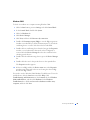
Before reinstalling the Windows XP operating system to correct a problem,
try correcting the problem by performing a Windows XP System Restore
(see page 52).
NOTICE: The Operating System CD provides options for reinstalling your
Windows XP operating system. The options can potentially overwrite files
installed by Dell and possibly affect programs installed on your hard drive.
Therefore, Dell does not recommend that you reinstall your operating system
unless instructed to do so by a Dell technical support representative.
NOTICE: To prevent conflicts with Windows XP, you must disable any
virus protection software installed on your computer before you reinstall
Windows XP.
1
Insert the Operating System CD into the CD or DVD drive.
Close any program or utility that may start to run after you insert the
CD into the drive.
2
HINT: The CD that you
need to place in your CD
or DVD drive is titled
Operating System.
Turn off the computer (see page 22), and then turn the computer on
again.
Solving Pr oblems
55
w w w. d e l l . c o m | s u p p o r t . d e l l . c o m
3
When the blue Dell logo appears, press <F12> immediately.
If you wait too long and the operating system logo appears, continue to
wait until you see the Microsoft Windows desktop. Then shut down
the computer and try again.
4
Use the arrow keys to select the CD-ROM option, and then press
<Enter>.
5
When the Windows XP Setup screen appears, press <Enter> to
select To set up Windows now.
6
Read the information in the License Agreement window, and then
press <F8> on your keyboard to agree with the license information.
7
If your computer already has Windows XP installed and you want to
recover your current Windows XP data, type R to select the repair
option, and then go to step 15.
If you want to install a new copy of Windows XP, press <Esc> to
select the fresh copy option, and then press <Enter> on the next
screen to select the highlighted partition (recommended). Then follow
the instructions on the screen.
8
The Windows XP Setup screen appears and Windows XP begins to
copy files and install the devices. The computer automatically restarts
multiple times before it requires additional input.
9
When the Welcome to Microsoft screen appears, click the green arrow
icon at the bottom of the screen to continue. Follow the on-screen
directions to finish.
10
When the Regional Settings screen appears, select the settings for
your locale, and then click Next.
11
Enter your name and organization in the Personalize Your Software
screen, and then click Next.
12
If you are reinstalling Windows XP Home Edition, enter a name for
your computer when the Computer Name window appears, and then
click Next.
If you are reinstalling Windows XP Professional, enter a name for your
computer and a password when the Computer Name and
Administrator Password window appears, and then click Next.
13
56
Solving Pr oblems
If you have a modem installed, the Modem Dialing Information
screen appears. Enter the requested information, and then click Next.
14
Enter the date, time, and time zone in the Date and Time Settings
window, and then click Next.
15
If you have a network card in your computer, select the appropriate
network settings. If you do not have a network card, you will not see
this option.
Windows XP begins to install its components and configure the
computer. The computer automatically restarts.
16
When the Welcome to Microsoft screen appears, click the green arrow
icon at the bottom of the screen to continue. Follow the on-screen
directions to finish.
17
Remove the CD from the drive.
18
Reinstall the appropriate drivers (see page 47).
19
Reinstall your virus protection software.
NOTICE: The Operating System CD provides options for reinstalling your
Windows 2000 operating system. The options can potentially overwrite files
installed by Dell and possibly affect programs installed on your hard drive.
Therefore, Dell does not recommend that you reinstall your operating system
unless instructed to do so by a Dell technical support representative.
NOTICE: To prevent conflicts with Windows 2000, you must disable any
virus protection software installed on your computer before you reinstall
Windows 2000.
1
Insert the Operating System CD into the CD or DVD drive.
Close any program or utility that may start to run after you insert the
CD into the drive.
2
Turn off the computer (see page 22), and then turn the computer on
again.
3
When the blue Dell logo appears, press <F12> immediately.
HINT: The CD that you
need to place in your CD
or DVD drive is titled
Operating System.
If you wait too long and the operating system logo appears, continue to
wait until you see the Microsoft Windows desktop. Then shut down
the computer and try again.
4
Use the arrow keys to select the CD-ROM option, and then press
<Enter>.
Solving Pr oblems
57
w w w. d e l l . c o m | s u p p o r t . d e l l . c o m
5
When the Windows 2000 Setup screen appears, ensure that the To
setup Win2000 now, press ENTER option is highlighted. Then press
<Enter>.
6
Read the information in the License Agreement screen, and then press
<F8> to continue.
7
When the Windows 2000 Professional Setup screen appears, use the
arrow keys to select the Windows 2000 partition option that you want.
To continue, press the key specified in the partition option that you
chose.
8
When the Windows 2000 Professional Setup screen reappears, use the
arrow keys to select the type of file system that you want Windows
2000 to use, and then press <Enter>.
9
Press <Enter> again to restart your computer.
10
Click Next when the Welcome to the Windows 2000 Setup Wizard
screen appears.
11
When the Regional Settings screen appears, select the settings for
your locale, and then click Next.
12
Enter your name and organization in the Personalize Your Software
screen, and then click Next.
13
Type the Windows product key in the fields provided, and then click
Next.
The product key is the bar code number found on the Microsoft
Windows label, which is located behind the front-panel connector
door as shown on the START HERE sheet for your computer.
14
When the Computer Name and Administrator Password screen
appears, enter a name for your computer and a password, if desired.
Then click Next.
15
Enter the date and time in the Date and Time Settings screen, and
then click Next.
Windows 2000 now begins to install its components and configure the
computer.
16
When the Completing the Windows 2000 Setup Wizard screen
appears, remove the CD from the drive, and then click Finish.
The computer automatically restarts.
58
Solving Pr oblems
SECTION 3
Front and Back View of the Computer
Opening the Computer Cover
Looking Inside Your Computer
Adding Cards
Adding Memory
Closing the Computer Cover
w w w. d e l l . c o m | s u p p o r t . d e l l . c o m
w w w. d e l l . c o m | s u p p o r t . d e l l . c o m
front-panel door
hard-drive access light
HINT: The front-panel
door is removable; if you
remove it or accidentally
knock it off its hinges, it
snaps back in place.
headphone connector
USB connectors (2)
60
Adding Parts
power button
power light
floppy-drive access light
breakaway hinges (2)
voltage-selection
switch (see page 9 for
important voltage
setting information)
mouse connector
parallel connector
video connector
serial connector
keyboard connector
USB connectors
microphone jack
line-out jack
line-in jack
power connector
CAUTION: Before you begin any of the procedures in this section,
follow the safety instructions listed in "When Working Inside Your
Computer" on page 12.
CAUTION: To guard against electrical shock, always unplug your
computer from the electrical outlet before opening the cover.
1
Shut down the computer (see page 22).
2
Turn off any attached devices and disconnect them from their
electrical outlets.
NOTICE: To disconnect a network cable, first unplug the cable from your
computer and then unplug it from the network wall jack.
3
Disconnect the computer power cable from the wall outlet, and then
press the power button to ground the system board.
Adding Pa rts
61
w w w. d e l l . c o m | s u p p o r t . d e l l . c o m
4
Remove the computer stand, if attached (see page 16).
NOTICE: Ensure that there is sufficient space to support the open cover—at
least 30 cm (1 ft) of desk top space.
5
Press the two release buttons until the cover is free to swing up.
NOTICE: Open the cover slowly to ensure that you do not damage any cables.
6
Raise the back of the cover, and pivot it toward the front of the
computer.
back of computer
62
Adding Parts
release buttons
(one on each side)
CAUTION: Before you begin any of the procedures in this section,
follow the safety instructions listed in "When Working Inside Your
Computer" on page 12.
CAUTION: To guard against electrical shock, always unplug your
computer from the electrical outlet before opening the cover.
NOTICE: Be careful when opening the computer cover to ensure that you do
not inadvertently disconnect cables from the system board.
5.25-inch drive
hard drive
3.5-inch floppy drive
system board
heat sink and
blower assembly
card cage
power supply
Adding Pa rts
63
w w w. d e l l . c o m | s u p p o r t . d e l l . c o m
System Board
CD drive connector
(IDE2)
floppy drive
connector (DSKT)
front panel switch connector
(FRONTPANEL)
standby power light
(AUX_PWR)
battery socket
(BATTERY) page 81
hard drive
connector (IDE1)
memory module
connectors
(DIMM A, DIMM B)
page 69
configuration jumper
(PSWD) page 80
main power connector
(POWER)
AGP slot connector
(AGP)
microprocessor fan
connector (FAN)
microprocessor
connector (CPU)
PCI card connector
(PCI2) page 65
power connector
(12VPOWER)
CD audio connector
(CD IN)*
front panel audio
cable connector
(FRONTAUDIO)
telephony voice modem
connector (MODEM)*
back of computer
*
64
Adding Parts
On computers with the optional telephony modem
CAUTION: Before you begin any of the procedures in this section,
follow the safety instructions listed in "When Working Inside Your
Computer" on page 12.
CAUTION: To guard against electrical shock, always unplug your
computer from the electrical outlet before opening the cover.
The computer’s card connectors allow you to install different types of
devices such as modems and network adapters.
1
Shut down the computer (see page 22).
2
Turn off any attached devices and disconnect them from their
electrical outlets.
NOTICE: To disconnect a network cable, first unplug the cable from your
computer and then unplug it from the network wall jack.
3
Disconnect the computer power cable from the wall outlet, and then
press the power button to ground the system board.
4
Remove the computer stand, if attached (see page 16).
5
Open the computer cover (see page 61).
6
Remove the card cage.
a
Check any cables connected to cards through the back-panel
openings. Disconnect any cables that will not reach the card cage
once it is removed from the computer.
Adding Pa rts
65
w w w. d e l l . c o m | s u p p o r t . d e l l . c o m
b
Gently pull on the handle and lift the card cage up and away from
the computer.
card cage
66
Adding Parts
7
Press the lever on the retention arm and raise the retention arm.
lever
retention arm
filler bracket
card
edge
connector
card
connector
riser
board
card cage
8
If you are installing a new card, remove the filler bracket to create an
empty card-slot opening.
If you are replacing a card that is already installed in the computer,
remove the card. If necessary, disconnect any cables connected to the
card. Grasp the card by its top corners, and ease it out of its connector.
9
Prepare the card for installation.
See the documentation that came with the card for information on
configuring the card, making internal connections, or otherwise
customizing it for your computer.
Adding Pa rts
67
w w w. d e l l . c o m | s u p p o r t . d e l l . c o m
CAUTION: Some network adapters automatically start the
computer when they are connected to a network. To guard against
electrical shock, be sure to unplug your computer from its
electrical outlet before installing any cards.
10
Insert the card into the card connector.
If the card is full-length, insert the end of the card into the card guide
bracket as you lower the card toward its connector on the system
board. Insert the card firmly into the card connector on the riser board.
11
Lower the retention arm and press it into place, securing the card(s) in
the computer.
12
Replace the card cage.
a
Align the tabs in the side of the card cage with the slots on the side
of the computer, and slide the card cage down into place.
b
Make sure that the riser board is fully seated in the connector on
the system board.
card cage
tabs (2)
slots (2)
13
Reconnect any cables that you removed in step 6.
14
Connect any cables that should be attached to the card.
See the documentation for the card for information about the card’s
cable connections.
68
Adding Parts
NOTICE: Do not route card cables over or behind the cards. Cables routed
over the cards can prevent the computer cover from closing properly or cause
damage to the equipment.
15
Close the computer cover (see page 71).
16
Connect your computer and devices to their electrical outlets, and
turn them on.
NOTICE: To connect a network cable, first plug the cable in to the network
wall jack and then plug it in to the computer.
17
Install any drivers required for the card as described in the card
documentation.
CAUTION: Before you begin any of the procedures in this section,
follow the safety instructions listed in "When Working Inside Your
Computer" on page 12.
CAUTION: To guard against electrical shock, always unplug your
computer from the electrical outlet before opening the cover.
You can increase your computer memory by installing memory modules on
the system board. For information on the type of memory supported by your
computer, see "Memory type" under "Memory" on page 75.
1
Shut down the computer (see page 22).
2
Turn off any attached devices and disconnect them from their
electrical outlets.
HINT: Memory
purchased from Dell is
covered under your
computer warranty.
NOTICE: To disconnect a network cable, first unplug the cable from your
computer and then unplug it from the network wall jack.
3
Disconnect the computer power cable from the wall outlet, and then
press the power button to ground the system board.
4
Remove the computer stand, if attached (see page 16).
5
Open the computer cover (see page 61).
Adding Pa rts
69
w w w. d e l l . c o m | s u p p o r t . d e l l . c o m
6
If necessary, remove a memory module:
a
Press out the securing clip at each end of the memory module
connector.
b
Grasp the module and pull up.
If the module is difficult to remove, gently ease the module back
and forth to remove it from the connector.
7
To insert a module, press out the securing clip at each end of the
memory module connector.
memory module connectors
securing clips (2)
notches (2)
memory module
connector
cutouts (2)
step 7
step 8
step 9
8
Align the notches on the bottom of the module with the crossbars in
the connector.
NOTICE: To avoid breaking the memory module, do not press near the middle
of the module.
70
Adding Parts
9
Insert the module straight down into the connector, ensuring that it
fits into the vertical guides at each end of the connector. Press firmly
on the ends of the module until it snaps into place.
If you insert the module correctly, the securing clips snap into the
cutouts at each end of the module.
10
Close the computer cover (see page 71).
11
Connect your computer and devices to their electrical outlets, and
turn them on.
NOTICE: To connect a network cable, first plug the cable in to the network
wall jack and then plug it in to the computer.
12
Right-click the My Computer icon and then click Properties.
13
Click the General tab.
14
To verify that the memory is installed correctly, check the amount of
memory (RAM) listed.
1
Ensure that all cables are connected, and fold cables out of the way.
Make sure cables are not routed over the drive cage—they will prevent
the cover from closing properly.
2
Ensure that no tools or extra parts are left inside the computer.
3
Pivot the cover down and ensure that the release buttons click into
place.
4
Attach the computer stand, if desired (see page 16).
NOTICE: To connect a network cable, first plug the cable in to the network
wall jack and then plug it in to the computer.
5
Connect your computer and devices to their electrical outlets, and
turn them on.
Adding Pa rts
71
72
Adding Parts
w w w. d e l l . c o m | s u p p o r t . d e l l . c o m
SECTION 4
Specifications
Standard Settings
Clearing Forgotten Passwords
Replacing the Battery
Dell Technical Support Policy (U.S. Only)
Contacting Dell
Regulatory Information
Limited Warranties and Return Policy
w w w. d e l l . c o m | s u p p o r t . d e l l . c o m
w w w. d e l l . c o m | s u p p o r t . d e l l . c o m
Microprocessor
Microprocessor type
Intel® Pentium® 4 microprocessor
L1 cache
8 KB first-level
L2 cache
integrated 256-KB at full microprocessor
speed
System Information
System chip set
Intel 845
DMA channels
four
Interrupt levels
15
System BIOS chip
4 Mb (512 KB)
System clock
400-MHz data rate
Expansion Bus
74
Appendix
Bus types
PCI and AGP
Bus speed
PCI: 33 MHz; AGP: 66 MHz
AGP connector
one
AGP connector size
172 pins
AGP connector data width
(maximum)
32 bits
AGP bus protocols
4x/2x modes at 1.5 V
PCI connectors
two
PCI connector size
120 pins
PCI connector data width
(maximum)
32 bits
Memory
Architecture
SDRAM PC133
Memory connectors
two
Memory capacities
64-, 128-, 256-, and 512-MB non-ECC
SDRAM
Minimum memory1
64 MB
Maximum memory
512 MB
Memory type
PC133 (non-ECC)
BIOS address
F8000h
Drives
Externally accessible
one 5.25-inch bay
one 3.5-inch bay
Internally accessible
one bay for 1-inch–high IDE hard drive
Available devices
ATA-66 or ATA-100 Ultra DMA hard drive,
CD drive, Zip drive, DVD drive, and CD-RW
drive
Ports and Connectors
Externally accessible:
1
2
Serial
9-pin connector; 16550C-compatible
Parallel
25-hole connector (bidirectional)
Video
15-hole connector
Keyboard
6-pin mini-DIN connector or USB connector
Mouse
6-pin mini-DIN connector or USB connector
USB
two front-panel and two back-panel
USB–compliant connectors
Headphone
front-panel miniature jack
Audio2
three miniature jacks for line in, line out, and
microphone
Microsoft requires a minimum of 128 MB of memory for Windows® XP.
Present only on computers with built-in audio capabilities.
Appendix
75
w w w. d e l l . c o m | s u p p o r t . d e l l . c o m
Ports and Connectors (continued)
Internally accessible:
Primary IDE channel
40-pin connector on PCI local bus
Secondary IDE channel
40-pin connector on PCI local bus
Floppy drive
34-pin connector
Video
Video controller
AGP 4X
Controls and Lights
Power control
push button
Power light
green light on power button—blinking green
in sleep state; solid green for power on state
Hard-drive access light
green
Diagnostic code lights
four bicolor (amber and green) located on
back panel
Power
DC power supply:
Wattage
180 W
Heat dissipation
500 BTU (fully-loaded computer without
monitor)
Voltage (see page 9 for important
voltage setting information)
90 to 135 V at 50/60 Hz;180 to 265 V at
50/60 Hz;100 V at 50/60 Hz for Japanese
computers
Backup battery
76
Appendix
3-V CR2032 coin cell
Physical
Height x Width x Depth
10.6 x 38.9 x 43.2 cm
(4.2 x 15.3 x 17 inches)
Weight
9.9 kg (22 lb)
Environmental
Temperature:
Operating
10° to 35°C (50° to 95°F)3
Storage
–40° to 65°C (–40° to 149°F)
Relative humidity
20% to 80% (noncondensing)
Maximum vibration:
Operating
0.25 G at 3 to 200 Hz at 1/2 octave/min
Storage
0.5 G at 3 to 200 Hz at 1/2 octave/min
Maximum shock:
Operating
bottom half-sine pulse with a change in
velocity of 50.8 cm/sec (20 inches/sec)
Storage
23-G faired-square wave with a velocity
change of 508 cm/sec (200 inches/sec)
Altitude:
Operating
–15.2 to 3048 m (–50 to 10,000 ft)3
Storage
–15.2 to 10,670 m (–50 to 35,000 ft)
3 At
35°C (95°F), the maximum operating altitude is 914 m (3000 ft)
Appendix
77
w w w. d e l l . c o m | s u p p o r t . d e l l . c o m
The system setup program contains the standard settings for your
computer.
NOTICE: Unless you are an expert computer user, don’t change the settings
for this program. Certain changes might make your computer work incorrectly.
See the following figure for an example of the main program screen.
78
Appendix
Viewing Settings
1
Turn on (or restart) your computer.
2
When the blue Dell™ logo appears, press <F2> immediately.
If you wait too long and the operating system logo appears, continue to
wait until you see the Microsoft® Windows desktop. Then shut down
your computer and try again.
System Setup Program Screens
The system setup program screens display the current configuration
information for your computer. Information on the screen is divided into
five areas:
•
Title – The area at the top of all system setup screens that displays
your computer’s model number.
•
Computer data – Two boxes below the title that display the system
processor, L2 cache, service tag, and the version number of the BIOS.
•
Options – A scrollable box listing options that define the configuration
of your computer (including installed hardware, power conservation,
and security features).
Fields to the right of the listed options contain settings or values. The
settings and values that you can change are brighter on the screen. All
other settings and values are set by the computer and cannot be
changed. When <Enter> appears to the right of an option, press
<Enter> to access a pop-up menu of additional options.
•
Key functions – A line of boxes across the bottom of all system setup
screens that lists keys and their functions within the system setup
program.
•
Help – Press <F1> for information on the option that is selected
(highlighted).
Appendix
79
w w w. d e l l . c o m | s u p p o r t . d e l l . c o m
CAUTION: Before you begin this procedure, follow the safety
instructions listed in "When Working Inside Your Computer" on
page 12.
If you forget your user or setup password, you cannot operate your computer
or change settings in the system setup program until you clear the forgotten
password(s).
NOTICE: This process erases both the system and setup passwords.
1
Shut down the computer (see page 22).
2
Turn off any attached devices and disconnect them from their
electrical outlets.
NOTICE: To disconnect a network cable, first unplug the cable from your
computer and then unplug it from the network wall jack.
3
Disconnect the computer power cable from the wall outlet, and then
press the power button to ground the system board.
4
Open the computer cover (see page 61).
5
Locate jumper PSWD on the system board (see page 64) and remove
the jumper plug.
6
Close the computer cover (see page 71), plug your computer into an
electrical outlet, and turn on the computer.
The existing password(s) are erased.
7
Shut down the computer (see page 22).
8
Turn off any attached devices and disconnect them from their
electrical outlets.
NOTICE: To disconnect a network cable, first unplug the cable from your
computer and then unplug it from the network wall jack.
9
80
Appendix
Disconnect the computer power cable from the wall outlet, and then
press the power button to ground the system board.
10
Open the computer cover (see page 61).
11
Reconnect the jumper plug to jumper PSWD (see page 64).
12
Close the computer cover (see page 71), plug your computer into an
electrical outlet, and turn on the computer.
Turning on your computer with the PSWD jumper installed reenables
the password feature.
CAUTION: Before you begin this procedure, follow the safety
instructions listed in "When Working Inside Your Computer" on
page 12.
A coin-cell battery maintains computer configuration, date, and time
information. The battery can last several years.
If you have to repeatedly reset time and date information after turning on
the computer, replace the battery.
CAUTION: A new battery can explode if it is incorrectly installed.
Replace the 3-V CR2032 battery only with the same or equivalent
type recommended by the manufacturer. Discard used batteries
according to the manufacturer’s instructions.
1
Record all the screens in the system setup program (see page 79) so
that you can restore the correct settings in step 7.
2
Open the computer cover (see page 61).
3
Locate the battery socket BATTERY (see page 64).
4
Remove the battery by carefully prying it out of its socket with your
fingers or with a blunt, nonconducting object such as a plastic
screwdriver.
Appendix
81
w w w. d e l l . c o m | s u p p o r t . d e l l . c o m
NOTICE: To avoid damage to the system board while you pry the battery
loose, be sure to insert the plastic screwdriver between the battery and the
socket (not the system board).
battery
battery socket
(BATTERY)
5
Insert the new battery into the socket with the side labeled "+" facing
up and snap it into place.
6
Close the computer cover (see page 71), and plug your computer and
devices into their electrical outlets.
7
Access the system setup program (see page 79) and restore the settings
you recorded in step 1.
8
Properly dispose of the old battery (see page 102).
Technician-assisted technical support requires the cooperation and
participation of the customer in the troubleshooting process and provides
for restoration of the operating system, application software, and hardware
drivers to the original default configuration as shipped from Dell, as well as
the verification of appropriate functionality of the computer and all Dellinstalled hardware. In addition to this technician-assisted technical support,
online technical support is available at support.dell.com. Additional
technical support options may be available for purchase.
82
Appendix
Dell provides limited technical support for the computer and any “Dellinstalled” software and peripherals1. Support for third-party software and
peripherals is provided by the original manufacturer, including those
purchased and/or installed through Dell Software & Peripherals, Readyware,
and Custom Factory Integration (DellPlus™)2.
1
2
Repair services are provided pursuant to the terms and conditions of your limited
warranty and any optional support service contract purchased with the
computer.
All Dell-standard components included in a Custom Factory Integration (CFI)
project are covered by the standard Dell limited warranty for your computer.
However, Dell also extends a parts replacement program to cover all nonstandard, third-party hardware components integrated through CFI for the duration
of the computer’s service contract.
Definition of "Dell-Installed" Software and Peripherals
Dell-installed software includes the operating system and some of the
application software that is preinstalled on the computer during the
manufacturing process (Microsoft Office, Norton Antivirus, and so on).
Dell-installed peripherals include any internal expansion cards, or Dellbranded module bay or PC Card accessories. In addition, any Dell-branded
monitors, keyboards, mice, speakers, microphones for telephonic modems,
docking stations/port replicators, networking products, and all associated
cabling are included.
Definition of "Third-Party" Software and Peripherals
Third-party software and peripherals include any peripheral, accessory, or
application software sold by Dell not under the Dell brand (printers,
scanners, cameras, games, and so on). Support for all third-party software
and peripherals is provided by the original manufacturer of the product.
Appendix
83
w w w. d e l l . c o m | s u p p o r t . d e l l . c o m
HINT: Toll-free numbers
are for use within the
country for which they are
listed.
When you need to contact Dell, use the telephone numbers, codes, and
electronic addresses provided in the following tables. If you need assistance
in determining which codes to use, contact a local or an international
operator.
See "Dell Technical Support Policy" on page 82 for a description of the
hardware and software support provided by Dell.
Contact Numbers and Addresses
Country (City)
International Access Code
Country Code
City Code
Department Name or Service Area,
Website and E-mail Address
Area Codes,
Local Numbers, and
Toll Free Numbers
Antigua and Barbuda
General Support
1-800-805-5924
Argentina (Buenos Aires)
Tech Support and Customer Care
toll free: 1-800-444-0733
International Access Code: 00
Sales
toll free: 1-800-444-3355
Country Code: 54
Tech Support Fax
11 4515 7139
City Code: 11
Customer Care Fax
11 4515 7138
Website: http://www.dell.com.ar
Australia (Sydney)
84
Home and Small Business
1-300-65-55-33
International Access Code: 0011 Government and Business
toll free: 1-800-633-559
Country Code: 61
Preferred Accounts Division (PAD)
toll free: 1-800-060-889
City Code: 2
Customer Care
toll free: 1-800-819-339
Corporate Sales
toll free: 1-800-808-385
Transaction Sales
toll free: 1-800-808-312
Fax
toll free: 1-800-818-341
Appendix
Country (City)
International Access Code
Country Code
City Code
Department Name or Service Area,
Website and E-mail Address
Area Codes,
Local Numbers, and
Toll Free Numbers
Austria (Vienna)
Home/Small Business Sales
01 795 67602
International Access Code: 900
Home/Small Business Fax
01 795 67605
Country Code: 43
Home/Small Business Customer Care
01 795 67603
City Code: 1
Preferred Accounts/Corporate Customer Care
Home/Small Business Technical Support
Preferred Accounts/Corporate Technical Support
Switchboard
0660 8056
01 795 67604
0660 8779
01 491 04 0
Website: support.euro.dell.com
E-mail: [email protected]
Barbados
General Support
Belgium (Brussels)
Technical Support
1-800-534-3066
02 481 92 88
International Access Code: 00
Customer Care
02 481 91 19
Country Code: 32
Home/Small Business Sales
City Code: 2
Corporate Sales
02 481 91 00
Fax
02 481 92 99
Switchboard
02 481 91 00
toll free: 0800 16884
Website: support.euro.dell.com
E-mail: [email protected]
E-mail for French Speaking Customers:
support.euro.dell.com/be/fr/emaildell/
Bermuda
General Support
Brazil
Customer Support, Technical Support
1-800-342-0671
0800 90 3355
International Access Code: 0021 Tech Support Fax
51 481 5470
Country Code: 55
Customer Care Fax
51 481 5480
City Code: 51
Sales
0800 90 3390
Website: http://www.dell.com/br
Brunei
Customer Technical Support (Penang, Malaysia)
604 633 4966
Country Code: 673
Customer Service (Penang, Malaysia)
604 633 4949
Transaction Sales (Penang, Malaysia)
604 633 4955
Appendix
85
w w w. d e l l . c o m | s u p p o r t . d e l l . c o m
Country (City)
International Access Code
Country Code
City Code
Department Name or Service Area,
Website and E-mail Address
Area Codes,
Local Numbers, and
Toll Free Numbers
Canada (North York, Ontario)
Automated Order-Status System
International Access Code: 011
AutoTech (Automated technical support)
toll free: 1-800-247-9362
Customer Care (From outside Toronto)
toll free: 1-800-387-5759
Customer Care (From within Toronto)
toll free: 1-800-433-9014
416 758-2400
Customer Technical Support
toll free: 1-800-847-4096
Sales (Direct sales—from outside Toronto)
toll free: 1-800-387-5752
Sales (Direct sales—from within Toronto)
416 758-2200
Sales (Federal government, education, and
medical)
toll free: 1-800-567-7542
Sales (Major accounts)
toll free: 1-800-387-5755
TechFax
toll free: 1-800-950-1329
Cayman Islands
General Support
Chile (Santiago)
Sales, Customer Support, and Technical Support
1-800-805-7541
toll free: 1230-020-4823
Country Code: 56
City Code: 2
86
China (Xiamen)
Home and Small Business Technical Support
toll free: 800 858 2437
Country Code: 86
Corporate Accounts Technical Support
toll free: 800 858 2333
City Code: 592
Customer Experience
toll free: 800 858 2060
Home and Small Business
toll free: 800 858 2222
Preferred Accounts Division
toll free: 800 858 2062
Large Corporate Accounts North
toll free: 800 858 2999
Large Corporate Accounts East
toll free: 800 858 2020
Large Corporate Accounts South
toll free: 800 858 2355
Large Corporate Accounts GCP
toll free: 800 858 2055
Large Corporate Accounts HK
toll free: 800 964108
Large Corporate Accounts GCP HK
toll free: 800 907308
Colombia
General Support
980-9-15-3978
Costa Rica
General Support
0800-012-0435
Appendix
Country (City)
International Access Code
Country Code
City Code
Department Name or Service Area,
Website and E-mail Address
Area Codes,
Local Numbers, and
Toll Free Numbers
Czech Republic (Prague)
Technical Support
02 22 83 27 27
International Access Code: 00
Customer Care
02 22 83 27 11
Country Code: 420
Fax
02 22 83 27 14
City Code: 2
TechFax
02 22 83 27 28
Switchboard
02 22 83 27 11
Website: support.euro.dell.com
E-mail: [email protected]
Denmark (Horsholm)
Technical Support
45170182
International Access Code: 00
Relational Customer Care
45170184
Country Code: 45
Home/Small Business Customer Care
32875505
Switchboard
45170100
Fax Technical Support (Upplands Vasby, Sweden)
Fax Switchboard
46 0 859005594
45170117
Website: support.euro.dell.com
E-mail: [email protected]
E-mail Support for Servers:
[email protected]
Dominican Republic
General Support
1-800-148-0530
El Salvador
General Support
01-899-753-0777
Finland (Helsinki)
Technical Support
09 253 313 60
International Access Code: 990
Technical Support Fax
09 253 313 81
Country Code: 358
Relational Customer Care
09 253 313 38
City Code: 9
Home/Small Business Customer Care
09 693 791 94
Fax
09 253 313 99
Switchboard
09 253 313 00
Website: support.euro.dell.com
E-mail: [email protected]
Appendix
87
w w w. d e l l . c o m | s u p p o r t . d e l l . c o m
Country (City)
International Access Code
Country Code
City Code
Department Name or Service Area,
Website and E-mail Address
Area Codes,
Local Numbers, and
Toll Free Numbers
France (Paris) (Montpellier)
Home and Small Business
International Access Code: 00
Technical Support
0825 387 270
Country Code: 33
Customer Care
0825 823 833
City Codes: (1) (4)
Switchboard
0825 004 700
Switchboard (Alternative)
04 99 75 40 00
Sales
0825 004 700
Fax
0825 004 701
Fax (Alternative)
04 99 75 40 01
Website: support.euro.dell.com
E-mail: support.euro.dell.com/fr/fr/emaildell/
Corporate
Technical Support
0825 004 719
Customer Care
0825 338 339
Switchboard
01 55 94 71 00
Sales
01 55 94 71 00
Fax
01 55 94 71 01
Website: support.euro.dell.com
E-mail: support.euro.dell.com/fr/fr/emaildell/
Germany (Langen)
Technical Support
06103 766-7200
International Access Code: 00
Home/Small Business Customer Care
Country Code: 49
Global Segment Customer Care
06103 766-9570
City Code: 6103
Preferred Accounts Customer Care
06103 766-9420
Large Accounts Customer Care
06103 766-9560
Public Accounts Customer Care
06103 766-9555
Switchboard
06103 766-7000
0180-5-224400
Website: support.euro.dell.com
E-mail: [email protected]
Guatemala
88
Appendix
General Support
1-800-999-0136
Country (City)
International Access Code
Country Code
City Code
Department Name or Service Area,
Website and E-mail Address
Area Codes,
Local Numbers, and
Toll Free Numbers
Hong Kong
Technical Support
International Access Code: 001
Customer Service (Penang, Malaysia)
Country Code: 852
Transaction Sales
toll free: 800 96 4109
Corporate Sales
toll free: 800 96 4108
India
Technical Support
toll free: 800 96 4107
604 633 4949
1600 33 8045
Sales
1600 33 8044
Ireland (Cherrywood)
Technical Support
1850 543 543
International Access Code: 16
Home User Customer Care
01 204 4095
Country Code: 353
Small Business Customer Care
01 204 4026
City Code: 1
Corporate Customer Care
01 279 5011
Sales
01 204 4444
SalesFax
01 204 0144
Fax
Switchboard
204 5960
01 204 4444
Website: support.euro.dell.com
E-mail: [email protected]
Italy (Milan)
Home and Small Business
International Access Code: 00
Technical Support
02 577 826 90
Country Code: 39
Customer Care
02 696 821 14
City Code: 02
Fax
02 696 821 13
Switchboard
02 696 821 12
Website: support.euro.dell.com
E-mail: support.euro.dell.com/it/it/emaildell/
Corporate
Technical Support
02 577 826 90
Customer Care
02 577 825 55
Fax
02 575 035 30
Switchboard
02 577 821
Website: support.euro.dell.com
E-mail: support.euro.dell.com/it/it/emaildell/
Appendix
89
w w w. d e l l . c o m | s u p p o r t . d e l l . c o m
Country (City)
International Access Code
Country Code
City Code
Department Name or Service Area,
Website and E-mail Address
Jamaica
General Support
Japan (Kawasaki)
Technical Support (Server)
International Access Code: 001
Technical Support Outside of Japan (Server)
Country Code: 81
Technical Support (Dimension™ and Inspiron™)
City Code: 44
Technical Support Outside of Japan (Dimension
and Inspiron)
Technical Support (Dell Precision™, OptiPlex™,
and Latitude™)
Technical Support Outside of Japan (Dell
Precision, OptiPlex, and Latitude)
Area Codes,
Local Numbers, and
Toll Free Numbers
1-800-682-3639
toll free: 0120-1984-35
81-44-556-4152
toll free: 0120-1982-26
81-44-520-1435
toll free: 0120-1984-33
81-44-556-3894
24-Hour Automated Order Service
044 556-3801
Customer Care
044 556-4240
Business Sales Division (Up to 400 employees)
044 556 3494
Preferred Accounts Division Sales (Over 400
employees)
044 556-3433
Large Corporate Accounts Sales (Over 3500
employees)
044 556-3440
Public Sales (Government agencies, educational
institutions, and medical institutions)
044 556 3440
Global Segment Japan
044 556 3469
Individual User
044 556 1657
Faxbox Service
044 556-3490
Switchboard
044 556-4300
Website: support.jp.dell.com
90
Korea (Seoul)
Technical Support
International Access Code: 001
Sales
toll free: 080-200-3600
Country Code: 82
Customer Service (Seoul, Korea)
toll free: 080-200-3800
City Code: 2
Customer Service (Penang, Malaysia)
Appendix
toll free: 080-200-3800
604 633 4949
Fax
2194-6202
Switchboard
2194-6000
Country (City)
International Access Code
Country Code
City Code
Latin America
Department Name or Service Area,
Website and E-mail Address
Area Codes,
Local Numbers, and
Toll Free Numbers
Customer Technical Support (Austin, Texas,
U.S.A.)
512 728-4093
Customer Service (Austin, Texas, U.S.A.)
512 728-3619
Fax (Technical Support and Customer
Service)(Austin, Texas, U.S.A.)
512 728-3883
Sales (Austin, Texas, U.S.A.)
512 728-4397
SalesFax (Austin, Texas, U.S.A.)
512 728-4600
or 512 728-3772
Luxembourg
Technical Support (Brussels, Belgium)
02 481 92 88
International Access Code: 00
Home/Small Business Sales (Brussels, Belgium)
Country Code: 352
Corporate Sales (Brussels, Belgium)
02 481 91 00
Customer Care (Brussels, Belgium)
02 481 91 19
Fax (Brussels, Belgium)
02 481 92 99
Switchboard (Brussels, Belgium)
02 481 91 00
toll free: 080016884
Website: support.euro.dell.com
E-mail: [email protected]
Macau
Technical Support
Country Code: 853
Customer Service (Penang, Malaysia)
Transaction Sales
toll free: 0800 582
604 633 4949
toll free: 0800 581
Malaysia (Penang)
Technical Support
toll free: 1 800 888 298
International Access Code: 00
Customer Service
04 633 4949
Country Code: 60
Transaction Sales
toll free: 1 800 888 202
City Code: 4
Corporate Sales
toll free: 1 800 888 213
Appendix
91
w w w. d e l l . c o m | s u p p o r t . d e l l . c o m
Country (City)
International Access Code
Country Code
City Code
Mexico
Department Name or Service Area,
Website and E-mail Address
Customer Technical Support
International Access Code: 00
Country Code: 52
Area Codes,
Local Numbers, and
Toll Free Numbers
001-877-384-8979
or 001-877-269-3383
Sales
50-81-8800
or 01-800-888-3355
Customer Service
001-877-384-8979
or 001-877-269-3383
Main
50-81-8800
or 01-800-888-3355
Netherlands Antilles
General Support
001-800-882-1519
Netherlands (Amsterdam)
Technical Support
020 581 8838
International Access Code: 00
Customer Care
020 581 8740
Country Code: 31
Home/Small Business Sales
City Code: 20
Home/Small Business Sales Fax
toll free: 0800-0663
020 682 7171
Corporate Sales
020 581 8818
Corporate Sales Fax
020 686 8003
Fax
020 686 8003
Switchboard
020 581 8818
Website: support.euro.dell.com
E-mail: [email protected]
New Zealand
Home and Small Business
0800 446 255
International Access Code: 00
Government and Business
0800 444 617
Country Code: 64
Sales
0800 441 567
Fax
0800 441 566
Nicaragua
92
Appendix
General Support
001-800-220-1006
Country (City)
International Access Code
Country Code
City Code
Department Name or Service Area,
Website and E-mail Address
Area Codes,
Local Numbers, and
Toll Free Numbers
Norway (Lysaker)
Technical Support
671 16882
International Access Code: 00
Relational Customer Care
671 17514
Country Code: 47
Home/Small Business Customer Care
23162298
Switchboard
671 16800
Fax Technical Support (Upplands Vasby, Sweden)
Fax Switchboard
46 0 85 590 05 594
671 16865
Website: support.euro.dell.com
E-mail: [email protected]
E-mail Support for Servers:
[email protected]
Panama
General Support
001-800-507-0962
Peru
General Support
0800-50-669
Poland (Warsaw)
Customer Service Phone
International Access Code: 011
Customer Care
57 95 999
Country Code: 48
Sales
57 95 999
City Code: 22
Customer Service Fax
57 95 806
Reception Desk Fax
57 95 998
Switchboard
57 95 999
57 95 700
Website: support.euro.dell.com
E-mail: [email protected]
Portugal
Technical Support
35 800 834 077
International Access Code: 00
Customer Care
800 300 415 or
35 800 834 075
Sales
800 300 410 or
800 300 411 or
800 300 412 or
Country Code: 35
351 214 220 710
Fax
35 121 424 01 12
E-mail: support.euro.dell.com/es/es/emaildell/
Puerto Rico
General Support
1-800-805-7545
St. Lucia
General Support
1-800-882-1521
Appendix
93
w w w. d e l l . c o m | s u p p o r t . d e l l . c o m
Country (City)
International Access Code
Country Code
City Code
Department Name or Service Area,
Website and E-mail Address
Area Codes,
Local Numbers, and
Toll Free Numbers
Singapore (Singapore)
Technical Support
toll free: 800 6011 051
International Access Code: 005
Customer Service (Penang, Malaysia)
Country Code: 65
Transaction Sales
toll free: 800 6011 054
Corporate Sales
toll free: 800 6011 053
604 633 4949
South Africa (Johannesburg)
Technical Support
International Access Code:
09/091
Customer Care
011 709 7707
Sales
011 709 7700
Country Code: 27
Fax
011 706 0495
City Code: 11
Switchboard
011 709 7700
011 709 7710
Website: support.euro.dell.com
E-mail: [email protected]
Southeast Asian and Pacific
Countries
Customer Technical Support, Customer Service,
and Sales (Penang, Malaysia)
604 633 4810
Spain (Madrid)
Home and Small Business
International Access Code: 00
Technical Support
902 100 130
Country Code: 34
Customer Care
902 118 540
City Code: 91
Sales
902 118 541
Switchboard
902 118 541
Fax
902 118 539
Website: support.euro.dell.com
E-mail: support.euro.dell.com/es/es/emaildell/
Corporate
Technical Support
902 100 130
Customer Care
902 118 546
Switchboard
91 722 92 00
Fax
91 722 95 83
Website: support.euro.dell.com
E-mail: support.euro.dell.com/es/es/emaildell/
94
Appendix
Country (City)
International Access Code
Country Code
City Code
Department Name or Service Area,
Website and E-mail Address
Area Codes,
Local Numbers, and
Toll Free Numbers
Sweden (Upplands Vasby)
Technical Support
08 590 05 199
International Access Code: 00
Relational Customer Care
08 590 05 642
Country Code: 46
Home/Small Business Customer Care
08 587 70 527
City Code: 8
Fax Technical Support
08 590 05 594
Sales
08 590 05 185
Website: support.euro.dell.com
E-mail: [email protected]
E-mail Support for Latitude and Inspiron:
[email protected]
E-mail Support for OptiPlex: [email protected]
E-mail Support for Servers:
[email protected]
Switzerland (Geneva)
Technical Support (Home and Small Business)
0844 811 411
International Access Code: 00
Technical Support (Corporate)
0844 822 844
Country Code: 41
Customer Care (Home and Small Business)
0848 802 202
City Code: 22
Customer Care (Corporate)
0848 821 721
Fax
022 799 01 90
Switchboard
022 799 01 01
Website: support.euro.dell.com
E-mail: [email protected]
E-mail for French Speaking HSB and Corporate
Customers: support.euro.dell.com/ch/fr/emaildell/
Taiwan
Technical Support
toll free: 0080 60 1255
International Access Code: 002
Technical Support (Servers)
toll free: 0080 60 1256
Country Code: 886
Transaction Sales
toll free: 0080 651 228
Corporate Sales
toll free: 0080 651 227
or 0800 33 556
or 0800 33 555
Thailand
Technical Support
International Access Code: 001
Customer Service (Penang, Malaysia)
Country Code: 66
Sales
toll free: 0880 060 07
604 633 4949
toll free: 0880 060 09
Appendix
95
w w w. d e l l . c o m | s u p p o r t . d e l l . c o m
Country (City)
International Access Code
Country Code
City Code
Department Name or Service Area,
Website and E-mail Address
Trinidad/Tobago
General Support
U.K. (Bracknell)
Technical Support (Corporate/Preferred
Accounts/PAD [1000+ employees])
0870 908 0500
International Access Code: 00
Country Code: 44
Technical Support (Direct/PAD and general)
0870 908 0800
City Code: 1344
Global Accounts Customer Care
01344 723186
Home and Small Business Customer Care
0870 906 0010
Corporate Customer Care
01344 72 3185
Preferred Accounts (500-5000 employees)
Customer Care
01344 723196
01344 723193
Local Government Customer Care
01344 723194
Home/Small Business Sales
0870 907 4000
Corporate/Public Sector Sales
01344 860456
E-mail: [email protected]
Appendix
1-800-805-8035
Central Government Customer Care
Website: support.euro.dell.com
96
Area Codes,
Local Numbers, and
Toll Free Numbers
Country (City)
International Access Code
Country Code
City Code
Department Name or Service Area,
Website and E-mail Address
Area Codes,
Local Numbers, and
Toll Free Numbers
U.S.A. (Austin, Texas)
Automated Order-Status System
toll free: 1-800-433-9014
International Access Code: 011
AutoTech (For portable and desktop computers)
toll free: 1-800-247-9362
Country Code: 1
Dell Home and Small Business Group (For portable and desktop computers):
Customer Technical Support (Return material
authorization numbers)
toll free: 1-800-624-9896
Customer Technical Support (Home sales
purchased via http://www.dell.com)
toll free: 1-877-576-3355
Customer Service (Credit return authorization
numbers)
toll free: 1-800-624-9897
National Accounts (Computers purchased by established Dell national accounts
[have your account number handy], medical institutions, or value-added resellers
[VARs]):
Customer Service and Technical Support (Return
material authorization numbers)
toll free: 1-800-822-8965
Public Americas International (Computers purchased by governmental agencies
[local, state, or federal] or educational institutions):
Customer Service and Technical Support (Return
material authorization numbers)
toll free: 1-800-234-1490
Dell Sales
toll free: 1-800-289-3355
or toll free: 1-800-879-3355
Spare Parts Sales
toll free: 1-800-357-3355
Desktop and Portable Fee-Based Technical Support
toll free: 1-800-433-9005
Sales (Catalogs)
toll free: 1-800-426-5150
Fax
toll free: 1-800-727-8320
TechFax
toll free: 1-800-950-1329
Dell Services for the Deaf, Hard-of-Hearing, or
Speech-Impaired
Switchboard
DellNet™ Technical Support
toll free: 1-877-DELLTTY
(1-877-335-5889)
512 338-4400
toll free: 1-877-Dellnet
(1-877-335-5638)
US Virgin Islands
General Support
1-877-673-3355
Venezuela
General Support
8001-3605
Appendix
97
w w w. d e l l . c o m | s u p p o r t . d e l l . c o m
Returning Items for Warranty Repair or Credit
Prepare all items being returned, whether for repair or credit, as follows:
1
Call Dell to obtain an authorization number, and write it clearly and
prominently on the outside of the box.
2
Include a copy of the invoice and a letter describing the reason for the
return.
3
Include any accessories that belong with the item(s) being returned
(power cables, CDs, guides, and so on) if the return is for credit.
4
Pack the equipment to be returned in the original (or equivalent)
packing materials.
You are responsible for paying shipping expenses. You are also responsible
for insuring any product returned, and you assume the risk of loss during
shipment to Dell. Collect-on-delivery packages are not accepted.
Returns that are missing any of the preceding requirements will be refused
at our receiving dock and returned to you.
Electromagnetic Interference (EMI) is any signal or emission, radiated in
free space or conducted along power or signal leads, that endangers the
functioning of a radio navigation or other safety service or seriously
degrades, obstructs, or repeatedly interrupts a licensed radio
communications service. Radio communications services include but are
not limited to AM/FM commercial broadcast, television, cellular services,
radar, air-traffic control, pager, and Personal Communication Services
(PCS). These licensed services, along with unintentional radiators such as
digital devices, including computers, contribute to the electromagnetic
environment.
98
Appendix
Electromagnetic Compatibility (EMC) is the ability of items of electronic
equipment to function properly together in the electronic environment.
While this computer has been designed and determined to be compliant
with regulatory agency limits for EMI, there is no guarantee that
interference will not occur in a particular installation. If this equipment
does cause interference with radio communications services, which can be
determined by turning the equipment off and on, you are encouraged to try
to correct the interference by one or more of the following measures:
•
Reorient the receiving antenna.
•
Relocate the computer with respect to the receiver.
•
Move the computer away from the receiver.
•
Plug the computer into a different outlet so that the computer and the
receiver are on different branch circuits.
If necessary, consult a Dell Technical Support representative or an
experienced radio/television technician for additional suggestions.
Dell computers are designed, tested, and classified for their intended
electromagnetic environment. These electromagnetic environment
classifications generally refer to the following harmonized definitions:
•
Class A is typically for business or industrial environments.
•
Class B is typically for residential environments.
Information Technology Equipment (ITE), including devices, expansion
cards, printers, input/output (I/O) devices, monitors, and so on, that are
integrated into or connected to the computer should match the
electromagnetic environment classification of the computer.
A Notice About Shielded Signal Cables: Use only shielded cables for
connecting devices to any Dell device to reduce the possibility of
interference with radio communications services. Using shielded cables
ensures that you maintain the appropriate EMC classification for the
intended environment. For parallel printers, a cable is available from Dell.
If you prefer, you can order a cable from Dell on the World Wide Web at
http://accessories.us.dell.com.
Appendix
99
w w w. d e l l . c o m | s u p p o r t . d e l l . c o m
Most Dell computers are classified for Class B environments. However, the
inclusion of certain options can change the rating of some configurations to
Class A. To determine the electromagnetic classification for your computer
or device, refer to the following sections specific for each regulatory agency.
Each section provides country-specific EMC/EMI or product safety
information.
Additional regulatory information regarding your computer can be found in
the Tell Me How help file. To access the Tell Me How help file, see page 28.
FCC Notices (U.S. Only)
Most Dell computers are classified by the Federal Communications
Commission (FCC) as Class B digital devices. To determine which
classification applies to your computer, examine all FCC registration labels
located on the bottom or back panel of your computer, on card-mounting
brackets, and on the cards themselves. If any one of the labels carries a Class
A rating, your entire computer is considered to be a Class A digital device. If
all labels carry an FCC Class B rating as distinguished by either an FCC ID
number or the FCC logo, ( ), your computer is considered to be a Class B
digital device.
Once you have determined your computer’s FCC classification, read the
appropriate FCC notice. Note that FCC regulations provide that changes
or modifications not expressly approved by Dell could void your authority to
operate this equipment.
This device complies with Part 15 of the FCC Rules. Operation is subject to
the following two conditions:
100
Appendix
•
This device may not cause harmful interference.
•
This device must accept any interference received, including
interference that may cause undesired operation.
Class A
This equipment has been tested and found to comply with the limits for a
Class A digital device pursuant to Part 15 of the FCC Rules. These limits
are designed to provide reasonable protection against harmful interference
when the equipment is operated in a commercial environment. This
equipment generates, uses, and can radiate radio frequency energy and, if
not installed and used in accordance with the manufacturer’s instruction
manual, may cause harmful interference with radio communications.
Operation of this equipment in a residential area is likely to cause harmful
interference, in which case you will be required to correct the interference at
your own expense.
Class B
This equipment has been tested and found to comply with the limits for a
Class B digital device pursuant to Part 15 of the FCC Rules. These limits are
designed to provide reasonable protection against harmful interference in a
residential installation. This equipment generates, uses, and can radiate
radio frequency energy and, if not installed and used in accordance with the
manufacturer’s instruction manual, may cause interference with radio
communications. However, there is no guarantee that interference will not
occur in a particular installation. If this equipment does cause harmful
interference to radio or television reception, which can be determined by
turning the equipment off and on, you are encouraged to try to correct the
interference by one or more of the following measures:
•
Reorient or relocate the receiving antenna.
•
Increase the separation between the equipment and the receiver.
•
Connect the equipment into an outlet on a circuit different from that
to which the receiver is connected.
•
Consult the dealer or an experienced radio/television technician for
help.
Appendix
101
w w w. d e l l . c o m | s u p p o r t . d e l l . c o m
The following information is provided on the device or devices covered in
this document in compliance with FCC regulations:
•
Model number: DHS
•
Company name:
Dell Computer Corporation
One Dell Way
Round Rock, Texas 78682 USA
Battery Disposal
Your computer uses a lithium-ion battery. The lithium-ion battery is a longlife battery, and it is very possible that you will never need to replace it.
However, should you need to replace it, see page 81.
Do not dispose of the battery along with household waste. Contact your
local waste disposal agency for the address of the nearest battery deposit
site.
102
Appendix
NOM Information (Mexico Only)
The following information is provided on the device(s) described in this
document in compliance with the requirements of the official Mexican
standards (NOM):
Exporter:
Dell
One Dell Way
Round Rock, TX 78682
Importer:
Dell Computer de México,
S.A. de C.V.
Paseo de la Reforma 2620 - 11° Piso
Col. Lomas Altas
11950 México, D.F.
Ship to:
Dell Computer de México,
S.A. de C.V. al Cuidado de Kuehne & Nagel de
México S. de R.I.
Avenida Soles No. 55
Col. Peñon de los Baños
15520 México, D.F.
Supply voltage:
115/230 VAC
Frequency:
60/50 Hz
Current consumption:
2.0/1.0 A
Appendix
103
w w w. d e l l . c o m | s u p p o r t . d e l l . c o m
Información para NOM (únicamente para México)
La información siguiente se proporciona en el dispositivo o en los
dispositivos descritos en este documento, en cumplimiento con los
requisitos de la Norma Oficial Mexicana (NOM):
104
Appendix
Exportador:
Dell
One Dell Way
Round Rock, TX 78682
Importador:
Dell Computer de México,
S.A. de C.V.
Paseo de la Reforma 2620 - 11° Piso
Col. Lomas Altas
11950 México, D.F.
Embarcar a:
Dell Computer de México, S.A. de C.V. al Cuidado
de Kuehne & Nagel de México S. de R.I.
Avenida Soles No. 55
Col. Peñon de los Baños
15520 México, D.F.
Tensión alimentación:
115/230 VAC
Frecuencia:
60/50 Hz
Consumo de corriente:
2.0/1.0 A
Dell-branded hardware products purchased in the U.S. or Canada come
with either a one-year limited warranty, a two-year limited warranty, or a
three-year limited warranty, or a four-year limited warranty (U.S. only). To
determine which warranty you purchased, see the Dell invoice that
accompanied your computer. The following sections describe these limited
warranties, the manufacturer guarantee for Latin America and the
Caribbean, and the return policy for the U.S. and Canada.
One-Year Limited Warranty (U.S. Only)
Dell Computer Corporation ("Dell") manufactures its hardware products
from parts and components that are new or equivalent to new in accordance
with industry-standard practices. Dell warrants that the hardware
products it manufactures will be free from defects in materials and
workmanship. The limited warranty term is one year beginning on the date
of invoice, as further described in the following text.
Damage due to shipping the products to you is covered under this limited
warranty. Otherwise, this limited warranty does not cover damage due to
external causes, including accident, abuse, misuse, problems with electrical
power, servicing not authorized by Dell, usage not in accordance with
product instructions, failure to perform required preventive maintenance,
and problems caused by use of parts and components not supplied by Dell.
This limited warranty does not cover any items that are in one or more of
the following categories: software; external devices (except as specifically
noted); accessories or parts added to a Dell system after the system is
shipped from Dell; accessories or parts added to a Dell system through
Dell’s system integration department; accessories or parts that are not
installed in the Dell factory; or Dell Software & Peripherals products.
Monitors, keyboards, and mice that are Dell-branded or that are included
on Dell’s standard price list are covered under this limited warranty; all
other monitors, keyboards, and mice (including those sold through the Dell
Software & Peripherals program) are not covered.
Appendix
105
w w w. d e l l . c o m | s u p p o r t . d e l l . c o m
Dell will repair or replace products covered under this limited warranty that
are returned to Dell’s facility. To request warranty service, you must contact
Dell’s Customer Technical Support within the limited warranty period. See
"Contacting Dell" on page 84 to find the appropriate contact information
for obtaining customer assistance. If warranty service is required, Dell will
issue a Return Material Authorization Number. You must ship the products
back to Dell in their original or equivalent packaging, prepay shipping
charges, and insure the shipment or accept the risk of loss or damage during
shipment. Dell will ship the repaired or replacement products to you
(freight prepaid) if you use an address in the continental U.S., where
applicable. Shipments to other locations will be made freight collect.
NOTE: Before you ship the product(s) to Dell, back up the data on the hard drive(s)
and any other storage device(s) in the product(s). Remove any removable media, such
as floppy disks, CDs, or PC Cards. Dell does not accept liability for lost data or
software.
Dell owns all parts removed from repaired products. Dell uses new and
reconditioned parts made by various manufacturers in performing warranty
repairs and building replacement products. If Dell repairs or replaces a
product, its warranty term is not extended.
THIS LIMITED WARRANTY GIVES YOU SPECIFIC LEGAL RIGHTS,
AND YOU MAY ALSO HAVE OTHER RIGHTS, WHICH VARY FROM
STATE TO STATE (OR JURISDICTION TO JURISDICTION). DELL'S
RESPONSIBILITY FOR MALFUNCTIONS AND DEFECTS IN
HARDWARE IS LIMITED TO REPAIR AND REPLACEMENT AS SET
FORTH IN THIS LIMITED WARRANTY STATEMENT. ALL EXPRESS
AND IMPLIED WARRANTIES FOR THE PRODUCT, INCLUDING
BUT NOT LIMITED TO ANY IMPLIED WARRANTIES OF AND
CONDITIONS OF MERCHANTABILITY AND FITNESS FOR A
PARTICULAR PURPOSE, ARE LIMITED IN DURATION TO THE
WARRANTY PERIOD SET FORTH ABOVE AND NO WARRANTIES,
WHETHER EXPRESS OR IMPLIED, WILL APPLY AFTER SUCH
PERIOD.
SOME STATES (OR JURISDICTIONS) DO NOT ALLOW
LIMITATIONS ON HOW LONG AN IMPLIED WARRANTY LASTS, SO
THE PRECEDING LIMITATION MAY NOT APPLY TO YOU.
106
Appendix
DELL DOES NOT ACCEPT LIABILITY BEYOND THE REMEDIES
SET FORTH IN THIS LIMITED WARRANTY STATEMENT OR
LIABILITY FOR INCIDENTAL OR CONSEQUENTIAL DAMAGES,
INCLUDING WITHOUT LIMITATION ANY LIABILITY FOR
PRODUCTS NOT BEING AVAILABLE FOR USE OR FOR LOST DATA
OR SOFTWARE.
SOME STATES (OR JURISDICTIONS) DO NOT ALLOW THE
EXCLUSION OR LIMITATION OF INCIDENTAL OR
CONSEQUENTIAL DAMAGES, SO THE PRECEDING EXCLUSION
OR LIMITATION MAY NOT APPLY TO YOU.
These provisions apply to Dell’s one-year limited warranty only. For
provisions of any service contract covering your system, refer to your invoice
or the separate service contract that you will receive.
If Dell elects to exchange a product or portion of a product, the exchange
will be made in accordance with Dell’s Exchange Policy in effect on the date
of the exchange. In any instance in which Dell issues a Return Material
Authorization Number, Dell must receive the product(s) for repair prior to
the expiration of the warranty period in order for the repair(s) to be covered
by the limited warranty.
Two-Year Limited Warranty (U.S. Only)
Dell Computer Corporation ("Dell") manufactures its hardware products
from parts and components that are new or equivalent to new in accordance
with industry-standard practices. Dell warrants that the hardware products
it manufactures will be free from defects in materials and workmanship.
The limited warranty term is two years beginning on the date of invoice, as
further described in the following section.
Damage due to shipping the products to you is covered under this warranty.
Otherwise, this limited warranty does not cover damage due to external
causes, including accident, abuse, misuse, problems with electrical power,
servicing not authorized by Dell, usage not in accordance with product
instructions, failure to perform required preventive maintenance, and
problems caused by use of parts and components not supplied by Dell.
Appendix
107
w w w. d e l l . c o m | s u p p o r t . d e l l . c o m
This limited warranty does not cover any items that are in one or more of
the following categories: software; external devices (except as specifically
noted); accessories or parts added to a Dell system after the system is
shipped from Dell; accessories or parts added to a Dell system through
Dell's system integration department; accessories or parts that are not
installed in the Dell factory; or Dell Software & Peripherals products.
Monitors, keyboards, and mice that are Dell-branded or that are included
on Dell's standard price list are covered under this warranty; all other
monitors, keyboards, and mice (including those sold through the Dell
Software & Peripherals program) are not covered. Batteries for portable
computers are covered only during the initial one-year period of this limited
warranty.
Limited Warranty Coverage During Year One
During the one-year period beginning on the invoice date, Dell will repair or
replace products covered under this limited warranty that are returned to
Dell's facility. To request warranty service, you must contact Dell’s
Customer Technical Support within the warranty period. See "Contacting
Dell" on page 84 to find the appropriate contact information for obtaining
customer assistance. If warranty service is required, Dell will issue a Return
Material Authorization Number. You must ship the products back to Dell in
their original or equivalent packaging, prepay shipping charges, and insure
the shipment or accept the risk of loss or damage during shipment. Dell will
ship the repaired or replacement products to you freight prepaid if you use
an address in the continental U.S., where applicable. Shipments to other
locations will be made freight collect.
NOTE: Before you ship the product(s) to Dell, back up the data on the hard drive(s)
and any other storage device(s) in the product(s). Remove any removable media, such
as floppy disks, CDs, or PC Cards. Dell does not accept liability for lost data or
software.
Dell owns all parts removed from repaired products. Dell uses new and
reconditioned parts made by various manufacturers in performing warranty
repairs and building replacement products. If Dell repairs or replaces a
product, its warranty term is not extended.
108
Appendix
Limited Warranty Coverage During Year Two
During the second year of this limited warranty, Dell will provide, on an
exchange basis and subject to Dell’s Exchange Policy in effect on the date of
the exchange, replacement parts for the Dell hardware product(s) covered
under this limited warranty when a part requires replacement. You must
report each instance of hardware failure to Dell’s Customer Technical
Support in advance to obtain Dell's concurrence that a part should be
replaced and to have Dell ship the replacement part. Dell will ship parts
(freight prepaid) if you use an address in the continental U.S., where
applicable. Shipments to other locations, where applicable, will be made
freight collect. Dell will include a prepaid shipping container with each
replacement part for your use in returning the replaced part to Dell.
Replacement parts are new or reconditioned. Dell may provide replacement
parts made by various manufacturers when supplying parts to you. The
warranty term for a replacement part is the remainder of the limited
warranty term.
You will pay Dell for replacement parts if the replaced part is not returned to
Dell. The process for returning replaced parts, and your obligation to pay for
replacement parts if you do not return the replaced parts to Dell, will be in
accordance with Dell’s Exchange Policy in effect on the date of the
exchange.
You accept full responsibility for your software and data. Dell is not required
to advise or remind you of appropriate backup and other procedures.
Appendix
109
w w w. d e l l . c o m | s u p p o r t . d e l l . c o m
General Provisions
THIS LIMITED WARRANTY GIVES YOU SPECIFIC LEGAL RIGHTS,
AND YOU MAY ALSO HAVE OTHER RIGHTS, WHICH VARY FROM
STATE TO STATE (OR JURISDICTION TO JURISDICTION). DELL'S
RESPONSIBILITY FOR MALFUNCTIONS AND DEFECTS IN
HARDWARE IS LIMITED TO REPAIR AND REPLACEMENT AS SET
FORTH IN THIS LIMITED WARRANTY STATEMENT. ALL EXPRESS
AND IMPLIED WARRANTIES FOR THE PRODUCT, INCLUDING
BUT NOT LIMITED TO ANY IMPLIED WARRANTIES OF AND
CONDITIONS OF MERCHANTABILITY AND FITNESS FOR A
PARTICULAR PURPOSE, ARE LIMITED IN DURATION TO THE
WARRANTY PERIOD SET FORTH ABOVE AND NO WARRANTIES,
WHETHER EXPRESS OR IMPLIED, WILL APPLY AFTER SUCH
PERIOD. SOME STATES (OR JURISDICTIONS) DO NOT ALLOW
LIMITATIONS ON HOW LONG AN IMPLIED WARRANTY LASTS, SO
THE PRECEDING LIMITATION MAY NOT APPLY TO YOU.
DELL DOES NOT ACCEPT LIABILITY BEYOND THE REMEDIES
SET FORTH IN THIS LIMITED WARRANTY STATEMENT OR
LIABILITY FOR INCIDENTAL OR CONSEQUENTIAL DAMAGES,
INCLUDING WITHOUT LIMITATION ANY LIABILITY FOR
PRODUCTS NOT BEING AVAILABLE FOR USE OR FOR LOST DATA
OR SOFTWARE. SOME STATES (OR JURISDICTIONS) DO NOT
ALLOW THE EXCLUSION OR LIMITATION OF INCIDENTAL OR
CONSEQUENTIAL DAMAGES, SO THE PRECEDING EXCLUSION
OR LIMITATION MAY NOT APPLY TO YOU.
These provisions apply to Dell's two-year limited warranty only. For
provisions of any service contract covering your system, refer to your invoice
or the separate service contract that you will receive.
If Dell elects to exchange a system or component, the exchange will be
made in accordance with Dell’s Exchange Policy in effect on the date of the
exchange. In any instance in which Dell issues a Return Material
Authorization Number, Dell must receive the product(s) for repair prior to
the expiration of the warranty period in order for the repair(s) to be covered
by the limited warranty.
110
Appendix
Three-Year Limited Warranty (U.S. Only)
Dell Computer Corporation ("Dell") manufactures its hardware products
from parts and components that are new or equivalent to new in accordance
with industry-standard practices. Dell warrants that the hardware products
it manufactures will be free from defects in materials and workmanship.
The limited warranty term is three years beginning on the date of invoice, as
described in the following text.
Damage due to shipping the products to you is covered under this limited
warranty. Otherwise, this limited warranty does not cover damage due to
external causes, including accident, abuse, misuse, problems with electrical
power, servicing not authorized by Dell, usage not in accordance with
product instructions, failure to perform required preventive maintenance,
and problems caused by use of parts and components not supplied by Dell.
This limited warranty does not cover any items that are in one or more of
the following categories: software; external devices (except as specifically
noted); accessories or parts added to a Dell system after the system is
shipped from Dell; accessories or parts added to a Dell system through
Dell’s system integration department; accessories or parts that are not
installed in the Dell factory; or Dell Software & Peripherals products.
Monitors, keyboards, and mice that are Dell-branded or that are included
on Dell’s standard price list are covered under this limited warranty; all
other monitors, keyboards, and mice (including those sold through the Dell
Software & Peripherals program) are not covered. Batteries for portable
computers are covered only during the initial one-year period of this limited
warranty.
Appendix
111
w w w. d e l l . c o m | s u p p o r t . d e l l . c o m
Limited Warranty Coverage During Year One
During the one-year period beginning on the invoice date, Dell will repair or
replace products covered under this limited warranty that are returned to
Dell’s facility. To request warranty service, you must contact Dell’s
Customer Technical Support within the warranty period. See "Contacting
Dell" on page 84 to find the appropriate contact information for obtaining
customer assistance. If warranty service is required, Dell will issue a Return
Material Authorization Number. You must ship the products back to Dell in
their original or equivalent packaging, prepay shipping charges, and insure
the shipment or accept the risk of loss or damage during shipment. Dell will
ship the repaired or replacement products to you freight prepaid if you use
an address in the continental U.S., where applicable. Shipments to other
locations will be made freight collect.
NOTE: Before you ship the product(s) to Dell, back up the data on the hard drive(s)
and any other storage device(s) in the product(s). Remove any removable media, such
as floppy disks, CDs, or PC Cards. Dell does not accept liability for lost data or
software.
Dell owns all parts removed from repaired products. Dell uses new and
reconditioned parts made by various manufacturers in performing warranty
repairs and building replacement products. If Dell repairs or replaces a
product, its warranty term is not extended.
Limited Warranty Coverage During Years Two and Three
During the second and third years of this limited warranty, Dell will provide,
on an exchange basis and subject to Dell’s Exchange Policy in effect on the
date of the exchange, replacement parts for the Dell hardware product(s)
covered under this limited warranty when a part requires replacement. You
must report each instance of hardware failure to Dell’s Customer Technical
Support in advance to obtain Dell’s concurrence that a part should be
replaced and to have Dell ship the replacement part. Dell will ship parts
(freight prepaid) if you use an address in the continental U.S., where
applicable. Shipments to other locations will be made freight collect. Dell
will include a prepaid shipping container with each replacement part for
your use in returning the replaced part to Dell. Replacement parts are new
or reconditioned. Dell may provide replacement parts made by various
manufacturers when supplying parts to you. The warranty term for a
replacement part is the remainder of the limited warranty term.
112
Appendix
You will pay Dell for replacement parts if the replaced part is not returned to
Dell. The process for returning replaced parts, and your obligation to pay for
replacement parts if you do not return the replaced parts to Dell, will be in
accordance with Dell’s Exchange Policy in effect on the date of the
exchange.
You accept full responsibility for your software and data. Dell is not required
to advise or remind you of appropriate backup and other procedures.
General Provisions
THIS LIMITED WARRANTY GIVES YOU SPECIFIC LEGAL RIGHTS,
AND YOU MAY ALSO HAVE OTHER RIGHTS, WHICH VARY FROM
STATE TO STATE (OR JURISDICTION TO JURISDICTION). DELL'S
RESPONSIBILITY FOR MALFUNCTIONS AND DEFECTS IN
HARDWARE IS LIMITED TO REPAIR AND REPLACEMENT AS SET
FORTH IN THIS LIMITED WARRANTY STATEMENT. ALL EXPRESS
AND IMPLIED WARRANTIES FOR THE PRODUCT, INCLUDING
BUT NOT LIMITED TO ANY IMPLIED WARRANTIES OF AND
CONDITIONS OF MERCHANTABILITY AND FITNESS FOR A
PARTICULAR PURPOSE, ARE LIMITED IN DURATION TO THE
WARRANTY PERIOD SET FORTH ABOVE AND NO WARRANTIES,
WHETHER EXPRESS OR IMPLIED, WILL APPLY AFTER SUCH
PERIOD.
SOME STATES (OR JURISDICTIONS) DO NOT ALLOW
LIMITATIONS ON HOW LONG AN IMPLIED WARRANTY LASTS, SO
THE PRECEDING LIMITATION MAY NOT APPLY TO YOU.
DELL DOES NOT ACCEPT LIABILITY BEYOND THE REMEDIES
SET FORTH IN THIS LIMITED WARRANTY STATEMENT OR
LIABILITY FOR INCIDENTAL OR CONSEQUENTIAL DAMAGES,
INCLUDING WITHOUT LIMITATION ANY LIABILITY FOR
PRODUCTS NOT BEING AVAILABLE FOR USE OR FOR LOST DATA
OR SOFTWARE.
SOME STATES (OR JURISDICTIONS) DO NOT ALLOW THE
EXCLUSION OR LIMITATION OF INCIDENTAL OR
CONSEQUENTIAL DAMAGES, SO THE PRECEDING EXCLUSION
OR LIMITATION MAY NOT APPLY TO YOU.
Appendix
113
w w w. d e l l . c o m | s u p p o r t . d e l l . c o m
These provisions apply to Dell’s three-year limited warranty only. For
provisions of any service contract covering your system, refer to your invoice
or the separate service contract that you will receive.
If Dell elects to exchange a system or component, the exchange will be
made in accordance with Dell’s Exchange Policy in effect on the date of the
exchange. In any instance in which Dell issues a Return Material
Authorization Number, Dell must receive the product(s) for repair prior to
the expiration of the warranty period in order for the repair(s) to be covered
by the limited warranty.
Four-Year Limited Warranty (U.S. Only)
Dell Computer Corporation ("Dell") manufactures its hardware products
from parts and components that are new or equivalent to new in accordance
with industry-standard practices. Dell warrants that the hardware products
it manufactures will be free from defects in materials and workmanship.
The limited warranty term is four years beginning on the date of invoice, as
further described in the following text.
Damage due to shipping the products to you is covered under this limited
warranty. Otherwise, this limited warranty does not cover damage due to
external causes, including accident, abuse, misuse, problems with electrical
power, servicing not authorized by Dell, usage not in accordance with
product instructions, failure to perform required preventive maintenance,
and problems caused by use of parts and components not supplied by Dell.
This limited warranty does not cover any items that are in one or more of
the following categories: software; external devices (except as specifically
noted); accessories or parts added to a Dell system after the system is
shipped from Dell; accessories or parts added to a Dell system through
Dell's system integration department; accessories or parts that are not
installed in the Dell factory; or Dell Software & Peripherals products.
Monitors, keyboards, and mice that are Dell-branded or that are included
on Dell's standard price list are covered under this limited warranty; all other
monitors, keyboards, and mice (including those sold through the Dell
Software & Peripherals program) are not covered. Batteries for portable
computers are covered only during the initial one-year period of this limited
warranty.
114
Appendix
Limited Warranty Coverage During Year One
During the one-year period beginning on the invoice date, Dell will repair or
replace products covered under this limited warranty that are returned to
Dell's facility. To request limited warranty service, you must contact Dell's
Customer Technical Support within the limited warranty period. See
"Contacting Dell" on page 84 to find the appropriate contact information
for obtaining customer assistance. If limited warranty service is required,
Dell will issue a Return Material Authorization Number. You must ship the
products back to Dell in their original or equivalent packaging, prepay
shipping charges, and insure the shipment or accept the risk of loss or
damage during shipment. Dell will ship the repaired or replacement
products to you freight prepaid if you use an address in the continental U.S.,
where applicable. Shipments to other locations will be made freight collect.
NOTE: Before you ship the product(s) to Dell, back up the data on the hard drive(s)
and any other storage device(s) in the product(s). Remove any removable media, such
as floppy disks, CDs, or PC Cards. Dell does not accept liability for lost data or
software.
Dell owns all parts removed from repaired products. Dell uses new and
reconditioned parts made by various manufacturers in performing limited
warranty repairs and building replacement products. If Dell repairs or
replaces a product, its limited warranty term is not extended.
Limited Warranty Coverage During Years Two, Three, and Four
During the second, third, and fourth years of this limited warranty, Dell will
provide, on an exchange basis and subject to Dell's Exchange Policy in effect
on the date of the exchange, replacement parts for the Dell hardware
product(s) covered under this limited warranty when a part requires
replacement. You must report each instance of hardware failure to Dell's
Customer Technical Support in advance to obtain Dell's concurrence that a
part should be replaced and to have Dell ship the replacement part. Dell will
ship parts (freight prepaid) if you use an address in the continental U.S.,
where applicable. Shipments to other locations will be made freight collect.
Dell will include a prepaid shipping container with each replacement part
for your use in returning the replaced part to Dell. Replacement parts are
new or reconditioned. Dell may provide replacement parts made by various
manufacturers when supplying parts to you. The limited warranty term for a
replacement part is the remainder of the limited warranty term.
Appendix
115
w w w. d e l l . c o m | s u p p o r t . d e l l . c o m
You will pay Dell for replacement parts when the replaced part is not
returned to Dell. The process for returning replaced parts, and your
obligation to pay for replacement parts if you do not return the replaced
parts to Dell, will be in accordance with Dell's Exchange Policy in effect on
the date of the exchange.
You accept full responsibility for your software and data. Dell is not required
to advise or remind you of appropriate backup and other procedures.
General Provisions
THIS LIMITED WARRANTY GIVES YOU SPECIFIC LEGAL RIGHTS,
AND YOU MAY ALSO HAVE OTHER RIGHTS, WHICH VARY FROM
STATE TO STATE (OR JURISDICTION TO JURISDICTION). DELL'S
RESPONSIBILITY FOR MALFUNCTIONS AND DEFECTS IN
HARDWARE IS LIMITED TO REPAIR AND REPLACEMENT AS SET
FORTH IN THIS LIMITED WARRANTY STATEMENT. ALL EXPRESS
AND IMPLIED WARRANTIES FOR THE PRODUCT, INCLUDING
BUT NOT LIMITED TO ANY IMPLIED WARRANTIES OF AND
CONDITIONS OF MERCHANTABILITY AND FITNESS FOR A
PARTICULAR PURPOSE, ARE LIMITED IN DURATION TO THE
LIMITED WARRANTY PERIOD SET FORTH ABOVE AND NO
WARRANTIES, WHETHER EXPRESS OR IMPLIED, WILL APPLY
AFTER SUCH PERIOD. SOME STATES (OR JURISDICTIONS) DO
NOT ALLOW LIMITATIONS ON HOW LONG AN IMPLIED
WARRANTY LASTS, SO THE PRECEDING LIMITATION MAY NOT
APPLY TO YOU.
DELL DOES NOT ACCEPT LIABILITY BEYOND THE REMEDIES
SET FORTH IN THIS LIMITED WARRANTY STATEMENT OR
LIABILITY FOR INCIDENTAL OR CONSEQUENTIAL DAMAGES,
INCLUDING WITHOUT LIMITATION ANY LIABILITY FOR
PRODUCTS NOT BEING AVAILABLE FOR USE OR FOR LOST DATA
OR SOFTWARE. SOME STATES (OR JURISDICTIONS) DO NOT
ALLOW THE EXCLUSION OR LIMITATION OF INCIDENTAL OR
CONSEQUENTIAL DAMAGES, SO THE PRECEDING EXCLUSION
OR LIMITATION MAY NOT APPLY TO YOU.
116
Appendix
If Dell elects to exchange a system or component, the exchange will be
made accordance with Dell's Exchange Policy in effect on the date of the
exchange. In any instance in which Dell issues a Return Material
Authorization Number, Dell must receive the product(s) for repair prior to
the expiration of the limited warranty period in order for the repairs to be
covered by the limited warranty.
These provisions apply to Dell's four-year limited warranty only. For
provisions of any on-site service contract covering your system, refer to the
separate on-site service contract that you will receive.
One-Year Limited Warranty (Canada Only)
Dell Computer Corporation ("Dell") manufactures its hardware products
from parts and components that are new or equivalent to new in accordance
with industry-standard practices. Dell warrants that the hardware
products it manufactures will be free from defects in materials and
workmanship. The limited warranty term is one year beginning on the date
of invoice, as further described in the following text.
Damage due to shipping the products to you is covered under this limited
warranty. Otherwise, this limited warranty does not cover damage due to
external causes, including accident, abuse, misuse, problems with electrical
power, servicing not authorized by Dell, usage not in accordance with
product instructions, failure to perform required preventive maintenance,
and problems caused by use of parts and components not supplied by Dell.
This limited warranty does not cover any items that are in one or more of
the following categories: software; external devices (except as specifically
noted); accessories or parts added to a Dell system after the system is
shipped from Dell; accessories or parts added to a Dell system through
Dell’s system integration department; accessories or parts that are not
installed in the Dell factory; or Dell Software & Peripherals products.
Monitors, keyboards, and mice that are Dell-branded or that are included
on Dell’s standard price list are covered under this limited warranty; all
other monitors, keyboards, and mice (including those sold through the Dell
Software & Peripherals program) are not covered.
Appendix
117
w w w. d e l l . c o m | s u p p o r t . d e l l . c o m
Dell will repair or replace products covered under this limited warranty that
are returned to Dell’s facility. To request warranty service, you must contact
Dell’s Customer Technical Support within the warranty period. See
"Contacting Dell" on page 84 to find the appropriate contact information
for obtaining customer assistance. If warranty service is required, Dell will
issue a Return Material Authorization Number. You must ship the products
back to Dell in their original or equivalent packaging, prepay shipping
charges, and insure the shipment or accept the risk of loss or damage during
shipment. Dell will ship the repaired or replacement products to you
(freight prepaid) if you use an address in Canada, where applicable.
Shipments to other locations will be made freight collect.
NOTE: Before you ship the product(s) to Dell, back up the data on the hard drive(s)
and any other storage device(s) in the product(s). Remove any removable media, such
as floppy disks, CDs, or PC Cards. Dell does not accept liability for lost data or
software.
Dell owns all parts removed from repaired products. Dell uses new and
reconditioned parts made by various manufacturers in performing warranty
repairs and building replacement products. If Dell repairs or replaces a
product, its warranty term is not extended.
DELL MAKES NO EXPRESS WARRANTIES OR CONDITIONS
BEYOND THOSE STATED IN THIS LIMITED WARRANTY
STATEMENT. DELL DISCLAIMS ALL OTHER WARRANTIES AND
CONDITIONS, EXPRESS OR IMPLIED, INCLUDING WITHOUT
LIMITATION IMPLIED WARRANTIES AND CONDITIONS OF
MERCHANTABILITY AND FITNESS FOR A PARTICULAR PURPOSE.
SOME STATES (OR JURISDICTIONS) DO NOT ALLOW
LIMITATIONS ON IMPLIED WARRANTIES OR CONDITIONS, SO
THIS LIMITATION MAY NOT APPLY TO YOU.
DELL’S RESPONSIBILITY FOR MALFUNCTIONS AND DEFECTS IN
HARDWARE IS LIMITED TO REPAIR AND REPLACEMENT AS SET
FORTH IN THIS LIMITED WARRANTY STATEMENT. THESE
WARRANTIES GIVE YOU SPECIFIC LEGAL RIGHTS, AND YOU MAY
ALSO HAVE OTHER RIGHTS, WHICH VARY FROM STATE TO
STATE (OR JURISDICTION TO JURISDICTION).
118
Appendix
DELL DOES NOT ACCEPT LIABILITY BEYOND THE REMEDIES
SET FORTH IN THIS LIMITED WARRANTY STATEMENT OR
LIABILITY FOR INCIDENTAL OR CONSEQUENTIAL DAMAGES,
INCLUDING WITHOUT LIMITATION ANY LIABILITY FOR
PRODUCTS NOT BEING AVAILABLE FOR USE OR FOR LOST DATA
OR SOFTWARE.
SOME STATES (OR JURISDICTIONS) DO NOT ALLOW THE
EXCLUSION OR LIMITATION OF INCIDENTAL OR
CONSEQUENTIAL DAMAGES, SO THE PRECEDING EXCLUSION
OR LIMITATION MAY NOT APPLY TO YOU.
These provisions apply to Dell’s one-year limited warranty only. For
provisions of any service contract covering your system, refer to your invoice
or the separate service contract that you will receive.
If Dell elects to exchange a product or portion of a product, the exchange
will be made in accordance with Dell’s Exchange Policy in effect on the date
of the exchange. In any instance in which Dell issues a Return Material
Authorization Number, Dell must receive the product(s) for repair prior to
the expiration of the warranty period in order for the repair(s) to be covered
by the limited warranty.
Two-Year Limited Warranty (Canada Only)
Dell Computer Corporation ("Dell") manufactures its hardware products
from parts and components that are new or equivalent to new in accordance
with industry-standard practices. Dell warrants that the hardware products
it manufactures will be free from defects in materials and workmanship.
The warranty term is two years beginning on the date of invoice, as
described in the following text.
Damage due to shipping the products to you is covered under this limited
warranty. Otherwise, this limited warranty does not cover damage due to
external causes, including accident, abuse, misuse, problems with electrical
power, servicing not authorized by Dell, usage not in accordance with
product instructions, failure to perform required preventive maintenance,
and problems caused by use of parts and components not supplied by Dell.
Appendix
119
w w w. d e l l . c o m | s u p p o r t . d e l l . c o m
This limited warranty does not cover any items that are in one or more of
the following categories: software; external devices (except as specifically
noted); accessories or parts added to a Dell system after the system is
shipped from Dell; accessories or parts added to a Dell system through
Dell’s system integration department; accessories or parts that are not
installed in the Dell factory; or Dell Software & Peripherals products.
Monitors, keyboards, and mice that are Dell-branded or that are included
on Dell’s standard price list are covered under this limited warranty; all
other monitors, keyboards, and mice (including those sold through the Dell
Software & Peripherals program) are not covered. Batteries for portable
computers are covered only during the initial one-year period of this limited
warranty.
Coverage During Year One
During the one-year period beginning on the invoice date, Dell will repair or
replace products covered under this limited warranty that are returned to
Dell's facility. To request warranty service, you must contact Dell’s
Customer Technical Support within the warranty period. See "Contacting
Dell" on page 84 to find the appropriate contact information for obtaining
customer assistance. If warranty service is required, Dell will issue a Return
Material Authorization Number. You must ship the products back to Dell in
their original or equivalent packaging, prepay shipping charges, and insure
the shipment or accept the risk of loss or damage during shipment. Dell will
ship the repaired or replacement products to you freight prepaid if you use
an address in Canada, where applicable. Shipments to other locations will
be made freight collect.
NOTE: Before you ship the product(s) to Dell, back up the data on the hard drive(s)
and any other storage device(s) in the product(s). Remove any removable media, such
as floppy disks, CDs, or PC Cards. Dell does not accept liability for lost data or
software.
Dell owns all parts removed from repaired products. Dell uses new and
reconditioned parts made by various manufacturers in performing warranty
repairs and building replacement products. If Dell repairs or replaces a
product, its warranty term is not extended.
120
Appendix
Coverage During Year Two
During the second year of this limited warranty, Dell will provide, on an
exchange basis and subject to Dell’s Exchange Policy in effect on the date of
the exchange, replacement parts for the Dell hardware product(s) covered
under this limited warranty when a part requires replacement. You must
report each instance of hardware failure to Dell’s Customer Technical
Support in advance to obtain Dell’s concurrence that a part should be
replaced and to have Dell ship the replacement part. Dell will ship parts
(freight prepaid) if you use an address in Canada, where applicable.
Shipments to other locations will be made freight collect. Dell will include a
prepaid shipping container with each replacement part for your use in
returning the replaced part to Dell. Replacement parts are new or
reconditioned. Dell may provide replacement parts made by various
manufacturers when supplying parts to you. The warranty term for a
replacement part is the remainder of the limited warranty term.
You will pay Dell for replacement parts if the replaced part is not returned to
Dell. The process for returning replaced parts, and your obligation to pay for
replacement parts if you do not return the replaced parts to Dell, will be in
accordance with Dell’s Exchange Policy in effect on the date of the
exchange.
You accept full responsibility for your software and data. Dell is not required
to advise or remind you of appropriate backup and other procedures.
General Provisions
DELL MAKES NO EXPRESS WARRANTIES OR CONDITIONS
BEYOND THOSE STATED IN THIS LIMITED WARRANTY
STATEMENT. DELL DISCLAIMS ALL OTHER WARRANTIES AND
CONDITIONS, EXPRESS OR IMPLIED, INCLUDING WITHOUT
LIMITATION IMPLIED WARRANTIES AND CONDITIONS OF
MERCHANTABILITY AND FITNESS FOR A PARTICULAR PURPOSE.
SOME STATES (OR JURISDICTIONS) DO NOT ALLOW
LIMITATIONS ON IMPLIED WARRANTIES OR CONDITIONS, SO
THIS LIMITATION MAY NOT APPLY TO YOU.
Appendix
121
w w w. d e l l . c o m | s u p p o r t . d e l l . c o m
DELL'S RESPONSIBILITY FOR MALFUNCTIONS AND DEFECTS IN
HARDWARE IS LIMITED TO REPAIR AND REPLACEMENT AS SET
FORTH IN THIS LIMITED WARRANTY STATEMENT. THESE
WARRANTIES GIVE YOU SPECIFIC LEGAL RIGHTS, AND YOU MAY
ALSO HAVE OTHER RIGHTS, WHICH VARY FROM STATE TO
STATE (OR JURISDICTION TO JURISDICTION).
DELL DOES NOT ACCEPT LIABILITY BEYOND THE REMEDIES
SET FORTH IN THIS LIMITED WARRANTY STATEMENT OR
LIABILITY FOR INCIDENTAL OR CONSEQUENTIAL DAMAGES,
INCLUDING WITHOUT LIMITATION ANY LIABILITY FOR
PRODUCTS NOT BEING AVAILABLE FOR USE OR FOR LOST DATA
OR SOFTWARE.
SOME STATES (OR JURISDICTIONS) DO NOT ALLOW THE
EXCLUSION OR LIMITATION OF INCIDENTAL OR
CONSEQUENTIAL DAMAGES, SO THE PRECEDING EXCLUSION
OR LIMITATION MAY NOT APPLY TO YOU.
These provisions apply to Dell’s two-year limited warranty only. For
provisions of any service contract covering your system, refer to your invoice
or the separate service contract that you will receive.
If Dell elects to exchange a system or component, the exchange will be
made in accordance with Dell’s Exchange Policy in effect on the date of the
exchange. In any instance in which Dell issues a Return Material
Authorization Number, Dell must receive the product(s) for repair prior to
the expiration of the warranty period in order for the repair(s) to be covered
by the limited warranty.
Three-Year Limited Warranty (Canada Only)
Dell Computer Corporation ("Dell") manufactures its hardware products
from parts and components that are new or equivalent to new in accordance
with industry-standard practices. Dell warrants that the hardware products
it manufactures will be free from defects in materials and workmanship.
The warranty term is three years beginning on the date of invoice, as
described in the following text.
122
Appendix
Damage due to shipping the products to you is covered under this limited
warranty. Otherwise, this limited warranty does not cover damage due to
external causes, including accident, abuse, misuse, problems with electrical
power, servicing not authorized by Dell, usage not in accordance with
product instructions, failure to perform required preventive maintenance,
and problems caused by use of parts and components not supplied by Dell.
This limited warranty does not cover any items that are in one or more of
the following categories: software; external devices (except as specifically
noted); accessories or parts added to a Dell system after the system is
shipped from Dell; accessories or parts added to a Dell system through
Dell’s system integration department; accessories or parts that are not
installed in the Dell factory; or Dell Software & Peripherals products.
Monitors, keyboards, and mice that are Dell-branded or that are included
on Dell’s standard price list are covered under this limited warranty; all
other monitors, keyboards, and mice (including those sold through the Dell
Software & Peripherals program) are not covered. Batteries for portable
computers are covered only during the initial one-year period of this limited
warranty.
Coverage During Year One
During the one-year period beginning on the invoice date, Dell will repair or
replace products covered under this limited warranty that are returned to
Dell’s facility. To request warranty service, you must contact Dell’s
Customer Technical Support within the warranty period. To request
warranty service, you must contact Dell’s Customer Technical Support
within the warranty period. See "Contacting Dell" on page 84 to find the
appropriate contact information for obtaining customer assistance. If
warranty service is required, Dell will issue a Return Material Authorization
Number. You must ship the products back to Dell in their original or
equivalent packaging, prepay shipping charges, and insure the shipment or
accept the risk of loss or damage during shipment. Dell will ship the
repaired or replacement products to you freight prepaid if you use an
address in Canada, where applicable. Shipments to other locations will be
made freight collect.
NOTE: Before you ship the product(s) to Dell, back up the data on the hard drive(s)
and any other storage device(s) in the product(s). Remove any removable media, such
as floppy disks, CDs, or PC Cards. Dell does not accept liability for lost data or
software.
Appendix
123
w w w. d e l l . c o m | s u p p o r t . d e l l . c o m
Dell owns all parts removed from repaired products. Dell uses new and
reconditioned parts made by various manufacturers in performing warranty
repairs and building replacement products. If Dell repairs or replaces a
product, its warranty term is not extended.
Coverage During Years Two and Three
During the second and third years of this limited warranty, Dell will provide,
on an exchange basis and subject to Dell’s Exchange Policy in effect on the
date of the exchange, replacement parts for the Dell hardware product(s)
covered under this limited warranty when a part requires replacement. You
must report each instance of hardware failure to Dell’s Customer Technical
Support in advance to obtain Dell’s concurrence that a part should be
replaced and to have Dell ship the replacement part. Dell will ship parts
(freight prepaid) if you use an address in Canada, where applicable.
Shipments to other locations will be made freight collect. Dell will include a
prepaid shipping container with each replacement part for your use in
returning the replaced part to Dell. Replacement parts are new or
reconditioned. Dell may provide replacement parts made by various
manufacturers when supplying parts to you. The warranty term for a
replacement part is the remainder of the limited warranty term.
You will pay Dell for replacement parts if the replaced part is not returned to
Dell. The process for returning replaced parts, and your obligation to pay for
replacement parts if you do not return the replaced parts to Dell, will be in
accordance with Dell’s Exchange Policy in effect on the date of the
exchange.
You accept full responsibility for your software and data. Dell is not required
to advise or remind you of appropriate backup and other procedures.
124
Appendix
General Provisions
DELL MAKES NO EXPRESS WARRANTIES OR CONDITIONS
BEYOND THOSE STATED IN THIS LIMITED WARRANTY
STATEMENT. DELL DISCLAIMS ALL OTHER WARRANTIES AND
CONDITIONS, EXPRESS OR IMPLIED, INCLUDING WITHOUT
LIMITATION IMPLIED WARRANTIES AND CONDITIONS OF
MERCHANTABILITY AND FITNESS FOR A PARTICULAR PURPOSE.
SOME STATES (OR JURISDICTIONS) DO NOT ALLOW
LIMITATIONS ON IMPLIED WARRANTIES OR CONDITIONS, SO
THIS LIMITATION MAY NOT APPLY TO YOU.
DELL’S RESPONSIBILITY FOR MALFUNCTIONS AND DEFECTS IN
HARDWARE IS LIMITED TO REPAIR AND REPLACEMENT AS SET
FORTH IN THIS LIMITED WARRANTY STATEMENT. THESE
WARRANTIES GIVE YOU SPECIFIC LEGAL RIGHTS, AND YOU MAY
ALSO HAVE OTHER RIGHTS, WHICH VARY FROM STATE TO
STATE (OR JURISDICTION TO JURISDICTION).
DELL DOES NOT ACCEPT LIABILITY BEYOND THE REMEDIES
SET FORTH IN THIS LIMITED WARRANTY STATEMENT OR
LIABILITY FOR INCIDENTAL OR CONSEQUENTIAL DAMAGES,
INCLUDING WITHOUT LIMITATION ANY LIABILITY FOR
PRODUCTS NOT BEING AVAILABLE FOR USE OR FOR LOST DATA
OR SOFTWARE.
SOME STATES (OR JURISDICTIONS) DO NOT ALLOW THE
EXCLUSION OR LIMITATION OF INCIDENTAL OR
CONSEQUENTIAL DAMAGES, SO THE PRECEDING EXCLUSION
OR LIMITATION MAY NOT APPLY TO YOU.
These provisions apply to Dell’s three-year limited warranty only. For
provisions of any service contract covering your system, refer to your invoice
or the separate service contract that you will receive.
If Dell elects to exchange a system or component, the exchange will be
made in accordance with Dell’s Exchange Policy in effect on the date of the
exchange. In any instance in which Dell issues a Return Material
Authorization Number, Dell must receive the product(s) for repair prior to
the expiration of the warranty period in order for the repair(s) to be covered
by the limited warranty.
Appendix
125
w w w. d e l l . c o m | s u p p o r t . d e l l . c o m
"Total Satisfaction" Return Policy (U.S. and Canada Only)
If you are an end-user customer who bought new products directly from a
Dell company, you may return them to Dell within 30 days of the date of
invoice for a refund or credit of the product purchase price. If you are an
end-user customer who bought reconditioned or refurbished products from
a Dell company, you may return them to Dell within 14 days of the date of
invoice for a refund or credit of the product purchase price. In either case,
the refund or credit will not include any shipping and handling charges
shown on your invoice. If you are an organization that bought the products
under a written agreement with Dell, the agreement may contain different
terms for the return of products than specified by this policy.
To return products, you must contact Dell Customer Service to receive a
Credit Return Authorization Number. See "Contacting Dell" on page 84 to
find the appropriate contact information for obtaining customer assistance.
To expedite the processing of your refund or credit, Dell expects you to
return the products to Dell in their original packaging within five days of
the date that Dell issues the Credit Return Authorization Number. You
must also prepay shipping charges and insure the shipment or accept the
risk of loss or damage during shipment. You may return software for refund
or credit only if the sealed package containing the floppy disk(s) or CD(s) is
unopened. Returned products must be in as-new condition, and all of the
manuals, floppy disk(s), CD(s), power cables, and other items included with
a product must be returned with it. For customers who want to return, for
refund or credit only, either applications software or an operating system
that has been installed by Dell, the whole system must be returned, along
with any media and documentation that may have been included in the
original shipment.
This "Total Satisfaction" Return Policy does not apply to Dell Software &
Peripherals products, which may be returned under Dell Software &
Peripherals's then-current return policy. In addition, reconditioned parts
purchased through Dell Spare Parts Sales in Canada are nonreturnable.
126
Appendix
One-Year End-User Manufacturer Guarantee (Latin America and
the Caribbean Only)
Guarantee
Dell Computer Corporation ("Dell") warrants to the end user in accordance
with the following provisions that its branded hardware products, purchased
by the end user from a Dell company or an authorized Dell distributor in
Latin America or the Caribbean, will be free from defects in materials,
workmanship, and design affecting normal use, for a period of one year from
the original purchase date. Products for which proper claims are made will,
at Dell’s option, be repaired or replaced at Dell’s expense. Dell owns all
parts removed from repaired products. Dell uses new and reconditioned
parts made by various manufacturers in performing repairs and building
replacement products.
Exclusions
This Guarantee does not apply to defects resulting from: improper or
inadequate installation, use, or maintenance; actions or modifications by
unauthorized third parties or the end user; accidental or willful damage; or
normal wear and tear.
Making a Claim
Claims must be made in Latin America or the Caribbean by contacting the
Dell point of sale within the guarantee period. The end user must always
supply proof of purchase, indicating name and address of the seller, date of
purchase, model and serial number, name and address of the customer, and
details of symptoms and configuration at the time of malfunction,
including peripherals and software used. Otherwise, Dell may refuse the
guarantee claim. Upon diagnosis of a warranted defect, Dell will make
arrangements and pay for ground freight and insurance to and from Dell’s
repair/replacement center. The end user must ensure that the defective
product is available for collection properly packed in original or equally
protective packaging together with the details listed above and the return
number provided to the end user by Dell.
Appendix
127
w w w. d e l l . c o m | s u p p o r t . d e l l . c o m
Limitation and Statutory Rights
Dell makes no other warranty, guarantee or like statement other than as
explicitly stated above, and this Guarantee is given in place of all other
guarantees whatsoever, to the fullest extent permitted by law. In the absence
of applicable legislation, this Guarantee will be the end user’s sole and
exclusive remedy against Dell or any of its affiliates, and neither Dell nor
any of its affiliates shall be liable for loss of profit or contracts, or any other
indirect or consequential loss arising from negligence, breach of contract, or
howsoever.
This Guarantee does not impair or affect mandatory statutory rights of the
end user against and/or any rights resulting from other contracts
concluded by the end user with Dell and/or any other seller.
Dell World Trade LP
One Dell Way, Round Rock, TX 78682, USA
Dell Computadores do Brasil Ltda (CNPJ No. 72.381.189/0001-10)/
Dell Commercial do Brasil Ltda (CNPJ No. 03 405 822/0001-40)
Avenida Industrial Belgraf, 400
92990-000 - Eldorado do Sul – RS - Brasil
Dell Computer de Chile Ltda
Coyancura 2283, Piso 3- Of.302,
Providencia, Santiago - Chile
Dell Computer de Colombia Corporation
Carrera 7 #115-33 Oficina 603
Bogota, Colombia
Dell Computer de Mexico SA de CV
Paseo de la Reforma 2620 - 11° Piso
Col. Lomas Altas
11950 México, D.F.
11950 México, D.F.
128
Appendix
A
opening cover, 61
specifications, 74
turning off, 22
audio. See sound
B
battery
disposal, 81
replacing, 81
BIOS, 78
conflicts
resolving software and
hardware
incompatibilities, 50
contact numbers, 84
cover
closing, 71
opening, 61
C
crashes, 43
cards
adding, 65
connectors, 64
D
CD drive
fixing problems, 40
display. See monitor
Dell support policy, 82
CD-RW drive
fixing problems, 41
drivers
reinstalling, 47
computer
back view, 60
closing cover, 71
crashes, 43
error messages, 29
front door, 60
front view, 60
internal parts, 63
drives
fixing problems, 39
DVD drive
fixing problems, 40, 41
E
e-mail
fixing problems, 46
error messages
start-up, 29
Windows, 42
F
FCC notices, 98, 100
Files and Settings Transfer
Wizard, 21
finding solutions, 26
fixing problems
drive, 39
e-mail, 46
general program, 43
Internet connection, 45
modem, 36
mouse, 37
network, 42
power, 28
printer, 33
scanner, 35
sound and speakers, 32
start-up error messages, 29
video and monitor, 30
Windows error messages, 42
floppy drive
fixing problems, 39
front door, 60
Index
129
130
Index
H
N
ResourceCD, 47
hard drive
fixing problems, 41
network
fixing problems, 42
setting up, 22
return policy, 126
help file
accessing, 28
Network Setup Wizard, 22
S
safety instructions, 9
I
O
Internet
fixing problems, 45
operating system
reinstallation, 57
IRQ conflicts, 50
keyboard
fixing problems, 38
M
memory
adding, 69
connectors, 64
messages
start-up, 29
Windows, 42
modem
fixing problems, 36
password
clearing system setup, 80
power
fixing problems, 28
turning off, 22
printer
connecting, 18
fixing problems, 33
reinstalling driver, 20
setting up, 18
troubleshooting, 33
programs
fixing problems, 43
monitor
fixing problems, 30
R
motherboard. See system
board
regulatory notices, 100
mouse
fixing problems, 37
130
Index
screen. See monitor
settings
system setup program, 78
shutdown, 22
P
K
ScanDisk, 41
RAM. See memory
reinstalling
drivers, 47
Windows 2000, 57
software
fixing problems, 43
reinstalling software, 47
sound
adjusting volume, 32
fixing problems, 32
speaker
adjusting volume, 32
fixing problems, 32
specifications, 74
system board, 64
System Restore, 52, 55
system setup program, 78
T
technical assistance
telephone numbers and
addresses, 84
warranty repair or credit, 98
Tell Me How help file
accessing, 28
troubleshooting, 26
turning off the computer, 22
V
video
fixing problems, 30
video memory
connector, 64
volume
adjusting, 32
W
warranty information, 105
Windows 2000
error messages, 42
Help, 28
printer, 34
reinstalling, 57
shutdown, 22
Windows XP
device driver rollback, 49
Help, 28
printer, 34
reinstalling, 55
shutdown, 22
Index
131
132
Index
132
Index