1
Chapter 3: Installation
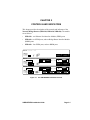
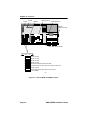
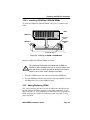
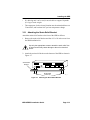
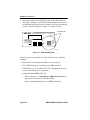
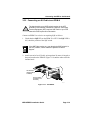
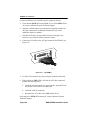
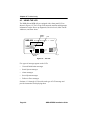
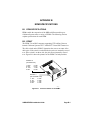
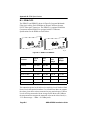
2. Observe the status of the LANVIEW LEDs on the NBR. When the
CPU LED is flashing, the STAND BY LEDs indicate the boot state of
the NBR. During this period (up to 5 minutes), the LEDs cycle through
a series of internal diagnostics. Figure 3-11 shows the LEDs.
LANVIEW LEDs
NBR-620
MULTI PORT BRIDGE ROUTER
®
WITH
LANVIEW
RECEIVE
TRANSMIT
PWR
DISPLAY
COLLISION
CPU
RESET
COM 2
STAND BY
COM 1
D
C
B
A PORT
1092_03
Figure 3-11
NBR LANVIEW LEDs
After the system boot procedure, the LEDs should be in the following
conditions:
•
PWR LED on, indicating that the NBR is receiving power.
•
CPU LED flashing green, indicating proper NBR operation.
•
STAND BY (A, B, C, D) LEDs ON or OFF, depending on the port’s
position in the Spanning Tree Algorithm.
•
Appropriate EPIM/BRIM LEDs ON:
-
Refer to Section 3.5, Connecting the NBR to the Network, for
appropriate LED status for individual EPIMs.
-
Refer to individual BRIM Guides for BRIM LED status.
Page 3-16
NBR-SERIES Installation Guide