1
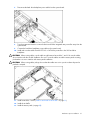
HP ProLiant DL360 Generation 5 Server
User Guide
Second Edition (May 2006)
Part Number 406316-002
© Copyright 2006 Hewlett-Packard Development Company, L.P.
The information contained herein is subject to change without notice. The only warranties for HP products and services are set forth in the express
warranty statements accompanying such products and services. Nothing herein should be construed as constituting an additional warranty. HP
shall not be liable for technical or editorial errors or omissions contained herein.
Microsoft, Windows, and Windows NT are U.S. registered trademarks of Microsoft Corporation. Windows Server 2003 is a trademark of
Microsoft Corporation.
Linux is a U.S. registered trademark of Linus Torvalds.
Second Edition (May 2006)
Part Number 406316-002
Contents
Component identification ............................................................................................................... 7
Front panel components ............................................................................................................................. 7
Front panel LEDs and buttons ...................................................................................................................... 8
Rear panel components.............................................................................................................................. 9
Rear panel LEDs and buttons..................................................................................................................... 10
System board components........................................................................................................................ 11
System maintenance switch............................................................................................................. 12
NMI switch ................................................................................................................................... 12
HP Systems Insight Display and LEDs.......................................................................................................... 12
HP Systems Insight Display LEDs and internal health LED combinations ........................................................... 13
SAS and SATA device numbers................................................................................................................. 15
SAS and SATA hard drive LEDs................................................................................................................. 16
SAS and SATA hard drive LED combinations .............................................................................................. 16
Fan locations .......................................................................................................................................... 17
Operations................................................................................................................................. 18
Power up the server ................................................................................................................................. 18
Power down the server............................................................................................................................. 18
Access the HP Systems Insight Display........................................................................................................ 18
Extend the server from the rack ................................................................................................................. 19
Remove the access panel.......................................................................................................................... 20
Install the access panel............................................................................................................................. 20
Remove the PCI riser board assembly......................................................................................................... 20
Install the PCI riser board assembly............................................................................................................ 21
Remove the power supply air baffle ........................................................................................................... 21
Remove the processor air baffle ................................................................................................................ 22
Remove and install a fan module............................................................................................................... 22
Setup......................................................................................................................................... 25
Optional installation services .................................................................................................................... 25
Rack planning resources........................................................................................................................... 26
Optimum environment.............................................................................................................................. 26
Space and airflow requirements ...................................................................................................... 26
Temperature requirements............................................................................................................... 27
Power requirements ....................................................................................................................... 27
Electrical grounding requirements .................................................................................................... 27
Rack warnings ........................................................................................................................................ 28
Contents of the server shipping carton........................................................................................................ 28
Installing hardware options....................................................................................................................... 28
Installing the server into the rack................................................................................................................ 28
Powering up and configuring the server ..................................................................................................... 30
Installing the operating system................................................................................................................... 30
Registering the server............................................................................................................................... 31
Hardware options installation....................................................................................................... 32
Introduction ............................................................................................................................................ 32
Processor option...................................................................................................................................... 32
Memory options ...................................................................................................................................... 37
Memory configurations................................................................................................................... 37
Advanced ECC memory ................................................................................................................. 38
Online spare memory configuration ................................................................................................. 38
Contents
3
Mirrored memory configuration ....................................................................................................... 39
Installing FBDIMMs ........................................................................................................................ 40
Hot-plug SAS and SATA hard drive options ................................................................................................ 40
Removing hard drive blanks............................................................................................................ 41
Removing hard drive bezel blanks ................................................................................................... 41
Removing a hot-plug SAS or SATA hard drive ................................................................................... 42
Installing a hot-plug SAS or SATA hard drive .................................................................................... 42
Multibay device options ........................................................................................................................... 43
Redundant hot-plug power supply option .................................................................................................... 44
Expansion board options.......................................................................................................................... 46
Installing an expansion board ......................................................................................................... 46
Installing a PCI-X riser board ........................................................................................................... 47
HP Smart Array controller options.............................................................................................................. 49
Removing an integrated HP Smart Array E200i Controller or an HP Smart Array P400i Controller ........... 50
Installing an integrated HP Smart Array E200i Controller or an HP Smart Array P400i Controller ............ 51
Upgrading an HP Smart Array E200i Controller cache module and battery pack................................... 52
Installing an HP Smart Array P400i Controller cache module and battery pack...................................... 55
Upgrading the HP Smart Array P400i Controller to support six hard drives ........................................... 59
Using a PCI SAS or SATA array controller to support six hard drives .................................................... 60
Using a PCI array controller and the HP Smart Array P400i Controller to support six hard drives ............. 62
Cabling ..................................................................................................................................... 63
Cabling overview .................................................................................................................................... 63
Array controller cabling ........................................................................................................................... 63
HP Smart Array E200i Controller cabling ......................................................................................... 64
HP Smart Array P400i Controller cabling ......................................................................................... 64
PCI Smart Array controller cabling................................................................................................... 65
Battery pack cabling ...................................................................................................................... 65
Multibay backplane cabling ..................................................................................................................... 66
Configuration and utilities ............................................................................................................ 67
Configuration tools .................................................................................................................................. 67
SmartStart software........................................................................................................................ 67
HP ROM-Based Setup Utility............................................................................................................ 68
Array Configuration Utility .............................................................................................................. 70
Option ROM Configuration for Arrays ............................................................................................. 70
HP ProLiant Essentials Rapid Deployment Pack................................................................................... 70
Re-entering the server serial number and product ID ........................................................................... 71
Management tools................................................................................................................................... 71
Automatic Server Recovery ............................................................................................................. 71
ROMPaq utility.............................................................................................................................. 71
System Online ROM flash component utility ...................................................................................... 72
Integrated Lights-Out 2 technology ................................................................................................... 72
Erase Utility .................................................................................................................................. 72
Management Agents...................................................................................................................... 73
HP Systems Insight Manager ........................................................................................................... 73
Redundant ROM support ................................................................................................................ 73
USB support.................................................................................................................................. 74
Internal USB functionality ................................................................................................................ 74
Diagnostic tools ...................................................................................................................................... 74
Survey Utility................................................................................................................................. 74
Array Diagnostic Utility .................................................................................................................. 75
HP Insight Diagnostics .................................................................................................................... 75
Integrated Management Log ........................................................................................................... 75
Contents
4
Remote support and analysis tools ............................................................................................................. 75
HP Instant Support Enterprise Edition................................................................................................ 75
Web-Based Enterprise Service......................................................................................................... 76
Open Services Event Manager ........................................................................................................ 76
Keeping the system current ....................................................................................................................... 76
Drivers ......................................................................................................................................... 76
Resource Paqs............................................................................................................................... 77
ProLiant Support Packs ................................................................................................................... 77
Operating system version support .................................................................................................... 77
System Online ROM flash component utility ...................................................................................... 77
Change control and proactive notification ........................................................................................ 77
Natural language search assistant ................................................................................................... 77
Care Pack .................................................................................................................................... 78
Troubleshooting .......................................................................................................................... 79
Troubleshooting resources ........................................................................................................................ 79
Pre-diagnostic steps ................................................................................................................................. 79
Important safety information............................................................................................................ 79
Symptom information ..................................................................................................................... 81
Prepare the server for diagnosis ...................................................................................................... 82
Loose connections ................................................................................................................................... 82
Service notifications................................................................................................................................. 82
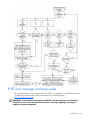
Troubleshooting flowcharts ....................................................................................................................... 83
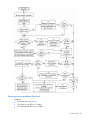
Start diagnosis flowchart ................................................................................................................ 83
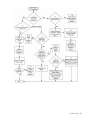
General diagnosis flowchart ........................................................................................................... 84
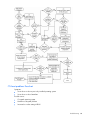
Server power-on problems flowchart ................................................................................................ 86
POST problems flowchart ............................................................................................................... 89
OS boot problems flowchart ........................................................................................................... 90
Server fault indications flowchart ..................................................................................................... 92
POST error messages and beep codes ....................................................................................................... 94
System battery ............................................................................................................................ 95
Regulatory compliance notices ..................................................................................................... 96
Regulatory compliance identification numbers ............................................................................................. 96
Federal Communications Commission notice............................................................................................... 96
FCC rating label............................................................................................................................ 96
Class A equipment......................................................................................................................... 97
Class B equipment ......................................................................................................................... 97
Declaration of conformity for products marked with the FCC logo, United States only....................................... 97
Modifications.......................................................................................................................................... 98
Cables ................................................................................................................................................... 98
Canadian notice (Avis Canadien).............................................................................................................. 98
European Union regulatory notice ............................................................................................................. 98
Disposal of waste equipment by users in private households in the European Union ......................................... 99
Japanese notice ...................................................................................................................................... 99
BSMI notice ............................................................................................................................................ 99
Korean notice ....................................................................................................................................... 100
Laser compliance .................................................................................................................................. 100
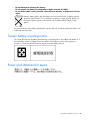
Battery replacement notice...................................................................................................................... 100
Taiwan battery recycling notice............................................................................................................... 101
Power cord statement for Japan............................................................................................................... 101
Electrostatic discharge ............................................................................................................... 102
Preventing electrostatic discharge ............................................................................................................ 102
Contents
5
Grounding methods to prevent electrostatic discharge ................................................................................ 102
Specifications ........................................................................................................................... 103
Environmental specifications ................................................................................................................... 103
Server specifications .............................................................................................................................. 103
Technical support...................................................................................................................... 105
Related documents ................................................................................................................................ 105
HP contact information ........................................................................................................................... 105
Customer Self Repair ............................................................................................................................. 105
Acronyms and abbreviations...................................................................................................... 113
Index....................................................................................................................................... 116
Contents
6
Component identification
In this section
Front panel components ............................................................................................................................ 7
Front panel LEDs and buttons ..................................................................................................................... 8
Rear panel components............................................................................................................................. 9
Rear panel LEDs and buttons ................................................................................................................... 10
System board components....................................................................................................................... 11
HP Systems Insight Display and LEDs ........................................................................................................ 12
HP Systems Insight Display LEDs and internal health LED combinations ......................................................... 13
SAS and SATA device numbers ............................................................................................................... 15
SAS and SATA hard drive LEDs ............................................................................................................... 16
SAS and SATA hard drive LED combinations ............................................................................................. 16
Fan locations ......................................................................................................................................... 17
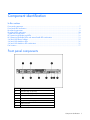
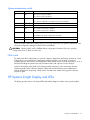
Front panel components
Item
Description
1
Hard drive bay 5 (optional)*
2
Hard drive bay 6 (optional)*
3
Multibay drive bay
4
USB connector
5
HP Systems Insight Display
6
Video connector
7
Hard drive bay 4
Component identification 7
Item
Description
8
Hard drive bay 3
9
Hard drive bay 2
10
Hard drive bay 1
*An optional controller is required when the server is configured with six hard drives.
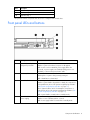
Front panel LEDs and buttons
Item
Description
Status
1
Power On/Standby button
and system power LED
Green = System is on.
Amber = System is shut down, but power is still applied.
Off = Power cord is not attached, power supply failure has
occurred, no power supplies are installed, facility power is not
available, or disconnected power button cable.
2
UID button/LED
Blue = Identification is activated.
Flashing blue = System is being remotely managed.
Off = Identification is deactivated.
3
Internal health LED
Green = System health is normal.
Amber = System health is degraded. To identify the component in
a degraded state, refer to "HP Systems Insight Display and LEDs"
("HP Systems Insight Display and LEDs" on page 12).
Red = System health is critical. To identify the component in a
critical state, refer to "HP Systems Insight Display and LEDs" ("HP
Systems Insight Display and LEDs" on page 12).
Off = System health is normal (when in standby mode).
4
External health LED
(power supply)
Green = Power supply health is normal.
Amber = Power redundancy failure occurred.
Off = Power supply health is normal when in standby mode.
Component identification 8
Item
Description
Status
5
NIC 1 link/activity LED
Green = Network link exists.
Flashing green = Network link and activity exist.
Off = No link to network exists.
If power is off, the front panel LED is not active. View the LEDs on
the RJ-45 connector for status by referring to the rear panel LEDs
("Rear panel LEDs and buttons" on page 10).
6
NIC 2 link/activity LED
Green = Network link exists.
Flashing green = Network link and activity exist.
Off = No link to network exists.
If power is off, the front panel LED is not active. View the LEDs on
the RJ-45 connector for status by referring to the rear panel LEDs
("Rear panel LEDs and buttons" on page 10).
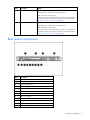
Rear panel components
Item
Description
1
PCI Express expansion slot 1, low-profile, half-length
2
PCI Express expansion slot 2
3
Power supply bay 2
4
Power supply bay 1
5
NIC 2 connector
6
NIC 1 connector
7
Keyboard connector
8
Mouse connector
9
Video connector
10
Serial connector
11
USB connector
12
USB connector
Component identification 9
Item
Description
13
iLO 2 NIC connector
Rear panel LEDs and buttons
Item
Description
Status
1
iLO 2 NIC activity
LED
Green = Activity exists.
Flashing green = Activity exists.
Off = No activity exists.
2
3
iLO 2 NIC link
LED
Green = Link exists.
10/100/1000
Green = Activity exists.
NIC 1 activity LED
Flashing green = Activity exists.
Off = No link exists.
Off = No activity exists.
4
5
10/100/1000
Green = Link exists.
NIC 1 link LED
Off = No link exists.
10/100/1000
Green = Activity exists.
NIC 2 activity LED
Flashing green = Activity exists.
Off = No activity exists.
6
7
10/100/1000
Green = Link exists.
NIC 2 link LED
Off = No link exists.
UID button/LED
Blue = Identification is activated.
Flashing blue = System is being managed
remotely.
Off = Identification is deactivated.
8
9
Power supply 2
LED
Green = Normal
Power supply 1
LED
Green = Normal
Off = System is off or power supply has failed
Off = System is off or power supply has failed
Component identification 10
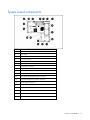
System board components
Item
Description
1
System maintenance switch (SW1)
2
NMI switch
3
FBDIMM slots (1-8)
4
Processor socket 2
5
Processor socket 1
6
Multibay drive connector
7
Power button connector
8
Fan module 3 connectors
9
Fan module 2 connectors
10
Fan module 1 connectors
11
SAS hard drive backplane power connector
12
Integrated Smart Array controller connector
13
Power supply connector 1
14
Power supply connector 2
15
Internal USB connector
16
System battery
17
PCI riser board connector 2
18
PCI riser board connector 1
Component identification 11
System maintenance switch
Position
Default
Function
S1
Off
Off = iLO 2 security is enabled.
On = iLO 2 security is disabled.
S2
Off
Off = System configuration can be modified.
On = System configuration is locked and cannot be modified.
S3
Off
Reserved
S4
Off
Reserved
S5
Off
Off = Power-on password is enabled.
On = Power-on password is disabled.
S6
Off
Off = Normal
On = ROM treats system configuration as invalid.
S7
Off
Reserved
S8
Off
Reserved
When the system maintenance switch position 6 is set to the On position, the system is prepared to erase
all system configuration settings from both CMOS and NVRAM.
CAUTION: Clearing CMOS and/or NVRAM deletes configuration information. Be sure to properly
configure the server or data loss could occur.
NMI switch
The NMI switch allows administrators to perform a memory dump before performing a hard reset. Crash
dump analysis is an essential part of eliminating reliability problems, such as hangs or crashes in
operating systems, device drivers, and applications. Many crashes freeze a system, requiring you to do a
hard reset. Resetting the system erases any information that would support root cause analysis.
Systems running Microsoft® Windows® operating systems experience a blue screen trap when the
operating system crashes. When this happens, Microsoft® recommends that system administrators
perform an NMI event by pressing a dump switch. The NMI event enables a hung system to become
responsive again.
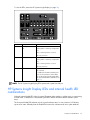
HP Systems Insight Display and LEDs
The display provides status for all internal LEDs and enables diagnosis with the access panel installed.
Component identification 12
To view the LEDs, access the HP Systems Insight Display (on page 18).
Item
Description
Status
1
Online spare memory
LED
Green = Protection enabled
Flashing amber = Memory configuration
error
Amber = Memory failure occurred
Off = No protection
2
Mirrored memory LED
Green = Protection enabled
Flashing amber = Memory configuration
error
Amber = Memory failure occurred
Off = No protection
All other LEDs
Amber = Failure
Off = Normal
For additional information detailing the
causes for the activation of these LEDs,
refer to HP Systems Insight Display LEDs
and internal health LED combinations (on
page 13).
NOTE: The HP Systems Insight Display LEDs represent the system board layout.
HP Systems Insight Display LEDs and internal health LED
combinations
When the internal health LED on the front panel illuminates either amber or red, the server is experiencing
a health event. Combinations of illuminated system LEDs and the internal health LED indicate system
status.
The front panel health LEDs indicate only the current hardware status. In some situations, HP SIM may
report server status differently than the health LEDs because the software tracks more system attributes.
Component identification 13
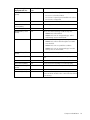
HP Systems Insight
Display LED and color
Internal health LED
color
Processor failure, socket X Red
(amber)
Status
One or more of the following conditions may exist:
•
Processor in socket X has failed.
•
Processor X is required yet not installed in the socket.
•
Processor X is unsupported.
Amber
Processor in socket X is in a pre-failure condition.
Processor failure, both
sockets (amber)
Red
Processor types are mismatched.
PPM failure (amber)
Red
Integrated PPM has failed.
FBDIMM failure, slot X
(amber)
Red
One or more of the following conditions may exist:
Amber
•
FBDIMM in slot X has failed.
•
FBDIMM in slot X is an unsupported type, and no
valid memory exists in another bank.
One or more of the following conditions may exist:
•
FBDIMM in slot X has reached single-bit correctable
error threshold.
•
FBDIMM in slot X is in a pre-failure condition.
•
FBDIMM in slot X is an unsupported type, but valid
memory exists in another bank.
FBDIMM failure, all slots
(amber)
Red
No valid or usable memory is installed in the system.
Overtemperature (amber)
Amber
The health driver has detected a cautionary temperature
level.
Red
The server has detected a critical temperature level.
Riser interlock (amber)
Red
The PCI riser board assembly is not seated properly.
Online spare memory
(amber)
Amber
Bank X failed over to the online spare memory bank.
Fan module (amber)
Amber
A redundant fan has failed.
Fan module (amber)
Red
The minimum fan requirements are not being met in one
or more of the fan modules. One or more fans have failed
or are missing.
Component identification 14
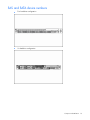
SAS and SATA device numbers
•
Four hard drive configuration
•
Six hard drive configuration
Component identification 15
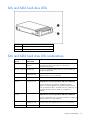
SAS and SATA hard drive LEDs
Item
Description
1
Fault/UID LED (amber/blue)
2
Online LED (green)
SAS and SATA hard drive LED combinations
Online/activity LED Fault/UID LED
(green)
(amber/blue)
Interpretation
On, off, or flashing Alternating amber
and blue
The drive has failed, or a predictive failure alert has been
received for this drive; it also has been selected by a
management application.
On, off, or flashing Steadily blue
The drive is operating normally, and it has been selected by a
management application.
Amber, flashing
regularly (1 Hz)
A predictive failure alert has been received for this drive.
On
Off
The drive is online, but it is not active currently.
Flashing regularly
(1 Hz)
Amber, flashing
regularly (1 Hz)
Do not remove the drive. Removing a drive may
terminate the current operation and cause data loss.
On
Replace the drive as soon as possible.
The drive is part of an array that is undergoing capacity
expansion or stripe migration, but a predictive failure alert has
been received for this drive. To minimize the risk of data loss, do
not replace the drive until the expansion or migration is
complete.
Flashing regularly
(1 Hz)
Off
Do not remove the drive. Removing a drive may
terminate the current operation and cause data loss.
The drive is rebuilding, or it is part of an array that is undergoing
capacity expansion or stripe migration.
Flashing irregularly Amber, flashing
regularly (1 Hz)
The drive is active, but a predictive failure alert has been
received for this drive. Replace the drive as soon as possible.
Flashing irregularly Off
The drive is active, and it is operating normally.
Component identification 16
Online/activity LED Fault/UID LED
(green)
(amber/blue)
Interpretation
Off
Steadily amber
A critical fault condition has been identified for this drive, and
the controller has placed it offline. Replace the drive as soon as
possible.
Off
Amber, flashing
regularly (1 Hz)
A predictive failure alert has been received for this drive.
Replace the drive as soon as possible.
Off
Off
The drive is offline, a spare, or not configured as part of an
array.
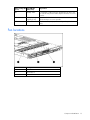
Fan locations
Item
Description
1
Fan module 1
2
Fan module 2
3
Fan module 3
Component identification 17
Operations
In this section
Power up the server ................................................................................................................................ 18
Power down the server............................................................................................................................ 18
Access the HP Systems Insight Display ...................................................................................................... 18
Extend the server from the rack ................................................................................................................ 19
Remove the access panel ........................................................................................................................ 20
Install the access panel ........................................................................................................................... 20
Remove the PCI riser board assembly ....................................................................................................... 20
Install the PCI riser board assembly .......................................................................................................... 21
Remove the power supply air baffle.......................................................................................................... 21
Remove the processor air baffle ............................................................................................................... 22
Remove and install a fan module.............................................................................................................. 22
Power up the server
To power up the server, press the Power On/Standby button.
Power down the server
WARNING: To reduce the risk of personal injury, electric shock, or damage to the
equipment, remove the power cord to remove power from the server. The front panel
Power On/Standby button does not completely shut off system power. Portions of the
power supply and some internal circuitry remain active until AC power is removed.
IMPORTANT: If installing a hot-plug device, it is not necessary to power down the server.
1.
Back up the server data.
2.
Shut down the operating system as directed by the operating system documentation.
3.
If the server is installed in a rack, press the UID LED button on the front panel. Blue LEDs illuminate on
the front and rear panels of the server.
4.
Press the Power On/Standby button to place the server in standby mode. When the server activates
standby power mode, the system power LED changes to amber.
5.
If the server is installed in a rack, locate the server by identifying the illuminated rear UID LED button.
6.
Disconnect the power cords.
The system is now without power.
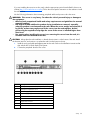
Access the HP Systems Insight Display
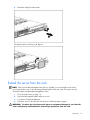
To eject the HP Systems Insight Display:
1.
Press and release the display.
Operations 18
2.
Extend the display from the chassis.
The display can be rotated up to 90 degrees.
Extend the server from the rack
NOTE: If the optional cable management arm option is installed, you can extend the server without
powering down the server or disconnecting peripheral cables and power cords. These steps are only
necessary with the standard cable management solution.
1.
Power down the server (on page 18).
2.
Disconnect all peripheral cables and power cords.
3.
Loosen the front panel thumbscrews.
4.
Extend the server on the rack rails until the server rail-release latches engage.
WARNING: To reduce the risk of personal injury or equipment damage, be sure that the
rack is adequately stabilized before extending a component from the rack.
Operations 19
WARNING: To reduce the risk of personal injury, be careful when pressing the server
rail-release latches and sliding the server into the rack. The sliding rails could pinch your
fingers.
5.
After performing the installation or maintenance procedure, slide the server into the rack:
a. Slide the server fully into the rack.
b. Secure the server by tightening the thumbscrews.
6.
Connect the peripheral cables and power cords.
Remove the access panel
WARNING: To reduce the risk of personal injury from hot surfaces, allow the drives and
the internal system components to cool before touching them.
CAUTION: Do not operate the server for long periods with the access panel open or removed. Operating
the server in this manner results in improper airflow and improper cooling that can lead to thermal damage.
1.
Power down the server if the standard cable management solution is installed ("Power down the
server" on page 18).
NOTE: If the optional cable management arm is installed, you can extend the server and perform hot-plug
installation or maintenance procedures without powering down the server.
2.
Extend or remove the server from the rack ("Extend the server from the rack" on page 19).
3.
Lift up on the hood latch handle and remove the access panel.
Install the access panel
1.
Place the access panel on top of the server with the hood latch open. Allow the panel to extend past
the rear of the server approximately 0.8 cm (0.2 in).
2.
Engage the anchoring pin with the corresponding hole in the latch.
3.
Push down on the hood latch. The access panel slides to a closed position.
Remove the PCI riser board assembly
CAUTION: To prevent damage to the server or expansion boards, power down the server and remove all
AC power cords before removing or installing the PCI riser board assembly.
1.
Power down the server (on page 18).
2.
Extend or remove the server from the rack ("Extend the server from the rack" on page 19).
3.
Remove the access panel (on page 20).
4.
Remove the PCI riser board assembly:
a. Disconnect external cables connected to any existing expansion boards.
b. Loosen the four PCI riser board assembly thumbscrews.
Operations 20
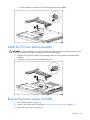
c. Lift the assembly to unseat the PCI riser boards and remove the assembly.
Install the PCI riser board assembly
CAUTION: To prevent damage to the server or expansion boards, power down the server and remove all
AC power cords before removing or installing the PCI riser board assembly.
1.
Align the PCI riser boards with the corresponding connectors on the system board and install the
assembly.
2.
Tighten the four PCI riser board assembly thumbscrews.
Remove the power supply air baffle
1.
Power down the server (on page 18).
2.
Extend or remove the server from the rack ("Extend the server from the rack" on page 19).
3.
Remove the access panel (on page 20).
Operations 21
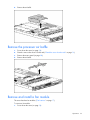
4.
Remove the air baffle.
Remove the processor air baffle
1.
Power down the server (on page 18).
2.
Extend or remove the server from the rack ("Extend the server from the rack" on page 19).
3.
Remove the access panel (on page 20).
4.
Remove the air baffle.
Remove and install a fan module
The server has three fan modules ("Fan locations" on page 17).
To remove a fan module:
1.
Power down the server (on page 18).
Operations 22
2.
Extend or remove the server from the rack ("Extend the server from the rack" on page 19).
3.
Remove the access panel (on page 20).
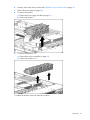
4.
To remove fan module 1:
a. Remove the power supply air baffle (on page 21).
b. Remove fan module 1.
5.
To remove fan module 2 or 3:
a. Remove the processor air baffle (on page 22).
b. Remove fan module 2 or 3.
To install a fan module, reverse the removal procedures.
Operations 23
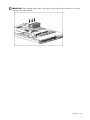
IMPORTANT: After installing the fan module, firmly press the top of the module connectors to ensure the
connectors are seated properly.
Operations 24
Setup
In this section
Optional installation services ................................................................................................................... 25
Rack planning resources ......................................................................................................................... 26
Optimum environment............................................................................................................................. 26
Rack warnings ....................................................................................................................................... 28
Contents of the server shipping carton ...................................................................................................... 28
Installing hardware options ..................................................................................................................... 28
Installing the server into the rack .............................................................................................................. 28
Powering up and configuring the server .................................................................................................... 30
Installing the operating system ................................................................................................................. 30
Registering the server.............................................................................................................................. 31
Optional installation services
Delivered by experienced, certified engineers, HP Care Pack services help you keep your servers up and
running with support packages tailored specifically for HP ProLiant systems. HP Care Packs let you
integrate both hardware and software support into a single package. A number of service level options
are available to meet your needs.
HP Care Pack Services offer upgraded service levels to expand your standard product warranty with easyto-buy, easy-to-use support packages that help you make the most of your server investments. Some of the
Care Pack services are:
•
•
•
•
Hardware support
•
6-Hour Call-to-Repair
•
4-Hour 24x7 Same Day
•
4-Hour Same Business Day
Software support
•
Microsoft®
•
Linux
•
HP ProLiant Essentials (HP SIM and RDP)
•
VMWare
Integrated hardware and software support
•
Critical Service
•
Proactive 24
•
Support Plus
•
Support Plus 24
Startup and implementation services for both hardware and software
For more information on Care Packs, refer to the HP website
(http://www.hp.com/hps/carepack/servers/cp_proliant.html).
Setup 25
Rack planning resources
The rack resource kit ships with all HP branded or Compaq branded 9000, 10000, and H9 series racks.
For more information on the content of each resource, refer to the rack resource kit documentation.
If you intend to deploy and configure multiple servers in a single rack, refer to the white paper on highdensity deployment at the HP website (http://www.hp.com/products/servers/platforms).
Optimum environment
When installing the server in a rack, select a location that meets the environmental standards described in
this section.
Space and airflow requirements
To allow for servicing and adequate airflow, observe the following space and airflow requirements when
deciding where to install a rack:
•
Leave a minimum clearance of 63.5 cm (25 in) in front of the rack.
•
Leave a minimum clearance of 76.2 cm (30 in) behind the rack.
•
Leave a minimum clearance of 121.9 cm (48 in) from the back of the rack to the back of another
rack or row of racks.
HP servers draw in cool air through the front door and expel warm air through the rear door. Therefore,
the front and rear rack doors must be adequately ventilated to allow ambient room air to enter the
cabinet, and the rear door must be adequately ventilated to allow the warm air to escape from the
cabinet.
CAUTION: To prevent improper cooling and damage to the equipment, do not block the ventilation
openings.
When vertical space in the rack is not filled by a server or rack component, the gaps between the
components cause changes in airflow through the rack and across the servers. Cover all gaps with
blanking panels to maintain proper airflow.
CAUTION: Always use blanking panels to fill empty vertical spaces in the rack. This arrangement ensures
proper airflow. Using a rack without blanking panels results in improper cooling that can lead to thermal
damage.
The 9000 and 10000 Series Racks provide proper server cooling from flow-through perforations in the
front and rear doors that provide 64 percent open area for ventilation.
CAUTION: When using a Compaq branded 7000 Series rack, you must install the high airflow rack door
insert [P/N 327281-B21 (42U) or P/N 157847-B21 (22U)] to provide proper front-to-back airflow and
cooling.
CAUTION: If a third-party rack is used, observe the following additional requirements to ensure adequate
airflow and to prevent damage to the equipment:
• Front and rear doors—If the 42U rack includes closing front and rear doors, you must allow 5,350 sq
cm (830 sq in) of holes evenly distributed from top to bottom to permit adequate airflow (equivalent to
the required 64 percent open area for ventilation).
• Side—The clearance between the installed rack component and the side panels of the rack must be a
minimum of 7 cm (2.75 in).
Setup 26
Temperature requirements
To ensure continued safe and reliable equipment operation, install or position the system in a wellventilated, climate-controlled environment.
The maximum recommended ambient operating temperature (TMRA) for most server products is 35°C
(95°F). The temperature in the room where the rack is located must not exceed 35°C (95°F).
CAUTION: To reduce the risk of damage to the equipment when installing third-party options:
• Do not permit optional equipment to impede airflow around the server or to increase the internal rack
temperature beyond the maximum allowable limits.
• Do not exceed the manufacturer’s TMRA.
Power requirements
Installation of this equipment must comply with local and regional electrical regulations governing the
installation of information technology equipment by licensed electricians. This equipment is designed to
operate in installations covered by NFPA 70, 1999 Edition (National Electric Code) and NFPA-75, 1992
(code for Protection of Electronic Computer/Data Processing Equipment). For electrical power ratings on
options, refer to the product rating label or the user documentation supplied with that option.
WARNING: To reduce the risk of personal injury, fire, or damage to the equipment, do
not overload the AC supply branch circuit that provides power to the rack. Consult the
electrical authority having jurisdiction over wiring and installation requirements of your
facility.
CAUTION: Protect the server from power fluctuations and temporary interruptions with a regulating
uninterruptible power supply (UPS). This device protects the hardware from damage caused by power
surges and voltage spikes and keeps the system in operation during a power failure.
When installing more than one server, you may need to use additional power distribution devices to
safely provide power to all devices. Observe the following guidelines:
•
Balance the server power load between available AC supply branch circuits.
•
Do not allow the overall system AC current load to exceed 80 percent of the branch circuit AC
current rating.
•
Do not use common power outlet strips for this equipment.
•
Provide a separate electrical circuit for the server.
For more information on the hot-plug power supply and calculators to determine server power
consumption in various system configurations, refer to the HP Enterprise Configurator website
(http://h30099.www3.hp.com/configurator/).
Electrical grounding requirements
The server must be grounded properly for proper operation and safety. In the United States, you must
install the equipment in accordance with NFPA 70, 1999 Edition (National Electric Code), Article 250,
as well as any local and regional building codes. In Canada, you must install the equipment in
accordance with Canadian Standards Association, CSA C22.1, Canadian Electrical Code. In all other
countries, you must install the equipment in accordance with any regional or national electrical wiring
codes, such as the International Electrotechnical Commission (IEC) Code 364, parts 1 through 7.
Furthermore, you must be sure that all power distribution devices used in the installation, such as branch
wiring and receptacles, are listed or certified grounding-type devices.
Because of the high ground-leakage currents associated with multiple servers connected to the same
power source, HP recommends the use of a PDU that is either permanently wired to the building’s branch
circuit or includes a nondetachable cord that is wired to an industrial-style plug. NEMA locking-style plugs
Setup 27
or those complying with IEC 60309 are considered suitable for this purpose. Using common power outlet
strips for the server is not recommended.
Rack warnings
WARNING: To reduce the risk of personal injury or damage to the equipment, be sure
that:
• The leveling jacks are extended to the floor.
• The full weight of the rack rests on the leveling jacks.
• The stabilizing feet are attached to the rack if it is a single-rack installation.
• The racks are coupled together in multiple-rack installations.
• Only one component is extended at a time. A rack may become unstable if more than
one component is extended for any reason.
WARNING: To reduce the risk of personal injury or equipment damage when unloading
a rack:
• At least two people are needed to safely unload the rack from the pallet. An empty
42U rack can weigh as much as 115 kg (253 lb), can stand more than 2.1 m (7 ft)
tall, and may become unstable when being moved on its casters.
• Never stand in front of the rack when it is rolling down the ramp from the pallet.
Always handle the rack from both sides.
Contents of the server shipping carton
Unpack the server shipping carton and locate the materials and documentation necessary for installing the
server. All the rack mounting hardware necessary for installing the server into the rack is included with the
rack or the server.
The contents of the server shipping carton include:
•
Server
•
Power cord
•
Printed setup documentation, Documentation CD, and software products
•
Rack mounting hardware kit and documentation
In addition to these supplied items, you may need:
•
T-15 Torx screwdriver
•
Hardware options
•
Operating system or application software
Installing hardware options
Install any hardware options before initializing the server. For options installation information, refer to the
option documentation. For server-specific information, refer to "Hardware options installation (on page
32)."
Installing the server into the rack
To install the server into a rack with square, round, or threaded holes, refer to the instructions that ship
with the rack hardware kit.
Setup 28
If you are installing the server into a telco rack, order the appropriate option kit at the RackSolutions.com
website (http://www.racksolutions.com/hp). Follow the server-specific instructions on the website to install
the rack brackets.
Use the following information when connecting peripheral cables and power cords to the server.
WARNING: This server is very heavy. To reduce the risk of personal injury or damage to
the equipment:
• Observe local occupational health and safety requirements and guidelines for manual
material handling.
• Get help to lift and stabilize the product during installation or removal, especially
when the product is not fastened to the rails. When the server weighs more than 22.5
kg (50 lb), at least two people must lift the server into the rack together. A third
person may be required to help align the server if the server is installed higher than
chest level.
• Use caution when installing the server in or removing the server from the rack; it is
unstable when not fastened to the rails.
CAUTION: Always plan the rack installation so that the heaviest item is on the bottom of the rack. Install
the heaviest item first, and continue to populate the rack from the bottom to the top.
1.
Install the server and cable management arm into the rack. Refer to the installation instructions that
ship with the HP 1U Quick Deploy Rail System.
2.
Connect the peripheral devices to the server.
Item
Description
1
PCI Express expansion slot 1, low-profile, half-length
2
PCI Express expansion slot 2
3
Power supply bay 2
4
Power supply bay 1
5
NIC 2 connector
6
NIC 1 connector
7
Keyboard connector
8
Mouse connector
9
Video connector
Setup 29
Item
Description
10
Serial connector
11
USB connector
12
USB connector
13
iLO 2 NIC connector
3.
Use the strain relief clip from the server hardware kit to secure the power cord.
Powering up and configuring the server
To power up the server, press the Power On/Standby button.
While the server boots, RBSU and the ORCA utility are automatically configured to prepare the server for
operating system installation.
To configure these utilities manually:
•
Press the F8 key when prompted during the array controller initialization to configure the array
controller using ORCA.
•
Press the F9 key when prompted during the boot process to change the server settings using RBSU.
The system is set up by default for the English language.
For more information on the automatic configuration, refer to the HP ROM-Based Setup Utility User Guide
located on the Documentation CD.
Installing the operating system
To operate properly, the server must have a supported operating system. For the latest information on
supported operating systems, refer to the HP website (http://www.hp.com/go/supportos).
Two methods are available to install an operating system on the server:
•
SmartStart assisted installation—Insert the SmartStart CD into the CD-ROM drive and reboot the
server.
Setup 30
•
Manual installation—Insert the operating system CD into the CD-ROM drive and reboot the server.
This process may require you to obtain additional drivers from the HP website
(http://www.hp.com/support).
Follow the on-screen instructions to begin the installation process.
For information on using these installation paths, refer to the SmartStart installation poster in the HP
ProLiant Essentials Foundation Pack, included with the server.
Registering the server
To register the server, refer to the HP Registration website (http://register.hp.com).
Setup 31
Hardware options installation
In this section
Introduction ........................................................................................................................................... 32
Processor option..................................................................................................................................... 32
Memory options ..................................................................................................................................... 37
Hot-plug SAS and SATA hard drive options............................................................................................... 40
Multibay device options .......................................................................................................................... 43
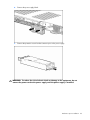
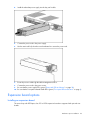
Redundant hot-plug power supply option................................................................................................... 44
Expansion board options ........................................................................................................................ 46
HP Smart Array controller options ............................................................................................................ 49
Introduction
If more than one option is being installed, read the installation instructions for all the hardware options
and identify similar steps to streamline the installation process.
WARNING: To reduce the risk of personal injury from hot surfaces, allow the drives and
the internal system components to cool before touching them.
CAUTION: To prevent damage to electrical components, properly ground the server before beginning any
installation procedure. Improper grounding can cause electrostatic discharge.
Processor option
The server supports single- and dual-processor operation. With two processors installed, the server
supports boot functions through the processor installed in processor socket 1.
The server uses embedded PPMs as DC-to-DC converters to provide the proper power to each processor.
CAUTION: To prevent possible server malfunction, do not mix processors of different speeds or cache
sizes. Refer to the label on the processor heatsink for a description of the processor.
CAUTION: Removal of the processor or heatsink renders the thermal layer between the processor and
heatsink useless. A new heatsink must be ordered and installed before reinstalling the processor.
IMPORTANT: Processor socket 1 must be populated at all times or the server does not function.
1.
Power down the server (on page 18).
2.
Extend the server from the rack (on page 19).
3.
Remove the access panel (on page 20).
4.
Remove the power supply air baffle (on page 21).
5.
Remove the processor air baffle (on page 22).
Hardware options installation
32
6.
Open the processor retaining latch and the processor socket retaining bracket.
7.
Remove the processor socket protective cover.
IMPORTANT: Be sure the processor remains inside the processor installation tool.
Hardware options installation
33
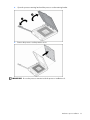
8.
If the processor has separated from the installation tool, carefully re-insert the processor in the tool.
9.
Align the processor installation tool with the socket and install the processor.
Hardware options installation
34
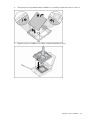
10. Press down firmly until the processor installation tool clicks and separates from the processor, and
then remove the processor installation tool.
11. Close the processor socket retaining bracket and the processor retaining latch.
Hardware options installation
35
12. Remove the heatsink protective cover.
13. Open the heatsink retaining latches.
Hardware options installation
36
14. Install the heatsink.
15. Install the processor air baffle.
16. Install the power supply air baffle.
17. Install the access panel (on page 20).
18. Slide the server into the rack.
19. Power up the server (on page 18).
Memory options
This server contains eight FBDIMM slots. You can expand server memory by installing supported
Registered DDR-2 FBDIMMs.
Memory configurations
The server supports the following Advanced Memory Protection (AMP) options to optimize server
availability.
•
Advanced ECC supporting up to 16 GB of active memory using 2-GB FBDIMMs.
•
Online Spare Memory providing additional protection against degrading FBDIMMs supporting up to
12 GB of active memory and 4 GB of online spare memory utilizing 2-GB FBDIMMs.
•
Mirrored Memory providing protection against failed FBDIMMs supporting up to 8 GB of active
memory and 8 GB of mirrored memory utilizing 2-GB FBDIMMs.
Maximum memory capacities for all AMP modes will increase with the availability of 4-GB and 8-GB
FBDIMMs, including a maximum of 64 GB in Advanced ECC mode. For the latest memory configuration
information, refer to the QuickSpecs on the HP website (http://www.hp.com).
The Advanced Memory Protection option is configured in RBSU. By default, the server is set to Advanced
ECC mode. For more information, refer to HP ROM-Based Setup Utility (on page 68). If the configured
AMP mode is not supported by the installed FBDIMM configuration, the system boots in Advanced ECC
mode.
The following configuration requirements apply to all AMP modes:
•
FBDIMMS must be ECC Registered DDR-2 SDRAM FBDIMMs.
•
FBDIMMs must be installed in pairs.
Hardware options installation
37
•
FBDIMM pairs in a memory bank must have identical HP part numbers.
•
FBDIMMS must be populated as specified for each AMP memory mode.
The memory subsystem for this server is divided into two branches. Each memory branch is essentially a
separate memory controller. The FBDIMMs map to the two branches as indicated in the following table:
Branch 0
Branch 1
FBDIMM 1A
FBDIMM 5B
FBDIMM 3A
FBDIMM 7B
FBDIMM 2C
FBDIMM 6D
FBDIMM 4C
FBDIMM 8D
This multi-branch architecture provides enhanced performance in Advanced ECC mode. The concept of
multiple branches is important for the operation of online spare mode and mirrored memory mode.
If the server contains more than 4 GB of memory, consult the operating system documentation about
accessing the full amount of installed memory.
Advanced ECC memory
Advanced ECC memory is the default memory protection mode for this server. In Advanced ECC, the
server is protected against correctable memory errors. The server provides notification if the level of
correctable errors exceeds a pre-defined threshold rate. The server does not fail because of correctable
memory errors. Advanced ECC provides additional protection over Standard ECC because it is possible
to correct certain memory errors that would otherwise be uncorrectable and result in a server failure.
Whereas standard ECC can correct single-bit memory errors, Advanced ECC can correct single-bit
memory errors and multi-bit memory errors if all failed bits are on the same DRAM device on the
FBDIMM.
In addition to general configuration requirements, Advanced ECC memory also has the following
configuration requirements:
•
FBDIMMs must be installed in pairs.
•
FBDIMMs must be installed in sequential order, beginning with bank A.
In Advanced ECC mode, FBDIMMs must be populated as specified in the following table:
Configuration
Bank A
Bank B
Bank C
Bank D
1A and 3A
5B and 7B
2C and 4C
6D and 8D
1
X
—
—
—
2
X
X
—
—
3
X
X
X
—
4
X
X
X
X
Online spare memory configuration
Online spare memory provides protection against degrading FBDIMMs by reducing the likelihood of
uncorrectable memory errors. This protection is available without any operating system support.
An understanding of single-rank and dual-rank FBDIMMs is required to understand memory usage in
online spare mode. FBDIMMs can either be single-rank or dual-rank. Certain FBDIMM configuration
requirements are based on these classifications. A dual-rank FBDIMM is similar to having two single-rank
FBDIMMs on the same module. Although only a single FBDIMM module, a dual-rank FBDIMM acts as two
separate FBDIMMs. The purpose of dual-rank FBDIMMs is to provide the largest capacity FBDIMM for the
Hardware options installation
38
current DRAM technology. If the current DRAM technology allows for 2-GB single-rank FBDIMMs, a dualrank FBDIMM using the same technology would be 4-GB.
In online spare mode, a single rank of memory acts as the spare memory. For single-rank FBDIMMs, the
entire FBDIMM acts as the spare memory. For a dual-rank FBDIMM, only half of the FBDIMM acts as the
spare memory while the other half is available for operating system and application usage.
If one of the non-spare FBDIMMs receives correctable memory errors at a higher rate than a specific
threshold, the server automatically copies the memory contents of the degraded rank to the online spare
rank. The server then deactivates the failing rank and automatically switches over to the online spare.
Because FBDIMMs that experience a high rate of correctable memory errors also have a higher
probability of receiving an uncorrectable memory error, this configuration reduces the likelihood of
uncorrectable memory errors that would result in server downtime.
Online spare is performed per branch of the memory controller. For a server with both branches
populated, two ranks are used for online spare memory. One branch can fail over to the associated
online spare while the other branch is still protected.
Each branch is made up of two banks:
•
Branch 0 contains banks A and C
•
Branch 1 contains banks B and D
Online spare FBDIMM configuration requirements (in addition to general configuration requirements):
•
When only bank A is being used, it must be fully populated with dual-rank FBDIMMs.
•
If banks A and C are being used, they must be fully populated.
•
If installed, bank A and bank C must contain FBDIMMs with identical part numbers.
•
If installed, bank B and bank D must also contain FBDIMMs with identical part numbers.
In online spare mode, FBDIMMs must be populated as specified in the following table:
Configuration
Branch 0
Branch 0
Branch 1
Branch 1
Bank A
Bank C
Bank B
Bank D
1A and 3A
2C and 4C
5B and 7B
6D and 8D
1*
X
—
—
—
2
X
X
—
—
3
X
X
X
X
* Configuration 1 is only supported if using bank A, populated with dual-rank FBDIMMs.
After installing FBDIMMs, use RBSU to configure the system for online spare memory support
("Configuring online spare memory" on page 69).
Mirrored memory configuration
Mirroring provides protection against uncorrectable memory errors that would otherwise result in server
downtime.
Mirroring is performed on the branch level. Branch 0 and branch 1 mirror each other.
Each branch maintains a copy of all memory contents. Memory writes go to both branches. Memory
reads come from only one of the two branches (unless an uncorrectable error occurs). If a memory read
on one branch returns incorrect data due to an uncorrectable memory error, the system automatically
retrieves the proper data from the other branch. A branch is not necessarily disabled (thus losing
mirroring protection) because of a single uncorrectable error. Mirroring protection is not lost because of
transient and soft uncorrectable errors, resulting in systems that maintain mirroring protection (and thus
improved uptime) unless there is a failure of both branches.
Mirrored memory FBDIMM configuration requirements (in addition to general configuration requirements):
Hardware options installation
39
•
Banks A and B must be fully populated.
•
Bank A and bank B must contain FBDIMMs with identical part numbers. If installed, bank C and
bank D must also contain FBDIMMs with identical part numbers.
When using mirrored memory mode, FBDIMMs must be populated as specified in the following table:
Configuration
Bank A
Bank B
Bank C
Bank D
1A and 3A
5B and 7B
2C and 4C
6D and 8D
1
X
X
—
—
2
X
X
X
X
After installing FBDIMMs, use RBSU to configure the system for mirrored memory support ("Configuring
mirrored memory" on page 69).
Installing FBDIMMs
1.
Power down the server (on page 18).
2.
Extend the server from the rack (on page 19).
3.
Remove the access panel (on page 20).
4.
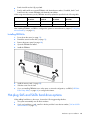
Open the FBDIMM slot latches.
5.
Install the FBDIMM.
6.
Install the access panel (on page 20).
7.
Slide the server into the rack.
8.
If you are installing FBDIMMs in an online spare or mirrored configuration, use RBSU ("HP ROMBased Setup Utility" on page 68) to configure this feature.
Hot-plug SAS and SATA hard drive options
When adding hard drives to the server, observe the following general guidelines:
•
The system automatically sets all device numbers.
•
If only one hard drive is used, install it in the bay with the lowest device number ("SAS and SATA
device numbers" on page 15).
Hardware options installation
40
•
Hard drives must be SFF types.
•
Drives should be the same capacity to provide the greatest storage space efficiency when drives are
grouped together into the same drive array.
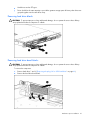
Removing hard drive blanks
CAUTION: To prevent improper cooling and thermal damage, do not operate the server unless all bays
are populated with either a component or a blank.
Removing hard drive bezel blanks
CAUTION: To prevent improper cooling and thermal damage, do not operate the server unless all bays
are populated with either a component or a blank.
To remove the component:
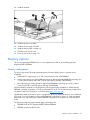
1.
Remove hard drives 1 and 2 ("Removing a hot-plug SAS or SATA hard drive" on page 42).
2.
Remove the hard drive bezel blank.
Hardware options installation
41
Removing a hot-plug SAS or SATA hard drive
CAUTION: To prevent improper cooling and thermal damage, do not operate the server unless all bays
are populated with either a component or a blank.
Installing a hot-plug SAS or SATA hard drive
1.
2.
Remove one of the following:
•
Hard drive blank ("Removing hard drive blanks" on page 41)
•
Hot-plug hard drive ("Removing a hot-plug SAS or SATA hard drive" on page 42)
Prepare the hard drive.
Hardware options installation
42
3.
Install the hot-plug hard drive.
4.
Determine the status of the hot-plug hard drive by observing the drive LEDs ("SAS and SATA hard
drive LED combinations" on page 16).
5.
Resume normal server operations.
Multibay device options
Several multibay devices can be installed in the server. For a list of supported multibay devices, refer to
the QuickSpecs on the HP website (http://www.hp.com/support).
To install the component:
1.
Power down the server (on page 18).
NOTE: Access to the ejector button is intentionally restricted. To eject the optical device, push the ejector
button with a small flat object such as a key or pen.
2.
Push the multibay drive ejector button to eject the device or blank.
Hardware options installation
43
CAUTION: To prevent improper cooling and thermal damage, do not operate the server unless all bays
are populated with either a component or a blank.
IMPORTANT: After removing a blank, save it for future use.
3.
Install the multibay device fully into the bay until it clicks.
Redundant hot-plug power supply option
CAUTION: To prevent improper cooling and thermal damage, do not operate the server unless all bays
are populated with either a component or a blank.
To install the component:
1.
Unfasten the cable management solution to access the power supply bays.
Hardware options installation
44
2.
Remove the power supply blank.
3.
Remove the protective cover from the connector pins on the power supply.
WARNING: To reduce the risk of electric shock or damage to the equipment, do not
connect the power cord to the power supply until the power supply is installed.
Hardware options installation
45
4.
Install the redundant power supply into the bay until it clicks.
5.
Connect the power cord to the power supply.
6.
Use the strain relief clip from the server hardware kit to secure the power cord.
7.
Route the power cord through the cable management solution.
8.
Connect the power cord to the power source.
9.
Be sure that the power supply LED is green ("Rear panel LEDs and buttons" on page 10).
10. Be sure that the front panel external health LED is green ("Front panel LEDs and buttons" on page 8).
Expansion board options
Installing an expansion board
The server ships with PCI Express slots. PCI or PCI-X expansion boards are supported with optional riser
boards.
Hardware options installation
46
NOTE: If the expansion slot is populated with the standard PCI-X storage controller card, it should not be
converted to PCI Express.
To install the component:
1.
Power down the server (on page 18).
2.
Extend the server from the rack (on page 19).
3.
Remove the access panel (on page 20).
4.
Remove the PCI riser board assembly.
5.
Remove the expansion slot cover from the PCI riser board assembly.
IMPORTANT: If the expansion board ships with an extender bracket, remove it from the expansion board
before inserting the board into the expansion slot of the PCI riser board assembly.
6.
Install the expansion board into the slot until it seats firmly.
IMPORTANT: Be sure that all FBDIMM slot latches are closed to provide adequate clearance before
installing the PCI riser board assembly with a half-length expansion board.
7.
Install the PCI riser board assembly (on page 21).
IMPORTANT: The server does not power up if the PCI riser board assembly is not seated properly.
NOTE: The same procedures apply for installing an expansion board in PCI expansion slot 1.
8.
Connect any internal or external cabling to the expansion boards.
9.
Install the access panel (on page 20).
10. Slide the server into the rack.
11. Power up the server (on page 18).
Installing a PCI-X riser board
1.
Power down the server (on page 18).
2.
Extend the server from the rack (on page 19).
3.
Remove the access panel (on page 20).
4.
Remove the PCI riser board assembly.
Hardware options installation
47
5.
Remove the expansion board from the slot, if installed.
6.
Remove the full-length PCI Express riser board from the riser board assembly.
Hardware options installation
48
7.
Install the PCI-X riser board on the riser board assembly.
8.
Install a PCI-X expansion board ("Installing an expansion board" on page 46).
9.
Install the PCI riser board assembly (on page 21).
10. Install the access panel (on page 20).
11. Slide the server into the rack.
12. Power up the server (on page 18).
HP Smart Array controller options
The server supports two integrated Smart Array controllers. Upgrade options exist for both integrated
array controllers.
HP Smart
Array E200i
Controller
HP Smart
Array P400i
Controller
PCI controller PCI controller
and P400i
Channel A
1-4
1-4
1-4
1-4 (PCI)
Channel B
None
5-6*
5-6
5-6 (P400i)
Standard cache
64 MB
256 MB
None
256 MB
Standard
battery
None
Yes*
None
Yes*
Optional cache
128 MB
512 MB
None
None
Yes
Yes
Yes
Optional battery Yes
*Available in some configurations.
For a list of supported options, see the QuickSpecs on the HP website (http://www.hp.com/support).
For instructions on installing optional configurations see the procedures in this guide:
•
Upgrading an HP Smart Array E200i Controller cache module and battery pack (on page 52)
•
Installing an HP Smart Array P400i Controller cache module and battery pack (on page 55)
•
Upgrading the HP Smart Array P400i Controller to support six hard drives (on page 59)
•
Using a PCI SAS or SATA array controller to support six hard drives (on page 60)
Hardware options installation
49
•
Using a PCI array controller and the HP Smart Array P400i Controller to support six hard drives (on
page 62)
The Battery-Backed Write Cache Enabler, also called the battery pack, works with the cache module to
provide transportable data protection, increase overall controller performance, and maintain any cached
data for up to 72 hours. The NiMH batteries in the battery pack are continuously recharged through a
trickle-charging process whenever the system power is on. Under normal operating conditions, the battery
pack lasts for 3 years before replacement is necessary.
CAUTION: To prevent a server malfunction or damage to the equipment, do not add or remove the battery
pack while an array capacity expansion, RAID level migration, or stripe size migration is in progress.
CAUTION: After the server is powered down, wait 15 seconds and then check the amber LED before
unplugging the cable from the cache module. If the amber LED blinks after 15 seconds, do not remove the
cable from the cache module. The cache module is backing up data, and data is lost if the cable is
detached.
IMPORTANT: The battery pack might have a low charge when installed. In this case, a POST error
message is displayed when the server is powered up, indicating that the battery pack is temporarily
disabled. No action is necessary on your part. The internal circuitry automatically recharges the batteries
and enables the battery pack. This process might take up to four hours. During this time, the cache module
functions properly, but without the performance advantage of the battery pack.
NOTE: The data protection and the time limit also apply if a power outage occurs. When power is restored
to the system, an initialization process writes the preserved data to the hard drives.
Removing an integrated HP Smart Array E200i Controller or an HP Smart Array
P400i Controller
1.
Power down the server (on page 18).
2.
Extend the server from the rack (on page 19).
3.
Remove the access panel (on page 20).
4.
Remove the air baffle. ("Remove the power supply air baffle" on page 21, "Remove the processor
air baffle" on page 22)
5.
Disconnect all cables from the integrated array controller.
Hardware options installation
50
6.
Disconnect the backplane power cable from the system board.
7.
Turn the quarter-turn fasteners and lift the integrated array controller away from the system board.
Installing an integrated HP Smart Array E200i Controller or an HP Smart Array
P400i Controller
1.
Install the integrated array controller.
Hardware options installation
51
2.
Turn the quarter-turn fasteners clockwise.
Upgrading an HP Smart Array E200i Controller cache module and battery pack
Use this procedure to upgrade the standard memory module to an optional memory module with a battery
pack.
1.
Power down the server (on page 18).
2.
Extend the server from the rack (on page 19).
3.
Remove the access panel (on page 20).
4.
Remove the air baffle. ("Remove the power supply air baffle" on page 21, "Remove the processor
air baffle" on page 22)
5.
Disconnect the hard drive backplane power cable.
6.
Remove the existing cache module.
Hardware options installation
52
7.
Install the optional cache module.
8.
Remove fan module 1 and 2 ("Remove and install a fan module" on page 22).
9.
Remove the HP Smart Array E200i Controller battery tray.
Hardware options installation
53
10. Install the HP Smart Array E200i Controller battery pack onto the HP Smart Array E200i Controller
battery tray.
11. Install the HP Smart Array E200i Controller battery tray.
12. Route and connect the battery pack power cable to the HP Smart Array E200i Controller.
Hardware options installation
54
CAUTION: When routing cables, use the cable trough between fan modules 1 and 2. Be sure the cables
do not interfere with fan module installation. Be sure to route the cables around the access panel mounting
pin bracket so as not to interfere with access panel installation.
13. Connect the hard drive backplane power cable to the system board ("System board components" on
page 11).
14. Install the fan module ("Remove and install a fan module" on page 22).
15. Install the air baffle.
16. Install the access panel (on page 20).
17. Slide the server into the rack.
18. Power up the server (on page 18).
Installing an HP Smart Array P400i Controller cache module and battery pack
1.
Power down the server (on page 18).
2.
Extend the server from the rack (on page 19).
3.
Remove the access panel (on page 20).
4.
Remove the air baffle. ("Remove the power supply air baffle" on page 21, "Remove the processor
air baffle" on page 22)
5.
Remove fan modules 1 and 2 ("Remove and install a fan module" on page 22).
6.
Remove the HP Smart Array P400i Controller ("Removing an integrated HP Smart Array E200i
Controller or an HP Smart Array P400i Controller" on page 50).
Hardware options installation
55
7.
Remove the existing cache module.
8.
Install the optional cache module.
9.
Install the HP Smart Array P400i Controller ("Installing an integrated HP Smart Array E200i
Controller or an HP Smart Array P400i Controller" on page 51).
10. Connect and route the data cables from the HP Smart Array P400i Controller to the hard drive
backplane.
11. Connect the hard drive backplane power cable to the system board.
Hardware options installation
56
CAUTION: When routing cables, use the cable trough between fan modules 1 and 2. Be sure the cables
do not interfere with fan module installation. Be sure to route the cables around the access panel mounting
pin bracket so as not to interfere with access panel installation.
12. Remove the HP Smart Array E200i Controller battery tray and retain it for future use.
13. Connect the power cable from the option kit to the HP Smart Array P400i Controller battery pack.
Hardware options installation
57
14. Install the HP Smart Array P400i Controller battery pack onto the HP Smart Array P400i Controller
battery tray.
15. Install the HP Smart Array P400i Controller battery tray.
Hardware options installation
58
16. Connect and route the battery pack power cable to the HP Smart Array P400i Controller cache
module.
17. Install fan modules 1 and 2 ("Remove and install a fan module" on page 22).
18. Install the air baffle.
19. Install the access panel (on page 20).
20. Slide the server into the rack.
21. Power up the server (on page 18).
Upgrading the HP Smart Array P400i Controller to support six hard drives
In certain configurations, the server may ship configured with the HP Smart Array P400i Controller and
only one data cable installed. To enable support for six hard drives, install an optional Mini-SAS 4i
0.35 m (14 in) cable from the HP Smart Array P400i Controller to the hard drive backplane.
1.
Power down the server (on page 18).
2.
Extend the server from the rack (on page 19).
3.
Remove the access panel (on page 20).
4.
Remove the air baffle. ("Remove the power supply air baffle" on page 21, "Remove the processor
air baffle" on page 22)
5.
Remove fan modules 1 and 2 ("Remove and install a fan module" on page 22).
6.
Connect and route the second cable.
CAUTION: When routing cables, use the cable trough between fan modules 1 and 2. Be sure the cables
do not interfere with fan module installation. Be sure to route the cables around the access panel mounting
pin bracket so as not to interfere with access panel installation.
Hardware options installation
59
CAUTION: When routing cables, always be sure that the cables are not in a position where they can be
pinched or crimped.
7.
Install fan modules 1 and 2 ("Remove and install a fan module" on page 22).
8.
Install the air baffle.
9.
Install the access panel (on page 20).
10. Slide the server into the rack.
11. Power up the server (on page 18).
Using a PCI SAS or SATA array controller to support six hard drives
1.
Power down the server (on page 18).
2.
Extend the server from the rack (on page 19).
3.
Remove the access panel (on page 20).
4.
Remove the air baffle. ("Remove the power supply air baffle" on page 21, "Remove the processor
air baffle" on page 22)
5.
Remove fan modules 1 and 2 ("Remove and install a fan module" on page 22).
6.
Disconnect all cables from the currently-installed HP Smart Array E200i Controller or HP Smart Array
P400i Controller.
Hardware options installation
60
7.
Disconnect the hard drive backplane power cable from the system board.
8.
Turn the quarter-turn fasteners counter-clockwise and lift the integrated array controller away from the
system board.
9.
Connect the hard drive backplane power cable to the system board.
10. Install and route the cables from the PCI SAS or SATA array controller to the SAS hard drive
backplane.
CAUTION: When routing cables, use the cable trough between fan modules 1 and 2. Be sure the cables
do not interfere with fan module installation. Be sure to route the cables around the access panel mounting
pin bracket so as not to interfere with access panel installation.
CAUTION: When routing cables, always be sure that the cables are not in a position where they can be
pinched or crimped.
11. Install fan modules 1 and 2 ("Remove and install a fan module" on page 22).
12. Install the air baffle.
13. Install the access panel (on page 20).
Hardware options installation
61
14. Slide the server into the rack.
15. Power up the server (on page 18).
Using a PCI array controller and the HP Smart Array P400i Controller to support
six hard drives
1.
Power down the server (on page 18).
2.
Extend the server from the rack (on page 19).
3.
Remove the access panel (on page 20).
4.
Remove the air baffle. ("Remove the power supply air baffle" on page 21, "Remove the processor
air baffle" on page 22)
5.
Remove fan modules 1 and 2 ("Remove and install a fan module" on page 22).
6.
Route and connect the data cables:
•
Connect the PCI SAS or SATA array controller to the SAS hard drive backplane.
•
Connect the HP Smart Array P400i Controller to the SAS hard drive backplane.
CAUTION: When routing cables, use the cable trough between fan modules 1 and 2. Be sure the cables
do not interfere with fan module installation. Be sure to route the cables around the access panel mounting
pin bracket so as not to interfere with access panel installation.
CAUTION: When routing cables, always be sure that the cables are not in a position where they can be
pinched or crimped.
7.
Install fan modules 1 and 2 ("Remove and install a fan module" on page 22).
8.
Install the air baffle.
9.
Install the access panel (on page 20).
10. Slide the server into the rack.
11. Power up the server (on page 18).
Hardware options installation
62
Cabling
In this section
Cabling overview................................................................................................................................... 63
Array controller cabling .......................................................................................................................... 63
Multibay backplane cabling .................................................................................................................... 66
Cabling overview
This section provides guidelines that help you make informed decisions about cabling the server and
hardware options to optimize performance.
For information on cabling peripheral components, refer to the white paper on high-density deployment at
the HP website (http://www.hp.com/products/servers/platforms).
CAUTION: When routing cables, always be sure that the cables are not in a position where they can be
pinched or crimped.
Array controller cabling
Depending on the primary controller installed, various cabling configurations exist:
•
HP Smart Array E200i Controller cabling (on page 64)
•
HP Smart Array P400i Controller cabling (on page 64)
•
PCI Smart Array controller cabling (on page 65)
•
Battery pack cabling (on page 65)
Cabling
63
HP Smart Array E200i Controller cabling
CAUTION: When routing cables, use the cable trough between fan modules 1 and 2. Be sure the cables
do not interfere with fan module installation. Be sure to route the cables around the access panel mounting
pin bracket so as not to interfere with access panel installation.
HP Smart Array P400i Controller cabling
CAUTION: When routing cables, use the cable trough between fan modules 1 and 2. Be sure the cables
do not interfere with fan module installation. Be sure to route the cables around the access panel mounting
pin bracket so as not to interfere with access panel installation.
Cabling
64
PCI Smart Array controller cabling
CAUTION: When routing cables, use the cable trough between fan modules 1 and 2. Be sure the cables
do not interfere with fan module installation. Be sure to route the cables around the access panel mounting
pin bracket so as not to interfere with access panel installation.
IMPORTANT: When using a PCI array controller, be sure to remove the integrated array controller.
Battery pack cabling
•
HP Smart Array E200i Controller battery pack cabling
Cabling
65
•
HP Smart Array P400i Controller battery pack cabling
Multibay backplane cabling
Cabling
66
Configuration and utilities
In this section
Configuration tools ................................................................................................................................. 67
Management tools.................................................................................................................................. 71
Diagnostic tools ..................................................................................................................................... 74
Remote support and analysis tools............................................................................................................ 75
Keeping the system current ...................................................................................................................... 76
Configuration tools
SmartStart software
SmartStart is a collection of software that optimizes single-server setup, providing a simple and consistent
way to deploy server configuration. SmartStart has been tested on many ProLiant server products,
resulting in proven, reliable configurations.
SmartStart assists the deployment process by performing a wide range of configuration activities,
including:
•
Configuring hardware using embedded configuration utilities, such as RBSU and ORCA
•
Preparing the system for installing "off-the-shelf" versions of leading operating system software
•
Installing optimized server drivers, management agents, and utilities automatically with every
assisted installation
•
Testing server hardware using the Insight Diagnostics Utility ("HP Insight Diagnostics" on page 75)
•
Installing software drivers directly from the CD. With systems that have internet connection, the
SmartStart Autorun Menu provides access to a complete list of ProLiant system software.
•
Enabling access to the Array Configuration Utility (on page 70), Array Diagnostic Utility (on page
75), and Erase Utility (on page 72)
SmartStart is included in the HP ProLiant Essentials Foundation Pack. For more information about
SmartStart software, refer to the HP ProLiant Essentials Foundation Pack or the HP website
(http://www.hp.com/servers/smartstart).
SmartStart Scripting Toolkit
The SmartStart Scripting Toolkit is a server deployment product that delivers an unattended automated
installation for high-volume server deployments. The SmartStart Scripting Toolkit is designed to support
ProLiant BL, ML, and DL servers. The toolkit includes a modular set of utilities and important documentation
that describes how to apply these new tools to build an automated server deployment process.
Using SmartStart technology, the Scripting Toolkit provides a flexible way to create standard server
configuration scripts. These scripts are used to automate many of the manual steps in the server
configuration process. This automated server configuration process cuts time from each server deployed,
making it possible to scale server deployments to high volumes in a rapid manner.
Configuration and utilities 67
For more information, and to download the SmartStart Scripting Toolkit, refer to the HP website
(http://www.hp.com/servers/sstoolkit).
Configuration Replication Utility
ConRep is shipped in the SmartStart Scripting Toolkit and is a program that works with RBSU to replicate
hardware configuration on ProLiant servers. This utility is run during State 0, Run Hardware Configuration
Utility, when doing a scripted server deployment. ConRep reads the state of the system environment
variables to determine the configuration and then writes the results to an editable script file. This file can
then be deployed across multiple servers with similar hardware and software components. For more
information, refer to the SmartStart Scripting Toolkit User Guide on the HP website
(http://h18004.www1.hp.com/products/servers/management/toolkit/documentation.html).
HP ROM-Based Setup Utility
RBSU, an embedded configuration utility, performs a wide range of configuration activities that may
include:
•
Configuring system devices and installed options
•
Displaying system information
•
Selecting the primary boot controller
•
Configuring memory options
•
Language selection
For more information on RBSU, refer to the HP ROM-Based Setup Utility User Guide on the Documentation
CD or the HP website (http://www.hp.com/servers/smartstart).
Using RBSU
The first time you power up the server, the system prompts you to enter RBSU and select a language.
Default configuration settings are made at this time and can be changed later. Most of the features in
RBSU are not required to set up the server.
To navigate RBSU, use the following keys:
•
To access RBSU, press the F9 key during power up when prompted in the upper right corner of the
screen.
•
To navigate the menu system, use the arrow keys.
•
To make selections, press the Enter key.
IMPORTANT: RBSU automatically saves settings when you press the Enter key. The utility does not prompt
you for confirmation of settings before you exit the utility. To change a selected setting, you must select a
different setting and press the Enter key.
Auto-configuration process
The auto-configuration process automatically runs when you boot the server for the first time. During the
power-up sequence, the system ROM automatically configures the entire system without needing any
intervention. During this process, the ORCA utility, in most cases, automatically configures the array to a
default setting based on the number of drives connected to the server.
NOTE: The server may not support all the following examples.
NOTE: If the boot drive is not empty or has been written to in the past, ORCA does not automatically
configure the array. You must run ORCA to configure the array settings.
Configuration and utilities 68
Drives installed
Drives used
RAID level
1
1
RAID 0
2
2
RAID 1
3, 4, 5, or 6
3, 4, 5, or 6
RAID 5
More than 6
0
None
To change any ORCA default settings and override the auto-configuration process, press the F8 key when
prompted.
By default, the auto-configuration process configures the system for the English language. To change any
default settings in the auto-configuration process (such as the settings for language, operating system, and
primary boot controller), execute RBSU by pressing the F9 key when prompted. After the settings are
selected, exit RBSU and allow the server to reboot automatically.
For more information, refer to the HP ROM-Based Setup Utility User Guide on the Documentation CD or
the HP website (http://www.hp.com/servers/smartstart).
Boot options
After the auto-configuration process completes, or after the server reboots upon exit from RBSU, the POST
sequence runs, and then the boot option screen is displayed. This screen is visible for several seconds
before the system attempts to boot from a diskette, CD, or hard drive. During this time, the menu on the
screen allows you to install an operating system or make changes to the server configuration in RBSU.
BIOS Serial Console
BIOS Serial Console allows you to configure the serial port to view POST error messages and run RBSU
remotely through a serial connection to the server COM port. The server that you are remotely configuring
does not require a keyboard and mouse.
For more information about BIOS Serial Console, refer to the BIOS Serial Console User Guide on the
Documentation CD or the HP website (http://www.hp.com/servers/smartstart).
Configuring online spare memory
To configure online spare memory:
1.
Install the required FBDIMMs ("Installing FBDIMMs" on page 40).
2.
Access RBSU by pressing the F9 key during power-up when the prompt is displayed in the upper
right corner of the screen.
3.
Select System Options.
4.
Select Advanced Memory Protection.
5.
Select Online Spare with Advanced ECC Support.
6.
Press the Enter key.
7.
Press the Esc key to exit the current menu, or press the F10 key to exit RBSU.
For more information on online spare memory, refer to the white paper on the HP website
(http://h18000.www1.hp.com/products/servers/technology/memoryprotection.html).
Configuring mirrored memory
To configure mirrored memory:
1.
Install the required FBDIMMs ("Installing FBDIMMs" on page 40).
Configuration and utilities 69
2.
Access RBSU by pressing the F9 key during power-up when the prompt is displayed in the upper
right corner of the screen.
3.
Select System Options.
4.
Select Advanced Memory Protection.
5.
Select Mirrored Memory with Advanced ECC Support.
6.
Press the Enter key.
7.
Press the Esc key to exit the current menu or press the F10 key to exit RBSU.
For more information on mirrored memory, refer to the white paper on the HP website
(http://h18000.www1.hp.com/products/servers/technology/memoryprotection.html).
Array Configuration Utility
ACU is a browser-based utility with the following features:
•
Runs as a local application or remote service
•
Supports online array capacity expansion, logical drive extension, assignment of online spares, and
RAID or stripe size migration
•
Suggests the optimum configuration for an unconfigured system
•
Provides different operating modes, enabling faster configuration or greater control over the
configuration options
•
Remains available any time that the server is on
•
Displays on-screen tips for individual steps of a configuration procedure
For optimum performance, the minimum display settings are 800 × 600 resolution and 256 colors.
Servers running Microsoft® operating systems require Internet Explorer 5.5 (with Service Pack 1) or later.
For Linux servers, refer to the README.TXT file for additional browser and support information.
For more information, refer to the HP Array Configuration Utility User Guide on the Documentation CD or
the HP website (http://www.hp.com).
Option ROM Configuration for Arrays
Before installing an operating system, you can use the ORCA utility to create the first logical drive, assign
RAID levels, and establish online spare configurations.
The utility also provides support for the following functions:
•
Reconfiguring one or more logical drives
•
Viewing the current logical drive configuration
•
Deleting a logical drive configuration
•
Setting the controller to be the boot controller
If you do not use the utility, ORCA will default to the standard configuration.
For more information regarding array controller configuration, refer to the controller user guide.
For more information regarding the default configurations that ORCA uses, refer to the HP ROM-Based
Setup Utility User Guide on the Documentation CD.
HP ProLiant Essentials Rapid Deployment Pack
NOTE: To deploy servers in an existing server blade enclosure, always use the most recent version of RDP
available at the HP website (http://www.hp.com/servers/rdp).
Configuration and utilities 70
The RDP software is the preferred method for rapid, high-volume server deployments. The RDP software
integrates two powerful products: Altiris Deployment Solution and the HP ProLiant Integration Module.
The intuitive graphical user interface of the Altiris Deployment Solution console provides simplified pointand-click and drag-and-drop operations that enable you to deploy target servers, including server blades,
remotely. It enables you to perform imaging or scripting functions and maintain software images.
For more information about the RDP, refer to the HP ProLiant Essentials Rapid Deployment Pack CD or
refer to the HP website (http://www.hp.com/servers/rdp).
Re-entering the server serial number and product ID
After you replace the system board, you must re-enter the server serial number and the product ID.
1.
During the server startup sequence, press the F9 key to access RBSU.
2.
Select the System Options menu.
3.
Select Serial Number. The following warning is displayed:
WARNING! WARNING! WARNING! The serial number is loaded into the system
during the manufacturing process and should NOT be modified. This option
should only be used by qualified service personnel. This value should
always match the serial number sticker located on the chassis.
4.
Press the Enter key to clear the warning.
5.
Enter the serial number and press the Enter key.
6.
Select Product ID.
7.
Enter the product ID and press the Enter key.
8.
Press the Esc key to close the menu.
9.
Press the Esc key to exit RBSU.
10. Press the F10 key to confirm exiting RBSU. The server will automatically reboot.
Management tools
Automatic Server Recovery
ASR is a feature that causes the system to restart when a catastrophic operating system error occurs, such
as a blue screen, ABEND, or panic. A system fail-safe timer, the ASR timer, starts when the System
Management driver, also known as the Health Driver, is loaded. When the operating system is
functioning properly, the system periodically resets the timer. However, when the operating system fails,
the timer expires and restarts the server.
ASR increases server availability by restarting the server within a specified time after a system hang or
shutdown. At the same time, the HP SIM console notifies you by sending a message to a designated
pager number that ASR has restarted the system. You can disable ASR from the HP SIM console or
through RBSU.
ROMPaq utility
Flash ROM enables you to upgrade the firmware (BIOS) with system or option ROMPaq utilities. To
upgrade the BIOS, insert a ROMPaq diskette into the diskette drive and boot the system.
The ROMPaq utility checks the system and provides a choice (if more than one exists) of available ROM
revisions. This procedure is the same for both system and option ROMPaq utilities.
Configuration and utilities 71
For more information about the ROMPaq utility, refer to the HP website
(http://www.hp.com/servers/manage).
System Online ROM flash component utility
The Online ROM Flash Component Utility enables system administrators to efficiently upgrade system or
controller ROM images across a wide range of servers and array controllers. This tool has the following
features:
•
Works offline and online
•
Supports Microsoft® Windows® 2000, Windows Server™ 2003, and Linux operating systems
IMPORTANT: This utility supports operating systems that may not be supported by the server. For
operating systems supported by the server, refer to the HP website (http://www.hp.com/go/supportos).
•
Integrates with other software maintenance, deployment, and operating system tools
•
Automatically checks for hardware, firmware, and operating system dependencies, and installs only
the correct ROM upgrades required by each target server
To download the tool and for more information, refer to the HP website
(http://h18000.www1.hp.com/support/files/index.html).
Integrated Lights-Out 2 technology
The iLO 2 subsystem is a standard component of selected ProLiant servers that provides server health and
remote server manageability. The iLO 2 subsystem includes an intelligent microprocessor, secure memory,
and a dedicated network interface. This design makes iLO 2 independent of the host server and its
operating system. The iLO 2 subsystem provides remote access to any authorized network client, sends
alerts, and provides other server management functions.
Using iLO 2, you can:
•
Remotely power up, power down, or reboot the host server.
•
Send alerts from iLO 2 regardless of the state of the host server.
•
Access advanced troubleshooting features through the iLO 2 interface.
•
Diagnose iLO 2 using HP SIM through a web browser and SNMP alerting.
For more information about iLO 2 features, refer to the iLO 2 documentation on the Documentation CD or
on the HP website (http://www.hp.com/servers/lights-out).
Erase Utility
CAUTION: Perform a backup before running the System Erase Utility. The utility sets the system to its
original factory state, deletes the current hardware configuration information, including array setup and disk
partitioning, and erases all connected hard drives completely. Refer to the instructions for using this utility.
Run the Erase Utility if you need to erase the system for the following reasons:
•
You want to install a new operating system on a server with an existing operating system.
•
You want to change the operating system selection.
•
You encounter a failure-causing error during the SmartStart installation.
•
You encounter an error when completing the steps of a factory-installed operating system installation.
The Erase Utility can be accessed from the Software and Drivers Download website
(http://www.hp.com/go/support) or the Maintenance Utilities menu of the SmartStart CD
("SmartStart software" on page 67).
Configuration and utilities 72
Management Agents
Management Agents provide the information to enable fault, performance, and configuration
management. The agents allow easy manageability of the server through HP SIM software, and thirdparty SNMP management platforms. Management Agents are installed with every SmartStart assisted
installation or can be installed through the HP PSP. The Systems Management homepage provides status
and direct access to in-depth subsystem information by accessing data reported through the Management
Agents. For additional information, refer to the Management CD in the HP ProLiant Essentials Foundation
Pack or the HP website (http://www.hp.com/servers/manage).
HP Systems Insight Manager
HP SIM is a web-based application that allows system administrators to accomplish normal administrative
tasks from any remote location, using a web browser. HP SIM provides device management capabilities
that consolidate and integrate management data from HP and third-party devices.
IMPORTANT: You must install and use HP SIM to benefit from the Pre-Failure Warranty for processors,
SAS and SCSI hard drives, and memory modules.
For additional information, refer to the Management CD in the HP ProLiant Essentials Foundation Pack or
the HP SIM website (http://www.hp.com/go/hpsim).
Redundant ROM support
The server enables you to upgrade or configure the ROM safely with redundant ROM support. The server
has a 4-MB ROM that acts as two, separate 2-MB ROMs. In the standard implementation, one side of the
ROM contains the current ROM program version, while the other side of the ROM contains a backup
version.
NOTE: The server ships with the same version programmed on each side of the ROM.
Safety and security benefits
When you flash the system ROM, ROMPaq writes over the backup ROM and saves the current ROM as a
backup, enabling you to switch easily to the alternate ROM version if the new ROM becomes corrupted
for any reason. This feature protects the existing ROM version, even if you experience a power failure
while flashing the ROM.
Access to redundant ROM settings
To access the redundant ROM through RBSU:
1.
Access RBSU by pressing the F9 key during powerup when the prompt is displayed in the upper
right corner of the screen.
2.
Select Advanced Options.
3.
Select Redundant ROM Selection.
4.
Select the ROM version.
5.
Press the Enter key.
6.
Press the Esc key to exit the current menu or press the F10 key to exit RBSU. The server restarts
automatically.
To access the redundant ROM manually:
1.
Power down the server (on page 18).
2.
Remove the access panel (on page 20).
Configuration and utilities 73
3.
Set positions 1, 5, and 6 of the system maintenance switch to On.
4.
Install the access panel (on page 20).
5.
Power up the server (on page 18).
6.
Wait for the server to emit two beeps.
7.
Repeat steps 1 and 2.
8.
Set positions 1, 5, and 6 of the system maintenance switch to Off.
9.
Repeat steps 4 and 5.
When the server boots, the system identifies whether the current ROM bank is corrupt. If a corrupt ROM is
detected, the system boots from the backup ROM and alerts you through POST or IML that the ROM bank
is corrupt.
If both the current and backup versions of the ROM are corrupt, the server automatically enters ROMPaq
disaster recovery mode.
USB support
HP provides both standard USB support and legacy USB support. Standard support is provided by the
operating system through the appropriate USB device drivers. HP provides support for USB devices prior
to the operating system loading through legacy USB support, which is enabled by default in the system
ROM. HP hardware supports USB version 2.0.
Legacy USB support provides USB functionality in environments where USB support is normally not
available. Specifically, HP provides legacy USB functionality at:
•
POST
•
RBSU
•
Diagnostics
•
DOS
•
Environments which do not support USB natively
For more information on ProLiant USB support, refer to the HP website
(http://www.compaq.com/products/servers/platforms/usb-support.html).
Internal USB functionality
An internal USB connector is available for use with USB drive keys only. This solution provides for use of
a permanent boot drive from a USB drive key installed in the internal connector, avoiding issues of
clearance on the front of the rack and physical access to secure data.
For additional security, the external USB connectors can be disabled through RBSU. Disabling external
USB in RBSU disables the front USB connector and both rear USB connectors.
Diagnostic tools
Survey Utility
Survey Utility, a feature within HP Insight Diagnostics (on page 75), gathers critical hardware and
software information on ProLiant servers.
This utility supports operating systems that may not be supported by the server. For operating systems
supported by the server, refer to the HP website (http://www.hp.com/go/supportos).
Configuration and utilities 74
If a significant change occurs between data-gathering intervals, the Survey Utility marks the previous
information and overwrites the Survey text files to reflect the latest changes in the configuration.
Survey Utility is installed with every SmartStart-assisted installation or can be installed through the HP PSP
("ProLiant Support Packs" on page 77).
NOTE: SmartStart version 7.5 and later provides the memory spare part numbers for the server.
Array Diagnostic Utility
ADU is a tool that collects information about array controllers and generates a list of detected problems.
ADU can be accessed from the SmartStart CD ("SmartStart software" on page 67) or downloaded from
the HP website (http://www.hp.com).
HP Insight Diagnostics
HP Insight Diagnostics is a proactive server management tool, available in both offline and online
versions, that provides diagnostics and troubleshooting capabilities to assist IT administrators who verify
server installations, troubleshoot problems, and perform repair validation.
HP Insight Diagnostics Offline Edition performs various in-depth system and component testing while the
OS is not running. To run this utility, launch the SmartStart CD.
HP Insight Diagnostics Online Edition is a web-based application that captures system configuration and
other related data needed for effective server management. Available in Microsoft® Windows® and
Linux versions, the utility helps to ensure proper system operation.
For more information or to download the utility, refer to the HP website
(http://www.hp.com/servers/diags).
Integrated Management Log
The IML records hundreds of events and stores them in an easy-to-view form. The IML timestamps each
event with 1-minute granularity.
You can view recorded events in the IML in several ways, including the following:
•
From within HP SIM ("HP Systems Insight Manager" on page 73)
•
From within Survey Utility (on page 74)
•
From within operating system-specific IML viewers
•
For NetWare: IML Viewer
•
For Windows®: IML Viewer
•
For Linux: IML Viewer Application
•
From within the iLO 2 user interface
•
From within HP Insight Diagnostics (on page 75)
For more information, refer to the Management CD in the HP ProLiant Essentials Foundation Pack.
Remote support and analysis tools
HP Instant Support Enterprise Edition
ISEE is a proactive remote monitoring and diagnostic tool to help manage your systems and devices, a
feature of HP support. ISEE provides continuous hardware event monitoring and automated notification to
Configuration and utilities 75
identify and prevent potential critical problems. Through remote diagnostic scripts and vital system
configuration information collected about your systems, ISEE enables fast restoration of your systems.
Install ISEE on your systems to help mitigate risk and prevent potential critical problems.
For more information on ISEE, refer to the HP website
(http://www.hp.com/hps/hardware/hw_enterprise.html).
To download HP ISEE, visit the HP website (http://www.hp.com/hps/hardware/hw_downloads.html).
For installation information, refer to the HP ISEE Client Installation and Upgrade Guide
(ftp://ftp.hp.com/pub/services/hardware/info/isee_client.pdf).
Web-Based Enterprise Service
WEBES enables administrators to manage hardware events proactively, either locally or online. The
service provides real-time multiple event analysis, crash analysis, and notification, locally through SMTP
and remotely through ISEE for OpenVMS, Tru64, and Microsoft® Windows® operating system binary
error logs.
For more information, refer to the HP website (http://h18000.www1.hp.com/support/svctools/).
Open Services Event Manager
OSEM is a standalone tool that performs real-time reactive and proactive service event filtering, analysis,
and notification. The tool gathers event data from SNMP traps or information provided over an HTTP
interface and notifies an administrator or HP through SMTP and ISEE.
For more information, refer to the HP website (http://h18000.www1.hp.com/support/svctools/).
Keeping the system current
Drivers
The server includes new hardware that may not have driver support on all operating system installation
media.
If you are installing a SmartStart-supported operating system, use the SmartStart software (on page 67)
and its Assisted Path feature to install the operating system and latest driver support.
NOTE: If you are installing drivers from the SmartStart CD or the Software Maintenance CD, refer to the
SmartStart website (http://www.hp.com/servers/smartstart) to be sure that you are using the latest version
of SmartStart. For more information, refer to the documentation provided with the SmartStart CD.
If you do not use the SmartStart CD to install an operating system, drivers for some of the new hardware
are required. These drivers, as well as other option drivers, ROM images, and value-add software can be
downloaded from the HP website (http://www.hp.com/support).
IMPORTANT: Always perform a backup before installing or updating device drivers.
Configuration and utilities 76
Resource Paqs
Resource Paqs are operating system-specific packages of tools, utilities, and information for HP servers
running certain Microsoft® or Novell operating systems. The Resource Paqs include utilities to monitor
performance, software drivers, customer support information, and white papers on the latest server
integration information. Refer to the Enterprise Partnerships website
(http://h18000.www1.hp.com/partners), select Microsoft or Novell, depending on the operating
system, and follow the link to the appropriate Resource Paq.
ProLiant Support Packs
PSPs represent operating system-specific bundles of ProLiant optimized drivers, utilities, and management
agents. Refer to the PSP website
(http://h18000.www1.hp.com/products/servers/management/psp.html).
Operating system version support
Refer to the operating system support matrix (http://www.hp.com/go/supportos).
System Online ROM flash component utility
The Online ROM Flash Component Utility enables system administrators to efficiently upgrade system or
controller ROM images across a wide range of servers and array controllers. This tool has the following
features:
•
Works offline and online
•
Supports Microsoft® Windows NT®, Windows® 2000, Windows Server™ 2003, Novell Netware,
and Linux operating systems
IMPORTANT: This utility supports operating systems that may not be supported by the server. For
operating systems supported by the server, refer to the HP website (http://www.hp.com/go/supportos).
•
Integrates with other software maintenance, deployment, and operating system tools
•
Automatically checks for hardware, firmware, and operating system dependencies, and installs only
the correct ROM upgrades required by each target server
To download the tool and for more information, refer to the HP website
(http://h18000.www1.hp.com/support/files/index.html).
Change control and proactive notification
HP offers Change Control and Proactive Notification to notify customers 30 to 60 days in advance of
upcoming hardware and software changes on HP commercial products.
For more information, refer to the HP website
(http://h18023.www1.hp.com/solutions/pcsolutions/pcn.html).
Natural language search assistant
The natural language search assistant (http://www.hp.com/support/natural_language_search) is a
search engine that finds information on HP products, including ProLiant servers. The search engine
responds to queries entered in question form.
Configuration and utilities 77
Care Pack
HP Care Pack Services offer upgraded service levels to extend and expand standard product warranty
with easy-to-buy, easy-to-use support packages that help you make the most of your server investments.
Refer to the Care Pack website (http://www.hp.com/hps/carepack/servers/cp_proliant.html).
Configuration and utilities 78
Troubleshooting
In this section
Troubleshooting resources ....................................................................................................................... 79
Pre-diagnostic steps ................................................................................................................................ 79
Loose connections .................................................................................................................................. 82
Service notifications................................................................................................................................ 82
Troubleshooting flowcharts ...................................................................................................................... 83
POST error messages and beep codes...................................................................................................... 94
Troubleshooting resources
The HP ProLiant Servers Troubleshooting Guide provides simple procedures for resolving common
problems as well as a comprehensive course of action for fault isolation and identification, error message
interpretation, issue resolution, and software maintenance.
To obtain the guide, refer to any of the following sources and then select the HP ProLiant Servers
Troubleshooting Guide:
•
The server-specific Documentation CD
•
The Business Support Center on the HP website (http://www.hp.com/support). Navigate to the
server technical support page. Under self-help resources, select ProLiant Troubleshooting
Guide.
•
The Technical Documentation website (http://www.docs.hp.com). Select Enterprise Servers,
Workstations and Systems Hardware, and then the appropriate server.
Pre-diagnostic steps
WARNING: To avoid potential problems, ALWAYS read the warnings and cautionary
information in the server documentation before removing, replacing, reseating, or
modifying system components.
IMPORTANT: This guide provides information for multiple servers. Some information may not apply to the
server you are troubleshooting. Refer to the server documentation for information on procedures, hardware
options, software tools, and operating systems supported by the server.
1.
Review the important safety information (on page 79).
2.
Gather symptom information (on page 81).
3.
Prepare the server for diagnosis (on page 82).
4.
Use the Start diagnosis flowchart (on page 83) to begin the diagnostic process.
Important safety information
Familiarize yourself with the safety information in the following sections before troubleshooting the server.
Troubleshooting 79
Important safety information
Before servicing this product, read the Important Safety Information document provided with the server.
Symbols on equipment
The following symbols may be placed on equipment to indicate the presence of potentially hazardous
conditions.
This symbol indicates the presence of hazardous energy circuits or electric shock
hazards. Refer all servicing to qualified personnel.
WARNING: To reduce the risk of injury from electric shock hazards, do not open
this enclosure. Refer all maintenance, upgrades, and servicing to qualified personnel.
This symbol indicates the presence of electric shock hazards. The area contains no
user or field serviceable parts. Do not open for any reason.
WARNING: To reduce the risk of injury from electric shock hazards, do not open
this enclosure.
This symbol on an RJ-45 receptacle indicates a network interface connection.
WARNING: To reduce the risk of electric shock, fire, or damage to the equipment,
do not plug telephone or telecommunications connectors into this receptacle.
This symbol indicates the presence of a hot surface or hot component. If this surface is
contacted, the potential for injury exists.
WARNING: To reduce the risk of injury from a hot component, allow the surface to
cool before touching.
This symbol indicates that the component exceeds the recommended weight for one
individual to handle safely.
12.47 - 16.78 kg WARNING: To reduce the risk of personal injury or damage to the equipment,
observe local occupational health and safety requirements and guidelines for manual
27.50 - 37.00 lb
material handling.
These symbols, on power supplies or systems, indicate that the equipment is supplied
by multiple sources of power.
WARNING: To reduce the risk of injury from electric shock, remove all power
cords to completely disconnect power from the system.
Warnings and cautions
WARNING: Only authorized technicians trained by HP should attempt to repair this
equipment. All troubleshooting and repair procedures are detailed to allow only
subassembly/module-level repair. Because of the complexity of the individual boards
and subassemblies, no one should attempt to make repairs at the component level or to
make modifications to any printed wiring board. Improper repairs can create a safety
hazard.
Troubleshooting 80
WARNING: To reduce the risk of personal injury or damage to the equipment, be sure
that:
• The leveling feet are extended to the floor.
• The full weight of the rack rests on the leveling feet.
• The stabilizing feet are attached to the rack if it is a single-rack installation.
• The racks are coupled together in multiple-rack installations.
• Only one component is extended at a time. A rack may become unstable if more than
one component is extended for any reason.
WARNING: To reduce the risk of electric shock or damage to the equipment:
• Do not disable the power cord grounding plug. The grounding plug is an important
safety feature.
• Plug the power cord into a grounded (earthed) electrical outlet that is easily
accessible at all times.
• Unplug the power cord from the power supply to disconnect power to the equipment.
• Do not route the power cord where it can be walked on or pinched by items placed
against it. Pay particular attention to the plug, electrical outlet, and the point where
the cord extends from the server.
WARNING: To reduce the risk of personal injury or damage to the equipment:
•
Observe local occupation health and safety requirements and guidelines for
manual handling.
•
Obtain adequate assistance to lift and stabilize the chassis during installation or
removal.
•
The server is unstable when not fastened to the rails.
•
When mounting the server in a rack, remove the power supplies and any other
removable module to reduce the overall weight of the product.
12.47 - 16.78 kg
27.50 - 37.00 lb
CAUTION: To properly ventilate the system, you must provide at least 7.6 cm (3.0 in) of clearance at the
front and back of the server.
CAUTION: The server is designed to be electrically grounded (earthed). To ensure proper operation, plug
the AC power cord into a properly grounded AC outlet only.
Symptom information
Before troubleshooting a server problem, collect the following information:
•
What events preceded the failure? After which steps does the problem occur?
•
What has been changed since the time the server was working?
•
Did you recently add or remove hardware or software? If so, did you remember to change the
appropriate settings in the server setup utility, if necessary?
•
How long has the server exhibited problem symptoms?
•
If the problem occurs randomly, what is the duration or frequency?
To answer these questions, the following information may be useful:
•
Run HP Insight Diagnostics (on page 75) and use the survey page to view the current configuration
or to compare it to previous configurations.
•
Refer to your hardware and software records for information.
•
Refer to server LEDs and their statuses.
Troubleshooting 81
Prepare the server for diagnosis
1.
Be sure the server is in the proper operating environment with adequate power, air conditioning,
and humidity control. Refer to the server documentation for required environmental conditions.
2.
Record any error messages displayed by the system.
3.
Remove all diskettes and CDs from the media drives.
4.
Power down the server and peripheral devices if you will be diagnosing the server offline. Always
perform an orderly shutdown, if possible. This means you must:
a. Exit any applications.
b. Exit the operating system.
c. Power down the server (on page 18).
5.
Disconnect any peripheral devices not required for testing (any devices not necessary to power up
the server). Do not disconnect the printer if you want to use it to print error messages.
6.
Collect all tools and utilities, such as a Torx screwdriver, loopback adapters, ESD wrist strap, and
software utilities, necessary to troubleshoot the problem.
•
You must have the appropriate Health Drivers and Management Agents installed on the server.
NOTE: To verify the server configuration, connect to the System Management homepage and select
Version Control Agent. The VCA gives you a list of names and versions of all installed HP drivers,
Management Agents, and utilities, and whether they are up to date.
•
HP recommends you have access to the SmartStart CD for value-added software and drivers
required during the troubleshooting process.
•
HP recommends you have access to the server documentation for server-specific information.
Loose connections
Action:
•
Be sure all power cords are securely connected.
•
Be sure all cables are properly aligned and securely connected for all external and internal
components.
•
Remove and check all data and power cables for damage. Be sure no cables have bent pins or
damaged connectors.
•
If a fixed cable tray is available for the server, be sure the cords and cables connected to the server
are correctly routed through the tray.
•
Be sure each device is properly seated.
•
If a device has latches, be sure they are completely closed and locked.
•
Check any interlock or interconnect LEDs that may indicate a component is not connected properly.
•
If problems continue to occur, remove and reinstall each device, checking the connectors and sockets
for bent pins or other damage.
Service notifications
To view the latest service notifications, refer to the HP website (http://www.hp.com/go/bizsupport).
Select the appropriate server model, and then click the Troubleshoot a Problem link on the product
page.
Troubleshooting 82
Troubleshooting flowcharts
To effectively troubleshoot a problem, HP recommends that you start with the first flowchart in this section,
"Start diagnosis flowchart (on page 83)," and follow the appropriate diagnostic path. If the other
flowcharts do not provide a troubleshooting solution, follow the diagnostic steps in "General diagnosis
flowchart (on page 84)." The General diagnosis flowchart is a generic troubleshooting process to be used
when the problem is not server-specific or is not easily categorized into the other flowcharts.
The available flowcharts include:
•
Start diagnosis flowchart (on page 83)
•
General diagnosis flowchart (on page 84)
•
Server power-on problems flowchart (on page 86)
•
POST problems flowchart (on page 89)
•
OS boot problems flowchart (on page 90)
•
Server fault indications flowchart (on page 92)
Start diagnosis flowchart
Use the following flowchart to start the diagnostic process.
Item
Refer to
1
"General diagnosis flowchart (on page 84)"
2
"Power-on problems flowchart ("Server power-on problems flowchart" on
page 86)"
3
"POST problems flowchart (on page 89)"
4
"OS boot problems flowchart (on page 90)"
5
"Server fault indications flowchart (on page 92)"
Troubleshooting 83
General diagnosis flowchart
The General diagnosis flowchart provides a generic approach to troubleshooting. If you are unsure of the
problem, or if the other flowcharts do not fix the problem, use the following flowchart.
Item
Refer to
1
"Symptom information (on page 81)"
2
"Loose connections (on page 82)"
3
"Service notifications (on page 82)"
Troubleshooting 84
Item
Refer to
4
The most recent version of a particular server or option firmware is
available on the following websites:
•
HP Support website (http://www.hp.com/support)
•
HP ROM-BIOS/Firmware Updates website
(http://h18023.www1.hp.com/support/files/server/us/romflash.ht
ml)
5
"General memory problems are occurring" in the HP ProLiant Servers
Troubleshooting Guide located on the Documentation CD or on the HP
website (http://www.hp.com/support)
6
Server maintenance and service guide, located on the Documentation
CD or the HP website (http://www.hp.com/products/servers/platforms)
7
•
Server maintenance and service guide, located on the
Documentation CD or the HP website
(http://www.hp.com/products/servers/platforms)
•
"Hardware problems" in the HP ProLiant Servers Troubleshooting
Guide located on the Documentation CD or on the HP website
(http://www.hp.com/support)
•
"Server information you need" in the HP ProLiant Servers
Troubleshooting Guide located on the Documentation CD or on the
HP website (http://www.hp.com/support)
•
"Operating system information you need" in the HP ProLiant Servers
Troubleshooting Guide located on the Documentation CD or on the
HP website (http://www.hp.com/support)
8
9
"HP contact information (on page 105)"
Troubleshooting 85
Server power-on problems flowchart
Symptoms:
•
The server does not power on.
•
The system power LED is off or amber.
•
The external health LED is red or amber.
Troubleshooting 86
•
The internal health LED is red or amber.
NOTE: For the location of server LEDs and information on their statuses, refer to the server documentation.
Possible causes:
•
Improperly seated or faulty power supply
•
Loose or faulty power cord
•
Power source problem
•
Power on circuit problem
•
Improperly seated component or interlock problem
•
Faulty internal component
Item
Refer to
1
"Component identification (on page 7)"
2
"HP Insight Diagnostics (on page 75)" or in the HP ProLiant Servers
Troubleshooting Guide located on the Documentation CD or on the HP
website (http://www.hp.com/support)
3
"Loose connections (on page 82)"
4
Server maintenance and service guide, located on the Documentation
CD, or the HP website (http://www.hp.com/products/servers/platforms)
5
"Integrated Management Log" or in the HP ProLiant Servers
Troubleshooting Guide located on the Documentation CD or on the HP
website (http://www.hp.com/support)
6
"Power source problems" in the HP ProLiant Servers Troubleshooting
Guide located on the Documentation CD or on the HP website
(http://www.hp.com/support)
7
•
"Power supply problems" in the HP ProLiant Servers Troubleshooting
Guide located on the Documentation CD or on the HP website
(http://www.hp.com/support)
•
Server maintenance and service guide, located on the
Documentation CD, or the HP website
(http://www.hp.com/products/servers/platforms)
8
"System open circuits and short circuits" in the HP ProLiant Servers
Troubleshooting Guide located on the Documentation CD or on the HP
website (http://www.hp.com/support)
Troubleshooting 87
Troubleshooting 88
POST problems flowchart
Symptoms:
•
Server does not complete POST
NOTE: The server has completed POST when the system attempts to access the boot device.
•
Server completes POST with errors
Possible problems:
•
Improperly seated or faulty internal component
•
Faulty KVM device
•
Faulty video device
Item
Refer to
1
"POST error messages and beep codes"
2
"Video problems" in the HP ProLiant Servers Troubleshooting Guide
located on the Documentation CD or on the HP website
(http://www.hp.com/support)
3
KVM or iLO 2 documentation
4
"Loose connections (on page 82)"
5
"Symptom information (on page 81)"
6
Server maintenance and service guide, located on the Documentation
CD or the HP website (http://www.hp.com/products/servers/platforms)
7
"Port 85 and iLO messages" in the HP ProLiant Servers Troubleshooting
Guide located on the Documentation CD or on the HP website
(http://www.hp.com/support)
8
"General memory problems are occurring" in the HP ProLiant Servers
Troubleshooting Guide located on the Documentation CD or on the HP
website (http://www.hp.com/support)
9
•
"Hardware problems" in the HP ProLiant Servers Troubleshooting
Guide located on the Documentation CD or on the HP website
(http://www.hp.com/support)
•
Server maintenance and service guide, located on the
Documentation CD or the HP website
(http://www.hp.com/products/servers/platforms)
•
"Server information you need" in the HP ProLiant Servers
Troubleshooting Guide located on the Documentation CD or on the
HP website (http://www.hp.com/support)
•
"Operating system information you need" in the HP ProLiant Servers
Troubleshooting Guide located on the Documentation CD or on the
HP website (http://www.hp.com/support)
10
Troubleshooting 89
OS boot problems flowchart
Symptoms:
•
Server does not boot a previously installed operating system
•
Server does not boot SmartStart
Possible causes:
•
Corrupted operating system
•
Hard drive subsystem problem
•
Incorrect boot order setting in RBSU
Troubleshooting 90
Item
Refer to
1
HP ROM-Based Setup Utility User Guide
(http://www.hp.com/servers/smartstart)
2
"POST problems flowchart (on page 89)"
3
•
"Hard drive problems" in the HP ProLiant Servers Troubleshooting
Guide located on the Documentation CD or on the HP website
(http://www.hp.com/support)
•
Controller documentation
4
"HP Insight Diagnostics (on page 75)" or in the HP ProLiant Servers
Troubleshooting Guide located on the Documentation CD or on the HP
website (http://www.hp.com/support)
5
•
"CD-ROM and DVD drive problems" in the HP ProLiant Servers
Troubleshooting Guide located on the Documentation CD or on the
HP website (http://www.hp.com/support)
•
Controller documentation
•
"Loose connections (on page 82)"
6
"General memory problems are occurring" in the HP ProLiant Servers
Troubleshooting Guide located on the Documentation CD or on the HP
website (http://www.hp.com/support)
7
•
"Operating system problems" in the HP ProLiant Servers
Troubleshooting Guide located on the Documentation CD or on the
HP website (http://www.hp.com/support)
•
"HP contact information (on page 105)"
•
"Hardware problems" in the HP ProLiant Servers Troubleshooting
Guide located on the Documentation CD or on the HP website
(http://www.hp.com/support)
•
Server maintenance and service guide, located on the
Documentation CD or the HP website
(http://www.hp.com/products/servers/platforms)
8
9
"General diagnosis flowchart (on page 84)"
Troubleshooting 91
Server fault indications flowchart
Symptoms:
•
Server boots, but a fault event is reported by Insight Management Agents (on page 73)
•
Server boots, but the internal health LED, external health LED, or component health LED is red or
amber
NOTE: For the location of server LEDs and information on their statuses, refer to the server documentation.
Troubleshooting 92
Possible causes:
•
Improperly seated or faulty internal or external component
•
Unsupported component installed
•
Redundancy failure
•
System overtemperature condition
Item
Refer to
1
"Management agents (on page 73)" or in the HP ProLiant Servers
Troubleshooting Guide located on the Documentation CD or on the HP
website (http://www.hp.com/support)
2
•
"Integrated Management Log" or in the HP ProLiant Servers
Troubleshooting Guide located on the Documentation CD or on the
HP website (http://www.hp.com/support)
•
"Event list error messages" in the HP ProLiant Servers Troubleshooting
Guide located on the Documentation CD or on the HP website
(http://www.hp.com/support)
3
"Component identification (on page 7)"
4
System Management Homepage (https://localhost:2381)
5
"Power-on problems flowchart ("Server power-on problems flowchart" on
page 86)"
6
•
"Smart Array SCSI Diagnosis feature" in the HP ProLiant Servers
Troubleshooting Guide located on the Documentation CD or on the
HP website (http://www.hp.com/support)
•
Server maintenance and service guide, located on the
Documentation CD or the HP website
(http://www.hp.com/products/servers/platforms)
•
"HP contact information (on page 105)"
7
"HP Insight Diagnostics (on page 75)" or in the HP ProLiant Servers
Troubleshooting Guide located on the Documentation CD or on the HP
website (http://www.hp.com/support)
8
•
"Hardware problems" in the HP ProLiant Servers Troubleshooting
Guide located on the Documentation CD or on the HP website
(http://www.hp.com/support)
•
Server maintenance and service guide, located on the
Documentation CD or the HP website
(http://www.hp.com/products/servers/platforms)
Troubleshooting 93
POST error messages and beep codes
For a complete listing of error messages, refer to the "POST error messages" in the HP ProLiant Servers
Troubleshooting Guide located on the Documentation CD or on the HP website
(http://www.hp.com/support).
WARNING: To avoid potential problems, ALWAYS read the warnings and cautionary
information in the server documentation before removing, replacing, reseating, or
modifying system components.
Troubleshooting 94
System battery
If the server no longer automatically displays the correct date and time, you may need to replace the
battery that provides power to the real-time clock. Under normal use, battery life is 5 to 10 years.
WARNING: The computer contains an internal lithium manganese dioxide, a vanadium
pentoxide, or an alkaline battery pack. A risk of fire and burns exists if the battery pack
is not properly handled. To reduce the risk of personal injury:
• Do not attempt to recharge the battery.
• Do not expose the battery to temperatures higher than 60°C (140°F).
• Do not disassemble, crush, puncture, short external contacts, or dispose of in fire or
water.
• Replace only with the spare designated for this product.
To remove the component:
1.
Power down the server (on page 18).
2.
Extend or remove the server from the rack ("Extend the server from the rack" on page 19).
3.
Remove the access panel (on page 20).
4.
Remove the PCI riser board assembly.
5.
Locate the battery on the system board ("System board components" on page 11).
6.
Remove the battery.
IMPORTANT: Replacing the system board battery resets the system ROM to its default configuration. After
replacing the battery, reconfigure the system through RBSU.
To replace the component, reverse the removal procedure.
For more information about battery replacement or proper disposal, contact an authorized reseller or an
authorized service provider.
System battery 95
Regulatory compliance notices
In this section
Regulatory compliance identification numbers............................................................................................ 96
Federal Communications Commission notice ............................................................................................. 96
Declaration of conformity for products marked with the FCC logo, United States only..................................... 97
Modifications......................................................................................................................................... 98
Cables .................................................................................................................................................. 98
Canadian notice (Avis Canadien) ............................................................................................................ 98
European Union regulatory notice ............................................................................................................ 98
Disposal of waste equipment by users in private households in the European Union ....................................... 99
Japanese notice ..................................................................................................................................... 99
BSMI notice ........................................................................................................................................... 99
Korean notice ...................................................................................................................................... 100
Laser compliance ................................................................................................................................. 100
Battery replacement notice .................................................................................................................... 100
Taiwan battery recycling notice.............................................................................................................. 101
Power cord statement for Japan ............................................................................................................. 101
Regulatory compliance identification numbers
For the purpose of regulatory compliance certifications and identification, this product has been assigned
a unique regulatory model number. The regulatory model number can be found on the product nameplate
label, along with all required approval markings and information. When requesting compliance
information for this product, always refer to this regulatory model number. The regulatory model number is
not the marketing name or model number of the product.
Federal Communications Commission notice
Part 15 of the Federal Communications Commission (FCC) Rules and Regulations has established Radio
Frequency (RF) emission limits to provide an interference-free radio frequency spectrum. Many electronic
devices, including computers, generate RF energy incidental to their intended function and are, therefore,
covered by these rules. These rules place computers and related peripheral devices into two classes, A
and B, depending upon their intended installation. Class A devices are those that may reasonably be
expected to be installed in a business or commercial environment. Class B devices are those that may
reasonably be expected to be installed in a residential environment (for example, personal computers).
The FCC requires devices in both classes to bear a label indicating the interference potential of the device
as well as additional operating instructions for the user.
FCC rating label
The FCC rating label on the device shows the classification (A or B) of the equipment. Class B devices
have an FCC logo or ID on the label. Class A devices do not have an FCC logo or ID on the label. After
you determine the class of the device, refer to the corresponding statement.
Regulatory compliance notices
96
Class A equipment
This equipment has been tested and found to comply with the limits for a Class A digital device, pursuant
to Part 15 of the FCC Rules. These limits are designed to provide reasonable protection against harmful
interference when the equipment is operated in a commercial environment. This equipment generates,
uses, and can radiate radio frequency energy and, if not installed and used in accordance with the
instructions, may cause harmful interference to radio communications. Operation of this equipment in a
residential area is likely to cause harmful interference, in which case the user will be required to correct
the interference at personal expense.
Class B equipment
This equipment has been tested and found to comply with the limits for a Class B digital device, pursuant
to Part 15 of the FCC Rules. These limits are designed to provide reasonable protection against harmful
interference in a residential installation. This equipment generates, uses, and can radiate radio frequency
energy and, if not installed and used in accordance with the instructions, may cause harmful interference
to radio communications. However, there is no guarantee that interference will not occur in a particular
installation. If this equipment does cause harmful interference to radio or television reception, which can
be determined by turning the equipment off and on, the user is encouraged to try to correct the
interference by one or more of the following measures:
•
Reorient or relocate the receiving antenna.
•
Increase the separation between the equipment and receiver.
•
Connect the equipment into an outlet on a circuit that is different from that to which the receiver is
connected.
•
Consult the dealer or an experienced radio or television technician for help.
Declaration of conformity for products marked with the
FCC logo, United States only
This device complies with Part 15 of the FCC Rules. Operation is subject to the following two conditions:
(1) this device may not cause harmful interference, and (2) this device must accept any interference
received, including interference that may cause undesired operation.
For questions regarding this product, contact us by mail or telephone:
•
Hewlett-Packard Company
P. O. Box 692000, Mail Stop 530113
Houston, Texas 77269-2000
•
1-800-HP-INVENT (1-800-474-6836). (For continuous quality improvement, calls may be recorded
or monitored.)
For questions regarding this FCC declaration, contact us by mail or telephone:
•
Hewlett-Packard Company
P. O. Box 692000, Mail Stop 510101
Houston, Texas 77269-2000
•
1-281-514-3333
To identify this product, refer to the part, series, or model number found on the product.
Regulatory compliance notices
97
Modifications
The FCC requires the user to be notified that any changes or modifications made to this device that are
not expressly approved by Hewlett-Packard Company may void the user’s authority to operate the
equipment.
Cables
Connections to this device must be made with shielded cables with metallic RFI/EMI connector hoods in
order to maintain compliance with FCC Rules and Regulations.
Canadian notice (Avis Canadien)
Class A equipment
This Class A digital apparatus meets all requirements of the Canadian Interference-Causing Equipment
Regulations.
Cet appareil numérique de la classe A respecte toutes les exigences du Règlement sur le matériel
brouilleur du Canada.
Class B equipment
This Class B digital apparatus meets all requirements of the Canadian Interference-Causing Equipment
Regulations.
Cet appareil numérique de la classe B respecte toutes les exigences du Règlement sur le matériel
brouilleur du Canada.
European Union regulatory notice
This product complies with the following EU Directives:
•
Low Voltage Directive 73/23/EEC
•
EMC Directive 89/336/EEC
Compliance with these directives implies conformity to applicable harmonized European standards
(European Norms) which are listed on the EU Declaration of Conformity issued by Hewlett-Packard for this
product or product family.
This compliance is indicated by the following conformity marking placed on the product:
This marking is valid for non-Telecom products and EU harmonized Telecom products (e.g. Bluetooth).
This marking is valid for EU non-harmonized Telecom products.
*Notified body number (used only if applicable—refer to the product label)
Regulatory compliance notices
98
Disposal of waste equipment by users in private
households in the European Union
This symbol on the product or on its packaging indicates that this product must not be
disposed of with your other household waste. Instead, it is your responsibility to dispose of
your waste equipment by handing it over to a designated collection point for the recycling of
waste electrical and electronic equipment. The separate collection and recycling of your
waste equipment at the time of disposal will help to conserve natural resources and ensure
that it is recycled in a manner that protects human health and the environment. For more
information about where you can drop off your waste equipment for recycling, please
contact your local city office, your household waste disposal service or the shop where you
purchased the product.
Japanese notice
BSMI notice
Regulatory compliance notices
99
Korean notice
Class A equipment
Class B equipment
Laser compliance
This product may be provided with an optical storage device (that is, CD or DVD drive) and/or fiber optic
transceiver. Each of these devices contains a laser that is classified as a Class 1 Laser Product in
accordance with US FDA regulations and the IEC 60825-1. The product does not emit hazardous laser
radiation.
Each laser product complies with 21 CFR 1040.10 and 1040.11 except for deviations pursuant to Laser
Notice No. 50, dated May 27, 2001; and with IEC 60825-1:1993/A2:2001.
WARNING: Use of controls or adjustments or performance of procedures other than
those specified herein or in the laser product's installation guide may result in hazardous
radiation exposure. To reduce the risk of exposure to hazardous radiation:
• Do not try to open the module enclosure. There are no user-serviceable components
inside.
• Do not operate controls, make adjustments, or perform procedures to the laser device
other than those specified herein.
• Allow only HP Authorized Service technicians to repair the unit.
The Center for Devices and Radiological Health (CDRH) of the U.S. Food and Drug Administration
implemented regulations for laser products on August 2, 1976. These regulations apply to laser products
manufactured from August 1, 1976. Compliance is mandatory for products marketed in the United States.
Battery replacement notice
WARNING: The computer contains an internal lithium manganese dioxide, a vanadium
pentoxide, or an alkaline battery pack. A risk of fire and burns exists if the battery pack
is not properly handled. To reduce the risk of personal injury:
Regulatory compliance notices
100
•
•
•
Do not attempt to recharge the battery.
Do not expose the battery to temperatures higher than 60°C (140°F).
Do not disassemble, crush, puncture, short external contacts, or dispose of in fire or
water.
Batteries, battery packs, and accumulators should not be disposed of together with the
general household waste. To forward them to recycling or proper disposal, please use
the public collection system or return them to HP, an authorized HP Partner, or their
agents.
For more information about battery replacement or proper disposal, contact an authorized reseller or an
authorized service provider.
Taiwan battery recycling notice
The Taiwan EPA requires dry battery manufacturing or importing firms in accordance with Article 15 of
the Waste Disposal Act to indicate the recovery marks on the batteries used in sales, giveaway or
promotion. Contact a qualified Taiwanese recycler for proper battery disposal.
Power cord statement for Japan
Regulatory compliance notices
101
Electrostatic discharge
In this section
Preventing electrostatic discharge........................................................................................................... 102
Grounding methods to prevent electrostatic discharge .............................................................................. 102
Preventing electrostatic discharge
To prevent damaging the system, be aware of the precautions you need to follow when setting up the
system or handling parts. A discharge of static electricity from a finger or other conductor may damage
system boards or other static-sensitive devices. This type of damage may reduce the life expectancy of the
device.
To prevent electrostatic damage:
•
Avoid hand contact by transporting and storing products in static-safe containers.
•
Keep electrostatic-sensitive parts in their containers until they arrive at static-free workstations.
•
Place parts on a grounded surface before removing them from their containers.
•
Avoid touching pins, leads, or circuitry.
•
Always be properly grounded when touching a static-sensitive component or assembly.
Grounding methods to prevent electrostatic discharge
Several methods are used for grounding. Use one or more of the following methods when handling or
installing electrostatic-sensitive parts:
•
Use a wrist strap connected by a ground cord to a grounded workstation or computer chassis. Wrist
straps are flexible straps with a minimum of 1 megohm ±10 percent resistance in the ground cords.
To provide proper ground, wear the strap snug against the skin.
•
Use heel straps, toe straps, or boot straps at standing workstations. Wear the straps on both feet
when standing on conductive floors or dissipating floor mats.
•
Use conductive field service tools.
•
Use a portable field service kit with a folding static-dissipating work mat.
If you do not have any of the suggested equipment for proper grounding, have an authorized reseller
install the part.
For more information on static electricity or assistance with product installation, contact an authorized
reseller.
Electrostatic discharge 102
Specifications
In this section
Environmental specifications .................................................................................................................. 103
Server specifications ............................................................................................................................. 103
Environmental specifications
Specification
Value
Temperature range*
Operating
10°C to 35°C (50°F to 95°F)
Shipping
-40°C to 70°C (-40°F to 158°F)
Maximum wet bulb temperature
28°C (82.4°F)
Relative humidity
(noncondensing)**
Operating
10% to 90%
Non-operating
5% to 95%
* All temperature ratings shown are for sea level. An altitude derating of 1°C per 300 m (1.8°F per 1,000 ft) to
3048 m (10,000 ft) is applicable. No direct sunlight allowed.
** Storage maximum humidity of 95% is based on a maximum temperature of 45°C (113°F). Altitude maximum for
storage corresponds to a pressure minimum of 70 KPa.
Server specifications
Specification
Value
Dimensions
Height
4.32 cm (1.70 in)
Depth
69.22 cm (27.25 in)
Width
42.62 cm (16.78 in)
Weight (maximum: two
processors, two power
supplies, six hard drives)
17.92 kg (39.50 lbs)
Weight (minimum: one
processor, one power supply,
no hard drives)
14.51 kg (32.00 lb)
Weight (no drives installed)
14.06 kg (31.00 lb)
Input requirement
Rated input voltage
100 VAC to 240 VAC
Rated input frequency
50 Hz to 60 Hz
Rated input current
7.1A (at 120 VAC); 3.5A (at 240 VAC)
Specifications
103
Specification
Value
Rated input power
852 W
BTUs per hour
2910 (at 120 VAC); 2870 (at 240 VAC)
Power supply output
Rated steady-state power
700 W
Specifications
104
Technical support
In this section
Related documents ............................................................................................................................... 105
HP contact information.......................................................................................................................... 105
Customer Self Repair ............................................................................................................................ 105
Related documents
For related documentation, refer to the Documentation CD.
HP contact information
For the name of the nearest HP authorized reseller:
•
In the United States, see the HP US service locator webpage (http://www.hp.com/service_locator).
•
In other locations, see the Contact HP worldwide (in English) webpage
(http://welcome.hp.com/country/us/en/wwcontact.html).
For HP technical support:
•
•
In the United States, for contact options see the Contact HP United States webpage
(http://welcome.hp.com/country/us/en/contact_us.html). To contact HP by phone:
•
Call 1-800-HP-INVENT (1-800-474-6836). This service is available 24 hours a day, 7 days a
week. For continuous quality improvement, calls may be recorded or monitored.
•
If you have purchased a Care Pack (service upgrade), call 1-800-633-3600. For more
information about Care Packs, refer to the HP website (http://www.hp.com).
In other locations, see the Contact HP worldwide (in English) webpage
(http://welcome.hp.com/country/us/en/wwcontact.html).
Customer Self Repair
HP products are designed with many Customer Self Repair (CSR) parts to minimize repair time and allow
for greater flexibility in performing defective parts replacement. If during the diagnosis period HP (or HP
service providers or service partners) identifies that the repair can be accomplished by the use of a CSR
part, HP will ship that part directly to you for replacement. There are two categories of CSR parts:
•
Mandatory—Parts for which customer self repair is mandatory. If you request HP to replace these
parts, you will be charged for the travel and labor costs of this service.
•
Optional—Parts for which customer self repair is optional. These parts are also designed for
customer self repair. If, however, you require that HP replace them for you, there may or may not be
additional charges, depending on the type of warranty service designated for your product.
NOTE: Some HP parts are not designed for customer self repair. In order to satisfy the customer
warranty, HP requires that an authorized service provider replace the part. These parts are identified as
"No" in the Illustrated Parts Catalog.
Technical support 105
Based on availability and where geography permits, CSR parts will be shipped for next business day
delivery. Same day or four-hour delivery may be offered at an additional charge where geography
permits. If assistance is required, you can call the HP Technical Support Center and a technician will help
you over the telephone. HP specifies in the materials shipped with a replacement CSR part whether a
defective part must be returned to HP. In cases where it is required to return the defective part to HP, you
must ship the defective part back to HP within a defined period of time, normally five (5) business days.
The defective part must be returned with the associated documentation in the provided shipping material.
Failure to return the defective part may result in HP billing you for the replacement. With a customer self
repair, HP will pay all shipping and part return costs and determine the courier/carrier to be used.
For more information about HP's Customer Self Repair program, contact your local service provider. For
the North American program, refer to the HP website (http://www.hp.com/go/selfrepair).
Réparation par le client (CSR)
Les produits HP comportent de nombreuses pièces CSR (Customer Self Repair = réparation par le client)
afin de minimiser les délais de réparation et faciliter le remplacement des pièces défectueuses. Si pendant
la période de diagnostic, HP (ou ses partenaires ou mainteneurs agréés) détermine que la réparation peut
être effectuée à l'aide d'une pièce CSR, HP vous l'envoie directement. Il existe deux catégories de pièces
CSR:
•
Obligatoire - Pièces pour lesquelles la réparation par le client est obligatoire. Si vous demandez à
HP de remplacer ces pièces, les coûts de déplacement et main d'œuvre du service vous seront
facturés.
•
Facultatif - Pièces pour lesquelles la réparation par le client est facultative. Ces pièces sont
également conçues pour permettre au client d'effectuer lui-même la réparation. Toutefois, si vous
demandez à HP de remplacer ces pièces, l'intervention peut ou non vous être facturée, selon le type
de garantie applicable à votre produit.
REMARQUE: Certaines pièces HP ne sont pas conçues pour permettre au client d'effectuer lui-même la
réparation. Pour que la garantie puisse s'appliquer, HP exige que le remplacement de la pièce soit
effectué par un Mainteneur Agréé. Ces pièces sont identifiées par la mention "Non" dans le Catalogue
illustré.
Les pièces CSR sont livrées le jour ouvré suivant, dans la limite des stocks disponibles et selon votre
situation géographique. Si votre situation géographique le permet et que vous demandez une livraison le
jour même ou dans les 4 heures, celle-ci vous sera facturée. Pour bénéficier d'une assistance
téléphonique, appelez le Centre d'assistance technique HP. Dans les documents envoyés avec la pièce de
rechange CSR, HP précise s'il est nécessaire de lui retourner la pièce défectueuse. Si c'est le cas, vous
devez le faire dans le délai indiqué, généralement cinq (5) jours ouvrés. La pièce et sa documentation
doivent être retournées dans l'emballage fourni. Si vous ne retournez pas la pièce défectueuse, HP se
réserve le droit de vous facturer les coûts de remplacement. Dans le cas d'une pièce CSR, HP supporte
l'ensemble des frais d'expédition et de retour, et détermine la société de courses ou le transporteur à
utiliser.
Pour plus d'informations sur le programme CSR de HP, contactez votre Mainteneur Agrée local. Pour plus
d'informations sur ce programme en Amérique du Nord, consultez le site Web HP
(http://www.hp.com/go/selfrepair).
Riparazione da parte del cliente
Per abbreviare i tempi di riparazione e garantire una maggiore flessibilità nella sostituzione di parti
difettose, i prodotti HP sono realizzati con numerosi componenti che possono essere riparati direttamente
dal cliente (CSR, Customer Self Repair). Se in fase di diagnostica HP (o un centro di servizi o di
Technical support 106
assistenza HP) identifica il guasto come riparabile mediante un ricambio CSR, HP lo spedirà direttamente
al cliente per la sostituzione. Vi sono due categorie di parti CSR:
•
Obbligatorie – Parti che devono essere necessariamente riparate dal cliente. Se il cliente ne affida
la riparazione ad HP, deve sostenere le spese di spedizione e di manodopera per il servizio.
•
Opzionali – Parti la cui riparazione da parte del cliente è facoltativa. Si tratta comunque di
componenti progettati per questo scopo. Se tuttavia il cliente ne richiede la sostituzione ad HP,
potrebbe dover sostenere spese addizionali a seconda del tipo di garanzia previsto per il prodotto.
NOTA: alcuni componenti HP non sono progettati per la riparazione da parte del cliente. Per rispettare
la garanzia, HP richiede che queste parti siano sostituite da un centro di assistenza autorizzato. Tali parti
sono identificate da un "No" nel Catalogo illustrato dei componenti.
In base alla disponibilità e alla località geografica, le parti CSR vengono spedite con consegna entro il
giorno lavorativo seguente. La consegna nel giorno stesso o entro quattro ore è offerta con un
supplemento di costo solo in alcune zone. In caso di necessità si può richiedere l'assistenza telefonica di
un addetto del centro di supporto tecnico HP. Nel materiale fornito con una parte di ricambio CSR, HP
specifica se il cliente deve restituire dei componenti. Qualora sia richiesta la resa ad HP del componente
difettoso, lo si deve spedire ad HP entro un determinato periodo di tempo, generalmente cinque (5) giorni
lavorativi. Il componente difettoso deve essere restituito con la documentazione associata nell'imballo di
spedizione fornito. La mancata restituzione del componente può comportare la fatturazione del ricambio
da parte di HP. Nel caso di riparazione da parte del cliente, HP sostiene tutte le spese di spedizione e
resa e sceglie il corriere/vettore da utilizzare.
Per ulteriori informazioni sul programma CSR di HP contattare il centro di assistenza di zona. Per il
programma in Nord America fare riferimento al sito Web HP (http://www.hp.com/go/selfrepair).
Customer Self Repair
HP Produkte enthalten viele CSR-Teile (Customer Self Repair), um Reparaturzeiten zu minimieren und
höhere Flexibilität beim Austausch defekter Bauteile zu ermöglichen. Wenn HP (oder ein HP
Servicepartner) bei der Diagnose feststellt, dass das Produkt mithilfe eines CSR-Teils repariert werden
kann, sendet Ihnen HP dieses Bauteil zum Austausch direkt zu. CSR-Teile werden in zwei Kategorien
unterteilt:
•
Zwingend – Teile, für die das Customer Self Repair-Verfahren zwingend vorgegeben ist. Wenn Sie
den Austausch dieser Teile von HP vornehmen lassen, werden Ihnen die Anfahrt- und Arbeitskosten
für diesen Service berechnet.
•
Optional – Teile, für die das Customer Self Repair-Verfahren optional ist. Diese Teile sind auch für
Customer Self Repair ausgelegt. Wenn Sie jedoch den Austausch dieser Teile von HP vornehmen
lassen möchten, können bei diesem Service je nach den für Ihr Produkt vorgesehenen
Garantiebedingungen zusätzliche Kosten anfallen.
HINWEIS: Einige Teile sind nicht für Customer Self Repair ausgelegt. Um den Garantieanspruch des
Kunden zu erfüllen, muss das Teil von einem HP Servicepartner ersetzt werden. Im illustrierten Teilekatalog
sind diese Teile mit „No“ bzw. „Nein“ gekennzeichnet.
CSR-Teile werden abhängig von der Verfügbarkeit und vom Lieferziel am folgenden Geschäftstag
geliefert. Für bestimmte Standorte ist eine Lieferung am selben Tag oder innerhalb von vier Stunden gegen
einen Aufpreis verfügbar. Wenn Sie Hilfe benötigen, können Sie das HP technische Support Center
anrufen und sich von einem Mitarbeiter per Telefon helfen lassen. Den Materialien, die mit einem CSRErsatzteil geliefert werden, können Sie entnehmen, ob das defekte Teil an HP zurückgeschickt werden
muss. Wenn es erforderlich ist, das defekte Teil an HP zurückzuschicken, müssen Sie dies innerhalb eines
vorgegebenen Zeitraums tun, in der Regel innerhalb von fünf (5) Geschäftstagen. Das defekte Teil muss
mit der zugehörigen Dokumentation in der Verpackung zurückgeschickt werden, die im Lieferumfang
enthalten ist. Wenn Sie das defekte Teil nicht zurückschicken, kann HP Ihnen das Ersatzteil in Rechnung
Technical support 107
stellen. Im Falle von Customer Self Repair kommt HP für alle Kosten für die Lieferung und Rücksendung auf
und bestimmt den Kurier-/Frachtdienst.
Weitere Informationen über das HP Customer Self Repair Programm erhalten Sie von Ihrem Servicepartner
vor Ort. Informationen über das CSR-Programm in Nordamerika finden Sie auf der HP Website unter
(http://www.hp.com/go/selfrepair).
Reparaciones del propio cliente
Los productos de HP incluyen muchos componentes que el propio usuario puede reemplazar (Customer
Self Repair, CSR) para minimizar el tiempo de reparación y ofrecer una mayor flexibilidad a la hora de
realizar sustituciones de componentes defectuosos. Si, durante la fase de diagnóstico, HP (o los
proveedores o socios de servicio de HP) identifica que una reparación puede llevarse a cabo mediante el
uso de un componente CSR, HP le enviará dicho componente directamente para que realice su
sustitución. Los componentes CSR se clasifican en dos categorías:
•
Obligatorio: componentes para los que la reparación por parte del usuario es obligatoria. Si
solicita a HP que realice la sustitución de estos componentes, tendrá que hacerse cargo de los
gastos de desplazamiento y de mano de obra de dicho servicio.
•
Opcional: componentes para los que la reparación por parte del usuario es opcional. Estos
componentes también están diseñados para que puedan ser reparados por el usuario. Sin embargo,
si precisa que HP realice su sustitución, puede o no conllevar costes adicionales, dependiendo del
tipo de servicio de garantía correspondiente al producto.
NOTA: Algunos componentes no están diseñados para que puedan ser reparados por el usuario. Para
que el usuario haga valer su garantía, HP pone como condición que un proveedor de servicios
autorizado realice la sustitución de estos componentes. Dichos componentes se identifican con la palabra
"No" en el catálogo ilustrado de componentes.
Según la disponibilidad y la situación geográfica, los componentes CSR se enviarán para que lleguen a
su destino al siguiente día laborable. Si la situación geográfica lo permite, se puede solicitar la entrega
en el mismo día o en cuatro horas con un coste adicional. Si precisa asistencia técnica, puede llamar al
Centro de asistencia técnica de HP y recibirá ayuda telefónica por parte de un técnico. Con el envío de
materiales para la sustitución de componentes CSR, HP especificará si los componentes defectuosos
deberán devolverse a HP. En aquellos casos en los que sea necesario devolver algún componente a HP,
deberá hacerlo en el periodo de tiempo especificado, normalmente cinco días laborables. Los
componentes defectuosos deberán devolverse con toda la documentación relacionada y con el embalaje
de envío. Si no enviara el componente defectuoso requerido, HP podrá cobrarle por el de sustitución. En
el caso de todas sustituciones que lleve a cabo el cliente, HP se hará cargo de todos los gastos de envío
y devolución de componentes y escogerá la empresa de transporte que se utilice para dicho servicio.
Para obtener más información acerca del programa de Reparaciones del propio cliente de HP, póngase
en contacto con su proveedor de servicios local. Si está interesado en el programa para Norteamérica,
visite la página web de HP siguiente (http://www.hp.com/go/selfrepair).
Customer Self Repair
Veel onderdelen in HP producten zijn door de klant zelf te repareren, waardoor de reparatieduur tot een
minimum beperkt kan blijven en de flexibiliteit in het vervangen van defecte onderdelen groter is. Deze
onderdelen worden CSR-onderdelen (Customer Self Repair) genoemd. Als HP (of een HP Service Partner)
bij de diagnose vaststelt dat de reparatie kan worden uitgevoerd met een CSR-onderdeel, verzendt HP
dat onderdeel rechtstreeks naar u, zodat u het defecte onderdeel daarmee kunt vervangen. Er zijn twee
categorieën CSR-onderdelen:
Technical support 108
•
Verplicht: Onderdelen waarvoor reparatie door de klant verplicht is. Als u HP verzoekt deze
onderdelen voor u te vervangen, worden u voor deze service reiskosten en arbeidsloon in rekening
gebracht.
•
Optioneel: Onderdelen waarvoor reparatie door de klant optioneel is. Ook deze onderdelen zijn
ontworpen voor reparatie door de klant. Als u echter HP verzoekt deze onderdelen voor u te
vervangen, kunnen daarvoor extra kosten in rekening worden gebracht, afhankelijk van het type
garantieservice voor het product.
OPMERKING: Sommige HP onderdelen zijn niet ontwikkeld voor reparatie door de klant. In verband
met de garantievoorwaarden moet het onderdeel door een geautoriseerde Service Partner worden
vervangen. Deze onderdelen worden in de geïllustreerde onderdelencatalogus aangemerkt met "Nee".
Afhankelijk van de leverbaarheid en de locatie worden CSR-onderdelen verzonden voor levering op de
eerstvolgende werkdag. Levering op dezelfde dag of binnen vier uur kan tegen meerkosten worden
aangeboden, indien dit mogelijk is gezien de locatie. Indien assistentie gewenst is, belt u een HP Service
Partner om via de telefoon technische ondersteuning te ontvangen. HP vermeldt in de documentatie bij het
vervangende CSR-onderdeel of het defecte onderdeel aan HP moet worden geretourneerd. Als het defecte
onderdeel aan HP moet worden teruggezonden, moet u het defecte onderdeel binnen een bepaalde
periode, gewoonlijk vijf (5) werkdagen, retourneren aan HP. Het defecte onderdeel moet met de
bijbehorende documentatie worden geretourneerd in het meegeleverde verpakkingsmateriaal. Als u het
defecte onderdeel niet terugzendt, kan HP u voor het vervangende onderdeel kosten in rekening brengen.
Bij reparatie door de klant betaalt HP alle verzendkosten voor het vervangende en geretourneerde
onderdeel en kiest HP zelf welke koerier/transportonderneming hiervoor wordt gebruikt.
Neem contact op met een Service Partner voor meer informatie over het Customer Self Repair programma
van HP. Informatie over Service Partners vindt u op de HP website
(http://www.hp.nl/services/servicepartners).
Reparo feito pelo cliente
Os produtos da HP são projetados com muitas peças para reparo feito pelo cliente (CSR) de modo a
minimizar o tempo de reparo e permitir maior flexibilidade na substituição de peças com defeito. Se,
durante o período de diagnóstico, a HP (ou fornecedores/parceiros de serviço da HP) concluir que o
reparo pode ser efetuado pelo uso de uma peça CSR, a peça de reposição será enviada diretamente ao
cliente. Existem duas categorias de peças CSR:
•
Obrigatória – Peças cujo reparo feito pelo cliente é obrigatório. Se desejar que a HP substitua
essas peças, serão cobradas as despesas de transporte e mão-de-obra do serviço.
•
Opcional – Peças cujo reparo feito pelo cliente é opcional. Essas peças também são projetadas
para o reparo feito pelo cliente. No entanto, se desejar que a HP as substitua, pode haver ou não a
cobrança de taxa adicional, dependendo do tipo de serviço de garantia destinado ao produto.
OBSERVAÇÃO: Algumas peças da HP não são projetadas para o reparo feito pelo cliente. A fim de
cumprir a garantia do cliente, a HP exige que um técnico autorizado substitua a peça. Essas peças estão
identificadas com a marca "No" (Não), no catálogo de peças ilustrado.
Conforme a disponibilidade e o local geográfico, as peças CSR serão enviadas no primeiro dia útil após
o pedido. Onde as condições geográficas permitirem, a entrega no mesmo dia ou em quatro horas pode
ser feita mediante uma taxa adicional. Se precisar de auxílio, entre em contato com o Centro de suporte
técnico da HP para que um técnico o ajude por telefone. A HP especifica nos materiais fornecidos com a
peça CSR de reposição se a peça com defeito deve ser devolvida à HP. Nos casos em que isso for
necessário, é preciso enviar a peça com defeito à HP dentro do período determinado, normalmente
cinco (5) dias úteis. A peça com defeito deve ser enviada com a documentação correspondente no
material de transporte fornecido. Caso não o faça, a HP poderá cobrar a reposição. Para as peças de
reparo feito pelo cliente, a HP paga todas as despesas de transporte e de devolução da peça e
determina a transportadora/serviço postal a ser utilizado.
Technical support 109
Para obter mais informações sobre o programa de reparo feito pelo cliente da HP, entre em contato com
o fornecedor de serviços local. Para o programa norte-americano, visite o site da HP
(http://www.hp.com/go/selfrepair).
Technical support 110
Technical support 111
Technical support 112
Acronyms and abbreviations
ABEND
abnormal end
ACU
Array Configuration Utility
AMP
Advanced Memory Protection
ASR
Automatic Server Recovery
BBWC
battery-backed write cache
DDR
double data rate
FBDIMM
fully buffered DIMM
IEC
International Electrotechnical Commission
iLO 2
Integrated Lights-Out 2
IML
Integrated Management Log
ISEE
Instant Support Enterprise Edition
LED
light-emitting diode
Acronyms and abbreviations 113
NEMA
National Electrical Manufacturers Association
NFPA
National Fire Protection Association
NIC
network interface controller
NVRAM
non-volatile memory
ORCA
Option ROM Configuration for Arrays
OS
operating system
PCI
peripheral component interface
PCI Express
peripheral component interconnect express
PCI-X
peripheral component interconnect extended
PCIe
peripheral component interconnect express
POST
Power-On Self Test
PPM
processor power module
PSP
ProLiant Support Pack
PXE
Preboot Execution Environment
Acronyms and abbreviations 114
RBSU
ROM-Based Setup Utility
SAS
serial attached SCSI
SATA
serial ATA
SDRAM
synchronous dynamic RAM
SFF
small form-factor
SIM
Systems Insight Manager
TMRA
recommended ambient operating temperature
UID
unit identification
USB
universal serial bus
VCA
Version Control Agent
VHDCI
very high density cable interconnect
WOL
Wake-on LAN
Acronyms and abbreviations 115
Index
A
AC power supply 9, 11
access panel 20
ACU (Array Configuration Utility) 70
additional information 105
ADU (Array Diagnostic Utility) 75
Advanced ECC support 38
air baffle 40
airflow requirements 26, 27
array configuration 70
Array Configuration Utility (ACU) 70
array controller, cabling 49, 63
array controllers 49
Array Diagnostic Utility (ADU) 75
ASR (Automatic Server Recovery) 71, 113
authorized reseller 105
auto-configuration process 68
Automatic Server Recovery (ASR) 71, 113
Autorun menu 67
B
batteries, replacing 100
battery 12, 95, 100
battery-backed write cache battery pack 52, 55
battery-backed write cache cabling 65
battery-backed write cache enabler cabling 65
BIOS Serial Console 69
BIOS upgrade 71
blue screen event 12
BSMI notice 99
buttons 7, 8, 10
C
cables 63, 82, 98
cabling 28, 63
Canadian notice 98
Care Pack 25, 78
cautions 80
Change Control 77
component identification 7, 9, 12, 16
components 7, 9
components, system board 11
configuration of system 30, 67
configuration tools 67
connection problems 82
connectors 7, 8, 9, 10, 11, 16
crash dump analysis 12
CSR (customer self repair) 105
customer self repair (CSR) 105
D
Declaration of Conformity 97
diagnosing problems 79, 82
diagnostic tools 67, 71, 74, 75
diagnostics utility 75
drivers 76
E
electrical grounding requirements 27
electrostatic discharge 102
environmental requirements 26, 103
environmental specifications 103
Erase Utility 72
error messages 94
European Union notice 98
expansion boards 46, 49, 50, 51, 52, 55, 59, 60,
62
extending server from rack 19
external health LED 7, 8
F
fan module locations 17
fan modules, installation 22
fan modules, removal 22
FBDIMMs 37, 40
features 7
Federal Communications Commission (FCC)
notice 96, 97, 98
flash ROM 71
flowcharts 83, 84, 86, 89, 90, 92
front panel buttons 8
front panel components 7
front panel LEDs 8
Index 116
G
L
general diagnosis flowchart 84
grounding methods 102
grounding requirements 27
laser devices 100
LEDs 7, 8, 10
LEDs, hard drive 16
LEDs, troubleshooting 79
loose connections 82
H
hard drive bezel blanks 41
hard drive blanks 41
hard drive LEDs 16
hard drives 7, 15, 16, 40, 42
hard drives, determining status of 16
hard drives, installing 42
hardware options 32
hardware options installation 28, 32
health driver 71
health LEDs 12
HP Insight Diagnostics 75
HP ProLiant Essentials Foundation Pack 73
HP Smart Array controllers 49
HP Systems Insight Manager, overview 73
M
I
Natural Language Search Assistant 77
NIC LEDs 8, 9, 10
NMI switch 12
identification number 96
iLO 2 (Integrated Lights-Out 2) 9, 72
iLO 2 activity LED 10
iLO 2 diagnostic LED 11
iLO 2 link LED 10
iLO connector 12
IML (Integrated Management Log) 75
Important Safety Information document 79
Insight Diagnostics 75
installation services 25
installation, server options 28, 32
installing hardware 32
Integrated Lights-Out (iLO) 72
Integrated Management Log (IML) 75
internal health LED 7, 12, 13
internal USB functionality 74
J
Japanese notice 99
K
keyboard connector 9
Korean notices 100
maintenance 76
Management Agents 73
management tools 71
memory 37, 40, 69
memory dump 12
memory slot LEDs 12, 13
mirrored memory 39
mouse connector 9
multibay backplane, cabling 66
multibay blank, removing 43
N
O
Online ROM Flash Component Utility 72, 77
online spare memory 38, 69
operating system crash 12
operating systems 30, 77
optimum environment 26
Option ROM Configuration for Arrays (ORCA) 70
options installation 28, 32, 40, 44, 46, 49
ORCA (Option ROM Configuration for Arrays) 70
OS boot problems flowchart 90
overtemperature LED 12, 13
P
PCI array controllers, cabling 63
PCI riser board 21
PCI riser board assembly 21
POST error messages 94
POST problems flowchart 89
power cord 80, 101
power distribution unit (PDU) 27
power LEDs, system 8, 9, 10
Power On/Standby button 7, 8, 18, 30
power supplies 44
power supply air baffle 21
Index 117
power supply LEDs 12, 13
powering down 18
powering up 18, 68
PPM failure LEDs 12, 13, 15
preparation procedures 82
problem diagnosis 79
processor air baffle 22
processor failure LEDs 12, 13
processors 32
ProLiant Support Pack (PSP) 77, 114
PSPs, overview 77
R
rack installation 25, 28
rack resources 26
rack stability 80
rack warnings 28, 80
RBSU (ROM-Based Setup Utility) 68, See ROMBased Setup Utility (RBSU)
rear panel buttons 9, 10
rear panel components 9
rear panel LEDs 10
redundant ROM 73
registering the server 31
regulatory compliance notices 96, 98, 99
resetting the system 12
Resource Paqs 77
ROM redundancy 73
ROM, updating 72, 77
ROMPaq utility 71, 73
S
safety considerations 28, 79
SAS hard drive LEDs 16
SATA drives 15
SATA hard drive 16
SATA hard drive LEDs 16
scripted installation 67
serial number 71
series number 96
server features and options 32
service notifications 82
SmartStart autorun menu 67
SmartStart Scripting Toolkit 67
SmartStart, overview 67
space requirements 26
specifications, environmental 103
specifications, server 103
start diagnosis flowchart 83
static electricity 102
support 75, 105
support packs 67
supported operating systems 77
Survey Utility 74
symbols on equipment 80
system board battery 100
system board components 11, 12
system maintenance switch 12
system power LED 8, 12
Systems Insight Display 12
Systems Insight Display LEDs 12
Systems Insight Display LEDs and internal health LED
combinations 13
Systems Insight Display, ejecting 18
Systems Insight Manager 73
T
Taiwan battery recycling notice 101
technical support 105
telephone numbers 105
temperature requirements 27
temperature, overtemperature LED 12, 13
troubleshooting 79
U
UID LEDs 7, 18
updating the system ROM 73
USB support 74
utilities 67
utilities, deployment 67, 68
V
ventilation 26
video connector 7, 10
W
warnings 28, 80
website, HP 105
Index 118