1
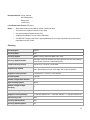
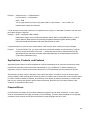
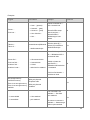
Hot Key Special Options
Usage: Is It Allowed?
Notes
No hotkey is assigned when no more
characters are available (minor
options only)
Yes
n/a
Additional notes: n/a
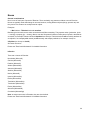
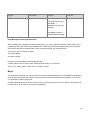
Arrow Keys
The arrow keys move input focus among the controls within a group. Pressing the right arrow key moves input
focus to the next control in tab order, whereas pressing the left arrow moves input focus to the previous control.
Home, End, Up, and Down also have their expected behavior within a group. Users can't navigate out of a control
group using arrow keys.
Numeric Keypad
It is recommended that you avoid distinguishing numeric keypad keys from the other keys, unless it is required by
a given application. In case which keys to be pressed is not obvious, provide necessary explanations.
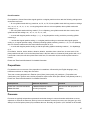
Shortcut Keys
Shortcut keys are keystrokes or combinations of keystrokes used to perform defined functions in a software
application. Shortcut keys replace menu commands and they are sometimes given next to the command they
represent. In opposition to the access keys, which can be used only when available on the screen, shortcut keys
can be used even when they are not accessible on the screen.
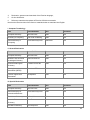
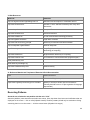
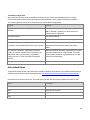
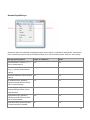
Standard Shortcut Keys
US
Command
US English
Shortcut Key
Estonian
Command
Estonian
Shortcut key
General Windows Shortcut keys
Help window
F1
Spikriaken
F1
Context-sensitive Help
Shift+F1
Kontekstitundlik spikker
Tõst+F1
Display pop-up menu
Shift+F10
Kuva hüpikmenüü
Tõst+F10
Cancel
Esc
Tühista
Esc
Activate\Deactivate menu bar
mode
F10
Aktiveeri/inaktiveeri menüüriba reţiim
F10
Switch to the next primary
Alt+Tab
Lülitu järgmisele peamisele rakendusele
Alt+Tab
57