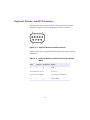
1
Avid Digital News Gathering System ® Hardware Guide tools for storytellers™ Copyright and Disclaimer Product specifications are subject to change without notice and do not represent a commitment on the part of Avid Technology, Inc. The software described in this document is furnished under a license agreement. The software may not be reverse assembled and may be used or copied only in accordance with the terms of the license agreement. It is against the law to copy the software on any medium except as specifically allowed in the license agreement. Avid products or portions thereof are protected by one or more of the following patents: 4,970,663; 5,045,940; 5,267,351; 5,309,528; 5,355,450; D352,278; 5,440,348; 5,452,378; 5,467,288; 5,513,375; 5,528,310; D372,478; 5,557,423; 5,568,275; 5,577,190; 5,583,496; and 5,584,006. No part of this document may be reproduced or transmitted in any form or by any means, electronic or mechanical, including photocopying and recording, for any purpose without the express written permission of Avid Technology, Inc. © Copyright Avid Technology, Inc. July 1997. All rights reserved. The following disclaimer is required by Apple Computer, Inc. APPLE COMPUTER, INC. MAKES NO WARRANTIES WHATSOEVER, EITHER EXPRESS OR IMPLIED, REGARDING THIS PRODUCT, INCLUDING WARRANTIES WITH RESPECT TO ITS MERCHANTABILITY OR ITS FITNESS FOR ANY PARTICULAR PURPOSE. THE EXCLUSION OF IMPLIED WARRANTIES IS NOT PERMITTED BY SOME STATES. THE ABOVE EXCLUSION MAY NOT APPLY TO YOU. THIS WARRANTY PROVIDES YOU WITH SPECIFIC LEGAL RIGHTS. THERE MAY BE OTHER RIGHTS THAT YOU MAY HAVE WHICH VARY FROM STATE TO STATE. The following disclaimer is required by Ray Sauers Associates, Inc. “Install-It” is licensed from Ray Sauers Associates, Inc. End-User is prohibited from taking any action to derive a source code equivalent of “Install-It,” including by reverse assembly or reverse compilation. Ray Sauers Associates, Inc. shall in no event be liable for any damages resulting from reseller’s failure to perform reseller’s obligation; or any damages arising from use or operation of reseller’s products or the software; or any other damages, including but not limited to, incidental, direct, indirect, special or consequential Damages including lost profits, or damages resulting from loss of use or inability to use reseller’s products or the software for any reason including copyright or patent infringement, or lost data, even if Ray Sauers Associates has been advised, knew or should have known of the possibility of such damages. The following disclaimer is required by Videomedia, Inc. “Videomedia, Inc. makes no warranties whatsoever, either express or implied, regarding this product, including warranties with respect to its merchantability or its fitness for any particular purpose.” “This software contains V-LAN ver. 3.0 Command Protocols which communicate with V-LAN ver. 3.0 products developed by Videomedia, Inc. and V-LAN ver. 3.0 compatible products developed by third parties under license from Videomedia, Inc. Use of this software will allow “frame accurate” editing control of applicable videotape recorder decks, videodisc recorders/players and the like.” Attn. Government User(s). Restricted Rights Legend U.S. GOVERNMENT RESTRICTED RIGHTS. Use, duplication or disclosure by the government of the software, documentation and other technical data is subject to restrictions as set forth in subparagraph (c) of FAR clause 52.227-19, COMMERCIAL COMPUTER SOFTWARE-RESTRICTED RIGHTS or, in the case of the Department of Defense or its contractor, is subject to DFARS 227.7202-3, Rights in Commercial Computer Software or Commercial Computer Software Documentation. Electromagnetic Compatibility FCC Notice This device complies with Part 15 of the FCC Rules. Operation is subject to the following two conditions: (1) This device may not cause harmful interference, and (2) this device must accept any interference received, including interference that may cause undesired operation. This equipment has been tested and found to comply with the limits for a Class A digital device, pursuant to Part 15 of the FCC Rules. These limits are designed to provide reasonable protection against harmful interference when the equipment is operated in a commercial environment. This equipment generates, uses, and can radiate radio frequency energy and, if not installed in accordance with the instruction manual, may cause harmful interference to radio communications. Operation of this equipment in a residential area is likely to cause harmful interference in which case the user will be required to correct the interference at his own expense. Ref: C97029a Canadian ICES-003 This Class A digital apparatus meets all requirements of the Canadian Interference Causing Equipment Regulations. Cet appareil numérique de class A respecte toutes les exigences du Règlement sur le matériel brouilleur du Canada. 2 Declaration of Conformity (according to ISO/IEC Guide 22 and EN 45014) Application of Council Directives: 73/23/EEC, 89/336/EEC. Standards to which Conformity is Declared: EN 60950: 1992 + A1, A2: 1993, IEC950: 1992 + A1, A2: 1993 Mod., CISPR 22:1985 / EN 55022:1988 Class A (1), EN 50082-1, IEC801 -2, -3, -4. Manufacturer’s Name: Avid Technology Inc., 1925 Andover Street, Tewksbury, MA 01876, USA. European Contact: Nearest Avid Sales and Service Office or Avid Technology Int’l B.V., Sandyford Business Center, Unit 3, Dublin 18, Ireland. Type of Equipment: Information Technology Equipment. Product Name: Avid Editing System, PCI Media Composer, MCXpress for Macintosh, Film Composer. Base Model Numbers: 400S, 800, 900, 1000, 4000, 8000, MC Offline, Media Station. Product Options: All. Year of Manufacture:1997. (1) The product was tested in a typical Avid Editing System configuration. I the undersigned, hereby declare that the equipment specified above conforms to the above Directives and Standards. George R. Smith, Quality Manager Ref: C97029a, C97030a Trademarks AirPlay, Avid, Media Composer, MediaMix, Media Recorder, NewsCutter, OMF, OMF Interchange, Open Media Framework, and the Avid logo are registered trademarks and ADR/Loop Record, AMP, AutoLoop, AVIDdrive, AVIDdrive Expander, AVIDdrive Towers, AvidDroid, AvidNet, AVIDstripe, CamCutter, Digital Media Architecture, FieldPak, MCXpress, MediaDock, MediaDock Shuttle, MediaLog, MediaServer, MediaShare, NetStation, NewsView, PowerSwap, and Work-N-Play are trademarks of Avid Technology, Inc. Digidesign and Pro Tools are registered trademarks and 442 I/O, Audiomedia III, Digidesign Bridge I/O, Disk I/O, Session 8, Sound Designer II, and Video Slave Driver are trademarks of Digidesign, a division of Avid Technology, Inc. PostScript is a registered trademark of Adobe Systems, Incorporated. Apple, AppleShare, AppleTalk, EtherTalk, LaserWriter, MacCheck, Macintosh, Macintosh Quadra, PowerBook, Power Macintosh, QuickTime, and TrueType are trademarks of Apple Computer, Inc., registered in the United States and other countries. AppleCD, Balloon Help, Disk First Aid, MacroMaker, MoviePlayer, Power Mac, and QuickDraw are trademarks of Apple Computer, Inc. Cabletron Systems, HubSTACK, and LANVIEW are trademarks or registered trademarks of Cabletron Systems, Inc. iNFiNiT! is a trademark of Chyron Corporation. Hurdler is a trademark of Creative Solutions, Inc. DOS Mounter is a trademark of Dayna Corporation. PhotoCD is a trademark of Eastman Kodak Company. Timbuktu is a registered trademark of Farallon Communications, Inc. FORE Systems and ForeRunner are registered trademarks of FORE Systems, Inc. Compact Pro is a trademark of Bill Goodman. Performer is a registered trademark of Grass Valley Group. Editcam is a trademark of Ikegami Tsushinki Co., Ltd. Informix is a worldwide trademark of Informix Software, Inc., or its subsidiaries, registered in the United States and in numerous other countries worldwide. IEEE is a registered trademark of Institute of Electrical and Electronic Engineers, Inc. Intel and Pentium are registered trademarks of Intel Corporation. Panasonic is a registered trademark of Matsushita Electric Industrial Company, Limited. MX/500 is a trademark of MediaDrive Systems, Incorporated, registered within the U.S. and other countries. SoftWindows is a trademark used under license from Microsoft Corporation. Windows NT is a registered trademark of Microsoft Corporation. DECK II is a trademark of OSC. CHALLENGE is a registered trademark and IRIX and XFS are trademarks of Silicon Graphics, Inc. Mac-PC Manager is a trademark of Software Architects, Inc. Sony is a registered trademark of Sony Corporation. Track-It is a trademark of Sprocket Development International. Norton Disk Doctor is a trademark of Symantec Corporation. VersaTerm is a trademark of Synergy Software. Novell is a registered trademark of Novell, Inc. NuBus is a registered trademark of Texas Instruments, Inc. NuVista+ is a registered trademark of Truevision, Inc. V-LAN and VLXi are registered trademarks of Videomedia, Inc. Ethernet is a trademark of Xerox Corporation. Xinet is a registered trademark of Xinet, Inc. UNIX is a registered trademark in the United States and other countries, licensed exclusively through X/Open Company, Ltd. All other trademarks and registered trademarks used herein are the property of their respective owners. Footage Footage provided courtesy of Team One Advertising. Avid Digital News Gathering System Hardware Guide • Part 0130-00944-01 Rev. A • July 1997 3 Contents Preface Who Should Use This Guide . . . . . . . . . . . . . . . . . . . . . . . . . . . . . . . . . About This Manual . . . . . . . . . . . . . . . . . . . . . . . . . . . . . . . . . . . . . . . . . Included in This Manual . . . . . . . . . . . . . . . . . . . . . . . . . . . . . . . . . Symbols and Conventions. . . . . . . . . . . . . . . . . . . . . . . . . . . . . . . . If You Need Help . . . . . . . . . . . . . . . . . . . . . . . . . . . . . . . . . . . . . . . . . . . Related Documentation . . . . . . . . . . . . . . . . . . . . . . . . . . . . . . . . . . . . . If You Have Documentation Comments . . . . . . . . . . . . . . . . . . . . . . . Chapter 1 NewsCutter and Media Recorder Introduction NewsCutter and Media Recorder Overview . . . . . . . . . . . . . . . . . . . . NewsCutter System . . . . . . . . . . . . . . . . . . . . . . . . . . . . . . . . . . . . . NewsCutter Layout . . . . . . . . . . . . . . . . . . . . . . . . . . . . . . . . . . . . . . Media Recorder System . . . . . . . . . . . . . . . . . . . . . . . . . . . . . . . . . . Media Recorder Layout . . . . . . . . . . . . . . . . . . . . . . . . . . . . . . . . . . NewsCutter and Media Recorder Installation . . . . . . . . . . . . . . . . . . NewsCutter and Media Recorder Components . . . . . . . . . . . . . . . . . Storage Options . . . . . . . . . . . . . . . . . . . . . . . . . . . . . . . . . . . . . . . . . Chapter 2 20 20 21 21 22 23 23 24 25 26 27 27 28 28 32 Single-Channel AirPlay MP and AirPlay MP/NewsCutter Introduction AirPlay MP and AirPlay MP/NewsCutter Overview . . . . . . . . . . . . Single-Channel AirPlay MP . . . . . . . . . . . . . . . . . . . . . . . . . . . . . . AirPlay MP/NewsCutter Combination System. . . . . . . . . . . . . . AirPlay MP and AirPlay MP/NewsCutter Layout . . . . . . . . . . . . . . . 4 34 35 35 36 Single-Channel AirPlay MP and AirPlay MP/NewsCutter Installation . . . . . . . . . . . . . . . . . . . . . . . . . . 37 AirPlay MP and AirPlay MP/NewsCutter Components . . . . . . . . . . 38 Storage Options . . . . . . . . . . . . . . . . . . . . . . . . . . . . . . . . . . . . . . . . . 41 Chapter 3 Multichannel AirPlay MP Introduction Single-Channel-With-Record AirPlay MP Overview . . . . . . . . . . . . Single-Channel-With-Record AirPlay MP System . . . . . . . . . . . Single-Channel-With-Record AirPlay MP Layout . . . . . . . . . . . Single-Channel-With-Record AirPlay MP Installation . . . . . . . . . . Single-Channel-With-Record AirPlay MP Components . . . . . . Two- and Three-Channel AirPlay MP Overview . . . . . . . . . . . . . . . . Two- and Three-Channel AirPlay MP Systems. . . . . . . . . . . . . . Two- and Three-Channel AirPlay MP Layout . . . . . . . . . . . . . . . Two- and Three-Channel AirPlay Installation . . . . . . . . . . . . . . . . . . Two- and Three-Channel AirPlay MP Components . . . . . . . . . Components for Linking the Channels . . . . . . . . . . . . . . . . . . . . AirPlay MP Storage Options . . . . . . . . . . . . . . . . . . . . . . . . . . . . . . . . . Chapter 4 Avid Media Processor Overview About the Avid Media Processor . . . . . . . . . . . . . . . . . . . . . . . . . . . . . . Avid System Cabling Guidelines . . . . . . . . . . . . . . . . . . . . . . . . . Avid Media Processor Hardware . . . . . . . . . . . . . . . . . . . . . . . . . . . . . . Plugging in the Avid Media Processor . . . . . . . . . . . . . . . . . . . . . Macintosh Basics . . . . . . . . . . . . . . . . . . . . . . . . . . . . . . . . . . . . . . . . . . . Peer-to-Peer Networking. . . . . . . . . . . . . . . . . . . . . . . . . . . . . . . . . . . . . Chapter 5 43 44 46 49 50 54 56 57 59 61 65 67 69 71 72 75 76 77 Avid Media Processor Hardware About Peripheral Boards. . . . . . . . . . . . . . . . . . . . . . . . . . . . . . . . . . . . . Video Board Set . . . . . . . . . . . . . . . . . . . . . . . . . . . . . . . . . . . . . . . . . Additional Peripheral Boards . . . . . . . . . . . . . . . . . . . . . . . . . . . . . NuBus Slot ConÞgurations . . . . . . . . . . . . . . . . . . . . . . . . . . . . . . . NuBus Power Requirements . . . . . . . . . . . . . . . . . . . . . . . . . . . . . . 5 79 79 81 81 83 Broadcast Panel and Cover Removal . . . . . . . . . . . . . . . . . . . . . . . . . . Installing Peripheral Boards . . . . . . . . . . . . . . . . . . . . . . . . . . . . . . . . . Expanding Memory . . . . . . . . . . . . . . . . . . . . . . . . . . . . . . . . . . . . . . . . . Servicing Internal MediaDrives . . . . . . . . . . . . . . . . . . . . . . . . . . . . . . Chapter 6 User Control and Serial Device Connections Control and Serial Devices . . . . . . . . . . . . . . . . . . . . . . . . . . . . . . . . . . Control Devices . . . . . . . . . . . . . . . . . . . . . . . . . . . . . . . . . . . . . . . . Serial Devices. . . . . . . . . . . . . . . . . . . . . . . . . . . . . . . . . . . . . . . . . . Connecting User Control Devices . . . . . . . . . . . . . . . . . . . . . . . . . . . . Connecting Serial Devices . . . . . . . . . . . . . . . . . . . . . . . . . . . . . . . . . . Using AirPlay MP Remote Controls . . . . . . . . . . . . . . . . . . . . . . . . . . Chapter 7 105 105 106 106 109 110 Video, Decks, and GPI Control Connections About Video Connections. . . . . . . . . . . . . . . . . . . . . . . . . . . . . . . . . . . Video Input and Output . . . . . . . . . . . . . . . . . . . . . . . . . . . . . . . . Monitors . . . . . . . . . . . . . . . . . . . . . . . . . . . . . . . . . . . . . . . . . . . . . . Control for Decks and Other External Devices . . . . . . . . . . . . . Reference Signal . . . . . . . . . . . . . . . . . . . . . . . . . . . . . . . . . . . . . . . Connecting Monitors and Video Input/Output . . . . . . . . . . . . . . . . ConÞguring the Monitor . . . . . . . . . . . . . . . . . . . . . . . . . . . . . . . . Connecting Deck Control . . . . . . . . . . . . . . . . . . . . . . . . . . . . . . . . . . . Connecting a Reference Signal . . . . . . . . . . . . . . . . . . . . . . . . . . . . . . Connecting GPIs . . . . . . . . . . . . . . . . . . . . . . . . . . . . . . . . . . . . . . . . . . . Chapter 8 84 88 92 97 112 112 113 113 114 114 117 118 119 121 Audio Connections About Audio Hardware. . . . . . . . . . . . . . . . . . . . . . . . . . . . . . . . . . . . . Four-Channel Audio Interface . . . . . . . . . . . . . . . . . . . . . . . . . . . Eight-Channel Audio Interface . . . . . . . . . . . . . . . . . . . . . . . . . . Connecting Audio . . . . . . . . . . . . . . . . . . . . . . . . . . . . . . . . . . . . . . . . . Connecting Digital Audio . . . . . . . . . . . . . . . . . . . . . . . . . . . . . . . Connecting to a Master Clock . . . . . . . . . . . . . . . . . . . . . . . . . . . . Connecting a Reference Signal . . . . . . . . . . . . . . . . . . . . . . . . . . . . . . 6 126 126 127 127 127 128 131 ConÞguring Audio . . . . . . . . . . . . . . . . . . . . . . . . . . . . . . . . . . . . . . . . . 132 ConÞguring the Four-Channel Audio Interface . . . . . . . . . . . . 132 ConÞguring the Avid Eight-Channel Audio Interface . . . . . . 133 Chapter 9 Storage Drive Connections About Storage Drives . . . . . . . . . . . . . . . . . . . . . . . . . . . . . . . . . . . . . . Media Storage Drive Options . . . . . . . . . . . . . . . . . . . . . . . . . . . . Buffer Drives and Shared Library . . . . . . . . . . . . . . . . . . . . . . . . Understanding SCSI Hardware . . . . . . . . . . . . . . . . . . . . . . . . . . . . . . Drive ConÞgurations . . . . . . . . . . . . . . . . . . . . . . . . . . . . . . . . . . . Storage Expander ConÞgurations . . . . . . . . . . . . . . . . . . . . . . . . Multichannel Storage ConÞgurations . . . . . . . . . . . . . . . . . . . . . Single-Ended and Differential SCSI Connections . . . . . . . . . . ATTO SiliconExpress Boards . . . . . . . . . . . . . . . . . . . . . . . . . . . . SCSI Cables . . . . . . . . . . . . . . . . . . . . . . . . . . . . . . . . . . . . . . . . . . . SCSI Connectors . . . . . . . . . . . . . . . . . . . . . . . . . . . . . . . . . . . . . . . SCSI Terminators . . . . . . . . . . . . . . . . . . . . . . . . . . . . . . . . . . . . . . SCSI IDs . . . . . . . . . . . . . . . . . . . . . . . . . . . . . . . . . . . . . . . . . . . . . . Connecting Storage Drives . . . . . . . . . . . . . . . . . . . . . . . . . . . . . . . . . . Connecting One MRS Enclosure . . . . . . . . . . . . . . . . . . . . . . . . . Connecting Two MRS Enclosures . . . . . . . . . . . . . . . . . . . . . . . . Connecting MRS Enclosures with Storage Expanders . . . . . . Connecting SCSI RAID Units . . . . . . . . . . . . . . . . . . . . . . . . . . . Connecting 9-GB MediaDrives . . . . . . . . . . . . . . . . . . . . . . . . . . Connecting the MediaShare Library . . . . . . . . . . . . . . . . . . . . . . Connecting Systems to the MediaShare Unit. . . . . . . . . . . Connecting Storage Drives to the MediaShare Unit. . . . . Connecting the MediaDock . . . . . . . . . . . . . . . . . . . . . . . . . . . . . Naming Drives . . . . . . . . . . . . . . . . . . . . . . . . . . . . . . . . . . . . . . . . . . . . 7 137 138 138 139 139 139 140 142 144 144 145 147 148 151 151 152 154 157 158 159 159 161 161 163 Chapter 10 Multiple Channel Connections About Connecting Channels . . . . . . . . . . . . . . . . . . . . . . . . . . . . . . . . Record/Engineering Workstation. . . . . . . . . . . . . . . . . . . . . . . . . User Interface ADB Switch . . . . . . . . . . . . . . . . . . . . . . . . . . . . . . ADB Switch Jumpers . . . . . . . . . . . . . . . . . . . . . . . . . . . . . . . Connecting the ADB Switch . . . . . . . . . . . . . . . . . . . . . . . . . Connecting Ethernet Channels. . . . . . . . . . . . . . . . . . . . . . . . . . . Chapter 11 165 165 165 166 166 168 Client/Server Hardware Hardware Overview. . . . . . . . . . . . . . . . . . . . . . . . . . . . . . . . . . . . . . . . Servers . . . . . . . . . . . . . . . . . . . . . . . . . . . . . . . . . . . . . . . . . . . . . . . . . . . Database Console . . . . . . . . . . . . . . . . . . . . . . . . . . . . . . . . . . . . . . . . . . ATM Switches . . . . . . . . . . . . . . . . . . . . . . . . . . . . . . . . . . . . . . . . . . . . . Network Modules . . . . . . . . . . . . . . . . . . . . . . . . . . . . . . . . . . . . . . Ports . . . . . . . . . . . . . . . . . . . . . . . . . . . . . . . . . . . . . . . . . . . . . . . . . . Ethernet Port. . . . . . . . . . . . . . . . . . . . . . . . . . . . . . . . . . . . . . . . . . . Display Window . . . . . . . . . . . . . . . . . . . . . . . . . . . . . . . . . . . . . . . Switch Connections . . . . . . . . . . . . . . . . . . . . . . . . . . . . . . . . . . . . Switch Administration. . . . . . . . . . . . . . . . . . . . . . . . . . . . . . . . . . Ethernet Hub . . . . . . . . . . . . . . . . . . . . . . . . . . . . . . . . . . . . . . . . . . . . . . Status LEDs . . . . . . . . . . . . . . . . . . . . . . . . . . . . . . . . . . . . . . . . . . . RAID Storage Units . . . . . . . . . . . . . . . . . . . . . . . . . . . . . . . . . . . . . . . . Ciprico . . . . . . . . . . . . . . . . . . . . . . . . . . . . . . . . . . . . . . . . . . . . . . . . Control Panel . . . . . . . . . . . . . . . . . . . . . . . . . . . . . . . . . . . . . . Power Supply Shuttles . . . . . . . . . . . . . . . . . . . . . . . . . . . . . . Audio Alarm . . . . . . . . . . . . . . . . . . . . . . . . . . . . . . . . . . . . . . . MegaDrive . . . . . . . . . . . . . . . . . . . . . . . . . . . . . . . . . . . . . . . . . . . . LCD Interface . . . . . . . . . . . . . . . . . . . . . . . . . . . . . . . . . . . . . . Controller LEDs . . . . . . . . . . . . . . . . . . . . . . . . . . . . . . . . . . . . Drives . . . . . . . . . . . . . . . . . . . . . . . . . . . . . . . . . . . . . . . . . . . . . Fault Alarm . . . . . . . . . . . . . . . . . . . . . . . . . . . . . . . . . . . . . . . . 8 170 173 175 176 177 177 178 178 178 179 180 181 182 182 183 184 184 184 186 186 187 188 Power Supplies. . . . . . . . . . . . . . . . . . . . . . . . . . . . . . . . . . . . . Fast, Wide SCSI-2 Ports. . . . . . . . . . . . . . . . . . . . . . . . . . . . . . Connections. . . . . . . . . . . . . . . . . . . . . . . . . . . . . . . . . . . . . . . . Power Cycling RAID Units . . . . . . . . . . . . . . . . . . . . . . . . . . . . . . Swapping RAID Unit Drives . . . . . . . . . . . . . . . . . . . . . . . . . . . . Chapter 12 Configuring Multichannel AirPlay MP Linking Multichannel AirPlay MP Channels. . . . . . . . . . . . . . . . . . Naming the Channels and Enabling Program Linking . . . . . . AutoGuest. . . . . . . . . . . . . . . . . . . . . . . . . . . . . . . . . . . . . . . . . . . . . Completing the Channel Links . . . . . . . . . . . . . . . . . . . . . . . . . . ConÞguring Access to the Central Disk Array . . . . . . . . . . . . . . . . . ConÞguring the Multichannel AirPlay MP System . . . . . . . . . . . . Understanding the Database Server Window . . . . . . . . . . . . . . Quitting from the Database Server Window . . . . . . . . . . . Relaunching the Database Server Window . . . . . . . . . . . . ConÞguring Playback Channels. . . . . . . . . . . . . . . . . . . . . . . . . . ConÞguring the Record Channel . . . . . . . . . . . . . . . . . . . . . . . . . ConÞguring the Control Channel . . . . . . . . . . . . . . . . . . . . . . . . Changing Media Sharing from the Status Bar . . . . . . . . . . . . . Taking Local Control of a Channel . . . . . . . . . . . . . . . . . . . . . . . . . . . Grouping Channels . . . . . . . . . . . . . . . . . . . . . . . . . . . . . . . . . . . . . . . . Chapter 13 188 188 188 190 191 192 193 194 195 197 199 200 201 201 201 204 206 208 209 211 Starting Up and Shutting Down Starting Up and Shutting Down Systems . . . . . . . . . . . . . . . . . . . . . 215 Starting Up the System . . . . . . . . . . . . . . . . . . . . . . . . . . . . . . . . . 215 If the Application Fails to Launch . . . . . . . . . . . . . . . . . . . . 216 Displaying ConÞguration Information . . . . . . . . . . . . . . . . 217 Shutting Down the System . . . . . . . . . . . . . . . . . . . . . . . . . . . . . . 218 Starting Up and Shutting Down Multichannel AirPlay MP Systems 219 Starting Up Multichannel AirPlay MP Systems . . . . . . . . . . . . 219 Shutting Down Multichannel AirPlay MP Systems . . . . . . . . 221 9 Starting Up and Shutting Down MediaServer Systems. . . . . . . . . Starting Up the Server . . . . . . . . . . . . . . . . . . . . . . . . . . . . . . . . . . Shutting Down the Server. . . . . . . . . . . . . . . . . . . . . . . . . . . . . . . Rebooting the Server . . . . . . . . . . . . . . . . . . . . . . . . . . . . . . . . . . . Starting Up an ATM Switch . . . . . . . . . . . . . . . . . . . . . . . . . . . . . Shutting Down an ATM Switch. . . . . . . . . . . . . . . . . . . . . . . . . . Chapter 14 222 222 223 223 223 223 Operating Safely Save and Back Up Frequently . . . . . . . . . . . . . . . . . . . . . . . . . . . . . . . 224 Why Saving is Important. . . . . . . . . . . . . . . . . . . . . . . . . . . . . . . . 225 Why Backups are Important . . . . . . . . . . . . . . . . . . . . . . . . . . . . . 225 Backing Up Bins and Projects . . . . . . . . . . . . . . . . . . . . . . . . . . . . . . . 226 Hints for Recording . . . . . . . . . . . . . . . . . . . . . . . . . . . . . . . . . . . . . . . . 227 Choose the Correct Storage Drive . . . . . . . . . . . . . . . . . . . . . . . . 227 Store Media Files on MediaDrivesÑProjects on the Avid System Drive . . . . . . . . . . . . . . . . . . . . . . . . . . . . . . . . . . . . . . . . . . . . . . . . . 228 Do Not Completely Fill MediaDrives. . . . . . . . . . . . . . . . . . . . . 228 Record Video and Audio to Separate Drives . . . . . . . . . . . . . . . 228 Choose Drives with Enough Storage Space. . . . . . . . . . . . . . . . 229 Store Fewer Than 100 Clips in Each Bin. . . . . . . . . . . . . . . . . . . 229 Create Large Rather Than Small Master Clips . . . . . . . . . . . . . 229 Keep Only One System Folder Online . . . . . . . . . . . . . . . . . . . . . . . 230 Removing Extra System Folders. . . . . . . . . . . . . . . . . . . . . . . . . . 230 Unplugging the Keyboard or Mouse . . . . . . . . . . . . . . . . . . . . . . . . . 231 If the Keyboard or Mouse Accidentally Disconnects . . . . . . . 231 Switch MediaDrives Safely . . . . . . . . . . . . . . . . . . . . . . . . . . . . . . . . . 232 Switching Drives Without Turning Off the System. . . . . . . . . 232 Switching Drives After Turning Off the System . . . . . . . . . . . 233 10 Chapter 15 Maintenance AirPlay MP Maintenance Procedures . . . . . . . . . . . . . . . . . . . . . . . . Daily AirPlay MP Maintenance . . . . . . . . . . . . . . . . . . . . . . . . . . Weekly AirPlay MP Maintenance . . . . . . . . . . . . . . . . . . . . . . . . Monthly AirPlay MP Maintenance . . . . . . . . . . . . . . . . . . . . . . . Single-Channel Monthly Maintenance . . . . . . . . . . . . . . . . Multichannel Monthly Maintenance. . . . . . . . . . . . . . . . . . Single and Multichannel Monthly Maintenance . . . . . . . MediaServer Maintenance . . . . . . . . . . . . . . . . . . . . . . . . . . . . . . . . . . Maintaining Drives with Disk First Aid . . . . . . . . . . . . . . . . . . . . . . Using Disk First Aid. . . . . . . . . . . . . . . . . . . . . . . . . . . . . . . . . . . . If Drive Status Cannot Be VeriÞed . . . . . . . . . . . . . . . . . . . . . . . Chapter 16 Troubleshooting When You Run into Trouble. . . . . . . . . . . . . . . . . . . . . . . . . . . . . . . . . Responding to Error Messages . . . . . . . . . . . . . . . . . . . . . . . . . . . Starting Over . . . . . . . . . . . . . . . . . . . . . . . . . . . . . . . . . . . . . . . . . . Solutions to Common Problems . . . . . . . . . . . . . . . . . . . . . . . . . . . . . Chapter 17 235 237 238 238 238 239 240 242 243 243 245 246 246 247 249 Hardware Specifications Site Requirements . . . . . . . . . . . . . . . . . . . . . . . . . . . . . . . . . . . . . . . . . Power Requirements . . . . . . . . . . . . . . . . . . . . . . . . . . . . . . . . . . . Source Requirements . . . . . . . . . . . . . . . . . . . . . . . . . . . . . . . . . . . Synchronization Requirements . . . . . . . . . . . . . . . . . . . . . . . . . . Printing Requirements. . . . . . . . . . . . . . . . . . . . . . . . . . . . . . . . . . Networking Requirements . . . . . . . . . . . . . . . . . . . . . . . . . . . . . . Telephone Requirements. . . . . . . . . . . . . . . . . . . . . . . . . . . . . . . . Environmental Requirements. . . . . . . . . . . . . . . . . . . . . . . . . . . . Component Weights and Dimensions . . . . . . . . . . . . . . . . . . . . . . . . Avid-Supplied Rack SpeciÞcations . . . . . . . . . . . . . . . . . . . . . . . . . . Power Requirements . . . . . . . . . . . . . . . . . . . . . . . . . . . . . . . . . . . . . . . 11 261 261 262 262 262 262 262 263 263 267 270 Broadcast Panels . . . . . . . . . . . . . . . . . . . . . . . . . . . . . . . . . . . . . . . . . . . Serial Ports . . . . . . . . . . . . . . . . . . . . . . . . . . . . . . . . . . . . . . . . . . . . Keyboard, Remote, and GPI Connectors . . . . . . . . . . . . . . . . . . UI Monitor Port . . . . . . . . . . . . . . . . . . . . . . . . . . . . . . . . . . . . . . . . Avid Broadcast Video Board . . . . . . . . . . . . . . . . . . . . . . . . . . . . . Chapter 18 274 276 278 279 280 Supported Decks Direct Serial Control . . . . . . . . . . . . . . . . . . . . . . . . . . . . . . . . . . . . . . . Fully Supported Direct Serial Control . . . . . . . . . . . . . . . . . . . . Conditionally Supported Direct Serial Control . . . . . . . . . . . . Untested Direct Serial Control . . . . . . . . . . . . . . . . . . . . . . . . . . . Logging Only Direct Serial Control . . . . . . . . . . . . . . . . . . . . . . V-LAN Control . . . . . . . . . . . . . . . . . . . . . . . . . . . . . . . . . . . . . . . . . . . . Fully Supported V-LAN Control . . . . . . . . . . . . . . . . . . . . . . . . . Untested V-LAN Control . . . . . . . . . . . . . . . . . . . . . . . . . . . . . . . . Logging Supported V-LAN Control . . . . . . . . . . . . . . . . . . . . . . 12 283 283 285 285 286 287 287 289 290 Figures Figure 1-1 Sample NewsCutter System Layout . . . . . . . . . . . . . . . 26 Figure 1-2 Sample Media Recorder System Layout. . . . . . . . . . . . 27 Figure 2-1 Sample Layout for a Single-Channel AirPlay MP or AirPlay MP/NewsCutter Combination System . . . . . 36 Figure 3-1 Single-Channel-With-Record AirPlay MP Diagram . . . . . . . . . . . . . . . . . . . . . . . . . . . . . . . . . . . . . . . 44 Figure 3-2 Rack-Mounted Components for Single-ChannelWith-Record AirPlay MP . . . . . . . . . . . . . . . . . . . . . . . . 47 Figure 3-3 Additional Components for Single-Channel-WithRecord AirPlay MP . . . . . . . . . . . . . . . . . . . . . . . . . . . . . 48 Figure 3-4 Three-Channel AirPlay MP Diagram . . . . . . . . . . . . . . 55 Figure 3-5 Three-Channel AirPlay MP Rack-Mounted Components . . . . . . . . . . . . . . . . . . . . . . . . . . . . . . . . . . . 58 Figure 3-6 Three-Channel AirPlay MP Additional Components . . . . . . . . . . . . . . . . . . . . . . . . . . . . . . . . . . . 59 Figure 4-1 Avid Media Processor (Front View) . . . . . . . . . . . . . . . 72 Figure 4-2 Avid Media Processor (Rear View with Analog Broadcast Panel) . . . . . . . . . . . . . . . . . . . . . . . . . . . . . . . . 73 Figure 4-3 Digital Broadcast Panel Connectors . . . . . . . . . . . . . . . 74 Figure 4-4 Analog Broadcast Panel Connectors . . . . . . . . . . . . . . . 74 Figure 4-5 Plugging In the Avid Media Processor . . . . . . . . . . . . . 75 Figure 4-6 Online Macintosh Guide . . . . . . . . . . . . . . . . . . . . . . . . . 76 Figure 5-1 NuBus Slot Layout . . . . . . . . . . . . . . . . . . . . . . . . . . . . . . 82 Figure 5-2 Removing the Broadcast Panel. . . . . . . . . . . . . . . . . . . . 85 Figure 5-3 Connectors When Broadcast Panel Is Not Attached. . . . . . . . . . . . . . . . . . . . . . . . . . . . . . . . . . . . . . . 86 Figure 5-4 Removing the Top Cover . . . . . . . . . . . . . . . . . . . . . . . . 87 13 Figure 5-5 Discharging Static Electricity . . . . . . . . . . . . . . . . . . . . . 88 Figure 5-6 Removing Slot Covers and Hold-Down Rails . . . . . . . 89 Figure 5-7 Handling NuBus Boards . . . . . . . . . . . . . . . . . . . . . . . . . 90 Figure 5-8 Aligning the Peripheral Board . . . . . . . . . . . . . . . . . . . . 90 Figure 5-9 Dislodging the Power Harness. . . . . . . . . . . . . . . . . . . . 93 Figure 5-10 Removing the Air Baffle . . . . . . . . . . . . . . . . . . . . . . . . . 94 Figure 5-11 Moving the Power Supply . . . . . . . . . . . . . . . . . . . . . . . 95 Figure 5-12 Installing SIMMs . . . . . . . . . . . . . . . . . . . . . . . . . . . . . . . 96 Figure 5-13 Removing the Drive Bracket Assembly . . . . . . . . . . . . 98 Figure 5-14 Diskette Drive Screws . . . . . . . . . . . . . . . . . . . . . . . . . . . 99 Figure 5-15 MediaDrive Screws . . . . . . . . . . . . . . . . . . . . . . . . . . . . . 99 Figure 5-16 Connecting the MediaDrive Cables. . . . . . . . . . . . . . . 100 Figure 5-17 Removing the Drive Bracket Assembly . . . . . . . . . . . 101 Figure 5-18 Internal SCSI Cable Connection and Terminators . . 102 Figure 5-19 Connecting the MediaDrive Power Cable to the Supply . . . . . . . . . . . . . . . . . . . . . . . . . . . . . . . . . . . . 103 Figure 6-1 User Control for NewsCutter and Media Recorder . 107 Figure 6-2 User Control for Single- and Multichannel AirPlay MP and AirPlay MP/NewsCutter . . . . . . . . 108 Figure 6-3 Serial Connections . . . . . . . . . . . . . . . . . . . . . . . . . . . . . 109 Figure 6-4 Desktop AirPlay MP Remote Control . . . . . . . . . . . . . 110 Figure 6-5 Rack-mounted AirPlay MP Remote Control . . . . . . . 110 Figure 7-1 Video I/O for Analog Broadcast Panel. . . . . . . . . . . . 115 Figure 7-2 Video I/O for Digital Broadcast Panel . . . . . . . . . . . . 116 Figure 7-3 Serial Deck Control . . . . . . . . . . . . . . . . . . . . . . . . . . . . 118 Figure 7-4 V-LAN VLXi Deck Control. . . . . . . . . . . . . . . . . . . . . . 119 Figure 7-5 Reference Signal . . . . . . . . . . . . . . . . . . . . . . . . . . . . . . . 120 14 Figure 7-6 Avid GPI Connections. . . . . . . . . . . . . . . . . . . . . . . . . . 121 Figure 7-7 V-LAN VLXi GPI Connections. . . . . . . . . . . . . . . . . . . 123 Figure 8-1 Audio Input and Output Using the Four-Channel Audio Interface, AB Amplifier, and Speakers . . . . . . . . . . . . 129 Figure 8-2 Audio Input and Output Using the Optional Eight-Channel Audio Interface . . . . . . . . . . . . . . . . . . 130 Figure 8-3 Reference Signal . . . . . . . . . . . . . . . . . . . . . . . . . . . . . . . 131 Figure 9-1 Avid Internal and External Media Drives . . . . . . . . . 137 Figure 9-2 Multichannel AirPlay MP SCSI Network for Sharing Drives . . . . . . . . . . . . . . . . . . . . . . . . . . . . . . . . 141 Figure 9-3 Identifying Single-ended and Differential SiliconExpress Boards . . . . . . . . . . . . . . . . . . . . . . . . . . 144 Figure 9-4 Single-ended and Differential SCSI Cables . . . . . . . . 145 Figure 9-5 Single-ended and Differential SCSI Connectors on MRS Enclosures . . . . . . . . . . . . . . . . . . . . . . . . . . . . . . . 146 Figure 9-6 Single-ended SCSI Connectors on External MediaDrives . . . . . . . . . . . . . . . . . . . . . . . . . . . . . . . . . . 146 Figure 9-7 SCSI Connectors on the MediaDock . . . . . . . . . . . . . . 147 Figure 9-8 SCSI Terminators . . . . . . . . . . . . . . . . . . . . . . . . . . . . . . 148 Figure 9-9 Terminating the MediaDock Chassis . . . . . . . . . . . . . 148 Figure 9-10 Setting SCSI IDs on MRS Enclosures. . . . . . . . . . . . . . 149 Figure 9-11 Setting SCSI IDs on MediaDrives . . . . . . . . . . . . . . . . 150 Figure 9-12 Setting SCSI IDs on the MediaDock Chassis . . . . . . . 150 Figure 9-13 Installing One MRS Enclosure . . . . . . . . . . . . . . . . . . . 152 Figure 9-14 Cables, SCSI IDs, and Terminator for Two MRS Enclosures . . . . . . . . . . . . . . . . . . . . . . . . . . . . . . . . . . . . 153 Figure 9-15 Cables, SCSI IDs, and Terminators for MRS with Storage Expanders . . . . . . . . . . . . . . . . . . . . . . . . . . . . . 156 Figure 9-16 Avid MediaShare Display and Buttons . . . . . . . . . . . 159 15 Figure 9-17 Avid MediaShare Connectors and Power Switch . . . 160 Figure 9-18 MediaDock Slots and SCSI Buses (Tower Configuration). . . . . . . . . . . . . . . . . . . . . . . . . . 162 Figure 10-1 User Interface ADB Switch (Front View) . . . . . . . . . . 166 Figure 10-2 Connecting the Record/Engineering Workstation . . 167 Figure 10-3 Ethernet Connections. . . . . . . . . . . . . . . . . . . . . . . . . . . 169 Figure 11-1 Sample CHALLENGE XL Layout . . . . . . . . . . . . . . . . 172 Figure 11-2 CHALLENGE DM Server . . . . . . . . . . . . . . . . . . . . . . . 173 Figure 11-3 CHALLENGE XL Server. . . . . . . . . . . . . . . . . . . . . . . . 174 Figure 11-4 ASX 200BX Switch . . . . . . . . . . . . . . . . . . . . . . . . . . . . . 177 Figure 11-5 Switch Ports. . . . . . . . . . . . . . . . . . . . . . . . . . . . . . . . . . . 178 Figure 11-6 Server Ethernet Hub . . . . . . . . . . . . . . . . . . . . . . . . . . . 180 Figure 11-7 Ciprico Front Panel . . . . . . . . . . . . . . . . . . . . . . . . . . . . 183 Figure 11-8 MegaDrive Front . . . . . . . . . . . . . . . . . . . . . . . . . . . . . . 185 Figure 11-9 MegaDrive Back . . . . . . . . . . . . . . . . . . . . . . . . . . . . . . . 185 Figure 11-10 MegaDrive Configuration . . . . . . . . . . . . . . . . . . . . . . 187 Figure 11-11 Direct RAID Connections to the Server . . . . . . . . . . . 189 Figure 11-12 RAID Connections to the Server and Other RAID Units . . . . . . . . . . . . . . . . . . . . . . . . . . . . . . . . . . . 190 Figure 13-1 Power-On Key . . . . . . . . . . . . . . . . . . . . . . . . . . . . . . . . 216 Figure 13-2 User Interface ADB Switch and Power-On Key . . . . 220 Figure 14-1 Project and Bins Saved on the Avid System Drive . . 225 Figure 17-1 Two-Rack Enclosure (front view) . . . . . . . . . . . . . . . . 268 Figure 17-2 Rack Dimensions and Service Access (overhead view) . . . . . . . . . . . . . . . . . . . . . . . . . . . . . . . 269 Figure 17-3 Base for a Rack (overhead view) . . . . . . . . . . . . . . . . . 270 Figure 17-4 Original Broadcast Panel Connectors . . . . . . . . . . . . . 275 16 Figure 17-5 Digital Broadcast Panel Connectors . . . . . . . . . . . . . . 275 Figure 17-6 Analog Broadcast Panel Connectors . . . . . . . . . . . . . . 276 Figure 17-7 9-Pin Serial Connector . . . . . . . . . . . . . . . . . . . . . . . . . . 276 Figure 17-8 Keyboard, Remote, and GPI Connector . . . . . . . . . . . 278 Figure 17-9 UI Monitor Connector . . . . . . . . . . . . . . . . . . . . . . . . . . 279 Figure 17-10 ABVB Analog 15-Pin Video Connector. . . . . . . . . . . . 280 Figure 17-11 ABVB Digital 9-Pin Video Connector . . . . . . . . . . . . . 282 17 Tables Table 1-1 NewsCutter and Media Recorder Components . . . . . . . . . . . . . . . . . . . . . . . . . . . . . . . . . . . 29 Table 1-2 NewsCutter and Media Recorder Storage Options . . 33 Table 2-1 Components for Single-Channel AirPlay MP or AirPlay MP/NewsCutter Combination . . . . . . . . . . . . 38 Table 2-2 Single-Channel AirPlay MP and AirPlay MP/ NewsCutter Combination System Storage Options . . 42 Table 3-1 Components for Each Channel in a Single-ChannelWith-Record AirPlay MP System . . . . . . . . . . . . . . . . . 50 Table 3-2 Single-Channel-With-Record AirPlay MP: Additional System Components . . . . . . . . . . . . . . . . . . . . . . . . . . . . 54 Table 3-3 Multichannel AirPlay MP Channel Components . . . . 61 Table 3-4 Multichannel AirPlay MP Linking Components. . . . . 66 Table 3-5 AirPlay MP Storage Options . . . . . . . . . . . . . . . . . . . . . 67 Table 5-1 Avid Media Processor Slot Configurations . . . . . . . . . 83 Table 5-2 NuBus Slot Power Usage . . . . . . . . . . . . . . . . . . . . . . . . 83 Table 5-3 Broadcast Panel Cable Connections . . . . . . . . . . . . . . . 91 Table 7-1 Avid GPI Controller Pin Assignments . . . . . . . . . . . . 122 Table 7-2 V-LAN VLXi Serial Pin Assignments . . . . . . . . . . . . . 124 Table 11-1 AvidNet Hardware . . . . . . . . . . . . . . . . . . . . . . . . . . . . 171 Table 11-2 Database Console Requirements . . . . . . . . . . . . . . . . . 175 Table 11-3 ASX 200BX ATM Switch Connections . . . . . . . . . . . . 179 Table 11-4 Cabletron Systems Status LED . . . . . . . . . . . . . . . . . . . 181 Table 11-5 Ciprico User Controls . . . . . . . . . . . . . . . . . . . . . . . . . . 183 Table 11-6 Controller LEDs . . . . . . . . . . . . . . . . . . . . . . . . . . . . . . . 186 Table 17-1 Environmental Specifications. . . . . . . . . . . . . . . . . . . . 263 Table 17-2 Physical Specifications for Components. . . . . . . . . . . 263 18 Table 17-3 Avid System Rack Enclosure Capacity . . . . . . . . . . . . 267 Table 17-4 Power Requirements . . . . . . . . . . . . . . . . . . . . . . . . . . . 271 Table 17-5 Pin Assignments for Serial Connectors. . . . . . . . . . . . 277 Table 17-6 Keyboard, Remote, and GPI Connector Pin Assignments . . . . . . . . . . . . . . . . . . . . . . . . . . . . . . . . . . 278 Table 17-7 UI Monitor Connector Pin Assignments . . . . . . . . . . 279 Table 17-8 NuBus ABVB Video Connector Pin Assignments. . . 281 Table 17-9 ABVB Video Connector Pin Assignments . . . . . . . . . 282 Table 18-1 Direct Serial Control: Fully Supported Decks . . . . . . 284 Table 18-2 Direct Serial Control: Conditionally Supported Decks . . . . . . . . . . . . . . . . . . . . . . . . . . . . . . 285 Table 18-3 Direct Serial Control: Untested Decks. . . . . . . . . . . . . 285 Table 18-4 Direct Serial Control: Logging Decks Only . . . . . . . . 286 Table 18-5 V-LAN Control: Fully Supported Decks . . . . . . . . . . 287 Table 18-6 V-LAN Control: Untested Decks . . . . . . . . . . . . . . . . . 289 Table 18-7 V-LAN Control: Logging Decks Only. . . . . . . . . . . . . 290 19 Preface This guide provides hardware information for Avid¨ broadcast and Digital News Gathering (DNG) systems. The guide explains how to install and operate the hardware for AvidÕs NewsCutter¨ editing system, Media Recorder¨ recording system, and AirPlay¨ MP playback system that are all based on the Avid Media Processor. The Avid MediaServerª hardware is explained for server and client applications. Who Should Use This Guide Read this guide if you are responsible for installing, moving, or attempting to solve a problem with an Avid DNG system. About This Manual In addition to the system integration instructions, this guide provides basic information on each standard and optional DNG component. The information includes features, connections, and operation. 20 Included in This Manual The Table of Contents that precedes this preface lists all topics included in the book. They are presented with the following overall structure: ¥ The Þrst three chapters introduce the DNG products and list the standard and optional components of each. References to detailed installation information to speciÞc chapters are also provided. ¥ The body of the guide provides information on opening the Avid Media Processor and describing its internal components. Step-bystep procedures for connecting each broadcast component to the Avid Media Processor are provided. ¥ Also in the body of the guide is information on starting up and shutting down the hardware, safe operation of the system, maintenance, and troubleshooting. SpeciÞcations include environmental, physical, and electrical. ¥ Finally, a detailed index helps you to locate speciÞc topics quickly. Symbols and Conventions The guide uses the following special symbols and conventions: 1. Numbered lists, when order is important. a. Alphabetical lists, when the order of secondary items is important. ¥ Bulleted lists, when the order of the items is unimportant. - Indented dashed lists, when the order of subtopics is unimportant. k This symbol refers to the Apple or Command key. Hold down the Command key and another key to perform the desired keyboard equivalent. 21 n A note provides important related information, reminders, recommendations, and strong suggestions. c A caution means that a speciÞc action you take could cause harm to your computer or cause you to lose data. w A warning describes an action that could cause you physical harm. Follow the guidelines in the manual or on the unit itself when handling electrical equipment. If You Need Help If you are having trouble using your Avid Digital News Gathering (DNG) product, you should: 1. Retry the action, carefully following the instructions given for that task in this guide. 2. Check the documentation that came with your hardware for maintenance or hardware-related issues. 3. Check the Services & Support section of the Avid web site at http://www.avid.com for the latest FAQs, Tips & Techniques, Avid Answers, and other Avid online offerings. 4. Check the Avid Bulletin Board, ÒAvid Online,Ó for product information. If you do not Þnd the solution to your problem, you can exchange information with other Avid customers and Customer Support representatives. 5. News DNG Maintenance Agreement contract customers can contact Avid Broadcast Customer Support at 800-NEWS DNG (639-7364). (For more information about support and News DNG Maintenance Agreements, call Avid TeleSales at 800-949-2843.) 22 Related Documentation The following documents provide more information pertaining to broadcast and DNG products: ¥ Avid NewsCutter UserÕs Guide Ñ describes how to operate the NewsCutter system and software. ¥ Avid MediaServer Administration Guide Ñ describes the administrative functions of the MediaServer. ¥ Avid MediaServer Client UserÕs Guide Ñ describes how to operate MediaServer clients and software. ¥ Avid AirPlay MP UserÕs Guide Ñ describes how to operate the AirPlay MP system and software. ¥ Avid Media Recorder UserÕs Guide Ñ describes how to operate the Media Recorder and software. If You Have Documentation Comments Avid Technology continuously seeks to improve its documentation. We value your comments about this guide or other Avid-supplied documentation. Simply E-mail your documentation comments to Avid Technology at [email protected] Please include the title of the document, its part number, revision, and the speciÞc section youÕre commenting on in all correspondence. 23 CHAPTER 1 NewsCutter and Media Recorder Introduction This chapter introduces the hardware for NewsCutter and Media Recorder. The introduction includes an overview of each system, a list of the standard and optional components, and references to conÞguration information later in this guide. NewsCutter and Media Recorder Overview NewsCutter is a disk-based, nonlinear, random access system for editing news stories, commercials, promotional material, and other broadcast needs. Media Recorder is a disk-based, non-linear, random access, recorder station that offers broadcast quality recording and playback. Media Recorder captures and plays directly from the drive. You can record material from satellite or microwave feeds, microphone, audio sources, or decks. 24 NewsCutter System The Avid Media Processor is a computer that serves as the central processing unit (CPU) for NewsCutter. The system and peripheral boards installed in the Avid Media Processor convert the incoming video and audio analog signals into digital format for storage. A user interface (UI) monitor displays the user interface, including command menus and buttons. The keyboard and mouse serve as communication devices for entering commands and operating the system. A customer-supplied playback monitor displays material the system is playing or recording. When the system records, it stores the audio and video media data in digital format on storage drives. The system plays back the digital material from the drives During playback, the system converts the digital media stored on disk to the correct output format (either analog or serial digital format depending on the type of video board installed in the system). 25 NewsCutter Layout Figure 1-1 shows all standard and optional NewsCutter components except for a source of reference video or a black burst generator. The rack shown in the Þgure is not supplied with a NewsCutter system. Customer-supplied deck, feed, router, or other video input/output source UI monitor Modem Customer-supplied playback monitor Speakers and audio amplifier (optional) Speaker Video Slave Driver Audio interface VLX POW Keyboard ER POW 1 ER 2 COO LING TERM BUS TERM A BUS B ACTI VITY Mouse DEVI CE SCSI ID V-LAN VLXi (option required to connect a deck without Avid direct serial protocol) Disk drives: MediaDock, MRS, or MediaDrives Avid Media Processor Customer-supplied rack MRS – multidrive rack-mountable storage V-LAN – video local area network Figure 1-1 Sample NewsCutter System Layout 26 Media Recorder System Media Recorder uses the same basic hardware as NewsCutter. However, it has a smaller UI monitor. Media Recorder Layout Figure 1-2 shows all standard and optional Media Recorder components except for a source of reference video or a black burst generator. The rack shown in the Þgure is not supplied with a Media Recorder system. Customer-supplied deck, feed, router, or other video source UI monitor Modem (optional) Customer-supplied playback monitor Speaker (optional) V-LAN VLXi (option required to connect a deck without Avid direct serial protocol) Video Slave Driver Speaker (optional) Audio interface VLX POW ER POW 1 ER 2 COO LING TER M BUS TER A M BUS B ACT IVIT Y DEV ICE SCS I ID Keyboard Mouse Disk drives: MediaDock, MRS, or MediaDrives Avid Media Processor MRS – multidrive rack-mountable storage V-LAN – video local area network Figure 1-2 Customer-supplied rack Sample Media Recorder System Layout 27 NewsCutter and Media Recorder Installation The basic steps for installing a NewsCutter or Media Recorder system are: 1. Unpack and position or mount the Avid Media Processor on a desktop or rack, respectively. 2. Connect the communication and control devices, such as the keyboard and mouse. 3. Connect the audio hardware. 4. Connect program input/output devices, such as one or more decks, feeds, or routers. 5. Connect the monitors. 6. Connect the disk drives for storing digital video and audio. 7. Start the system. All Avid systems ship with the latest release of the Avid software installed. However, if your system includes some third-party software, you must install it yourself after reviewing the thirdparty licensing agreements and terms. Exported systems might not include some or any of the third-party software. c Some third-party software conßicts with Avid DNG software, causing unpredictable system operation. Before installing any thirdparty software, call Avid Broadcast Customer Support to Þnd out if the software will degrade the Avid system performance. NewsCutter and Media Recorder Components The components listed in Table 1-1 are part of the NewsCutter and Media Recorder systems, unless otherwise noted. The table brießy 28 describes each piece of hardware and lists the chapters where information on connecting the components is provided. Table 1-1 NewsCutter and Media Recorder Components Components Purpose of Components See: Avid Media Processor The rack-mountable computer that runs the system; Chapter 4 has industry-standard connectors for broadcast video input and output. The CPU has a minimum of 40 MB of RAM and a 250-MB or similar size internal hard drive (called the Avid system drive) for storing the system software. Peripheral boards Video, audio, and disk controller boards installed in Chapter 5 the Avid Media Processor. Avid Broadcast Video Board (ABVB) Processes video input and output. Compatible with Chapter 5 either analog video (composite or component) or component serial digital video, depending on the board option purchased. Advanced JPEG (Janus) board Performs video compression using JPEG; handles two video streams for real-time effects. ATTO SiliconExpress IV board (also called the SCSI controller) Connects the Avid Media Processor to drives storing Chapter 5 digital video, audio, and graphics. Version IV is for wide, single-ended SCSI storage devices. Digidesign Pro Tools¨ board (also called the SA4 board) Works with the audio interface to process digital audio. 29 Chapter 5 Chapter 5 Table 1-1 NewsCutter and Media Recorder Components (Continued) Components Purpose of Components See: User control devices Devices that allow the user to control the system. Chapter 6 Chapter 6 Apple¨ design keyboard, mouse, The keyboard is for typing commands; the mouse selects and drags items displayed on the UI monitor; mouse pad, and color keycaps the keycaps show the commands mapped to each key. Dongle Serial port devices A ÒkeyÓ that provides access to the system software. Chapter 6 Devices for communicating messages or system data. Chapter 6 Customer-supplied printer Prints system data (for example, data in bins). Chapter 6 Modem (standard for NewsCutter, optional for Media Recorder) Sends and receives electronic messages and Þles over telephone lines. Chapter 6 Display video and information required to run the system. Chapter 7 Monitors UI monitor The color monitor displays the user interface, which Chapter 7 includes a menu bar for entering commands to operate the system, and bins displaying source shots (clips) and edited material (stories). Customer-supplied playback monitor Displays incoming video when recording. Also displays playback material during the edit session. Chapter 7 Timecode In (customer-supplied house or master clock) Chapter 7 The timecode is connected to the Avid Media Processor, decks, audio, and external devices. The timecode is used to synchronize all of the input data to a common clock time. Video input and output devices Hardware for bringing video into and out of the Avid system. 30 Chapter 7 Table 1-1 Components NewsCutter and Media Recorder Components (Continued) Purpose of Components See: Customer-supplied deck A video deck for playing and recording source Chapter 7 material. Also for recording from the Avid system to videotape. Router or other video device A router output or feed that can provide video input Chapter 7 to the system. Black burst generator or house reference signal (required for all systems; customer-supplied) A reference video signal must be provided to several Chapter 7 components in the system for proper system performance. Control for decks or external devices Devices and cable connections that enable the Avid system to control decks or other external video devices. Chapter 7 Direct serial control If a deck is supported by the Avid direct serial protocol, control is possible directly via an Avid serial control cable. Chapter 7 V-LAN VLXi control If a deck does not support Avid direct serial protocol, control is possible via V-LAN VLXi hardware, which includes a transmitter and appropriate receivers. Chapter 7 General-purpose interface (GPI) (optional) Triggers external hardware to play or create effects, Chapter 7 generate characters, or create other special video effects using a parallel control interface. 31 Table 1-1 NewsCutter and Media Recorder Components (Continued) Components Purpose of Components See: Audio hardware Interface devices for sampling, recording, and playing audio. Chapter 8 Audio interface (standard) (also called the Pro Tools) Converts analog to digital format and/or accepts Chapter 8 AES/EBU digital audio (48 kHz locked to video) to and from digital audio for the Pro Tools board. Avid eight-channel audio interface (optional) Chapter 8 An alternative to the standard audio interface. Additional input and output AES/EBU connectors provide two channels of stereo digital audio. Also provides more analog audio connectors, but only four input and four output channels are supported. Video Slave Driver Locks audio and video sampling together to keep Chapter 8 video and audio aligned; locks the system to a black burst generator reference signal. Audio ampliÞer and two speakers (NewsCutter only, optional in Europe and on Media Recorder) Hardware for monitoring audio. Speaker/ampliÞer combination (optional) A one-rack unit device for audio monitoring. Chapter 8 Replaces the audio ampliÞer and separate speakers. Chapter 8 Storage Options Table 1-2 lists the storage options available for NewsCutter and Media Recorder systems. The listing includes a brief description of the storage option and where to Þnd the installation instructions for each option. 32 Table 1-2 NewsCutter and Media Recorder Storage Options Options Description See: MediaDock chassis An enclosure that houses up to eight 3.5-inch ÒConnecting the MediaDockÓ drives or up to four 5.25-inch drives. The on page 161 chassis can stand alone or be rack mounted. Drives slide into slots and plug into a SCSI bus in the chassis. 9-GB MediaDrives ÒConnecting 9-GB MediaDrivesÓ Individual 9-GB MediaDrives linked in a single-ended SCSI chain connected to a on page 158 SiliconExpress IV board. Connect no more than seven disks per SiliconExpress IV board. Multidrive rackmountable storage (MRS) Provides multiple 9-GB drives enclosed in rack-mounted enclosures. ÒConnecting Storage DrivesÓ on page 151 One MRS enclosure One MRS enclosure contains one to four 9-GB ÒConnecting One MRS disk drives. Use single-ended SCSI EnclosureÓ on page 151 connectors to link the MRS to a SiliconExpress IV board. Two MRS enclosures Two MRS enclosures linked in a chain provide a total of Þve to seven 9-GB disk drives. Use single-ended SCSI connectors to link the MRS enclosures to a SiliconExpress IV board. 33 ÒConnecting Two MRS EnclosuresÓ on page 152 CHAPTER 2 Single-Channel AirPlay MP and AirPlay MP/NewsCutter Introduction This chapter introduces the hardware for single-channel AirPlay MP and the AirPlay MP/NewsCutter combination system. The introduction includes an overview of each system, a list of the standard and optional components, and references to conÞguration information later in this guide. AirPlay MP and AirPlay MP/NewsCutter Overview Avid AirPlay MP is a disk-based, random-access playback system. As a replacement for the traditional video cassette library system, AirPlay MP automates the scheduling and playback of short segments, including news stories, commercials, promotional material, bumpers, IDs, and other broadcast audio and video. 34 Single-Channel AirPlay MP The Avid Media Processor is a computer that serves as the CPU for AirPlay MP. The system and peripheral boards installed in the Avid Media Processor convert the incoming video and audio analog signals into digital format for storage. A UI monitor displays the user interface; a keyboard and mouse serve as communication devices for entering commands and operating the system. A playback monitor displays material the system is playing or recording. When the system records, it stores the audio and video media data in digital format on storage drives. The system plays back the digital material from the drives. n AirPlay MP can be conÞgured as a one-, two-, or three-channel system. This section describes the single-channel system. See Chapter 3 for information about multichannel AirPlay MP. AirPlay MP/NewsCutter Combination System The AirPlay MP/NewsCutter combination system has the same hardware as the single-channel AirPlay MP system. However, both NewsCutter and AirPlay MP software are installed on the system, so you can in turn, use NewsCutter features for editing programs and AirPlay MP features for playing back material. 35 AirPlay MP and AirPlay MP/NewsCutter Layout Figure 2-1 shows the standard and optional components for singlechannel AirPlay MP or an AirPlay MP/NewsCutter combination system. Customer-supplied deck, feed, router, or other video input/output device Customer-supplied playback monitor UI monitor AirPlay Remote Control AirPlay MP remote control (optional) Keyboard Mouse Speaker/amplifier (optional) Modem (optional) Customer-supplied switcher (optional) Rack-mounted remote control (optional) Avid GPI controller (optional) V-LAN VLXi (one or more required for GPIs, external events, or decks without Avid direct serial protocol) GPI Controller Video Slave Driver VLX Audio interface Power Sequencer D0 D1 D3 D2 O Disk drives: MRS, RAID, or MediaDrives MRS – multidrive rack-mountable storage V-LAN – video local area network RAID – redundant arrays of independent disks Figure 2-1 Avid Media Processor Avid-supplied rack (optional) Sample Layout for a Single-Channel AirPlay MP or AirPlay MP/NewsCutter Combination System 36 Single-Channel AirPlay MP and AirPlay MP/NewsCutter Installation Avid fully integrates single-channel AirPlay MP systems; the AirPlay MP/NewsCutter combination system requires assembly. The basic steps for installing or checking the connections for a singlechannel AirPlay MP or AirPlay MP/NewsCutter combination system are: 1. Set up the Avid Media Processor. 2. Connect the communication and control devices. 3. Connect the audio hardware. 4. Connect input/output devices, such as one or more decks, feeds, or routers. 5. Connect the monitors. 6. Connect the drives for storing digital video and audio. 7. Make sure all the components are plugged into the power sequencer and their power switches are on. 8. Start the system by turning on the power sequencer. The sequencer starts the components in the proper order. All Avid systems ship with the latest release of the Avid software installed. However, if your system includes some third-party software, you must install it yourself after reviewing the thirdparty licensing agreements and terms. Exported systems might not include some or any of the third-party software. c Some third-party software conßicts with Avid broadcast software, causing unpredictable system operation. Before installing any thirdparty software, call Avid Broadcast Customer Support to Þnd out if the software will degrade the Avid system performance. 37 AirPlay MP and AirPlay MP/NewsCutter Components Table 2-1 lists the standard and optional hardware for single-channel AirPlay MP and the AirPlay MP/NewsCutter combination system. The table brießy describes each piece of hardware and lists the chapters where information on connecting the components is provided. Table 2-1 Components for Single-Channel AirPlay MP or AirPlay MP/NewsCutter Combination Component Purpose of Component See: Avid Media Processor The rack-mountable computer that runs the system; Chapter 4 has customized connectors for broadcast video input and output. The CPU has a minimum of 72 MB of RAM and a 250-MB or similar size internal hard drive (called the Avid system drive) for storing the system software. System enclosure (rack) Expandable rack housing for the system. System boards Auxiliary video and audio processors installed in the Chapter 5 Avid Media Processor. Chapter 17 Avid Broadcast Video Board (ABVB) Processes video input and output. Compatible with Chapter 5 either analog video (composite or component) or component serial digital video, depending on the top card selected for the board. Advanced JPEG (Janus) board (optional) Performs two-Þeld video compression using a JPEG Chapter 5 algorithm; handles two streams of video for real-time effects. ATTO SiliconExpress IV board (also called the SCSI controller) Connects the Avid Media Processor to magnetic Chapter 5 storage devices. SiliconExpress IV is for wide, singleended SCSI storage devices. 38 Table 2-1 Components for Single-Channel AirPlay MP or AirPlay MP/NewsCutter Combination (Continued) Component ATTO SiliconExpress 4D (differential) board (optional) Purpose of Component See: Chapter 5 Connects the Avid Media Processor to wide, differential SCSI storage devices. Required if using storage expander hardware or connecting disks to the Avid Media Processor using long cables. Digidesign Pro Tools board (also Works with the audio interface to process digital called the SA4 board) audio. Chapter 5 Hurdlerª 4-port serial I/O expansion board Provides four additional serial ports for connecting the Avid Media Processor to serial devices (for example, a modem, serial printer, or automation device). Chapter 5 Devices that allow the user to control the system. Chapter 6 User control devices Apple design keyboard, mouse, mouse pad, and color keycaps The keyboard is for typing commands; the mouse Chapter 6 selects and drags items displayed on the UI monitor; the keycaps show the commands mapped to each key. Dongle A ÒkeyÓ that provides access to the system software. Chapter 6 AirPlay MP remote control (optional) Manual user interface for controlling the system remotely by using buttons (desktop and rackmountable versions). Chapter 6 Serial port devices Devices for communicating messages or system data. Chapter 6 Customer-supplied printer Prints system data (for example, data in bins and playlist). Modem (optional) Sends and receives electronic mail messages and Þles Chapter 6 over telephone lines. Monitors Display video and information required to run the system. 39 Chapter 6 Chapter 7 Table 2-1 Components for Single-Channel AirPlay MP or AirPlay MP/NewsCutter Combination (Continued) Component Purpose of Component See: UI monitor Chapter 7 Displays the user interface, which includes a menu bar for entering commands to operate the system, and bins for displaying source shots (called clips) and edited material (called stories). Customer-supplied playback monitor Displays incoming video when recording. Also displays material during the work session. Chapter 7 Timecode In (customer-supplied house or master clock) The timecode is connected to the Avid Media Processor, decks, audio, and external devices. The timecode is used to synchronize all of the input data to a common clock time. Chapter 7 Video input and output devices Hardware for bringing video into and out of the Avid Chapter 7 system. Customer-supplied deck A deck for viewing and recording source material. Also for recording digital cuts from the Avid system to videotape. Router or other video device (optional) A router output or feed that can provide video input Chapter 7 to the system. Chapter 7 Black burst generator or house A reference video signal must be provided to several Chapter 7 reference signal (required for all components in the system for proper system systems; customer-supplied) performance. Control for decks or external devices Devices and cable connections that enable the Avid system to control decks or other external video devices. Chapter 7 Direct serial control If a deck is supported by the Avid direct serial Chapter 7 protocol, control is possible directly via an Avid serial control cable. V-LAN VLXi control If a deck does not support Avid direct serial protocol, Chapter 7 control is possible via V-LAN VLXi hardware, which includes a transmitter and appropriate receivers. 40 Table 2-1 Components for Single-Channel AirPlay MP or AirPlay MP/NewsCutter Combination (Continued) Component Purpose of Component General-purpose interface (GPI) Triggers external hardware to play or create effects, (optional) generate characters, or create other special video effects using a parallel control interface. Audio hardware See: Chapter 7 Interface devices for sampling, recording, and playing audio. Chapter 8 Audio interface (also called the Pro Tools) Converts analog to digital format and/or accepts AES/EBU digital audio (48 kHz locked to video) to and from digital audio for the Pro Tools board. Chapter 8 Avid eight-channel audio interface (optional) Chapter 8 An alternative to the standard audio interface. Additional input and output AES/EBU connectors provide two channels of stereo digital audio. Also provides more analog audio connectors, but only four input and four output channels are supported. Video Slave Driver Locks audio and video sampling together to keep video and audio aligned; locks the system to a black burst generator reference signal. Chapter 8 Audio ampliÞer and two speakers (optional) Hardware for monitoring audio. Chapter 8 Speaker/ampliÞer combination (optional) A one-rack unit device for audio monitoring. Chapter 8 Storage Options Table 2-2 lists the storage options available for single-channel AirPlay MP and AirPlay MP/NewsCutter systems. The listing includes a brief description of the storage option and where to Þnd the installation instructions for each option. 41 Table 2-2 Options Single-Channel AirPlay MP and AirPlay MP/NewsCutter Combination System Storage Options Description See: MediaDock chassis An enclosure that houses up to eight 3.5-inch ÒConnecting the MediaDockÓ on drives or up to four 5.25-inch drives. The page 161 chassis can stand alone or be rack mounted. Drives slide into slots and plug into a SCSI bus in the chassis. 9-GB MediaDrives ÒConnecting 9-GB Individual 9-GB MediaDrives linked in a single-ended SCSI chain connected to a MediaDrivesÓ on page 158 SiliconExpress IV board. Connect no more than seven disks per SiliconExpress IV board. Multidrive rackmountable storage (MRS) Provides multiple 9-GB drives enclosed in rack-mounted enclosures. ÒConnecting Storage DrivesÓ on page 151 One MRS enclosure One MRS enclosure contains one to four 9-GB ÒConnecting One MRS disk drives. Use single-ended SCSI connectors EnclosureÓ on page 151 to link the MRS to a SiliconExpress IV board. Two MRS enclosures Two MRS enclosures linked in a chain provide ÒConnecting Two MRS a total of Þve to seven 9-GB disk drives. Use EnclosuresÓ on page 152 single-ended SCSI connectors to link the MRS enclosures to a SiliconExpress IV board. Multiple MRS enclosures with storage expanders Use storage expanders to chain together a maximum of two MRS enclosures with a total of up to seven 9-GB disk drives. Use differential SCSI connectors to connect the MRS enclosures to a SiliconExpress 4D board. Redundant arrays of independent disks (RAID) ÒConnecting MRS Enclosures with Storage ExpandersÓ on page 154 RAID storage provides built-in backup: 20% of ÒConnecting SCSI RAID UnitsÓ the drive storage contains data to restore lost on page 157 media. Each RAID unit contains multiple drives that can be replaced without shutting down the unit or losing data. RAID units use either a differential SCSI or Fibre Channel interface. 42 CHAPTER 3 Multichannel AirPlay MP Introduction This chapter introduces the hardware for multichannel AirPlay MP systems. The Þrst half of the chapter describes single-channel-withrecord AirPlay MP; the second half describes two- or three-channel AirPlay MP. The introduction includes an overview of each system, a list of the standard and optional components, and references to conÞguration information later in this guide. Single-Channel-With-Record AirPlay MP Overview Avid AirPlay MP is a disk-based, random-access playback system. As a replacement for the traditional video cassette library system, AirPlay MP automates the scheduling and playback of short segments, including news stories, commercials, promotional material, and other broadcast audio and video. A functional diagram of the single-channel-with-record AirPlay MP system is shown in Figure 3-1. 43 Shared library of storage disks SCSI network UI monitor Playback monitor UI monitor Keyboard and mouse Keyboard and mouse Avid Media Processor Avid Media Processor Playback monitor Buffer Buffer Audio Audio hardware Audio hardware Audio Video Video Video and audio input/ output devices Figure 3-1 Video and audio input/ output devices Ethernet Single-Channel-With-Record AirPlay MP Diagram Single-Channel-With-Record AirPlay MP System The single-channel-with-record AirPlay MP includes two channels, which can serve as a record and a playback channel, and central and local storage for digital video. 44 The conÞguration allows you to: ¥ Simultaneously record and play back material ¥ In an emergency, switch the record channel to take over playback from the playback channel The single-channel-with-record AirPlay MP system comprises two identical channels. Each channel includes an Avid Media Processor as the CPU, with additional system boards and video and audio hardware to convert incoming video and audio to digital format for storage. Each channel also has a UI monitor for displaying the user interface; a keyboard and mouse for entering commands and operating the channel, and a customer-supplied playback monitor for displaying material the system is playing or recording. Input video and audio by connecting a deck or feed to the system. When the system records, it stores the new material in digital format on magnetic buffer storage disks connected to the record channel via the SCSI. The system then copies the material into a shared library of magnetic storage drives. Each channel is linked to the shared library via a second SCSI network. When the system plays back material, it copies the material from the shared library to the buffer disks for the playback channel. The system converts the digital media saved on the buffer disks to the correct output format (for example, the video output can be either analog or serial digital format depending on the type of video board installed in the system). The material plays back in real time. Ethernetª links the channels so they can exchange database information. The database is located on the record channel and is shared with the playback channel. 45 n In contrast to the single-channel-with-record AirPlay MP system that provides one record and one playback channel, single-channel AirPlay MP includes only one channel that alternates between recording and playing back. Two- and three-channel AirPlay MP systems include one record channel, one or more playback channels, as well as an independent control channel to provide a centralized interface for the system. See Chapter 2 and the next sections of this chapter for more information about the other versions of AirPlay MP. Single-Channel-With-Record AirPlay MP Layout Figure 3-2 shows the rack-mounted components in a fully installed single-channel-with-record AirPlay MP system. Figure 3-3 shows the workstation components for single-channel-with-record AirPlay MP. 46 Avid-supplied racks Speaker/amplifier unit (optional for each channel) Customer-supplied switcher (optional for each channel) Avid GPI controller (optional for each channel) V-LAN VLXi (one or more required for GPIs, external events, or decks without Avid direct serial protocol) GPI Controller Audio for each channel: Video Slave Driver (top) Audio interface (bottom) VLX Power Sequencers (one for the shared library and each channel) b D0 D1 D3 D2 Ethernet hub O Playback channel Channel components: a) Avid Media Processor b) MRS Disks a Avid MediaShare LINK STATUS b D0 D1 D3 D2 D0 D1 D3 D2 O O Record channel D0 D1 D3 D2 O a D0 D1 D3 D2 Shared library of disk drives: MRS or RAID O MRS – multidrive rack-mountable storage V-LAN – video local area network RAID – redundant arrays of independent disks Figure 3-2 Rack-Mounted Components for Single-ChannelWith-Record AirPlay MP 47 Playback channel workstation Record channel workstation Customer-supplied playback monitor for each channel UI monitor UI monitor Modem (optional for each channel) AirPlay Remote Control Keyboard Mouse Customer-supplied deck, feed, router, or other video input/output device Figure 3-3 Keyboard Mouse AirPlay MP remote control (optional for each channel) Additional Components for Single-Channel-WithRecord AirPlay MP 48 Single-Channel-With-Record AirPlay MP Installation Avid fully integrates the single-channel-with-record AirPlay MP system. You need only to connect the system to your house signals and equipment. However, if you need to check or reinstall the system, follow these basic steps: 1. For each channel, including one playback channel and one record channel: a. Set up the Avid Media Processor. b. Connect the communication and control devices, such as the keyboard and mouse. c. Connect the audio hardware. d. Connect input/output devices, such as one or more decks, feeds, or routers. e. Connect a UI monitor. f. Connect the buffer disk drives for storing digital video and audio. 2. Install Ethernet to link the channels. 3. Connect the shared library of central storage disks. 4. Make sure all the components are plugged into the power sequencer and their power switches are on. 5. Start the system by turning on the power sequencer. The sequencer starts the components in the proper order. All Avid systems ship with the latest release of the Avid software installed. However, if your system includes some third-party software, you must install it yourself after reviewing the thirdparty licensing agreements and terms. Exported systems might not include some or any of the third-party software. 49 c Some third-party software conßicts with Avid broadcast software, causing unpredictable system operation. Before installing any thirdparty software, call Avid Broadcast Customer Support to Þnd out if the software will degrade the Avid system performance. Single-Channel-With-Record AirPlay MP Components Table 3-1 lists the components included in each individual channel. Table 3-2 lists the components that link the channels together. These tables list all the standard and optional components for singlechannel-with-record AirPlay MP systems. The tables brießy describes each piece of hardware and lists the chapters where information on connecting the components is provided. Table 3-1 Components for Each Channel in a Single-Channel-With-Record AirPlay MP System Component Purpose of Component See: Avid Media Processor The rack-mountable Avid Media Processor that runs the system; has customized connectors for broadcast video input and output. The CPU has a minimum of 72 MB of RAM and a 250-MB or similar size internal hard drive (called the Avid system drive) for storing the system software. Chapter 4 System boards Auxiliary video and audio processors installed in the Avid Media Processor. Chapter 5 Avid Broadcast Video Board (ABVB) Processes video input and output. Compatible with either analog video (composite or component) or component serial digital video, depending on the top card selected for the board. Chapter 5 Advanced JPEG (Janus) board (optional) Performs two-Þeld video compression using a JPEG Chapter 5 algorithm; handles two streams of video for real-time effects. 50 Table 3-1 Components for Each Channel in a Single-Channel-With-Record AirPlay MP System (Continued) Component Purpose of Component See: ATTO SiliconExpress IV board Connects the Avid Media Processor to buffer storage Chapter 5 devices. Connects to wide, single-ended SCSI storage devices, is conÞgured using software, and handles two video streams for real-time effects. ATTO SiliconExpress 4D (differential) board Connects the Avid Media Processor to the shared library of storage disks using wide, differential SCSI hardware. Chapter 5 Digidesign Pro Tools board (also called the SA4 board) Works with the audio interface to process digital audio. Chapter 5 Hurdler 4-port serial I/O expansion board Provides four additional serial ports for connecting the Chapter 5 Avid Media Processor to multiple serial devices (for example, a modem or printer). User control devices Devices connected to each channel that allow the user Chapter 6 to control the channel. Apple design keyboard, mouse, The keyboard is for typing commands; the mouse Chapter 6 mouse pad and color keycaps selects and drags items displayed on the UI monitor; the keycaps show the commands mapped to each key. Dongle A ÒkeyÓ that provides access to the system software. Chapter 6 AirPlay MP remote control (optional) Manual user interface for controlling the system remotely by using buttons. Chapter 6 Devices for communicating messages or system data. Chapter 6 Customer-supplied printer (optional for any channel) Prints system data (for example, data in bins and playlists). Chapter 6 Modem (optional for any channel) Sends and receives electronic mail messages and Þles over telephone lines. Chapter 6 Serial port devices 51 Table 3-1 Components for Each Channel in a Single-Channel-With-Record AirPlay MP System (Continued) Component Purpose of Component See: Monitors Display video and information required to run the system. Chapter 7 UI monitor (high-resolution, color multisync monitor) Chapter 7 Displays the central user interface, which includes a menu bar for entering commands to operate the system, bins displaying events, and playlists showing the events to air on each channel. Customer-supplied playback monitor Displays incoming video when recording. Also displays material during the work session. Chapter 7 Timecode In (customer-supplied house or master clock) Chapter 7 The timecode is connected to the Avid Media Processor, decks, audio, and external devices. The timecode is used to synchronize all of the input data to a common clock time. Video input and output devices Hardware for bringing video into and out of the Avid Chapter 7 system. Use decks connected directly to the system or some other external source of video. Customer-supplied deck A deck for viewing and recording source material. Chapter 7 Also for recording digital cuts from the Avid system to videotape. Router or other video source A router output or feed that can provide video input to Chapter 7 the system. Black burst generator or house A reference video signal must be provided to several reference signal (required for all components in the system for proper system systems; customer-supplied) performance. Control for decks or external devices Direct serial control Devices and cable connections that enable the Avid system to control decks or other external video devices. Chapter 7 Chapter 7 If a deck is supported by the Avid direct serial Chapter 7 protocol, control is possible directly via an Avid serial control cable. 52 Table 3-1 Components for Each Channel in a Single-Channel-With-Record AirPlay MP System (Continued) Component V-LAN VLXi control Purpose of Component See: If a deck does not support Avid direct serial protocol, control is possible via V-LAN VLXi hardware, which includes a transmitter and appropriate receivers. Chapter 7 General-purpose interface (GPI) Triggers external hardware to play or create effects, (optional) generate characters, or create other special video effects using a parallel control interface. Audio hardware Chapter 7 Interface devices for sampling, recording, and playing Chapter 8 audio. Audio interface (standard) (also called Pro Tools) Converts analog to digital format and/or accepts AES/EBU digital audio (48 kHz locked to video) to and from digital audio for the Pro Tools board. Avid eight-channel audio interface (optional) Chapter 8 An alternative to the standard audio interface. Additional input and output AES/EBU connectors provide two channels of stereo digital audio. Also provides more analog audio connectors, but only four input and four output channels are supported. Video Slave Driver Locks audio and video sampling together to keep video and audio aligned; locks the system to a black burst generator reference signal. Chapter 8 Audio ampliÞer and two speakers (optional) Hardware for monitoring audio. Chapter 8 Speaker/ampliÞer combination (optional) A one-rack unit device for audio monitoring. Chapter 8 Chapter 8 The components listed in Table 3-2 link the channels in the singlechannel-with-record AirPlay MP system. 53 Table 3-2 Single-Channel-With-Record AirPlay MP: Additional System Components System Component Purpose of Component See: System enclosure (rack) Expandable rack housing for the system. Chapter 17 Ethernet Chapter 11 A high-speed network for transmitting database information ¨ between channels. Conforms to IEEE 802.3 speciÞcations for 10Base-T networks. Uses standard, unshielded twisted pair (UTP) telephone cable; can also use co-axial cable. Avid recommends using Category 5 or better cable for external connections. Asante 10T hub/8 The center of the Ethernet ÒstarÓ conÞguration. Connects to the Chapter 11 network Òspokes,Ó or nodes. There is one node for each channel in the Avid system. Uses standard RJ-45 telephone connectors. Asante FriendlyNet 10T Required for linking an Avid Media Processor to an Ethernet adapter (one per chan- cable plugged into the Ethernet hub. Needs one adapter per nel) record/playback channel. Chapter 11 Two- and Three-Channel AirPlay MP Overview Avid AirPlay MP is a disk-based, random access playback system. As a replacement for the traditional video cassette library system, AirPlay MP automates the scheduling and playback of short segments, including news stories, commercials, promotions, and other broadcast audio and video. A functional diagram of the singlechannel-with-record AirPlay MP system is shown in Figure 3-4. 54 Record/engineering workstation Control workstation User interface ADB switch Ethernet Avid Media Processor Buffer (optional) Avid Media Processor Avid Media Processor Buffer Audio hardware Buffer Buffer Audio hardware Audio hardware Video/audio input/output Video/audio input/output Control channel Avid Media Processor Record channel Playback channel 1 SCSI network Shared library of storage disks Figure 3-4 Three-Channel AirPlay MP Diagram 55 Audio hardware Video/audio input/output Playback channel 2 Two- and Three-Channel AirPlay MP Systems Two- and three-channel AirPlay MP systems include a control channel to provide a centralized interface for the system and two or three record/playback channels. Only one channel can record at a time, but any of the record/playback channels can serve as the record channel. The systems also provide local and central storage for digital video. The multichannel conÞguration allows you to: ¥ Simultaneously record and play back material. ¥ Play back on multiple channels. ¥ Play back the same material on multiple channels to provide redundancy; if the primary channel fails, you can quickly switch to the backup channel. The multichannel AirPlay MP system includes two or three identical channels for recording or playing back material. Each channel includes an Avid Media Processor as the CPU, with system boards and video and audio hardware to convert incoming video and audio to digital format for storage. Each record/playback channel also has a customer-supplied playback monitor for displaying material the system is playing or recording. Input video and audio by connecting a deck or feed to any channelÑ generally only the record channelÑto input video and audio. When the system records, it stores the material in digital format on SCSI buffer storage disks connected to the record channel. The system then copies the material to a shared library of magnetic storage disks. Each channel is linked to the shared library via a SCSI network, but only the record channel has write-access to the shared library. When the system plays back material, it copies the material from the shared library to the buffer disks for the playback channel. The system converts the digital media saved on the buffer disks to the correct format for output to a deck or broadcast channel (for example, the 56 video output can be either analog or serial digital format depending on the type of video board installed in the system). The material plays back in real time. Each playback and record channel does not have its own UI monitor for displaying the user interface or keyboard and mouse for operating the channel. Instead, each channel is linked to the record/engineering workstation through a user interface ADB switch. The monitor, keyboard, and mouse functions for each channel are selected by the user interface ADB switch and controlled by the record/engineering workstation. The control channel has the same hardware as the playback and record channels with the addition of a monitor for displaying the central control user interface and keyboard and mouse for entering central control commands. Ethernet links the channels so they can exchange control and database information. The database is located on the record channel and is shared with the playback channels. n In contrast to the two- or three-channel AirPlay MP system, single-channel AirPlay MP includes only one channel that alternates between recording and playing back. The single-channel-with-record AirPlay MP system does not provide a control channel with a centralized interface. See Chapter 2 and previous sections of this chapter for more information about the other versions of AirPlay MP. Two- and Three-Channel AirPlay MP Layout Figure 3-5 and Figure 3-6 show the standard and optional components for a three-channel AirPlay MP system. Two-channel system components for the second playback channel are omitted, and the record channel is located below playback channel 1. 57 Audio for each channel: Video Slave Driver (top) Audio interface (bottom) Speaker/Amplifier (optional for each record/ playback channel) Power Sequencer (one for the shared library and each channel) Avid-supplied racks Customer-supplied switcher (optional for each record/playback channel) Avid GPI controller (optional for each record/playback channel) GPI Controller V-LAN VLXi (one or more required for GPIs, external events, or decks without Avid direct serial protocol) VLX b D0 D1 D3 D2 b O D0 D1 D3 D2 Control channel (local storage optional) O Playback channel 1 Channel components: a) Avid Media Processor b) MRS Playback channel 2 (assigned as the record channel for two-channel systems) LINK STATUS a a b D0 D1 D3 D2 b O D0 D1 D3 D2 O D0 D1 D3 D2 D0 D1 D3 D2 D0 D1 D3 D2 O O a a MRS – multidrive rack-mountable storage V-LAN – video local area network RAID – redundant arrays of independent disks Figure 3-5 Record channel (omit for two-channel systems) O Ethernet hub Avid MediaShare Shared library of disk drives: MRS, MediaDock, or RAID Three-Channel AirPlay MP Rack-Mounted Components 58 Record/engineering workstation Control channel workstation Playback monitor for each record and playback channel UI monitor Record/engineering monitor Modem (optional for any record/playback channel) User interface ADB switch AirPlay Remote Control VIDEO SWITCH 1 Keyboard Mouse 2 3 4 Keyboard Mouse Customer-supplied deck, feed, router, or other video input/output device AirPlay MP remote control (optional for each record/playback channel) Figure 3-6 Three-Channel AirPlay MP Additional Components Two- and Three-Channel AirPlay Installation Avid fully integrates two- and three-channel AirPlay systems. You need only to connect your system to your house signals and equipment. 59 However, if you need to check or reinstall the system, follow these basic steps: 1. For each channel: a. Set up the Avid Media Processor. b. Connect the communication and control devices, such as keyboard and mouse. c. Connect the audio hardware. d. Connect input/output devices, such as one or more decks. e. Connect a UI monitor to the control channel, but not to the record or playback channels. f. Connect the buffer disk drives for storing digital video and audio. 2. Connect the record/engineering workstation to each record and playback channel. 3. Install Ethernet to link the channels. 4. Connect the shared library of central storage disks. 5. Make sure all the components are plugged into the power sequencer and their power switches are on. 6. Start the system by turning on the power sequencer. The sequencer starts the components in the proper order. All Avid systems ship with the latest release of the Avid software installed. However, if your system includes some third-party software, you must install it yourself after reviewing the thirdparty licensing agreements and terms. Exported systems might not include some or any of the third-party software. c Some third-party software conßicts with Avid broadcast software, causing unpredictable system operation. Before installing any thirdparty software, call Avid Broadcast Customer Support to Þnd out if the software will degrade the Avid system performance. 60 Two- and Three-Channel AirPlay MP Components Table 3-3 and Table 3-4 list the standard and optional components for two- and three-channel AirPlay MP systems. The tables brießy describe each piece of hardware and list the chapters where information on connecting the components is provided. Table 3-3 lists the components required to set up individual channels. A system must include one control channel; it also has two or three playback channels or a record channel with one or two playback channels. Record and playback channels have exactly the same components, but differ from the control channel. Therefore, each component is marked to show whether it is part of the control channel, a record or playback channel, or all channels. Table 3-4 lists the components used to link the channels. Table 3-3 Multichannel AirPlay MP Channel Components Channel: Component Purpose of Component Control Record Playback The rack-mountable Avid Media Processor that Chapter 4 runs the system; has customized connectors for broadcast video input and output. The CPU has a minimum of 72 MB of RAM and a 250-MB or similar size internal hard drive (called the Avid system drive) for storing the system software. Avid Media Processor (with rack-mount housing and slide) 61 See: Table 3-3 Multichannel AirPlay MP Channel Components (Continued) Channel: Component System boards Purpose of Component See: Auxiliary video and audio processors installed in the Avid Media Processor. Chapter 5 Control Record Playback Avid Broadcast Video Board (ABVB) Processes video input and output. Compatible with either analog video (composite or component) or component serial digital video, depending on the top card selected for the board. Chapter 5 Control Record Playback Advanced JPEG (Janus) board Performs two-Þeld video compression using a JPEG algorithm; handles two streams of video for real-time effects. Chapter 5 Control Record Playback ATTO SiliconExpress IV board (also called the SCSI controller) Connects the Avid Media Processor to the local, Chapter 5 buffer magnetic storage drives using wide, single-ended SCSI hardware connections. Control Record Playback ATTO SiliconExpress 4D (differential) board Connects the Avid Media Processor to the Chapter 5 shared library of magnetic storage drives using wide, differential SCSI hardware. Control Record Playback Digidesign Pro Tools Works with the audio interface to process digital Chapter 5 board (also called the SA4 audio. board) Record Playback Hurdler 4-port serial I/O expansion board (optional) User control devices Provides four additional serial ports for connecting the Avid Media Processor to serial devices (for example, a printer). Chapter 5 Devices that allow the user to control the system. Chapter 6 Control channel: Includes a keyboard, mouse, and dongle for centralized control of the system. Record/playback channel: Includes only a dongle, not keyboard and mouse. The record/ engineering workstation provides control for the record/playback channels. 62 Table 3-3 Multichannel AirPlay MP Channel Components (Continued) Channel: Component Purpose of Component Control Apple design keyboard, mouse, mouse pad and color keycaps Chapter 6 The keyboard is for typing commands; the mouse selects and drags items displayed on the UI monitor; the keycaps show the commands mapped to each key. Control Record Playback Dongle A ÒkeyÓ that provides access to the system software. Record Playback AirPlay MP remote control (optional) Manual user interface for controlling the system Chapter 6 remotely using buttons. Serial port devices See: Chapter 6 Devices for communicating messages or system Chapter 6 data. Control Record Playback Customer-supplied printer Control Record Playback Modem (optional for any Sends and receives electronic mail messages and Chapter 6 channel) Þles over telephone lines. Record (channel with database) Control Prints system data (for example, data in bins and playlists). Chapter 6 Timecode In (customersupplied house or master clock) The timecode is connected to the Avid Media Processor, decks, audio, and external devices. The timecode is used to synchronize all of the input data to a common clock time. Chapter 7 Monitors Display video and information required to run the system. Chapter 7 UI monitor (highresolution, color multisync monitor) Chapter 7 Displays the central user interface, which includes a menu bar for entering commands to operate the system, bins displaying events, and playlists showing the events to air on each channel. Record/playback channels: Connect to the record/ engineering monitor, which shows the UI for one record/playback channel at a time. 63 Table 3-3 Multichannel AirPlay MP Channel Components (Continued) Channel: Component Purpose of Component See: Record Playback Displays incoming video when recording. Also displays material during the work session. Chapter 7 Customer-supplied playback monitor Video input and output devices Hardware for bringing video into and out of the Chapter 7 Avid system. Record Playback Customer-supplied deck A customer-supplied deck for viewing and recording source material. Also for recording digital cuts from the Avid system to videotape. Chapter 7 Record Playback Router/other device A router output or feed that can provide video input to the system. Chapter 7 Control Record Playback Black burst generator or A reference video signal must be provided to house reference signal several components in the system for proper (required for all systems) system performance. Control for decks or external Devices and cable connections that enable the devices Avid system to control decks or other external video devices. Chapter 7 Chapter 7 Record Playback Direct serial control If a deck is supported by the Avid direct serial Chapter 7 protocol, control is possible directly via an Avid serial control cable. Record Playback V-LAN VLXi control If a deck does not support Avid direct serial protocol, control is possible via V-LAN VLXi hardware, which includes a transmitter and appropriate receivers. Chapter 7 Control Record Playback General-purpose interface (GPI) Triggers external hardware to play or create effects, generate characters, or create other special video effects using a parallel control interface. Chapter 7 64 Table 3-3 Multichannel AirPlay MP Channel Components (Continued) Channel: Component Audio hardware Purpose of Component See: Interface devices for sampling, recording, and playing audio. Chapter 8 Converts analog to digital format and/or accepts AES/EBU digital audio (48 kHz locked to video) to and from digital audio for the Pro Tools board. Chapter 8 Control Record Playback Audio interface (standard) (also called Pro Tools) Control Record Playback Avid eight-channel audio An alternative to the standard audio interface. Chapter 8 interface (optional) Additional input and output AES/EBU connectors provide two channels of stereo digital audio. Also provides more analog audio connectors, but only four input and four output channels are supported. Control Record Playback Video Slave Driver Control Record Playback Audio ampliÞer and two Hardware for monitoring audio. speakers (optional) Chapter 8 Control Record Playback Speaker/ampliÞer combination (optional) Chapter 8 Locks audio and video sampling together to Chapter 8 keep video and audio aligned; locks the system to a black burst generator reference signal. A one-rack unit device for audio monitoring. Components for Linking the Channels The components listed in Table 3-4 link the channels in a multichannel AirPlay MP system. 65 Table 3-4 Multichannel AirPlay MP Linking Components System Components Purpose of Components See: System enclosure (rack) Expandable rack housing for the system Chapter 17 Ethernet A high-speed network for transmitting control and database information between channels. Conforms to IEEE 802.3 speciÞcations for 10Base-T networks. Uses standard, unshielded twisted pair (UTP) telephone cable. Chapter 11 Asante 10T hub/8 The center of the Ethernet ÒstarÓ conÞguration. Connects to the network Òspokes,Ó or nodes. There is one node for each channel in the Avid system. Uses standard RJ-45 telephone connectors. Chapter 11 Asante FriendlyNet 10T adapter (one per channel) Required for linking an Avid Media Processor to an Chapter 11 Ethernet cable plugged into the Ethernet hub. Needs one adapter per control and record/playback channel. Record/engineering workstation Includes a monitor and control devices that switch between the record/playback channels. Lets the user operate one channel at a time for recording, playing back, and organizing material. Chapter 10 Control channel: Not usually connected to the record/ engineering workstation. Record/playback channel: Each channel is connected to the record/engineering workstation. Keyboard and mouse For controlling each channel. 17-inch record/ engineering monitor Displays the user interface for one channel at a time. The Chapter 10 interface includes a menu bar for entering commands to operate the system and bins for displaying events. User interface ADB switch Switches the monitor and keyboard control between record/playback channels. 66 Chapter 10 Chapter 10 AirPlay MP Storage Options Table 3-5 lists the storage options available for single- and multichannel AirPlay MP systems. The listing includes a brief description of the storage option and where to Þnd the installation instructions for each option. Table 3-5 Options AirPlay MP Storage Options Description See: MediaDock chassis An enclosure that houses up to eight 3.5-inch ÒConnecting the MediaDockÓ on page 161 drives or up to four 5.25-inch drives. The chassis can stand alone or be rack mounted. Drives slide into slots and plug into a SCSI bus in the chassis. ÒConnecting 9-GB 9-GB MediaDrives Individual 9-GB MediaDrives linked in a single-ended SCSI chain connected to a MediaDrivesÓ on page 158 SiliconExpress IV board. Connect no more than seven disks per SiliconExpress IV board. Multidrive rackProvides multiple 9-GB drives enclosed in mountable storage rack-mounted enclosures. (MRS) ÒConnecting Storage DrivesÓ on page 151 One MRS enclosure One MRS enclosure contains one to four 9-GB ÒConnecting One MRS disk drives. Use single-ended SCSI connectors EnclosureÓ on page 151 to link the MRS to a SiliconExpress IV board. Two MRS enclosures Two MRS enclosures linked in a chain provide ÒConnecting Two MRS a total of Þve to seven 9-GB disk drives. Use EnclosuresÓ on page 152 single-ended SCSI connectors to link the MRS enclosures to a SiliconExpress IV board. Multiple MRS enclosures with storage expanders Use storage expanders to chain together a maximum of two MRS enclosures with a total of up to seven 9-GB disk drives. Use differential SCSI connectors to connect the MRS enclosures to a SiliconExpress 4D board. 67 ÒConnecting MRS Enclosures with Storage ExpandersÓ on page 154 Table 3-5 AirPlay MP Storage Options (Continued) Options Description Shared library (buffer storage) Each channel is connected to the shared library, ÒMultichannel Storage which is a group of SCSI storage disks used as ConÞgurationsÓ on page 140 a central storage location for digital media. Material recorded on a channelÕs buffer disks is transferred to the shared library for long-term storage, then transferred back to a buffer for playback. MediaShare Redundant arrays of independent disks (RAID) See: Functions as the central controller between the ÒConnecting the MediaShare SCSI shared library of storage disks and LibraryÓ on page 159 multiple Avid Media Processors. Regulates the transfer of digital media to and from the shared library. RAID storage provides built-in backup: 20% of ÒConnecting SCSI RAID UnitsÓ the drive storage contains data to restore lost on page 157 media. Each RAID unit contains multiple drives that can be replaced without shutting down the unit or losing data. RAID units use either a differential SCSI or Fibre Channel interface. 68 CHAPTER 4 Avid Media Processor Overview The core of all Avid DNG client systems is the Avid Media Processor with a broadcast connector panel attached to the back to accept input and output signals. This chapter identiÞes the Avid Media Processor hardware and its connections. About the Avid Media Processor The Avid Media Processor is the central processor that runs each Avid broadcast system. The Avid Media Processor is based on the Apple Macintosh¨ computer. Installed in the Avid Media Processor are peripheral boards that process the audio, video, and storage data. The Avid Media Processor is based on, and fully compatible with, the Power Macintosh¨ 8100/100. The Avid Media Processor is designed to process media, and not to be used as general-purpose computer. However, the Avid Media Processor can perform all the functions of a general-purpose computer. 69 The Avid Media Processor provides 100 MHz of processor performance with an enhanced NuBus¨ design to allow for six expansion slots. The main system board contains the PowerPC 601 100-MHz CPU and features two NuBus slots, diskette and hard disk controllers, as well as Apple Desktop Bus (ADB), AppleTalk¨, SCSI controllers, graphics support circuits, microphone, speaker, printer, Ethernet, and modem ports. The NuBus expander contains four additional NuBus slots. n For information about installing peripheral boards in the Avid Media Processor, see Chapter 5. The base Avid Media Processor system consists of: ¥ System board with the 100-MHz processor, 8 MB of random-access memory (RAM), 2 MB of video RAM, and the NuBus ¥ NuBus expander that allows the system to support up to six NuBus slots ¥ Additional system memory (exact amount depends on conÞguration) ¥ 250-MB hard disk (or larger) ¥ 1.44-MB diskette drive ¥ 303-watt power supply The Avid Media Processor can be rack-mounted. A patch panel attached to the rear of the Avid Media Processor converts the standard Apple and Avid connections to industry-standard broadcast connections. n Each channel in a multichannel AirPlay MP requires an Avid Media Processor. For example, a two-channel AirPlay MP system includes three Avid Media Processors. The record, playback, and control channels each have one Avid Media Processor. 70 Avid System Cabling Guidelines Please note the following guidelines when setting up the system. ¥ The conÞguration of the Avid Media Processor and the disks must be maintained according to the standards described in this guide. Rearranging disks without following the standards described in this guide for SCSI cabling, IDs, and termination can cause the system to malfunction. ¥ Do not use SCSI cables other than those supplied by Avid. Avid SCSI cables provide proper impedance matching and deliver the best performance for tested and qualiÞed Avid broadcast system conÞgurations. ¥ The monitors should be within 25 feet (7.6 meters) of the Avid Media Processor. Greater distances degrade the images displayed on the monitors. ¥ The keyboard and mouse should be within 12 feet (3.6 meters) of the Avid Media Processor. The maximum distance is greater when the remote control and GPI connectors on the broadcast panel are not used. ¥ The Pro Tools unit (audio interface and Video Slave Driver) must be within 12 feet (3.6 meters) of the Avid Media Processor. The Pro Tools unit provides the system audio interface to the external user components. If the unit is located more than 12 feet (3.6 meters) away from the Avid Media Processor, the synchronization signal is delayed and will not operated properly. ¥ The V-LAN VLXi must be within 100 feet (30 meters) of the Avid Media Processor and the decks. Avid supplies a 6 foot (1.83 meter) cable. This limit is imposed by RS-422 cable connections requirements. ¥ The AirPlay MP remote control must be within 10 feet (3 meters) of the Avid Media Processor. 71 Avid Media Processor Hardware Figure 4-1 shows the Avid Media ProcessorÕs front user controls and the location of the internal drives. Use only 3.5-inch diskettes in the diskette drive. Diskette drive Reset button Interrupt button Hard disk drive (Internal) Figure 4-1 Avid Media Processor (Front View) Figure 4-2 shows the hardware ports located on the back of the Avid Media Processor. This Þgure shows the analog broadcast panel attached to the Avid Media Processor. Refer to this illustration when connecting the equipment described later in this guide. 72 Video inputs Serial ports Video outputs Composite Power cord socket R-Y B-Y Y Input Composite R-Y B-Y Y Output Accessory socket (not used) Serial Ports 4 3 Peripheral board slots 2 Time Code In Analog Ref In 1 Timecode In UI Monitor Keyboard Remote GPI Power switch Apple SCSI port (not used) Avid GPI port UI monitor Ethernet port Figure 4-2 SiliconExpress SCSI port Avid remote control port Keyboard ADB port Avid Media Processor (Rear View with Analog Broadcast Panel) One of two possible broadcast panels might be attached to the rear of the Avid Media Processor. The broadcast panel centralizes many external connectors used for attaching the Avid DNG system components. Figure 4-3 shows the digital broadcast panel, Figure 4-4 shows the analog broadcast panel. n See Chapter 17 for the broadcast panel connector pin assignments. If connecting your Avid system with older Avid Media Processors, see Figure 17-4 for references to analog and digital connections on the original broadcast panel. See Chapter 5 for information on removing the broadcast panel and the connections to the Avid Media Processor behind the panel. 73 Digital Input Serial Ports 4 Out 1 Out 2 3 Analog Ref In 2 Monitor Out Time Code In 1 UI Monitor Figure 4-3 Composite Keyboard Remote Digital Broadcast Panel Connectors R-Y B-Y Y Input Composite GPI R-Y B-Y Y Output Serial Ports 4 3 2 Time Code In Analog Ref In 1 UI Monitor Figure 4-4 Keyboard Remote GPI Analog Broadcast Panel Connectors 74 Plugging in the Avid Media Processor Plug in the Avid Media Processor before connecting anything to it. The plug grounds and protects the Avid Media Processor from electrical damage while you set up the system. Surge protection and an uninterruptible power supply (UPS) are recommended for all systems. Do not turn on the Avid Media Processor until at least the keyboard and UI monitor have been attached. c The Avid Media Processor is equipped with a three-wire grounding plug. As a safety feature, this plug only Þts into grounded ac outlets. Contact a licensed electrician to replace the outlet if the Avid plug does not insert into the outlet properly. Avid does not warranty failures due to power sources that do not meet electrical codes. To plug in the Avid Media Processor: 1. Plug the socket end of the Avid Media ProcessorÕs power cord into the recessed power socket. 2. Plug the other end of the power cord into a three-hole grounded outlet or power strip. Recessed power socket Outlet Power cord Power strip Figure 4-5 Plugging In the Avid Media Processor 75 Macintosh Basics The software installed on Avid Media Processor runs by using the Macintosh operating system. After connecting the applicable components to the Avid system (described in the following chapters), learn how to create folders, move Þles, and perform other system tasks by referencing the online Macintosh Guide. To access the guide: 1. Click the question mark icon on the Apple menu bar at the top right corner of the screen. 2. Choose Macintosh Guide from the pull-down menu. Apple menu bar Question mark icon Macintosh Guide Figure 4-6 Online Macintosh Guide 76 Peer-to-Peer Networking Avid offers a peer-to-peer networking solution called the AvidNetª Transfer Tool. The Transfer Tool provides media transfer and sharing capabilities as well as a standalone application for transferring Þles between Avid systems. The Transfer Tool might require a network board to be installed in the Avid Media Processor. When speciÞed, an optional network board is preinstalled in Avid systems. Because of the diversity and complexity of possible network conÞgurations, Avid can only be responsible for the operation of the AvidNet Transfer Tool software. Problems with network hardware or network operation should be addressed by in-house networking personnel or a network consultant. If your site does not have in-house networking expertise, Avid recommends that you hire a network consultant for the task of setting up, conÞguring, and maintaining your Ethernet or ATM network site. For more information, see the AvidNet Peer-to-Peer Setup and UserÕs Guide. 77 CHAPTER 5 Avid Media Processor Hardware This chapter explains how to install or replace peripheral boards, additional memory, and internal MediaDrives. Avid DNG systems come with the following peripheral boards installed. NewsCutter Ð The Avid Broadcast Video Board (ABVB) with analog or serial digital top board, Advanced JPEG board, Pro Tools, and ATTO SiliconExpress IV boards are standard. An optional upgrade is the Advanced JPEG board. Media Recorder Ð The ABVB with analog or serial digital top board, Advanced JPEG board, Pro Tools, and SiliconExpress IV boards are standard. Single-Channel AirPlay MP and AirPlay MP/NewsCutter Ð The ABVB with analog or serial digital top board, Advanced JPEG board Pro Tools, and SiliconExpress IV expansion boards are standard. Optional upgrade is the SiliconExpress 4D boards. 78 Multichannel AirPlay MP Ð The Avid Media Processor for each channel requires a complete set of peripheral boards, including the ABVB with analog or serial digital top board, Advanced JPEG, Pro Tools, and two SiliconExpress boards (Version IV for connecting buffer drives and Version 4D for connecting the shared library of drives). About Peripheral Boards Peripheral boards (or expansion boards) inside the Avid Media Processor to record video and audio, store the digital media on drives, and retrieve and play back the media. Video Board Set Each video board set includes two boards: a video input/output board and a compression board. The video input/output board converts analog or serial digital video to digital format for editing, then converts the video back to analog or serial digital format for playback or output to tape. The video input/ output board options are: ¥ ABVB with analog video top board - For composite or component analog video input/output - Requires analog genlock input - Accepts composite or component (Y, R-Y, B-Y) analog video and outputs both - Controls both the UI and playback monitor displays 79 ¥ ABVB with serial digital top board - For component serial digital (4:2:2) video input/output (provides one input and two outputs) - Does not accept analog video input - Provides composite analog monitor output - Requires analog video genlock source - Controls both the UI and playback monitor displays The compression board uses an algorithm developed by the Joint Photographic Experts Group (JPEG) to compress the video for storage. Avid Media Processor uses the Advanced JPEG (Janus) compression board to compress the video. Both the analog and serial digital versions of the ABVB cannot be installed in the Avid Media Processor at the same time. The ABVB provides 720x248 nonsquare pixels per Þeld, which covers all of the active video for NTSC, starting at line 16. n Depending on the running application, vertical interval material (lines 16 through 20) may not be captured. The ABVB also provides: ¥ Full motion pop-up monitor playback and millions of colors for the UI monitor. ¥ Ability to adjust Gain, Setup and Color difference signals on input and output with separate input and output video tools on analog interface systems. ¥ Separate genlock input for genlocking the video output to an external reference signal. ¥ A user interface for adjusting genlock settings to facilitate system setup and to allow users to set the system output timing. The resulting digital material is the same, regardless of the video interface used. 80 Additional Peripheral Boards In addition to the video boards, a system must include ¥ The Pro Tools board (also referred to as the sound accelerator or SA4 board) for processing audio. ¥ The SiliconExpress board, which assists with media storage and retrieval. - Version IV (single-ended SCSI) is for connecting fewer drives closer to the Avid Media Processor. - Version 4D (differential SCSI) is for connecting more drives farther from the Avid Media Processor. The Hurdler 4-port serial I/O expansion board might be included for additional serial ports for AirPlay MP. Use the boardÕs four serial ports to connect the Avid Media Processor to additional serial devices (for example, a modem or serial printer). NuBus Slot Configurations The Avid Media Processor has six expansion slots designed to accept NuBus peripheral boards. Avid preconÞgures the Avid Media Processor with the appropriate peripheral boards to support the application. The Avid Media Processor has six available NuBus slots: ¥ Four addressable superslots ¥ Two regular slots Although the Avid Media Processor comes preconÞgured from Avid, there are certain slot requirements you need to follow when installing additional peripheral boards. 81 The following Avid peripheral boards must be installed in a superslot: ¥ ABVB ¥ Avid compression boards - Advanced JPEG ¥ FORE Systems¨ ATM switch Figure 5-1 identiÞes the NuBus connectors inside the Avid Media Processor. The bridge board connects the system board to the NuBus extender board. The NuBus extender provides four additional NuBus connectors inside the Avid Media Processor. All peripheral boards are installed into the NuBus connectors. Connectors on back of Avid Media Processor Bridge board PDS slot NuBus connectors 8 7 A 4 C D Superslots NuBus extender Avid Media Processor system board Figure 5-1 NuBus Slot Layout 82 Table 5-1 outlines the peripheral slot conÞgurations for Avid Media Processor. The slots are hardware set and cannot be changed. Table 5-1 Avid Media Processor Slot Configurations Peripheral Board Slot Pro Tools audio (SA4) Slot 8 SiliconExpress IV (single-ended) or SiliconExpress 4D (differential) boards Slot 7 ATM switch or second SiliconExpress board Slot A Hurdler serial port expander board (legacy AirPlay MP only) Slot 4 ABVB Slot C Advanced JPEG board Slot D NuBus Power Requirements The combined power consumption of NuBus boards in an Avid Media Processor must not exceed 20.0 amperes. If installing additional NuBus boards, make sure the total power consumption does not exceed the total available power. Table 5-2 list the power consumption for each Avid peripheral board. Table 5-2 NuBus Slot Power Usage NuBus Board +5 Volt Power Usage SiliconExpress IV or 4D boards 3.0 A Advanced JPEG board 2.73 A 83 Table 5-2 c NuBus Slot Power Usage (Continued) NuBus Board +5 Volt Power Usage ABVB w/analog top board 2.62 A ABVB w/digital top board 2.52 A Hurdler serial port expander board 1.24 A Pro Tools audio (SA4) 1.8 A 100Base-T adapter 0.8 A FORE Systems ATM Switch 2.5 A Exceeding the maximum power consumption could damage the peripheral boards, Avid Media Processor, or both. Broadcast Panel and Cover Removal Remove the Avid Media Processor cover only if: ¥ Adding or replacing peripheral boards ¥ Adding or replacing expansion memory ¥ Replacing an internal MediaDrive All Avid Media Processors have a broadcast connector panel attached to the rear of the Avid Media Processor. The broadcast panel centralizes the external connections for the Avid Media Processor. If replacing the ABVB, you must Þrst remove the broadcast panel. To remove the broadcast panel and cover: 1. Turn off the Avid Media Processor. 2. Label and disconnect all cables connected to the broadcast panel. 84 n Even if not removing the broadcast panel, unplug the keyboard to prevent accidently turning on the Avid Media Processor. 3. Remove the broadcast panel as follows. If the panel does not need to be removed, go to step 4. a. Loosen the two panel thumbscrews that hold the broadcast panel to the rear of the Avid Media Processor (see Figure 5-2). b. Tilt the panel away from the Avid Media Processor and lift the mounting tabs out of their slots in the rear panel. Thumbscrews Composite R-Y B-Y Y Input Composite R-Y B-Y Y Output Serial Ports 4 3 2 Time Code In Analog Ref In 1 UI Monitor Figure 5-2 Keyboard Remote Removing the Broadcast Panel 85 GPI c. Disconnect the appropriate cables between the Avid Media Processor and the broadcast panel (see Figure 5-3). Monitor port Ethernet port Sound out (not used) SCSI port (not used) Timecode in High-density monitor port (not used) ADB port Modem port Printer port Figure 5-3 Connectors When Broadcast Panel Is Not Attached 4. Open both front doors (see Figure 5-4). a. Pull open the left door by gripping it from the bottom of the door. b. Release the two tabs on the right door and pull open. 86 5. Loosen the two captive screws that secure the top cover (shown in Figure 5-4) by turning them counterclockwise. 6. Remove the top cover from the Avid Media Processor. Lift the front of the cover upward and pull to release it from the retaining slots in the rear of the Avid Media Processor. Captive screws Right door Left door tabs Figure 5-4 Removing the Top Cover 87 7. Put on a wrist strap and attach the ground clip to the Avid Media Processor chassis (see Figure 5-5). You are grounded properly only if the Avid Media Processor is plugged in. Always do this before you touch any parts or install components inside the Avid Media Processor. c c Semiconductor devices are vulnerable to damage by electrostatic discharge (ESD). Use an ESD wrist strap or other grounding device to ensure against electrostatic discharge. Do not dislodge any of the copper EMI strip material in the chassis. Look for any missing segments before replacing the cover. Figure 5-5 Discharging Static Electricity Installing Peripheral Boards This section explains how to install NuBus boards or to install an additional Avid peripheral board (such as an additional drive controller) in the Avid Media Processor. 88 c Only use NuBus boards designed speciÞcally for the Avid Media Processor as described under ÒNuBus Slot ConÞgurationsÓ on page 81. Rearranging factory-installed NuBus peripheral boards may result in conÞgurations that do not function properly. Follow these steps if installing a NuBus peripheral board: 1. Remove the top cover from the Avid Media Processor. Use the procedure described in ÒBroadcast Panel and Cover RemovalÓ on page 84 to remove the cover. 2. Discharge any static electricity by touching the power-supply case or use an ESD wrist strap. 3. Remove the rear metal slot cover and the board hold-down rail for the slot. Metal tab fits into slot in rear of chassis Hold-down rail (loosen thumbscrew from end and lift) Figure 5-6 Slot cover (remove screw from rear of chassis and lift) Removing Slot Covers and Hold-Down Rails 89 4. Remove the board from its staticproof bag. Hold the board by its outer edges to avoid touching the connector on the bottom of the board. Connector Figure 5-7 Handling NuBus Boards 5. Align the connector end of the board with the NuBus connector in the Avid Media Processor (see Figure 5-8). Metal tab fits into slot in rear of chassis Hold-down rail Board Figure 5-8 Aligning the Peripheral Board 90 6. Press the board Þrmly until the connector is seated. Do not force the board. If you meet with a lot of resistance, pull it out, inspect the connector pins, and try again. 7. Install the board hold-down rail. 8. Replace the broadcast panel if you removed it. a. Reconnect any cables that you disconnected. For details see Table 5-3. b. Carefully place the excess cables into the broadcast panel, making sure they do not bind. c. Hook the mounting tabs in their slots in the rear panel. d. Tighten the thumbscrews. n Some broadcast panels do not use all of the cables listed in Table 5-3. Table 5-3 Broadcast Panel Cable Connections Cable Connection Analog video cable Connects to the bottom connector on the ABVB with analog I/F board. (Leave disconnected when using the digital I/F board.) Digital video cable Connects to the bottom connector on the ABVB with digital I/F board. (Leave disconnected when using the analog I/F board.) UI monitor cable Connects to the top connector on the ABVB. Remote ADB cable Connects to the ADB port below the panel. SIO cable 1 (Printer) Connects to the Apple printer port below the panel. SIO cable 2 (Modem) Connects to the Apple modem port below the panel. SIO cable 3 Connects to the top connector of the serial expander board. 91 Table 5-3 Broadcast Panel Cable Connections (Continued) Cable Connection SIO cable 4 Connects to the second connector of the serial expander board. SIO cable 5 Connects to the third connector of the serial expander board. SIO cable 6 Connects to the bottom connector of the serial expander board. Timecode cable Connects to the Apple microphone IN connector below the panel. 9. Replace the Avid Media Processor top cover and tighten the top cover screws. You might have to press the top cover to align the screws and holes properly. 10. Reconnect any cables previously disconnected from the broadcast panel. Expanding Memory The RAM in the Avid Media Processor can be expanded by adding single inline memory modules (SIMMs) to those already installed or by exchanging installed modules for ones that have greater storage capacity. Make sure the SIMMs you purchase for memory expansion are the correct SIMMs for the Avid Media Processor. The Avid Media Processor uses the same SIMMs as a Power Macintosh 8100 system. SIMMs for the Avid Media Processor must be installed in pairs of the same size into paired slots. c Avid recommends using only Macintosh approved 70-ns SIMMs. 92 To install SIMMs in the Avid Media Processor: 1. Remove the top cover from the Avid Media Processor. Use the procedure described in ÒBroadcast Panel and Cover RemovalÓ on page 84 to remove the cover. 2. Discharge any static electricity by touching the power-supply case. 3. Put on a wrist strap and attach the ground clip to the Avid Media Processor chassis (see Figure 5-5). You are grounded properly only if the Avid Media Processor is plugged in. c Semiconductor devices are vulnerable to damage by electrostatic discharge (ESD). Use an ESD wrist strap or other grounding device to ensure against electrostatic discharge. 4. Disconnect the external power cord from the rear of the system. 5. Dislodge the power harness as shown in Figure 5-9, but leave the connector attached. Leave harness connector attached. Figure 5-9 Dislodging the Power Harness 93 6. Loosen the two captive screws that secure the air bafße as shown in Figure 5-10. Air baffle Screws Figure 5-10 Removing the Air Baffle 7. Pivot the power supply up as shown in Figure 5-11. Use care when lifting the power supply to ensure the drive and fan power cables connected to power sockets are not stressed. If these are stressed, disconnect them from the power supply. Be sure to reconnect them before powering on the Avid Media Processor. c Check to see that the power supply uplock falls into place before letting go of the power supply. The power supply uplock is located on the left side of the power supply toward the rear. 94 Power supply uplock (located on the lower back corner of the power supply; not shown) D C B A Power sockets Figure 5-11 Moving the Power Supply 95 8. Install the new SIMMs as shown in Figure 5-12. SIMMs must be installed in identical pairs, in the slots marked on the system board. First pair, second pair, and so on (order or blank slot pairs do not matter). Insert the SIMM into the slot on a 45-degree angle, then rotate the SIMM to the upright position until it snaps into place. If there seems to be too much resistance, do not force the SIMM. Reinsert it and try again. Figure 5-12 Installing SIMMs 9. Raise the power supply slightly and hold the uplock out of the way. 10. Lower the power supply and return the power harness to its former location. 96 c Before lowering the power supply, ensure the fanÕs power cable is securely connected to power socket A on the power supply. Proper air ßow is critical to system performance. 11. Replace the air bafße. 12. Replace the Avid Media Processor top cover and tighten the top cover screws. You might have to press the top cover to align the screws and holes properly. 13. Reconnect any cables previously disconnected from the broadcast panel. Servicing Internal MediaDrives Your Avid Media Processors might have two internal 9-GB MediaDrives installed. The internal MediaDrives are only installed by Avid Manufacturing. The internal MediaDrives are mounted on a modiÞed bracket that now secures the two MediaDrives and the diskette drive. Reference this procedure if replacing an internal MediaDrive or its components. n If connecting external MediaDrives to the same SiliconExpress IV board that the internal MediaDrives are connected to, use SCSI IDs 2 through 6. The internal MediaDrives use SCSI IDs 0 and 1. The following describes the complete procedure for replacing an internal MediaDrive and components. To remove the drive bracket and install an internal MediaDrive: 1. Remove the Avid Media Processor top cover as described in ÒBroadcast Panel and Cover RemovalÓ on page 84. 97 2. Loosen the captive screw that secures the drive mounting bracket to the chassis as shown in Figure 5-13. Mounting bracket screw Support post Figure 5-13 Removing the Drive Bracket Assembly 3. Slide the bracket assembly toward the rear of the unit until the assembly clears the support post. 4. Lift the assembly out of the chassis. There should be enough slack in the diskette drive cables so that the assembly can be raised out of the unit. 98 5. Remove the four screws securing the diskette drive to the bracket assembly as shown in Figure 5-14 and remove the diskette drive. Figure 5-14 Diskette Drive Screws 6. Position the MediaDrives so that the drive bracket holes match up with the screw holes in the drive. 7. Secure each MediaDrive to the bracket assembly as shown in Figure 5-15 with four screws. Figure 5-15 MediaDrive Screws 99 8. Reattach the diskette drive to the bracket assembly. 9. Connect the power and SCSI signal cables through the drive bracket to the MediaDrives as follows (see Figure 5-16). n The SCSI signal cable provides four SCSI connectors. The end of the SCSI cable that has the SCSI connector farthest away from the other three connectors must be connected to the SiliconExpress IV board. a. Connect the MediaDrives to the middle two SCSI signal cable connectors. b. Connect the drive power cables to the MediaDrives. c. Connect a SCSI terminator to the SCSI cable end closest to the MediaDrives. Drive power cable To SiliconExpress IV board SCSI signal cable Terminator Figure 5-16 Connecting the MediaDrive Cables 10. Reinstall the diskette drive removed earlier and be sure to reattach the diskette drive cables if they were removed. 100 11. Lower the bracket assembly onto the support post in the chassis. Slide the assembly forward until the diskette drive is ßush against the front bezel. 12. Tighten the captive screw that secures the bracket assembly. Mounting bracket screw Support post Figure 5-17 Removing the Drive Bracket Assembly 13. Locate the SiliconExpress IV board. 14. Remove the board hold-down rail and lift the SiliconExpress IV board out of the chassis. 101 15. Connect the remaining end of the SCSI signal cable to the connector on the SiliconExpress IV board as shown in Figure 5-18. 16. Remove the three terminators from the SiliconExpress IV board. SCSI cable SCSI board terminators Hold-down rail Figure 5-18 Internal SCSI Cable Connection and Terminators n Route the cable to minimize front-to-rear air ßow disruption. 17. Reinstall the SiliconExpress IV board in its NuBus slot. 18. Install the board hold-down rail. 102 19. Connect the loose end of the MediaDrive power cable to power socket D on the power supply as shown in Figure 5-19. If the access to the power socket is tight, see ÒExpanding MemoryÓ on page 92 for information on how to raise the power supply and gain more access to the socket. D C B A n Figure 5-19 Connecting the MediaDrive Power Cable to the Supply 20. Replace the Avid Media Processor top cover and tighten the top cover screws. You might have to press the top cover to align the screws and holes properly. 21. Reconnect any cables previously disconnected from the broadcast panel. 103 CHAPTER 6 User Control and Serial Device Connections This chapter provides information on installing user control and serial devices. Standard user control devices for all systems include a keyboard, mouse, and dongle. SpeciÞc devices for Avid systems are listed as follows. NewsCutter Ð A modem is standard, a customer-supplied printer is optional. Media Recorder Ð A modem and a customer-supplied printer are optional. Single-Channel-With-Record AirPlay MP Ð Each channel is connected to a keyboard, mouse, and dongle. An Avid remote control is optional. Single-Channel AirPlay MP and AirPlay MP/NewsCutter Combination Ð A modem, printer, and Avid remote control are optional. Multichannel AirPlay MP Ð The control channel has a keyboard, mouse, and dongle. For centralized control of the system, an Avid remote control is optional. (For example, the control channel can build playlists for all three playback channels.) 104 n To connect each record and playback channel to a dongle and a record/engineering workstation, see Chapter 10. Control and Serial Devices The control devices not only provide security, but are used to input and operate Avid DNG systems. Use serial devices to transfer information to or from the system. Control Devices These control devices are used to operate the Avid broadcast system: ¥ Dongle Prevents unauthorized access to the system; this copyright protection device is required to run the software. ¥ Keyboard For typing commands; color keycaps show the commands mapped to each key. ¥ Mouse Selects and moves items shown in the visual user interface displayed on the UI monitor. ¥ Avid remote control (optional for NewsCutter and AirPlay MP) For controlling an AirPlay MP system from a distance; provides buttons for the playback functions. 105 Serial Devices The following serial devices connect to the serial port and allow you to transfer information to and from the system: ¥ Modem For communicating with the Avid Bulletin Board System, which provides technical tips and information, and allows you to send feedback to Avid directly. ¥ Customer-supplied printer For printing paper copies of system data, such as the information stored in bins or playlists. Connecting User Control Devices Figure 6-1 shows the connections for a a keyboard, mouse, and dongle. Dongles are required to gain access to Avid system software. c n Never connect or disconnect the mouse or the keyboard while the Avid Media Processor is on. Disconnecting the mouse or keyboard can damage the system board. Trackballs and other input devices that were speciÞcally designed to work with the Macintosh can be installed instead of a mouse, as shown in Figure 6-1 and Figure 6-2. 106 Avid Media Processor Composite R-Y B-Y Y R-Y B-Y Y Serial Ports 4 Input Composite Output 3 2 Time Code In Analog Ref In 1 UI Monitor Keyboard Remote GPI To Keyboard port Apple-design keyboard cable Built-in cable Dongle with cable Apple-design keyboard Figure 6-1 Mouse with cable User Control for NewsCutter and Media Recorder Figure 6-2 shows the connections for a a keyboard, mouse, dongle, and an Avid remote control for AirPlay MP systems. An Avid remote control can be connected directly to any channel on multichannel AirPlay MP but not to the NewsCutter, Media Recorder, or user interface ADB switch. 107 Avid desktop remote control Avid rack-mounted remote control DC Rack-mounted remote control cable Desktop remote control cable Avid Media Processor Composite R-Y B-Y Y R-Y B-Y Y Input Composite Output Serial Ports 4 3 2 Time Code In Analog Ref In 1 UI Monitor Keyboard Remote GPI To Keyboard port To remote control port Apple-design keyboard cable To power Dongle with cable Built-in cable Apple-design keyboard Mouse with cable Figure 6-2 User Control for Single- and Multichannel AirPlay MP and AirPlay MP/NewsCutter 108 Connecting Serial Devices Figure 6-3 shows how to install a modem and a customer-supplied printer. n When using the modem, turn off AppleTalk (NewsCutter requires that AppleTalk always be off). Select Chooser from the Apple menu. At the bottom of the Chooser window, click the Inactive button under AppleTalk. Modem (standard for NewsCutter, optional for other systems) To Modem serial input Modem cable To serial port 2 (modem port) on the broadcast panel Composite R-Y B-Y Y R-Y B-Y Y Input Avid Media Processor Composite Output Serial Ports 4 3 2 Time Code In Analog Ref In 1 UI Monitor Keyboard Remote GPI To serial port 1 (printer port) Customer-supplied Apple serial compliant printer (optional) To input port Figure 6-3 Serial Connections 109 Serial printer cable Using AirPlay MP Remote Controls The remote control is a user interface that operates AirPlay MP from a remote location. Figure 6-4 shows the desktop remote control and Figure 6-5 shows the rack-mountable version. AirPlay Remote Control Stop Skip Standby Recue Play Figure 6-4 Desktop AirPlay MP Remote Control AirPlay Remote Control Skip Stop Standby Recue Play Figure 6-5 Rack-mounted AirPlay MP Remote Control 110 CHAPTER 7 Video, Decks, and GPI Control Connections This chapter provides information on the video input/output and GPI control connections for Avid systems. All systems include UI and playback monitors and require a video reference signal. All DNG systems can connect to a deck or other video device. n Information on compatible decks is listed in Chapter 18. Video input and output connections are made to the Avid Broadcast Video Board (ABVB); see Chapter 5 if installing the ABVB. NewsCutter Ð The system ships with a UI monitor. Playback monitors are customer-supplied. Support for GPIs is optional. Media Recorder Ð The system ships with a UI monitor and a customer-supplied playback monitor. Support for GPIs is not an option. Single-Channel AirPlay MP Ð The system ships with a UI monitor. Playback monitors are customer-supplied. Support for GPIs is optional. Single-Channel-With-Record AirPlay MP Ð Each channel ships with a UI monitor. Playback monitors are customer-supplied. 111 Multichannel AirPlay MP Ð Each record and playback channel uses a customer-supplied playback monitor for displaying the video recorded or edited on that channel. These record and playback channels are also connected to a record/engineering workstation which provides the UI monitor for one channel at a time. The control channel has a UI monitor for displaying the central user interface. Support for GPIs is optional. For instructions on connecting multichannels, see Chapter 10. About Video Connections This chapter describes how to connect the system to: ¥ Video input and output from decks, feeds, routers, or satellite receivers ¥ Monitors ¥ Control for decks or other external video devices ¥ Reference signal Video Input and Output Video devices are connected to the ABVB, which is installed in the Avid Media Processor, to input and output video signals. Depending on the daughter board installed on the video board, the system accepts either component serial digital or analog (composite and/or component) video. 112 Monitors This chapter describes how to connect two types of monitors. The Avid-supplied UI monitor displays a command menu bar for operating the system and bins for organizing source clips and edited stories. A customer-supplied playback monitor displays incoming video when the system is recording or edited material during playback. Both monitors are connected to the ABVB, which is installed in the Avid Media Processor. Control for Decks and Other External Devices These control systems allow the DNG system to operate attached decks or external video devices: ¥ Deck control hardware Two types of deck control hardware are available for controlling the operation of a deck from within an Avid DNG system: ¥ - A serial direct deck control cable links the Avid Media Processor directly to a deck that supports Avid direct serial protocol. - Video local area network (V-LAN VLXi) deck controllers link the Avid Media Processor to a deck. V-LAN VLXi deck controllers do not support Avid direct serial protocol. General-purpose interface (GPI) triggers GPIs trigger special effects, such as character generation or special video effects. 113 Reference Signal All systems require an analog video reference signal. The video reference signal must be provided to several of the system components and meet the standard NTSC or PAL speciÞcations. See ÒConnecting a Reference SignalÓ on page 119. Connecting Monitors and Video Input/Output Figure 7-1 shows how to connect the UI monitor to an analog broadcast panel. Figure 7-2 shows how to connect the UI monitor and video deck to a digital broadcast panel and the customer-supplied playback monitor. These diagrams also show how to connect video input and output from decks, satellite feeds, or routers. See ÒConnecting a Reference SignalÓ on page 119 to connect the black burst generator or house reference video source after connecting the monitor and video I/O. n After starting the system, adjust the monitor setup using the Monitor control panel. See ÒConÞguring the MonitorÓ on page 117. 114 Analog video source (a deck, router, or feed) Customer-supplied cables for either analog composite or analog component (Y, R-Y, B-Y) video input Avid Media Processor Composite R-Y B-Y Y R-Y B-Y Y Input Customer-supplied cable for analog composite video output Composite Output UI Monitor Keyboard Remote GPI To UI monitor port Customer-supplied playback monitor UI monitor UI monitor cable To monitor connector Figure 7-1 Video I/O for Analog Broadcast Panel 115 Analog video source (a deck, router, or feed) Customer-supplied cable for component serial digital (4:2:2) video outputs (two outputs) Customer-supplied cable for component serial digital (4:2:2) video Input Digital Input Out 1 Serial Ports 4 Avid Media Processor Out 2 3 Analog Ref In 2 Monitor Out Time Code In 1 UI Monitor Keyboard Remote GPI Customer-supplied playback monitor To UI monitor port Customer-supplied cable for analog composite video output UI monitor cable UI monitor To monitor connector Figure 7-2 Video I/O for Digital Broadcast Panel 116 Configuring the Monitor When turning on the Avid Media Processor for the Þrst time or after reconÞgure the ABVB, use the Monitor control panel to select the monitor color settings. 1. Choose Control Panels from the Apple menu. A window opens. 2. Double-click Monitors. A window similar to the following opens. 3. Select the monitor settings: a. Select Colors by clicking the circle beside Colors. b. Highlight Millions for the number of colors. 4. Restart the Avid Media Processor for these changes to take effect. 117 Connecting Deck Control This section explains how to control a deck using either: n ¥ A serial control cable to link the Avid Media Processor directly to a deck that supports Avid direct serial protocol (see Figure 7-3). ¥ V-LAN VLXi deck controllers to link the Avid Media Processor to a deck that does not support Avid direct serial protocol (see Figure 7-4). For a list of decks shown in the following Þgures that can be connected to the system using a serial control cable or using V-LAN VLXi, see Chapter 18. Composite Avid Media Processor R-Y B-Y Y R-Y B-Y Y Input Composite Output Serial Ports 4 3 2 Time Code In Analog Ref In 1 UI Monitor Keyboard Remote To serial port 2 (modem port) GPI Direct deck serial control cable To remote connector on deck Deck (serial deck only) Figure 7-3 Serial Deck Control 118 Deck To remote connector on deck Customer-supplied cables (required only if the deck does not have a built-in timecode reader) 9- to 9-pin cable (shipped with the V-LAN VLXi) Timecode out To serial A SERIAL PARALLEL REF Timecode in SERIAL A TIMECODE A IN OUT SERIAL B TIMECODE B IN OUT LAN CF AC VLX TRANSMITTER VLX 2R DUAL RECEIVER To VLXi transmitter serial input V-LAN VLXi VLXi cable To serial port 2 (modem port) Composite R-Y B-Y Y R-Y B-Y Y Input Composite Output Serial Ports 4 Avid Media Processor 3 2 Time Code In Analog Ref In 1 UI Monitor Keyboard Remote Figure 7-4 GPI V-LAN VLXi Deck Control Connecting a Reference Signal All Avid DNG systems require a video reference signal from a black burst generator or the house black reference signal. 119 n A single source video feed can be routed to other ÒgenlockÓ connectors by using ÒTÓ connector. The video input connector on the Video Slave Driver is a high impedance connection and is not terminated in a 75-ohm load. The reference signal connects to the Video Slave Driver and Avid Media Processor, as well as any deck and V-LAN VLXi that are part of the system. The Video Slave Driver then uses the slave clock signal to synchronize the audio interface (see Figure 7-5). All cables are customer-supplied Video source deck To video reference input To analog reference input Black burst generator or house reference video source BB1 BB2 BB3 To black burst connectors COMPOSITE Y R-Y B-Y COMPOSITE Y R-Y B-Y SERIAL PORTS INPUT 4 3 OUTPUT 2 TIME CODE IN ANALOG REF IN 1 UI MONITOR KEYBOARD REMOTE GPI BNC T Connector To Video Sync Input Avid Media Processor Video Slave Driver VIDEO FORMAT NTSC VIDEO INPUT PAL SYNC SOURCE VIDEO WORLD CLOCK INPUT SLAVE CLOCK OUTPUT WORLD CLOCK OUTPUT WORLD CLOCK To slave clock output To slave clock input Terminator Audio interface ANALOG OUTPUT CH4 CH3 CH2 SLAVE CLOCK ANALOG INPUT CH1 CH4 CH3 CH2 CH1 AUDIO CARD In Out S/PDIF In Out AES/EBU In Out To reference Terminator V-LAN VLXi SERIAL PARALLEL REF SERIAL A TIMECODE A IN OUT SERIAL B TIMECODE B IN OUT LAN CF AC VLX TRANSMITTER Figure 7-5 VLX 2R DUAL RECEIVER Reference Signal 120 Connecting GPIs Avid DNG systems support a general-purpose interface (GPI). Special video effects and character generation can be triggered with GPIs. The Avid system interprets the GPI trigger directive, which tells the system when to trigger an external source. A V-LAN VLXi (GPI) or Avid GPI controller is required to use this interface. The GPI can control the Stop, Standby, Play, Record, Recue, Skip, and Tally functions. The input signals for these functions are IN1 to IN8 and cannot be reassigned (see Table 7-1). IN7 and IN8 are not used. These eight inputs provide 16 output signals that are user assignable. For information on entering GPI triggers, see the userÕs guide for the system. Customer-supplied 50-pin parallel port cable to external devices (see Table 7-1 for pin assignments) Avid Media Processor Composite R-Y B-Y Y R-Y B-Y Y Input Composite Output Serial Ports 4 3 2 Time Code In Analog Ref In 1 UI Monitor Keyboard Remote Avid GPI GPI To GPI port To either Apple Desktop Bus (ADB) port GPI control cable Figure 7-6 Avid GPI Connections 121 Table 7-1 Avid GPI Controller Pin Assignments Pin # Signal Function Pin # Signal Function 1 IN1 Stop 18 VCC +5 V pull-up 35 GND Ground 2 VCC +5 V pull-up 19 GND Ground 36 VCC +5 V pull-up 3 OUT5 Assignable* 20 IN2 Play/record 37 GND Ground 4 OUT6 Assignable 21 IN3 Standby 38 VCC +5 V pull-up 5 OUT7 Assignable 22 IN4 Recue 39 GND Ground 6 OUT8 Assignable 23 IN8 Reserved 40 VCC +5 V pull-up 7 OUT1 Assignable 24 IN7 Reserved 41 GND Ground 8 OUT3 Assignable 25 IN6 Tally in 42 GND Ground 9 OUT16 Play Status Tally 26 IN5 Skip 43 GND Ground 10 OUT14 Stop Status Tally 27 OUT2 Assignable 44 GND Ground 11 OUT9 Assignable 28 OUT4 Assignable 45 GND Ground 12 OUT11 Assignable 29 OUT15 Standby Status Tally 46 GND Ground 13 GND Ground 30 OUT13 Assignable 47 GND Ground 14 VCC +5 V pull-up 31 OUT10 Assignable 48 GND Ground 15 GND Ground OUT12 Assignable 49 GND Ground 16 VCC +5 V pull-up 33 GND Ground 50 GND Ground 17 GND Ground VCC +5 V pull-up 32 34 Pin # Signal * Assignable means that the user can assign the output signal in the Avid application. 122 Function The V-LAN VLXi GPI controller in shown in Figure 7-7. Table 7-2 lists the V-LAN VLXi serial pin assignments. All outputs are open collector type; they ßoat when off and connect to ground when on. Each output can drive up to 100 mA with an operating voltage range of up to 30 V. The parallel port uses standard parallel pin assignment. See the documentation that come with the V-LAN VLXi. Composite Avid Media Processor R-Y B-Y Y R-Y B-Y Y Input Composite Output Serial Ports 4 3 2 Time Code In Analog Ref In 1 UI Monitor Keyboard Remote GPI To serial port 2 (modem port) To VLXi transmitter serial input V-LAN VLXi GPI Customer-supplied 9-pin serial port cable to external devices (see Table 7-2 for pin assignments) Figure 7-7 Customer-supplied 37-pin parallel port cable to external devices V-LAN VLXi GPI Connections 123 Table 7-2 V-LAN VLXi Serial Pin Assignments VLXi Pin Function 1 Shield/ground 2 Receive A(Ð) 3 Transmit B(+) 4 Transmit common/ground 5 Not used 6 Receive common/ground 7 Receive B(+) 8 Transmit A(Ð) 9 Shield/ground 124 CHAPTER 8 Audio Connections All Avid DNG systems include a four-channel audio interface or the optional Avid eight-channel audio interface attached to a Pro Tools audio board and Video Slave Driver. This chapter provides audio hardware information for each system. NewsCutter Ð The system includes an audio ampliÞer and two speakers or the optional, rack-mountable speaker/ampliÞer combination. Single-Channel AirPlay MP and AirPlay MP/NewsCutter Combination Ð An audio ampliÞer and two speakers or a rack-mountable speaker/ampliÞer unit are optional. Avid recommends synchronizing AirPlay MP systems to the Society of Motion Picture and Television Engineers/European Broadcast Union (SMPTE/EBU) master clock system for accurate start times. Multichannel AirPlay MP Ð An audio interface and Video Slave Driver are connected to the Pro Tools board for each channel. An audio ampliÞer and two speakers or a rack-mountable speaker/ampliÞer combination are optional for each record and playback channel, but not for the control channel. Avid recommends synchronizing AirPlay MP systems to an SMPTE/EBU master clock system driver for accurate start times. n See Chapter 5 for information about installing the Pro Tools audio board. 125 About Audio Hardware Avid systems includes the following three devices for sampling, recording, and playing audio: ¥ Audio interface ¥ Pro Tools board ¥ Video Slave Driver The audio interface, which is connected to the Pro Tools board, converts analog or Audio Engineering Society/European Broadcast Union (AES/EBU) digital audio (for example, audio from a videotape or CD) to and from digital audio for the Pro Tools board. The audio interface is connected to the Video Slave Driver and a black burst generator reference signal which locks audio and video sampling together to keep video and audio synchronized. The audio interface is usually connected to an ampliÞer with speakers or a rackmountable speaker/ampliÞer unit for monitoring audio during recording and playback. Four-Channel Audio Interface The standard four-channel audio interface has connectors for four channels of analog audio input and four channels of output, which is the maximum number of channels supported by Avid DNG systems. Connectors are also provided for one input and one output channel of AES/EBU digital audio. 126 Eight-Channel Audio Interface The Avid eight-channel audio interface is optional hardware that provides connectors for eight channels of analog audio input and eight channels of output with high-resolution 15-segment LED output metering. Note that Avid DNG systems accept up to four channels of input and output. The unit also provides four AES/EBU-format digital audio input channels and four output channels. Connecting Audio Figure 8-1 and Figure 8-2 show how to connect the Pro Tools hardware (that is, the audio interface and Video Slave Driver, which process up to four channels of analog audio input and output) and an ampliÞer with speakers. After completing any audio hardware installation, changes, or maintenance, you must conÞgure the audio software and adjust the Pro Tools settings. c Disconnect the deckÕs audio input while recording and editing to prevent feedback. When creating digital cuts, reconnect the audio input and disconnect the audio output. Or, turn the input record levels on the deck down when recording into the Avid system and editing. Then readjust the levels when creating a digital cut. Connecting Digital Audio An optional digital audio device can be connected to the audio interface. Figure 8-1 shows the four-channel connections. Figure 8-2 shows the eight-channel connections. 127 c Connect digital audio input only if a valid, uninterrupted digital signal is available for the system. If digital audio input is disrupted, system errors occur. Digital audio devices that use 48 kHz sample rates can be connected. ¥ AES/EBU is a format used with professional digital audio equipment. ¥ Some digital audio tapes (DATs) use a Sony/Phillips Digital interface (S/PDIF) format found in consumer digital audio equipment. Connecting to a Master Clock If you are using AirPlay MP, Avid strongly recommends synchronizing the Avid Media Processor clock to the house master clock (SMPTE for NTSC, and EBU for PAL) for accurate start times. The house master clock can be connected to either the Ch4 audio input or the Timecode In connector on the broadcast panel, but not both. This timecode is used throughout the DNG system. When the fourth audio channel input is used for the timecode, only three channels of audio input are available, even if using the eightchannel audio interface. n If you connect a master clock driver to the four-channel audio interface, only three audio input channels remain. 128 Speaker wire shipped with speaker and amplifier (Amplifier and speakers are optional for Media Recorder.) AB amplifier (Hafler is an alternative) BAL 1 BAL UNBAL CH 2 HI 3 LO 1 GND LIFT UNBAL MONO 2 NORM CH TWO CH ONE GND To Ch1/Ch2 audio input Left speaker 4 x 4 audio harness cable Phono (RCA) jack for S/PDIF input and output To Ch1/Ch2 audio input on deck or other audio destination Balanced, three-conductor XLR jacks for AES/EBU input and output Right speaker Customer-supplied cables To analog Ch1/Ch2 audio output (Ch3/Ch4 optional) ANALOG OUTPUT Four-channel audio interface CH4 CH3 CH2 SLAVE CLOCK ANALOG INPUT CH1 CH4 CH3 CH2 CH1 AUDIO CARD In Out S/PDIF In AES/EBU Out In Out To audio data port To analog Ch1/Ch2 audio input (Ch3/Ch4 optional) Data cable (shipped with audio interface) Customer-supplied cables Composite R-Y B-Y Y R-Y B-Y Y Input Composite Output Serial Ports 4 3 2 Time Code In Analog Ref In 1 UI Monitor To deck or other audio source Keyboard Remote Avid Media Processor Figure 8-1 GPI To Pro Tools audio board Audio Input and Output Using the Four-Channel Audio Interface, AB Amplifier, and Speakers 129 Composite R-Y B-Y Y Input Composite R-Y B-Y Y Output Serial Ports 4 3 2 Time Code In Analog Ref In 1 UI Monitor Keyboard Remote To Pro Tools audio board GPI Avid Media Processor Data cable (shipped with audio board) Balanced male XLR connectors for analog Ch1-Ch4 audio output to deck or other audio destination Balanced female XLR connectors for analog Ch1-Ch4 audio input from deck or other audio source Balanced, three-conductor XLR jacks for Ch1/2 and Ch3/4 AES/EBU digital output and input Not used: Do not connect peripherals to this port. To audio data port Computer 1 Computer 2 7 8 5 3 ANALOG OUTPUT 6 4 1 7 2 8 5 3 ANALOG INPUT 6 4 1 2 5/6 1/2 AES/EBU OUTPUT 7/8 3/4 5/6 1/2 AES/EBU INPUT 7/8 3/4 8 CH Mode 2 x 4 CH Mode S/PDIF S/PDIF IN OUT SLAVE CLOCK SLAVE CLOCK IN OUT Eight-channel audio interface Set button to out position (2x4Ch Mode). Two unbalanced, two-conductor phono (RCA) jacks for S/PDIF digital input/output Figure 8-2 Audio Input and Output Using the Optional EightChannel Audio Interface 130 Connecting a Reference Signal All Avid DNG systems require a video reference signal from a black burst generator or the house black reference signal (see Figure 8-3). The reference signal connects to the Video Slave Driver and Avid Media Processor, as well as any deck and V-LAN VLXi that are part of the system. The Video Slave Driver then uses the slave clock signal to synchronize the audio interface. All cables are customer-supplied Video source deck To video reference input To analog reference input Black burst generator or house reference video source BB1 BB2 BB3 To black burst connectors COMPOSITE Y R-Y B-Y COMPOSITE Y R-Y B-Y SERIAL PORTS INPUT 4 3 OUTPUT 2 TIME CODE IN ANALOG REF IN 1 UI MONITOR VIDEO FORMAT NTSC VIDEO INPUT PAL SYNC SOURCE VIDEO WORLD CLOCK INPUT SLAVE CLOCK OUTPUT WORLD CLOCK OUTPUT WORLD CLOCK To slave clock output To slave clock input Terminator Audio interface ANALOG OUTPUT CH4 CH3 CH2 SLAVE CLOCK ANALOG INPUT CH1 CH4 CH3 CH2 CH1 AUDIO CARD In Out S/PDIF In Out AES/EBU In Out To reference Terminator V-LAN VLXi SERIAL PARALLEL REF SERIAL A TIMECODE A IN OUT SERIAL B TIMECODE B IN OUT LAN CF AC VLX TRANSMITTER Figure 8-3 VLX 2R DUAL RECEIVER Reference Signal 131 REMOTE GPI Avid Media Processor BNC T Connector To Video Sync Input Video Slave Driver KEYBOARD Configuring Audio Once the audio components are connected, use the following sections to conÞgure the audio hardware. The hardware only needs to be conÞgured the Þrst time you run the system. Configuring the Four-Channel Audio Interface If your system has the standard four-channel audio interface, use the Pro Tools software to conÞgure your audio hardware the Þrst time you run your system. If your system has the eight-channel audio interface, see ÒConÞguring the Avid Eight-Channel Audio InterfaceÓ on page 133. 1. Double-click on your Utilities folder to open it. This folder is located on the Avid system drive. 2. Double-click the Pro Tools Setup icon. The following dialog box opens. 132 3. ConÞgure the dialog box so it looks like the previous example. a. Choose the Card slot number that is being used for your system. Only the slot with the audio interface board will be detected. b. Choose 48000 for the Sample Rate. DNG systems only support a sample rate of 48000. 4. If you are using Digital audio inputs, change the Ch 1, 2 Input to Digital, the Digital Format to S/PDIF, and the Sync Mode to Digital. c Choose Digital audio input only if a valid, uninterrupted digital signal is available for the system. If digital audio input is disrupted, system errors occur. 5. Click Recalibrate Inputs, then click OK. Configuring the Avid Eight-Channel Audio Interface If your system has an Avid eight-channel audio interface, use the Hardware Setup software to conÞgure your audio hardware the Þrst time you run the system. If the system has the four-channel audio interface, see ÒConÞguring the Four-Channel Audio InterfaceÓ on page 132. 1. Double-click on your Utilities folder to open it. This folder is located on the Avid system drive. 2. Double-click the Hardware Setup icon. 133 The following dialog box opens. 3. Select 442 Card as the Card Type. 4. ConÞgure the dialog box so it looks like the previous example. However, choose the Card slot number that is being used for your system. a. Choose 888 I/O as the Peripheral. b. Choose 48000 as the Sample Rate. c. Choose the appropriate Sync Mode: Internal Ð Sets the clock and timing for the sample rate internally. When using black burst as a reference signal for your source decks and a Video Slave Driver (which is the standard setup), set the Sync Mode to Internal. Digital Ð When using a source deck that provides a digital word-clock signal that is wired to a Video Slave Driver, set the Sync Mode to Digital. 134 d. Choose a digital format: Audio Engineering Society/European Broadcast Union (AES/ EBU) (Sony/Phillips Digital Interface Format (S/PDIF) e. Choose the appropriate Ch 1, 2 Input: Analog Ð If using analog inputs, choose Analog. Digital Ð If using digital audio inputs, change the Ch 1, 2 Input to Digital, the Digital Format to S/PDIF, and the Sync Mode to Digital. -If you are using four digital inputs, click the Other Options button. The following dialog box opens. -Click to select Digital as the input for Ch 1-2 and Ch 3-4. -Click Done. 5. Click OK. 135 CHAPTER 9 Storage Drive Connections This chapter supplies information on connecting external storage drives to Avid systems. All the storage drives described in this chapter connect to the ATTO SiliconExpress SCSI boards. n Chapter 5 provides instructions for installing ATTO SiliconExpress boards. SpeciÞc devices for Avid systems are listed as follows. NewsCutter and Media Recorder Ð Attach MediaDrives, one or two MRS enclosures, and MediaDocks. Chapter 1 provides a complete list of NewsCutter and Media Recorder options. Single-Channel AirPlay MP and AirPlay MP/NewsCutter Combination Ð Attach one or two MRS enclosures, multiple MRS enclosures with storage expanders, MediaDocks, or RAID. Chapter 2 provides a complete list of Single-Channel AirPlay MP and AirPlay MP/NewsCutter options. Multichannel AirPlay MP Ð Each channel of multichannel AirPlay MP systems has two SiliconExpress boards. One board connects to the local buffer drives; the other board connects to the shared library of storage drives. Buffer drives can be MediaDocks, one or two MRS enclosures, or multiple MRS enclosures with storage expanders. 136 Shared libraries use an Avid MediaShareª with MediaDocks, one or two MRS enclosures, multiple MRS enclosures with storage expanders, or RAID. Chapter 3 provides a complete list of multichannel AirPlay MP options. About Storage Drives Avid systems include an Avid drive and MediaDrives. The Avid drive, or startup drive, is a hard disk drive installed inside the Avid Media Processor. It stores the software that is required to start and run the system. MediaDrives store digital video and audio and are connected to the Avid Media Processor via a SiliconExpress board, a storage processor board installed in the Avid Media Processor. This chapter explains how to install the external MediaDrives. External MediaDrive AVID 4GB Avid Media Processor contains internal system drive two internal MediaDrives are optional MRS enclosure contains up to four media drives D0 D1 D3 D2 O MediaDock rack-mounted (as shown) or positioned upright contains up to eight 3.5-in or four 5.25-inch drives SI ID SC VICE DE TY TIVI AC RM SB BU SA TE RM TE BU ING OL CO WER PO WER 2 1 PO Figure 9-1 Avid Internal and External Media Drives 137 Media Storage Drive Options Media storage drive options include: ¥ Multidrive rack-mountable storage (MRS) Each rack-mounted enclosure can contain as many as four drives. ¥ Multiple MRS enclosures with storage expanders Some of the MRS enclosures include storage expanders, which make it possible to connect more drives to the system. ¥ Redundant arrays of independent drives (RAID) Each RAID enclosure includes media storage drives and a backup drive for restoring lost media. ¥ MediaDrives Individual Þxed drives (MediaDrives) can be linked together in chains, then connected to the system to provide more storage. ¥ MediaDock This rack-mountable chassis provides slots for up to eight removable drives. Buffer Drives and Shared Library Multichannel AirPlay MP systems include buffer storage drives connected directly to each channel and a single, central shared library of storage drives linked to all the channels via a SCSI network. When a channel records new material, the digital video is stored on the buffer drives for the channel. The system automatically uploads the material to the shared library of storage drives. The system automatically downloads the material from the shared library to the playback channelÕs buffer from which it is played. 138 Understanding SCSI Hardware This section provides background information about the hardware used to connect storage drives to the system. Information on hardware preparation is included. See ÒConnecting Storage DrivesÓ on page 151 for step-by-step storage drive installation instructions. Drive Configurations Up to seven SCSI devices can be connected to a SiliconExpress IV single-ended board. You can connect one MRS enclosure containing four drives and a second MRS enclosure containing three additional drives. The drives have SCSI IDs ranging from 0 to 6. Procedures are provided later in this chapter. Storage Expander Configurations Storage expanders provide additional drive connections using SiliconExpress 4D boards. Although each storage expander can be linked to as many as seven drives, the system considers each storage expander to be a single SCSI device. For example, chain two storage expanders together and link them to a SiliconExpress 4D board, then connect seven drives to each storage expander for a total of 14 drives. Systems that include storage expanders require both differential and single-ended SCSI hardware. Differential hardware links the storage expanders to a SiliconExpress 4D board. Single-ended hardware links the storage drives to each storage expander. 139 However, knowing which hardware to use is complicated because each storage expander could be installed inside an MRS enclosure, which also contains MediaDrives. An MRS enclosure that includes a storage expander can also be connected to an enclosure that contains only drives. See ÒConnecting MRS Enclosures with Storage ExpandersÓ on page 154 for procedures. Multichannel Storage Configurations Multichannel AirPlay MP systems include buffer storage drives connected directly to each channel and a central shared library of storage drives linked to all the channels via a SCSI network. 140 The basic drive-sharing architecture is illustrated in Figure 9-2. Shared library of storage drives SCSI network Playback channel Playback channel Local drive Figure 9-2 Playback/record channel Local drive Local drive Control channel Local drive Multichannel AirPlay MP SCSI Network for Sharing Drives When a channel records new material, the digitized video is stored on the buffer drives for the channel. The system uploads the material to the shared library of storage drives. When a channel plays material, the system downloads the material from the shared library to the playback channelÕs buffer. Each playback channel examines its active playlist and determines the next several events it needs to play. It then uses the time when it is not playing to download the required events from the shared library to its buffer. Because the system needs to download material for playback, you cannot play back from a channel continuously for 24 hours. 141 Although you can play events directly from the central shared library, normally events are downloaded to local storage buffers for playback. Using buffers with a shared library increases the reliability of the system. When each channel plays material from its own buffer drives, the demands placed on the shared library are reduced, the same event can play on multiple playback channels, and there is no single point of failure. In the multichannel drive-sharing system, the Avid Media Processor for each channel includes two SiliconExpress boards. One board is connected to the buffer drives for the channel. The other board is connected to the SCSI network that links the channel to the shared library of storage drives. Only the record channel has write-access to the shared library of storage drives. The record channel uses the write-access privileges to transfer newly recorded material from the record buffer to the shared library. All the other channels have read-only access, which they use to download material from the shared library to their buffers for playback. Write protection is set up by mounting the storage drive volumes on each channel as read-only or read/write, based on a Þle installed in each channelÕs system folder and initialization software that runs on each Avid Media Processor at startup. Each channel periodically updates its view of the shared Þle system, so any changes posted by one channel are available to all channels. Single-Ended and Differential SCSI Connections All drives are linked to the Avid Media Processor using SCSI. SCSI is a high-speed data interface between the Avid Media Processor and attached devices. 142 Due to the high data transfer rates associated with digital audio and video, Avid systems use wide, 68-pin SCSI connections to link the Avid Media Processor to the media storage drives. There are two types of wide SCSI connections: ¥ Single-ended SCSI For linking fewer storage devices close to the Avid Media Processor. ¥ Differential SCSI For linking storage devices farther away from the Avid Media Processor, using storage expanders for connecting more storage devices, and for higher data rates. c Single-ended and differential SCSI are incompatible with each other. Mixing the two interfaces can seriously damage any or all connected devices due to electrical and cabling incompatibilities. A single-ended SCSI bus complements each data line with a ground path connection, so for every line that passes information between the host and a device, there is one connector that is always at ground potential. In contrast, a differential bus has no data ground lines. Instead, each signal line is complemented by a negative data line. When a signal line goes high, its complement goes low, and vice versa. c Single-ended and differential SCSI devices must be attached to the correct type of single-ended or differential SCSI board. Failure to install the hardware correctly could cause the system to fail or could damage the connected devices. The differences between the two types of SCSI hardware are explained in the following sections. The installation instructions at the end of this chapter specify the hardware to use for the storage option. 143 ATTO SiliconExpress Boards All media storage devices are connected to the Avid Media Processor via a SiliconExpress board installed in the Avid Media Processor. When the system is recording and playing video, the SiliconExpress board provides a fast SCSI connection for transferring digital media between the Avid Media Processor and each storage device. Avid Media Processors can include one or two, single-ended or differential SiliconExpress boards. All SiliconExpress IV boards have 68-pin connectors. The differences between the single-ended and differential versions of the board are shown in Figure 9-3. Side view Single-ended 68-pin SCSI connector with female jackscrews. (SiliconExpress IV board) Figure 9-3 Side view Differential 68-pin SCSI connector with male jackscrews. (SiliconExpress 4D board) Identifying Single-ended and Differential SiliconExpress Boards SCSI Cables Each storage device is connected to a SiliconExpress board using the appropriate single-ended or differential SCSI cables, connectors, and terminators. 144 Figure 9-4 shows the mating single-ended or differential SCSI cables for the connectors shown in Figure 9-3. c Use the appropriate single-ended or differential SCSI cables specially designed and supplied by Avid. Terminate the system as described in ÒSCSI TerminatorsÓ on page 147. Differential cable (female jackscrews) Single-ended cable (has male jackscrews) Figure 9-4 Single-ended and Differential SCSI Cables SCSI Connectors Some systems include only one media storage device connected to the SiliconExpress board. One end of a SCSI cable plugs into the board and the other end plugs into a SCSI connector at the back of the storage device. Most systems include multiple storage devices. SCSI cables connect the devices in a chain by linking the SCSI connector at the back of the Þrst device to a SCSI connector at the back of the second device, and so on. Then the chain is attached to the SiliconExpress board. 145 Figure 9-5 shows the location of the SCSI connectors on the MRS enclosures. Figure 9-6 shows the location of the SCSI connectors on the Þxed and removable drive chassis. Figure 9-7 shows the location of the SCSI connectors on the MediaDock chassis. MRS with single-ended connectors only Single-ended 68-pin SCSI connectors with female jackscrews MRS with single-ended and differential connectors (includes storage expanders) Differential 68-pin SCSI connectors with male jackscrews Single-ended 68-pin SCSI connectors with female jackscrews Figure 9-5 Single-ended and Differential SCSI Connectors on MRS Enclosures Single-ended 50-pin SCSI connectors with bail-latches or high density 68-pin SCSI connectors + 5 MediaDrive Figure 9-6 Single-ended SCSI Connectors on External MediaDrives 146 MediaDock Unit GPI failure and reset port SCSI bus A (IN) connector SCSI Bus A (OUT) SCSI Bus A (IN) SCSI bus A (OUT) connector SCSI Bus B (IN) SCSI Bus B (OUT) SCSI bus B (IN) connector SCSI bus B(OUT) connector 68-pin high density SCSI connectors Figure 9-7 SCSI Connectors on the MediaDock SCSI Terminators After the storage devices are connected to the system, one or more terminators are used to terminate each SCSI chain. Terminators ensure the proper transmission of data to and from the Avid Media Processor and each connected device. Figure 9-8 shows the types of terminators. 147 50-pin narrow terminator Single-ended terminator (purple, gray, or blue with male jackscrews) Figure 9-8 n Differential terminator (red with female jackscrews) SCSI Terminators The MediaDock ships with an Avid ultra, wide 68-pin (blue) terminator. Terminate the SCSI bus B (OUT) connector on the rear of the MediaDock chassis (see Figure 9-9) when the MediaDock is conÞgured as a single bus conÞguration. When the MediaDock is conÞgured as a dual-bus conÞguration, terminate both the SCSI bus A and B (OUT) connectors on the rear of the MediaDock chassis. SCSI bus A (IN) connector SCSI Bus A (OUT) SCSI Bus A (IN) SCSI bus A (OUT) connector SCSI Bus B (IN) SCSI Bus B (OUT) SCSI bus B (IN) connector Figure 9-9 SCSI bus B(OUT) connector Terminating the MediaDock Chassis SCSI IDs The Avid Media Processor identiÞes each storage device using its SCSI identiÞcation number (ID). Set the SCSI ID for each device when installing it or when changing the SCSI device conÞgurations. 148 n SCSI IDs for AirPlay MP systems are set at the factory before they are shipped. c Each device connected to a SiliconExpress board must have a unique SCSI ID that is in the acceptable range for the storage system option. Failure to set the IDs according to the speciÞcations for the storage option could damage the drives. Figure 9-10 shows the SCSI ID display locations on the back of the MRS enclosures. Figure 9-11 shows the SCSI ID locations on the back of the external MediaDrive. Press where indicated in the Þgures to set the IDs for each device. See ÒConnecting Storage DrivesÓ on page 151 when connecting the devices. Press to decrease the SCSI ID. MRS 1 2 3 4 Press to increase the SCSI ID. Display showing IDs for four drives Press to decrease the SCSI ID. MRS with storage expander 1 0 1 2 Press to increase the SCSI ID. Drive IDs Storage expander ID Figure 9-10 Setting SCSI IDs on MRS Enclosures 149 Decreases the ID Press these switches to change the SCSI ID. 5 Increases the ID + 5 Figure 9-11 Setting SCSI IDs on MediaDrives The MediaDock control panel displays two numbers, one on either side of a colon. The number on the left represents the selected slot location or terminator position; the number on the right is the slotÕs SCSI ID assignment or internal terminator status. Selected slot Assigned SCSI ID SC SI ID t ts Slo Ac us ns de Wi alb Du Fa r1 r2 Pw Pw Slot button SCSI ID button Figure 9-12 Setting SCSI IDs on the MediaDock Chassis 150 To assign SCSI bus ID numbers to the devices on the system: 1. Press and hold the Slot button for 5 seconds. This activates Set Mode and the colon in the center of the digital readout ßashes. 2. Press the Slot button repeatedly until the left digit of the readout displays the target slot location. 3. Press the SCSI ID button repeatedly until the right digit of the readout displays the SCSI ID number you want to assign to the bay. Connecting Storage Drives The following sections provide procedures with diagrams for connecting storage drives to Avid systems. Connecting One MRS Enclosure This procedure describes how to connect a single MRS enclosure to a channel to provide local or buffer storage. Figure 9-13 shows a diagram of the connections. To install a single MRS enclosure: 1. Use a 68- to 68-pin single-ended SCSI cable to connect the Avid Media Processor to an MRS enclosure. a. Plug one end of the cable into a single-ended SCSI connector on the Avid Media Processor. b. Plug the other end of the cable into a single-ended SCSI port on an MRS. c Use only Þngers to tighten the jack screws on the cable connectors. Excess torque can damage the screw socket. 151 2. Set the SCSI ID for each drive in the MRS to a unique number from 0-6, inclusive. 3. Plug a single-ended terminator into the available SCSI port on the MRS. Avid Media Processor Single-ended wide SCSI terminator Composite R-Y B-Y Y R-Y B-Y Y Input Composite Output Serial Ports 4 3 Single-ended cable 2 Time Code In Analog Ref In 1 UI Monitor Keyboard Remote 0 3 1 2 Drive GPI SCSI ID To SiliconExpress IV sIngle-ended board MRS Figure 9-13 Installing One MRS Enclosure Connecting Two MRS Enclosures This procedure describes how to connect two MRS enclosures to a channel to provide local or buffer storage. Figure 9-14 shows a diagram of the connections. c When connecting two MRS enclosures to the system, make sure that the enclosures contain a total of no more than seven drives. The MRS enclosures connect to the Avid system using single-ended SCSI connectors. To install two MRS enclosures: 1. Use a 68- to 68-pin single-ended SCSI cable to connect the Avid Media Processor to an MRS enclosure that contains four drives: a. Plug one end of the cable into a single-ended SCSI connector on the Avid Media Processor. 152 b. Plug the other end of the cable into a single-ended SCSI port on the MRS. c Use only Þngers to tighten the jack screws on the cable connectors. Excess torque can damage the screw socket. 2. Use a 12-inch 68- to 68-pin single-ended SCSI cable to connect the Þrst MRS to a second MRS that includes no more than three drives: a. Plug one end of the cable into the remaining single-ended SCSI port on the Þrst MRS. b. Plug the other end into a single-ended SCSI port on the second MRS. 3. Set the SCSI ID for each drive in the MRS enclosures to a unique number from 0-6, inclusive. 4. Plug a single-ended terminator into the available SCSI port on the second MRS. Avid Media Processor Composite R-Y B-Y Y R-Y B-Y Y Input Composite Output Serial Ports 4 3 2 Time Code In To SiliconExpress IV sIngle-ended board Analog Ref In 1 UI Monitor Keyboard Remote GPI Single-ended wide SCSI terminator Single-ended cable SIngle-ended cable Drive 0 3 4 SCSI ID 1 2 5 6 MRS MRS Figure 9-14 Cables, SCSI IDs, and Terminator for Two MRS Enclosures 153 Connecting MRS Enclosures with Storage Expanders This procedure describes how to connect two MRS enclosures that include storage expanders to a channel to provide local or buffer storage. Figure 9-15 shows a diagram of the connections. To install MRS enclosures with storage expanders: 1. Use a 68- to 68-pin differential SCSI cable to connect the Avid Media Processor to an MRS that includes a storage expander and three drives: a. Plug one end of the cable into a differential SCSI connector on the Avid Media Processor. b. Plug the other end into a differential SCSI port on the MRS that includes a storage expander. 2. Use 68- to 68-pin differential SCSI cables to connect each remaining MRS enclosure that includes a storage expander: a. Plug one end of a differential cable into a differential SCSI connector on the back of the previously installed MRS that has a storage expander. b. Plug the other end of the cable into a differential SCSI connector on the back of the next MRS that has a storage expander. c. Repeat steps a and b, using additional differential cables to connect the second MRS that has a storage expander to the third, the third to the fourth, and so on. c Connect no more than two MRS enclosures that contain storage expanders. 3. Use a 68- to 68-pin single-ended SCSI cable to connect each MRS that has a storage expander to an MRS that contains only drives. a. Plug one end of the cable into a single-ended SCSI port on an MRS that includes a storage expander. 154 b. Plug the other end of the cable into a SCSI port on an MRS that does not include a storage expander. c An MRS that includes a storage expander and an attached MRS that includes only drives can enclose a total of no more than seven drives. 4. Set the SCSI ID for each drive and storage expander: a. Set the SCSI ID for each storage expander to a unique number from 0-6, inclusive. b. Set the SCSI ID for each drive connected to a particular storage expander to a unique number from 0-6, inclusive. 5. Terminate the storage devices: a. Plug a differential terminator into the available differential SCSI connector on the back of the last MRS that contains a storage expander. b. Plug a single-ended terminator into the available single-ended SCSI connector on the back of each MRS that does not contain storage expanders. c No more than fourteen 9-GB drives can be connected. 155 Avid Media Processor Composite R-Y B-Y Y R-Y B-Y Y Input Composite Output Differential connector Single-ended connector Serial Ports 4 3 2 Time Code In Analog Ref In 1 UI Monitor Keyboard Remote GPI To SiliconExpress 4D board Differential cable Differential terminator or Differential cable to attach another MRS with a storage expander Differential cable Storage Expander SCSI0ID 0 SCSI LUN ID 0 Storage Expander SCSI LUN ID 2 SCSI1ID 1 SCSI LUN ID 0 SCSI LUN ID 1 SCSI LUN ID 2 SCSI LUN ID 1 MRS with a storage expander MRS with a storage expander Single-ended wide SCSI terminator Single-ended wide SCSI terminator Single-ended cable Single-ended cable SCSI LUN ID 3 SCSI LUN ID 6 SCSI LUN ID 3 SCSI LUN ID 6 SCSI LUN ID 4 SCSI LUN ID 5 SCSI LUN ID 4 SCSI LUN ID 5 MRS MRS Figure 9-15 Cables, SCSI IDs, and Terminators for MRS with Storage Expanders 156 Connecting SCSI RAID Units Use the following procedure in conjunction with the RAID documentation that comes with the RAID units. This procedure summarizes connecting differential SCSI units to Avid systems. Additional server information can be found in Chapter 11. 1. Use a 68- to 68-pin differential SCSI cable to connect a RAID unit to the Avid Media Processor: a. Plug one end of the cable into a differential SCSI connector on the Avid Media Processor. b. Plug the other end into a differential SCSI connector on the back of the RAID unit. 2. Connect any additional RAID units to the Þrst using 68- to 68-pin differential SCSI cables: a. Plug one end of a cable into the remaining differential SCSI connector on the back of the Þrst RAID unit. b. Plug the other end of the cable into a differential SCSI connector on the back of the next RAID unit. c. Repeat steps a and b by using additional differential SCSI cables to connect the Þrst RAID unit to a second RAID unit, the second to a third, and so on. c No more than seven SCSI RAID units can be connected per SCSI board. 3. Set the SCSI ID for each drive to a unique number from 0-6, inclusive. Set the RAID controller SCSI ID using the control panel as described in the user manual supplied with the RAID hardware. 4. Plug a differential terminator into the available differential SCSI connector on the back of the last RAID unit in the chain. 157 Connecting 9-GB MediaDrives The following procedure applies when connecting Þxed and removable drive chassis to a system. c Failure to install storage devices correctly can prevent the system from starting or operating successfully. Use only Avid-supplied cables for optimal performance. Use up to seven drives. A chassis includes two drives. 1. Use a 68- to 68-pin single-ended SCSI cable to attach a MediaDrive to the Avid Media Processor: a. Plug one end of the cable into a single-ended SCSI connector on the Avid Media Processor. b. Plug the other end of the cable into one of the single-ended SCSI connectors on the back of the MediaDrive. Or to connect a chassis, use an ATTO-to-chassis cable: a. Plug one end of the cable into a single-ended SCSI connector on the Avid Media Processor. b. Plug the other end of the cable into one of the single-ended SCSI connectors on the back of the chassis. 2. Attach the remaining devices using a SCSI-to-SCSI cable between drives, a SCSI-to-Chassis cable to connect a MediaDrive to a chassis, and a Chassis-to-Chassis cable between chassis. 3. Set the SCSI ID on each drive to a unique number from 0-6, inclusive. 4. Terminate only the last drive in the chain using a purple or blue active MediaDrive or chassis terminator (see Figure 9-8). 158 Connecting the MediaShare Library The Avid MediaShare is a SCSI router that allows you to connect several Avid video and audio systems to a shared group of storage drives. MediaShare allows up to four editors to collaborate on projects from separate workstations, or work on separate parts of the same project concurrently. Figure 9-16 shows the location of the status display and the button used for selecting display choices. The Avid MediaShare Installation and UserÕs Guide provides detailed information on MediaShare connections and operation. Status display Status display buttons Figure 9-16 Avid MediaShare Display and Buttons Connecting Systems to the MediaShare Unit MediaShare units can only connect to Avid systems using differential SCSI connections. If the system does not already have a SiliconExpress 4D board, you must purchase one. Any external singleended or differential SCSI storage drives currently connected to the system can be connected to the MediaShare unit. To connect the Avid system to the MediaShare unit: 1. Remove any external SCSI storage currently connected to the Avid Media Processor. 159 2. If the system is using a single-ended SCSI adapter board, replace it with a SiliconExpress 4D board (see Chapter 5 for information on installing system boards). 3. Use a 68- to 68-pin differential SCSI cable to connect Avid system to the Avid MediaShare: a. Plug one end of the differential cable into a SiliconExpress 4D board installed in the Avid Media Processor. b. Plug the other end of the cable into a differential SCSI host connector on the back of the MediaShare (see Figure 9-17). Serial interface for diagnostics Power switch SCSI host differential connectors (4) AC power connector SCSI drive single-ended connectors (2) SCSI drive differential connector (1) Figure 9-17 Avid MediaShare Connectors and Power Switch n Internal MediaShare switch settings can reconÞgure the drive ports. See the Avid MediaShare UserÕs Guide for more information. 160 Connecting Storage Drives to the MediaShare Unit If you disconnected any external single-ended or differential SCSI storage drives from the Avid system, you can reconnect them to the MediaShare unit. The drives connected in the following procedure will become the shared library of storage drives. To connect the shared library of storage drives to the Avid MediaShare unit: 1. Connect the SCSI cable to the Avid MediaShare unit as follows: a. If connecting a differential cable, plug one end of a 68- to 68pin differential cable into the differential connector on the back of the MediaShare unit (see Figure 9-17). b. If connecting a single-ended cable, plug one end of a 68- to 68pin single-ended cable into one of the single-ended connectors on the back of the MediaShare unit (see Figure 9-17). n The other end of the cable might already be connected to the external storage drives if you are reconnecting the drives that were connected to the Avid system. 2. Connect the shared library to the Avid MediaShare following the appropriate ÒConnecting Storage DrivesÓ on page 151. Use the MediaShare unit shown in Figure 9-17 in place of the Avid Media Processor in each Þgure. Connecting the MediaDock The MediaDock is a chassis that supports up to eight drives. The drives plug into a backplane in the chassis. The backplane can be split to support two independent SCSI buses; SCSI bus A and B. The SCSI IDs for the installed drives are set and displayed on the MediaDock control panel (see ÒSCSI IDsÓ on page 148). 161 The MediaDock chassis can also be positioned on its side and rackmounted. The MediaDock unit is shown in Figure 9-18. See the Avid MediaDock Setup and UserÕs Guide for the many possible storage conÞgurations. Avid MediaDock Control panel PO WER PO 1 WER CO 2 OLI TE NG RM TE BU SA RM AC BU SB TIVI DEV TY SC ICE SI ID Slot 1 Slot 2 SCSI bus A Slot 3 Slot 4 Slot 5 Slot 6 SCSI bus B Slot 7 Slot 8 Figure 9-18 MediaDock Slots and SCSI Buses (Tower Configuration) Avid ships the MediaDock conÞgured for one SCSI bus. You can reconÞgure the I/O extender board inside the MediaDock for a dualbus conÞguration (two independent SCSI buses). Access to the I/O extender board is provided when the MediaDock SCSI connector panel is removed. In a dual-bus conÞguration, two different SCSI boards within one Avid Media Processor, or two separate Avid Media Processors can be connected to the same MediaDock. Information on conÞguring the SCSI bus and connecting storage drives is provided in the Avid MediaDock Setup and UserÕs Guide. 162 Naming Drives All Þxed and removable drives are formatted before they are delivered to you. For some systems, the drives are given the name Media, so you must give each drive a unique name the Þrst time you start the system. When turning on the Avid system, each online Þxed and removable drive should appear on the desktop. c Do not change the names of drives on the multichannel AirPlay MP systems. The drives are given unique names during system integration and testing. Changing the names of drives connected to the Avid MediaShare confuses the system. If the name is accidently changed, data can be lost. Alert the system administrator. To name the drive: 1. Highlight the old drive name by dragging the cursor across it. Media 2. Type a new name and press Return. Media One 3. For removable drives: a. First turn off the Avid system, then the hard drives in the chassis. b. Open the chassis, slide the drive out, and label it with the assigned name so you can identify it later. c. If you have another drive, insert it and turn on the chassis Þrst, and then turn on the Avid system. Repeat steps 1 through 3. n To avoid confusion about which removable drive you are naming, start the Avid Media Processor with a single drive in the chassis. 163 CHAPTER 10 Multiple Channel Connections This chapter applies only to multichannel AirPlay MP systems. It explains how to set up the record/engineering workstation by connecting each playback and record channel to a video/keyboard switch, which in turn is connected to a monitor, keyboard, and mouse. Single-Channel-With-Record AirPlay MP Ð This system includes Ethernet but not the record/engineering workstation. (See Chapter 6 for information about connecting each channel to its own keyboard and mouse, and Chapter 7 for information about connecting each channel to its own monitor.) Multichannel AirPlay MP Ð All channels are connected to Ethernet, but only the record and playback channels are connected to the record/engineering workstation. (See Chapter 6 for information about connecting the control channel directly to its own keyboard, monitor, and mouse.) n See Chapter 12 for information about installing the appropriate multichannel AirPlay MP software for using the Ethernet. 164 About Connecting Channels The individual channels in a multichannel AirPlay MP system are connected using the record/engineering workstation and Ethernet. Each playback and record channel is connected to the user interface ADB switch. The user interface ADB switch then connects to the monitor, keyboard, and mouse and is referred to as the record/ engineering workstation. In addition, an Ethernet hub connects each Avid Media Processor in the system. Record/Engineering Workstation The record/engineering workstation consists of a UI monitor, a keyboard, and mouse. These components connect to the user interface ADB switch, which in turn connects to each record and playback channel. The record/engineering workstation provides control of one record or playback channel at a time. The workstation can be used to record a new program, play back a story, display the menu bar, bins, and playlists for the selected channel without physically being at that channel. User Interface ADB Switch The user interface ADB switch is a video/keyboard switch that lets you choose the channel you want to control. After the Avid system is fully installed and started, use the ADB switch to select the channel you want to operate from the record/engineering workstation (see Figure 10-1). For example, when you press button 1 on the ADB switch, the record/engineering workstation monitor, keyboard, and mouse will control channel 1 of the AirPlay MP system. 165 VIDEO SWITCH 1 2 3 4 These buttons correspond to the channels connected on the back of the switch. Figure 10-1 User Interface ADB Switch (Front View) The record/engineering monitor displays the selected channelÕs user interface, including a command menu bar. You can use keyboard and mouse controls to select channels. Select the channels by typing a command or choosing them with the mouse from the menu bar displayed on the monitor. ADB Switch Jumpers Avid sets the jumpers inside the user interface ADB switch before shipping the equipment. These jumpers should not be changed. To verify the jumpers, remove the cover screws located on the sides of the ADB switch. The jumpers are located behind the channel connectors. The jumpers are positioned on pins 2, 4, and 6 for each channel. The jumpers are not numbered; when checking the jumper positions, count them from the top to the bottom. Connecting the ADB Switch Connect only the record and playback channels to the user interface ADB switch, not the control channel. To set up a single operatorÕs position for the system, connect all the channels (including the control channel) to the user interface ADB switch. 166 Figure 10-2 shows how to connect the user interface ADB switch to the channels in a multichannel AirPlay MP system. Record/engineering monitor To monitor UI monitor cable User interface ADB switch 4 3 2 1 C Use C ports for the record/engineering workstation. To channel 1 monitor input port Apple-design keyboard with cable Use ports 2 and 3 for linking record and playback channels 2 and 3. Dongle with cable connected to the ADB port for channel 1 Mouse with cable UI monitor port to user interface ADB switch cable Avid Media Processor for channel 1 Composite R-Y B-Y Y R-Y B-Y Y Input Composite Output Keyboard port to ADB cable Serial Ports 4 3 2 Time Code In Analog Ref In 1 UI Monitor To UI monitor port Keyboard Remote GPI To keyboard port Figure 10-2 Connecting the Record/Engineering Workstation 167 n Trackballs and other input devices that were speciÞcally designed to work with the Macintosh can be installed instead of a mouse. After installing the multichannel AirPlay MP hardware, install the multichannel AirPlay MP system software to link the channels and activate the record/engineering workstation. n For multichannel AirPlay MP software installation instructions, see Chapter 12. Connecting Ethernet Channels Ethernet transfers the control and database information between channels. For example, when you use the control channel to schedule and air playlists on several playback channels, the system controls the process via Ethernet. If you record new material on the record channel, the system uses Ethernet to update the shared database with the new program data for the playback channels. New program data can include clip names, marks, and source tapes for the program. Figure 10-3 illustrates the Ethernet hub connections to each channel. n The Ethernet connections conform to IEEE 802.3 speciÞcations for 10Base-T networks. Use standard, unshielded twisted pair (UTP) telephone cable for the connections. Avid recommends Category 5 or better cable for external connections. 168 To the built-In Ethernet port on the back of the Avid Media Processor (each channel labeled with this symbol) An Asante FriendlyNet 10T adapter for each channel (appearance may vary) Power indicator Link integrity indicator Ethernet 10T cables (RJ45 telephone jacks on each end) 1 2 3 OUT 4 5 6 IN Ethernet Hub (appearance may vary) Figure 10-3 Ethernet Connections 169 7 8 CHAPTER 11 Client/Server Hardware This chapter provides an overview of the AvidNet client/server hardware components. It includes a description of each component and instructions for performing some common procedures. The server is not supplied by Avid. Your Avid representative can provide you with a list of Avid certiÞed vendors. The ATM switches, Ethernet hub, and MegaDrives are all components of a MediaServer. Your NewsCutter, Media Recorder, or AirPlay MP workstations can all be used as the clients for the MediaServer. Hardware Overview Table 11-1 lists the hardware components of the AvidNet client/server system. 170 Table 11-1 AvidNet Hardware Item Quantity Purpose Avid certiÞed server 1 Stores and manages bins and media. Windows NT¨ database console 1 Console for running Informix¨ OnLine Dynamic Server software. Sever programming terminal 1 Interface to server OS and switch. Handles media data trafÞc between clients and the server. FORE Systems ATM switches ASX-200BX 1 or 2 ASX-1000 (alternative) 1 Cabletron SEHI-24 Intelligent Ethernet hub 1 RAID storage Store media. MegaDrive 6 arrays Ciprico¨ 2 arrays 10Base-T Transceiver Handles bin and database trafÞc between clients and the server. 1 Approximately 24 hours of storage Approximately 16 hours of storage Connects built-in Ethernet port to Ethernet. Asante FriendlyNet Mac- 1 per client intosh adapter Connects built-in Ethernet interface to Ethernet cable. Differential SCSI cable Connects RAID storage to server or another RAID units. 1 per RAID unit 171 The switches, the Ethernet hub, and the RAID storage are rackmountable. Figure 11-1 shows a sample layout of the major components. RAID unit (MX/500™) Server (CHALLENGE® XL) Ethernet hub RCV LNK 12 11 10 9 8 7 6 5 4 3 E 2 1 2 12 11 10 9 8 7 6 5 4 3 E 2 1 1 RCV LNK PWR CPU CLN RESET COM RX1 C RX1 TX1 RX1 A TX1 RX1 TX1 TX1 RESET ASX 200BX ATM switches ETH RX1 C A RX1 TX1 RX1 TX1 AvidNet SER RX1 TX1 RX1 TX1 RX1 TX1 TX1 RESET RX1 TX1 RX1 TX1 AvidNet SER ETH RX1 RX1 RX1 RX1 RX1 D TX1 RX1 TX1 RX1 TX1 RX1 TX1 RX1 TX1 RX1 B TX1 TX1 TX1 TX1 TX1 PWR NEXT SELECT RX1 RX1 RX1 RX1 RX1 D TX1 RX1 TX1 RX1 TX1 RX1 TX1 RX1 TX1 RX1 B TX1 TX1 TX1 TX1 TX1 PWR NEXT SELECT Power sequencer Customer-supplied Windows NT database console Drive module Figure 11-1 Sample CHALLENGE XL Layout 172 Control panel Servers The server stores and plays back media at the request of clients. The Silicon Graphics CHALLENGE DM and XL servers are the only two Avid certiÞed servers. For operating and hardware information, see the documentation that is provided with the server. Figure 11-2 shows the CHALLENGE DM server hardware. System controller I/O panel Figure 11-2 CHALLENGE DM Server 173 Figure 11-3 shows the front of the CHALLENGE XL server hardware. Blower access door Cardcage 1 System controller SCSI box Offline switches (power supplies) Power switch Fault LED Power LED Figure 11-3 CHALLENGE XL Server 174 Database Console The customer is responsible for supplying a database console computer with a Windows NT operating system. This console computer requires the components speciÞed in Table 11-2. Table 11-2 Database Console Requirements Component SpeciÞcation Processor Intel ¨ Pentium ¨ Pro; 200 MHz. Memory 128-MB; internal system memory. Hard drive 4-GB intelligent device electronics (IDE) hard drive with NTFS format; primary drive that contains the operating system and 3 GB of database information. Diskette drive 3.5-inch diskette drive; reads and writes to 1.44-MB diskettes. The Avid database installation is distributed on diskette. CD-ROM reader Any CD-ROM reader: required for loading software. The On-Line Dynamic Server is distributed on CD. SCSI accelerator board Any SCSI board; required for connected SCSI hard drive and tape drive. SCSI hard drive 3-GB SCSI hard drive; this is a database mirror drive. The drive must be formatted as NTFS. Avid recommends using separate drive controllers for the primary and mirror database drives. 175 Table 11-2 Database Console Requirements (Continued) Component SpeciÞcation SCSI tape drives Two Windows NT compatible, SCSI tape drives; these tape drives must be able to work simultaneously with each other. Both connect to the SCSI accelerator board and are used to back up the database. A minimum of four compatible tapes are required. The total number of tapes depends on the database size. Network board TCP/IP compatible network board; required for network and server connections. Modem 28,000 bps or greater modem. Monitor Compatible monitor for console computer; required for viewing the database console information. Operating system Windows NT Workstation version 4.0. Server software Informix DB server software; ÒOn-Line Dynamic ServerÓ version 7.2.2 or later. Do not use ÒOn-Line Dynamic Server for Workgroups.Ó Remote software Timbuktu ¨ Pro for Windows software; version 4.1 or later (supports Windows NT). ATM Switches The ATM switches transfer media data between clients and the server. Most AvidNet client/server conÞgurations use one ASX 1000 ATM switch or two ASX 200BX switches. The ASX 1000 ATM switch is over three times the size and functionality of the ASX 200BX. Figure 11-4 identiÞes the ASX 200BX switch parts. 176 OC3 ports Network interface module Dual power supply switches C RX1 RX1 RX1 RX1 RX1 RX1 RX1 RX1 D A TX1 RX1 TX1 RX1 TX1 RX1 TX1 RX1 TX1 RX1 TX1 RX1 TX1 RX1 TX1 RX1 B TX1 TX1 TX1 TX1 TX1 TX1 TX1 TX1 RESET AvidNet SER Switch control processor (SCP) module ETH PWR NEXT SELECT Ethernet port Display LED Port status LEDs Figure 11-4 ASX 200BX Switch Network Modules A typical ATM switch may contain up to four network modules. Network modules are swappable units containing the physical input/ output connections to the switch. AvidNet client/server systems use ports with SC-style connectors. For detailed information about the ATM switches, consult the ForeRunner ASX-200BX/ASX-200BX ATM Switch UserÕs Manual or ForeRunner ASX-1000 ATM Switch UserÕs Manual. Ports Ports are the physical input/output connections to the switch. Each port has a transmit connector and a receive connector. Typically, ports are labeled with the preÞx of the network module on which they reside (see Figure 11-5). 177 RX1 A RX1 TX1 A1 RX1 TX1 A2 RX1 TX1 A3 Transmit indicator TX1 A4 Receive indicator Figure 11-5 Switch Ports The status LEDs to the right of each port indicate the status of the connection. The top LED describes the status of the receive line, and the bottom LED describes the status of the transmit line. When these LEDs are green, the port is receiving or transmitting data. ATM data transmission is rapid, so the lights may appear to be blinking. Ethernet Port The Ethernet port is a 10Base-T port with a standard RJ45 connector. There is a transmit status LED on the left of the port and a receive status LED on the right. The LEDs are green when the port is transmitting normally, and off when the port is not transmitting. If either LED is red, there is a possible problem with the port. Display Window During normal operation, the display window shows the name of the switch. During boot and troubleshooting processes, the display window displays status messages and menu options. Switch Connections Table 11-3 provides the type of connection between the switches and other components. 178 Table 11-3 ASX 200BX ATM Switch Connections From To Connection Type Port A1 Server ATM board fa0 Fiber Port A2 Server ATM board fa1 Fiber Port A3 Server ATM board fa2 Fiber Ports B1 and up Client ATM boards Fiber Ethernet port Ethernet hub, port X Unshielded twisted pair Port A1 Server ATM board fa3 Fiber Port A2 Server ATM board fa4 Fiber Port A3 Server ATM board fa5 Fiber Ports B1 and up Client ATM boards Fiber Ethernet port Ethernet hub, port X Category 5 Ethernet cable ATM Switch 1 ATM Switch 2 n If upgrading to the 2.0 Release with twelve clients, ports A1 through A4 and B1 are connected to the CHALLENGE ATM boards on both ASX 200 switches. Switch Administration The switch in the AvidNet system is preconÞgured. Each switch is connected to the Ethernet hub. The only time you will need to log in to the switch is to perform a system upgrade or to Þx a problem. For detailed information about the ATM switches, consult the ForeRunner ASX-200BX/ASX-200BX ATM Switch UserÕs Manual or ForeRunner ASX-1000 ATM Switch UserÕs Manual. 179 Ethernet Hub The Ethernet hub routes bin data between the clients and the server. The hub is a Cabletron¨ SEHI-24. Network printers, NewsViewª, MediaServer, and the MediaServer database all connect the Avid Media Processors through the Ethernet hub. The Ethernet hub looks similar to the one shown in Figure 11-6. Ports Status LEDs HUBStack 10BASE-T HUB with LANVIEW RCV SEHI-24 LNK PWR CPU CLN RESET TM E 12 11 10 9 8 7 6 5 4 2 1 3 E 2 1 1 RCV LNK 12 11 10 9 8 7 6 5 4 2 3 24X 23X 22X 21X 12X 11X 10X 20X 19X 18X 17X 16X 15X 14X 13X 8X 7X 6X 5X 4X 3X 2X 1X 9X COM Reset button Status LEDs Figure 11-6 Server Ethernet Hub n If the DNG Ethernet network is connected to any other network, a router must be conÞgured to Þlter out all the broadcast and AppleTalk trafÞc. 180 Status LEDs The status LEDs are part of the Cabletron Systems LANVIEW¨ Status and Monitoring Diagnostics System. Use the LEDs to monitor the status of various hub components. Table 11-4 describes the status LEDs. Table 11-4 Cabletron Systems Status LED LED Description PWR When this LED is on (green), the hub is receiving power normally. If this LED is off, there is a problem with the hubÕs power. CPU During normal operation, this LED blinks green. The LED turns red if there is a problem with the processor. CLN If this LED turns red, a collision has occurred on one of the ports. RCV There is one RCV LED corresponding to each port on the hub. When this LED ßashes yellow, it indicates that the corresponding port is receiving data. LNK There is one LNK LED corresponding to each port on the hub. When this LED is green, a link has been established between the associated cable and the 10Base-T device at the other end of the cable. For more information about the SEHI-24 Ethernet hub, see the SEHI-24 10BASE-T Intelligent Stackable Hub UserÕs Guide. 181 RAID Storage Units AvidNet uses RAID storage units to store media Þles. Ciprico and MegaDrive storage units are described in the following sections. Ciprico The Ciprico 7000 is a RAID level 3, high-availability storage device. The medium over which it transfers data to and from the host is Þberoptics. The protocol it uses is Fibre Channel. Fibre Channel is a new ANSI standard designed speciÞcally to provide high-speed data transfers using several network topologies. The Ciprico array and the Prisa¨ dual-channel HIO64 adapter board together provide RAID storage to AvidÕs MediaServer. The Prisa adapter board provides the Fibre Channel interface for the Ciprico array units. Ciprico array units contain nine 9-GB drives. Eight 3.5inch drives are used to store data, and one drive is a parity drive that can be used to reconstruct data if a drive fails. Ciprico arrays are rackmounted into Avid racks using Ciprico rail kits. Use the information in PrisaÕs NetFX Fibre Channel Adapters UserÕs Guide to install the Prisa Fibre Channel adapter. The Ciprico 7000 array is described in the Ciprico Disk Array 7000 Disk Array Guide. ConÞgure the adapter using CipricoÕs driver and utility software called ÒSpectra.Ó Spectra is included on a distribution tape and described in CipricoÕs Spectra Disk Array Installation Guide. 182 Control Panel Figure 11-7 describes the control panel on the front of the Ciprico array. LCD display Drive 5 Drive 6 Drive 4 In set LED Drive 7 Drive 3 Drive 8 Rocker arrow switch Drive 2 Drive 1 Drive 9 Array busy Select Key Built-in self-test (BIST) error Inefficient Use Figure 11-7 Ciprico Front Panel Table 11-5 deÞnes the controls. Table 11-5 Ciprico User Controls Control Function Rocker arrow switch Use the rocker arrow switch to move through the menu. LCD display The LCD display shows menu options and failure messages. During normal operation the display reads ÒON LINE STATUS OK.Ó In set LED When the LED is lit, the drive is operating as a working member of the array. If the LED is blinking the array is performing a rebuild on the drive. 183 Table 11-5 Ciprico User Controls (Continued) Control Function Select key After using the rocker arrow switch to maneuver through the menu, press the select key to selected a new option or default value. Defaults are indicated by an asterisk. Power Supply Shuttles The array contains dual hot-swappable power supplies. Each power supply is in an individual shuttle and can be replaced without turning off the array. No manual switching is required to set the input voltage. Audio Alarm An audio alarm sounds when any of the following conditions occur in the Ciprico array: ¥ A drive fails. ¥ The overtemp sensor detects excessive heat or fan failure. ¥ A power supply failure or power failure. The audible alarm can be turned ON or OFF through the menu settings. The default is ON. To temporarily silence the alarm when sounding, press any arrow on the rocker arrow switch. MegaDrive MegaDrive storage units contain Þve 9-GB drives. Four drives are used to store data, and one drive is a parity drive that can be used to reconstruct data if a drive fails. A sixth spare drive is optional. MegaDrives are rack-mounted four to a rack. Each group of four represents a single volume on the server. 184 Figure 11-8 shows the front of a single MegaDrive drive array and Figure 11-9 shows the back. Drives LCD interface Control buttons Activity graph Drive module status LED Power supply LED Support system LED Controller Drive locks Drive status LED Activity LED Figure 11-8 MegaDrive Front RS 232 communications/ configuration port Fans 1 Fast and wide SCSI-2 Ports 2 3 1 2 Power switch 3 Fans Figure 11-9 MegaDrive Back 185 Power supplies LCD Interface The LCD interface provides a direct interface to the MegaDrive controller. During normal operations, the LCD interface displays the MegaDrive logo. When the MegaDrive is booted or encounters a fault, the LCD displays status or informational messages. You can use the LCD interface to display the following information about the drive array: ¥ Current SCSI ID ¥ Current time and date ¥ Support system status ¥ RAID status Use the menu selection control buttons next to the display to select menus and functions. To make a selection, press the Up or Down button until the selection is highlighted. Then press the Right button to advance to the function menu. Press the Left button to return to the previous screen. Controller LEDs The controller displays three LEDs under the activity graph. Table 11-6 shows how to interpret these LEDs referenced in Figure 11-8. Table 11-6 Controller LEDs LED Green Red Yellow Drive module status (left) Normal Drive failure. A drive needs to be replaced. Drive data reconstruction is in progress. Power supply (middle) Normal A power supply has malfunctioned. Check the power supply LEDs on the back of the chassis. 186 Table 11-6 Controller LEDs (Continued) LED Green Red Yellow Support systems (right) Normal One of the fans has failed. Call Avid. Drives Each MegaDrive chassis can house up to six 9-GB drives (the standard is four or Þve). Drives 1 through 4 contain media data, drive 5 is a parity drive, and the auxiliary drive is an unpowered optional spare. The drives are numbered as shown in Figure 11-10. 1 2 The sixth one is an optional spare 3 4 5 Figure 11-10 MegaDrive Configuration The drives can be locked into place. You must unlock a drive before you can remove it from the MegaDrive chassis. The lock above drive 5 unlocks the drive controller (see Figure 11-8). There are two LEDs on the front panel of each drive. The top LED indicates the status of the drive. When the LED is green, the drive is active and operating normally. If the LED is red, the drive has spun down. Either the drive is about to spin up, or it has failed. When a drive fails, an alarm sounds. The lower LED on the front panel of each drive indicates activity on the drive. This LED glows green when the drive is being read from or written to. 187 Fault Alarm If a drive or any other component in the MegaDrive array fails, the MegaDrive sounds an alarm and displays the problem in the LCD interface. The LCD interface shows what has malfunctioned, the time and date of the malfunction, the total number of malfunctions occurring, and what to do to Þx the problem. To silence the alarm, press the Down button next to the LCD. Power Supplies Each MegaDrive unit uses three identical power supplies (see Figure 11-9). During normal operation, all three power supplies are active and supply an equal share of power to the MegaDrive. The power supplies are hot swappable. If a power supply fails, you can change it without shutting down the MegaDrive. The power supply status LEDs above the power supplies indicate the status of the power supplies. The LEDs and the power supplies are numbered. During normal operation, the LEDs are green. If a power supply fails, the LED corresponding to that power supply turns red. Fast, Wide SCSI-2 Ports The MegaDrive unit contains two fast, wide SCSI-2 ports. AvidNet uses these ports to connect MegaDrives to the server or another MegaDrive, depending on the system conÞguration. Connections AvidNet storage is conÞgured (striped) in groups of six RAID units. The racks house up to four RAID units. Each group of four MegaDrive RAID units (1 volume) can store approximately 24 hours of media data at AVR-70 resolution. In conÞgurations of twelve RAID units or fewer, each RAID unit is connected directly to a SCSI port on the server via a differential SCSI cable as shown in Figure 11-11. 188 Terminator SCSI cable to server Server RAID units Figure 11-11 Direct RAID Connections to the Server In conÞgurations with more than eight RAID units, eight are connected directly to the server, and additional units are daisy chained to the Þrst eight, as shown in Figure 11-12. 189 SCSI cable to RAID unit Terminator SCSI cable to server Server RAID unit Figure 11-12 RAID Connections to the Server and Other RAID Units Power Cycling RAID Units Power cycling RAID units involves shutting them off, then turning them back on again. 1. Shut down the MediaServer application (see Chapter 13). 2. Shut down the server. 3. Shut off the RAID unit. 4. With the server terminal at the maintenance menu, turn on the RAID units. 190 5. Wait for the ÒonlineÓ or ÒOKÓ message to appear in the display of each RAID, about one minute after you turn it on. If the power supply on a MegaDrive unit fails (the alarm will go off), shut off the MegaDrive unit, reseat the power supply, and try again. The power supply in Ciprico units can be swapped while the unit is running. See the Ciprico Disk Array 7000 Disk Array Guide for more information. Swapping RAID Unit Drives You can swap drives in a RAID array while the unit is running. To swap a drive: 1. Pull out the bad drive. 2. Gently plug in the spare. The drive connectors engage with very little force. For additional information about the MegaDrive arrays, see the MegaDrive MX/500 RAID User Guide. For Ciprico arrays units, see the Ciprico Disk Array 7000 Disk Array Guide. 191 CHAPTER 12 ConÞguring Multichannel AirPlay MP This chapter describes how to conÞgure multichannel AirPlay MP systems. Before conÞguring the multichannel AirPlay MP, install the basic software on each individual channel, as described in the Release Notes. n c The AirPlay MP 4.0 release does not support multichannel conÞgurations. Failing to follow the startup instructions in this chapter could damage the Avid Media Processor or storage disk drives. Linking Multichannel AirPlay MP Channels The following procedures explain how to use the multichannel software to select record and playback channels and link these channels to the control channel. Once the system is installed and operational, the channels communicate automatically. 192 Naming the Channels and Enabling Program Linking When installing or conÞguring the software, do not turn on the shared library drives until all the software installation and settings are completed. The central library data and drive conÞgurations could get corrupted. To name the channels and enable the program linking: 1. Start the Avid Media Processor for each channel in the system. 2. Use the record/engineering workstation to access the desktop, or startup screen, for the Þrst record or playback channel. n The record/engineering monitor should display the Apple menu bar for the record or playback channel you are conÞguring. Switch between channels by pressing the user interface ADB switch channel buttons. Use the record/engineering workstation to enter the conÞguration options described next. 3. Choose Control Panels from the Apple menu. 4. Double-click the Sharing Setup Control Panel to open it. 5. Type the following information in the Sharing Setup window: ¥ AirPlay MP as the owner name. ¥ ap as the owner password. ¥ Channel 1 (if appropriate) as the Avid Media Processor Name. 193 6. Next to Program Linking, click Start to turn on the linking option. 7. Repeat steps 1 through 6 for each remaining record and playback channel in the system. Name the successive channels Channel 2, Channel 3, and so on. AutoGuest The AutoGuest init is installed in the System Folder for each channel in the system. When AutoGuest is enabled, the enabled channels can share Þles with each other. 194 The System Folder is located on the Avid startup disk on the desktop, or startup screen, for each channel. AutoGuest INIT 2.0 Completing the Channel Links Follow these directions for each channel in the system, including the control, record, and playback channels. 1. Use the record/engineering workstation to access the desktop, or startup screen, for a channel. 2. Choose Control Panels from the Apple menu. 3. Double-click Users & Groups. 195 4. In the window that opens, double-click AirPlay, which is the owner name. Owner Guest 5. Select Program Linking in the next window that appears, then click the close box to return to the Users & Groups window. Close box Selected option 196 6. Double-click the Guest in the Users & Groups window and select Program Linking in the window that opens. Close box 7. Close the Guest window. 8. Repeat the steps in this section for each remaining channel in the system. 9. Close the Users & Groups window and start the AirPlay MP software on each channel. To launch the AirPlay MP software: a. Double-click the Avid system drive icon. b. Double-click the Avid AirPlay folder icon. c. Double-click the AirPlay icon. Configuring Access to the Central Disk Array Only the record channel has write access to the central disk storage array. The other channels have read-only access. Write protection is done by mounting the volumes on each channel as read-only or read/ write, based on a Þle in the system folder and an application that runs at startup on each Avid Media Processor. 197 The Þrst time the multichannel AirPlay MP system is launched, access should be correctly conÞgured for all channels on the system. Most systems are conÞgured by Avid. By default, new disks are conÞgured with write access for all channels. If you are adding additional disks, you should lock all channels, except the record channel. c If you assign two channels write access to the same volume, you will corrupt the volume. Do not change write access unless you are certain of what you are doing. If you are unsure, call Avid Broadcast Customer Support. Multichannel AirPlay MP storage uses a speciÞc naming scheme. Media drives that are part of the central storage are named shared libraryn, with Shared library indicating that the volume is part of central storage and n indicating the name of the speciÞc partition. Local drives are named Localn, with Local indicating that the volume is not part of central storage and n indicating the name of the speciÞc partition (1 Ð 99). When names are changed on shared library drives, power off all other channels, perform the name change (preferably on the record channel with write access), and reboot the channel where the changes were made. Verify the lock status of the other channels from within VScanner volume information command, one channel at a time. Failure to do so could corrupt one or more drives and cause system failures. The VScanner icon is located in the Avid AirPlay folder. c Changing the naming scheme of shared volumes affects media sharing. 1. Double-click to open the SCSI-NET preferences Þle in the System Folder on the Avid system drive. Perform this step on the desktop, using TeachText¨ or a text-only word processor. 2. Complete the following steps for each volume that you want to modify: 198 a. Scroll to the volume name. If you rename a volume, do not use leading or trailing spaces or change the shared library preÞx. b. On the next line type L to lock the drive or U to unlock a drive. Unlocked drives have write access to the central disk array. c Do not assign two channels write access to the same volume. c. Type 0 (zero) to indicate how frequently the drive information should be updated. This is an Avid system requirement. Configuring the Multichannel AirPlay MP System When setting up the multichannel AirPlay MP system for the Þrst time, locate and identify which are the playback, record, and control channels. These channels only need to conÞgured once. Generally, one person at each site is assigned to administer the system. This person is usually responsible for maintaining the databases and deleting outdated media Þles. The control channel in a multichannel AirPlay MP system communicates with the playback channel via an Ethernet network. Multichannel AirPlay MP uses a database application to move information about clips between channels. For example, if you change the Mark IN on an event in the control channel, the database changes the mark on all channels.The AirPlay MP database application must be running on a channel for multichannel AirPlay MP to function properly. Most systems come preconÞgured. The easiest method is to place the AirPlay MP database application in the Startup Items for the record channel. See the Macintosh documentation for information on Startup Items. 199 AirPlay MP automatically creates a bin called AirPlay Database bin. This bin provides easy access to new material on the system. For example, if you record new clips on the record channel, the new clips appear in the AirPlay Database bin. You can then drag the clips to a different bin. Since all new clips appear in the AirPlay Database bin, the bin could easily contain thousands of clips for commercial insertion applications. This would make it very difÞcult to identify new material. The most efÞcient method is usually to organize clips by ID numbers or kill dates. For example, have bins Ò0-100Ó, Ò101-200Ó if organized by tape ID numbers. Understanding the Database Server Window The Database Server window provides information about the exchange of bin information.The window displays the number of items currently on the system, and ßashes when information is being transferred. For example, if you set a Mark IN in a clip on the control channel, this information is sent to each additional channel on the system. 200 Quitting from the Database Server Window The Database Server window does not have a Close box; it usually runs in the background on the control or record channel. Click in the Database Server window to activate the window. Choose Quit from the File menu to close the window and leave the application. Relaunching the Database Server Window Avid systems ship with the AirPlay¥Database alias in the Startup Items folder. The Database Server window opens automatically when the Avid Media Processor is turned on. There are two options for relaunching the application after quitting: ¥ Double-click the database application in the Startup Items folder. The Startup Items folder is located in the System Folder on the Avid system drive. ¥ Restart the Avid Media Processor. Configuring Playback Channels During playback, some functions are monitored from the control channel, not the playback channel. For example, timecode displays update on the control channel, not the playback channel. 1. Start the Avid Media Processors and launch the AirPlay MP software. For information see Chapter 13. The AP¥Database will automatically launch on the record channel. 2. At an Avid Media Processor that you want to be a playback channel, click the Settings button in the Project window. 201 3. Double-click Multichannel. Settings button Double-click here The multichannel dialog box appears. 4. To choose the playback channel, click next to Playback channel. Channel number Click here 5. Type the correct channel number. 6. If the system is a single channel with record, click to select Show Clocks While Playing. 202 n This option updates time displays on the playback channel during playback. If the system has a control channel, do not select this option because updating displays requires additional processing time. 7. Click to select Connect To It for the Local Database. 8. Click to select Connect To It for the Server Database. 9. Click Find to Þnd the server database application. A dialog box opens. Your system might not display any AppleTalk Zones. This is normal. Click here Click here 10. Click to select AirPlay record channel (that is, Channel 3). 11. Click to select the database server, and click OK. The application is usually stored in the AirPlay Folder on the control channel. It is called AirPlay•Database. 12. Click OK or press Return. 13. Complete steps 2 through 12 on each subsequent playback channel. 203 Configuring the Record Channel To conÞgure the record channel: 1. Complete the steps in ÒConÞguring Playback ChannelsÓ on page 201. 2. At the Avid Media Processor system that you want to be the record channel, click the Settings button in the Project window. (On a three-channel system, channel 3 is usually the record channel.) 3. Double-click Multichannel. Settings button Double-click here The multichannel dialog box appears. 4. To choose the record channel, click next to Record channel. 204 Click here 5. If the system is a single channel with record, click to select Show Clocks While Playing. n This option updates time displays on the record channel during playback and recording. If the system has a control channel, do not select this option because updating displays requires additional processing time. 6. Click to select Connect To It for the Local Database. 7. Click to select Connect To It for the Server Database. 8. Click Find to Þnd the Server Database application. A dialog box appears. 9. Click to select the application and click OK. The application is usually stored in the AirPlay Folder on the control channel. It is called AP•Database. 10. Click to select the appropriate options: ¥ Click to select Delete Media After Upload if you want to automatically delete media Þles from the record channelÕs local drives after they are transferred to the shared disks. ¥ Click to select Trim Media To Marks if you want to transfer only the material between marks to the shared disks. 205 ¥ If you select Trim Media To Marks, type a handle size in the Add Secs Before Mark IN and Secs After Mark OUT boxes. This provides handles on each event in case you need to reset the marks. 11. Click OK or press Return. Configuring the Control Channel To conÞgure the control channel: 1. On the Avid Media Processor that serves as the control channel, click the Settings button in the Project window. 2. Double-click Multichannel. Settings button Double-click here The multichannel settings dialog box appears. 206 3. Click next to Control channel. Click here 4. Click the check box next to Playback channel #1 Connect to it. 5. Click Find, next to Playback channel #1 Connect to it. A dialog box opens. Click here 6. Click to highlight AirPlay Channel 1. 7. Click OK or press Return. 8. Repeat steps 4 to 7 for any additional playback channels on the system. 207 9. Click to select Connect To It for the Local Database. 10. Click to select Connect To It for the Server Database. 11. Click Find to Þnd the Server Database application. A dialog box appears. 12. Click to select the application and click OK. The application is usually stored in the AirPlay Folder on the control channel. It is called AP•Database. 13. Click OK or press Return. Changing Media Sharing from the Status Bar Instead of using the multichannel settings, you should conÞgure the downloading of media from the Status Bar window. On playback channels, you can select or deselect the Download Media options. While material is being transferred, the name and ID of the clip being transferred appear in the Status Bar menu. A thermometer appears to show the progress of the transfer. When the transfer is complete, you can click the menu for a pop-up listing of the clips that were transferred. Playlist events are highlighted in green during downloading. Click to select or deselect the Media Sharing button in the Status Bar window. The green indicator is lit when downloading or uploading is selected. 208 The following illustration shows playback channel 1 conÞgured to download media from the shared drives. Download/upload indicator Event being downloaded Media sharing button c You should download events to the local drives before playing. You can only play directly from the central disk array if no other channel is accessing the disk array. For example, if the record channel began uploading while you were playing from the central disk array, the system would experience video underruns. Events that are not local display a ÒMedia is Not LocalÓ warning in the playlist. For information on warnings, see the Avid AirPlay UserÕs Guide. Taking Local Control of a Channel Each channel on a multichannel system is independent. For example, one channel can be taken ofßine to perform maintenance, without affecting the additional channels. To take a channel ofßine: 1. Click the Settings button in the Project window. 2. Double-click multichannel. 209 Settings button Double-click here The multichannel settings dialog box appears. 3. Click next to Local channel. Click here 4. Click OK or press Return. 5. To bring the channel online again, you must complete the steps described in ÒConÞguring Playback ChannelsÓ on page 201. 210 Grouping Channels You can group channels to provide simultaneous rolling, redundancy, or multicasting. When you play a grouped playlist in the control channel, the active playlist simultaneously plays in each grouped channel. The active playlist in each channel is indicated by the red position arrow. For redundancy, load the same playlist in two channels. For multicasting, open different playlists. You can also group channels by using a GPI to command the channels to play. The system must include a V-LAN VLX or Avid GPI controller to use GPIs.You can connect a single GPI controller to the control channel to command the grouped playback channels to play, stop, recue, or skip. However, GPIs on the control channel will always command the currently selected channel or channel group. You could also connect GPI controllers to each playback channel. The advantage of connecting a GPI controller to each channel is that the system does not have a single point of failure. For information on using GPIs, see the Avid AirPlay UserÕs Guide. n Before playing a group playlist, make sure that each channel is in Standby and Auto Mode. 1. On the control channel, click the Settings button in the Project window. 211 2. Double-click Channel Grouping. Settings button Double-click here The Channel Groupings dialog box appears. 3. For each channel that you want to group, choose Group 1 from the group pop-up menu that appears. Channel 3 Group menu 4. Click OK or press Return. 5. To remove channels from the group, complete steps 1 to 4, but choose None from the pop-up menu. 212 n To loop grouped channels, activate each playlist and click the Loop button. Grouped channels are indicated in the Status Bar panel. In the following example, channels 1 and 3 are grouped together. The green LED is lit for the active channel. Playback channels that are controlled by the control channel are indicated with an Active Connection symbol in the channel selector. Active connection symbol Green LED Grouped channels 213 CHAPTER 13 Starting Up and Shutting Down This chapter describes how to start up and shut down all Avid DNG systems. When powering on for the Þrst time, or after reconÞguring the storage devices, double-check the following: c n c ¥ All interface and power cable connections ¥ SCSI IDs ¥ SCSI termination Failure to follow the instructions in this chapter for starting up and shutting down the system could damage the Avid Media Processor or storage drives. Drives installed in the MediaDock may be pulled out without powering off the MediaDock and Avid DNG system. The drive must Þrst be unmounted from the desktop and then spun down using the MediaDock control panel. See the Avid MediaDock UserÕs Guide for details. Do not unplug external MediaDrives while the drives are turned on, or you will damage the Avid Media Processor and the drive. 214 Starting Up and Shutting Down Systems The following procedures explain how to launch and shut down NewsCutter, Media Recorder, single-channel AirPlay MP, and the AirPlay MP/NewsCutter combination systems. See ÒStarting Up and Shutting Down Multichannel AirPlay MP SystemsÓ on page 219 for information about multichannel AirPlay MP systems. Starting Up the System AirPlay MP systems are shipped with a power sequencer. All AirPlay MP components are connected to the sequencer. When the power sequencer is turned on, all of the AirPlay MP components are turned on in the proper sequence. To start up a system: 1. Insert any removable disk into the system (skip this step if the system does not have removable disks). 2. Turn on the external drives (if any) in the following order: ¥ MediaDock ¥ MRS ¥ RAID enclosures ¥ External MediaDrives Wait 15-30 seconds for the drives to spin up before starting the Avid Media Processor, or it will not communicate with the drives successfully. 3. Turn on all other hardware except the Avid Media Processor. 215 4. After all other hardware has been on for 10 seconds, press the power-on key at the top right corner of the keyboard (see Figure 13-1). Power-on key Figure 13-1 Power-On Key The Avid Media Processor goes through its startup process, then the desktop appears. 5. Double-click the Avid system drive icon. 6. Double-click the Avid application folder icon. 7. Double-click the Avid application icon for the system. The application launches and the Project Selection dialog box opens. n Create an alias of the application icon and place it on the desktop. Then double-click the alias to launch the Avid system. See the online Macintosh Guide for instructions. If the Application Fails to Launch Each time the application is launched, the software checks the system conÞguration. The system checks for all necessary supporting Þles and control panels. 216 If a supporting Þle is missing, there are initialization (INIT) conßicts, or hardware problems are found, a dialog box similar to the following appears. Choose the appropriate option: ¥ Click Save to save a copy of the report. A window might open asking where to the save conÞguration report Þle on the Avid Media Processor. ¥ Click Quit to stop the software from launching. ¥ Click OK to launch the application. The software will launch, but problems may occur (depending on the detected failure). Displaying Configuration Information The conÞguration report can be displayed while in the application. Choose ConÞguration from the Windows menu to view the report. A report of the complete test or only the information about conÞguration tests that did not pass be can displayed. While the ConÞguration Check Report window is displayed: ¥ Choose Show Full Listing from the Edit menu or press k-L to display all the conÞguration test results. ¥ Choose Show Brief Listing from the Edit menu or press k-K to display only the problems found (if any). 217 This conÞguration report can also be displayed when not in the application by using AppleÕs SimpleText. Shutting Down the System To shut down the system: 1. Quit the application and back up the bins and projects. n Avid recommends that you safeguard the project by backing up the bins and projects on 3.5-inch diskettes before shutting down the system. See Chapter 14 for information on backing up bins and projects. 2. Choose Shut Down from the Special menu to turn off the Avid Media Processor desktop. 3. Shut down each disk drive. For removable disks, turn off each removable disk in the chassis and then the chassis itself. Then remove the disks from the chassis, if needed. 4. Turn off the remaining hardware. 218 Starting Up and Shutting Down Multichannel AirPlay MP Systems These directions explain how to start up and shut down all multichannel AirPlay MP systems. See ÒStarting Up and Shutting Down SystemsÓ on page 215 for information about NewsCutter, Media Recorder, and single-channel AirPlay MP systems. Starting Up Multichannel AirPlay MP Systems n When setting up the multichannel AirPlay MP system for the Þrst time, locate and identify which are the playback, record, and control channels. For information, see Chapter 12. To start up a multichannel system: 1. Turn on all the peripheral hardware, such as the audio interfaces and Video Slave Drivers, for all the channels. 2. Turn on all the buffer storage disks. The buffer disks are contained in the MRS enclosures connected directly to each channel. 3. Turn on all the disks that are part of the shared library, wait 10 seconds, then turn on the Avid MediaShare. The shared library of disks is attached to the Avid MediaShare and can include MRS and RAID enclosures. 4. Start the channels one at a time, with the control channel last: a. Press the button for the channel on the user interface ADB switch to select the channel that the record/engineering workstation controls (see Figure 13-2). 219 b. Press the power-on key at the top right corner of the record/ engineering keyboard. This keyboard is connected to the user interface ADB switch (see Figure 13-2). User interface ADB switch Power-on key VIDEO SWITCH 1 2 3 Keyboard 4 Channel selection buttons Figure 13-2 User Interface ADB Switch and Power-On Key The Avid Media Processor for the selected channel goes through its startup process, then the desktop appears. c. Start the multichannel AirPlay MP application on the channel. Double-click the Avid system drive icon. When the Avid application folder icon appears in the Avid disk directory window, double-click the AirPlay icon. The application launches and the Project Selection dialog box opens. Select an existing project or create a new project. See the Avid AirPlay UserÕs Guide for more information. d. Repeat steps a to c to start each additional record and playback channel, then start the control channel last. n Create an alias of the application icon and place it on the desktop, then doubleclick the alias to launch the Avid system. Or install the AirPlay MP software in the Startup Items of the System Folder, then AirPlay MP launches automatically when starting up the Avid Media Processor for the channel. See the Macintosh documentation for instructions. 220 Shutting Down Multichannel AirPlay MP Systems Always shut down the system in the correct order. c Failure to follow the instructions in this chapter for shutting down the system could damage the Avid Media Processor or storage disk drives. 1. Shut down one channel at a time: a. Quit the application and back up the bins and projects. n Avid recommends that you safeguard the project by backing up the bins and projects on 3.5-inch diskettes before shutting down the system. See Chapter 14 for information on backing up bins and projects. b. Choose Shut Down from the Special menu to turn off the Avid Media Processor. 2. Shut down each disk drive. For removable disks, turn off each removable disk in the chassis and then the chassis itself. Then remove the disks from the chassis, if needed. 3. Turn off the remaining hardware. 221 Starting Up and Shutting Down MediaServer Systems These directions explain how to start up and shut down the CHALLENGE XL and DM MediaServer systems. n Although the layout of the hardware is different in the XL and DM models, the procedures for turning the server on and off, rebooting the server, and using the System Controller are the same. When you see the maintenance menu, the shutdown is complete. At this point, you can turn off the server by pressing the power switch to Off. Starting Up the Server To start the server from a power off state: 1. Turn the power switch on. The maintenance menu appears. 2. Do one of the following: ¥ If the RAID storage units are off, turn them on. ¥ If the RAID storage units are on, turn them off, then back on again. (This procedure is called power cycling.) 3. Wait until every RAID storage unit is online. (The word online will appear in place of the activity graph on the controller). 4. Select menu item 1 (Start System) from the maintenance menu of the console terminal. 222 Shutting Down the Server To shut down the server, you must be logged in as root. Use the shutdown command: % shutdown -g0 n The prompt used in the above example may differ depending on the server. Rebooting the Server To reboot the server, you must be logged in as root. Use the reboot command: wvid> reboot n The prompt used in the above example may differ depending on the server. The system displays the prompt again, then a series of status messages. Starting Up an ATM Switch To restart an ATM switch, turn the power switch on and wait for the switch to boot up. Typically, ATM1 or ATM2 will appear in the window when the switch is ready. Shutting Down an ATM Switch To shut down an ATM switch: 1. Shut down the server. 2. Press the power switch on the front of the switch to 0 (zero). 223 CHAPTER 14 Operating Safely This chapter describes the basic principles for operating all Avid DNG systems safely. While using the system, feel free to experiment with the software by trying new commands, using new techniques, and adjusting various settings to learn what works best for you. In most cases you can avoid damaging the system or destroying the Þles as long as you follow a few simple operational rules. c Failure to follow the basic safety rules listed in this chapter could result in damage to the system. Save and Back Up Frequently NewsCutter users should save bins, projects, and rundowns frequently while working. The Auto-Save feature protects the work in most cases, but it is good practice to save the bins, rundowns, and stories explicitly when you are satisÞed with the work. The Auto-Save feature is disabled on AirPlay MP systems. You should back up the source and work Þles whenever you have made signiÞcant progress. 224 Back up the bins and projects on 3.5-inch diskettes after each editing or scheduling session. Why Saving is Important While you work, the project is only stored in volatile RAM. If the power fails and the system shuts down unexpectedly, the Avid Media Processor loses everything stored in RAM. Saving the bins and projects protects the work by copying the information from RAM to the storage drives. Avid system drive (All Avid Media Processors have a system drive with the application software installed) Figure 14-1 Project and Bins Saved on the Avid System Drive Why Backups are Important Drives can provide long-term storage, but over time, they might become damaged, or the Þles saved on the drives could be accidentally destroyed or corrupted. 225 Make backups of work bins and projects on 3.5-inch diskettes at the end of every editing or scheduling session. Then if the original Þles are lost, the bin and project backups can be reinstalled. Batch record the clips and stories to re-create any lost media Þles. Backing Up Bins and Projects NewsCutter users should back up bins and projects at the end of every editing session to avoid losing work. If you are using AirPlay MP for news applications, Avid strongly recommends copying important bins and projects onto a 3.5-inch diskette at the end of each session. Projects and bins require very little storage space and are easily saved on 3.5-inch diskettes. Projects store general information about the job. Bins store data about clips and stories. The system can only play clips and stories if the associated media Þles with the digital video and audio information are online, but media Þles require too much storage space to be stored on 3.5-inch diskettes. However, if the original Þles are deleted or corrupted, you can copy the projects and bins from the backup diskette onto the Avid system drive and then batch record to create new media Þles. n You must have the original source footage to batch record; you cannot rerecord clips that originated from a feed unless you record the feed to tape. The easiest method is to copy the entire Project folder to the 3.5-inch diskette. 1. Insert a formatted 3.5-inch diskette into the diskette drive. n On multichannel AirPlay MP systems, make sure you insert the diskette in the diskette drive for the channel that has the material you want to back up. 2. Double-click the Avid Projects folder. 3. Drag the appropriate project folder to the diskette icon. 226 The Avid Media Processor copies the folder and its contents onto the diskette. 4. Drag the diskette icon to the Trash to eject it. Hints for Recording Use the guidelines in this section to ensure the best results when recording. Choose the Correct Storage Drive AvidÕs broadcast resolutions provide more picture detail and crisper sound, but also require faster drive access rates and more drive storage space than other digital video. Some drives cannot handle these demands. Use only 9-GB storage drives attached to a SiliconExpress IV board installed in an Avid Media Processor. 227 Store Media Files on MediaDrives—Projects on the Avid System Drive Mixing in a few small bin and project Þles with large media Þles can cause drive fragmentation. To prevent fragmentation, store bins, projects, and other small Þles on the Avid system drive, where the Avid DNG system software is installed. Store all media Þles separately on the MediaDrives. c Do not run drive defragmentation software on Avid MediaDrives. These have been found to corrupt the audio and video Þles. The speed of the drives is able to overcome fragment Þle situations. Storing media Þles on the MediaDrives, not the Avid system drive, is also important because the system does not recognize media Þles if they are located on the same drive as the Avid system application. Do Not Completely Fill MediaDrives If the MediaDrives are Þlled to capacity, the system slows down. If all the online MediaDrives are Þlled to capacity, you will be unable to record. A 9-GB drive holds approximately one hour of video with two tracks of 48 kHz of audio. Record Video and Audio to Separate Drives Video and audio can be recorded across volumes; when a volume reaches its capacity, stop recording, select a different drive, and resume recording. For the longest continuous recording, record the audio and video to separate drives. For the most efÞcient playback, be sure to choose separate drives, not two partitions of the same drive. 228 Choose Drives with Enough Storage Space Choose MediaDrives with enough space to store the material. If you are recording from a Mark IN to a Mark OUT and choose drives without enough storage, a dialog box appears. Switch to drives that have enough storage space for the clip and begin recording. If the drive Þlls during recording, a dialog box appears. Switch drives and the system continues recording at the timecode where it stopped recording. When you Þnish, edit the two clips together into one clip. When you have the Discontinuous Timecode option selected, the system switches drives automatically. For more information, see the section on recording discontinuous timecode in the applicationÕs userÕs guide. Store Fewer Than 100 Clips in Each Bin Avid bins function most efÞciently when they contain fewer than 100 clips. When you are working with a lot of source material, create a number of bins, each named according to the events it contains. Then you can log or record an optimal number of clips into each bin. For AirPlay MP commercial insertion applications, you may want to organize the bins by ID numbers. Create Large Rather Than Small Master Clips The system works more efÞciently when there are fewer individual media Þles online. Therefore, log and record larger master clips when possible. Then you can break the master clips into smaller subclips. 229 Keep Only One System Folder Online The System Folder includes all the software required to operate the Avid Media Processor. It is stored on the internal Avid system drive. If you store another copy of the System Folder on the Avid system drive or on any of the other drives attached to the Avid Media Processor, the system may become confused. The Avid Media Processor may access any of the online System Folders when starting Ñ you cannot be sure which it will use. If one of the folders does not have the correct initialization software installed, the system will not start successfully. Removing Extra System Folders To check if you have more than one System Folder: 1. At the desktop, choose Find from the File menu, or press k-F. 2. Type the name System Folder and press Return. 3. To look for additional copies of the System Folder, choose Find Again from the File menu, or press k-G. The System Folder looks like the following example when viewed as an icon. (To view icons, click the directory window where the folder is stored, then choose By Icon from the View menu.) 4. If you Þnd additional System Folders, drag the unwanted versions to the Trash so only one copy remains on the system. 230 Unplugging the Keyboard or Mouse Unplug the keyboard or mouse only when the Avid Media Processor is turned off. c Unplugging the keyboard or mouse while the Avid Media Processor is turned on could damage the system board. As a result, the mouse and keyboard would no longer function. To unplug the keyboard or mouse: 1. Choose Quit from the File menu, or press k-Q, if you are running an application. 2. At the Finder level of the Avid Media Processor, choose Shut Down from the Special menu to turn off the Avid Media Processor. 3. Unplug the keyboard or mouse. 4. Reconnect the keyboard or mouse via the Avid Media Processor ADB ports before restarting the system. For diagrams, see Chapter 6. If the Keyboard or Mouse Accidentally Disconnects If the keyboard or mouse disconnects: 1. Shut down the Avid Media Processor by using its power switch as soon as possible on the back of the unit. 2. Reconnect the keyboard or mouse. 3. Restart the system. 231 Switch MediaDrives Safely MediaDrives contain media Þles. Media Þles are the digital video and audio the system captures and uses for playing back. During the scheduling session, you may need to switch drives to bring speciÞc media Þles online or to provide storage space for recording new media Þles. Although you can switch drives while the Avid Media Processor is running, Avid recommends turning off the Avid Media Processor before switching drives. Use one of the following procedures each time you switch MediaDrives. Switching Drives Without Turning Off the System To remove a drive without turning off the system: 1. At the desktop, drag the drive icons to the Trash. 2. Turn off the MediaDrives. For removable drives, turn off each drive in the chassis, then turn off the chassis. 3. Switch the MediaDrives, making sure that the SCSI IDs for the new drives are set correctly. For removable drives, take the drives out of the chassis and insert new ones. Make sure the drives spin down completely before you remove the drives. 4. Turn on the new MediaDrives. Restart the chassis and each drive in the chassis. 5. Within the Avid application, choose Mount All from the File menu to mount the new drive. n To reconnect storage devices, see Chapter 9. 232 c Make sure you use the correct SCSI cables, addresses, and termination when setting up the new storage conÞguration. Do not use the Mount command from the SiliconExpress control panel to remount the drives. Switching Drives After Turning Off the System To switch a MediaDrive after turning off the system: 1. Choose Quit from the File menu to quit the software, or press k-Q. 2. Choose Shut Down from the Special menu on the desktop to turn off the Avid Media Processor. 3. Power off the MediaDrives. 4. For removable drives, turn off each drive in the chassis, then turn off the chassis. 5. Switch the MediaDrives, making sure that the SCSI IDs for the new drives are set correctly. Take out the removable drives and insert new ones. Make sure the drives spin down completely before you remove the drives. 6. Restart the system in the following order: a. The chassis and each drive in the chassis b. The MediaDrives c. All other hardware except the Avid Media Processor d. The Avid Media Processor 7. Launch the Avid application. 8. Reopen the project. 9. Choose Mount All from the File menu. 233 n c To reconnect storage devices, see Chapter 9. Always read the latest documentation supplied with the drives. Technology and procedures change over time. Use the correct SCSI cables, addresses, and termination when setting up the new storage conÞguration. Do not use the Mount command from the SiliconExpress control panel to remount the drives. 234 CHAPTER 15 Maintenance This chapter describes maintenance routines that should be done on a regular basis to minimize problems from occurring on the Avid DNG systems. AirPlay MP Maintenance Procedures As part of the maintenance routine, always make sure that the cooling fans and air ßow vents for the Avid components, racks, and storage devices are unrestricted. The following sections are AvidÕs recommended maintenance procedures. These procedures apply to both single-channel AirPlay MP and multichannel AirPlay MP except where noted. In order to use these procedures, the system setup should be as follows: ¥ General Controls ÒShow DesktopÓ selection. General Controls is located in the Control Panels, System Folder. Uncheck the Show Desktop box to turn it off. This hides the desktop when AirPlay MP is running. It prevents operators from inadvertently switching to the desktop unintentionally. 235 ¥ Apple Menu Items folder should contain the following: - AirPlay application alias - Chooser (installed as part of Macintosh O/S) - Control Panels alias (installed as part of Macintosh O/S) - Find File (installed as part of Macintosh O/S) - VScanner alias (multichannel only) - AirPlay¥Database alias (multichannel record only) The Apple Menu Items folder is located in the System Folder. All other items can be removed. ¥ The Startup Items folder must contain the following Þles and in the order listed: - AvidNet Startup (single and record channels with peer-topeer option) - VScanner alias (multichannel only) - AirPlay¥Database alias (multichannel record only) - AirPlay application alias (single and playback channels only this automatically launches AirPlay MP after a reboot and minimizes restart time) The Startup Items folder is located in the System Folder. Startup items list and launch in alphabetical order. n On the multichannel record, you must add a ÒspaceÓ character to the head of the AvidNet Startup, VScanner and AirPlay¥Database alias names to put them in the right order. 236 Daily AirPlay MP Maintenance Perform the following procedure on AirPlay MP systems each day. 1. Restart each channel of the system. a. Quit out of AirPlay. From the File menu, choose Quit. Click Quit in the dialog box that follows. b. From the Application menu (upper right corner of the screen), choose Finder. This step is only necessary if the Show Desktop function is turned off in the General Controls Control Panel. c. From the Special menu, choose Restart. Each channel will automatically return to AirPlay. 2. For systems with the Asrun option; copy the As Run Log to diskette (skip this step for multichannel record). a. Hide AirPlay MP. From the Application menu, choose Hide AirPlay MP. b. Display the Finder. From the Application menu, choose Finder. c. Open the internal Avid drive (double-click the icon). d. Open the AirPlay MP folder. e. Insert a formatted diskette. f. Drag the desired As Run Log (labeled with the date and the .LOG Þle extension to the diskette icon. g. Eject the diskette by dragging its icon to the Trash. h. From the Apple menu, choose AirPlay MP to return to AirPlay MP. 237 Weekly AirPlay MP Maintenance Check that the date and time are correct on each channel. Select the Date and Time window from the Control Panels folder. The Control Panels are found in the Apple Menu Items list. Alternatively it can be found on the internal Avid drive in the Control Panels folder. The Control Panels folder is located in the System Folder. Monthly AirPlay MP Maintenance Perform the following procedures on AirPlay MP systems each month. On multichannel systems, perform the procedure on the record channel Þrst, then each playback channel. See ÒMultichannel Monthly MaintenanceÓ on page 239. Single-Channel Monthly Maintenance This procedure is for single-channel AirPlay MP systems only. See ÒMultichannel Monthly MaintenanceÓ on page 239 for multichannel AirPlay MP systems. After completing this section, continue to ÒSingle and Multichannel Monthly MaintenanceÓ on page 240. 1. Delete the Media Database Þles on single-channel systems as follows. a. Quit out of AirPlay MP and go to the desktop. b. From the Apple Menu Items folder, choose Find File. c. From the Find File window, choose Þnd items Òon all disks.Ó d. Type media database and click Find. e. When Find File locates the media database Þles, an Items Found window will open. Select the media database Þles in this window and drag them to the Trash. f. Close the Items Found window. 238 2. Check for creating and .write Þles using the Find File utility. a. Type creating in the Find File window and click Find. b. If Find File locates a creating Þle, the Items Found window will open. Select the creating Þles in this window and drag them to the Trash. c. Close the Items Found window and type .write (note the period before the word). Click Find. Select the .write Þles in this window and drag them to the Trash. d. Close the Find File windows. e. Choose Empty Trash from the Special menu and click OK. Multichannel Monthly Maintenance This procedure is for multichannel AirPlay MP systems only. See ÒSingle-Channel Monthly MaintenanceÓ on page 238 for single-channel AirPlay MP systems. After completing this section, continue to ÒSingle and Multichannel Monthly MaintenanceÓ on page 240. 1. Delete the Media Database Þles multichannel systems as follows. Perform these steps on the record channel Þrst, then repeat this procedure for each playback channel. a. Quit out of AirPlay and go to the desktop. b. Highlight the Database Server window (record channel Þrst). From the File menu, choose Quit. c. Highlight the VScanner window. d. Choose Delete Media Database from the Volume menu. e. Click Yes. f. Highlight the VScanner window. From the File menu, choose Quit. 2. Check for creating and .write Þles using the Find utility. a. From the Apple Menu Items folder, choose Find File. b. From the Find File window, choose Þnd items Òon all disks.Ó 239 c. Type creating and click Find. d. If Find File locates a creating Þle, an Items Found window will open. Select the creating Þles in this window and drag them to the Trash. e. Close the Items Found window and type .write (note the period before the word). Click Find. Select the .write Þles in this window and drag them to the Trash. f. Close the Find File windows. g. Choose Empty Trash from the Special menu and click OK. Single and Multichannel Monthly Maintenance To complete the AirPlay MP monthly maintenance, perform the following: 1. Run Disk First Aidª. See ÒMaintaining Drives with Disk First AidÓ on page 243 for additional information. a. Open the internal Avid drive. b. Open the Utilities folder. c. Double-click the Disk First Aid icon. d. Highlight the internal Avid drive and click OK on the warning message that follows. Click Verify. ¥If Disk First Aid indicates the drive needs to be repaired, you must boot from the Disk Tools diskette to repair it. ¥If Disk First Aid indicates there is no problem with the drive, proceed to step e. e. Repair any reported problems with Disk First Aid. Call Avid Broadcast Customer Support if Disk First Aid cannot repair the problem. ¥On the record channel, highlight all buffer drives and shared library drive partitions and click Repair. 240 ¥On the playback channels, highlight only the buffer drive partitions and click Repair. f. Choose Quit from the Disk First Aid File menu. 2. Run Norton Disk Doctorª - Version 3.2 or higher (when using striped MediaDrives). a. Double-click on the Disk Doctor icon. b. Set Preferences (Disk Doctor Edit menu). Click Use Defaults, check box for Fix Automatically, uncheck box for Check for Defective Media. Click Save. Preferences only need to be set one time. c. On the record channel, select all partitions of all drives. On the playback channels, select only the internal Avid system drive and the buffer drive partitions (click on the Þrst drive partition and then hold down the Shift key while clicking on the additional partitions). Do not highlight the shared library partitions on the playback channels. d. Click Examine. e. View the reports. Unless Norton warns of a problem not repaired, quit Disk Doctor by choosing Quit from the File menu. Call Avid Broadcast Customer Support if Norton Disk Doctor cannot repair the problem. f. Close the Utilities folder. 3. Delete old playlists. a. Open the Avid Projects folder. b. Open the Station project folder. c. Drag all old playlists to the Trash. d. From the Special menu, choose Empty Trash. Click OK. e. Close the Station project and Avid Projects folders. 4. Delete old As Run Logs. a. Make certain all old As Run Logs are no longer needed. 241 b. Open the AirPlay MP folder. c. Drag all old As Run Logs to the Trash. These logs are identiÞable by the date in their names. n This does not include the one labeled ÒAirPlay As Run Log.Ó It is the current As Run Log. d. From the Special menu, choose Empty Trash. Click OK. e. Close the AirPlay MP folder. f. Close the Avid system drive window. 5. On the single and record channels only, rebuild desktop Þles. a. Restart the record channel with the k-Option keys pressed. Hold the keys down until desktop rebuild prompt comes up. b. Release the k-Option keys and click OK to rebuild the desktop Þle for each drive partition. MediaServer Maintenance Over time, the number of entries in the server database increases. This causes database operation to be less efÞcient. When this number grows to 5-6 times the number of spots (master clips) in the system, or approximately 10,000 entries, a rebuild is recommended. See the Avid MediaServer Administration Guide for details. Avid recommends that the MediaServer clients be rebooted once a day. The following server and database maintenance should be completed on a regular schedule: ¥ Do a complete consistency, statistics, and database space check. ¥ Perform a complete backup of the database. ¥ Reboot the database server. 242 Maintaining Drives with Disk First Aid Every drive has a directory or drive index that tells the system where Þles reside. If the drive directory becomes damaged or corrupted, the system will not be able to locate the Þles. If the system is reporting drive errors or if Þles cannot be opened, try running Disk First Aid to Þnd and repair errors on the drive before reformatting or calling Avid Broadcast Customer Support. Using Disk First Aid You can avoid drive errors by running Disk First Aid regularly. To use Disk First Aid: 1. Insert the Disk Tools diskette in the drive and restart the Avid Media Processor. (The Disk Tools diskette was included with the system software and documentation.) n Disk First Aid can be installed in the Utilities folder on the Avid system drive. The Disk First Aid application can be used to check and repair MediaDrives from the system drive. If checking or repairing the system drive, Disk First Aid must be used from the Disk Tool diskette. 2. Double-click the Disk First Aid icon on the drive to start the application. 243 3. If you are checking the system drive or a shared drive, click OK in the warning dialog box that appears. The Disk First Aid window opens. This window contains all the necessary controls for you to run Disk First Aid. Select a drive to verify or repair by clicking the icon in the drive selection window. Verify a drive Repair a drive Stop the process Drive First Aid instructions 4. Select the drive you want to verify by clicking the drive in the drive selection window. 244 5. Click the Verify button to verify the selected drive. Disk First Aid veriÞes the selected drive and reports the results. If errors appear when testing the Avid system drive, click Verify before repairing them. Click Repair for any MediaDrive errors. Verification results 6. If the drive needs to be repaired, click the Repair button. After the drive has been successfully repaired, choose Quit from the File menu to exit Disk First Aid. If Disk First Aid reports that the selected drive cannot be veriÞed or repaired, see ÒIf Drive Status Cannot Be VeriÞedÓ on page 245. If Drive Status Cannot Be Verified If Disk First Aid is unable to verify the status of a drive: 1. Copy all media to another drive. 2. Delete all media Þles on the damaged drive. 3. Run Disk First Aid again. If Disk First Aid is unable to verify the status of a system drive, call Avid Broadcast Customer Support for instructions. 245 CHAPTER 16 Troubleshooting This chapter provides information about solving or preventing common problems. When You Run into Trouble While using the system, you may occasionally see a debugger screen, an error message, or experience a problem such as the pointer ÒfreezingÓ on the screen. If you have trouble with the Avid Media Processor, take a moment to read the information in this section. See ÒSolutions to Common ProblemsÓ on page 249. For additional troubleshooting information, read the Þle named Power Macintosh Read Me or access the online Macintosh UserÕs Guide. These Þles are on the Avid system drive of the Avid Media Processor. Responding to Error Messages When an error message appears, capture the contents on the message (for example; to a log book) and then note the conditions and actions of the system prior to the error message. 246 Click the OK button in the window to clear the message. If the system does not respond, turn off the Avid Media Processor. To help diagnose and correct the problem, gather as much information about the situation as you can before starting over: ¥ Make a note of exactly what you were doing when the problem occurred. Write down the message on the screen and its ID number (if any). Also list the programs you were using and the names of any items that have been added to the System Folder since the system software was installed. This information helps Avid Broadcast Customer Support diagnose the problem. ¥ Check the screen for any clues. Is a menu selected? What programs and document icons are open? Note anything else that seems relevant. ¥ If you were typing text and were not able to save it before the problem occurred, you can write down the parts of the text still visible on the screen so that some of the work will be easy to replace. ¥ Ask your system administrator and other users about the problem you are having Ñ they might have a solution or it might be a known abnormality. If a system log is kept, check it for a solution or record the problem. ¥ When the system does not respond to keyboard and mouse commands, and the menus cannot be accessed, it might simply be processing a command. Check the pointer Ñ if it appears as a spinning wheel or a clock, the system is processing a command. Starting Over Sometimes you can eliminate a problem simply by clearing the Avid Media ProcessorÕs memory and starting over. 247 If possible, save any open documents before restarting the Avid Media Processor. If the system does not respond to any input, or if the debugger screen is displayed, saving might not be possible. Try pressing k-Option-Esc to quit the program in use when the problem occurred; if this works, you can then save the documents open in other programs before restarting. To restart the Avid Media Processor, try the following steps: 1. If possible, choose Restart from the Special menu or from the dialog box that is on screen. 2. If Restart cannot be chosen, hold down the Option and Control keys while you press the Power-on key. This key combination restarts the Avid Media Processor. (Use this key combination only when choosing Restart from the Special menu does not work.) 3. If nothing happens, look for the Reset and Interrupt buttons on the front of the Avid Media Processor and press the Reset button (see Figure 4-1). Pressing the Reset button is like turning the power switch off and then on again. You will lose any work you have not saved. (The Interrupt button is intended for use by programmers who have debugging software installed.) 4. If pressing the Reset button does nothing, turn off the Avid Media Processor by using the power switch, wait at least 10 seconds, then turn it on again. 5. If the power switch does not turn off the Avid Media Processor, cycle the power sequencer (if equipped) or unplug the Avid Media Processor. If you suspect that the problem is with a peripheral device, such as a printer or external hard drive, turn the peripheral device off for 10 seconds or more, then turn it on again and restart the Avid Media Processor. If the problem persists, leave the suspected device powered off. 248 Solutions to Common Problems The following are possible problems followed by their possible solutions. The Avid Media Processor is turned on but the screen is dark. The Avid Media Processor or the monitor is not getting power, a program has darkened the screen, or the monitor controls are not adjusted properly. ¥ If using a screen saver software, press a key or move the mouse to turn off the screen saver. Remove the screen saver software from the Avid system drive. Screen saver programs are not supported on DNG systems. ¥ Check that the monitor is turned on. ¥ Check that the power cord is plugged in and Þrmly connected to the Avid Media Processor and that the electrical outlet has power. The power light on the Avid Media ProcessorÕs front panel should be on. ¥ Check the monitorÕs brightness control and increase it if necessary. ¥ Check that the monitor is set up correctly in the Monitors control panel. ¥ The Avid Media Processor may be having a problem recognizing a SCSI device. Turn off external SCSI devices and restart. If the Avid Media Processor starts after you turn off the SCSI devices, see Chapter 9 for information on connecting SCSI devices and assigning SCSI ID numbers. Turn on the devices one at a time to isolate the defective unit. ¥ The system software is not installed on the Avid system drive, the system software is damaged, or the system drive is not working properly. See the Release Notes about reinstalling the system software or call Avid Broadcast Customer Support. 249 A diskette icon with a blinking question mark appears during startup. The blinking question mark indicates that the Avid Media Processor cannot Þnd system software. Repair the damaged drive or reinstall system software from the supplied diskettes. Start the Avid Media Processor using the Disk Tools diskette. If repairing the drive does not help, call Avid Broadcast Customer Support. A diskette icon with an X appears and the diskette is ejected. The Avid Media Processor ejected a diskette that is not a startup diskette. Wait a few seconds. The Avid Media Processor should start from the Avid system drive. Only insert diskettes after the Avid Media Processor has started. A icon with a sad face appears during startup. A Òsad MacintoshÓ icon appears and the Avid Media Processor will not start. The Avid Media Processor cannot start because of a problem with the system software or the Avid Media Processor hardware. ¥ Eject any diskettes by turning off the Avid Media Processor and then holding down the mouse button while you turn the Avid Media Processor on again. 250 ¥ Try starting with a different startup diskette (such as the Disk Tools diskette). If the Òsad MacintoshÓ icon appears again, note any screen messages and call Avid Broadcast Customer Support. ¥ Turn off all the peripheral devices and restart the system. The hard drive icon does not appear on the desktop. If the Avid system drive icon does not appear on the desktop, try the following: ¥ If the drive is the startup Avid system drive: - Shut down the Avid Media Processor, wait at least 10 seconds, and then turn it on again. - Start the Avid Media Processor using the Disk Tools diskette. If repairing the drive does not help, call Avid Broadcast Customer Support. ¥ If the drive is external, make sure it is turned on and its cable is connected Þrmly. Restart the Avid Media Processor. ¥ Power cycle the suspected drive assembly. ¥ Check the ID numbers of all SCSI equipment connected to the Avid Media Processor. For information on SCSI devices, see Chapter 9. Icons do not appear correctly on the screen. You need to Òrebuild the desktopÓ Ñ a process that helps the Avid Media Processor keep track of Þles and folders on the Avid system drive. Hold down the Option-k keys while starting the Avid Media Processor. Keep holding down the keys until a message asks whether you want to rebuild the desktop. Click OK. 251 The Avid Media Processor cannot read a diskette. If you see a message that a diskette is unreadable, try one of the following: ¥ If the diskette has never been used, you may simply need to initialize it. ¥ The diskette drive may need cleaning. Contact your local computer store. ¥ The diskette might be damaged. If you are trying to use a DOS diskette: ¥ The diskette might have been formatted incorrectly on a DOS computer. On DOS computers it is possible to format a standard double-sided diskette in a high-density (1.44 K) format, and vice versa. Diskettes formatted this way cannot be read by an Avid Media Processor. When formatting diskettes on a DOS computer, always format standard double-sided diskettes in the 720 K format. Always format high-density diskettes in the 1.44 K format. If a diskette has been formatted incorrectly, use a DOS computer to copy its contents onto another diskette that has been properly formatted. The pointer does not move when you move the mouse. The mouse is not connected properly, or its signals are not reaching the Avid Media Processor, or there is a software error. ¥ Turn off the Avid Media Processor using the power button, check that the mouse cable is connected properly, then restart the Avid Media Processor. ¥ Restart the Avid Media Processor and press the keyboard Tab key and verify different desktop icons highlight with each press. ¥ Clean the mouse. 252 ¥ If you have another mouse or pointing device, try connecting and using it. (Turn off the Avid Media Processor Þrst.) If it works, there is probably something wrong with the mouse. ¥ Restart the Avid Media Processor with a different startup diskette (such as the Disk Tools diskette). If the mouse works, reinstall system software on the startup diskette. ¥ If the problem recurs, it may be due to an incompatible program. Make sure that all programs, desk accessories, and system extensions you are using are compatible with the system software. ¥ Detach all ADB, remote control, and GPI devices from the broadcast panel and restart the Avid Media Processor. If none of these procedures solves the problem, call Avid Broadcast Customer Support. Typing on the keyboard produces nothing on the screen. The insertion point has not been set, no text is selected, the keyboard is not connected properly, the keyboardÕs signals are not reaching the Avid Media Processor, or there is a software error. ¥ Make sure the program you want to type in is the active program. ¥ Place the pointer in the active window and click to set an insertion point or drag to select text (if applicable). ¥ Turn off the Avid Media Processor by using the power button, then check that the keyboard cable is connected properly at both ends. ¥ Turn off the Avid Media Processor, then connect the keyboard cable to the other ADB port on the keyboard. (You may have to unplug the mouse to do this.) If the keyboard cable is connected to the monitor, connect it to another ADB port on the monitor or directly to the Avid Media ProcessorÕs ADB port (on the back of the Avid Media Processor). If typing still does not work, the problem is most likely with the keyboard. 253 ¥ If you have access to another keyboard, try using it instead. Unplug the keyboard and try a mouse only. (Turn off the Avid Media Processor before connecting it.) ¥ Restart the Avid Media Processor with a different startup diskette (such as the Disk Tools diskette). If this solves the problem, reinstall the system software on the startup diskette. If none of these procedures solves the problem, call Avid Broadcast Customer Support. A dialog box with a picture of a bomb appears. The system has a software problem. ¥ Write down what you were doing when the message appeared, and write down the number on the message, if there is one. ¥ Restart the Avid Media Processor. Most software problems are temporary and restarting usually corrects the problem. ¥ If the problem recurs, check the startup drive and program you are using when the message appears. Make sure that all programs, desk accessories, and system extensions you are using are compatible with the system software. Reinstalling the system software may correct the problem. ¥ Sometimes incompatible system extensions or control panels can cause system software problems. Restart while holding down the Shift key; this temporarily turns off all system extensions. If the Avid Media Processor works normally with this method, remove all extensions from the Extensions folder (inside the System Folder) and put them back into the Extensions folder one at a time. Restart after you add each extension. This procedure should identify any incompatible extensions. You cannot start the application or it quits unexpectedly. When you try to open an application, a message appears that not enough memory is available. 254 ¥ Avid applications do not run while other applications are running. Check the Apple pull-down menu and verify no other applications are running. ¥ The application needs more memory or the Avid Media Processor ran out of memory. ¥ Quit the open applications and then open the application you want to use, or restart the Avid Media Processor. ¥ Use the applicationÕs Info window to give it more memory. For more information, refer to the online Macintosh UserÕs Guide. ¥ Use the Memory control panel to turn on virtual memory. This is especially important if using applications designed for Power Macintosh. For more information, refer to the online Macintosh UserÕs Guide. The application program cannot be opened because a file cannot be found. Power Macintosh programs use special Þles called shared libraries. Any necessary shared libraries should be installed automatically when you install Power Macintosh programs. Follow the directions that came with the application to reinstall the application. If the shared library is still missing, contact the software programÕs manufacturer for assistance. You experience problems using a document from a DOS computer. If you cannot open a DOS Þle using the Macintosh, try the following: ¥ Open the document from within the program by choosing the Open command from the programÕs File menu. ¥ Use the PC Exchange control panel to change the documentÕs type to one that can be opened by the program. If a DOS document is displayed incorrectly, or you see strange codes or characters in the document: 255 n ¥ The application may have special procedures for opening documents with different Þle formats. See the information that came with the program. ¥ Try opening the document in another program. Some characters that can be displayed on the Avid Media Processor are not accurately displayed on DOS computers. You see a message that an application program cannot be found. The following dialog box appears if you try to open a document created using software that is not on the hard drive. Normally, this message appears when you try to open a document that came from another Avid Media Processor using different software. ¥ Some documents can be opened by more than one application program. Try starting a program that you think could open the document, then choose the Open command from the programÕs File menu to try to open the document. (Or drag the document to the programÕs icon. If the program can open the document, the programÕs icon is highlighted.) ¥ Purchase and install the correct software to use the document, or Þnd out if the original owner of the document can convert it to a usable format. ¥ Do not try to open the Þles in the System Folder. Most of the System Folder Þles are used by the Avid Media Processor for internal purposes, and are not intended to be opened. 256 ¥ Rebuild the desktop by holding down the Option-k keys while starting the Avid Media Processor. Keep holding down the keys until you see a message asking whether you want to rebuild the desktop. Click OK. ¥ If the document is from a DOS computer, use the PC Exchange control panel to specify which Macintosh program will open the document. The system fails to boot or hangs after drive installation. If the system fails to boot or it hangs after you install a drive: 1. Check that all SCSI devices on the bus have a unique SCSI ID. Duplicate SCSI IDs will cause system problems. 2. Make sure that all SCSI cables are properly connected. 3. Check that the SCSI bus is properly terminated (see Chapter 9). 4. If the system still will not boot or if it hangs, disconnect the drive and bring the system back to its original conÞguration. 5. Turn on one external drive at a time and verify from within the Control Panel SExpress application and conÞrm the SCSI setting matches the one set on the drive. 6. If the system now operates properly, either the drive, a cable, or terminator may be defective. Contact Avid Broadcast Customer Support. 7. If the system still does not boot, recheck all connections and try again. If it again fails to boot, contact Avid Broadcast Customer Support. A drive does not appear. If drives do not appear on the desktop when you start the hardware for the system, or do not appear in the menu of available storage drives within the application, you can use the AVIDdriveª utility to mount the drives. 257 1. Go to the desktop and double-click the AVIDdrive Formatter icon. The utility is usually located in the Utilities folder. It opens to the Select Window, which displays bus and drive information along with buttons for the FormatterÕs main functions. SCSI buses Expand and collapse bus arrows Drive type SCSI ID and logical unit number Scan bus button Cursor sensitive help area Mount button 2. If the drive that you want to mount does not appear in the Select Window, then click the Scan Bus button. When the Formatter is opened, it should scan the bus automatically to identify all the drives attached to the Avid Media Processor. Clicking the Scan button rescans the buses for any devices that may have been turned on since the Formatter was started. If a drive still does not appear, double-check the SCSI cable connections, the ID for each device, and the termination, then click the Scan Bus button again. It might required power cycling the Avid system and drives. 3. Select the drive you want to mount by clicking its icon. 4. Click the Mount button. 258 5. Click the close box in the upper left corner of the Select Window to close the utility. The mounted drive should appear on the desktop and in the drive menus within the Avid application. 6. Click the Close button in the upper left corner of the window. The keyboard or mouse is pulled out. If the keyboard or mouse is pulled out: 1. Turn off the Avid Media Processor by using the power switch (see Figure 4-2). 2. Connect the keyboard or mouse. 3. Restart the system. Liquid is spilled on the keyboard. If liquid is spilled on the keyboard: 1. Turn off the Avid Media Processor immediately. 2. If the liquid is water or another clear liquid, unplug the keyboard, turn it upside down to drain the liquid, and let it dry for 24 hours with forced air (a fan) supplied. 3. If you spill a greasy or sticky liquid, call Avid Broadcast Customer Support. The mouse becomes sticky. The mouse contains a small ball that must roll smoothly. Keep this ball free of dirt and grease by using the mouse on a clean, lint-free surface like the mouse pad that comes with the system. The mouse should be cleaned occasionally. To clean the mouse: 1. Turn the mouse upside-down. 259 2. Rotate the mouse ball cover on counterclockwise and remove the cover. 3. Turn the mouse right-side up to remove the ball from its socket. 4. Remove any dust from the ball and the socket. 5. Place the ball back into the socket. 6. Replace the mouse ball cover and rotate the cover clockwise to secure it. You See a “This product is not licensed” error message. Sometimes when you launch AirPlay MP, NewsCutter, or Media Recorder, the system displays the message, ÒThis broadcast product is not licensed to run on this machine.Ó This message usually means that the dongle has come loose or been disconnected, or a software item has not been detected during startup. 1. Quit the software application. 2. Check that the dongle is present and correctly connected. 3. Check that the EvE INIT Þle is installed in the Extension folder. The Extensions folder can be found in the System Folder. Make sure that the extension has not been disabled. 4. Restart the system and launch the software. 5. If you still see the message, contact Avid Broadcast Customer Support. 260 CHAPTER 17 Hardware SpeciÞcations This chapter provides information about requirements for the site where the Avid system is installed and the physical dimensions and power requirements for the Avid system components. Site Requirements The following are the site requirements for all Avid systems. Power Requirements Each channel of an Avid DNG product requires one circuit of 20 A, 110 to 120 V ac, 60 Hz or 10 A, 220 to 224 V ac, 50 Hz. Storage upgrades might require additional electrical service. Consult your Avid representative. Surge protection and an uninterruptible power supply (UPS) are recommended for all systems. Rack-mounted systems using 120 V ac require a female NEMA L5-20 receptacle located within 24 inches of the base of the rack. There must be one connector for each Avid Media Processor. The 220 V ac systems ship with pigtails on the input cable. Consult your local electrical codes for details. 261 Source Requirements Avid systems accept video and audio that adhere to broadcast standards. Excessive jitter and/or noise on a signal is not an acceptable source. Synchronization Requirements A stable video reference source is required for synchronizing the system. Multichannel systems might require multiple feeds of the video reference. Printing Requirements The Avid Media Processor uses the standard Apple Macintosh serial port printing capabilities. You can use network printers via Ethernet connections. Networking Requirements Avid DNG systems are always connected to networks, isolated from corporate networks. This protects your broadcast system from network problems. Telephone Requirements Systems which include a modem require an analog telephone line. Avid encourages all customers to use the Avid Online Bulletin Board Service (BBS) to log feature requests, to report problems, and to access the latest news from Avid headquarters and other users. 262 Environmental Requirements Table 17-1 lists the environmental speciÞcations for a standard broadcast environment. Table 17-1 Environmental Specifications Condition Range Operating temperature 50°F to 75°F (10°C to 24°C) Storage temperature Ð40°F to 80°F (Ð40°C to 27°C) Relative humidity 8% to 80% / Wet bulb 82°F (27.7°C maximum) Altitude 0 to 6000 ft (0 to 1829 m) Component Weights and Dimensions Table 17-2 provides the dimensions and weights of Avid system components. Table 17-2 Component Physical Specifications for Components Rack Rack Mount Units Height x Width x Depth Weight ATM switch ASX-200BX (add a rack unit for cables) Yes 3 +1 4.75x 17.5 x 18 in (12 x 44.5 x 47.7 cm) 24.9 lb (11.3 kg) ASX-1000 (add a rack unit for cables) Yes 14 +1 24.5 x 19 x 18 in (62 x 48 x 45.7 cm) 89.7 lb (41 kg) 263 Table 17-2 Physical Specifications for Components (Continued) Rack Rack Mount Units Height x Width x Depth Weight Two-channel audio ampliÞer (optional) Yes 1 2 x 19 x 12 in (5 x 48 x 30 cm) 16 lb (7 kg) Audio interface Yes 1 2 x 19 x 9 in (5 x 48 x 23 cm) 3.8 lb (1.7 kg) Avid eight-channel audio interface (optional) Yes 2 3.5 x 19 x 9 in (8.9 x 48 x 23 cm) 7 lb (3.2 kg) Speakers No Ñ 10 x 6.5 x 7.5 in (25 x 17 x 19 cm) 7 lb (3.2 kg) Speaker/ampliÞer combination Yes 1 2 x 19 x 12 in (5 x 48 x 30 cm) 14 lb (6.4kg) Video Slave Driver Yes 1 2 x 19 x 9 in (5 x 48 x 23 cm) 3.8 lb (1.7 kg) Avid Media Processor (computer system) Yes 5 8.68 x 16.68 x 23.12 in (22 x 42 x 59 cm) 58 lb (26 kg) CHALLENGE XL (server) No Ñ 74.5 x 46 x 59.75 in (189 x 117 x 152 cm) 400 lb (180 kg) CHALLENGE DM (server) No Ñ 40 x 39 x 34 in (102 x 99 x 86 cm) 160 lb (72 kg) AirPlay MP remote control (rack-mounted) Yes 1 2 x 19 x 7 in (5 x 48 x 18 cm) 6.6 lb (3 kg) AirPlay MP remote control (desktop) No Ñ 3.5 x 7 x 5.5 in (9 x 18 x 14 cm) Keyboard No Ñ 2 x 19 x 8 in (5 x 48 x 20 cm) 3.8 lb (1.7 kg) Modem No Ñ 5 x 3 x 10 in (13 x 8 x 25 cm) 1.5 lb (0.7 kg) Component Audio Communication devices 264 Table 17-2 Component Mouse Physical Specifications for Components (Continued) Rack Rack Mount Units Height x Width x Depth Weight No Ñ 1 x 2 x 4 in (2.5 x 5 x 10 cm) 0.3 lb (0.1 kg) Disk drives (local and shared library) Avid MediaDrives No Ñ 4 x 10 x 11 in (10 x 25 x 28 cm) 15 lb (6.8 kg) MegaDrive MX/500 RAID Yes 8 7 x 19 x 20 in (18 x 48 x 50 cm) 65 lb (29.2 kg) Ciprico RAID Yes 4 7 x 17 x 22 in (18 x 43 x 56 cm) 75 lb (33.8 kg) MediaDock unit (MediaDock Shuttleª drives are mounted inside of the Media Dock) Yes 4 17 x 7 x 14 in (44 x 18 x 50 cm) 25 lb empty (11.3 kg) 2 lb/drive (0.9 kg) MediaShare No Ñ 5 x 8 x 9.2 in (13 x 20 x 23 cm) 6.3 lb (2.8 kg) MRS without storage expanders Yes 3 5.25 x 19 x 23.5 in (13 x 48 x 60 cm) 55 lb empty (24.8 kg) 8 lb/drive (3.6 kg) MRS with storage expanders Yes 3 5.25 x 19 x 23.5 in (13 x 48 x 60 cm) 60 lb empty (27 kg) 8 lb/drive (3.6 kg) Ethernet hub (desktop) No Ñ 1 x 7 x 4 in (2.5 x 18 x 10 cm) 1.1 lb (0.5 kg) Ethernet hub (rack-mounted) (add a rack unit for cables) Yes 2 +1 3.5 x 19 x 6 in (8.9 x 48 x 15 cm) 265 Table 17-2 Component Physical Specifications for Components (Continued) Rack Rack Mount Units Height x Width x Depth Weight Monitors 14-inch UI monitor No Ñ 14 x 14 x 14.5 in (36 x 36 x 37 cm) 31 lb (14 kg) 17-inch record/engineering No monitor Ñ 16 x 16 x 17 in (41 x 41 x 43 cm) 38 lb (17.1 kg) 20- and 21-inch UI monitor Ñ 18 x 20 x 23 in (46 x 51 x 58 cm) 71 lb (32 kg) Ñ Ñ Ñ 1 1.75 x 19 x 7.5 in (5 x 48 x 19 cm) No Playback monitor (userÑ supplied; dimensions vary) Power sequencer Yes Video input/output hardware (to be used with customer-supplied decks, feeds, or routers) Avid GPI controller Yes 1 1.75 x 19 x 7.5 in (5 x 48 x 19 cm) Black burst generator (optional) No Ñ 1.75 x 7 x 8 in (5 x 18 x 20 cm) 1.9 lb (0.9 kg) User interface ADB switch Yes 3 4 x 11 x 5.5 in (10 x 28 x 14 cm) 4.5 lb (2 kg) V-LAN and VLXi Yes 1 1.75 x 19 x 11 in (5 x 48 x 28 cm) 8.5 lb (3.8 kg) 266 6.7 lb (3 kg) Avid-Supplied Rack Specifications Avid provides a rack-mount housing for the AirPlay MP systems. The enclosures are expandable to include one, two, or three racks, depending on the size of the system (see Table 17-3). Racks include rails, a ground bar, and cable tie bars for organizing and securing the systemÕs cables. A rail is mounted to each of the four corners of the rack. The rails have mounting holes from top to bottom. Slide kits are supplied with system components and are secured to the rails using three rack mounting holes. Each set of three mounting holes is called a rack unit (1.75 inches in height). n Table 17-2 lists whether the component is rack-mountable or not. Table 17-3 Avid System Rack Enclosure Capacity ConÞguration Rack Units Width Depth Single rack 38 22.06 in (56 cm) 30 in (76 cm) Double rack 76 44.12 in (112 cm) 30 in (76 cm) Triple rack 114 66.18 in (168 cm) 30 in (76 cm) 267 A cooling fan is mounted on the top panel of the rack. Provide a minimum clearance of 12-inches above the rack for the air to exhaust. Figure 17-1 shows the front view of an enclosure that has been expanded to include two racks. 0.6 in (1.6 cm) cover height 3 in (7.6 cm) top panel height 0.6 in (1.6 cm) side panel width 75 in (191 cm) 66.5 in (169 cm) 17.5 in (44.5 cm) 19 in (48 cm) Four rails with threaded holes (inside width) Rack opening (front panel width) 22 in (56 cm) 2 in (5 cm) crossbar height 3 in (7.6 cm) crossbar height Figure 17-1 Two-Rack Enclosure (front view) 268 Be sure the installation site provides adequate front and back service access, as shown in Figure 17-2. 3 ft (1 m) service access space in back 22.06 in (56.2 cm) 19 in (48 cm) Ground bar Rack rail 0.6 x 1.4 in (1.6 x 3.5 cm) 30 in (76.2 cm) 24 in (61 cm) Front-to-back side support rails Rack rail Rack-mounted equipment removed for servicing 4.5 ft (1.4 m) service access space in front Figure 17-2 Rack Dimensions and Service Access (overhead view) 269 The base of each rack has casters and leveling feet that you can remove to bolt the enclosure to the ßoor (see Figure 17-3). 15.3 in (39 cm) 3.4 in (8.6 cm) Back Removable casters and leveling feet 23.3 in (59 cm) 30 in (76.2 cm) 0.3 in (0.8 cm) diameter hole for bolting down rack Front 3.4 in (8.6 cm) 22.06 in (56.2 cm) Figure 17-3 Base for a Rack (overhead view) Power Requirements Make sure the site has an adequate power source with overcurrent protection. If it is an existing power source, make sure that the additional power draw will not overload the circuits. Take into consideration the equipment nameplate ratings when addressing this concern. w Most systems are designed to work with single-phase (3-wire) power cord with a grounded neutral conductor. To reduce the risk of electric shock, always plug the cord into a grounded power outlet that meets all of the local electrical codes. 270 Avid rack-mount systems now include a power sequencer. This component allows the entire rack to be started up with a single switch. The power switch is also a circuit breaker. One power sequencer is included with each Avid Media Processor. Rack-mounted systems using 120 V ac require a female NEMA L5-20 connector located within 24 inches of the base of the rack. There must be one connector for each Avid Media Processor in a multichannel AirPlay MP system. International rack-mounted systems are supplied with no input connectors. Consult your local electrical codes for the proper connector combination, for example, 10 A at 220 V ac. There is one power input for each Avid Media Processor. Table 17-4 lists the power requirements for individual system components. The total approximate power for a system with one MediaDrive is 915 W. Each system requires three surge and spikeprotected power strips (not supplied by Avid). For best performance, keep all system power connections on the same power feed distribution panel. Do not connect fans, lamps, coffee pots, or other equipment to the same outlet that is powering the Avid equipment. Table 17-4 Item Power Requirements Type Voltage Frequency Power 200 W ATM switches ASX-200BX Auto-sensing 120 V ac 240 V ac 60 Hz 50 Hz ASX-1000 Auto-sensing 120 V ac 240 V ac 60 Hz 50 Hz 271 Table 17-4 Item Power Requirements (Continued) Type Voltage Frequency Power 60 Hz 50 Hz 16 W 60 Hz 50 Hz 300 W max 47 to 63 Hz 30 W 60 Hz 50 Hz 35 W Auto-sensing 100 to 120 V ac 220 to 240 V ac 60 Hz 50 Hz 16 W Auto-sensing 100 V ac 240 V ac 60 Hz 50 Hz 248 W @ 110 V ac, 60 Hz (conÞguration dependent) AirPlay MP remote control (desktop model) Auto-sensing 90 to 264 V ac 47 to 63 Hz 25 W AirPlay MP remote control (rack-mounted model) Auto-sensing 90 to 264 V ac 47 to 63 Hz 25 W Audio Audio interface Auto-sensing 100 to 120 V ac 220 to 240 V ac Two-channel audio ampliÞer Switch selectable Avid eight-channel audio interface (optional alternative) Speaker/ampliÞer combination Video Slave Driver Avid Media Processor (computer system) 120 V ac 220 V ac Auto-sensing 90 to 240 V ac 110 V ac 230 V ac Communication devices Modem 120 V ac 240 V ac 272 60 Hz 50 Hz Table 17-4 Item Power Requirements (Continued) Type Voltage Frequency Power Disk drive systems MediaDrives Auto-sensing 120 V ac, + 10% 240 V ac, + 10% 60 Hz 50 Hz 70 W MediaDock Switch selectable 83 to 245 V ac 47 to 63 Hz 140 W (idle) 200 W (max) MediaShare Auto-sensing 90 to 240 V ac 47 to 63 Hz 25 W MegaDrive MX/500 RAID 110 V ac, 220 V ac 47 to 63 Hz 200 W (idle) Ciprico RAID Auto-sensing 100 to 120 V ac 200 to 240 V ac 60 Hz 50 Hz MRS expanders with or without storage expander Switch selectable 90 to 132 V ac 180 to 264 V ac 47 to 440 Hz Dedicated 110 V ac or 220 V ac 60 Hz 50 Hz 120 V ac 60 Hz 85 W 14-inch UI monitor (PAL) Auto-sensing 110 V ac 220 V ac 60 Hz 50 Hz 85 W 17-inch record/engineering monitor Auto-sensing 100 to 120 V ac 200 to 240 V ac 60 Hz 50 Hz 120 W 20-inch UI monitor Auto-sensing 120 V ac + 10% 220 to 240 V ac 60 Hz 50 Hz 140 W Ñ Ñ Ñ 115 V ac or 230 V ac 60 Hz 50 Hz Ethernet hub (desktop) 300 W Monitors 14-inch UI monitor (NTSC) Playback monitor (userÑ supplied; requirements vary) Power Sequencer Switch selectable 273 Table 17-4 Power Requirements (Continued) Item Type Voltage Frequency System enclosureÕs fan Dedicated 110 V ac or 220 V ac 60 Hz 50 Hz Power Video and input/output hardware Avid GPI controller Auto-sensing 90 to 64 V ac 47 to 63 Hz 25 W Black burst generator Switch Selectable 120 V ac 240 V ac 60 Hz 50 Hz 20 W User interface ADB switch (is not ac powered) Ñ Ñ Ñ Ñ V-LAN and VLXi Auto-sensing 120 V ac 220 V ac 60 Hz 50 Hz 20 W Broadcast Panels One of three possible rear broadcast panels may be attached to the Avid Media Processor. Broadcast panels originally contained all the external connectors for both the digital and analog connections. In an effort to make the broadcast panel less cluttered, digital and analog panels have been redesigned. The following Þgures identify the connectors on the three broadcast panels. 274 Y R-Y B-Y Y R-Y B-Y Composite Analog Ref Digital Input Digital Ref Analog Inputs Analog Outputs 1 Time Code In Composite 2 3 1 Digital Out Monitor 4 5 6 Serial Ports Keyboard UI Monitor Remote Control GPI Figure 17-4 Original Broadcast Panel Connectors Digital Input Out 1 Serial Ports 4 Out 2 3 Analog Ref In 2 Monitor Out Time Code In 1 UI Monitor Keyboard Remote GPI Figure 17-5 Digital Broadcast Panel Connectors 275 2 Composite R-Y B-Y Y Input Composite R-Y B-Y Y Output Serial Ports 4 3 2 Time Code In Analog Ref In 1 UI Monitor Keyboard Remote GPI Figure 17-6 Analog Broadcast Panel Connectors Serial Ports The original broadcast panel contains six serial ports; the other two panels have four. The serial ports use 9-pin male connectors. Figure 17-7 shows the pinouts for the serial ports. 1 6 5 9 Figure 17-7 9-Pin Serial Connector 276 Table 17-5 lists the pin assignments for the serial connectors. Not all serial devices use every signal. Table 17-5 Pin Assignments for Serial Connectors Pin Signal 1 DTR 2 CTS 3 TxD- 4 GND/Shield 5 RxD- 6 TxD+ 7 Not used 8 RxD+ 9 Not used 277 Keyboard, Remote, and GPI Connectors The keyboard, remote control, and GPI connectors are 9-pin female connectors. Figure 17-8 shows the pinouts for these connectors. 5 1 9 6 Figure 17-8 Keyboard, Remote, and GPI Connector Table 17-6 lists the pin assignments for the keyboard, remote, and GPI connectors. Table 17-6 Keyboard, Remote, and GPI Connector Pin Assignments GPI Remote Keyboard Signal 6 6 6 ADB Not used Not used 5 Power on Not used Not used 4 +5 V, 500 mA maximum 2 GND/shield 2 2 278 UI Monitor Port The UI monitor port is the connection for the UI monitor. It uses a 15-pin female connector. Figure 17-9 shows the pinouts for the UI monitor connectors. 5 1 10 6 15 11 Figure 17-9 UI Monitor Connector Table 17-7 lists the pin assignments for the UI monitor connector. Table 17-7 UI Monitor Connector Pin Assignments Pin Signal 1 Red video 2 Green video 3 Blue video 4 MonID2 5 SYNC GND/HSYNC GND 6 Red GND 7 Green GND 8 Blue GND 279 Table 17-7 UI Monitor Connector Pin Assignments (Continued) Pin Signal 9 Not used 10 SYNC GND/HSYNC GND 11 MonID0 12 MonID1 13 HSYNC 14 VSYNC 15 COMPSYNC Avid Broadcast Video Board When the broadcast panel is removed from the Avid Media Processor, plug the UI monitor directly into the Avid Broadcast Video Board (ABVB). The NuBus ABVB will have either an analog or digital top card attached to it. The analog top card provides a external female 15-pin UI monitor connector. Figure 17-10 shows the pinouts for the analog video connector. 5 1 10 6 15 11 Figure 17-10 ABVB Analog 15-Pin Video Connector 280 Table 17-8 lists the pin assignments for the ABVB 15-pin analog connector. Table 17-8 NuBus ABVB Video Connector Pin Assignments Pin Signal 1 Y out 2 CV out 3 Ground 4 CV in 5 Y in 6 Genlock 7 Blue Y out 8 Red Y out 9 Red Y in 10 Blue Y in 11 No connection 12 No connection 13 Ground 14 No connection 15 No connection 281 When the ABVB has the serial digital top card installed, a 9-pin male connector is used. Figure 17-11 shows the pinouts for the digital video connector. 1 6 5 9 Figure 17-11 ABVB Digital 9-Pin Video Connector The following table lists the pin assignments for the ABVB serial digital 9-pin connector. The signals on pins 1 through 5 are provided on the digital broadcast panel via BNC connectors. Table 17-9 ABVB Video Connector Pin Assignments Pin Signal 1 Analog monitor out 2 Reference/genlock in 3 Digital in 4 Digital out 1 5 Digital out 2 6 Not used 7 Ground 8 Ground 9 Ground 282 CHAPTER 18 Supported Decks This chapter provides a list of Avid compatible decks. Direct Serial Control Each deck listed in this section can connect directly to an Avid Media Processor via a serial cable (see Chapter 7). The cable links the serial port on the systemÕs computer to the serial remote connector on the deck. Special conditions or qualiÞcations that apply to some decks are described in this section. c The serial ports on the broadcast panel are not standard RS-422 pinouts. Use only Avid supplied cables for serial deck connections. Fully Supported Direct Serial Control The decks listed in Table 18-1 are supported for direct serial control and do not require V-LAN control modules for recording or making digital cuts. 283 Table 18-1 Direct Serial Control: Fully Supported Decks Manufacturer Model Format Comments Ampex¨ CVR-60, 65, 70, 75 Betacam SP Same as Sony BVW series. Panasonic¨ AG-7650, 7750 S-VHS LTC only, not VITC. Optional timecode board required. Panasonic AJ-D350 D3 Panasonic AU-60, 63, 65 MII MII protocol works for logging only. Panasonic AU-505 MII Portable deck. MII protocol works for logging only. Panasonic AU-550, 620, 630, 640 MII MII protocol works for logging only. Panasonic AU-650, 660 MII MII protocol works for logging only. Sony¨ BVU-900, 920, 950 3/4-inch U SP Optional timecode board required (BKU-905). Sony BVW-60, 65 70, 75 Betacam SP Sony VO-9800, 9850 3/4-inch U SP Optional timecode board required (BKU-704 or 705). Sony EVO-9800 Hi8 Sony PVW-2800, 2600, 2650 Betacam SP Not frame accurate. 284 Conditionally Supported Direct Serial Control The decks listed in Table 18-2 can be used for logging and recording, but not for digital cut to timecode. If digital cut to timecode is required, use a V-LAN with these decks. Table 18-2 Direct Serial Control: Conditionally Supported Decks Manufacturer Model Format Ampex CVR-10, 15, 40 Betacam Sony BVW-10, 15, 40 Betacam Sony BVU-800, 820, 850, 870 3/4-inch U Sony BVH-3000, 3100 1-inch Sony DVR-10, C10, 20, 28 D2 Comments Optional timecode board required (TC-20, not TC-13). Untested Direct Serial Control Table 18-3 lists the decks believed to work based on speciÞcations alone. However, Avid has not tested these decks and Þeld test data is not available. Table 18-3 Manufacturer Model Direct Serial Control: Untested Decks Format Comments Timecode board required. JVC¨ KR-M820U 3/4-inch U Sony BVH-2000, 2000PM 1-inch 285 Table 18-3 Direct Serial Control: Untested Decks (Continued) Manufacturer Model Format Sony BVH-2180, 2180PM 1-inch Sony BVH-2500, 2700 1-inch Sony BVH-2800, 2830, 1-inch Sony BVH-2000PS, 2180PS 1-inch Sony BVH-2500PS, 2800PS 1-inch Sony BVH-2830PS 1-inch Sony DVR-1000 D2 Comments Logging Only Direct Serial Control Table 18-4 lists the decks to be used only for logging. They are not supported for recording or digital cuts. Table 18-4 Direct Serial Control: Logging Decks Only Manufacturer Model Format Comments Sony BVW-35 Betacam Problems with control, accuracy and video stability. Sony BVW-50 Betacam Replaces BVW-35. Problems with control, accuracy and video stability reported. Sony EVO-9850 Hi8 V-LAN required for recording. TC indicator not present. 286 V-LAN Control The following decks are supported with V-LAN control. The V-LAN VLX hardware is software conÞgurable. Fully Supported V-LAN Control Table 18-5 lists the fully supported V-LAN control decks. Table 18-5 V-LAN Control: Fully Supported Decks Manufacturer Model V-LAN VLXi Type Format Ampex CVR-10, 15, 40 SBV Betacam Ampex CVR-60, 65,70, 75 SBV Betacam SP Ampex VPR-3, 6, 80 VPR 1-inch Ampex VPR-200, 250, 300 VPR 1-inch JVC DS-DT900 JDA DAT JVC CR-850U, 600U J50 3/4-inch U Timecode board required. PROM J50223TN required for timecode indicator. Panasonic AG-7650, 7750 SBV S-VHS Timecode board required. Panasonic AU-60, 63, 65 MII MII Panasonic AU-505 MII MII Panasonic AJ-D350 SBV D3 287 Comments Portable deck. Table 18-5 V-LAN Control: Fully Supported Decks (Continued) Manufacturer Model V-LAN VLXi Type Format Panasonic AU-550, 620, 630, 640, 650, 660 MII MII Sony BVH-2000, 2000PM SBV 1-inch Sony BVH-2180, 2180PM SBV 1-inch Sony BVH-2500, 2700, 2800 SBV 1-inch Sony BVH-2830, 3000, 3100 SBV 1-inch Sony BVH-2500PS, 2800PS, 2830PS SBV 1-inch Sony BVU-800, 820, 850, 870 SBV 3/4-inch U Optional timecode board required (TC-20, not TC-13). Sony BVU-900, 920, 950 SBV 3/4-inch U SP Optional timecode board required (BKU 950). Sony BVW-10, 15, 40 SBV Betacam Sony BVW-60, 65, 70, 75 SBV Betacam SP Sony DVR-10, C10, 20, 28 SBV D2 Sony DVR-1000 SBV D2 Sony VO-9800, 9850 SBV 3/4-inch U SP Option timecode board required (BKU-704 or 705). Sony EVO-9800 SBV Hi8 Not frame accurate. Sony EVO-9850 SBV patch Hi8 288 Comments Table 18-5 V-LAN Control: Fully Supported Decks (Continued) Manufacturer Model V-LAN VLXi Type Sony PVW-2800, 2600, 2650 SBV Betacam SP Sony PCM-7030 SBV DAT Format Comments Untested V-LAN Control Table 18-6 lists the decks believed to work based on speciÞcations alone. However, Avid has not tested these decks and Þeld test data is not available. Table 18-6 V-LAN Control: Untested Decks Manufacturer Model V-LAN VLXi Type Format JVC KR-M860U MII MII JVC PR-900U, PR-600U J50 3/4-inch U Timecode board required. JVC KR-M820U SBV 3/4-inch U Timecode board required. Panasonic TQ-2026F, 2027F PQ2 LaserDisk Panasonic TQ-3031 PTQ LaserDisk Panasonic LQ-4000 PLQ Rewrite Laser Panasonic LX-150 PLX LaserDisk Plays consumer LaserDisks and CDs. Pioneer¨ LD-V8000, 4200, 4400 PLV LaserDisk 289 Comments Table 18-6 V-LAN Control: Untested Decks (Continued) Manufacturer Model V-LAN VLXi Type Pioneer VDR-V1000, V100 VDR Rewrite Laser Sony LVR-3000, 4000 LVR Laser WORM Sony LVR-5000, 6000 LVR Laser WORM Sony LVA-7000, 8000 LVR Laser WORM Format Comments Logging Supported V-LAN Control Table 18-7 lists the decks that support logging only. Problems with video stability during recording and deck control have been reported. Table 18-7 V-LAN Control: Logging Decks Only Manufacturer Model V-LAN VLXi Type Format Comments Ampex CVR-35 SBV Betacam Problems including unstable digital video. Ampex CVR-50 SBV Betacam Replaces CVR-35. Similar problems. Sony BVW-35 SBV Betacam Problems including unstable digital video. Sony BVW-50 SBV Betacam Replaces BVW-35. Similar problems. 290 Index A B C D E F G H I J K L M N O P R S T U V W A single-channel-with-record layout 44 overview 43 starting 215 user interface ADB switch 165 AirPlay MP/NewsCutter basic installation 37 components 36, 38, 38 drives 41 layout 36, 36 overview 35 Alias creating 216, 220 VScanner 236 Altitude 263 Amperes 83 Amplifier 127 Analog broadcast panel 115 Analog video board 79 Apple Desktop Bus (ADB) 70 Apple menu items 236 Application fails 216 problems 254, 256 starting the software 215 Asante hub 54, 66 ATM switch AvidNet hardware 171 ABVB See Avid Broadcast Video Board ADB port 253 Advanced JPEG board description 80 power usage 83 slot configuration 83 AirPlay MP bin 199 components 36, 38 configuring the system 199 connecting a master clock 128 database 204 icon 197, 220 layout 36 linking 193 maintenance 235 multichannel components 61 drives 67 system overview 54 remote control 39, 110, 110, 110 shutting down 218, 221 single-channel components 38 layout 36 overview 34 291 board slot 82, 83 connections 178 network 176 network modules 177 power 84, 271 shutting down 223 specifications 263 starting 223 Audio configuration 132 connections 125, 127, 127 files 228 hardware 32, 41, 53, 65 interface digital 127 eight-channel configuration 133 four-channel configuration 126 Pro Tools setup 132 master clock connection 128 overview 126 power 272 setup 134, 135 specifications 264 Audio Engineering Society (AES) 126 Auto-save 224 Avid Broadcast Video Board (ABVB) analog video top card 79 description 29 pin assignments 280 power 84 serial digital top card 80 slot 83 Avid compression 82 Avid Media Processor broadcast panel 274 CPU 70 description 29 features 70 hardware 72, 78 internal drives 97 linking 193 memory 70 overview 69 panel 73 power cord 75 power requirements 272 power supply 94 reset 248 restarting 233 SCSI connections 144 specifications 264 Avid MediaDock See MediaDock Avid rack 267 Avid system drive icon 197, 220 safety 228 startup 137 AvidNet hardware 170 linking 180 peer-to-peer 77 storage 182 B Backups bins and projects 226 how often reasons 225 Batch record 226 Bins AirPlay MP database 199 backing up 226 exchanging information in 200 storing clips in 229 Black burst generator description 31 power 274 specifications 266 Blinking question mark 250 Board installation 81 292 Bomb icon 246, 254 Broadcast panel analog 74, 115 connectors 73, 274 digital 74, 116 original 275 removal 84 Broadcast serial expander 84 Buffer drives overview 138 sharing 56 Component physical specifications 263 video 112 Composite video 112 Configuration checker 216, 217 restrictions 81 Configuring audio 132 central disk array 197 control channel 206 multichannel systems 199 playback channel 201 record channel 204, 204 Connecting ATM switch 178 audio 125, 127 deck control 118 Ethernet 168 GPIs 121 MediaShare 159, 161 MegaDrive 188 RAID 188 record/engineering workstation 166 reference signal 119 Connectors broadcast panel 74, 74, 275 GPI 278 keyboard 278 mouse 278 SCSI 145 serial 276, 282 UI monitor 279 Console MediaServer 171 requirements 175 Control channel, configuring 206 Control devices 105 Cover removal 84 Customer support 22 Cycling RAID 190 C Cabling guidelines 71 SCSI 144 single-ended and differential 145 Central disk array 197, 197 CHALLENGE models 173 specifications 264 Ciprico alarms 184 control panel 183 overview 182 power supplies 184 power supply 273 specifications 265 volumes 171 Client hardware 170 transfer media 176 Clips 229 Communication devices connections 109 installing 105 power 272 serial 104 specifications 264 293 fully supported decks 283 logging only decks 286 untested decks 285 Disk Doctor See Norton Disk Doctor Disk First Aid 240, 243 Disk Tools diskette 240 Diskette drive 70 Diskette problems 250, 252 Dongle connection 105 description 30 Drives configurations 139 connecting one MRS 151 connecting two MRS 152 do not appear 257 maintenance 243 MRS with storage expanders 154 naming 163 overview 137 power 273 sharing 142 specifications 265 Dual-bus configuration 162 D Database AirPlay MP 199 configuring array 197 console 175 control channel 206 MediaServer 175 playback channels 201 record channel 204 SCSI-NET 198 Database Server window 200 Deck connections 111, 118 control 113 direct serial control 285 fully supported V-LAN control 287 logging only 286 supported 283 untested 285 untested V-LAN control 289 V-LAN control for logging only 290 Defragmentation 228 Deleting media 205 Differential SCSI board 81 cabling 145 connections 142 connectors 146 terminators 148 versus single-ended 143 Differential SiliconExpress board 144 overview 142 Digital audio interface 127 serial board 80 Digital broadcast panel 116 Dimensions of components 263 Direct serial control conditionally supported decks 285 E Eight-channel audio configuring 133 interface 127 Enclosure specifications 267 Environmental requirements 263 Error messages 246, 260 Ethernet ATM switch 178 hub 54, 180 connections 168 MediaServer 171 power 273 specifications 265 294 status LED 181 overview 168 port 168 European Broadcast Union (EBU) 126 Expanding memory 92 Extensions folder 254 External drives See MediaDrives H Handles 206 Hardware eight-channel audio 127 Ethernet hub 180 four-channel audio 126 MediaServer 170, 173, 173 MegaDrive 182 specifications 261 starting up and shutting down 215 House clock 40, 128 House reference signal 31 Hub See Ethernet Humidity 263 F Fan power 274 Fiber connections 179 FORE Systems 84, 171 Four-channel audio configuring 132 interface 126 FriendlyNet 54, 66, 171 I Icon AirPlay MP 220 bomb 246 Disk First Aid 240, 243 diskette 226 Norton Disk Doctor 241 sad Macintosh 250 system folder 230 Installing AirPlay MP remote control 110 AirPlay MP system 37 cabling systems 71 communication devices 105 internal MediaDrives 97 multichannel AirPlay MP system 59 NewsCutter system 28 NuBus boards 84 restrictions 71 single-channel-with-record AirPlay MP system 49 G General controls 235 General-purpose interface (GPI) connections 111, 121 control 121 controller 266, 274 description 31 pin assignments 122, 278 triggers 113 Grounding clip 88, 93 plug 75, 75 requirements 270 Grouping channels 211 Guidelines, cabling 71 295 database 242 MediaServer 242 monthly 238 weekly 238 Marks 205 Master clips 229 Master clock connection 128 description 40 system driver 128 Media files 228 Media Processor See Avid Media Processor Media Recorder basic installation 28 components 27, 29 drives 32 layout 27 shutting down 218 starting 215 system overview 27 MediaDock buttons 151 chassis slots 138 control panel 148, 150 digital readout 151 dual-bus 162 power 273 specifications 265 MediaDock Shuttle 265 MediaDrives bracket 99 cabling, internal 100 connections 158 internal 97 options 138 overview 137 safety 232 MediaServer ATM switches 176 CD-ROM 175 CHALLENGE DM 173 J Joint Photographic Experts Group (JPEG) See Advanced JPEG board K Keyboard description 105 pin assignments 278 power-on key 216 problem 253, 259 L Layout AirPlay MP/NewsCutter 36 Media Recorder 27 MediaServer 172 multichannel AirPlay MP 57 NewsCutter 26 NuBus slots 82 single-channel-with-record, AirPlay MP 46 Linking channels 65 Ethernet connection 180 multichannel systems 192 M Macintosh Avid Media Processor 69 guide 76 monitor control panel 117 restarting 233 starting the hardware 215 Maintenance daily 237 296 CHALLENGE XL 174 components 175 connections 180 console requirements 175 database 175 hardware 173 layout 172 maintenance 242 memory 175 modem 176 networking, NewsView 180 operating system 176 overview 170 rebooting 223 shutting down 223 startup 222 storage 182 tape drive 175 MediaShare connectors 160 description 68 library 159 starting 219 MegaDrive power requirements 273 power supplies 188 specifications 265 volume 171 Memory database console 175 installed 70 installing 92 troubleshooting 247 Modem database console 176 description 30 serial device 106 Monitor configuring 117 connections 114 description 39 power 273 specifications 266 Mouse cleaning 259 description 105 pin assignments 278 problem 252, 259 trackball 168 unplugging 231 MRS See Multidrive rack-mountable storage (MRS) Multichannel AirPlay MP adding handles 206 basic installation 59 components 57, 61, 61, 61 configuring systems 199 connecting channels 165 drives 67 grouping 211 layout 57 linking 192 naming channels 193 offline 209 overview 165 record channel 204 SCSI-NET, configuring 198 settings 201 shutting down 221 starting 215, 219 storage configurations 140 system overview 54, 54, 56 users and groups 197 Multidrive rack-mountable storage (MRS) connecting enclosures with expanders 154 connecting one enclosure 151 connecting two enclosures 152 drive slots 138 enclosures 146 power requirements 273 SCSI connectors 146 specifications 265 297 two-channel systems 152 P Parity drive 182, 184 PC Exchange control panel 255, 257 Peer-to-peer 77 Peripheral boards inside Avid Media Processor 79 installing 88 Physical dimensions 263 Pin assignments ABVB (15-pin) 281 ABVB (26-pin) 282 GPI 122, 278 keyboard 278 mouse 278 serial 277 UI monitor 279 V-LAN VLXi 124 Playback channel components 61 configuring 201, 201 connections 164 storage 141 Ports ADB 253 Ethernet 178 network 177 Power cord 75 MegaDrive supply 188 on key 216 requirements 261, 270 sequencer 266, 271 supply 94 switch 270 Printer connections 109 description 30 serial device 106 Printing requirements 262 N Naming channels 193 Network 100Base-T board 84 10Base-T 168, 171 ATM switch 176 channels 65 Ethernet hub 180 MediaServer console 176 modules 177 peer-to-peer 77 ports 177 printers connections 180 requirements 262 NewsCutter basic installation 28 components 26, 28, 29 drives 32 layout 26 shutting down 218 starting 215 system overview 25 NewsView connections 180 Norton Disk Doctor 241 NuBus design 70 power requirements 83, 83 slot connections 81 slot layout 82 O Offline channel 209 Operating safely 224 Optional boards 79 298 connections 166 description 66 overview 165 Recording across volumes 228 hints 227 Redundant arrays of independent drives See RAID Reference signal connections 119, 131 requirements 114 Remote control cable length 71 connections 110 description 39 installing 110 power 272 serial device 105 Requirements See Site requirements Reset switch 248 Resolution, video 80 Restarting ATM switch 223 RAID 190 Restrictions in configurations 81 Pro Tools board 81 cable length 71 configuring audio interface with 132 description 29 hardware 127 power 84 settings 127 slot 83 Problems, solutions to 249 Program linking 196 Projects backing up 226 safety 228 R Rack capacity 267 dimensions 268, 269 specifications 267 RAID connections 157, 188 cycling 190 power 273 specifications 265 storage 171, 182, 182 swapping drives 191 Random-access memory (RAM) 92, 225 Rebooting the MediaServer 223 Record channel adding handles 206 central disk array access 197 components 61 configuring 204 connections 164 deleting media 205 storage 142 trimming to marks 205 Record/engineering workstation S SA4 board description 29 slot 81 Save See Backups SCSI boards 142 cables 71, 144, 144 card 101 connectors 144, 144 299 RAID units 190 systems 218 SiliconExpress 4D board 39, 83, 139 IV board 29, 38, 83 SiliconExpress board 81, 101, 144 Single inline memory modules (SIMM) 92 Single-channel AirPlay MP basic installation 37 components 38 drives 41 starting 215 system overview 34, 35 with record components 46 Single-channel AirPlay MP with record basic installation 49 components 46, 50 diagram 44 layout 46 shutting down 221 starting 219 system overview 43 Single-ended SCSI board 81 cables 145 connectors 146 overview 142 terminators 148 versus differential 143 Single-ended SiliconExpress board 144 Site requirements environmental 263 network 262 power 261 printing 262 source 262 synchronization 262 telephone 262 IDs on MediaDock 150 problems with 249 settings 148 network 140 overview 139, 142 power usage 83 RAID cables 171 slot, board 81 storage connectors 145 tape drive 175, 176 terminators 144, 147, 147 SCSI-NET 198, 198 Serial cabling 109 connector 276 control cable 118 digital board power 84 I/O board 51, 83, 84 interface 277 Serial devices 106 Server See MediaServer Settings multichannel AirPlay MP 201 SCSI 148 Setup eight-channel audio interface 133 four-channel audio interface 132 monitor 117 Shared library connections 159, 161 MediaDock 161 multichannel 56, 141 overview 138 single-channel 45 starting 219 Sharing media 208 Shutting down ATM switch 223 MediaServer 223 multichannel AirPlay MP 221 300 overview 137 RAID 171, 182 RAID connections 188 shared library 161 single-channel AirPlay MP 41 space 229 Supported decks 283 Surge protector 271 Swapping RAID units 191 Switch See also ATM switch power supply 270, 271 user interface ADB 266 Synchronization requirements 262 Synchronizing 128 System boards 38, 50, 62 enclosure 54 System Folder added files 247 Avid files 256 extensions 254 icon 230 Slot configuration 81, 83 MediaDock button 151 SiliconExpress boards 83, 83 Slot button 151 Software starting 215 third-party 28 Solutions to problems 249 Sony/Phillips Digital Interface(S/PDIF) 128 Source requirements 262 Specifications Avid-supplied rack 267 CHALLENGE 264 environmental 263 mechanical 263 monitor 266 power 270, 271 Starting ATM switch 223 hardware 219 MediaServer 222 multichannel AirPlay MP 219 startup items 236 systems 215 Storage See also Drives AirPlay MP/NewsCutter 41 buffers 142 Ciprico 182 connecting MediaDrives 158 connecting MediaShare 159, 161 connecting RAID 157 drives do not appear 257 expanders 139, 154 installing drives 136 maintenance 243 Media Recorder options 32 multichannel AirPlay MP 67, 140 NewsCutter options 32 options 138 T Tape drive 175 Telephone requirements 262 Temperature 263 Terminators internal 102 MediaDock 148 SCSI 147 Timecode in connections 128 description 30 Trackballs 168 Transfer Tool 77 Troubleshooting 246 to 260 301 V-LAN VLXi cable length 71 connections 120 control 113 deck connections 118 requirements 274 serial pin assignments 124 specifications 266 VScanner 236 Two- and three-channel AirPlay MP See Multichannel AirPlay MP U Uploading 205 User control connections 106 devices 104 User interface (UI) monitor 113, 279 User interface ADB switch connections 166 description 66 jumpers 166 overview 165 specifications 266 Users and groups, multichannel systems 197 W Weights of components 263 Windows NT 171, 175 V Video connections 114, 114 drives 228 input and output 112 reference signal 114 Video board analog 79 digital 80 Video local area network See V-LAN VLXi Video Slave Driver cable length 71 connections 120 description 41 Sync Mode 134 V-LAN control decks 287 fully supported decks 287 logging only decks 290 untested decks 289 302