1
Memory confirmation
All features selected are retained in the memory, which are Highway/City, Brightness, Tone
Sound, and VG-2.
Adjusting Volume
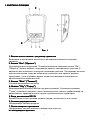
To change the detector's volume, turn volume control either away or toward you.
Dim Mode
Dim Mode reduces the illumination of the display. When pressing the button, the
illumination reduces up to 50 %. When pressing the button for the second time – all
illumination is reduced except the ‘P’. Pressing and holding the power button a third time
restores full illumination to the display.
OPERATION SETTINGS
City Operation
In modern cities there are many weak signals which have no relation to the traffic signal
controllers. The City mode reduces the detector's sensitivity to weak signals and eliminates
responses to false sources.
It’s important to notice that old or poorly shielded detectors in other vehicles can
sometimes transmit weak radar signals. So don’t forget to switch on the City mode where it
is necessary.
The CRUNCH 211B has three City Modes:
To select the city mode, press CITY button. A green LED S3 will blink, and Highway
mode will turn on. This mode provides maximum sensitivity for open road driving where
there are no false signals.
Press CITY button again to switch a green LED S2. This mode is preferred in city
highway,
Press CITY button again to switch a green LED S1. This mode is preferred in industrial
zones.
Next press CITY button returns to S3 mode.
Mute Operation
To silence the detector, press MUTE. You can also press MUTE button while the audio
alert is sounding to silence it. Press MUTE button again to restore audio alarm.
Receiving and Identifying Radar and Laser Signals
When your detector identifies radar signals, the following will occur:
1. Distinctive audible alarms will be emitted for X-, K-, and Ka-band radar signals.
The alarm sounds will occur faster and faster as the signal gets stronger
(as you get closer to the source).
When the signal gets very strong, the alarm sounds become continuous tones.
2. The appropriate visual alarm indicator will flash in unison with the audio tones.
When the pulses of laser light from a laser gun are detected by your detector
a. The audible alarm will emit a distinctive sound for laser.
b. The “L” indicator will flash and start blinking.
20