1
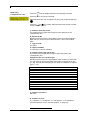
Operating manual
Label printer
Vario II series
June 2010
Copyright by Carl Valentin GmbH / 79550030610
Information on the scope of delivery, appearance, performance,
dimensions and weight reflect our knowledge at the time of printing.
We reserve the rights to make modifications.
All rights, including those regarding the translation, are reserved.
No part of this document may be reproduced in any form (print,
photocopy or any other method) or edited, copied or distributed
electronically without written permission from Carl Valentin GmbH.
Carl Valentin label printers comply with the following safety guidelines:
CE
EG Low-Voltage Directive (2006/95/EC)
EG Electromagnetic Compatibility Directive (89/336/EEC)
Carl Valentin GmbH
Postfach 3744
Neckarstraße 78-82+94
D-78026 Villingen-Schwenningen
D-78056 Villingen-Schwenningen
Phone:
+49 7720 9712-0
Fax:
+49 7720 9712-9901
E-mail:
[email protected]
www.valentin-carl.de
Vario II series
Table of contents
Table of contents
Table of contents.............................................................................. 3
1
1.1
1.2
1.3
2
2.1
2.2
3
3.1
3.2
3.3
4
4.1
4.2
4.3
4.4
5
5.1
5.2
6
6.1
6.2
7
7.1
7.2
7.3
7.4
7.5
7.6
8
8.1
8.2
8.3
8.4
8.5
8.6
8.7
8.8
8.9
8.10
8.11
8.12
8.13
8.14
8.15
8.16
8.17
06/10
Important notes ..................................................................... 5
Intended use ............................................................................ 5
Environmentally-friendly disposal ............................................ 6
Connector pin assignment (printer rear).................................. 6
Safety notes ........................................................................... 7
Warnings ................................................................................. 7
Operating conditions................................................................ 8
Technical data...................................................................... 13
Control inputs and outputs (option I) ..................................... 16
Control inputs and outputs (option II) .................................... 18
Plug & Play ............................................................................ 19
Installation ............................................................................ 21
Setting up the label printer .................................................... 21
Connecting the label printer .................................................. 22
Switching the label printer on and off .................................... 22
Initiation of the label printer ................................................... 23
Loading media ..................................................................... 25
Loading media ....................................................................... 25
Loading transfer ribbon ......................................................... 29
Foil keyboard ....................................................................... 31
Keyboard assignment (standard) .......................................... 31
Keyboard assignment (text entry/customized) ...................... 32
Label creation ...................................................................... 35
Bitmap fonts ........................................................................... 35
Vektor fonts ........................................................................... 37
1D bar codes ......................................................................... 39
2D Barcodes .......................................................................... 42
Rectangle .............................................................................. 51
Line graphic ........................................................................... 52
Function menu ..................................................................... 55
Menu structure....................................................................... 55
Printer parameter................................................................... 58
Label measurement ............................................................... 58
Printer initialisation ................................................................ 59
Print mode ............................................................................. 61
Serial interface 1.................................................................... 64
Serial interface 2.................................................................... 64
Parallele interface .................................................................. 65
Start/stop sign........................................................................ 65
Paper counter ........................................................................ 65
Date & time ............................................................................ 66
Password protection .............................................................. 67
Service functions ................................................................... 67
Print examples ....................................................................... 71
Remote console..................................................................... 71
Emulation ............................................................................... 72
Main menu ............................................................................. 73
Operating manual
3
Table of contents
4
Vario II series
9
9.1
9.2
9.3
9.4
9.5
9.6
10
10.1
10.2
10.3
10.4
10.5
10.6
10.7
11
Options ................................................................................. 75
Cutter ..................................................................................... 75
Dispenser .............................................................................. 76
Network ................................................................................. 77
RFID ...................................................................................... 78
Scanner ................................................................................. 81
Memory Card ......................................................................... 83
Maintenance and cleaning .................................................. 89
General cleaning ................................................................... 90
Cleaning the printer roller ...................................................... 90
Cleaning the printhead .......................................................... 91
Cleaning the label photocell .................................................. 92
Replacing the printhead (general) ......................................... 93
Replacing printhead............................................................... 94
Adjusting printhead ................................................................ 95
Error correction ................................................................... 97
12
12.1
12.2
12.3
12.4
12.5
13
Additional information ...................................................... 107
Column printing ................................................................... 107
Password ............................................................................. 108
Hotstart ................................................................................ 110
Backfeed/delay .................................................................... 112
Photocells ............................................................................ 114
Index ................................................................................... 115
Operating manual
06/10
Vario II series
Important notes
1
Important notes
The label printer can be used in thermal as well as in thermal transfer
applications.
The label printer is equipped with 6 vector, 6 bitmap and 6
proportional fonts. It can be printed inverse, in italic format or 90
degrees turned fonts.
The handling of our durable label printer is easy and comfortable. The
printer settings are made with the keys of the foil keyboard. At each
time the two-line display shows the current status.
By the use of a 32 Bit processor and a large main memory of 4MB
also for large labels (optional up to a length of 3000 mm) a large print
is possible.
An enormously high print quality is obtained by most modern
printhead technology.
By a new-developed electronics a maximum print speed of up to 200
mm/s can be achieved. Time-saving update of the printer software is
possible via the interface. The label printer can be adapted by the
large selection of options to each function.
As default, printers of this series are equipped with a parallel and
serial interface. The label printer automatically recognizes by which
interface it is controlled.
Time-saving printer update is possible by interface.
Thanks to the large number of options the label printer can be
adapted to each task.
1.1 Intended use
The label printer is a state-of-the-art device which complies with the
recognized safety-related rules and regulations. Despite this, a danger
to life and limb of the user or third parties could arise and the label
printer or other property could be damaged while operating the device.
The label printer may only be used while in proper working order and
for the intended purpose. Users must be safe, aware of potential
dangers and must comply with the operating instructions. Faults, in
particular those which affect safety, must be remedied immediately.
The label printer is solely intended to print suitable media which have
been approved by the manufacturer. Any other or additional use is not
intended. The manufacturer/supplier is not liable for damage resulting
from misuse. Any misuse is at your own risk.
Intended used includes heeding the operating manual, including the
maintenance recommendations/regulations specified by the
manufacturer.
06/10
Operating manual
5
Important notes
Vario II series
1.2 Environmentally-friendly disposal
Manufacturers of B2B equipments are obliged to take-back and
dispose old equipment which was manufactured after 13 August 2005.
In principle, these old equipments may not be delivered to communal
collecting points. They may only be organised used and disposed by
the manufacturer. Valentin products accordingly labelled can therefore
in future be returned to Carl Valentin GmbH.
Thereupon old equipment is professionally disposed.
Thereby Carl Valentin GmbH observes all obligations in the context of
old equipment disposal in time and makes therewith the smooth
selling of products furthermore possible. Please understand that we
can only take-back equipment that is send free of carriage charges.
Further information is available from WEEE directive or our web site.
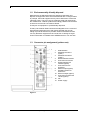
1.3 Connector pin assignment (printer rear)
1
2
3
4
5
6
7
8
9
10
11
12
13
USB interface
PCMCIA card slot A
(option)
PCMCIA card slot B
(option)
Serial interface RS-232
Connection for winder
Serial interface RS
422/485 (option)
Connection for PC
keyboard
External input (option)
Parallel interface for
Centronics
External output (option)
Connection for Ethernet
10/100 (option)
Fan
Power supply
Figure 1
6
Operating manual
06/10
Vario II series
Safety notes
2
Safety notes
The label printer is designed for power supply systems from 230V.
Connect the label printer only to electrical outlets with a ground
contact.
Couple the label printer to devices using extra low voltage only.
Before making or undoing connections, switch off all devices involved
(computer, printer, accessories etc.).
Operate the label printer in a dry environment only and do not get it
wet (sprayed water, mist etc.).
If the label printer is operated with the cover open, ensure that
clothing, hair, jewellery and similar personal items do not contact the
exposed rotating parts.
The print unit can get hot during printing. Do not touch the printhead
during operation. Cool down the print unit before changing material,
removal or adjustment.
Carry out only the actions described in these operating instructions.
Other tasks may only be performed by trained personnel or service
technicians.
2.1 Warnings
Warnings are presented with three signal words for the different levels
of danger.
DANGER identifies an extraordinarily great and immediate danger
which could lead to serious injury or even death.
WARNING identifies a possible danger would could lead to serious
bodily injury or even death if sufficient precautions are not taken.
CAUTION indicates a potentially dangerous situation which could lead
to moderate or light bodily injury or damage to property.
06/10
Operating manual
7
Safety notes
Vario II series
2.2 Operating conditions
Before initial operation and during operation these operating
conditions have to be observed to guarantee save and interferencefree service of our printers.
Therefore please carefully read these operating conditions.
Shipment and storage of our printers are only allowed in original
packing.
Installation and initial operation of printer is only allowed if operating
conditions were fulfilled.
Initial operation, programming, operation, cleaning and service of our
printers are only recommended after careful study of our manuals.
Operation of printer is only allowed by especially trained persons.
Perform trainings regularly.
These indications are also valid for someone else's equipment
supplied by us.
Only use original spare and exchange parts.
Instructions for
lithium battery
CPU of printer is equipped with a lithium battery (type CR 2032) for
which the battery regulation is to apply. This regulation plans that
unloaded batteries have to be given to used battery collecting
containers of trade and public carries. In case that batteries were not
completely discharged you have to make arrangements for shortcircuits. At a shutdown of printer the battery has to be disposed in
either case separately from printer.
DANGER!
Danger of life by explosion!
⇒
Conditions for
installation place
Use nonconducting tools.
The installation place of printer should be even, free of vibration and
currents of air are to be avoided.
The printers have to be installed to ensure optimal operation and
servicing.
8
Operating manual
06/10
Vario II series
Installation of
power supply
Safety notes
The installation of the power supply to connect our printers has to be
effected according to the international rules and regulations,
especially the recommendations of one of the three following
commissions:
•
International Electronic Commission (IEC)
•
European Committee for Electro technical Standardisation
(CENELEC)
•
Verband Deutscher Elektrotechniker (VDE)
Our printers are constructed according to VDE and have to be
connected to a grounded conductor. The power supply has to be
equipped with a grounded conductor to eliminate internal interfering
voltage.
Technical data of
power supply
Power line voltage and power line frequency: See type plate
Allowable tolerance of power line voltage: +6% to −10% of nominal
value
Allowable tolerance of power line frequency: +2% to −2% of nominal
value
Allowable distortion factor of power line voltage: <=5%
Anti-Interference
measures
Stray radiation and
immunity from
disturbance
In case your net is infected (e.g. by using thyristor controlled
machines) anti-interference measures have to be taken. You can use
one of the following possibilities:
•
Provide separate power supply to our printers.
•
In case of problems please connect capacity-decoupled isolation
transformer or similar interference suppressor in front of our
printers.
Emitted interference according to EN 61000-6-4: 08-2002
•
Interference voltage to wires according to EN 55022: 09-2003
•
Interference field power according to EN 55022: 09-2003
Immunity to interference according to EN 61000-6-2: 03-2006
•
Stray radiation against discharge of static electricity according to
EN 61000-4-2: 12-2001
•
Electromagnetic fields according to EN 61000-4-3: 11-2003
•
Fast transient burst according to EN 61000-4-4: 07-2005
•
Surge according to EN 61000-4-5: 12-2001
•
High-frequency tension according to EN 61000-4-6: 12-2001
•
Voltage interruption and voltage drop according to EN 61000-411: 02-2005
This is a machine of type A. This machine can cause
interferences in residential areas; in this case it can be required
from operator to accomplish appropriate measures and be
responsible for it.
06/10
Operating manual
9
Safety notes
Connecting lines to
external machines
Vario II series
All connecting lines have to be guided in shielded lines. Shielding has
to be connected on both sides to the corner shell.
It is not allowed to guide lines parallel to power lines. If a parallel
guiding cannot be avoided a distance of at least 0.5 m has to be
observed.
Temperature of lines between: −15 to +80 °C.
It is only allowed to connect devices which fulfil the request 'Safety
Extra Low Voltage' (SELV). These are generally devices which are
checked corresponding to EN 60950.
Installation of
data lines
The data cables must be completely protected and provide with metal
or metallised connector housings. Shielded cables and connectors are
necessary, in order to avoid radiant emittance and receipt of electrical
disturbances.
Allowable lines
Shielded line:
4 x 2 x 0,14 mm² ( 4 x 2 x AWG 26)
6 x 2 x 0,14 mm² ( 6 x 2 x AWG 26)
12 x 2 x 0,14 mm² (12 x 2 x AWG 26)
Sending and receiving lines have to be twisted in pairs.
Maximum line length:
with interface V 24 (RS-232C) - 3 m (with
shielding)
with Centronics - 3 m (with shielding)
with USB - 5 m
with Ethernet - 100 m
Air convection
To avoid inadmissible heating, free air convection has to be ensured.
Limit values
Protection according IP: 20
Ambient temperature °C (operation): Min. +5 Max. +45
Ambient temperature °C (storage): Min. −20 Max. +60
Relative air humidity % (operation): Max. 80
Relative air humidity % (storage): Max. 80
(bedewing of printers not allowed)
10
Operating manual
06/10
Vario II series
Guarantee
Safety notes
We do not take any responsibility for damage caused by:
•
Ignoring our operating conditions and operating manual.
•
Incorrect electric installation of environment.
•
Building alterations of our printers.
•
Incorrect programming and operation.
•
Not performed data protection.
•
Using of not original spare parts and accessories.
•
Natural wear and tear.
When (re)installing or programming our printers please control the
new settings by test running and test printing. Herewith you avoid
faulty results, reports and evaluation.
Only specially trained staff is allowed to operate the printers.
Control the correct handling of our products and repeat training.
We do not guarantee that all features described in this manual exist in
all models. Caused by our efforts to continue further development and
improvement, technical data might change without notice.
By further developments or regulations of the country illustrations and
examples shown in the manual can be different from the delivered
model.
Please pay attention to the information about admissible print media
and the notes to the printer maintenance, in order to avoid damages
or premature wear.
We endeavoured to write this manual in an understandable form to
give and you as much as possible information. If you have any queries
or if you discover errors, please inform us to give us the possibility to
correct and improve our manual.
06/10
Operating manual
11
Vario II series
Technical data
3
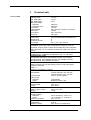
Vario II 104/8
06/10
Technical data
Print
Passage width
110 mm
Min. label width
15 mm
Min. label height
6 mm
Max. label height
Standard
2800 mm
Option Ethernet
2500 mm
Print width
104 mm
Label material
max. 220 gr/m² (others on demand)
Resolution
203 dpi
Print speed
max. 200 mm/s
Printhead
Flat Type
Built-in fonts
Vector fonts
6 free scaleable BITSTREAM® fonts
Bitmap fonts
6
Proportional fonts
6
Font height
min. 1 mm - max. 99 mm
1D bar codes
CODABAR, Code 128, Code 2/5 interleaved, Code 39, Code 39
extended, Code 93, EAN 13, EAN 8, EAN ADD ON, GS1-128 (EAN
128), Identcode, ITF 14, Leitcode, Pharmacode, PZN Code, UPC-A,
UPC-E
2D bar codes
CODABLOCK F, DataMatrix, MAXICODE, PDF 417, QR Code
Composite bar codes
GS1 DataBar Expanded, GS1 DataBar Limited, GS1 DataBar
Omnidirectional, GS1 DataBar Stacked, GS1 DataBar Stacked
Omnidirectional, GS1 DataBar Truncated
Interface
Serial: RS-232C (up to 57600 bauds), RS-422 + RS-485 (option)
Parallel: Centronics
USB: 1.1
Ethernet: 10/100 Base-T (option)
Labels
Roll diameter
internal unwinder: max. 200 mm
internal rewinder: max. 100 mm
Core diameter
40 mm / 75 mm (option)
Label sensor
Standard
Transmission
Option
Reflexion bottom + top
Transfer ribbon
Core diameter
25,4 mm / 1"
Length
max. 300 m
Dimensions
width x height x depth
230 x 310 x 450
Weight
16 kg
Connection values
Nominal voltage
Standard
230 V / 50-60 Hz − Fuse: 1 AT
Option
115 V / 50-60 Hz − Fuse: 2 AT
Power consumption
max. 150 VA
Operating conditions
Temperature
5-35 °C
Relative humidity
max. 80% (non-condensing)
Operating manual
13
Technical data
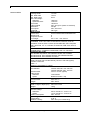
Vario II 107/12
14
Vario II series
Print
Passage width
110 mm
Min. label width
15 mm
Min. label height
6 mm
Max. label height
Standard
1200 mm
Option Ethernet
1100 mm
Print width
106,6 mm
Label material
max. 220 gr/m² (others on demand)
Resolution
304 dpi
Print speed
max. 200 mm/s
Printhead
Flat Type
Built-in fonts
Vector fonts
6 free scaleable BITSTREAM® fonts
Bitmap fonts
6
Proportional fonts
6
Font height
min. 1 mm - max. 99 mm
1D bar codes
CODABAR, Code 128, Code 2/5 interleaved, Code 39, Code 39
extended, Code 93, EAN 13, EAN 8, EAN ADD ON, GS1-128 (EAN
128), Identcode, ITF 14, Leitcode, Pharmacode, PZN Code, UPC-A,
UPC-E
2D bar codes
CODABLOCK F, DataMatrix, MAXICODE, PDF 417, QR Code
Composite bar codes
GS1 DataBar Expanded, GS1 DataBar Limited, GS1 DataBar
Omnidirectional, GS1 DataBar Stacked, GS1 DataBar Stacked
Omnidirectional, GS1 DataBar Truncated
Interface
Serial: RS-232C (up to 57600 bauds), RS-422 + RS-485 (option)
Parallel: Centronics
USB: 1.1
Ethernet: 10/100 Base-T (option)
Lables
Roll diameter
internal unwinder: max. 200 mm
internal rewinder: max. 100 mm
Core diameter
40 mm / 75 mm (option)
Label sensor
Standard
Transmission
Option
Reflexion bottom + top
Transfer ribbon
Core diameter
25,4 mm / 1"
Length
max. 300 m
Dimensions
width x height x depth (mm) 230 x 310 x 450
Weight
16 kg
Connection values
Nominal voltage
Standard
230 V / 50-60 Hz − Fuse: 1 AT
Option
115 V / 50-60 Hz − Fuse: 2 AT
Power consumption
max. 150 VA
Operating conditions
Temperature
5-35 °C
Relative humidity
max. 80% (non-condensing)
Operating manual
06/10
Vario II series
Standard equipment
Optional equipment
06/10
Technical data
•
Date / time
•
integrated unwinder
(max. outside diameter 200 mm / 8"
•
integrated rewinder
(max. outside diameter 100 mm)
•
IBM keyboard connection
•
Thermal and thermal transfer version
•
Label photocell
(transmission and reflexion from bottom)
•
Windows printer driver
•
Tear-off edge
•
Cutting unit
•
Dispensing unit
•
Alphanumeric keyboard
(German, English, French, Spanish)
•
External unwinder PA50
(max. outside diameter 300 mm)
•
External rewinder PR45
(max. outside diameter 270 mm)
•
Memory card slot
•
PCMCIA cards: 256 KB, 512 KB, 1 MB, 2 MB
•
RS422 interface
•
RS485 interface
•
Ethernet interface
•
I/O board
•
Label creation software Labelstar PLUS
Operating manual
15
Technical data
Vario II series
3.1 Control inputs and outputs (option I)
Control outputs
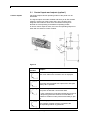
Via signal outputs various operating modes of the printer can be
demanded.
The signal outputs are made available vial two 9-pin D-Sub-sockets
(Output 1) at the rear of the Control Unit. They consist of optointegrator semiconductor lines which are switched through res.
blocked out corresponding to the different operating modes.
In case a control output is active, then the corresponding output is to
strain with a maximum current of 30mA.
Figure 2
PIN
(socket)
Output I
Out 1: Error message
Each error status such as ribbon error is displayed.
Out 2: Print order
The printer was activated with a print order. Now print
start by IN1 is possible.
Out 3: Label generation
The printer is filled with current label data.
In case in dispensing mode either dispensing photocell
or dispensing photocell continuous is selected it is
indicated if a label is under photocell and ready to pick
up.
Out 4: Single print
The contents of printer memory is printed to the
corresponding medium by printhead.
16
Operating manual
06/10
Vario II series
Control inputs
Technical data
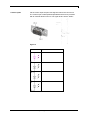
Via the control input the print start signal is lead to the control unit.
The control input is electroplated separated and has to be provided
with an external tension source. The signal level is active "HIGH".
Figure 3
PIN
Input I
In 1: Print start
In 2: Not used
In 3: Not used
In 4: Not used
06/10
Operating manual
17
Technical data
Vario II series
3.2 Control inputs and outputs (option II)
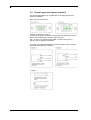
For special applications, an I/O plate with 24 V supply and special
options is available.
Back view of I/O connector.
Output I is identical to option I.
The I/O-24 connector is 15-pole and provides user-sided 24 V for pins
5 and 10 for supplying the sensors (max. 200 mA).
Pin 1, 6 and 11 are equipped with GND. In case of using I/O-24
signals, exist no galvanic separation.
The other connection possibilities of I/O-24 connector can be noticed
from the below switching examples.
18
Operating manual
06/10
Vario II series
Technical data
3.3 Plug & Play
Plug & Play capable printers can be recognised automatically at
parallel ports, USB-IEEE 1394- or infra-red connections but the last
both are not important for our printers.
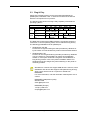
The following table shows the Plug & Play capability of the different
operating systems.
Port
LPT
USB
Windows
95
98
Support
Recognition
by
Support
Recognition
by
Me
NT4
XP
Installation
Boot procedure,
device manager
Hot Plug
& Play
2000
s.b.
s.b.
Hot Plug &
Play
The table above shows that USB provides the recognition during the
connection in current operating mode, the so-called Hot-Plug & Play.
The following possibilities exist for parallel port:
•
Windows 95 / 98 / Me
Printers are recognised during the start procedure by Windows or
by the search for new hardware by means of the hardware wizard.
•
Windows 2000 / XP
Printers can be recognised during the start procedure by Windows
or by the search for new hardware by means of the hardware
wizard or, if the option 'Automatic recognition and installation of
Plug & Play printers' is set in the printer installation wizard. For
Windows XP the Hot Plug & Play when switching on the printer is
obviously possible.
Windows NT 4.0 does not support USB devices. However, some
distributors offer drivers that support USB (without Plug & Play).
Such a driver which suits to our printer is offered from
BSQUARE.
For more information, visit their web side: www.bsquare.com or
contact
BSQUARE Headquarters (USA)
888-820-4500
sales @bsquare.com
BSQUARE (Europe)
+49 (811) 600 59-0
[email protected]
06/10
Operating manual
19
Vario II series
Installation
4
Unpack the label
printer
Scope of delivery
⇒
⇒
⇒
Installation
Lift the label printer out of the box.
Check the label printer for transport damages.
Check delivery for completeness.
•
Label printer.
•
Empty core, mounted on transfer ribbon rewinder.
•
Dispenser edge (printers with dispenser option only).
•
Power cable.
•
Documentation.
•
Printer driver CD.
Retain original packaging for subsequent transport.
4.1 Setting up the label printer
CAUTION!
The label printer and the print media can be damaged by
moisture and water.
⇒
⇒
⇒
⇒
06/10
Set up the label printer only in a dry place protected
from sprayed water.
Set up label printer on a level, vibration-free and air draught-free
surface.
Open cover of label printer.
Remove foam transportation safeguards near the printhead.
Operating manual
21
Installation
Vario II series
4.2 Connecting the label printer
Connecting to the
power supply
The label printer is equipped with a versatile power supply unit. The
device may be operated with a mains voltage of 230 V / 50-60 Hz
without any adjustments or modifications.
CAUTION!
The label printer can be damaged by undefined switch-on
currents.
⇒
⇒
⇒
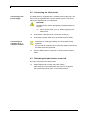
Set de power switch (1) to '0' before plugging in the
label printer.
Insert power cable into power connection socket (2).
Insert plug of power cable into a grounded electrical outlet.
Insufficient or missing grounding can cause faults during
operation.
Connecting to a
computer or to a
computer network
Ensure that all computers and connection cables connected to
the label printer are grounded.
⇒
Connect label printer to computer or network with a suitable
cable.
4.3 Switching the label printer on and off
Once all connections have been made:
⇒
22
Switch label printer on witch the power switch.
After switching on the label printer the main menu appears
which shows the printer type, current date and time.
Operating manual
06/10
Vario II series
Installation
4.4 Initiation of the label printer
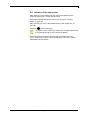
After switching on the label printer the main menu appears which
shows the printer type, current date and time.
Insert label material and transfer ribbon (see chapter 5. Loading
media, on page 25).
Start measuring in menu 'Label Measurement' (see chapter 8.3, on
page 58
Press key
to finish measuring.
To enable correct measuring, at least two completed labels have
to be passed through (not for continuous labels).
During measuring the label and gap length small differences can
occur. Therefore the values can be set manually in the menu 'Printer
initialisation/Label and Gap'.
06/10
Operating manual
23
Vario II series
Loading media
5
Loading media
5.1 Loading media
Loading label roll in
rewind mode
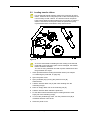
Figure 4
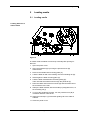
In rewind mode the labels are wound up internally after printing for
later use.
1. Open the printer cover.
2. Open the printhead (A) by turning the pressure lever (B)
anticlockwise.
3. Remove the outside label mounting plate (C).
4. Load the label roll with inner winding onto the unwinding roll (D).
5. Attach again the label mounting plate (C).
6. Lead the label material below the label guiding (E).
Take care that the material runs through the photocell (F).
7. Place the labels around the front sheet (G) and lead them below
the mechanics to the rear.
8. Clamp the label material, with the handle (H) designated for it, at
the rewinding roll (I).
9. To move the printhead (A) down, turn the pressure lever (B) in
clockwise direction until it locks.
10. Adjust the limit stops (J) of the label guiding roll to the width of
material.
11. Close the printer cover.
06/10
Operating manual
25
Loading media
Vario II series
Loading label roll in
tear-off mode
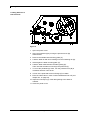
Figure 5
1. Open the printer cover.
2. Open the printhead (A) by turning the pressure lever (B)
anticlockwise.
3. Remove the outside label mounting plate (C).
4. Load the label roll with inner winding onto the unwinding roll (D).
5. Attach again the label mounting plate (C).
6. Lead the label material below the label guiding (E).
Take care that the label runs through the photocell (F).
7. To move the printhead (A) down, turn the pressure lever (B) in
clockwise direction until it locks.
8. In front of the printhead the tear off edge (G) is visible.
9. Enter the offset value in menu 'Printer Initialisation/Tear off' (see
chapter 8.4, on page 59).
10. Adjust the limit stops (H) of the label guiding to the width of
material.
11. Close the printer cover.
26
Operating manual
06/10
Vario II series
Loading media
Loading label roll in
cutter mode
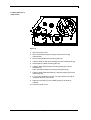
Figure 6
1. Open the printer cover.
2. Open the printhead (A) by turning the pressure lever (B)
anticlockwise.
3. Remove the outside label mounting plate (C).
4. Load the label roll with inner winding onto the unwinding roll (D).
5. Attach again the label mounting plate (C).
6. Lead the label material below the label guiding (E) and the
printhead (A).
Take care that the label runs through the photocell (F).
7. Lead the label material between the inserting angle (G) and the
cutter ledge (H).
8. To move the printhead (A) down, turn the pressure lever (B) in
clockwise direction until it locks.
9. Adjust the limit stops (I) of the label guiding to the width of
material.
10. Close the printer cover.
06/10
Operating manual
27
Loading media
Vario II series
Loading label roll in
peel off mode
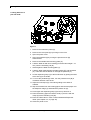
Figure 7
1. Remove the small front panel (O).
2. Remove the cover plate (P) by turning it to the front.
3. Open the printer cover.
4. Open the printhead (A) by turning the pressure lever (B)
anticlockwise.
5. Remove the outside label mounting plate (C).
6. Load the label roll with inner winding (minimum label height = 15
mm) onto the unwinding roll (D).
7. Attach again the label mounting plate (C).
8. Lead the label material below the label guiding (E) and printhead
(A). Take care that the labels run through the photocell (F).
9. Lift the dispensing whip (H) to the front/bottom by pulling the shaft
at the side (I) to the inside.
10. To move the printhead (A) down, turn the pressure lever (B) in
clockwise direction until it locks.
11. Adjust the limit stops (G) of the label guiding to the width of
material.
12. Strip some labels from the backing paper and lead the paper over
the dispenser ledge (J) and behind the plastic roll (K).
13. Press again the dispensing whip (H) to the top and lock it.
14. Place the backing paper around the shaft (L) and fix it with the
clamp (N) at the rewinding unit (M).
15. Enter the offset value in menu 'Printer Initialisation/Dispenser
offset' (see chapter 8.4, on page 59).
16. Close the printer cover.
28
Operating manual
06/10
Vario II series
Loading media
5.2 Loading transfer ribbon
For the thermal transfer printing method it is necessary to load a
ribbon, otherwise when using the printer in direct thermal print it is
not necessary to load a ribbon. The ribbons used in the printer
have to be at least the same width as the print media. In case the
ribbon is narrower than the print media, the printhead is partly
unprotected and this could lead to early wear and tear.
Figure 8
As for the electrostatic unloading the thin coating of the thermal
printhead or other electronic parts can be damaged, the transfer
ribbon should be antistatic.
The use of wrong materials can lead to printer malfunctions and
the guarantee can expire.
1. Clean printhead before loading the transfer ribbon (see chapter
10.3 Cleaning the printhead, on page 91).
2. Open the printer cover.
3. Open printhead (A) by turning the pressure lever (B)
anticlockwise.
4. Load the transfer ribbon roll (C) with outer winding onto the
unwinding roll (D).
5. Place an empty ribbon roll on the rewinding roll (E).
6. Lead the transfer ribbon below the printhead.
7. Fix the ribbon with an adhesive tape in rotating direction at the
empty roll of the rewinding roll (E).
8. To move the printhead (A) down, turn the pressure lever (B) in
clockwise direction until it locks.
9. Close the printer cover.
06/10
Operating manual
29
Vario II series
Foil keyboard
6
Foil keyboard
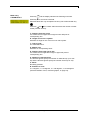
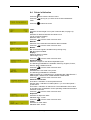
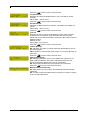
6.1 Keyboard assignment (standard)
Key
Meaning
Function
Main menu
Up
Back to main menu.
Activate test print.
Delete stopped print order.
Increase values.
Down
Decrease values.
Function menu
Change to function menu.
In function menu, one menu item
back.
In main menu, one label feed.
In function menu, change to next
menu item.
Confirm settings in function menu.
Stop and continue current print order.
Delete stopped print order with key
Feed
Start/Stopp
Memory
Quant
0-9
Function keys
Change to number of copies menu.
Press keys
and
to select the
number of copies that are to print.
Change to next input field.
Press keys
and
to change
values.
Change to previous input field.
Press keys
and
to change
values.
Change to the entry of text mask.
Press key again to change to the text
entry.
Change to the entry of code mask.
Press key again to change to the
code entry.
Parameter selection (e.g. speed).
F1 + F2
Function keys
No function.
C
E
Function key
Delete complete entry.
Funcion key
Confirm entry. After confirmation of
settings, return to the main menu.
Forwards
Backwards
Text entry menu
Code entry menu
06/10
. No further label of the print order
is printed.
Change to memory card card menu.
Operating manual
31
Foil keyboard
Vario II series
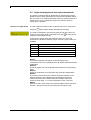
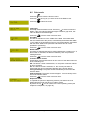
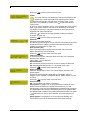
6.2 Keyboard assignment (text entry/customized)
The printer is equipped with an alphanumeric character block which
allows the user to enter parameters and customised variables without
the connection of an external keyboard. Each key contains letters and
similar to the use of a mobile phone (like sms) a direct and timesaving input is possible.
Selection of input mode
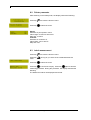
In order to select the entry mode, the printer has to be in main menu.
Press key
twice and the display indicates the following.
The mode is displayed in the first line (example: M) so the user can
control in which input mode is selected. Press key
to select and/or
change the desired input mode.
As the input is almost done with characters from one mode, the
characters are divided in different groups. Following input modes are
available:
Symbol
Mode
0
M
m
A
a
Standard, starting with figures
Starting with capital letters
Starting with small letters
Input Alt
Input Alt, is switched off after one character
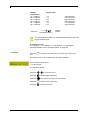
Mode 0
This mode is displayed as default. At first the figure which
corresponds to the key is displayed, then all capital and afterwards the
small letters.
Mode M
At first all capital, then the small letters and at last the corresponding
figure.
Mode m
At first all small letters, then the figure and at last the capital letters.
Mode A
This mode can be used for the creation of special characters. The
desired character can be displayed by the assigned number by
entering the ANSI code. Please note that the ANSI code has to
consist of three digits, i.e. you have possible to enter a zero first.
Mode a
Same as mode A. After input of the selected ANSI code the machine,
however, changes back to the previously selected input mode.
32
Operating manual
06/10
Vario II series
Foil keyboard
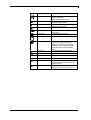
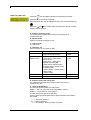
Key
Meaning
Function
Main menu
Back to main menu.
Activate test print.
Delete stopped print order.
For customized variables, change
between single entries.
For customized variables, change
between single entries.
No function.
Up
Down
Funktion menu
Feed
06/10
Start/Stop
Entry confirmation. Change to the
main menu.
Confirmation/end of entry.
Memory
Entry mode selection.
Quant
Forwards
Delete character at cursor position.
If the cursor is behind the last
character, the last one is deleted.
Character is only deleted if it was
before entered by the character
block.
Cursor one position to the right.
Backwards
Cursor one position to the left.
0-9
Character block
Entry of desired data.
F1 + F2
Function keys
No function.
C
Function key
E
Function key
Delete complete entry. The entry is
only deleted if it was entered by the
character block.
Confirm entry. After confirmation of
settings, return to the main menu.
Operating manual
33
Vario II series
Label creation
7
Label creation
7.1 Bitmap fonts
Mask entry
Press key
and the display indicates the following text mask:
Press key E to access the next field.
Selected values are only accepted if the entry was confirmed with key
.
Press key
and
to increase and/or decrease the number of mask
record (number of lines).
Y - Distance from top in mm
It is measured from the upper label margin to the lower left point of the
corresponding line.
EY - Extension in direction Y
Extension of font in direction y (factor 1 - 9)
T - Selection of font type
01 - regular font
02 - regular font inverse
10 - rectangle
11 - line
S - Spaces between characters
min.: 1 x 0,083 mm - max.: 99 x 0,083 mm
X - Distance from right side in mm
It is measured from the right label margin to the lower left point of the
corresponding line.
EX - Extension in direction X
Extension of font in direction x (factor 1 - 9)
F - Selection of font
Bitmap
not proportional
01 = FONT 01
02 = FONT 02
03 = FONT 03
04 = FONT 04
05 = FONT 05
07 = FONT 07
06/10
Matrix (mm)
0,8 x 1,1
1,2 x 1,7
1,8 x 2,6
4,0 x 5,6
1,8 x 3,2 descender
1,2 x 2,2 descender
Operating manual
127 characters
255 characters
255 characters
127 characters
255 characters
255 characters
35
Label creation
Vario II series
Bitmap
proportional
21 = FONT 21
22 = FONT 22
23 = FONT 23
24 = FONT 24
28 = FONT 28
29 = FONT 29
Height (mm)
1,0
1,8
2,6
5,6
4,0
0,8
1g
base line
255 characters
255 characters
255 characters
255 characters
255 characters
255 characters
height;
pixels
To reach best print results it is recommended always to chose the
biggest possible font!
R - Rotation of line
0 = 0 degrees, 1 = 90 degrees, 2 = 180 degrees, 3 = 270 degrees
(see also Rotation of text, code and graphic, on page 53).
Text entry
Press key
line.
to change from mask entry to the text entry of the first
A maximum entry of 70 characters per text line is possible.
0 = Indication of input mode
1 = Field number
5 = Character number
Press key
Press key
36
and
to move the cursor.
to delete single characters.
Press key
to access the text entry for the next line.
Press key
to return to the mask entry.
Press key
to quit the text entry.
Operating manual
06/10
Vario II series
Label creation
7.2 Vektor fonts
Mask entry
Press key
and the display indicates the following text mask:
Press key E to access the next field.
Selected values are only accepted if the entry was confirmed with key
.
and
to increase and/or decrease the number of mask
Press key
record (number of lines).
Y - Distance from top in mm
It is measured from the upper label margin to the lower left point of the
corresponding line.
EY - Extension in direction Y
Height of font in mm
T - Selection of font type
04 - Vector fonts proportional
05 - Vector fonts autoscale
06 - Vector fonts proportional inverse
07 - Vector fonts autoscale inverse
Proportional:
In case of using proportional, then font height and width are displayed
in mm. These values refer to the first letter, i.e. the values of other
characters were modified correspondingly.
Autoscale:
In case of using autoscale, then the font height and width are
displayed in mm. The font height refers to all capital letters. The height
of small letters and descenders is modified proportionally. The
complete field width is entered as width and the entered text is
automatically fit to this field, i.e. the width of the characters changes.
S - Spaces between characters
Proportional:
min.: 1 x 0,083 mm - max.: 99 x 0,083 mm
Autoscale:
no function, because the width of the characters is
fit to the field width
X - Distance from right side in mm
It is measured from the right label margin to the lower left point of the
corresponding line.
EX - Extension in direction X
Proportional:
character width in mm (factor 1 - 99, should be the
same as EY)
Autoscale:
field width in mm (up to 99 mm)
06/10
Operating manual
37
Label creation
Vario II series
S - Selection of font
01 = Helvetica Bold
02 = Helvetica Bold italic
03 = Helvetica Roman
04 = Helvetica Roman italic
05 = Swiss Light
06 = Swiss Light italic
07 = Baskerville
08 = Baskerville italic
09 = Brush Script
10 = Brush Script italic
11 = Monospace
12 = Monospace italic
255 characters
255 characters
255 characters
255 characters
255 characters
255 characters
255 characters
255 characters
255 characters
255 characters
255 characters
255 characters
R - Rotation of line
0 = 0 degrees, 1 = 90 degrees, 2 = 180 degrees, 3 = 270 degrees
(see also Rotation of text, code and graphic, on page 53).
Text entry
38
For information about text entry of vector fonts, please see chapter 7.1
Bitmap fonts, on page 35.
Operating manual
06/10
Vario II series
Label creation
7.3 1D bar codes
Mask entry
and the display indicates the following text mask:
Press key
Press key E to access the next field.
Selected values are only accepted if the entry was confirmed with key
.
and
to increase and/or decrease the number of mask
Press key
record (number of lines).
Y - Distance from top in mm
It is measured from the upper label margin to the lower left point of the
corresponding line.
H - Height of bar code in mm
min: 5 mm - max: 99 mm
T - Type of bar code
30 Code 39
31
32
33
34
35
36
37
Code 2/5 interleaved
EAN 8
EAN13
UPC-A
UPC-E
CODABAR
Code 128
38
39
EAN ADD ON
GS1-128 (EAN 128)
40
Code 93
41
43
44
46
47
48
49
50
51
52
53
54
57
PZN-Code
Leitcode
Identcode
Code 39 extended
Code 128 A
Code 128 B
Pharmacode
PDF417
MAXICODE
DataMatrix
CODABLOCK F
RSS Codes
QR Code
alphanumeric (capital letters) and - .
SPACE * $ / + %
numeric, even number of digits
numeric, fix number of 8 digits
numeric, fix number of 13 digits
numeric, fix number of 12 digits
numeric, fix number of 8 digits
numeric and - : / . + (start/stop sign)
ASCII font (Code A, B, C)
automatic selection of font
EAN 13 + 2 or 5 digits
ASCII font (Code A, B, C)
automatic selection of font
alphanumeric (capital letters) and - .
SPACE * $ / + %
7 digits, see Code 39
numeric, even number of digits
numeric, even number of digits
ASCII font
ASCII font (Code A)
ASCII font (Code B)
numeric, fix number of 9 digits
2D bar code
2D bar code
2D bar code
2D bar code
Composite bar codes
2D bar code
S - Human readable
0 = without - 1 = with
X - Distance from the right side in mm
It is measured from the right label margin to the lower left point of the
corresponding line.
06/10
Operating manual
39
Label creation
Vario II series
P - Proportion of bar code
Certain conditions for ratio, SC factor res. module width are valid for
the supported bar codes.
Bar code
Ratio / Module width /
SC factor
Entry
Code 39, Code 2/5,
CODABAR,
Code 39 extended,
Pharmacode
Ration thick:thin min. 3:1
(0301)
variable
EAN 8 / EAN 13 /
UPC-A / UPC-E
~
~
Code 128 / GS1-128
(EAN 128) / Code 93
EAN ADD ON
vario 104/8
SC factor 0
SC factor 3
SC factor 6
0000
0003
0006
SC factor 8
0008
vario 107/12
SC factor 0
SC factor 2
SC factor 4
SC factor 6
SC factor 9
0000
0002
0004
0006
0009
Module width 1 – 9
0001 - 0009
SC-Zahl 0
0000
C - Check digit calculation (P = 0 → without check digit)
Bar code
P=
1
Code 39 /
Code 39 ext.
2
0
1
Code 2/5
2
40
with check digit (HIBC-Code, modulo 43);
check digit is not shown in display and as
human readable but coded
check digit control
without check digit;
odd number of digits: 0 is automatically
placed to the 1st position
with check digit;
odd number of digits: check digit is added
to the last position
even number of digits: check digit
overwrites the last position
check digit control
Operating manual
06/10
Vario II series
Label creation
Codeart
P=
1
Code ITF 14
1
Code ITF 16
Code 128 /
GS1-128 (EAN
128)
EAN 8 / 13 /
UPC-A / E /
EAN ADD ON
CODABAR
1
X
X
0, 1
Code 93
2
0, 1
PZN-Code
2
corresponds to the entry of Code 2/5 with
check digit calculation;
minimum ratio 21:7 and entry of 13 res 14
digits
13 digits: a 14th digit is added as check digit
14 digits: last digit is overwritten with the
check digit
corresponds to the entry of Code 2/5 with
check digit calculation;
minimum ratio 21:7 and entry of 15 res 16
digits
15 digits: a 16th digit is added as check digit
16 digits: last digit is overwritten with the
check digit
with check digit (modulo 103); check digit is
not shown in display and as human readable
but coded
entry is not important because the check digit
is always calculated
except C = 2 → check digit control
no check digit
with check digit (modulo 47); check digit is not
shown in display and as human readable but
coded
check digit control
with check digit (modulo 11); 7th digit is
overwritten as check digit
check digit control
R - Rotation of bar code
0 = 0 degrees, 1 = 90 degrees, 2 = 180 degrees, 3 = 270 degrees
(see also Rotation of text, code and graphic, on page 53).
06/10
Operating manual
41
Label creation
Vario II series
7.4 2D Barcodes
Mask entry PDF417
and the display indicates the following text mask:
Press key
Press key E to access the next field.
Selected values are only accepted if the entry was confirmed with key
.
and
to increase and/or decrease the number of mask
Press key
record (number of lines).
Y - Distance from top in mm
It is measured from upper label margin to lower left point of the
corresponding line.
H - Height of symbol
It is not possible to indicate the symbol size of the PDF417 in mm or
similar dimensions but in discreet numbers. The following table shows
the obtainable symbol sizes for different resolutions.
Size
1
2
3
4
5
6
7
8
9
10
11
12
13
14
15
16
17
18
19
20
21
22
23
24
200 DPI
300 DPI
X
X
X
X
X
X
X
X
X
X
X
X
X
X
X
T - Type of code
50 = PDF417
42
Operating manual
06/10
Vario II series
Label creation
S - Human readable
0 = PDF417 has no human readable.
This function provides the possibility to select the desired style of PDF
bar code.
0 = Standard, 1 = Truncated, 2 = Naked, 3 = Bare
X - Distance from side in mm
Is measured from right label margin to lower left point of the
corresponding line.
P - Proportion of height/width
It is not possible to create the symbol with a defined height res. width
because the necessary space depends on the label contents.
C - Error Correction Level ECL
Possible entry = 0-8; From support of different procedures the
PDF417 is able to rebuild destroyed information. The higher the ECL
the saver is the code. However, the symbol is also growing higher.
R - Rotation of code
0 = 0 degrees 1 = 90 degrees, 2 = 180 degrees, 3 = 270 degrees
(see also Rotation of text, code and graphic, on page 53).
06/10
Operating manual
43
Label creation
Mask entry MAXICODE
Vario II series
Press key
and the display indicates the following text mask:
Press key E to access the next field.
Selected values are only accepted if the entry was confirmed with key
.
and
to increase and/or decrease the number of mask
Press key
record (number of lines).
Y - Distance from top in mm
It is measured from upper label margin to lower left point of the
corresponding line.
H - Height of symbol
It is not possible to modify the symbol size and therefore the height of
the symbol is always 0.
T - Type of code
51 = MAXICODE
S - Human readable
0 = MAXICODE has no human readable
X - Distance from right side in mm
It is measured from right label margin to lower left point of the
corresponding line.
P - Proportion symbol number/quantity of symbols
Ratio of the present symbol numbers (in case that several
MAXICODE symbols are onto the same label) to the total number of
defined MAXICODE symbols is indicated (generally for a symbol:
0101).
C - Mode
It is possible to create the MAXICODE in three different modes (mode
2, 3 and 4).
R - Rotation of code
0 = 0 degrees, 1 = 90 degrees, 2 = 180 degrees, 3 = 270 degrees
(see also Rotation of text, code and graphic, on page 53).
44
Operating manual
06/10
Vario II series
Mask entry DataMatrix
Label creation
Press key
and the display indicates the following text mask:
Press key E to access the next field.
Selected values are only accepted if the entry was confirmed with key
.
and
to increase and/or decrease the number of mask
Press key
record (number of lines).
Y - Distance from top in mm
It is measured from upper label margin to lower left point of the
corresponding line.
H - Height of symbol
Zoom factor, the entry is possible in 1/10 mm steps between 01 and
99
T - Type of code
52 = DataMatrix
Z - Format ID
The format ID describes the format of data which is to code.
Entry
interface
0
1
2
3
4
5
6
7
8
9
Format ID
Data to code
11
1
2
3
4
5
6
7
12
14
numeric, 2000 characters
numeric, 500 characters
alphabetical, 500 characters
alphabetical + pointers, 500 characters
alphanumeric, 500 characters
7 Bit, 500 characters
8 Bit, 500 characters
pre-programmed, 500 characters
alphabetical, 2000 characters
alphanumeric, 2000 characters
The format IDs which are displayed in grey are not supported from the
printer.
In case ECC 200 is set then it is not possible to evaluate the format
ID. In this case at least 3116 numeric res. 2335 alphanumeric signs
are possible.
X - Distance from right side in mm
It is measured from right label margin to upper left point of the
corresponding line.
06/10
Operating manual
45
Label creation
Vario II series
P - Proportion symbol number/quantity of symbols
The symbol size (height/width in rows) of DataMatrix bar code
depends on the set ECC level.
In case you set 0 for proportion height/width then height/width is
calculated by means of the data. Nevertheless it is also possible to set
manually corresponding to the following notes:
ECC from 0 to 140
height in rows = width in rows (square symbol)
height/width odd
minimum height/width = 9 (indication software library)
the minimum height/width depends additionally on the coded data
and ECC level
maximum height/width = 49 (indication software library)
ECC of 200
square and rectangular symbols possible
even height/width
minimum height/width = 8 (indication software library)
the minimum height depends on the coded data
maximum height/width = 144 (indication software library)
Allowed proportions:
10:10
12:12
14:14
16:16
18:18
20:20
22:22
24:24
26:26
32:32
36:36
40:40
44:44
48:48
52:52
64:64
72:72
80:80
8:18
8:32
12:26
12:36
88:88
96:96
16:36
16:48
104:104 120:120
132:132
144:144
It is NOT possible to enter the proportions 104:104 to 144:144 in
StandAlone mode.
C - Error Correction Code
It is possible to set various levels of ECC. This setting has an effect to
the size of the bar code symbol (see proportion height/width). Special
case is ECC 200 which operates with the Reed-Solomon-Algorithms.
In the software library are ECC levels defined as ECC types 0 to 26.
The selection of ECC level results by entry of 0..9 from the following
table.
Entry interface
ECC type
ECC level
Overhead
0
0
0
0%
1
2
40
33 %
2
3
50
25 %
3
6
80
33 %
4
8
100
50 %
5
9
110
75 %
6
10
120
50 %
7
11
130
67 %
8
12
140
75 %
9
26
200
ECC levels that are displayed in grey are not specified and therefore
not supported from the printer.
R - Rotation of code
0 = 0 degrees, 1 = 90 degrees, 2 = 180 degrees, 3 = 270 degrees
(see also Rotation of text, code and graphic, on page 53).
46
Operating manual
06/10
Vario II series
Mask entry
CODABLOCK F
Label creation
Press key
and the display indicates the following text mask:
Press key E to access the next field.
Selected values are only accepted if the entry was confirmed with key
.
and
to increase and/or decrease the number of mask
Press key
record (number of lines).
Y - Distance from top in mm
It is measured from upper label margin to lower left point of
corresponding line.
H - Height of one line in symbol
Indication of height in mm of a line in bar code symbol.
T - Type of code
53 = CODABLOCK F
Z - Module size
Indication of corresponding factor.
X - Distance from right side in mm
It is measured from right label margin to upper left point of
corresponding line.
P - Number of characters/line
The first two figures specify the number of characters (2 up to max.
61) and the last two figures specify the number of lines (max. 22).
C - Mode
No setting possible.
R - Rotation of code
0 = 0 degrees, 1 = 90 degrees, 2 = 180 degrees, 3 = 270 degrees
(see also Rotation of text, code and graphic, on page 53).
06/10
Operating manual
47
Label creation
Mask entry QR Code
Vario II series
and the display indicates the following text mask:
Press key
Press key E to access the next field.
Selected values are only accepted if the entry was confirmed with key
.
and
to increase and/or decrease the number of mask
Press key
record (number of lines).
Y - Distance from top in mm
It is measured from upper label margin to lower left point of
corresponding line.
H - Module width
Width of a module (rectangle) in mm
T - Type of code
57 = QR Code
Z - Character set
Used character set for coding of data.
Mode
N = Numeric
A=
Alphanumeric
B = 8-bit Byte
K = Kanji
Data sector
Figures 0-9
(ASCII 0x30-ASCII 0x39)
Figures 0 - 9
(ASCII 0x30 - ASCII 0x39)
Letters A - Z
(ASCII 0x41 - ASCII 0x5A)
Special characters SP
(ASCII 0x20), $ (ASCII 0x24),
% (ASCII 0x25),* (ASCII 0x2A),
+ (ASCII 0x2B),
- (ASCII 0x2D), . (ASCII 0x2E), /
(ADCII 0x2F),
: (ASCII 0x3A)
Character set 8-bit Latin/Kana
Character set Kanji (shifted)
Data density
3 signs/
10 Bit
2 signs/
11 Bit
1 sign / 8 Bit
1 sign / 13 Bit
X - Distance from right side in mm
It is measured from right label margin to upper left point of
corresponding line.
V - Code model/Masking
The first two figures specify the code model:
Model 1 – old, use only because of compatibility reasons
Model 2 – current state for new systems
The last two figures specify the masking:
Evenly / good structured distribution of pale and dark sectors inside
the symbol.
1 = Automatic masking
0-7 = Manual selection
8 = No masking - direct acception of symbol
48
Operating manual
06/10
Vario II series
Label creation
P - Error correction level
In order to guarantee in case of damages of the symbol (abrasion,
unsatisfactory print) further the correctness of data, there are three
different levels of error correction:
Level
L
M
Q
H
Recovery capacity
7%
15 %
25 %
30 %
For the execution of error correction, further code words with data for
the error correction according to fixed given samples are added to the
code words with reference data. Correspondingly the number of
reference data decreases.
By means of the error correction the following error types can be
recognised and removed:
• Erasures: Not decodable / readable code word at known
position.
•
Errors: Wrong decoded code word at unknown position.
R - Rotation of code
0 = 0 degrees, 1 = 90 degrees, 2 = 180 degrees, 3 = 270 degrees
(see also Rotation of text, code and graphic, on page 53).
06/10
Operating manual
49
Label creation
Mask entry
Composite bar code
Vario II series
Press key
and the display indicates the following text mask:
Press key E to access the next field.
Selected values are only accepted if the entry was confirmed with key
.
and
to increase and/or decrease the number of mask
Press key
record (number of lines).
Y - Distance from top in mm
It is measured from upper label margin to lower left point of the
corresponding line.
H - Module width
Because of the fact that it is impossible to enter a symbole height for
RSS code you have to enter a value between 1 and 12 for module
width.
T - Type of code
54 = RSS
S - Human readable
0 = RSS has no human readable
X - Distance from right side in mm
It is measured from right label margin to upper left point of the
corresponding line.
V Segments per line / Symbol type
Because of the fact that it is impossible to enter a ration for RSS code,
you can enter for the first two digits the number of segments per line
*
(2 – 22) and with the last digits you can enter an indication for symbol
type (1 – 12).
Indication for symbol type
1 - RSS
2 - RSS-14 Truncated
3 - RSS-14 Stacked
4 - RSS-14 Stacked Omnidirectional
5 - RSS Limited
6 - RSS Expanded Stacked
7 - UPC-A
8 - UPC-E
9 - EAN 13
10 - EAN 8
11 - UCC/GS1-128 (EAN 128) with CC-A or CC-B
12 - UCC/GS1-128 (EAN 128) with CC-C
P - Distance correction
Not used
D - Rotation of code
0 = 0 degrees, 1 = 90 degrees, 2 = 180 degrees, 3 = 270 degrees
(see also Rotation of text, code and graphic, on page 53).
*
50
only necessary for RSS Expanded
Operating manual
06/10
Vario II series
Label creation
7.5 Rectangle
Mask entry
Press key
and the display indicates the following text mask:
Press key E as long as cursor reached A, then enter 10 for rectangle.
Press key E again and the display indicates the following for the entry
of mask.
Press key E to access the next field.
Selected values are only accepted if the entry was confirmed with key
.
and
to increase and/or decrease the number of mask
Press key
record (number of lines).
Y - Distance from top in mm
It is measured from upper label margin to lower left point of the
rectangle.
H - Height of rectangle
Indication of height in mm.
T - Selection of line type
10 = Rectangle
X - Distance from right side in mm
It is measured from right label margin to lower left point of the
rectangle.
W - Width of rectangle
Indication of rectangle in mm.
F - Line thickness
*
Value of F x [0,125] 0,083 mm
*
06/10
Indications in [ ] correspond to printers with 200 dpi
Operating manual
51
Label creation
Vario II series
7.6 Line graphic
By means of the line graphic mode it is possible to create vertical and
horizontal as well as squares and rectangles.
Mask entry
Press key
and the display indicates the following text mask:
Press key E as long as cursor reached A, then enter 11 for line.
Press key E again and the display indicates the following for the entry
of mask.
Press key E to access the next field.
Selected values are only accepted if the entry was confirmed with key
.
and
to increase and/or decrease the number of mask
Press key
record (number of lines).
Y - Distance from top in mm
It is measured from upper label margin to upper left point of the line.
S - Length of line
Length of line in mm
T - Selection of line type
11 = line (difference see R = rotation)
X - Distance from right side in mm
It is measured from right label margin to lower left point of a line.
R - Rotation of line
0 = horizontal line (as 0 degrees)
1 = vertical line (as 90 degrees)
F - Line thickness
*
Value of F x [0,125] 0,083 mm
*
52
Indications in [ ] correspond to printers with 200 dpi
Operating manual
06/10
Vario II series
Example label
line graphic
Label creation
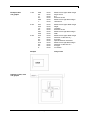
1. line
'068'
'56'
'11
'03'
'089'
'1'
Enter
Enter
Enter
Enter
Enter
Enter
distance from upper label margin
length of line
line
thickness of line
distance from right label margin
vertical line
2. line
'057'
'034'
'10'
'03'
'081'
'055'
Enter
Enter
Enter
Enter
Enter
Enter
distance from upper label margin
height
rectangle
thickness of line
distance from right label margin
width
3. line
'043'
'05'
'04'
'02'
'072'
'05'
'03'
'0'
Enter
Enter
Enter
Enter
Enter
Enter
Enter
Enter
distance from upper label margin
extension in direction of y
font style
spaces between characters
distance from right label margin
extension in direction of x
font type
no rotation
example
entry of text
Rotation of text, code
and graphic
06/10
Operating manual
53
Vario II series
Function menu
8
Function menu
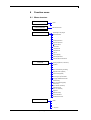
8.1 Menu structure
Printer parameter
Speed
Contrast
Label measurement
Printer initialisation
Start measurement
Label length / Gap length
Material selection
Buzzer / Display
Keyboard D/GB/F/G/E/S/US
Codepage selection
Dispenser photocell
Dispenser offset
Cutter offset
Y displacement
X displacement
Tear off
Column printing
External parameters
Automatic label measurement
Print mode
Label type (adhesive, continuous)
Flip label
Rotate label
Ribbon control
(Off, On weak/strong sensitivity)
Dispender mode (optional)
Cutter mode (optional)
Photocell / Scan position
Error length / Synchronisation
Language D/GB/F/E/P/NL/I/DK
Field handling
(Off, receive/delete graphic)
Data memory
(Off, standard, extended)
Customized entry
(Off, On, Automatic)
Alignment
Backfeed / Delay
Label confirmation
Standard label On/Off
Serial interface 1
COM 1
Baud
P - Parity
D - Data bits
S - Stop bits
06/10
Operating manual
55
Function menu
Vario II series
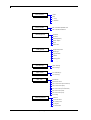
Serial interface 2
COM 2
Baud
P - Parity
D - Data bits
S - Stop bits
Parallel interface
ECP - Extended Capabilities Port
SPP - Standard Parallel Port
Network (optional)
IP address
Net mask
Standard gateway
Speed / Duplex
DHCP
Printer name
RFID (optional)
Programming On/Off
Module type
Tag information
Interface
Error/attempts
Sending power
RFID tags/error
Start / End sign
SOH - Start sign
ETB - End sign
Paper counter
DL - Printhead (m)
GL - Printer (m)
Date / Time
Set date/time
Summertime On/Off
Start of summertime (format selection)
Start of summertime (date)
Start of summertime (time)
End of summertime (format selection)
End of summertime (date)
End of summertime (time)
Time shifting
Password protection
Password
F - Function menu
MC - Memory card
E - Eingabe
D - Print function
56
Operating manual
06/10
Vario II series
Function menu
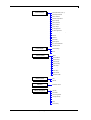
Service functions
Label parameters (A, B, C)
Photocell parameters
Heater resistant
Printhead temperature
Motor / Rampe
Cutter photocell
Online / Offline
Input / Output
I/O IN signal level
I/O OUT signal level
Transfer ribbon prior warning
Port test
Hotstart
Autoload
Invert label
Manual reprint
Zero point adjustment
Automatic return
Print examples
Printer settings
Bar codes
Fonts
Scanner (option)
Mode
Non readables
Label feeding
Scanner type
Scanner setup
Scan offset
Scan length
Scan mode
Scan delay
Scan timeout
Interface COM2
Remote console
Port
Intervall
Emulation
Memory card (option)
Emulation On/Off
Load file
Save label
Save configuration
Change directory
Delete file
Format
Copy
Free memory
06/10
Operating manual
57
Function menu
Vario II series
8.2 Printer parameter
After switching on the label printer, the display shows the following:
Press key
to access the function menu.
Press key
to select the menu.
Speed:
Indication of print speed in mm/s.
Value range: 50 mm/s to 200 mm/s
Step size: 10 mm/s
Contrast:
Indication of contrast in %.
Value range: 10% to 200 %.
Step size: 10%
8.3 Label measurement
Press key
Press key
menu.
Press key
to access the function menu.
as long as you arrive at the 'Label Measurement'
to select the menu.
to confirm the enquiry. Press key
again to start the
Press key
measuring procedure. During the procedure, the display indicates the
following.
The determined values are displayed and saved.
58
Operating manual
06/10
Vario II series
Function menu
8.4 Printer initialisation
Press key
Press key
menu.
Press key
to access the function menu.
as long as you arrive at the 'Printer Initialisation'
to select the menu.
Label:
Indication of label length in mm (see Technical data, on page 13).
Gap:
Indication of distance between two labels in mm
(not for continuous labels).
Minimum value: 1 mm.
to arrive at the next menu item.
Press key
Material:
Selection of the used label and transfer ribbon material.
to arrive at the next menu item.
Press key
Buzzer:
On: An acoustic signal is audible when pressing a key.
Off: No signal is audible.
Display:
Setting of display contrast.
Value range: 0 to 7.
to arrive at the next menu item.
Press key
Keyboard layout:
Selection of region for the desired keyboard layout.
The following possibilities are available: Germany, England, France,
Greece, Spain, Sweden and US.
to arrive at the next menu item.
Press key
Codepage:
Indication of the font used in the printer.
The following possibilities are available:
ANSI character set / Codepage 437 / Codepage 850 / GEM German /
GEM English / GEM French / GEM Swedish / GEM Danish
to arrive at the next menu item.
Press key
Photocell switch level:
First value = Indication of current photocell level.
Second value = Indication if a label (value = 1) or if no label (value =
0) was found.
Third value = Indication of switch level. The modification of this value
is only taken into consideration for the operating modes Photocell and
Photocell continuous.
to arrive at the next menu item.
Press key
Dispenser:
Indication of dispenser offset.
Standard value: 13 mm.
to arrive at the next menu item.
Press key
Cutter:
Indication of cutter offset.
Standard value: 23 mm.
06/10
Operating manual
59
Function menu
Vario II series
to arrive at the next menu item.
Press key
Y displacement:
Indication of initial point displacement in mm. The label is moved
vertically.
Value range: −30.0 to +90.0.
to arrive at the next menu item.
Press key
X displacement:
Indication of displacement in X direction. The fields on the label are
moved.
Value range: −90.0 to +90.0.
to arrive at the next menu item.
Press key
Tear off:
Indication of value to which the last label of a print order is moved
forward and is moved back to the label start at a new print start.
Labels can be torn after termination of the print order without a loss of
labels by tearing.
Default: 12 mm.
Value range: 0 to 50.0 mm.
to arrive at the next menu item.
Press key
Column printing:
NC: Indication of number of columns that are placed side by side on
the backing paper.
CW: Indication of column width (see chapter 12.1 Column printing, on
page 107).
to arrive at the next menu item.
Press key
External parameters:
On: Sending parameters such as print speed and contrast via our
label creation software to the printer. Parameters which are set
directly at the printer before are no longer considered.
Off: Only settings made directly at the printer are considered.
to arrive at the next menu item.
Press key
Measure label automatically:
On: After switching on the printer, the loaded label is automatically
measured.
Off: In order to start the measurement procedure you have to change
to the corresponding menu.
60
Operating manual
06/10
Vario II series
Function menu
8.5 Print mode
Press key
Press key
Press key
to access the function menu.
as long as you arrive at the 'Print Mode' menu.
to select the menu.
Label type:
to select continuous
Generally adhesive labels are set. Press key
labels. If the menu label length/gap length contains a gap value, this
value is added to the label length.
to arrive at the next menu item.
Press key
Flip label:
The axis of reflection is in the middle of the label. If the label width
was not transferred to the printer, automatically the default label width
i.e. the width of the printhead is used. It is recommended to use labels
with the same width as the printhead. Otherwise this can cause
problems in positioning.
to arrive at the next menu item.
Press key
Rotate label:
According to standard the label is printed ahead with a rotation of 0°. If
the function is activated, the label is rotated by 180° and printed in
reading direction.
to arrive at the next menu item.
Press key
Transfer ribbon control:
Examination if the transfer ribbon roll is to end or if the ribbon was torn
at the unwinding roll.
Off: The ribbon control is deselected, i.e. the printer continues without
an error message.
On: The ribbon control is selected, i.e. the current print order is
interrupted and an Error Message appears at the printer display.
strong sensibility: The printer reacts immediately to the end of the
transfer ribbon.
weak sensibility: The printer reacts at approx. 1/3 more slowly to the
end of the transfer ribbon.
to arrive at the next menu item.
Press key
Dispenser mode:
To operate the printer in dispensing mode a print order has to be
started and the printer has to be in 'waiting' mode.
you can switch to the next operating mode (see
By means of key
chapter 9.2 Dispenser, on page 76).
06/10
Operating manual
61
Function menu
Vario II series
Press key
to arrive at the next menu item.
Cutter:
The cutter menu is only displayed if the printer recognises the
option by the cutter photocell when switching on the printer.
The first line indicates the selected cutter operating mode. In the
to select the desired
second line it is possible by means of key
control mode.
In case you select automatic, then a cut is released after each printed
label. If you select external, then the cut is released by an external
I/O. Please note that you can select external in case your printer is
equipped with option external I/O.
to change to the next operating mode (see chapter
Press key
9.1Cutter, on page 75).
to arrive at the next menu item.
Press key
Photocell:
Selection of the used photocell.
The following photocell types can be selected: Transmission photocell
normal and inverse, reflexion photocell normal and inverse (see
chapter 12.5 Photocells, on page 114).
Scan position (SP):
Entry of percental label length by that the label end is searched.
Marks onto the label can be skipped.
to arrive at the next menu item.
Press key
Label error length:
In case an error occurs, indication after how many mm a message
appears in the display.
Value range: 1 mm to 999 mm.
Synchronisation:
On: If a label is missed on the liner an error message is displayed.
Off: Missing labels are ignored, i.e. it is printed into the gap.
to arrive at the next menu item.
Press key
Printer language:
Selection of language in which you want to display the text in the
printer display.
At the moment the following languages are available: German,
English, French, Spanish, Portuguese, Dutch, Italian, Danish, Finnish
or Polish.
to arrive at the next menu item.
Press key
Field handling:
Off: The complete print memory is deleted.
Keep graphic: A graphic res. a TrueType font is transferred to the
printer once and stored in the printer internal memory. For the
following print order only the modified data is transferred to the printer.
The advantage is the saving of transmitting time for the graphic data.
The graphic data created by the printer itself (internal fonts, bar codes,
...) is generated only if they were changed. The generating time is
saved.
Delete graphic: The graphics res. TrueType fonts stored in the
printer-internal memory is deleted but the other fields are kept.
62
Operating manual
06/10
Vario II series
Function menu
to arrive at the next menu item.
Press key
Data memory:
Standard: After starting a print order the printer buffer receives data
as long as it is filled.
Advanced: During a current print order data is received and
processed.
Off: After starting a print order no more data is received.
to arrive at the next menu item.
Press key
Customized entry:
On: The question referring the customized variable appears once
before the print start at the display.
Auto: The question referring the customized variable appears after
every printed label.
Off: No question appears at the display. In this case the stored default
value is printed.
to arrive at the next menu item.
Press key
Alignment:
The adjustment of label is effected only after 'flip/rotate label', i.e. the
adjustment is independent of the functions flip and rotate label.
Left: The label is aligned at the left-most position of printhead.
Centre: The label is aligned at central point of printhead.
Right: The label is aligned at right-most position of printhead.
to arrive at the next menu item.
Press key
Backfeed / Delay:
Backfeed: The backfeed was optimised in the operating modes
dispenser (optional), cutter (optional) and tear off. Now, when driving
into the offset, the following label is 'pre-printed' if possible and
therefore the backfeed of label is no necessary and time can be
saved.
Delay: The adjustable deceleration time is only for mode 'backfeed
automatic' of importance (see chapter 12.4 Backfeed/delay, on page
112).
to arrive at the next menu item.
Press key
Label confirmation:
On: A new print order is only printed after confirmation at the device.
An already active continuing print order is printed as long as the
confirmation is effected at the device.
Off: No query appears at the display of control unit.
to arrive at the next menu item.
Press key
Standard label:
On: If a print order is started without previous definition of label, the
standard label is printed.
Off: If a print order is started without previous definition of label, an
error message appears in the display.
06/10
Operating manual
63
Function menu
Vario II series
8.6 Serial interface 1
Press key
Press key
Press key
to access the function menu.
as long as you arrive at the 'Serial Interface 1' menu.
to select the menu.
COM1:
0 - serial interface Off.
1 - serial interface On.
2 - serial Interface On, no error message occurs in case of a
transmission error.
Baud rate:
Indication of bits which are transferred per second.
Following values are possible: 1200, 2400, 4800, 9600, 19200, 38400
and 57600.
Par = Parity:
N - No parity; E - Even; O - Odd
Please observe that the settings correspond to those of the printer.
Dat = Data bits:
Setting of data bits. Value range: 7 or 8 Bits.
Stop = Stop bits:
Indication of stop bits between bytes. Value range: 1 or 2 stop bits.
8.7 Serial interface 2
Press key
Press key
Press key
to access the function menu.
as long as you arrive at the 'Serial Interface 2' menu.
to select the menu.
COM1:
0 - serial interface Off.
1 - serial interface On.
2 - serial Interface On, no error message occurs in case of a
transmission error.
Baud rate:
Indication of bits which are transferred per second.
Following values are possible: 1200, 2400, 4800, 9600, 19200, 38400
and 57600.
Par = Parity:
N - No parity; E - Even; O - Odd
Please observe that the settings correspond to those of the printer.
Dat = Data bits:
Setting of data bits. Value range: 7 or 8 Bits.
Stop = Stop bits:
Indication of stop bits between bytes. Value range: 1 or 2 stop bits.
64
Operating manual
06/10
Vario II series
Function menu
8.8 Parallele interface
Press key
Press key
Press key
to access the function menu.
as long as you arrive at the 'Parallel Interface' menu.
to select the menu.
Parallel port:
SPP - Standard Parallel Port
ECP - Extended Capabilities Port (grants a fast data transmission but
it is only to set at PCs of newer version).
Please observe that the settings correspond to those of the PC.
8.9 Start/stop sign
Press key
Press key
Press key
to access the function menu.
as long as you arrive at the 'Start/Stop Sign' menu.
to select the menu.
Hex format 01
SOH: Start of data transfer block
Hex formal 17
ETB: End of data transfer block
Two different start / en signs can be set. The settings are normally
SOH = 01 HEX and ETB = 17 HEX. Several host computers cannot
process these signs and therefore SOH = 5E HEX and ETB = 5F
cannot be set.
8.10 Paper counter
Press key
Press key
Press key
to access the function menu.
as long as you arrive at the 'Paper Counter' menu.
to select the menu.
Paper counter:
D: Indication of printhead attainment in meters.
G: Indication of printer attainment in meters.
06/10
Operating manual
65
Function menu
Vario II series
8.11 Date & time
Press key
Press key
Press key
to access the function menu.
as long as you arrive at the 'Date/Time' menu.
to select the menu.
Set date and time:
The upper line of display shows the current date, the second line the
current time. With keys and you can change to the next or
and
you can increase and/or decrease
previous field. With keys
the displayed values.
to arrive at the next menu item.
Press key
Summertime:
On: Printer automatically adjust clock for daylight saving changes.
Off: Summertime is not automatically recognized and adjusted.
to arrive at the next menu item.
Press key
Start of summertime (format):
Select the format in which you want to define beginning summertime.
The above example indicates the default setting (European format).
DD = day; WW = week; WD = weekday; MM = month; YY = year;
next day = only next day is taken into consideration
to arrive at the next menu item.
Press key
Start of summertime (date):
By means of this function you can enter the date at which summertime
has to start. This entry refers to the previously selected format.
Example: summertime is automatically adjusted at last Sunday in
March (03).
to arrive at the next menu item.
Press key
Start of summertime (time):
By means of this function you can define the time when you want to
start summertime.
to arrive at the next menu item.
Press key
End of summertime (format):
Select the format in which you want to define end of summertime.
The above example indicates the default setting (European format).
DD = day; WW = week; WD = weekday; MM = month; YY = year;
next day = only next day is taken into consideration
to arrive at the next menu item.
Press key
End of summertime (date):
By means of this function you can define the date when you want to
stop summertime. The entry refers to the previously selected format.
Example: summertime is automatically adjusted at last Sunday in
October (10).
to arrive at the next menu item.
Press key
End of summertime (time):
By means of this function you can define the time when you want to
stop summertime.
to arrive at the next menu item.
Press key
Time shifting:
By means of this function you can enter time shifting in hours and
minutes (for automatically adjustment from summer and wintertime).
This entry refers to the currently set printer time.
66
Operating manual
06/10
Vario II series
Function menu
8.12 Password protection
Press key
Press key
menu.
Press key
to access the function menu.
as long as you arrive at the 'Password Protection'
to select the menu.
Password:
By a password several functions can be blocked, so the user cannot
work with them. There are several applications in which the use of
password protection makes sense (see chapter 12.2 Password, on
page 108).
8.13 Service functions
So that the distributor res. the printer manufacturer at the case
of service can offer fast support, the printer is equipped with
the Service functions menu.
Necessary information such as set parameter can read
directly at the printer (see chapter 8.15 on page 71).
Press key
Press key
Press key
to access the function menu.
as long as you arrive at the 'Service Functions' menu.
to select the menu.
Label parameters:
Indication of label parameters in Volt.
A: Indication of minimum value.
B: Indication of difference between minimum and maximum value.
C: Indication of trigger level. The value is ascertained while measuring
and can be changed.
to arrive at the next menu item.
Press key
Photocell paramters:
DLS: Indication of transmission photocell level in Volt.
RLS: Indication of reflexion photocell level in Volt.
OLS: Indication of ribbon savings photocell level in Volt.
TR: Indication of transfer ribbon photocell status (either 0 or 1).
H: Indication of printhead position.
0 = printhead down; 1 = printhead up
to arrive at the next menu item.
Press key
Heater resistance:
To achieve a high print quality, the indicated Ohm value must be set
after an exchange of printhead.
06/10
Operating manual
67
Function menu
Vario II series
to arrive at the next menu item.
Press key
Printhead temperature:
Indication of printhead temperature. The printhead temperature
corresponds normally to the room temperature. In case the maximum
printhead temperature is exceeded, the current print order is
interrupted and an error message appears at the printer display.
to arrive at the next menu item.
Press key
Motor Ramp:
This function is often used for high printing speed as the tearing of
transfer ribbon can be prevented.
The higher the '++' value is set, the slower the feeding motor is
accelerated.
The smaller the '--' value is set, the faster the feeding motor is
decelerated.
to arrive at the next menu item.
Press key
Cutter photocell:
1 - Printer is equipped with a cutter
0 - Printer is not equipped with a cutter
CH:
1 - The cutter is in the initial position and ready for the cutting
procedure.
0 - The cutter is not in the initial position. Before you are going to
release a cutting procedure you first have to place the cutter in its
initial position.
to arrive at the next menu item.
Press key
Online/Offline:
This function is activated e.g. if the transfer ribbon is to be changed. It
is avoided that a print order is processed although the printer is not
to change
ready. If the function is activated then press the key
between Online and Offline mode. The respective state is indicated in
the display.
Standard: Off
Online: Data can be received by interface. The keys of the foil
keyboard are only active, if you changed in the Offline mode with key
.
Offline: The keys of the foil keyboard are still active but received data
are not processed. If the printer is again in Online mode then new
print orders can be again received.
to arrive at the next menu item.
Press key
Input/Output:
Indication of signal level which indicates the signal a print order is
started.
0 – Low
1 – High
68
Operating manual
06/10
Vario II series
Function menu
to arrive at the next menu item.
Press key
IN signal level:
Indication of signal at which a print order is started.
+ = active signal level is 'high' (1)
− = active signal level is 'low' (0)
x = not activated signal level
*
s = status can be affected by interface
The modification of the signal level is only taken into consideration for
the operating modes I/O static, I/O dynamic, I/O static continuous and
I/O dynamic continuous.
to arrive at the next menu item.
Press key
OUT signal level:
Indication of signal level for output signal.
+ = active signal level is 'high' (1)
− = active signal level is 'low' (0)
s = status can be affected by interface*
Press key
to arrive at the next menu item.
TRB = Transfer ribbon advance warning:
Before the end of transfer ribbon, a signal is send by the control
output.
Warning diameter:
Setting of transfer ribbon advance warning diameter.
In case you enter a value in mm then a signal appears via control
output when reaching this diameter (measured at transfer ribbon roll).
v = Reduced print speed:
Setting of the reduced print speed. This can be set in the limits of the
normal print speed. Additionally there are the following settings:
−: No reduced print speed
0: Printer stops at reaching the warning diameter and indicates 'ribbon
error'.
to arrive at the next menu item.
Press key
Port test:
Examination of photocell.
and then the received data is
To start the port test, press key
printed.
COM1 =
LPT =
USB =
TCP/IP =
serial interface
parallel interface
Universal Serial Bus interface
Ethernet interface
Press key
to arrive at the next menu item.
Hotstart:
On: Continue an interrupted print order after switching on the printer
anew.
(Only if printer is equipped with option memory card)
Off: After switching off the printer the complete data is lost
(see chapter 12.3 Hotstart, on page 110).
*
06/10
in combination with Netstar PLUS
Operating manual
69
Function menu
Vario II series
Press key
to arrive at the next menu item.
Autoload:
On: A label which was loaded once from memory card can be loaded
again automatically after a restart of printer.
Procedure: The used label is saved onto memory card. The label is
loaded from memory card and printed. After switching the printer Off
and again On, the label is loaded from memory card automatically and
can be printed again.
The last loaded label from memory card is always again loaded
after a restart of printer.
Off: After a restart of printer the last used label must be again loaded
manually from memory card.
A common use of the functions Autoload and Hotstart is not
possible. For a correct Autoload procedure the Hotstart must be
deactivated in the printer.
Press key
to arrive at the next menu item.
Invert label:
On: Label is printed inverse.
Off: Function is deactivated.
to arrive at the next menu item.
Press key
Manual reprint:
Yes: I In case an error occurred and printer is in stopped mode then
and .
you can reprint the last printed labels by means of keys
No: Only blank labels were advanced.
to arrive at the next menu item.
Press key
Zero point adjustment:
Indication of value in 1/100 mm.
After replacing the printhead - the print cannot be continued at the
same position on the label, the difference can be corrected.
The value for zero point adjustment is set ex works. After
replacing the printhead, only service personnel are allowed to
set this value anew.
Press key
to arrive at the next menu item.
Automatic return:
On: The label is pulled back immediately after the cut.
Off: The label is pulled back only before the next print.
70
Operating manual
06/10
Vario II series
Function menu
8.14 Print examples
Press key
Press key
Press key
to access the function menu.
as long as you arrive at the 'Print Examples' menu.
to select the menu.
Print examples:
Settings: Printout of all printer settings such as speed, label and
transfer ribbon material.
Bar codes: Printout of all available bar code types.
Fonts: Printout of all available font types.
8.15 Remote console
Press key
Press key
Press key
to access the function menu.
as long as you arrive at the 'Remote Console' menu.
to select the menu
For more information, please contact our sales department.
06/10
Operating manual
71
Function menu
Vario II series
8.16 Emulation
Press key
Press key
Press key
to access the function menu.
as long as you arrive at the 'Emulation' menu.
to select the menu.
Protocol:
CVPL: Carl Valentin Programming Language
®
ZPL: Zebra Programming Language
®
Change between CVPL protocol and ZPL II protocol.
Press key
to confirm the selection.
®
The printer performs a restart and ZPL II commands are transformed
into CVPL commands internally by the printer and then executed by
the printer.
Press key
in menu protocol to arrive at the next menu item.
Printhead resolution:
®
At activated ZPL II emulation the printhead resolution of the emulated
printer must be set, e.g. 11.8 Dot/mm (= 300 dpi).
®
If the printhead resolution of the Zebra printer differs from
that of the Valentin printer, then the size of objects (e.g. texts,
graphics) complies not exactly.
Press key
to arrive at the next menu item.
Drive mapping:
®
The access to Zebra drives
B: Memory Card
R: RAM Disk (standard drive, if not indicated)
is rerouted to the corresponding Valentin drives
A: Memory Card (slot 1) and/or Compact Flash
B: Memory Card (slot 2)
R: RAM Disk
This can be necessary if the available space on the RAM disk (at
present. 512 KByte) is not sufficient or if bitmap fonts are downloaded
to the printer and be stored permanently.
®
As the printer build-in fonts in Zebra printers are not available
in Valentin printers, this can cause small differences in the
text image.
72
Operating manual
06/10
Vario II series
Function menu
8.17 Main menu
After switching on the printer, the display shows the following:
The first line of main menu indicates used printer type.
The second line indicates current date and time.
Press key
for display the following:
The second line of display indicates version number of firmware.
After a short time the indication of display returns automatically to
main menu.
Press key
for display the following:
Indication of software Build version.
Press key
once more for display the following:
Indication of firmware creation date.
Press key
once more for display the following:
Indication of firmware creation time.
Press key
once more for display the following:
Indication of font version of bitmap fonts.
Press key
once more for display the following:
Indication of font version of vector fonts.
Press key
once more for display the following:
Indication of version number of FPGA
Press key
once more for display the following:
Indication of boot software version number.
Press key
once more for display the following:
Indication of memory space of FLASH in MB.
06/10
Operating manual
73
Vario II series
Options
9
Options
9.1 Cutter
The menu item cutter is only displayed if the printer recognizes the
option via cutter photocell when switching on the printer.
Press key
to access the function menu.
In menu 'Print Mode', press key
'Cutter' menu.
Press key
as long as you arrive at the
to select the menu.
In the first line of the display the cutter mode can be selected.
In the second line the cutter offset which is approx. 20 mm can be set.
to change to the next operating mode.
Press key
Operating modes
Off:
The print order is processed without cutting.
Without backfeed:
A cut is effected after each label.
We recommend using this operating mode if no data which is to print
is in the upper part of the label.
With backfeed:
A cut is effected after each label.
Interval with final cut
A cut is effected after a fixed number of labels which you have to enter
at the print start and additionally at the end of the print order.
Interval without final cut:
A cut is effected after a fixed number of labels which you have to enter
at the print start. At the end of the printer order no cut is effected
except when the set interval comes to the end of the print order.
Final cut:
A cut is only effected at the end of the print order.
Single cut:
In case you are in the main menu or a print order has been stopped
you can release a single cut by pressing key .
The type of the single cut depends on the set cutter mode, offset and
the value set for the double cut.
Press key
06/10
res.
to return to the main menu.
Operating manual
75
Options
Vario II series
9.2 Dispenser
In order to operate the printer in dispensing mode a print order has to
be started and the printer has to be in 'waiting' mode.
Press key
to access the function menu.
In menu 'Print Mode', press key
'Dispenser' menu.
Press key
as long as you arrive at the
to select the menu.
In the first line of the display the dispenser mode can be selected.
In the second line the dispenser offset which is approx. 18 mm can be
set.
Press key
Operating modes
to arrive at the next operating mode.
Off:
It is printed without the labels are dispensed.
I/O static:
The input signal evaluated, i.e. it is printed as long as the signal
exists. The number of labels which was entered at the print start is
printed.
The set dispenser offset is not taken into consideration.
I/O static continuous:
You can find the description of this operating mode in chapter I/O
static.
Continuous means that it is printed as long as new data is transferred
via interface
The set dispenser offset is not taken into consideration.
I/O dynamic:
The external signal is evaluated dynamically, i.e. is the printer in
'waiting' mode a single label is printed at each signal changing. After
the print the set dispenser offset is executed, i.e. a backfeed is
effected.
I/O dynamic continuous:
You can find the description of this operating mode in chapter I/O
dynamic.
Continuous means that it is printed as long as new data is transferred
via interface.
Photocell:
The printer is controlled via photocell. The printer prints automatically
a label if the user takes away the label at the dispensing ledge. The
print order is finished when the target number of labels is reached.
Photocell continuous:
You can find the description of this operating mode in chapter
photocell.
Continuous means that it is printed as long as new data is transferred
via interface.
Press key
76
res.
to return to the main menu.
Operating manual
06/10
Vario II series
Options
9.3 Network
Press key
Press key
to access the function menu.
as long as you arrive at the 'Network' menu.
This menu item can only be selected if a network card is recognised at
switching on the printer, otherwise a message appears that the option
is not available.
For more information, please see the separate manual.
06/10
Operating manual
77
Options
Vario II series
9.4 RFID
Press key
Press key
Press key
to access the function menu.
as long as you arrive at the 'RFID' menu.
to select the menu.
Press key and
to set the operating mode of RFID hardware.
In order to program a RFID tag the setting must be On.
in On mode to activate the hardware. The setting
Press key
remains also when switching the printer Off.
After a successful activation the availability of RFID module is
indicated. The menu is not available if no RFID hardware was
recognised.
Press key
to access the RFID menu.
Indication of RFID module type, frequency range (HF, UHF) and used
frequency.
Press key
to arrive at the next menu item.
The menu item Tag information contains several sub-functions.
Press key
to indicate the tag number.
Indication of tag identification number (TID) or 'no RFID tag' if no tag
was recognised.
For UHF Class 1 Gen2 tags the EPC is indicated.
Press key
to return to the menu item Tag information.
Press key to arrive at the next sub-function and then press key
to select the function.
Indication of tag storage allocation.
This information can be used to assure that the tag was programmed
correctly.
Press key
to return to the menu item Tag information.
Press key to arrive at the next sub-function and then press key
to select the function.
Indication of tag type.
Press keys and to use the scroll function in order to shift the
complete information into the display.
78
Operating manual
06/10
Vario II series
Options
Press key
to return to the menu item Tag information.
Press key to arrive at the next sub-function and then press key
to select the function.
Start measuring function.
In order to evaluate the quality factor of RFID radio link the measuring
function is started. With set tag offset the label is positioned
accordingly.
Press key
to return to the menu item Tag information.
Press key to arrive at the next sub-function and then press key
to select the function.
Adjust antenna.
First value: Indication of successful reading attempts for current tag.
Second value: Number of reading attempts.
Third value: Number of failed reading attempts.
and
to position the label in mm steps. The set
Press keys
antenna offset is corrected correspondingly.
Press key
to return to the menu item Tag information.
Press key to arrive at the next sub-function and then press key
to select the function.
The automatic tag recognition is started.
The printer tries to recognise the inserted tag.
The status of tag recognition is indicated in percent.
After the tag recognition is finished the customized information is to be
confirmed with key
Press key
to return to the previous menu.
to arrive at the next menu item.
Indication of interface settings.
The settings should not be changed because the ideal setting is
effected automatically.
06/10
Operating manual
79
Options
Vario II series
Press key
to arrive at the next menu item.
Settings for error handling.
Press key
and
to change between the different error reactions.
Print stop:
The printer stops after each RFID error (tag could not be
programmed).
Marking:
In case of an error the label is marked with sample.
Ignore:
Errors caused by unsuccessful tag programming are 'ignored'. The
label is printed. However, the error is logged in the RFID statistics.
Press key
attempts.
and
to change between the settings error or number of
and
to specify the number of attempts, how often the
Press key
RFID unit tries to write on the tag before an error is released or before
the print order is cancelled.
Press key
to arrive at the next menu item.
Setting the sending power of the RFID write/read unit.
Press key
and
to change the value.
The adjustment of this value requires more special knowledge of
the used hardware. The indicated value does not have to be
changed normally because it affects the function of the write/read
module. Changing can lead to the fact that RFID tags cannot be
programmed any longer.
Press key
Press key
to save the current settings permanently.
to arrive at the next menu item.
Indication of the antenna position inside the used label.
Press key
to arrive at the next menu item.
Statistics indication of the previously programmed tags as well as the
number of faulty tags.
Press key
80
to reset the counter.
Operating manual
06/10
Vario II series
Options
9.5 Scanner
Press key
Press key
Press key
to access the function menu.
as long as you arrive at the 'Scanner' menu.
to select the menu.
Mode:
0 Off
1 Mode 1 (data comparison)
i.e. bar code date which was read by the scanner is compared with
the printed data.
2 Mode 2 (check readability)
i.e. it is only checked if the scanner can read the printed bar codes.
NoRd = Non readables:
Indication of number of successive non readables, i.e. when the
printer indicates an error message.
Value range: 0 - 9
1 = the printer stops at the first label which cannot be red from the
scanner and shows an error message.
0 = the printer do not stop at non-readable. A message appears at the
display only.
VEtik = Label feeding:
In many cases it is impossible to position the scanner directly at the
printhead, and therefore with this setting a feeding can be set
Value range: 1 - 5
The illustration below clarifies the meaning of this parameter.
to arrive at the next menu item.
Press key
Scanner type:
Selection of the connected scanner type.
For more information about the different scanner models, please
contact our sales department.
to arrive at the next menu item.
Press key
Scanner setup:
Positioning of scanner. First of all, the scanner must be connected,
the appropriate scanner must be selected in the scanner type menu,
the interface must be activated in the interface parameter menu and
the interface parameters must be set correctly.
to arrive at the next menu item.
Press key
Scan offset:
Indication of value at which the label is moved so the scanner can
read data onto the label.
06/10
Operating manual
81
Options
Vario II series
to arrive at the next menu item.
Press key
Scan length:
If this parameter is set to 0 (AUTO), the switch on and off position of
scanner is calculated by means of position and height of bar code
onto the label.
If the parameter Scan Length is not 0, so this defines the length of
scan sector. The start of scan sector is then set by the parameter
Scan Offset. The following drawing shows the meaning of parameter.
Figure 9
to arrive at the next menu item.
Press key
Scan mode:
With this parameter can be adjusted, at which time the scanning of the
bar code is to be effected - during printing or after printing.
to arrive at the next menu item.
Press key
Scan delay:
In scan mode 'after print' the scanner is switched On after the label
was printed. With this value the time can be specified between printing
the label and switching On the scanner.
to arrive at the next menu item.
Press key
Scan timeout:
In scan mode 'after print' can be specified with this value the time
which is available for scanning the label.
to arrive at the next menu item.
Press key
Interface:
In order to use a scanner, the COM interface must be set to 1.
For more information, please see the separate manual.
82
Operating manual
06/10
Vario II series
Options
9.6 Memory Card
This label printer is equipped at the rear with two memory card slots.
By means of this memory card you can permanently save via interface
graphics, text, label data or information from database.
Insertion and removal
of memory card
Insert memory card with contact side forwards to the slot that was
planned for it. Take care that the memory card engaged and the
marking is on the left side (see illustration).
To take the memory card out of device A you have to press the upper
ejector knob, to take out the card of device B press the lower one.
Figure 10
File and/or
directory name
The printer handles your memory card as a DOS compatible file
system.
After formatting the memory card the STANDARD directory is
automatically available. After switching on the printer or inserting the
memory card, this directory is the current one. The directories are
displayed with capital letters and the '<' sign. The indication of single
files is effected in small letters.
The first line of the display shows the directory in capital letters res.
the selected file, the second line shows the currently selected device
with the corresponding path indication.
06/10
Operating manual
83
Options
Key assignment
Selecting label
Vario II series
Press key
to indicate the saved labels onto the memory card.
Press key
to enter the memory card menu.
Press key
to arrive at the next menu item.
Press key
to return to the previous menu item.
Press key
to select a menu and/or to confirm a query.
Press key
function.
to change between drive A and B inside a selected
Press key
and
Press key
and
to browse the contents of the current directory.
to change to the indicated directory.
Keys:
Press key
directory.
Press key
and
to select the desired label in STANDARD
to select the label.
Select the number of labels which you want to print
Press key
to start the print order.
After finishing the print order the display shows again the main menu.
It is NOT possible to change the directory. Enter the menu
'Change dir' to change the directory.
84
Operating manual
06/10
Vario II series
Loading file from
memory card
Options
Keys:
,
Press key
to select the 'Load file' menu item.
Select the file you want to load and confirm the selection with key
.
The loaded label is now in the printer internal storage and after the
loading procedure the display shows the main menu.
Saving label onto
memory card
Keys:
,
Press key
,
to select the 'Save label' menu item.
Select the directory and/or label you want to save and confirm the
.
selection with key
Confirm the query with
and the label will be saved.
After the saving procedure the display shows again the main menu.
Saving the
configuration
Keys:
,
Press key
,
,
to select the 'Save configuration' menu item.
As standard, the proposed file name is config.cfg. This name can be
changed by the user. In this file the printer parameters are saved
which are not saved permanent in the internal Flash.
Press key
to start the saving procedure.
After the saving procedure, the display shows again the main menu.
06/10
Operating manual
85
Options
Changing
directory/drive
Vario II series
Keys:
,
Press key
,
,
,
to select the 'Change directory' menu item.
The lower line of display shows the directory which is selected at the
moment.
Press key
and
Press key
and
Press key
to change the directory in the upper line.
to show all available directories.
to confirm the selected directory.
After changing the directory the display shows again the main menu.
Deleting file from
memory card
Keys:
,
Press key
,
,
,
,
to select the 'Delete file' menu item.
Select directory and/or label you want to delete and confirm the
.
selection with key
The selected label is deleted from the memory card.
After the deleting procedure the display shows again the first menu
item 'Load file'.
Formatting
memory card
Keys:
,
,
,
,
,
,
Press key
to select the 'Format' menu item.
Press key
to confirm the selection and the procedure is started.
When formatting the memory card the STANDARD directory is
automatically created.
After the formatting procedure the display shows again the 'Load file'
menu item.
86
Operating manual
06/10
Vario II series
Copying
memory card
Options
Keys:
,
Press key
,
,
,
,
,
,
to select the 'Copy' menu item.
to select the copy function.
Press key
Drive A to A, A to B, B to A or B to B.
to confirm the
Insert source and destination card and press key
selection. The content of the source card is transferred to the
destination card.
When copying from A to A and B to B, please observe that the
memory cards have the same storage capacity.
When copying from A to A res. B to B first of all the query regarding
the destination card appears on the display.
Insert card and confirm the query. If the content of the card is loaded
into the printer-internal memory, a prompt appears to insert the
destination card.
Depending on the storage capacity of memory card, this
procedure is to be repeated.
After the copying procedure the display shows again the 'Load file'
menu item.
Indication of free
memory space
Keys:
,
Press key
,
,
,
,
,
,
,
to select the 'Free memory' menu item.
The still available memory space onto memory card is indicated.
Press key
06/10
to display again the 'Load file' menu item.
Operating manual
87
Vario II series
Maintenance and cleaning
10 Maintenance and cleaning
DANGER!
Risk of death by electric shock!
⇒
Maintenance
schedule
Disconnect the label printer from power supply
before performing any maintenance work.
Maintenance task
Frequency
General cleaning (see section
10.1, on page 90).
As necessary.
Cleaning print roller (see section
10.2, on page 90).
Each time the label roll is
changed or when the printout and
label transport are adversely
affected.
Cleaning printhead (see section
10.3, on page 91).
Direct thermal printing:
Each time the label roll is
changed.
Thermal transfer printing:
Each time the transfer ribbon is
changed or when the printout is
adversely affected.
Cleaning label photocell (see
section 10.4, on page 92).
When exchanging the label roll.
Replacing printhead (see
section 10.5, on page 93).
When errors in the printout occur.
WARNING!
Risk of fire by easily inflammable label soluble!
⇒
06/10
When using label soluble, dust must be completely
removed from the label printer and cleaned.
Operating manual
89
Maintenance and cleaning
Vario II series
10.1 General cleaning
CAUTION!
Abrasive cleaning agents can damage the label printer!
⇒
⇒
⇒
Do not use abrasives or solvents to clean the outer
surface of the label printer.
Remove dust and paper fuzz in the printing area with a soft
brush or vacuum cleaner.
Clean outer surfaces with an all-purpose cleaner.
10.2 Cleaning the printer roller
A soiled print roll can lead to reduced print quality and can affect
transport of material.
Figure 11
1. Open printer cover.
2. Turn lever (A) counter clockwise to lift up the printhead (B).
3. Remove labels and transfer ribbon form the label printer.
4. Remove deposits with roller cleaner and a soft cloth.
5. Turn the roller (C) manually step by step to clean the complete
roller (only possible when printer is switched off, as otherwise the
step motor is full of power and the roller is kept in its position).
90
Operating manual
06/10
Vario II series
Maintenance and cleaning
10.3 Cleaning the printhead
Printing can cause accumulation of dirt at printhead e.g. by colour
particles of transfer ribbon, and therefore it is necessary to clean the
printhead in regular periods depending on operating hours,
environmental effects such as dust etc.
CAUTION!
Printhead can be damaged!
⇒
⇒
Do not use sharp or hard objects to clean the
printhead.
Do not touch protective glass layer of the printhead.
Figure 12
1. Open printer cover.
2. Turn lever (A, in Figure 11) counter clockwise to lift up the
printhead.
3. Remove labels and transfer ribbon from the label printer.
4. Clean printhead surface with special cleaning pen or a cotton
swab dipped in pure alcohol.
5. Allow printhead to dry for 2-3 minutes before commissioning the
printer.
06/10
Operating manual
91
Maintenance and cleaning
Vario II series
10.4 Cleaning the label photocell
CAUTION!
Label photocell can be damaged!
⇒
Do not use sharp or hard objects or solvents to clean
the label photocell.
The label photocell can become dirtied with paper dust and this can
adversely affect label detection.
Figure 13
1. Open printer cover.
2. Turn lever (A, in Figure 11) counter clockwise to lift up the
printhead.
3. Remove labels and transfer ribbon from the label printer.
4. Blow out the photocell (A) with pressure gas spray.
Observe strictly the instructions on the spray can!
5. Clean the label photocell (A) additionally with a cleaning card (B)
before soaked in pure alcohol. Move the cleaning card from one
side to the other (see illustration).
6. Reload labels and transfer ribbon (see chapter 5 Loading media,
on page 25).
92
Operating manual
06/10
Vario II series
Maintenance and cleaning
10.5 Replacing the printhead (general)
The printhead (4) is preinstalled on a head plate (1) and
precisely aligned at the factory.
Figure 14
1
2
3
4
5
Head plate
Plug connection signal
Plug connection tension
Printhead
Focal line
CAUTION!
The printhead can be damaged by static electricity
discharges and impacts!
⇒
⇒
⇒
⇒
06/10
Set up printer on a grounded, conductive surface.
Ground your body, e.g. by wearing a grounded
wristband.
Do not touch contacts on the plug connections (2, 3).
Do not touch printing line (5) with hard objects or
your hands.
Operating manual
93
Maintenance and cleaning
Vario II series
10.6 Replacing printhead
Figure 15
Removing the
printhead
1. Remove labels and transfer ribbon from the label printer.
2. When printhead is closed, loosen the screws (A).
3. Turn lever (B) counter clockwise to lift up the printhead.
4. If the printhead (C) is not disengaged on the pressure roller,
continue loosen the screws (A).
5. Remove the printhead carefully to the front until you can reach the
plug connections.
6. Remove plug connections and then remove printhead (C).
Installing the printhead
1. Attach plug connections.
2. Position printhead in printhead mounting bracket in such a way
that the pin is secured in the corresponding hole in the head plate.
3. Lightly keep printhead mounting bracket on the printer roller with
one finger and check for correct positioning of the printhead.
4. Tighten again screw (A).
5. Check resistance value on the type plate of printhead and if
necessary change the value in the 'Service functions/heater
resistance'.
6. Reload labels and transfer ribbon (see chapter 5 Loading media,
on page 25).
94
Operating manual
06/10
Vario II series
Maintenance and cleaning
10.7 Adjusting printhead
Parallelism
An important characteristic for a high quality print is the parallelism of
the focal line of the thermal printhead to the pressure roll. Because of
the fact that the position of focal line of the printhead depends on
fluctuations caused by production, it is necessary to adjust the
parallelism.
1. Loosen the screws (A, Figure 15) with a hexagon key by approx.
¼ rotations.
2. Adjust the parallelism with the adjusting screws (D, Figure 15).
Clockwise = printhead moves forwards
Counter clockwise = printhead moves backwards
3. Adjust the parallelism as long as the printing result comes up to
your full expectation.
4. Tighten again screws (A, Figure 15).
5. Start a print order with approx. 10 labels and control the correct
passage of transfer ribbon.
Pressure
Increasing the head contact pressure leads to an improvement of the
print image density on the corresponding side and to a shifting of the
ribbon feed path in the corresponding direction.
CAUTION!
Damage of printhead by unequal use!
⇒
Change factory settings only in exceptional cases.
The selection of the smallest value can optimise the life cycle of
printhead.
1. Turn pressure screws (E, Figure 15) to change the pressure of
printhead.
2. Turning the pressure screws (E, Figure 15) in clockwise direction
results in a pressure increase.
3. Turning the pressure screws (E, Figure 15) counter clockwise
results in a pressure decrease.
06/10
Operating manual
95
Vario II series
Error correction
11 Error correction
06/10
Line rises up completely or partly
over the upper edge of label.
Move line down (increase Y
value).
Check rotation and font.
Line rises up completely or partly
over the bottom edge of label.
Move line up (reduce Y value).
Check rotation and font.
One res. several characters of
the text is res. are not available
in the selected font.
Change text.
Change font.
Selected code is not available.
Check code type.
Selected position is not
available.
Check position.
Selected font is not available.
Check font.
Selected font is not available.
Check font.
While measuring no label was
found.
Set label length is too large.
Check label length and if labels
are inserted correctly.
Restart measuring anew.
No label available.
Soiled label photocell.
Labels not inserted correctly.
Insert new label roll.
Check if labels are inserted
correctly.
Clean the label photocell.
During the print order the ribbon
roll becomes empty.
Defect at the transfer ribbon
photocell.
Change transfer ribbon.
Check transfer ribbon photocell
(service functions).
Stop bit error.
Check stop bits.
Check baud rate.
Check cable (printer and PC).
Parity error.
Check parity.
Check baud rate.
Check cable (printer and PC).
Operating manual
97
Error correction
98
Vario II series
Loss of data at serial interface
(RS-232).
Check baud rate.
Check cable (printer and PC).
Received line number is invalid
at RS-232 and Centronics.
Check sent data.
Check connection PC - printer.
Invalid length of received mask
statement.
Check sent data.
Check connection PC - printer.
Transferred mask statement is
invalid.
Check sent data.
Check connection PC - printer.
No end of data found.
Check sent data.
Check connection PC - printer.
One res. several characters of
the text is res. are not available
in the selected font.
Change text.
Change font.
Unknown transferred data
record.
Check sent data.
Check connection PC - printer.
For check digit control the
entered res. received check digit
is wrong.
Calculate check digit anew.
Check code data.
Selected SC factor is invalid for
EAN res. UPC.
Check SC factor.
Entered digits for EAN res. UPC
are invalid
< 12; > 13.
Check number of digits.
Selected check digit calculation
is not available in the bar code.
Check calculation of check digit.
Check bar code type.
Selected zoom factor is not
available.
Check zoom factor.
Entered sign is not available.
Check offset value.
Entered offset value is invalid.
Check offset value.
Operating manual
06/10
Vario II series
06/10
Error correction
Printhead temperature is too
high.
Defective printhead sensing
device.
Reduce contrast.
Change printhead.
With cut an error occurred.
Paper jam.
Check label run.
Check cutter run.
Entered data do not correspond
to the characters allowed from
the application identifier.
Check code data.
Selected application identifier is
not available in GS1-128 (EAN
128).
Check code data.
F Missing HIBC system sign.
Missing primary code.
Check definition of HIBC code.
Real Time Clock function is
selected but the battery is
empty.
Defective RTC.
Change battery.
Change RTC component.
Interrupted connection CPU memory card.
Defective memory card
interface.
Check connection CPU memory card interface.
Check memory card interface.
No print memory found.
Check memory assembly on
CPU.
At start of a print order the
printhead is open.
Close the printhead and start
print order anew.
BCD error
Invalid format for the calculation
of Euro variable.
Check entered format.
BCD error
Invalid format for the calculation
of Euro variable.
Check entered format.
BCD error
Invalid format for the calculation
of Euro variable.
Check entered format.
Flash component error.
Run a software update.
Change CPU.
Operating manual
99
Error correction
100
Vario II series
Invalid length of the received
command statement.
Check data sent.
Check connection PC - printer.
Memory card not found / not
correctly inserted.
Insert memory card correctly.
Impossible to read memory card
(faulty).
Check memory card, if
necessary change it.
Memory Card not formatted.
Format memory card.
Attempt to delete the actual
directory.
Change directory.
Too long indication of path.
Indicate a shorter path.
Memory Card is write-protected.
Deactivate write protection.
Attempt to indicate a directory as
file name.
Correct your entry.
Attempt to change a file during
an access is active.
Select another file.
File does not exist on memory
card.
Check file name.
File name contains invalid
characters.
Correct entry of name, remove
special characters.
Internal file system error.
Please contact your distributor.
The max. number (64) of main
directory entries is reached.
Delete at least one main
directory entry and create
subdirectories.
Maximum memory capacity is
reached.
Use new Memory Card, delete
no longer required files.
Operating manual
06/10
Vario II series
06/10
Error correction
The selected file/directory
already exists.
Check name, select a different
name.
During copying procedure not
enough memory space onto
target drive available.
Use a larger target card.
Errors in update file of firmware.
Start update file anew.
The selected file does not
contain graphic data.
Check file name.
Attempt to delete a not empty
directory.
Delete all files and subdirectories in the desired
directory.
No memory card drive found.
Check connection of memory
card drive.
Contact your distributor
No memory card is inserted.
Insert memory card in the slot.
Error at start of web server.
Please contact your distributor.
The printer is equipped with the
wrong FPGA.
Please contact your distributor.
The label length is too long.
The number of labels per cycle
is too much.
Check label length res. the
number of labels per cycle.
Defective photocell.
Change photocell.
Pressure air is not connected.
Check pressure air.
External print release signal is
missing.
Check input signal.
Wrong definition of column width
res. number of columns.
Reduce the column width res.
correct the number of columns.
Operating manual
101
Error correction
102
Vario II series
The connected bar code
scanner signals a device error.
Check the connection
scanner/printer.
Check scanner (dirty).
Bad print quality.
Printhead completely soiled or
defective.
Print speed too high.
Increase contrast.
Clean printhead or exchange (if
necessary).
Reduce print speed.
Scanned data does not
correspond to the data which is
to print.
Exchange printhead.
As page number either 0 or a
number > 9 is selected.
Select a number between 1 and
9.
A page which is not available is
selected.
Check the defined pages.
The page is not defined.
Check the print definition.
Wrong format for customised
entry.
Check the format string.
Wrong format for date/time.
Check the format string.
No memory card found.
If option hotstart was activated,
a memory card must be
inserted.
Switch off the printer before
inserting the memory card.
Selection of print of several
columns and also mirror/rotate.
It is only possible to select one
of both functions.
Loading of temporary hotstart
files.
Not possible.
Faulty definition of shift times
(overlapping times).
Check definition of shift times.
General RSS bar code error.
Check definition and parameter
of RSS bar code.
Operating manual
06/10
Vario II series
06/10
Error correction
Protocol error IGP.
Check sent data.
Printing creation was still active
at print start.
Reduce print speed.
Use printers' output signal for
synchronisation.
Use bitmap fonts to reduce
generating time.
Both DPM position sensors
(start/end) are active.
Displace zero point sensor
Check sensors in service
functions menu
Font and web data is missing.
Run a software update.
Layout ID definition is missing.
Define layout ID onto the label.
Scanned data does not
correspond to defined ID.
Wrong label loaded from
memory card.
RFID unit cannot recognise a
label.
Displace RFID unit or use an
offset.
Error while checking
programmed data.
Faulty RFID label.
Check RFID definitions
Error at programming the RFID
label.
Label positioning.
Faulty label.
Faulty or incomplete definition of
RFID data.
Check RFID data definitions.
Definition of label data does not
correspond with the used label.
Check storage partitioning of
used label type
Error at programming the RFID
label (locked fields).
Check RFID data definitions.
Label was already programmed.
Error at programming the RFID
label.
Check RFID definitions.
Operating manual
103
Error correction
Vario II series
The scanner could not read the
bar code within the set timeout
time.
104
Defective printhead.
Wrinkles in transfer ribbon.
Scanner wrong positioned.
Timeout time too short.
Check printhead.
Check transfer ribbon.
Position scanner correctly,
corresponding to the set feeding.
Select longer timeout time.
Scanner data does not
correspond to bar code data.
Check adjustment of scanner.
Check scanner settings /
connection.
Serial interface error.
Check settings for serial data
transmission as well as cable
(printer-PC).
Serial interface error.
Check settings for serial data
transmission as well as cable
(printer-PC).
No printhead-FPGA data
available.
Please contact your responsible
distributor.
Error when programming
printhead-FPGA.
Please contact your responsible
distributor.
Sensor signal up is missing
(option APL 100).
Check input signals /
compressed-air supply.
Sensor signal down is missing
(option APL 100).
Check input signals /
compressed-air supply.
Sensor does not recognise a
label at vacuum plate
(option APL 100).
Check input signals /
compressed-air supply.
Print order is active but device
not ready to process it.
Check start signal.
Print data outside the defined
label.
Selection of wrong module type
(design software).
Check selected module type.
Check selection of left/right
version.
Operating manual
06/10
Vario II series
06/10
Error correction
No original printhead is used.
Check the used printhead.
Contact your distributor.
Wrong Tag type.
Tad data do not match the Tag
type in the printer.
Adapt data or use the correct
Tag type.
RFID module is not activated.
No RFID data can be processed.
Activate RFID module or remove
RFID data from label data.
Transferred GS1-128 (EAN 128)
bar code is invalid.
Verify bar code data (see GS1128 bar code specification).
Error at EPC calculation.
Verify data (see EPC
specification).
When starting the print order the
housing cover is not closed.
Close the housing cover and
start the print order anew.
Transferred EAN.UCC code is
invalid.
Verify bar code data (see
corresponding specification).
Printing carriage does not move.
Check gear belt (possibly
broken).
Applicator error.
Check applicator.
Applicator
Left end position
Check LEFT final position switch
for correct function and position.
Check function of pneumatics for
cross traverse.
Applicator:
Right end position
Check RIGHT final position
switch for correct function and
position.
Check function of pneumatics for
cross traverse.
Applicator:
Not in print position
Check TOP and RIGHT final
position switch for correct
function and position.
Check function of pneumatics.
Parameter error XML file.
Please contact your responsible
distributor.
Operating manual
105
Vario II series
Additional information
12 Additional information
12.1 Column printing
With this printer several columns can be printed, i.e. the information of
one column can be printed several times (depending on its width) on a
label. Caused by this the use of the complete print width is possible
and the generating time is enormously reduced.
For example 4 columns with a width of 25 mm or 2 columns with a
width of 50 mm can be printed onto a label with a width of 100 mm.
Please note that the first label is always the one with the largest x
coordinate, i.e. it has the largest distance to the printhead.
Setting the print of
several columns
Press key
Press key
Press key
Press key
printing'.
to change to the function menu.
as long as you arrive the 'Printer Initialisation' menu.
to confirm the selection.
as long as you arrive at the menu item 'Column
Press key
and/or
Press key
and/or
Press key
and/or
to set the number of columns.
to arrive to the next input field.
to set the column width, e.g. 20.0 mm.
Press key
to start a print with indication of number of labels and
number of lines. The number of labels corresponds to the number of
labels that are to print.
e.g. columns: 3, items: 4
The first four labels were printed but not label 5 and 6.
06/10
Operating manual
107
Additional information
Vario II series
12.2 Password
Example 1:
The supervisor programs a Memory Card directly with the printer. He
stores 10 different labels. As well he adjusts the printer parameters,
like contrast, speed, etc. to the corresponding values. The user is only
supposed to read the labels from memory card and to print them.
Therefore the supervisor blocks the function menu and the entry
function by a password.
Example 2:
The printer is connected to a PC. The user is only supposed to take
the labels dispensed by the printer and stick them on. To prevent, that
the labels or the printer set-up will not be changed, the supervisor
blocks all printer functions (e.g. function menu, entry menu, etc.) by a
password.
Example 3:
The user has to change several texts before printing. It is not allowed
to change any masks (fonts, position, etc.). Therefore the supervisor
blocks the entry of mask and the function menu. By this means the
user indeed can print labels, but the printer set-up and the masks of
the labels can't be changed.
To receive a most flexible password protection, the printer functions
will be divided into several function groups:
1. Function menu:
In the function menu the printer parameters can be changed (contrast,
speed, mode, ...). The password protection prevents modifications at
the printer settings.
2. Memory Card:
With the functions of your Memory Card labels can be stored, loaded,
....
Here the password protection has to separate, if none or only reading
functions are allowed.
3. Entry functions:
With the keys text and code actual changes of mask or text entry can
be done. The password protection either blocks the whole function or
allows changes in the text information.
4. Print functions:
With key quant a print can be produced. In case the printer is
connected to a PC, it can be useful, that the user is not able to
produce a print manually. So the password protection prevents that
prints can be produced manually.
Because of these different function groups the password protection is
very flexible. The printer can be adjusted best to its actual order, as
only certain functions are blocked.
108
Operating manual
06/10
Vario II series
Define password
Additional information
In case no password is defined res. the password protection is not
activated, all functions can be used. In the function menu you will find
the menu item "Password", where the password can be entered and
the password protection activated.
as long as to the password menu.
Press key
Press key
to confirm the selection.
The abbreviations have the following meaning:
F
MC
E
D
Function menu
Memory card functions
Entry menu
Print functions
In case the password protection is active, but the function menu is not
protected, the password
(4-digit number between 0000 and 9999) has to be entered first, so
the above shown display appears. Now changes can be done. In the
first line the user can define the password (4-digit number).
Activate blocked
function
Press key
to switch to the next.
Press key
(yes/no).
and
Press key
to change to the second line.
Press key
and
to block/release individual function groups.
(Press key
and
to change from one group to the next one.)
to activate/deactivate the password protection
F:
Function menu
MC:
Memory card
E.
Entry
D:
Print function
0...open
1...locked
0...open
1...only reading access
2...all functions locked
0...open
1...only masks locked
2...no entry possible
0...open
1...open
2...no manual print release
In case the user wants to perform a blocked function, he has to enter
the valid password first.
The entered password has to be confirmed with E. In case the correct
password has been entered the desired function can be performed. If
the entered password was invalid no error message appears but the
main menu will be displayed.
06/10
Operating manual
109
Additional information
Vario II series
12.3 Hotstart
Because of the fact that no battery-buffered SRAM is
available, the necessary data has to be saved in another
way, i.e. the data is saved onto memory card. Therefore
the option memory card is a condition for the hotstart menu
item.
The function hotstart contains e.g. that in case of a power failure the
currently loaded label can be further processed without any loss of
data.
Moreover a print order can be interrupted and to be continued after
switching on the printer anew.
At an active hotstart all necessary data is stored on the
memory card therefore do not remove the card during
operation. When removing during operation, this causes
the loss of all data on the memory card.
Saving the current label
Saving the printer order
state
Loading a label and
print order state
110
In case the hotstart function is set to on, at the start of a print order the
data of the current label is saved to the corresponding directory of the
memory card.
However the following conditions have to be fulfilled:
•
Memory card inserted in drive A
•
Memory card not write protected
•
Enough free storage space onto memory card
•
An error message appears in case these conditions are not
fulfilled.
At switching off the printer the state of the current print order is saved
to the corresponding directory of the memory card.
However the following conditions have to be fulfilled:
•
Memory card inserted in drive A
•
Memory card not write protected
•
Enough free storage space onto memory card
In case the hotstart function is set to On, at a new start of printer the
saved label data and the print order state is loaded from the
corresponding file on the memory card. Because of this reason a
memory card has to be inserted at switching on the printer. In case it
is impossible to load the data an error message appears.
Operating manual
06/10
Vario II series
Additional information
Starting the print order
In case at switching off the label printer a print order was active, then
a print start is released automatically and the required res. actual
number of printed labels is refreshed.
In case the print order was stopped at switching off the label printer, it
is again set to the stopped mode after switching on the label printer
anew.
In case a customized entry was active during switching off the label
printer, the window for the first customized variable is displayed.
Refreshing the variable
counter
As in the intended file only the start values of the counter are saved,
they are refreshed at a new start of the print order by means of the
number of printed labels. Each counter is counted corresponding from
its start value. Afterwards the position of the current and the next
counter update are correctly set by means of the update intervals.
Make sure that in case graphics are onto the label they
have to be saved onto memory card.
06/10
Operating manual
111
Additional information
Vario II series
12.4 Backfeed/delay
Backfeed operating
modes
In continuous dispensing mode (IO dynamic continuous, IO static
continuous, IO photocell continuous) no optimised backfeed is
possible. Because of the fact when changing the print order, then the
current label in the offset sector is already printed from the old print
order.
With activated double cut no optimised backfeed is possible.
In the sector that is printed when preprint the following label, no
date/time variable should be existing, because this could be refreshed
before the next start impulse.
Standard
Peel off:
After printing the label, it is driven into the
dispensing offset and waited there, until the label
was removed (photocell) or a new start signal is
given (IO dynamic). Afterwards it is again
backtracked to the beginning of label and then the
next label is printed.
Cutter:
After printing the label, it is driven into the cutter
offset; the label is cut and then backtracked
immediately to the beginning of label (if an operating
mode with backfeed is selected). Afterwards the
next label is printed, if necessary.
Tear off
edge:
After printing the last label of a print order it is driven
into the tear-off offset and the label res. labels can
be taken away. When starting a new print order, first
it is backtracked again to the beginning of label and
then the next label is printed.
If a following print order is available before driving
into the tear-off offset, then it is not driven into tearoff offset but the following label is directly printed.
Peel off:
After printing the label it is driven into the dispensing
offset and then backtracked to the beginning of label
either immediately or after the set delay time. When
releasing a new start signal (IO dynamic) the next
label is immediately printed.
Cutter:
This is the same function as for 'backfeed standard'
as it is always backtracked immediately to the
beginning of label.
After printing the last label of a print order it is driven
into the tear-off offset and then backtracked to the
beginning of label either immediately of after the set
delay time. When starting a new print order then the
next label is immediately printed.
If a following print order is available before driving
into the tear-off offset, then it is not driven into tearoff offset but the following label is directly printed.
Automatic
Tear off
edge:
112
Operating manual
06/10
Vario II series
No backfeed
Optimised backfeed
06/10
Additional information
Peel off:
After printing the label it is driven into the dispensing
offset and there waited. When releasing a new start
signal (IO dynamic) then the next label is
immediately printed. Because of the fact that the
label is already in the offset, the label is only printed
from beginning of offset position, i.e. at the definition
of label an accordingly large range must be left free
at the top margin of label, because these data are
otherwise not printed.
Cutter:
This is the same function as for 'backfeed standard'
as it is always backtracked after cutting immediately
to the beginning of label.
Tear off
edge:
After printing the last label of a print order it is driven
into the tear-off offset. When starting a new print
order, the next label is immediately printed. Because
of the fact that the label is already in the offset, the
label is only printed from beginning of offset position,
i.e. at the definition of label an accordingly large
range must be left free at the top margin of label,
because these data are otherwise not printed.
If a following print order is available before driving
into the tear-off offset, then it is not driven into tearoff offset but the following label is directly printed.
Peel off:
After printing the label, during driving into dispensing
offset the following label is 'pre-printed', if this is
already available (generated). When releasing a new
start signal (IO dynamic) the already 'pre-printed'
label is printed to the end and when driving into the
dispenser offset the following label is again 'preprinted'. In case the following label is not yet
available or at the last label of a print order, the
dispenser offset is driven as until now, and then for
the next label before printing the backfeed to the
beginning of label is executed.
Cutter:
After printing the label, during driving into the cutter
offset the following label is 'pre-printed', if this is
already available (generated). After the cut it is not
backtracked but the already 'pre-printed' label is
printed to the end and when driving into the cutter
offset the following label is again 'pre-printed'. If the
following label is not yet available or at the last label
of a print order, the cutter offset is driven as until
now, then cut and afterwards the backfeed to the
beginning of label is executed.
Tear off
edge:
This is the same function as for 'backfeed standard'
as it is only driven into the tear-off offset at the last
label of a print order, if no following print order is
available.
Operating manual
113
Additional information
Vario II series
12.5 Photocells
When using reflection photocells you should observe that
the label printer cover is closed and in this way other light
(e.g. working lamp) on the photocell is prevented.
Transmission photocell
normal
For this photocell type the transmitter is at the top res. the receiver at
the bottom, i.e. the infra-red light is sent from the top. In this way the
label detection is also from the top. This photocell type is used for
standard adhesive labels with gap.
Reflexion photocell
normal
For this photocell type the transmitter and receiver are at the bottom,
i.e. the light is reflected by the label and taken over from the receiver.
This photocell type is used for white (light) continuous labels with a
black (dark) bar. The bar is the separator, i.e. it indicates the position
of gap and in this way the label start.
Transmission photocell
inverse
For this photocell type the transmitter is at the top res. the receiver at
the bottom, i.e. the infra-red light is sent from the top. The label
detection is, same as for the transmission photocell normal, from the
top. However, it is printed differently as for normal photocells, in the
translucent place; the label printer recognizes the opaque place as
gap. This photocell type is used frequently when printing foils.
Reflexion photocell
inverse
For this photocell type the transmitter and receiver are at the bottom,
i.e. the light is reflected by the label and taken over from the receiver.
This photocell type is used for black (dark) continuous labels with a
white (light) bar. This bar is the separator, i.e. it indicates the position
of gap and in this way the start of label.
When using transmission photocells inverse, the label
printer must measure a difference of 2.5 V and for
reflection photocells inverse 1 V between translucent and
opaque material. Otherwise the label printer does not
recognize a difference between label and gap (bar).
114
Operating manual
06/10
Vario II series
Index
13 Index
B
Backfeed/delay ......................................................................... 112, 113
C
Column printing ................................................................................ 107
Connecting printer .............................................................................. 22
Connector pin assignment, printer rear ................................................ 6
E
Environmentally-friendly disposal ......................................................... 6
Error correction ....................... 97, 98, 99, 100, 101, 102, 103, 104, 105
F
Function menu
Date/time ........................................................................................ 66
Emulation ........................................................................................ 72
Label measurement ........................................................................ 58
Menu structure .......................................................................... 56, 57
Paper counter ................................................................................. 65
Parallel interface ............................................................................. 65
Password protection ....................................................................... 67
Print examples ................................................................................ 71
Print mode .......................................................................... 61, 62, 63
Print parameter ............................................................................... 58
Printer initialisation .................................................................... 59, 60
Remote console .............................................................................. 71
Serial interface 1 ............................................................................. 64
Serial interface 2 ............................................................................. 64
Service functions .......................................................... 67, 68, 69, 70
Start/stop sign ................................................................................. 65
H
Hotstart ..................................................................................... 110, 111
I
Important notes .................................................................................... 5
Initial operation ................................................................................... 23
Input/output
Option I ..................................................................................... 16, 17
Option II .......................................................................................... 18
Installation .......................................................................................... 21
Intended use ......................................................................................... 5
K
Keyboard
Standard ......................................................................................... 31
Text entry/customized entry ..................................................... 32, 33
L
Loading media
Cutter mode .................................................................................... 27
Peel off mode .................................................................................. 28
Rewind mode .................................................................................. 25
Tear-off mode ................................................................................. 26
06/10
Operating manual
115
Index
Vario II series
M
Main menu .......................................................................................... 73
Maintenance/cleaning
General cleaning ............................................................................. 90
Label photocell cleaning ................................................................. 92
Maintenance schedule .................................................................... 89
Print roller cleaning ......................................................................... 90
Printhead adjusting ......................................................................... 95
Printhead cleaning .......................................................................... 91
Printhead replacing ................................................................... 93, 94
Mask entry
1D bar codes .................................................................................. 39
2D bar codes (CODABLOCK F) ..................................................... 47
2D bar codes (composite bar code) ............................................... 50
2D bar codes (DataMatrix).............................................................. 45
2D bar codes (MAXICODE) ............................................................ 44
2D bar codes (PDF417) .................................................................. 42
2D bar codes (QR Code) ................................................................ 48
Bitmap fonts .................................................................................... 35
Line graphic .................................................................................... 52
Rectangle ........................................................................................ 51
Vector fonts ..................................................................................... 37
O
Operating conditions ............................................................ 8, 9, 10, 11
Options
Cutter .............................................................................................. 75
Dispenser ........................................................................................ 76
Memory card ................................................................. 84, 85, 86, 87
Network ........................................................................................... 77
RFID.......................................................................................... 78, 79
P
Password protection ................................................................. 108, 109
Photocells ......................................................................................... 114
Plug & Play ......................................................................................... 19
Printhead
Parallelism adjustment.................................................................... 95
Pressure adjustment ....................................................................... 95
Replacing ........................................................................................ 94
S
Safety notes ......................................................................................... 7
Setting up printer ................................................................................ 21
Switching on/off printer ....................................................................... 22
T
Technical data .............................................................................. 13, 14
Text entry
Bitmap fonts .................................................................................... 36
Vector fonts ..................................................................................... 38
Transfer ribbon loading ...................................................................... 29
W
Warnings .............................................................................................. 7
116
Operating manual
06/10