1
Connecting the Power Cord
Caution
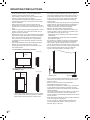
• Do not use a power cord other than the one supplied with
the monitor.
1. Turn off the main power switch.
2. Plug the power cord (supplied) into the AC input terminal.
3. Plug the power cord (supplied) into the AC power outlet.
3
Main power switch
For power
outlet
2
1
AC input terminal
Power cord (Supplied)
Binding Cables
[PN-E471]
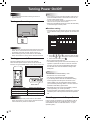
The cables connected to the terminals on the rear of the
monitor can be fastened with the cable clamp.
Insert the cable clamp into the cable clamp attachment on the
rear of the monitor and fasten the cables.
Cable
Cable clamp
attachment
Cable clamp attachment
[PN-E421]
Cable clamp
Cable clamp attachment
Removing the Handles
Handle
Caution
Handle screws
• The removed handles and handle screws are for use with
this monitor. Do not use them for any other devices.
• To attach handles, be sure to use the handles and handle
screws which were removed from the monitor.
• Be sure the handles are attached securely.
Handle
Handle screws
E
10
The handles can be removed.
The removed handles can be attached on the rear side.