1
4.0
ERROR CODES
1.0
USING THE BOILER
Green
1.2
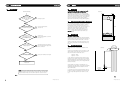
The boiler is in an ERROR state when there is an error code flashing on the back lit display.
CH = Central Heating
BCC = Boiler Chip Card
Press and release the RESET button, the control tries to initiate a restart if possible
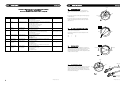
ERROR CODE
1
4
DESCRIPTION
Overheated
appliance
No flame
5
Flame loss
6
Temporarily
overheated appliance
7
Overheated appliance
11
Flame simulation
41
Water flow failure/
Flame for a short
period only
42
Water flow failure/
Flame for a short
period only
REASON
CH Water temperature
greater than 105°C
No flame signal on ignition
Loss of flame signal
during operation
Water temperature
greater than 95°C
Flue over temperature
> 92°C
Flame detected when
gas valve closed
Low water pressure
Reversed sensors
Low water pressure
No flow
Dry run protection
ACTION
•Check no air is in heat exchanger/CH system
•Check plate heat exchanger for blockages
•Check CH thermistor
•Check system bypass is functional
•Check detection electrode/lead – electrode may require cleaning
•Check spark gap
•Check gas supply & pressure
•Check flue system is connected properly
•Check condensate trap not blocked
•Check gas valve and/or lead
•Check detection electrode/lead
•Check gas valve mains lead
•Check overheat thermostat
•Check no air is in heat exchanger/CH system
•CH system and hot water plate heat exchanger blockage
•Check CH thermistor
•Check system bypass is functional
•Check no air in heat exchanger
•Check flue thermistor
•Check flue system
•Check pump
•Check PCB/X8 connector
•Check detection electrode/lead electrode may require cleaning
•Check gas valve operation.
•Check CH flow circulation
•Check water pressure(> 0.5 bar)
•Check pump/lead
•Check expansion vessel
•Check flow and return sensors connected correct way around
•Check no air in heat exchanger
•Check CH flow circulation
•Check water pressure(> 0.5 bar)
•Check pump/lead
•Check expansion vessel
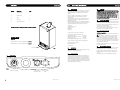
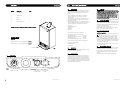
SYSTEM PRESSURE GAUGE
The normal operating water pressure is shown when the
needle is in the GREEN section of the gauge between 1 and 2
bar.
RESET POSSIBLE
Y
2
If the pressure drops too low the system will need topping up
via the filling loop.
Red
1
3
0
4
Red
bar
If the pressure exceeds 3 bar the pressure relief valve will
operate and a fault may be indicated. Contact your installer
(see section 1.5).
Fig. 3
Y
Y
1.3
CH - CENTRAL HEATING TEMPERATURE CONTROL
Switch shown in the OFF position.
Auto Re-start after 1 minute
Min
Max
Turn the knob clockwise to increase the temperature of the
central heating.
Y
min
max
=
=
30°
80°
Fig. 4
Y
Y
1.4
Y
CH CENTRAL HEATING
If you adjust the central heating temperature (set point), the
display will light and show the temperature you have set. After
10 seconds the display will revert to showing the current
boiler central heating temperature and the backlight will switch
off after a further 10 seconds.
Decrease
Increase
Min
Max
Fig. 5
Green
1.5
To re-pressurise the system, locate the filling loop and connect
to the two valves. Open one valve completely then carefully
open the other valve until the pressure gauge shows 1.5 bar
(halfway round the green section of the dial). Shut both valves
and disconnect the filling loop.
Filling Loop
2
RE-PRESSURISING THE SYSTEM
Red
1
3
0
4
Red
Valve
bar
Fig. 6
NOTE: Disconnect filling
loop after re-pressurising
6
© Dimplex Boilers 2008
© Dimplex Boilers 2008
3