1
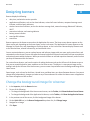
Image sizes for the BlackBerry Curve 8350i smartphone
User Guide
Screen element
Lock screen
Global images
Image
incoming call background
background
transmission arrows
Alt mode
NUM lock, CAP lock
multi-tap
navigation arrows
hourglass cursor
Image size in pixels
320 x 240
320 x 240
26 x 15 o 50 x 30
23 x 17 to 50 x 24
32 x 20 to 50 x 24
40 x 25 to 50 x 24
16 x 9 to 28 x 18
36 x 36 to 50 x 50
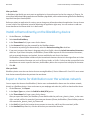
Image sizes for the BlackBerry Curve 8350i smartphone
Screen element
Banner
Home screen (Zen theme)
Controls
Message list
Phone
Lock screen
Global images
Image
background
focus icon
battery meter
alarm icon
new items indicator
signal meter
Wi-Fi® signal meter
unread icons
background
tab, tab focus
new items indicator
underlay
move icon
dialog box icons
dialog box background, dialog box buttons (all
states), menu background, title bar background
background
icons
web icons
phone receiver
volume control
incoming call background
active call background
background
lock icon
transmission arrows
Alt mode, NUM lock, CAP lock, multi-tap
Image size in pixels
320 x 36
36 x 36
variable (multistate image)
9x8
14 x 14
variable (multistate image)
variable (multistate image)
variable (multistate image)
320 x 240
52 x 52
52 x 52
52 x 52
52 x 52
40 x 40
variable (pattern tile image)
variable (pattern tile image)
variable (multistate image)
variable (multistate image)
variable (multistate image)
variable (multistate image)
320 x 240
320 x 240
320 x 240
52 x 52
22 x 22 to 50 x 30
21 x 20 to 30 x 29
53