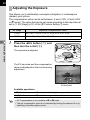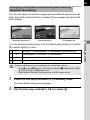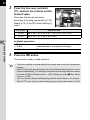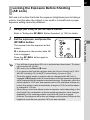
1
PENTAX RICOH IMAGING CO., LTD.
2-35-7, Maeno-cho, Itabashi-ku, Tokyo 174-8639, JAPAN
(http://www.pentax.jp)
PENTAX RICOH IMAGING 112 Quai de Bezons, B.P. 204, 95106 Argenteuil Cedex,
FRANCE S.A.S.
FRANCE
(European Headquarters) (HQ - http://www.pentax.eu)
(France - http://www.pentax.fr)
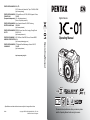
Digital Camera
PENTAX RICOH IMAGING Julius-Vosseler-Strasse 104, 22527 Hamburg,
DEUTSCHLAND GmbH
GERMANY
(http://www.pentax.de)
PENTAX RICOH IMAGING PENTAX House, Heron Drive, Langley, Slough, Berks
UK LTD.
SL3 8PN, U.K.
(http://www.pentax.co.uk)
PENTAX RICOH IMAGING 1770 Argentia Road Mississauga, Ontario L5N 3S7,
CANADA INC.
CANADA
(http://www.pentax.ca)
http://www.pentax.jp/english
Operating Manual
Operating Manual
PENTAX RICOH IMAGING 633 17th Street, Suite 2600, Denver, Colorado 80202,
AMERICAS CORPORATION U.S.A.
(http://www.pentaximaging.com)
• Specifications and external dimensions are subject to change without notice.
58240
Copyright © PENTAX RICOH IMAGING CO., LTD. 2012
R02DTB12 Printed in Philippines
To ensure the best performance from your camera, please
read the Operating Manual before using the camera.
Thank you for purchasing this PENTAX O Digital Camera. Please read this
manual before using the camera in order to get the most out of all the features and
functions. Keep this manual safe, as it can be a valuable tool in helping you to
understand all the camera’s capabilities.
Lenses you can use
In general, lenses that can be used with this camera are DA, DA L, D FA and FA J
lenses and lenses that have an s (Auto) position on the aperture ring. To use any other
lens or accessory, see p.47 and p.232.
Regarding copyrights
Images taken with the O that are for anything other than personal enjoyment
cannot be used without permission according to the rights as specified in the Copyright
Act. Please take care, as there are cases where limitations are placed on taking
pictures even for personal enjoyment during demonstrations, performances or of items
on display. Images taken with the purpose of obtaining copyrights also cannot be used
outside the scope of use of the copyright as laid out in the Copyright Act, and care
should be taken here also.
Regarding trademarks
Microsoft and Windows are registered trademarks of Microsoft Corporation in the
United States and other countries. Windows Vista is either a registered trademark or
trademark of Microsoft Corporation in the United States and/or other countries.
Macintosh, Mac OS, and QuickTime are trademarks of Apple Inc., registered in the U.S.
and other countries.
SDXC Logo is a trademark of SD-3C, LLC.
This product includes DNG technology under license by Adobe Systems Incorporated.
The DNG logo is a either registered trademark or trademark of Adobe Systems
Incorporated in the United States and/or other countries.
HDMI, the HDMI logo and High-Definition Multimedia Interface are trademarks or
registered trademarks of HDMI Licensing, LLC in the United States and/or other
countries.
All other brands or product names are trademarks or registered trademarks of their
respective companies. However, the TM or ® marks are not used in all cases in this
manual.
This product supports PRINT Image Matching III. PRINT Image Matching enabled
digital still cameras, printers and software help photographers to produce images more
faithful to their intentions. Some functions are not available on printers that are not
PRINT Image Matching III compliant.
Copyright 2001 Seiko Epson Corporation. All Rights Reserved. PRINT Image Matching
is a trademark of Seiko Epson Corporation. The PRINT Image Matching logo is a
trademark of Seiko Epson Corporation.
This product is licensed under the AVC Patent Portfolio License for the personal use of
a consumer or other uses in which it does not receive remuneration to (i) encode video
in compliance with the AVC standard (“AVC video”) and/or (ii) decode AVC video that
was encoded by a consumer engaged in a personal activity and/or was obtained from
a video provider licensed to provide AVC video. No license is granted or shall be implied
for any other use. Additional information may be obtained from MPEG LA, L.L.C.
See http://www.mpegla.com
To users of this camera
• Do not use or store this camera in the vicinity of equipment that generates strong
electromagnetic radiation or magnetic fields. Strong static charges or the magnetic
fields produced by equipment such as radio transmitters could interfere with the
monitor, damage the stored data, or affect the camera’s internal circuitry and cause
camera misoperation.
• The liquid crystal panel used for the monitor is manufactured using extremely high
precision technology. Although the level of functioning pixels is 99.99% or better, you
should be aware that 0.01% or fewer of the pixels may not illuminate or may illuminate
when they should not. However, this has no effect on the recorded image.
• There is a possibility that the illustrations and the display screen of the monitor in this
manual are different from the actual ones.
• In this manual, SD Memory Cards, SDHC Memory Cards and SDXC Memory Cards
are referred to as SD Memory Cards.
• In this manual, the generic term “computer(s)” refers to either a Windows PC or a
Macintosh hereafter.
• In this manual, the term “battery(ies)” refers to any type of batteries used for this
camera and its accessories.
For Using Your Camera Safely
We have paid close attention to the safety of this camera. When using this camera,
we request your special attention regarding items marked with the following
symbols.
This symbol indicates that violating this item could cause serious
personal injuries.
This symbol indicates that violating this item could cause minor
Caution
or medium personal injuries, or loss of property.
Warning
About the Camera
Warning
• Do not disassemble or modify the camera. High voltage areas are present inside the
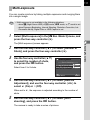
camera, with the risk of electric shock.
• If the camera interior is exposed due to dropping or otherwise damaging the camera,
never touch the exposed portion. There is a risk of electric shock.
• Do not aim the camera at the sun or other strong light sources when taking pictures
or leave the camera sitting in direct sunlight with the lens cap off. Doing so may cause
the camera to malfunction or cause a fire.
• Do not look at the sun or other strong light sources through the lens. Doing so may
lead to a loss of eyesight or cause vision to be impaired.
1
2
• If any irregularities occur during use, such as smoke or a strange odor, stop use
immediately, remove the battery or the AC adapter, and contact your nearest
PENTAX Service Center. Continued use can cause a fire or electrical shock.
Caution
• Do not place your finger over the flash when discharging the flash. You may burn
yourself.
• Do not cover the flash with clothes when discharging the flash. Discoloration may
occur.
• Some portions of the camera heat up during use. There is a risk of low temperature
burns when holding such portions for long periods.
• Should the monitor be damaged, be careful of glass fragments. Also, be careful not
to allow the liquid crystal to get on your skin or in your eyes or mouth.
• Depending on your individual factors or physical condition, the use of the camera may
cause itching, rashes or blisters. In case of any abnormality, stop using the camera
and get medical attention immediately.
About the Battery Charger and AC Adapter
Warning
• Always use the battery charger and AC adapter exclusively developed for this
camera, with the specified power and voltage. Using a battery charger or AC adapter
not exclusive to this camera, or using the exclusive battery charger or AC adapter with
an unspecified power or voltage can cause a fire, electric shock, or camera
breakdown. The specified voltage is 100 - 240V AC.
• Do not disassemble or modify the product. This can cause a fire or electrical shock.
• If the generation of smoke or strange odor from the product or other abnormality
occurs, immediately discontinue using and consult a PENTAX Service Center.
Continued use can cause a fire or electrical shock.
• If water should happen to get inside the product, consult a PENTAX Service Center.
Continued use can cause a fire or electrical shock.
• If you see a lightning flash or hear the thunder during use of the battery charger and
AC adapter, unplug the power plug and discontinue use. Continued use can cause
damage to the product, fire or electrical shock.
• Wipe off the power plug if it should become covered with dust. Accumulated dust may
cause a fire.
• To reduce the risk of hazards, use only CSA/UL certified power supply cord set, cord
is Type SPT-2 or heavier, minimum NO.18 AWG copper, one end with a molded-on
male attachment plug cap (with a specified NEMA configuration), and the other is
provided with a molded-on female connector body (with a specified IEC nonindustrial
type configuration) or the equivalent.
Caution
• Do not place or drop heavy objects on or forcefully bend the AC plug cord. Doing so
may damage the cord. Should the AC plug cord be damaged, consult a PENTAX
Service Center.
• Do not touch or short-circuit the terminal area of the AC plug cord while the cord is
plugged in.
• Do not handle the power plug with wet hands. This can cause an electric shock.
• Do not drop the product, or subject it to violent impact. This can cause the product
breakdown.
• Do not use the battery charger D-BC90 to charge batteries other than the
rechargeable lithium-ion battery D-LI90. Attempting to charge other types of batteries
may cause an explosion or heating, or may damage the battery charger.
About the Rechargeable Lithium-ion Battery
Warning
• If any leakage from the battery should come in contact with your eyes, do not rub
them. Flush your eyes with clean water and get medical attention immediately.
Caution
• Only use the specified battery with this camera. Use of other batteries may cause an
explosion or fire.
• Do not disassemble the battery. Disassembling the battery may cause an explosion
or leakage.
• Remove the battery from the camera immediately if it becomes hot or begins to
smoke. Be careful not to burn yourself during removal.
• Keep wires, hairpins, and other metal objects away from the + and - contacts of the
battery.
• Do not short the battery or dispose of the battery in fire. This can cause an explosion
or fire.
• If any leakage from the battery should come in contact with skin or clothes, it may
cause irritation to the skin. Wash the affected areas thoroughly with water.
• Precautions for D-LI90 Battery Usage:
USE SPECIFIED CHARGER ONLY.
- DO NOT INCINERATE.
- DO NOT DISASSEMBLE.
- DO NOT SHORT CIRCUIT.
- DO NOT EXPOSE TO HIGH TEMP. (140°F/60°C)
Keep the Camera and its Accessories out of the Reach of
Small Children
Warning
• Do not place the camera and its accessories within the reach of small children.
1. If the product falls or is operated accidentally, it may cause serious personal injuries.
2. Wrapping the strap around a neck may cause suffocation.
3. To avoid the risk of a small accessory such as the battery or SD Memory Cards
from being swallowed by mistake, keep them out of the reach of small children.
Seek medical attention immediately if an accessory is accidentally swallowed.
3
4
Care to be Taken During Handling
Before Using Your Camera
• When traveling, take the Worldwide Service Network listing that is included in the
package. This will be useful if you experience problems abroad.
• When the camera has not been used for a long time, confirm that it is still working
properly, particularly prior to taking important pictures (such as at a wedding or when
traveling). Contents of the recording cannot be guaranteed if recording, playback or
transferring your data to a computer, etc. is not possible due to a malfunction of your
camera or recording media (SD Memory Card), etc.
About the Battery and Charger
• To keep the battery in optimal condition, avoid storing it in a fully charged state or in
high temperatures.
• If the battery is left inserted and the camera is not used for a long time, the battery will
over-discharge and shorten the battery’s life.
• Charging the battery a day before use or on the day of use is recommended.
• The AC plug cord provided with this camera is developed exclusively for the battery
charger D-BC90. Do not use it with other devices.
Precautions on Carrying and Using Your Camera
• Do not subject the camera to high temperatures or high humidity. Do not leave the
camera in a vehicle, as the temperature can get very high.
• Do not subject the camera to strong vibrations, shocks, or pressure. Use a cushion to
protect the camera from vibrations of motorcycles, automobiles, or ships.
• The temperature range for camera use is 0°C to 40°C (32°F to 104°F).
• The monitor may appear black at high temperatures, but will return to normal at
normal temperatures.
• The monitor may respond more slowly at low temperatures. This is due to liquid
crystal properties, and is not a malfunction.
• Sudden temperature changes will cause condensation on the inside and outside of
the camera. Place the camera in your bag or a plastic bag, and remove it after
temperature of the camera and surroundings are equalized.
• Avoid contact with garbage, mud, sand, dust, water, toxic gases, or salt. These could
cause the camera to breakdown. Wipe the camera to dry off any rain or water drops.
• Do not press forcefully on the monitor. This could cause it to break or malfunction.
• Be careful not to overtighten the screw in the tripod socket when using a tripod.
5
Cleaning Your Camera
• Do not clean the product with organic solvents such as thinner, alcohol, or benzine.
• Use a lens brush to remove dust accumulated on the lens. Never use a spray blower
for cleaning as it may damage the lens.
• Please contact a PENTAX Service Center for professional cleaning of the CMOS
sensor. (This will involve a fee.)
Storing Your Camera
• Do not store the camera with preservatives or chemicals. Storage in high
temperatures and high humidity can cause mold to grow on the camera. Remove the
camera from its case and store it in a dry and well-ventilated place.
• Avoid using or storing the camera where it may be exposed to static electricity or
electrical interference.
• Avoid using or storing the camera in direct sunlight or in locations where it may be
exposed to rapid changes in temperature or to condensation.
• Periodic inspections are recommended every one to two years to maintain high
performance.
Other Precautions
• The SD Memory Card is equipped with a writeprotect switch. Setting the switch to LOCK
prevents new data from being recorded on the
card, the stored data from being deleted, and the
Write-protect
card from being formatted by the camera or
switch
computer.
• The SD Memory Card may be hot when removing
the card immediately after using the camera.
• Do not remove the SD Memory Card or turn off the power while the card is being
accessed. This may cause the data to be lost or the card to be damaged.
• Do not bend the SD Memory Card or subject it to violent impact. Keep it away from
water and store away from high temperatures.
• Do not remove the SD Memory Card while formatting. The card may be damaged and
become unusable.
• Data on the SD Memory Card may be deleted in the following circumstances. We do
not accept any liability for data that is deleted if
1. the SD Memory Card is mishandled by the user.
2. the SD Memory Card is exposed to static electricity or electrical interference.
3. the SD Memory Card has not been used for a long time.
4. the SD Memory Card or the battery is removed while the card is being accessed.
• If the SD Memory Card is not used for a long time, the data on the card may become
unreadable. Be sure to regularly make a backup of important data on a computer.
• Format new SD Memory Cards. Also format SD Memory Cards previously used with
other cameras.
6
• Please note that deleting data stored on an SD Memory Card, or formatting an SD
Memory Card does not completely erase the original data. Deleted data can
sometimes be recovered using commercially available software. If you are going to
discard, give away or sell your SD Memory Card, you should ensure that the data on
the card is completely deleted or the card itself is destroyed if it contains any personal
or sensitive information.
• The data on your SD Memory Card should be managed at your own risk.
Regarding Product Registration
In order to better serve you, we request that you complete the product registration, which
can be found on the CD-ROM supplied with the camera or on the PENTAX website.
Refer to p.213 for details. Thank you for your cooperation.
7
Contents
For Using Your Camera Safely ............................................................ 1
Care to be Taken During Handling ...................................................... 4
Contents............................................................................................... 7
Composition of the Operating Manual ............................................... 13
Before Using Your Camera
15
Checking the Contents of the Package ......................................16
Names and Functions of the Working Parts ..............................17
Capture Mode .................................................................................... 18
Playback Mode .................................................................................. 20
Monitor Display .................................................................................. 22
How to Change Function Settings ..............................................31
Using the Direct Keys ........................................................................ 31
Using the Control Panel ..................................................................... 32
Using the Menus ................................................................................ 33
Getting Started
37
Attaching the Strap ......................................................................38
Inserting the Battery.....................................................................39
Charging the Battery .......................................................................... 39
Inserting/Removing the Battery.......................................................... 40
Battery Level Indicator ....................................................................... 41
Approximate Image Storage Capacity and Playback Time
(when Using a Fully Charged Battery) ............................................... 42
Using the AC Adapter (Optional) ....................................................... 42
Inserting/Removing an SD Memory Card...................................45
Attaching a Lens...........................................................................47
Turning the Camera On and Off ..................................................49
Initial Settings ...............................................................................50
Setting the Display Language ............................................................ 50
Setting the Date and Time ................................................................. 52
8
Basic Operations
55
Basic Shooting Operation ...........................................................56
Letting the Camera Choose the Optimal Settings.............................. 56
Using the Built-in Flash ...............................................................59
Setting the Flash Mode ...................................................................... 59
Shooting with Auto Flash ................................................................... 62
Shooting with Manual Flash............................................................... 63
Reviewing Images ........................................................................64
Playing Back Images ......................................................................... 64
Deleting a Single Image..................................................................... 65
Shooting Functions
67
How to Operate the Shooting Functions....................................68
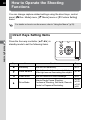
Direct Keys Setting Items................................................................... 68
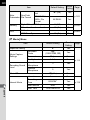
Rec. Mode Menu Items ...................................................................... 69
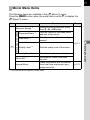
Movie Menu Items.............................................................................. 71
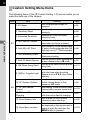
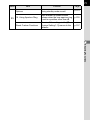
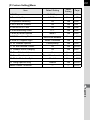
Custom Setting Menu Items............................................................... 72
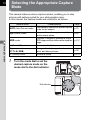
Selecting the Appropriate Capture Mode...................................74
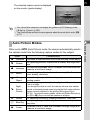
Auto Picture Modes............................................................................ 75
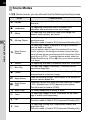
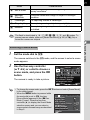
Scene Modes ..................................................................................... 76
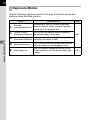
Exposure Modes ................................................................................ 78
Setting the Exposure....................................................................79
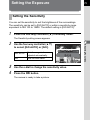
Setting the Sensitivity......................................................................... 79
Changing the Exposure Mode ........................................................... 81
Adjusting the Exposure ...................................................................... 84
Locking the Exposure Before Shooting (AE Lock)............................. 87
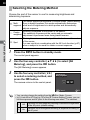
Selecting the Metering Method .......................................................... 88
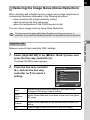
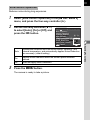
Reducing the Image Noise (Noise Reduction)................................... 89
Focusing........................................................................................92
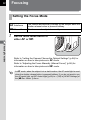
Setting the Focus Mode ..................................................................... 92
Setting the Autofocus Method............................................................ 93
Checking the Focus ........................................................................... 95
Focusing Using the =/L Button ............................................... 96
Locking the Focus (Focus Lock) ........................................................ 97
Adjusting the Focus Manually (Manual Focus) .................................. 98
Checking the Depth of Field (Preview) .......................................99
Using the Shake Reduction Function to Prevent Camera
Shake ...........................................................................................100
Taking Pictures Using the Shake Reduction Function ..................... 100
Shooting with the Self-timer ............................................................. 102
Shooting with a Remote Control Unit (Optional) .............................. 104
Taking Pictures Continuously...................................................106
Continuous Shooting........................................................................ 106
Interval Shooting .............................................................................. 108
Multi-exposure ................................................................................. 111
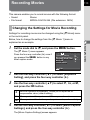
Recording Movies.......................................................................113
Changing the Settings for Movie Recording .................................... 113
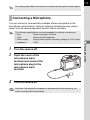
Connecting a Microphone ................................................................ 115
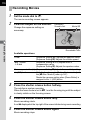
Recording Movies ............................................................................ 116
Interval Movie................................................................................... 119
Playing Back Movies ........................................................................ 121
Editing Movies.................................................................................. 123
Shooting Settings
125
Setting a File Format ..................................................................126
Aspect Ratio..................................................................................... 126
File Format....................................................................................... 127
JPEG Recorded Pixels .................................................................... 128
JPEG Quality ................................................................................... 129
Color Space ..................................................................................... 129
Setting the White Balance .........................................................130
Adjusting the White Balance Manually............................................. 132
Correcting Images ......................................................................133
Brightness Adjustment ..................................................................... 133
High Dynamic Range Image Capture .............................................. 135
Lens Correction................................................................................ 138
Setting the Image Finishing Tone .............................................140
Custom Image.................................................................................. 140
Digital Filter ...................................................................................... 144
Customizing the Button Functions...........................................147
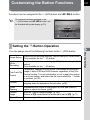
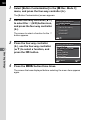
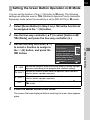
Setting the d Button Operation ....................................................... 147
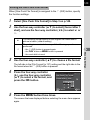
Setting the E-dial Operation in e Mode .......................................... 150
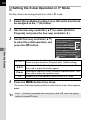
Setting the Green Button Operation in a Mode .............................. 151
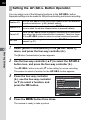
Setting the =/L Button Operation .......................................... 152
9
10
Playback Functions and Image Editing
153
How to Operate the Playback/Editing Functions.....................154
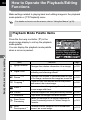
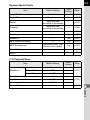
Playback Mode Palette Items .......................................................... 154
Playback Menu Items....................................................................... 155
Setting the Playback Display Method.......................................156
Magnifying Images .....................................................................157
Selecting the Playback Functions ............................................158
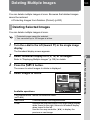
Displaying Multiple Images .............................................................. 158
Playing Back Images Continuously.................................................. 160
Rotating Images............................................................................... 162
Deleting Multiple Images ...........................................................163
Deleting Selected Images ................................................................ 163
Deleting All Images .......................................................................... 164
Processing Images.....................................................................165
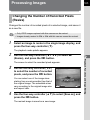
Changing the Number of Recorded Pixels (Resize) ........................ 165
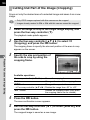
Cutting Out Part of the Image (Cropping) ........................................ 166
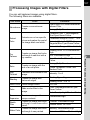
Processing Images with Digital Filters ............................................. 167
Joining Multiple Images (Index) ....................................................... 172
Developing RAW Images ...........................................................174
Developing One RAW Image........................................................... 174
Developing Multiple RAW Images ................................................... 176
Connecting the Camera to an AV Device .................................178
Connecting the Camera to a Video Input Terminal or HDMI Input
Terminal ........................................................................................... 178
Setting the Video/HDMI Output Format ........................................... 179
Changing Additional Settings
183
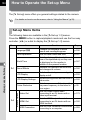
How to Operate the Set-up Menu ..............................................184
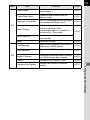
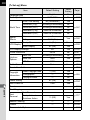
Set-up Menu Items........................................................................... 184
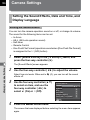
Camera Settings .........................................................................186
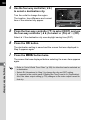
Setting the Sound Effects, Date and Time, and Display
Language ......................................................................................... 186
Setting the Monitor and the Menu Display ....................................... 190
Selecting Settings to Save in the Camera (Memory) ....................... 195
Resetting the Camera Settings ........................................................ 196
Checking the Camera Version Information ...................................... 197
File Management Settings .........................................................199
Formatting an SD Memory Card ...................................................... 199
Protecting Images from Deletion (Protect)....................................... 200
Changing the Naming System for Folders ....................................... 201
Creating New Folders ...................................................................... 201
Setting the Photographer Information .............................................. 202
Setting the DPOF Settings............................................................... 204
Connecting to a Computer
207
Manipulating Captured Images on a Computer.......................208
Saving Images on a Computer ..................................................209
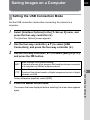
Setting the USB Connection Mode .................................................. 209
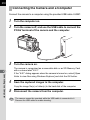
Connecting the Camera and a Computer ........................................ 210
Using the Provided Software.....................................................211
Installing the Software...................................................................... 211
Using the Flash
215
Using the Built-in Flash .............................................................216
Flash Characteristics in Each Exposure Mode ................................ 216
Using the Slow-speed Sync Flash ................................................... 216
Using the Trailing Curtain Sync Flash.............................................. 217
Distance and Aperture when Using the Built-in Flash...................... 218
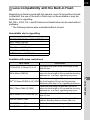
Lens Compatibility with the Built-in Flash ........................................ 219
11
12
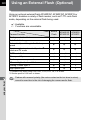
Using an External Flash (Optional)...........................................220
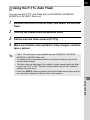
Using the P-TTL Auto Flash............................................................. 221
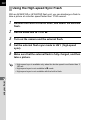
Using the High-speed Sync Flash.................................................... 222
Connecting an External Flash with an Extension Cord.................... 223
Appendix
225
Default Settings ..........................................................................226
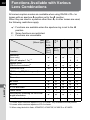
Functions Available with Various Lens Combinations...........232
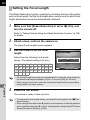
Setting the Focal Length .................................................................. 234
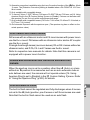
Using the Aperture Ring................................................................... 235
Cleaning the CMOS Sensor .......................................................237
Removing Dust by Shaking the CMOS Sensor (Dust Removal) ..... 237
Removing Dust with a Blower .......................................................... 238
Optional Accessories.................................................................240
Using the GPS Unit .......................................................................... 244
Error Messages...........................................................................245
Troubleshooting .........................................................................247
Main Specifications ....................................................................250
Index ............................................................................................256
WARRANTY POLICY ..................................................................263
13
Composition of the Operating Manual
This Operating Manual contains the following chapters.
1 Before Using Your Camera
Explains the provided accessories and the names and functions of the working
parts.
2 Getting Started
Explains your first steps from purchasing the camera to taking pictures. Be
sure to read this chapter and follow the instructions.
1
2
3
3 Basic Operations
Explains basic operations for taking and playing back pictures.
4
4 Shooting Functions
Explains shooting-related functions.
5
5 Shooting Settings
Explains procedures for changing the shooting settings, such as the file
format.
6 Playback Functions and Image Editing
Explains various operations for playing back and editing images.
7 Changing Additional Settings
Explains general camera settings and file management settings such as the
monitor display settings and the image folder naming system.
8 Connecting to a Computer
Explains how to connect the camera to a computer, and includes installation
instructions and a general overview of the provided software.
9 Using the Flash
Explains how to use the built-in flash and external flashes.
10Appendix
Explains troubleshooting, introduces optional accessories and provides
various resources.
6
7
8
9
10
14
The symbols used in this Operating Manual are explained below.
1
Indicates reference page numbers explaining a related operation.
Indicates useful information.
Indicates precautions to take when operating the camera.
1
Before Using Your
Camera
Check the package contents and the names and functions
of the working parts before use.
Checking the Contents of the Package .............. 16
Names and Functions of the Working Parts ...... 17
How to Change Function Settings ...................... 31
16
Checking the Contents of the
Package
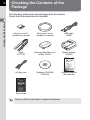
The following accessories are packaged with the camera.
Check that all accessories are included.
1
Before Using Your Camera
Hot shoe cover FK
(installed on camera)
Body mount cover
(installed on camera)
USB cable
I-USB7
Strap
O-ST120
Rechargeable lithium-ion
battery D-LI90
Battery charger
D-BC90
AC plug cord
Software (CD-ROM)
S-SW120
Operating Manual
(this manual)
Quick Guide
Refer to p.240 for information on optional accessories.
Names and Functions of the Working
Parts
17
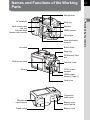
Microphones
AF assist light
Speaker
CMOS sensor
AF coupler
Lens information
contacts
Hot shoe
Built-in flash
Strap lug
SD Memory Card
slot
Card access lamp
Monitor
Terminal cover
PC/AV output
terminal
HDMI output
terminal (Type C)
Card cover
Connection
cable cover
Microphone
input terminal
Tripod socket
Battery cover
unlock switch
Battery cover
Before Using Your Camera
Lens mount index
(red dot)
Self-timer lamp/
Remote control receiver
1
Strap lug
18
Capture Mode
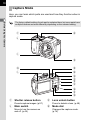
Here, you can learn which parts are used and how they function when in
capture mode.
1
Before Using Your Camera
The factory default setting of each part is explained here, but some parts have
multiple functions and work differently depending on the selected setting.
1
4
2
3
5
6
8
9
7
0
a
b
c
d
e
f
1 Shutter release button
Press to capture images. (p.57)
2 Main switch
Move to turn the camera on
and off. (p.49)
3 Lens unlock button
Press to detach a lens. (p.48)
4 Mode dial
Changes the capture mode.
(p.74)
19
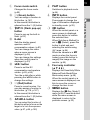
5 Focus mode switch
Changes the focus mode.
(p.92)
6 d (Green) button
7 K/i (Flash pop-up)
button
Press to pop up the built-in
flash. (p.63)
8 E-dial
Sets the shutter speed,
aperture, and EV
compensation values. (p.81)
You can change the menu
when a menu screen is
displayed. (p.34)
You can change the settings
when the control panel is
displayed. (p.33)
9 m/c button
Press to set the EV
compensation and aperture
values. (p.82, p.84)
Turn the e-dial after or while
pressing the m/c button to
change the settings.
0 d (Red) button
Press to record movies. You
can also assign a function to
this button. (p.118, p.147)
In this manual, this button is
referred to as the d (R) button.
a =/L button
You can select the function of
this button either to focus on the
target or to lock the exposure
value. (p.87, p.96, p.152)
Switches to playback mode.
(p.64)
c M button
Displays the control panel.
Press again to change the
type of information displayed
in standby mode. (p.22)
d 4 button
When the control panel or a
menu screen is displayed,
press this button to confirm
the selected item.
When [Autofocus Method] is
set to G (Select), press this
button to start and end
selecting the autofocusing
(AF) area. (p.94)
When the camera is in \
mode or when the focus is
locked, press this button to
magnify the image on the
monitor. (p.95)
e Four-way controller
(2345)
Displays the Sensitivity/White
Balance/Flash Mode/Drive
Mode setup menu. (p.68)
When the control panel or a
menu screen is displayed, use
this to move the cursor or
change the item to set.
f 3 button
Displays the [A Rec. Mode 1]
menu (p.69). Press this button
while the menu screen is
displayed to return to the
previous screen. (p.33)
1
Before Using Your Camera
You can assign a function to
this button. (p.147)
In this manual, this button is
referred to as the d (G) button.
b N button
20
Playback Mode
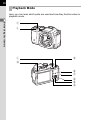
Here, you can learn which parts are used and how they function when in
playback mode.
1
Before Using Your Camera
1
2
3
5
4
6
7
8
9
0
21
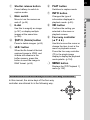
1 Shutter release button
Press halfway to switch to
capture mode.
2 Main switch
3 E-dial
Use this to magnify an image
(p.157) or display multiple
images at the same time
(p.158).
4 K/i (Delete) button
Press to delete images. (p.65)
5 m/c button
When the file format of the last
captured image is JPEG, and
its data still remains in the
buffer memory, press this
button to save the image in
RAW format. (p.64)
Switches to capture mode.
7 M button
Changes the type of
information displayed in
playback mode. (p.25)
8 4 button
Confirms the setting you
selected in the menu or
playback screen.
9 Four-way controller
(2345)
Use this to move the cursor or
change the item to set in the
menu or playback screen.
Press the four-way controller
(3) in the single image
display to display the playback
mode palette. (p.154)
0 3 button
Displays the [Q Playback 1]
menu (p.155).
References to the Arrow Keys of the Four-way Controller
In this manual, the arrow keys of the four-way
controller are referred to in the following way.
1
Before Using Your Camera
Move to turn the camera on
and off. (p.49)
6 N button
22
Monitor Display
Various information appears on the monitor depending on the status of the
camera.
1
The brightness level and the color of the monitor can be adjusted. (p.192)
Before Using Your Camera
Capture Mode
In standby mode, the current settings for shooting are displayed on the
monitor.
Press the M button to display the “control panel” and change settings.
(p.24)
If you press the M button while the control panel is displayed, you can
select the type of information displayed in standby mode. Use the four-way
controller (2345) to select a display type, and press the 4 button to
set the standby mode screen.
M
1/ 2000
F2.8
1600
[
37]
Standby mode
(Standard Information Display)
Screen Display
Standard Information Display
Custom Image
Bright
M
65535
Control panel
MENU Cancel
OK OK
Standby mode
display selection
Displayed Information
Standard
The Live View image and the shooting function settings are
Information Display displayed. (p.23)
No Information
Display
Only the Live View image is displayed. Press the shutter
release button halfway to display the shutter speed, aperture
value, sensitivity and number of recordable images.
Display Off
Nothing is displayed on the monitor. The shutter speed,
aperture value and sensitivity are displayed while the
exposure is set with the e-dial.
Not available when the mode dial is set to C.
The current latitude, longitude, altitude, direction, and
Coordinated Universal Time (UTC) are displayed. Press the
shutter release button halfway to return to [Standard
Electronic Compass
Information Display].
Available only when the optional GPS unit O-GPS1 (p.243)
is attached to the camera and is operating.
23
• A grid, histogram, and bright/dark area warning can be displayed when
[Standard Information Display] or [No Information Display] is selected. (p.190)
• If [Display Off] or [Electronic Compass] is selected, the display setting returns
to [Standard Information Display] when the camera is turned off.
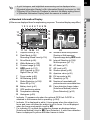
Standard Information Display
1
1 2 3 4 5 6 7 8 9 10
001/999
11
12
14
15
16
+1.7 EV
13
1/ 2000
F2.8
1600
[
17 18 19 20 21
1/ 2000
37]
F2.8
1600
[
37]
23
22
1
2
Capture mode (p.74)
Flash Mode (p.59)/
Recording Sound Level (p.114)
14
Number of shots during Interval
Shooting or Multi-exposure/
Exposure range during p mode
3
4
5
6
Drive Mode (p.68)
White Balance (p.130)
Custom Image (p.140)
p mode (p.137)/
HDR Capture (p.135)/
Digital Filter (p.144)
15
Interval Shooting (p.108)/
Multi-exposure (p.111)
7
8
9
Focus mode (p.92)
AE Metering (p.88)
Shake Reduction (p.100)/
Movie SR (p.114)
Battery level (p.41)
GPS positioning status
Temperature warning
Histogram (p.29)
16
17
18
19
20
21
22
AF frame (p.57)
AE Lock (p.87)
Shutter speed (p.82)
Aperture value (p.82)
EV bar scale (p.84)
Sensitivity (p.79)
Number of recordable still
pictures/movie recordable time
Face detection frame (when
[Autofocus Method] is set to
[Face Detection]) (p.93)
10
11
12
13
23
* Indicator 11 appears only when the optional GPS Unit O-GPS1 is
attached to the camera and is operating. (p.244)
* Indicator 16 is displayed in white. It turns green when the subject is in
focus and turns red when the subject is not in focus. It is not displayed
when the focus mode switch is set to \.
* For indicator 23, multiple face detection frames are displayed when
[Autofocus Method] is set to D (Face Detection). A main face detection
frame is displayed in yellow and other frames in white.
Before Using Your Camera
(All items are displayed here for explanatory purposes. The actual display may differ.)
24
Control panel
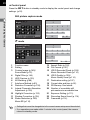
Press the M button in standby mode to display the control panel and change
settings. (p.32)
Still picture capture mode
1
1
2
Before Using Your Camera
Custom Image
Bright
65535
3
4
5
6
7
8
9
10
11
12
13
14
15
16
17
18
19
20
C mode
1
2
Exposure Setting
Program AE
1:15'30"
21
3
4
6
7
10
11
15
23
16
22
12
17
18
19
20
1
2
3
Function name
Setting
Custom Image (p.140)/
Scene Mode (p.76)
13
14
15
Aspect Ratio (p.126)
File Format (p.127)
JPEG Recorded Pixels (p.128)/
Movie Recorded Pixels (p.114)
4
5
6
7
8
9
Digital Filter (p.144)
HDR Capture (p.135)
AE Metering (p.88)
Autofocus Method (p.93)
Distortion Correction (p.138)
Lateral Chromatic Aberration
Adjustment (p.138)
16
JPEG Quality (p.129)/
Movie Quality Level (p.114)
17
18
19
20
Destination setting (p.187)
Current date and time (p.52)
SD Memory Card status
Number of recordable still
pictures/movie recordable time
10
11
12
Highlight Correction (p.133)
Shadow Correction (p.134)
Shake Reduction (p.100)/
Movie SR (p.114)
21
22
23
Exposure Setting (p.113)
Recording Sound Level (p.114)
Framerate (p.114)
• Settings that cannot be changed due to the current camera setup cannot be selected.
• If no operations are made within 1 minute in the control panel, the camera
returns to standby mode.
25
Playback Mode
The captured image and shooting information are displayed in the single
image display of playback mode.
1 Playing Back Images (p.64)
Standard Information Display
100-0001
M
1/ 2000
F2.8
200
Single image display
(Standard Information Display)
Screen Display
MENU Cancel
OK OK
Playback information display
selection
Displayed Information
Standard Information
Display
The captured image, file format and operation guide
indicators are displayed.
Detailed Information
Display
Detailed information on how and when the image was
taken is displayed in two pages. (p.26)
Histogram Display
The captured image and brightness histogram are
displayed. Not available during movie playback. (p.28)
RGB Histogram
Display
The captured image and RGB histogram are displayed.
Not available during movie playback. (p.28)
No Information Display Only the captured image is displayed.
The information selected here is displayed the next time the camera is
switched to playback mode.
If [Playback Info Display] is set to P (Off) in [Memory] of the [A Rec. Mode 3]
menu, the Standard Information Display always appears first when the camera
is turned on. (p.195)
1
Before Using Your Camera
Press the M button to select the type of information displayed in the
single image display. Use the four-way controller (2345) to select a
display type and press the 4 button to set the playback information
display screen.
26
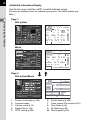
Detailed Information Display
Use the four-way controller (23) to switch between pages.
(All items are displayed here for explanatory purposes. The actual display may
differ.)
1
Page 1
Before Using Your Camera
Still picture
100-0001
1
3
2
4 5 6
8
1/ 2000
50mm
F2.8
+1.5
+1.0
1600
G1A1
02/02/2012
±0
±0
±0
±0
±0
10
11
14
19
22 23 24
16
17
20
21
25 26
31
10:30 AM
29
13
12
15
18
7
9
30
27 28
32
Movie
100-0001
3
2
6
1/ 125
50mm
F8.0
0.0
125
G1A1
02/02/2012
7
33
10'10"
±0
±0
±0
±0
±0
10
11
14
8
15
18
12
34
4
23 35 24
29
9
20
30
21
25 26
32
10:30 AM
Page 2
Still picture/Movie
100-0001
1
6
2
38
36
39
38
1
2
3
4
5
N 36°45.410'
W140°02.000'
0m
123°
02/02/2012
10:00:00
Rotation information (p.162)
Captured image
Capture mode (p.74)
Digital Filter (p.144)
DPOF setting (p.204)
7
37
40
42
41
36
43
6
7
8
9
10
Protect setting (p.200)
Folder number-File number (p.201)
Drive Mode (p.68)
AE Metering (p.88)
Shutter speed (p.82)
27
Lens focal length
Shake Reduction (p.100)/
Movie SR (p.114)
13
14
15
16
17
Focus mode (p.92)
Aperture value (p.82)
EV Compensation (p.84)
Flash Mode (p.59)
Flash Exposure Compensation
(p.61)
18
19
Sensitivity (p.79)
HDR Capture (p.135)/
Multi-exposure (p.111)
20
21
22
23
White Balance (p.130)
White Balance fine-tuning (p.131)
File Format (p.127)
JPEG Recorded Pixels (p.128)/
Movie Recorded Pixels (p.114)
24
JPEG Quality (p.129)/
Movie Quality Level (p.114)
25
Highlight Correction (p.133)
26
27
28
Shadow Correction (p.134)
Distortion Correction (p.138)
Lateral Chromatic Aberration
Adjustment (p.138)
29
30
31
32
33
34
35
36
37
38
39
40
41
42
43
Custom Image (p.140)
Custom Image parameters (p.141)
Color Space (p.129)
Shooting date and time
Recording time
Recording Sound Level (p.114)
Framerate (p.114)
Lens direction
Photographer (p.202)
Information tampering warning
Copyright Holder (p.203)
Latitude
Altitude
Longitude
Universal Coordinated Time
* Indicators 36 and 40 to 43 appear only for images in which GPS information
is stored.
1
Before Using Your Camera
11
12
28
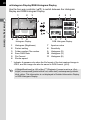
Histogram Display/RGB Histogram Display
Use the four-way controller (23) to switch between the Histogram
Display and RGB Histogram Display.
1
2
1
3
4
2
100-0001
3
100-0001
Before Using Your Camera
4
9
10
1
5
1/ 2000
F2.8
6
7
8
5
Histogram Display
1
2
3
4
5
6
11
1/ 2000
200
Histogram (Brightness)
Protect setting
Folder number-File number
Save RAW Data
File Format
Shutter speed
6
F2.8
7
200
8
RGB Histogram Display
7
8
9
10
11
Aperture value
Sensitivity
Histogram (R)
Histogram (G)
Histogram (B)
* Indicator 4 appears only when the file format of the last captured image is
JPEG, and the image can also be saved in RAW format. (p.64)
If [Bright/Dark Area] (p.156) of the [Q Playback 1] menu is set to O (On),
bright (overexposed) portions blink red, while dark (underexposed) portions
blink yellow. This information is not displayed in Detailed Information Display
or RGB Histogram Display.
29
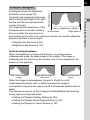
Using the Histogram
Number of pixels→
1Adjusting the Exposure (p.84)
1Brightness Adjustment (p.133)
Understanding Brightness
When the brightness is correct and there are no overexposed or
underexposed areas, the graph peaks in the middle. If the image is
underexposed, the peak is on the left side, and if it is overexposed, the
peak is on the right side.
Dark (underexposed)
image
Image with few bright or
dark areas
Bright (overexposed)
image
When the image is underexposed, the part to the left is cut off
(underexposed portions with no detail) and when the image is
overexposed, the part to the right is cut off (overexposed portions with no
detail).
This camera can be set so that it displays the Bright/Dark Area warning
during capture or playback mode.
1Setting the Playback Display Method (p.156)
1Setting the Standby Mode Display Method (p.190)
1Setting the Display for Instant Review (p.191)
1
Before Using Your Camera
A histogram shows the brightness
distribution of an image.The
horizontal axis represents brightness
(dark at the left and bright at the right)
and the vertical axis represents the
number of pixels.
The shape and the distribution of the
(Dark) ←Brightness→ (Bright)
histogram before and after shooting
Dark portions
Bright portions
tell you whether the exposure level
and contrast are correct or not, and let you decide if you need to adjust the
exposure and take a picture again.
30
1
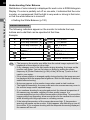
Understanding Color Balance
Distribution of color intensity is displayed for each color in RGB Histogram
Display. If a color is partially cut off on one side, it indicates that the color
is under- or overexposed, that the light is very weak or strong in that color,
or that the white balance is incorrect.
1Setting the White Balance (p.130)
Before Using Your Camera
Guide Indicators
The following indicators appear on the monitor to indicate the keys,
buttons and e-dial that can be operated at that time.
Example:
2
Four-way controller (2)
3
Four-way controller (3)
(Green) d (G) button
4
Four-way controller (4)
5
Four-way controller (5)
m/c button
3 button
K/i button
(Red)
d (R) button
M button
4 button
=/L button
E-dial
Shutter release button
• The image on the monitor may differ from the actual image captured if the
brightness of the subject is low or high.
• If any changes occur in the light source during shooting, the image on the
monitor may flicker. You can cut down on flicker by setting the power
frequency in [Flicker Reduction] (p.184) of the [R Set-up 1] menu to that
used in your region.
• If the camera position is changed rapidly during shooting, the image may not
be displayed with the appropriate brightness. Wait for the display to become
stable before shooting.
• Noise may appear on the monitor image when used in dark locations.
• The higher the sensitivity, the more noise and color unevenness may occur in
the monitor image and/or captured image.
• If you continue shooting for a prolonged period, the internal temperature of
the camera may increase, resulting in lower quality images. It is
recommended that you turn off the camera when not shooting. To prevent the
image quality from degrading, allow enough time for the camera to cool down
while shooting with long exposures or recording movies.
• If the internal temperature of the camera becomes high, l (temperature
warning) will appear on the monitor. If this happens, stop shooting or turn off
the monitor. If you continue shooting with the temperature warning displayed,
the camera will turn off.
How to Change Function Settings
31
Function settings can be changed using the direct keys, control panel or
menus.
This section explains the basic ways to change function settings.
In standby mode, you can set Sensitivity, White Balance, Flash Mode and
Drive Mode by pressing the four-way controller (2345). (p.68)
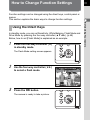
Below, how to set [Flash Mode] is explained as an example.
1
Press the four-way controller (4)
in standby mode.
The Flash Mode setting screen appears.
2
Use the four-way controller (45)
to select a flash mode.
Auto Flash Discharge
0.0
MENU Cancel
3
Press the 4 button.
The camera is ready to take a picture.
OK OK
Before Using Your Camera
Using the Direct Keys
1
32
Using the Control Panel
In standby mode, you can switch to the control panel and change settings.
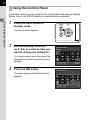
Below, how to set [JPEG Quality] is explained as an example.
1
Before Using Your Camera
1
Press the M button in
standby mode.
The control panel appears.
2
Use the four-way controller
(2345) to select an item you
want to change the setting for.
Custom Image
Bright
You cannot select items that cannot be
changed as a result of current camera
settings.
3
Press the 4 button.
65535
JPEG Quality
The setup screen of the selected item
appears.
37
4
33
Use the four-way controller (45)
or e-dial to select a setting value.
JPEG Quality
128
1
5
OK OK
Press the 4 button.
The camera returns to the control panel.
Next, set other items.
6
Press the 3 button or the shutter release button
halfway.
The camera is ready to take a picture.
You can also change the setting by turning the e-dial after selecting the item
you want to change in Step 2 ([Recording Sound Level] for C mode can only
be set using this operation). Detailed settings such as for Custom Image and
Digital Filter can be changed after pressing the 4 button.
Using the Menus
This section explains how to use the following menus: [A Rec. Mode],
[C Movie], [Q Playback], [R Set-up] and [A Custom Setting].
Below, how to set [Slow Shutter Speed NR] in the [A Rec. Mode 2] menu
is explained as an example.
1
Press the 3 button in
standby mode.
The [A Rec. Mode 1] menu appears on
the monitor.
The menus listed below are displayed in
the following situations.
When the mode
dial is set to C
[C Movie 1] menu
In playback mode [Q Playback 1] menu
Before Using Your Camera
MENU Cancel
34
2
Press the four-way controller
(5).
Each time the four-way controller (5) is
pressed, the menu will change in the
following sequence: [A Rec. Mode 2],
[A Rec. Mode 3], [C Movie 1],
[Q Playback 1] ... [A Rec. Mode 1].
You can also change the menu by turning
the e-dial.
1
Before Using Your Camera
3
4
Use the four-way controller (23)
to select an item.
Press the four-way controller
(5).
Available settings are displayed in the
pop-up menu or submenu.
5
Use the four-way controller (23)
to select a setting.
Press the 3 button to cancel the
pop-up menu, or return to the previous
screen.
1 2 3
Custom Image
Digital Filter
HDR Capture
Image Capture Settings
AE Metering
AF/MF Settings
Lens Correction
MENU Exit
1 2 3
Multi-exposure
Interval Shooting
D-Range Setting
High-ISO NR
Slow Shutter Speed NR
Shake Reduction
Input Focal Length
MENU Exit
1 2 3
Multi-exposure
Interval Shooting
D-Range Setting
High-ISO NR
Slow Shutter Speed NR
Shake Reduction
Input Focal Length
MENU Exit
1 2 3
Multi-exposure
Interval Shooting
D-Range Setting
High-ISO NR
Slow Shutter Speed NR
Shake Reduction
Input Focal Length
MENU Cancel
35mm
OK OK
6
35
Press the 4 button.
The setting is saved.
Press the 3 button if a submenu is
displayed.
Next, set other items.
Press the 3 button.
The screen that was displayed before
selecting the menu item appears again.
Even after you press the 3 button and close the menu screen, your
settings will not be saved if the camera is turned off improperly (such as by
removing the battery while the camera is on).
• You can select either to display the menu tab selected the last time first, or
to always display the [A Rec. Mode 1] menu first. (p.193)
• Refer to the following pages for details on each menu.
• [A Rec. Mode] menu 1 p.69
• [C Movie] menu 1p.71
• [Q Playback] menu 1p.155
• [R Set-up] menu 1p.184
• [A Custom Setting] menu 1p.72
Before Using Your Camera
7
1
36
Memo
2
Getting Started
This chapter explains your first steps from purchasing the
camera to taking pictures. Be sure to read this and follow
the instructions.
Attaching the Strap .............................................. 38
Inserting the Battery ............................................ 39
Inserting/Removing an SD Memory Card .......... 45
Attaching a Lens .................................................. 47
Turning the Camera On and Off .......................... 49
Initial Settings ....................................................... 50
Attaching the Strap
38
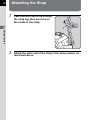
1
Pass the end of the strap through
the strap lug, then secure it on
the inside of the clasp.
2
Getting Started
2
Attach the other end of the strap in the same manner as
described above.
Inserting the Battery
39
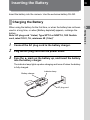
Insert the battery into the camera. Use the exclusive battery D-LI90.
Charging the Battery
1
Connect the AC plug cord to the battery charger.
2
Plug the AC plug cord into the power outlet.
3
Face the 2 mark on the battery up, and insert the battery
into the battery charger.
The indicator lamp lights up when charging and turns off when the battery
is fully charged.
Battery charger
Indicator lamp
AC plug cord
2
Getting Started
When using the battery for the first time, or when the battery has not been
used in a long time, or when [Battery depleted] appears, recharge the
battery.
Note: AC plug cord “Listed, Type SPT-2 or NISPT-2, 18/2 flexible
cord, rated 125 V, 7A, minimum 6ft (1.8m)”
40
4
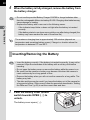
When the battery is fully charged, remove the battery from
the battery charger.
• Do not use the provided Battery Charger D-BC90 to charge batteries other
than the rechargeable lithium-ion battery D-LI90. Charging other batteries may
cause damage or heating.
• Replace the battery with a new one in the following cases:
- If the indicator lamp blinks or does not light after the battery is inserted
correctly
- If the battery starts to run down more quickly even after being charged (the
battery may have reached the end of its service life)
2
Getting Started
The maximum charging time is approximately 320 minutes (depends on
temperature and remaining battery power). Charge in a location where the
temperature is between 0°C and 40°C.
Inserting/Removing the Battery
• Insert the battery correctly. If the battery is inserted incorrectly, it may not be
removed. Wipe the electrodes of the battery with a soft dry cloth before
inserting.
• Do not open the battery cover or remove the battery while the power is on.
• Be careful as the camera or battery may become hot when the camera is
used continuously for a long period of time.
• Remove the battery when you will not use the camera for a long while. The
battery may leak.
• The date and time may be reset if you leave the battery out of the camera for
a long period of time. If this occurs, follow the procedure described in “Setting
the Date and Time” (p.52) to set the current date and time.
1
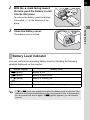
Push the battery cover unlock
switch towards OPEN (1) to
unlock.
The battery cover opens (2).
1
2
2
41
With the 2 mark facing toward
the lens, push the battery in until
it locks into place.
3
To remove the battery, push the battery
lock switch (3) in the direction of the
arrow.
Close the battery cover.
Getting Started
3
2
The battery cover is locked.
Battery Level Indicator
You can confirm the remaining battery level by checking the following
symbols displayed on the monitor.
Monitor Display
w (green)
Battery Level
Battery is full.
x (green)
Battery is close to full.
y (yellow)
Battery is running low.
z (red)
Battery is almost empty.
[Battery depleted]
The camera turns off after displaying the message.
y or z (red) may appear even when the battery level is sufficient if the
camera is used at low temperatures or for a long period of time. In this situation,
turn the camera off and on again. If w (green) appears, you can use the
camera.
42
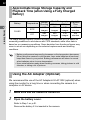
Approximate Image Storage Capacity and
Playback Time (when Using a Fully Charged
Battery)
Battery
2
Flash Photography
Getting Started
Temperature
Normal
Shooting
50% Use
100% Use
Playback
Time
23°C
540
images
500
images
440
images
320
minutes
0°C
480
images
450
images
410
images
300
minutes
D-LI90
The image storage capacity (normal recording and flash use 50%) is based on
measuring conditions in accordance with CIPA standards, while other data is
based on our measuring conditions. Some deviation from the above figures may
occur in actual use depending on the selected capture mode and shooting
conditions.
• Battery performance temporarily decreases as the temperature decreases.
When using the camera in cold climates, have extra batteries at hand and
keep them warm in your pocket. Battery performance will return to normal
when batteries return to room temperature.
• Have extra batteries ready when traveling overseas, taking pictures in cold
climates, or taking a lot of pictures.
Using the AC Adapter (Optional)
We recommend the use of the AC Adapter kit K-AC1202 (optional) when
using the monitor for a long time or when connecting the camera to a
computer or AV device.
1
Make sure that the camera is turned off.
2
Open the battery cover.
Refer to Step 1 on p.40.
Remove the battery if it is inserted in the camera.
3
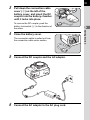
43
Pull down the connection cable
cover (1) on the left of the
battery cover, and insert the DC
coupler into the battery chamber
until it locks into place.
2
1
4
Close the battery cover.
The connection cable is pulled out from
the connection cable cover section.
5
Connect the DC coupler and the AC adapter.
6
Connect the AC adapter to the AC plug cord.
2
Getting Started
To remove the DC coupler, push the
battery lock switch (2) in the direction of
the arrow.
44
2
7
Plug the AC plug cord into the power outlet.
Getting Started
• Make sure the camera is turned off before connecting or disconnecting the
AC adapter.
• Make sure connections are secure between the terminals. SD Memory Card
or data may be corrupted if the connection to the power supply is lost while
the card is being accessed.
• While the AC adapter is in use, the connection cable is pulled out from the
bottom side of the camera, so remember that you cannot stand the camera
upright on a table, etc.
• After removing the DC coupler, return the connection cable cover to its
original location.
• When the AC adapter is connected to the camera, W is displayed as the
battery level.
• Be sure to read the manual of the AC Adapter kit K-AC1202 before using the
AC adapter.
Inserting/Removing an SD Memory
Card
45
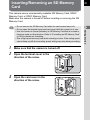
This camera uses a commercially available SD Memory Card, SDHC
Memory Card, or SDXC Memory Card.
Make sure the camera is turned off before inserting or removing the SD
Memory Card.
1
2
3
Make sure that the camera is turned off.
Open the terminal cover in the
direction of the arrow.
Open the card cover in the
direction of the arrow.
2
Getting Started
• Do not remove the SD Memory Card while the card access lamp is lit.
• Do not open the terminal cover and card cover while the camera is in use.
• Use this camera to format (initialize) an SD Memory Card that is unused or
has been used on other devices. Refer to “Formatting an SD Memory Card”
(p.199) for details on formatting.
• Use a high-speed memory card when recording movies. If the writing speed
cannot keep up with the recording speed, writing may stop during recording.
46
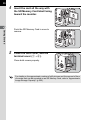
4
2
Insert the card all the way with
the SD Memory Card label facing
toward the monitor.
Getting Started
Push the SD Memory Card in once to
remove.
5
Close the card cover, and the
terminal cover (1→2).
1
Close both covers properly.
2
For details on the approximate number of still pictures and the amount of time
of movies that can be recorded on an SD Memory Card, refer to “Approximate
Image Storage Capacity” (p.255).
Attaching a Lens
Attach a proper lens to the camera body.
When you use one of the following lenses with this camera, all the
camera’s capture modes are available.
(a) DA, DA L, D FA, FA J lenses
(b) Lenses with an s (Auto) position; when used in the s position
The steps are described here using a DA 40mm F2.8 XS lens.
1
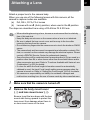
2
Make sure that the camera is turned off.
Remove the body mount cover
(1) and lens mount cover (2).
Be sure to put the lens down with the lens
mount side facing upward to protect the
lens mount from damage when there is
no lens mount cover on the lens.
2
Getting Started
• When attaching/removing a lens, choose an environment that is relatively
free of dirt and dust.
• Keep the body mount cover on the camera when a lens is not attached.
• Be sure to attach the lens mount cover and lens cap to the lens after
removing the lens from the camera.
• Do not insert any fingers into the camera mount or touch the shutter or CMOS
sensor.
• The camera body and lens mount incorporate lens information contacts. Dirt,
dust, or corrosion on the contacts may damage the electrical system. Please
contact a PENTAX Service Center for professional cleaning.
• Some functions will be restricted when lenses described in (b) are used in a
position other than s, or when lenses other than those listed above and/or
other accessories are used. Refer to “Functions Available with Various Lens
Combinations” (p.232) for details.
• If a lens for which the focal length information cannot be automatically
obtained is used, the Input Focal Length setting screen appears when the
camera is turned on. Refer to “Setting the Focal Length” (p.234) for details.
• We assume no responsibility nor liability for accidents, damages and
malfunctions resulting from the use of lenses made by other manufacturers.
47
48
3
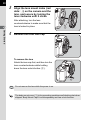
Align the lens mount index (red
dots: 3) on the camera and the
lens, and secure by turning the
lens clockwise until it clicks.
After attaching, turn the lens
counterclockwise to make sure that the
lens is locked in place.
2
Getting Started
4
3
Remove the front lens cap.
To remove the lens
Attach the lens cap first, and then turn the
lens counterclockwise while holding
down the lens unlock button (4).
4
Do not remove the lens while the power is on.
The body mount cover (1) is for preventing scratches and blocking dust when
shipped. Body Mount Cap K is sold separately and has a lock function.
Turning the Camera On and Off
1
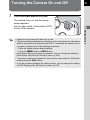
49
Turn the main switch to [ON].
The camera turns on, and the startup
screen appears.
Set the main switch to the position [OFF]
to turn off the camera.
Getting Started
• Always turn the camera off when not in use.
• The power will automatically turn off when you do not perform any operations
within a set period of time (Auto Power Off). To reactivate the camera, turn it
on again or perform any of the following operations.
- Press the shutter release button halfway.
- Press the 3 button or M button.
• [Auto Power Off] is set to [1min.] by default. You can change the setting in
[Auto Power Off] of the [R Set-up 2] menu. (p.194)
• To turn the camera on in playback mode, turn the main switch to [ON] while
holding down the N button.
• If you do not want to display the startup screen, you can change the setting
in [LCD Display] of the [R Set-up 1] menu. (p.192)
2
Initial Settings
50
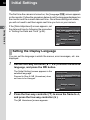
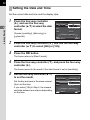
The first time the camera is turned on, the [Language/u] screen appears
on the monitor. Follow the procedure below to set the language displayed on
the monitor and the current date and time. Once these settings are made,
you will not need to set them again next time you turn on your camera.
2
Getting Started
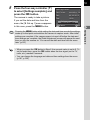
If the [Date Adjustment] screen appears, set
the date and time by following the procedure
in “Setting the Date and Time” (p.52).
Date Adjustment
Date Format
mm/dd/yy 24h
Date
01/01/2012
Time
00:00
Settings complete
MENU Cancel
Setting the Display Language
You can set the language in which the menus, error messages, etc. are
displayed.
1
Use the four-way controller (2345) to select the desired
language, and press the 4 button.
The [Initial Setting] screen appears in the
selected language.
Proceed to Step 6 if W (Hometown) does
not have to be changed.
Initial Setting
English
New York
Settings complete
MENU Cancel
2
Press the four-way controller (3) to move the frame to W,
and press the four-way controller (5).
The [W Hometown] screen appears.
3
51
Use the four-way controller (45)
to select a city.
Turn the e-dial to change the region.
Refer to “List of World Time Cities”
(p.189) for cities that can be selected as a
hometown.
Hometown
New York
DST
MENU Cancel
5
Press the four-way controller (3) to select [DST], and use
the four-way controller (45) to select O (On) or P (Off).
Press the 4 button.
The camera returns to the [Initial Setting] screen.
6
Press the four-way controller (3)
to select [Settings complete], and
press the 4 button.
Initial Setting
English
New York
The [Date Adjustment] screen appears.
Settings complete
MENU Cancel
OK OK
If the hometown and the date and time are not set, the [Initial Setting] screen
or [Date Adjustment] screen will be displayed again the next time the camera
is turned on.
2
Getting Started
4
OK OK
52
Setting the Date and Time
Set the current date and time and the display style.
1
2
Getting Started
Press the four-way controller
(5), and use the four-way
controller (23) to select the date
format.
Date Adjustment
Date Format
mm/dd/yy 24h
Date
01/01/2012
Time
Choose [mm/dd/yy], [dd/mm/yy] or
[yy/mm/dd].
00:00
Settings complete
MENU Cancel
2
3
OK OK
Press the four-way controller (5), and use the four-way
controller (23) to select [24h] or [12h].
Press the 4 button.
The frame returns to [Date Format].
4
Press the four-way controller (3), and press the four-way
controller (5).
The frame moves to the month if the date format is set to [mm/dd/yy].
5
Use the four-way controller (23)
to set the month.
Set the day and year in the same manner.
Next, set the time.
If you select [12h] in Step 2, the camera
switches between am and pm depending
on the time.
Date Adjustment
Date Format
mm/dd/yy 24h
Date
01/01/2012
Time
00:00
Settings complete
MENU Cancel
OK OK
6
53
Press the four-way controller (3)
to select [Settings complete], and
press the 4 button.
The camera is ready to take a picture.
If you set the date and time from the
menu, the [R Set-up 1] menu reappears.
In this case, press the 3 button.
Date Adjustment
Date Format
mm/dd/yy 24h
Date
02/02/2012
Time
10:00
Settings complete
MENU Cancel
OK OK
• When you press the 4 button in Step 6, the seconds value is set to 0. To
set the exact time, press the 4 button when the time signal (on the TV,
radio, etc.) reaches 0 seconds.
• You can change the language and date and time settings from the menu.
(p.187, p.190)
Getting Started
Pressing the 3 button while setting the date and time cancels the settings
made up to that point and switches the camera to capture mode. After initial
settings are complete, if the camera power is turned off before the date and
time settings are complete, the [Date Adjustment] screen will appear the next
time you turn the camera on. You can set the date and time from the menu
later. (p.187)
2
54
Memo
3
Basic Operations
This chapter explains basic operations for shooting by
setting the mode dial to n (Auto Picture) to have the
camera select the optimum settings based on the subject.
For information about advanced functions and settings for
taking pictures, refer to chapter 4 and onward.
Basic Shooting Operation ................................... 56
Using the Built-in Flash ....................................... 59
Reviewing Images ................................................ 64
Basic Shooting Operation
56
Letting the Camera Choose the Optimal
Settings
This camera features various capture modes, focus modes, and drive
modes. This section explains how to take pictures by simply pressing the
shutter release button.
3
Basic Operations
1
Set the mode dial to n.
The capture mode is set to n mode.
1 Selecting the Appropriate Capture
Mode (p.74)
2
Set the focus mode switch to =.
The focus mode changes to the
autofocus mode.
1 Setting the Focus Mode (p.92)
3
57
View the subject on the monitor.
When using a zoom lens, turn the zoom
ring to the right or left to change the angle
of view (focal length).
MF
AF
4
Position the subject inside the AF frame, and press the
shutter release button halfway.
5
[
Basic Operations
The autofocus system operates.
The AF frame turns green and you will
hear a beep when the subject comes into
focus (focus lock).
When set to n mode, the optimal
capture mode is automatically selected
from U (Standard), c (Portrait), s
1/ 2000 F2.8
1600
(Landscape), b (Macro), \ (Moving
AF frame
Object), . (Night Scene Portrait), K
(Sunset), d (Blue Sky) or x (Forest).
(p.75)
The built-in flash pops up automatically when necessary.
3
37]
Press the shutter release button fully.
The picture is taken.
This action is referred to as “releasing the shutter” or “release”.
6
Review the captured image on the monitor.
The image appears for 1 second on the monitor shortly after it is captured
(Instant Review).
1Setting the Display for Instant Review (p.191)
The following operations can be performed during Instant Review.
Available operations
E-dial
Magnifies the image. (p.157)
K/i button
m/c button
Deletes the image. (p.65)
Saves the image in RAW format. (p.64)
58
• You can enlarge the central area in focus by pressing the 4 button while
the focus is locked (except when [Autofocus Method] is set to E (Tracking)).
(p.95)
• The beep that sounds when the image is focused can be turned off. (p.186)
• You can set the camera so that it automatically focuses when the =/L
button is pressed. (p.96)
• You can preview the image on the monitor and check the depth of field before
shooting. (p.99)
Power Zoom functions (Image Size Tracking, Zoom Clip and Auto Zoom Effect)
are not compatible with this camera.
3
Basic Operations
Using the Built-in Flash
59
Use a flash to take pictures in low light or backlit conditions.
The built-in flash is optimum for a subject at a distance from 0.7 m to 5 m.
Vignetting (darkening of the corners of the image due to a lack of light) may
occur when used at a distance closer than 0.7 m (this distance varies
slightly depending on the lens being used and the sensitivity setting.
(p.218))
For details on the built-in flash and instructions on how to take pictures with an
external flash, refer to “Using the Flash” (p.215).
Setting the Flash Mode
Flash Mode
C
Function
Auto Flash
Discharge
Automatically measures the ambient light and
determines whether to use the flash.
Auto Flash+
Discharges a pre-flash for red-eye reduction before
Manual Flash
Discharge
Discharges the flash manually. Discharges when
the flash is popped up, and does not discharge
when it is retracted.
Manual Flash+
Discharges the flash manually. Discharges a pre-
Slow-speed Sync
Sets to a slow shutter speed depending on the
brightness. When using this to shoot a portrait with
the sunset in the background, both the person and
the background are captured beautifully.
i Red-eye Reduction the automatic flash.
E
F Red-eye Reduction flash for red-eye reduction before the main flash.
G
H Red-eye
Slow-speed Sync+
Discharges a pre-flash for red-eye reduction before
the main flash is discharged with Slow-speed Sync.
I Trailing Curtain
k Sync
Discharges the flash immediately before closing the
shutter. Captures moving objects as if they are
leaving a trail behind. (p.217)
3
Basic Operations
• When using the built-in flash, remove the lens hood before shooting. Vignetting
may occur depending on the lens being used and the capture conditions. Refer
to “Lens Compatibility with the Built-in Flash” (p.219) for details.
• The built-in flash fully discharges when using a lens without an s (Auto)
position.
60
The flash modes that can be selected differ depending on the capture
mode.
Capture Mode
n/H
Selectable Flash Mode
C/i/E/F
e/c
E/F/G/H/I
b/a/p
E/F/k
The flash does not discharge in the following capture modes:
- p, a, or C mode
- K (Sunset) or d (Blue Sky) of n mode
- K (Sunset), d (Blue Sky), A (Night Scene), Z (Night Scene HDR), y
(Backlight Silhouette), U (Candlelight), n (Stage Lighting) or E (Museum)
of H mode
3
Basic Operations
1
Press the four-way controller (4) in standby mode.
The Flash Mode setting screen appears.
The flash modes that can be selected for the set capture mode appear.
2
Use the four-way controller (45)
to select a flash mode, and press
the 4 button.
Auto Flash Discharge
The camera is ready to take a picture.
0.0
MENU Cancel
A red E blinks while the built-in flash is charging.
OK OK
61
Compensating Flash Output
You can change the flash output in a range of -2.0 to +1.0. The following
flash compensation values can be set according to the step interval set in
[1. EV Steps] (p.72) of the [A Custom Setting 1] menu.
EV Steps
Selectable Flash Compensation Value
1/3 EV
-2.0, -1.7, -1.3, -1.0, -0.7, -0.3, 0.0, +0.3, +0.7, +1.0
1/2 EV
-2.0, -1.5, -1.0, -0.5, 0.0, +0.5, +1.0
Press the four-way controller (3) in Step 2 on p.60.
2
Turn the e-dial.
3
Auto Flash Discharge
The flash compensation value is set.
Press the d (G) button to reset the value
to 0.0.
+0.7
MENU Cancel
OK OK
• When the flash output exceeds its maximum amount, the compensation will
not be effective even if the compensation value is set to the plus (+) side.
• Compensating to the minus (-) side may have no effect if the subject is too
close, the aperture is set to a large opening, or the set sensitivity is high.
• The flash output compensation is also effective for external flash units which
support P-TTL auto flash mode.
Basic Operations
1
62
Shooting with Auto Flash
The flash pops up and discharges automatically when necessary, such as
when using a shutter speed which is likely to cause camera shake or in
backlit conditions. The flash may pop up but may not discharge if the
camera determines that the flash is not necessary.
The auto flash mode is available only when the mode dial is set to n or H
(except K, d, A, Z, y, U, n, or E).
3
Basic Operations
1
Set the flash mode to C or D.
2
Press the shutter release button halfway.
The flash mode icon changes according to the mode that the camera
selects.
When E or F is selected, the built-in
flash pops up and begins charging. If the
camera determines that the flash is not
necessary, the flash mode icon will not be
shown.
3
Press the shutter release button fully.
The picture is taken.
4
Push down on the top of the flash
in the direction indicated in the
illustration to retract the built-in
flash.
Press the K/i button while the built-in flash is popped up to switch between
the auto flash and manual flash modes.
63
Shooting with Manual Flash
Discharges the flash for each picture.
1
Set the flash mode to E or F.
2
Press the K/i button.
3
Press the shutter release button fully.
The flash discharges and the picture is taken.
4
Push down on the top of the flash
in the direction indicated in the
illustration to retract the built-in
flash.
• When the mode dial is set to a (Flash Off), the built-in flash will not pop up
even if the K/i button is pressed.
• By default, you cannot take pictures while the built-in flash is being charged.
If you want to take pictures while charging the built-in flash, set [12. Release
While Charging] (p.72) to [On] in the [A Custom Setting 2] menu.
3
Basic Operations
The built-in flash pops up and begins
charging.
When you do not want the flash to
discharge, keep the built-in flash
retracted.
Reviewing Images
64
Playing Back Images
You can play back captured images with the camera.
1
Press the N button.
The camera switches to the single image
display of playback mode and the most
recently captured image (image with the
highest file number) is displayed on the
monitor. (For movies, only the first frame
is displayed on the monitor.)
3
Basic Operations
2
Press the four-way controller
(45).
4: Displays the previous image.
5: Displays the next image.
• Refer to “Playback Functions and Image Editing” (p.153) for details on the
playback functions.
• When the file format of the last captured image is JPEG, and its RAW data
still remains in the buffer memory, you can save the RAW image by pressing
the m/c button during Instant Review or playback (if [Save RAW Data] is
set to O (On) in [Instant Review] of the [A Rec. Mode 3] menu (p.191)).
If the image was captured using any of the following settings, the
corresponding image listed is saved.
- Multi-exposure
RAW image with Multi-exposure
- Interval Shooting
RAW image for the last captured image
Images captured with Continuous Shooting, Exposure Bracketing, HDR
Capture or Digital Filter cannot be saved in RAW format.
65
Deleting a Single Image
You can delete images one by one.
• Deleted images cannot be restored.
• Protected images cannot be deleted. (p.200)
1
Press the K/i button.
The delete confirmation screen appears.
3
Press the four-way controller (2)
to select [Delete].
100-0001
Delete
Cancel
OK OK
4
3
Basic Operations
2
Press the N button, and use the four-way controller
(45) to display an image to delete.
Press the 4 button.
The image is deleted.
• You can delete multiple images at once. Refer to “Deleting Multiple Images”
(p.163) for details.
• For the images captured with [File Format] (p.127) set to [RAW+], you can
select the file format to delete in Step 3.
66
Memo
4
Shooting Functions
This chapter describes the various basic and advanced
shooting functions available with this camera.
How to Operate the Shooting Functions ........... 68
Selecting the Appropriate Capture Mode .......... 74
Setting the Exposure ........................................... 79
Focusing ............................................................... 92
Checking the Depth of Field (Preview) ............... 99
Using the Shake Reduction Function to Prevent
Camera Shake .................................................... 100
Taking Pictures Continuously .......................... 106
Recording Movies .............................................. 113
68
How to Operate the Shooting
Functions
You can change capture-related settings using the direct keys, control
panel, [A Rec. Mode] menu, [C Movie] menu or [A Custom Setting]
menu.
For details on how to use the menus, refer to “Using the Menus” (p.33).
Direct Keys Setting Items
4
Shooting Functions
Press the four-way controller (2345) in
standby mode to set the following items.
Key
Item
2
Sensitivity
Sets the ISO sensitivity.
Function
p.79
Page
3
White Balance
Adjusts the color balance to match the type
of the light source illuminating the subject.
p.130
4
Flash Mode
Sets the method of flash discharge.
p.59
5
Drive Mode
Selects Single Frame Shooting,
Continuous Shooting, Self-timer, Remote
Control or Exposure Bracketing.
p.106
p.102
p.104
p.85
69
Rec. Mode Menu Items
The following items are available in the
[A Rec. Mode 1-3] menus.
Press the 3 button in standby mode to
display the [A Rec. Mode 1] menu.
Page
Custom Image *1 *2
p.140
4
Digital Filter *1
Applies a digital filter effect when taking
pictures.
p.144
HDR Capture *1
Enables capturing images with high
dynamic range.
p.135
Image Capture Settings
Function
Sets the image finishing tone such as color
and contrast before shooting an image.
Aspect Ratio *1
Sets the horizontal and vertical ratio of
images.
File Format *1
Sets the file format.
JPEG Recorded Sets the recording size of images saved in
Pixels *1
JPEG format.
JPEG Quality *1
Sets the quality of images saved in JPEG
format.
Color Space
Sets the color space to use.
AE Metering
AF/MF Settings
A1
Item
Shooting Functions
Menu
*1
p.126
Selects the part of the sensor to use for
p.88
measuring brightness and determining exposure.
Autofocus
Method *1
Selects the autofocus method in = mode. p.93
AF Autozoom
Automatically magnifies the monitor image,
centering on the area in focus, after the
focus is locked.
p.95
AF Assist Light
Sets whether to use the AF assist light
when autofocusing in dark locations.
p.92
Focus Peaking
Emphasizes the outline of the subject in
p.98
focus and makes it easier to check the focus.
Lens Correction *1
Reduces distortions and lateral chromatic
p.138
aberrations occurring due to lens properties.
70
Menu
A2
Item
Function
Page
Multi-exposure
Creates a picture by taking multiple
exposures and merging them into a single
image.
p.111
Interval Shooting
Takes pictures at a set interval from a set
time.
p.108
D-Range Setting *1
Expands the dynamic range and prevents
bright and dark areas from occurring.
p.133
p.134
High-ISO NR
Sets the Noise Reduction setting when
shooting with a high ISO sensitivity.
p.89
Slow Shutter Speed Sets the Noise Reduction setting when
NR
shooting with a slow shutter speed.
p.91
Shake Reduction *1 Activates the Shake Reduction function.
p.100
4
Shooting Functions
Sets the focal length when using a lens for
which focal length information cannot be
obtained.
p.234
Live View
Sets the Live View display settings.
p.190
Instant Review
Sets the Instant Review display settings.
p.191
Button
Customization
Sets the function of the d (G/R) button or
=/L button.
p.147
Memory
Determines which settings to save when
the power is turned off.
p.195
GPS
Sets the action for when the optional GPS
unit is attached to the camera.
p.244
Input Focal Length
A3
*1 Can be also set through the control panel.
*2 When the mode dial is set to H, [Scene Mode] appears instead.
71
Movie Menu Items
The following items are available in the [C Movie 1] menu.
Press the 3 button when the mode dial is set to C to display the
[C Movie 1] menu.
Menu
Item
Page
Selects the movie exposure mode
from e, c, or a mode.
Recorded Pixels *1
Sets the number of recorded pixels
and size of the movie.
Framerate *1
Sets the number of frames shot per
second.
p.113
Quality Level *1
Sets the quality level of the movie.
Recording Sound Level *1 Sets the microphone sensitivity.
Movie SR *1
Activates the Shake Reduction
function.
Interval Movie
Takes still pictures at a set interval
from a set time and saves it as a
single movie file.
*1 Can also be set through the control panel.
4
Shooting Functions
C1
Movie Capture Settings
Exposure Setting
Function
*1
p.119
72
Custom Setting Menu Items
The following items of the [A Custom Setting 1-3] menus enable you to
make the best use of the camera.
Menu
4
A1
Shooting Functions
A2
Item
Function
Page
1. EV Steps
Sets the adjustment steps for
exposure.
p.84
2. Sensitivity Steps
Sets the adjustment steps for ISO
sensitivity.
p.80
3. Expanded Sensitivity
Expands the lower and upper
sensitivity limits.
p.80
4. AE-L with AF Locked
Sets whether to lock the exposure
value when the focus is locked.
p.87
5. Link AE to AF Point
Sets whether to link the exposure and
AF point in the focusing area when [AE p.88
Metering] is set to L (Multi-segment).
6. Auto Bracketing Order
Sets the order for Exposure
Bracketing shooting.
p.85
7. Bulb (B) Mode Options
Sets the operation when pressing the
shutter release button in p mode.
p.83
8. WB When Using Flash
Sets the white balance setting when
using flash.
p.131
9. AWB in Tungsten Light
Sets whether to adjust the tungsten
light color tone when the white
balance is set to F (Auto White
Balance).
–
10. AF Release Options
Sets the action priority for when the
shutter release button is fully
pressed in = mode.
p.93
11. AF with Remote
Control
Sets whether to use autofocus when
shooting with a remote control unit.
p.105
12. Release While
Charging
Sets whether to release the shutter
while the built-in flash is charging.
p.63
13. Save Rotation Info
Sets whether to save rotation
information when shooting.
p.156
14. Save Menu Location
Sets whether to save the last menu
tab displayed on the monitor and to
display it again the next time the
3 button is pressed.
p.193
73
Menu
A3
Item
Function
Page
15. Shake Reduction
Options
Sets whether to use Shake Reduction
during standby mode as well.
p.101
16. Using Aperture Ring
Sets whether to enable shutter
release when the lens aperture ring
is set to a position other than s.
p.235
Reset Custom Functions
Resets all the settings in the [A
Custom Setting 1-3] menus to the
defaults.
p.197
4
Shooting Functions
Selecting the Appropriate Capture
Mode
74
This camera features various capture modes, enabling you to take
pictures with settings suited for your photographic vision.
In this manual, the capture modes are referred to as follows.
Capture Mode
4
Shooting Functions
Characteristics
Page
n (Auto Picture) mode
Automatically selects the optimal capture
mode for the subject.
p.75
H (Scene) mode
Lets you choose the capture mode from
various scene styles.
p.76
p mode
Captures 3 images to generate a single
HDR image and provides a wider dynamic
range.
p.137
a (Flash Off) mode
Deactivates the flash.
Exposure modes
(e/b/c/a/p)
Changes the shutter speed and aperture
value, and takes pictures.
p.78
C (Movie) mode
Records a movie.
p.116
1
Turn the mode dial to set the
desired capture mode on the
mode dial to the dial indicator.
Dial indicator
–
75
The selected capture mode is displayed
on the monitor (guide display).
Program
Automatic Exposure
• You can set the camera to not display the guides in [LCD Display] of the
[R Set-up 1] menu. (p.192)
• The Scene Mode selection screen appears when the mode dial is set to H.
(p.77)
4
When set to n (Auto Picture) mode, the camera automatically selects
the optimal mode from the following capture modes for the subject.
Mode
U
Standard
c
Portrait
s
Landscape
b
Macro
\ Moving
Object
Characteristics
This mode is selected when none of the following modes apply.
For capturing portraits. Reproduces a healthy and bright skin
tone.
For capturing landscape views. Increases color saturation and
produces a vivid color image.
For capturing tiny objects at close focus range like flowers,
coins, jewelry, and more.
For capturing images of fast moving subjects, such as at
sporting events.
.
Night
Scene
Portrait
For capturing images of people in low light conditions, such as
dusk or at night.
Even though the flash is used, the camera will use slow shutter
speeds so the background areas beyond the flash reach will also
appear correctly exposed in the picture (Slow-speed Sync
(p.216)). To prevent camera shake, either set [Shake Reduction]
(p.100) to Q (On) or mount the camera on a tripod.
K
Sunset
For capturing sunrises or sunsets in beautiful, vivid color.
d
Blue Sky
For capturing images of blue sky. Produces a more impressive
deep blue.
x
Forest
Enhances colors of trees and sunbeams through foliage and
produces a vivid color image.
Shooting Functions
Auto Picture Modes
76
Scene Modes
In H (Scene) mode, you can choose from the following shooting scenes.
Mode
4
Characteristics
c Portrait
For capturing portraits. Reproduces a healthy and bright
skin tone.
s Landscape
For capturing landscape views. Increases color
saturation and produces a vivid color image.
b Macro
For capturing tiny objects at close focus range like
flowers, coins, jewelry, and more.
\ Moving Object
For capturing images of fast moving subjects, such as at
sporting events.
The drive mode is fixed to g (Continuous Shooting (Hi)).
Shooting Functions
For capturing images of people in low light conditions,
such as dusk or at night.
Scene
. Night
Portrait
Even though the flash is used, the camera will use slow
shutter speeds so the background areas beyond the flash
reach will also appear correctly exposed in the picture (Slowspeed Sync (p.216)). To prevent camera shake, either set
[Shake Reduction] (p.100) to Q (On) or mount the camera
on a tripod.
K Sunset
For capturing sunrises or sunsets in beautiful, vivid color.
d Blue Sky
For capturing images of blue sky. Produces a more
impressive deep blue.
x Forest
Enhances colors of trees and sunbeams through foliage
and produces a vivid color image.
A Night Scene
Used for shooting at night. Use a tripod or flat surface to
prevent camera shake blur.
Z
Night Scene
HDR
Generates a single HDR image with less noise from 3 images
(-3 EV, Standard, and +3 EV) captured in dim lighting.
The file format is fixed to [JPEG].
l
Night Snap
For taking snapshots in poorly lit place.
K
Food
For capturing images of food. Saturation will be rather
high to make it look appetizing.
Z
Pet
For capturing moving pets.
The drive mode is fixed to g (Continuous Shooting (Hi)).
R
Kids
For capturing moving kids. Reproduces healthy and
bright skin tone.
The drive mode is fixed to g (Continuous Shooting (Hi)).
77
Mode
Q Surf & Snow
Characteristics
For capturing images of dazzling backgrounds, such as
snowy mountains.
y
Backlight
Silhouette
Produces a silhouette image of subject in backlight
condition.
U
Candlelight
For capturing scenes in candlelight.
n Stage Lighting
For capturing moving subjects in poorly lit place.
E Museum
For capturing images in places where a flash is
prohibited.
The flash is deactivated in K, d, A, Z, y, U, n, and E modes. To
prevent camera shake, either set [Shake Reduction] (p.100) to Q (On) or
mount the camera on a tripod.
1
Set the mode dial to H.
The camera switches to the H mode, and the screen to select a scene
mode appears.
2
Use the four-way controller
(2345) or e-dial to choose a
scene mode, and press the 4
button.
The camera is ready to take a picture.
Portrait
For capturing portraits.
Reproduces a healthy
ġand bright skin tone
OK OK
MENU Cancel
• To change the scene mode, press the M button and select [Scene Mode]
in the control panel.
• When the 3 button is pressed while
1 2 3
the mode dial is set to H, the item
Scene Mode
[Scene Mode] appears on the [A Rec.
Digital Filter
Mode 1] menu. Press the four-way
HDR Capture
controller (5) to display the Scene Mode
Image Capture Settings
AE Metering
selection screen and you can select a
AF/MF Settings
scene mode in the same way as described
Lens Correction
in Step 2.
MENU Exit
Shooting Functions
Selecting a Scene Mode
4
78
Exposure Modes
Use the following exposure modes to change the shutter speed and
aperture value and take pictures.
Mode
e
Characteristics
Shutter Priority
Lets you set the desired shutter speed for
b Automatic Exposure expressing subject movement.
4
Page
Automatically sets the shutter speed and
Program
aperture value to obtain a proper exposure
Automatic Exposure
according to the program line.
p.81
Aperture Priority
Lets you set the desired aperture value for
c Automatic Exposure controlling the depth of field.
Shooting Functions
a
Manual Exposure
Lets you set the shutter speed and aperture
value to match your photographic vision.
p
Bulb Exposure
Lets you capture images that require slow
shutter speeds such as fireworks and night
scenes.
p.83
Setting the Exposure
79
Setting the Sensitivity
You can set the sensitivity to suit the brightness of the surroundings.
The sensitivity can be set to [ISO AUTO] or within a sensitivity range
equivalent to ISO 100 to 12800. The default setting is [ISO AUTO].
1
Press the four-way controller (2) in standby mode.
The Sensitivity setting screen appears.
4
Use the four-way controller (23)
to select [ISO AUTO] or [ISO].
100 -
ISO AUTO
Sets the range to be
adjusted automatically.
ISO
Sets the fixed value.
3200
6400
MENU Cancel
3
Use the e-dial to change the sensitivity value.
4
Press the 4 button.
The camera is ready to take a picture.
OK OK
Shooting Functions
2
80
• In Z (Night Scene HDR), l (Night Snap) or n (Stage Lighting) of H
mode, the sensitivity is fixed to [ISO AUTO (up to ISO 6400)].
• In p mode, [ISO AUTO] is not displayed. If the mode dial is set to p when
the sensitivity is set to [ISO AUTO], the sensitivity is fixed to the last set value.
• More noise may appear in captured images if a higher sensitivity is set. You
can reduce image noise by using Noise Reduction. Set in [High-ISO NR]
(p.70) of the [A Rec. Mode 2] menu.
• You can select whether to set the sensitivity in increments of 1 EV or in
accordance with the EV step setting for exposure (p.84). This can be set in
[2. Sensitivity Steps] (p.72) of the [A Custom Setting 1] menu.
• The sensitivity range can be expanded to a range of ISO 100 to 25600 when
[3. Expanded Sensitivity] (p.72) in the [A Custom Setting 1] menu is set to
[On].
4
Shooting Functions
81
Changing the Exposure Mode
This camera features the following exposure modes.
The settings available for each exposure mode are as follows.
z: Available #: Restricted ×: Not available
Exposure Mode
Change
Shutter
Speed
Change
Aperture
Value
Change
Sensitivity
EV
Compensation
#*1
z
z
Program
Automatic Exposure
b
Shutter Priority
Automatic Exposure
z
×
z
z
c
Aperture Priority
Automatic Exposure
×
z
z
z
a Manual Exposure
p Bulb Exposure
#*1
z
z
×
z
z*2
ISO AUTO: ×
×
×
*1 In [Button Customization] of the [A Rec. Mode 3] menu, you can make the setting so that
the shutter speed and/or aperture value can be changed by turning the e-dial. (p.150)
*2 When the sensitivity is set to [ISO AUTO], the camera switches to L (Shutter &
Aperture Priority Automatic Exposure) mode and the sensitivity is automatically set so that
a proper exposure is obtained from the set shutter speed and aperture value. When the
sensitivity is set to a fixed value, images are captured with the set sensitivity.
1
2
Set the mode dial to e, b, c,
a, or p.
Turn the e-dial to adjust the
value.
4
Shooting Functions
e
82
5 appears on the monitor for the value
that can be changed.
The following parameters can be
changed depending on the selected
exposure mode.
1/ 2000
e
F2.8
1600
[
37]
Item set in [Button Customization] of the [A Rec. Mode 3]
menu (p.150)
b/a/L Shutter speed
Aperture value
c/p
4
3
Shooting Functions
When set to a or L mode,
press the m/c button (1), and
then turn the e-dial (2) to change
the aperture value.
The exposure compensation value can
be adjusted by this operation in e, b, or
c mode. (p.84)
1
2
• The proper exposure may not be obtained with the selected shutter speed
and aperture value when the sensitivity is set to a fixed value (p.79).
• In a mode, the difference from the proper exposure is displayed in a bar
scale while the shutter speed or aperture value is adjusted. The exposure
value blinks red when the difference from the proper exposure becomes ±3.0
or larger.
• You can set the function of the d (G) button when the exposure mode is set
to a or L. Set in [Button Customization] of the [A Rec. Mode 3] menu.
(p.151)
83
Bulb Shooting
This is useful when capturing images of night scenes and fireworks which
require long exposures.
1
2
Set the mode dial to p.
Press the shutter release button.
The shutter remains open as long as the shutter release button is kept
pressed.
3
Take your finger off the shutter release button.
4
Exposure ends.
• To operate the shutter release button in p mode, set in [7. Bulb (B) Mode
Options] (p.72) of the [A Custom Setting 1] menu.
1
Mode1
Exposure continues while the shutter release button is
pressed. (default setting)
2
Mode2
Exposure starts and ends when the shutter release button
is pressed.
• More noise may appear in captured images if a slower shutter speed is set.
You can reduce image noise by using Noise Reduction. Set in [Slow Shutter
Speed NR] of the [A Rec. Mode 2] menu. (p.91)
• Use a tripod to prevent camera shake during Bulb shooting.
• We recommend using the AC Adapter kit K-AC1202 (optional) as the
battery drain is high during Bulb shooting. (p.42)
Shooting Functions
• In p mode, the following functions are not available.
- Continuous Shooting
- Exposure Bracketing
- EV Compensation
- AE Lock
- Interval Shooting
- HDR Capture
- Shake Reduction
84
Adjusting the Exposure
This allows you to deliberately overexpose (brighten) or underexpose
(darken) your picture.
The compensation value can be set between -3 and +3 EV (-2 and +2 EV
in C mode). The value that can be set varies according to the step interval
set in [1. EV Steps] (p.72) of the [A Custom Setting 1] menu.
EV Steps
4
Shooting Functions
1
Exposure Compensation Value
1/3 EV
±0.3, ±0.7, ±1.0, ±1.3, ±1.7, ±2.0, ±2.3, ±2.7, ±3.0
1/2 EV
±0.5, ±1.0, ±1.5, ±2.0, ±2.5, ±3.0
Press the m/c button (1), and
then turn the e-dial (2).
1
The exposure is adjusted.
2
The EV bar scale and the compensation
value are displayed on the monitor during
adjustment.
+1.7 EV
1/ 2000
F2.8
1600
[
±0EV
37]
EV bar scale
Available operations
m/c button
Starts/ends selecting the compensation value.
d (G) button
Resets the compensation value.
• EV Compensation is not available in a or p mode.
• The set compensation value is not canceled by turning the camera off or by
switching to another capture mode.
85
Changing the Exposure Automatically when Shooting
(Exposure Bracketing)
You can take three consecutive images at three different exposure levels
when the shutter release button is pressed. Three images are saved with
each release.
Standard exposure
Underexposure
Overexposure
1
0-+
Standard ´ Underexposed ´ Overexposed (default setting)
2
-0+
Underexposed ´ Standard ´ Overexposed
3
+0-
Overexposed ´ Standard ´ Underexposed
4
0+-
Standard ´ Overexposed ´ Underexposed
Exposure Bracketing is not available in the following situations.
- when p mode, p mode, or \ (Moving Object)/Z (Night Scene HDR)/
Z (Pet)/R (Kids) of H mode is set
- when Interval Shooting, Multi-exposure or HDR Capture is set
1
Press the four-way controller (5) in standby mode.
The Drive Mode setting screen appears.
2
Use the four-way controller (45) to select l.
4
Shooting Functions
You can set the bracketing order in [6. Auto Bracketing Order] (p.72) of the
[A Custom Setting 1] menu.
86
3
Press the four-way controller
(3), and turn the e-dial to set the
bracket value.
The value that can be set varies
according to the step interval set in [1. EV
Steps] (p.72) of the [A Custom Setting 1]
menu.
EV Steps
Exposure Bracketing
±0.7EV
MENU Cancel
OK OK
Bracket Value
1/3 EV
±0.3, ±0.7, ±1.0, ±1.3, ±1.7, ±2.0, ±2.3, ±2.7, ±3.0
1/2 EV
±0.5, ±1.0, ±1.5, ±2.0, ±2.5, ±3.0
Available operations
4
Shooting Functions
m/c button
´ E-dial
d (G) button
4
Adjusts the EV compensation value (when taking
underexposed or overexposed images).
Resets the compensation value.
Press the 4 button.
The camera is ready to take a picture.
• The focus position is locked with the first image and is used for subsequent
images.
• Select 9 (Single Frame Shooting) in the Drive Mode setting screen to cancel
Exposure Bracketing. The setting is canceled automatically when the camera
is turned off if [Drive Mode] is set to P (Off) in [Memory] of the [A Rec. Mode
3] menu. (p.195)
• You can combine Exposure Bracketing with the built-in flash or an external
flash (P-TTL auto only) to continuously change only the flash output. (p.221)
87
Locking the Exposure Before Shooting
(AE Lock)
AE Lock is a function that locks the exposure (brightness) prior to taking a
picture. Use this when the subject is too small or is backlit and a proper
exposure setting cannot be obtained.
1
Assign [AE Lock] to the =/L button.
Refer to “Setting the =/L Button Operation” (p.152) for details.
2
Set the exposure, and press the
=/L button.
• You will hear a beep when AE Lock is activated and deactivated. The beep
can be turned off. (p.186)
• AE Lock is not available in p mode.
• If you want to also lock the exposure when the focus is locked, set [4. AE-L
with AF Locked] (p.72) of the [A Custom Setting 1] menu to [On].
• When the shutter speed or aperture value is changed while AE Lock is
engaged in a (Manual) mode, the combination of shutter speed and aperture
value changes while the exposure remains the same. For example, when the
shutter speed is 1/125 sec. and aperture value is F4 and these settings are
locked, the aperture value automatically changes to F8 if the shutter speed
is changed to 1/30 sec.
• When using a zoom lens whose maximum aperture varies depending on the
focal length, the combination of shutter speed and aperture value changes
depending on the zooming position even while AE Lock is engaged.
However, the exposure value does not change and the picture is taken at the
brightness level that was set when AE Lock was activated.
Shooting Functions
The camera locks the exposure at that
instant.
@ is displayed on the monitor while AE
Lock is engaged.
Press the =/L button again to
cancel AE Lock.
4
88
Selecting the Metering Method
Choose the part of the sensor to use for measuring brightness and
determining exposure.
The sensor meters the brightness in multiple zones. (default setting)
Even in backlit locations, this mode automatically determines
MultiL
segment what level of brightness is in which portion and automatically
adjusts exposure.
M
4
Metering is weighted at the center of the sensor.
CenterThe sensitivity increases at the center and no automatic
weighted
adjustment is performed even during backlit scenes.
Shooting Functions
The brightness is measured only within a limited area at the center
of the sensor.
You can use this in combination with the AE Lock function (p.87)
when a subject is too small to obtain a correct exposure.
N Spot
1
Press the M button in standby mode.
The control panel appears.
2
Use the four-way controller (2345) to select [AE
Metering], and press the 4 button.
The [AE Metering] screen appears.
3
Use the four-way controller (45)
to select a metering method, and
press the 4 button.
AE Metering
Multi-segment
The camera returns to the control panel.
MENU Cancel
OK OK
• You can also change the setting from the [A Rec. Mode 1] menu.
• In [5. Link AE to AF Point] (p.72) of the [A Custom Setting 1] menu, you can
link the exposure and AF point in the focusing area when L is selected.
1
Off
Exposure for multi-segment metering is determined regardless
of the AF point. (default setting)
2
On
Exposure for multi-segment metering is adjusted according to
the AF point.
89
Reducing the Image Noise (Noise Reduction)
When shooting with a digital camera, image noise (image roughness or
unevenness) becomes noticeable in the following situations.
- when shooting with a high sensitivity setting
- when shooting with long exposures
- when the temperature of the CMOS sensor is high
You can reduce image noise by using Noise Reduction.
Pictures cannot be taken while Noise Reduction is being processed. In
particular, if you use Slow Shutter Speed NR, it may take more time to process.
4
Reduces noise at high sensitivity (ISO) settings.
1
Select [High-ISO NR] in the [A Rec. Mode 2] menu, and
press the four-way controller (5).
The [High-ISO NR] screen appears.
2
Press the four-way controller
(5), and use the four-way
controller (23) to select a
setting.
High-ISO NR
Auto
Low
Medium
High
Custom
Off
MENU Cancel
OK OK
Auto
Applies Noise Reduction at optimally calculated levels
throughout ISO range. (default setting)
Low/
Medium/
High
Applies Noise Reduction at constant chosen level throughout
ISO range.
Custom
Applies Noise Reduction at user-defined levels for each ISO
setting.
Off
Does not apply Noise Reduction at any ISO setting.
Shooting Functions
High-ISO NR
90
3
Press the 4 button.
If you select [Auto], [Off], [Low], [Medium] or [High], proceed to Step 7.
4
Use the four-way controller (23) to select [Setting], and
press the four-way controller (5).
The screen to set the noise reduction level according to the sensitivity
appears.
5
4
Shooting Functions
Use the four-way controller (23)
to select a sensitivity value, and
use the four-way controller (45)
to set the level of noise reduction
which is applied to the selected
sensitivity.
High-ISO NR
1 2
100
200
400
800
1600
3200
6400
MENU
Reset
The sensitivity values displayed vary
according to the [1. EV Steps] and [2.
Sensitivity Steps] (p.72) settings made in the [A Custom Setting 1] menu.
Available operations
E-dial
d (G) button
6
Switches between [High-ISO NR 1] and [High-ISO NR 2].
Resets the set value.
Press the 3 button.
The screen that was displayed in Step 2 appears again.
7
Press the 3 button twice.
The camera is ready to take a picture.
91
Slow Shutter Speed NR
Reduces noise during long exposures.
1
2
Use the four-way controller (23)
to select [Auto], [On] or [Off], and
press the 4 button.
1 2 3
Multi-exposure
Interval Shooting
D-Range Setting
High-ISO NR
Slow Shutter Speed NR
Shake Reduction
Input Focal Length
MENU Cancel
35mm
OK OK
Auto
Determines conditions such as shutter speed, sensitivity, and
internal temperature, and automatically applies Noise Reduction
as necessary. (default setting)
On
Applies Noise Reduction when the shutter speed exceeds 1
second.
Off
Does not apply Noise Reduction.
Press the 3 button.
The camera is ready to take a picture.
4
Shooting Functions
3
Select [Slow Shutter Speed NR] in the [A Rec. Mode 2]
menu, and press the four-way controller (5).
Focusing
92
Setting the Focus Mode
= Autofocus
The camera automatically focuses on the subject when the
shutter release button is pressed halfway.
\ Manual focus The focus can be adjusted manually.
1
4
Set the focus mode switch to
either = or \.
Shooting Functions
Refer to “Letting the Camera Choose the Optimal Settings” (p.56) for
information on how to take pictures in = mode.
Refer to “Adjusting the Focus Manually (Manual Focus)” (p.98) for
information on how to take pictures in \ mode.
In = mode, when the subject is in a dark location, the AF assist light is used
when the shutter release button is pressed halfway. If you do not want to use
the AF assist light, set [AF Assist Light] (p.69) to P (Off) in [AF/MF Settings] of
the [A Rec. Mode 1] menu.
93
Setting the Autofocus Method
Selects the autofocus method in = mode.
D
Face
Detection
Detects and tracks faces of people. (default setting)
The main face detection frame for autofocus and auto
exposure is displayed in yellow.
E Tracking
Tracks the subject in focus when the shutter release button is
pressed halfway.
G Select
Focuses on a desired area.
The sensor is divided into 100 areas (10 horizontal by 10
vertical), and you can select a wider or narrower focusing area
by using 4, 16, or 36 of those 100 areas available. (p.94)
H Spot
Focuses on a limited area at the center.
Press the M button in standby mode.
The control panel appears.
2
Use the four-way controller (2345) to select [Autofocus
Method], and press the 4 button.
The [Autofocus Method] screen appears.
3
Use the four-way controller (45)
to select an autofocus method,
and press the 4 button.
Autofocus Method
Face Detection
The camera returns to the control panel.
MENU Cancel
OK OK
• You can also change the setting from [Autofocus Method] (p.69) in [AF/MF
Settings] of the [A Rec. Mode 1] menu.
• [Autofocus Method] is fixed to D in n mode, or c (Portrait)/. (Night
Scene Portrait)/R (Kids) of H mode.
• To take pictures when the subject is not in focus, set [10. AF Release
Options] (p.72) to [Release-priority] in the [A Custom Setting 2] menu.
Shooting Functions
1
4
94
Selecting the Desired Focusing Area
You can set the range of the autofocusing area (AF area).
1
Select G in Step 3 on p.93, and press the 4 button.
The camera returns to the control panel.
2
Press the 3 button or the shutter release button
halfway.
The camera is ready to take a picture.
3
Press the 4 button.
The range of the selectable area is displayed with broken lines and a
white rectangle appears on it. You can set the AF area by changing the
position and size of this rectangle.
4
Shooting Functions
4
Select the AF area.
OK OK
Available operations
5
Four-way controller (2345)
E-dial
Changes the position of the AF area.
Changes the size of the AF area.
d (G) button
Returns the AF area to the center.
Press the 4 button or the shutter release button
halfway.
The AF area is set.
The set AF area is saved in the memory even if the autofocus method is
changed or the camera is turned off.
95
Checking the Focus
You can check the focus lock position (AF point) by magnifying the image
on the monitor, centering around the area in focus.
1
View the subject on the monitor, and press the shutter
release button halfway.
The autofocus system operates.
2
Press the 4 button while keeping the shutter release
button pressed halfway.
3
Use the e-dial to change the
magnification.
Magnification can be selected from 2 to 6
times.
x2
4
Press the 4 button or stop pressing the shutter release
button halfway.
The camera returns to standby mode.
• When [AF Autozoom] is set to O (On) in [AF/MF Settings] of the [A Rec.
Mode 1] menu, the camera automatically magnifies the image 1 second after
the focus is locked.
• In \ mode, an image can be magnified by simply pressing the 4 button.
(p.98)
An image cannot be magnified when [Autofocus Method] is set to E
(Tracking).
4
Shooting Functions
While the shutter release button is pressed halfway, the image on the
monitor is magnified centering around the AF point.
96
Focusing Using the =/L Button
You can set the camera so that pressing the =/L button focuses
automatically, in the same way as pressing the shutter release button
halfway.
1
Assign [Enable AF1] or [Enable AF2] to the =/L
button.
Refer to “Setting the =/L Button Operation” (p.152) for details. By
default, autofocus can be performed by either pressing the shutter
release button halfway or using the =/L button.
4
Shooting Functions
2
While viewing the subject on the
monitor, press the =/L
button.
The autofocus system operates.
97
Locking the Focus (Focus Lock)
When the subject is in focus in = mode, the focus is locked while the
shutter release button is pressed halfway and the picture can be
recomposed (except when [Autofocus Method] is set to E).
Below is an example of how to capture an image using the focus lock
function when [Autofocus Method] is set to H.
1
2
Frame the desired composition
for your picture on the monitor.
4
1/ 2000
F2.8
1600
[
37]
1/ 2000
F2.8
1600
[
37]
1/ 2000
F2.8
1600
[
37]
Center the subject to focus on
the monitor, and press the
shutter release button halfway.
The AF frame turns green when focused.
The focus is locked while the AF frame is
green.
4
Recompose the picture while
keeping the shutter release
button pressed halfway.
Turning the zoom ring with the focus locked may cause the subject to be out of
focus.
Shooting Functions
3
Set the focus mode to =, and [Autofocus Method] to H.
98
Adjusting the Focus Manually (Manual Focus)
Manually adjust the focus.
1
2
Set the focus mode to \.
While viewing the monitor, turn
the focusing ring.
The shutter can be released by pressing
the shutter release button fully even if the
subject is not in focus.
4
Shooting Functions
3
When it is difficult to check the focus, press the 4
button.
The image on the monitor is magnified.
x4
Available operations
Four-way controller (2345)
d (G) button
4
Moves the display area.
Changes the display area to the center.
Press the 4 button or the shutter release button halfway.
The camera returns to standby mode.
When [Focus Peaking] is enabled in [AF/MF Settings] of the [A Rec. Mode 1]
menu, the outline of the subject in focus is emphasized and makes it easier to
check the focus. When [Focus Peaking] is assigned to the d (G/R) button, the
Focus Peaking function can be turned on or off by pressing the d (G/R) button.
(p.147)
Checking the Depth of Field (Preview)
99
You can check the depth of field by stopping down the aperture of the lens
to the actual set value.
1
Assign [Preview] to the d (G/R) button.
Assign [Preview] to one of the two buttons.
Refer to “Setting the d Button Operation” (p.147) for details.
2
View the subject on the monitor, and press the shutter
release button halfway.
The autofocus system operates.
Press the d (G/R) button.
Press the button that you assigned
[Preview] to in Step 1.
You can check the depth of field on the
monitor while the button is pressed.
4
Take your finger off the d (G/R) button.
Preview is ended and the camera returns to standby mode.
Shooting Functions
3
4
Using the Shake Reduction Function
to Prevent Camera Shake
100
Taking Pictures Using the Shake Reduction
Function
The Shake Reduction function reduces camera shake that occurs when
the shutter release button is pressed. This is useful for taking pictures in
situations where camera shake is likely to occur.
The Shake Reduction function works effectively when taking pictures in
the following situations.
- when taking pictures in dimly lit locations, such as indoors, at night,
on cloudy days and in the shade
- when taking telephoto pictures
4
Shooting Functions
• The Shake Reduction function does not compensate for blurring caused by
subject movement. To take pictures of a moving subject, increase the shutter
speed.
• The Shake Reduction function may not fully reduce camera shake when
taking close-up shots. In this case, it is recommended to deactivate the
Shake Reduction function and use the camera with a tripod.
• The Shake Reduction function will not fully work when shooting with a very
slow shutter speed, for example when panning or capturing images of night
scenes. In this case, it is recommended to deactivate the Shake Reduction
function and use the camera with a tripod.
• The Shake Reduction function is available with any PENTAX lens compatible
with this camera. However, be sure to set the focal length when using a lens
for which focal length information cannot be automatically obtained. Refer to
“Functions Available with Various Lens Combinations” (p.232) for details.
1
Press the M button in standby mode.
The control panel appears.
2
Use the four-way controller (2345) to select [Shake
Reduction], and press the 4 button.
The [Shake Reduction] screen appears.
3
101
Use the four-way controller (45)
to select Q or R, and press the
4 button.
Shake Reduction
On
The camera returns to the control panel.
MENU Cancel
4
Q On
Uses Shake Reduction. (default setting)
R Off
Does not use Shake Reduction.
OK OK
Press the shutter release button halfway.
4
1/ 2000
F2.8
1600
[
37]
Be sure to set to R when using the camera with a tripod.
• You can also change the settings from the [A Rec. Mode 2] menu (p.70).
• [Shake Reduction] is fixed to R in the following situations.
- Self-timer shooting
- Remote Control shooting
- when p mode is set
- when HDR Capture is set, and [Auto Align] is set to P (Off)
• [Shake Reduction] is fixed to Q in Z (Night Scene HDR) of H mode.
• You can select whether to use the Shake Reduction function only when
taking pictures or during standby mode as well with [15. Shake Reduction
Options] (p.73) from the [A Custom Setting 3] menu. To extend the battery
life, set this to not operate during standby mode.
• The Shake Reduction function will not fully work (for about 2 seconds)
immediately after the camera is turned on or is restored from Auto Power Off.
Wait for the Shake Reduction function to work stably and properly before
shooting.
Shooting Functions
k appears on the monitor and the
Shake Reduction function is activated.
102
Shooting with the Self-timer
Self-timer
g (12 sec.)
Self-timer
Z (2 sec.)
The shutter is released after about 12 seconds. Use this mode to
include the photographer in the picture.
The shutter is released about 2 seconds after the shutter release
button is pressed. Use this mode to avoid camera shake when
the shutter release button is pressed.
Shooting with the self-timer is not available in \ (Moving Object)/Z (Pet)/R
(Kids) of H mode.
4
Shooting Functions
1
Mount the camera onto a tripod.
2
Press the four-way controller (5) in standby mode.
The Drive Mode setting screen appears.
3
4
Use the four-way controller (45) to select g.
Press the four-way controller
(3), use the four-way controller
(45) to select g or Z, and press
the 4 button.
Self-timer (12 sec.)
The camera is ready to take a picture.
MENU Cancel
5
Press the shutter release button halfway.
The autofocus system operates.
OK OK
6
103
Press the shutter release button
fully.
For g, the self-timer lamp starts blinking
slowly and then blinks rapidly 2 seconds
before the shutter is released. A beep is
heard and the rate increases. The shutter
will be released about 12 seconds after
the shutter release button is pressed fully.
For Z, the shutter will be released about 2 seconds after the shutter
release button is pressed fully.
4
Shooting Functions
• Select 9 (Single Frame Shooting) in the Drive Mode setting screen to cancel
shooting with the self-timer. The setting is canceled automatically when the
camera is turned off if [Drive Mode] is set to P (Off) in [Memory] of the [A
Rec. Mode 3] menu. (p.195)
• The Shake Reduction function is fixed to R (Off).
• You can set the camera so that the beep does not sound. (p.186)
104
Shooting with a Remote Control Unit (Optional)
The shutter can be released from a distance by using an optional remote
control unit (p.242).
h Remote Control
Remote Control
i (3 sec. delay)
The shutter is released immediately after the shutter
release button on the remote control unit is pressed.
The shutter is released about 3 seconds after the
shutter release button on the remote control unit is
pressed.
Shooting with a remote control unit is not available in the following situations.
- when p mode, or \ (Moving Object)/Z (Pet)/R (Kids) of H mode is set
- when Interval Shooting is set
4
Shooting Functions
1
Mount the camera onto a tripod.
2
Press the four-way controller (5) in standby mode.
The Drive Mode setting screen appears.
3
4
Use the four-way controller (45) to select h.
Press the four-way controller
(3), use the four-way controller
(45) to select h or i, and press
the 4 button.
The remote control receiver on the front
of the camera will blink and the camera is
in a standby status.
5
Remote Control
MENU Cancel
Press the shutter release button halfway.
The autofocus system operates.
OK OK
6
105
Point the remote control unit
towards the remote control
receiver on the front of the
camera, and press the shutter
release button on the remote
control unit.
4m
The maximum operating distance of the
remote control unit is about 4 m from the front of the camera.
After a picture is taken, the remote control receiver lights for 2 seconds
and then returns to blinking.
4
Shooting Functions
• By default, you cannot adjust the focus with the remote control unit. Focus on
the subject first with the camera before operating with the remote control unit.
When [11. AF with Remote Control] (p.72) is set to [On] in the [A Custom
Setting 2] menu, you can use the remote control unit to adjust the focus.
• Select 9 (Single Frame Shooting) in the Drive Mode setting screen to cancel
shooting with a remote control unit. The setting is canceled automatically
when the camera is turned off if [Drive Mode] is set to P (Off) in [Memory] of
the [A Rec. Mode 3] menu. (p.195)
• The Shake Reduction function is fixed to R (Off).
• Shooting with a remote control unit may not be available in backlit conditions.
• When using the Remote Control Waterproof O-RC1, the autofocus system
can be operated with the S button. The { button cannot be used.
• The Remote Control F can send a remote control signal about 30,000 times.
Contact a PENTAX Service Center to replace the battery (this will involve a
fee).
Taking Pictures Continuously
106
Continuous Shooting
Pictures can be taken continuously while the shutter release button is fully
pressed.
Up to approximately 6 frames per second can be taken
continuously (for JPEG images).
Not available when the file format is set to [RAW] or [RAW+].
g
Continuous
Shooting (Hi)
h
Continuous
Up to approximately 3 frames per second can be taken
Shooting (Lo) continuously (for JPEG images).
4
Shooting Functions
• Continuous Shooting is not available in the following situations.
- when Z (Night Scene HDR) of H mode, p mode, or p mode is set
- when Interval Shooting or HDR Capture is set
• You cannot save RAW images during Instant Review or playback when g or
h is selected.
1
Press the four-way controller (5) in standby mode.
The Drive Mode setting screen appears.
2
3
Use the four-way controller (45) to select g.
Press the four-way controller
(3), use the four-way controller
(45) to select g or h, and press
the 4 button.
Continuous Shooting (Hi)
The camera is ready to take pictures
continuously.
MENU Cancel
4
Press the shutter release button halfway.
The autofocus system operates.
OK OK
5
107
Press the shutter release button fully.
Pictures are taken continuously while the shutter release button is fully
pressed. Take your finger off the shutter release button to stop.
4
Shooting Functions
• The shooting mode is fixed to g in \ (Moving Object)/Z (Pet)/R (Kids) of
H mode.
• The focus position is locked with the first image and is used for subsequent
images.
• If the file format is changed to [RAW] or [RAW+] while g is selected, the
shooting mode is temporarily changed to h.
• The shutter cannot be released until charging is complete when using the
built-in flash. Set [12. Release While Charging] to [On] in the [A Custom
Setting 2] menu to enable shutter release before the built-in flash is ready.
(p.63)
• Select 9 (Single Frame Shooting) in the Drive Mode setting screen to cancel
Continuous Shooting. The setting is canceled automatically when the camera
is turned off if [Drive Mode] is set to P (Off) in [Memory] of the [A Rec. Mode
3] menu. (p.195)
108
Interval Shooting
Takes pictures at a set interval from a set time.
The following items can be set.
Interval
Set the time interval between shots from 1 second to 24 hours.
Number of
Shots
Set from 2 to 999.
The number of images that can be set varies depending on the shooting
conditions such as the amount of available space on the SD Memory Card.
Select whether to take the first picture now or at a set time.
Start Interval Selecting [Now] starts recording immediately. When [Set Time] is
selected, set [Start Time].
Start Time
4
Set the time at which to start shooting.
Shooting Functions
Interval Shooting is not available in the following situations.
• when p mode or C mode is set
• when Multi-exposure is set
1
Select [Interval Shooting] in the [A Rec. Mode 2] menu,
and press the four-way controller (5).
The [Interval Shooting] screen appears.
2
3
Use the four-way controller (23) to select [Interval], and
press the four-way controller (5).
Use the four-way controller (45)
to select hours, minutes, or
seconds, and use the four-way
controller (23) to set the time.
Press the 4 button to complete the
setting.
Interval Shooting
Start shooting
Interval
Number of Shots
00:00'01"
002 images
Start Interval
Now
Start Time
MENU Cancel
4
5
OK OK
Use the four-way controller (23) to select [Number of
Shots], and press the four-way controller (5).
Press the four-way controller (45), and use the four-way
controller (23) to select the number of shots to be taken.
Press the 4 button to complete the setting.
6
7
109
Use the four-way controller (23) to select [Start Interval],
and press the four-way controller (5).
Use the four-way controller (23) to select [Now] or [Set
Time], and press the 4 button.
If you selected [Now], proceed to Step 10.
8
9
Use the four-way controller (23) to select [Start Time],
and press the four-way controller (5).
Press the 4 button to complete the setting.
10
Use the four-way controller (23) to select [Start
shooting], and press the 4 button.
The camera is ready to take a series of interval pictures.
11
Press the shutter release button halfway.
The autofocus system operates.
The focus during Interval Shooting is locked at this position.
12
Press the shutter release button fully.
When [Start Interval] is set to [Now], the
first picture is taken. When set to [Set
Interval Shooting
Standby
Time], shooting starts at the set time.
For shooting multiple pictures, pictures
are taken at the interval set in Step 3.
5 images
Remaining Shots
To cancel Interval Shooting, press the
Interval
00:01'00"
3 button.
MENU Exit
After the set number of pictures are taken,
[Interval shooting complete] is displayed, and the camera returns to
normal standby mode.
4
Shooting Functions
Use the four-way controller (45) to select hours or
minutes, and use the four-way controller (23) to set the
time.
110
• Refer to “Interval Movie” (p.119) for information on how to perform Interval
Shooting in C mode.
• If the mode dial or the main switch is turned while shooting, the pictures that
have been already taken are saved and Interval Shooting is ended.
• 9 (Single Frame Shooting) is used regardless of the current drive mode
setting.
• Although each shot taken is displayed on the monitor with Instant Review,
they cannot be magnified, deleted, or saved in RAW format.
• The monitor turns off during the intervals between shots.
• If the Auto Power Off function turns the camera off before starting Interval
Shooting, the camera automatically turns on again when the shooting time
approaches.
4
Shooting Functions
When using Interval Shooting, use the AC Adapter kit K-AC1202 (optional) or
install a fully charged battery. If the battery is not sufficiently charged, it may
become depleted during Interval Shooting, and cause recording to stop.
111
Multi-exposure
You can create a picture by taking multiple exposures and merging them
into a single image.
• Multi-exposure is not available in the following situations.
- when Z (Night Scene HDR) of H mode, p mode, or C mode is set
- when Exposure Bracketing, Interval Shooting, Distortion Correction, LatChromatic-Ab Adj, Digital Filter or HDR Capture is set
1
Select [Multi-exposure] in the [A Rec. Mode 2] menu, and
press the four-way controller (5).
The [Multi-exposure] screen appears.
3
Use the four-way controller (23) to select [Number of
Shots], and press the four-way controller (5).
Use the four-way controller (23)
to select the number of shots,
and press the 4 button.
Select from 2 to 9 shots.
Multi-exposure
Start shooting
Number of Shots
MENU Cancel
4
2 times
Auto EV Adjustment
OK OK
Use the four-way controller (23) to select [Auto EV
Adjustment], and use the four-way controller (45) to
select O (On) or P (Off).
When set to O, the exposure is adjusted according to the number of
shots.
5
Use the four-way controller (23) to select [Start
shooting], and press the 4 button.
The camera is ready to take a series of pictures.
Shooting Functions
2
4
112
6
Take the picture.
The composite picture is displayed in Instant Review each time the
shutter release button is pressed. Press the K/i button during
Instant Review to discard pictures taken up to that point and take pictures
again from the first frame.
To cancel shooting, press the 3 button.
The picture is saved when the set number of shots are taken, and then
the screen in Step 3 appears again.
4
Shooting Functions
Recording Movies
113
This camera enables you to record movies with the following format.
• Sound
• File format
Stereo
MPEG-4 AVC/H.264 (File extension: .MOV)
Changing the Settings for Movie Recording
Settings for recording movies can be changed using the [C Movie] menu
or the control panel.
Below, how to change the settings from the [C Movie 1] menu is
explained as an example.
Set the mode dial to C, and press the 3 button.
The [C Movie 1] menu appears.
Press the four-way controller (5) once if
you pressed the 3 button in any
other capture mode.
1
Exposure Setting
Movie Capture Settings
Recording Sound Level
Movie SR
Interval Movie
MENU Exit
2
3
Use the four-way controller (23) to select [Exposure
Setting], and press the four-way controller (5).
Use the four-way controller (23) to select e, c, or a,
and press the 4 button.
e
Sets the exposure automatically. Allows you to adjust the EV
compensation value. (default setting)
c Allows you to set the aperture and EV compensation values.
a Allows you to set the shutter speed, aperture value, and sensitivity.
4
Use the four-way controller (23) to select [Movie Capture
Settings], and press the four-way controller (5).
The [Movie Capture Settings] screen appears.
Shooting Functions
1
4
114
5
Select [Recorded Pixels].
Recorded Pixels
Display
Resolution
Aspect Ratio
a (default setting)
1920×1080
K
b
1280×720
K
60/50/30/25/24
c
640×480
I
30/25/24
Frame Rate (fps)
30/25/24
When the setting is changed, the amount of recordable time for that
setting appears at the top right of the screen.
6
4
Shooting Functions
7
8
9
Select [Framerate].
The frame rates that can be selected vary depending on the recorded pixels.
Set [Quality Level] to [C], [D], or [E].
Press the 3 button.
The [C Movie 1] menu appears.
Use the four-way controller (23) to select [Recording
Sound Level], and press the four-way controller (5).
The [Recording Sound Level] screen appears.
10
Use the four-way controller (23) to select [Internal
Microphone] or [External Microphone], and use the fourway controller (45) to select the recording sound level.
The sound level for recording can be set in the range from 0 to 5 for
[Internal Microphone] and from 0 to 10 for [External Microphone].
Sound is not recorded when l (0) is selected.
11
12
13
Use the four-way controller (23) to select [Movie SR],
and press the four-way controller (5).
Use the four-way controller (23) to select Q or R, and
press the 4 button.
Q On
Uses Shake Reduction. (default setting)
R Off
Does not use Shake Reduction.
Press the 3 button.
The camera is ready to record a movie.
115
The settings described in this section can also be set through the control panel.
Connecting a Microphone
You can connect a commercially available stereo microphone to the
microphone input terminal. Using an external microphone may reduce
noise, such as camera operation sounds, that is recorded.
The following specifications are recommended for external microphones.
• Plug:
Stereo mini-plug (∅3.5mm)
• Type:
Stereo electret condenser
• Power supply:
Plug-in-power system (operating voltage of 2.0V or less)
• Impedance:
2.2kΩ
2
3
Turn the camera off.
Open the cover of the
microphone input
terminal and connect the
microphone plug to the
microphone input
terminal.
Turn the camera on.
Note that if the external microphone is disconnected during recording, the
movie recording will be terminated.
Shooting Functions
1
4
116
Recording Movies
1
Set the mode dial to C.
The movie recording screen appears.
2
View the subject on the monitor.
Change the exposure setting as
necessary.
Recording
Sound Level
Movie SR
4
Shooting Functions
10'30"
Recordable Time
Available operations
E-dial
m/c button
´ E-dial
(Exposure Setting c) Adjusts the aperture value.
(Exposure Setting a) Adjusts the shutter speed.
(Exposure Setting e/c) Adjusts the EV
compensation value.
(Exposure Setting a) Adjusts the aperture value.
Four-way controller (2) (Exposure Setting a) Adjusts the sensitivity setting.
d (G/R) button
Calls the function set in [Button Customization] of
the [A Rec. Mode 3] menu (p.147).
Resets the exposure setting when [Green Button] is
assigned to the d (G/R) button.
3
Press the shutter release button halfway.
The autofocus system operates.
When the focus mode is set to \, turn the focusing ring until the subject
is clearly visible on the focusing screen.
4
Press the shutter release button fully.
Movie recording starts.
A red P displayed at the top right of the screen blinks during movie recording.
5
Press the shutter release button again.
Movie recording stops.
117
• When [Recording Sound Level] is set to a value other than l (0), the camera
operation sounds are also recorded. When recording a movie, mount the
camera onto a tripod or use an external microphone, and do not operate the
camera while recording.
• The flash is not available.
• When recording a movie using an image processing function such as Digital
Filter, some frames may be omitted from the recorded movie.
• If the internal temperature of the camera becomes high during movie
recording, the recording may be terminated to protect the camera circuitry.
4
Shooting Functions
• When recording a movie, regardless of the focus mode setting, recording
starts when the shutter release button is pressed fully even if the subject is
not in focus.
• You can record a movie continuously up to 4 GB or 25 minutes. When the SD
Memory Card is full, recording stops and the movie is saved.
• The screen display in C mode is set according to the [Live View] setting
made in the [A Rec. Mode 3] menu. (p.190)
• You can set the =/L button operation in C mode. Refer to “Setting the
=/L Button Operation” (p.152) for details.
• If you intend to record movies continuously for a long period, use of the AC
Adapter kit K-AC1202 (optional) is recommended. (p.42)
• You can also use an optional remote control unit to record a movie. (p.104)
Press the four-way controller (5) in C mode to display the screen for setting
whether to use the remote control instead of the normal Drive Mode setting
screen.
118
Recording Movies Using the d Button
If you use the d (R) button, you can start recording a movie immediately,
regardless of the mode dial setting.
• [Exposure Setting] is fixed to e.
• HDR Capture and Digital Filter are not available during movie recording.
• In standby mode during Interval Shooting or Multi-exposure, movies cannot
be recorded.
1
4
Assign [Movie Recording] to the d (R) button.
Refer to “Setting the d Button Operation” (p.147) for details. The default
setting is [Movie Recording].
Shooting Functions
2
View the subject on the monitor.
3
Press the shutter release button halfway.
The autofocus system operates.
4
Press the d (R) button.
Movie recording starts.
5
Press the d (R) button again.
Movie recording stops.
119
Interval Movie
Takes still pictures at a set interval from a set time and records them as a
single movie file (Motion JPEG, file extension: .AVI).
The following items can be set.
Interval
Set the shooting interval to 1 sec., 5 sec., 10 sec., 30 sec.,
1 min., 5 min., 10 min., 30 min., or 1 hour.
Set the time at which to start and stop recording from 4
Recording Time seconds to 99 hours. The time that can be set varies
depending on the [Interval] setting.
Select whether to take the first picture now or at a set time.
Selecting [Now] starts recording immediately. When [Set Time]
is selected, set [Start Time].
Start Time
Set the time at which to start shooting.
This mode is available only when the mode dial is set to C.
1
Select [Interval Movie] in the [C Movie 1] menu, and press
the four-way controller (5).
The [Interval Movie] screen appears.
2
3
Use the four-way controller (23) to select [Interval], and
press the four-way controller (5).
Use the four-way controller (23)
to select the shooting interval,
and press the 4 button.
Interval Movie
Start shooting
Interval
1sec.
Recording Time
00:00'04"
Start Interval
Now
Start Time
MENU Cancel
4
OK OK
Use the four-way controller (23) to select [Recording
Time], and press the four-way controller (5).
4
Shooting Functions
Start Interval
120
5
Use the four-way controller (45) to select hours,
minutes, or seconds, and use the four-way controller
(23) to set the time.
Press the 4 button to complete the setting.
6
7
Use the four-way controller (23) to select [Start Interval],
and press the four-way controller (5).
Use the four-way controller (23) to select [Now] or [Set
Time], and press the 4 button.
If you selected [Now], proceed to Step 10.
4
8
Shooting Functions
9
Use the four-way controller (23) to select [Start Time],
and press the four-way controller (5).
Use the four-way controller (45) to select hours or
minutes, and use the four-way controller (23) to set the
time.
Press the 4 button to complete the setting.
10
Use the four-way controller (23) to select [Start
shooting], and press the 4 button.
After the message [Press the shutter release button to start interval
shooting] appears, the monitor turns off.
11
Press the shutter release button halfway.
The autofocus system operates.
12
Press the shutter release button fully.
When [Start Interval] is set to [Now], a picture is taken immediately,
Instant Review is displayed, and then the monitor display turns off. After
the shooting ends, [Interval shooting complete] is displayed, and then the
camera turns off.
When recording with Interval Movie, use the AC Adapter kit K-AC1202
(optional) or install a fully charged battery. If the battery is not sufficiently
charged, it may become depleted during recording and cause recording of the
movie to stop.
121
Playing Back Movies
Recorded movies can be played back in playback mode in the same
manner as saved still pictures.
1
In the single image display of playback mode, use the
four-way controller (45) to select a movie to play back.
The first frame of the movie is displayed on the monitor.
2
Press the four-way controller
(2).
Movie playback starts.
4
Four-way controller (2)
Pauses/resumes playback.
Four-way controller (5)
Press and hold four-way
controller (5)
Four-way controller (4)
Forwards a frame (when paused).
Fast-forwards playback.
Press and hold four-way
controller (4)
Fast-reverses playback.
Four-way controller (3)
Stops playback.
Displays the playback mode palette (when
stopped). (p.154)
Adjusts the volume (6 levels).
E-dial
Reverses a frame (when paused).
M button
Switches between [Standard Information
Display] and [No Information Display].
m/c button
Saves the displayed image as a JPEG file
(when paused) (p.122).
When the movie ends, playback stops and the first frame is displayed again.
• You can use the optional Video Cable I-VC28, AV Cable I-AVC7, or a
commercially available HDMI cable to play back recorded movies on a TV
screen or other AV devices. (p.178) The sound when playing back movies is
monaural with video output and stereo with HDMI output.
• QuickTime is required to play back movies transferred to a computer. (p.208)
Shooting Functions
10'00"
Available operations
122
Capturing a Still Picture from a Movie
You can capture a single frame from a movie and save it as a JPEG still
picture.
1
2
Press the four-way controller (2) in Step 2 on p.121 to
pause the movie.
Use the four-way controller (45)
to display the frame to save as a
still picture.
Frame number/
Total number of frames
90/1800
90/18000
4
Shooting Functions
10'00"
3
Press the m/c button.
The save confirmation screen appears.
4
Use the four-way controller (23) to select [Save as], and
press the 4 button.
The captured image is saved in JPEG format.
123
Editing Movies
Movies can be divided and unwanted segments can be deleted.
1
In the single image display, use the four-way controller
(45) to select a movie to edit.
The first frame of the movie is displayed on the monitor.
2
Press the four-way controller (3).
The playback mode palette appears.
3
The movie editing screen appears.
4
Select a point where you want to
divide the movie.
The first frame at the dividing point is
displayed at the top of the screen.
Up to four points can be selected (divided
into five segments).
00'00"
10'00"
MENU Stop
INFO
Available operations
Four-way controller (2)
Four-way controller (5)
Plays back/pauses a movie.
Forwards a frame (when paused).
Press and hold four-way
controller (5)
Four-way controller (4)
Fast-forwards playback.
Press and hold four-way
controller (4)
Fast-reverses playback.
E-dial
M button
Adjusts the volume (6 levels).
Confirms/cancels a dividing point.
Reverses a frame (when paused).
Proceed to Step 8 if you do not want to delete any segment.
5
Press the K/i button.
The screen to select the segment(s) to delete is displayed.
OK OK
4
Shooting Functions
Use the four-way controller (2345) to select [ (Movie
Editing), and press the 4 button.
124
6
Use the four-way controller (45)
to move the selection frame, and
press the 4 button.
The segment(s) to delete are specified.
Multiple segments can be specified.
Press the 4 button again to cancel the
selection.
7
00'05"
10'00"
Select segments for deletion
MENU
OK
Press the 3 button.
The screen that was displayed in Step 4 appears again.
4
8
Press the 4 button.
Shooting Functions
The save confirmation screen appears.
9
Use the four-way controller (23)
to select [Save as], and press the
4 button.
The movie is divided at the specified
points and the unwanted segments are
deleted from it. The divided movie is then
saved as separate files and the single
image display reappears.
Saves divided movie
as separate files
Save as
Cancel
MENU
OK OK
• Select dividing points in chronological order from the beginning of the movie.
When canceling the selected dividing points, cancel each of them in reverse
order (from the end of the movie to the beginning). In an order other than
specified, you can neither select frames as a dividing point nor cancel the
selections of the dividing points. You cannot, for example, select the frames
prior to the last selected frame as a dividing point while selecting a dividing
point.
• Movies with a short recording time cannot be divided.
5
Shooting Settings
This chapter describes image file formats and camera
operating settings in capture mode.
Setting a File Format .......................................... 126
Setting the White Balance ................................. 130
Correcting Images .............................................. 133
Setting the Image Finishing Tone ..................... 140
Customizing the Button Functions .................. 147
Setting a File Format
126
Set the aspect ratio, file format, number of recorded pixels, quality level,
and color space of still pictures.
1
Select [Image Capture Settings] in the [A Rec. Mode 1]
menu, and press the four-way controller (5).
The [Image Capture Settings] screen appears.
2
5
Shooting Settings
Use the four-way controller (23)
to select [Aspect Ratio], [File
Format], [JPEG Recorded
Pixels], [JPEG Quality] or [Color
Space], and press the four-way
controller (5).
Refer to p.127 to p.129 for details about
each of these settings.
3
4
Image Capture Settings
Aspect Ratio
File Format
JPEG Recorded Pixels
JPEG Quality
Color Space
MENU
Use the four-way controller (23) to change the settings,
and press the 4 button.
Press the 3 button twice.
The screen that was displayed before selecting the menu item appears
again.
• Aspect Ratio, File Format, JPEG Recorded Pixels, and JPEG Quality can
also be set through the control panel.
• When File Format, JPEG Recorded Pixels, or JPEG Quality is changed, the
number of images that can be recorded for that setting appears on the
monitor.
Aspect Ratio
Select the horizontal and vertical ratio of images from K, J (default
setting), I or L.
127
File Format
You can set the format of image files.
Captures images in JPEG format. (default setting)
You can change the number of recorded pixels in [JPEG Recorded
Pixels], and the image quality level in [JPEG Quality].
RAW
The RAW format is a CMOS sensor output format saved without
processing. RAW files are recorded with the general-purpose DNG
(Digital Negative) format designed by Adobe Systems.
Effects of White Balance, Custom Image and Color Space are not
applied to the captured images, but they are saved as actual original
information. When you perform the development process by using the
[RAW Development] function (p.174), or using the provided software
(p.211), you can create JPEG images with these effects.
RAW+
Captures images in both JPEG and RAW formats.
When [One Push File Format] is assigned to the d (G/R) button, you
can press the d (G/R) button to temporarily change the file format and
save an image in both file formats. (p.149)
• When Digital Filter or HDR Capture is set, the file format is fixed to [JPEG]
and cannot be changed. To change the file format, deactivate these
functions.
• In Z (Night Scene HDR) of H mode, or p mode, the image is saved
in JPEG format, regardless of the [File Format] setting.
5
Shooting Settings
JPEG
128
JPEG Recorded Pixels
Sets the recording size of images when the file format is set to [JPEG]. The
selectable sizes vary according to the [Aspect Ratio] setting.
Aspect Ratio
Recorded
Pixels
Pixels
q
4928×2776
N
4224×2376
P
3456×1944
g
p
2688×1512
4928×3264 (default setting)
E
4224×2816
a
3456×2304
5
f
Shooting Settings
W
2688×1792
4352×3264
r
3840×2880
a
3072×2304
g
N
2304×1728
3264×3264
a
2880×2880
f
2304×2304
h
1728×1728
K
J
I
L
• The more pixels there are, the bigger the file size. The file size will also vary
according to the [JPEG Quality] setting.
• The quality of a captured image depends on the exposure control, resolution
of the printer and a variety of other factors.
129
JPEG Quality
You can set the image quality level (compression ratio). The default setting
is C (Best).
C Best
D
Better
E
Good
Quality: clearer File size: larger
Quality: grainier File size: smaller
Color Space
You can select a color space to use.
sRGB
Covers a wider range of color than sRGB and is used for
commercial uses such as industrial printing.
The file naming system changes depending on the color space setting as
shown below. (“xxxx” is a four-digit sequential number.)
For sRGB: IMGPxxxx.JPG
For AdobeRGB: _IGPxxxx.JPG
5
Shooting Settings
AdobeRGB
Mainly used for devices such as a computer. (default setting)
130
Setting the White Balance
White Balance is a function for adjusting the color of an image so that white
objects appear white. Set the white balance if you are not satisfied with the
color balance of pictures taken with white balance set to F (Auto), or
to intentionally apply a creative effect to your images.
Setting
Color
Temperature *1
Automatically adjusts the white balance.
(default setting)
Approx. 4,000 to
8,000K
For use when taking pictures in sunlight.
Approx. 5,200K
H Shade
For use when taking pictures in the
shade. It reduces the bluish color tones in
a picture.
Approx. 8,000K
^ Cloudy
For use when taking pictures on cloudy
days.
Approx. 6,000K
Item
F Auto
G
5
Shooting Settings
J
Daylight
For use when taking pictures under
fluorescent lighting. Select the type of
fluorescent light.
Fluorescent
D
Fluorescent - Daylight Color
Light
N
Fluorescent - Daylight White
W
Fluorescent - Cool White
L
Fluorescent - Warm White
I Tungsten
L Flash
f
*2
K Manual
Approx. 6,500K
Approx. 5,000K
Approx. 4,200K
Approx. 3,000K
For use when taking pictures under light
bulbs or other tungsten light. It reduces
the reddish color tones in a picture.
Approx. 2,850K
For use when taking pictures using the
built-in flash.
Approx. 5,400K
Use this to keep and strengthen the color
tone of the light source in the image.
—
Use this to manually adjust the white
balance according to the lighting when
taking pictures.
—
*1 The color temperatures (K) shown above are all estimates. These do not indicate precise
colors.
*2 CTE = Color Temperature Enhancement
The white balance is fixed to F in n or H mode.
1
2
131
Press the four-way controller (3) in standby mode.
The White Balance setting screen appears.
Use the four-way controller (45)
to select the white balance.
When J is selected, press the four-way
controller (3) and use the four-way
controller (45) to select D, N, W, or L.
The background image changes
according to the settings.
Proceed to Step 6 if you do not need to
change the parameters.
3
Auto White Balance
MENU Cancel
INFO WB±
OK OK
Press the M button.
The fine-tuning screen appears.
5
Fine-tune the white balance.
G3
Shooting Settings
4
A2
MENU Cancel
±0
OK OK
Available operations
Four-way controller
(23)
Four-way controller
(45)
d (G) button
5
Adjusts the tone of the colors between green (G) and
magenta (M).
Adjusts the tone of the colors between blue (B) and
amber (A).
Resets the adjustment value.
Press the 4 button.
The screen that was displayed in Step 2 appears again.
6
Press the 4 button.
The camera is ready to take a picture.
Because the light source changes when a flash discharges, you can set the white
balance for when the flash discharges. Select [Auto White Balance], [Unchanged]
or [Flash] in [8. WB When Using Flash] (p.72) of the [A Custom Setting 1] menu.
132
Adjusting the White Balance Manually
You can adjust the white balance depending on the light source when
taking pictures. The camera can store delicate shades that cannot be
precisely adjusted with the white balance preset values provided in the
camera. This provides the optimum white balance for your surroundings.
1
Select K in Step 2 on p.131.
Manual White Balance
SHUTTER Adjust
MENU Cancel
5
Shooting Settings
2
INFO WB±
OK OK
Under the light you wish to measure the white balance of,
select a white area as the subject.
Or, fully display a white sheet of paper in the center of the monitor.
3
Press the =/L button.
The autofocus system operates.
4
Press the shutter release button fully.
The screen that was displayed in Step 1 appears again.
Adjust the white balance as necessary.
The message [The operation could not be completed correctly] appears
when measuring is unsuccessful. Press the 4 button to remeasure the
white balance.
5
Press the 4 button.
The camera is ready to take a picture.
If a picture is extremely overexposed or underexposed, the white balance may
not be adjusted. In this case, adjust exposure to the correct exposure before
adjusting the white balance.
Correcting Images
133
The camera and lens properties can be automatically adjusted for when
taking pictures.
Brightness Adjustment
Adjusts the brightness and reduces the occurrence of overexposed and
underexposed areas.
Highlight Correction
Expands the dynamic range and enables a wider range of tones
expressed by the CMOS sensor and reduces the occurrence of
overexposed areas.
Press the M button in standby mode.
The control panel appears.
2
Use the four-way controller (2345) to select [Highlight
Correction], and press the 4 button.
The [Highlight Correction] screen appears.
3
Use the four-way controller (45)
to select [Auto], [On] or [Off], and
press the 4 button.
Highlight Correction
Auto
The camera returns to the control panel.
MENU Cancel
OK OK
When [Highlight Correction] is set to [On], the minimum sensitivity is set to
ISO 200.
Shooting Settings
1
5
134
Shadow Correction
Expands the dynamic range and enables a wider range of tones
expressed by the CMOS sensor and reduces the occurrence of
underexposed areas.
1
Press the M button in standby mode.
The control panel appears.
2
Use the four-way controller (2345) to select [Shadow
Correction], and press the 4 button.
The [Shadow Correction] screen appears.
3
5
Shooting Settings
Use the four-way controller (45)
to select [Auto], [Low], [Medium],
[High] or [Off], and press the 4
button.
Shadow Correction
Auto
The camera returns to the control panel.
MENU Cancel
OK OK
You can also set [Highlight Correction] and [Shadow Correction] in [D-Range
Setting] (p.70) of the [A Rec. Mode 2] menu.
135
High Dynamic Range Image Capture
High dynamic range photography is a way of expressing the entire range
from dark to bright areas by capturing multiple images with different
exposures (underexposed, properly exposed (standard), and
overexposed), and combining them into a single image.
HDR Capture
Available by setting through the control panel or in the
[A Rec. Mode 1] menu.
Z (Night Scene HDR) Available by selecting from H mode. (p.76)
p mode
Available by simply setting the mode dial to p.
(p.137)
This section explains how to set HDR Capture and p mode.
HDR Capture
HDR Capture is available regardless of the mode dial setting (except in
some capture modes). It creates a single composite image from three
different exposures (-3 EV, standard exposure, and +3 EV).
• HDR Capture is not available in the following situations.
- when the file format is set to [RAW] or [RAW+]
- when p mode is set
• If p mode or Z (Night Scene HDR) of H mode is selected, settings for
these modes override the settings for HDR Capture.
1
Press the M button in standby mode.
The control panel appears.
2
Use the four-way controller (2345) to select [HDR
Capture], and press the 4 button.
The [HDR Capture] screen appears.
5
Shooting Settings
• During HDR Capture or in p mode, the following functions are not available.
- Continuous Shooting
- Exposure Bracketing
- Flash mode
- Multi-exposure
- Digital Filter
• During high dynamic range image capture, multiple images are combined
together to create a single image, so it will take more time to save an image.
136
3
Use the four-way controller (45)
to select [Auto], [HDR 1], [HDR 2],
[HDR 3] or [Off], and press the
4 button.
HDR Capture
Auto
The camera returns to the control panel.
MENU Cancel
• You can also set the [Auto Align] setting
from [HDR Capture] in the [A Rec. Mode
1] menu.
5
P
Does not use Auto Align.
Deactivates Shake Reduction.
(default setting)
O
Uses Auto Align. Activates
Shake Reduction according to
the [Shake Reduction] setting.
OK OK
HDR Capture
HDR Capture
Auto Align
MENU
Shooting Settings
• When both [Shake Reduction] and [Auto Align] are activated, take note of the
following points.
- Make sure to hold the camera firmly so that the composition of the picture
does not change while the three images are captured. If there is a great
difference of the composition between three images, Auto Align may not be
possible.
- Images captured with HDR Capture are susceptible to camera shake and
blur. Be sure to set a higher shutter speed and a higher ISO sensitivity.
- When the sensitivity is set to [ISO AUTO], the sensitivity can be raised
more easily than normal.
- Auto Align may not be possible when the lenses that have a focal length
exceeding 100 mm is used, or when the entire subject is checkered or has
a uniform surface.
• In Z (Night Scene HDR) of H mode, [HDR Capture] is fixed to [Auto] and
[Auto Align] is fixed to O (On).
• If [One Push File Format] is assigned to the d (G/R) button, pressing the d
(G/R) button temporarily deactivates HDR Capture and saves captured
images in RAW+.
137
p Mode
Enables capturing images with high dynamic range by simply turning the
mode dial. You can specify the range in which the exposure is changed.
The file format is fixed to [JPEG]. One Push File Format is not available with
the d (G/R) button.
1
Set the mode dial to p.
The camera switches to p mode and is ready to use high dynamic
range image capture.
Proceed to Step 6 if you do not need to change the HDR type.
2
Select [HDR Capture] in the [A Rec. Mode 1] menu, and
press the four-way controller (5).
3
4
Press the four-way controller (5), use the four-way
controller (23) to select [Auto], [HDR 1], [HDR 2] or [HDR
3], and press the 4 button.
Use the four-way controller (23) to select [Auto Align],
and use the four-way controller (45) to select O or P.
Refer to p.136 for details on the setting.
5
Press the 3 button twice.
The camera is ready to take a series of pictures.
6
Use the e-dial to set the range in
which to change the exposure.
Select from ±1, ±2 (default setting) or ±3.
1/ 2000
F2.8
1600
[
37]
5
Shooting Settings
The [HDR Capture] screen for p mode appears.
138
7
Take a picture.
Step 3 can also be performed through the control panel.
Lens Correction
Reduces distortions and lateral chromatic aberrations occurring due to
lens properties.
5
Distortion
Distortion is a phenomenon in which the center of the image appears
inflated (barrel distortion) or the center of the image appears pinched
(pincushion distortion). Distortion occurs more easily when using a
zoom lens or a small diameter lens, and straight walls or the horizon in
an image appear curved.
Shooting Settings
Pincushion distortion
Barrel distortion
Lateral chromatic aberration
Lateral chromatic aberration is a phenomenon in which the
magnification of an image varies according to the colors (wavelengths
of light) when a picture was taken, and may cause a blurred image.
Chromatic aberration occurs more easily at shorter focal lengths.
139
• Corrections can only be made when using DA, DA L, D FA or some FA
lenses. [Distortion Correction] and [Lat-Chromatic-Ab Adj] cannot be
selected when an incompatible lens is attached. (p.232)
• The Distortion Correction function is disabled when a DA FISH-EYE 1017mm is used.
• The Lens Correction function is disabled when using an accessory such as a
close-up ring or rear converter that is attached between the camera and the
lens.
• The shooting speed for Continuous Shooting may be slower when using the
Distortion Correction function.
• The effects of the Lens Correction function may be barely noticeable in some
cases due to the shooting conditions or other factors.
1
Press the M button in standby mode.
The control panel appears.
2
The [Distortion Correction] or [Lat-Chromatic-Ab Adj] screen appears.
3
Use the four-way controller (45)
to select [Off] or [On].
Distortion Correction
On
MENU Cancel
4
OK OK
Press the 4 button.
The camera returns to the control panel.
• When a compatible lens is attached and the file format is set to [RAW] or
[RAW+], the correction information is saved as a RAW file parameter and you
can select [On] or [Off] when developing the RAW images. (p.175)
• You can also set [Distortion Correction] and [Lat-Chromatic-Ab Adj] in [Lens
Correction] (p.69) of the [A Rec. Mode 1] menu.
5
Shooting Settings
Use the four-way controller (2345) to select [Distortion
Correction] or [Lat-Chromatic-Ab Adj], and press the 4
button.
Setting the Image Finishing Tone
140
Take pictures with settings to suit for your creative photographic vision.
Custom Image
Select the desired picture style from the following modes and enjoy taking
pictures with a creative finishing tone.
Image Tone
Bright
5
Image
Saturation, hue and contrast are set relatively high to create a
bright sharp image. (default setting)
Shooting Settings
Natural
Creates a natural look that is close to the actual color.
Portrait
Reproduces a healthy and bright skin tone.
Landscape
Increases color saturation, highlights shapes, and produces a
vivid color image.
Vibrant
Changes the color slightly to create an antique look.
Radiant
Emphasizes glossiness to produce a spectacular finish.
Muted
Reduces the saturation to create a soft look.
Bleach Bypass
Reduces the saturation and increases the contrast to create
the look of an old picture.
Reversal Film
Creates a picture with strong image contrast as if taken with
reversal film.
Monochrome
Takes pictures using a monochrome color filter.
Cross
Processing
Intentionally changes the hue and contrast. The outcome
varies each time a picture is taken.
The image tone is automatically set according to the capture mode and the
setting cannot be changed in n or H mode.
1
Press the M button in standby mode.
The control panel appears.
2
141
Use the four-way controller (2345) to select [Custom
Image], and press the 4 button.
The Custom Image setting screen appears.
3
Use the four-way controller
(2345) to select an image
finishing tone.
Bright
The background image changes
according to the selected image tone.
Proceed to Step 8 if you do not need to
change the parameters.
4
INFO Parameter Adj.
MENU Cancel
OK OK
Press the M button.
The screen to adjust the parameters appears.
5
Use the four-way controller (23)
to choose a parameter you want
to change.
Saturation
MENU Cancel
OK OK
The following parameters can be changed according to the selected
image finishing tone.
Image Tone
Parameter
Saturation: -4 to +4
Bright/Natural/Portrait/ Hue: -4 to +4
High/Low Key Adj: -4 to +4
Landscape/Vibrant/
Radiant
Contrast: -4 to +4
Sharpness: -4 to +4
Saturation: -4 to +4
Muted/Bleach Bypass
Toning: Off/Green/Yellow/Orange/Red/Magenta/
Purple/Blue/Cyan
High/Low Key Adj: -4 to +4
Contrast: -4 to +4
Sharpness: -4 to 4
Shooting Settings
5
142
Image Tone
Parameter
Reversal Film
Sharpness: -4 to 4
Filter Effect: None/Green/Yellow/Orange/Red/
Magenta/Blue/Cyan/Infrared Filter
Toning: Off/Green/Yellow/Orange/Red/Magenta/
Purple/Blue/Cyan
Monochrome
High/Low Key Adj: -4 to +4
Contrast: -4 to +4
Sharpness: -4 to 4
Random/Preset 1-3/Favorite 1-3 *1
Cross Processing
*1 For [Favorite 1-3], you can save the settings of a cross processed image as a
favorite in advance through the playback mode palette. (p.143)
6
5
Use the four-way controller (45) to adjust the
parameter’s value.
You can check the saturation and hue with the radar chart.
Shooting Settings
Available operations
E-dial
d (G) button
7
Switches between [Sharpness] and [Fine Sharpness].
Resets the set value.
Press the 4 button.
The screen that was displayed in Step 3 appears again.
8
Press the 4 button.
The camera returns to the control panel.
You can also change the setting from the [A Rec. Mode 1] menu (p.69).
143
Saving the Cross Processing Settings of a Captured Image
The outcome of cross processing varies each time a picture is taken. If you
take a cross processed image that you like, you can save the Cross
Processing settings used in that image. A total of three Cross Processing
settings can be saved.
1
Press the four-way controller (3) in the single image
display of playback mode.
The playback mode palette appears.
2
Use the four-way controller (2345) to select s (Save
Cross Processing), and press the 4 button.
3
Use the e-dial to select a cross
processed image.
100-0001
Saves this image's Cross
Processing settings
Save as Favorite 1
Save as Favorite 2
Save as Favorite 3
MENU Cancel
4
OK OK
Use the four-way controller (23) to select [Save as
Favorite 1], [Save as Favorite 2] or [Save as Favorite 3],
and press the 4 button.
The settings of the selected image are saved to [Favorite 1 - 3] and the
last displayed image is displayed again.
5
Shooting Settings
The camera will search for cross processed images starting from the most
recent image taken. (An hourglass icon is displayed while searching.) When
a cross processed image is found, the screen to save the settings appears.
If there are no cross processed images, the message [No cross
processed image] appears.
144
Digital Filter
You can apply a filter effect when taking pictures.
The following filters can be selected.
Filter Name
Effect
Parameter
Extracted Color 1: Red/Magenta/
Blue/Cyan/Green/Yellow
Extract Color
For extracting one or two
specific colors and making Extractable Range of Color 1: 1 to 5
the rest of the image black Extracted Color 2: OFF/Red/
and white.
Magenta/Blue/Cyan/Green/Yellow
Extractable Range of Color 2: 1 to 5
5
Toy Camera
For taking pictures that
look as if taken with a toy
camera.
Shading Level: OFF/Low/Medium/
High
(Not available in C mode.)
Blur: Low/Medium/High
Shooting Settings
Tone Break: Red/Green/Blue/Yellow
Toning (B-A): 7 levels
Retro
For taking pictures with
the look of old photos.
High Contrast
For taking pictures with
high contrasts.
Shading
*1
Frame Composite: None/Thin/
Medium/Thick
(Not available in C mode.)
Intensity: 1 to 5
Shading Type: 4 types
For taking pictures with
the edge areas darkened. Shading Level: -3 to +3
Invert Color
Inverts the colors in the
image.
Color
For taking pictures with
the selected color filter.
OFF/ON
Color: Red/Magenta/Blue/Cyan/
Green/Yellow
Color Density: Light/Medium/Dark
*1 Cannot be selected in C mode.
• Digital Filter is not available in the following situations.
- when Z (Night Scene HDR) of H mode, or p mode is set
- when the file format is set to [RAW] or [RAW+]
• When Digital Filter is set, the following functions are not available.
- Continuous Shooting
- Multi-exposure
- HDR Capture
• Depending on the filter used, it may take longer to save images.
1
145
Press the M button in standby mode.
The control panel appears.
2
Use the four-way controller (2345) to select [Digital
Filter], and press the 4 button.
The Digital Filter setting screen appears.
3
Use the four-way controller
(2345) to select a filter.
The background image changes
according to the selected filter.
Proceed to Step 7 if you do not need to
change the parameters.
INFO Parameter Adj.
MENU Cancel
OK OK
Press the M button.
The screen to adjust the parameters appears.
5
Use the four-way controller (23)
to select a parameter, and use
the four-way controller (45) to
adjust the value.
Shading Level
MENU Cancel
6
Press the 4 button.
The screen that was displayed in Step 3 appears again.
7
Press the 4 button.
The camera returns to the control panel.
OK OK
5
Shooting Settings
4
Toy Camera
146
• You can also change the settings from the [A Rec. Mode 1] menu (p.69).
• Select [No Filter] in Step 3 to finish shooting with a digital filter.
• After shooting, you can also apply digital filter effects to JPEG/RAW images
in playback mode. (p.167)
• [Shading Level] for the Toy Camera filter and the Shading filter cannot be
checked with Live View.
5
Shooting Settings
Customizing the Button Functions
147
Functions can be assigned to the d (G/R) button and =/L button.
The current functions assigned to the
d (G/R) button and =/L button can
be checked with guide display (p.75).
Program
Automatic Exposure
Setting the d Button Operation
5
Green Button
Resets the values being adjusted. (default setting for Green button)
Only available for the d (G) button.
Movie
Recording
Starts and ends movie recording. (p.118) (default setting for Red
button)
Only available for the d (R) button.
Temporarily changes the file format. Simultaneously saves an
image in both JPEG and RAW formats, regardless of the [File
One Push File
Format] setting. You can set whether or not to apply the setting
Format
to only one image, and select the file format when the d button
is pressed. (p.149)
Preview
While the d button is pressed, you can check the depth of field by
stopping down the aperture to the set value. (p.99)
Focus
Peaking
Emphasizes the outline of the subject in focus and makes it
easier to check the focus. (p.98)
Custom
Image
Sets the Custom Image settings. (p.140)
Selects a H mode when the mode dial is set to H. (p.77)
Digital Filter
Selects a digital filter and adjusts its parameters. (p.144)
Shooting Settings
You can assign one of the following functions to the d (G/R) button.
148
1
Select [Button Customization] in the [A Rec. Mode 3]
menu, and press the four-way controller (5).
The [Button Customization] screen appears.
2
Use the four-way controller (23)
to select the d (G/R) button icon,
and press the four-way controller
(5).
Button Customization
Green Button
Movie Recording
Enable AF1
The screen to select a function for the d
button appears.
Enable AF1
MENU
3
5
Shooting Settings
Press the four-way controller
(5), use the four-way controller
(23) to select a function, and
press the 4 button.
Button Customization
Green Button
One Push File Format
Preview
Focus Peaking
Custom Image
Digital Filter
MENU Cancel
4
OK OK
Press the 3 button three times.
The screen that was displayed before selecting the menu item appears
again.
149
Setting the One Push File Format
When [One Push File Format] is assigned to the d (G/R) button, specify
the function settings.
1
2
Select [One Push File Format] in Step 3 on p.148.
Use the four-way controller (23) to select [Cancel after 1
shot], and use the four-way controller (45) to select O or
P.
O
The recording format returns to the original file format after a
picture is taken. (default setting)
The setting is canceled when any of the following operations are
performed.
P
Use the four-way controller (23) to choose a file format.
The left side is the [File Format] (p.127) setting and the right side is the
file format when the d (G/R) button is pressed.
4
Press the four-way controller
(5), use the four-way controller
(23) to select a file format, and
press the 4 button.
Button Customization
One Push File Format
Cancel after 1 shot
MENU Cancel
5
OK OK
Press the 3 button three times.
The screen that was displayed before selecting the menu item appears
again.
5
Shooting Settings
3
- the d (G/R) button is pressed again
- the N button or 3 button is pressed
- the mode dial is turned
150
Setting the E-dial Operation in e Mode
Set the value to be changed with the e-dial in e mode.
1
2
3
Select [Green Button] in Step 3 on p.148 as the function to
be assigned to the d (G) button.
Use the four-way controller (23) to select [E-dial in
Program], and press the four-way controller (5).
Use the four-way controller (23)
to select the e-dial operation, and
press the 4 button.
5
Button Customization
PSHIFT
P Tv
Action in M/TAv Mode P Av
E-dial in Program
OFF
Green Button
Shooting Settings
Shifts combination of the
aperture and shutter speed
to obtain proper exposure
OK OK
MENU Cancel
e SHIFT
e}b
e}c
OFF
4
Automatically adjusts the shutter speed and aperture value to
obtain a proper exposure (Program shift). (default setting)
Switches to Shutter Priority Automatic Exposure mode. Turn
the e-dial to adjust the shutter speed.
Switches to Aperture Priority Automatic Exposure mode. Turn
the e-dial to adjust the aperture value.
Disables the e-dial operation when turned in e mode.
Press the 3 button three times.
The screen that was displayed before selecting the menu item appears
again.
If the d (G) button is pressed after turning the e-dial in e mode, the setting
returns to normal e mode.
151
Setting the Green Button Operation in a Mode
You can set the function of the d (G) button in a mode. The following
settings are effective even in L (Shutter & Aperture Priority Automatic
Exposure) mode (when the sensitivity is set to [ISO AUTO] in a mode).
1
2
3
Select [Green Button] in Step 3 on p.148 as the function to
be assigned to the d (G) button.
Use the four-way controller (23) to select [Action in M/
L Mode], and press the four-way controller (5).
Use the four-way controller (23)
to select a function to assign to
the d (G) button, and press the
4 button.
Button Customization
Sets the aperture and
shutter speed to the
Program Line exposure
OK OK
MENU Cancel
Adjusts the aperture value and shutter speed to obtain a proper
exposure according to the program line. (default setting)
Adjusts the shutter speed while the aperture value remains
b SHIFT
fixed to obtain a proper exposure.
Adjusts the aperture value while the shutter speed remains
c SHIFT
fixed to obtain a proper exposure.
Disables the d (G) button operation when pressed in a or
OFF
L mode.
e LINE
4
Press the 3 button three times.
The screen that was displayed before selecting the menu item appears
again.
5
Shooting Settings
PLINE
TvSHIFT
Action in M/TAv Mode AvSHIFT
E-dial in Program
OFF
Green Button
152
Setting the =/L Button Operation
You can assign one of the following functions to the =/L button.
Separate settings can be made for still picture shooting and movie recording.
5
Enable AF1
Both the =/L button and shutter release button are available
to perform autofocus. (p.96) (default setting)
Enable AF2
Autofocus is performed only when the =/L button is pressed
and not when the shutter release button is pressed halfway.
Cancel AF
While the =/L button is pressed, autofocus is not performed
even when the shutter release button is pressed. Take your finger
off the =/L button to return to normal autofocus operation.
AE Lock
The exposure setting is locked when the =/L button is
pressed. (p.87)
1
Shooting Settings
Select [Button Customization] in the [A Rec. Mode 3]
menu, and press the four-way controller (5).
The [Button Customization] screen appears.
2
Use the four-way controller (23) to select the =/L
button icon, and press the four-way controller (5).
The =/L button icon with C is the setting for movie recording.
The screen to select a function for the =/L button appears.
3
Press the four-way controller
(5), use the four-way controller
(23) to select a function, and
press the 4 button.
Button Customization
Enable AF1
Enable AF2
Cancel AF
AE Lock
AF is performed when the
AF/AE-L button is pressed
MENU Cancel
4
Press the 3 button three times.
The camera is ready to take a picture.
OK OK
6
Playback Functions and
Image Editing
This chapter describes how to use the various playback
functions and how to edit the captured images.
How to Operate the Playback/Editing
Functions ............................................................ 154
Setting the Playback Display Method .............. 156
Magnifying Images ............................................. 157
Selecting the Playback Functions .................... 158
Deleting Multiple Images ................................... 163
Processing Images ............................................ 165
Developing RAW Images ................................... 174
Connecting the Camera to an AV Device ......... 178
154
How to Operate the Playback/Editing
Functions
Make settings related to playing back and editing images in the playback
mode palette or [Q Playback] menu.
For details on how to use the menus, refer to “Using the Menus” (p.33).
Playback Mode Palette Items
Press the four-way controller (3) in the
single image display to call up the playback
mode palette.
You can display the playback mode palette
when a movie is paused.
6
Playback Functions and Image Editing
Item
Image Rotation
Image Rotation
Rotates captured images.
Useful for image playback on
TV and other display devices
OK OK
MENU Exit
Function
Page
Changes the rotation information of an image.
p.162
*1
D Digital Filter
Changes the color tone of images, adds
softening and slimming effects.
p.167
*1 *2
n Resize
Changes the number of recorded pixels or size
p.165
of the image, and saves the image as a new file.
*1
o Cropping
Crops out only the desired area of the picture
and saves it as a new image.
p.166
p Index *1
Joins a number of images together and creates
a new image with them.
p.172
Z Protect
u Slideshow
Plays back the images one after another.
p.161
Save Cross
Processing
Saves the settings for an image captured in
Cross Processing mode of Custom Image to
Favorite.
p.143
RAW
h Development *1
Converts a RAW image to JPEG format and
saves it as a new image.
p.174
s
s
*1
Protects images from being accidentally erased. p.200
155
Item
Function
Page
[ Movie Editing *3
Divides a movie and deletes unwanted
segments.
p.123
*1 *2
r DPOF
Sets information such as the number of prints
and the date to images saved on the SD
Memory Card.
p.204
*1 This cannot be performed when a movie is displayed.
*2 This cannot be performed when a RAW image is displayed.
*3 This can be performed only when a movie is displayed.
Playback Menu Items
The following items are available in the [Q Playback] menu.
Press the 3 button in playback mode to display the [Q Playback 1]
menu.
Menu
Function
Page
Slideshow
Plays back the images one after another.
You can set how images will be displayed
in the slideshow.
p.160
Quick Zoom
Sets the initial magnification when
magnifying images.
Bright/Dark Area
Sets whether to display the Bright/Dark
Area warning during playback.
Sets whether to rotate images when
playing back images captured with the
Auto Image Rotation camera held vertically or images for which
the rotation information was changed to
the vertical position.
p.156
Delete All Images
p.164
Deletes all saved images at once.
6
Playback Functions and Image Editing
Q1
Item
Setting the Playback Display Method
156
You can set the initial magnification when magnifying images (p.157),
whether to display the Bright/Dark Area warning, and whether to
automatically rotate images that are captured with the camera held
vertically in the single image display.
1
2
Select [Quick Zoom] in the [Q Playback 1] menu, and
press the four-way controller (5).
Use the four-way controller (23)
to select the magnification, and
press the 4 button.
Select from [×16], [×8], [×4], [×2] or [Off]
(default setting).
6
1
Slideshow
Quick Zoom
Bright/Dark Area
Auto Image Rotation
Delete All Images
MENU Cancel
Playback Functions and Image Editing
3
4
X16
X8
X4
X2
Off
OK OK
Use the four-way controller (23) to select [Bright/Dark
Area] or [Auto Image Rotation], and use the four-way
controller (45) to select O (On) or P (Off).
Bright/Dark Area
Bright (overexposed) portions blink red and dark
(underexposed) portions blink yellow. (p.29)
Auto Image Rotation
During playback, the image is automatically rotated
based on the rotation information when [13. Save
Rotation Info] (p.72) in the [A Custom Setting 2]
menu is set to [On].
Press the 3 button.
The screen that was displayed before selecting the menu item appears
again.
The Bright/Dark Area warning is not displayed in Detailed Information Display
and RGB Histogram Display. (p.25)
Magnifying Images
157
Images can be magnified up to 16 times in playback mode.
1
2
Use the four-way controller (45) to select an image in the
single image display.
Turn the e-dial to the right
(toward y).
100-0001
The image is magnified with each click
(1.2 to 16 times).
x4
Available operations
Magnifies the image (up to 16 times).
E-dial to the left (f)
Four-way controller
(2345)
d (G) button
Reduces the image (up to 1 times).
Moves the magnified area.
M button
4 button
Returns a position of the magnified display area
to the center (when the magnified display area
has been moved to the side).
Switches between [Standard Information
Display] and [No Information Display].
Returns to the single image display.
• You can magnify an image by following the same procedure during Instant
Review (p.57).
• The default setting for the first click is 1.2 times. You can change this in
[Quick Zoom] of the [Q Playback 1] menu. (p.156)
• The initial full display of vertical images is displayed with a magnification of
0.75 times that of horizontal images, therefore, magnification at the first click
starts at 0.75 times.
6
Playback Functions and Image Editing
E-dial to the right (y)
Selecting the Playback Functions
158
You can display images in a list or play back saved images successively.
Displaying Multiple Images
1
Turn the e-dial to the left (toward f) in the single image
display.
The thumbnail display screen appears.
Proceed to Step 5 if you do not need to change the display style.
2
Press the M button.
The display style selection screen appears.
6
3
Playback Functions and Image Editing
Use the four-way controller
(2345) to select the display
style.
9 Thumbnail Display
MENU Cancel
OK OK
4/9/16/36/81 Thumbnail Display
Images are displayed with the screen
divided into multiple sections.
Icons such as C and ? are displayed with
images (except in 81 Thumbnail Display).
100 - 0010
159
Folder Display
Images are grouped and displayed by
folder in which they are saved.
50
100
101
102
103
104
105
100 _ 0202
Calendar Filmstrip Display
Images are grouped and displayed by the
shooting date.
Number of images
shot on this date
2012.2
2
11
20
24
2012.3
4
SUN
8
THU
TUE 13
2/5
THU
SAT
MON
FRI
Shooting
date
Press the 4 button.
The selected display style is confirmed.
The next time the e-dial is turned to the left (toward f) in the single
image display, the screen selected in Step 3 will be displayed.
5
Select the image(s) to display.
Available operations
Four-way controller Moves the selection frame.
(2345)
Four-way controller Selects a shooting date (in Calendar Filmstrip Display).
(23)
Four-way controller Selects an image taken on the selected shooting date
(45)
(in Calendar Filmstrip Display).
E-dial to the right
(y)
Displays the selected image in the single image display
(in Calendar Filmstrip Display).
Turn to the left (f) to return to the Calendar Filmstrip Display.
K/i button
4 button
Deletes the selected images.
Displays the selected image in the single image display.
Displays the first image from the selected folder in the
single image display (in Folder Display).
6
Playback Functions and Image Editing
4
107-0002
Thumbnail
160
6
Turn the e-dial to the right (toward y).
The camera returns to the single image display.
Playing Back Images Continuously
You can play back all images saved on your SD Memory Card
successively in a slideshow.
Setting the Slideshow Display
Sets how images will be displayed during Slideshow.
1
Select [Slideshow] in the [Q Playback 1] menu, and press
the four-way controller (5).
The Slideshow setting screen appears.
6
2
Playback Functions and Image Editing
Use the four-way controller (23)
to select an item you want to
change.
The following items can be changed.
Slideshow starts
ġ
Start
Interval
Screen Effect
Repeat Playback
3sec.
OK OK
MENU
Item
3
Description
Setting
Interval
Select an image display
interval.
3sec. (default setting)/
5sec./10sec./30sec.
Screen
Effect
Select a transition effect when
the next image is displayed.
OFF (default setting)/
Fade/Wipe/Stripe
Repeat
Playback
Set whether to start the
slideshow again from the
P (default setting)/O
beginning after the last image is
displayed.
Press the four-way controller (5), use the four-way
controller (23) to change the setting, and press the 4
button.
161
Starting the Slideshow
1
Select [Start] in Step 2 on p.160, and press the 4 button.
Or, select u (Slideshow) in the playback mode palette,
and press the 4 button.
The start screen is displayed and the
slideshow starts.
Start
Available operations
Pauses/resumes playback.
Four-way controller (4)
Four-way controller (5)
Shows the previous image.
Shows the next image.
6
Press the four-way controller (3).
Slideshow ends and the single image display reappears.
After slideshow ends, the camera returns to the single image display
even if you do not press the four-way controller (3).
For movies, only the first frame is displayed and then the next image is
displayed after the set interval has elapsed. To play a movie during a
slideshow, press the 4 button while the first frame is displayed. After the
playback of the movie is finished, the slideshow will resume.
Playback Functions and Image Editing
2
4 button
162
Rotating Images
You can change the rotation information of an image and save it. Images
with changed image rotation information are displayed in the changed
orientation during playback.
When [Auto Image Rotation] (p.156) in the [Q Playback 1] menu is set to
O (On), images with rotation information are automatically rotated during
playback.
• You cannot change the rotation information of protected images.
• Movie files cannot be rotated.
1
Select the image you want to rotate in the single image
display, and press the four-way controller (3).
The playback mode palette appears.
6
Playback Functions and Image Editing
2
Use the four-way controller (2345) to select s (Image
Rotation), and press the 4 button.
The selected image is rotated in 90° increments and the four thumbnail
images are displayed.
3
Use the four-way controller
(2345) to select the desired
rotation direction, and press the
4 button.
The image rotation information is saved.
MENU Cancel
OK OK
Deleting Multiple Images
163
You can delete multiple images at once. Be aware that deleted images
cannot be restored.
1Protecting Images from Deletion (Protect) (p.200)
Deleting Selected Images
You can delete multiple images at once.
• Protected images cannot be selected.
• You can select up to 100 images at a time.
1
Turn the e-dial to the left (toward f) in the single image
display.
The thumbnail display screen appears.
2
6
Select thumbnail display for 4, 9, 16, or 36 images.
3
Press the K/i button.
The screen to select images to delete is displayed.
4
Select images to delete.
Available operations
MENU
Delete
OK
Four-way controller Moves the selection frame.
(2345)
Confirms/cancels the image selection.
4 button
E-dial
Displays the selected image in the single image display
when turned to the right; returns to thumbnail display
when turned to the left.
Use the four-way controller (45) to display the
previous or next image.
Playback Functions and Image Editing
Refer to “Displaying Multiple Images” (p.158) for details.
164
5
Press the K/i button.
The delete confirmation screen appears.
6
Use the four-way controller (23) to select [Select &
Delete], and press the 4 button.
The selected images are deleted.
If [Folder Display] is selected in Step 2, the selected folder and all of the images
in it can be deleted at the same time. The confirmation screen appears when
there are protected images. Use the four-way controller (23) to select [Delete
all] or [Leave all] and press the 4 button. When [Delete all] is selected,
protected images are also deleted.
Deleting All Images
You can delete all images saved on an SD Memory Card at once.
6
Playback Functions and Image Editing
1
Select [Delete All Images] in the [Q Playback 1] menu,
and press the four-way controller (5).
The confirmation screen for deleting all images is displayed.
2
Press the four-way controller (2) to select [Delete All
Images], and press the 4 button.
All images are deleted.
The confirmation screen appears when there are protected images. Use
the four-way controller (23) to select [Delete all] or [Leave all] and
press the 4 button.
When [Delete all] is selected, protected images are also deleted.
Processing Images
165
Changing the Number of Recorded Pixels
(Resize)
Changes the number of recorded pixels of a selected image, and saves it
as a new file.
• Only JPEG images captured with this camera can be resized.
• Images already resized to Z or S with this camera cannot be resized.
1
Select an image to resize in the single image display, and
press the four-way controller (3).
The playback mode palette appears.
2
Use the four-way controller (2345) to select n
(Resize), and press the 4 button.
6
3
Use the four-way controller (45)
to select the number of recorded
pixels, and press the 4 button.
You can select one of the image sizes
starting from one size smaller than that of
the original image. The selectable sizes
vary according to the original image size
and aspect ratio.
4
MENU Cancel
OK OK
Use the four-way controller (23) to select [Save as], and
press the 4 button.
The resized image is saved as a new image.
Playback Functions and Image Editing
The screen to select the recorded pixels appears.
166
Cutting Out Part of the Image (Cropping)
Crops out only the desired area of a selected image and saves it as a new
image.
• Only JPEG images captured with this camera can be cropped.
• Images already resized to Z or S with this camera cannot be cropped.
1
Select an image to crop in the single image display, and
press the four-way controller (3).
The playback mode palette appears.
2
Use the four-way controller (2345) to select o
(Cropping), and press the 4 button.
The cropping frame to specify the size and position of the area to crop
appears on the screen.
6
3
Playback Functions and Image Editing
Specify the size and position of
the area to crop by using the
cropping frame.
MENU Cancel
INFO
OK OK
Available operations
Four-way controller (2345)
E-dial
Moves the cropping frame.
Changes the size of the cropping frame.
Changes the aspect ratio.
M button
→ Four-way controller (2345) Rotates the image from -45° to +45°.
m/c button
Rotates the cropping frame (only when
the cropping frame can be rotated).
4
Press the 4 button.
The save confirmation screen appears.
5
Use the four-way controller (23) to select [Save as], and
press the 4 button.
The cropped image is saved as a new image.
167
Processing Images with Digital Filters
You can edit captured images using digital filters.
The following filters are available.
Filter Name
Monochrome
Effect
Creates a monochrome
image.
Parameter
Filter Effect: OFF/Red/Green/Blue/
Infrared Filter
Toning (B-A): 7 levels
Extracted Color 1: Red/Magenta/
Blue/Cyan/Green/Yellow
Extract
Color
Extracts one or two specific
colors and makes the rest of
the image black and white.
Extractable Range of Color 1: 1 to 5
Extracted Color 2: OFF/Red/
Magenta/Blue/Cyan/Green/Yellow
Extractable Range of Color 2: 1 to 5
Creates an image that looks
as though it was shot with a
toy camera.
Retro
Creates an image with the
look of an old photo.
High
Contrast
Enhances the contrast in the
image.
Shading
Creates an image with
darkened edges.
Invert Color Inverts image colors.
Color
Adds a color filter to the
image.
Tone
Expansion
Creates an image with a
unique contrast.
Blur: Low/Medium/High
Tone Break: Red/Green/Blue/
Yellow
Toning (B-A): 7 levels
Frame Composite: None/Thin/
Medium/Thick
Intensity: 1 to 5
Shading Type: 4 types
Shading Level: -3 to +3
OFF/ON
Color: Red/Magenta/Blue/Cyan/
Green/Yellow
Color Density: Light/Medium/Dark
Low/Medium/High
Creates an image that looks Contrast: Low/Medium/High
as though it was drawn with a
Scratch Effect: OFF/ON
pencil.
Creates an image that looks Intensity: Low/Medium/High
Water Color
as though it was painted.
Saturation: OFF/Low/Medium/High
Sketch
Filter
6
Playback Functions and Image Editing
Toy
Camera
Shading Level: OFF/Low/Medium/
High
168
Filter Name
Effect
Parameter
Creates an image that looks
as though it was drawn with a Low/Medium/High
crayon.
Pastel
Lessens the tone of the image
Posterization to create an image that looks Intensity: 1 to 5
as though it was hand-drawn.
In-Focus Plane: -3 to +3
In-Focus Width: Narrow/Middle/
Wide
Miniature
Blurs part of the image to
create a simulated miniature
scene.
Soft
Creates an image with a soft
focus throughout the image.
Soft Focus: Low/Medium/High
Effect Density: Small/Medium/Large
Starburst
Creates an image with a
special sparkling look by
adding extra glitter to the
highlights of night scenes or
lights reflected on water.
Fish-eye
Creates an image that looks
as though it was shot with a
fish-eye lens.
Low/Medium/High
Slim
Changes the horizontal and
vertical ratio of images.
-8 to +8
In-Focus Plane Angle: Side/
Vertical/Positive Slope/Negative
Slope
Blur: Low/Medium/High
6
Shadow Blur: OFF/ON
Size: Small/Medium/Large
Playback Functions and Image Editing
Angle: 0°/30°/45°/60°
Brightness: -8 to +8
Base
Parameter
Adj
Adjusts the parameters to
create the desired image.
Saturation: -3 to +3
Hue: -3 to +3
Contrast: -3 to +3
Sharpness: -3 to +3
Only JPEG and RAW images captured with this camera can be edited with
digital filters.
1
169
Select an image for applying the digital filter in the single
image display, and press the four-way controller (3).
The playback mode palette appears.
2
Use the four-way controller (2345) to select D (Digital
Filter), and press the 4 button.
The screen to select a filter appears.
3
Use the four-way controller
(2345) to select a filter.
The background image changes
according to the selected filter.
You can select a different image by
turning the e-dial.
Proceed to Step 6 if you do not need to
change the parameters.
INFO Parameter Adj.
MENU Stop
OK OK
6
Press the M button.
The screen to adjust the parameters appears.
5
Use the four-way controller (23)
to select a parameter, and use
the four-way controller (45) to
adjust the value.
Red
MENU Cancel
6
Press the 4 button.
The save confirmation screen appears.
OK OK
Playback Functions and Image Editing
4
100-0001
Monochrome
170
7
Use the four-way controller (23)
to select [Apply additional
filter(s)] or [Save as], and press
the 4 button.
Continue selecting filters?
Apply additional filter(s)
Save as
Select [Apply additional filter(s)] when
Cancel
you want to apply additional filters to the
OK OK
MENU
same image. The screen that was
displayed in Step 3 appears again.
If [Save as] is selected, the filter-processed image is saved as a new image.
Up to 20 filters, including a digital filter used during shooting (p.144), can be
applied to the same image.
Recreating Filter Effects
6
Retrieves the filter effects of a selected image and applies the same filter
effects to other images.
Playback Functions and Image Editing
1
2
3
Select a filter-processed image in the single image
display.
Select D (Digital Filter) in the playback mode palette, and
press the 4 button.
Use the four-way controller (23)
to select [Recreating filter
effects], and press the 4
button.
The filter effects used for the selected
image appear.
Applying the digital filter
Recreating filter effects
Searching for the original image
MENU
OK OK
4
171
To check the parameter details,
press the M button.
You can check the filter parameters.
Press the 3 button to return to the
previous screen.
100-0001
Reapplies following digital filter
effects from previous image
1.
2.
3.
4.
5.
6.
7.
8.
MENU
5
9.
13.
10.
14.
11.
15.
12.
16.
INFO Details
17.
18.
19.
20.
OK OK
Press the 4 button.
The image selection screen appears.
6
Use the e-dial to select an image
to apply the same filter effects,
and press the 4 button.
100-0001
Performs digital filter
processing to this image
You can only select an image that has not
been processed with a filter.
The save confirmation screen appears.
MENU
Use the four-way controller (23) to select [Save as], and
press the 4 button.
The filter-processed image is saved as a new image.
If [Searching for the original image] is selected in Step 3 on p.170, the original
image prior to digital filter application can be retrieved. If the original image is
no longer stored on the SD Memory Card, the message [Original image, prior
to digital filter application, is not found] appears.
6
Playback Functions and Image Editing
7
OK OK
172
Joining Multiple Images (Index)
Join a number of images together and display them as an index print. You
can also save the displayed index print as a new image. You can have the
camera select the images to include in the index print or you can select
them yourself. The images will be randomly arranged or displayed by file
number depending on the layout selected.
1
Press the four-way controller (3) in the single image
display.
The playback mode palette appears.
2
Use the four-way controller (2345) to select p (Index),
and press the 4 button.
The Index setting screen appears.
3
6
Playback Functions and Image Editing
Press the four-way controller
(5), use the four-way controller
(23) to select a layout, and
press the 4 button.
Layout
Images
Backgrnd.
Selection
You can select o (Thumbnail),
Create an index image
p (Square), q (Random1),
r (Random2), s (Random3) or
OK OK
MENU Cancel
p (Bubble).
Images are displayed according to the file number (from the smallest
number) for o, and are displayed in random order for other layouts.
4
5
Use the four-way controller (23) to select [Images], and
press the four-way controller (5).
Use the four-way controller (23) to select the number of
images, and press the 4 button.
You can select 12, 24 or 36 images.
When the number of saved images is smaller than the number selected,
empty spaces will appear when [Layout] is set to o and some images
may be duplicated for other layouts.
6
Use the four-way controller (23) to select [Backgrnd.],
and press the four-way controller (5).
7
173
Use the four-way controller (23) to select the
background color, and press the 4 button.
You can select a white or black background.
8
9
Use the four-way controller (23) to select a type of image
selection, and press the 4 button.
u
All images
Picks images automatically from all of the images
saved.
w
Manual
Lets you select images you want to include in the
index image. If w is selected, [Select image(s)]
appears and leads you to the image selection
screen.
x
Folder name
Picks images automatically from the folder selected.
If x is selected, [Select a folder] appears and
leads you to the folder selection screen.
Use the four-way controller (23) to select [Create an
index image], and press the 4 button.
The index image is created and a confirmation screen appears.
11
Use the four-way controller (23) to select [Save] or
[Reshuffle], and press the 4 button.
Save
Saves the index image as a J, P (3072×2048) and
C file.
Reshuffle
Reselects the images to be included in the index image
and displays a new index image. However, if o
(Thumbnail) is selected for [Layout], this item is not
displayed.
After the index image is saved, the camera returns to playback mode and
the index image is displayed.
Processing may take a while when creating an index image.
6
Playback Functions and Image Editing
10
Use the four-way controller (23) to select [Selection],
and press the four-way controller (5).
Developing RAW Images
174
You can convert captured RAW images into JPEG images, and save them
as new files.
Only RAW images captured with this camera can be edited. RAW images and
JPEG images captured with other cameras cannot be edited on this camera.
Developing One RAW Image
1
Select a RAW image in the single image display, and press
the four-way controller (3).
The playback mode palette appears.
6
2
Use the four-way controller (2345) to select h (RAW
Development), and press the 4 button.
Playback Functions and Image Editing
The screen to select a development method is displayed.
3
Use the four-way controller (23)
to select [Developing a single
image], and press the 4 button.
The parameters saved in the image file
appear.
Proceed to Step 6 if you do not need to
change the parameters.
4
Use the four-way controller (23)
to choose a parameter you want
to change.
Developing a single image
Developing multiple images
MENU
OK OK
100-0001
Image Capture Settings
You can select a different image by
turning the e-dial.
MENU
OK
175
The following parameters can be changed.
Parameter
Value
Page
Aspect Ratio
K/J/I/L
p.126
JPEG Recorded Pixels *1
JPEG recorded pixels corresponding to
the aspect ratio
p.128
JPEG Quality
C/D/E
p.129
Color Space
sRGB/AdobeRGB
p.129
Distortion Correction *2
Off/On
Lat-Chromatic-Ab Adj *2
Off/On
Custom Image
Bright/Natural/Portrait/Landscape/
Vibrant/Radiant/Muted/Bleach Bypass/
Reversal Film/Monochrome/Cross
Processing
p.140
White Balance
F/G/H/^/JD/JN/JW/ JL/
I/L/f/K
p.130
p.138
Sensitivity
-2.0 to +2.0
High-ISO NR
Off/Auto/Low/Medium/High
p.89
—
Shadow Correction
Off/Auto/Low/Medium/High
p.134
5
Use the four-way controller (45) to change the value.
Press the four-way controller (5) to display the setting screen for
Custom Image and White Balance.
6
Press the 4 button.
The save confirmation screen appears.
7
Use the four-way controller (23) to select [Save as], and
press the 4 button.
The RAW image is developed and saved as a new JPEG image.
8
Use the four-way controller (23) to select [Continue] or
[Exit], and press the 4 button.
Select [Continue] to edit other images. The screen that was displayed in
Step 4 appears again.
6
Playback Functions and Image Editing
*1 When developing multiple images, select from W, X, Y, or Z. (p.176)
*2 This can be selected only for images taken with a compatible lens. (p.232)
176
Developing Multiple RAW Images
You can develop multiple RAW images with the same settings.
1
Select [Developing multiple images] in Step 3 on p.174,
and press the 4 button.
Images are displayed in [4 Thumbnail Display], [9 Thumbnail Display],
[16 Thumbnail Display] or [36 Thumbnail Display] (the display style that
was set immediately before).
2
Select the RAW images to be developed.
Available operations
Four-way controller Moves the selection frame.
(2345)
Confirms/cancels the image selection.
4 button
E-dial
6
Playback Functions and Image Editing
3
4
Displays the selected image in the single image display.
Use the four-way controller (45) to display the
previous or next image.
Press the m/c button.
The development confirmation screen appears.
Use the four-way controller (23)
to select [Develop images as
shot] or [Develop images with
modified settings], and press the
4 button.
To change parameters, select [Develop
images with modified settings].
5
Use the four-way controller
(2345) to set [JPEG Recorded
Pixels] and [JPEG Quality].
For JPEG Recorded Pixels, select from
W, X, Y, or Z.
When [Develop images with modified
settings] is selected in Step 4, refer to
p.175 to change other parameters. All
images are developed with the same
settings.
Develop images as shot
Develop images with
modified settings
MENU
OK OK
JPEG Recorded Pixels
MENU
OK
6
177
Press the 4 button.
The save confirmation screen appears.
7
Use the four-way controller (23) to select [Save as], and
press the 4 button.
The selected RAW images are developed and saved as new JPEG
images.
6
Playback Functions and Image Editing
Connecting the Camera to an AV
Device
178
You can connect the camera to a TV or other device with a video input
terminal or HDMI input terminal and play back images.
• For an AV device with multiple video input terminals, check the operating
manual of the device, and select a suitable video input terminal for
connecting the camera.
• If you intend to use the camera continuously for a long period, use of the AC
Adapter kit K-AC1202 (optional) is recommended. (p.42)
Connecting the Camera to a Video Input
Terminal or HDMI Input Terminal
Use a cable according to the terminal of the device to which you connect.
Terminal of AV Device
Cable Used
6
Video terminal
Video Cable I-VC28 (optional)/AV Cable I-AVC7 (optional)
Playback Functions and Image Editing
HDMI terminal
HDMI cable with an HDMI terminal (Type C) (commercially
available)
1
2
Turn the AV device and camera off.
Open the terminal cover of the camera, and connect the
cable to either the PC/AV output terminal or the HDMI
output terminal.
3
4
179
Connect the other end of the cable to the input terminal on
the AV device.
Turn the AV device and camera on.
The camera turns on in video mode or HDMI mode, and the camera
information is displayed on the screen of the connected AV device.
• You cannot output composite and HDMI video signals at the same time.
• You cannot adjust the volume on the camera while the camera is connected
to an AV device. Adjust the volume on the AV device.
• When using the video output, movies are played back with monaural sound.
• When using the video output, images are output at normal resolution
regardless of the resolution supported by the AV device. To output HD video,
use the HDMI output or transfer to and play back on a computer.
Setting the Video/HDMI Output Format
Selecting the Video Output Format
When the hometown is set at the time of initial setting (p.50), the video
output format is set in accordance with that region. Depending on the
country or region, images may fail to be played back with the set video
output format. If this happens, change the setting.
1
Select [Interface Options] in the [R Set-up 2] menu, and
press the four-way controller (5).
The [Interface Options] screen appears.
2
3
Use the four-way controller (23) to select [Video Out],
and press the four-way controller (5).
Use the four-way controller (23) to select [NTSC] or
[PAL], and press the 4 button.
6
Playback Functions and Image Editing
Set the video/HDMI output format according to the connected terminal.
Normally, the output format initially set does not have to be changed.
However, if it fails to play back images properly, change the setting.
180
4
Press the 3 button twice.
The screen that was displayed before selecting the menu item appears again.
The video output format differs depending on the region. When you set [Setting
the Time] in the World Time setting (p.187) to X (Destination), the video output
setting changes to the video output format for that city. Refer to “List of World
Time Cities” (p.189) for cities that can be selected as a hometown or destination.
Selecting the HDMI Output Format
By default, the maximum resolution is automatically selected to suit the AV
device and camera. However, if it fails to play back images properly,
change the setting.
1
Select [Interface Options] in the [R Set-up 2] menu, and
press the four-way controller (5).
The [Interface Options] screen appears.
6
2
Playback Functions and Image Editing
3
4
Use the four-way controller (23) to select [HDMI Out],
and press the four-way controller (5).
Use the four-way controller (23) to select the HDMI
output format, and press the 4 button.
Auto
The maximum resolution corresponding to the AV device and
camera is automatically selected. (default setting)
1080i
1920×1080i
720p
1280×720p
480p
576p
720×480p (when [Video Out] is set to [NTSC])
720×576p (when [Video Out] is set to [PAL])
Press the 3 button twice.
The screen that was displayed before selecting the menu item appears again.
• When the HDMI output format is set to [1080i] or [720p], some items
displayed on the screen of the AV device may have a different design from
those on the camera monitor.
• If the 3 button is pressed during HDMI output, the [HDMI] menu is
displayed and the following settings can be changed.
- HDMI Out
- Bright/Dark Area (p.156)
- Slideshow (p.160)
- Auto Image Rotation (p.156)
181
The camera stays in playback mode while the HDMI cable is connected to it.
Remove the HDMI cable to enable shooting.
6
Playback Functions and Image Editing
182
Memo
7
Changing Additional
Settings
This chapter describes how to change additional settings.
How to Operate the Set-up Menu ...................... 184
Camera Settings ................................................. 186
File Management Settings ................................. 199
184
How to Operate the Set-up Menu
The [R Set-up] menu offers you general settings related to the camera.
For details on how to use the menus, refer to “Using the Menus” (p.33).
Set-up Menu Items
The following items are available in the [R Set-up 1-3] menus.
Press the 3 button in capture/playback mode and use the four-way
controller (45) or e-dial to display the [R Set-up 1-3] menus.
Menu
Item
p.190
Date Adjustment
Sets the date format and time.
p.187
World Time
Sets the display of the local date and
time of the specified city so they can
be displayed on the monitor in
addition to the present location.
p.187
Sound Effects
Switches the operation sound on/off
and changes its volume.
p.186
LCD Display
Switches the startup screen and guide
display on/off.
p.192
LCD Display Settings
Adjusts the brightness and the color of
the monitor.
p.192
Flicker Reduction
Cuts down on screen flicker by setting
the power frequency to that used in
your region.
p.30
Video Out
Sets the output format when
connecting to an AV device with a
video input terminal.
p.179
HDMI Out
Sets the HDMI output format when
connecting to an AV device with an
HDMI terminal.
p.180
USB Connection
Sets the USB connection mode when
connecting to a computer.
p.209
Interface Options
Changing Additional Settings
R2
Page
Language/u
7
R1
Function
Changes the language in which
menus and messages appear.
185
Menu
Item
Function
Page
Folder Name
Sets the naming system for folders to
store images.
p.201
Create New Folder
Creates a new folder on the SD
Memory Card.
p.201
Copyright Information
Sets the photographer and copyright
information embedded in Exif.
p.202
Power Saving
Enables saving battery power by
setting the display to dim
automatically when no operation is
performed for 10 seconds.
Auto Power Off
Sets the time until the camera turns off
automatically.
R2
R3
p.194
Resets all settings.
p.196
Pixel Mapping
Maps out and corrects any defective
pixels in the CMOS sensor.
p.194
Dust Removal
Cleans the CMOS sensor by shaking
it.
p.237
Sensor Cleaning
Keeps the shutter open when cleaning
the CMOS sensor with a blower.
p.238
Format
Formats an SD Memory Card.
p.199
Firmware Info/Options
Displays the camera’s firmware
version.
p.197
7
Changing Additional Settings
Reset
Camera Settings
186
Setting the Sound Effects, Date and Time, and
Display Language
Setting the Sound Effects
You can turn the camera operation sound on or off, or change its volume.
The sound for the following items can be set.
•
•
•
•
•
1
7
In-focus
AE-L (AE Lock operation sound)
Self-timer
Remote Control
One Push File Format (operation sound when [One Push File Format]
is assigned to the d (G/R) button)
Select [Sound Effects] in the [R Set-up 1] menu, and
press the four-way controller (5).
The [Sound Effects] screen appears.
Changing Additional Settings
2
Use the four-way controller (45) to adjust the volume.
Select from six levels. When set to Z (0), you can turn all the sound
effects off.
3
Use the four-way controller (23)
to select an item, and use the
four-way controller (45) to
select O (On) or P (Off).
Sound Effects
Volume
In-focus
AE-L
Self-timer
Remote Control
One Push File Format
MENU
4
Press the 3 button twice.
The screen that was displayed before selecting the menu item appears
again.
187
Changing the Date and Time Display
You can change the initial date and time settings, and their display
formats.
Set in [Date Adjustment] of the [R Set-up 1]
menu.
1Setting the Date and Time (p.52)
Date Adjustment
Date Format
mm/dd/yy 24h
Date
01/01/2012
Time
00:00
Settings complete
MENU Cancel
Setting the World Time
The date and time set in “Initial Settings” (p.50) serve as the date and time
of your present location.
Setting the destination in [World Time] enables you to display the local
date and time on the monitor when traveling overseas.
1
Select [World Time] in the [R Set-up 1] menu, and press
the four-way controller (5).
2
Use the four-way controller (45)
to select X (Destination) or W
(Hometown) for [Setting the
Time].
This setting is reflected in the date and
time that appear in the control panel.
World Time
Setting the Time
Destination
London
16:00
Hometown
New York
10:00
MENU
3
Press the four-way controller (3) to move the frame to X
(Destination), and press the four-way controller (5).
The [X Destination] screen appears.
7
Changing Additional Settings
The [World Time] screen appears.
188
4
Use the four-way controller (45)
to select a destination city.
Turn the e-dial to change the region.
The location, time difference and current
time of the selected city appear.
Destination
London
DST
MENU Cancel
5
+06:00
16:00
OK OK
Press the four-way controller (3) to select [DST], and use
the four-way controller (45) to select O (On) or P (Off).
Select O if the destination city uses daylight saving time (DST).
6
Press the 4 button.
The destination setting is saved and the screen that was displayed in
Step 2 appears again.
7
7
Press the 3 button twice.
The screen that was displayed before selecting the menu item appears
again.
Changing Additional Settings
• Refer to “List of World Time Cities” (p.189) for cities that can be selected as
a destination.
• Select W (Hometown) in Step 3 to change the city and DST setting.
• X appears in the control panel if [Setting the Time] is set to X (Destination).
Also, the video output setting (p.179) changes to the video output format for
that city.
189
List of World Time Cities
Region
North
America
City
NTSC
NTSC
NTSC
NTSC
NTSC
NTSC
NTSC
NTSC
NTSC
NTSC
NTSC
NTSC
NTSC
NTSC
NTSC
NTSC
PAL
PAL
NTSC
PAL
PAL
PAL
PAL
PAL
PAL
PAL
PAL
PAL
PAL
PAL
PAL
PAL
PAL
PAL
PAL
PAL
PAL
PAL
Region
Africa/
West Asia
East Asia
Oceania
City
Istanbul
Cairo
Jerusalem
Nairobi
Jeddah
Tehran
Dubai
Karachi
Kabul
Male
Delhi
Colombo
Kathmandu
Dacca
Yangon
Bangkok
Kuala Lumpur
Vientiane
Singapore
Phnom Penh
Ho chi Minh
Jakarta
Hong Kong
Beijing
Shanghai
Manila
Taipei
Seoul
Tokyo
Guam
Perth
Adelaide
Sydney
Noumea
Wellington
Auckland
Pago Pago
Video
Output
Format
PAL
PAL
PAL
PAL
PAL
PAL
PAL
PAL
PAL
PAL
PAL
PAL
PAL
PAL
NTSC
PAL
PAL
PAL
PAL
PAL
PAL
PAL
PAL
PAL
PAL
NTSC
NTSC
NTSC
NTSC
NTSC
PAL
PAL
PAL
PAL
PAL
PAL
NTSC
7
Changing Additional Settings
Honolulu
Anchorage
Vancouver
San Francisco
Los Angeles
Calgary
Denver
Chicago
Miami
Toronto
New York
Halifax
Central and Mexico City
South
Lima
America
Santiago
Caracas
Buenos Aires
Sao Paulo
Rio de Janeiro
Europe
Lisbon
Madrid
London
Paris
Amsterdam
Milan
Rome
Copenhagen
Berlin
Prague
Stockholm
Budapest
Warsaw
Athens
Helsinki
Moscow
Africa/
Dakar
West Asia Algiers
Johannesburg
Video
Output
Format
190
Setting the Display Language
You can change the language in which the menus, error messages, etc.
are displayed.
Set in [Language/u] of the [R Set-up 1] menu.
1Setting the Display Language (p.50)
Setting the Monitor and the Menu Display
Setting the Standby Mode Display Method
Sets the monitor display when the standby mode display is set to
[Standard Information Display] or [No Information Display].
1
Select [Live View] in the [A Rec. Mode 3] menu, and press
the four-way controller (5).
The [Live View] screen appears.
7
2
Changing Additional Settings
Press the four-way controller
(5), use the four-way controller
(23) to select a grid display
type, and press the 4 button.
Live View
Show Grid
Histogram Display
Bright/Dark Area
Select from e (4x4 Grid), f (Golden
Section), g (Scale) or h (default setting).
MENU Cancel
3
OK OK
Press the four-way controller (23) to select [Histogram
Display] or [Bright/Dark Area], and use the four-way
controller (45) to select O (On) or P (Off).
Histogram Display Shows the brightness distribution of an image. (p.28)
Bright/Dark Area
4
Bright (overexposed) portions blink red and dark
(underexposed) portions blink yellow. (p.29)
Press the 3 button twice.
The screen that was displayed before selecting the menu item appears again.
191
Setting the Display for Instant Review
You can set the Instant Review (p.57) display settings.
1
Select [Instant Review] in the [A Rec. Mode 3] menu, and
press the four-way controller (5).
The [Instant Review] screen appears.
2
Press the four-way controller
(5), use the four-way controller
(23) to select a display time,
and press the 4 button.
Instant Review
Display Time
Enlarge Instant Review
Save RAW Data
Histogram Display
Bright/Dark Area
1sec.
3sec.
5sec.
Off
MENU Cancel
3
OK OK
Use the four-way controller (23) to select [Enlarge
Instant Review], [Save RAW Data], [Histogram Display] or
[Bright/Dark Area], and use the four-way controller (45)
to select O (On) or P (Off).
You can magnify the image with the e-dial. (p.157)
Save RAW Data
Sets whether to save the RAW image by pressing the
m/c button when the file format of the last captured
image is JPEG and its RAW data still remains in the
buffer memory. (p.64)
Histogram Display Shows the brightness distribution of an image. (p.28)
Bright/Dark Area
4
Bright (overexposed) portions blink red and dark
(underexposed) portions blink yellow. (p.29)
Press the 3 button twice.
The screen that was displayed before selecting the menu item appears again.
Changing Additional Settings
Enlarge Instant
Review
7
192
Setting the Startup Screen and Guide Display
You can set whether or not to display the
startup screen, and the guide display (p.75)
which appears when the mode dial is turned
in standby mode. Set in [LCD Display] of the
[R Set-up 1] menu.
LCD Display
Startup Screen
Guide Display
MENU
Adjusting the Brightness and the Color of the Monitor
Adjusts the brightness and the color of the monitor.
1
Select [LCD Display Settings] in the [R Set-up 1] menu,
and press the four-way controller (5).
The [LCD Display Settings] screen appears.
2
7
Changing Additional Settings
Use the four-way controller (23)
to select [Brightness Level],
[Adjust: Blue-Amber], or [Adjust:
Green-Magenta].
LCD Display Settings
Brightness Level
MENU Cancel
±0
OK OK
Brightness Level
Changes the brightness of the monitor (-7 to +7).
Adjust: Blue-Amber
Adjusts the tone of the colors between blue (B7)
and amber (A7).
Adjust: Green-Magenta
Adjusts the tone of the colors between green (G7)
and magenta (M7).
3
193
Use the four-way controller (45) to adjust the value.
Available operations
| (G) button
E-dial
Resets the adjustment value.
Displays a captured image in the background.
4
Press the 4 button.
5
Press the 3 button.
The screen that was displayed before selecting the menu item appears
again.
Setting the Initial Menu Tab to be Displayed
Set the initial menu tab displayed on the monitor when the 3 button
is pressed.
1
3
The [14. Save Menu Location] screen appears.
7
Use the four-way controller (23) to select [Reset Menu
Location] or [Save Menu Location], and press the 4
button.
Changing Additional Settings
2
Select [14. Save Menu Location] in the [A Custom Setting
2] menu, and press the four-way controller (5).
1
The [A Rec. Mode 1] menu ([C Movie 1] menu in C
Reset Menu
mode, and [Q Playback 1] menu in playback mode) is
Location
always displayed first. (default setting)
2
Save Menu
Location
The menu tab last selected is displayed first.
Press the 3 button.
The screen that was displayed before selecting the menu item appears
again.
194
Minimizing Battery Consumption
You can set the monitor to dim and the camera to turn off automatically if
unused for a certain length of time.
Set in [Power Saving] and [Auto Power Off] of the [R Set-up 2] menu.
The monitor brightness goes dim if the camera is unused for a while in
Power
standby mode. The default setting is O (On).
Saving
Press any button to return it to the normal brightness.
Auto
Power
Off
The power turns off automatically. Select from [1min.] (default setting),
[3min.], [5min.], or [Off].
Perform any of the following operations to reactivate the camera.
- Turn the camera off and on again.
- Press the shutter release button halfway.
- Press the N button, 3 button, or M button.
• The Power Saving function does not work while a movie is being recorded or
while the AC adapter is connected to the camera.
• The Auto Power Off function does not work when a slideshow is played back,
or when the camera is connected to a computer with an USB cable.
Correcting Defective Pixels in the CMOS Sensor (Pixel
Mapping)
7
Changing Additional Settings
Pixel Mapping is a function for mapping out and correcting defective pixels
in the CMOS sensor.
Attach a proper lens to the camera before performing pixel mapping.
1
Select [Pixel Mapping] in the [R Set-up 3] menu, and press
the four-way controller (5).
The [Pixel Mapping] screen appears.
2
Press the four-way controller (2) to select [Pixel
Mapping], and press the 4 button.
Defective pixels are mapped and corrected, and the screen that was
displayed before selecting the menu item appears again.
• It takes about 30 seconds to map out and correct the defective pixels.
• When the battery level is low, [Not enough battery power remaining to
activate Pixel Mapping] is displayed on the monitor. Use the AC Adapter kit
K-AC1202 (optional) or install a fully charged battery.
195
Selecting Settings to Save in the Camera
(Memory)
You can select which function settings to save when the camera is turned
off. The following function settings can be saved.
Function
Default
Setting
Function
Default
Setting
Flash Mode
O
Flash Exposure Comp.
O
Drive Mode
O
Digital Filter
P
White Balance
O
HDR Capture
P
Custom Image
O
Playback Info Display
O
Sensitivity
O
File No.
O
EV Compensation
O
1
Select [Memory] in the [A Rec. Mode 3] menu, and press
the four-way controller (5).
The [Memory 1] screen appears.
2
Turn the e-dial to display the [Memory 2]
screen.
Memory
7
1 2
Flash Mode
Drive Mode
White Balance
Custom Image
Sensitivity
EV Compensation
Flash Exposure Comp.
MENU
3
O
Settings are saved even when the camera is turned off.
P
Settings are returned to their default values when the
camera is turned off.
Press the 3 button twice.
The screen that was displayed before selecting the menu item appears
again.
Changing Additional Settings
Use the four-way controller (23)
to select an item, and use the
four-way controller (45) to
select O (On) or P (Off).
196
• Set [File No.] to O (On) to continue the sequential numbering (four digits) for
the file name even if a new folder is created.
O
The file number of the last image saved to the previous folder is
saved and subsequent images are assigned sequential file numbers
even if a new folder is created.
P
The file number of the first image saved to a folder returns to 0001
each time a new folder is created for saving images.
• When [Reset] of the [R Set-up 2] menu is performed, all Memory settings
return to the default values. (p.196)
Resetting the Camera Settings
Resetting the Rec. Mode/Movie/Playback/Set-up Menus
Settings of the direct keys and for the items of the [A Rec. Mode] menu,
[C Movie] menu, [Q Playback] menu, [R Set-up] menu, and playback
mode palette can be reset to default values.
1
7
Select [Reset] in the [R Set-up 2] menu, and press the
four-way controller (5).
Changing Additional Settings
The [Reset] screen appears.
2
Press the four-way controller (2) to select [Reset], and
press the 4 button.
The settings are reset, and the screen that was displayed before
selecting the menu item appears again.
The following settings are not reset.
- Language/u
- Date Adjustment
- The city and DST settings for World Time
- Flicker Reduction
- Video Out
- [A Custom Setting] menu items
197
Resetting the Custom Menu
Settings for the items of the [A Custom Setting] menu can be reset to
default values.
1
Select [Reset Custom Functions] in the [A Custom Setting
3] menu, and press the four-way controller (5).
The [Reset Custom Functions] screen appears.
2
Press the four-way controller (2) to select [Reset], and
press the 4 button.
The settings are reset, and the screen that was displayed before
selecting the menu item appears again.
Checking the Camera Version Information
You can check the version information for software (firmware) in the
camera. If an update file for the firmware is released, you can update the
camera to the latest firmware version.
1
Select [Firmware Info/Options] in the [R Set-up 3] menu,
and press the four-way controller (5).
The firmware version for the camera is
displayed on the [Firmware Info/Options]
screen.
At this point, if an update file is saved on
your SD Memory Card, you can run the
update.
Firmware Info/Options
Camera
Ver:X.XX
MENU
2
Press the 3 button twice.
The screen that was displayed before selecting the menu item appears again.
Changing Additional Settings
Refer to the PENTAX website for more information and procedural details
regarding updates.
7
198
• You cannot restore a camera to its previous firmware version after updating
it.
• Before running the update, be sure to save the data on your SD Memory Card
to a computer or other location.
• When the battery level is low, [Not enough battery power remaining to update
the firmware] is displayed on the monitor. Use the AC Adapter kit K-AC1202
(optional) or install a fully charged battery.
7
Changing Additional Settings
File Management Settings
199
Formatting an SD Memory Card
Use this camera to format (initialize) an SD Memory Card that is unused
or has been used on other devices.
Formatting deletes all the data saved on the SD Memory Card.
• Do not remove the SD Memory Card while formatting. The card may be
damaged and become unusable.
• Formatting deletes all data, either protected or unprotected. Be aware.
1
Select [Format] in the [R Set-up 3] menu, and press the
four-way controller (5).
The [Format] screen appears.
2
Press the four-way controller (2)
to select [Format], and press the
4 button.
All data will be deleted
ġ
Format
Cancel
OK OK
When an SD Memory Card is formatted, the volume label assigned to the card
is “K-01”. When this camera is connected to a computer, the SD Memory Card
is recognized as a removable disk with the name “K-01”.
7
Changing Additional Settings
Formatting starts.
When formatting is completed, the screen
that was displayed before selecting the
menu item appears again.
Format
200
Protecting Images from Deletion (Protect)
You can protect images from being accidentally deleted.
Even protected images are deleted if the inserted SD Memory Card is
formatted.
1
Press the four-way controller (3) in the single image
display of playback mode.
The playback mode palette appears.
2
Use the four-way controller (2345) to select Z
(Protect), and press the 4 button.
The screen to select how to change the settings is displayed.
3
Use the four-way controller (23)
to select [Single image] or [All
images], and press the 4
button.
Single image
All images
If you selected [All images], proceed to
Step 5.
7
Changing Additional Settings
MENU
4
5
OK OK
Use the e-dial to select an image to protect.
Press the four-way controller (2)
to select [Protect], and press the
4 button.
100-0001
Select [Unprotect] to cancel the
protection of the image.
Protect
Unprotect
The image is protected and the Y icon
OK OK
MENU Exit
appears at the top right of the screen.
Repeat Steps 4 and 5 to protect other
images.
If you selected [All images] in Step 3, the camera returns to playback mode.
6
Press the 3 button.
The camera returns to the single image display.
201
Changing the Naming System for Folders
When images are captured with this camera, a folder is automatically created
and the captured images are stored in the new folder. Each folder name
consists of a sequential number from 100 to 999 and a string of 5 characters.
You can change the folder name in [Folder Name] of the [R Set-up 2] menu.
Date
PENTX
The two digits of the month and day on which the picture was taken are
assigned as the folder name in the form of [xxx_MMDD]. (default setting)
[MMDD] (month and day) appears according to the display format set
in [Date Adjustment] (p.52).
Example: 101_0125: Folder for images taken on January 25th
The folder name is assigned in the form of [xxxPENTX].
Example: 101PENTX
A maximum of 500 images can be stored in a single folder. When the number
of captured images exceeds 500, a new folder is created to store the additional
images. However, in Exposure Bracketing shooting, images will be stored in
the same folder until shooting is completed, even if the number of images
exceeds 500.
Creating New Folders
7
1
Select [Create New Folder] in the [R Set-up 2] menu, and
press the four-way controller (5).
The [Create New Folder] screen appears.
2
Press the four-way controller (2)
to select [Create folder], and
press the 4 button.
A folder with a new number is created.
Create New Folder
Creates a new storage folder
with the following name:
101PENTX
Create folder
Cancel
OK OK
Changing Additional Settings
You can create a new folder on an SD Memory Card. A folder is created
with the number following the number of the folder currently being used.
The newly created folder is used to store images starting with the next
captured image.
202
Only one folder can be created using this operation. Multiple empty folders
cannot be created consecutively.
Setting the Photographer Information
The camera type, shooting conditions and other information are
automatically embedded in captured images in Exif data format. You can
embed photographer information in this Exif.
Use the provided software (p.211) to check the Exif information.
1
Select [Copyright Information] in the [R Set-up 2] menu,
and press the four-way controller (5).
The [Copyright Information] screen appears.
2
Use the four-way controller (45)
to select O or P.
Copyright Information
Embed Copyright Data
Photographer
7
Changing Additional Settings
3
O
Embeds copyright information in
the Exif.
P
Does not embed copyright
information in the Exif. (default
setting)
Copyright Holder
MENU
Use the four-way controller (23) to select
[Photographer], and press the four-way controller (5).
The text-entry screen appears.
4
203
Enter the text.
Up to 32 single-byte
alphanumeric
characters and
symbols can be
entered.
Text selection
cursor
Photographer
Finish
Text input cursor
Delete One Character
MENU Cancel
OK Enter
Available operations
Four-way controller
(2345)
E-dial
5
Moves the text selection cursor.
Moves the text input cursor.
m/c button
4 button
Switches between upper and lower case letters.
Enters a character selected with the text
selection cursor at the position of the text input
cursor.
K/i button
Deletes a character at the position of the text
input cursor.
After entering the text, move the text selection cursor to
[Finish], and press the 4 button.
6
7
Use the four-way controller (23) to select [Copyright
Holder], and enter the text in the same way as
[Photographer].
Press the 3 button twice.
The screen that was displayed before selecting the menu item appears
again.
7
Changing Additional Settings
The camera returns to the [Copyright Information] screen.
204
Setting the DPOF Settings
By adding DPOF (Digital Print Order Format) settings to stored images on
the SD Memory Card, you can specify the number of copies and whether
to imprint the date on the images in advance and order conventional
photograph prints by taking this SD Memory Card to a store for printing.
• DPOF settings cannot be applied to RAW images and movies.
• You can make DPOF settings for up to 999 images.
1
Press the four-way controller (3) in the single image
display of playback mode.
The playback mode palette appears.
2
Use the four-way controller (2345) to select r (DPOF),
and press the 4 button.
The screen to select how to change the settings is displayed.
3
7
Use the four-way controller (23)
to select [Single image] or [All
images], and press the 4
button.
Single image
Changing Additional Settings
All images
If you selected [All images], proceed to
Step 5.
OK OK
MENU
4
Use the e-dial to select an image
to set DPOF settings.
100-0001
Copies
MENU
5
00
INFO Date
Date
OK OK
Use the four-way controller (23) to select the number of
copies.
You can set up to 99 copies.
K appears at the top right of the screen for images with DPOF settings.
To cancel the DPOF settings, set the number of copies to [00].
6
205
Press the M button to select O or P for printing the
date.
O
The date is printed.
P
The date is not printed.
Repeat Steps 4 to 6 to make DPOF settings for other images.
7
Press the 4 button.
The DPOF settings for the selected image or all images are saved and
the camera returns to playback mode.
• Depending on the printer or printing equipment at the photo processing lab,
the date may not be printed on the pictures even if the date for DPOF setting
is set to O.
• The number of copies specified for all images is applied to all the images, and
that specified for a single image is canceled. Before printing, check that the
specified number is correct.
7
Changing Additional Settings
206
Memo
8
Connecting to a
Computer
This chapter explains how to connect the camera to a
computer, install the supplied CD-ROM, etc.
Manipulating Captured Images on a
Computer ............................................................ 208
Saving Images on a Computer .......................... 209
Using the Provided Software ............................ 211
208
Manipulating Captured Images on a
Computer
The captured still pictures and movies can be transferred to a computer by
connecting the camera using a USB cable, and RAW images can be
developed using the provided software “SILKYPIX Developer Studio”.
When connecting the camera to a computer and using the software, we
recommend using a computer with the following system requirements.
Windows
8
OS
Windows XP (SP3 or later, 32-bit Home/Pro), Windows Vista
(32-bit, 64-bit), Windows 7 (32-bit, 64-bit)
• Installation requires administrator rights
• Can be run as a 32-bit application on any 64-bit Edition of
Windows
CPU
Intel Pentium-compatible processor (Pentium 4, Athlon XP or
higher recommended)
• Supports multi-core processors (Intel Core i5, i7; Core 2
Quad, Duo; AMD Phenom II X4, X6; Athlon II X2, X4; and
other)
RAM
1 GB minimum (2 GB or more recommended)
HDD
For installing and starting up the program: 100 MB minimum of
free space
For saving image files: Approx. 10 MB/file
Monitor
1024×768 dots, 24-bit full color or higher
Others
Input devices such as a keyboard and mouse
Connecting to a Computer
Macintosh
OS
Mac OS X 10.5, 10.6, or 10.7
CPU
Intel processor-compatible, Power PC
RAM
1 GB minimum (2 GB or more recommended)
HDD
For installing and starting up the program: 100 MB minimum of
free space
For saving image files: Approx. 10 MB/file
Monitor
1024×768 dots, 24-bit full color or higher
Others
Input devices such as a keyboard and mouse
• Use the provided software to develop RAW images captured with this
camera.
• QuickTime is required to play back movies transferred to a computer. You
can download it from the following site: http://www.apple.com/quicktime/
Saving Images on a Computer
209
Setting the USB Connection Mode
Set the USB connection mode when connecting the camera to a
computer.
1
Select [Interface Options] in the [R Set-up 2] menu, and
press the four-way controller (5).
The [Interface Options] screen appears.
2
3
Use the four-way controller (23) to select [USB
Connection], and press the four-way controller (5).
Use the four-way controller (23) to select [MSC] or [PTP],
and press the 4 button.
Mass Storage Class (default setting)
MSC A general-purpose driver program that handles devices connected
to a computer via USB as a memory device.
PTP
Unless otherwise specified, select [MSC].
4
Press the 3 button twice.
The screen that was displayed before selecting the menu item appears
again.
8
Connecting to a Computer
Picture Transfer Protocol
A protocol that allows transfer of digital images and control of digital
cameras via USB.
210
Connecting the Camera and a Computer
Connect the camera to a computer using the provided USB cable I-USB7.
1
2
3
Turn the computer on.
Turn the camera off, and use the USB cable to connect the
PC/AV terminal of the camera and the computer.
Turn the camera on.
The camera is recognized as a removable disk or an SD Memory Card
with a volume label “K-01”.
If the “K-01” dialog appears when the camera is turned on, select [Open
folder to view files using Windows Explorer] and click the OK button.
8
Connecting to a Computer
4
Save the captured images to the computer.
Copy the image file(s) or folder(s) to the hard disk of the computer.
5
Disconnect the camera from the computer.
The camera cannot be operated while the USB cable is connected to it.
Remove the USB cable to enable shooting.
Using the Provided Software
211
“SILKYPIX Developer Studio 3.0 for PENTAX” is included on the CD-ROM
(S-SW120). With the SILKYPIX Developer Studio, you can develop RAW
files, adjust the color of the images and other settings, and save the new
images in JPEG or TIFF format.
Installing the Software
You can install the software from the provided CD-ROM.
When multiple accounts have been set up on a computer, log on with an
account that has administrative rights before installing the software.
1
Turn the computer on.
Make sure no other software is running.
2
Place the CD-ROM into the CD/DVD drive on the computer.
The [PENTAX Software Installer] screen appears.
If the [PENTAX Software Installer] screen does not appear
• For Macintosh
1 Double-click the CD/DVD (S-SW120) icon on the desktop.
2 Double-click the [PENTAX Installer] icon.
8
Connecting to a Computer
• For Windows
1 Click [My Computer] from the Start menu.
2 Double-click the [CD/DVD drive (S-SW120)] icon.
3 Double-click the [Setup.exe] icon.
212
3
Click [SILKYPIX Developer
Studio 3.0 for PENTAX].
For Macintosh, follow the instructions
on the screen to perform subsequent
steps.
4
5
Select the desired language in the [Choose Setup
Language] screen, and click [OK].
When the [InstallShield Wizard] screen appears in the
selected language, click [Next].
Follow the instructions on the screen to perform subsequent steps.
Start SILKYPIX Developer Studio and see the help menu for details on using
the software program.
8
Connecting to a Computer
213
Regarding Product Registration
To better serve you, please take a moment to register your software.
Click [Product Registration] on the
screen in Step 3 on p.212.
A world map for Internet Product
Registration is displayed. If the
computer is connected to the
Internet, click the displayed country
or area and then follow the
instructions to register your software.
Note that you can only register online
if your country or area is shown.
8
Connecting to a Computer
214
Memo
9
Using the Flash
This chapter provides details on the built-in flash and
describes how to take pictures with an external flash.
Using the Built-in Flash ..................................... 216
Using an External Flash (Optional) .................. 220
216
Using the Built-in Flash
Flash Characteristics in Each Exposure Mode
Using the Flash in b Mode
• When taking a moving subject, you can use the flash to change the blur
effect.
• The aperture value automatically changes according to the ambient
brightness.
• Any desired shutter speed of 1/180 sec. or slower can be set for taking a
flash photograph.
Using the Flash in c Mode
• You can set the desired aperture value to take a flash photograph when
you want to change the depth of field or shoot a subject farther away.
• The shutter speed automatically changes with the ambient brightness.
• The shutter speed automatically changes over a range from 1/180 sec.
to a slow shutter speed that reduces camera shake (the slowest shutter
speed depends on the focal length of the lens in use).
The shutter speed is locked at 1/180 sec. when a lens other than a DA,
DA L, D FA, FA J, FA or F lens is used.
9
Using the Slow-speed Sync Flash
Using the Flash
You can use Slow-speed Sync in . (Night Scene Portrait) of H mode
or b mode when shooting portraits with the sunset in the background.
Both the portrait and the background are captured beautifully. G and H
can be used in e or c mode.
• Slow-speed Sync slows down the shutter speed. To avoid camera shake,
either set [Shake Reduction] to Q (On), or set it to R (Off) and use a tripod.
Note that the picture will also blur if the subject moves.
• Slow-speed Sync can also be performed with an external flash.
217
Using the Trailing Curtain Sync Flash
Trailing Curtain Sync discharges a flash immediately before the shutter
closes. When shooting moving objects with a slow shutter speed, Trailing
Curtain Sync and Slow-speed Sync produce different effects depending
on when the flash is discharged.
For example, when shooting a moving car with Trailing Curtain Sync,
trailing light is captured while the shutter is open and the flash captures the
car immediately before the shutter is closed. Therefore, the picture will
include a sharp, well-lit car with trailing light behind it.
Slow-speed Sync
(Leading Curtain Sync)
Trailing Curtain Sync
Trailing Curtain Sync slows down the shutter speed.To avoid camera shake,
either set [Shake Reduction] to Q (On), or set it to R (Off) and use a tripod.
9
Using the Flash
218
Distance and Aperture when Using the Built-in Flash
Relationships among the guide number, aperture and distance must be
considered when shooting with the flash to obtain a correct exposure.
Calculate the shooting distance or aperture value in the following way, and
adjust the shooting conditions if the flash output is not sufficient.
Sensitivity
ISO 100
ISO 200
ISO 400
ISO 800
Built-in Flash
Guide Number
Approx. 12
Approx. 17
Approx. 24
Approx. 34
Sensitivity
ISO 1600
ISO 3200
ISO 6400
ISO 12800
Built-in Flash
Guide Number
Approx. 48
Approx. 68
Approx. 96
Approx. 136
Calculating Shooting Distance from Aperture Value
The following equation calculates the effective distance of the flash for
aperture values.
Maximum flash distance L1 = Guide number ÷ Aperture value
Minimum flash distance L2 = Maximum flash distance ÷ 5 *
* The value 5 used in the formula above is a fixed value
which applies only when using the built-in flash alone.
9
Using the Flash
Example:
When the sensitivity is ISO 200 and the aperture value is F5.6:
L1 = 17 ÷ 5.6 = approx. 3 (m)
L2 = 3 ÷ 5 = approx. 0.6 (m)
Therefore, the flash can be used in a range of about 0.6 m to 3 m.
However, the built-in flash in this camera cannot be used when the
distance is 0.7 m or less. When the flash is used at distances closer
than 0.7 m, it causes vignetting in the picture corners, light is
distributed unevenly and the picture may be overexposed.
Calculating Aperture Value from Shooting Distance
The following equation calculates the aperture value for shooting distances.
Aperture value F = Guide number ÷ Shooting distance
Example:
When the sensitivity is ISO 200 and the shooting distance is 4 m, the
aperture value is:
F = 17 ÷ 4 = approx. 4.2
If the resulting number (4.2, in the above example) is not available
as a lens aperture, a smaller number that is closest (4.0, in the
above example) is generally used.
219
Lens Compatibility with the Built-in Flash
Depending on the lens used with this camera, even if a lens without a hood
is attached, the use of the built-in flash may not be available or may be
limited due to vignetting.
DA, DA L, D FA, FA J, and FA lenses not listed below can be used without
problems.
* The following lenses were evaluated without a hood.
Unavailable due to vignetting
Lens Name
DA FISH-EYE 10-17mm F3.5-4.5ED (IF)
DA12-24mm F4ED AL
DA14mm F2.8ED (IF)
FA300mm F2.8ED (IF)
FA600mm F4ED (IF)
FA250-600mm F5.6ED (IF)
Available with some restrictions
Lens Name
Restrictions
F FISH-EYE 17-28mm F3.5-4.5
Vignetting may occur if the focal length is less
than 20 mm.
DA16-45mm F4ED AL
When the focal length is less than 28 mm, or
when the focal length is 28 mm and the shooting
distance is 1 m or less, vignetting may occur.
DA17-70mm F4AL (IF) SDM
When the focal length is less than 24 mm or
when the focal length is 35 mm and the shooting
distance is 1 m or less, vignetting may occur.
DA18-250mm F3.5-6.3ED AL (IF)
Vignetting may occur if the focal length is less
than 35 mm.
FA28-70mm F2.8AL
Vignetting may occur if the focal length is 28 mm
and the shooting distance is less than 1 m.
FA SOFT 28mm F2.8
Built-in flash always discharges fully.
FA SOFT 85mm F2.8
Built-in flash always discharges fully.
9
Using the Flash
When the focal length is 35 mm or less or when
DA16-50mm F2.8ED AL (IF) SDM the focal length is 50 mm and the shooting
distance is less than 1.5 m, vignetting may occur.
220
Using an External Flash (Optional)
Using an optional external flash AF540FGZ, AF360FGZ, AF200FG or
AF160FC enables a variety of flash modes, such as P-TTL auto flash
mode, depending on the external flash being used.
z: Available
× : Functions are unavailable.
Flash
Built-in
Flash
AF540FGZ
AF360FGZ
AF200FG
AF160FC
z
z
z
z
z
z
z
z
z
z
z
z
P-TTL auto flash
Slow-speed Sync
z*1
z
z*1
z
z*1
z
Flash exposure compensation
AF assist light of external flash
z
×
z
z
z
×
Trailing Curtain Sync *2
High-speed sync
z
×
z
z
×
×
Camera Function
Red-eye reduction flash
Auto flash discharge
Automatically switching to the flash sync
speed
Aperture value is automatically set in e
mode and b mode
*1 Available only when using a DA, DA L, D FA, FA J, FA, F or A lens.
*2 Shutter speed of 1/90 sec. or slower.
9
Flashes with reversed polarity (the center contact on the hot shoe is minus)
cannot be used due to the risk of damaging the camera and/or flash.
Using the Flash
221
Using the P-TTL Auto Flash
You can use the P-TTL auto flash with an AF540FGZ, AF360FGZ,
AF200FG or AF160FC flash unit.
1
Remove the cover of the hot shoe, and attach the external
flash.
2
Turn on the camera and the external flash.
3
Set the external flash mode to [P-TTL].
4
Make sure that the external flash is fully charged, and then
take a picture.
• The P-TTL auto flash is only available with an AF540FGZ, AF360FGZ,
AF200FG or AF160FC flash unit.
• For details such as operation method and effective distance, refer to the
external flash manual.
• The flash does not discharge if the subject is bright enough when the flash
mode is set to C or i. Therefore, these modes may not be suitable for
daylight-sync shooting.
• Even if the K/i button is pressed, the built-in flash does not pop up when
an accessory is attached to the hot shoe of the camera.
9
Using the Flash
222
Using the High-speed Sync Flash
With an AF540FGZ or AF360FGZ flash unit, you can discharge a flash to
take a picture at a shutter speed faster than 1/180 second.
1
Remove the cover of the hot shoe, and attach the external
flash.
2
Set the mode dial to b or a.
3
Turn on the camera and the external flash.
4
5
Set the external flash sync mode to HSb (high-speed
sync).
Make sure that the external flash is fully charged, and then
take a picture.
• High-speed sync is available only when the shutter speed is set faster than 1/
180 sec.
• High-speed sync is not available in p mode.
• High-speed sync is not available with the built-in flash.
9
Using the Flash
223
Connecting an External Flash with an
Extension Cord
When using an external flash away from the camera, attach the Hot Shoe
Adapter FG (optional) to the camera hot shoe and an Off-Camera Shoe
Adapter F (optional) to the bottom of the external flash, and then connect
these with the Extension Cord F5P (optional) as shown in the illustration
below. The Off-Camera Shoe Adapter F can be mounted to your tripod
using the tripod screw.
• Do not combine with accessories that have a different number of contacts,
such as a Hot Shoe Grip, as a malfunction may occur.
• Combining with flashes from other manufacturers may cause equipment
breakdown. We recommend using the AF540FGZ, AF360FGZ or AF200FG.
9
Using the Flash
224
Memo
10
Appendix
Default Settings .................................................. 226
Functions Available with Various Lens
Combinations ..................................................... 232
Cleaning the CMOS Sensor ............................... 237
Optional Accessories ........................................ 240
Error Messages .................................................. 245
Troubleshooting ................................................. 247
Main Specifications ............................................ 250
Index .................................................................... 256
WARRANTY POLICY .......................................... 263
226
Default Settings
The table below shows the factory default settings.
The functions set in Memory (p.195) are saved even when the camera is
turned off.
Reset Setting
Yes: The setting returns to the default setting with the reset function
(p.196).
No:
The setting is saved even after reset.
Direct Keys
Item
Sensitivity
White Balance
Default Setting
Reset
Setting
Page
ISO AUTO
(ISO 100 to 3200)
Yes
p.79
F (Auto)
Yes
p.130
Flash Mode
Depends on capture mode
Yes
p.59
Drive Mode
9 (Single Frame Shooting)
Yes
p.85
p.102
p.104
p.106
Reset
Setting
Page
[A Rec. Mode] Menu
Item
Custom Image
10
Digital Filter
Appendix
HDR
Capture
HDR Capture
Auto Align
Aspect Ratio
Image
Capture
Settings
AE Metering
File Format
JPEG Recorded Pixels
Default Setting
Bright
Yes
p.140
No Filter
Yes
p.144
Off
Yes
O (On)
Yes
p.135
J
Yes
JPEG
Yes
p.126
p.127
p (4928×3264)
Yes
p.128
JPEG Quality
C (Best)
Yes
p.129
Color Space
sRGB
Yes
p.129
L
(Multi-segment)
Yes
p.88
227
Reset
Setting
Item
Default Setting
Autofocus Method
D (Face Detection)
Yes
p.93
Yes
p.95
AF Assist Light
P (Off)
O (On)
Yes
p.92
Focus Peaking
Off
Yes
p.98
Lens
Correction
Distortion Correction
Off
Yes
Lat-Chromatic-Ab Adj
On
Yes
Multiexposure
Number of Shots
2 times
Yes
Auto EV Adjustment
P (Off)
Yes
Interval
00:00'01"
Yes
Number of Shots
2 images
Yes
Now
Yes
AF/MF
Settings
Interval
Shooting
AF Autozoom
Start Interval
Start Time
Page
p.138
p.111
p.108
12:00 AM/00:00
Yes
Highlight Correction
Auto
Yes
p.133
Shadow Correction
Auto
Yes
p.134
High-ISO NR
Auto
Yes
p.89
Slow Shutter Speed NR
Auto
Yes
p.91
D-Range
Setting
Shake Reduction
Input Focal Length
Live View
Yes
p.100
35 mm
Yes
p.234
Show Grid
h (Off)
Yes
Histogram Display
P (Off)
P (Off)
Yes
1 sec.
Yes
O (On)
O (On)
P (Off)
P (Off)
Yes
Bright/Dark Area
Display Time
Instant
Review
Q (On)
Enlarge Instant Review
Save RAW Data
Histogram Display
Bright/Dark Area
d (Red)
=/L (still picture)
Button
Customization =/L (movie)
Action in a/L Mode
E-dial in Program
Yes
p.191
Yes
10
Yes
Green Button
Yes
Movie Recording
Yes
Enable AF1
Yes
Enable AF1
Yes
p.147
p.152
e LINE
Yes
p.151
e SHIFT
Yes
p.150
Appendix
d (Green)
p.190
Yes
228
Item
Button
One Push
Customization File Format
Memory
GPS
Default Setting
Reset
Setting
O (On)
Yes
All RAW+
Yes
P (Off)
O (On)
Yes
Cancel after 1
shot
Page
p.149
JPEG/RAW/
RAW+ File
Format
Digital Filter, HDR Capture
Other than the above functions
Calibration
GPS Time Sync
Yes
—
—
O (On)
Yes
p.195
p.244
[C Movie] Menu
Item
Exposure Setting
Movie Capture
Settings
Recording Sound
Level
e
Yes
Yes
Framerate
30 fps
Yes
Quality Level
C
Yes
Internal
Microphone
3
Yes
External
Microphone
5
Yes
Interval
10
Reset
Setting
a
(1920×1080, K)
Recorded
Pixels
Movie SR
Interval Movie
Default Setting
Recording
Time
Start Interval
Appendix
Start Time
Q (On)
Yes
1 sec.
Yes
00:00'04"
Yes
Now
Yes
12:00 AM/00:00
Yes
Page
p.113
p.119
229
Playback Mode Palette
Item
Image Rotation
Default Setting
Reset
Setting
Page
—
—
p.162
Monochrome
Yes
p.167
Resize
Maximum size
according to the setting
—
p.165
Cropping
Maximum size
according to the setting
—
p.166
—
—
p.172
Digital Filter
Index
Protect
—
No
p.200
Slideshow
—
Yes
p.161
—
Yes
p.143
Recorded Pixels: p
Quality Level: C
Yes
p.174
Save Cross Processing
RAW Development
Movie Editing
—
—
p.123
DPOF
—
No
p.204
Default Setting
Reset
Setting
Page
3 sec.
Yes
[Q Playback] Menu
Item
Interval
Slideshow
Screen Effect
Repeat Playback
Quick Zoom
Bright/Dark Area
Auto Image Rotation
Delete All Images
OFF
Yes
P (Off)
Yes
Off
Yes
P (Off)
O (On)
Yes
—
—
p.160
p.156
Yes
p.164
10
Appendix
230
[R Set-up] Menu
Item
LCD Display
No
p.190
No
p.187
W (Hometown)
Yes
Hometown (City)
According to initial setting
No
Hometown (DST)
According to initial setting
No
Destination (City)
Same as Hometown
No
Destination (DST)
Same as Hometown
No
Volume
3
Setting
All O (On)
Startup Screen
O (On)
Yes
O (On)
Yes
Flicker Reduction
Video Out
p.186
p.192
±0
Yes
p.192
50 Hz
No
p.30
According to initial setting
No
p.179
Auto
Yes
p.180
USB Connection
MSC
Yes
p.209
Date
Yes
p.201
—
—
p.201
P (Off)
Yes
Create New Folder
Embed Copyright Data
Photographer
—
No
Copyright Holder
—
No
O (On)
Yes
1 min.
Yes
Reset
—
—
p.196
Pixel Mapping
—
—
p.194
—
—
P (Off)
Yes
Sensor Cleaning
—
—
Format
—
—
p.199
Firmware Info/Options
—
—
p.197
Power Saving
10
p.187
HDMI Out
Folder Name
Copyright
Information
Yes
Guide Display
LCD Display Settings
Interface
Options
Page
English
World Time setting
Sound
Effects
Reset
Setting
01/01/2012
Language/u
Date Adjustment
World Time
Default Setting
Auto Power Off
Appendix
Dust
Removal
Dust Removal
Startup Action/
Shutdown Action
p.202
p.194
p.237
p.238
231
[A Custom Setting] Menu
Default Setting
Reset
Setting
Page
1/3 EV Steps
Yes
p.84
1 EV Step
Yes
p.80
3. Expanded Sensitivity
Off
Yes
p.80
4. AE-L with AF Locked
Off
Yes
p.87
5. Link AE to AF Point
Off
Yes
p.88
6. Auto Bracketing Order
0-+
Yes
p.85
7. Bulb (B) Mode Options
Item
1. EV Steps
2. Sensitivity Steps
Mode1
Yes
p.83
8. WB When Using Flash
Auto White Balance
Yes
p.131
9. AWB in Tungsten Light
Subtle Correction
Yes
—
Focus-priority
Yes
p.93
11. AF with Remote Control
Off
Yes
p.105
12. Release While Charging
Off
Yes
p.63
13. Save Rotation Info
On
Yes
p.156
p.193
10. AF Release Options
14. Save Menu Location
Reset Menu Location
Yes
15. Shake Reduction Options
Mode1
Yes
p.101
16. Using Aperture Ring
Disable
Yes
p.235
Reset Custom Functions
—
—
p.197
10
Appendix
232
Functions Available with Various
Lens Combinations
All camera capture modes are available when using DA/DA L/FA J or
lenses with an aperture s position set to the s position.
When they are used in a position other than s, or other lenses are used,
the following restrictions apply.
z: Functions are available when the aperture ring is set to the s
position.
# : Some functions are restricted.
× : Functions are unavailable.
Lens DA
[Mount type] DA L
D FA
FA J
FA *6
F *6
A
M
P
[KAF]
[KAF2]
[KAF3]
[KAF]
[KAF2]
[KAF]
[KA]
[K]
z
—
z
—
z
—
—
#
—
#
Manual focus
(With the focus indicator)*2
z
z
z
z
z
Quick-shift focus
#*5
×
×
×
×
AE Metering L (Multi-segment)
z
z
z
z
×
Function
Autofocus
(Lens only)
(With AF adapter 1.7x)
10
*1
e mode
z
z
z
z
#*8
b mode
z
z
z
z
#*8
c mode
z
z
z
z
#*8
Appendix
a mode
z
z
z
z
#
P-TTL auto flash *3
z
z
z
z
×
Power Zoom
—
×
—
—
—
z
z
z
×
×
z
×*7
×
×
×
Automatically obtaining the lens focal
length information
Lens Correction function
*4
*1 Lenses with a maximum aperture of F2.8 or faster. Only available at the s position.
*2 Lenses with a maximum aperture of F5.6 or faster.
*3 When using the built-in flash, AF540FGZ, AF360FGZ, AF200FG or AF160FC.
*4 Aberration correction is available using the Lens Correction function of the [A Rec. Mode
1] menu. The [Distortion Correction] setting is disabled when a DA FISH-EYE 10-17mm
lens is used.
*5 Only available with compatible lenses.
*6 To use an FA lens, F SOFT 85 mm F2.8 lens or FA SOFT 28 mm F2.8 lens, set [16. Using
Aperture Ring] in the [A Custom Setting 3] menu to [Enable]. Pictures can be taken with
the aperture you set, but only within manual aperture range.
*7 Only available with compatible lenses (FA 31mm F1.8 Limited, FA 43mm F1.9 Limited, or
FA 77mm F1.8 Limited).
*8 c Automatic Exposure with the aperture open. (The aperture ring has no effect on the
actual aperture value.)
233
Lens names and mount names
DA lenses with an ultrasonic motor and FA zoom lenses with power zoom
use the KAF2 mount. DA lenses with an ultrasonic motor and no AF coupler
use the KAF3 mount.
FA single focal length lenses (non-zoom lenses), DA or DA L lenses without an
ultrasonic motor, and D FA, FA J and F lenses use the KAF mount.
Refer to respective lens manuals for details. Note that this camera is not
equipped with a power zoom function.
Lenses and accessories that cannot be used with this
camera
When the aperture ring is set to a position other than s (Auto) or a lens
without an s position or accessories such as an auto extension tube or
auto bellows are used, the camera will not operate unless [16. Using
Aperture Ring] is set to [Enable] in the [A Custom Setting 3] menu. Refer
to “Using the Aperture Ring” (p.235) for details.
Lens and Built-in Flash
Appendix
The built-in flash cannot be regulated and fully discharges when A lenses
not set to the s (Auto) position, pre A lenses or soft focus lenses are used.
Note that the built-in flash cannot be used as an auto flash.
10
234
Setting the Focal Length
The Shake Reduction function operates by obtaining the lens information
such as focal length. Set the focal length when using a lens for which focal
length information cannot be automatically obtained.
1
Make sure that [Shake Reduction] is set to Q (On), and
turn the camera off.
Refer to “Taking Pictures Using the Shake Reduction Function” (p.100)
for details.
2
Attach a lens, and turn the camera on.
The [Input Focal Length] screen appears.
3
Use the e-dial to set the focal
length.
Select from the following focal length
values. (The default setting is 35 mm.)
8
Input Focal Length
30
35
40
10 12 15 18 20 24 28 30 35
40 45 50 55 65 70 75 85 100 120
MENU Cancel
OK OK
135 150 180 200 250 300 350 400 450 500
550 600 700 800
• If the focal length for your lens is not listed above, select the value closest to
the actual focal length (example: [18] for 17 mm and [100] for 105 mm).
• When using a zoom lens, select the actual focal length at the zoom setting
being used in the same manner.
10
Appendix
4
Press the 4 button.
The camera is ready to take a picture.
• To change the focal length setting, use [Input Focal Length] in the [A Rec.
Mode 2] menu.
• When using a lens without an s position on the aperture or with the aperture
set to a position other than s, set [16. Using Aperture Ring] in the [A Custom
Setting 3] menu to [Enable]. (p.235)
235
Using the Aperture Ring
The shutter can be released even if the aperture ring of the D FA, FA, F or
A lens is not set to the s (Auto) position or a lens without an s position is
attached.
1
Select [Enable] in [16. Using
Aperture Ring] of the [A Custom
Setting 3] menu.
16. Using Aperture Ring
1 Disable
2 Enable
Shutter will release when
aperture ring is not set to the
"A" position
OK OK
MENU Cancel
The following restrictions apply depending on the lens being used.
Capture
Mode
Restriction
D FA, FA, F, A, M
(lens only or with
auto diaphragm
accessories such
as auto extension
tube K)
c
The aperture remains open regardless of
the aperture ring position. The shutter
speed changes in relation to the open
aperture but an exposure error may
occur. [F--] appears for the aperture
indicator.
D FA, FA, F, A, M, S
(with diaphragm
accessories such as
extension tube K)
c
Manual diaphragm
lens such as reflex
lens (lens only)
c
Lens Used
All lenses
10
c
Pictures can be taken with a specified
aperture value in the manual aperture range.
[F--] appears for the aperture indicator.
When the depth of field is checked (Optical
Preview), the exposure can be checked.
a
Pictures can be taken with a set aperture
value and shutter speed. [F--] appears for
the aperture indicator.
When the depth of field is checked (Optical
Preview), the exposure can be checked.
Appendix
FA, F SOFT 85mm,
FA SOFT 28mm
(lens only)
Pictures can be taken with a specified
aperture value but an exposure error may
occur. [F--] appears for the aperture
indicator.
236
If the aperture is set to a position other than s, the camera operates in c mode
regardless of the mode dial setting except when set to a or C mode.
10
Appendix
Cleaning the CMOS Sensor
237
If the CMOS sensor becomes dirty or dusty, shadows may appear in the
image in certain situations such as when shooting against a white
background. This indicates that the CMOS sensor must be cleaned.
Removing Dust by Shaking the CMOS Sensor
(Dust Removal)
Shaking the CMOS sensor removes dust that has collected.
1
Select [Dust Removal] in the [R Set-up 3] menu, and press
the four-way controller (5).
The [Dust Removal] screen appears.
2
Press the 4 button.
The Dust Removal function is activated
by shaking the CMOS sensor.
To activate the Dust Removal function
every time the camera is turned on and
off, set [Startup Action] and [Shutdown
Action] to O.
When Dust Removal is completed, the
camera returns to the [R Set-up 3] menu.
Dust Removal
Dust Removal
Startup Action
Shutdown Action
MENU
OK Start
10
Appendix
Use a brush-less blower to remove dirt and dust from the CMOS sensor. Using
a blower with a brush may scratch the CMOS sensor. Do not wipe the CMOS
sensor with a cloth.
238
Removing Dust with a Blower
Keep the shutter open when cleaning the CMOS sensor with a blower.
Please contact a PENTAX Service Center for professional cleaning as the
CMOS sensor is a precision part. Cleaning services involve a fee.
• The self-timer lamp blinks while cleaning the sensor.
• This camera features a CMOS sensor corresponding to the Shake Reduction
system, and it may generate a vibration sound while cleaning the CMOS
sensor. It is not a malfunction.
• Do not use a spray type blower.
• Do not clean the sensor when the mode dial is set to p.
• To prevent dirt and dust from accumulating on the CMOS sensor, keep the
body mount cover on the camera when a lens is not attached.
• When the battery level is low, [Not enough battery power remaining to clean
sensor] is displayed on the monitor.
• It is recommended to use the AC Adapter kit K-AC1202 (optional) when
cleaning the sensor. If you do not use the AC adapter kit, install the battery
with ample power remaining. If the battery capacity becomes low during
cleaning, the self-timer lamp blinks rapidly. In this case, stop cleaning
immediately.
• Do not put the tip of the blower inside the lens mount area. If the power is
turned off, this may cause damage to the shutter and CMOS sensor.
10
1
Turn the camera off, and remove the lens.
2
Turn the camera on.
3
Appendix
Select [Sensor Cleaning] in the [R Set-up 3] menu, and
press the four-way controller (5).
The [Sensor Cleaning] screen appears.
4
239
Press the four-way controller (2)
to select [Start cleaning], and
press the 4 button.
Sensor Cleaning
Opens shutter to access sensor
for cleaning. When finished, turn
the camera off to close shutter
The shutter is locked open.
Start cleaning
Cancel
OK OK
5
Clean the CMOS sensor.
Use a brush-less blower to remove dirt
and dust from the CMOS sensor. Using a
blower with a brush may scratch the
CMOS sensor. Do not wipe the CMOS
sensor with a cloth.
6
Turn the camera off.
The shutter is closed.
7
Attach the lens or body mount cover.
10
Appendix
240
Optional Accessories
A number of dedicated accessories are available for this camera. Contact
a PENTAX Service Center for details regarding accessories.
Products marked with an asterisk (*) are the same as those supplied with
the camera.
Power Supply Accessories
Battery Charger kit K-BC90 (*)
(Kit includes Battery Charger D-BC90 and AC plug cord.)
Rechargeable Lithium-ion Battery D-LI90 (*)
AC Adapter kit K-AC1202
(Kit includes AC Adapter D-AC120, DC Coupler D-DC120 and AC plug
cord.)
Lets you power your camera from an AC outlet.
The AC adapter and battery charger are both only sold as a kit.
10
Appendix
241
Flash Accessories
Auto Flash AF540FGZ/Auto Flash AF360FGZ
The AF540FGZ and AF360FGZ are P-TTL auto flash units with a
maximum guide number of about 54 and about 36 (ISO 100/m),
respectively.
AF540FGZ
AF360FGZ
Auto Flash AF200FG
The AF200FG is a P-TTL auto flash unit
with a maximum guide number of about 20
(ISO 100/m).
AF200FG
AF160FC
10
Appendix
Auto Macro Flash AF160FC
The AF160FC is a flash system
especially designed for macro
photography to take close, shadowless
pictures of small objects. It is compatible
with existing TTL auto flash functions
and it can be used with a wide range of
PENTAX cameras by using provided
adapter rings.
242
Hot Shoe Adapter FG
Extension Cord F5P
Hot Shoe Adapter FG
Off-camera Shoe Adapter F
Use the adapters and cords to use the
external flash away from the camera.
Off-camera Shoe Adapter F
Off-camera Shoe Clip CL-10
This large clip is used for setting the
AF540FGZ or AF360FGZ on a desk or
table.
Off-camera Shoe Clip CL-10
Remote Control
Used in Remote Control shooting.
Operating range of the remote control
From the front of the camera: approx. 4 m
10
Remote Control F
Remote Control Waterproof
O-RC1
Appendix
243
GPS Unit O-GPS1
Attach this unit to the camera’s hot shoe
to record information such as the
latitude, longitude, altitude, direction,
and Coordinated Universal Time (UTC).
(p.244)
Camera Case/Strap
Camera Case O-CC120
Camera Strap O-ST120 (*)
Hand Strap O-ST991
Free Length Strap O-ST842
Others
Body Mount Cap K
Hot Shoe Cover FK (*)
USB Cable I-USB7 (*)
Video Cable I-VC28
AV Cable I-AVC7
10
Appendix
244
Using the GPS Unit
The following functions are available when the GPS Unit O-GPS1 is
attached to the this camera.
Electronic
Compass
Displays the latitude,
longitude, altitude of the
current location, and lens
direction in standby mode.
N 36°45.410'
W140°02.000'
0°
02/02/2012
GPS Time Sync
89m
10:00:00
Automatically adjusts the camera’s date and time settings
using information acquired from GPS satellites.
• Refer to the manual of the GPS unit for details on how to attach the unit and
information on the unit’s functions.
• To display the electronic compass, press the M button twice and select
[Electronic Compass] in the screen to select the type of information
displayed. The setting returns to [Standard Information Display] when the
shutter release button is pressed halfway. Press the M button and
reselect the setting to display it again. (p.22)
Simple Navigation and ASTROTRACER cannot be used with the O.
10
Appendix
Error Messages
245
Error Message
Description
Memory card full
The SD Memory Card is full and no more images
can be saved. Insert a new SD Memory Card or
delete unwanted files. (p.45, p.163)
You may be able to save more images if you
change the image capture settings. (p.126)
No image
There are no images that can be played back on
the SD Memory Card.
This image cannot be
displayed
You are trying to play back an image in a format
not supported by this camera. You may be able
to play it back on another brand of camera or a
computer.
No card in the camera
There is no SD Memory Card inserted in the
camera. (p.45)
There is a problem with the SD Memory Card and
image capture and playback are not possible. It
may be viewable on a computer but not with this
camera.
Card is not formatted
The SD Memory Card you have inserted is
unformatted or has been formatted on another
device and is not compatible with this camera.
Use the card after formatting it with this camera.
(p.199)
Card is locked
The write-protect switch on an SD Memory Card
you have inserted is locked. Unlock the SD
Memory Card.
This image cannot be
magnified
You are trying to magnify an image that cannot
be magnified.
This image is protected
You are trying to delete an image that is
protected. Remove protection from the image.
(p.200)
Not enough battery
power remaining to
activate Pixel Mapping
Appears during Pixel Mapping if the battery level
is insufficient. Install a fully charged battery, or
use the AC Adapter kit K-AC1202 (optional).
(p.42)
Not enough battery
power remaining to
clean sensor
Appears during sensor cleaning if the battery
level is insufficient. Install a fully charged battery,
or use the AC Adapter kit K-AC1202 (optional).
(p.42)
10
Appendix
Memory card error
246
Error Message
Description
Not enough battery
power remaining to
update the firmware
Appears when trying to update the firmware if the
battery level is insufficient. Install a fully charged
battery, or use the AC Adapter kit K-AC1202
(optional). (p.42)
Unable to update firmware.
There is a problem with the
firmware update file
Unable to update the firmware. The update file is
damaged. Try downloading the update file again.
(p.197)
Image folder cannot be
created
The maximum folder number (999) and file
number (9999) are being used, and no more
images can be saved. Insert a new SD Memory
Card or format the card. (p.199)
Unable to store image
The image could not be saved because of an SD
Memory Card error.
Settings not stored
The DPOF settings could not be saved because
the SD Memory Card is full. Delete unwanted
images and perform the DPOF setting again.
(p.163)
The operation could not be
completed correctly
The camera was unable to measure the manual
white balance (p.132) or use HDR Capture
(p.135). Try the operation again.
No more images can be
selected
You cannot select 100 or more images at a time
for Index (p.172) and Select & Delete (p.163).
No image can be processed
This image cannot be
processed
10
There are no images that can be processed
using the Digital Filter (p.167) or RAW
Development (p.174) function.
Appears when you try to perform Resize (p.165),
Cropping (p.166), Digital Filter (p.167), or RAW
Development (p.174) for images captured with
other cameras, or when you try to perform Resize
or Cropping for minimum file size images.
Appendix
The camera failed to create
an image
The creation of an index print image failed.
(p.172)
This function is not available
in the current mode
You are trying to set a function that is not
available in n, H or C mode.
The camera will turn off
to prevent damage from
overheating
The camera will turn off because its internal
temperature gets too hot. Leave the camera
turned off and give it enough time to cool down.
Turn it on again after a while.
Troubleshooting
247
In rare cases, the camera may not operate correctly due to static
electricity. This can be remedied by taking the battery out and putting it
back in again. After these procedures are done, if the camera operates
correctly, it does not require any repairs.
We recommend checking the following items before contacting a service
center.
Problem
The camera
does not turn
on
The shutter
cannot be
released
Cause
Remedy
Battery is not
installed
Check if a battery is installed. If not, install
a fully charged battery.
The battery power
is low
Install a fully charged battery, or use the
AC Adapter kit K-AC1202 (optional).
(p.42)
The built-in flash is
charging
E blinks red while the built-in flash is
charging. Wait until charging is finished.
There is no
available space on
the SD Memory
Card
Insert an SD Memory Card with available
space or delete unwanted images. (p.45,
p.163)
Recording
Wait until recording is finished.
The lens aperture
ring is set to a
position other than
s
Set the lens aperture ring to the s
position or select [Enable] in [16. Using
Aperture Ring] of the [A Custom
Setting 3] menu. (p.235)
10
Appendix
Autofocus does The subject is
not work
difficult to focus on
Autofocus cannot work well for subjects
that have low contrast (the sky, white
walls, etc.), dark colors, intricate designs,
rapidly-moving objects or scenery shot
through a window or a net-like pattern.
Lock focus on another object located at
the same distance as your subject, then
aim at the target and press the shutter
release button fully. Alternatively, use
manual focus. (p.98)
248
Problem
Cause
Remedy
Position the subject in the AF area on the
monitor. If the subject is outside the AF
The subject is not in area, aim the camera at the subject and
the AF area
lock the focus, then compose a picture
and press the shutter release button fully.
Autofocus does
(p.97)
not work
The subject is too
Move away from the subject and take a
close
picture.
The AE Lock
function does
not operate
The focus mode is
set to \
Set the focus mode switch to =. (p.92)
p mode is set
AE Lock is not available in p mode.
When the flash
mode is set to C or Set the flash mode to E (Manual Flash
Discharge) or F (Manual Flash+RedC, the flash will
not discharge if the eye Reduction). (p.59)
subject is bright
The built-in
flash does not
discharge
The power
zoom system
does not work
10
a mode is set
Set the mode dial to any mode other than
a (Flash Off).
Set H mode to any mode other than K
(Sunset), d (Blue Sky), A (Night
K, d, A, Z,
Scene), Z (Night Scene HDR), y
y, U, n, or E of
(Backlight Silhouette), U (Candlelight),
H mode is set
n (Stage Lighting) or E (Museum).
(p.77)
The camera does
not have a power
zoom function
Use manual zoom.
Appendix
The USB
connection with The USB
Set [USB Connection] to [MSC] in
a computer
connection mode is [Interface Options] of the [R Set-up 2]
does not work set to [PTP]
menu. (p.209)
properly
249
Problem
Cause
Remedy
The Shake
Reduction function
is off
Set [Shake Reduction] to Q (On).
(p.100)
The focal length is
not set
If a lens for which the focal length
information cannot be obtained is used,
set the focal length in the [Input Focal
Length] screen. (p.234)
Shake
Reduction does Shutter speed is too
low for the Shake
not work
Reduction function Set [Shake Reduction] to R (Off) and
to be effective when use a tripod.
panning or shooting
night scenes, etc.
The subject is too
close
Move away from the subject, or set
[Shake Reduction] to R and use a
tripod.
10
Appendix
250
Main Specifications
Model Description
Type
Lens-interchangeable SL digital camera
Lens Mount
PENTAX KAF2 bayonet mount (AF coupler, lens information
contacts, K-mount with power contacts)
Compatible Lens
KAF3, KAF2 (power zoom not compatible), KAF, KA mount lenses
Image Capture Unit
Image Sensor
Primary color filter, CMOS, Size: 23.7 x 15.7 (mm)
Effective Pixels
Approx. 16.28 megapixels
Total Pixels
Approx. 16.49 megapixels
Dust Removal
SP coating and CMOS sensor operations
Sensitivity
(Standard Output)
ISO AUTO: 100 to 12800 (EV steps can be set to 1 EV, 1/2 EV,
or 1/3 EV), expandable from ISO 100 to ISO 25600.
Image Stabilizer
Sensor shift Shake Reduction
File Formats
File Format
RAW (DNG), JPEG (Exif 2.3), DCF2.0 compliant
JPEG: J
I
Recorded Pixels
K
L
RAW:
J
p (4928x3264)
a (3456x2304)
W (4352x3264)
a (3072x2304)
q (4928x2776)
P (3456x1944)
N (3264x3264)
f (2304x2304)
p (4928x3264)
E (4224x2816)
f (2688x1792)
r (3840x2880)
g (2304x1728)
N (4224x2376)
g (2688x1512)
a (2880x2880)
h (1728x1728)
10
Quality Level
Appendix
RAW: DNG (12 bit)
JPEG: C (Best), D (Better), E (Good)
RAW and JPEG simultaneously recordable
Color Space
sRGB, AdobeRGB
Storage Medium
SD, SDHC, and SDXC Memory Cards
Storage Folder
Date (100_1018, 100_1019...)/
PENTX (100PENTX, 101PENTX...)
251
LCD Monitor
Type
TFT color LCD monitor, wide angle viewing
Size
3.0 inches
Dots
Approx. 921,000 dots
Adjustment
Brightness and colors adjustable
Display
Field of view: approx. 100%, Grid display (4 × 4 Grid, Golden
Section, Scale), Bright/dark area warning, Histogram
White Balance
Auto
TTL by CMOS image sensor
Preset
Daylight, Shade, Cloudy, Fluorescent Light (D: Daylight Color, N: Daylight
White, W: Cool White, L: Warm White), Tungsten, Flash, f, Manual
Manual
Configuration on monitor
Fine Adjustment
Adjustable ±7 steps on A-B axis and G-M axis
Focusing Mechanism
Type
Contrast detection AF
Brightness Range
EV 1 to 18 (ISO 100 50mm, F 1.4 lens)
Focus Mode
Can be switched between = and \ modes.
Autofocus Method Face Detection, Tracking, Select, Spot
AF Assist Light
Dedicated LED AF assist light
Focus Assist
AF Autozoom (Off/×2/×4/×6), Focus Peaking
When set to \, an image can be magnified by pressing the 4
button.
Metering
TTL image sensor metering, multi-segment metering, centerweighted metering, and spot metering
Metering Range
EV -1 to 21 (ISO 100 50mm, F 1.4 lens)
Exposure Modes
Auto Picture modes: automatically selects from Standard, Portrait, Landscape,
Macro, Moving Object, Night Scene Portrait, Night Scene, Blue Sky, Forest
Scene modes: Portrait, Landscape, Macro, Moving Object, Night Scene Portrait,
Sunset, Blue Sky, Forest, Night Scene, Night Scene HDR, Night Snap, Food, Pet,
Kids, Surf & Snow, Backlight Silhouette, Candlelight, Stage Lighting, Museum
Program, Shutter Priority, Aperture Priority, Manual, Bulb, HDR
(can be switched between ±1EV, ±2EV and ±3EV)
* Fixed to JPEG in Night Scene HDR and Night Scene modes.
EV Compensation ±3 EV
AE Lock
Can be assigned to the =/L button from the menu.
Shutter
Auto: 1/4000 to 30 seconds, Manual: 1/4000 to 30 seconds, Bulb
10
Appendix
Type
252
Drive Modes
Mode Selection
Single frame, Continuous (Hi, Lo), Self-timer (12 sec., 2 sec.),
Remote Control (immediately, 3 sec.), Auto Bracketing (3 frames)
Continuous
Shooting
Approx. 6 fps (JPEG/Hi)
Approx. 3 fps (JPEG/Lo)
Flash
Type
Built-in retractable P-TTL auto pop-up flash
Guide number: approx. 12 (ISO100/m)
Angle of view coverage: equivalent to 28 mm in 35 mm format
Flash Modes
P-TTL, Red-eye Reduction, Slow-speed Sync, Trailing Curtain Sync;
High-speed sync is also available with PENTAX dedicated external flash.
Sync Speed
1/180 sec.
Flash Exposure
Compensation
-2.0 to +1.0 EV
Capture Functions
Custom Image
Bright, Natural, Portrait, Landscape, Vibrant, Radiant, Muted,
Bleach Bypass, Reversal Film, Monochrome, Cross Processing
Noise Reduction
High-ISO NR, Slow Shutter Speed NR
Dynamic Range
Setting
Highlight Correction, Shadow Correction
Lens Correction
Distortion Correction, Lateral Chromatic Aberration Correction
Digital Filter
Extract Color, Toy Camera, Retro, High Contrast, Shading, Invert Color, Color
HDR Capture
Auto, HDR 1, HDR 2, HDR 3, Auto Align (automatic composition correction)
Multi-exposure
Number of shots: 2-9, Exposure adjusted automatically.
Interval Shooting
Shooting interval: 1 sec. to 24 hr.; Start Interval setting:
immediately, from the set time; Number of shots: up to 999 images
Movie
10
Appendix
File Format
MPEG-4 AVC/H.264
Recorded Pixels
a (1920×1080, K, 30 fps/25 fps/24 fps),
b (1280×720, K, 60 fps/50 fps/30 fps/25 fps/24 fps),
c (640×480, I, 30 fps/25 fps/24 fps)
Quality Level
C (Best), D (Better), E (Good)
Sound
Built-in stereo microphone, external stereo microphone terminal,
Recording Sound Level
Recording Time
Up to 25 minutes; automatically stops recording if the internal
temperature of the camera becomes high.
Custom Image
Bright, Natural, Portrait, Landscape, Vibrant, Radiant, Muted,
Bleach Bypass, Reversal Film, Monochrome, Cross Processing
Digital Filter
Extract Color, Toy Camera, Retro, High Contrast, Invert Color, Color
253
Interval Movie
Recording interval: 1 sec., 5 sec., 10 sec., 30 sec., 1 min., 5 min.,
10 min., 30 min., 1 hr.; Recording time: 4 sec. to 99 hr.; Start
Interval setting: immediately, from the set time
*The file format is Motion JPEG (AVI).
Playback Functions
Playback View
Single frame, multi-image display (4, 9, 16, 36, and 81
segmentation), display magnification (up to 16×, scrolling and
quick magnification available), image rotation, histogram display
(Y histogram, RGB histogram), bright/dark area warning, auto
image rotation, detailed information display, copyright information
display (photographer, copyright holder), GPS data (latitude,
longitude, altitude, direction, Coordinated Universal Time (UTC)),
folder display, calendar filmstrip display, slideshow
Delete
Delete single image, delete all images, select & delete, delete
folder, delete instant review image
Digital Filter
Monochrome, Extract Color, Toy Camera, Retro, High Contrast,
Shading, Invert Color, Color, Tone Expansion, Sketch Filter,
Water Color, Pastel, Posterization, Miniature, Soft, Starburst,
Fish-eye, Slim, Base Parameter Adj
File Format (JPEG), Image Capture Settings (Aspect Ratio,
Recorded Pixels, Quality Level, Color Space), Distortion
RAW Development
Correction, Lat-Chromatic-Ab Adj, Custom Image, White
Balance, Sensitivity, High-ISO NR, Shadow Correction
Edit
Resize, Cropping (aspect ratio can be changed and tilt correction
is available), Index, Movie Edit (divide or delete selected frames),
Capturing a JPEG still picture from a movie, Saving the RAW file
data in the buffer memory
Customization
Custom Functions 16 items
11 items
Button/Dial
Customization
d (G) button: Green Button, One Push File Format, Preview,
Focus Peaking, Custom Image, Digital Filter
d (R) button: Movie Recording, One Push File Format, Preview,
Focus Peaking, Custom Image, Digital Filter
=/L button: Enable AF1, Enable AF2, Cancel AF, AE Lock
World Time
World Time settings for 75 cities (28 time zones)
Copyright
Information
Names of “Photographer” and “Copyright Holder” are embedded
to the image file.
10
Appendix
Mode Memory
254
Power Supply
Battery Type
Rechargeable lithium-ion battery D-LI90
AC Adapter
AC Adapter kit K-AC1202 (optional)
Battery Life
Number of recordable images (with 50% flash usage): approx.
500 images,
(without flash usage): approx. 540 images
Playback time: approx. 320 minutes
* Tested in compliance with CIPA standard. Actual results
may vary depending on the shooting conditions/
circumstances.
Interfaces
Connection Port
USB 2.0 (high-speed compatible)/AV output terminal, HDMI
output terminal (Type C), stereo microphone input terminal
USB Connection
MSC/PTP
Video Output
Format
NTSC/PAL
Dimensions and Weight
Dimensions
Approx. 121 mm (W) × 79 mm (H) × 59 mm (D) (excluding the
operation parts and protrusion)
Weight
Approx. 560 g (loaded and ready with the dedicated battery and
SD Memory Card), Approx. 480 g (body only)
Accessories
USB Cable I-USB7, Strap O-ST120, Rechargeable Lithium-ion
Battery D-LI90, Battery Charger D-BC90, Software (CD-ROM) SPackage Contents SW120
<Mounted on the camera>
Hot shoe cover FK, Body mount cover
Software
10
SILKYPIX Developer Studio 3 for PENTAX
Appendix
255
Approximate Image Storage Capacity
(When using a 2 GB SD Memory Card)
Aspect Ratio
K
J
I
L
Recorded Pixels
JPEG Quality
E
RAW
C
D
q (4928×2776)
251
445
878
N (4224×2376)
343
602
1181
—
P (3456×1944)
507
890
1707
—
g (2688×1512)
830
1429
2672
—
p (4928×3264)
214
379
749
76
E (4224×2816)
289
512
1007
—
a (3456×2304)
429
758
1463
—
f (2688×1792)
706
1229
2363
—
W (4352×3264)
242
429
841
76
r (3840×2880)
311
548
1078
—
a (3072×2304)
483
841
1617
—
g (2304×1728)
841
1463
2793
—
N (3264×3264)
323
569
1117
76
a (2880×2880)
412
723
1396
—
f (2304×2304)
640
1117
2119
—
h (1728×1728)
1117
1920
3615
—
76
* The number of storable images may vary depending on the subject, shooting conditions,
selected capture mode and SD Memory Card, etc.
10
Appendix
Index
256
Symbols
10
Appendix
[A Rec. Mode] menu .... 69, 226
[C Movie] menu .... 71, 113, 228
[Q Playback] menu .... 155, 229
[R Set-up] menu ......... 184, 230
[A Custom Setting] menu
....................................... 72, 231
d (Green/Red) button ... 19, 147
K/i (Flash pop-up/Delete)
button ................... 19, 21, 63, 65
m/c (EV Compensation) button
................................... 19, 21, 84
U Standard ........................... 75
c Portrait ........................ 75, 76
s Landscape .................. 75, 76
b Macro .......................... 75, 76
\ Moving Object ............. 75, 76
. Night Scene Portrait ... 75, 76
K Sunset ....................... 75, 76
d Blue Sky .................... 75, 76
x Forest ......................... 75, 76
A Night Scene ...................... 76
Z Night Scene HDR ............ 76
l Night Snap ........................ 76
K Food .................................. 76
Z Pet .................................... 76
R Kids .................................... 76
Q Surf & Snow ..................... 77
y Backlight Silhouette ......... 77
U Candlelight ........................ 77
n Stage Lighting .................. 77
E Museum ........................... 77
C Movie .............................. 116
a Flash Off ............................ 74
A
AC adapter ............................. 42
AC plug cord .......................... 39
Accessories ....................16, 240
Action in a/L Mode .........151
Adding the date (DPOF) .......205
AdobeRGB ...........................129
AE Lock ..................................87
AE Metering ............................88
AF area ...................................94
AF Assist Light .................17, 92
= (Autofocus) ......................92
AF coupler ..............................17
AF frame .................................57
AF point ..................................95
=/L button ......19, 96, 152
Aperture Priority Automatic
Exposure mode c .................81
Aspect Ratio .................114, 126
F (White Balance) .........130
n (Auto Picture) mode
.........................................56, 75
Auto Bracketing ......................85
Auto Flash Discharge .......59, 62
Auto Image Rotation .............156
Auto Power Off .....................194
Autofocus = .........................92
Autofocus Method ..................93
c (Aperture Priority Automatic
Exposure) mode .....................81
AV device .............................178
B
p (Bulb Exposure) mode .......83
Backlight Silhouette y ..........77
Base Parameter Adj (Digital
Filter) ....................................168
Battery ....................................39
Battery level ............................41
Bleach Bypass (Custom Image)
.............................................140
Blue Sky d .................... 75, 76
Body mount cover .................. 47
Bracketing shooting ............... 85
Bright (Custom Image) ......... 140
Bright areas ......................... 133
Bright/Dark Area warning
............................. 156, 190, 191
Brightness adjustment ......... 133
Built-in flash ........................... 59
Bulb shooting ......................... 83
Button Customization ........... 147
C
257
D
Dark areas ............................134
Date Adjustment .....................52
Date change .........................187
Daylight (White Balance) ......130
DC coupler .............................43
Default settings .....................226
K/i (Delete) button ....21, 65
Deleting ..........................65, 163
Deleting a single image ..........65
Deleting all images ...............164
Depth of field ..........................99
Destination ...........................187
Detailed Information Display
...............................................26
Developing RAW images
.....................................174, 211
Digital Filter ..................144, 167
Direct keys ................31, 68, 226
Display language ............50, 190
Distortion ..............................138
DPOF ...................................204
D-Range Setting ...................134
Drive Mode .............................68
DST ................................51, 188
Dust Removal .......................237
Dynamic Range ....................133
E
E-dial ................................19, 21
E-dial in Program ..................150
Electronic Compass .............244
Enlarge Instant Review
...............................95, 157, 191
Error messages ....................245
EV Compensation ..................84
m/c (EV Compensation) button
...................................19, 21, 84
10
Appendix
Calendar Filmstrip Display ... 159
Camera shake ............. 100, 114
Candlelight U ........................ 77
Capture mode ........................ 74
Card access lamp .................. 17
CD-ROM .............................. 211
Center-weighted metering ..... 88
Charging the battery .............. 39
City ....................................... 189
Cleaning the sensor ............. 237
Cloudy (White Balance) ....... 130
CMOS sensor ........................ 17
Color (Digital Filter) ...... 144, 167
Color Space ......................... 129
Compression ratio ................ 129
Computer ............................. 207
Connection cable cover ......... 17
Continuous playback ........... 160
Continuous Shooting ........... 106
Contrast (Custom Image) .... 141
Control panel ................... 24, 32
Copyright Holder .................. 202
Correcting distortion ............. 138
Creating New Folders .......... 201
Cropping images .................. 166
Cross Processing (Custom
Image) .................................. 140
f (White Balance) .......... 130
Custom Image ......................140
[A Custom Setting] menu
.......................................72, 231
258
Exif ....................................... 202
Exposure ................................ 79
Exposure Bracketing .............. 85
Exposure modes .................... 81
Exposure setting for movies
............................................. 113
External flash ....................... 220
External microphone ............ 115
Extract Color (Digital Filter)
..................................... 144, 167
F
10
Appendix
Face Detection (Autofocus
Method) .................................. 93
File Format ........................... 127
File naming system .............. 129
File No. ................................ 196
Filter ..................................... 144
Filter Effect (Custom Image)
............................................. 142
Fine Sharpness (Custom Image)
............................................. 142
Firmware Info/Options ......... 197
Fish-eye (Digital Filter) ......... 168
Flash .............................. 59, 215
Flash (White Balance) ......... 130
Flash exposure compensation
............................................... 61
Flash Off a ............................ 74
K/i (Delete) button ... 19, 63
Flicker Reduction ................... 30
Fluorescent Light (White
Balance) ............................... 130
Focus lock ........................ 57, 97
Focus mode ........................... 92
Focus mode switch ................ 19
Focus Peaking ............... 98, 147
Focusing ................................ 92
Focusing ring ......................... 98
Folder Display ...................... 159
Folder Name ........................ 201
Food K ...................................76
Forest x .........................75, 76
Format ..................................199
Four-way controller (2345)
.............................19, 21, 31, 68
Framerate .............................114
G
d (G) button ...................19, 147
GPS ................................23, 244
GPS Time Sync ....................244
Green button ..................19, 147
Guide Display .........75, 147, 192
Guide indicators .....................30
Guide number .......................218
H
HDMI output format ..............180
HDMI output terminal ...........178
HDR Capture ........................135
p mode ...........................137
High Contrast (Digital Filter)
.....................................144, 167
High Dynamic Range Image
Capture .................................135
High/Low Key Adjustment
(Custom Image) ....................141
High-ISO NR ..........................89
Highlight Correction ..............133
High-speed Sync mode (flash)
.............................................222
Histogram Display
...................25, 28, 29, 190, 191
Hometown ............................187
Hot shoe .................................17
Hue (Custom Image) ............141
I
Image Capture Settings ........126
Image finishing tone .............140
Image Rotation .....................162
Image storage capacity
....................................... 42, 255
Index .................................... 172
M button ........ 19, 21, 22, 25
Initial settings ......................... 50
Initializing a memory card .... 199
Input Focal Length ............... 234
Installing software ................ 211
Instant Review ............... 57, 191
Interface Options ......... 179, 209
Interval Movie ...................... 119
Interval Shooting .................. 108
Invert Color (Digital Filter)
..................................... 144, 167
ISO sensitivity ........................ 79
J
JPEG ................................... 127
JPEG Quality ....................... 129
JPEG Recorded Pixels ........ 128
K
Kids R .................................... 76
L
259
M
M button .........................158
a (Manual Exposure) mode ...81
Macintosh .............................208
Macro b ...........................75, 76
Main switch .................18, 21, 49
Manual Exposure mode a .....81
Manual Flash Discharge ...59, 63
Manual focus \ .............92, 98
Manual White Balance .........132
Memory ................................195
Memory Card ..........................45
3 button .............19, 21, 33
Menu display ........................193
Menu operation ......................33
\ (Manual focus) ...........92, 98
Microphone input terminal ......17
Microphones ...................17, 115
Miniature (Digital Filter) ........168
Mode dial ..........................18, 74
Monitor ...................................22
Monochrome (Custom Image)
.............................................140
Monochrome (Digital Filter)
.............................................167
Movie ....................................113
Movie button ...........19, 118, 147
Movie Capture Settings ........113
Movie Editing ........................123
[C Movie] menu .....71, 113, 228
Movie Recording ..........118, 147
Movie SR ..............................114
Moving Object \ .............75, 76
MSC .....................................209
Multi-exposure ......................111
Multi-segment metering ..........88
10
Appendix
Landscape s .................. 75, 76
Landscape (Custom Image)
............................................. 140
Language setting ........... 50, 190
Lateral chromatic aberration
............................................. 138
LCD Display ......................... 192
LCD Display Settings ........... 192
Leading Curtain Sync mode
(flash) ................................... 217
Lens ............................... 47, 232
Lens Correction ................... 138
Lens information contacts ...... 17
Lens mount cover .................. 47
Lens mount index ............ 17, 48
Lens unlock button ................. 18
Lens with aperture ring ........ 235
Live View ..............................190
Locking the exposure .............87
Locking the focus ...................97
Long exposure ........................83
260
Museum E ........................... 77
Muted (Custom Image) ........ 140
N
Natural (Custom Image) ...... 140
Night Scene A ...................... 76
Night Scene HDR Z ............ 76
Night Scene Portrait . ... 75, 76
Night Snap l ........................ 76
Noise Reduction .................... 89
NTSC ................................... 179
O
4 button ....................... 19, 21
One Push File Format .......... 149
Optional accessories ........... 240
Output Format ...................... 179
P
10
Appendix
e (Program Automatic
Exposure) mode .................... 81
PAL ...................................... 179
Pastel (Digital Filter) ............ 168
PC/AV output terminal
..................................... 178, 210
Pet Z .................................... 76
Photographer information .... 202
Pixel Mapping ...................... 194
Pixels ........................... 114, 128
Playback ................................ 64
N button ............... 19, 21, 64
Playback information display
selection ................................. 25
[Q Playback] menu .... 155, 229
Playback mode palette
..................................... 154, 229
Playback time ........................ 42
Playing back images
continuously ......................... 160
Playing back movies ............ 121
Portrait c ........................ 75, 76
Portrait (Custom Image) ...... 140
Posterization (Digital Filter)
.............................................168
Power .....................................49
Power Saving .......................194
Preview ...........................99, 147
Printing .................................204
Product registration ..............213
Program Automatic Exposure
mode e ..................................81
Protect setting ......................200
Provided software .................211
PTP ......................................209
P-TTL (Flash) .......................221
Q
Quality Level .................114, 129
Quick Zoom ..........................156
R
d (R) button ...................19, 147
Radiant (Custom Image) ......140
RAW .....................................127
RAW Development .......174, 211
[A Rec. Mode] menu .....69, 226
Recorded Pixels ...........114, 128
Recording Sound Level ........114
Red-eye reduction ..................59
Release ..................................57
Release-priority ......................93
Remote Control ....................104
Remote control receiver
.......................................17, 105
Reset ....................................196
Resize ..................................165
Retro (Digital Filter) ......144, 167
Reversal Film (Custom Image)
.............................................140
RGB Histogram Display .........25
Rotation ................................162
S
261
T
L (Shutter & Aperture Priority
Automatic Exposure) mode ....81
Temperature warning .............30
Thumbnail display ................158
Tone Expansion (Digital Filter)
.............................................167
Toning (Custom Image) ........141
Toy Camera (Digital Filter)
.....................................144, 167
Tracking (Autofocus Method)
...............................................93
Trailing Curtain Sync ......59, 217
Tripod socket ..........................17
Tungsten (White Balance) ....130
b (Shutter Priority Automatic
Exposure) mode .....................81
U
Updating software ................197
USB Connection mode .........209
V
Vibrant (Custom Image) .......140
Video output format ..............179
Video terminal ......................178
10
Appendix
Saturation (Custom Image)
............................................. 141
Save Cross Processing ....... 143
Save RAW Data ............. 64, 191
H (Scene) mode ................. 76
SD Memory Card ........... 45, 199
Select & Delete .................... 163
Select (Autofocus Method) .... 93
Self-timer ............................. 102
Self-timer lamp ............... 17, 103
Sensitivity ....................... 79, 175
[R Set-up] menu ......... 184, 230
Shade (White Balance) ........ 130
Shading (Digital Filter)
..................................... 144, 167
Shadow Correction .............. 134
Shake Reduction ................. 100
Sharpness (Custom Image)
............................................. 141
Shooting information .............. 22
Show Grid ............................ 190
Shutter & Aperture Priority
Automatic Exposure mode L
............................................... 81
Shutter Priority Automatic
Exposure mode b ................ 81
Shutter release button
................................... 18, 21, 57
SILKYPIX Developer Studio
............................................. 211
Sketch Filter (Digital Filter)
............................................. 167
Slideshow ............................ 160
Slim (Digital Filter) ............... 168
Slow Shutter Speed NR ......... 91
Slow-speed Sync ........... 59, 216
Soft (Digital Filter) ................ 168
Software ....................... 197, 211
Sound Effects ...................... 186
Speaker ................................. 17
Specifications .......................250
Spot (Autofocus Method) ........93
Spot metering .........................88
sRGB ....................................129
Stage Lighting n ...................77
Standard U ............................75
Standard Information Display
.........................................23, 25
Standby mode display selection
...............................................22
Starburst (Digital Filter) ........168
Startup screen ................49, 192
Strap .......................................38
Sunset K ........................75, 76
Surf & Snow Q ......................77
262
Volume ......................... 114, 186
W
Water Color (Digital Filter)
............................................. 167
White Balance ...................... 130
Windows .............................. 208
World Time .......................... 187
Write-protect ............................ 5
Z
Zoom lens .............................. 57
10
Appendix
WARRANTY POLICY
263
All PENTAX cameras purchased through authorized bona fide
photographic distribution channels are guaranteed against defects of
material or workmanship for a period of twelve months from date of
purchase. Service will be rendered, and defective parts will be replaced
without cost to you within that period, provided the equipment does not
show evidence of impact, sand or liquid damage, mishandling, tampering,
battery or chemical corrosion, operation contrary to operating instructions,
or modification by an unauthorized repair shop. The manufacturer or its
authorized representatives shall not be liable for any repair or alterations
except those made with its written consent and shall not be liable for
damages from delay or loss of use or from other indirect or consequential
damages of any kind, whether caused by defective material or
workmanship or otherwise; and it is expressly agreed that the liability of
the manufacturer or its representatives under all guarantees or warranties,
whether expressed or implied, is strictly limited to the replacement of parts
as hereinbefore provided. No refunds will be made on repairs by nonauthorized PENTAX service facilities.
10
Appendix
Procedure During 12-month Warranty Period
Any PENTAX which proves defective during the 12-month warranty period
should be returned to the dealer from whom you purchased the equipment
or to the manufacturer. If there are no representatives of the manufacturer
in your country, send the equipment to the manufacturer, with postage
prepaid. In this case, it will take a considerable length of time before the
equipment can be returned to you owing to the complicated customs
procedures required. If the equipment is covered by warranty, repairs will
be made and parts replaced free of charge, and the equipment will be
returned to you upon completion of servicing. If the equipment is not
covered by warranty, regular charges of the manufacturer or of its
representatives will apply. Shipping charges are to be borne by the owner.
If your PENTAX was purchased outside of the country where you wish to
have it serviced during the warranty period, regular handling and servicing
fees may be charged by the manufacturer’s representatives in that
country. Notwithstanding this, your PENTAX returned to the manufacturer
will be serviced free of charge according to this procedure and warranty
policy. In any case, however, shipping charges and customs clearance
fees to be borne by the sender. To prove the date of your purchase when
264
required, please keep the receipt or bills covering the purchase of your
equipment for at least a year. Before sending your equipment for servicing,
please make sure that you are sending it to the manufacturer’s authorized
representatives or their approved repair shops, unless you are sending it
directly to the manufacturer. Always obtain a quotation for the service
charge, and only after you accept the quoted service charge, instruct the
service station to proceed with the servicing.
• This warranty policy does not affect the customer’s statutory
rights.
• The local warranty policies available from PENTAX distributors in
some countries can supersede this warranty policy. Therefore, we
recommend that you review the warranty card supplied with your
product at the time of purchase, or contact the PENTAX distributor
in your country for more information and to receive a copy of the
warranty policy.
10
Appendix
The CE Mark is a Directive conformity mark of the European
Union.
For customers in USA
STATEMENT OF FCC COMPLIANCE
This device complies with Part 15 of the FCC Rules. Operation is subject
to the following two conditions: (1) This device may not cause harmful
interference, and (2) this device must accept any interference received,
including interference that may cause undesired operation.
Changes or modifications not approved by the party responsible for
compliance could void the user’s authority to operate the equipment.
This equipment has been tested and found to comply with the limits for a
Class B digital device, pursuant to part 15 of the FCC Rules.
These limits are designed to provide reasonable protection against
harmful interference in a residential installation. This equipment
generates, uses and can radiate radio frequency energy and, if not
installed and used in accordance with the instructions, may cause harmful
interference to radio communications. However, there is no guarantee that
interference will not occur in a particular installation.
If this equipment does cause harmful interference to radio or television
reception, which can be determined by turning the equipment off and on,
the user is encouraged to try to correct the interference by one or more of
the following measures:
• Reorient or relocate the receiving antenna.
• Increase the separation between the equipment and receiver.
• Connect the equipment into an outlet on a circuit different from that to
which the receiver is connected.
* Consult the dealer or an experienced radio/TV technician for help.
265
For customers in Canada
This Class B digital apparatus complies with Canadian ICES-003.
FOR CALIFORNIA, U.S.A. ONLY
Perchlorate Material-special handling may apply.
The lithium battery used in this camera contains perchlorate material,
which may require special handling.
See www.dtsc.ca.gov/hazardouswaste/perchlorate
10
Appendix
Pour les utilisateurs au Canada
Cet appareil numérique de la classe B est conforme à la norme NMB-003
du Canada.
Declaration of Conformity
According to 47CFR, Parts 2 and 15 for
Class B Personal Computers and Peripherals
We:
PENTAX RICOH IMAGING AMERICAS
CORPORATION
Located at:
633 17 th Street, Suite 2600
Denver, Colorado 80202 U.S.A.
Phone: 800-877-0155 FAX: 303-790-1131
Declare under sole responsibility that the product identified herein
complies with 47CFR Parts 2 and 15 of the FCC rules as a Class B digital
device. Each product marketed is identical to the representative unit tested
and found to be compliant with the standards. Records maintained
continue to reflect the equipment being produced can be expected to be
within the variation accepted, due to quantity production and testing on the
statistical basis as required by 47CFR §2.909. Operation is subject to the
following two conditions: (1) This device may not cause harmful
interference, and (2) This device must accept any interference received,
including interference that may cause undesired operation. The above
named party is responsible for ensuring that the equipment complies with
the standards of 47CFR §15.101 to §15.109.
Product Name:
Digital Single Lens Camera
Model Number: K-01
Contact person: Customer Service Manager
Date and Place: February, 2012, Colorado
Information for Users on Collection and Disposal of Old
Equipment and Used Batteries
1. In the European Union
These symbols on the products, packaging and/or
accompanying documents mean that used electrical and
electronic equipment and batteries should not be mixed with
general household waste.
Used electrical/electronic equipment and batteries must be
treated separately and in accordance with legislation that
requires proper treatment, recovery and recycling of these
products.
By disposing of these products correctly you will help ensure
that the waste undergoes the necessary treatment, recovery
and recycling and thus prevent potential negative effects on the
environment and human health which could otherwise arise
due to inappropriate waste handling.
If a chemical symbol is added beneath the symbol shown above, in
accordance with the Battery Directive, this indicates that a heavy metal
(Hg = Mercury, Cd = Cadmium, Pb = Lead) is present in the battery at a
concentration above an applicable threshold specified in the Battery
Directive.
For more information about collection and recycling of used products,
please contact your local authorities, your waste disposal service or the
point of sale where you purchased the products.
2. In other countries outside the EU
These symbols are only valid in the European Union. If you wish to discard
used products, please contact your local authorities or dealer and ask for
the correct method of disposal.
For Switzerland: Used electrical/electronic equipment can be returned free
of charge to the dealer, even when you don’t purchase a new product.
Further collection facilities are listed on the home page of www.swico.ch
or www.sens.ch.
Memo
Thank you for purchasing this PENTAX O Digital Camera. Please read this
manual before using the camera in order to get the most out of all the features and
functions. Keep this manual safe, as it can be a valuable tool in helping you to
understand all the camera’s capabilities.
Lenses you can use
In general, lenses that can be used with this camera are DA, DA L, D FA and FA J
lenses and lenses that have an s (Auto) position on the aperture ring. To use any other
lens or accessory, see p.47 and p.232.
Regarding copyrights
Images taken with the O that are for anything other than personal enjoyment
cannot be used without permission according to the rights as specified in the Copyright
Act. Please take care, as there are cases where limitations are placed on taking
pictures even for personal enjoyment during demonstrations, performances or of items
on display. Images taken with the purpose of obtaining copyrights also cannot be used
outside the scope of use of the copyright as laid out in the Copyright Act, and care
should be taken here also.
Regarding trademarks
Microsoft and Windows are registered trademarks of Microsoft Corporation in the
United States and other countries. Windows Vista is either a registered trademark or
trademark of Microsoft Corporation in the United States and/or other countries.
Macintosh, Mac OS, and QuickTime are trademarks of Apple Inc., registered in the U.S.
and other countries.
SDXC Logo is a trademark of SD-3C, LLC.
This product includes DNG technology under license by Adobe Systems Incorporated.
The DNG logo is a either registered trademark or trademark of Adobe Systems
Incorporated in the United States and/or other countries.
HDMI, the HDMI logo and High-Definition Multimedia Interface are trademarks or
registered trademarks of HDMI Licensing, LLC in the United States and/or other
countries.
All other brands or product names are trademarks or registered trademarks of their
respective companies. However, the TM or ® marks are not used in all cases in this
manual.
This product supports PRINT Image Matching III. PRINT Image Matching enabled
digital still cameras, printers and software help photographers to produce images more
faithful to their intentions. Some functions are not available on printers that are not
PRINT Image Matching III compliant.
Copyright 2001 Seiko Epson Corporation. All Rights Reserved. PRINT Image Matching
is a trademark of Seiko Epson Corporation. The PRINT Image Matching logo is a
trademark of Seiko Epson Corporation.
This product is licensed under the AVC Patent Portfolio License for the personal use of
a consumer or other uses in which it does not receive remuneration to (i) encode video
in compliance with the AVC standard (“AVC video”) and/or (ii) decode AVC video that
was encoded by a consumer engaged in a personal activity and/or was obtained from
a video provider licensed to provide AVC video. No license is granted or shall be implied
for any other use. Additional information may be obtained from MPEG LA, L.L.C.
See http://www.mpegla.com
Memo
PENTAX RICOH IMAGING CO., LTD.
2-35-7, Maeno-cho, Itabashi-ku, Tokyo 174-8639, JAPAN
(http://www.pentax.jp)
PENTAX RICOH IMAGING 112 Quai de Bezons, B.P. 204, 95106 Argenteuil Cedex,
FRANCE S.A.S.
FRANCE
(European Headquarters) (HQ - http://www.pentax.eu)
(France - http://www.pentax.fr)
Digital Camera
PENTAX RICOH IMAGING Julius-Vosseler-Strasse 104, 22527 Hamburg,
DEUTSCHLAND GmbH
GERMANY
(http://www.pentax.de)
PENTAX RICOH IMAGING PENTAX House, Heron Drive, Langley, Slough, Berks
UK LTD.
SL3 8PN, U.K.
(http://www.pentax.co.uk)
PENTAX RICOH IMAGING 1770 Argentia Road Mississauga, Ontario L5N 3S7,
CANADA INC.
CANADA
(http://www.pentax.ca)
http://www.pentax.jp/english
Operating Manual
Operating Manual
PENTAX RICOH IMAGING 633 17th Street, Suite 2600, Denver, Colorado 80202,
AMERICAS CORPORATION U.S.A.
(http://www.pentaximaging.com)
• Specifications and external dimensions are subject to change without notice.
58240
Copyright © PENTAX RICOH IMAGING CO., LTD. 2012
R02DTB12 Printed in Philippines
To ensure the best performance from your camera, please
read the Operating Manual before using the camera.