1
Wireless Bluetooth headset.fm Page 8 Wednesday, November 3, 2004 5:11 PM
Using Your Headset
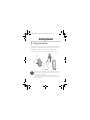
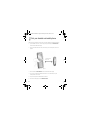
Your headset has a Multi-function button which allows you to turn on or off your
headset. With the Multi-function button, you can answer or end calls, use the Last
Number Redial* feature, and adjust the volume without using your mobile phone.
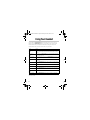
The table below shows you how to use the button on your headset.
Usage
Action
Turning on your
headset
Press and hold the Multi-function button for three seconds. The LED turns
on under normal condition or blinks five times when the battery is almost
depleted.
Turning off your
headset
Press and hold the Multi-function button until the LED blinks. Release the
button. The LED turns off.
Going into pairing
mode
Turn off your headset. Press and hold the Multi-function button until the LED
blinks rapidly.
Answering a call
Press the Multi-function button. You can also answer the call using your
mobile phone.
Ending a call
Press the Multi-function button for three seconds. You can also end a call
using your mobile phone.
Rejecting a call
Press the Multi-function button for three seconds.
Transfering a call*
Press the Multi-function button twice quickly.
Using Voice Dial*
Press the Multi-function button once and when you hear an alert tone, say
the voice tag.
Using Last Number
Redial*
Press the Multi-function button twice quickly.
Adjusting volume
Press the Multi-function button to select low, medium, or high volume.
*Some features are available only for selected mobile phones. For more information, refer to your mobile
phone’s User’s Guide.
8