1
•
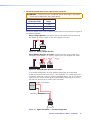
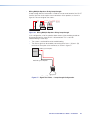
Wiring Multiple Speakers Using Loop-through:
A loop-through electrical connection is made on the crossover board of the CS 26T.
Connect the wires to the captive screw connectors of the speakers, as shown in
figure 15. Be sure to tighten the screws.
(Red)
(Red)
(Black)
– –+ +
LOOP
Power Amplifier
(Red)
(Black)
(Black)
IN
IN
LOOP
Speaker 1
– –+ +
LOOP
IN
IN
LOOP
Speaker 2
Wiring Multiple Speakers Using Loop-through
Figure 15. Wiring Multiple Speakers Using Loop-through
In this configuration, all of the speakers downstream of the one being tested are disconnected from the signal when it is disconnected. This is useful for troubleshooting in three ways:
•
The system is sectioned for easier troubleshooting.
•
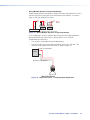
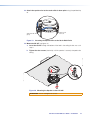
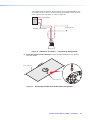
The source signal can be tested by connecting to the inner + (IN) and – (IN) terminals of the captive screw connector, as shown in figure 16.
Red Wire (+) from Amplifier
Amplifier
Black Wire (-) from Amplifier
Test Points
Signal Test Points
Figure 16. Signal Test Points — Loop-through Configuration
CS 26T and CS 120P User Guide • Installation
10