1
Agilent Technologies
87050A Option K24
User’s and Service Guide
Agilent Technologies
87050A Option K24
User’s and Service Guide
Multiport Test Set
Use this manual with the following documents:
PNA Series Network Analyzer On-line Help System and Application Note 1408-12
8719D/20D/22D Network Analyzer User’s Guide, Part Number 08720-90288
8753D Network Analyzer User’s Guide, Part Number 08753-90257
8753E Network Analyzer User’s Guide, Part Number 08753-90367
8719D/20D/22D Network Analyzer Service Guide, Part Number: 08720-90292
8753D Network Analyzer Service Guide, Part Number: 08753-90261
8753E Network Analyzer Service Guide, Part Number: 08753-90374
Manufacturing Part Number: 87050-90022
Printed in USA: November 2009
Supersede: April 2008
© Copyright Agilent Technologies, Inc. 2002, 2007-2009
Warranty Statement
THE MATERIAL CONTAINED IN THIS DOCUMENT IS PROVIDED “AS IS,” AND IS SUBJECT
TO BEING CHANGED, WITHOUT NOTICE, IN FUTURE EDITIONS. FURTHER, TO THE
MAXIMUM EXTENT PERMITTED BY APPLICABLE LAW, AGILENT DISCLAIMS ALL
WARRANTIES, EITHER EXPRESS OR IMPLIED WITH REGARD TO THIS MANUAL AND
ANY INFORMATION CONTAINED HEREIN, INCLUDING BUT NOT LIMITED TO THE
IMPLIED WARRANTIES OF MERCHANTABILITY AND FITNESS FOR A PARTICULAR
PURPOSE. AGILENT SHALL NOT BE LIABLE FOR ERRORS OR FOR INCIDENTAL
OR CONSEQUENTIAL DAMAGES IN CONNECTION WITH THE FURNISHING, USE, OR
PERFORMANCE OF THIS DOCUMENT OR ANY INFORMATION CONTAINED HEREIN.
SHOULD AGILENT AND THE USER HAVE A SEPARATE WRITTEN AGREEMENT WITH
WARRANTY TERMS COVERING THE MATERIAL IN THIS DOCUMENT THAT CONFLICT
WITH THESE TERMS, THE WARRANTY TERMS IN THE SEPARATE AGREEMENT WILL
CONTROL.
DFARS/Restricted Rights Notice
If software is for use in the performance of a U.S. Government prime contract or
subcontract, Software is delivered and licensed as “Commercial computer software” as
defined in DFAR 252.227-7014 (June 1995), or as a “commercial item” as defined in FAR
2.101(a) or as “Restricted computer software” as defined in FAR 52.227-19 (June 1987) or
any equivalent agency regulation or contract clause. Use, duplication or disclosure of
Software is subject to Agilent Technologies’ standard commercial license terms, and
non-DOD Departments and Agencies of the U.S. Government will receive no greater than
Restricted Rights as defined in FAR 52.227-19(c)(1-2) (June 1987). U.S. Government users
will receive no greater than Limited Rights as defined in FAR 52.227-14 (June 1987) or
DFAR 252.227-7015 (b)(2) (November 1995), as applicable in any technical data.
ii
Safety Notes
The following safety notes are used throughout this document. Familiarize yourself with
each of these notes and its meaning before performing any of the procedures in this
document.
WARNING
Warning denotes a hazard. It calls attention to a procedure
which, if not correctly performed or adhered to, could result in
injury or loss of life. Do not proceed beyond a warning note
until the indicated conditions are fully understood and met.
CAUTION
Caution denotes a hazard. It calls attention to a procedure that, if not
correctly performed or adhered to, could result in damage to or
destruction of the instrument. Do not proceed beyond a caution sign
until the indicated conditions are fully understood and met.
Definitions
• Specifications describe the performance of parameters covered by the product warranty
(temperature –0 to 55 °C, unless otherwise noted.)
• Typical describes additional product performance information that is not covered by the
product warranty. It is performance beyond specification that 80% of the units exhibit
with a 95% confidence level over the temperature range 20 to 30 °C. Typical
performance does not include measurement uncertainty.
• Nominal values indicate expected performance or describe product performance that is
useful in the application of the product, but is not covered by the product warranty.
• Characteristic Performance describes performance parameter that the product is
expected to meet before it leaves the factory, but is not verified in the field and is not
covered by the product warranty. A characteristic includes the same guard bands as a
specification.
iii
iv
Contents
87050A Option K24
Description . . . . . . . . . . . . . . . . . . . . . . . . . . . . . . . . . . . . . . . . . . . . . . . . . . . . . . . . . . . . . . . . . . 2
87050A Option K24 Options. . . . . . . . . . . . . . . . . . . . . . . . . . . . . . . . . . . . . . . . . . . . . . . . . . . 2
Verifying the Shipment . . . . . . . . . . . . . . . . . . . . . . . . . . . . . . . . . . . . . . . . . . . . . . . . . . . . . . . . 3
General Specifications . . . . . . . . . . . . . . . . . . . . . . . . . . . . . . . . . . . . . . . . . . . . . . . . . . . . . . . . . 4
Power Requirements . . . . . . . . . . . . . . . . . . . . . . . . . . . . . . . . . . . . . . . . . . . . . . . . . . . . . . . . 5
Environmental Requirements . . . . . . . . . . . . . . . . . . . . . . . . . . . . . . . . . . . . . . . . . . . . . . . . . 6
Operating Environment . . . . . . . . . . . . . . . . . . . . . . . . . . . . . . . . . . . . . . . . . . . . . . . . . . . . 6
Environmental Tests . . . . . . . . . . . . . . . . . . . . . . . . . . . . . . . . . . . . . . . . . . . . . . . . . . . . . . . 6
Equipment Heating and Cooling . . . . . . . . . . . . . . . . . . . . . . . . . . . . . . . . . . . . . . . . . . . . . 6
Required Conditions for Accuracy Enhanced Measurement . . . . . . . . . . . . . . . . . . . . . . . 6
Dimensions and Space Requirements . . . . . . . . . . . . . . . . . . . . . . . . . . . . . . . . . . . . . . . . . 7
Ventilation Requirements . . . . . . . . . . . . . . . . . . . . . . . . . . . . . . . . . . . . . . . . . . . . . . . . . . 8
Front and Rear Panel Features . . . . . . . . . . . . . . . . . . . . . . . . . . . . . . . . . . . . . . . . . . . . . . . . . . 9
Line Power Switch. . . . . . . . . . . . . . . . . . . . . . . . . . . . . . . . . . . . . . . . . . . . . . . . . . . . . . . . . . . 9
Ports 1–24 . . . . . . . . . . . . . . . . . . . . . . . . . . . . . . . . . . . . . . . . . . . . . . . . . . . . . . . . . . . . . . . . . 9
Transmission and Reflection Ports . . . . . . . . . . . . . . . . . . . . . . . . . . . . . . . . . . . . . . . . . . . . 10
Ground Connector . . . . . . . . . . . . . . . . . . . . . . . . . . . . . . . . . . . . . . . . . . . . . . . . . . . . . . . . . . 10
Port Connection Status LCD . . . . . . . . . . . . . . . . . . . . . . . . . . . . . . . . . . . . . . . . . . . . . . . . . 10
Parallel Port Input Connector . . . . . . . . . . . . . . . . . . . . . . . . . . . . . . . . . . . . . . . . . . . . . . . . 11
Parallel Port Output Connector . . . . . . . . . . . . . . . . . . . . . . . . . . . . . . . . . . . . . . . . . . . . . . . 11
Printer/Test Set Switch. . . . . . . . . . . . . . . . . . . . . . . . . . . . . . . . . . . . . . . . . . . . . . . . . . . . . . 11
GPIB Connector . . . . . . . . . . . . . . . . . . . . . . . . . . . . . . . . . . . . . . . . . . . . . . . . . . . . . . . . . . . 11
Address Switch . . . . . . . . . . . . . . . . . . . . . . . . . . . . . . . . . . . . . . . . . . . . . . . . . . . . . . . . . . . . 12
Line Module. . . . . . . . . . . . . . . . . . . . . . . . . . . . . . . . . . . . . . . . . . . . . . . . . . . . . . . . . . . . . . . 12
Available Fuse . . . . . . . . . . . . . . . . . . . . . . . . . . . . . . . . . . . . . . . . . . . . . . . . . . . . . . . . . . . . . 12
Power Cables . . . . . . . . . . . . . . . . . . . . . . . . . . . . . . . . . . . . . . . . . . . . . . . . . . . . . . . . . . . . . . . 13
System Setup . . . . . . . . . . . . . . . . . . . . . . . . . . . . . . . . . . . . . . . . . . . . . . . . . . . . . . . . . . . . . . . 15
Setting the Test Set Address Switch . . . . . . . . . . . . . . . . . . . . . . . . . . . . . . . . . . . . . . . . . . . 16
Performance Verification . . . . . . . . . . . . . . . . . . . . . . . . . . . . . . . . . . . . . . . . . . . . . . . . . . . . 17
Equipment Required . . . . . . . . . . . . . . . . . . . . . . . . . . . . . . . . . . . . . . . . . . . . . . . . . . . . . . 17
Procedure . . . . . . . . . . . . . . . . . . . . . . . . . . . . . . . . . . . . . . . . . . . . . . . . . . . . . . . . . . . . . . . 17
Operation . . . . . . . . . . . . . . . . . . . . . . . . . . . . . . . . . . . . . . . . . . . . . . . . . . . . . . . . . . . . . . . . . . 18
Typeface Key Conventions . . . . . . . . . . . . . . . . . . . . . . . . . . . . . . . . . . . . . . . . . . . . . . . . . . . 18
Commands . . . . . . . . . . . . . . . . . . . . . . . . . . . . . . . . . . . . . . . . . . . . . . . . . . . . . . . . . . . . . . . . 18
Computer Control . . . . . . . . . . . . . . . . . . . . . . . . . . . . . . . . . . . . . . . . . . . . . . . . . . . . . . . . 18
Network Analyzer Control . . . . . . . . . . . . . . . . . . . . . . . . . . . . . . . . . . . . . . . . . . . . . . . . . 19
Calibrating the Test System . . . . . . . . . . . . . . . . . . . . . . . . . . . . . . . . . . . . . . . . . . . . . . . . . 25
Making Measurements . . . . . . . . . . . . . . . . . . . . . . . . . . . . . . . . . . . . . . . . . . . . . . . . . . . . . . 26
Measuring Reflection. . . . . . . . . . . . . . . . . . . . . . . . . . . . . . . . . . . . . . . . . . . . . . . . . . . . . . 26
Measuring Transmission. . . . . . . . . . . . . . . . . . . . . . . . . . . . . . . . . . . . . . . . . . . . . . . . . . . 26
Theory of Operation . . . . . . . . . . . . . . . . . . . . . . . . . . . . . . . . . . . . . . . . . . . . . . . . . . . . . . . . . . 28
System Theory. . . . . . . . . . . . . . . . . . . . . . . . . . . . . . . . . . . . . . . . . . . . . . . . . . . . . . . . . . . . . 28
A1 Power Supply . . . . . . . . . . . . . . . . . . . . . . . . . . . . . . . . . . . . . . . . . . . . . . . . . . . . . . . . . . 28
A2 Front Panel Display . . . . . . . . . . . . . . . . . . . . . . . . . . . . . . . . . . . . . . . . . . . . . . . . . . . . . 28
A3 Controller Board (Mother Board) and Switch Driver Board (Daughter Board) . . . . . . 28
Performance Tests . . . . . . . . . . . . . . . . . . . . . . . . . . . . . . . . . . . . . . . . . . . . . . . . . . . . . . . . . . . 30
Insertion Loss . . . . . . . . . . . . . . . . . . . . . . . . . . . . . . . . . . . . . . . . . . . . . . . . . . . . . . . . . . . . . 30
Return Loss . . . . . . . . . . . . . . . . . . . . . . . . . . . . . . . . . . . . . . . . . . . . . . . . . . . . . . . . . . . . . . . 31
Isolation . . . . . . . . . . . . . . . . . . . . . . . . . . . . . . . . . . . . . . . . . . . . . . . . . . . . . . . . . . . . . . . . . . 31
Performance Test Record . . . . . . . . . . . . . . . . . . . . . . . . . . . . . . . . . . . . . . . . . . . . . . . . . . . . 32
Assembly Replacement and Post-Repair Procedures . . . . . . . . . . . . . . . . . . . . . . . . . . . . . . . . 45
Contents-1
Contents
Connector Replacement . . . . . . . . . . . . . . . . . . . . . . . . . . . . . . . . . . . . . . . . . . . . . . . . . . . . . .47
Troubleshooting and Block Diagram . . . . . . . . . . . . . . . . . . . . . . . . . . . . . . . . . . . . . . . . . . . . .48
General Troubleshooting Notes . . . . . . . . . . . . . . . . . . . . . . . . . . . . . . . . . . . . . . . . . . . . . . . .48
Troubleshooting Power Supply Problems . . . . . . . . . . . . . . . . . . . . . . . . . . . . . . . . . . . . . . . .48
Troubleshooting the Front Panel Board . . . . . . . . . . . . . . . . . . . . . . . . . . . . . . . . . . . . . . . . .49
Troubleshooting the Controller and Switch Driver Boards . . . . . . . . . . . . . . . . . . . . . . . . . .49
Safety and Regulatory Information . . . . . . . . . . . . . . . . . . . . . . . . . . . . . . . . . . . . . . . . . . . . . .51
Introduction . . . . . . . . . . . . . . . . . . . . . . . . . . . . . . . . . . . . . . . . . . . . . . . . . . . . . . . . . . . . . . .51
Before Applying Power. . . . . . . . . . . . . . . . . . . . . . . . . . . . . . . . . . . . . . . . . . . . . . . . . . . . . . .51
Connector Care and Cleaning . . . . . . . . . . . . . . . . . . . . . . . . . . . . . . . . . . . . . . . . . . . . . . . . .51
Declaration of Conformity . . . . . . . . . . . . . . . . . . . . . . . . . . . . . . . . . . . . . . . . . . . . . . . . . . . .51
Statement of Compliance . . . . . . . . . . . . . . . . . . . . . . . . . . . . . . . . . . . . . . . . . . . . . . . . . . . . .51
General Safety Considerations . . . . . . . . . . . . . . . . . . . . . . . . . . . . . . . . . . . . . . . . . . . . . . . .52
Cautions . . . . . . . . . . . . . . . . . . . . . . . . . . . . . . . . . . . . . . . . . . . . . . . . . . . . . . . . . . . . . . . .52
Warnings . . . . . . . . . . . . . . . . . . . . . . . . . . . . . . . . . . . . . . . . . . . . . . . . . . . . . . . . . . . . . . . .53
Regulatory Information . . . . . . . . . . . . . . . . . . . . . . . . . . . . . . . . . . . . . . . . . . . . . . . . . . . . . .54
Instrument Markings . . . . . . . . . . . . . . . . . . . . . . . . . . . . . . . . . . . . . . . . . . . . . . . . . . . . . .54
Battery Collection . . . . . . . . . . . . . . . . . . . . . . . . . . . . . . . . . . . . . . . . . . . . . . . . . . . . . . . . .55
Compliance with German Noise Requirements . . . . . . . . . . . . . . . . . . . . . . . . . . . . . . . . .55
EMC Information . . . . . . . . . . . . . . . . . . . . . . . . . . . . . . . . . . . . . . . . . . . . . . . . . . . . . . . . .55
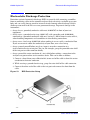
Electrostatic Discharge Protection . . . . . . . . . . . . . . . . . . . . . . . . . . . . . . . . . . . . . . . . . . . . . . .56
Agilent Support, Services, and Assistance . . . . . . . . . . . . . . . . . . . . . . . . . . . . . . . . . . . . . . . . .57
Service and Support Options . . . . . . . . . . . . . . . . . . . . . . . . . . . . . . . . . . . . . . . . . . . . . . . . . .57
Contacting Agilent . . . . . . . . . . . . . . . . . . . . . . . . . . . . . . . . . . . . . . . . . . . . . . . . . . . . . . . . . .57
Shipping Your Analyzer to Agilent for Service or Repair . . . . . . . . . . . . . . . . . . . . . . . . . . .57
Contents-2
87050A Option K24
User’s and Service Guide
1
87050A Option K24
Description
Description
The Agilent 87050A Option K24 Multiport Mechanical Switching Test Set is designed for
use with 50 Ω network analyzers such as the Agilent PNA E8362B, PNA-L N5230A,
8719D/E, 8720D/E, 8722D/E and 8753D/E.
The Test Set provides the ability to make single connection, multiple measurements of
multiport devices with up to 24 ports, such as distribution amplifiers, taps, switches and
couplers. Throughput is increased by reducing the number of device reconnects the
operator must perform. Switching is performed with mechanical switches.
The test set can be controlled by using an external GPIB controller, or parallel control
NOTE
This User’s and Service Guide documents the use of the test set with an
Agilent 8720D or the PNA E8362B.
87050A Option K24 Options
UK6
Option UK6 provides a commercial calibration certificate including actual test data. Data
includes test results of 95 tests including reflection, transmission, and isolation from all
test ports.
Rack Ear Mounts
Option 908 (5062-3974) provides rack mounts that make it quick and easy to install or
remove the test set from a mainframe.
For further information on these options please contact Agilent Technologies. Refer
to "Contacting Agilent" on page 57.
2
User’s and Service Guide
87050A Option K24
Verifying the Shipment
Verifying the Shipment
After the test set has been unpacked, keep the original packaging materials so they can be
used if you need to transport the instrument.Inspect the test set and all accessories for any
signs of damage that may have occurred during shipment. If your test set or any
accessories appear to be damaged or missing refer to "Contacting Agilent" on page 57.
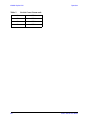
Table 1
87050A Option K24 Accessories Supplied
Description
Agilent Part Number
Quantity
See Figure 7 on page 14
1
Adapter, 3.5 mm to APC-7
1250-1747
2
RF Cable (SMA to SMA)
5062-6682
2
Front Handle Kit
5063-9228
1
Rack Mount Kit
5063-9235
1
Parallel Port Interface Cable
8120-6818
1
RF Cable (Connect Option K24
trans and refl ports to the analyzer)
08720-20245
2
3.5 mm Connector
85052-60012
2
User’s and Service Guide
87050-90022
1
Power Cord
User’s and Service Guide
3
87050A Option K24
General Specifications
General Specifications
Table 2
Agilent 87050A Option K24 Specifications
Parameter
Specification
Frequency Range
50 MHz to 20 GHz
Isolation
0.50 GHz to 1.3 GHz
≥ 85 dB
1.3 GHz to 3.0 GHz
≥ 100 dB
3.0 GHz to 6.0 GHz
≥ 95 dB
Return Loss
0.50 GHz to 1.3 GHz
≥ 24 dB
1.3 GHz to 3.0 GHz
≥ 20 dB
3.0 GHz to 6.0 GHz
≥ 14 dB
6.0 GHz to 12.4 GHz
≥ 12 dB
12.4 GHz to 20 GHz
≥ 8 dB
Insertion Loss
0.5 GHz to 6.0 GHz
≤ 2.5 dB
6.0 GHz to 12.4 GHz
≤ 3.5 dB
12.4 GHz to 20 GHz
≤ 4.5 dB
Phase Deviation
Reflection Port to Ports 1–24
(0.5 GHz to 6.0 GHz)
± 10°
Transmission Port to Ports 1–24
(0.5 GHz to 6.0 GHz)
± 10°
Reflection Port to Ports 1–24
(6.0 GHz to 20 GHz)
± 35°
Transmission Port to Ports 1–24
(6.0 GHz to 20 GHz)
± 35°
Input Power Damage Level
4
> 1 Watt (RF +dc)
User’s and Service Guide
87050A Option K24
General Specifications
Power Requirements
NOTE
Refer to your network analyzer documentation for specifications and power
requirements.
Verify that the required ac power is available at all necessary locations before installing
the Test Set to the PNA.
• Air conditioning equipment (or other motor–operated equipment) should not be placed
on the same ac line that powers the Test Set and PNA.
• The line power module on your test set is an autoranging input.
• Ensure that the available ac power source meets the following requirements:
—
100/120/220/240 Vac
— 50/60 Hz
— 40 Watts
Specifications for the 87050A Mechanical Switching Multiport Test Set are characteristics
for the system performance of the PNA and test set. Actual performance of the system is
based on the customers PNA that is used with the test set.
WARNING
This is a Safety Class I product (provided with a protective earthing
ground incorporated in the power cord). The mains plug shall be
inserted only into a socket outlet provided with a protective earth
contact. Any interruption of the protective conductor, inside or
outside the instrument, is likely to make the instrument dangerous.
Intentional interruption is prohibited.
CAUTION
This product has an autoranging line voltage input. Be sure the supply
voltage is within the specified range. If the ac line voltage does not fall within
these ranges, an autotransformer that provides third wire continuity to earth
ground should be used.
User’s and Service Guide
5
87050A Option K24
General Specifications
Environmental Requirements
Operating Environment
Indoor use only
Operating Temperature: 0 to 55 °C (32 °F to 104 °F)
Storage Temperature: -40 °C to +70 °C (–40 °F to +158 °F)
Altitude: 10,000 feet (3,000 meters)
Enclosure Protection IP 2 0
Environmental Tests
The 87050A Option K24 complies with all applicable safety and regulatory requirements
for the intended location of use and have been evaluated to assure that they are consistent
with Agilent quality and reliability goals.
Equipment Heating and Cooling
If necessary, install air conditioning and heating to maintain the ambient temperature
within the appropriate range. Air conditioning capacity must be consistent with the power
ratings given on Page 5.
Required Conditions for Accuracy Enhanced Measurement
Accuracy–enhanced (error–corrected) measurements require the ambient temperature of
the PNA and Test Set to be maintained within ± 1 °C of the ambient temperature at
calibration.
CAUTION
6
This product is designed for use in Installation Category II, and Pollution
Degree 2.
User’s and Service Guide
87050A Option K24
General Specifications
Dimensions and Space Requirements
Standard installation of the 87050A Option K24 and PNA includes configuration and
installation on a customer provided lab bench or table top of adequate size and strength.
Table 3
Instrument Dimensions
Model
Weight
Height
Width
Depth
E8362B
29 kg (64 lb)
26.7 cm
(10.5 in)
42.5 cm
(16.7 in)
42.6 cm
(16.8 in)
N5230A
24.9 kg
(55 lb, ±0.5 lb)
26.7 cm
(10.5 in)
42.5 cm
(16.7 in)
42.6 cm
(16.8 in)
87050A Opt K24
9 kg (19.8 lb)
17.8 cm
(7 in)
42.5 cm
(16.7 in)
50 cm
(19.7 in)
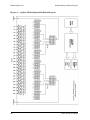
Figure 1
Agilent 87050A Option K24 Physical Dimensions
User’s and Service Guide
7
87050A Option K24
General Specifications
Ventilation Requirements
ESD (electrostatic discharge) must be eliminated by use of static-safe work procedures and
an anti-static bench mat.Refer to “Electrostatic Discharge Protection” on page 56.
The 87050A Option K24 and the PNA are listed in “Environmental Requirements” are
listed on Page 6. Note that these requirements are the same as those of the E8362B and
N5230A PNA-L. The E8362B and N5230A PNA-L provides front panel access to the source
outputs, receiver inputs and couplers for use with the multiport test sets.
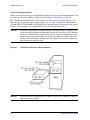
CAUTION
Ventilation Requirements: When installing the instrument in a cabinet, the
convection into and out of the instrument must not be restricted. The ambient
temperature (outside the cabinet) must be less than the maximum operating
temperature of the instrument by 4 °C for every 100 watts dissipated in the
cabinet. If the total power dissipated in the cabinet is greater than 800 watts,
forced convection must be used.
Figure 2
Ventilation Clearance Requirements
CAUTION
If the total power dissipated in the cabinet is greater than 800 watts, forced
convection must be used.
8
User’s and Service Guide
87050A Option K24
Front and Rear Panel Features
Front and Rear Panel Features
This chapter contains information on the ports and switches found on the front and rear
panels of the test set.
Figure 3
Front Panel
Reflection 50 Ω
Port Connection
Line Power Switch Status LCD
Transmission 50 Ω
Test Ports 1–24
Ground Connector
Line Power Switch
The Test Set line power switch is located at the bottom left corner of the front panel. See
Figure 3. The line power switch turns the power to the test set on or off.
The front panel line switch disconnects the mains circuits from the mains supply after the
EMC filters and before other parts of the instrument.
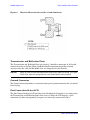
Ports 1–24
Ports 1 through 24 are 50 Ω, 3.5 mm connectors that are used to connect to the device
under test.
CAUTION
Do not input more than 1 watt, RF and DC combined, to these ports or
damage to the internal RF switches or the analyzer may occur.
User’s and Service Guide
9
87050A Option K24
Figure 4
Front and Rear Panel Features
Physical Characteristics of the 3.5 mm Connector
Transmission and Reflection Ports
The Transmission and Reflection Ports are female 3.5 mm 50 Ω connectors. A 50 Ω cable
connects directly to the Port 1/Port 2 or Reflection/Transmission port of the network
analyzer using the cable (08720-20245) that was shipped with your Test Set.
CAUTION
Refer to your analyzer documentation for damage limits to the RF OUT port.
Verify that your test setup will not cause those limits to be exceeded.
Ground Connector
The Ground connector provides a convenient front panel ground connection for a standard
banana plug.
Port Connection Status LCD
The Port Connection Status LCD provides visual feedback of which port(s) are connected to
the Transmission and Reflection ports of the test set. When the LCD displays a path
connection, all other corresponding test ports are internally terminated in 50 Ω.
10
User’s and Service Guide
87050A Option K24
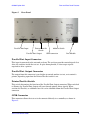
Figure 5
Front and Rear Panel Features
Rear Panel
Parallel Port Input
Printer/Test Set
Switch
Parallel Port Output
Address Switch
GPIB connector
Line Module
Parallel Port Input Connector
This input is connected to the network analyzer. The analyzer provides control signals that
drive the switches inside the test set. In pass-through mode, it also accepts signals
required to drive a printer.
Parallel Port Output Connector
The output from this connector is used either to control another test set, or to control a
printer, depending upon how the Printer/Test Set switch is set.
Printer/Test Set Switch
This switch determines the function of the Parallel Port Output connector. When switched
to Printer, the Parallel Port Output will pass through printer driver signals. When
switched to Test Set, an additional test set can be controlled from the Parallel Port Output
connector.
GPIB Connector
This connector allows the test set to be connected directly to a controller, as shown in
Figure 5.
User’s and Service Guide
11
87050A Option K24
Front and Rear Panel Features
Address Switch
The address switch sets the GPIB or parallel address of the test set. See “Setting the Test
Set Address Switch” on page 16 for information.
Line Module
The line fuse and a spare reside within the line module. Figure 6 illustrates where the
fuses are and how to access them.
Figure 6
Line Module
Available Fuse
• Fuse (F 3 A/250 V, part number 2110-0780) UL listed and CSA certified.
12
User’s and Service Guide
87050A Option K24
Power Cables
Power Cables
The line power cable is supplied in one of several configurations, depending on the
destination of the original shipment.
Each instrument is equipped with a three-wire power cable. When connected to an
appropriate ac power receptacle, this cable grounds the instrument chassis. The type of
power cable shipped with each instrument depends on the country of destination. See
Figure 7 on page 14 for the part numbers of these power cables. Cables are available in
different lengths. See "Contacting Agilent" on page 57 for descriptions and part numbers
of cables other than those described in Figure 7.
CAUTION
Always use the three-prong ac power cord supplied with this product. Failure
to ensure adequate grounding by not using this cord may cause damage to the
product.
WARNING
This is a Safety Class I product (provided with a protective earthing
ground incorporated in the power cord). The mains plug shall only
be inserted in a socket outlet provided with a protective earth
contact. Any interruption of the protective conductor, inside or
outside the instrument, is likely to make the instrument dangerous.
Intentional interruption is prohibited.
User’s and Service Guide
13
87050A Option K24
Figure 7
Power Cables
Power Cable and Line (Mains) Plug Part Numbers
a
Plug Type
250V
Cable
Part
Number
Plug b
Length
Description cm (in.)
Cable
Color
8120-8705
Straight
BS 1363A
229 (90)
Mint Gray
8120-8709
90
229 (90)
Mint Gray
8120-1369
Straight
AS 3112
210 (79)
Gray
8120-0696
90
200 (78)
Gray
8120-1378
Straight
NEMA 5-15P
203 (80)
Jade Gray
8120-1521
90
203 (80)
Jade Gray
8120-4753
Straight
NEMA 5-15P
229 (90)
Gray
8120-4754
90
229 (90)
Gray
8120-1689
Straight
CEE 7/VII
200 (78)
Mint Gray
8120-1692
90
200 (78)
Mint Gray
8120-2104
Straight
SEV Type 12
200 (78)
Gray
8120-2296
90
200 (78)
Gray
8120-2956
Straight
SR 107-2-D
200 (78)
Gray
8120-2957
90
200 (78)
Gray
8120-4211
Straight
IEC 83-B1
200 (78)
Mint Gray
8120-4600
90
200 (78)
Mint Gray
8120-5182
Straight
SI 32
200 (78)
Jade Gray
8120-5181
90
200 (78)
Jade Gray
E
L
N
250V
E
L
N
125V
E
N
L
125V
For Use
in Country
Option 900
United Kingdom, Hong
Kong, Cyprus, Nigeria,
Singapore, Zimbabwe
Option 901
Argentina, Australia,
New Zealand, Mainland
China
Option 903
United States, Canada,
Brazil, Colombia,
Mexico,Philippines,
Saudi Arabia, Taiwan
Option 918
Japan
E
N
L
250V
E
N
L
230V
Option 902
Continental Europe,
Central African Republic,
United Arab Republic
Option 906
Switzerland
E
L
N
220V
N
L
Option 912
Denmark
E
250V
Option 917
South Africa, India
E
L
N
250V
Option 919
Israel
E
N
L
a. E =earth ground, L = line, and N = neutral.
b. Plug identifier numbers describe the plug only. The Agilent Technologies part number is for the complete cable assembly.
14
User’s and Service Guide
87050A Option K24
System Setup
System Setup
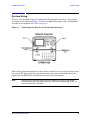
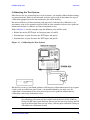
The test set is designed to be placed underneath the network analyzer in a rack system
and connected as shown in Figure 8. Use the two SMA 50 Ω jumper cables (08720-20245)
included in the shipment. See Table 1 on page 3.
Figure 8
Connecting the Test Set to the Network Analyzer
After all the proper connections have been made, turn on the test set using the front panel
line switch. The front panel line switch disconnects the mains circuits from the mains
supply after the EMC filters and before other parts of the instrument.
NOTE
Allow the test set warm up for at least 2 hours for accurate, repeatable
measurements. For the most stable and accurate measurements, leave the
test set turned on at all times.
User’s and Service Guide
15
87050A Option K24
System Setup
Setting the Test Set Address Switch
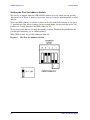
The test set is shipped with the GPIB (HP-IB) address set to 12, which sets the parallel
address to 0 as in Figure 9. Refer to “Operation” on page 18 for the definition of the parallel
address.
To set the GPIB address, set all five switches so that the sum of the switches in the On or
“1” position equal the desired address. In the example below, the two switches in the “On”
position are 8 and 4, therefore the GPIB address is 12.
To set the parallel address, use only the number 1 switch. Therefore the possibilities for
parallel port addressing are an address of 0 or 1.
When GPIB is used, the parallel address is ignored.
Figure 9
16
The Test Set Address Switch
User’s and Service Guide
87050A Option K24
System Setup
Performance Verification
For information on how to control the test set, refer to “Operation” on page 18.
The following performance verification is designed to provide you with a high degree of
confidence that your test set is working properly. It is not designed to verify specifications.
To verify specifications, refer to “Performance Tests” on page 30.
Equipment Required
• Network Analyzer, 50 Ω impedance (Agilent 8720D)
• Cable, 50 Ω 3.5 mm (85131-60012 or equivalent)
• Calibration Kit, 50 Ω (Agilent 85052B)
Procedure
This procedure is for performing a simple performance verification using a network
analyzer of the proper frequency range and impedance.
NOTE
This is an 80% confidence test only. A unit could pass this simple test and yet
still not function properly. For more complete testing, see “Performance Tests”
on page 30.
Step 1. Perform a one-port reflection calibration at the end of a 50 Ω cable over a
frequency range of 50 MHz to 20 GHz on the analyzer. Verify the calibration
is active and that a cable terminated with a short displays a return loss of
0 (±0.2 dB).
Step 2. Connect the cable (already connected to the reflection port of the analyzer) to the
reflection port of the 87050A Option K24 Test Set.
Step 3. Measure the return loss of each section of the test set by selecting each port
individually (ports 1 thru 24), using the network analyzer. Terminate each port
being tested with a known good 50 Ω load (greater than –30 dB). The resulting
return loss should be greater than –10 dB (the absolute value should be greater
than 10).
User’s and Service Guide
17
87050A Option K24
Operation
Operation
The Agilent 87050A Option K24 is a “slave” instrument: a controller must be used to
control the test set. There are three ways in which the test set can be controlled:
• The controller can talk to the network analyzer GPIB, which then controls the test set
via the parallel connection
• The controller can control the test set directly via GPIB
• A network analyzer equipped with a parallel connection can control the test set directly
Typeface Key Conventions
The following key conventions are used throughout this document.
• [HARDKEYS] are labeled front panel keys
• SOFTKEYS are unlabeled key whose function is indicated on the instrument display
Commands
As mentioned earlier, the test set can be controlled in three ways. The first two involve the
use of a separate computer. The third way uses the network analyzer manually. These
methods of control are detailed below and on the following page.
Computer Control
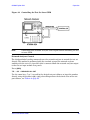
The first way to control the test set is to write GPIB commands to the network analyzer
which then writes to the test set by way of the parallel port. See Figure 10 on page 19 for a
diagram of connections for this type of control. The following examples use the variable [D]
which is defined in Table 4 on page 20.
To use a parallel port connection with the 8720D, use a GPIB command to write bits on the
parallel port. The following example assumes that the address of the network analyzer is
16.
OUTPUT 716;"PARALGPIO;"
Sets the parallel port for GP-IO function
OUTPUT 716;"PARAOUT[D];"
Programs all GP-IO output bits
(0 to 256) at once
NOTE
Be sure to use the ending semi-colon.
The second way to control the test set is to address the 87050A Option K24 test set directly
over GPIB, using a controller to write directly to the test set GPIB port. The following
example assumes that the address of the test set is 12.
OUTPUT 712;"STRING$"
18
User’s and Service Guide
87050A Option K24
Operation
Figure 10
Controlling the Test Set Over GPIB
NOTE
Connection to the network analyzer is not required when controlling the test
set over GPIB.
Network Analyzer Control
The third method of sending commands uses the network analyzer to control the test set
directly. This method is performed with the standard setup of the network analyzer
working with the test set. A parallel cable is connected from the network analyzer output
to the test set input on both rear panels.
Press: [SEQ]
TTL → I/O → PARALLEL ALL OUT
Use the arrow keys, ⇑ or ⇓, to scroll to the desired test port address, or input the number
directly using the hard keys [D] → [x1], where D represents the decimal value of the test
port address, see Table 4 on page 20.
User’s and Service Guide
19
87050A Option K24
Table 4
Operation
Test Port Addresses
Connection Path
GPIB
Command
Decimal [D]
Binary
Equivalent
Transmission to Port 1
tran_01
0
00000000
Transmission to Port 2
tran_02
1
00000001
Transmission to Port 3
tran_03
2
00000010
Transmission to Port 4
tran_04
3
00000011
Transmission to Port 5
tran_05
4
00000100
Transmission to Port 6
tran_06
5
00000101
Transmission to Port 7
tran_07
6
00000110
Transmission to Port 8
tran_08
7
00000111
Transmission to Port 9
tran_09
8
00001000
Transmission to Port 10
tran_10
9
00001001
Transmission to Port 11
tran_11
10
00001010
Transmission to Port 12
tran_12
11
00001011
Transmission to Port 13
tran_13
12
00001100
Transmission to Port 14
tran_14
13
00001101
Transmission to Port 15
tran_15
14
00001110
Transmission to Port 16
tran_16
15
00001111
Transmission to Port 17
tran_17
16
00010000
Transmission to Port 18
tran_18
17
00010001
Transmission to Port 19
tran_19
18
00010010
Transmission to Port 20
tran_20
19
00010011
Transmission to Port 21
tran_21
20
00010100
Transmission to Port 22
tran_22
21
00010101
Transmission to Port 23
tran_23
22
00010110
Transmission to Port 24
tran_24
23
00010111
Transmission Terminated
*t_term
24
00011000
Reflection to Port 1
refl_01
25
00011001
Reflection to Port 2
refl_02
26
00011010
Reflection to Port 3
refl_03
27
00011011
Reflection to Port 4
refl_04
28
00011100
20
User’s and Service Guide
87050A Option K24
Table 4
Operation
Test Port Addresses
Connection Path
GPIB
Command
Decimal [D]
Binary
Equivalent
Reflection to Port 5
refl_05
29
00011101
Reflection to Port 6
refl_06
30
00011110
Reflection to Port 7
refl_07
31
00011111
Reflection to Port 8
refl_08
32
00100000
Reflection to Port 9
refl_09
33
00100001
Reflection to Port 10
refl_10
34
00100010
Reflection to Port 11
refl_11
35
00100011
Reflection to Port 12
refl_12
36
00100100
Reflection to Port 13
refl_13
37
00100101
Reflection to Port 14
refl_14
38
00100110
Reflection to Port 15
refl_15
39
00100111
Reflection to Port 16
refl_16
40
00101000
Reflection to Port 17
refl_17
41
00101001
Reflection to Port 18
refl_18
42
00101010
Reflection to Port 19
refl_19
43
00101011
Reflection to Port 20
refl_20
44
00101100
Reflection to Port 21
refl_21
45
00101101
Reflection to Port 22
refl_22
46
00101110
Reflection to Port 23
refl_23
47
00101111
Reflection to Port 24
refl_24
48
00110000
Reflection Terminated
*r term
49
00110001
Box Identity
idn?
Reset
*rst
50
00110010
Serial Number
sn?
User’s and Service Guide
21
87050A Option K24
Operation
To connect all ports to their internal 50 Ω loads, send the following two commands:
OUTPUT
716;"PARAOUT24;"
OUTPUT 716;"PARAOUT49;"
or
OUTPUT 712;"*t_term"
OUTPUT 712;"*r_term"
NOTE
When a test set port is not in use, it is terminated in 50 Ω.
If the 87050A Option K24 is being controlled by GPIB, you can read the serial number of
the test set by sending the following commands:
OUTPUT 712;"sn?"
ENTER 712;Sn$
DISP Sn$
Reset Command:
When the Reset (*rst) command is sent, the box is set to a known state where all ports are
terminated.
Switch Count Commands
To read the individual switch count, send the following two commands:
OUTPUT 712;"SW10?"
OUTPUT 712;J10$
The previous example illustrates the J10 command only. To enter additional commands
use Table 5 on page 23.
22
User’s and Service Guide
87050A Option K24
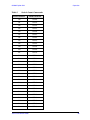
Table 5
Operation
Switch Count Commands
Switch Number
GPIB Command
J10
SW10?
J11
SW11?
J12
SW12?
J13
SW13?
J14
SW14?
J15
SW15?
J16
SW16?
J17
SW17?
J18
SW18?
J19
SW19?
J50
SW50?
J51
SW51?
J52
SW52?
J53
SW53?
J54
SW54?
J55
SW55?
J56
SW56?
J57
SW57?
J58
SW58?
J59
SW59?
J60
SW60?
J61
SW61?
J62
SW62?
J63
SW63?
J64
SW64?
J65
SW65?
J66
SW66?
J67
SW67?
J68
SW68?
J69
SW69?
User’s and Service Guide
23
87050A Option K24
Table 5
24
Operation
Switch Count Commands
J70
SW70?
J71
SW71?
J72
SW72?
J73
SW73?
User’s and Service Guide
87050A Option K24
Operation
Calibrating the Test System
After the test set has warmed up for at least two hours, you should calibrate before making
any measurements. Refer to your network analyzer user’s guide to determine the type of
calibration appropriate for the measurements you will be making.
You must calibrate each measurement path separately and store the calibration as an
instrument state in the network analyzer. Refer to your network analyzer user’s guide for
information on how to calibrate and store instrument states.
Refer to Figure 11. In this example setup the following tests will be made:
• Return loss on the DUT input and 2 output ports (A and B)
• Insertion loss (or gain) between the DUT input and port A
• Insertion loss (or gain) between the DUT input and port B
Figure 11
Calibrating the Test System
For the best accuracy, you should perform a full two-port calibration between test set ports
1 and 2, and again between ports 1 and 3. As mentioned before, you must save the
calibrations as instrument states. See your analyzer user’s guide for information on
calibrations and saving instrument states.
CAUTION
When performing a full two-port calibration and making subsequent
measurements, you must use the transfer switch internal to the 8720D to
change the RF signal path direction. Do not use the test set to change the RF
signal path direction when you are using a full two-port calibration. Doing so
will render the calibration invalid.
User’s and Service Guide
25
87050A Option K24
Operation
Making Measurements
The following examples assume that you are using a parallel port connection with an
8720D, with the test set's parallel address set to "0". See “Setting the Test Set Address
Switch” on page 16 for information on setting the test set address.
Measuring Reflection
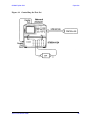
By leaving the DUT connected, as shown in Figure 12, and setting the network analyzer to
measure S11, you can measure reflection or return loss.
Measuring Transmission
Refer to Figure 12 on page 27 for the following discussion. With the 8720D set to measure
forward transmission (S21), the analyzer RF source is output through the analyzer PORT
1, and PORT 2 is set to receive the RF signal.
By using the following commands, you will connect PORT 20 of the test set to the
Transmission port, and you will connect PORT 21 of the test set to the Reflection port. You
will, therefore; be measuring forward transmission through the device under test when
measuring S21. This will provide you with gain or insertion loss information.
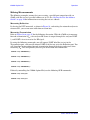
OUTPUT 716;"PARALGPIO;"
OUTPUT 716;"PARAOUT19;"
OUTPUT 716;"PARALGPIO;"
OUTPUT 716;"PARAOUT45;"
If directly controlling the 87050A Option K24, use the following GPIB commands:
OUTPUT 712;"tran_20"
OUTPUT 712;"refl_21"
26
User’s and Service Guide
87050A Option K24
Figure 12
Operation
Controlling the Test Set
User’s and Service Guide
27
87050A Option K24
Theory of Operation
Theory of Operation
The theory of operation begins with a general description of the 87050A Option K24
Multiport Test Set. This is followed by more detailed operating theory. The operation of
each group is described briefly, to the assembly level only. Detailed component level circuit
theory is not provided.
System Theory
The test set consists of three main components: a power supply, a front panel display and a
controller interface mother board. The purpose of the power supply is to provide power to
both the front panel display and the main switch board. The front panel display serves to
indicate the switching paths to the user. The controller interface mother board does the
actual switching between the different ports.
A1 Power Supply
The switching power supply provides regulated dc voltages to power all assemblies in the
test set. A dc cable provides power to the main switch board. A connector from the main
switch board to the front panel display provides dc power and control signals to the front
panel. The power supply provides the following voltages: +24V, +12V, and +5V.
The power LED on the front panel indicates that the instrument is on and that the power
supply is providing power.
A2 Front Panel Display
The front panel display consists of an LCD. The LCD is divided into two lines, forward and
reverse. The first line indicates which of the 24 ports is connected to the forward path. The
second line indicates which of the 24 ports is connected to the reverse path. Control signals
and dc power are provided by a cable connected to the main switch board.
A3 Controller Board (Mother Board) and Switch Driver Board
(Daughter Board)
Refer to Figure 13 on page 50 for the following discussion. The mother and daughter board
provide the bias to switch the paths of the various ports to the Transmission and Reflection
ports. The front panel display contains an LCD that indicates the switched ports. A
particular test port (1 thru 24) can be in one of the following three states:
• Switched to the forward path
• Switched to the reverse path
• Terminated in 50 Ω
When a port is not connected, it is automatically terminated in 50 Ω.
The test set consists of twenty four 1×2 switches, eight 1×6 switches, and two 1×4 switches.
The 1×2 switches divide each of the input ports (1 thru 24) into two separate paths, the
Transmission path or the Reflection path.
28
User’s and Service Guide
87050A Option K24
Theory of Operation
Each path is routed to a bank of four 1 × 6 switches, for a total of eight 1 × 6 switches. Each
bank of switches is routed to a single 1 × 4 switch where it becomes either the
Transmission or Reflection port.
All switches are mechanical, biased according to the necessary switching path. A user
interface through the GPIB and parallel ports converts the necessary input signals from
the user to the necessary control signals to control the switching paths.
User’s and Service Guide
29
87050A Option K24
Performance Tests
Performance Tests
Performance testing consists of measuring insertion loss, return loss and isolation between
all ports. For the most accurate measurements, the use of an Agilent 8720D 50 Ω Network
Analyzer is recommended and its use is recommended in this document. Familiarity with
RF/microwave measurements is assumed. The use of adapters may be required and their
effects should be accounted for. Performance tests will require the following equipment:
• Agilent 8720D Network Analyzer
• Test Port Extension Cables (85131-60012)
• Agilent 85052B Cal Kit
• Agilent 909D Option 040 or 50 Ω Termination (00909-60007)
NOTE
Make a photocopy of the performance test record (later in this chapter) to
record the results of the performance tests.
There are no adjustments required for the 87050A Option K24 test set.
Perform a full two-port calibration over a frequency range of 50 MHz to 20 GHz at the ends
of two cables attached to the two test ports of the 8720D. Verify that the calibration is
active. Save the results to a disk, as they will be used again.
Set up the 8720D with the following:
1. Set the number of points to “201”.
2. Set the Bandwidth to “300 Hz”.
3. Set the 8720D to “Step Sweep”.
NOTE
The Isolation Cal Routine is done with 16 averages.
Insertion Loss
Step 1. Recall the full two-port calibration.
Step 2. Connect the cable that is attached to Port 1 of the 8720D to the Transmission port
of the 87050A Option K24.
Step 3. Connect the cable from Port 2 of the analyzer to Port 1 of the 87050A Option K24.
Select Transmission Port 1 using the 8720D. Record the results in the
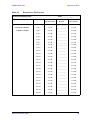
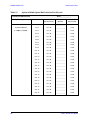
Performance Test Record, Table 6 beginning on Page 33.
Step 4. Repeat step 3 for each of the remaining test ports 2 through 24.
Step 5. Repeat steps 2 through 4, but connect the cable in step 2 to the Reflection port of
the 87050A Option K24. In step 3, select the Reflection port instead of the
Transmission port.
30
User’s and Service Guide
87050A Option K24
Performance Tests
Return Loss
This test will verify the internal termination load of each port and the through match
when the appropriate input port is terminated with a load.
Step 1. Perform a one-port reflection calibration at the end of a 50 Ω cable over the
frequency range of 50 MHz to 20 GHz on the analyzer. Verify the calibration is
active and that the terminated cable displays a return loss of 0 (± 0.2 dB).
Step 2. Connect the cable (already connected to the Reflection measurement port of the
analyzer) to Port 1 of the 87050A Option K24. Connect a high-quality 50 Ω load to
the Transmission port of the 87050A Option K24. Measure the return loss of Port
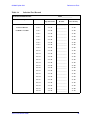
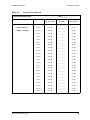
1 by selecting Port 1. Record the results in the Performance Test Record, Table 9
beginning on Page 36.
Step 3. Repeat this measurement, but this time select no active port. The display should
indicate “Transmission-Terminated, Reflection-Terminated”.
Step 4. Move the cable to Port 2 and repeat steps 2 and 3, selecting Port 2. Repeat steps 2
and 3 for the remaining ports.
Isolation
Isolation must be measured only on adjacent ports. Two 50 Ω loads are required for this
test.
Step 1. Recall the full two-port calibration. Make sure the calibration is active and that
averaging is On when making measurements.
Step 2. Connect a 50 Ω load to the Transmission and Reflection ports of the 87050A
Option K24.
Step 3. Connect the two cables from the network analyzer to Ports 1 and 2 of the 87050A
Option K24. The exact order does not matter.
Step 4. Select Reflection Port 1 and Transmission Port 2. Set the 8720D to measure
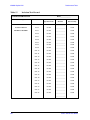
Transmission. Record the results in the Performance Test Record, Table 14
beginning on Page 41.
Step 5. Repeat steps 3 and 4 for the next two adjacent ports; 2 and 3. Repeat again for
ports 3 and 4, then 4 and 5, and so on, ending with ports 23 and 24.
User’s and Service Guide
31
87050A Option K24
Performance Tests
Performance Test Record
NOTE
The following pages (Performance Test Record) are designed to be duplicated
and used as a template for either of the Transmission or Reflection ports
during each of the performance tests (Insertion Loss, Return Loss, and
Isolation). At the top of each page, circle the appropriate input port
(Transmission or Reflection), and write in the test date.
Agilent 87050A Option K24 Test Record
Test Facility ____________________________
Report Number __________________________
________________________________________
Date ____________________________________
________________________________________
Date of Last System Calibration _____________
________________________________________
________________________________________
Tested by _______________________________
Customer _______________________________
Model __________________________________
Serial Number ___________________________
Ambient Temperature _________________ °C
Relative Humidity _______________________%
Test Equipment
Used
Model Number
Trace Number
Cal Due Date
___________________
___________________
___________________
___________________
___________________
___________________
___________________
___________________
___________________
___________________
___________________
___________________
___________________
___________________
___________________
___________________
___________________
___________________
___________________
___________________
Special Notes:
__________________________________________________________________________________
__________________________________________________________________________________
__________________________________________________________________________________
__________________________________________________________________________________
__________________________________________________________________________________
32
User’s and Service Guide
87050A Option K24
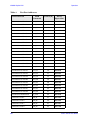
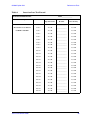
Table 6
Performance Tests
Insertion Loss Test Record
Transmission/Reflection
Test Description
Date______________
Port
Minimum
Specifications
Measured
Results
Measured
Uncertainty
Port 1
≤2.5 dB
_______________
±0.3 dB
Insertion Loss to Band 1
Port 2
≤2.5 dB
_______________
±0.3 dB
0.5 GHz to 6.0 GHz
Port 3
≤2.5 dB
_______________
±0.3 dB
Port 4
≤2.5 dB
_______________
±0.3 dB
Port 5
≤2.5 dB
_______________
±0.3 dB
Port 6
≤2.5 dB
_______________
±0.3 dB
Port 7
≤2.5 dB
_______________
±0.3 dB
Port 8
≤2.5 dB
_______________
±0.3 dB
Port 9
≤2.5 dB
_______________
±0.3 dB
Port 10
≤2.5 dB
_______________
±0.3 dB
Port 11
≤2.5 dB
_______________
±0.3 dB
Port 12
≤2.5 dB
_______________
±0.3 dB
Port 13
≤2.5 dB
_______________
±0.3 dB
Port 14
≤2.5 dB
_______________
±0.3 dB
Port 15
≤2.5 dB
_______________
±0.3 dB
Port 16
≤2.5 dB
_______________
±0.3 dB
Port 17
≤2.5 dB
_______________
±0.3 dB
Port 18
≤2.5 dB
_______________
±0.3 dB
Port 19
≤2.5 dB
_______________
±0.3 dB
Port 20
≤2.5 dB
_______________
±0.3 dB
Port 21
≤2.5 dB
_______________
±0.3 dB
Port 22
≤2.5 dB
_______________
±0.3 dB
Port 23
≤2.5 dB
_______________
±0.3 dB
Port 24
≤2.5 dB
_______________
±0.3 dB
User’s and Service Guide
33
87050A Option K24
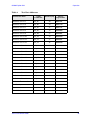
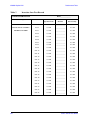
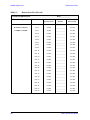
Table 7
Performance Tests
Insertion Loss Test Record
Transmission/Reflection
Test Description
34
Date______________
Port
Minimum
Specifications
Measured
Results
Measured
Uncertainty
Port 1
≤3.5 dB
_______________
±0.3 dB
Insertion Loss to Band 2
Port 2
≤3.5 dB
_______________
±0.3 dB
6.0 GHz to 12.4 GHz
Port 3
≤3.5 dB
_______________
±0.3 dB
Port 4
≤3.5 dB
_______________
±0.3 dB
Port 5
≤3.5 dB
_______________
±0.3 dB
Port 6
≤3.5 dB
_______________
±0.3 dB
Port 7
≤3.5 dB
_______________
±0.3 dB
Port 8
≤3.5 dB
_______________
±0.3 dB
Port 9
≤3.5 dB
_______________
±0.3 dB
Port 10
≤3.5 dB
_______________
±0.3 dB
Port 11
≤3.5 dB
_______________
±0.3 dB
Port 12
≤3.5 dB
_______________
±0.3 dB
Port 13
≤3.5 dB
_______________
±0.3 dB
Port 14
≤3.5 dB
_______________
±0.3 dB
Port 15
≤3.5 dB
_______________
±0.3 dB
Port 16
≤3.5 dB
_______________
±0.3 dB
Port 17
≤3.5 dB
_______________
±0.3 dB
Port 18
≤3.5 dB
_______________
±0.3 dB
Port 19
≤3.5 dB
_______________
±0.3 dB
Port 20
≤3.5 dB
_______________
±0.3 dB
Port 21
≤3.5 dB
_______________
±0.3 dB
Port 22
≤3.5 dB
_______________
±0.3 dB
Port 23
≤3.5 dB
_______________
±0.3 dB
Port 24
≤3.5 dB
_______________
±0.3 dB
User’s and Service Guide
87050A Option K24
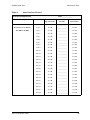
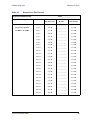
Table 8
Performance Tests
Insertion Loss Record
Transmission/Reflection
Test Description
Date______________
Port
Minimum
Specifications
Measured
Results
Measured
Uncertainty
Port 1
≤4.5 dB
_______________
±0.3 dB
Insertion Loss to Band 3
Port 2
≤4.5 dB
_______________
±0.3 dB
12.4 GHz to 20 GHz
Port 3
≤4.5 dB
_______________
±0.3 dB
Port 4
≤4.5 dB
_______________
±0.3 dB
Port 5
≤4.5 dB
_______________
±0.3 dB
Port 6
≤4.5 dB
_______________
±0.3 dB
Port 7
≤4.5 dB
_______________
±0.3 dB
Port 8
≤4.5 dB
_______________
±0.3 dB
Port 9
≤4.5 dB
_______________
±0.3 dB
Port 10
≤4.5 dB
_______________
±0.3 dB
Port 11
≤4.5 dB
_______________
±0.3 dB
Port 12
≤4.5 dB
_______________
±0.3 dB
Port 13
≤4.5 dB
_______________
±0.3 dB
Port 14
≤4.5 dB
_______________
±0.3 dB
Port 15
≤4.5 dB
_______________
±0.3 dB
Port 16
≤4.5 dB
_______________
±0.3 dB
Port 17
≤4.5 dB
_______________
±0.3 dB
Port 18
≤4.5 dB
_______________
±0.3 dB
Port 19
≤4.5 dB
_______________
±0.3 dB
Port 20
≤4.5 dB
_______________
±0.3 dB
Port 21
≤4.5 dB
_______________
±0.3 dB
Port 22
≤4.5 dB
_______________
±0.3 dB
Port 23
≤4.5 dB
_______________
±0.3 dB
Port 24
≤4.5 dB
_______________
±0.3 dB
User’s and Service Guide
35
87050A Option K24
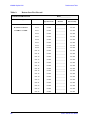
Table 9
Performance Tests
Return Loss Test Record
Transmission/Reflection
Test Description
36
Date______________
Port
Minimum
Specifications
Measured
Results
Measured
Uncertainty
Port 1
.≥24 dB
_______________
±1.5 dB
Return Loss Band 1
Port 2
≥24 dB
_______________
±1.5 dB
0.5 GHz to 1.3 GHz
Port 3
≥24 dB
_______________
±1.5 dB
Port 4
≥24 dB
_______________
±1.5 dB
Port 5
≥24 dB
_______________
±1.5 dB
Port 6
≥24 dB
_______________
±1.5 dB
Port 7
≥24 dB
_______________
±1.5 dB
Port 8
≥24 dB
_______________
±1.5 dB
Port 9
≥24 dB
_______________
±1.5 dB
Port 10
≥24 dB
_______________
±1.5 dB
Port 11
≥24 dB
_______________
±1.5 dB
Port 12
≥24 dB
_______________
±1.5 dB
Port 13
≥24 dB
_______________
±1.5 dB
Port 14
≥24 dB
_______________
±1.5 dB
Port 15
≥24 dB
_______________
±1.5 dB
Port 16
≥24 dB
_______________
±1.5 dB
Port 17
≥24 dB
_______________
±1.5 dB
Port 18
≥24 dB
_______________
±1.5 dB
Port 19
≥24 dB
_______________
±1.5 dB
Port 20
≥24 dB
_______________
±1.5 dB
Port 21
≥24 dB
_______________
±1.5 dB
Port 22
≥24 dB
_______________
±1.5 dB
Port 23
≥24 dB
_______________
±1.5 dB
Port 24
≥24 dB
_______________
±1.5 dB
User’s and Service Guide
87050A Option K24
Table 10
Performance Tests
Return Loss Test Record
Transmission/Reflection
Test Description
Date______________
Port
Minimum
Specifications
Measured
Results
Measured
Uncertainty
Port 1
≥20 dB
_______________
±1.5 dB
Return Loss Band 2
Port 2
≥20 dB
_______________
±1.5 dB
1.3 GHz to 3.0 GHz
Port 3
≥20 dB
_______________
±1.5 dB
Port 4
≥20 dB
_______________
±1.5 dB
Port 5
≥20 dB
_______________
±1.5 dB
Port 6
≥20 dB
_______________
±1.5 dB
Port 7
≥20 dB
_______________
±1.5 dB
Port 8
≥20 dB
_______________
±1.5 dB
Port 9
≥20 dB
_______________
±1.5 dB
Port 10
≥20 dB
_______________
±1.5 dB
Port 11
≥20 dB
_______________
±1.5 dB
Port 12
≥20 dB
_______________
±1.5 dB
Port 13
≥20 dB
_______________
±1.5 dB
Port 14
≥20 dB
_______________
±1.5 dB
Port 15
≥20 dB
_______________
±1.5 dB
Port 16
≥20 dB
_______________
±1.5 dB
Port 17
≥20 dB
_______________
±1.5 dB
Port 18
≥20 dB
_______________
±1.5 dB
Port 19
≥20 dB
_______________
±1.5 dB
Port 20
≥20 dB
_______________
±1.5 dB
Port 21
≥20 dB
_______________
±1.5 dB
Port 22
≥20 dB
_______________
±1.5 dB
Port 23
≥20 dB
_______________
±1.5 dB
Port 24
≥20 dB
_______________
±1.5 dB
User’s and Service Guide
37
87050A Option K24
Table 11
Performance Tests
Return Loss Test Record
Transmission/Reflection
Test Description
38
Date______________
Port
Minimum
Specifications
Measured
Results
Measured
Uncertainty
Port 1
≥14 dB
_______________
±0.6 dB
Return Loss Band 3
Port 2
≥14 dB
_______________
±0.6 dB
3.0 GHz to 6.0 GHz
Port 3
≥14 dB
_______________
±0.6 dB
Port 4
≥14 dB
_______________
±0.6 dB
Port 5
≥14 dB
_______________
±0.6 dB
Port 6
≥14 dB
_______________
±0.6 dB
Port 7
≥14 dB
_______________
±0.6 dB
Port 8
≥14 dB
_______________
±0.6 dB
Port 9
≥14 dB
_______________
±0.6 dB
Port 10
≥14 dB
_______________
±0.6 dB
Port 11
≥14 dB
_______________
±0.6 dB
Port 12
≥14 dB
_______________
±0.6 dB
Port 13
≥14 dB
_______________
±0.6 dB
Port 14
≥14 dB
_______________
±0.6 dB
Port 15
≥14 dB
_______________
±0.6 dB
Port 16
≥14 dB
_______________
±0.6 dB
Port 17
≥14 dB
_______________
±0.6 dB
Port 18
≥14 dB
_______________
±0.6 dB
Port 19
≥14 dB
_______________
±0.6 dB
Port 20
≥14 dB
_______________
±0.6 dB
Port 21
≥14 dB
_______________
±0.6 dB
Port 22
≥14 dB
_______________
±0.6 dB
Port 23
≥14 dB
_______________
±0.6 dB
Port 24
≥14 dB
_______________
±0.6 dB
User’s and Service Guide
87050A Option K24
Table 12
Performance Tests
Return Loss Test Record
Transmission/Reflection
Test Description
Date______________
Port
Minimum
Specifications
Measured
Results
Measured
Uncertainty
Port 1
≥12 dB
_______________
±0.5 dB
Return Loss Band 4
Port 2
≥12 dB
_______________
±0.5 dB
6.0 GHz to 12.4 GHz
Port 3
≥12 dB
_______________
±0.5 dB
Port 4
≥12 dB
_______________
±0.5 dB
Port 5
≥12 dB
_______________
±0.5 dB
Port 6
≥12 dB
_______________
±0.5 dB
Port 7
≥12 dB
_______________
±0.5 dB
Port 8
≥12 dB
_______________
±0.5 dB
Port 9
≥12 dB
_______________
±0.5 dB
Port 10
≥12 dB
_______________
±0.5 dB
Port 11
≥12 dB
_______________
±0.5 dB
Port 12
≥12 dB
_______________
±0.5 dB
Port 13
≥12 dB
_______________
±0.5 dB
Port 14
≥12 dB
_______________
±0.5 dB
Port 15
≥12 dB
_______________
±0.5 dB
Port 16
≥12 dB
_______________
±0.5 dB
Port 17
≥12 dB
_______________
±0.5 dB
Port 18
≥12 dB
_______________
±0.5 dB
Port 19
≥12 dB
_______________
±0.5 dB
Port 20
≥12 dB
_______________
±0.5 dB
Port 21
≥12 dB
_______________
±0.5 dB
Port 22
≥12 dB
_______________
±0.5 dB
Port 23
≥12 dB
_______________
±0.5 dB
Port 24
≥12 dB
_______________
±0.5 dB
User’s and Service Guide
39
87050A Option K24
Table 13
Performance Tests
Return Loss Record
Transmission/Reflection
Test Description
40
Date______________
Port
Minimum
Specifications
Measured
Results
Measured
Uncertainty
Port 1
≥8 dB
_______________
±0.5 dB
Return Loss Band 5
Port 2
≥8 dB
_______________
±0.5 dB
12.4 GHz to 20 GHz
Port 3
≥8 dB
_______________
±0.5 dB
Port 4
≥8 dB
_______________
±0.5 dB
Port 5
≥8 dB
_______________
±0.5 dB
Port 6
≥8 dB
_______________
±0.5 dB
Port 7
≥8 dB
_______________
±0.5 dB
Port 8
≥8 dB
_______________
±0.5 dB
Port 9
≥8 dB
_______________
±0.5 dB
Port 10
≥8 dB
_______________
±0.5 dB
Port 11
≥8 dB
_______________
±0.5 dB
Port 12
≥8 dB
_______________
±0.5 dB
Port 13
≥8 dB
_______________
±0.5 dB
Port 14
≥8 dB
_______________
±0.5 dB
Port 15
≥8 dB
_______________
±0.5 dB
Port 16
≥8 dB
_______________
±0.5 dB
Port 17
≥8 dB
_______________
±0.5 dB
Port 18
≥8 dB
_______________
±0.5 dB
Port 19
≥8 dB
_______________
±0.5 dB
Port 20
≥8 dB
_______________
±0.5 dB
Port 21
≥8 dB
_______________
±0.5 dB
Port 22
≥8 dB
_______________
±0.5 dB
Port 23
≥8 dB
_______________
±0.5 dB
Port 24
≥8 dB
_______________
±0.5 dB
User’s and Service Guide
87050A Option K24
Table 14
Performance Tests
Isolation Test Record
Transmission/Reflection
Test Description
Date______________
Port
Minimum
Specifications
Measured
Results
Measured
Uncertainty
Port 1
≥85 dB
_______________
±5 dB
Isolation Band 1
Port 2
≥85 dB
_______________
±5 dB
0.5 GHz to 1.3 GHz
Port 3
≥85 dB
_______________
±5 dB
Port 4
≥85 dB
_______________
±5 dB
Port 5
≥85 dB
_______________
±5 dB
Port 6
≥85 dB
_______________
±5 dB
Port 7
≥85 dB
_______________
±5 dB
Port 8
≥85 dB
_______________
±5 dB
Port 9
≥85 dB
_______________
±5 dB
Port 10
≥85 dB
_______________
±5 dB
Port 11
≥85 dB
_______________
±5 dB
Port 12
≥85 dB
_______________
±5 dB
Port 13
≥85 dB
_______________
±5 dB
Port 14
≥85 dB
_______________
±5 dB
Port 15
≥85 dB
_______________
±5 dB
Port 16
≥85 dB
_______________
±5 dB
Port 17
≥85 dB
_______________
±5 dB
Port 18
≥85 dB
_______________
±5 dB
Port 19
≥85 dB
_______________
±5 dB
Port 20
≥85 dB
_______________
±5 dB
Port 21
≥85 dB
_______________
±5 dB
Port 22
≥85 dB
_______________
±5 dB
Port 23
≥85 dB
_______________
±5 dB
Port 24
≥85 dB
_______________
±5 dB
User’s and Service Guide
41
87050A Option K24
Table 15
Performance Tests
Agilent 87050A Option K24 Isolation Test Record
Transmission/Reflection
Test Description
42
Date______________
Port
Minimum
Specifications
Measured
Results
Measured
Uncertainty
Port 1
≥100 dB
_______________
±5 dB
Isolation Band 2
Port 2
≥100 dB
_______________
±5 dB
1.3 GHz to 3.0 GHz
Port 3
≥100 dB
_______________
±5 dB
Port 4
≥100 dB
_______________
±5 dB
Port 5
≥100 dB
_______________
±5 dB
Port 6
≥100 dB
_______________
±5 dB
Port 7
≥100 dB
_______________
±5 dB
Port 8
≥100 dB
_______________
±5 dB
Port 9
≥100 dB
_______________
±5 dB
Port 10
≥100 dB
_______________
±5 dB
Port 11
≥100 dB
_______________
±5 dB
Port 12
≥100 dB
_______________
±5 dB
Port 13
≥100 dB
_______________
±5 dB
Port 14
≥100 dB
_______________
±5 dB
Port 15
≥100 dB
_______________
±5 dB
Port 16
≥100 dB
_______________
±5 dB
Port 17
≥100 dB
_______________
±5 dB
Port 18
≥100 dB
_______________
±5 dB
Port 19
≥100 dB
_______________
±5 dB
Port 20
≥100 dB
_______________
±5 dB
Port 21
≥100 dB
_______________
±5 dB
Port 22
≥100 dB
_______________
±5 dB
Port 23
≥100 dB
_______________
±5 dB
Port 24
≥100 dB
_______________
±5 dB
User’s and Service Guide
87050A Option K24
Table 16
Performance Tests
Isolation Test Record
Transmission/Reflection
Test Description
Date______________
Port
Minimum
Specifications
Measured
Results
Measured
Uncertainty
Port 1
≥95 dB
___________
±5 dB
Isolation Band 3
Port 2
≥95 dB
___________
±5 dB
3.0 GHz to 6.0 GHz
Port 3
≥95 dB
___________
±5 dB
Port 4
≥95 dB
___________
±5 dB
Port 5
≥95 dB
___________
±5 dB
Port 6
≥95 dB
___________
±5 dB
Port 7
≥95 dB
___________
±5 dB
Port 8
≥95 dB
___________
±5 dB
Port 9
≥95 dB
___________
±5 dB
Port 10
≥95 dB
___________
±5 dB
Port 11
≥95 dB
___________
±5 dB
Port 12
≥95 dB
___________
±5 dB
Port 1
≥95 dB
___________
±5 dB
Port 2
≥95 dB
___________
±5 dB
Port 3
≥95 dB
___________
±5 dB
Port 4
≥95 dB
___________
±5 dB
Port 5
≥95 dB
___________
±5 dB
Port 6
≥95 dB
___________
±5 dB
Port 7
≥95 dB
___________
±5 dB
Port 8
≥95 dB
___________
±5 dB
Port 9
≥95 dB
___________
±5 dB
Port 10
≥95 dB
___________
±5 dB
Port 11
≥95 dB
___________
±5 dB
Port 12
≥95 dB
___________
±5 dB
User’s and Service Guide
43
87050A Option K24
Table 17
Performance Tests
Isolation Test Record
Transmission/Reflection
Test Description
Date______________
Port
Minimum
Specifications
Measured
Results
Measured
Uncertainty
Port 1
≥90 dB
_______________
±7 dB
Isolation Band 4
Port 2
≥90 dB
_______________
±7 dB
6.0 GHz to 20.0 GHz
Port 3
≥90 dB
_______________
±7 dB
Port 4
≥90 dB
_______________
±7 dB
Port 5
≥90 dB
_______________
±7 dB
Port 6
≥90 dB
_______________
±7 dB
Port 7
≥90 dB
_______________
±7 dB
Port 8
≥90 dB
_______________
±7 dB
Port 9
≥90 dB
_______________
±7 dB
Port 10
≥90 dB
_______________
±7 dB
Port 11
≥90 dB
_______________
±7 dB
Port 12
≥90 dB
_______________
±7 dB
Port 13
≥90 dB
_______________
±7 dB
Port 14
≥90 dB
_______________
±7 dB
Port 15
≥90 dB
_______________
±7 dB
Port 16
≥90 dB
_______________
±7 dB
Port 17
≥90 dB
_______________
±7 dB
Port 18
≥90 dB
_______________
±7 dB
Port 19
≥90 dB
_______________
±7 dB
Port 20
≥90 dB
_______________
±7 dB
Port 21
≥90 dB
_______________
±7 dB
Port 22
≥90 dB
_______________
±7 dB
Port 23
≥90 dB
_______________
±7 dB
Port 24
≥90 dB
_______________
±7 dB
_______________
44
User’s and Service Guide
87050A Option K24
Assembly Replacement and Post-Repair Procedures
Assembly Replacement and Post-Repair Procedures
The following table contains the list of replaceable parts for the Agilent 87050A Option
K24 test set. If any of these parts or assemblies is replaced, you must run all performance
tests to verify conformance to specifications.
NOTE
Special options are built to order, therefore long lead times may be
encountered when ordering replacement parts. Refer to “Contacting Agilent”
on page 57.
Table 18
Agilent 87050A Option K24 Replaceable Parts
Replacement Part
Part Number
Quantity
0950-2252
1
Rear Panel
08720-00102
1
Switch Bracket
08720-00103
4
RF Cable (Option K24 to 8720D)
08720-20245
2
Wire Harness, Multiport-short
08720-60191
1
Display Subassembly
08720-60193
1
Switch Support (12sw)
87050-00020
1
Deck
87050-00021
1
RF Cable-Refl
87050-20070
1
RF Cable-Trans
87050-20071
1
RF Cable-Port 1/6
87050-20072
1
RF Cable-Port 6/12
87050-20073
1
RF Cable-Port 13/18
87050-20074
1
RF Cable-Port 19/24
87050-20075
1
RF Cable-Sw A1-1
87050-20076
1
RF Cable-Sw A2-1
87050-20077
1
RF Cable- Sw A3-1
87050-20078
1
RF Cable- Sw A7-1
87050-20079
1
RF Cable- Sw A8-1
87050-20080
1
RF Cable- Sw A9-1
87050-20081
1
RF Cable- Sw A13-1
87050-20082
1
RF Cable- Sw A14-1
87050-20083
1
Power Supply
User’s and Service Guide
45
87050A Option K24
Table 18
Assembly Replacement and Post-Repair Procedures
Agilent 87050A Option K24 Replaceable Parts
Replacement Part
Part Number
Quantity
RF Cable- Sw A15-1
87050-20084
1
RF Cable- Sw A19-1
87050-20085
1
RF Cable- Sw A20-1
87050-20086
1
RF Cable- Sw A21-1
87050-20087
1
RF Cable- Sw A1-2
87050-20088
1
RF Cable- Sw A2-2
87050-20089
1
RF Cable- Sw A3-2
87050-20090
1
RF Cable- Sw A7-2
87050-20091
1
RF Cable- Sw A8-2
87050-20092
1
RF Cable- Sw A9-2
87050-20093
1
RF Cable- Sw A13-2
87050-20094
1
RF Cable- Sw A14-2
87050-20095
1
RF Cable- Sw A15-2
87050-20096
1
RF Cable- Sw A19-2
87050-20097
1
RF Cable- Sw A20-2
87050-20098
1
RF Cable- Sw A21-2
87050-20099
1
RF Cable-Sw B1-C
87050-20100
1
RF Cable- Sw B2-C
87050-20101
1
RF Cable- Sw B3-C
87050-20102
1
RF Cable- Sw B4-C
87050-20103
1
RF Cable- Sw C1-C
87050-20104
1
RF Cable- Sw C2-C
87050-20105
1
RF Cable- Sw C3-C
87050-20106
1
RF Cable- Sw C4-C
87050-20107
1
Wire Harness, Multiport-long
87050-60070
1
Controller Mother Board
87050-60149
1
Front Panel Subassembly
87050-60153
1
User's and Service Guide
87050-90022
1
46
User’s and Service Guide
87050A Option K24
Assembly Replacement and Post-Repair Procedures
Connector Replacement
The 50 Ω, 3.5 mm connectors are available separately as (5062-6618). It is possible to
replace them in the field. An alternative to replacing a damaged connector would be to
replace just the center pin components. The components for the assembly are:
Component
Part Number
3.5 mm Connector, RF (complete)
5062-6618
3.5 mm Pin and Bead Assembly (only)
5061-5394
When replacing just the pin and bead, a liquid thread-locking adhesive such as part
number 0470-1590 will be needed. Re-use any shims and spacers from the connector being
replaced. For best results, use a connector gauge to verify pin depth. See Figure 4 on
page 10 for proper pin-depth. Add or subtract spacers as required. Spacers and shims are
also available from Agilent Technologies.
WARNING
The opening of covers or removal of parts is likely to expose the user to
dangerous voltages. Disconnect the instrument from all voltage sources
while it is being opened.
User’s and Service Guide
47
87050A Option K24
Troubleshooting and Block Diagram
Troubleshooting and Block Diagram
This section contains information on troubleshooting the test set to the assembly level only.
By following these procedures you should be able to determine whether the power supply,
front panel, or main switch board needs replacing. Refer to Figure 13, “Agilent 87050A
Option K24 Block Diagram,” as an aid in troubleshooting.
Theory of operation information can be found Page 28 of this manual.
General Troubleshooting Notes
WARNING
The opening of covers or removal of parts is likely to expose the user to
dangerous voltages. Disconnect the instrument from all voltage sources
while it is being opened.
CAUTION
If you need to disassemble the instrument, be sure to work at an antistatic
workstation and use a grounded wrist strap to prevent damage from
electrostatic discharge (ESD). See “Electrostatic Discharge Protection” on
page 56.
Troubleshooting Power Supply Problems
Turn the instrument on. Verify the condition of the LCD on the front panel:
Step 1. If the LCD is off, inspect the main fuse located in the power supply filter at the
rear of the instrument and replace if necessary.
Step 2. If the LCD is still off, there is still a possibility that the power supply is not
supplying the necessary +24V, +12V, and +5V to the main board.
Step 3. If the LCD is still off, check the cable between the main board and front panel
board.
Step 4. Finally, disconnect the DC power cable from the power supply to the main switch
board and measure the voltages. They should be +24V, +12V, and +5V. If not,
replace the power supply.
48
User’s and Service Guide
87050A Option K24
Troubleshooting and Block Diagram
Troubleshooting the Front Panel Board
Turn the instrument power on and confirm the following:
Step 1. Verify the condition of each of the switching paths by issuing commands to switch
each of the paths to either the transmission or reflection path. Ensure that the
LCD indicates the appropriate path.
Step 2. If the LCD indicates a wrong path, the problem can lie either with the front panel
board or with the main switch board. Measure the RF path to determine where
the problem is.
Step 3. If the LCD does not display the proper path, confirm if the RF path has indeed
been switched. If the problem lies with the front panel board, replace it
Troubleshooting the Controller and Switch Driver Boards
Turn the instrument power on.
Step 1. Confirm the condition of each of the switching paths by issuing commands to
switch each of the paths to either the Transmission or Reflection path.
Step 2. Verify each of the RF paths for connection.
Step 3. If an RF path is not connected to the necessary port or terminated in 50 Ω,
replace the controller and switch driver board.
User’s and Service Guide
49
87050A Option K24
Figure 13
50
Troubleshooting and Block Diagram
Agilent 87050A Option K24 Block Diagram
User’s and Service Guide
87050A Option K24
Safety and Regulatory Information
Safety and Regulatory Information
Introduction
Review this product and related documentation to familiarize yourself with safety
markings and instructions before you operate the instrument. The documentation contains
information and warnings that must be followed by the user to ensure safe operation and
to maintain the product in a safe condition.
Before Applying Power
Verify that the premises electrical supply is within the range of the instrument. The
instrument has an autoranging power supply.
WARNING
To prevent electrical shock, disconnect the Agilent Technologies 87050A
Option K24 from mains electrical supply before cleaning. Use a dry
cloth or one slightly dampened with water to clean the external case
parts. Do not attempt to clean internally.
Connector Care and Cleaning
If alcohol is used to clean the connectors, the power cord to the instrument must be
removed. All cleaning should take place in a well ventilated area. Allow adequate time for
the fumes to disperse and moist alcohol to evaporate prior to energizing the instrument.
WARNING
Keep isopropyl alcohol away from heat, sparks, and flame. Store in a
tightly closed container. It is extremely flammable. In case of fire, use
alcohol foam, dry chemical, or carbon dioxide; water may be
ineffective.
Declaration of Conformity
A copy of the Declaration of Conformity is available upon request, or a copy is available on
the Agilent Technologies web site at
http://regulations.corporate.agilent.com/DoC/search.htm
Statement of Compliance
This instrument has been designed and tested in accordance with CAN/CSA 22.2
No. 61010-1-04, UL Std No. 61010-1 (Second Edition), and IEC 61010-1 (Second Edition).
User’s and Service Guide
51
87050A Option K24
Safety and Regulatory Information
General Safety Considerations
Cautions
Cautions applicable to this instrument.
CAUTION
The Mains wiring and connectors shall be compatible with the connector used
in the premise electrical system. Failure, to ensure adequate earth grounding
by not using the correct components may cause product damage, and serious
injury.
CAUTION
Always use the three prong AC power cord supplied with this product. Failure
to ensure adequate earth grounding by not using this cord may cause product
damage and the risk of electrical shock.
CAUTION
This product is designed for use in Installation Category II and Pollution
Degree 2.
CAUTION
Verify that the premise electrical voltage supply is within the range specified
on the instrument.
CAUTION
Ventilation Requirements: When installing the instrument in a cabinet, the
convection into and out of the instrument must not be restricted. The ambient
temperature (outside the cabinet) must be less than the maximum operating
temperature of the instrument by 4 °C for every 100 watts dissipated in the
cabinet. If the total power dissipated in the cabinet is greater than 800 watts,
forced convection must be used.
52
User’s and Service Guide
87050A Option K24
Safety and Regulatory Information
Warnings
Warnings applicable to this instrument.
WARNING
Danger of explosion if battery is incorrectly replaced. Replace only
with the same or equivalent type recommended. Discard used
batteries according to manufacturer’s instructions.
WARNING
This is a Safety Class I product (provided with a protective earthing ground
incorporated in the power cord). The mains plug shall be inserted only into
a socket outlet provided with a protective earth contact. Any interruption
of the protective conductor, inside or outside the product is likely to make
the product dangerous. Intentional interruption is prohibited.
WARNING
For continued protection against fire hazard replace line fuse only
with same type and rating. The use of other fuses or material is
prohibited.
WARNING
These servicing instructions are for use by qualified personnel only.
To avoid electrical shock, do not perform any servicing unless you
are qualified to do so.
WARNING
The opening of covers or removal of parts is likely to expose the user
to dangerous voltages. Disconnect the instrument from all voltage
sources while it is being opened.
WARNING
This product is designed for use in Installation Category II and Pollution
Degree 2.
WARNING
No operator serviceable parts inside. Refer servicing to qualified
personnel.
WARNING
If this product is not used as specified, the protection provided by the
equipment could be impaired. This product must be used in a normal
condition (in which all means for protection are intact) only.
User’s and Service Guide
53
87050A Option K24
Safety and Regulatory Information
Regulatory Information
This section contains information that is required by various government regulatory
agencies.
Instrument Markings
The instruction documentation symbol. The product is marked with this symbol
when it is necessary for the user to refer to the instructions in the documentation.
This symbol indicates that the instrument requires alternating current (ac) input.
This symbol indicates separate collection for electrical and electronic equipment,
mandated under EU law as of August 13, 2005. All electric and electronic equipment
are required to be separated from normal waste for disposal (Reference WEEE
Directive, 2002/96/EC).
This symbol indicates that the power line switch is ON.
This symbol indicates that the power line switch is in the STANDBY position.
This symbol indicates that the power line switch is in the OFF position.
This symbol is used to identify a terminal which is internally connected to the
product frame or chassis.
The CE mark is a registered trademark of the European Community. (If accompanied
by a year, it is when the design was proven.)
The CSA mark is a registered trademark of the CSA International. This instrument
complies with Canada: CSA 22.2 No. 61010-1-04.
This is a symbol of an Industrial Scientific and Medical Group 1 Class A product.
ICES/NMB-001
This is a marking to indicate product compliance with the Canadian
Interference-Causing Equipment Standard (ICES-001).
Direct Current.
IP 2 0
The instrument has been designed to meet the requirements of IP 2 0 for egress and
operational environment.
This is a required mark signifying compliance with an EMC requirement. The C-Tick
mark is a registered trademark of the Australian Spectrum Management Agency.
China RoHS regulations include requirements related to packaging, and require
compliance to China standard GB18455-2001.
This symbol indicates compliance with the China RoHS regulations for
paper/fiberboard packaging.
54
User’s and Service Guide
87050A Option K24
Safety and Regulatory Information
Battery Collection
Do not throw batteries away but collect as small chemical waste, or in accordance with
your country’s requirements. You may return the battery to Agilent Technologies for
disposal. Refer to “Contacting Agilent” on page 57 for assistance.
Compliance with German Noise Requirements
This is to declare that this instrument is in conformance with the German Regulation on
Noise Declaration for Machines (Laermangabe nach der Maschinenlaermrerordnung-3.
GSGV Deutschland).
Acoustic Noise Emission/Geraeuschemission
LpA<70 dB
Lpa<70 dB
Operator Position
am Arbeitsplatz
Normal Operation
normaler Betrieb
per ISO 7779
nach DIN 45635 t. 19
EMC Information
Complies with European EMC Directive 2004/108/EC
• IEC/EN 61326-1
• CISPR Pub 11 Group 1, class A
• AS/NZS CISPR 11
• This ISM device complies with Canadian ICES-001.
Cet appareil ISM est conforme a la norme NMB du Canada.
User’s and Service Guide
55
87050A Option K24
Electrostatic Discharge Protection
Electrostatic Discharge Protection
Protection against electrostatic discharge (ESD) is essential while removing assemblies
from or connecting cables to the network analyzer. Static electricity can build up on your
body and can easily damage sensitive internal circuit elements when discharged. Static
discharges too small to be felt can cause permanent damage. To prevent damage to the
instrument:
• always have a grounded, conductive table mat (9300-0797) in front of your test
equipment.
• always wear a grounded wrist strap (9300-1367) with grounding cord (9300-0980),
connected to a grounded conductive table mat, having a 1 MΩ resistor in series with it,
when handling components and assemblies or when making connections.
• always wear a heel strap (9300-1126) when working in an area with a conductive floor.
If you are uncertain about the conductivity of your floor, wear a heel strap.
• always ground yourself before you clean, inspect, or make a connection to a
static-sensitive device or test port. You can, for example, grasp the grounded outer shell
of the test port or cable connector briefly.
• always ground the center conductor of a test cable before making a connection to the
analyzer test port or other static-sensitive device. This can be done as follows:
1. Connect a short (from your calibration kit) to one end of the cable to short the center
conductor to the outer conductor.
2. While wearing a grounded wrist strap, grasp the outer shell of the cable connector.
3. Connect the other end of the cable to the test port and remove the short from the
cable.
Figure 19
56
ESD Protection Setup
User’s and Service Guide
87050A Option K24
Agilent Support, Services, and Assistance
Agilent Support, Services, and Assistance
Service and Support Options
The analyzer’s standard warranty is a one-year return to Agilent Technologies service
warranty.
NOTE
There are many other repair and calibration options available from the
Agilent Technologies support organization. These options cover a range of
service agreements with varying response times. Contact Agilent for
additional information on available service agreements for this product.
Contacting Agilent
Assistance with test and measurements needs and information or finding a local Agilent
office are available on the Web at:
http://www.agilent.com/find/assist
You can also purchase accessories or documentation items on the Internet at:
http://www.agilent.com/find
If you do not have access to the Internet, contact your field engineer.
NOTE
In any correspondence or telephone conversation, refer to the Agilent product
by its model number and full serial number. With this information, the
Agilent representative can determine the warranty status of your unit.
Shipping Your Analyzer to Agilent for Service or Repair
IMPORTANT
Agilent Technologies reserves the right to reformat or replace the internal
hard disk drive in your analyzer as part of its repair. This will erase all user
information stored on the hard disk. It is imperative, therefore, that you
make a backup copy of your critical test data located on the analyzer’s hard
disk before shipping it to Agilent for repair.
If you wish to send your instrument to Agilent Technologies for service or repair:
• Include a complete description of the service requested or of the failure and a
description of any failed test and any error message.
• Ship the analyzer using the original or comparable antistatic packaging materials.
• Contact Agilent for instructions on where to ship your analyzer.
User’s and Service Guide
57
87050A Option K24
58
Agilent Support, Services, and Assistance
User’s and Service Guide