1
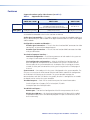
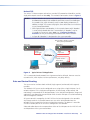
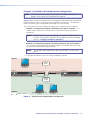
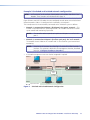
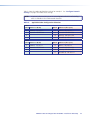
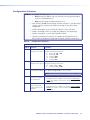
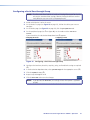
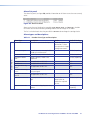
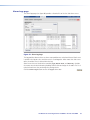
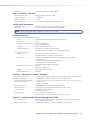
Table 4 shows the codec configuration settings for example 3. See “Configure Network
Settings” on page 16 to make these settings.
Table 4.
Applicable Codec Configuration Selections
Codec 1
Option LAN Port 1 (RJ-45)
Option LAN Port 2 (fiber optic)
2
Address: 172.28.0.1
12
Address: 192.168.1.1
3
Netmask: 255.255.0.0
13
Netmask: 255.255.255.0
14
Gateway: 192.168.0.250
17
Controller ip: 192.168.1.1
Codec 2
Option LAN Port 1 (RJ-45)
Option LAN Port 2 (fiber optic)
2
Address: 172.29.1.1
12
Address: 192.168.1.1
3
Netmask: 255.255.0.0
13
Netmask: 255.255.255.0
14
Gateway: 192.168.1.250
17
Controller ip: 192.168.0.1
Configuring Network Settings
NOTE:
Perform the procedures in this section before you connect any codec to a
network.
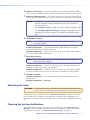
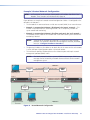
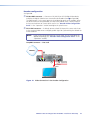
Connect a computer to the Remote port (a) on each unit to configure the network settings
for that unit. Set one codec in the system as the controller.
See”Serial Port Wiring”, below to make a cable for Remote port.
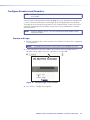
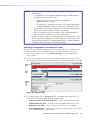
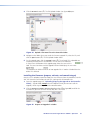
See “Configure Network Settings” to configure the network settings.
Serial Port Wiring
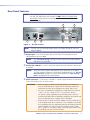
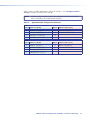
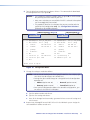
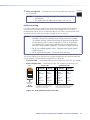
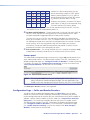
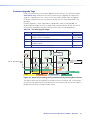
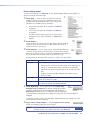
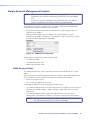
Figure 9 shows how to connect a host device to the Remote port (a).
REMOTE
1
5
6
9
Pin RS-232 Function
1
DCD Data character detect
2
RX
Receive data
3
TX
Transmit data
4
DTR Data terminal ready
5
Gnd Signal ground
6
DSR Data set ready
7
RTS Request to send
8
CTS Clear to send
9
Ring Ring indicator
Figure 9. Pin Assignment for the Remote Port
NOTES: • The VNC 325 uses 9-pin D male connectors. You may need an adapter.
• The RS-232 protocol for the Remote port is as follows:
Baud rate: 115200 Data bits: 8
Parity: None
Stop bits: 1
Flow control: None
VN-Matrix 325 Serial Digital Over IP CODEC • Installation and Setup
16