1
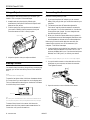
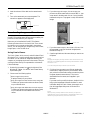
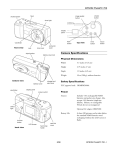
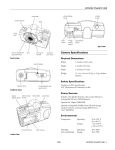
EPSON PhotoPC 550 The battery icon flashes when your battery power is completely out. At this point, you can’t take pictures until you replace the batteries or use the optional AC adapter. Handling Batteries When your PhotoPC 550 batteries wear out, you can replace them with any of the following: You should use the battery icon only as a guide to estimate remaining power. Several factors can affect battery life, including the surrounding temperature and the type of batteries you use. Low temperatures—especially below 50 °F (10 °C)—drain your batteries faster. ❏ Single-use AA alkaline batteries (Energizer brand recommended) ❏ Single-use AA lithium batteries (longer life) ❏ Rechargeable AA NiCd batteries ❏ Rechargeable AA NiMH batteries WARNING To avoid the danger of fire or explosion, do not mix different types of batteries. Do not allow the battery contacts to touch metal objects such as coins or keys, which could short out the battery’s circuits. Read all safety and handling instructions before using batteries. ❏ Use the batteries that came with your camera only in EPSON digital cameras. Standard (S) ❏ Do not use manganese batteries. Produces color images at 320 × 240 pixels, with standard compression. The image size is smaller and includes less detail when enlarged. This is ideal for web pages and walletsize pictures (the picture size is approximately 2.2 × 1.7 inches [43.2 × 55.8 mm]). The camera holds at least 24 pictures in this mode. ❏ Battery life varies depending on the battery type and the manufacturer. Checking the Display Panel The display panel shows the camera’s current settings, the number of pictures remaining, and status of your batteries. High (Hi) Produces color images at 640 × 480 pixels with standard compression. Pictures include greater detail and are snapshot size (approximately 3.3 × 4.4 inches [83.8 × 111.8 mm]). The camera holds at least 12 pictures in this mode. . voice recording macro mode pictures remaining self timer erase Super High (S-Hi) battery status Checking the Battery Before you take pictures, check the battery icon on the control panel. The icon shows how much battery power you have left, in the following stages. Full battery power (or AC adapter in use) to Battery power is decreasing Battery power low (time to buy new batteries) Battery power is almost out Change batteries NOTE When the battery power is low, image processing is less reliable. PhotoPC 550 has three image quality (resolution) settings: Standard, High, and Super High. Press the image quality button on top of the camera to cycle from one setting to the other. The image quality icons (shown below) appear on the display panel. Note the following when handling batteries: image quality Setting Image Quality Produces color images at 640 × 480 pixels with low compression. With less compression, Super High images are better for pictures that will be enlarged. The camera holds at least 6 snapshot size (approximately 3.3 × 4.4 inches [83.8 × 111.8 mm]) pictures in this mode. NOTE You can switch between the settings and mix pictures of varying quality in the camera. The camera’s capacity for storing images will vary accordingly. Depending on the content of your pictures, your camera may hold more than the numbers shown. As long as the display panel shows a number other than zero, you can continue taking pictures. When you turn the camera off and back on, the image quality setting is the last setting used. When you replace the batteries, the image quality setting defaults to High. 10/8/97 PhotoPC 550 - 3