1
User guide
CANMAX400 Standalone
Revision: 16-Nov-09
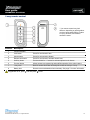
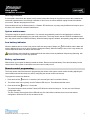
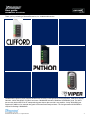
2-way remote control
* Your remote control may look
different, depending on which product
you have purchased (Clifford, Python
or Viper); however, the features
remain the same.
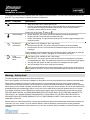
Function
Description
1
Transmit indicator
2
LED indicators
Blink to indicate function confirmation.
3
Lock button
Press for one second to arm.
4
Unlock button
Press for one second to disarm.
5
Remote start button
Press for one second to activate remote start.
6
Auxiliary button
Press and hold for 1.5 second to activate optional trunk release.
7
Function button
Allows access to programming and modifies operation of the other buttons.
8
2-way label
Back of remote has a label to identify the remote as 2-way or 1-way.
9
Battery door
Remote to access batteries when necessary. See page 7 for more information.
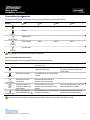
If keypad lock is on, press
and then press
© 2009 Directed Electronics, Inc. All rights reserved.
to exit.
4