1
OPERATING YOUR WASHER
USING YOUR WASHER (CONT.)
9. Push in the Cycle Control knob and turn it to the
10. Pull out the Cycle Control knob to start
wash cycle you want.
See “Cycle descriptions.”
• Reduce the wash
time when using a
small load size setting.
the washer.
NOTE: To stop the washer at any time, push in the
Cycle Control knob. Do not stop the washer during
water pump out. To restart the washer, close the lid
(if open) and pull out the Cycle Control knob.
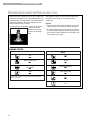
SELECTING A CYCLE AND TIME
This section describes the available wash cycles
and will help you make the best cycle selections
for your wash loads. Each cycle is designed for
different types of fabric and soil levels.
• The washer pauses briefly throughout each cycle.
NOTE: When tested to AS2040-1990 for wash
performance, the Regular/Normal cycle was
selected with extra large load size, warm wash,
and cold rinse.
•
These pauses are normal. Refer to “Understanding
normal washer sounds” to learn more about the
sounds you may hear during a wash cycle.
Refer to “Understanding what happens in each
cycle” to learn what happens during a wash cycle.
7