1
RADIO RECEPTION
English
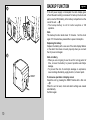
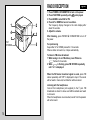
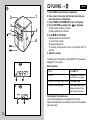
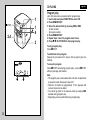
Press POWER 6 STANDBY/ON to turn on the power.
Press FUNCTION repeatedly until
is displayed.
Press BAND to select AM or FM.
Press UP or DOWN to tune in to a station.
The frequency display changes to the clock display after
about 10 seconds.
5 Adjust the volume.
1
2
3
4
1
4
FM
STEREO
2
3
5
After listening, press POWER 6 STANDBY/ON to turn off
the power.
For quick tuning
Keep either UP or DOWN pressed for 1-2 seconds.
When a station is tuned in to, it stops automatically.
To listen to FM stereo broadcast
1 While tuning in to an FM station, press FM stereo.
flashes for 3 seconds.
2 While
is flashing, press FM STEREO repeatedly
until “on” is displayed.
When the FM stereo broadcast signal is weak, press FM
stereo repeatedly until “OFF” is displayed in step 2. The sound
will be heard in monaural, but distortion will be reduced.
Listening with the headphones
Connect the headphones (not supplied) to the \ jack. FM
broadcasts are heard in stereo and AM broadcasts are heard
in monaural.
When the headphones are connected, sound from the speaker
will not be heard.
14