1
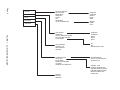
Setup Menu
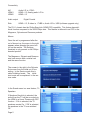
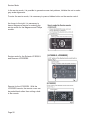
In the Setup Menu, channels can be programmed using Autoprogram. Channels
can be deleted from the channel ring
using Channel List. Add Channels can be
used to to add channels not picked up
during Autoprogram. Antenna is only
available in the Antenna mode.
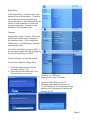
Features
Among other things, Location, Child lock,
and Closed Caption can be selected in
the Features menu. This is called the
Details menu in the Magnavox, Sylvania
and Emerson sets.
Out of box, the Child Lock pin is 0000. If
the customer forgets their pin, unplugging
the set will reset the pin to 0000.
Current Software can also be viewed.
To load new software: (Philips Only)
1. Down the latest version from the
customer website *.zip.
2. Unzip the file and extract the *.ecc
file and load it in to the root
directory of a USB drive.
3. Unplug the TV from AC power.
4. Insert the USB drive into the TV.
5. Re-apply power and turn the set On.
6. Do not unplug the set on use the remote
while the set is programming as this will
damage the TV.
Page 3