1
Phone Book
T39
5
Preparing Your Phone
6
Saving Contacts ........................... 34
Calling a Contact ......................... 35
Editing the Phone Book ............... 36
Copy to and from the SIM Card .. 37
Business Cards............................. 37
Groups ......................................... 39
Touch Tone Services ................... 40
Checking the Memory ................. 40
No
so t f
n M or
ob Com
ile
me
Co
r
mm cial
un Us
ica e
tio
n
Assembly ....................................... 7
SIM Card ....................................... 7
Battery ........................................... 7
The Clip ....................................... 10
Text Messages
Making Calls
11
Turning Your Phone On .............. 11
Making a Call .............................. 11
Receiving a Call .......................... 14
Turning Your Phone Off ............. 14
During a Call
15
Earpiece Volume ......................... 15
Microphone.................................. 15
Notepad........................................ 15
Sending Touch Tone Signals....... 15
Ciphering ..................................... 16
Key Functions
17
Menus
18
Moving through the Menus ......... 18
Instructions .................................. 18
Display Text ................................ 19
Help Texts ................................... 20
Menu Language ........................... 20
My Shortcuts ............................... 20
Personalizing
Your Phone
22
ics
Sounds ......................................... 22
Pictures ........................................ 25
Display......................................... 27
Time and Date ............................. 28
Flip settings ................................. 29
Master Reset ................................ 29
Er
Entering Letters
30
Input Languages .......................... 30
Multitap Text Input...................... 30
T9® Text Input ............................ 31
34
sA
B
Contents
41
Before Sending Messages............ 41
Sending Messages........................ 43
Status Report................................ 45
Receiving Messages .................... 45
List of Options ............................. 46
Area Information ......................... 48
Bluetooth™
Wireless Technology
49
Before You Start.......................... 49
Operation Modes ......................... 51
Searching for Devices.................. 52
Sending and Receiving ................ 52
Infrared Port
54
Activating the IR Port.................. 54
Connecting IR Devices................ 55
Calendar
56
Appointments and Tasks ............. 56
Viewing Your Calendar............... 57
Editing and Deleting .................... 58
The List of Options...................... 58
Calendar Settings......................... 59
Exchanging Calendar Entries ...... 59
Synchronization
61
Starting the Synchronization ....... 61
Internet Calendar Synchronization 62
Setting up WAP
and E-mail
63
Data Account Settings ................. 63
WAP Profile Settings................... 65
E-mail Account Settings.............. 67
1
69
Diverting Calls
E-mail
74
Sending and Receiving ................74
Writing and Sending ....................74
Attaching Pictures........................75
Receiving and Reading ................75
Replying .......................................76
Deleting........................................76
Archiving .....................................76
Data Calls
77
Making Data Calls .......................77
Receiving Data Calls....................77
Sending and Receiving E-mail from
Your PC .......................................78
Profiles
More than One Call
82
Before Voice Dialling ..................82
Voice Dialling ..............................83
Voice Answering .........................83
Changing Profiles.........................84
Recording Voice Memos .............84
The Magic Word ..........................85
Editing Your Voice Commands...85
Voice Memo
87
Er
ics
Recording Voice Memos .............87
Listening to Voice Memos...........87
Editing Voice Memos ..................88
Recording Quality ........................88
Settings.........................................88
2
Voice Mail Service
92
Call Waiting Service ....................92
Making a Second Call ..................92
Receiving a Second Call ..............93
Handling Two Calls .....................93
Receiving a Third Call .................94
Conference Calls ..........................94
Call Time and Call Cost 96
Checking the Time or Cost ..........96
Setting the Call Cost ....................96
Credit Limit for Calls...................97
Minute Minder .............................97
Networks
98
Searching for Networks ...............98
Preferred Networks ......................99
Search Modes.............................100
79
Selecting a Profile ........................79
Changing the Profile Settings ......80
Accessories ..................................80
Voice Control
90
Activating Divert Calls ................90
Cancelling Divert Calls................90
Checking Divert Status ................91
No
so t f
n M or
ob Com
ile
me
Co
r
mm cial
un Us
ica e
tio
n
Starting the WAP Browser...........69
Exiting the WAP Browser ...........69
Options When Browsing..............70
Additional WAP Options.............70
Security ........................................71
WAP Push Messages ...................73
sA
B
WAP
89
Calling Your Voice Mail .............89
Message Alert Signal ...................89
Security
101
Locking the SIM Card ...............101
Locking the Phone .....................102
Restricting Calls.........................102
Fixed Dialling ............................103
Closed User Groups ...................104
Accepting Calls..........................104
Code Memo
106
Checkword and Security ............106
Using Code Memo .....................106
Deleting and Editing Codes .......107
Changing the Password..............107
Forgot Your Password?..............107
Two Voice Lines
108
Changing the Name....................108
Changing Lines ..........................108
Locking One Line ......................108
Calling Card Calls
110
Calling Card Service ..................110
Saving Calling Card Numbers ...110
Games
Troubleshooting
Error Messages .......................... 119
Other Problems .......................... 120
112
Tennis ........................................ 112
Erix ............................................ 113
119
sA
B
Choosing a Card ........................ 111
Making a Calling Card Call....... 111
Technical Data
121
No
so t f
n M or
ob Com
ile
me
Co
r
mm cial
un Us
ica e
tio
n
Safe and Efficient Use 124
Tools
114
Alarm Clock .............................. 114
Stopwatch .................................. 115
Timer ......................................... 115
Calculator .................................. 116
Online Services
131
Regulatory Information 134
Icons
136
Quick Keys
140
Index
143
117
118
Er
ics
Ericsson
Mobile Internet
Limited Warranty
3
sA
B
No
so t f
n M or
ob Com
ile
me
Co
r
mm cial
un Us
ica e
tio
n
Ericsson T39
First edition (March 2001)
This User’s Guide is published by Ericsson Mobile Communications AB,
without any warranty. Improvements and changes to this User’s Guide
necessitated by typographical errors, inaccuracies of current information,
or improvements to programs and/or equipment, may be made by Ericsson
Mobile Communications AB at any time and without notice. Such changes
will, however, be incorporated into new editions of this User’s Guide.
All rights reserved.
©Ericsson Mobile Communications AB, 2001
Publication number: EN/LZT 108 4560 R1A
INNOVATRON PATENTS
Please note:
Some of the services described in this User’s Guide are not supported by
all networks. Such services are indicated by an icon in the left margin.
This also applies to the GSM International Emergency Numbers.
Please contact your network operator or service provider if you are in
doubt whether you can use a particular service or not.
Please read the Safe and Efficient Use and the Warranty chapters before using
your mobile phone.
The BLUETOOTH trademarks are owned by Telefonaktiebolaget L M
Ericsson, Sweden.
Er
ics
T9 is a registered trademark of Tegic Communications.
T9 is licensed under one or more of the following: U.S. Pat. Nos. 5,818,437,
5,953,541, 5,187,480, 5,945,928, and 6,011,554; Canadian Pat. No.1,331,057;
United Kingdom Pat. No. 2238414B; Hong Kong Standard Pat. No.
HK0940329; Republic of Singapore Pat. No. 51383; Euro. Pat. No. 0 842
463(96927260.8) DE/DK, FI, FR, IT, NL, PT, ES, SE, GB; and additional
patents are pending worldwide.
No
so t f
n M or
ob Com
ile
me
Co
r
mm cial
un Us
ica e
tio
n
T39 is a Triple Band mobile phone
operating on GSM 900/1800/1900 networks.
Its advanced functionality offers you a host
of new and interesting features ensuring you
remain efficient and productive, no matter
where you are.
sA
B
T39
T39 supports GPRS (General Packet Radio
Services), which are designed to keep you
always online and facilitate rapid transmission
of data – ideal when using E-mail or the
WAP browser. Speed of data transmission is
further enhanced by its High Speed Data
functionality.
Advanced wireless connectivity is guaranteed
with Bluetooth wireless technology that lets
you connect with other Bluetooth devices
such as a headset, PC, PDA or printer. For
example, you can exchange business cards
and synchronize your Calendar using
Bluetooth wireless technology.
Er
ics
T39 contains many timesaving functions that
are helpful and fun to use. T9 Text Input lets
you write text messages quickly which can be
enhanced with both music and pictures.
Contacts in the phone book lets you save
multiple numbers and voice commands for
each person and Voice control enables
complete handsfree communication, using
the Magic word.
T39
5
No
so t f
n M or
ob Com
ile
me
Co
r
mm cial
un Us
ica e
tio
n
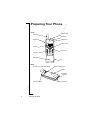
Front
sA
B
Preparing Your Phone
Antenna
Indicator light
Earpiece
Volume key
Infrared Port
Power on/off
Display
Arrow keys
Keypad
Microphone
Flip
Back
Connector for external antenna
Battery release catch
Battery
ics
Handsfree
connector
Er
Hole for belt clip
6
Preparing Your Phone
Charging connector
You need to do the following to use your phone:
• insert the SIM card.
• attach and charge the battery.
No
so t f
n M or
ob Com
ile
me
Co
r
mm cial
un Us
ica e
tio
n
SIM Card
sA
B
Assembly
Your network operator provides you with a SIM (Subscriber Identity
Module) card. The SIM card contains information about your phone
number, the services included in your subscription, and your phone
book, among other things.
Note: Turn off the phone and disconnect the charger and other
accessories before you insert or remove your SIM card.
Inserting and Removing the SIM Card
1. Remove the battery if attached. Slide the SIM card into the slot,
under the silvery holders, with the golden connectors facing down.
2. To remove it, raise the edge of the SIM card and slide it out.
Battery
Your phone comes with a lithium battery. The battery is not charged
when you buy your phone, but there may be enough power to turn the
phone on.
• Place the battery on the back
of the phone and push until
you hear a click.
Er
ics
Attaching the Battery
Preparing Your Phone
7
No
so t f
n M or
ob Com
ile
me
Co
r
mm cial
un Us
ica e
tio
n
sA
B
When to Charge the Battery
You can charge the battery that comes with your phone whenever you
wish, without its performance being affected. You can also charge the
battery when the phone is off. To remind you that you will soon need
to charge the battery or replace it with a charged one:
• an alarm signal (a short beep) sounds and Attention! Battery low
appears in the display.
• the indicator light on top of the phone starts flashing red.
With an Ericsson-approved battery, you can check the remaining talk
time and standby time in the Status menu by sliding the volume key
up or down in standby mode. The total remaining talk time and
standby time may vary, depending on network conditions. Please note
that these times are approximate and that you may have 10% less
time than is shown in the display.
Charging the Battery
1. Make sure that the battery
is attached to the phone.
2. Connect the charger to
the mains.
3. Connect the charger to the
phone as shown. The flash
symbol on the plug must
face upwards.
Er
ics
Note: The mains plug may look different depending on the mains
socket in your country. Do not connect it to any item other than your
Ericsson Travel Charger CTR-10. Do not separate the charger from
the plug when plugged into the mains socket.
8
Preparing Your Phone
sA
B
To indicate charging:
• the battery meter in the display pulses continuously.
• the indicator on top of the phone shows a steady red light (or green,
if the phone is switched on).
• Optimized charging is shown briefly in the display.
No
so t f
n M or
ob Com
ile
me
Co
r
mm cial
un Us
ica e
tio
n
Note: It may take up to 30 minutes before you get an indication of
charging in the display, if you are charging a new battery that is
completely flat, or a battery that has not been used for a long time.
When the battery is fully charged, the battery meter in the display is
full and the indicator on top of the phone shows a steady green light.
For the best charging, talk and standby times in the long run, we
recommend that you use only Ericsson-approved batteries with your
phone. Please note that use of non-Ericsson-approved batteries will
invalidate your phone warranty.
Disconnecting the Charger
Tilt the plug up.
Removing the Battery
2. Lift the battery away from
the phone.
Er
ics
1. Slide the release catch up.
Preparing Your Phone
9
sA
B
The Clip
By using the clip with your phone, you can hang your phone, for
example, on your trousers or shirt.
No
so t f
n M or
ob Com
ile
me
Co
r
mm cial
un Us
ica e
tio
n
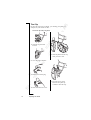
To use the clip with your phone
1. Open the clip and slide
it down.
5. Slide the phone into the clip
until you hear a click.
2. Close the clip to attach it.
Er
ics
3. Remove the rubber plug.
10
4. Insert and fasten the screw.
Preparing Your Phone
6. Press the release catch
and move the phone up
to detach it from the clip.
sA
B
Making Calls
No
so t f
n M or
ob Com
ile
me
Co
r
mm cial
un Us
ica e
tio
n
Before you can make and receive calls, you need to turn on the phone
and be within range of a network.
Turning Your Phone On
• Open the flip.
• Press and hold the N O key until you hear a tone.
The PIN
Most SIM cards are protected with a PIN (Personal Identity Number),
which you get from your network operator and which you need in
order to access the network. If PIN: appears in the display after you
have turned on the phone:
1. Enter your PIN. If you make a mistake while entering your PIN,
delete the wrong number by pressing
.
2. Press Y E S .
If your PIN is entered incorrectly three times in a row, the SIM card
is blocked. If this happens, you can unblock it by using your PUK
(Personal Unblocking Key), which you also get from your network
operator. See “Locking the SIM Card” on page 101.
If Phone locked appears in the display, enter your phone lock code.
See “Locking the Phone” on page 102.
Network Search
After you have turned on the phone (and entered your PIN), the
phone searches for a network. When a network is found, the phone
beeps three times. The indicator light on top of the phone flashes
green and your network operator’s name (in most cases abbreviated)
appears in the display. This is called standby mode. You can now
make and receive calls.
ics
Note: If you do not reach standby mode, see “Error Messages” on
page 119 or “Searching for Networks” on page 98.
Er
Making a Call
1. Enter the area code and phone number (note that some countries
may not use area codes).
2. Press Y E S .
3. Press N O to end the call.
Making Calls
11
No
so t f
n M or
ob Com
ile
me
Co
r
mm cial
un Us
ica e
tio
n
sA
B
Using the Call List
The numbers that you have dialled are always saved in the Call list.
If your subscription includes the Calling Line Identification (CLI)
service and the caller’s network sends the number, you will also find
the numbers (together with a name if saved in your phone book) of
answered and missed calls in the call list. If the incoming call is a
restricted number, the display shows Withheld. If the incoming call
is an unknown number, the display shows Unknown.
You can delete a number by pressing
, YES.
The call list saves:
Dialled numbers
Answered calls
Missed calls
The last 30 incoming and outgoing calls are saved together in chronological order. The last call made is saved in first position. If the same
number is called more than once, the latest call replaces earlier ones.
If you check a call within 24 hours, the time of the call is displayed.
Otherwise, the time is replaced by the date.
To call a number from the call list
1. Press Y E S from standby mode.
2. Press
or
until the number you want to call is
highlighted.
3. Press Y E S .
Note: You can also find the Call list in the Call info menu.
Depending on whether a call is ongoing or not, either the Call info
menu or the Ongoing call menu is shown.
Er
ics
To clear the call list
1. Press
until you reach the Call info menu. press Y E S .
2. Press
until the Options sub-menu is highlighted, press Y E S .
3. Press
until the Clear call list sub-menu is highlighted,
press Y E S .
4. The question Call list Clear? appears. Press Y E S to clear the
call list.
12
In the Call listing sub-menu in Options, you can turn the call list on
or off. If you select Off, you are asked to clear the call list.
Making Calls
No
so t f
n M or
ob Com
ile
me
Co
r
mm cial
un Us
ica e
tio
n
sA
B
Automatic Re-Dialling
If the connection failed when you first called, the display shows
Retry?. You can now re-dial the number by pressing Y E S . Your
phone automatically re-dials (up to ten times):
• until the call is successfully connected. You hear a ring signal.
• until you press a key or receive a call.
Note: Automatic re-dialling is not available for fax and data calls.
Making International Calls
1. Press and hold the 0 key until a + sign appears.
The + replaces the international prefix of the country from which
you are calling.
2. Enter the country code, area code (without the leading zero) and
phone number.
3. Press Y E S .
Making Emergency Calls
• Enter the international emergency number 112 and press Y E S .
Your Ericsson phone supports the international emergency numbers,
112, 911 and 08. This means that these numbers can normally be used
to make an emergency call in any country, with or without a SIM card
inserted, if a GSM network is within range.
Note: Some network operators may require that a SIM card is
inserted, and in some cases that the PIN has been entered as well.
In some countries, other emergency numbers may also be promoted.
Your operator may therefore save additional local emergency
numbers on the SIM card.
To view your local emergency numbers
1. Press
to go to the Phone book menu, press Y E S .
2. Press
until Special numbers is highlighted, press Y E S .
3. Press
until SOS numbers is highlighted, press Y E S .
Er
ics
Showing and Hiding Your Number
Some operators offer subscriptions where your phone number can be
hidden. You can choose to show or hide your number for a particular
call, if your subscription supports the Calling Line Identification
Restriction (CLIR) service.
Making Calls
13
sA
B
To hide or show your phone number
Enter the phone number you wish to call.
Press
until you reach the Call info menu, press Y E S .
Press
until Next call is highlighted, press Y E S .
Press
until Hide my number or Show my numb. is highlighted.
Press Y E S to make the call.
No
so t f
n M or
ob Com
ile
me
Co
r
mm cial
un Us
ica e
tio
n
1.
2.
3.
4.
5.
Receiving a Call
When you receive a call, the phone rings and the display shows
Answer? If your subscription includes the Calling Line Identification
(CLI) service and the caller’s network sends the number, the caller’s
number appears in the display. If the incoming call is a restricted
number, the display shows Withheld. If the incoming call is an
unknown number, the display shows Unknown. If the number has a
name associated with it in the contacts list, then the name will also be
displayed.
Answering a Call
• Open the flip or press Y E S to answer the call.
Rejecting a Call
• Slide the volume key on the side of the phone twice.
The display shows Busy tone. The caller hears a busy tone if this
is supported by the caller’s subscription. If the When busy divert
function is on, the call is diverted to the number you have
specified. See “Diverting Calls” on page 90.
Missed Calls
If you have missed a call, the message Missed calls: 1 appears in
standby mode, where the number, in this case 1, indicates the number
of missed calls.
1. Press Y E S to display the missed calls.
2. Press Y E S to call the number.
Tip: You can also see the missed calls list in the Call info menu.
Missed calls are also saved in the call list.
ics
Turning Your Phone Off
Er
• In standby mode, press and hold the N O key until you hear a tone.
14
Making Calls
sA
B
During a Call
No
so t f
n M or
ob Com
ile
me
Co
r
mm cial
un Us
ica e
tio
n
Earpiece Volume
During a call, you can change the earpiece volume by sliding the
volume key on the side of the phone.
• Slide up to increase the volume.
• Slide down to decrease the volume.
Microphone
During a call, you can turn off the microphone.
• Press and hold
until Muted appears in the display.
• Press and hold
again to resume the conversation.
Tip: Instead of pressing and holding
hold by pressing Y E S .
, you can put the call on
Notepad
If you want to make a note of a phone number during a call, you can
use your phone display as a notepad. Use the number keys to enter
the number. When you end the call, the number remains in the
display. You can call the number by pressing Y E S .
Turn Off Tones
If you use the phone display as a notepad, the person you are talking
to hears the tone signals when you press the keys.
To turn the tone signals on or off
1. Press
to go to the Ongoing call menu, press Y E S .
2. Press
until Turn off tones or Turn on tones is highlighted,
press Y E S .
Sending Touch Tone Signals
Er
ics
To use touch tone services such as telephone banking or controlling
an answering machine, you need to use codes. These codes are sent
as touch tone signals (also known as DTMF – Dual Tone Multiple
and
during a call,
Frequency tones). If you press 0 –9 ,
these numbers and characters are sent as tone signals. You can save
codes in your phone book, and during a call, you can send the codes
by pressing Find and send. See also “Touch Tone Services” on
page 40.
During a Call
15
sA
B
Ciphering
Er
ics
No
so t f
n M or
ob Com
ile
me
Co
r
mm cial
un Us
ica e
tio
n
Ciphering is a built-in feature that encodes your calls and messages
to provide additional privacy. An exclamation mark is shown in the
display during a call to indicate that ciphering is currently not being
provided by the network.
16
During a Call
sA
B
Key Functions
No
so t f
n M or
ob Com
ile
me
Co
r
mm cial
un Us
ica e
tio
n
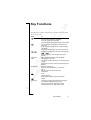
The table below explains some of the key functions. See also “Quick
Keys” on page 140.
Press...
To
make and answer calls.
choose a menu, sub-menu or setting.
voice dial, press and hold the key.
enter the Call list, briefly press the key from standby.
turn the phone on or off, press and hold the key.
end a call.
go back one level in the menus, to leave a setting
unchanged.
get back to standby mode, press and hold the key.
enter and move within the main menus, briefly press
or
.
move (scroll) up or down through menus, lists
and text.
Clear
Number keys
delete numbers and letters from the display.
delete an item from a list.
turn off the microphone during a call, press and hold
the key.
set the phone to silent, press and hold the key from
standby.
enter the numbers 0-9.
enter the international prefix (+), press and
hold 0.
call your voice mail, press and hold 1.
enter letters.
enter *.
enter a pause (p).
shift between capital and lower-case letters.
enter #.
increase or decrease the volume of the earpiece
or handsfree loudspeaker during a call.
reject an incoming call, slide the key twice.
enter the Status menu, slide the key briefly.
Er
ics
Volume key
Key Functions
17
sA
B
Menus
No
so t f
n M or
ob Com
ile
me
Co
r
mm cial
un Us
ica e
tio
n
There are seven main menus. Each menu has several sub-menus. You
enter the menus by briefly pressing
or
. You also use these
keys to move from left to right in the main menus and up and down in
the sub-menus. Your phone includes pop-up help texts. See “Help
Texts” on page 20.
Moving through the Menus
There are two ways of moving through the menus:
• scrolling by using the keys.
• using shortcuts.
Scrolling by Using the Keys
Press...
or
to...
enter and move through the main menus and
sub-menus.
YES
select a menu, sub-menu or setting.
NO
go back one level in the menus or leave a setting
unchanged.
Press and hold N O to go back to standby.
Tip: When in the menus, instead of pressing the keys repeatedly to
reach the sub-menu that you want, you can press and hold the arrow
keys or slide and hold the volume key.
Using Shortcuts
A quicker way to move through the menus is to use the shortcuts.
First briefly press
or
to enter the menus, then enter the
number of the menu or sub-menu to which you want to go. To get
back to standby, press and hold N O . See the example on the
following page.
Er
ics
Instructions
18
In the instructions in this User’s Guide, we use the arrow keys to
describe the functions and settings, since the shortcut numbers may
vary between phones according to your subscription and network.
In this example of how to interpret the instructions, we are going to
set the key sound to Tone.
Menus
sA
B
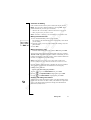
To set the key sound
1. Scroll to Settings, Y E S , Sounds & alerts, Y E S , Key sound, Y E S .
2. Select Tone and press Y E S .
No
so t f
n M or
ob Com
ile
me
Co
r
mm cial
un Us
ica e
tio
n
Interpret the instructions as follows:
1. From standby mode, use
or
to scroll to the Settings menu.
2. Press Y E S to select the menu.
You are now in the Settings menu.
The name of the menu that you have selected is shown at the top
of the display.
3. Press Y E S to select the Sounds & alerts sub-menu.
4. Use
or
to scroll to the Key sound sub-menu.
Press Y E S to select the sub-menu.
5. Use
or
to scroll to Tone.
Press Y E S to select the Tone alternative.
You have now set the key sound to Tone.
To go back to standby mode, press and hold the N O key.
When using shortcuts, interpret the instructions as follows:
1.
2.
3.
4.
5.
To set the key sound
From standby mode, press
or
to enter the menus.
Press 4 to select the Settings menu.
Press 1 to select the Sounds & alerts sub-menu.
Press 8 to select the Key sound sub-menu.
Select Tone and press Y E S .
Display Text
Er
ics
When you move through the menus, the display changes.
• White text on a grey background at the top indicates the menu you
have selected.
• White text on a black background indicates your position in the
menus. Press Y E S to enter this menu or select this setting.
• Grey text indicates a function that is temporarily unavailable, for
example due to your subscription or a certain setting which is
not on.
• Text marked with a tick indicates the current setting or settings
selected.
• Text marked with a filled button indicates the current setting
selected.
Menus
19
sA
B
Help Texts
Your phone includes pop-up help texts that explain the sub-menus.
No
so t f
n M or
ob Com
ile
me
Co
r
mm cial
un Us
ica e
tio
n
To turn the help texts on or off
1. Scroll to Settings, Y E S , Display, Y E S , Menu help, Y E S .
2. Select On or Off and press Y E S .
Menu Language
Most modern SIM cards automatically set the menu language to
the language of the country where you bought your SIM card,
Automatic. If this is not the case, the pre-set language is English.
To change the menu language
1. Scroll to Settings, Y E S , Language, Y E S , Menus, Y E S .
2. Select a language and press Y E S .
To select a language that you want to use when writing text, see
“Input Languages” on page 30.
Tip: You can always select Automatic by pressing
in standby, and English by pressing
, 0000,
, 8888,
in standby.
My Shortcuts
To reach your favourite functions and settings quickly and easily, you
can place them in the menu My shortcuts. You place them there by
selecting them in the list of Edit shortcuts.
To select your favourite settings for My shortcuts
1. Scroll to My shortcuts, Y E S , Edit shortcuts, Y E S .
2. Select or clear a setting from the list by scrolling to it and
pressing
.
3. If you select a new setting, enter the position number you want for
it in this menu. Press Y E S .
4. Press Y E S to save your settings and exit the list.
When you buy your phone, the menu My shortcuts contains a few
settings which you can delete if you wish.
Er
ics
Tip: Press and hold
from standby to reach the shortcut saved
in the first position in My shortcuts.
20
Menus
Menus
21
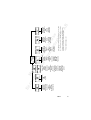
ics
Call contact
Add contact
Edit contact
Business cards
Call from SIM
Groups
Calling cards
Options
Memory status
Special numbers
Er
Call voice mail
SMS
E-mail
Options
Missed calls
Call list
Call costs
Call timers
Data counters
Next call
Options
Turn on/off tones*
Hold call*
Switch calls*
Release active*
Retrieve call*
Join calls*
Transfer call*
Extract part*
Release all*
Release part*
Parties in conf*
Call info*
Sounds & alerts
Profiles
Call options
Networks
Display
Language
Time and date
Locks
Voice control
Handsfree
Phone name
Master reset
Data comm.
Flip functions
NETWORK
04:22pm
Homepage
Bookmarks
Push inbox
Enter address
Resume
Select profile
Clear cache
WAP settings
* Only available during a call.
Please note that many of the menu alternatives are
dependent on your network and subscription.
sA
B
Select profile
Ring volume
Switch to line 1
Alarm
Bluetooth
Infrared port
Edit shortcuts
Depending on whether a call is ongoing or not, either
the Call info menu or the Ongoing call menu is shown.
Calendar
Infrared port
Synchronization
Bluetooth
Time
Pictures
Code memo
Calculator
Games
Voice memo
Accessories
No
so t f
n M or
ob Com
ile
me
Co
r
mm cial
un Us
ica e
tio
n
sA
B
No
so t f
n M or
ob Com
ile
me
Co
r
mm cial
un Us
ica e
tio
n
Personalizing Your
Phone
Sounds
You can change the volume, ring signal and key sound according to
your preferences. You can set a specific ring signal for a specific
person so that you know who is calling by the ring signal. You can
also compose your own melody and send it to another phone.
Note: If you change a setting which is included in a profile, the
profile is also changed. See “Profiles” on page 79.
Ring Volume
You can set the volume to six levels. The first level means that only
two clicks are heard when you receive a call. You can also turn the
ring signal off (0). An icon then appears when in standby mode.
To set the ring volume
1. Scroll to Settings, YES, Sounds & alerts, YES, Ring volume, YES.
2. Use
or
to increase or decrease the volume.
3. Press Y E S to save the setting.
Tip: Use the volume key to change the volume silently.
Silent
You can set your phone to silent so that all signals, except the alarm
and timer signals, are turned off.
To set the phone to silent
1. From standby, press and hold
.
2. Silent on? appears. Press Y E S .
An icon appears when in standby mode.
To cancel, repeat step 1 and press Y E S at Silent off?.
Er
ics
Increasing Ring
You can select a ring signal, Increasing ring, that rises in steps from
the lowest volume to the highest.
22
To turn the increasing ring on or off
1. Scroll to Settings, YES, Sounds & alerts, YES, Increasing ring, YES.
2. Select On or Off and press Y E S .
The increasing ring must be Off for the ring signal volume to apply.
Personalizing Your Phone
No
so t f
n M or
ob Com
ile
me
Co
r
mm cial
un Us
ica e
tio
n
sA
B
Vibrating Alert
You can select to be notified of an incoming call by the buzzing of the
Vibrating alert. You can set the phone’s vibrating alert to one of the
following:
• On (all the time)
• On if silent (on when the ring volume is turned off or when you
have set the phone to silent)
• Off (all the time)
To set the Vibrating Alert
1. Scroll to Settings, Y E S , Sounds & alerts, Y E S , Vibrating alert, Y E S .
2. Select a setting and press Y E S .
Note: When your phone is placed in a desktop charger or a car
handsfree kit, the vibrating alert is automatically turned off.
Ring Signal Type
You can select a ring signal from a list of different sounds and
melodies. See also “Composing Your Own Melodies” on page 24.
To select a ring signal
1. Scroll to Settings, Y E S , Sounds & alerts, Y E S , Ring signals,
Y E S , Voice calls, Y E S .
2. Select the ring signal type that you want and press Y E S .
Tip: Use the volume key to change the ring signal silently.
The Low Pitch ring signal has been specially developed for people
with hearing disabilities.
Specific Ring Signals
If you subscribe to the Two Line Service, you can set different ring
signals for the two lines. Line 1 and Line 2 are displayed instead of
Voice calls. If your SIM subscription supports Fax and Data calls,
you can set different ring signals for voice, fax and data calls
respectively.
If your subscription includes the Calling Line Identification (CLI)
service, you can assign a Personal ring signal to up to ten callers.
Er
ics
To set a specific ring signal for a caller
1. Scroll to Settings, Y E S , Sounds & alerts, Y E S , Ring signals,
Y E S , Personal rings, Y E S , Add new?, Y E S .
2. Enter the first letter of the contact name and press Y E S .
3. Select a contact and press Y E S .
4. Select a ring signal and press Y E S .
Personalizing Your Phone
23
sA
B
To delete a caller’s number
1. Scroll to Settings, Y E S , Sounds & alerts, Y E S , Ring signals,
Y E S , Personal rings, Y E S .
2. Scroll to the number you wish to delete and press Y E S .
3. Select Delete and press Y E S .
No
so t f
n M or
ob Com
ile
me
Co
r
mm cial
un Us
ica e
tio
n
Composing Your Own Melodies
You can compose eight different melodies to use as your ring signal.
To compose a melody
1. Scroll to Settings, Y E S , Sounds & alerts, Y E S , My melodies,
Y E S , Edit, Y E S .
2. Select one of the melodies and press Y E S .
3. Press
to clear the display.
4. The keypad now works as a keyboard (see figure).
Use the keypad to enter notes:
• Press and hold a key to enter a long note.
The longer you press a key, the longer that note will be. There
are four different lengths of notes.
• Press
to raise the note an octave.
• Press
twice to raise the note two octaves.
• Press
once to raise the note a semitone.
• Press
twice to lower the note a semitone.
• Press
to enter a pause.
5. To listen to your melody, press Y E S .
6. Press Y E S again to save it or press N O to continue composing.
Tip: You can also download existing melodies from the Ericsson
Mobile Internet: http://mobileinternet.ericsson.com. See also
“Starting the WAP Browser” on page 69.
Er
ics
Exchanging Melodies
You can transfer your melodies to and from another similar phone or
download your new melody from a computer or the Ericsson Mobile
Internet. You can send and receive melodies using Bluetooth wireless
technology, the infrared port or a text message.
24
To send a melody
1. Scroll to Settings, Y E S , Sounds & alerts, Y E S , My melodies,
Y E S , Send, Y E S .
2. Scroll to the melody that you want to send. Press Y E S .
Personalizing Your Phone
sA
B
3. Select a transfer method and press Y E S .
4. Continue as described in “Sending and Receiving” on page 52,
“Connecting IR Devices” on page 55 or “Sending Messages” on
page 43.
No
so t f
n M or
ob Com
ile
me
Co
r
mm cial
un Us
ica e
tio
n
To receive a melody via a text message, see “To save a melody found
in a message” on page 47. To be able to receive a melody using the
infrared port or Bluetooth wireless technology, the recipient first
needs to select the Receive menu in order to activate the infrared port
or to make the phone discoverable.
To receive a melody
1. Scroll to Settings, Y E S , Sounds & alerts, Y E S , My melodies,
Y E S , Receive, Y E S .
2. Select a transfer method and press Y E S .
3. When you receive a melody, New melody Play? appears. Press
Y E S to hear the melody before you save it.
4. Save melody? appears. Press Y E S .
5. Select the position in the melody list in which you want to save the
new melody, press Y E S .
Key Sound
You can choose which sound you want the keys to make when you
press them. You can choose between clicks, tones or silent.
To set the key sound
1. Scroll to Settings, Y E S , Sounds & alerts, Y E S , Key sound, Y E S .
2. Select a key sound and press Y E S .
Pictures
Your phone contains several pictures which you can send in a text
message. See “To insert a picture in a text message” on page 43. You
can edit the pictures and save them in My pictures.
Er
ics
To edit and save a picture in My pictures
1. Scroll to Extras, Y E S , Pictures, Y E S .
2. Select a picture group and press Y E S .
3. Press
or
to scroll through the pictures. Select a picture
and press Y E S to view the editing tools. You can now start to edit
the picture. See the table below.
4. Press Y E S again to view the Options menu.
5. Select Save and press Y E S . The picture is saved in My pictures.
Personalizing Your Phone
25
Press…
to…
move the cursor up and left.
move the cursor up.
No
so t f
n M or
ob Com
ile
me
Co
r
mm cial
un Us
ica e
tio
n
move the cursor up and right.
sA
B
How to use the keys when editing a picture:
move the cursor left.
lift up or put down the pen.
Press and hold to switch between zoom and full
size view.
move the cursor right.
move the cursor down and left.
move the cursor down.
move the cursor down and right.
switch line thickness.
view the Options menu.
exit the Picture editor.
press and hold to clear the picture.
move the cursor 1, 5 or 10 spaces.
switch between black and white pen colour.
The pictures can also be added to My favourites.
1.
2.
3.
4.
To add a picture to My favourites
Scroll to Extras, Y E S , Pictures, Y E S .
Select a picture group and press Y E S .
Select a picture and press
.
Press Y E S to add the picture.
To remove a picture from My favourites, scroll to it and press
, YES.
You can delete the edited pictures from My pictures, but you cannot
delete the original pictures that were in the phone when you bought it.
Er
ics
To delete a picture from My pictures
1. Scroll to Extras, Y E S , Pictures, Y E S , My pictures, Y E S .
2. Scroll to a picture and press
, YES.
26
Personalizing Your Phone
sA
B
Display
You can personalize your phone display with a number of settings.
No
so t f
n M or
ob Com
ile
me
Co
r
mm cial
un Us
ica e
tio
n
Display Light
You can set the display light to automatic, off or on. In automatic
mode, the display light switches off a few seconds after you have
pressed the last key.
To set the display light
1. Scroll to Settings, Y E S , Display, Y E S , Light, Y E S .
2. Select a display light setting and press Y E S .
Sleeping Display
To save battery power, you can turn on the sleeping display. The text
in standby mode is reduced to one row at the bottom of the display a
few minutes after you have pressed the last key.
To turn the sleeping display on or off
1. Scroll to Settings, Y E S , Display, Y E S , Display sleep, Y E S .
2. Select On or Off and press Y E S .
Contrast Setting
You can change the display’s contrast.
To set the display contrast
1. Scroll to Settings, Y E S , Display, Y E S , Contrast, Y E S .
2. Use
or
to increase or decrease the contrast.
3. Press Y E S to save the setting.
Greeting Text
When you turn on your phone, a text or an image appear as a greeting
in the display. You can write your own greeting instead.
1.
2.
3.
4.
To write a new greeting
Scroll to Settings, Y E S , Display, Y E S , User greeting, Y E S .
Select Custom and press Y E S .
Write your new greeting.
Press Y E S to confirm your setting.
Er
ics
To set the standard greeting
1. Scroll to Settings, Y E S , Display, Y E S , User greeting, Y E S .
2. Select Standard and press Y E S .
Personalizing Your Phone
27
sA
B
To turn the greeting off
1. Scroll to Settings, Y E S , Display, Y E S , User greeting, Y E S .
2. Select Off and press Y E S .
No
so t f
n M or
ob Com
ile
me
Co
r
mm cial
un Us
ica e
tio
n
My Numbers
My numbers shows your phone number(s). If your phone number
cannot be retrieved from your SIM card, you can enter it yourself.
To enter your phone number
1. Scroll to Phone book, Y E S , Special numbers, Y E S , My numbers,
Y E S , Voice, Y E S .
2. Enter the number and press Y E S .
Tip: You can also enter your fax and/or data number and the
different numbers for Line 1 and Line 2, if these are supported by
your subscription.
Text Size
You can change the size of the letters and thus the number of visible
rows in the display.
To change the text size and the number of rows
1. Scroll to Settings, Y E S , Display, Y E S , Text size, Y E S .
2. Select a text size and press Y E S .
Time and Date
The time is always shown when the phone is in standby mode.
To set the time
1. Scroll to Settings, Y E S , Time and date, Y E S , Set time, Y E S .
2. Enter the time in hours and minutes (you can move from number to
number by pressing
or
), and press Y E S .
You are now asked whether you want to enter more time
information, such as time zone and daylight saving time. Press Y E S .
3. Select a time zone and press Y E S .
4. Select a daylight saving time and press Y E S .
Er
ics
To set the time format
1. Scroll to Settings, Y E S , Time and date, Y E S , Time settings, Y E S ,
Time format, Y E S .
2. Select the 24-hour or 12-hour (am/pm) clock and press Y E S .
If you select the 12-hour clock, you can alternate between am and
pm by pressing
.
28
Personalizing Your Phone
No
so t f
n M or
ob Com
ile
me
Co
r
mm cial
un Us
ica e
tio
n
sA
B
Automatic Time Zone
Your phone is equipped with an automatic time update function.
When your phone changes network, and the time sent out from
the operator deviates from the time in your phone, you are asked
whether you want to update the time. If you press Y E S , the time is
automatically updated.
To turn the Automatic Time Zone on or off
1. Scroll to Settings, Y E S , Time and date, Y E S , Time settings, Y E S ,
Auto time zone, Y E S .
2. Select On or Off and press Y E S .
Date
When the phone is in standby mode, you can slide the volume key up
or down to see today’s date in the Status menu.
To set the date format
1. Scroll to Settings, Y E S , Time and date, Y E S , Date format, Y E S .
2. Select a date format and press Y E S .
To set the date
1. Scroll to Settings, Y E S , Time and date, Y E S , Set date, Y E S .
2. Enter the date according to the format you have chosen and then
press Y E S .
Flip settings
The flip of your phone is active, which means that you can answer
a call or voice dial by just opening the flip.
To change the flip setting
1. Scroll to Settings, Y E S , Flip functions, Y E S .
2. Select Answer call, Answer&Voice or Off and press Y E S .
Master Reset
You can reset the phone’s settings to the way they were when you
bought your phone.
Er
ics
To reset the phone
1. Scroll to Settings, Y E S , Master reset, Y E S , Reset settings, Y E S .
2. Enter the phone lock code (0000) or the number you have changed
it to. See “Changing the phone lock code” on page 102.
Press Y E S .
Note: The Reset all option deletes all contacts, e-mail messages, text
messages and WAP settings.
Personalizing Your Phone
29
sA
B
Entering Letters
No
so t f
n M or
ob Com
ile
me
Co
r
mm cial
un Us
ica e
tio
n
You can enter letters, for example, when you add names to the phone
book, write text messages or enter WAP addresses.
Apart from the way you normally enter letters in your phone, using
multitap text input, you can use T9 Text Input for entering text
messages and e-mail, for example, if the input language you select
supports this. T9 Text Input is a predictive input method and is a
quicker way to write texts. See “T9® Text Input” on page 31.
Input Languages
Before you start entering letters, you need to select the input
languages that you want to use when writing.
To select input languages
1. Scroll to Settings, Y E S , Language, Y E S , Input, Y E S .
2. Scroll to the language that you want to use for entering letters and
press
.
Repeat step 2 if you want to use another language.
3. Press Y E S to exit the menu.
When writing, you can switch to one of your selected input languages
by pressing and holding
and then selecting Input language.
See “The List of Options” on page 32.
Multitap Text Input
Er
ics
When saving names in the phone book or when writing WAP addresses,
you enter letters using multitap text input. You press each key as many
times as needed to show the letter you want.
30
Entering Letters
sA
B
In the following example, we are going to write a name:
No
so t f
n M or
ob Com
ile
me
Co
r
mm cial
un Us
ica e
tio
n
To enter letters using multitap text input
1. Scroll to Phone book, Y E S , Add contact, Y E S . Press Y E S again.
2. Press the appropriate key,
–
,
or
, repeatedly
until the character you want appears in the display.
See the table of the Latin alphabet below:
Press…
to get…
Space - ? ! ‚ . : ; " ’ < = > ( ) _ 1
ABCÅÄÆàÇ2Γ
DEFèÉ3∆Φ
GHIì4
JKL5Λ
MNOÑÖØò6
PQRSß7ΠΣ
TUVÜù8
WXY Z9
+&@/¤%$ €£¥\§¿¡0Θ Ξ Ψ Ω
#*↵
to delete letters and numbers
to shift between capital and lower-case letters
-
press and hold to enter numbers
Example:
• To enter an ‘A’, press
once.
• To enter a ‘B’, quickly press
twice.
• To shift between capital and lower-case letters, press
then enter the letter.
,
Tip: You can also use the volume key as a shortcut to certain letters:
To enter a ‘B’, slide the volume key up and press
To enter a ‘C’, slide the volume key down and press
.
.
Er
ics
T9® Text Input
You can use T9 Text Input when entering text for example in text
messages and e-mail. The T9 Text Input method uses a built-in
dictionary to recognize the most commonly used word for every
sequence of key presses. This way, you press each key only once,
even if the letter you want is not the first letter on the key.
Entering Letters
31
sA
B
When you press the keys, different words are suggested. If the word
you want is not suggested, you can edit the word (press and hold
). The word is then added to the dictionary so that it is suggested
the next time.
No
so t f
n M or
ob Com
ile
me
Co
r
mm cial
un Us
ica e
tio
n
In the following example, we will start writing a text message:
To enter letters using T9 Text Input
1. Scroll to Messages, Y E S , SMS, Y E S , Write new, Y E S .
2. For example, if you want to write the word “How”, press
,
.
The word “How” appears.
3. If the word shown is the one you want:
• press
to accept and add a space.
(To accept a word without adding a space, press
.)
If the word shown is not the one you want:
,
• press
repeatedly to view alternative words (candidates).
Accept a word and add a space by pressing
.
If you do not find the word you want by pressing
:
• press and hold
to go to a list of options.
• Select Edit word, Y E S .
• Delete the entire word by pressing
, or delete one letter at
a time by pressing
and then
repeatedly.
• Write the new word using multitap text input and press Y E S .
The word is added to the dictionary. The next time you enter
,
,
, the word you just added to the dictionary
will appear as one of the alternative words.
4. Continue writing your message. See also “Sending Messages” on
page 43.
Tip: Press
to enter a full stop. To enter other punctuation marks,
press
and then
repeatedly. Accept by pressing
.
Press and hold
to select an input method.
Er
ics
The List of Options
If you press and hold
when writing, you enter a list of options:
• Edit word – for T9 Text Input only
Edit the suggested word by using multitap text input.
• Add symbol
Symbols and punctuation marks such as ? and , are shown. Move
between the symbols by using the arrow keys. Press Y E S to select
a symbol.
32
Entering Letters
No
so t f
n M or
ob Com
ile
me
Co
r
mm cial
un Us
ica e
tio
n
sA
B
• Accept word – for T9 Text Input only
Accept the suggested word.
• Candidates – for T9 Text Input only
A list of alternative words is shown. Scroll to a word and press Y E S .
• Rel. caps lock/Caps lock
Switch between capital and lower-case letters.
• Input Language
A list of the input languages that you selected earlier is shown. If
you want to change the input language for the text you are writing,
scroll to a language and press Y E S .
• Input method
A list of input methods is shown. If you want to change the input
method for the text you are writing, scroll to an input method and
press Y E S .
• Help
Turning off the T9 Text Input
If you wish, you can turn off the T9 Text Input. This setting is valid
for all input of texts – not only for the text you are currently entering.
Er
ics
To turn the T9 Text Input on or off
1. Scroll to Settings, Y E S , Language, Y E S , T9 Input, Y E S .
2. Select On or Off.
Entering Letters
33
sA
B
Phone Book
No
so t f
n M or
ob Com
ile
me
Co
r
mm cial
un Us
ica e
tio
n
You can create your personal phone book by saving information
about your friends and colleagues as a contact. In a contact, you can
save details such as name, title, phone numbers and e-mail address –
all in one place.
Saving Contacts
For each contact, you can fill in the following information: first name,
last name, company, title, home phone number, work phone number,
mobile phone number, fax number, other phone number and e-mail
address. The contacts are saved in the phone. To save the numbers to
the SIM card, see “To copy contacts to the SIM card” on page 37.
To add a new contact
1. Scroll to Phone book, Y E S , Add contact, Y E S .
2. Press Y E S and enter a first name. Press Y E S and enter a last
name, and so on.
When you enter phone numbers, you can press and hold Y E S to
retrieve a phone number from the phone book, the SIM card or
from a list of unsaved numbers.
3. When you have filled in the information you want, scroll to
Save and exit? and press Y E S .
If voice dialling is on, you are asked if you want to save a voice
command for the contact.
Note: Each phone number saved occupies one position in the
memory. You can save around 500 positions in the phone. Please
contact your network operator to find out how many numbers you
can save on the SIM card.
Er
ics
Ask to Save
If you make or receive a call from a number that is not saved in your
phone book, you are asked if you want to save the number. If you do
not want to be asked, you can turn the Ask to save function off.
34
To turn the Ask to save function on or off
1. Scroll to Phone book, Y E S , Options, Y E S , Ask to save, Y E S .
2. Select On or Off and press Y E S .
Phone Book
sA
B
Calling a Contact
To call a phone number saved in a contact, use the Call contact
function. You can find the contact by searching for either first or last
name, depending on which sort order you have set.
No
so t f
n M or
ob Com
ile
me
Co
r
mm cial
un Us
ica e
tio
n
To select a sort order
1. Scroll to Phone book, Y E S , Options, Y E S , Sort order, Y E S .
2. Select a sort order and press Y E S .
To call a contact
1. Scroll to Phone book, Y E S , Call contact, Y E S .
2. Enter the first letter of the contact name and press Y E S .
3. If the default phone number of the contact is the number you want
to call, press and hold Y E S .
If you want to call another phone number, press Y E S to go to the
contact.
or
to go to the phone number you want to call.
Press
Press Y E S to make the call.
Tip: A quicker way to enter the Call contact menu is to press and
hold
from standby.
Shortcuts to Contacts
When in standby, you can find a contact by:
• pressing and holding one of the keys 2-9 to find a contact
beginning with a specific letter.
For example, pressing and holding 2 takes you to the first contact
beginning with the letter A (or closest following).
Shortcuts to Phone Numbers
When in standby, you can find a phone number on the SIM card by:
• entering its position number followed by
.
Once you are in the list of contacts you can use
or
to scroll
through the list, or a letter to go to a certain name.
To see the position of the phone numbers that you have saved, go to
Phone book, Y E S , Options, Y E S , Position list, Y E S .
Er
ics
Speed Dialling
You can call the phone numbers that are saved in positions 1–9 on the
SIM card.
• From standby, enter the position number and press Y E S .
See also “To change position numbers” on page 37. To copy contacts
in your phone to your SIM card, see “To copy contacts to the SIM
card” on page 37.
Phone Book
35
sA
B
Editing the Phone Book
You can edit a contact in the phone book with the Edit contact
function.
No
so t f
n M or
ob Com
ile
me
Co
r
mm cial
un Us
ica e
tio
n
To edit a contact
1. Scroll to Phone book, Y E S , Edit contact, Y E S .
2. Enter the first letter of the contact you want to edit. Press Y E S .
or
If the contact shown is not the one you want, press
until you find the correct contact.
3. Press Y E S .
Select Edit name or Edit numbers and press Y E S .
You can edit the voice command for the contact name by selecting
Edit voice. You can edit the position for a phone number by
selecting Edit positions.
or
to go to the details that you want to edit.
4. Press
5. When editing phone numbers, you can press and hold Y E S to
retrieve a phone number from the phone book, the SIM card or
from a list of unsaved numbers.
6. When you have made your changes, press Y E S . Scroll to Save
and exit? at the bottom of the list and press Y E S .
If you scroll to a certain contact in your phone book and then press and
hold Y E S , the default phone number of the contact is dialled. You can
select another default phone number for a contact, if you wish.
To set a default number
Scroll to Phone book, Y E S , Edit contact, Y E S .
Enter the first letter of the contact you want to edit. Press Y E S .
Press Y E S to select a contact.
Select Default number and press Y E S .
Select the number you want as the default phone number. Press Y E S .
1.
2.
3.
4.
To delete a contact
Scroll to Phone book, Y E S , Edit contact, Y E S .
Enter the first letter of the contact you want to delete.
Press
to delete the contact.
Press Y E S to confirm.
Er
ics
1.
2.
3.
4.
5.
36
To delete all contacts select Phone book, Y E S , Options, Y E S ,
Delete all, Y E S .
Tip: Your contacts can be synchronized with a program running
on a PC or a PDA. See “Synchronization” on page 61.
Phone Book
sA
B
You can organize your phone book so that the phone numbers you
use most frequently are easily available. You can, for example, have
certain numbers saved in positions 1-9 to be able to speed dial them.
No
so t f
n M or
ob Com
ile
me
Co
r
mm cial
un Us
ica e
tio
n
To change position numbers
1. Scroll to Phone book, Y E S , Options, Y E S , Position list, Y E S .
2. Scroll to the phone number you want to move, press Y E S .
3. Scroll to the position to which you want to move the phone
number and press Y E S . The phone numbers switch positions.
4. When you have finished, press N O .
A question appears. Press Y E S if you want to copy the changes
to the SIM card.
Copy to and from the SIM Card
Your contacts are saved in the phone. If you want to speed dial or
if you want to use your contacts in another phone, you first need to
copy the contacts to the SIM card. The contacts on the SIM card are
then replaced by the contacts in the phone.
To copy contacts to the SIM card
• Scroll to Phone book, Y E S , Options, Y E S , Copy to SIM, Y E S .
If you insert a SIM card with saved contacts into your phone, you can
call the contacts on the SIM card by selecting Call from SIM. To be
able to edit the contacts saved on the SIM card, you first have to copy
the SIM card contacts to the phone by selecting Copy from SIM.
To copy contacts to the phone
• Scroll to Phone book, Y E S , Options, Y E S , Copy from SIM, Y E S .
To call a contact saved on the SIM card
1. Scroll to Phone book, Y E S , Call from SIM, Y E S .
2. Enter the first letter of the contact name and press Y E S .
3. Press Y E S to call the contact.
Business Cards
Er
ics
You can add your own business card as a contact in the phone book.
You can then exchange business cards with your colleagues via
your phone.
To add or edit your business card
1. Scroll to Phone book, Y E S , Business cards, Y E S , My own, Y E S .
2. Select Add my own and press Y E S .
3. Proceed as in “To add a new contact” on page 34.
Phone Book
37
sA
B
If you have already entered your own details as a contact, you may
want to use this contact as your business card.
No
so t f
n M or
ob Com
ile
me
Co
r
mm cial
un Us
ica e
tio
n
To use a contact as your business card
1. Scroll to Phone book, Y E S , Business cards, Y E S , My own, Y E S .
2. Select Use contact and press Y E S .
3. Enter the first letter of the contact you want to use as your
business card. Press Y E S .
4. If the highlighted contact is not the one you want, scroll through
the list until you find the correct contact. Press Y E S .
To delete your business card
1. Scroll to Phone book, Y E S , Business cards, Y E S , My own, Y E S .
2. Select Delete my own and press Y E S .
The entry is still available in the phone book as an ordinary contact.
Exchanging Business Cards
You can exchange contacts and business cards between your phone
and another similar phone, a PDA or a PC using Bluetooth wireless
technology, the infrared port or a text message.
To send your own business card
1. Scroll to Phone book, Y E S , Business cards, Y E S ,
Send my own, Y E S .
2. Select a transfer method and press Y E S .
3. Continue as described in “Sending Messages” on page 43,
“Sending and Receiving” on page 52 or “Connecting IR Devices”
on page 55.
When you receive a business card via a text message, you accept the
card by pressing Y E S . To be able to receive a business card using
the infrared port or Bluetooth wireless technology, the recipient first
needs to select the Receive menu in order to activate the infrared port
or to make the phone discoverable.
Er
ics
To receive a business card
1. Scroll to Phone book, Y E S , Business cards, Y E S , Receive, Y E S .
2. Select a transfer method and press Y E S .
3. When you receive the business card, press Y E S to save the card
in your phone book.
4. Add all to phone book? appears. Press Y E S .
5. Reply with own business card? appears. Press Y E S if you want
to reply.
38
Phone Book
No
so t f
n M or
ob Com
ile
me
Co
r
mm cial
un Us
ica e
tio
n
sA
B
To send a contact
1. Scroll to Phone book, Y E S , Business cards, Y E S ,
Send contact, Y E S .
2. Enter the first letter of the contact and press Y E S .
3. Select the contact you want to send, Y E S .
4. Select a transfer method and press Y E S .
5. Continue as described in “Sending Messages” on page 43,
“Sending and Receiving” on page 52 or “Connecting IR Devices”
on page 55.
To send the complete phone book, select Send all. You can send the
complete phone book using the infrared port or Bluetooth wireless
technology.
Tip: You can send business cards and contacts to a specific Bluetooth
printer and have them printed out.
Groups
You can create groups of contacts. In this way you can send a text
message to several recipients at the same time. See “Sending Messages”
on page 43.
To create a new group
Scroll to Phone book, Y E S , Groups, Y E S .
Select Add group and press Y E S .
Enter a name for the group and press Y E S .
Scroll to Add member, Y E S .
Enter the first letter of the contact you want to add. Press Y E S .
If the contact shown is not the one you want, press
or
until you find the correct contact. Press Y E S .
6. Select a number and press Y E S .
7. To add the next member, scroll back to Add member and press Y E S .
1.
2.
3.
4.
5.
Er
ics
To add a new member to an existing group
1. Scroll to Phone book, Y E S , Groups, Y E S .
2. Select the group that you want to edit and press Y E S .
3. Scroll to Edit, Y E S , Add member, Y E S . Continue the same way
as when you add a new member to a new group (see above).
1.
2.
3.
4.
To edit the name of a group
Scroll to Phone book, Y E S , Groups, Y E S .
Select the group name that you want to edit and press Y E S .
Select Edit group name and press Y E S .
Enter the new name of the group and press Y E S .
Phone Book
39
To delete a member from a group
Scroll to Phone book, Y E S , Groups, Y E S .
Select the group that you want to edit and press Y E S .
Select Edit and press Y E S .
Scroll to the member that you want to delete and press
Press Y E S to confirm your choice.
1.
2.
3.
4.
To delete a group
Scroll to Phone book, Y E S , Groups, Y E S .
Select the group that you want to delete and press Y E S .
Select Delete group and press Y E S .
Press Y E S to confirm your choice.
No
so t f
n M or
ob Com
ile
me
Co
r
mm cial
un Us
ica e
tio
n
sA
B
1.
2.
3.
4.
5.
.
Touch Tone Services
You can save a phone number together with tone signals and codes in
your phone book. When you call this entry, the phone number and
all the tone signal codes are then dialled automatically. This could be
useful, for example, when accessing an answering machine or when
using telephone banking services.
Note: Saving personal codes in the phone book involves a risk if
your phone is stolen. It is safer to save personal codes in the Code
memo. See “Code Memo” on page 106.
To save a phone number together with tone signals and codes
1. Scroll to Phone book, Y E S , Add contact, Y E S .
2. Press Y E S and enter the name that you want to associate with the
phone number and code. Press Y E S .
3. Scroll to Other and press Y E S .
4. Enter the phone number. Press and hold
until the pause
character p appears in the display. Enter the code, if needed,
enter another pause, another code and so on. Press Y E S .
5. Scroll to Save and exit? and press Y E S .
Checking the Memory
Er
ics
With the Memory status function in your phone book, you can check
how many positions you have left in your memory.
40
To check the status of your phone book memory
1. Scroll to Phone book, Y E S , Memory status, Y E S .
2. Use
or
to scroll through the list.
Phone Book
sA
B
Text Messages
No
so t f
n M or
ob Com
ile
me
Co
r
mm cial
un Us
ica e
tio
n
You can send and receive text messages with the Short Message
Service (SMS) using your mobile phone. You can also send and
receive e-mail. See “E-mail” on page 74.
Before Sending Messages
Before you send a text message for the first time, make sure you have
made the settings below.
Service Centre
If you want to send or reply to a text message, your network
operator’s service centre number must be set. Most SIM cards already
contain the service centre number. In some cases you may have to
activate it. You must obtain the number from your network operator.
To activate a service centre number on the SIM card
1. Scroll to Messages, YES, Options, Y E S , SMS, YES,
Service centres, YES.
2. Scroll to the number you want and press Y E S .
3. Select Activate and press Y E S .
If no number is found in the list, you have to enter the number yourself.
To enter the phone number of your service centre
1. Scroll to Messages, Y E S , Options, Y E S , SMS, Y E S ,
Service centres, Y E S , Add new?, Y E S .
2. Enter the number, including the international sign (+) and country
code and press Y E S .
To send a text message as an e-mail message, you first need to enter
your e-mail gateway number. For details, please contact your network
operator. See also “Message Options” on page 42.
Er
ics
To enter an e-mail gateway number
1. Scroll to Messages, Y E S , Options, Y E S , SMS, Y E S ,
E-mail gateways, Y E S , Add new?, Y E S .
2. Enter the e-mail gateway number and press Y E S .
Text Messages
41
sA
B
Using GPRS
You can send a text message using GPRS as the access type. For more
details, please check with your network operator.
No
so t f
n M or
ob Com
ile
me
Co
r
mm cial
un Us
ica e
tio
n
To select GPRS as the access type
1. Make sure you have created a data account and selected
GPRS&GSM as the preferred service. See “Data Account Settings”
on page 63 and “GPRS and GSM Data Settings” on page 65.
2. Scroll to Settings, Y E S , Data comm., Y E S , SMS access, Y E S .
3. Select GPRS preferred and press Y E S .
Message Options
You can create the settings below as default for all your messages, or
you can turn on the option Set on send, which means that you choose
the settings each time you send a message.
• Message type
You can select how you want your text message to be interpreted
by the recipient, for example, as a text message, or as a fax or
e-mail message.
• Validity period
If your message cannot be delivered because the recipient has
turned off the phone, your service centre can save the message to
send it later, within a certain time period.
• Request reply
If you want the recipient of your message to reply, you can turn on
the Request reply option. You are usually charged for the reply.
Please contact your network operator for details. When you send
a message, you are asked whether you want the recipient to reply
or not.
• Status request
With this option on, you can view the status of a sent message.
For more information, see “Status Report” on page 45.
To set a default value for the options above
Scroll to Messages, Y E S , Options, Y E S , SMS, Y E S .
Select the option you want and press Y E S .
Select Set default and press Y E S .
Select your default value from the list and press Y E S .
1.
2.
3.
4.
To turn Set on send on or off
Scroll to Messages, Y E S , Options, Y E S , SMS, Y E S .
Select the option you want and press Y E S .
Select Set on send and press Y E S .
Select On or Off and press Y E S .
Er
ics
1.
2.
3.
4.
42
Text Messages
sA
B
Sending Messages
No
so t f
n M or
ob Com
ile
me
Co
r
mm cial
un Us
ica e
tio
n
You can send your message to one person or to a pre-defined group,
specified and saved in the phone book. For more information on how
to create groups, see “Groups” on page 39. When you send text
messages to a group, you are charged for each member included in
the group.
You can insert pictures and melodies in a text message. When you
send text messages containing pictures or melodies, you use the Long
messages function. See “Long messages” on page 44.
To send a message
1. Scroll to Messages, Y E S , SMS, Y E S , Write new, Y E S .
2. Enter your message and press Y E S .
See “Entering Letters” on page 30.
3. Enter the recipient’s number or press
to retrieve the number
from the phone book, the list of groups or the call list.
4. Press Y E S to send the message.
If you want to send the message later, press N O after you have
entered your message. The message is saved in the Unsent menu.
To send a message later
Scroll to Messages, Y E S , SMS, Y E S , Unsent, Y E S .
Select the message you want to send and press Y E S .
Press Y E S again.
Select Send and press Y E S .
You may now edit your message.
5. Press Y E S and send the message as described above.
1.
2.
3.
4.
To insert a picture in a text message
Make sure the long messages function is on.
Scroll to Messages, Y E S , SMS, Y E S , Write new, Y E S .
While entering your message, press and hold
.
Scroll to Insert object, Y E S , Picture, Y E S .
Select one of the picture groups and press Y E S .
Select the picture you want to insert in your message and
press Y E S .
Er
ics
1.
2.
3.
4.
5.
6.
Tip: To edit a picture, see “To edit and save a picture in My
pictures” on page 25.
Text Messages
43
sA
B
To insert a melody in a text message
Scroll to Messages, Y E S , SMS, Y E S , Write new, Y E S .
While entering your message, press and hold
.
Scroll to Insert object, Y E S , Melody, Y E S .
Select the melody you want to insert in your message and
press Y E S .
No
so t f
n M or
ob Com
ile
me
Co
r
mm cial
un Us
ica e
tio
n
1.
2.
3.
4.
Tip: To edit a melody saved in your phone, see “Composing Your
Own Melodies” on page 24.
Long messages
A short text message can contain up to 160 characters, depending on
the language. You can send a longer message, but it is automatically
divided into several shorter messages (up to six messages) and you
are charged for each message.
To turn long messages on or off
1. Scroll to Messages, Y E S , Options, Y E S , SMS, Y E S ,
Long messages, Y E S .
2. Select On or Off and press Y E S .
To send a long message
1. Scroll to Messages, Y E S , SMS, Y E S , Write new, Y E S .
2. Enter your message. The display shows how many parts the
message is divided into. Press Y E S .
3. Enter the recipient’s number or press
to retrieve the number
from the phone book or the call list.
4. Press Y E S to send the message.
Note: If the recipient’s phone does not support long messages,
the messages are received one at a time.
Templates
If you have one or more standard messages that you often use, you
can save these as templates in your phone. You can save up to ten
templates consisting of up to 30 characters each.
Er
ics
To create a template
1. Scroll to Messages, Y E S , SMS, Y E S , Templates, Y E S ,
Add new?, Y E S .
2. Enter the message and press Y E S .
44
Text Messages
No
so t f
n M or
ob Com
ile
me
Co
r
mm cial
un Us
ica e
tio
n
sA
B
3. To send the message now, press Y E S when Send message?
appears in the display, and proceed as described in “Sending
Messages” on page 43. The message is saved in the list of
templates.
4. If you do not want to send the message now, press N O . The
message is saved as a template for later use.
If you want to use a template as a message, scroll to Messages, Y E S ,
SMS, Y E S , Templates, Y E S , select the template you want from the
list and then select Write new.
To delete a template, scroll to Messages, Y E S , SMS, Y E S , Templates,
Y E S . Select the template you want to delete and press
, YES.
Status Report
You can request a status report for a sent text message, providing
your network supports the status report service. In the status report
you can see if the message has been delivered or not.
1.
2.
3.
4.
To request a status report for a sent message
Scroll to Messages, Y E S , SMS, Y E S , Sent items, Y E S .
Scroll to the message you want a status report for and press Y E S .
Press Y E S again.
Select Status request and press Y E S .
To check the status of a sent message
• Scroll to Messages, Y E S , SMS, Y E S , Sent items, Y E S ,
View status, Y E S .
Receiving Messages
When you receive a message, the phone beeps (see “Message Signal”
on page 48), the indicator light on the top of the phone rapidly flashes
green and the message New message Read now? appears in the display.
Er
ics
To read the message at once
1. Press Y E S when you see the question New message Read now?.
If you have received several messages, and you press Y E S at the
question above, you enter a list of new messages. Select the
message that you want to read and press Y E S .
2. Scroll through the message by using the
and
keys. An
arrow in the bottom right-hand corner of the display indicates that
there is more text in the message. All parts of a long message may
not be received at the same time. ... indicates that part of the
message has yet to be received.
Text Messages
45
sA
B
Note: If the sender of the message wants you to reply, the display
shows ‘Reply requested Reply?’ when you press Y E S at the end of
the message. Press Y E S again to reply. If you do not want to reply,
press N O .
No
so t f
n M or
ob Com
ile
me
Co
r
mm cial
un Us
ica e
tio
n
To read a message later
• Press N O when you see the question New message Read now?.
The message is saved in the phone and an envelope icon appears
at the top of the display. If you want to read the message, you can
retrieve it from the Inbox menu.
means an unread message.
means that the message is saved on the SIM card.
List of Options
If you select a message in the Inbox by pressing Y E S and then
press Y E S again, you can see a list of options: Delete, Reply,
Forward, Save, Call, Mail to, Save [number], Save picture,
Save melody, Send to printer, Go to [WAP address], Read next.
Tip: You can also reach a list of options in the Unsent or Sent items
menus, by pressing Y E S after selecting a message.
To delete a message
• There are two ways to delete a message:
• Select Delete in the list of options and press Y E S .
• In the Inbox menu, scroll to a message and press
, YES.
To reply to a message
1. Select Reply in the list of options and press Y E S .
2. Select the way you want to reply to the message:
• enter a new message
• include the message you want to reply to and enter a reply
• use a template and enter a reply
and press Y E S .
3. Enter your reply and press Y E S to send the message.
Er
ics
To forward a message
1. Select Forward in the list of options, press Y E S .
2. You can now edit the message. Press Y E S .
3. Enter the recipient’s phone number, or press
to retrieve the
number from the phone book or the call list. Press Y E S to send.
46
Text Messages
No
so t f
n M or
ob Com
ile
me
Co
r
mm cial
un Us
ica e
tio
n
To call the sender of a message
• Select Call in the list of options and press Y E S .
sA
B
To save a received message
• Select Save in the list of options and press Y E S .
The message is saved on the SIM card. Messages that are saved
on the SIM card remain there until you delete them.
Tip: To call a phone number found in a message, press Y E S when
the number is highlighted and then press Y E S again.
To send a message to an e-mail address found in a message
1. Make sure you have set the e-mail gateway number, see “To enter
an e-mail gateway number” on page 41.
2. Select Mail to in the list of options and press Y E S .
3. Enter a message and press Y E S .
4. Press Y E S again to send the message.
To save a phone number found in a message
1. When the number is highlighted, press Y E S .
2. Select Save [number] and press Y E S . You can find the number in
a list of unsaved numbers. To add the number to the phone book,
see “To add a new contact” on page 34.
To save a picture found in a message
1. When the picture is highlighted, press Y E S .
2. Select Save picture and press Y E S .
The picture is saved in My pictures.
To save a melody found in a message
1. When the melody icon is highlighted, press Y E S .
2. Select Save melody and press Y E S .
The melody is saved in the My melodies list. To set the melody
as your ring signal, see “To select a ring signal” on page 23.
You can send a message to a specific Bluetooth printer and have the
text in the message printed out.
Er
ics
To send a message to a printer
1. Select Send to printer in the list of options, press Y E S .
2. Select Via Bluetooth, Y E S .
3. Select the relevant printer in the list of devices, Y E S .
To go to a WAP address found in message
1. When the WAP address is highlighted, press Y E S .
2. Select Go to [WAP address] and press Y E S .
Text Messages
47
sA
B
Message Signal
You can choose the signal you want to hear when you receive
a message. You can choose between clicks, tones or silent.
No
so t f
n M or
ob Com
ile
me
Co
r
mm cial
un Us
ica e
tio
n
To set the message signal
1. Scroll to Messages, Y E S , Options, Y E S , SMS, Y E S ,
Message alert, Y E S .
2. Select a signal and press Y E S .
Area Information
The ordinary Short Message Service is a personal service that carries
your private messages. Area Information is another type of text
message, for example a local traffic report or the phone number of a
local taxi company, that is sent to all subscribers in a certain network
area. Please contact your network operator for further details.
To turn area information on or off
1. Scroll to Messages, Y E S , Options, Y E S , SMS, Y E S , Area info,
Y E S , Reception, Y E S .
2. Select On or Off and press Y E S .
Area Information Message List
You can decide which types of area information messages you wish
to receive. The number of area information codes that can be saved
depends on your SIM card.
To enter an area information code
1. Scroll to Messages, Y E S , Options, Y E S , SMS, Y E S , Area info,
Y E S , Edit list, Y E S , Add new?, Y E S .
2. Enter the new code and press Y E S .
To delete an area information code
• If you want to delete a code, scroll to the code and press
.
Cell Information
The cell information channel is used by some network operators for
sending messages to their subscribers within a certain network area.
Er
ics
To turn cell information on or off
1. Scroll to Messages, Y E S , Options, Y E S , SMS, Y E S ,
Cell information, Y E S .
2. Select On or Off and press Y E S .
48
Text Messages
No
so t f
n M or
ob Com
ile
me
Co
r
mm cial
un Us
ica e
tio
n
sA
B
Bluetooth™ Wireless
Technology
Your phone has built-in Bluetooth wireless technology. Short-range
radio links operate in a globally available frequency band and make
it possible for you to connect your phone wirelessly to different
Bluetooth devices such as a headset, PC, PDA or printer. You can
have a conversation via a cordless Bluetooth headset or browse the
Internet on a PC wherever you are, wirelessly connected via a mobile
phone. You can exchange information such as your business card,
contacts, calendar appointments and tasks, ring melodies and game
commands. You can automatically synchronize information in your
phone and your PC. You may connect to several Bluetooth devices,
but only one at a time.
Note: For best performance, we recommend that your phone and the
Bluetooth device you are communicating with are within a range of
10 metres. In some situations, avoiding solid objects in between your
phone and the other Bluetooth device may improve the connection.
Before You Start
Before you start communicating with a Bluetooth device, an accessory
such as a cordless Bluetooth headset or a PC, you need to:
• pair your phone with the device – you do this by adding the device
to a list of paired devices in your phone.
• set your computer for Bluetooth communication – for communication
between your phone and a PC.
Note: To browse the Internet via Bluetooth wireless technology on a
PC, you need to install the Bluetooth installation software which you
can find on the Ericsson CD that comes with your mobile phone.
Er
ics
To exchange melodies, business cards, calendar entries or play games
using Bluetooth wireless technology, you do not need to pair your
phone with the other device. You only need to make sure that the
devices are within range of each other, and that the operation mode is
set to Automatic or On. See “Operation Modes” on page 51.
Bluetooth™ Wireless Technology
49
No
so t f
n M or
ob Com
ile
me
Co
r
mm cial
un Us
ica e
tio
n
sA
B
Pairing
Pairing is the process of associating Bluetooth devices with each
other so that they connect as soon as they get within range of each
other. Your phone can be paired with up to ten Bluetooth devices. You
can initiate the pairing between two Bluetooth devices from your own
phone or you can accept a request for pairing from the other device.
After having paired your phone with the other Bluetooth device, the
operation mode is automatically set to On. See “Operation Modes”
on page 51.
To initiate pairing with a device
1. Scroll to Extras, Y E S , Bluetooth, Y E S , Paired devices, Y E S ,
Add device?, Y E S , Phone initiates, Y E S .
2. A list of device types that can be paired with your phone is shown.
Scroll to a device type and press Y E S . If you are not sure about
what type of device you want to pair with your phone, you can
choose All.
3. The phone starts to search for Bluetooth devices. When the search
is finished, the display shows available devices of the type you
selected. Select the device that you want to pair with your phone
by pressing Y E S .
4. Enter a passkey (up to 16 digits) for both your phone and for
the other device. (If a passkey does not come with the Bluetooth
device when you buy it, you need to create one yourself.)
5. When the pairing has been completed, you may edit the name tag
for the device and press Y E S .
Tip: Grey icons are Bluetooth devices that have not yet been paired
with your phone. See “Icons” on page 136 for information about
icons that may appear in the phone display.
Er
ics
To accept pairing with a device
1. Scroll to Extras, Y E S , Bluetooth, Y E S , Paired devices, Y E S ,
Add device?, Y E S , Phone accepts, Y E S .
The phone waits for the other device. This may take a while.
2. A question appears. Press Y E S to confirm the pairing.
3. Enter an identical passkey on the phone and on the other device.
4. When the pairing has been completed, you may edit the name tag
for the device and press Y E S .
50
You can edit the list of paired devices, for example by editing the
name tag of a device, deleting a device from the list or by editing the
order of the devices in the list.
Bluetooth™ Wireless Technology
No
so t f
n M or
ob Com
ile
me
Co
r
mm cial
un Us
ica e
tio
n
sA
B
To edit the name tag of a device
1. Scroll to Extras, Y E S , Bluetooth, Y E S , Paired devices, Y E S .
2. A list of paired devices is shown. Scroll to the device you want to
edit and press Y E S .
3. Scroll to Edit and press Y E S .
4. Edit the name tag and press Y E S .
To delete a device from the list
1. Scroll to Extras, Y E S , Bluetooth, Y E S , Paired devices, Y E S .
2. Scroll to the device and press
. Delete? appears. Press Y E S .
To edit the order of the devices in the list
1. Scroll to Extras, Y E S , Bluetooth, Y E S , Paired devices, Y E S .
2. Scroll to the device whose position you want to change and
press Y E S .
3. Enter the position number (2 - 10) you want for the device.
(Position 1 is always for the headset.)
Phone Name
You can choose a name for your phone. This name is shown in other
devices when your phone is discovered.
To enter a name for your phone
1. Scroll to Settings, Y E S , Phone name, Y E S , Edit, Y E S .
2. Enter a name and press Y E S .
The phone name is also used for the infrared port.
Operation Modes
Er
ics
There are four different operation modes, depending on what you
want the phone to do:
• Off – the phone cannot send or receive any information.
• Automatic – The Bluetooth function is activated automatically
when you start sending information such as a business card or
when you answer an incoming call by pressing the Bluetooth
headset button.
• On – the Bluetooth function is activated all the time (until you
change the mode). The phone can send and receive information
to and from a paired Bluetooth device.
• Discoverable – the phone can receive information from any
Bluetooth device and can accept pairing.
Note: In countries where the use of Bluetooth wireless technology is
not allowed, you must ensure that the Bluetooth function is set to Off.
Bluetooth™ Wireless Technology
51
sA
B
To change the operation mode
1. Scroll to Extras, Y E S , Bluetooth, Y E S , Operation mode, Y E S .
2. Select Off, Automatic or On and press Y E S .
No
so t f
n M or
ob Com
ile
me
Co
r
mm cial
un Us
ica e
tio
n
In order to be detected by Bluetooth devices searching for other
Bluetooth devices in the vicinity, you must make your phone
discoverable.
To make the phone discoverable
• Scroll to Extras, Y E S , Bluetooth, Y E S , Discoverable, Y E S .
Your phone is discoverable for a few minutes. It then returns to the
operation mode that it was in before.
Searching for Devices
You can choose first to search for Bluetooth devices and then,
for example, to pair the device with your phone, or to exchange
business cards.
To discover devices
1. Scroll to Extras, Y E S , Bluetooth, Y E S , Discover, Y E S .
A list of discovered devices appears.
2. You can now choose to add the device to the list of paired devices
as long as the list is not full.
Note: Other Bluetooth devices are not shown in the list of devices
unless they are discoverable.
Sending and Receiving
To send an item such as a business card, a calendar appointment or
a melody using Bluetooth wireless technology, you need to make sure
that the devices are within range of each other.
The procedure of sending items via Bluetooth wireless technology
differs depending on the item you want to send. See “Exchanging
Melodies” on page 24, “Exchanging Business Cards” on page 38
and “Exchanging Calendar Entries” on page 59.
Er
ics
To send an item
• After you select Bluetooth as the transfer method, the phone
searches for devices. A list of devices appears. Select the device
you want to send the item to and press Y E S .
52
Bluetooth™ Wireless Technology
sA
B
There are certain items in your phone that you can send to specific
Bluetooth printers and have printed out. This can be useful if, for
example, you want to print an overview of all the meetings that you
have scheduled in your phone. Select the relevant printer in the list
of devices.
No
so t f
n M or
ob Com
ile
me
Co
r
mm cial
un Us
ica e
tio
n
These are items you can send to printers using Bluetooth wireless
technology:
• Monthly, weekly and daily overviews
• Appointments and tasks
• Contacts
• Business cards
• Text messages
Er
ics
To receive an item
• To be able to receive an item, do one of the following:
• scroll to the Receive menu and press Y E S .
For example, to receive a calendar appointment, scroll to
Extras, Y E S , Calendar, Y E S , Receive, Y E S .
• set the phone to Discoverable mode.
Bluetooth™ Wireless Technology
53
sA
B
Infrared Port
No
so t f
n M or
ob Com
ile
me
Co
r
mm cial
un Us
ica e
tio
n
Your phone is equipped with a port using infrared (IR) as a
communications link. With IR you can connect your phone to
another similar phone, a PDA or a PC. You can send and receive,
for example, calendar appointments and tasks, business cards,
melodies and game commands.
Before you start communicating with another IR device, you need to
ensure that:
• the IR port is on.
• the IR devices are placed so that the IR ports are facing each other.
• the software for infrared communication is installed.
You can find the software installation on the Ericsson CD that
comes with your mobile phone.
Note: To be able to use the e-mail and browsing services, you have
to have programs for the respective services installed on your PC.
Activating the IR Port
The IR port has three settings:
• On. The phone keeps searching for other IR devices until the port
is turned off. When the IR port is set to on, an icon appears in
the display.
• Off. The port is not active.
• 10 minutes. The port is automatically turned off 10 minutes after
the last data transmission, in order to preserve battery life.
Er
ics
To set the IR port
1. Scroll to Extras, Y E S , Infrared port, Y E S .
2. Select On, Off or 10 minutes and press Y E S .
54
Infrared Port
sA
B
Connecting IR Devices
No
so t f
n M or
ob Com
ile
me
Co
r
mm cial
un Us
ica e
tio
n
Place your phone and the other device so that the IR ports are facing
each other. Make sure that the IR function is activated on both devices.
1m
3' 3"
30°
You can move the devices out of line for a short while (approximately
15-20 seconds) without interrupting the connection.
Strong sunlight can interfere with infrared light.
Phone Name
You can choose a name for your phone. This name is shown in other
devices when they are connected to your phone.
Er
ics
To enter a name for your phone
1. Scroll to Settings, Y E S , Phone Name, Y E S , Edit, Y E S .
2. Enter a name and press Y E S .
This name is also shown when you use Bluetooth wireless
technology as the transfer method.
Infrared Port
55
sA
B
Calendar
No
so t f
n M or
ob Com
ile
me
Co
r
mm cial
un Us
ica e
tio
n
You can use the calendar to keep track of important meetings that you
need to attend, phone calls that you need to make or tasks that you
need to do.
Appointments and Tasks
You can save up to 200 appointments and tasks in your calendar,
depending on the size of each item. You can choose to add a new
appointment or task, or use an old appointment or task as a template
by copying and editing it.
• Appointments: meetings, vacation, phone call.
• Tasks: make a phone call, send a message, pay bills.
You can fill in different types of information about the appointments
or tasks.
To add a new appointment
Scroll to Extras, Y E S , Calendar, Y E S , Add appointm., Y E S .
Select the type of appointment and press Y E S .
Press Y E S and enter a subject.
Scroll to Location:, press Y E S , enter a location, and so on.
Scroll to Continue? and press Y E S .
Press Y E S and enter a start date. Scroll to Time, press Y E S ,
enter a start time, and so on.
7. Scroll to Continue? and press Y E S .
8. Select the reminder interval you want, for example 5 min before,
and press Y E S .
If you select Other reminder, enter a reminder date and press Y E S .
Enter a reminder time and press Y E S .
1.
2.
3.
4.
5.
6.
Er
ics
9. A list of options appears.
If the appointment is recurrent:
• Select Recurrent app. and press Y E S .
• Select the recurrence you want and press Y E S .
• If you want to set an end date, select Set end date and press
Y E S . Enter a date and press Y E S .
56
Calendar
No
so t f
n M or
ob Com
ile
me
Co
r
mm cial
un Us
ica e
tio
n
sA
B
If you want to change the class for your appointment:
• Select Class and press Y E S .
• Select the class you want and press Y E S .
If you want to set the time zone for a meeting:
• Select Time zone and press Y E S .
• Select the time zone, in which the meeting is to be held, and
press Y E S . Your meeting time will be adjusted automatically
according to the time zone you are in.
10.Confirm with Save and close, Y E S .
To add a new task
1. Scroll to Extras, Y E S , Calendar, Y E S , Add task, Y E S .
2. Select a task and press Y E S .
If you select phone call, enter a number and press Y E S .
If you select message, select a type of message and press Y E S .
If you select miscellaneous, select a type and press Y E S .
3. Press Y E S and enter a subject. Scroll to Descr.:, press Y E S and
enter a description.
4. Scroll to Continue? and press Y E S .
5. If you want to set a reminder, scroll to Set reminder and press
Y E S . Enter a reminder date and press Y E S .
6. A list of options appears. Confirm with Save and close, Y E S .
Viewing Your Calendar
Er
ics
To view your calendar content, scroll to Extras, Y E S , Calendar, Y E S
and then select one of the following:
• View today. This shows all the appointments for the current day
and the tasks that have not been completed. An icon appears next
to those appointments that cover the whole day. Scroll to the
appointment or task you want to view and press Y E S . Press Y E S
again to see options for the appointment or task.
• View all tasks. This shows all your entered tasks. Scroll to the task
you want to view and press Y E S . Press Y E S again to see options
for the task.
• View month. This shows a whole month, with the current day in
a square. Move among the weeks by using the arrow keys. Press
Y E S to enter a certain week. You enter a certain day by pressing
Y E S when that day is highlighted. Days on which you have
appointments are marked in bold.
• View week. This shows a whole week. All your appointments and
tasks are shown as grey boxes. You enter a certain day by pressing
Y E S when that day is highlighted.
Calendar
57
No
so t f
n M or
ob Com
ile
me
Co
r
mm cial
un Us
ica e
tio
n
Editing and Deleting
sA
B
Tip: In the monthly or weekly views, you can go to next week by
pressing 3, to next month by pressing 6 and to next year by pressing
9. You can go back a week, a month or a year by pressing 1,4 or 7
.
respectively. To reach the current day, press
You may wish to edit an appointment or a task, for example, by
changing the date or location.
To edit or delete an appointment
1. In the calendar, scroll to the day of the appointment you want
to edit and press Y E S .
If you want to delete the appointment, press
. Delete? appears,
press Y E S .
2. To edit, press Y E S again to open the appointment.
3. Press Y E S again to go to the list of options.
4. Select Edit and press Y E S .
5. Proceed as described in “To add a new appointment” on page 56.
6. When you have finished, scroll to Save and close and press Y E S .
To edit or delete a task
1. Scroll to Extras, Y E S , Calendar, Y E S , View all tasks, Y E S .
2. Scroll to the task you want to edit.
If you want to delete the task, press
. Delete? appears,
press Y E S .
3. To edit, press Y E S again to open the task.
4. Press Y E S again to go to the list of options.
5. Select Edit and press Y E S .
6. Proceed as described in “To add a new task” on page 57.
7. When you have finished, scroll to Save and close and press Y E S .
The List of Options
Er
ics
When you have scrolled to an appointment or a task in one of the
calendar views, and pressed Y E S , you can press Y E S again to view
a list of options. You may now choose one of the following options:
• Edit. Enter the correct date, time and so on and press Y E S after
each entry. When you have finished editing the appointment or
task, scroll to Save and close and press Y E S .
• Delete. Press Y E S to delete an appointment or a task.
• Send. See “Exchanging Calendar Entries” on page 59.
58
Calendar
No
so t f
n M or
ob Com
ile
me
Co
r
mm cial
un Us
ica e
tio
n
sA
B
• Reschedule. You can re-schedule an appointment. Select a week in
the monthly view and press Y E S . Select a day in the weekly view
and press Y E S to re-schedule the appointment to the selected day.
Edit and press Y E S .
• Copy. You can use an old appointment or task as a template by
copying and editing it. Enter a category, description and so on,
and confirm each entry by pressing Y E S .
• Call. Select a task or an appointment that contains a phone number
in the subject, and press Y E S to make the phone call.
Calendar Settings
To view your calendar options, scroll to Extras, Y E S , Calendar,
Y E S , Options, Y E S , and then select one of the following:
• Status. Use this to check when you last synchronized your
calendar, how much space is left for new appointments and tasks.
• Class view. You can choose whether to see only the private
calendar entries, only the public ones or both.
• Reminders. Turn on this function if you want your phone to
remind you even though the phone is turned off.
• Profile switch. If you set the profile switch reminder function to
On, the question Switch profile? appears when a meeting is about
to start. Press Y E S to view the list of profiles and select a profile.
After the meeting, you are asked to switch profile again.
• Delete all. Deletes all appointments and tasks in the calendar.
Exchanging Calendar Entries
You can send and receive appointments and tasks using Bluetooth
wireless technology, the infrared port or a text message.
Er
ics
To send an appointment or a task
1. Select Send in the list of options.
2. Select a transfer method.
Continue as described in “Connecting IR Devices” on page 55,
“Sending Messages” on page 43 or “Sending and Receiving” on
page 52.
You can send appointments and tasks to a specific Bluetooth
printer and have them printed out. Select the relevant printer in the
list of devices.
You can also send daily, weekly and monthly overviews to specific
Bluetooth printers and have the overviews printed out.
Calendar
59
sA
B
To send calendar views to a printer
Scroll to Extras, Y E S , Calendar, Y E S , Send, Y E S .
Select a view: View today, View week or View month and press Y E S .
Scroll to the day, week or month you want to print and press Y E S .
Scroll to Send, Y E S , Via Bluetooth, Y E S .
Select the printer in the list of devices and press Y E S .
No
so t f
n M or
ob Com
ile
me
Co
r
mm cial
un Us
ica e
tio
n
1.
2.
3.
4.
5.
When you receive an appointment or a task via a text message, you
accept it by pressing Y E S . To be able to receive calendar items using
the infrared port or Bluetooth wireless technology, you first need to
select the Receive menu in order to activate the infrared port or to
make the phone discoverable.
Er
ics
To receive an appointment or a task
1. Scroll to Extras, Y E S , Calendar, Y E S , Receive, Y E S .
2. Select a transfer method and press Y E S .
• When you receive a calendar item, press Y E S to save it in the
calendar.
If your calendar is full, you must remove calendar items before
saving any new ones.
60
Calendar
sA
B
Synchronization
No
so t f
n M or
ob Com
ile
me
Co
r
mm cial
un Us
ica e
tio
n
You can synchronize the calendar and contacts in your phone with the
calendar and contacts in your PC. To do this, you first need to install
on your PC the synchronization program found on the Ericsson CD
that comes with your mobile phone.
If you have an Internet calendar or phone book, you can also
synchronize that with your phone calendar and contacts, using WAP.
Starting the Synchronization
Before you start the synchronization, decide which synchronization
method you want to use:
• For synchronization with nearby devices:
use the Bluetooth wireless technology, the infrared port or a cable.
If you want to use the Bluetooth wireless technology, you must
first pair your mobile phone with the other device. See “To initiate
pairing with a device” on page 50. If you use a cable, the
synchronization starts as soon as you connect the cable.
• For synchronization with your Internet calendar or phone book:
use WAP.
The first time you want to synchronize your phone with your
Internet calendar or phone book you must make settings for this,
see “Internet Calendar Synchronization” on page 62.
Er
ics
To start the synchronization
1. Scroll to Extras, Y E S , Synchronization, Y E S , Synchronize, Y E S .
2. Select the synchronization method you wish to use and press YES.
• If you select Use Bluetooth:
Select Synchronize with. Select a device in the list, for example
your PC.
• If you select Use IR:
Make sure the infrared port of the phone and the other device
are facing each other.
• If you select Use WAP:
See “Internet Calendar Synchronization” on page 62.
Synchronization
61
sA
B
Synchronization Sound
You can select whether you want the phone to make a sound when the
synchronization is finished.
No
so t f
n M or
ob Com
ile
me
Co
r
mm cial
un Us
ica e
tio
n
To turn the synchronization sound on or off
1. Scroll to Extras, Y E S , Synchronization, Y E S , Sound, Y E S .
2. Select On or Off and press Y E S .
Internet Calendar Synchronization
Via WAP you can synchronize your mobile phone calendar or
contacts with a calendar or phone book on the Internet. To do this you
must have:
• an Internet calendar and phone book program. Contact your
operator for more information about the program. You need a user
id, password and Internet address for the calendar and phone book.
• a WAP profile set in your mobile phone. For information on how
to set a WAP profile, see “WAP Profile Settings” on page 65.
Er
ics
To make the WAP synchronization settings
1. Scroll to Extras, Y E S , Synchronization, Y E S , Server settings, Y E S .
2. Select WAP profile, Y E S .
In the list of WAP profiles, select the one you want to use for
synchronization.
3. Select Server user id, Y E S .
Enter your user id for the Internet calendar and phone book.
4. Select Server pwd, Y E S .
Enter your password for the Internet calendar and phone book.
5. Select Server URL, Y E S .
Enter the Internet address of the Internet calendar and phone book.
6. Select Phone book path, Y E S .
Enter the Internet address, user id and password for your phone
book on the Internet.
7. Select Calendar path, Y E S .
Enter the Internet address, user id and password for your calendar
on the Internet.
62
Synchronization
sA
B
No
so t f
n M or
ob Com
ile
me
Co
r
mm cial
un Us
ica e
tio
n
Setting up WAP
and E-mail
In order to browse via WAP or use the e-mail program in your phone,
you must enter settings for a data account in your phone. The
settings specify all the information your phone needs to communicate
with a certain server on the Internet, for example, the address of that
server. You can have several data accounts saved in your phone, with
different settings for different purposes. For fast and efficient access,
try the General Packet Radio Service (GPRS) as the access type.
In order to browse via WAP, you also need to enter settings for a
WAP profile and select which WAP profile you want to use when
browsing.
In order to use the e-mail program in your phone, you also need to
enter settings for an e-mail account and select which e-mail account
you want to use when sending and receiving e-mail messages.
Note: The settings may already be entered when you buy the
phone, or you can receive the settings from your network operator
or your Internet service provider. You can also receive settings from
http://mobileinternet.ericsson.com.
Data Account Settings
Er
ics
The main setting for a data account is the access type (connection
method). You can choose between two access types:
• GPRS (General Packet Radio Service) data
GPRS allows you to be always online, yet pay only for the amount
of data transmitted and not for the time you are connected. You
need a subscription that supports GPRS. Please contact your
network operator for charging and subscription details.
• GSM data
Normally, you pay for the time you are connected.
To create a data account
1. Scroll to Settings, Y E S , Data comm., Y E S , Data accounts, Y E S ,
Add account?, Y E S .
2. Enter a name for the data account.
3. Select an access type: GPRS data or GSM data.
Setting up WAP and E-mail
63
Confirm each setting by pressing Y E S .
No
so t f
n M or
ob Com
ile
me
Co
r
mm cial
un Us
ica e
tio
n
5. Scroll to Save?, press Y E S .
sA
B
4. Enter the settings that you have received from your operator.
For GPRS: access point name, user id and password.
For GSM data: phone number, user id and password.
To enter additional settings for a data account
Scroll to Settings, Y E S , Data comm., Y E S , Data accounts, Y E S .
Select a data account and press Y E S .
Select Edit.
Select the setting you want to edit and press Y E S . Edit the setting,
press Y E S .
5. Repeat step 4 for all the settings you want to edit.
1.
2.
3.
4.
Settings for GPRS:
APN (Access point name address) – the address of the external data
network you want to connect to, either an IP address or a text string.
User id – your user id to log on to the external data network.
Password – your password to log on to the external data network.
Passwd. request (Password request) – if this setting is on, you are asked
for a password each time you log on to the external data network.
Allow calls – if you want to allow incoming calls during a GPRS
session, select On. If not, select Off,
.
IP address – the IP address that the phone uses when communicating
with the network. If you do not enter a value, the network provides
you with a temporary IP address.
Advan. settings (Advanced settings) – these are optional. Consult
your network operator.
Settings for GSM data:
Phone number – the phone number of your Internet service provider.
ics
User id, Password, Passwd. request. Same as for GPRS above.
Data rate – select the speed you want for the connection.
Er
Dial type – select analogue or ISDN connection.
64
If you want to change access type, you have to create a new data
account and select the access type you want to use.
Setting up WAP and E-mail
No
so t f
n M or
ob Com
ile
me
Co
r
mm cial
un Us
ica e
tio
n
sA
B
GPRS and GSM Data Settings
If you have selected GPRS as the access type, the Preferred service
should be set to GPRS&GSM. An icon may then appear in the
display telling you that GPRS is within range. See “Icons” on
page 136. If you have selected GSM data as the access type, you
should select GSM only as the preferred service. This setting is valid
for all data accounts.
To select a preferred service
1. Scroll to Settings, Y E S , Data comm., Y E S , Pref. service, Y E S .
2. Select GPRS&GSM or GSM only.
Tip: To see the status of GPRS coverage and connection, slide the
volume key up or down from standby to enter the Status menu and
then scroll to GPRS.
Data Counters
To check how much data you have sent and received, using GPRS,
scroll to Call info, Y E S , Data counters, Y E S , and select Last session
or Total data.
WAP Profile Settings
When you browse WAP pages, you use a certain WAP profile. A WAP
profile is a collection of settings that determines, for example, how you
connect to the mobile Internet. You could, for example, have one WAP
profile for mobile e-commerce and another one for general WAP
browsing. You can have five WAP profiles. By switching WAP profile,
you also switch settings in a simple way.
There are three ways in which WAP profile settings can be entered
into your phone:
• The settings are already entered when you buy the phone.
• You receive the settings in a text message, for example, from http:/
/mobileinternet.ericsson.com.
• You enter the settings manually.
Er
ics
Note: You may not need to enter all the settings below. Contact your
network operator or service provider (a distributor of WAP pages)
before you start changing the settings yourself.
To enter WAP profile settings manually
1. Make sure you have created a data account between your phone
and the WAP gateway.
2. Scroll to WAP services, Y E S , WAP settings, Y E S .
3. Select the profile that you want to edit and press Y E S .
Setting up WAP and E-mail
65
No
so t f
n M or
ob Com
ile
me
Co
r
mm cial
un Us
ica e
tio
n
sA
B
4. Scroll to Rename, Y E S . Enter a name for the profile.
5. Scroll to Chg homepage, Y E S . Enter the address of the WAP page
you want to have as homepage.
6. Scroll to Save to, Y E S . Select if the bookmarks that you add
during browsing should be available for all your WAP profiles or
only for the WAP profile you are currently using.
7. Scroll to Gateway, Y E S .
8. For GPRS and GSM data, select IP settings, Y E S . Continue as
described in “To enter IP settings” below.
For SMS, scroll to Change type, Y E S , SMS, Y E S . Then select
SMS settings, Y E S . Continue as described in “To enter SMS
settings” below.
To enter IP settings
1. Select Connect using, Y E S . Select the data account you want
to use when browsing.
2. Scroll to IP address, Y E S . Enter the IP address of the WAP
gateway.
3. Scroll to User id, Y E S . Enter your user id for the WAP gateway.
4. Scroll to Password, Y E S . Enter your password for the WAP
gateway.
5. Scroll to Data mode, Y E S . Select a data connection mode, Y E S .
6. Scroll to Security, Y E S . Select On if you want a secure
connection, or Off if you do not want a secure connection.
7. Scroll to Show images, Y E S . Select On if you want to view
images while browsing, or Off if you do not want to view images
while browsing.
8. Scroll to Response timer, Y E S . Enter a time limit in seconds after
which a download attempt will stop.
Note: An IP address consists of four groups of digits, with a maximum
of three in each group, for example 136.225.37.163. If any of the digit
groups consists of only one or two digits, enter a leading zero (0) for
each digit that is missing, 136.225.037.163.
Er
ics
To enter SMS settings
1. Select Service centre, Y E S . Enter the phone number of your
network operator’s service centre.
2. Scroll to SMS gateway, Y E S . Enter the phone number of your
network operator’s SMS gateway.
3. Scroll to User id, Y E S . Enter your user id for the WAP gateway.
66
Setting up WAP and E-mail
No
so t f
n M or
ob Com
ile
me
Co
r
mm cial
un Us
ica e
tio
n
sA
B
4. Scroll to Password, Y E S . Enter your password for the WAP
gateway.
5. Scroll to Security, Y E S . Select On if you want a secure
connection, or Off if you do not want a secure connection.
6. Scroll to Show images, Y E S . Select On if you want to view
images while browsing, or Off if you do not want to view images
while browsing.
7. Scroll to Response timer, Y E S . Enter a time limit in seconds after
which a download attempt will stop.
Before you start using the WAP browser, you must select which of
your WAP profiles you want to use when browsing.
To select a WAP profile
1. Scroll to WAP services, Y E S , Select profile, Y E S .
2. Select a WAP profile and press Y E S .
E-mail Account Settings
An e-mail account specifies, for example, the server that is used for
your e-mail messages. Your network operator provides you with the
settings, for example, in a text message.
To create an e-mail account
Scroll to Messages, Y E S , Options, Y E S , E-mail, Y E S .
Select Edit account.
Select Add account and press Y E S .
Enter a name for the account, for example, Home or Office for
your home e-mail or your office e-mail.
5. Select Connect using and press Y E S .
A list appears with the data accounts that you have saved in
your phone.
1.
2.
3.
4.
Er
ics
6. Select the data account you want to use with this e-mail account
and press Y E S .
7. Enter the rest of the settings in the list. You use the same e-mail
settings in your phone as in your PC e-mail program. If you do
not have an e-mail service, contact your operator to get all the
necessary settings.
Setting up WAP and E-mail
67
sA
B
There are two optional settings:
No
so t f
n M or
ob Com
ile
me
Co
r
mm cial
un Us
ica e
tio
n
• Copy outgoing
• On: e-mail messages sent from your phone are also sent to an
e-mail address of your choice. This way, your sent messages
are copied and can be saved for future reference.
Press Y E S to specify the e-mail address.
• Off: e-mail messages sent from your phone are not copied to
an e-mail address.
• Check interval
Select how often you want the phone to connect to your e-mail
server and check for incoming e-mail messages.
You can have more than one e-mail account in your phone: for
example, one for your business e-mail and one for your private
e-mail. You can set which e-mail account you want to use as default.
Er
ics
To set an e-mail account as default
1. Scroll to Messages, Y E S , Options, Y E S , E-mail, Y E S ,
Set account, Y E S .
2. Select the e-mail account you want to use as default and press Y E S .
68
Setting up WAP and E-mail
sA
B
WAP
No
so t f
n M or
ob Com
ile
me
Co
r
mm cial
un Us
ica e
tio
n
WAP (Wireless Application Protocol) is a global standard for advanced
mobile services, for example, mobile Internet communication, mobile
e-commerce and telephony services. WAP allows you to access certain
services on the Internet such as banking services, news and reservation
services from your mobile phone.
Note: In order to access WAP services, you need a subscription
that supports data transmission and WAP browsing.
Before you start using the WAP browser, make sure you have created
a data account, entered the WAP profile settings and selected a WAP
profile. See “Setting up WAP and E-mail” on page 63. For fast and
efficient browsing, try the General Packet Radio Service (GPRS) as
the access type.
Starting the WAP Browser
To start browsing
1. Scroll to WAP services and press Y E S .
2. Select one of the following ways to start browsing:
• Open your homepage. Ericsson Mobile Internet is the
homepage which is set when you buy your phone.
• Go to one of your bookmarks. Scroll to Bookmarks, Y E S .
Select a bookmark from the list and press Y E S .
• Enter the address of a WAP page. Scroll to Enter address,
Y E S , New address?, Y E S . Enter the WAP address, for
example: mobileinternet.ericsson.com. (You only need to
enter a prefix if you want to use a protocol other than http,
such as ftp://.)
Exiting the WAP Browser
Er
ics
To exit the browser
• Press and hold N O . Remain connected? appears. Press N O .
If you want to leave the browser temporarily but stay on-line,
press and hold Y E S and select Go to menu.
WAP
69
sA
B
Options When Browsing
When browsing, you can reach different browsing options such
as links or special features by pressing and holding Y E S until the
Options menu appears. The options may vary depending on the
WAP page you are visiting.
No
so t f
n M or
ob Com
ile
me
Co
r
mm cial
un Us
ica e
tio
n
The following options are always found:
• Homepage – go to the homepage of the current WAP profile.
• Bookmarks – add the page you are currently browsing to your list
of bookmarks, or view the list of bookmarks for the WAP profile
you are currently using.
Bookmarks which have been saved in a WAP profile other than the
one you are currently using are in grey. To view all bookmarks, exit
the browser and go to WAP services, Y E S , Bookmarks, Y E S .
• Enter address – enter the WAP address of a page you want to visit.
• Send as link – send a text message with a link to the current WAP
page to another phone.
• Reload – refresh the contents of the WAP page.
• Go to menu – go back to the WAP services menu in order to
access other phone menus. The connection to the Internet is not
interrupted. When you want to start browsing again, scroll to
WAP services, Y E S , Resume, Y E S .
• Exit – close down the WAP connection.
• Status – display the current status, for example how long you
have been browsing.
• New homepg – set the current WAP page as the homepage for the
WAP profile you are currently using.
Additional WAP Options
When not browsing, you can, for example, change the homepage,
edit your bookmarks or clear the cache memory.
Er
ics
Changing the Homepage of a WAP Profile
When you buy your mobile phone, Ericsson Mobile Internet is set to
be the homepage in each of the five WAP profiles that you have in
your phone.
70
1.
2.
3.
4.
5.
WAP
To change the homepage of a WAP profile
Scroll to WAP services, Y E S , WAP settings, Y E S .
Select the profile whose homepage you want to change, Y E S .
Scroll to Chg homepage, Y E S .
Enter the name of the homepage, Y E S .
Enter the address of the homepage, Y E S .
sA
B
Your List of Bookmarks
When you are not browsing, you can see all your WAP bookmarks
in Bookmarks. You can have a maximum of 50 bookmarks.
No
so t f
n M or
ob Com
ile
me
Co
r
mm cial
un Us
ica e
tio
n
To work with your bookmarks when not browsing
1. Scroll to WAP services, Y E S , Bookmarks, Y E S .
2. Select the bookmark you want to go to, edit or send, Y E S .
3. Select one of the following sub-menus and press Y E S :
• Go to bookmark. Go to the marked WAP page.
• Edit bookmark. Edit the name and/or the WAP address of the
bookmark.
• Delete. Delete the bookmark.
• Send as link. This creates a text message in which the WAP
address is sent as a link. You can add a comment if you wish.
Clearing Cache
You can clear the cache memory which contains previously visited
WAP pages. You may, for example, want to clear the information on
your transactions.
To clear the cache memory
1. Scroll to WAP services, Y E S , Clear cache, Y E S .
2. Clear cache? appears. Press Y E S .
Security
When you use certain WAP services, for example mobile e-commerce,
you need a secure connection between your phone and the WAP
gateway. If you are connected securely while browsing, an icon
appears in the display.
Er
ics
To establish secure connections, you need to have certificates saved
in your phone. There are two types of certificates:
• A certificate that guarantees that a WAP site is genuine. If you
have this type of certificate saved in your phone, it means you
trust all WAP gateways that its supplier, for example, a network
operator has certified. (Trusted certif)
• A personal certificate that verifies your identity. A bank that you
have a contract with may issue this kind of certificate. (Client certif)
You can find and download trusted certificates from certain WAP
pages. Ask your network operator or service provider for the WAP
address. Trusted certificates may already be saved in your phone
when you buy it.
WAP
71
sA
B
To download a trusted certificate
1. Browse to the WAP page where the certificates are.
2. Click a suitable link and follow the instructions to download the
certificate to your phone.
No
so t f
n M or
ob Com
ile
me
Co
r
mm cial
un Us
ica e
tio
n
To check the certificates in your phone
1. Scroll to WAP services, Y E S , WAP settings, Y E S , Common,
Y E S , Security, Y E S .
2. Select Trusted certif or Client certif and press Y E S .
A list of the available certificates is shown.
Locks (PIN codes)
There are two types of WAP security locks (PIN codes) in your
phone. The locks protect your subscription from unauthorized use
when browsing. You receive them from your operator when you buy
the phone.
• Access lock. You may be asked to enter the access lock code
when accessing certain WAP pages or when you want to see your
certificates.
• Signature lock. Used for confirming transactions.
To change the lock codes
1. Scroll to WAP services, Y E S , WAP settings, Y E S , Common,
Y E S , Security, Y E S , Locks, Y E S .
2. Select the lock you want to change, Y E S .
The locks may have different names, depending on your network
operator or your service provider.
3. Select Change PIN, Y E S .
4. Enter your new lock code (four to eight digits) and press Y E S .
If you do not want to be asked for your access lock code when
browsing, you can set the access lock to off.
Er
ics
To set the access lock to on or off
1. Scroll to WAP services, Y E S , WAP settings, Y E S , Common,
Y E S , Security, Y E S , Locks, Y E S .
2. Select Access lock, Y E S .
3. Select Protection, Y E S .
4. Select On or Off, Y E S .
72
WAP
sA
B
Transaction Contracts
You can check which transactions you have made with your phone
when browsing. Each time you confirm a transaction with your
signature lock code, a contract is saved in your phone. The contract
contains details of the transaction.
No
so t f
n M or
ob Com
ile
me
Co
r
mm cial
un Us
ica e
tio
n
To check your transaction contracts
1. Scroll to WAP services, Y E S , WAP settings, Y E S , Common,
Y E S , Security, Y E S , Contracts, Y E S .
2. A list of your contracts is shown.
You can delete a contract by pressing
, YES.
WAP Push Messages
A service provider can send, for example, updated news or new WAP
settings to your phone in a push message.
There are two kinds of push messages:
• Text messages that inform you about a WAP page.
• WAP pages with the updated information appear. Press Y E S to
start the WAP browser.
Accepting or Rejecting Push Messages
If you do not want to receive push messages, you can turn off the
Push access. This setting is valid for all your WAP profiles.
To turn the push access on or off
1. Scroll to WAP services, Y E S , WAP settings, Y E S , Common,
Y E S , Push access, Y E S .
2. Select On or Off.
Receiving Push Messages
When you receive a push message, it comes to the Push inbox.
Er
ics
When you have read the message, press Y E S and select one of the
following:
• Postpone. Saves the push message so that you can load and see
it later.
• Load. The browser starts and loads the pushed WAP page.
• Delete. Deletes the push message.
WAP
73
sA
B
E-mail
No
so t f
n M or
ob Com
ile
me
Co
r
mm cial
un Us
ica e
tio
n
You can use the e-mail function in your phone to send and receive
e-mail messages. Before using the e-mail program, make sure you
have created a data account, an e-mail account and set which e-mail
account to use. See “Setting up WAP and E-mail” on page 63.
Note: You must have a subscription that supports data transmission.
Sending and Receiving
The Send & Receive option in the E-mail menu offers the fastest way
for you to check for new e-mail messages and send e-mail messages
saved in your Outbox.
Writing and Sending
Er
ics
To write and send new e-mail messages
1. Scroll to Messages, Y E S , E-mail, Y E S , Compose.
2. Select To: and press Y E S . You can:
• select Add name: and press Y E S . Enter a name and e-mail
address.
to enter the phone book and retrieve a saved e-mail
• press
address.
3. If you want to send a copy of the message to someone, select Cc:
and select the address as above.
4. If you want to set a priority other than Normal to the message,
scroll to Priority, Y E S . Select High or Low.
5. Select Subject: and press Y E S . Enter a title and press Y E S .
This is mandatory.
6. Select Text: and press Y E S . Enter your message and press Y E S .
7. Select one of the following:
• Send now
The message is sent at once.
• Send now with attachment
The phone’s infrared port searches for an infrared camera in
order to load pictures as attachments. See “Attaching Pictures”
on page 75.
74
E-mail
sA
B
• Save to outbox
The message is saved in the Outbox. All e-mail messages in the
Outbox are sent when you select the Send & Receive option in
the E-mail menu.
No
so t f
n M or
ob Com
ile
me
Co
r
mm cial
un Us
ica e
tio
n
If you compose an e-mail message and do not send it, it is saved in
the Drafts folder. You can open these messages, edit them and send
them, at any time.
You can copy sent messages to an e-mail address, see “E-mail
Account Settings” on page 67.
Attaching Pictures
You can attach pictures, taken with a digital IR camera, to an
e-mail message.
To attach a picture
1. Open or create an e-mail message.
2. Select Send now with attachment.
3. Make sure the infrared ports of the phone and the camera are
facing each other.
4. Start transmitting the picture from the camera. An infrared
connection is established between the phone and the camera and
the picture is loaded to the e-mail message as an attachment.
When the picture has been loaded, the e-mail message is sent.
Receiving and Reading
To receive and read e-mail messages
1. Scroll to Send&Receive, Y E S . Your e-mail messages are
downloaded from the server.
2. Scroll to Inbox, Y E S .
3. Select the e-mail message you want to read and press Y E S .
Note: The phone can save up to 6 complete e-mail messages. All your
e-mail messages are saved on your e-mail server.
Er
ics
You may not be able to see all your new e-mail messages at once,
since the memory capacity of the Inbox is limited. An arrow in the
top or bottom left corner, indicates that there are more e-mail
messages on the server. To retrieve more e-mail messages, scroll to
the arrow and press Y E S .
E-mail
75
To reply to an e-mail message
Open the e-mail message you want to reply to.
Place the cursor in the text and press Y E S to view a list of options.
Select Reply or Reply all and press Y E S .
Write a message and press Y E S .
No
so t f
n M or
ob Com
ile
me
Co
r
mm cial
un Us
ica e
tio
n
1.
2.
3.
4.
sA
B
Replying
Deleting
To delete e-mail messages
1. Go to the Inbox and select the e-mail message you want to delete.
2. Press
.
Archiving
You can archive an e-mail message in order to read it later or if you
want to save important information. You can only archive as much
text as the display shows.
To archive an e-mail message
Open the e-mail message with the text you want to archive.
Make sure the text that you want to archive is visible in the display.
Place the cursor in the text and press Y E S to view a list of options.
Select Copy to arch. and press Y E S . The text can now be found in
Archive under the E-mail menu.
Er
ics
1.
2.
3.
4.
76
E-mail
sA
B
Data Calls
No
so t f
n M or
ob Com
ile
me
Co
r
mm cial
un Us
ica e
tio
n
A data call is a call where information, for example, e-mail messages,
is sent between computers or servers via the built-in modem in your
phone. To be able to send and receive data calls, you need:
• the appropriate computer program, such as an e-mail program.
• a phone subscription that supports data transmission.
For detailed information, please consult your network operator.
WAP browsing is a data call sent between your phone and a mobile
Internet server, not involving any computer program. See “WAP” on
page 69.
Making Data Calls
Data calls are initiated from the appropriate computer program. To
make data calls you need to connect your phone to a computer via
Bluetooth wireless technology, an infrared port or a cable and then
start the computer program.
Receiving Data Calls
If you have separate numbers for voice and data calls, your phone
recognizes the type of call.
Receiving Data Calls – Separate Numbers
If your network and subscription support separate numbers for the
different types of call, the display shows which type of call you are
receiving.
To receive a data call
1. Connect your phone to the computer.
2. Answer the call from within the computer program (if it is not
answered automatically).
Note: You cannot answer an incoming data call by pressing the
Er
ics
Y E S key on the phone, but you can reject the call by pressing N O .
Receiving Data Calls – One Number
If you have a SIM card that does not support separate voice and data
numbers, the phone does not recognize the type of incoming call.
If you want to receive a voice or data call, you first have to set the
phone to one of these options in the Next incoming sub-menu.
Data Calls
77
No
so t f
n M or
ob Com
ile
me
Co
r
mm cial
un Us
ica e
tio
n
sA
B
To receive a voice or data call
1. Scroll to Call info, Y E S , Next call, Y E S , Next incoming, Y E S .
2. Select the call type you want (Voice, Data or Fax) and press Y E S
to confirm your choice.
3. Connect your phone to the computer.
4. Answer the call from within the program.
Once you have set your phone for a specific incoming call, it remains
set until you change it.
Sending and Receiving E-mail from Your PC
You can use the phone’s built-in modem to send or receive e-mail
from your PC.
To send e-mail messages from your PC
1. Install modem drives on your PC for your phone’s built-in modem.
You do this from the CD that comes with your phone.
2. In the Dial-Up Networking service on your computer, select
Ericsson T39 as the modem you wish to use.
3. Place your mobile phone next to your computer. Make sure it is
connected according to the instructions for the transfer method
you are using.
4. Start your e-mail program, then write and send a message.
Er
ics
To receive e-mail messages from your PC
1. Follow steps 1 and 2 above.
2. Start your e-mail program and open your Inbox to read your new
e-mail messages.
78
Data Calls
sA
B
Profiles
No
so t f
n M or
ob Com
ile
me
Co
r
mm cial
un Us
ica e
tio
n
Your phone includes a number of pre-programmed profiles. A profile
is a group of settings which suit a certain environment. Some phone
accessories select a profile automatically. For example, when you
place your phone in a car handsfree unit, the In car profile is chosen.
Selecting a Profile
There are seven pre-programmed profiles:
• Normal
• Meeting
• In Car
• Outdoors
• Port h-free (portable handsfree)
• Home
• Office
When you buy your phone, it is set to the Normal profile. From
standby mode, you can slide the volume key up or down to see which
profile you are currently using. If you select a profile other than
Normal, an icon is shown in standby.
A profile with no accessories associated, such as Meeting or
Normal, must be chosen manually.
To select a profile
1. Scroll to Settings, Y E S , Profiles, Y E S , Select profile, Y E S .
2. Select a profile and press Y E S .
Using Your Voice
You can select a profile by using your voice, but first you need to
activate the voice profile function and record a voice command. See
“Changing Profiles” on page 84.
Er
ics
To select a profile using your voice
1. Press and hold Y E S until you hear a tone.
2. Release Y E S and say your voice command for the profile.
Tip: You can make the phone remind you to switch profile, for
example, before a meeting begins. See“Calendar Settings” on
page 59.
Profiles
79
sA
B
Changing the Profile Settings
You cannot create more profiles, but you can change the settings
for a profile. Use the View profile function to see what settings are
included in a certain profile.
No
so t f
n M or
ob Com
ile
me
Co
r
mm cial
un Us
ica e
tio
n
To view your profiles
1. Scroll to Settings, Y E S , Profiles, Y E S , Select profile, Y E S .
2. Select the profile you want to view and press Y E S .
3. Scroll to View profile and press Y E S . The settings for the profile
in use appear.
To change a profile setting
1. Scroll to Settings, Y E S , Profiles, Y E S , Edit profile, Y E S .
2. Select a setting and press Y E S .
3. Change the profile setting according to your wishes. The settings
remain until you change them again.
To change the name of a profile
1. Scroll to Settings, Y E S , Profiles, Y E S , Edit profile, Y E S ,
Profile name:, Y E S .
2. Enter a new name and press Y E S .
With the Reset Profiles function, you can change all profile settings
back to the way they were when you bought your phone.
To reset the profile settings
1. Scroll to Settings, Y E S , Profiles, Y E S , Reset profiles, Y E S .
2. Answer Y E S if you are sure you want to reset all profiles.
Accessories
A specific profile is chosen automatically when you use the phone
together with a certain accessory. Every time you disconnect your
phone from the accessory, the profile is changed to the one which
was active before.
Note: Contact your local Ericsson retailer for more information
about accessories.
Er
ics
Adding Accessories to a Profile
You can add one or more accessories to any profile, except the
Normal profile. For example, if you usually use a portable handsfree
together with a specific charger, you may add the charger to the Port
h-free profile. When you connect the phone to the charger, the phone
recognizes it and switches profile automatically.
80
Profiles
sA
B
When you want to add an accessory to a specific profile, you must
first activate that profile. See “To select a profile” on page 79.
No
so t f
n M or
ob Com
ile
me
Co
r
mm cial
un Us
ica e
tio
n
To add an accessory to a profile
1. Scroll to Settings, Y E S , Profiles, Y E S , Edit profile, Y E S ,
Accessories, Y E S .
Now you are in the list of the accessories already associated with
the profile.
2. Select Add accessory? and press Y E S .
3. Select an accessory and press Y E S .
Note: An accessory cannot be associated with more than one profile.
.
Er
ics
To remove an accessory from a profile
1. Scroll to Settings, Y E S , Profiles, Y E S , Edit profile, Y E S ,
Accessories, Y E S .
2. Scroll to the accessory that you want to remove and press
3. Delete? appears. Press Y E S .
Profiles
81
sA
B
Voice Control
No
so t f
n M or
ob Com
ile
me
Co
r
mm cial
un Us
ica e
tio
n
With your phone, you can:
• voice dial - call someone by saying the name and number type
• answer and reject calls with your voice when using a handsfree kit
• change profile with your voice
• record or listen to voice memos by using voice commands
• activate the voice control by saying a “magic word”
You can save up to 50 voice commands altogether. When recording
voice commands, make sure you are in a quiet environment.
Before Voice Dialling
Before you can start voice dialling, you need to turn on the voice
dialling function and record your voice commands.
To turn voice dialling on and record number types
1. Scroll to Settings, Y E S , Voice control, Y E S , Voice settings, Y E S ,
Voice dialling, Y E S ,
2. Select On and press Y E S . Now you are going to record a voice
command for each number type you use with your phone book
contacts, “home”, “mobile”, “work”, “other”.
3. Instructions appear. Press Y E S .
4. Select a number type and press Y E S .
5. Lift the phone to your ear, wait for the tone and say the number
type that you have selected. The voice command is played back
to you.
6. Press Y E S to save the voice command. If the recording is not OK,
press N O and repeat step 5.
You also need to record voice commands for each contact, that is the
name, for example “John”.
Er
ics
To record a contact name
1. Scroll to Settings, Y E S , Voice control, Y E S , Voice commands,
Y E S , Contacts, Y E S , Add voice, Y E S .
2. Enter the first letter of the contact name and press Y E S .
3. Select a contact and press Y E S .
4. Follow the instructions in the display.
82
Voice Control
sA
B
An icon appears next to the contact names which already have a
voice command.
Caller Name
You can choose whether you want to hear the recorded voice command
for a name when you receive an incoming call, from that contact.
No
so t f
n M or
ob Com
ile
me
Co
r
mm cial
un Us
ica e
tio
n
To turn the caller name on or off
1. Scroll to Settings, Y E S , Voice control, Y E S , Voice settings, Y E S ,
Caller name, Y E S .
2. Select On or Off.
Voice Dialling
To make a call
1. From standby, press and hold Y E S until you hear a tone.
2. Release Y E S , lift the phone to your ear and say a name, for
example “John”. The name is played back to you.
If you have saved several numbers for that contact:
• After a second tone, say a number type that you have recorded
earlier, for example “home”.
The number type is played back to you, and the call is connected.
From standby, you can also initiate voice dialling, voice profiles and
voice control of voice memos by:
• sliding and holding the volume key.
• pressing and holding the handsfree button (when using a portable
handsfree or a Bluetooth headset).
• saying the magic word. See “The Magic Word” on page 85.
Voice Answering
You can answer or reject incoming calls by using your voice, when
using a portable handsfree or a car handsfree kit.
Er
ics
To turn on voice answering and record voice answer commands
1. Scroll to Settings, Y E S , Voice control, Y E S , Voice settings, Y E S ,
Voice answer, Y E S .
2. Select the accessories you want to be able to use with voice
answering by pressing
.
3. Press Y E S to continue.
4. Lift the phone to your ear, wait for the tone and say “Answer”, or
another word, and press Y E S if it sounds OK. If the recording
was not OK, press N O and repeat step 4.
5. After the next tone, say “Busy”, or another word. Press Y E S to
save your recordings.
Voice Control
83
sA
B
To answer an incoming call using voice commands
• When the phone rings, say “Answer”, or the alternative word you
recorded. “Answer” is played back to you and the call is connected.
No
so t f
n M or
ob Com
ile
me
Co
r
mm cial
un Us
ica e
tio
n
To reject an incoming call using voice commands
• When the phone rings, say “Busy”, or the alternative word you
recorded. “Busy” is played back to you and the call is rejected.
The caller hears a busy tone or if the call is diverted, the caller is
diverted to the specified number.
Changing Profiles
If you record voice commands for your profiles, you can change
profile with your voice.
To turn on and record profile commands
1. Scroll to Settings, Y E S , Voice control, Y E S , Voice settings, Y E S ,
Voice profiles, Y E S .
2. Select On and press Y E S .
3. Instructions appear. Press Y E S .
4. Select a profile and press Y E S .
5. Lift the phone to your ear, wait for the tone and say the profile
name. Repeat steps 4 and 5 to record voice commands for the
other profiles, you use.
To change a profile using voice commands
1. From standby, press and hold Y E S until you hear a tone.
2. Release Y E S , lift the phone to your ear and say the profile
command for the required profile. The profile command is played
back to you and the current profile is changed.
Recording Voice Memos
Instead of using the Extras menu, you can record voice commands
to start a voice memo recording or to listen to voice memos.
Er
ics
To turn on and record voice memo commands
1. Scroll to Settings, Y E S , Voice control, Y E S , Voice settings, Y E S ,
Voice memo, Y E S .
2. Select On and press Y E S .
3. Instructions appear. Press Y E S .
4. Lift the phone to your ear, wait for the tone and say “Record”.
Press Y E S if it sounds OK or N O to repeat the step.
5. After the next tone, say “Play” and press Y E S to save your
recordings.
84
Voice Control
No
so t f
n M or
ob Com
ile
me
Co
r
mm cial
un Us
ica e
tio
n
sA
B
To start a voice memo recording using a voice command
1. From standby, press and hold Y E S until you hear a tone.
2. Release Y E S , lift the phone to your ear and say “Record”. The
voice command is played back to you and a tone indicates that the
recording has begun.
To end the recording, press Y E S .
To listen to voice memo recordings using a voice command
1. From standby, press and hold Y E S until you hear a tone.
2. Release Y E S , lift the phone to your ear and say “Play”. The voice
command is played back to you.
3. Listen to your voice memo recordings. Press N O to stop.
The Magic Word
You can record a magic word and use it as a voice command to allow
totally handsfree access to voice control. Instead of pressing and
holding Y E S , you say the magic word and then one of your recorded
voice commands. The magic word is especially suitable when driving
a car with a car handsfree kit installed, because you use external
power instead of the battery power of your phone. You can also use
the magic word when the phone is connected to a portable handsfree.
Tip: Choose a long, unusual word which can easily be distinguished
from ordinary background speech.
To turn on and record the magic word
1. Scroll to Settings, Y E S , Voice control, Y E S , Voice settings, Y E S ,
Magic word, Y E S .
2. Select the accessories you want to be able to use with the magic
word by pressing
. Press Y E S .
3. Lift the phone to your ear, wait for the tone and say the magic word.
Turn off the magic word when you no longer need totally handsfree
access, in order to save battery power.
Editing Your Voice Commands
Er
ics
In Voice commands you find all your voice commands. You can
keep them up to date by re-recording them or deleting the ones you
do not use.
Voice Control
85
No
so t f
n M or
ob Com
ile
me
Co
r
mm cial
un Us
ica e
tio
n
sA
B
To re-record a voice command
1. Scroll to Settings, Y E S , Voice control, Y E S , Voice commands, Y E S .
2. Select the type of voice command and press Y E S .
3. Select a voice command and press Y E S .
To listen to the recorded voice command, select Play voice.
4. Select Replace voice and press Y E S .
5. Lift the phone to your ear, wait for the tone and say the command.
You can also edit the voice command for a contact name in Edit
contact in the Phone book menu.
Er
ics
Problems when Recording
If your phone cannot detect speech, one of the following might have
happened:
• you spoke too softly – try speaking more loudly
• you held the phone too far away – hold it as you do during a call
• the voice command was too short – it should be around one
second long
• you spoke too late or too soon – speak immediately after the tone
and listen to the recording playback to check it was OK.
86
Voice Control
sA
B
Voice Memo
No
so t f
n M or
ob Com
ile
me
Co
r
mm cial
un Us
ica e
tio
n
With the voice memo function, you can record up to 90 seconds of
your own messages or parts of calls.
Recording Voice Memos
The voice memo function is always available. The voice memos are
saved in your mobile phone and can be accessed even if you change
your SIM card.
To record a voice memo
• Scroll to Extras, Y E S , Voice memo, Y E S , Record, Y E S .
• When you hear a tone, the recording starts and the display shows
Recording together with the remaining recording time.
To end the recording
• Press Y E S . The display shows Voice memo saved.
Tip: You can start recording or listening to voice memos with a voice
command. See “Recording Voice Memos” on page 84.
The recording stops automatically if you receive an incoming call or,
for call recordings, when the call ends. You hear a tone two seconds
before the voice memory is full.
Who to Record During Calls?
If a call is in progress and you start recording a voice memo, your
phone starts recording the other person by default. You can choose
to record either yourself or the person you are talking to during a call.
To select who to record
1. Scroll to Extras, Y E S , Voice memo, Y E S , During calls, Y E S .
2. Select Record myself or Record other and press Y E S .
ics
Note: In some countries you are required by law to inform the
person you are talking to that you are recording him/her.
Listening to Voice Memos
Er
You can listen to your voice memos at any time, except during a call.
To listen to your voice memos
1. Scroll to Extras, Y E S , Voice memo, Y E S , Memo list, Y E S .
2. Scroll to the voice memo you wish to hear.
Voice Memo
87
No
so t f
n M or
ob Com
ile
me
Co
r
mm cial
un Us
ica e
tio
n
sA
B
3. Press Y E S to play. If you want to:
• pause, press Y E S . Press Y E S again to play.
• go to next or previous: press
or
respectively.
• go fast forward or rewind: press and hold
or
,
respectively.
4. Press N O to stop playback.
Tip: To see how many seconds you have left for recording, scroll to
the memory indicator bar at the top of the Memo list and press Y E S .
Editing Voice Memos
1.
2.
3.
4.
To erase or rename a voice memo
Scroll to Extras, Y E S , Voice memo, Y E S , Memo list, Y E S .
Scroll to the voice memo you wish to erase or rename.
Press Y E S to play and press Y E S again to reach a list of options.
Select Erase or Rename and press Y E S .
To erase all voice memos
• Scroll to Extras, Y E S , Voice memo, Y E S , Erase all, Y E S .
Recording Quality
In standby mode, you can record your voice memos in two different
modes. You can choose to record either 36 seconds of high quality
sound, or 92 seconds of normal quality sound.
To set the recording quality
1. Scroll to Extras, Y E S , Voice memo, Y E S , Set quality, Y E S .
2. Select a recording quality and press Y E S .
Settings
You can choose to show the date, time or length of the voice memo.
Er
ics
To set the view of your voice memos
1. Scroll to Extras, Y E S , Voice memo, Y E S , Set view, Y E S .
2. Scroll to Date and press
if you do not want this information
to be shown. The tick in the box disappears.
Press
again if you want the information to be shown. The
tick reappears. Repeat the procedure for Time and Length.
3. Press Y E S .
88
Voice Memo
sA
B
Voice Mail Service
No
so t f
n M or
ob Com
ile
me
Co
r
mm cial
un Us
ica e
tio
n
The answering service of your network allows callers to leave a voice
message when you cannot answer your calls.
Some operators inform you by sending a specific Voice mail indication.
If this is the case, the voice mail icon appears in the display. Most
operators, however, inform you by sending a text message, asking you
to call your Voice mail service.
Calling Your Voice Mail
You can save the number of your voice mail service to be able to
call your voice mail service by simply pressing and holding 1 . The
number is provided by your network operator.
To save your voice mail number
1. Scroll to Messages, Y E S , Options, Y E S , Voice mail no., Y E S .
2. Enter your voice mail number and press Y E S .
Note: The number of your voice mail service may be different if you
are calling from a network that is not your home network.
When you receive a voice mail, your phone beeps and the message
New voice mail appears in the display (only if you receive the specific
voice mail indication). If you want to check your voice mail now,
press Y E S to call your voice mail service.
If you press N O , you can call your voice mail service later to listen to
your recorded messages.
To call your voice mail service
• Press and hold 1 from standby mode, or:
• Scroll to Messages, Y E S , Call voice mail, Y E S .
Message Alert Signal
Er
ics
You can change the signal that notifies you of a new message.
To change the message alert signal
1. Scroll to Messages, Y E S , Options, Y E S , SMS, Y E S ,
Message alert, Y E S .
2. Select a signal and press Y E S .
Voice Mail Service
89
sA
B
Diverting Calls
No
so t f
n M or
ob Com
ile
me
Co
r
mm cial
un Us
ica e
tio
n
You can use the Divert calls service to divert incoming calls to another
phone number when you are unable to answer.
For voice calls, you can choose between the following divert
alternatives:
• Divert always - divert all voice calls.
• When busy - divert calls if you are already on the phone.
• No reply - divert calls that you do not answer within a specified
time limit.
• Not reachable - divert calls if your phone is turned off or if you
are unreachable.
If you subscribe to the Two line service, you may set different divert
phone numbers for your two voice lines, line 1 and line 2. You will
then have two divert alternatives in the menu, All line 1 calls and
All line 2 calls, instead of Divert always.
Tip: If you place your phone in an Ericsson Desktop Charger, your
calls can be diverted automatically.
Activating Divert Calls
1.
2.
3.
4.
5.
To turn on the Divert calls function
Scroll to Settings, Y E S , Call options, Y E S , Divert calls, Y E S .
Select a call type and press Y E S .
Select a divert alternative and press Y E S .
Select Activate and press Y E S .
Enter the phone number, including the area code, to which you
want your calls to be diverted and then press Y E S .
Note: When the Restrict calls function is on, some Divert calls
options cannot be activated.
Er
ics
Cancelling Divert Calls
90
1.
2.
3.
4.
To cancel Divert calls
Scroll to Settings, Y E S , Call options, Y E S , Divert calls, Y E S .
Select a call type and press Y E S .
Scroll to the divert you want to cancel and press Y E S .
Select Cancel and press Y E S .
Diverting Calls
To check the status of Divert calls
Scroll to Settings, Y E S , Call options, Y E S , Divert calls, Y E S .
Select a call type and press Y E S .
Scroll to the divert you want to check and press Y E S .
Select Get status and press Y E S .
No
so t f
n M or
ob Com
ile
me
Co
r
mm cial
un Us
ica e
tio
n
1.
2.
3.
4.
sA
B
Checking Divert Status
Er
ics
To check the status of all Divert calls
• Scroll to Settings, Y E S , Call options, Y E S , Divert calls, Y E S ,
Check all, Y E S .
Diverting Calls
91
sA
B
More than One Call
No
so t f
n M or
ob Com
ile
me
Co
r
mm cial
un Us
ica e
tio
n
You can handle more than one call simultaneously. For example, you
can put an ongoing call on hold, while you make or answer a second
call, and then switch between the two calls.
You can also set up a Conference call to have a joint conversation
with up to four other people.
Note: Depending on whether a call is ongoing or not, either the Call
info menu or the Ongoing call menu is shown.
Call Waiting Service
If you wish to be able to receive a second call while another call is in
progress, you must turn on the Call waiting service.
Note: If you are engaged in a fax or a data call, any other incoming
calls are rejected.
To turn on the Call waiting service
• Scroll to Settings, Y E S , Call options, Y E S , Call waiting, Y E S ,
Activate, Y E S . There may be a short delay before the network
responds.
To cancel the Call waiting service
• Scroll to Settings, Y E S , Call options, Y E S , Call waiting, Y E S ,
Cancel, Y E S .
To check whether the Call waiting service is on or not
• Scroll to Settings, Y E S , Call options, Y E S , Call waiting, Y E S ,
Get status, Y E S .
Making a Second Call
You can only put one call on hold while you make a second call.
Er
ics
To make a second call
1. Put the current call on hold by pressing Y E S .
2. Enter the number you wish to call and press Y E S or press and
hold
to retrieve the number from your phone book.
92
More than One Call
sA
B
Receiving a Second Call
No
so t f
n M or
ob Com
ile
me
Co
r
mm cial
un Us
ica e
tio
n
If the Call waiting service is on, you hear a tone in the earpiece if you
receive a second call. The number or name of the caller is normally
shown at the top of the display together with a list of the alternatives:
Answer, Busy and Release&answer. If the incoming call is a restricted
number, the display shows Withheld.
To put the ongoing call on hold and answer the waiting call
• Press Y E S to answer the waiting call.
The current call is now put on hold.
To continue the ongoing call and reject the waiting call
• Select Busy and press Y E S .
The waiting call is rejected.
Note: If Divert when busy is on, the waiting call is diverted to the
number you have specified.
To end the ongoing call and answer the waiting call
• Select Release&answer and press Y E S .
Handling Two Calls
When you have one active call and one call on hold, you can do one
of the following:
To switch between the two calls
• Press Y E S .
To end the active call and return to the call on hold
1. Press N O . The question Retrieve call? appears.
2. Press Y E S .
If you press N O , the call on hold is also ended.
To end both calls
• Scroll to Ongoing call, Y E S , Release all, Y E S .
Er
ics
To connect the two calls
• Scroll to Ongoing call, Y E S , Transfer call, Y E S .
The two calls are now connected to each other, and you are
disconnected from both. Please contact your network operator
for charging details.
To join the two calls into a Conference call
• Scroll to Ongoing call, Y E S , Join calls, Y E S .
See ‘Conference calls’ below.
More than One Call
93
sA
B
Receiving a Third Call
No
so t f
n M or
ob Com
ile
me
Co
r
mm cial
un Us
ica e
tio
n
If the Call waiting service is on, you may receive a third call when
you have one active call and a second call on hold. From now on, you
cannot answer any more calls without disconnecting one, unless you
create a conference call. You hear a tone in the earpiece and Busy and
Release&answer appear in the display.
To end the ongoing call and accept the waiting call
• Select Release&answer and press Y E S .
The waiting call becomes active and the call on hold remains
on hold.
To reject the waiting call
• Select Busy and press Y E S . The caller hears a busy tone.
The third call is rejected.
Conference Calls
In a conference call, you can have a joint conversation with up to four
other people.
Creating a Conference Call
To create a conference call, you must have one active call and one
call on hold.
To join the two calls into a conference call
• Scroll to Ongoing call, Y E S , Join calls, Y E S .
Adding New Participants
You can put the conference group on hold and then add new
participants.
To add a new participant
1. Press Y E S to put the conference group on hold.
2. Call the next person you wish to include in the conference group.
3. Scroll to Ongoing call, Y E S , Join calls, Y E S .
ics
To check the participants in the conference group
1. Scroll to Ongoing call, Y E S , Parties in conf, Y E S .
The first participant’s phone number is displayed, if available.
Otherwise the display shows part 1, 2 etc.
Er
2. Scroll with
94
More than One Call
to check the other participants.
sA
B
Having a Private Conversation
You can have a private conversation with one of the participants and
put the other participants on hold.
No
so t f
n M or
ob Com
ile
me
Co
r
mm cial
un Us
ica e
tio
n
To extract a participant
1. Scroll to Ongoing call, Y E S , Extract part, Y E S .
2. Select the participant and press Y E S .
You may now have a private conversation with the participant.
To rejoin the participant to the conference group
• Scroll to Ongoing call, Y E S , Join calls, Y E S .
Releasing Participants
You can release participants from the conference group one by one
or all at once.
To release a participant
1. Scroll to Ongoing call, Y E S , Release part, Y E S .
2. Select the participant and press Y E S .
To release all participants
• Scroll to Ongoing call, Y E S , Release all, Y E S .
Making a Call during a Conference Call
You can put the conference group on hold and make another call. You
can then switch between the new call and the conference call.
To put the conference group on hold and make a new call
1. Press Y E S .
2. Enter the number you wish to call and press Y E S .
To switch between the new call and the conference group
• Press Y E S .
To end the new call and return to the conference group
• Press N O and then Y E S .
Er
ics
Ending the Conference Call
• Press N O .
More than One Call
95
sA
B
Call Time and Call Cost
No
so t f
n M or
ob Com
ile
me
Co
r
mm cial
un Us
ica e
tio
n
During a call, the duration is shown in the display. If you subscribe
to cost information, the call cost (or the number of call units) is
displayed instead.
Checking the Time or Cost
The Call info menu allows you to check the total time or cost of
your calls.
To check the call time of the last call
• Scroll to Call info, Y E S , Call timers, Y E S , Last Call, Y E S .
To check the call time of your outgoing calls
• Scroll to Call info, Y E S , Call timers, Y E S , Outgoing time, Y E S .
To check the total call time
• Scroll to Call info, Y E S , Call timers, Y E S , Total time, Y E S .
To reset the total call time
1. Scroll to Call info, Y E S , Call timers, Y E S , Reset timers, Y E S .
2. Select Total time or Outgoing time and press Y E S .
To check the cost of the last call
• Scroll to Call info, Y E S , Call costs, Y E S , Last call, Y E S .
To check the total call cost
• Scroll to Call info, Y E S , Call costs, Y E S , Total cost, Y E S .
To reset the total call cost
1. Scroll to Call info, Y E S , Call costs, Y E S , Clear total cost, Y E S .
2. Press Y E S to confirm your choice.
ics
Note: If you subscribe to cost information, you must enter your PIN2
to clear the cost or time counter. For details about PIN2, please
contact your network operator.
Setting the Call Cost
Er
You can use the Tariff function to specify the price per call unit. The
price entered is saved on your SIM card.
96
Note: If you do not specify a price per call unit, the number of call
units is displayed during a call, and in Last call and Total cost in the
Call info menu.
Call Time and Call Cost
sA
B
To enter the price per call unit
Scroll to Call info, Y E S , Call costs, Y E S , Set tariff, Y E S .
Enter your PIN2 and press Y E S .
Select Change tariff and press Y E S .
Enter the currency you want, for example GBP for Pounds
Sterling, and press Y E S .
5. Enter the price per call unit, for example 0.75, and press Y E S .
To enter a decimal point, press
.
No
so t f
n M or
ob Com
ile
me
Co
r
mm cial
un Us
ica e
tio
n
1.
2.
3.
4.
To revert to call units
1. Scroll to Call info, Y E S Call costs, Y E S , Set tariff, Y E S .
2. Enter your PIN2 and press Y E S .
3. Select Units and press Y E S .
Credit Limit for Calls
You can enter a total amount of money that can be used for making
calls. When the amount reaches zero, no more calls can be made.
1.
2.
3.
4.
To set a specific credit limit
Scroll to Call info, Y E S , Call costs, Y E S , Set credit, Y E S .
Enter your PIN2 and press Y E S .
Select Change credit and press Y E S .
Enter the amount, for example 30 pounds, and press Y E S .
To set unlimited credit
1. Scroll to Call info, Y E S , Call costs, Y E S , Set credit, Y E S .
2. Enter your PIN2 and press Y E S .
3. Select Unlimited and press Y E S .
Minute Minder
If you turn on the minute minder, you hear a beep once every minute
during a call as a reminder of the duration of the ongoing call.
Er
ics
To turn the minute minder on or off
1. Scroll to Call info, Y E S , Call timers, Y E S , Minute minder, Y E S .
2. Select On or Off and press Y E S .
Call Time and Call Cost
97
No
so t f
n M or
ob Com
ile
me
Co
r
mm cial
un Us
ica e
tio
n
Searching for Networks
sA
B
Networks
When you turn on the phone, it searches for the last accessed network.
If this is not within range, you may use another network, provided
your home network has an agreement that allows you to do so. This is
called roaming.
To start an automatic network search
• Scroll to Settings, Y E S , Networks, Y E S , New search, Y E S .
The phone automatically starts searching for a network according
to the list of preferred networks saved on your SIM card.
To select a network
1. Scroll to Settings, Y E S , Networks, Y E S , Select network, Y E S .
2. Select a network and press Y E S .
The network you are currently using is marked with a filled button.
The following information is also shown:
The display shows... meaning...
Your home network is within range.
The name of the network is included in a list of
preferred networks on your SIM card. You can
use this network.
The name of the network is included in a list of
forbidden networks on your SIM card, and can
only be used for emergency calls.
All other networks without any icons are available.
Er
ics
If your home network and a forbidden network come to an agreement
that allows you to use the forbidden network, you can select this
network even though the message Forbidden is displayed.
98
Networks
sA
B
Preferred Networks
You can create and edit a list that defines the order in which your
phone selects a network during an automatic network search, when
your home network is not within range.
No
so t f
n M or
ob Com
ile
me
Co
r
mm cial
un Us
ica e
tio
n
The number of networks that can be saved in the list depends on your
SIM card.
To view the list of networks
• Scroll to Settings, Y E S , Networks, Y E S , Preferred nets, Y E S .
The name of the first network is displayed.
Use
or
to scroll through the networks in the list.
To see a network’s full name
1. Scroll to Settings, Y E S , Networks, Y E S , Preferred nets, Y E S .
2. Scroll to a network and press Y E S .
3. Select Full name and press Y E S .
To add a network to the list
1. Scroll to Settings, Y E S , Networks, Y E S , Preferred nets, Y E S ,
Add new?, Y E S .
2. Scroll to a network and press Y E S .
If the network you want does not appear in the list, scroll to Other
and press Y E S . Enter the three-digit country number and the twodigit network number and press Y E S . For details, please contact
your network operator.
3. Enter a position number and press Y E S .
To delete a network from the list
1. Scroll to Settings, Y E S , Networks, Y E S , Preferred nets, Y E S .
2. Scroll to a network and press
, YES.
To rearrange the list
Scroll to Settings, Y E S , Networks, Y E S , Preferred nets, Y E S .
Scroll to a network and press Y E S .
Select Change priority and press Y E S .
Enter the new position within the list and press Y E S .
Er
ics
1.
2.
3.
4.
Networks
99
sA
B
Search Modes
When you turn on your phone, it searches for a network. This can be
done in two different ways:
No
so t f
n M or
ob Com
ile
me
Co
r
mm cial
un Us
ica e
tio
n
Automatic search mode means that your phone first searches for the
last accessed network. If this is not available, it automatically searches
for another available network within range.
Manual search mode means that your phone first searches for the
last accessed network. If this is not available, the question Select net?
appears. You then need to choose a network as described in
“Searching for Networks” on page 98.
Er
ics
To turn on the automatic or manual search mode
1. Scroll to Settings, Y E S , Networks, Y E S , Search mode, Y E S .
2. Select Automatic or Manual, and press Y E S .
100
Networks
sA
B
Security
No
so t f
n M or
ob Com
ile
me
Co
r
mm cial
un Us
ica e
tio
n
You can protect your phone and subscription from unauthorized use
in several ways. For example, you can lock the phone or subscribe to
specific services such as the Restrict Calls service.
Locking the SIM Card
The SIM card lock protects your subscription, but not your phone
itself, from unauthorized use. If you change SIM cards, the phone
still works with the new SIM card.
Most SIM cards are locked at the time of purchase. If the SIM card
lock is on, you have to enter your PIN (Personal Identity Number)
every time you turn on your phone. If you enter your PIN incorrectly
three times in a row, the SIM card is blocked. This is indicated by the
message PIN blocked. To unblock it you need to enter your PUK
(Personal Unblocking Key). Your PIN and PIN2 and your PUK and
PUK2 are supplied by your network operator.
1.
2.
3.
4.
To unblock your SIM card
PIN blocked appears.
Enter your PUK (or PUK2) and press Y E S .
Enter a new four- to eight-digit PIN (or PIN2) and press Y E S .
Re-enter the new PIN (or PIN2) to confirm and press Y E S .
Note: If you enter the wrong PUK ten times in a row, your card
is permanently blocked. If this happens, you should contact your
network operator.
Er
ics
To change your PIN
1. Scroll to Settings, Y E S , Locks, Y E S , SIM lock, Y E S ,
Change PIN, Y E S .
2. Enter your old PIN and press Y E S .
3. Enter your new PIN and press Y E S .
4. Re-enter your new PIN to confirm and press Y E S .
To change your PIN 2
1. Scroll to Settings, Y E S , Locks, Y E S , SIM lock, Y E S ,
Change PIN2, Y E S .
2. Proceed as described in “To change your PIN” above.
Security
101
No
so t f
n M or
ob Com
ile
me
Co
r
mm cial
un Us
ica e
tio
n
sA
B
To turn the SIM card lock on or off
1. Scroll to Settings, Y E S , Locks, Y E S , SIM lock, Y E S ,
Protection, Y E S .
2. Select On or Off, enter your PIN and press Y E S .
The message Locked or Unlocked confirms that the card lock has
now been turned on or off.
Locking the Phone
The phone lock protects the phone against unauthorized use if it is
stolen and the SIM card exchanged. It is not on when you buy the
phone. We recommend that you change the phone lock code (0000)
to any four- to eight-digit personal code. The phone lock can be On,
Automatic or Off.
To set the phone lock to on, automatic or off
1. Scroll to Settings, Y E S , Locks, Y E S , Phone lock, Y E S ,
Protection, Y E S .
2. Select On, Automatic or Off. The current setting is not available
in the list.
3. Enter the phone lock code and press Y E S .
If the phone lock is On, the message Phone locked Phone lock code:
appears each time you turn on the phone. You have to enter your code
followed by Y E S to use your phone.
If the phone lock is set to Automatic, you do not need to enter your
phone lock code until a different SIM card is inserted in the phone.
Changing the phone lock code
1. Scroll to Settings, Y E S , Locks, Y E S , Phone lock, Y E S ,
Change code, Y E S .
2. Follow the steps described in “To change your PIN” on page 101.
Note: If you should forget your new code, you have to hand in your
phone to your local Ericsson retailer or service point to have the
phone unlocked.
Restricting Calls
Er
ics
You can use the Restrict calls service to restrict certain types of
calls that can be made and received. You need a password, which
comes with your subscription from the network operator, to turn a
call restriction on or off.
102
Security
No
so t f
n M or
ob Com
ile
me
Co
r
mm cial
un Us
ica e
tio
n
sA
B
The following calls can be restricted:
• all outgoing calls, All outgoing
• all outgoing international calls, Outgoing Intl
• all outgoing international calls except to your home country,
Outg Intl roam
• all incoming calls, All incoming
• all incoming calls when you are abroad (when roaming),
Inc when roam
1.
2.
3.
4.
To turn a call restriction on or off
Scroll to Settings, Y E S , Call options, Y E S , Restrict calls, Y E S .
Scroll to an option and press Y E S .
Select Activate or Cancel and press Y E S .
Enter your password and press Y E S .
• To cancel all call restrictions, select Cancel all.
• To check the status of a call restriction, select the call restriction
option and then Get status.
• To change the password, select Change passwd.
Note: If you divert incoming calls, you cannot turn on some Restrict
calls options.
Fixed Dialling
The Fixed dialling function allows calls to be made only to certain
numbers saved on the SIM card. If an attempt is made to call other
numbers, the message Number not permitted appears in the display.
Fixed dialling requires a SIM card that allows fixed numbers to be
saved. The fixed numbers are protected by your PIN2.
Note: Emergency calls can still be made, even when Fixed dialling
is on.
To turn Fixed dialling on or off
1. Scroll to Phone book, Y E S , Options, Y E S , Fixed dialling, Y E S .
2. Enter your PIN2 and press Y E S .
3. Select On or Off and press Y E S .
Er
ics
To save fixed numbers
1. Scroll to Phone book, Y E S , Special numbers, Y E S , Fixed numbers,
Y E S , Add new?, Y E S .
2. Enter your PIN2 and press Y E S .
3. Enter the fixed number and press Y E S .
4. Enter the name you want to associate with the number and
press Y E S .
Security
103
sA
B
Closed User Groups
The Closed user group function is another way of lowering call
costs. On some networks it is cheaper to make calls within a call
group. Your network operator can place certain numbers in groups.
You can have a maximum of 10 groups.
No
so t f
n M or
ob Com
ile
me
Co
r
mm cial
un Us
ica e
tio
n
To add a closed user group
1. Scroll to Settings, Y E S , Call options, Y E S , Closed groups, Y E S ,
Edit list, Y E S .
2. Scroll to Add new? and press Y E S .
3. Enter the name of the user group and press Y E S .
4. Enter the index number of the group and press Y E S .
The index numbers are provided by your network operator.
To activate a closed user group
1. Scroll to Settings, Y E S , Call options, Y E S , Closed groups, Y E S ,
Edit list, Y E S .
2. Scroll to the group you want and press Y E S .
3. Select Activate and press Y E S .
Calls can be made only within the selected user group.
To call outside closed user groups
1. Scroll to Settings, Y E S , Call options, Y E S , Closed groups, Y E S ,
Open calls, Y E S .
2. Select On and press Y E S .
Accepting Calls
With the Accept calls service, you can choose to receive calls only
from certain numbers that you have in your phone book. Other calls
are automatically rejected by a busy tone. You have to save the
numbers that you want to receive in an Accepted list. The rejected
calls are saved in the Call list in the Call info menu.
Er
ics
To add numbers to the list of accepted callers
1. Scroll to Settings, Y E S , Call options, Y E S , Accept calls, Y E S ,
Edit list, Y E S , Add to list?, Y E S .
2. Select Phone book (you can add a contact’s number) or Groups
(you can add a group).
3. Enter the first letter of the contact or group and press Y E S .
4. Scroll to the number or group you want to add and press Y E S .
104
Security
Er
ics
No
so t f
n M or
ob Com
ile
me
Co
r
mm cial
un Us
ica e
tio
n
sA
B
To set the accept options
1. Scroll to Settings, Y E S , Call options, Y E S , Accept calls, Y E S ,
Accept options, Y E S .
2. Select one of the following:
• From list - you only receive calls from callers in the Accepted
list. All other incoming calls will be rejected. The caller hears
a busy tone and you get no indication of incoming calls.
• From no one - All incoming calls are rejected.
• From all - You receive all calls as normal.
Security
105
sA
B
Code Memo
No
so t f
n M or
ob Com
ile
me
Co
r
mm cial
un Us
ica e
tio
n
Instead of having to remember all the different security codes for
credit cards etc, you can save them in the Code memo in your phone.
Then all you need to remember is the password to open the Code
memo. You can save a maximum of 10 codes in the Code memo.
Checkword and Security
To confirm that you have entered the correct password for the Code
memo and to prevent unauthorized access to your codes, you must
enter a Checkword. When you enter your password to open the Code
memo, the checkword is shown for a short time. If the password is
correct, the correct codes are shown. If you enter the incorrect
password, the checkword and the codes that are shown are also
incorrect.
Factors strengthening the security of the Code memo function are:
• You get no feedback about whether the password is correct, except
for the checkword, and only you know the checkword.
• All codes are encrypted in the mobile phone.
• When you access your codes, they are shown for a limited time only.
Using Code Memo
Er
ics
To open Code memo for the first time
1. Scroll to Extras, Y E S , Code memo, Y E S .
A message with instructions appears.
2. Press Y E S .
3. Enter a four-digit password to open Code memo and press Y E S .
4. Re-enter the new password to confirm.
5. Enter a checkword (maximum 15 characters) and press Y E S .
The checkword can consist of both letters and numbers. To enter
a number, press and hold the key.
106
To add a new code
1. Scroll to Extras, Y E S , Code memo, Y E S .
2. Enter your password.
3. Select Add new code? and press Y E S .
Code Memo
sA
B
4. Enter a name associated with the code, for example, the name
of the credit card company, and press Y E S .
5. Enter the code and press Y E S .
No
so t f
n M or
ob Com
ile
me
Co
r
mm cial
un Us
ica e
tio
n
To open Code memo
1. Scroll to Extras, Y E S , Code memo, Y E S .
2. Enter your password and press Y E S .
Your entered checkword appears. When the decryption process
has finished, your codes are shown.
Deleting and Editing Codes
To delete a single code
1. Open Code memo as described above.
2. Scroll to the code you want to delete and press
3. Delete? appears. Press Y E S .
1.
2.
3.
4.
.
To edit a code
Open Code memo as described above.
Scroll to the code you want to edit and press Y E S . Press Y E S again.
Select Edit and press Y E S .
Enter the name and press Y E S , enter the code and press Y E S .
Changing the Password
1.
2.
3.
4.
5.
Open Code memo as described above.
Scroll to Options, Y E S , Chg password, Y E S .
Enter your new password and press Y E S .
Re-enter the new password and press Y E S .
Enter a checkword and press Y E S .
Forgot Your Password?
If you forget your password, just enter any password to access the
Code memo function. The checkword and codes that are then shown
are incorrect. You must now reset the Code memo.
Er
ics
To reset Code memo
1. Scroll to Options, Y E S , Reset, Y E S .
2. Reset code memo? appears. Press Y E S .
The Code memo is reset and all entries are cleared. The next time
you enter the Code memo, you must start at “To open Code memo
for the first time” on page 106.
Code Memo
107
sA
B
Two Voice Lines
No
so t f
n M or
ob Com
ile
me
Co
r
mm cial
un Us
ica e
tio
n
If your subscription supports the Two line service, your phone
has two voice lines with different phone numbers, separate bills and
perhaps different subscription services. This is useful if, for example,
you want to keep business calls and private calls on separate lines.
You may have different settings for each line, for example, the ring
signal or divert calls. You may also have separate voice mail numbers
for each phone line, if this is supported by your subscription. Some
operators may show the call time or call cost for each line separately.
Note: The Bluetooth headset does not work on line 2.
Changing the Name
When you buy your phone, the names of the lines are normally line 1
and line 2, but you can change their names.
To change the name of a line
1. Scroll to Settings, Y E S , Display, Y E S , Edit line tags, Y E S .
2. Select a line and press Y E S .
3. Enter a new name and press Y E S .
Changing Lines
Once you have chosen a line, all outgoing calls are made on this line
until you change it again. An icon indicates the line currently chosen
for outgoing calls.
Note: Incoming calls can be received on both lines, irrespective of
the line currently chosen.
To change phone lines
1. Scroll to Call info, Y E S , Next call, Y E S .
2. Select Switch to line 1 or Switch to line 2 and press Y E S .
ics
Locking One Line
Er
You can choose to lock one of the lines, so that it cannot be used
unless you enter the PIN2.
108
Two Voice Lines
sA
B
To lock a phone line
1. Scroll to Settings, Y E S , Locks, Y E S .
2. Select the phone line you want to lock: Lock line 1 or Lock line 2.
Press Y E S .
3. Enter your PIN2 and press Y E S .
Er
ics
No
so t f
n M or
ob Com
ile
me
Co
r
mm cial
un Us
ica e
tio
n
To unlock a phone line
1. Scroll to Settings, Y E S , Locks, Y E S .
2. Select the phone line you want to unlock: Unlock line 1 or Unlock
line 2. Press Y E S .
3. Enter your PIN2 and press Y E S .
Two Voice Lines
109
sA
B
Calling Card Calls
No
so t f
n M or
ob Com
ile
me
Co
r
mm cial
un Us
ica e
tio
n
When making international or long distance calls, you may want to
use the calling card service to redirect the charges to a credit card
account, instead of your normal account.
Note: You cannot use the calling card service when making a fax
or a data call.
Calling Card Service
To be able to make calling card calls, you need to turn on the service.
To turn on the calling card service
1. Scroll to Phone book, Y E S , Options, Y E S , Set callingcards, Y E S .
2. Enter your phone lock code (0000) and press Y E S .
3. Select On and press Y E S .
The Calling card service is now on and the sub-menu Calling cards
is available in the Phone book menu.
Saving Calling Card Numbers
You can save two calling card numbers in your phone.
To save a card number
Scroll to Phone book, Y E S , Calling cards, Y E S .
Enter your phone lock code and press Y E S .
Select Add new? and press Y E S .
Enter the access number of the calling card server and press Y E S .
Enter a name that you want to associate with your calling card
server and press Y E S .
6. Enter the verification code of the calling card server and press Y E S .
7. Select which you want to send first - the number that you want to call
or the verification code - and press Y E S to confirm your choice.
1.
2.
3.
4.
5.
Er
ics
Note: Verification codes are provided by your network operator.
110
To delete a card number
1. Scroll to Phone book, Y E S , Calling cards, Y E S .
2. Scroll to the card number that you want to delete and press
3. Press Y E S .
Calling Card Calls
.
sA
B
To edit a card number
Scroll to Phone book, Y E S , Calling cards, Y E S .
Scroll to the card number that you want to edit and press Y E S .
Select Edit and edit the card number.
Press Y E S to confirm the new number.
No
so t f
n M or
ob Com
ile
me
Co
r
mm cial
un Us
ica e
tio
n
1.
2.
3.
4.
Choosing a Card
If you have saved two card numbers, you must choose which card
you want to use before making a calling card call.
1.
2.
3.
4.
To select a card
Scroll to Phone book, Y E S , Calling cards, Y E S .
Enter your phone lock code and press Y E S .
Select the card that you want to use and press Y E S .
Select Activate card and press Y E S .
Making a Calling Card Call
Er
ics
1. Enter the phone number you wish to call or retrieve it from the
phone book by pressing and holding
.
2. Press and hold Y E S .
The access number of the calling card server is called. During the
connecting phase, you are asked to send the phone number that
you want to call and the verification code, in the order chosen
earlier (see above).
3. Press Y E S when the display shows Send or wait a few seconds
and the number and code are sent automatically.
Calling Card Calls
111
No
so t f
n M or
ob Com
ile
me
Co
r
mm cial
un Us
ica e
tio
n
Your phone includes two games: Tennis and Erix.
sA
B
Games
Tennis
You can play Tennis by yourself or against a user of another T39
phone using Bluetooth wireless technology or the infrared port. You
play seven sets.
Tip: Read about “Bluetooth™ Wireless Technology” on page 49
and “Infrared Port” on page 54.
Er
ics
To start Tennis
1. Scroll to Extras, Y E S , Games, Y E S , Tennis, Y E S .
2. To start a new game, press 1 .
(Press 2 to resume a game and press 3 for help.)
3. If you want to have sound effects, press 1 . If not, press 2 .
4. Select how you want to play:
• Single – you play against the phone: select difficulty level by
pressing 1 or 2 . Press 1 and start playing.
• Two, one phone – you and another person play against each
other on the same phone: press 2 and start playing.
• Two, two phones – you and another person play against each
other on your phones via Bluetooth wireless technology or via
the infrared port: press 3 .
If you select Two, two phones, proceed as follows:
5. Select a transfer method by pressing 1 (IR) or 2 (Bluetooth).
6. Select if you want to initiate a game or if you want to join a game:
• Invite others – your phone searches for other nearby players
who have selected Accept others (see below): press 1 .
When a player is found, the game starts automatically.
• Accept others – your phone waits to be found by another player
who has selected Invite others to initiate a game: press 2 .
7. When the phones have found each other, start playing.
112
Games
sA
B
To control Tennis
You are the tennis player on the left.
• 1 or 2 = move the tennis player up
• 4 , 5 , 7 or 8 = move the tennis player down
No
so t f
n M or
ob Com
ile
me
Co
r
mm cial
un Us
ica e
tio
n
If two people play on the same phone, the tennis player on the right
controls the game as follows:
• 3 = up
• 6 or 9 = down
Erix
The object of Erix is to fill the display. You draw a line and when the
line is connected at both ends, the contained area is filled. When you
have filled approximately 75% of the display you move up to the next
level. If a ball hits you or the line you are drawing, you lose a life.
To start Erix
1. Scroll to Extras, Y E S , Games, Y E S , Erix, Y E S .
2. To start the game, press Y E S .
You can select difficulty level or resume the game by pressing
. Instead of selecting Start, you can select Help or Highscores
at step 2.
Er
ics
To control Erix
• 5 = up, 0 = down, 7 = left, 9 = right
Games
113
No
so t f
n M or
ob Com
ile
me
Co
r
mm cial
un Us
ica e
tio
n
Alarm Clock
sA
B
Tools
The phone has an alarm clock that can be set to ring at a specific
time within 24 hours. You can also set a recurrent alarm to ring at
a specific time on several days. For example, it can ring at 8 am on
Monday, Wednesday and Friday. You can have both these alarms set
at the same time. Even if you have set your phone to silent the alarm
and timer signal rings.
To set an alarm
1. Scroll to Extras, Y E S , Time, Y E S , Alarms, Y E S , Alarm, Y E S .
2. Enter the time.
3. Press Y E S to confirm your setting.
To change the time of an alarm
1. Scroll to Extras, Y E S , Time, Y E S , Alarms, Y E S , Alarm, Y E S ,
New time, Y E S .
2. Enter the time and press Y E S to confirm your setting.
To turn the alarm signal off
• Press any key to turn the alarm signal off when it rings.
If you do not want the alarm to be repeated, press Y E S .
To cancel an alarm
1. Scroll to Extras, Y E S , Time, Y E S , Alarms, Y E S , Alarm, Y E S .
2. Select Cancel and press Y E S .
Er
ics
To set a recurrent alarm
1. Scroll to Extras, Y E S , Time, Y E S , Alarms, Y E S ,
Recurrent alarm, Y E S .
2. Enter the time and press Y E S .
3. Select the days that you want the alarm to recur by scrolling and
pressing
. Press Y E S to exit the menu.
You can view the days in the Recurrence rule sub-menu.
114
To change the time for a recurrent alarm
1. Scroll to Extras, Y E S , Time, Y E S , Alarms, Y E S ,
Recurrent alarm, Y E S .
2. Select New time and press Y E S .
3. Enter the new time for your recurrent alarm and press Y E S .
Tools
sA
B
To turn the alarm signal off
• Press any key to turn the alarm signal off when it rings.
If you do not want the alarm to be repeated, press Y E S .
No
so t f
n M or
ob Com
ile
me
Co
r
mm cial
un Us
ica e
tio
n
To cancel a recurrent alarm
1. Scroll to Extras, Y E S , Time, Y E S , Alarms, Y E S ,
Recurrent alarm, Y E S .
2. Select Cancel and press Y E S .
Alarm Signal
To change the alarm signal
1. Scroll to Settings, Y E S , Sounds & alerts, Y E S , Alarm signal, Y E S .
2. Select a signal and press Y E S .
Stopwatch
The phone has a built-in stopwatch.
To run the stopwatch
1. Scroll to Extras, Y E S , Time, Y E S , Stopwatch, Y E S .
2. Press Y E S to start the stopwatch. Press Y E S again to stop it.
By pressing
when the stopwatch is running, you can save up to
nine lap times. Press
or
to check your saved lap times.
To reset the stopwatch
• Press
when the stopwatch is not running.
Note: The stopwatch is turned off when you answer an incoming call
or when you exit the stopwatch menu.
Timer
The phone has a built-in 24-hour timer.
To set the timer
1. Scroll to Extras, Y E S , Time, Y E S , Timer, Y E S .
2. Enter the hours, minutes and seconds and press Y E S .
The countdown begins. The timer is shown in standby mode.
When the alert sounds, press any key to turn it off.
Er
ics
To set a new time when the timer is running
1. Scroll to Extras, Y E S , Time, Y E S , Timer, Y E S , New time, Y E S .
2. Enter the time and press Y E S .
The countdown begins. The timer is shown in standby mode.
When the alert sounds, press any key to turn it off.
Tools
115
sA
B
Calculator
No
so t f
n M or
ob Com
ile
me
Co
r
mm cial
un Us
ica e
tio
n
The phone has a built-in calculator, which can add, subtract, divide
and multiply.
• Press
to get +, -, x, /.
• Press
to delete the figure.
• Press
to enter a decimal point.
Er
ics
To use the calculator
In this example, we are going to divide 134 by 32.
1. Scroll to Extras, Y E S , Calculator, Y E S .
2. Enter 134 .
3. Press
repeatedly until the division sign (/ ) appears.
4. Enter 32 .
5. Press Y E S to get the answer.
6. To clear the display, press
.
116
Tools
sA
B
Online Services
No
so t f
n M or
ob Com
ile
me
Co
r
mm cial
un Us
ica e
tio
n
Online services are customized services offered by network operators,
independently of mobile phones and mobile phone manufacturers.
A SIM card which supports Online services works in the same way
as a normal SIM card. When you have inserted your SIM card and
turned on your phone, your network operator can download data to
your SIM card. After the first data download and after restarting your
phone, a new menu appears in your phone as the first sub-menu under
the Extras menu.
To enter your new menu system
• Scroll to Extras, Y E S , Online services, Y E S .
Note: This menu only appears if your SIM card supports this service.
Some operators may not use the name “Online services”. Your phone
may not support all of the services offered.
Er
ics
Your network operator can, at any time, download new data, for
example a new feature, to your SIM card. You may be notified by
a message in your display.
Online Services
117
sA
B
Ericsson Mobile Internet
No
so t f
n M or
ob Com
ile
me
Co
r
mm cial
un Us
ica e
tio
n
When you are on the move and in need of communication and
information, the Ericsson Mobile Internet is the answer.
The Ericsson Mobile Internet is a service supplied by Ericsson to
make it easier for you to communicate and receive information
quickly, wherever you are. It gives you access to various messaging
services, on-line customer services, user manuals and other useful
information. Some WAP profiles can be set up from your PC at the
Ericsson Mobile Internet. You can also download communications
software to ensure you get the best out of your Ericsson products.
You can access the Ericsson Mobile Internet via the WAP browser
in your phone and via the Internet browser on your computer.
Er
ics
The Ericsson Mobile Internet address is:
http://mobileinternet.ericsson.com
118
Ericsson Mobile Internet
sA
B
Troubleshooting
No
so t f
n M or
ob Com
ile
me
Co
r
mm cial
un Us
ica e
tio
n
Here are some problems that you might have while using your phone.
Some problems require that you call your service provider, but most
of the problems you encounter you can easily correct yourself.
Error Messages
Insert Card
There is no SIM card in the phone or you may have inserted it
incorrectly. Insert a SIM card. See “SIM Card” on page 7.
Insert Correct SIM Card
The phone may have been locked by the network operator to work
only with a certain SIM card. Insert the correct SIM card.
SOS Calls Only
You are within range of a network but you are not allowed to use it.
However, in an emergency, some operators allow you to make an
emergency call. See “Making Emergency Calls” on page 13.
No Network
There is no network within range or the received signal is too weak.
You have to move to get a signal that is strong enough.
Wrong PIN, Wrong PIN2
You have entered your PIN or PIN2 incorrectly.
Enter the correct PIN or PIN2, and press Y E S .
See “Locking the SIM Card” on page 101.
Codes Do not Match
When you want to change a security code (for example your PIN)
you have to confirm the new code by entering it again. The two codes
that you have entered do not match. See “Locking the SIM Card” on
page 101.
Er
ics
PIN/PIN2 Blocked
You have entered your PIN or PIN2 incorrectly three times in a row.
To unblock, see “Locking the SIM Card” on page 101.
PUK Blocked - Contact Operator
You have entered your personal unblocking key code (PUK)
incorrectly 10 times in a row. Contact your network operator.
Troubleshooting
119
sA
B
Phone Locked
The phone is locked. To unlock the phone, see “Locking the Phone”
on page 102.
No
so t f
n M or
ob Com
ile
me
Co
r
mm cial
un Us
ica e
tio
n
Phone Lock Code:
Your phone comes with the phone lock code, 0000. You can change it
to any four- to eight-digit code. See “Locking the Phone” on page 102.
Number not Permitted
The Fixed Dialling function is on and the number you have dialled
is not on your fixed numbers list. See “Fixed Dialling” on page 103.
Charging, Alien Battery
The battery you are using is not an Ericsson-approved battery and is
charging slowly for safety reasons.
Other Problems
No Indication of Charging
When you start charging a battery that is completely flat or a battery
that has not been used for a long time, it may take up to 30 minutes
before the indicator on the top of the phone shows a red light and the
battery meter appears.
Cannot Access a Certain Function
The function or service may be dependent on your SIM card or the
network. Contact your network operator.
ics
Cannot Receive Any Calls
• You may have diverted your incoming calls to another phone
number. To cancel the Divert calls service, see “Cancelling Divert
Calls” on page 90.
• You may have set the Accept Calls option to From no one or From
list. Select From all. See “To set the accept options” on page 105.
• You may have selected Fax or Data as the next incoming call.
Select Voice. See “To receive a voice or data call” on page 78.
• You may have set Allow calls to Off for a data account. Select On
instead. See “To create a data account” on page 63. If you still cannot
receive incoming calls, it could be due to network limitations.
Er
Cannot Speed Dial
Your contacts are not saved on the SIM card. To copy the contacts
to the SIM card, see “To copy contacts to the SIM card” on page 37.
120
Cannot Access My Contacts
Your contacts are not saved in the phone. To copy the contacts to the
phone, see “To copy contacts to the phone” on page 37.
Troubleshooting
No
so t f
n M or
ob Com
ile
me
Co
r
mm cial
un Us
ica e
tio
n
sA
B
Technical Data
General
Product name
T39
System
GSM 900/GSM1800/GSM1900
SIM card
Small plug-in card, 3V or 5V type
Type number
1130102-BV
Talktime (with an ultra
slim battery)
Up to 10 hours
Standby time (with an
ultra slim battery)
Up to 300 hours (>12 days)
Dimensions
Size
96 x 50 x 18 mm
Weight (with an ultra slim
battery)
86 g
HUMIDITY
Ambient temperatures
Max
+55°C
Min
-10°C
GSM fax and data
ics
Data transmission rate
Er
Fax
Up to 28.8 kb/s on networks
supporting HSCSD (High Speed
Circuit Switched Data).
With V.42bis compression, you can
reach data transmission rates up to
four times higher, depending on the
data type and the network.
Up to 9.6 kb/s.
Group III, class 1 and 2. Class 2 is
recommended.
Technical Data
121
Up to 53.6 kb/s.
No
so t f
n M or
ob Com
ile
me
Co
r
mm cial
un Us
ica e
tio
n
Data transmission rate
sA
B
GPRS (General Packet
Radio Services)
Infrared communication
Coverage area
Up to 1 metre (3.3 ft)
Standards for transfer
T39 supports full implementation
of standard IrDA and IrDA-Ultra.
Data transmission rate
Up to 1 Mb/s.
1m
3' 3"
30°
CLASS 1 LED PRODUCT.
The IrDA Feature Trademark is owned by the Infrared
Data Association and is used under licence therefrom.
Cable
Cable type
RS232 (V.24)
Data transmission rate
Up to 230.4 kb/s.
Bluetooth wireless
technology
Coverage area
Up to 10 metres (33 ft.)
Transmission power
1mW (0dBm)
2.4 GHz - the unlicensed ISM band
Power consumption
Standby current: < 0.3 mA
Voice mode: 8-30 mA
Data mode average: 5 mA [0.3-30 mA,
20 kb/s, 25%]
Data transmission rate
Up to 108.8 kb/s with one time slot.
Er
ics
Frequency band
122
Technical Data
Er
ics
No
so t f
n M or
ob Com
ile
me
Co
r
mm cial
un Us
ica e
tio
n
The following Bluetooth functions are supported:
• Generic Access Profile
• Serial Port Profile
• Headset Profile
• Dial-up Networking Profile
• Fax Profile
• Generic Object Exchange Profile
• Object Push Profile
• Synchronization Profile
sA
B
Bluetooth Capability Statement
This product is manufactured to comply with the Bluetooth specification
1.1. However, since the qualification for the 1.1 specification is not yet
available, this product has been formally qualified according to the
Bluetooth specification 1.0b.
Technical Data
123
sA
B
Safe and Efficient Use
No
so t f
n M or
ob Com
ile
me
Co
r
mm cial
un Us
ica e
tio
n
Note: Please read this information before using your mobile phone.
Your mobile phone is a highly sophisticated electronic device. To get
the most out of your mobile phone, please read this section about
product care, and safe and efficient use.
Product Care
• Do not expose your product to liquid or moisture.
• Do not expose your product to extreme high or low temperatures.
• Do not expose your product to lit candles, cigarettes, or cigars,
or to open flames etc.
• Do not drop, throw or try to bend the product as rough treatment
could damage your product.
• Do not paint your product as the paint could obstruct the earpiece,
microphone or any moveable parts and prevent normal use.
• Do not attempt to disassemble your product. The product does not
contain consumer serviceable components. Only Ericsson Service
Points or Certified Service Centres should perform service.
• Do not use any accessories other than Ericsson originals, with the
exception of products approved by the Bluetooth Qualification
Review Board. Use of non-Ericsson original accessories may
result in loss of performance, damage to the product, fire, electric
shock or injury. The warranty does not cover product failures
which have been caused by use of non-Ericsson original
accessories.
• Treat your product with care, keep it in a clean and dust-free
environment.
Antenna Care
Er
ics
• To avoid impaired performance, please ensure your mobile phone’s
antenna is not bent or damaged.
• Do not remove the antenna yourself. If your mobile phone’s
antenna is damaged, please take it to an Ericsson Service Point or
Certified Service Centre.
124
Safe and Efficient Use
sA
B
• Use only an antenna that has been specifically designed for your
mobile phone. Use of unauthorized antennas, modifications, or
attachments could damage the mobile phone and may violate the
appropriate regulations, causing loss of performance and radio
frequency (RF) energy above the recommended limits.
No
so t f
n M or
ob Com
ile
me
Co
r
mm cial
un Us
ica e
tio
n
Efficient Use
For optimum performance with minimum power consumption please:
• Hold the mobile phone as you would any other telephone. While
speaking directly into the mouthpiece, angle the antenna in a
direction up and over your shoulder. If the antenna is extendable/
retractable, it should be extended during a call.
• Do not hold the antenna when the mobile phone is in use. Holding
the antenna affects call quality, may cause the mobile phone to
operate at a higher power level than needed and may shorten talk
and standby times. If your mobile phone is equipped with an
infrared port, never direct the infrared ray at anyone’s eye and
make sure that it does not disturb any other infrared units.
Radio Frequency Energy
Your mobile phone is a low-power radio transmitter and receiver.
When it is turned on, it intermittently receives and transmits radio
frequency (RF) energy (radio waves). The system that handles the
call controls the power level at which the phone transmits.
Exposure to Radio Frequency Energy
Er
ics
All Ericsson mobile phone models are designed to not exceed the limits
for exposure to RF energy set by national authorities and international
health agencies.* These limits are part of comprehensive guidelines
and establish permitted levels of radio wave exposure for the general
population. The guidelines were developed by independent scientific
organizations such as ICNIRP (International Commission on NonIonizing Radiation Protection) through periodic and thorough
evaluation of scientific studies. The limits include a substantial safety
margin designed to assure the safety of all persons, regardless of age
and health, and to account for any variations in measurements.
*Examples of radio frequency exposure guidelines and standards that
Ericsson mobile phone models are designed to conform to:
• ICNIRP, “Guidelines for limiting exposure to time-varying
electric, magnetic, and electromagnetic fields (up to 300 GHz)”,
International Commission on Non-Ionizing Radiation Protection
(ICNIRP), Health Physics, vol.74, pp.494-522, April 1998.
Safe and Efficient Use
125
No
so t f
n M or
ob Com
ile
me
Co
r
mm cial
un Us
ica e
tio
n
sA
B
• 99/519/EC, EU Council Recommendation on the limitation of
exposure to the general public to electromagnetic fields 0 Hz-300
GHz, Official Journal of the European Communities, July 12, 1999.
• ANSI/IEEE C95.1-1992. “Safety levels with respect to human
exposure to radio frequency electromagnetic fields, 3kHz to 300
GHz”, The Institute of Electrical and Electronics Engineers Inc.,
New York, 1991.
• FCC Report and Order, ET Docket 93-62, FCC 96-326, Federal
Communications Commission (FCC), August 1996.
• Radiocommunications (Electromagnetic Radiation Human
Exposure) Standard 1999, Australian Communications Authority
(ACA), May 1999.
Driving
Check the laws and regulations on the use of mobile phones in the
areas where you drive. If you are going to use your mobile phone
while driving, please:
• Give full attention to driving.
• Use an Ericsson Vehicle Handsfree Solution, if available. Law in
many countries/states requires drivers to use a Vehicle Handsfree
Solution. Read the installation instructions carefully before installing
a Vehicle Handsfree Solution.
• Pull off the road and park before making or answering a call if
driving conditions so require.
RF energy may affect some electronic systems in motor vehicles
such as car stereo, safety equipment etc. In addition, some vehicle
manufacturers do not allow use of mobile phones in their vehicles,
unless the installation is supported by a handsfree kit with an external
antenna. Check with your vehicle manufacturer’s representative to be
sure that your mobile phone will not affect the electronic systems in
your vehicle.
Er
ics
Vehicles Equipped with an Air Bag
An air bag inflates with great force. Do not place objects, including
either installed or portable wireless equipment, in the area over
the air bag or in the air bag deployment area. If in-vehicle wireless
equipment is improperly installed and the air bag inflates, serious
injury could result.
126
Safe and Efficient Use
sA
B
Electronic Devices
No
so t f
n M or
ob Com
ile
me
Co
r
mm cial
un Us
ica e
tio
n
Most modern electronic equipment, for example equipment in
hospitals and cars, is shielded from RF energy. However, certain
electronic equipment is not, therefore:
• Do not use your mobile phone near medical equipment without
requesting permission.
Mobile phones may affect the operation of some implanted cardiac
pacemakers and other medically implanted equipment. Pacemaker
patients should be aware that the use of a mobile phone very close to
a pacemaker might cause the device to malfunction. Avoid placing the
mobile phone over the pacemaker, e.g. in your breast pocket. When
using the mobile phone, place it at the ear opposite the pacemaker. If a
minimum distance of 15 cm is kept between the mobile phone and the
pacemaker, the risk of interference is limited. If you have any reason
to suspect that interference is taking place, immediately turn off your
mobile phone.
Contact your cardiologist for more information.
Some hearing aids might be disturbed by mobile phones. In the event
of such disturbance, you may want to contact your local Call Centre
to discuss alternatives.
Aircraft
• Turn off your mobile phone before boarding any aircraft.
To prevent interference with communication systems, you must
not use your mobile phone while the plane is in the air.
• Do not use it on the ground without permission from the crew.
Blasting Areas
Turn off your mobile phone when in a blasting area or in areas posted
“turn off two-way radio” to avoid interfering with blasting operations.
Construction crews often use remote control RF devices to set off
explosives.
Explosive Atmospheres
Er
ics
Turn off your mobile phone when in any area with a potentially
explosive atmosphere. It is rare, but your mobile phone or its
accessories could generate sparks. Sparks in such areas could
cause an explosion or fire resulting in bodily injury or even death.
Safe and Efficient Use
127
sA
B
Areas with a potentially explosive atmosphere are often, but not
always, clearly marked. They include fuelling areas, such as petrol
stations, below deck on boats, fuel or chemical transfer or storage
facilities, and areas where the air contains chemicals or particles,
such as grain, dust, or metal powders.
No
so t f
n M or
ob Com
ile
me
Co
r
mm cial
un Us
ica e
tio
n
Do not transport or store flammable gas, liquid, or explosives in the
same compartment of your vehicle that contains your mobile phone
and accessories.
Power Supply
• Connect the AC power adapter only to designated power sources
as marked on the product.
• To reduce risk of damage to the electric cord, remove it from the
outlet by holding onto the AC adapter rather than the cord.
• Make sure the cord is positioned so that it will not be stepped on,
tripped over or otherwise subjected to damage or stress.
• To reduce risk of electric shock, unplug the unit from any power
source before attempting to clean it.
• The AC power adapter must not be used outdoors or in damp areas.
Children
DO NOT ALLOW CHILDREN TO PLAY WITH YOUR MOBILE
PHONE SINCE IT CONTAINS SMALL PARTS THAT COULD
BECOME DETACHED AND CREATE A CHOKING HAZARD.
Disposing of the Product
The product should never be placed in municipal waste. Please check
local regulations for disposal of electronic products.
Emergency Calls
Er
ics
IMPORTANT!
This mobile phone, like any mobile phone, operates using radio
signals, cellular and landline networks as well as user-programmed
functions, which cannot guarantee connection under all conditions.
Therefore you should never rely solely upon any mobile phone for
essential communications (e.g. medical emergencies).
128
Remember, in order to make or receive calls, the mobile phone must
be switched on and in a service area with adequate cellular signal
strength. Emergency calls may not be possible on all cellular phone
networks or when certain network services and/or mobile phone
features are in use. Check with your local service provider.
Safe and Efficient Use
sA
B
Battery Information
No
so t f
n M or
ob Com
ile
me
Co
r
mm cial
un Us
ica e
tio
n
Charging the Battery
The battery delivered with your phone is not fully charged. We
recommend that you charge the battery for 4 hours before you use the
phone for the first time. If you are charging a new battery, or a battery
that has run out completely, it may take a while before you get any
indication (the top indicator lights up and the battery meter appears in
the display) that the battery is being charged.
Please note that you cannot turn on the phone before the indicator
lights up and the battery meter appears in the display.
The battery can only be charged in temperatures between +5°C
(+41°F) and +45°C (+113°F).
Er
ics
Battery Use and Care
A rechargeable battery has a long service life if treated properly. A new
battery or one that has not been used for a long time could have reduced
capacity the first few times it is used.
• The talk and standby times depend on the actual transmission
conditions when using the phone. If the phone is used near a base
station, less power is required and talk and standby times are
prolonged.
• Use only Ericsson original batteries and chargers. Using other
batteries and chargers could be dangerous, and the warranty does
not cover product failures which have been caused by use of nonEricsson original batteries and chargers.
• Do not expose the battery to extreme temperatures, never above
+60°C (+140°F). For maximum battery capacity, use the battery
at room temperature. If the battery is used in low temperatures,
battery capacity will be reduced.
• Turn off your phone before removing the battery.
• Use the battery for the intended purpose only.
• Do not attempt to take the battery apart.
• Do not let the metal contacts on the battery touch another metal
object. This could short-circuit and damage the battery.
• Do not expose the battery to open flames. This could cause the
battery to explode.
• Do not expose the battery to liquid.
• Do not allow the battery to be put into the mouth. Battery
electrolytes may be toxic if swallowed.
Safe and Efficient Use
129
sA
B
Disposing of the Battery
Er
ics
No
so t f
n M or
ob Com
ile
me
Co
r
mm cial
un Us
ica e
tio
n
The battery should never be placed in municipal waste. Please check
local regulations for disposal of batteries.
130
Safe and Efficient Use
sA
B
Limited Warranty
No
so t f
n M or
ob Com
ile
me
Co
r
mm cial
un Us
ica e
tio
n
Thank you for purchasing this Ericsson Product. To get maximum
use of your new Product we recommend that you follow a few
simple steps:
• Read the Guidelines for Safe and Efficient use.
• Read all the terms and conditions of your Ericsson Warranty.
• Save your original receipt. You will need it for warranty repair
claims. Should your Ericsson Product need warranty service,
please return it to the dealer from whom it was purchased or
contact your local Ericsson Call Centre to get further information.
Our Warranty
Ericsson warrants this Product to be free from defects in material and
workmanship at the time of its original purchase by a consumer, and
for a subsequent period of one (1) year.
Any Ericsson accessory is covered by a warranty period of one (1) year
from the date of its original purchase by a consumer in accordance with
the applicable terms and conditions stipulated herein.
What We Will Do
If, during the warranty period, this Product fails to operate under normal
use and service, due to improper materials or workmanship, Ericsson
subsidiaries, authorized distributors, Service Points or Certified Service
Centres will, at their option, either repair or replace the Product in
accordance with the terms and conditions stipulated herein.
Conditions
Er
ics
1. The warranty is valid only if the original receipt issued to the
original purchaser by the dealer, specifying the date of purchase
and serial number, is presented with the Product to be repaired or
replaced. Ericsson reserves the right to refuse warranty service if
this information has been removed or changed after the original
purchase of the Product from the dealer.
Limited Warranty
131
No
so t f
n M or
ob Com
ile
me
Co
r
mm cial
un Us
ica e
tio
n
sA
B
2. If Ericsson repairs or replaces the Product, the repaired or replaced
Product shall be warranted for the remaining time of the original
warranty period or for ninety (90) days from the date of repair,
whichever is longer. Repair or replacement may involve the use of
functionally equivalent reconditioned units. Replaced faulty parts
or components will become the property of Ericsson.
3. This warranty does not cover any failure of the Product due to
normal wear and tear, or due to misuse, including but not limited
to use in other than the normal and customary manner, in
accordance with Ericsson’s instructions for use and maintenance
of the Product. Nor does this warranty cover any failure of the
Product due to accident, modification or adjustment, acts of God,
improper ventilation or damages resulting from liquid.
4. This warranty does not cover Product failures due to improper
repair installations, modifications or service performed by a nonEricsson Service Point or Certified Service Centre or opening of
the Product by non-Ericsson certified persons.
5. The warranty does not cover Product failures which have been
caused by use of non-Ericsson original accessories.
6. Tampering with any of the seals on the Product will void the
warranty.
7. THERE ARE NO EXPRESS WARRANTIES, WHETHER
WRITTEN OR ORAL, OTHER THAN THIS PRINTED
LIMITED WARRANTY. ALL IMPLIED WARRANTIES,
INCLUDING WITHOUT LIMITATION THE IMPLIED
WARRANTIES OR MERCHANTABILITY OR FITNESS
FOR A PARTICULAR PURPOSE, ARE LIMITED TO THE
DURATION OF THIS LIMITED WARRANTY. IN NO
EVENT SHALL ERICSSON BE LIABLE FOR INCIDENTAL
OR CONSEQUENTIAL DAMAGES OF ANY NATURE
WHATSOEVER, INCLUDING BUT NOT LIMITED TO LOST
PROFITS OR COMMERCIAL LOSS, TO THE FULL EXTENT
THOSE DAMAGES CAN BE DISCLAIMED BY LAW.
Er
ics
Some countries/states do not allow the exclusion or limitation of
incidental or consequential damage, or limitation of the duration of
implied warranties, so the preceding limitations or exclusions may
not apply to you. This warranty gives you specific rights, and you
may also have other legal rights which may vary from country/state
to country/state.
132
Limited Warranty
sA
B
International Service
Er
ics
No
so t f
n M or
ob Com
ile
me
Co
r
mm cial
un Us
ica e
tio
n
You can have your Ericsson Product serviced within the warranty
period in any country/state where an identical Product is sold by an
authorized Ericsson distributor. To find out if your Product is sold in
the country/state you are in, please call the local Call Centre. In order
to be granted service, you have to present your original receipt
specifying the date of purchase and serial number. Please observe that
certain services may not be possible elsewhere than in the country/
state of original purchase, for example due to the fact that your
Ericsson Product may have an interior or exterior which is different
from equivalent models sold in other countries/states. It may not be
possible to repair SIM-locked Products.
Limited Warranty
133
No
so t f
n M or
ob Com
ile
me
Co
r
mm cial
un Us
ica e
tio
n
Declaration of Conformity
sA
B
Regulatory Information
We, Ericsson Mobile Communications AB of
Torshamnsgatan 27
S-164 80 Stockholm, Sweden
declare under our sole responsibility that our product
Ericsson type 1130102-BV
and in combination with our accessories, to which this declaration
relates is in conformity with the appropriate standards 3GPP TS
51.010-1, ETS 300 342-1 and EN 60950, following the provisions of,
Radio Equipment and Telecommunication Equipment directive
99/5/EC with requirements covering EMC directive 89/336/EEC,
and Low voltage directive 73/23/EEC.
Kista February 23, 2001
Place & date of issue
0682
We fulfil the requirements of the R&TTE Directive (99/5/EC).
Er
ics
FCC Statement
Before a phone model is available for sale to the public, it must be
tested and certified to the FCC that it does not exceed the limit
established by the government-adopted requirement for safe exposure.
The tests are performed in positions and locations (i.e. at the ear and
worn on the body) as required by the FCC for each model. Body worn
measurements are made while the phone is in use and worn on the
body with an Ericsson accessory. The design and composition of an
accessory can affect the body worn SAR (Specific Absorption Rate)
levels for the phone. Ericsson has not measured, and makes no
representation about the body worn SAR levels when the phone is
used with non-Ericsson accessories.
134
Regulatory Information
Er
ics
No
so t f
n M or
ob Com
ile
me
Co
r
mm cial
un Us
ica e
tio
n
sA
B
This device complies with Part 15 of the FCC rules. Operation is
subject to the following two conditions: (1) This device may not
cause harmful interference, and (2) This device must accept any
interference received, including interference that may cause
undesired operation.
Regulatory Information
135
sA
B
Icons
No
so t f
n M or
ob Com
ile
me
Co
r
mm cial
un Us
ica e
tio
n
The table below shows icons which may appear in standby or in
the menus.
Icon
Description
Your personal phone book.
Handling of text and voice messages.
Handling of call time, call cost information and
ongoing calls.
Personal settings, profiles, divert calls, networks
and voice control.
Bluetooth, calendar, synchronization, voice memo,
alarm clock and other extras.
Gives you access to WAP services on the Internet.
A selection of your most frequently used functions.
Help text.
Tells you the strength of the GSM network signal.
GPRS is within range.
GPRS is within range and can be used.
You cannot receive any incoming calls.
Tells you the status of the battery.
Er
ics
You have missed an incoming call.
136
Icons
All incoming calls are diverted to a defined number.
No calls or only certain calls from numbers in a list
are received.
A profile other than Normal has been chosen.
The ring signal is turned off.
All signals are turned off, except the alarm
and timer.
Description
sA
B
Icon
The alarm clock has been set and is on.
You have received a text message.
No
so t f
n M or
ob Com
ile
me
Co
r
mm cial
un Us
ica e
tio
n
You have received a voice message.
You have received an e-mail message.
You have received a WAP push message.
The Bluetooth function is on.
The Bluetooth function is in discoverable mode.
Bluetooth communication is in progress.
The infrared port is on.
Infrared communication is in progress.
Line 1 is in use for outgoing calls.
Line 2 is in use for outgoing calls.
Ciphering is currently not being provided by
the network.
The card lock or phone lock is on.
A secure WAP connection is established.
An ongoing call.
A missed call in the call list.
An answered call in the call list.
A dialled number in the call list.
A group of contacts in the phone book.
Er
ics
A text message has not been read.
A text message is saved on the SIM card.
Melody inserted in a message.
A voice message has not been checked.
Icons
137
Description
sA
B
Icon
You can enter the phone book by pressing
A home number in the phone book.
No
so t f
n M or
ob Com
ile
me
Co
r
mm cial
un Us
ica e
tio
n
A work number in the phone book.
.
A mobile number in the phone book.
A fax number in the phone book.
Another number in the phone book.
An e-mail address in the phone book.
A voice command has been recorded for a
contact name.
You have recorded a voice memo.
An e-mail message has not been read.
An e-mail message has been read.
Only part of an e-mail message is saved in
the phone.
An e-mail message, not read, has been deleted.
A Bluetooth headset, not paired with your phone.
A Bluetooth headset, paired with your phone.
A Bluetooth phone, paired with your phone.
A Bluetooth PC, paired with your phone.
A Bluetooth printer, paired with your phone.
A Bluetooth PDA, paired with your phone.
Er
ics
The appointment is a meeting.
138
Icons
The appointment is a date.
The appointment is to travel.
The appointment is a vacation.
The appointment is an anniversary.
Description
A miscellaneous appointment.
An all day calendar appointment.
No
so t f
n M or
ob Com
ile
me
Co
r
mm cial
un Us
ica e
tio
n
A recurrent calendar appointment.
sA
B
Icon
A reminder is set for a calendar appointment.
A task in your calendar.
A task of high priority.
A task of low priority.
The task is to make a phone call.
The task is to write a message.
The network is preferred and can be used.
The network is forbidden and cannot be used.
Er
ics
Your network is within range and can be used.
Icons
139
sA
B
Quick Keys
No
so t f
n M or
ob Com
ile
me
Co
r
mm cial
un Us
ica e
tio
n
The table describes some of the most useful key combinations.
To...
Do this when in standby:
make an emergency call
enter the international emergency
number 112 and press Y E S
enter and move through the main press
menus and sub-menus
enter the Call list
press Y E S
voice dial
press and hold Y E S or say your
magic word
call your Voice mail
press and hold
enter the + sign to make an
international phone call
press and hold
set the phone to silent
press and hold
reach a contact beginning with
a specific letter
press and hold any of the keys
-
reach a phone number at
a specific position.
press the position number
and
speed dial
press any of the number keys
and Y E S
enter Call contact
press and hold
enter the first sub-menu of the
My Shortcuts menu
press and hold
slide the volume key up or down
see today’s date
slide the volume key up or down
change the language
to Automatic
press
8888
change the language
to English
press
0000
reject a call
quickly slide the volume key up or
down twice when receiving a call
ics
see which profile you are using
Er
To...
140
or
Do this during a call:
put a call on hold
press Y E S
retrieve a call
press Y E S again
turn off the microphone
press and hold
Quick Keys
Do this when in the menus:
move through menus or lists
slide (and hold) the volume key up
or down
sA
B
To...
select a menu or setting
press Y E S
delete an item
press and hold
go back to standby
press and hold N O
To...
Do this when entering letters
using multitap text input:
reach the second letter
or character of a key
slide the volume key up and press
any of the number keys
reach the third letter
or character of a key
slide the volume key down and
press any of the number keys
shift between capital and
lower-case letters
press
enter numbers
press and hold any of the
number keys
enter a question mark
slide the volume key down
and press
enter the @ -sign
slide the volume key down
and press
No
so t f
n M or
ob Com
ile
me
Co
r
mm cial
un Us
ica e
tio
n
when in lists
, then the letter
enter a space
press
delete letters and
numbers
press
shift between input methods
or input languages
press and hold
enter a p (pause)
press and hold
saving codes
enter a p (pause)
press
melodies
when
Er
ics
when composing
Quick Keys
141
Do this when entering letters
using T9 Text Input:
view alternative words
press
sA
B
To...
accept a word and add a space
press
enter a full stop
press
view alternative punctuation
marks
press
, then
shift between capital and
lower-case letters
press
, then the letter
enter numbers
press and hold any of the
number keys
delete letters and numbers
press
shift between input methods
or input languages
press and hold
No
so t f
n M or
ob Com
ile
me
Co
r
mm cial
un Us
ica e
tio
n
repeatedly
A quick way to move through the menus is to use shortcuts. You
simply enter the number of the menu or sub-menu to which you want
to go. See “Using Shortcuts” on page 18 and “Instructions” on
page 18.
You can quickly and easily reach the settings you use most by placing
them in the menu My Shortcuts. See “My Shortcuts” on page 20.
Er
ics
For more information about key functions, see “Key Functions” on
page 17, “Moving through the Menus” on page 18 and “Entering
Letters” on page 30.
142
Quick Keys
Er
ics Not
so for
nM C
ob omm
ile
e
Co rcia
mm l U
un se
ica
tio
n
s
Index
A
Accept calls service 104
Access lock 72
Alarm clock 114
Answered calls indicator 12
Answering calls 14, 16, 83
Answering service. See Voice mail
Antenna 6
Area information 48
Arrow keys 6
Ask to save 34
Assembling the phone 7
Attachment 75
Auto lock 102
B
Banking by phone. See Telephone
banking
Battery 7
attaching 7
charging 8
no indication of charging 120
removing 9
Bluetooth 49
pairing 50
receiving 53
sending 52
Business cards 37
C
Calculator 116
Calendar 56
new appointments 56
new tasks 57
Call cost 96
setting a credit limit 97
specifying price per call unit 96
Call divert. See Diverting
incoming calls
Call forwarding. See Diverting
incoming calls
Call list
calling from call list 12
Call time 96
Call Waiting service 92
Caller ID. See Calling Line
Identification 14
Calling cards
choosing card 111
making a call 111
saving card number 110
saving number 110
Calling Line Identification
(CLI) 12, 14
Calls
answering 14, 16, 83
making 11, 83
putting a call on hold 92, 93
putting on hold 15
receiving 14
rejecting 14, 84
switching between calls 93
CB. See Area information
Cell broadcast (CB). See Area
information
Charging the battery 8
CLI 14
CLI Restriction (CLIR) 13
Code Memo
password 107
reset 107
using 106
Conference calls 94
adding new participants 94
creating 94
extracting a participant 95
putting conference on hold 94, 95
releasing a participant 95
reviewing participants 94
Contacts 34
Index
143
K
Key sound 25
Keypad 6
Er
ics Not
so for
nM C
ob omm
ile
e
Co rcia
mm l U
un se
ica
tio
n
Data account 63
Data counter 65
Date
format 29
setting 29
Declaration of Conformity 134
Dialled numbers indicator 12
Display 6
greeting text 27
light 27
Display icons 136
Diverting incoming calls 90
DTMF tones. See Touch tones
International emergency number 13
IR link
activating 54
connecting IR devices 55
s
D
E
Elapsed time of calls. See Call time
E-mail 74
Emergency calls 13
Erasing and renaming voice
memos 88
Error messages 119
F
Fax, sending and receiving 77
Fixed numbers dialling 103
Flip 6
Forwarding incoming calls. See
Diverting incoming calls
Full lock 102
G
Games 112
GPRS 63, 64, 65
Greeting text in the display 27
H
Hiding your number 14
I
Icons in display 136
Indicator light 6
Indicators in display
answered calls 12
dialled numbers 12
missed calls 12
International calls 13
144
Index
L
Locks
access lock 72
phone lock 102
signature lock 72
SIM card lock 101
Long message 44
M
Magic word 85
Making calls 11, 83
Melodies 24
composing or editing 24
saving from a message 47
Menus 18
Microphone 6
muting 15
Missed calls 14
Missed calls indicator 12
Muting microphone 15
N
Network
preferred networks 99
search 11
search modes 100
selecting 98
Note Pad 15
O
Online services 117
P
Pause 40, 141
Phone book 34
business cards 37
checking status of memory 40
contacts 34
s
SIM card 7, 117
inserting 7
removing 7
unblocking 101
SIM card lock 101
activating, cancelling 102
SMS
deleting messages 46
forwarding messages 46
inserting a melody 44
inserting a picture 43
message types 42
reply requested 42
service centre 41
templates 44
SOS Calls only 119
SOS calls. See Emergency calls
Speed dialling 35
Standby 11
Stopwatch 115
Switching the phone on/off. See
Turning the phone on/off
Er
ics Not
so for
nM C
ob omm
ile
e
Co rcia
mm l U
un se
ica
tio
n
creating 34
shortcuts to contacts 35
Phone lock
activating/cancelling 102
auto lock 102
changing security code 102
full lock 102
Phone number
displaying own 28
Phone number in SMS
replying to 47
Pictures 25
editing 25
saving from a message 47
PIN
changing 101
entering 11
PIN2
changing 101
Plus sign (+) 13
Profiles 79
changing settings 80
selecting 79
using accessories 80
PUK 101
T
Receiving calls 14
Recording a voice memo 87
Rejecting calls 14, 84
Resetting phone 29
Ring signal 22
choosing 23
T9 Text Input 31
Technical data 121
Telephone banking 40
Text messages. See SMS
Timer 115
Tools 114
Touch tones 40
Troubleshooting 119
Turning the phone off 14
Turning the phone on 11
Two Line service 108
changing phone lines 108
S
V
Q
Quick keys 140
R
Scroll 17
Scrolling 18
Service centre (SMS) 41
Short Message Service. See SMS 41
Shortcuts
to contacts in phone book 35
Showing your number 14
Signature lock 72
Vibrating alert 23
Voice control
answering calls 83
making calls 83
recording voice labels 82
rejecting calls 84
Voice mail 89
changing signal 89
entering voice mail number 89
Index
145
Volume
changing 15
Volume key 6, 14, 17
Er
ics Not
so for
nM C
ob omm
ile
e
Co rcia
mm l U
un se
ica
tio
n
WAP services 69
browsing 69
push messages 73
security 66, 71
s
W
146
Index