1
CALLER ID OPERATION
Store a Call History Record in the Directory
1 Locate the record in call history you want to store in memory.
2 If you wish to change how the number is stored, press # .The screen
3
displays any alternate dialing sequences availablefor this call (area
code + number; 1 + area code + number;1+ number; number only).
Press SELECT, then press
or
until PGM flashes.
DIAL PGM ERASE
973-555-0123
5/01 5:40PM
OLD 28
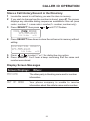
4 Press SELECT three times to store the call record in memory without
editing.
DISTINCTIVE RING?Y
973-555-0123
5/01 5:40PM
OLD 28
5 Press
or
to select Y or N for distinctive ring option.
6 Press SELECT. You’ll hear a beep confirming that the name and
number were stored.
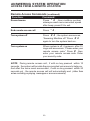
Display Screen Messages
Screen Displays:
When:
PRIVATE
The other party is blocking name and/or number
information.
OUT OF AREA
Your phone company is unable to receive
information about this caller’s name and/or number.
23