1
PILOT 2000 USER GUIDE
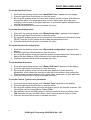
To Clear All the Memory
1.Switch on the board while holding down the Reset key (located by the Utility
Keyboard section at the left of the display)
2.1-10 will flash on the Multifunction Keyboard (the 20 buttons located at the bottom
of the desk)
3.Release the Reset key.
4.Type in 121297 fast (within 4 seconds),by using the buttons 1-20 of the
Multifunction Keyboard.
N.B. this will also delete all the scanners details that have been programmed in, excluding
the existing SGM fixtures that are part of the permanent software of the board.
4
SGM Light Technology 30/06/2000 Ver. 2.03