1
1.7
System memory
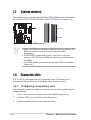
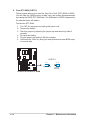
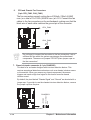
The motherboard has three Double Data Rate (DDR) DIMM sockets that supports
up to 3GB non-ECC PC2100/1600 DDR. (Note: PC2700 max. to 4 banks only.)
104 Pins
®
80 Pins
A7V333-X
A7V333-X 184-Pin DDR DIMM Sockets
1. Make sure the memory frequency and bus frequency setting in the
BIOS are the same or set to [Auto] for optimum system
performance.
2. A DDR DIMM is keyed with a notch so that it fits in only one
direction. DO NOT force a DIMM into a socket to avoid damaging
the DIMM.
3. Visit ASUS website (www.asus.com) for latest DDR333 Qualified
Vendor List.
1.8
Expansion slots
The A7V333-X motherboard has six (6) expansion slots. The following subsections describe the slots and the expansion cards that they support.
1.8.1
Configuring an expansion card
After physically installing the expansion card, configure the card by adjusting the
software settings.
1.
Turn on the system and change the necessary BIOS settings, if any.
2.
Assign an IRQ to the card. Refer to the tables below.
3.
Install the software drivers for the expansion card.
1-8
Chapter 1: Motherboard Information