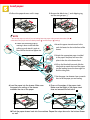
1
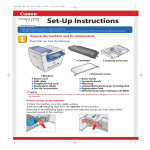
7 Pull out the left cover and
remove the tape on the inside.
2 Remove the clear protective
sheet on the LCD display.
3 Lift the feeder and remove
the lining material on the
platen glass.
4 Remove the shipping tape
on the right side and
unscrew the metal pin on
the underside of the
machine.
6 Open the stack bypass and remove
the tape holding the auxiliary tray
and the tray extension.
5 Keep the metal pin in the
pin slot on the black panel
behind the front cover.
IMPORTANT
●
When you transport the machine, you need to screw the metal pin back into the underside of the machine.
Install the stamp cartridge.
2 Open the black inner cover.
1 Pull up the latch to
open the feeder cover.
3 Use the supplied tweezers to align the small stubs on
the side of the stamp cartridge with the indentations
on the stamp receptacle, and push down the stamp
until it snaps into place. Close the inner cover and
the feeder cover.