1
RUGGEDCOM ROS
Chapter 3
User Guide
Device Management
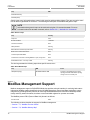
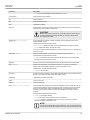
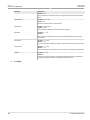
Parameter
Description
Shows the type, part number, and revision level of the hardware.
Section 3.2
Viewing CPU Diagnostics
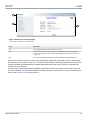
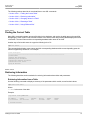
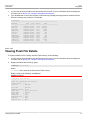
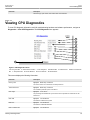
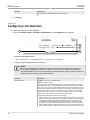
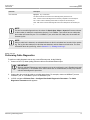
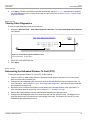
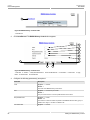
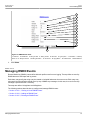
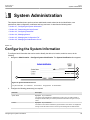
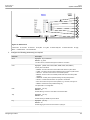
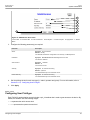
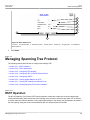
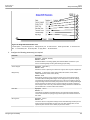
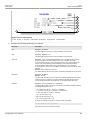
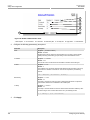
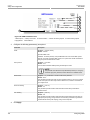
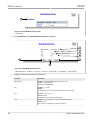
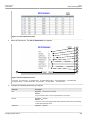
To view CPU diagnostic information useful for troubleshooting hardware and software performance, navigate to
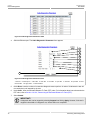
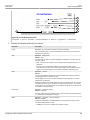
Diagnostics » View CPU Diagnostics. The CPU Diagnostics form appears.
1
2
3
4
5
6
7
8
9
11
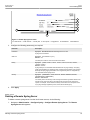
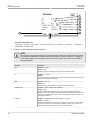
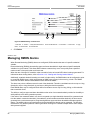
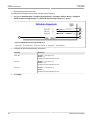
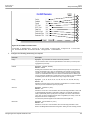
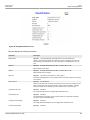
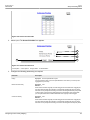
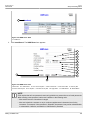
Figure 9: CPU Diagnostics Form
1. Running Time Box 2. Total Powered Time Box 3. CPU Usage Box 4. RAM Total Box
Box 7. Temperature Box 8. Free Rx Bufs Box 9. Free Tx Bufs Box 10. Reload Button
5. RAM Free Box
6. RAM Low Watermark
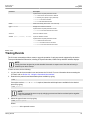
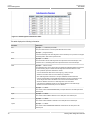
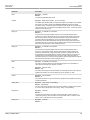
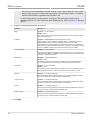
This screen displays the following information:
Parameter
Description
Running Time
Synopsis: DDDD days, HH:MM:SS
The amount of time since the device was last powered on.
Total Powered time
Synopsis: DDDD days, HH:MM:SS
The cumulative powered up time of the device.
CPU Usage
Synopsis: 0.0 to 100.0%
The percentage of available CPU cycles used for device operation as measured over the
last second.
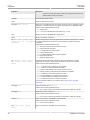
RAM Total
Synopsis: 0 to 4294967295
The total size of RAM in the system.
RAM Free
Synopsis: 0 to 4294967295
The total size of RAM still available.
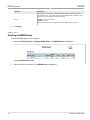
RAM Low Watermark
Viewing CPU Diagnostics
Synopsis: 0 to 4294967295
45