1
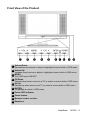
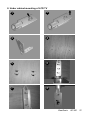
Front View of the Product
1
2
3
4
5
6
7
8
9
10
1 Volume Down
Decrease sound volume or adjust a highlighted control while in OSD menu.
2 Volume Up
Increase sound volume or adjust a highlighted control while in OSD menu.
3 MENU
Turn OSD menu ON/OFF.
4 CH Down
Channel down when source is at TV or select a control while in OSD menu.
5 CH Up
Channel up when source is at TV or select a control while in OSD menu.
6 ENTER
To highlight a control in OSD menu.
7 Power LED indicator
8 Power button
9 Remote control receiver
10 Earphone
ViewSonic
N1300
6