1
Site Preparation
Cable Labeling and Record Keeping
A reliable cable labeling system is essential when planning and installing a network. Maintaining
accurate records helps you to:
• Relocate devices easily.
• Make changes quickly.
• Isolate faults in the distribution system.
• Locate the opposite end of any cable.
• Know the types of network devices that your cabling infrastructure can support.
Consider the following recommendations when setting up a cable labeling system suitable for your
installation:
• Identify cables by securely attaching a label to all cable ends.
• Assign a unique block of sequential numbers to the group of cables that run between each pair of
wiring closets.
• Assign a unique identification number to each distribution rack.
• Identify all wiring closets by labeling the front panel of your Extreme Networks equipment and
other hardware.
• Keep accurate and current cable identification records.
• Post records near each distribution rack. Include the following cable drop information: the cable
source, destination, and jumper location.
Installing Cable
Consider the following recommendations when you connect cable to your network equipment:
• Examine cable for cuts, bends, and nicks.
• Support cable using a cable manager that is mounted above connectors to avoid unnecessary weight
on the cable bundles.
• Use cable managers to route cable bundles to the left and right of the network equipment to
maximize accessibility to the connectors.
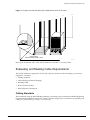
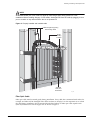
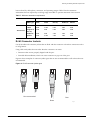
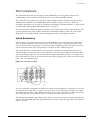
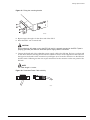
• Provide enough slack—approximately 2 to 3 inches (5.08-7.62 cm)— to provide proper strain relief as
shown in Figure 2.
• Bundle cable using velcro straps to avoid injuring cables.
• If you build your own cable, ensure that cable is properly crimped.
• When installing a patch panel using twisted pair wiring, untwist no more than 1 inch (2.54 cm) of
the cable to avoid RF interference.
• When required for safety and fire rating requirements, use plenum-rated cable. See your local
building codes for determining when it is appropriate to use plenum-rated cable, or refer to IEC
standard 850.
• Keep all ports and connectors free of dust.
28
Consolidated "e" Series Hardware Installation Guide