1
UM-1EX_e.book 1 ページ 2007年3月20日 火曜日 午前11時32分
Owner’s Manual
Thank you, and congratulations on your choice of the UM-1EX USB MIDI Interface.
201a
Before using this unit, carefully read the sections entitled: “USING THE UNIT
SAFELY” and “IMPORTANT NOTES” (p. 2; p. 4). These sections provide
important information concerning the proper operation of the unit. Additionally,
in order to feel assured that you have gained a good grasp of every feature
provided by your new unit, Owner’s manual should be read in its entirety. The
manual should be saved and kept on hand as a convenient reference.
202
Copyright © 2005 ROLAND CORPORATION
All rights reserved. No part of this publication may be reproduced in any form
without the written permission of ROLAND CORPORATION.
UM-1EX_e.book 2 ページ 2007年3月20日 火曜日 午前11時32分
USING THE UNIT SAFELY
The
symbol alerts the user to important instructions
or warnings.The specific meaning of the symbol is
determined by the design contained within the
triangle. In the case of the symbol at left, it is used for
general cautions, warnings, or alerts to danger.
Used for instructions intended to alert
the user to the risk of death or severe
injury should the unit be used
improperly.
Used for instructions intended to alert
the user to the risk of injury or material
damage should the unit be used
improperly.
* Material damage refers
other adverse effects
respect to the home
furnishings, as well
animals or pets.
The
symbol alerts the user to items that must never
be carried out (are forbidden). The specific thing that
must not be done is indicated by the design contained
within the circle. In the case of the symbol at left, it
means that the unit must never be disassembled.
to damage or
caused with
and all its
to domestic
The ● symbol alerts the user to things that must be
carried out. The specific thing that must be done is
indicated by the design contained within the circle. In
the case of the symbol at left, it means that the powercord plug must be unplugged from the outlet.
001
004
• Before using this unit, make sure to read
the instructions below, and the Owner’s
Manual.
...............................................................................................
• Never use or store the unit in places that
are:
• Subject to temperature extremes (e.g.,
direct sunlight in an enclosed vehicle,
near a heating duct, on top of heatgenerating equipment); or are
• Damp (e.g., baths, washrooms, on wet
floors); or are
• Humid; or are
• Exposed to rain; or are
• Dusty; or are
• Subject to high levels of vibration.
...............................................................................................
002a
• Do not open (or modify in any way) the
unit.
...............................................................................................
003
• Do not attempt to repair the unit, or replace
parts within it (except when this manual
provides specific instructions directing you
to do so). Refer all servicing to your
retailer, the nearest Roland Service Center,
or an authorized Roland distributor, as
listed on the “Information” page.
...............................................................................................
2
UM-1EX_e.book 3 ページ 2007年3月20日 火曜日 午前11時32分
007
023
• Make sure you always have the unit placed
so it is level and sure to remain stable.
Never place it on stands that could wobble,
or on inclined surfaces.
...............................................................................................
• DO NOT play a CD-ROM disc on a conventional audio CD player. The resulting
sound may be of a level that could cause
permanent hearing loss. Damage to
speakers or other system components may
result.
...............................................................................................
011
• Do not allow any objects (e.g., flammable
material, coins, pins); or liquids of any kind
(water, soft drinks, etc.) to penetrate the
unit.
...............................................................................................
012d (Modified)
• Immediately disconnect the USB cable, and
request servicing by your retailer, the
nearest Roland Service Center, or an authorized Roland distributor, as listed on the
“Information” page when:
• If smoke or unusual odor occurs
• Objects have fallen into, or liquid has
been spilled onto the unit; or
• The unit has been exposed to rain (or
otherwise has become wet); or
• The unit does not appear to operate
normally or exhibits a marked change in
performance.
...............................................................................................
104
• Try to prevent cords and cables from
becoming entangled. Also, all cords and
cables should be placed so they are out of
the reach of children.
...............................................................................................
106
• Never climb on top of, nor place heavy
objects on the unit.
...............................................................................................
108c
• Disconnect all cords coming from external
devices before moving the unit.
...............................................................................................
013
• In households with small children, an adult
should provide supervision until the child
is capable of following all the rules
essential for the safe operation of the unit.
...............................................................................................
014
• Protect the unit from strong impact.
(Do not drop it!)
...............................................................................................
3
UM-1EX_e.book 4 ページ 2007年3月20日 火曜日 午前11時32分
IMPORTANT NOTES
291a
In addition to the items listed under “USING THE UNIT SAFELY” on pages 2 and 3, please read and
observe the following:
Placement
352a
•
Maintenance
401a
This device may interfere with radio and
television reception. Do not use this device in the
vicinity of such receivers.
•
352b
•
Noise may be produced if wireless communications devices, such as cell phones, are operated in
the vicinity of this unit. Such noise could occur
when receiving or initiating a call, or while
conversing. Should you experience such
problems, you should relocate such wireless
devices so they are at a greater distance from this
unit, or switch them off.
354a
•
Do not expose the unit to direct sunlight, place it
near devices that radiate heat, leave it inside an
enclosed vehicle, or otherwise subject it to
temperature extremes. Excessive heat can deform
or discolor the unit.
355b
•
4
When moved from one location to another where
the temperature and/or humidity is very
different, water droplets (condensation) may
form inside the unit. Damage or malfunction may
result if you attempt to use the unit in this
condition. Therefore, before using the unit, you
must allow it to stand for several hours, until the
condensation has completely evaporated.
For everyday cleaning wipe the unit with a soft,
dry cloth or one that has been slightly dampened
with water. To remove stubborn dirt, use a cloth
impregnated with a mild, non-abrasive
detergent. Afterwards, be sure to wipe the unit
thoroughly with a soft, dry cloth.
402
•
Never use benzine, thinners, alcohol or solvents
of any kind, to avoid the possibility of discoloration and/or deformation.
Additional Precautions
553
•
Use a reasonable amount of care when using the
unit’s buttons, sliders, or other controls; and
when using its jacks and connectors. Rough
handling can lead to malfunctions.
556
•
When connecting / disconnecting all cables,
grasp the connector itself—never pull on the
cable. This way you will avoid causing shorts, or
damage to the cable’s internal elements.
558b
•
To avoid disturbing your neighbors, try to keep
the unit’s volume at reasonable levels (especially
when it is late at night).
559b
•
When you need to transport the unit, pack it in
shock-absorbent material. Transporting the unit
without doing so can cause it to become
scratched or damaged, and could lead to
malfunction.
UM-1EX_e.book 5 ページ 2007年3月20日 火曜日 午前11時32分
Handling CD-ROMs
801
•
Avoid touching or scratching the shiny underside
(encoded surface) of the disc. Damaged or dirty
CD-ROM discs may not be read properly. Keep
your discs clean using a commercially available
CD cleaner.
204
*
Microsoft and Windows are registered trademarks of Microsoft Corporation.
206e
*
206j
*
The screen shots in this document are used in compliance with the guidelines of the Microsoft Corporation.
Windows® is known officially as: “Microsoft® Windows® operating system.”
207
*
Apple and Macintosh are registered trademarks of Apple Computer, Inc.
209
*
Mac OS is a trademark of Apple Computer, Inc.
220
*
All product names mentioned in this document are trademarks or registered trademarks of their respective
owners.
231
*
OMS is a registered trademark of Opcode Systems, Inc.
232
*
FreeMIDI is a trademark of Mark of the Unicorn, Inc.
5
UM-1EX_e.book 6 ページ 2007年3月20日 火曜日 午前11時32分
Contents of the Package
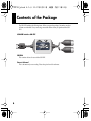
The UM-1EX includes the following items. When you open the package, first make sure that
all items are included. If any are missing, contact the dealer where you purchased the UM1EX.
USB MIDI Interface UM-1EX
CD-ROM
This contains drivers for use with the UM-1EX.
Owner’s Manual
This is the manual you are reading. Please keep it on hand for reference.
6
UM-1EX_e.book 7 ページ 2007年3月20日 火曜日 午前11時32分
Contents
Names of Things and What They Do................................................................... 8
Getting Connected and Installing Drivers (Windows) ..................................... 10
About the Driver Modes ................................................................................................................ 10
Installing the Driver........................................................................................................................ 11
Windows XP/2000 users ...................................................................................................... 11
Windows Me/98 users ......................................................................................................... 16
Setting the Driver ............................................................................................................................ 17
Windows XP users ................................................................................................................ 17
Windows 2000/Me users ..................................................................................................... 18
Windows 98 users ................................................................................................................. 19
Getting Connected and Installing Drivers (Macintosh) ................................... 20
About the Driver Modes ................................................................................................................ 20
Driver Installation and Settings .................................................................................................... 20
Mac OS X users ...................................................................................................................... 21
Mac OS 9 users....................................................................................................................... 25
Basic Use............................................................................................................. 32
Basic Connections and MIDI Flow ............................................................................................... 32
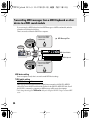
Transmitting MIDI messages
from a MIDI keyboard or digital piano to the sequencer software ............................... 32
Transmitting MIDI Messages
from the sequencer software to a MIDI sound module or digital piano....................... 33
Transmitting MIDI messages
from a MIDI Keyboard or other device to a MIDI sound module ................................. 34
Appendices.......................................................................................................... 36
About Standard Driver Mode ....................................................................................................... 36
Installation of the standard driver ...................................................................................... 36
Standard driver settings ....................................................................................................... 36
Troubleshooting.................................................................................................. 37
Main Specifications ............................................................................................ 46
7
UM-1EX_e.book 8 ページ 2007年3月20日 火曜日 午前11時32分
Names of Things and What They Do
3
4
6
1
5
2
7
8
1 USB Cable
Use this when connecting the UM-1EX to your computer.
2 USB Indicator
This will light when you’ve connected the UM-1EX to your computer and your computer has
detected the UM-1EX.
In order for your computer to detect the UM-1EX, you must install the driver and make settings.
(→“Getting Connected and Installing Drivers” Windows (p. 10) / Macintosh (p. 20))
3 ADVANCED (mode select) Switch
This switches the operating mode.
* Standard driver mode supports only Windows XP SP2 or later, and Mac OS X.
If you are using Windows 98/Me/2000/XP or XP SP1, or if you are using Mac OS 9, you must
turn the ADVANCED (mode select) Switch ON before you connect the UM-1EX to your
computer.
ON
(Advanced mode)
This mode utilizes the UM-1EX’s special, advanced MIDI driver.
This advanced driver uses *FPT technology for rapid, high-performance
MIDI transmissions.
We recommend use of this mode.
OFF
This mode uses the standard MIDI driver included with the OS.
(Standard driver mode) Use this if you do not have the special driver installed.
*FPT=Fast Processing Technology of MIDI Transmission
8
UM-1EX_e.book 9 ページ 2007年3月20日 火曜日 午前11時32分
4 THRU Switch
Selects the destination to which the MIDI messages that flow in through the UM-1EX’s MIDI IN
cable are to output.
■THRU switch ON/OFF setting
You can use the THRU switch to switch the destination device for MIDI messages from the MIDI
keyboard or digital piano connected to the MIDI IN cable. There is no need to change any cable
connections.
Switch Setting MIDI Message Destination Device
MIDI messages flowing in through the UM-1EX’s MIDI IN cable are routed to the
computer (sequencer software).
MIDI messages flowing in through the UM-1EX’s MIDI IN cable are output from
ON
the UM-1EX’s MIDI OUT cable. If you are not using sequencer software with your
performances, set this to ON.
OFF
fig.connect-change_e
MIDI Message Flow (THRU OFF)
MIDI Message Flow (THRU ON)
* Don’t change the setting of the THRU switch while playback is in progress. Doing so will cause MIDI
errors.
5 MIDI OUT Indicator
If the THRU switch is OFF, this lights when MIDI messages from the computer are being
transmitted.
6 MIDI OUT Cable (CONNECT TO MIDI IN)
Connect this to the MIDI IN connector of the device (such as a sound
module) that is to be employed by your computer for playing music.
7 MIDI IN Indicator
MIDI Message Flow
If the THRU switch is OFF, this lights when MIDI messages from the
device connected to MIDI IN are being received.
8 MIDI IN Cable (CONNECT TO MIDI OUT)
Connect this to the MIDI OUT connector of the device (such as a MIDI
keyboard) that will be transmitting MIDI messages to your computer.
MIDI Message Flow
9
UM-1EX_e.book 10 ページ 2007年3月20日 火曜日 午前11時32分
Getting Connected and Installing Drivers (Windows)
About the Driver Modes
What is a driver?
A “driver” is software that transfers data between the UM-1EX and application software running
on your computer, when your computer and the UM-1EX are connected. The driver sends data
from your application to the UM-1EX, and from the UM-1EX to your application.
About the driver modes
The UM-1EX has two operating modes, Advanced mode and Standard driver mode, and a
different driver is used by each mode.
* Standard driver mode supports only Windows XP SP2 or later.
If you are using Windows 98/Me/2000/ XP or XP SP1, you must turn the ADVANCED (mode
select) Switch ON before you connect the UM-1EX to your computer.
ON
(Advanced mode)
This mode utilizes the UM-1EX’s special, advanced MIDI driver.
This advanced driver uses *FPT technology for rapid, high-performance MIDI transmissions.
We recommend use of this mode.
(→ “Installing the Driver” (p. 11))
OFF
(Standard driver mode)
This mode uses the standard MIDI driver included with the OS.
Use this if you do not have the special driver installed.
(→ “Installation of the standard driver” (p. 36))
*FPT = Fast Processing Technology for MIDI Transmission
10
UM-1EX_e.book 11 ページ 2007年3月20日 火曜日 午前11時32分
Installing the Driver
The installation procedure will differ depending on your system.
Please proceed to one of the following sections, depending on the system you use.
• Windows XP/2000 users..........................................................................................p. 11
• Windows Me/98 users .............................................................................................p. 16
Steps to be performed on the UM-1EX itself are marked by a
Operation of the UM-1EX
symbol.
Windows XP/2000 users
1. With the UM-1EX left unconnected, start up Windows.
Do not connect the UM-1EX to the computer until you reach Step 13 (p. 13).
* Disconnect all USB cables except for a USB keyboard and USB mouse (if used).
* Log onto Windows using a user name that has administrative privileges (such as Administrator).
2. Open the System Properties dialog box.
Windows XP:
1. Click the Windows start menu, and from the menu, select Control Panel.
2. In “Pick a category,” click “Performance and Maintenance.”
3. In “or pick a Control Panel icon,” click the System icon.
Depending on your setup, the System icon may appear directly in the Control Panel (Classic
view). If so, double-click the System icon.
Windows 2000:
1. Click the Windows Start menu, and from the menu that appears, select Settings | Control
Panel.
2. In Control Panel, double-click the System icon.
3. Click the Hardware tab, then click [Driver Signing].
The Driver Signing Options dialog box will open.
4. In the Driver Signing Options dialog box, select “Ignore,” then click [OK].
If the current setting is “Warn” or “Block,” change this to “Ignore.” Then, when you’ve finished
installing the driver, change it back to the original setting.
11
UM-1EX_e.book 12 ページ 2007年3月20日 火曜日 午前11時32分
5. Click [OK] to close the System Properties dialog box.
6. Exit all currently running software (applications).
Also close any currently open windows. If you are using virus checking or similar software, you
must exit all of these programs as well.
7. Prepare the CD-ROM.
Insert the CD-ROM into your computer’s CD-ROM drive.
* If the message “Windows can perform the same action each time you insert a disk or
connect a device with this kind of file” appears, [Cancel].
8. From the Windows start menu, choose Run...
9. In the Open field of the “Run...” dialog box, type the following and click [OK].
D: \Driver\XP2k\setup.exe
* The drive name is “D:” in the example shown here, but may be different on your system. Use the drive
name for your CD-ROM drive.
10. The Driver Setup dialog box will appears.
Click [Next].
11. To begin the installation, click [Next] once again. Installation will begin.
Windows XP:
If “Driver Signing Options” in step 4 is set to anything other than “Ignore,” a dialog box with
an “!” or “x” symbol will appear. If a [Continue Anyway] button is displayed, click
[Continue Anyway] to proceed with the installation. If you are unable to continue, click [OK]
and repeat the driver installation from step 1.
Windows 2000:
If “Driver Signing Options” in step 4 is set to anything other than “Ignore,” a dialog box
indicating “Digital Signature Not Found” will appear. If a [Yes] button is displayed, click
[Yes] to proceed with the installation. If you are unable to continue, click [OK] and repeat the
driver installation from step 1.
The “Setup is now ready to install the drivers” dialog box will appear.
Now you are ready to install the driver.
12.
Operation of the UM-1EX
Set the UM-1EX’s ADVANCED (mode select) Switch to ON.
* The driver cannot be installed by means of the following procedure if the switch is set to OFF.
If you are using Windows 98/Me/2000/XP or XP SP1, you must turn the ADVANCED (mode
select) Switch ON before you connect the UM-1EX to your computer.
12
UM-1EX_e.book 13 ページ 2007年3月20日 火曜日 午前11時32分
13.
Operation of the UM-1EX Connect the UM-1EX to your computer.
A message of “Found New Hardware” will appear. Please wait.
* This unit is equipped with a protection circuit. A brief interval (a few seconds) after connecting the UM1EX is required before the unit will operate normally.
Windows XP:
1. The Found New Hardware Wizard dialog box will appear.
If the message “Connect to Windows Update to search for software?” appears, choose “No”
and then click [Next].
2. Make sure that “EDIROL UM-1” is indicated. Then, choose “Install the software
automatically (Recommended)” and click [Next].
If “Driver Signing Options” in step 4 is set to anything other than “Ignore,” a dialog box with
an “!” symbol will appear. Click [Continue Anyway] to proceed with the installation.
Windows 2000:
If “Driver Signing Options” in step 4 is set to anything other than “Ignore,” a dialog box
indicating “Digital Signature Not Found” will appear. Click [Yes] to proceed with the
installation.
14. The Completing the Found New Hardware Wizard dialog box will appear.
Click [Finish].
15. In the Driver Setup dialog box, click [Close].
This completes driver installation.
If the Change System Settings dialog box appears, click [Yes]. Windows will restart
automatically.
* If you changed the “Driver Signing Options” setting (step 4 on p. 11), restore the original settings
after Windows has restarted.
Next, in order to ensure that MIDI processing occurs smoothly, you need to make settings so that
Background Services is given priority.
(➔ “Giving priority to Background Services” (p. 14))
13
UM-1EX_e.book 14 ページ 2007年3月20日 火曜日 午前11時32分
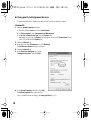
■ Giving priority to Background Services
To ensure that MIDI data is handled smoothly, proceed as follows to make this setting.
Windows XP:
1. Open the System Properties dialog box.
1. From the Windows start menu, choose Control Panel.
2. In “Pick a category,” click “Performance and Maintenance.”
3. In “or Pick a Control Panel icon,” click the System icon.
Depending on your setup, the System icon may appear directly in the Control Panel (Classic
view). If so, double-click the System icon.
2. Click the Advanced tab.
3. In the right side of the Performance area, click [Settings].
The Performance Options dialog box will open.
4. Click the Advanced tab.
5. In the Processor scheduling area, choose
“Background services,” and click [OK].I
6. In the System Properties dialog box, click [OK].
The System Properties dialog box will close.
Next, you’ll make the driver settings. (➔ “Setting the Driver” (p. 17))
14
UM-1EX_e.book 15 ページ 2007年3月20日 火曜日 午前11時32分
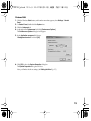
Windows 2000:
1. Click the Windows Start button, and from the menu that appears, select Settings | Control
Panel.
2. In Control Panel, double-click the System icon.
3. Click the Advanced tab.
4. At the right of the Performance field, click [Performance Options].
The Performance Options dialog box will appear.
fig.back2000
5. In the Application response field, choose
“Background services” and click [OK].
6. Click [OK] to close the System Properties dialog box.
The System Properties dialog box will close.
Next, you’ll make the driver settings. (➔ “Setting the Driver” (p. 17))
15
UM-1EX_e.book 16 ページ 2007年3月20日 火曜日 午前11時32分
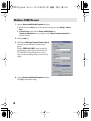
Windows Me/98 users
1. With the UM-1EX left unconnected, start up Windows.
Do not connect the UM-1EX to the computer until you reach Step 9.
2. Exit all currently running software.
Also close any open windows. If you are using virus checking or similar software, be sure to exit it
as well.
3. Prepare the CD-ROM.
Insert the CD-ROM into the CD-ROM drive of your computer.
4. Click the Windows Start menu. From the menu that appears, select Run....
The “Run...” dialog box will appear.
5. In the dialog box that appears, input the following into the “Open” field, and click [OK].
D: \Driver\Me98\Setup.exe
* The drive name is “D:” in the example shown here, but may be different on your system. Use the drive
name for your CD-ROM drive.
6. The Driver Setup dialog box will appears. Click [Next].
7. To begin the installation, click [Next] once again. Installation will begin.
The “Setup is now ready to install the drivers” dialog box will appear.
Now you are ready to install the driver.
8.
Operation of the UM-1EX
Set the UM-1EX’s ADVANCED (mode select) Switch to the ON position.
* The driver cannot be installed by means of the following procedure if the switch is set to OFF.
If you are using Windows 98/Me/2000/XP or XP SP1, you must turn the ADVANCED (mode
select) Switch ON before you connect the UM-1EX to your computer.
9.
Operation of the UM-1EX Connect the UM-1EX to your computer.
A message of “Found New Hardware” will appear. Please wait.
* This unit is equipped with a protection circuit. A brief interval (a few seconds) after connecting the UM1EX is required before the unit will operate normally.
10. In the Driver Setup dialog box, click [Close].
Next, you’ll make the driver settings. (➔ “Setting the Driver” (p. 17))
16
UM-1EX_e.book 17 ページ 2007年3月20日 火曜日 午前11時32分
Setting the Driver
The following describes the settings needed to use the UM-1EX with Media Player or other
sequencer software using Windows standard device settings.
If you are using sequencer software that does not utilize Windows standard device settings, make
the device settings within the sequencer software.
Windows XP users
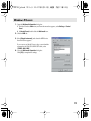
1. Open the Sounds and Audio Devices Properties dialog box.
1. From the Windows start menu, choose Control Panel.
2. In “Pick a category,” click Sound, Speech, and Audio Devices.
3. In “or Pick a Control Panel icon,” click the Sounds and Audio Devices icon.
Depending on your setup, the Sounds and Audio Devices icon may appear directly in the
Control Panel (Classic view). If so, double-click the Sounds and Audio Devices icon.
2. Click the Audio tab.
fig.XP-E
3. For MIDI music playback, click the ▼ located at the right
of [Default device], and select the MIDI device from the
list that appears.
Selecting “EDIROL UM-1 MIDI” enables sounds to be
played from the sound module connected to the UM1EX’s MIDI OUT cable with Media Player or other
sequencer software utilizing Windows standard device
settings.
4. Close the Sounds and Audio Devices Properties dialog
box.
Click [OK] to complete the settings.
17
UM-1EX_e.book 18 ページ 2007年3月20日 火曜日 午前11時32分
Windows 2000/Me users
1. Open the Sounds and Multimedia Properties dialog box.
1. Click the Windows start button, and from the menu that appears, select Settings | Control
Panel.
2. In Control Panel, double-click the Sounds and Multimedia icon.
If Sounds and Multimedia icon is not displayed, click “Show all control panel options” in
the frame at the left.
2. Click the Audio tab.
fig.2K-E
3. Click ▼ in the MIDI Music Playback [Preferred device]
menu and select the MIDI device from the list that
appears.
Selecting “EDIROL UM-1 MIDI” enables sounds to be
played from the sound module connected to the UM1EX’s MIDI OUT cable with Media Player or other
sequencer software utilizing Windows standard device
settings.
4. Close the Sounds and Multimedia Properties dialog box.
Click [OK] to complete the settings.
18
UM-1EX_e.book 19 ページ 2007年3月20日 火曜日 午前11時32分
Windows 98 users
1. Open the Multimedia Properties dialog box.
1. Click the Windows Start menu, and from the menu that appears, select Settings | Control
Panel.
2. In Control Panel, double-click the Multimedia icon.
2. Click the MIDI tab.
fig.2K-E
3. Select [Single instrument], and select the MIDI device
from the list that appears.
If you want to use Media Player to play a sound module
connected to the UM-1EX’s MIDI OUT cable, select
“EDIROL UM-1 MIDI.”
4. Close the Multimedia Properties dialog box.
Click [OK] to complete the settings.
19
UM-1EX_e.book 20 ページ 2007年3月20日 火曜日 午前11時32分
Getting Connected and Installing Drivers (Macintosh)
About the Driver Modes
What is a driver?
A “driver” is software that transfers data between the UM-1EX and application software running
on your computer, when your computer and the UM-1EX are connected. The driver sends data
from your application to the UM-1EX, and from the UM-1EX to your application.
About the driver modes
The UM-1EX has two operating modes, Advanced mode and Standard driver mode, and a
different driver is used by each mode.
* Standard driver mode supports only Mac OS X.
If you’re using OS 9, you must turn the ADVANCED (mode select) Switch ON before you
connect the UM-1EX to your Macintosh.
ON
(Advanced mode)
This mode utilizes the UM-1EX’s special, advanced MIDI driver.
This advanced driver uses *FPT technology for rapid, high-performance
MIDI transmissions.
We recommend use of this mode.
(→ “Driver Installation and Settings” (p. 20))
OFF
(Standard driver
mode)
This mode uses the standard MIDI driver included with the OS.
Use this if you do not have the special driver installed.
(→“Installation of the standard driver” (p. 36))
*FPT = Fast Processing Technology for MIDI Transmission
Driver Installation and Settings
The installation procedure will differ depending on your system.
Please proceed to one of the following sections, depending on the system you use.
• Mac OS X users................................................................................................ (p. 21)
• Mac O S9 users ................................................................................................ (p. 25)
Steps to be performed on the UM-1EX itself are marked by a
20
Operation of the UM-1EX
symbol.
UM-1EX_e.book 21 ページ 2007年3月20日 火曜日 午前11時32分
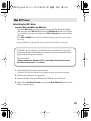
Mac OS X users
■ Installing the driver
* If the “Authenticate” dialog box appears during the installation, input the password and click “OK.”
* What you actually see on your Macintosh screen may be different, depending on your computing
environment and the operating system you’re using.
1. With the UM-1EX left unconnected, start up Macintosh.
* Disconnect all USB cables other than those for your keyboard and mouse, and restart your Macintosh.
2. Exit all currently running software (applications).
3. Prepare the CD-ROM.
Insert the CD-ROM into the CD-ROM drive of your Macintosh.
4. In the Driver (Mac OS X) folder of the CD-ROM, double-click UM1USBDriver.pkg.
* A message such as “This Installer package needs to...” may appear.
Click “Continue.”
5. The display will indicate “Welcome to the EDIROL UM-1Driver Installer.” Click [Continue].
6. The display will indicate “Select a Destination.”
Click the drive in which the operating system is installed to select it, and then click [Continue].
* Select your startup disk as the drive.
7. The display will indicate “Easy Install.”
Click [Install] or [Upgrade].
8. The display will indicate “Installing this software requires you to restart your computer when
the installation is done.”
Click [Continue Installation].
9. The display will indicate “The software was successfully installed.”
Click [Restart] to restart your Macintosh.
This completes installation of the UM-1 driver.
Next, make MIDI device settings. (→“Setting the driver” (p. 22))
21
UM-1EX_e.book 22 ページ 2007年3月20日 火曜日 午前11時32分
■ Setting the driver
The following describes the settings enabling use of the UM-1EX with sequencer software using
Macintosh standard device settings.
If you are using sequencer software that does not utilize Macintosh standard device settings, make
the device settings within the sequencer software.
* What you actually see on your Macintosh screen may be different, depending on your computing
environment and the operating system you’re using.
1.
Operation of the UM-1EX
Set the UM-1EX’s ADVANCED (mode select) Switch to the ON position.
2.
Operation of the UM-1EX
Connect the UM-1EX to your Macintosh.
* Connect the cable to the USB connector of the Macintosh itself, not to the USB connector of the keyboard.
* This unit is equipped with a protection circuit. A brief interval (a few seconds) after connecting the UM1EX is required before the unit will operate normally.
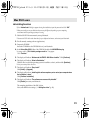
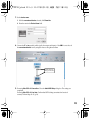
3. Open the Applications folder of your Macintosh hard disk. In the Utilities folder, double-click
Audio MIDI Setup to open the Audio MIDI Setup dialog box.
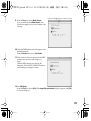
4 Click MIDI Devices
6 Click Add Device
7 Click Show Info
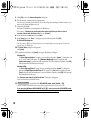
4. Click the MIDI Devices tab.
5. Confirm that UM-1 appears in the Audio MIDI Setup dialog box.
* If UM-1 does not appear or if it is grayed out, it means that the UM-1EX is not being recognized properly.
Click Rescan MIDI. Also try disconnecting and reconnecting the UM-1EX.
* Previous settings from installation of a different version of the driver may still remain. If this is the case,
click on the grayed UM-1 or EDIROL UM-1 to select it, then click Remove Selected Device to delete
the settings.
6. Click Add Device.
new external device will appear.
22
UM-1EX_e.book 23 ページ 2007年3月20日 火曜日 午前11時32分
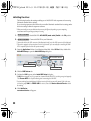
7. Set the device name.
1. With the new external device selected, click Show Info.
2. Enter the name in the Device Name field.
8. Connect the ▼ and ▲ symbols (which signify the outputs and inputs) of the UM-1 icon to those of
the new external device icon by using the mouse to drag between them.s
Use the mouse to
drag a connection
9. If running Mac OS X v10.2 or earlier: Close the Audio MIDI Setup dialog box. The settings are
completed.
If running Mac OS X v10.3 or later: Confirm that MIDI is being transmitted and received
correctly. Perform Steps 10–13 (p. 24).
23
UM-1EX_e.book 24 ページ 2007年3月20日 火曜日 午前11時32分
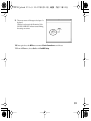
10. Click Test Setup.
The shape of the mouse
cursor changes .
11. Click the area shown in
the illustration. If the
UM-1EX’s MIDI OUT
indicator starts blinking,
the settings are correct.
10, 12 Test Setup
12. Click Test Setup and
complete the
confirmation.
11 Click the icon
13. Close the Audio MIDI Setup dialog box.
.
When using the UM-1EX with your sequencer software
Before using the UM-1EX with your sequencer software, please note the following points.
• Connect the UM-1EX to your Macintosh before you start up your sequencer software.
• Do not disconnect the UM-1EX from your Macintosh while your sequencer software is
running.
Quit your sequencer software before you disconnect the UM-1EX from your Macintosh.
• Turn off the Sleep function of your Macintosh.
• The UM-1EX will not operate in the Mac OS X Classic environment. Use the UM-1EX when
the Classic environment is not running.
24
UM-1EX_e.book 25 ページ 2007年3月20日 火曜日 午前11時32分
Mac OS 9 users
■ Installing the UM-1 driver
Use either OMS or FreeMIDI as the MIDI driver.
The included UM-1 driver is an add-on module for using the UM-1EX with OMS or FreeMIDI.
OMS can be found in the OMS 2.3.8 E folder within the OMS (Mac OS 9) folder of the CD-ROM.
If you would like to know more about OMS, refer to OMS_2.3_Mac.pdf which can be found in the
same folder.
* Either OMS or FreeMIDI must be installed in your Macintosh, as appropriate for the sequencer software
you are using.
* If you install OMS after installing the UM-1 driver, you must install the UM-1 driver once again.
If a UM-1EX is already connected to your Macintosh when you install the driver, a message like
the following will appear when the Macintosh is started up. Perform the steps described below as
appropriate for the message that is displayed.
If the screen indicates:
“Software needed for the USB device “UM-1” is not available. Would you like to look for
the software on the Internet?”➔ click [Cancel].
1. With the UM-1EX left unconnected, start up Macintosh
* Disconnect all USB cables other than those for your keyboard and mouse, and restart your Macintosh.
2. Exit all currently running software (applications).
3. Prepare the CD-ROM. Insert the CD-ROM into the CD-ROM drive of your Macintosh.
4. Double-click the UM-1 Driver-E Installer icon (found in the Driver E (Mac OS 9) folder of the CDROM) to start up the installer.
25
UM-1EX_e.book 26 ページ 2007年3月20日 火曜日 午前11時32分
5. Verify the Install Location, and click [Install].
The installation location will be shown differently depending on your system. Make sure that you
have selected the startup disk for the system you are currently using.
fig.05-20
6. If a message like the following is displayed,
click [Continue].
The other currently running software will exit,
and installation will continue.
7. A dialog box will indicate Installation was successful.
Click [Restart] to restart your Macintosh.
Next, make the driver settings.
• OMS users ..................................................................................................................p. 27
• FreeMIDI users ..........................................................................................................p. 30
26
UM-1EX_e.book 27 ページ 2007年3月20日 火曜日 午前11時32分
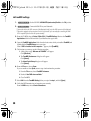
■ OMS settings
If you are using FreeMIDI, proceed to “FreeMIDI settings” (p. 30).
1.
Operation of the UM-1EX
Set the UM-1EX’s ADVANCED (mode select) Switch to the ON position.
2.
Operation of the UM-1EX
Connect the UM-1EX to your Macintosh.
* Connect the cable to the USB connector of the Macintosh itself, not to the USB connector of the keyboard.
* This unit is equipped with a protection circuit. A brief interval (a few seconds) after connecting the UM1EX is required before the unit will operate normally.
fig.3-3
3. From the CD-ROM, drag the Driver E (Mac OS 9) - OMS Setting folder into the
Opcode - OMS Applications folder on the hard disk of your Macintosh to copy it
there.
fig.3-4
4. In the Opcode - OMS Applications folder where you installed OMS, double-click
OMS Setup to start it up.
fig.3-5_35
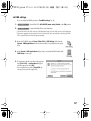
5. If a dialog box like the one shown here appears,
click [Turn It Off]. A confirmation dialog box
will then appear, so click [OK].
* We recommend that you turn off AppleTalk, by
selecting Chooser from the Apple menu.
27
UM-1EX_e.book 28 ページ 2007年3月20日 火曜日 午前11時32分
fig.3-6_35
6. The Create a New Studio Setup dialog box will
appear. Click [Cancel].
If you accidentally clicked [OK], click [Cancel] in
the next screen.
fig.3-8_35
7. Choose “Open” from the File menu.
From the OMS Setting folder that you copied in
step 3, select the UM-1 file, and click [Open].
A screen like the one shown here will appear.
fig.3-9_35
8. From the Edit menu, select OMS MIDI Setup.
In the OMS MIDI Setup dialog box that appears,
check Run MIDI in background, and click [OK].
28
UM-1EX_e.book 29 ページ 2007年3月20日 火曜日 午前11時32分
fig.3-10_40
A diamond mark ( ) indicates the settings are enabled.
9. From the File menu, choose Make Current.
If you are unable to select Make Current, it has
already been applied, and you may continue to the
next step.
10. Verify that MIDI transmission and reception can be
performed correctly.
From the Studio menu, choose Test Studio.
fig.OMS3
11. When you move the mouse cursor near the MIDI
connector icon, the cursor will change to a shape.
Click the MIDI connector icon shown in the
illustration. If the UM-1EX’s MIDI OUT indicator
starts blinking, the settings are correct.
12. Exit OMS Setup.
From the File menu, choose [Exit]. If the AppleTalk confirmation dialog box appears, click [OK]
to close the dialog box.
29
UM-1EX_e.book 30 ページ 2007年3月20日 火曜日 午前11時32分
■ FreeMIDI settings
1.
2.
Set the UM-1EX’s ADVANCED (mode select) Switch to the ON position.
Operation of the UM-1EX
Operation of the UM-1EX
Connect the UM-1EX to your Macintosh.
* Connect the cable to the USB connector of the Macintosh itself, not to the USB connector of the keyboard.
* This unit is equipped with a protection circuit. A brief interval (a few seconds) after connecting the UM1EX is required before the unit will operate normally.
3. From the CD-ROM, drag the Driver E (Mac OS 9) - FreeMIDI Setting folder into the FreeMIDI
Applications folder on the hard disk of your Macintosh to copy it there.
4. Open the FreeMIDI Applications folder from the location into which you installed FreeMIDI, and
double-click the FreeMIDI Setup icon to start it up.
When “OMS is installed on this computer...” appears, click [FreeMIDI].
5. The first time you start up, use the following procedure.
1. A dialog box saying “Welcome to FreeMIDI!” will appear.
Click [Continue].
2. The FreeMIDI Preferences dialog box will appear.
Click [Cancel].
3. The About Quick Setup dialog box will appear.
Click [Cancel].
6. From the File menu, choose Open.
If you are unable to select Open, return to step 4 and continue the procedure.
1. From the File menu, choose FreeMIDI Preference.
2. Uncheck “Use OMS when available.”
3. Close FreeMIDI.
7. Select UM-1 from the FreeMIDI Setting folder you copied in step 3, and click [Open].
8. Verify that MIDI transmission and reception occur correctly.
From the MIDI menu, choose Check Connections.
30
UM-1EX_e.book 31 ページ 2007年3月20日 火曜日 午前11時32分
fig.FreeMIDI
9. The mouse cursor will change to the shape of a
keyboard.
Click the icon shown in the illustration. If the
UM-1EX’s MIDI OUT indicator starts blinking,
the settings are correct.
10. Once again choose the MIDI menu command Check Connections to end the test.
11. From the File menu, choose Quit to exit FreeMIDI Setup.
31
UM-1EX_e.book 32 ページ 2007年3月20日 火曜日 午前11時32分
Basic Use
This chapter describes different basic methods of connecting the UM-1EX according to how the
UM-1EX is to be used.
Basic Connections and MIDI Flow
Transmitting MIDI messages from a MIDI keyboard or digital
piano to the sequencer software
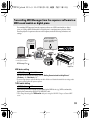
To transmit MIDI messages from a MIDI keyboard or digital piano to the sequencer software or
make a MIDI recording of a keyboard performance or other performance using sequencer
software on your computer, make the following connections and settings.
fig.connect-in_e
THRU OFF
MIDI Keyboard
Message Flow
Digital Piano
MIDI messages are transmitted
to the sequencer software.
Connect to the
computer’s
USB connector.
Connect to the MIDI OUT connector
of the MIDI keyboard or digital piano.
MIDI Message Flow
MIDI device setting
MIDI IN
UM-1 MIDI
* Make the device settings within the sequencer software.
THRU switch setting
THRU Switch
OFF
MIDI messages from the MIDI device (e.g, MIDI keyboard, digital piano) connected to the UM-1EX’s MIDI IN
cable are transmitted to the computer.
* Don't change the setting of the THRU switch while you're using the UM-1EX. Doing so will cause MIDI errors.
32
If you are experiencing duplicate notes (i.e., if your sound generating device plays two notes for each note it should play), turn
Local Control OFF on your sound generating device, or turn the Thru function OFF in your sequencer software. For details on
how to make these settings, refer to the owner’s manual for your equipment.
UM-1EX_e.book 33 ページ 2007年3月20日 火曜日 午前11時32分
Transmitting MIDI Messages from the sequencer software to a
MIDI sound module or digital piano
If transmitting MIDI messages from the sequencer software to a MIDI sound module or digital
piano, or if using a MIDI sound module’s or digital piano’s sound generator to play the sounds
from the playback of sequencer software on the computer, make the following connections and
settings.
fig.connect-out_e
Connect to the MIDI IN
connector of the MIDI sound
module or digital piano.
Connect to the
computer’s
USB connector.
THRU OFF
MIDI Sound Module
MIDI messages are transmitted
from the sequencer software.
Message Flow
MIDI Message Flow
Digital Piano
MIDI device setting
MIDI OUT
UM-1 MIDI
For more on how to make the settings, refer to “Getting Connected and Installing Drivers”
(Windows:p. 10 / Macintosh:p. 20).
* If you are using sequencer software that does not utilize Windows or Macintosh standard device settings, make
the device settings within the sequencer software.
THRU switch setting
THRU Switch
OFF
MIDI messages from the computer are transmitted to the MIDI device (e.g., MIDI sound module,
digital piano) connected to the UM-1EX’s MIDI OUT cable.
* Don't change the setting of the THRU switch while you're using the UM-1EX. Doing so will cause MIDI
errors.
33
UM-1EX_e.book 34 ページ 2007年3月20日 火曜日 午前11時32分
Transmitting MIDI messages from a MIDI Keyboard or other
device to a MIDI sound module
If you want to play a MIDI keyboard and send MIDI messages to a MIDI sound module, make the
connections and settings shown below.
There is no need to connect the UM-1EX to a computer.
fig.connect-thru_e
Connect to the MIDI IN
connector of the MIDI
sound module.
MIDI Message Flow
Message Flow
THRU ON
MIDI Sound Module
MIDI Keyboard
Message Flow
Connect to the MIDI OUT
connector of the MIDI
keyboard.
MIDI device setting
Since no computer is used, there is no need to make MIDI device settings.
THRU switch setting
THRU Switch
ON
MIDI messages from the MIDI keyboard or digital piano connected to the UM-1EX’s MIDI IN
cable will be sent to the MIDI sound module connected to the UM-1EX’s MIDI OUT cable. Even if
the UM-1EX is connected to a computer, no MIDI messages will be sent to the computer.
* Don't change the setting of the THRU switch while you're using the UM-1EX. Doing so will cause MIDI
errors
34
UM-1EX_e.book 35 ページ 2007年3月20日 火曜日 午前11時32分
■ THRU switch ON/OFF setting
You can use the THRU switch to switch the destination device for MIDI messages from the MIDI
keyboard or digital piano connected to the MIDI IN cable. There is no need to change any cable
connections.
Switch Setting
OFF
ON
MIDI Message Destination Device
MIDI messages are transmitted to the computer (sequencer software).
MIDI messages are transmitted to the MIDI device (e.g., MIDI sound module) connected to the MIDI OUT cable.
fig.connect-change_e
MIDI Message Flow (THRU OFF)
MIDI Message Flow (THRU ON)
* Don't change the setting of the THRU switch while you're using the UM-1EX. Doing so will cause MIDI
errors.
35
UM-1EX_e.book 36 ページ 2007年3月20日 火曜日 午前11時32分
Appendices
About Standard Driver Mode
Use this mode when using the standard MIDI driver provided with the operating system.
* Standard driver mode supports only Windows XP SP2 or later, and Mac OS X.
If you are using Windows 98/Me/2000/XP or XP SP1, or if you are using Mac OS 9, you must
turn the ADVANCED (mode select) Switch ON before you connect the UM-1EX to your
computer.
Installation of the standard driver
1.
*
2.
3.
4.
With the UM-1EX left unconnected, start up your computer.
Disconnect all USB cables other than those for your keyboard and mouse, and restart your Macintosh.
Exit all currently running software (applications).
Set the UM-1EX’s ADVANCE DRIVER switch (mode switch) to OFF.
Connect the UM-1EX to the computer.
The driver is automatically installed.
* This unit is equipped with a protection circuit. A brief interval (a few seconds) after connecting the UM1EX is required before the unit will operate normally.
Standard driver settings
These settings enable use of the UM-1EX with sequencer software that uses Windows or
Macintosh standard device settings.
If using sequencer software that does not utilize Windows standard device settings, make the
device settings within the sequencer software. For instructions on the device settings for your
particular sequencer software, refer to the owner’s manual that was supplied with it.
When using Windows XP
1. In accordance with Steps 1 in “Windows XP users” (p. 17), open the Audio tab in the Sounds and
Audio Devices Properties dialog box.
2. Click the ▼ for [Default device] in the MIDI music playback menu and select the USB audio
device from the list that appears.
Depending on your computing environment, “(2)” or some other number may be added at the end
of the port name.
When using Macintosh (Mac OS X)
The procedure is the same as for Advanced mode. Refer to “Setting the driver” (p. 22).
36
UM-1EX_e.book 37 ページ 2007年3月20日 火曜日 午前11時32分
Troubleshooting
If you experience problems, read this chapter first. It contains tips for solving most problems.
* For details on operating your Windows or Macintosh computer, refer to the owner’s manual of the
computer and operating system you are using.
Problems Related to the USB Driver
Cannot install the driver correctly
Install the UM-1 driver once again as described in Getting Connected and Installing Drivers
(Windows) (p. 10) or Getting Connected and Installing Drivers (Macintosh) (p. 20).
Is the UM-1EX connected correctly?
Make sure that the USB connector of your computer is connected to the UM-1EX.
Could any other USB device be connected?
Before you install, disconnect all USB devices except for your mouse and keyboard.
Could other software or resident software (such as antivirus programs) be running?
Installation may not be successful if other programs are running.
Be sure to close all other programs before installation.
Is the CD-ROM correctly inserted into your CD-ROM drive?
Installation is not possible unless the CD-ROM included with the UM-1EX is inserted in your CDROM drive. Make sure that the CD-ROM is correctly inserted into your CD-ROM drive.
Are you attempting to install from a networked CD-ROM drive?
You cannot install from a networked CD-ROM drive.
Is the CD-ROM or the lens of the CD-ROM drive dirty?
If the CD-ROM or the lens of the CD-ROM drive is dirty, the installer may not work correctly.
Clean the disc and/or lens using a commercially-available CD cleaner or lens cleaner.
37
UM-1EX_e.book 38 ページ 2007年3月20日 火曜日 午前11時32分
Is your computer’s power-conservation mode turned off?
If power-conservation settings are enabled on your computer, please disable any such settings.
For the procedure, refer to the owner’s manual of your computer.
Is there sufficient free space on your hard disk?
Delete unneeded files to increase the amount of free space. After deleting the unneeded files,
empty the recycling bin.
Could the UM-1EX’s ADVANCED (mode select) Switch be OFF?
Turn the UM-1EX’s ADVANCED (mode select) Switch ON, restart Windows, and re-install the
driver.
Does your computer or USB hub have sufficient power supply capacity?
The UM-1EX cannot be connected if insufficient power is supplied to it. Check whether one of the
following cases apply.
• If you are using the UM-1EX with a notebook computer that is running on its battery,
operation may be unreliable with some models of computer. If this is the case, connect the
AC adaptor to your notebook computer.
• The power conservation mode of your computer may limit the power that is supplied to
USB. Check the settings of your computer.
• In some cases, the UM-1EX cannot be used with a bus-powered hub (a hub that does not
contain a power supply). Please use a self-powered hub (a hub that contains a power
supply).
Is USB enabled on your computer?
Refer to the operation manual for your computer, and make sure that USB is enabled.
Does your computer meet the USB specifications?
If you are using a computer that does not fulfill the electrical requirements of the USB
specifications, operation may be unstable. In this case, you may be able to solve the problem by
connecting a USB hub.
In the Device Manager, do you see “Other device,” “Unknown device,” or a device
for which “?”, “!” or “x” is displayed? (Windows)
If the driver installation could not be successfully completed, the installed driver may remain in an
incomplete state.
Re-install the driver. (➔“Installing the Driver” (p. 11))
Is OMS or FreeMIDI installed? (Mac OS 9)
The UM-1 driver cannot be installed unless OMS or FreeMIDI are installed. Please install OMS or
FreeMIDI.
38
UM-1EX_e.book 39 ページ 2007年3月20日 火曜日 午前11時32分
Windows XP/2000 displays a “Hardware Installation” or “Digital
Signature Not Found” dialog box
Did you make “Driver Signing Options”?
In order to install/re-install the driver, you must make the settings described in “Driver Signing
Options” (p. 11).
You are asked to install the driver file even though you installed the driver
(Windows)
Did you connect the UM-1EX to a different USB connector than the one you used when
installing the driver?
If your computer or USB hub has two or more USB connectors, and you connect the UM-1EX to a
different USB connector, you may be asked for the driver file even though the driver has already
been installed in your computer. (Such a response does not indicate a malfunction.)
Proceed as follows to install the driver.
1. Connect the UM-1EX to the computer.
Windows XP:
1. The Found New Hardware Wizard dialog box will appear.
If the message “Connect to Windows Update to search for software?” appears, choose “No”
and then click [Next].
2. Choose “Search for the best driver in these locations” and click [Next].
If a dialog box with an “!” or “x” symbol will appear, click [Continue Anyway] to proceed with
the installation. If you are unable to continue, click [OK] and repeat the driver installation.
(➔“Installing the Driver” (p. 11))
Windows 2000:
If a dialog box indicating “Digital Signature Not Found” will appear, click [Yes] to proceed
with the installation. If you are unable to continue, click [OK] and repeat the driver installation.
(➔“Installing the Driver” (p. 11))
2. The Completing the Found New Hardware Wizard dialog box will appear.
Click [Finish].
3. If the Change System Settings dialog box appears, click [Yes]. Windows will restart
automatically.
If you are unable to complete driver installation using the above method, repeat the driver
installation. (➔“Installing the Driver” (p. 11))
39
UM-1EX_e.book 40 ページ 2007年3月20日 火曜日 午前11時32分
“Find new hardware wizard” does not execute automatically
“Find new hardware wizard” ends before the process is completed
“Found unknown device” appears even though you installed the driver
(Windows)
Is the USB cable connected correctly?
Make sure that the UM-1EX’s USB cable and your computer are correctly connected.
It may take about 15seconds (or more) after the USB cable is connected.
Does your computer or USB hub have sufficient power supply capacity?
The UM-1EX cannot be connected if insufficient power is supplied to it. Check whether one of the
following cases apply.
• If you are using the UM-1EX with a notebook computer that is running on its battery, operation
may be unreliable with some models of computer. If this is the case, connect the AC adaptor to
your notebook computer.
• The power conservation mode of your computer may limit the power that is supplied to USB.
Check the settings of your computer.
• In some cases, the UM-1EX cannot be used with a bus-powered hub (a hub that does not contain a
power supply). Please use a self-powered hub (a hub that contains a power supply).
Is USB enabled on your computer?
Refer to the operation manual for your computer, and make sure that USB is enabled.
Does your computer meet the USB specifications?
If you are using a computer that does not fulfill the electrical requirements of the USB
specifications, operation may be unstable. In this case, you may be able to solve the problem by
connecting a USB hub.
40
UM-1EX_e.book 41 ページ 2007年3月20日 火曜日 午前11時32分
UM-1EX is not detected when making OMS or FreeMIDI settings
(Mac OS 9 users)
Is the UM-1EX detected?
• Reconnect the UM-1EX.
• If other USB devices are connected, connect only the UM-1EX.
• It is possible that the Macintosh did not correctly detect and initialize the UM-1EX. Leave the
UM-1EX connected, and restart your Macintosh. If it is still not detected, shut down your
Macintosh, and then restart it.
• In some cases, the UM-1EX will not be detected if you have connected it to the USB connector
located on the keyboard of the Macintosh. Please connect it to a USB connector on the
Macintosh itself.
41
UM-1EX_e.book 42 ページ 2007年3月20日 火曜日 午前11時32分
Deleting the Driver
If you were unable to install the driver according to the procedure given, the UM-1EX may not be
recognized correctly by the computer. In this case, use the following procedure to delete the
driver, and then follow the procedure to install the driver once again.
Windows users
Here’s how to uninstall the dedicated driver.
1. Start up Windows with the UM-1EX disconnected.
Disconnect all USB cables other than a USB keyboard or USB mouse.
* If you are using Windows XP Professional/2000, log on as a user that has administrative privileges (e.g.,
Administrator).
2. Insert the CD-ROM into the CD-ROM drive of your computer.
3. From the Windows Start menu, choose “Run....”
In the Run dialog box, input the following into the Open field, and click [OK].
Windows XP/2000 users:
D:\Driver\XP2k\Uninstal.exe
Windows Me/98 users:
D:\Driver\Me98\Uninstal.exe
* The drive name is “D:” in the example shown here, but may be different on your system. Use the drive
name for your CD-ROM drive.
4. Follow the on-screen instructions to uninstall the driver.
42
UM-1EX_e.book 43 ページ 2007年3月20日 火曜日 午前11時32分
Macintosh (Mac OS X) users
1. Start up Macintosh with the UM-1EX disconnected.
Disconnect all USB cables other than a USB keyboard or USB mouse.
2. Prepare the CD-ROM.
Insert the CD-ROM into the CD-ROM drive of your Macintosh.
3. In the Driver (Mac OS X) folder of the CD-ROM, double-click “UM1_Uninstaller.”
4. The display will indicate “This uninstalls EDIROL UM-1 driver from this Macintosh.”; click
[Uninstall].
If any other message appears, proceed as directed by that message.
5. The display will indicate “Are you sure to uninstall the driver?”; click [OK].
6. The “Authenticate” dialog box will appear; enter the password and click [OK].
7. The display will indicate “Uninstllation is completed.”; click [Restart]. Your Macintosh will
then restart.
Macintosh (Mac OS 9) users
1. Start up Macintosh with the UM-1EX disconnected.
Disconnect all USB cables other than a USB keyboard or USB mouse.
2. From the system extensions folder inside the System folder, drag “USB UM-1 Driver” into
the trash to delete it.
3. Delete UM-1 from the OMS Folder inside the System folder, or drag UM-1 Driver from the
FreeMIDI Folder inside the System folder to the trash.
4. Restart the Macintosh.
43
UM-1EX_e.book 44 ページ 2007年3月20日 火曜日 午前11時32分
Problems When Using the UM-1EX
Sound is interrupted during MIDI playback
In Windows, did you make the setting described in “Giving priority to background
services”?
In order to ensure that MIDI processing occurs smoothly, make the setting described inGiving
priority to Background Services. (➔Windows XP (p. 14) / Windows 2000 (p. 15))
Did you plug in the USB cable, or unplug it while an software was running?
Exit all software that are using the UM-1EX, and re-connect the UM-1EX.
Is your computer in Suspend or Sleep mode?
If so, get your computer to resume normal operation, then exit all software that are using the UM1EX. Next re-connect the UM-1EX.
Are you running multiple software?
If multiple software are running simultaneously, an error message may appear. If this occurs, click
[OK] and exit the other software.
Even if an software window is closed, it is still running if it appears in the taskbar. Be sure to exit
unneeded software displayed.
Playback or recording halts midway through, and then becomes impossible
Was a heavy processing load experienced while using the UM-1EX, such as accessing
the CD-ROM drive or a network?
If an operation involving a heavy processing load is performed while the UM-1EX is in use, it may
not operate correctly. If this occurs, stop playback/recording, and then try resuming playback/
recording. If you are still unable to play back/record, exit all software that use the UM-1EX,
disconnect the UM-1EX from the computer and then reconnect it.
44
UM-1EX_e.book 45 ページ 2007年3月20日 火曜日 午前11時32分
Operating system becomes unstable
Operation becomes unstable when the computer is started up with the UM-1EX
already connected
Please start up your computer with the UM-1EX disconnected, and then connect the UM-1EX. On
a computer that uses a USB keyboard, starting up the computer with the UM-1EX already
connected may cause operation to become unstable. In this case, start up the computer with the
UM-1EX disconnected, and then connect the UM-1EX.
45
UM-1EX_e.book 46 ページ 2007年3月20日 火曜日 午前11時32分
Main Specifications
■ UM-1EX: USB MIDI Interface
Controllers
ADVANCED switch
THRU switch
Connectors
MIDI IN Cable x 1 (16 MIDI Channels)
MIDI OUT Cable x 1 (16 MIDI Channels)
USB Cable
Power Supply
Supplied from the computer
Current Draw
70 mA
Dimensions
75 (W) x 41 (D) x 20 (H) mm
3 (W) x 1-5/8 (D) x 13/16 (H) inches
Weight
120 g / 5 oz
Accessories
Owner’s Manual
CD-ROM
962a
* In the interest of product improvement, the specifications, appearance, and/or contents of this unit are
subject to change without prior notice.
46
UM-1EX_e.book 47 ページ 2007年3月20日 火曜日 午前11時32分
Memo
47
UM-1EX_e.book 48 ページ 2007年3月20日 火曜日 午前11時32分
Information
EUROPE
When you need repair service, call your nearest EDIROL/Roland Service Center or authorized
EDIROL/Roland distributor in your country as shown below.
REUNION
KOREA
Maison FO - YAM Marcel
25 Rue Jules Hermann,
Chaudron - BP79 97 491
Ste Clotilde Cedex,
REUNION ISLAND
TEL: (0262) 218-429
Cosmos Corporation
1461-9, Seocho-Dong,
Seocho Ku, Seoul, KOREA
TEL: (02) 3486-8855
EDIROL (Europe) Ltd.
Studio 3.4 114 Power Road
London W4 5PY
U. K.
SOUTH AFRICA
TEL: +44 (0)20 8747 5949
FAX:+44 (0)20 8747 5948
Paul Bothner(PTY)Ltd.
http://www.edirol.com/europe Royal Cape Park, Unit 24
Londonderry Road, Ottery 7800
Deutschland
Cape Town, SOUTH AFRICA
TEL: 0700 33 47 65 20
TEL: (021) 799 4900
Italia
TEL: 02 93778329
ASIA
CHINA
NORTH AMERICA
CANADA
Roland Canada Ltd.
(Head Office)
5480 Parkwood Way Richmond
B. C., V6V 2M4 CANADA
TEL: (604) 270 6626
Roland Canada Ltd.
(Toronto Office)
170 Admiral Boulevard
Mississauga On L5T 2N6
CANADA
TEL: (905) 362 9707
U. S. A.
Roland Corporation U.S.
5100 S. Eastern Avenue
Los Angeles, CA 90040-2938,
U. S. A.
TEL: (323) 890 3700
AFRICA
EGYPT
Al Fanny Trading Office
9, EBN Hagar A1 Askalany
Street,
ARD E1 Golf, Heliopolis,
Cairo 11341, EGYPT
TEL: 20-2-417-1828
48
Roland Shanghai Electronics
Co.,Ltd.
5F. No.1500 Pingliang Road
Shanghai 200090, CHINA
TEL: (021) 5580-0800
Roland Shanghai Electronics
Co.,Ltd.
(BEIJING OFFICE)
10F. No.18 3 Section Anhuaxili
Chaoyang District Beijing
100011 CHINA
TEL: (010) 6426-5050
HONG KONG
Parsons Music Ltd.
8th Floor, Railway Plaza, 39
Chatham Road South, T.S.T,
Kowloon, HONG KONG
TEL: 2333 1863
INDIA
Rivera Digitec (India) Pvt. Ltd.
409, Nirman Kendra
Mahalaxmi Flats Compound
Off. Dr. Edwin Moses Road,
Mumbai-400011, INDIA
TEL: (022) 2493 9051
INDONESIA
PT Citra IntiRama
J1. Cideng Timur No. 15J-150
Jakarta Pusat
INDONESIA
TEL: (021) 6324170
MALAYSIA/
SINGAPORE
Roland Asia Pacific Sdn. Bhd.
45-1, Block C2, Jalan PJU 1/39,
Dataran Prima, 47301 Petaling
Jaya, Selangor, MALAYSIA
TEL: (03) 7805-3263
PHILIPPINES
G.A. Yupangco & Co. Inc.
339 Gil J. Puyat Avenue
Makati, Metro Manila 1200,
PHILIPPINES
TEL: (02) 899 9801
TAIWAN
ROLAND TAIWAN
ENTERPRISE CO., LTD.
Room 5, 9fl. No. 112 Chung
Shan N.Road Sec.2, Taipei,
TAIWAN, R.O.C.
TEL: (02) 2561 3339
THAILAND
Theera Music Co. , Ltd.
330 Soi Verng NakornKasem,
New Road, Sumpantawongse,
Bangkok 10100, THAILAND
TEL: (02) 224-8821
AUSTRALIA/
NEW ZEALAND
AUSTRALIA/
NEW ZEALAND
Roland Corporation
Australia Pty.,Ltd.
38 Campbell Avenue
Dee Why West. NSW 2099
AUSTRALIA
For Australia
Tel: (02) 9982 8266
For New Zealand
Tel: (09) 3098 715
CENTRAL/LATIN
AMERICA
ARGENTINA
Instrumentos Musicales S.A.
Av.Santa Fe 2055
(1123) Buenos Aires
ARGENTINA
TEL: (011) 4508-2700
BARBADOS
A&B Music Supplies LTD
12 Webster Industrial Park
Wildey, St.Michael, Barbados
TEL: (246)430-1100
BRAZIL
Roland Brasil Ltda.
Rua San Jose, 780 Sala B
Parque Industrial San Jose
Cotia - Sao Paulo - SP, BRAZIL
TEL: (011) 4615 5666
CHILE
Comercial Fancy II S.A.
Rut.: 96.919.420-1
Nataniel Cox #739, 4th Floor
Santiago - Centro, CHILE
TEL: (02) 688-9540
COLOMBIA
GUATEMALA
Casa Instrumental
Calzada Roosevelt 34-01,zona 11
Ciudad de Guatemala
Guatemala
TEL:(502) 599-2888
HONDURAS
Almacen Pajaro Azul S.A. de C.V.
BO.Paz Barahona
3 Ave.11 Calle S.O
San Pedro Sula, Honduras
TEL: (504) 553-2029
MARTINIQUE
Musique & Son
Z.I.Les Mangle
97232 Le Lamantin
Martinique F.W.I.
TEL: 596 596 426860
Gigamusic SARL
10 Rte De La Folie
97200 Fort De France
Martinique F.W.I.
TEL: 596 596 715222
MEXICO
Casa Veerkamp, s.a. de c.v.
Av. Toluca No. 323, Col. Olivar
de los Padres 01780 Mexico
D.F. MEXICO
TEL: (55) 5668-6699
Centro Musical Ltda.
Cra 43 B No 25 A 41 Bododega 9
NICARAGUA
Medellin, Colombia
Bansbach Instrumentos
TEL: (574)3812529
Musicales Nicaragua
Altamira D'Este Calle Principal
CURACAO
de la Farmacia 5ta.Avenida
Zeelandia Music Center Inc.
1 Cuadra al Lago.#503
Orionweg 30
Managua, Nicaragua
Curacao, Netherland Antilles
TEL: (505)277-2557
TEL:(305)5926866
DOMINICAN REPUBLIC PERU
Instrumentos Fernando Giraldez
Calle Proyecto Central No.3
Ens.La Esperilla
Santo Domingo,
Dominican Republic
TEL:(809) 683 0305
ECUADOR
Mas Musika
Rumichaca 822 y Zaruma
Guayaquil - Ecuador
TEL:(593-4)2302364
Audionet
Distribuciones Musicales SAC
Juan Fanning 530
Miraflores
Lima - Peru
TEL: (511) 4461388
UM-1EX_e.book 49 ページ 2007年3月20日 火曜日 午前11時32分
TRINIDAD
DENMARK
POLAND
UKRAINE
LEBANON
AMR Ltd
Ground Floor
Maritime Plaza
Barataria Trinidad W.I.
TEL: (868)638 6385
Roland Scandinavia A/S
Nordhavnsvej 7, Postbox 880,
DK-2100 Copenhagen
DENMARK
TEL: 3916 6200
ROLAND POLSKA SP. Z O.O.
UL. Gibraltarska 4.
PL-03664 Warszawa POLAND
TEL: (022) 679 44 19
Chahine S.A.L.
Gerge Zeidan St., Chahine Bldg.,
Achrafieh, P.O.Box: 16-5857
Beirut, LEBANON
TEL: (01) 20-1441
URUGUAY
FINLAND
Todo Musica S.A.
Francisco Acuna de Figueroa 1771
C.P.: 11.800
Montevideo, URUGUAY
TEL: (02) 924-2335
Roland Scandinavia As,
Filial Finland
Elannontie 5
FIN-01510 Vantaa, FINLAND
TEL: (0)9 68 24 020
Roland Iberia, S.L.
Portugal Office
Cais das Pedras, 8/9-1 Dto
4050-465, Porto, PORTUGAL
TEL: 22 608 00 60
EURHYTHMICS Ltd.
P.O.Box: 37-a.
Nedecey Str. 30
UA - 89600 Mukachevo,
UKRAINE
TEL: (03131) 414-40
UNITED KINGDOM
TALENTZ CENTRE L.L.C.
Malatan House No.1
Al Noor Street, Ruwi
SULTANATE OF OMAN
TEL: 2478 3443
VENEZUELA
GERMANY
Instrumentos Musicales
Allegro,C.A.
Av.las industrias edf.Guitar
import
#7 zona Industrial de Turumo
Caracas, Venezuela
TEL: (212) 244-1122
Roland Elektronische
Musikinstrumente HmbH.
Oststrasse 96, 22844
Norderstedt, GERMANY
TEL: (040) 52 60090
EUROPE
AUSTRIA
Roland Elektronische
Musikinstrumente HmbH.
Austrian Office
Eduard-Bodem-Gasse 8,
A-6020 Innsbruck, AUSTRIA
TEL: (0512) 26 44 260
BELGIUM/FRANCE/
HOLLAND/
LUXEMBOURG
GREECE/CYPRUS
STOLLAS S.A.
Music Sound Light
155, New National Road
Patras 26442, GREECE
TEL: 2610 435400
HUNGARY
Roland East Europe Ltd.
Warehouse Area ‘DEPO’ Pf.83
H-2046 Torokbalint,
HUNGARY
TEL: (23) 511011
IRELAND
Roland Central Europe N.V.
Houtstraat 3, B-2260, Oevel
(Westerlo) BELGIUM
TEL: (014) 575811
Roland Ireland
G2 Calmount Park, Calmount
Avenue, Dublin 12
Republic of IRELAND
TEL: (01) 4294444
CROATIA
ITALY
ART-CENTAR
Degenova 3.
HR - 10000 Zagreb
TEL: (1) 466 8493
Roland Italy S. p. A.
Viale delle Industrie 8,
20020 Arese, Milano, ITALY
TEL: (02) 937-78300
CZECH REP.
NORWAY
CZECH REPUBLIC
DISTRIBUTOR s.r.o
Voctárova 247/16
CZ - 180 00 PRAHA 8,
CZECH REP.
TEL: (2) 830 20270
Roland Scandinavia Avd.
Kontor Norge
Lilleakerveien 2 Postboks 95
Lilleaker N-0216 Oslo
NORWAY
TEL: 2273 0074
PORTUGAL
ROMANIA
FBS LINES
Piata Libertatii 1,
535500 Gheorgheni,
ROMANIA
TEL: (266) 364 609
RUSSIA
Roland (U.K.) Ltd.
Atlantic Close, Swansea
Enterprise Park, SWANSEA
SA7 9FJ,
UNITED KINGDOM
TEL: (01792) 702701
MIDDLE EAST
BAHRAIN
OMAN
QATAR
Badie Studio & Stores
P.O. Box 62,
Doha, QATAR
TEL: 423554
SAUDI ARABIA
MuTek
Dorozhnaya ul.3,korp.6
117 545 Moscow, RUSSIA
TEL: (095) 981-4967
Moon Stores
No.16, Bab Al Bahrain Avenue,
P.O.Box 247, Manama 304,
State of BAHRAIN
TEL: 17 211 005
SLOVAKIA
IRAN
DAN Acoustic s.r.o.
Povazská 18.
SK - 940 01 Nové Zámky
TEL: (035) 6424 330
MOCO INC.
P.O.Box 2154, Alkhobar 31952
No.41 Nike St., Dr.Shariyati Ave., SAUDI ARABIA
Roberoye Cerahe Mirdamad
TEL: (03) 898 2081
Tehran, IRAN
SYRIA
TEL: (021) 285-4169
Technical Light & Sound
ISRAEL
Center
Halilit P. Greenspoon & Sons Rawda, Abdul Qader Jazairi St.
Ltd.
Bldg. No. 21, P.O.BOX 13520,
8 Retzif Ha’aliya Hashnya St.
Damascus, SYRIA
Tel-Aviv-Yafo ISRAEL
TEL: (011) 223-5384
TEL: (03) 6823666
SPAIN
Roland Iberia, S.L.
Paseo García Faria, 33-35
08005 Barcelona SPAIN
TEL: 93 493 91 00
SWEDEN
Roland Scandinavia A/S
SWEDISH SALES OFFICE
Danvik Center 28, 2 tr.
S-131 30 Nacka SWEDEN
TEL: (0)8 702 00 20
SWITZERLAND
Roland (Switzerland) AG
Landstrasse 5, Postfach,
CH-4452 Itingen,
SWITZERLAND
TEL: (061) 927-8383
JORDAN
MUSIC HOUSE CO. LTD.
FREDDY FOR MUSIC
P. O. Box 922846
Amman 11192 JORDAN
TEL: (06) 5692696
KUWAIT
EASA HUSAIN AL-YOUSIFI
& SONS CO.
Abdullah Salem Street,
Safat, KUWAIT
TEL: 243-6399
aDawliah Universal
Electronics APL
Corniche Road, Aldossary Bldg.,
1st Floor, Alkhobar,
SAUDI ARABIA
TURKEY
ZUHAL DIS TICARET A.S.
Galip Dede Cad. No.37
Beyoglu - Istanbul / TURKEY
TEL: (0212) 249 85 10
U.A.E.
Zak Electronics & Musical
Instruments Co. L.L.C.
Zabeel Road, Al Sherooq Bldg.,
No. 14, Grand Floor, Dubai,
U.A.E.
TEL: (04) 3360715
As of November 1, 2006
(EDIROL-1)
49
UM-1EX_e.book 50 ページ 2007年3月20日 火曜日 午前11時32分
For EU Countries
SE
UK
FI
DE
HU
FR
PL
IT
CZ
SK
ES
EE
PT
LT
NL
LV
DK
SI
NO
GR
50
UM-1EX_e.book 51 ページ 2007年3月20日 火曜日 午前11時32分
For EU Countries
This product complies with the requirements of European Directive 89/336/EEC.
For the USA
FEDERAL COMMUNICATIONS COMMISSION
RADIO FREQUENCY INTERFERENCE STATEMENT
This equipment has been tested and found to comply with the limits for a Class B digital device, pursuant to Part 15 of the
FCC Rules. These limits are designed to provide reasonable protection against harmful interference in a residential
installation. This equipment generates, uses, and can radiate radio frequency energy and, if not installed and used in
accordance with the instructions, may cause harmful interference to radio communications. However, there is no guarantee
that interference will not occur in a particular installation. If this equipment does cause harmful interference to radio or
television reception, which can be determined by turning the equipment off and on, the user is encouraged to try to correct the
interference by one or more of the following measures:
– Reorient or relocate the receiving antenna.
– Increase the separation between the equipment and receiver.
– Connect the equipment into an outlet on a circuit different from that to which the receiver is connected.
– Consult the dealer or an experienced radio/TV technician for help.
This device complies with Part 15 of the FCC Rules. Operation is subject to the following two conditions:
(1) This device may not cause harmful interference, and
(2) This device must accept any interference received, including interference that may cause undesired operation.
Unauthorized changes or modification to this system can void the users authority to operate this equipment.
This equipment requires shielded interface cables in order to meet FCC class B Limit.
For Canada
NOTICE
This Class B digital apparatus meets all requirements of the Canadian Interference-Causing Equipment Regulations.
AVIS
Cet appareil numérique de la classe B respecte toutes les exigences du Règlement sur le matériel brouilleur du Canada.
For the USA
DECLARATION OF CONFORMITY
Compliance Information Statement
Model Name :
Type of Equipment :
Responsible Party :
Address :
Telephone :
UM-1EX
USB MIDI Interface
Roland Corporation U.S.
5100 S. Eastern Avenue, Los Angeles, CA 90040-2938
(323) 890 3700
51
UM-1EX_e.book 52 ページ 2007年3月20日 火曜日 午前11時32分
*
0
3
9
0
9
2
9
0
-
0
3
*
03909290
3MP