1
SSA-EB Series Emergency Stop Push Buttons
30 mm Panel Mount Electro-Mechanical Push Buttons
Features
• Four styles of actuators: standard, illuminated, lockable, and illuminated lockable
• Push-to-stop, twist-to-release (standard and lockable), or pull-to-release (standard) operation per IEC60947-5-5
• Latching design complies with ISO 13850; direct (positive) opening operation per
IEC 60947-5-1
• Compliant with ANSI B11.19, ANSI NFPA79, and IEC/EN 60204-1 Emergency
Stop requirements
• “Safe Break Action” ensures N.C. contacts will open if the contact block is separated from the actuator
• Panel mount though 30 mm mounting hole
• "Emergency Stop" legend optional
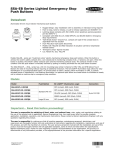
Models SSA-EB… series are "mushroom-style" electro-mechanical emergency stop push buttons. These buttons mount through a 30 mm
hole in an enclosure. When the button is armed, the switch's safety contacts (N.C.) are closed and its monitoring contacts (N.O.), if
present, are open. When the button is pushed, the switch's safety contacts open and the monitoring contacts close. The contacts remain
in this condition until they are manual rearmed. The standard 40 mm and 60 mm actuators can be rearmed by pulling or twisting clockwise the red actuator. The lockable 44 mm actuator can be rearmed only by twisting the actuator clockwise. Do not pull the actuator while
twisting or the switch may be damaged, causing a malfunction or operational failure. The illuminated models provide a RED indication
within the face of the button that allows for easy identification of a pushed/actuated button.
SSA-EB1M… series padlock-style lockable emergency stop push buttons are intended to prevent unauthorized or accidental resetting of
a pushed/latched button. The SSA-EB1M… series are not to be used as an energy isolating device or as the sole means of complying
with Lockout/Tagout or with the requirements of the isolation of hazardous energy (see OSHA 29CFR1910.147, ANSI Z244.1, CSA Z460,
ISO 14118). The locking feature can be used to provide supervisory/personal control and provide an additional safety measure(s) to
reduce the likelihood of inadvertent arming and energization of the emergency stop circuit.
Models
Non-Illuminated Models
Standard 40 mm
Standard 60 mm
Lockable 44 mm
E-Stop Contact
SSA-EB1P-02
SSA-EB2P-02
SSA-EB1MP-02
2 N.C.
SSA-EB1P-04
SSA-EB2P-04
SSA-EB1MP-04
4 N.C.
SSA-EB1P-11
SSA-EB2P-11
SSA-EB1MP-11
1 N.C. / 1 N.O.
SSA-EB1P-13
SSA-EB2P-13
SSA-EB1MP-13
3 N.C. / 1 N.O.
SSA-EB1P-22
SSA-EB2P-22
SSA-EB1MP-22
2 N.C. / 2 N.O.
Standard 40 mm
Lockable 44 mm
LED
E-Stop Contact
SSA-EB1PL1-02
SSA-EB1ML1P-02
Per Hookup
2 N.C.
SSA-EB1PL1-04
SSA-EB1ML1P-04
Per Hookup
4 N.C.
SSA-EB1PL1-11
SSA-EB1ML1P-11
Per Hookup
1 N.C. / 1 N.O.
SSA-EB1PL1-13
SSA-EB1ML1P-13
Per Hookup
3 N.C. / 1 N.O.
SSA-EB1PL1-22
SSA-EB1ML1P-22
Per Hookup
2 N.C. / 2 N.O.
SSA-EB1PL2-12
SSA-EB1ML2P-12
PUSH ON
2 N.C. / 1 N.O.
Illuminated Models
P/N 168349_web
Rev. B
4/3/2013
SSA-EB Series Emergency Stop Push Buttons
Important... Read this before proceeding!
The user is responsible for satisfying all local, state, and national laws, rules, codes, and regulations relating to the use of this
product and its application. Banner Engineering Corp. has made every effort to provide complete application, installation, operation, and
maintenance instructions. Please direct any questions regarding the use or installation of this product to the factory applications department at the telephone numbers or address found at http://www.bannerengineering.com.
The user is responsible for making sure that all machine operators, maintenance personnel, electricians, and supervisors are thoroughly familiar with and understand all instructions regarding the installation, maintenance, and use of this product, and with the machinery it
controls. The user and any personnel involved with the installation and use of this product must be thoroughly familiar with all applicable
standards, some of which are listed within the specifications. Banner Engineering Corp. makes no claim regarding a specific recommendation of any organization, the accuracy or effectiveness of any information provided, or the appropriateness of the provided information
for a specific application.
WARNING: Not a Safeguarding Device
An Emergency Stop Device is not considered a safeguarding device because it requires an overt
action by an individual to stop machine motion or hazards.
(A safeguarding device limits or eliminates an individual's exposure to a hazard without action by the individual or others.) Because an individual must actuate the device for it to function, these devices do not fit
the definition of a safeguarding device and cannot be substituted for required safeguarding. Refer to the
relevant standards to determine those requirements.
Emergency Stop Considerations
ANSI NFPA 79, ANSI B11.19, IEC/EN 60204-1, and ISO 13850 specify emergency stop requirements, including the following:
• Emergency-stop push buttons shall be located at each operator control station and at other operating stations where emergency
shutdown is required.
• Stop and emergency-stop push buttons shall be continuously operable and readily accessible from all control and operating stations
where located. Do not mute or bypass E-stop buttons.
• Actuators of emergency-stop devices shall be colored red. The background immediately around the device actuator shall be colored
yellow (where possible). The actuator of a push-button-operated device shall be of the palm or mushroom-head type.
• The emergency-stop actuator shall be a self-latching type.
WARNING: Emergency Stop Functions
Do not mute or bypass any Emergency Stop device. ANSI B11.19, ANSI NFPA79 and IEC/EN
60204-1 require that the Emergency Stop function remain active at all times.
WARNING: Multiple Switching Devices
Whenever two or more devices are connected to the same safety module (controller):
• Contacts of the corresponding pole of each switch must be connected together in series. Never
connect the contacts of multiple switches in parallel. Such a parallel connection defeats the switch
contact monitoring ability of the Module and creates an unsafe condition which could result in serious
injury or death.
• Each device must be individually actuated (engaged), then released (or re-armed) and the safety module reset. This allows the module to check each switch and its wiring to detect faults.
This check must be performed during the prescribed checkouts. Failure to test each device individually
in this manner could result in undetected faults and create an unsafe condition which could result
in serious injury or death.
2
www.bannerengineering.com - tel: 763-544-3164
P/N 168349_web
Rev. B
SSA-EB Series Emergency Stop Push Buttons
Installation and Maintenance
The device must not be affected by environmental conditions. Install the device so that operation is not impeded, but should be
protected against inadvertent operation (for example, accidental actuation by being bumped or leaned against). Do not operate the
switch using a tool. Do not expose the switch to excessive shocks and vibrations, otherwise the switch may be deformed or damaged,
causing malfunction or operation failure. See Dimensions on page 8.
Electrical installation must be made by qualified personnel1 and must comply with NEC (National Electrical Code), ANSI/NFPA 79 or
IEC/EN 60204-1, and all applicable local standards. It is not possible to give exact wiring instructions for a device that interfaces to a
multitude of machine control configurations. The following is general in nature; it is recommended to perform a risk assessment to ensure
appropriate application, interfacing/hookup, and risk reduction (see ISO 12100 or ANSI B11.0).
For SSA-EB1M..-.. series padlock-style lockable emergency stop push buttons, make sure that an applicable padlock and hasp is used.
The total weight of the padlock and hasp must not exceed 1500 g (3.3 lbs) or the switch may malfunction or fail.
Removing and Installing the Contact Block and Panel Mounting
Remove the Contact Block
1. Arm (reset) the actuator (button). Do not attempt to remove the contact block while the actuator is latched (pushed), or the switch
may be damaged.
2. Grip the beveled surfaces at the corners of the yellow bayonet ring and pull the ring toward the contact block until the latch pin clicks.
Tip: If the switch is not installed, place the contact block against the base of the index finger and grip the
bayonet ring with the thumb, index finger, and middle finger, then squeeze until the click is heard.
3. Rotate the contact block counterclockwise and pull out to remove the contact block. Do not use excessive force when removing the
contact block, or the switch may be damaged.
NOTE:
• For illuminated pushbuttons, the LED lamp is built into the contact block. When removing the contact
block, pull the contact block straight to prevent damage to the LED lamp. Do not use excessive force
or the LED lamp may be damaged and fail to light.
• When the contact block is removed, the monitor contact (normally open contact) is closed.
Bayonet Ring
Beveled Surface
Contact Block
Contact Block
Latch Pin
Pull
1
A Qualified Person possesses a recognized degree or certificate or has extensive knowledge, training, and experience to solve problems relating to the emergency stop installation.
P/N 168349_web
Rev. B
www.bannerengineering.com - tel: 763-544-3164
3
SSA-EB Series Emergency Stop Push Buttons
Panel Mounting
1. Remove the contact block and the M30 jam nut from the actuator and verify that the rubber gasket is in place.
2. Align the anti-rotation key on the bezel with the keyway (notch) in the panel.
3. Insert the actuator into the hole from the front of the panel, and tighten the M30 jam nut using wrench SSA-EB1-LRW or SSA-EB1LRTW to a maximum torque of 2.5 N•m (1.8 ft-lbs).
NOTE:
• The allowable panel thickness is 1 mm to 5 mm for SSA-EB1P… and 1 mm to 6 mm for SSA-EB1M….
• Banner recommends that the anti-rotation key/keyway is placed at the top of the hole (0° versus 90°
or 180°) so the word “TOP” on the contact block and actuator is on the top so that the terminal label is
easier to read.
• If using ESLP1-30/60-.. Plastic Emergency Stop legend, remove the anti-rotation projection on the legend using pliers, and then install the legend onto the actuator before inserting it into the hole.
Install the Contact Block
1. Arm (reset) the actuator (button). Do not attempt to install the contact block while the actuator is latched (pushed), or the switch may
be damaged.
2. Align the small ▼ mark on the edge of the actuator with the small ▲ mark on the yellow bayonet ring. The contact block (TOP
LOCK) should be turned approximately 45° counterclockwise from the anti-rotation key/keyway on the bezel.
3. Hold the black contact block (not the yellow bayonet ring), and slide the contact block onto the actuator. Push until the actuator is fully
inserted into the contact block (the bayonet ring will compress and motion will stop).
NOTE: If not installed on a panel, press on the actuator’s bezel (not the button).
4. Turn the contact block clockwise until the yellow bayonet ring pops into position and clicks.
When properly seated, the contact block cannot be turned or pulled.
Mark
Mark
TOP
Push
Turn
Clockwise
TOP Lock
Hookups
Non-Illuminated
E-Stop Contact
SSA-EB1P-02
SSA-EB1MP-02
2 N.C.
4
Hookup
12
21
11
22
Illuminated
E-Stop Contact
SSA-EB1PL1-02
SSA-EB1ML1P-02
2 N.C.
www.bannerengineering.com - tel: 763-544-3164
Hookup
12
11
X1
21
LED24V
22
X2
P/N 168349_web
Rev. B
SSA-EB Series Emergency Stop Push Buttons
Non-Illuminated
E-Stop Contact
SSA-EB1P-04
SSA-EB1MP-04
4 N.C.
SSA-EB1P-11
SSA-EB1MP-11
Hookup
11
12
22
41
21
42
1 N.C. / 1 N.O.
32
31
11
12
Illuminated
E-Stop Contact
SSA-EB1PL1-04
SSA-EB1ML1P-04
4 N.C.
Hookup
11
12
22
41
21 LED24V 42
X1 32
31 X2
SSA-EB1PL1-11
SSA-EB1ML1P-11
1 N.C. / 1 N.O.
11
12
LED24V
SSA-EB1P-13
SSA-EB1MP-13
3 N.C. / 1 N.O.
SSA-EB1P-22
SSA-EB1MP-22
24
23
11
12
X1 24
22
41
21
42
2 N.C. / 2 N.O.
34
33
13
14
22
41
21
42
34
SSA-EB1PL1-13
SSA-EB1ML1P-13
3 N.C. / 1 N.O.
23 X2
11
12
22
41
21 LED24V 42
X1 34
33 X2
SSA-EB1PL1-22
SSA-EB1ML1P-22
2 N.C. / 2 N.O.
13
14
22
41
21 LED24V 42
X1 34
33 X2
33
SSA-EB1PL2-12
SSA-EB1ML2P-12
(Push ON LED)
2 N.C. / 1 N.O.
13
14
22
21
31
32
X1 X2
LED24V
Applicable Crimping Terminal
Spade Terminal
Solid Wire
Crimping
Terminal
4.7 min.
Insulation Tube
Insulation Tube
3.2 max.
6.0 max.
ø6.0 max.
ø3.2 min.
Crimping
Terminal
ø1.2 max.
Ring Terminal
3.0 max.
4.7 to 5.9
4.7 to 5.9
Wire
4.7 to 5.9
Wire
6.2 max.
Banner recommends the use of crimp terminals with stranded wire or solid core wire to prevent short circuits between terminals. Ensure
that the insulation tube is installed on crimp terminals.
Installing and Removing the Terminal Cover
Install the SSA-EB1-TC Terminal Cover
1. Align the TOP mark on the SSA-EB1-TC terminal cover with the TOP mark on the contact block.
2. Place the two projections on the bottom of the contact block into the slots in the SSA-EB1-TC terminal cover.
P/N 168349_web
Rev. B
www.bannerengineering.com - tel: 763-544-3164
5
SSA-EB Series Emergency Stop Push Buttons
TOP Mark
Press on the
terminal cover
Slots
Place projections
on contact block
3. Press the SSA-EB1-TC terminal cover toward the contact block.
Remove the SSA-EB1-TC Terminal Cover
1. Pull out the two latches on the top of the SSA-EB1-TC terminal cover. Do not exert excessive force on the latches, or the latches may
break.
Projections
(pull)
2. Remove the SSA-EB1-TC terminal cover.
Install the IP20 Fingersafe SSA-EB1-FSTC Terminal Cover
After installation, the SSA-EB1-FSTC terminal cover cannot be removed.
With the SSA-EB1-FSTC terminal cover installed, crimping terminals cannot be used. Use solid wires.
The SSA-EB1-FSTC terminal covers cannot be installed after wiring.
Make sure that the SSA-EB1-FSTC terminal cover is securely installed. IP20 cannot be achieved when installed loosely, and electric
shocks may occur.
1. Align the TOP mark on the cover with the TOP mark on the contact block.
2. Press the cover toward the contact block.
TOP Mark
Press
TOP Mark
WARNING: Shock Hazard and Hazardous Energy
Always disconnect power from the safety system (for example, device, module, interfacing,
etc.) and the machine being controlled before making any connections or replacing any component.
Electrical installation and wiring must be made by Qualified Personnel and must comply with the relevant electrical standards and wiring codes, such as the NEC (National Electrical Code), ANSI
NFPA79, or IEC 60204-1, and all applicable local standards and codes.
Lockout/tagout procedures may be required. Refer to OSHA 29CFR1910.147, ANSI Z244-1, ISO
14118, or the appropriate standard for controlling hazardous energy.
6
www.bannerengineering.com - tel: 763-544-3164
P/N 168349_web
Rev. B
SSA-EB Series Emergency Stop Push Buttons
Specifications
Button/Locking Collar
Polyamide/Aluminum
Operating Temperature
Non-illuminated: –25 to +60°C (-13 to +140°F)
Illuminated: –25 to +55°C (-13 to +131°F)
Environmental Rating
Actuator: IP65 (IEC60529)
Terminal: IP20 with SSA-EB1-FSTC installed
Operating Humidity
45% to 85% RH (no condensation)
Insulation Resistance
100MΩ minimum (500V DC megger)
Impulse Withstand Voltage
2.5kV
Pollution Degree
3
Output Configuration
See Installation and Maintenance on page 3
Overvoltage Category
II
Contact Material/Bounce2
Gold plated silver / 20 ms
Electrical Life
100,000 operations minimum, 250,000 operations
minimum at 24V AC/DC, 100mA
Mechanical Life
250,000 operations
Shock Resistance
Operating extremes: 150 m/s2 (15G)
Vibration Resistance
Operating extremes: 10 to 500Hz, amplitude 0.35
mm acceleration 50 m/s2
LED Color
Red (The LED is built into the contact block and cannot
be replaced)
LED Voltage/Maximum Current
24V ac/dc ±10%, 15 mA
Total Weight of Padlock and Hasp (SSA-EB1M..-.. only)
1500g (3.3 lb) max.
Electrical Rating
Minimum load: 1 mA at 5V ac/dc
Maximum Rated Load: See table
UL Applications: 1.5A at 250V ac, 1A at 30V dc (pilot
duty)
CE Applications: AC-15: 1.5A at 250V ac, DC-13: 1A at
30V dc
Rated Insulation Voltage (Ui)
250V
Rated Current (Ith)
5A
B10d
100,000 (based on ISO13849-1(2006))
Terminals
M3 screw terminal (terminal cover included)
Recommended Torque: 0.6 to 1.0 N•m (5.3 to 8.8 in-lbf)
Allowable Wire: 0.75 to 1.25 mm2 (18 to 16 AWG)
Design Standards
Compliant with EN/IEC 60497-1 / -5-1, ISO 13850, ANSI
B11.19 , ANSI NFPA79, IEC 60204-1
Date code format (U.S. Standard Format)
YYWWX: 2-digit year, 2-digit week, "X” internal code
Certifications
858T
Rated Operating Voltage (Ue) and Current
Safety Contact (N.C.)
AC 50/60 Hz
DC
2
30V
125V
250V
Resistive Load (AC-12)
-
5A
3A
Inductive Load (AC-15)
-
3A
1.5A
Resistive Load (DC-12)
2A
0.4A
0.2A
Inductive Load (DC-13)
1A
0.22A
0.1A
When the button is reset, the normally closed contacts will chatter. When pressing the button, the normally open contacts will chatter. When designing a control circuit, take
the contact chatter time into consideration. Do not expose the switch to external shocks, otherwise the contacts will bounce.
P/N 168349_web
Rev. B
www.bannerengineering.com - tel: 763-544-3164
7
SSA-EB Series Emergency Stop Push Buttons
Monitor Contacts (N.O.)
AC 50/60 Hz
DC
30V
125V
250V
Resistive Load (AC-12)
-
1.2A
0.6A
Inductive Load (AC-14)
-
0.6A
0.3A
Resistive Load (DC-12)
2A
0.4A
0.2A
Inductive Load (DC-13)
1A
0.22A
0.1A
The operating current is classified according to JIS C 8201-5-1-1999 making and breaking capacities and are measured at
resistive/inductive load types specified in IEC 60947-5-1. See "Electrical Rating" above for specific model and UL/CE maximum ratings.
Checkout
At machine set up, a Designated Person3 should test each emergency stop push button for proper machine shutdown response. A
Designated Person should check the emergency stop buttons for proper operation, physical damage, button looseness, and excessive
environmental contamination. This should take place on a periodic schedule determined by the user, based on the severity of the operating environment and the frequency of switch actuations. Adjust, repair, or replace components as needed. If inspection reveals contamination on the switch, thoroughly clean the switch and eliminate the cause of the contamination. Replace the switch and/or appropriate
components when any parts or assemblies are damaged, broken, deformed, or badly worn; or if the electrical/mechanical specifications
(for the environment and operating conditions) have been exceeded. Always test the control system for proper functioning under
machine control conditions after performing maintenance, replacing the emergency stop device, or replacing any component of the device.
Dimensions
3
8
A Designated Person is identified in writing by the employer as being appropriately trained to perform a specified checkout procedure. A Qualified Person possesses a recognized degree
or certificate or has extensive knowledge, training, and experience to solve problems relating to the emergency stop installation.
www.bannerengineering.com - tel: 763-544-3164
P/N 168349_web
Rev. B
SSA-EB Series Emergency Stop Push Buttons
a
b
c
d
7 mm max
19 mm max
39 mm min
15 mm min4
4
Dimension d is 6 mm or more when attaching a padlock from the side of a switch
P/N 168349_web
Rev. B
www.bannerengineering.com - tel: 763-544-3164
9
SSA-EB Series Emergency Stop Push Buttons
Mounting Hole Layout
The values are the minimum dimensions for mounting with other ø 30 mm push
buttons. For other control units of different sizes and styles, determine the values
according to the dimensions, operation, and wiring convenience.
For padlock-style lockable emergency stop push buttons, determine the values according to the size and number of padlocks and hasp.
Ø30.5
70 mm
minimum
70 mm
minimum
Accessories
NOTE: Actuators and contact blocks (including LED indicators) are only available as complete units and are
not sold separately.
SSA-EB1-FSTC
IP20 Finger-safe terminal cover
SSA-EB1-TC
Standard terminal cover (supplied)
SSA-EB1-LRW
Jam nut wrench
SSA-EB1-LRTW
Jam nut twist wrench
ESLP1-30/60-NW
ESLP1-30/60
•
•
•
•
E-Stop Legend, Plastic
Blank
60 mm diameter (OD)
30 mm hole
ESL-41/60 (1 each)
ESL-41/60-10 (10 each)
•
•
•
•
10
E-Stop Legend, Label
“EMERGENCY STOP”
60 mm diameter (OD)
41 mm hole for application
around SSA-EB1P…
•
•
•
•
E-Stop Legend, Plastic
“Emergency Stop”
60 mm diameter (OD)
30 mm hole
ESL-41/60-ENES (1 each)
ESL-41/60-ENES-10 (10 each)
• E-Stop Legend, Label
• “EMERGENCY STOP PARADA DE EMERGENCIA”
• 60 mm diameter (OD)
• 41 mm hole for application
around SSA-EB1P…
www.bannerengineering.com - tel: 763-544-3164
P/N 168349_web
Rev. B
SSA-EB Series Emergency Stop Push Buttons
EM
ER
GENCY ST
OP
ESL-44/70 (1 each)
ESL-44/70-10 (10 each)
ww
nnerengineering.c
om
E-Stop Legend, Label
“EMERGENCY STOP”
70 mm diameter (OD)
44 mm hole for application
around SSA-EB1M…
w.ba
•
•
•
•
EM
ER
GENCY ST
OP
U.S. Application Standards
ANSI B11.0 Safety of Machinery; General Requirements and Risk Assessment
ANSI B11.19 Performance Criteria for Safeguarding
ANSI NFPA 79 Electrical Standard for Industrial Machinery
International/European Standards
ISO 12100 Safety of Machinery – General Principles for Design — Risk Assessment and Risk Reduction
ISO 13850 (EN 418) Emergency Stop Devices, Functional Aspects – Principles for Design
IEC 62061 Functional Safety of Safety-Related Electrical, Electronic and Programmable Control Systems
ISO 13849-1 (EN 954-1) Safety-Related Parts of Control Systems
IEC 60204-1 Electrical Equipment of Machines Part 1: General Requirements
IEC 60947-1 Low Voltage Switchgear – General Rules
IEC 60947-5-1 Low Voltage Switchgear – Electromechanical Control Circuit Devices
IEC 60947-5-5 Low Voltage Switchgear – Electrical Emergency Stop Device with Mechanical Latching Function
EC Declaration of Conformity (DOC)
Banner Engineering Corp. herewith declares that the SSA-EB1.. Emergency Stop Push Buttons are in conformity with the provisions of
the Machinery Directive (Directive 2006/42/EC) and all essential health and safety requirements have been met. For more information,
visit http://www.bannerengineering.com/.
Banner Engineering Corp Limited Warranty
Banner Engineering Corp. warrants its products to be free from defects in material and workmanship for one year following the date of
shipment. Banner Engineering Corp. will repair or replace, free of charge, any product of its manufacture which, at the time it is returned
to the factory, is found to have been defective during the warranty period. This warranty does not cover damage or liability for misuse,
abuse, or the improper application or installation of the Banner product.
THIS LIMITED WARRANTY IS EXCLUSIVE AND IN LIEU OF ALL OTHER WARRANTIES WHETHER EXPRESS OR IMPLIED (INCLUDING, WITHOUT LIMITATION, ANY WARRANTY OF MERCHANTABILITY OR FITNESS FOR A PARTICULAR PURPOSE), AND
WHETHER ARISING UNDER COURSE OF PERFORMANCE, COURSE OF DEALING OR TRADE USAGE.
This Warranty is exclusive and limited to repair or, at the discretion of Banner Engineering Corp., replacement. IN NO EVENT SHALL
BANNER ENGINEERING CORP. BE LIABLE TO BUYER OR ANY OTHER PERSON OR ENTITY FOR ANY EXTRA COSTS, EXPENSES, LOSSES, LOSS OF PROFITS, OR ANY INCIDENTAL, CONSEQUENTIAL OR SPECIAL DAMAGES RESULTING FROM ANY
PRODUCT DEFECT OR FROM THE USE OR INABILITY TO USE THE PRODUCT, WHETHER ARISING IN CONTRACT OR WARRANTY, STATUTE, TORT, STRICT LIABILITY, NEGLIGENCE, OR OTHERWISE.
Banner Engineering Corp. reserves the right to change, modify or improve the design of the product without assuming any obligations or
liabilities relating to any product previously manufactured by Banner Engineering Corp.