1
Operation Guide 2972 2973
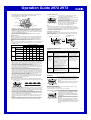
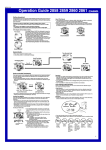
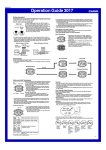
1,500 kilometers
Rugby
500 kilometers
Mainflingen
• This watch is designed to receive the time calibration signal transmitted from Rugby,
England and the signal from Mainflingen, Germany. Signal reception is possible
within the area represented by a circle with a radius of about 1,500 kilometers.
• At distances further than about 500 kilometers from a transmitter, signal reception
may not be possible during certain times of year or times of day. Radio interference
may also cause problems with reception.
• See the information under “Signal Reception Troubleshooting” if you experience
problems with time calibration signal reception.
Your City Code
1
2
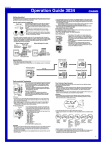
Auto Receive Start Times
3
4
5
PAR, BER Standard Time
(GMT +1)
2:00 am 3:00 am 4:00 am 5:00 am Midnight 1:00 am
next day
Daylight Saving
Time
PM
indicator
2:00 am 3:00 am 4:00 am 5:00 am Midnight 1:00 am
next day
3:00 am 4:00 am 5:00 am Midnight 1:00 am 2:00 am
next day next day
3:00 am 4:00 am 5:00 am Midnight 1:00 am 2:00 am
next day next day
4:00 am 5:00 am Midnight 1:00 am 2:00 am 3:00 am
next day next day next day
Note
• Auto receive works only while the watch is in the Timekeeping Mode or World Time
Mode. Auto receive is not performed if an auto receive time is reached while an
alarm is sounding, while a countdown timer operation is in progress, or if a setting
screen (a screen with a flashing setting) is on the display.
• Auto receipt of the calibration signal is designed to be performed early in the
morning, while you sleep (provided that the Timekeeping Mode time is set correctly).
Before going to bed for the night, remove the watch from your wrist, and put it in a
location where it can receive the signal easily.
• When auto receive is turned on, the watch receives the calibration signal for two to
six minutes everyday when the Timekeeping Mode time reaches each of the
calibration times. Do not perform any button operation within six minutes before or
after any one of the calibration times. Doing so can interfere with correct calibration.
• Remember that reception of the calibration signal depends on the time kept in the
Timekeeping Mode. The receive operation will be performed whenever the display
shows any one of the calibration times, regardless of whether or not the
Timekeeping Mode time is actually the correct time.
• If more than one auto receive is successful, the watch uses the data from the last
successful receive to adjust settings. When only one reception is successful, the
watch uses the data of the successful reception.
About the Receiving Indicator
The receiving indicator shows the strength of the calibration signal being received. For
best reception, be sure to keep the watch in a location where signal strength is strongest.
Press D.
Receive date
Signal Receive Troubleshooting
Check the following points whenever you experience problems with calibration signal
reception.
Problem
Probable Cause
Cannot perform • The watch is not in the Timekeeping Mode.
manual receive. • Your current Home City is not one of the
following city codes: LON, PAR,
BER, or ATH.
Auto receive is • You changed the time setting manually.
turned on, but
• The watch was not in the Timekeeping
the Level 4
or World Time Mode, or you performed
receiving
some button operation during the auto
indicator does
receive operation.
not appear on
• Even if receive is successful, the Level 4
the display.
receiving indicator disappears when the
second auto receive time is reached
each day.
• Time data (hour, minutes, seconds)
only was received during the last
receive operation. The Level 4
receiving indicator appears only when
time data and date data (year, month,
day) are both received.
Time setting is • If the time is one hour off, the DST
incorrect
setting may be incorrect.
following signal • The Home City code setting is not
correct for the area where you are using
reception.
the watch.
Strong
(Level 4)
• Even in an area where signal strength is strong, it takes about 10 seconds for signal
reception to stabilize enough for the receiving indicator to indicate signal strength.
• Use the receiving indicator as a guide for checking signal strength and for finding the
best location for the watch during signal receive operations.
• Following reception of the time calibration signal and calibration of the watch’s time
setting, the Level 4 receiving indicator will remain on the display in all modes. The
Level 4 receiving indicator will not be displayed if signal reception was unsuccessful
or after you adjust the current time setting manually.
• The Level 4 receiving indicator is displayed only when the watch is able to receive
both time and date data successfully. It does not appear when only time data is
received.
• The Level 4 receiving indicator indicates that at least one of the auto calibration
signal receive operations was successful. Note, however, that the Level 4 receiving
indicator is cleared from the display at the next successful reception each day.
What you should do
• Enter the Timekeeping Mode
and try again.
• Select LON, PAR, BER, or
ATH as your Home City.
• Perform manual signal receive
or wait until the next auto
signal receive operation is
performed.
• Check to make sure the
watch is in a location where it
can receive the signal.
• Change the DST setting to
Auto DST.
• Select the correct Home City
code.
• For further information, see “Important!” under “Time Calibration Signal Reception”
and “Radio-controlled Timekeeping Precautions”.
World Time
City code
Receiving indicator
Weak
(Level 1)
Last Signal Screen
Receive time
Month – Day
Hour : Minutes Seconds
1:00 am 2:00 am 3:00 am 4:00 am 5:00 am Midnight
ATH
Standard Time
(GMT +2)
To display the Last Signal screen
In the Timekeeping Mode, press D to display the Last Signal screen (indicated by
GET). The Last Signal screen shows the date and time of the last successful time
calibration signal reception.
6
LON
Standard Time
(GMT +0)
Daylight Saving
Time
Daylight Saving
Time
Note
• To interrupt a receive operation and return to the Timekeeping Mode, press D.
• If the receive operation is unsuccessful, the message ERR appears on the display
for about one or two minutes. After that, the watch returns to the Timekeeping Mode.
• You can also change from the Last Signal or ERR screen to the normal
timekeeping screen by pressing D.
▲
About Auto Receive
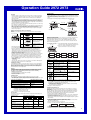
With auto receive, the watch receives the time calibration signal automatically five or
six times a day. When the second or third receive is successful, the remaining auto
receive operations are not performed. The reception schedule (calibration times)
depends on your currently selected Home City Code, and whether standard time or
Daylight Saving Time is selected for your Home City Code.
Note
• Auto receive is turned on whenever LON, PAR, BER, or ATH is selected as the
Home City code. For information about turning off auto receive, see “To select the
transmitter mode”.
To perform manual receive
1. Place the watch on a stable surface so its top (12
Receiving indicator
o’clock side) is facing towards a window.
2. In the Timekeeping Mode, hold down D for about two
seconds until the watch beeps.
• Release D and the message RC! appears to indicate
that signal reception has started.
• Time calibration signal reception takes from two to six
minutes. Take care that you do not perform any button
operations or move the watch during this time.
• After signal reception is complete, the display of the
watch changes to the Last Signal screen.
▲
• When within range of the applicable transmitter, this watch can receive either the
Germany (Mainflingen) or England (Rugby) time calibration signals.
See “Transmitters” for more information.
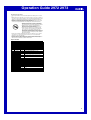
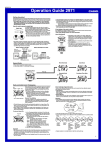
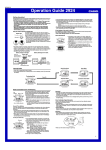
The World Time Mode shows you the current time in 30
cities (29 time zones) around the world.
• If the current time shown for a city is wrong, check your
Home City time settings and make the necessary
changes.
• All of the operations in this section are performed in the
World Time Mode, which you enter by pressing C.
Current time in
selected city
To view the time in another city
While in the World Time Mode, press D to scroll eastward through the city codes
(time zones) or B to scroll westward.
• For full information on city codes, see the “City Code Table”.
To toggle a city code time between Standard Time and Daylight Saving Time
1. In the World Time Mode, use B and D to display the
DST indicator
city code (time zone) whose Standard Time/Daylight
Saving Time setting you want to change.
2. Hold down A to toggle Daylight Saving Time (DST
indicator displayed) and Standard Time (DST indicator
not displayed).
• Note that you cannot switch between Standard Time
and Daylight Saving Time while GMT is selected as the
city code.
• The DST indicator will appear whenever you display a
city code for which Daylight Saving Time is turned on.
• Note that the DST/Standard Time setting affects only the
currently displayed city code. Other city codes are not
affected.
2