1
Final Cut Pro 7
Exploring Final Cut Pro
KKApple Inc.
Copyright © 2009 Apple Inc. All rights reserved.
Your rights to the software are governed by the
accompanying software license agreement. The owner
or authorized user of a valid copy of Final Cut Studio
software may reproduce this publication for the
purpose of learning to use such software. No part of
this publication may be reproduced or transmitted
for commercial purposes, such as selling copies of this
publication or for providing paid for support services.
The Apple logo is a trademark of Apple Inc., registered
in the U.S. and other countries. Use of the “keyboard”
Apple logo (Shift-Option-K) for commercial purposes
without the prior written consent of Apple may
constitute trademark infringement and unfair
competition in violation of federal and state laws.
Every effort has been made to ensure that the
information in this manual is accurate. Apple is not
responsible for printing or clerical errors.
Because Apple frequently releases new versions and
updates to its system software, applications, and Internet
sites, images shown in this book may be slightly different
from what you see on your screen.
Apple
1 Infinite Loop
Cupertino, CA 95014
408-996-1010
www.apple.com
Apple, the Apple logo, Final Cut, Final Cut Pro,
Final Cut Studio, iPod, QuickTime, and Soundtrack are
trademarks of Apple Inc., registered in the U.S. and
other countries.
iPhone is a trademark of Apple Inc.
MobileMe is a service mark of Apple Inc.
The YouTube logo is a trademark of Google Inc.
Other company and product names mentioned herein
are trademarks of their respective companies. Mention
of third-party products is for informational purposes
only and constitutes neither an endorsement nor a
recommendation. Apple assumes no responsibility with
regard to the performance or use of these products.
Contents
7
8
10
14
19
24
28
29
31
Chapter 1: A First Look at Final Cut Pro
Opening Final Cut Pro
Jump In: Explore the Browser
Jump In: Explore the Viewer
Jump In: Explore the Canvas
Jump In: Explore the Timeline
Jump In: Work with the Main Windows
Learning About Projects, Sequences, Clips, and Media Files
Key Concepts
33
34
40
48
Chapter 2: Bringing Media into Your System
Jump In: Explore Tape-Based Video Capture
Jump In: Explore File-Based Video Transfer
Jump In: Import Still Images and Other Media
51 Learning About Ingesting Media and Setting Up Projects
53 Key Concepts
3
55
55
61
62
68
77
Chapter 3: Preparing Clips in the Viewer
Jump In: Get to Know the Viewer
Jump In: Change Clips in the Viewer
Jump In: Create a Title Clip
Jump In: Change Clips over Time
Learning About Motion Parameters
79 Key Concepts
81
81
86
93
97
Chapter 4: Working with the Canvas and Timeline
Jump In: Work with the Canvas
Jump In: Work with Tracks in the Timeline
Jump In: Edit Clips into a Sequence in the Timeline
Key Concepts
99 Chapter 5: Basic Editing
99 Jump In: Trim Clips
107 Jump In: Make Simple Split Edits and Cutaways
113 Learning About the Trim Edit Window
115 Key Concepts
117
118
125
134
140
Chapter 6: Working with Audio
Jump In: Work with a Clip’s Audio in the Viewer
Jump In: Change Audio Levels over Time
Jump In: Work with Audio Tracks in the Timeline
Key Concepts
4
Contents
141 Chapter 7: Creating Voiceovers
141 Jump In: Add Voiceover Clips
150 Key Concepts
151 Chapter 8: Adding Video Filters and Transitions
152 Jump In: Apply Filters to Clips
157
159
165
169
Jump In: Make Simple Color Corrections
Jump In: Add Transitions Between Clips
Learning About Transitions
Key Concepts
171
172
173
176
Chapter 9: Outputting Your Finished Movie
Jump In: Create a QuickTime Movie
Jump In: Export a Movie in a Specific File Format
Key Concepts
177 Chapter 10: Getting Answers
177 Jump In: Explore Final Cut Pro Help
178 What’s Next?
Contents
5
A First Look at Final Cut Pro
1
Welcome to Final Cut Pro. If you’re new to the Final Cut Pro
video editing workflow, this guide is for you. Here you’ll create
a sample video project and learn by doing.
Each chapter of this book presents major features and guides you in trying things
out. Feel free to explore on your own. Have fun learning the basics. Later, when you
feel comfortable, you can bring in your own video and other media and begin serious
editing with Final Cut Pro.
This book assumes that you’ve installed Final Cut Pro on your computer.
ÂÂ If you haven’t installed Final Cut Pro yet: See the Installing Your Software booklet.
ÂÂ If you prefer to start by reading in-depth explanations of concepts and procedures used
with Final Cut Pro: Open Final Cut Pro and choose Help > Final Cut Pro Help. Then
click Final Cut Pro 7: User Manual.
7
Opening Final Cut Pro
You’ll start by opening Final Cut Pro and creating a sample project.
To open Final Cut Pro:
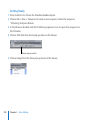
1 Double-click the Final Cut Pro icon in your Applications folder.
2 If you see the Choose Settings dialog, click OK to accept the default settings.
When you open Final Cut Pro, it checks to see if a camera or other device is connected
to your computer. If no device for capturing video is connected, a dialog appears
asking whether you want to connect a device and have Final Cut Pro check again, or
continue without connecting a device.
8
Chapter 1    A First Look at Final Cut Pro
3 Click Continue.
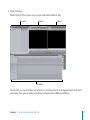
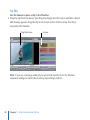
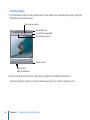
When Final Cut Pro opens, your screen will look similar to this:
Browser
Viewer
Canvas
Timeline
On the left you see the Browser, where you create projects and organize bins that hold
your clips. Now you’re ready to explore a simple video editing workflow.
Chapter 1    A First Look at Final Cut Pro
9
Jump In: Explore the Browser
First, you’ll import some clips into your project, and then you’ll explore some important
parts of the Final Cut Pro interface. If you have video files of your own on your
computer, feel free to import several and work with them as you explore. You’ll learn
more about capturing video from a camcorder or other device later.
Getting Ready
To import sample video files:
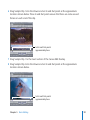
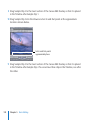
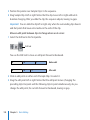
1 In Final Cut Pro, choose Help > Final Cut Pro Help.
2 Click the link below the description of the Exploring Final Cut Pro manual to download
the sample files.
3 After downloading, double-click the folder to decompress it, then drag the four sample
files from your Downloads folder into your Movies folder.
4 Choose File > Import > Files.
5 Navigate to the Movies folder.
6 Select the sample files. You can Shift-click or Command-click files to select several at once.
7 Click Choose.
10
Chapter 1    A First Look at Final Cut Pro
To import your own video files that are already on your computer:
1 Choose File > Import > Files.
2 Navigate to the folder holding your video files.
3 Select the files you want to import into Final Cut Pro. You can Shift-click or Command-click
files to select several at once.
4 Click Choose.
Next, you’ll explore the Browser. Your Browser now looks similar to this:
Project tab
Audio clip
Sample video clips
Sequence icon
Chapter 1    A First Look at Final Cut Pro
11
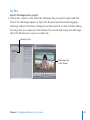
Try This
Feel free to try out any of the following to see what happens.
Change the Browser display:
mm Choose View > Browser Items > as Large Icons to display the clips as icons.
mm Choose View > Browser Items > as Small Icons to display the clips as smaller icons. Drag
the clips around in the Browser to reposition or reorder them.
mm Choose View > Browser Items > as List to display the clips as a list of items.
Create and work with bins:
1 Choose File > New > Bin to create a new bin to hold clips. Type “Samples” as the bin
name and press Return.
You can create bins, which are like folders, to hold and organize the clips in your project.
2 Press Command-B to create another bin. Name it “Samples 2” and press Return.
3 Double-click the Samples bin to open it. Click the close button to close the bin. Click the
Samples 2 bin to select it, and press Return to open it. Press Control-W to close the bin.
4 Select the Samples 2 bin and press Delete to delete it.
Select items in the Browser:
mm Click an item in the Browser. Press the Up Arrow and Down Arrow keys to select items.
mm Shift-click items in the Browser.
12
Chapter 1    A First Look at Final Cut Pro
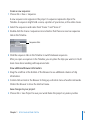
Create a new sequence:
1 Choose File > New > Sequence.
A new sequence icon appears in the project. A sequence represents clips in the
Timeline. A sequence might hold a scene, a portion of your movie, or the entire movie.
2 Select the sequences and name them “Scene 1” and “Scene 2.”
3 Double-click the Scene 2 sequence icon and notice that there are now two sequence
tabs in the Timeline.
Sequence tabs
4 Click the sequence tabs in the Timeline to switch between sequences.
After you open a sequence in the Timeline, you can place the clips you want in it. You’ll
learn more about working with sequences later.
View additional Browser information:
mm Drag the scroll bar at the bottom of the Browser to see additional columns of clip
information.
mm Control-click an item in the Browser to bring up a shortcut menu of useful commands.
Click in the Browser to close the shortcut menu.
Save changes to your project:
mm Choose File > Save Project to save your work. Name the project any name you like.
Chapter 1    A First Look at Final Cut Pro
13
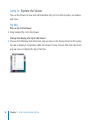
Jump In: Explore the Viewer
You use the Viewer to view and edit individual clips, set In and Out points, set markers,
and more.
Try This
Place a clip in the Viewer:
mm Drag Sample Clip 1 into the Viewer.
Change the display of a clip in the Viewer:
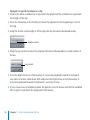
mm Choose Fit to Window from the Zoom pop-up menu in the Viewer. Final Cut Pro resizes
the clip to display it completely within the Viewer’s frame. Choose 50% from the Zoom
pop-up menu to display the clip at half size.
14
Chapter 1    A First Look at Final Cut Pro
Play a clip in the Viewer:
mm Click the Play button to start and stop playing the video clip. Then press the Space bar
to start and stop playing the video clip.
Scrubber bar
Play button
mm Press J to play the clip backward. Press K to stop playback. Press L to play the clip
forward. Press the J or L key several times to accelerate the playback speed, and press K
to stop playback.
Chapter 1    A First Look at Final Cut Pro
15
Navigate to specific locations in a clip:
mm Click in the white scrubber bar to reposition the playhead. The scrubber bar represents
the length of the clip.
mm Press the Home key or the End key to move the playhead to the beginning or end of
the clip.
mm Drag the shuttle control right or left to play the clip forward or backward slowly.
Shuttle control
mm Drag the jog control to move the playhead forward or backward by a small number of
frames.
Jog control
mm Press the Right Arrow or Left Arrow key to move the playhead forward or backward
one frame at a time. Hold down Shift and press the Right Arrow or Left Arrow key to
move the playhead forward or backward 1 second at a time.
mm If your mouse has a trackball, position the pointer over the Viewer and roll the trackball
left or right to reposition the playhead in the Viewer.
16
Chapter 1    A First Look at Final Cut Pro
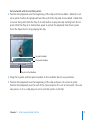
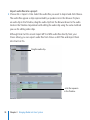
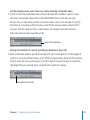
Set and work with In and Out points:
mm Position the playhead near the beginning of the clip and choose Mark > Mark In to set
an In point. Position the playhead near the end of the clip and choose Mark > Mark Out
to set an Out point. Click the Play In to Out button to play the clip starting from the In
point. Click the Play In to Out button again to restart the playback from the In point.
Press the Space bar to stop playing the clip.
In point marker
Out point marker
Play In to Out button
mm Drag the In point and Out point markers in the scrubber bar to new positions.
mm Position the playhead near the beginning of the clip and press I to set an In point.
Position the playhead near the end of the clip and press O to set an Out point. (You can
also press I or O as a clip plays to set In and Out points on the fly.)
Chapter 1    A First Look at Final Cut Pro
17
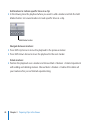
Navigate between edit points:
mm Click the Go to Next Edit button or the Go to Previous Edit button to move the
playhead to the next or previous edit point.
Go to Previous Edit button
Go to Next Edit button
mm Press the Up Arrow and Down Arrow keys to move between edit points.
18
Chapter 1    A First Look at Final Cut Pro
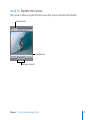
Jump In: Explore the Canvas
The Canvas is where you play back the movie that you’ve created in the Timeline.
Sequence tab
Scrubber bar
Transport controls
Chapter 1    A First Look at Final Cut Pro
19
Try This
Use the Canvas to place a clip in the Timeline:
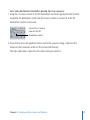
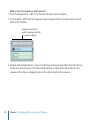
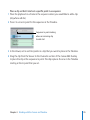
mm Drag the clip from the Viewer (just drag the image) into the Canvas until the colored
Edit Overlay appears. Drag the clip to the Insert section of the overlay. The clip is
inserted in the Timeline.
Drag from here...
...to here.
Note: If you see a message asking if you want Final Cut Pro to set the Timeline
sequence settings to match the incoming clip settings, click Yes.
20
Chapter 1    A First Look at Final Cut Pro
Change the display of the Canvas:
mm Choose several different zoom levels from the Zoom pop-up menu. Last, choose the
50% zoom level from the Zoom pop-up menu.
Zoom pop-up menu
Play and navigate within the clip in your sequence:
mm Click the Canvas window to make it active. To play the clip in your sequence in the
Timeline, press Home to move the playhead to the beginning of the Timeline, then
click the Play button in the Canvas transport controls. Most of the Canvas controls work
identically to those you’ve used in the Viewer.
Go to Next Edit button
Scrubber bar
Go to Previous Edit button
Chapter 1    A First Look at Final Cut Pro
21
mm Press the Space bar to start and stop playback.
mm Click in the white scrubber bar in the Canvas to reposition the playhead. The scrubber
bar represents the sequence in the Timeline.
mm Press the Home key or the End key to move the playhead to the beginning or end of
the sequence in the Timeline.
mm Press the J key or L key to play the clip backward or forward. Press K to stop playback.
Press the J or L key several times to accelerate the playback speed.
Move the playhead forward or backward:
mm Press the Right Arrow key or Left Arrow key to move playhead forward or backward
one frame at a time. Hold down Shift and press the Right Arrow or Left Arrow key to
move the playhead forward or backward 1 second at a time.
mm Click the Go to Next Edit button or Go to Previous Edit button to move the Canvas
playhead to the next or previous edit point in the sequence. Press the Up Arrow and
Down Arrow keys to move between edit points.
Go to Previous Edit button
Go to Next Edit button
22
Chapter 1    A First Look at Final Cut Pro
Reposition the playhead in the Canvas (if your mouse has a trackball):
mm Position the pointer over the Canvas and roll the trackball left or right to reposition the
playhead in the Canvas and Timeline.
Change the display of the Canvas:
mm Choose Show Overlays from the View pop-up menu. Choose Show Title Safe from
the View pop-up menu to have Final Cut Pro display borders showing the part of the
image that will appear on a standard video screen. Choose Show Overlays from the
View pop-up menu again to turn off the display of overlays.
View pop-up menu
Chapter 1    A First Look at Final Cut Pro
23
Jump In: Explore the Timeline
The Timeline holds your sequences, which contain the arrangement of video and
audio clips, and other items such as titles and transitions, in the order you want them
in your movie.
Sequence tab
Playhead
Ruler
Video clip item
Audio clip items
Zoom slider
Thumb tab
Try This
Play and navigate within the sequence in the Timeline:
mm Click in the Timeline ruler to reposition the playhead. Try using the J, K, and L keys to
play the sequence in the Timeline. Press Home and End to jump to the beginning or
end of the sequence. Use arrow keys to move the playhead to different locations.
24
Chapter 1    A First Look at Final Cut Pro
mm Drag the thumb tabs at the ends of the Zoom slider to change the displayed length of
the Timeline’s clips. Scroll through the Timeline by dragging the Zoom slider left or right.
mm Press Command–Equal Sign (=) and Command-Hyphen (-) to zoom in to and out of the
Timeline.
Scroll through the sequence in the Timeline:
mm Press H to select the Hand tool, then drag left or right within the Timeline. Press A to
select the Selection tool again.
mm If your mouse has a trackball, position the pointer over the Timeline and roll the
trackball left or right to scroll through the sequence.
Change a clip in the Timeline:
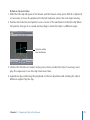
mm Drag the clip to the right to reposition it in your sequence in the Timeline. (Just drag
the blue bar that represents the clip.)
Drag the clip to move it.
Drag the end of a clip
to shorten or lengthen it.
Chapter 1    A First Look at Final Cut Pro
25
mm Position the pointer over the end of the clip and drag to shorten or lengthen the clip.
You can trim either end of a clip this way.
mm Click the Razor Blade tool in the Tool palette. Position the pointer over the clip, then
click to split the clip. Click the Selection tool. Select part of the clip and press Delete.
Selection tool
Razor Blade tool
Cancel your actions:
mm Choose Edit > Undo to cancel your last change. Press the Undo command’s keyboard
shortcut, Command-Z, to undo the change before that. You can undo up to 99 changes.
26
Chapter 1    A First Look at Final Cut Pro
Change the Timeline track size:
mm Change the size of tracks by clicking the Track Height control.
Track Height control
Add more clips to the Timeline using the Canvas window:
1 To add another clip to your sequence in the Timeline, first press End to position the
playhead at the end of the last clip.
2 Drag Sample Clip 2 from the Browser into the Viewer. Set In and Out points if you wish
(press I to set an In point, and press O to set an Out point).
3 Drag the clip from the Viewer to the Insert section of the Canvas Edit overlay.
Open a sequence clip in the Viewer to make changes:
mm Double-click the blue bar of Sample Clip 1 in the Timeline to open the clip in the
Viewer. Change the In and Out points of the clip in the Viewer to make the clip shorter,
and see the change appear in the Timeline.
Eliminate gaps between clips in your sequence:
mm To eliminate a gap, click the space in the Timeline where the gap appears (between the
clips) to select it, then press Delete.
Experiment with dragging and moving clips in the Timeline:
mm Experiment with dragging and changing the position and lengths of clips in the Timeline.
Chapter 1    A First Look at Final Cut Pro
27
Jump In: Work with the Main Windows
Final Cut Pro provides some easy methods for working with its main windows.
Try This
Change the active window:
mm Press Command-1 to activate the Viewer.
mm Press Command-2 to activate the Canvas.
mm Press Command-3 to activate the Timeline.
mm Press Command-4 to activate the Browser.
Change the window layout for different editing purposes:
mm Drag the title bar of a window to change its position.
mm Choose Window > Arrange > Standard to restore the standard window layout.
mm Choose Window > Arrange > Two Up to change to a window layout that allows you to
easily work with the Viewer and Canvas.
mm Choose Window > Arrange > Audio Mixing to change to a layout designed for easily
working with the audio in your sequences.
mm Choose Window > Arrange > Color Correction to change to a layout that allows you to
easily grade and color correct clips.
mm When you’ve finished exploring these window layouts, press Control-U to restore the
standard window layout.
28
Chapter 1    A First Look at Final Cut Pro
Learning About Projects, Sequences, Clips, and Media Files
To begin creating a movie, you create a project in the Browser. To create a new project,
choose File > New Project.
You can have multiple projects open at once, each represented by a tab in the Browser.
To access a specific project, you click the project tab. You can also drag a project tab
out of the Browser window to open the project in a separate window. You can reuse
and share sequences and clips between projects.
Learning About Sequences
When you create a new project, a sequence icon appears in the project, too. This
sequence icon represents the clips you place in the Timeline. You can open a sequence
by double-clicking it in the Browser, and the sequence then appears in the Timeline.
You can create multiple sequences in a project. For a long project, for example, you
might create different sequences to hold different scenes. You can create as many
sequences as you wish. A sequence tab appears in the Timeline title bar for each open
sequence. Clicking the sequence tab in the Timeline displays the sequence’s clips.
You can drag a sequence from the Browser and place it in the Timeline, just as you
can with a clip. You can place one sequence after another in the Timeline. You can also
place sequences within sequences. So, for example, you might create several different
sequences that represent scenes in your movie and then arrange them in their final
order within a single master sequence.
Chapter 1    A First Look at Final Cut Pro
29
Understanding the Relationship Between Clips and Media Files
An important first stage in creating a project is transferring your video to your
computer. Final Cut Pro provides a variety of ways to get media into your computer.
The method you use depends on the media type. You’ll learn more about capturing
and transferring video in the next chapter.
After you’ve captured or transferred your media into a project, clip icons representing
the media files appear in the project’s tab of the Browser window. A large project may
hold many clips. For complicated projects, you can create a system of bins to hold and
organize clips. You can name and organize the bins to suit your work style.
When you capture or transfer clips, the corresponding media files are stored on your
computer hard disk. You can specify where you want the media files stored. Because
video and audio media files are often large, you’ll want to plan where your files will reside.
An important point to remember is that the media files from your camcorder or other
sources are not stored in a project. The clips in a project merely point to the media files
stored elsewhere on your hard disk. When you modify a clip, you are not modifying
the media file, just the clip’s information in the project. You work with and edit clips in
Final Cut Pro, but the underlying media files are unchanged on your hard disk.
30
Chapter 1    A First Look at Final Cut Pro
If you transfer a Final Cut Pro project file to another computer for editing, you must
also transfer all the media files to the other system as well. It’s important to maintain
the connection between your media files on disk and the clips in your project. If, for
example, you rename media files on your hard disk in the Finder, you may have to
reconnect those files to the appropriate clips in your project later. Your media files are
placed in the Scratch Disk folder that is created when you first ingest media. Keep in
mind that it’s a good idea to keep all your files for a project in a central location, rather
than have files in different locations on different disks. Final Cut Pro provides easy
ways to maintain the connection between media files and clips, but it’s important to
remember that your clips represent media files that reside elsewhere on a hard disk.
Key Concepts
ÂÂ Project: A project in the Browser holds the clips, sequences, and bins to be used in a
video program.
ÂÂ Sequence: A sequence represents a chronological arrangement of clips in the Timeline.
Double-clicking a sequence icon in the Browser opens that sequence in the Timeline.
ÂÂ Clip: Clips appear in the Browser, where you can organize them and then edit them
into a sequence. Clips point to the media files stored on your hard disk.
ÂÂ Media files: The digital files that are captured or transferred from a camcorder or
other device and that correspond to clips in your project.
Chapter 1    A First Look at Final Cut Pro
31
ÂÂ Viewer: A window in Final Cut Pro in which you can work with a clip to set In and Out
points, play back the clip, and make many other types of changes such as applying
filters and adjusting motion parameters. Basically, you make changes to a clip using
the Viewer and then place the clip in the sequence in the Timeline.
ÂÂ Timeline: The Timeline holds a sequence of clips in the order in which they should
appear in your movie. Video and audio clips are stored in tracks in the Timeline, and
you can move, rearrange, change, and delete clips to create the chronological order
of your video.
Next, you’ll learn more about importing video and other media into Final Cut Pro.
32
Chapter 1    A First Look at Final Cut Pro
Bringing Media into Your System
2
Final Cut Pro provides a variety of methods for bringing your
video and other media into your Final Cut Pro system for editing.
Bringing media into your system is called ingesting. In this chapter, you’ll experiment
with bringing some of your own video footage into Final Cut Pro and familiarize
yourself with the features for logging and ingesting. After you’ve had some basic
experience ingesting sample clips, you can begin envisioning how to routinely log and
ingest your own video.
If you don’t have video footage that you’d like to try ingesting, skip this chapter for
now. You can refer to the Final Cut Pro 7 User Manual for all the details you’ll need to
ingest your video later.
Today, there are many different kinds of camcorders and different video formats. The
ingest method you use depends on the type of camcorder you have.
Many standard camcorders record video on tape. If your camcorder or deck uses
videotape, follow the instructions in “Jump In: Explore Tape-Based Video Capture” on
page 34.
Some advanced camcorders record video as digital files stored on capture cards,
optical discs, or hard disks. To bring these types of files into Final Cut Pro, follow the
instructions in “Jump In: Explore File-Based Video Transfer” on page 40.
33
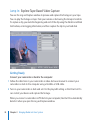
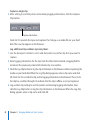
Jump In: Explore Tape-Based Video Capture
You use the Log and Capture window to preview and capture the footage on your tape.
You can play the footage on tape from your camera or deck using the transport controls.
To capture a clip, you mark the beginning and end of the clip using the Mark In and Mark
Out buttons, enter logging information, and then capture the clip to your hard disk.
Getting Ready
Connect your camcorder or deck to the computer:
1 Follow the directions in your camcorder or video deck user manual to connect your
camcorder or deck to the computer using a FireWire or USB cable.
2 Turn on your camcorder or deck and set it to the play/edit setting so that Final Cut Pro
can control your device and capture the footage.
When you connect a camcorder or VTR deck to your computer, Final Cut Pro automatically
detects it when you open the Log and Capture window.
34
Chapter 2    Bringing Media into Your System
Create a new project to hold your video:
mm Choose File > New Project. For now the name of the project is “Untitled,” and a new
project tab appears in the Browser. Later, when you save the project, you can give it any
name you like.
Choose an Easy Setup to configure Final Cut Pro to work with your type of video
and camcorder:
1 Choose Final Cut Pro > Easy Setup.
2 In the Easy Setup dialog, choose the format of your footage from the Format pop-up
menu. If you have a standard DV camcorder, choose NTSC or PAL, depending on your
region. If your footage is from a high definition camcorder, choose HD.
3 From the Use pop-up menu, choose an Easy Setup that matches the format of your
footage. For example, if you have a DV NTSC camcorder, choose DV-NTSC. If you chose
HD from the Format pop-up menu, the Use pop-up menu lists Easy Setups for many
of the common HD formats. Check your camcorder user manual if you’re unsure of the
format of your footage, then choose the appropriate Easy Setup.
4 Click Setup.
Choose a scratch disk to hold the media you’re capturing in the project:
1 Choose Final Cut Pro > System Settings.
2 In the System Settings window, click Set in the Scratch Disks tab.
3 Select the hard disk location where you want the media files stored. Select a disk or folder
and click Choose. Although there are many other custom settings that you can specify in
the System Settings window, just click OK to set the scratch disk location for now.
Chapter 2    Bringing Media into Your System
35
Try This
Select a logging bin:
mm Choose File > New > Bin to create a new bin to hold clips. Rename the bin, if you wish.
Select the bin and choose File > Set Logging Bin.
Open the Log and Capture window:
mm Choose File > Log and Capture.
Preview footage on tape:
mm Use the transport controls to play and review the videotape. The transport controls
work similarly to those you’ve already used in the Viewer and Canvas. You can also
press the J, K, and L keys to rewind, stop, and play the tape.
Reel field
Transport controls
Mark In button
36
Mark Out button
Chapter 2    Bringing Media into Your System
Set rough In and Out points for a clip that you want to capture:
mm Use the transport controls to go to the beginning of a section of tape that you want to
capture. Click the Mark In button to set an In point to roughly mark the beginning of
the clip. Play the video forward until you’ve reached the end of the section of tape you
want to capture. Click the Mark Out button to mark the rough Out point of the clip.
Enter logging information about a clip:
mm Enter a reel name or number in the Reel field.
mm Enter a short, descriptive clip name in the Description field. This description appears in
the Name field when you finish entering the description.
mm Enter scene, shot/take, and angle information in the Scene, Shot/Take, and Angle fields
if you wish. If you don’t want to include an item in the logging information, deselect
the checkbox beside the field. For example, deselect the checkbox beside Shot/Take to
not include shot/take information in the logging information.
mm Enter a note about the clip contents in the Log Note field, if you wish. If the clip is one
worthy of inclusion in your movie, select the Good checkbox.
Chapter 2    Bringing Media into Your System
37
Capture a single clip:
mm After setting In and Out points and entering logging information, click the Capture
Clip button.
Capture Clip button
Final Cut Pro rewinds the tape and captures the footage as a media file on your hard
disk. The new clip appears in the Browser.
Log additional clips without capturing them:
1 Use the transport controls to set In and Out points in another clip that you want to
capture.
2 Enter logging information for the clip. Click the Slate button beside a logging field to
increment the previously entered information by one number.
3 Click the Log Clip button to log the clip information in the Browser without capturing the
media on your hard disk. When the Log Clip dialog appears, enter a clip name and click
OK. Final Cut Pro records the clip and its logging information in the Browser. The icon for
the clip has a red bar through it to indicate that the clip is offline, or not yet captured.
4 Log another clip, setting In and Out points and entering logging information, then
click the Log Clip button to log the clip information in the Browser. When the Log Clip
dialog appears, enter a clip name and click OK.
38
Chapter 2    Bringing Media into Your System
Batch capture multiple clips at once:
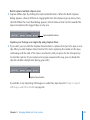
mm Capture offline clips by clicking the Capture Batch button. When the Batch Capture
dialog appears, choose All Items in Logging Bin from the Capture pop-up menu, then
click OK. When the Insert Reel dialog appears, click Continue. Final Cut Pro rewinds the
tape and captures the logged clips, one by one.
Capture Batch button
Capture your footage as a single clip using Capture Now:
mm If you wish, you can click the Capture Now button to capture all or part of a tape as one
clip. After you click Capture Now, Final Cut Pro starts capturing the media on the tape,
continuing until the end of the tape is reached or until you press the Esc (Escape) key
to stop the capture. (If you capture a long tape sequence this way, you can break the
clip into smaller subclips later during your edit.)
Capture Now button
If you’d like to try importing still images or audio files, skip ahead to “Jump In: Import
Still Images and Other Media” on page 48.
Chapter 2    Bringing Media into Your System
39
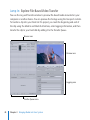
Jump In: Explore File-Based Video Transfer
You use the Log and Transfer window to preview file-based media mounted on your
computer or another device. You can preview the footage using the transport controls.
To transfer a clip into your Final Cut Pro project, you mark the beginning and end of
the clip using the Mark In and Mark Out buttons, enter logging information, and then
transfer the clip to your hard disk by adding it to the Transfer Queue.
Browse area
Preview area
Logging area
Transfer Queue area
40
Chapter 2    Bringing Media into Your System
Getting Ready
Create a new project to hold your video:
mm Choose File > New Project. For now the name of the project is “Untitled,” and a new
project tab appears in the Browser. Later, when you save the project, you can give it any
name you like.
Choose an Easy Setup to configure Final Cut Pro to work with your type of video
and camcorder:
1 Choose Final Cut Pro > Easy Setup.
2 In the Easy Setup dialog, choose the format of your footage from the Format pop-up
menu. If your footage is from a high definition camcorder, choose HD.
3 From the Use pop-up menu, choose an Easy Setup that matches the format of
your footage. For example, If you chose HD from the Format pop-up menu, the Use
pop-up menu lists Easy Setups for many of the common HD formats. Check your
camcorder user manual if you’re unsure of the format of your footage, then choose the
appropriate Easy Setup.
4 Click Setup.
Chapter 2    Bringing Media into Your System
41
Choose a scratch disk to hold the media you’re transferring to the project:
1 Choose Final Cut Pro > System Settings.
2 In the System Settings window, click Set in the Scratch Disks tab.
3 Select the hard disk location where you want the media files stored. Select a disk or folder
and click Choose. Although there are many other custom settings that you can specify in
the System Settings window, just click OK to set the scratch disk location for now.
Important: When selecting a scratch disk location, avoid selecting a hard disk location
nested within a scratch disk folder that’s already in use, which can cause confusion
about where your media files are located later.
Connect your camcorder or deck to the computer and copy your footage:
1 Follow the directions that came with your camcorder, video deck, flash memory card,
P2 card, or other device to connect the device to the computer or card reader. (Some
file-based camcorders may record files directly to hard disks, in which case you just
connect the hard disk to your computer as you would any other hard disk.)
2 Follow the instructions that came with your device to copy your footage to your computer.
Typically, you must copy an entire folder of files from your device to your computer, and
not copy individual files from within a folder. Once the folder containing your footage is on
your computer hard disk, Final Cut Pro can access it as a mounted volume.
42
Chapter 2    Bringing Media into Your System
Try This
Select a logging bin:
mm Choose File > New > Bin to create a new bin to hold clips. Rename the bin, if you wish.
Select the bin and choose File > Set Logging Bin.
Open the Log and Transfer window:
mm Choose File > Log and Transfer.
Mount a volume:
mm In the Browse area of the Log and Transfer window, click the Add Volume button. Select
any volume that holds footage that you’d like to transfer, then click Open.
Add Volume button
Search field
Click a file to select it for
logging and transferring.
Chapter 2    Bringing Media into Your System
43
Locate files on mounted volumes:
mm In the Browse area, click a file to select it for logging and transferring.
mm Click a column heading in the Browse area to sort the files by that column category, in
ascending or descending order.
mm Enter a filename in the search field to locate files with that name.
Preview footage:
mm With a file selected in the Browse area, use the transport controls in the Preview area
to play and review the footage. The transport controls work similarly to those you’ve
already used in the Viewer and Canvas. You can also press the J, K, and L keys to rewind,
stop, and play the footage.
Clip name
Transport controls
Mark Out button
Mark In button
44
Chapter 2    Bringing Media into Your System
Set rough In and Out points for a clip:
mm Use the transport controls to go to the beginning of a section of a media that you want
to transfer. Click the Mark In button to set an In point to roughly mark the beginning of
the clip. Play the video forward until you’ve reached the end of the media you want to
transfer. Click the Mark Out button to mark the rough Out point of the clip.
Log a clip:
mm Enter a reel name or number in the Reel field, if you wish. Final Cut Pro automatically
adds the folder name of the mounted volume as the reel name.
You can add incremental
numbers to a field’s logging
information by clicking the
Increment button.
Logging fields
You can quickly choose
logging information that
you’ve used previously from
the Autofill pop-up menu.
mm Enter a short, descriptive clip name in the Clip Name field.
Chapter 2    Bringing Media into Your System
45
mm Enter scene, shot/take, and angle information in the Scene, Shot/Take, and Angle fields
if you wish.
mm Enter a note about the clip contents in the Log Note field, if you wish. If the clip is one
worthy of inclusion in your movie, select the Good checkbox.
Add a clip to the Transfer Queue:
mm After entering your logging information and setting In and Out points for the clip,
click the Add Clip to Queue button to have Final Cut Pro move the clip to the Transfer
Queue and begin transferring the file.
Click to reveal
the current logging
bin in the Browser.
Progress bar
Pause button
Thumbnail Resize slider
Once the file is transferred, the new clip appears in the Browser.
46
Chapter 2    Bringing Media into Your System
Log additional clips without immediately transferring them:
1 Select a clip in the Log and Transfer window’s Browse area, then set In and Out points
and enter the logging information for the clip. Click the Increment button beside a
logging field to increment the previously entered information by one number.
2 Select other clips in the Browse area, and set In and Out points and add logging
information for those clips.
3 When you’re ready to transfer your logged clips, select them in the Browse area and
drag them to the Transfer Queue area, or click the Add Clip to Queue button.
If you’d like to try importing still images or audio files, see the next section, “Jump
In: Import Still Images and Other Media.”
Chapter 2    Bringing Media into Your System
47
Jump In: Import Still Images and Other Media
You can import still images and graphics files into your projects and place them in
your sequence in the Timeline. You can also import audio files such as CD tracks, voice
recordings, or sound effects and place these clips in the audio tracks of the Timeline.
Final Cut Pro can import many common file formats (see the Final Cut Pro 7 User Manual
for a complete list). But the easiest way to see if you can use a certain file type in your
project is to just try importing it. If you have still images or audio files available, you can
experiment with importing them here.
Important: Make sure to follow all copyright laws when including still images, graphics
files, and audio files in your projects.
Getting Ready
Prepare to import a still image:
mm Place or locate still images that you’d like to import, such as photos, on your computer.
For example, you can import images directly from your Pictures folder, if you wish.
Prepare to import an audio file:
mm Place an audio file, such as a sound effect or music file, on your computer. If you like,
insert a music CD into your disc drive and, when the disc opens on your desktop, drag
a music track into your Music folder (or any other location you prefer).
48
Chapter 2    Bringing Media into Your System
Try This
Import still images into a project:
mm Choose File > Import > Files. Select the still-image files you want to import and click
Choose. The still images appear as clips in the Browser. Experiment with dragging a
still-image clip into the Viewer, changing In and Out points if you like, and then editing
the image into your sequence in the Timeline. You can edit and change the still-image
clip in the Timeline just as you can a video clip.
Still-image clip
Still-image clip
in the Viewer
Chapter 2    Bringing Media into Your System
49
Import audio files into a project:
mm Choose File > Import > Files. Select the audio files you want to import and click Choose.
The audio files appear as clips represented by a speaker icon in the Browser. To place
an audio clip in the Timeline, drag the audio clip from the Browser down to the audio
tracks in the Timeline. Experiment with editing the audio clip using the same methods
you use for editing video clips.
Although Final Cut Pro cannot import MP3 or MP4 audio files directly from your
iTunes Library, you can export audio files from iTunes as AIFF files and import them
into Final Cut Pro.
Drag the audio clip...
...into the sequence
in the Timeline.
50
Chapter 2    Bringing Media into Your System
Learning About Ingesting Media and Setting Up Projects
When you capture or transfer footage from a camcorder, the media files are stored on
your scratch disk, a disk location that you tell Final Cut Pro to use. You can configure
Final Cut Pro to store different types of media files in different locations. For example,
you can have Final Cut Pro store audio media files in one location and video media files
in another. Because media files can take up considerable space, you can assign several
hard disks as scratch disks to hold your media.
Choosing an Easy Setup is a quick way to configure Final Cut Pro to match the settings
of your camcorder and video format. It’s an important first step in setting up a new
project. Choosing an Easy Setup sets the Final Cut Pro capture settings and configures
the sequence settings to allow you to play back and edit your footage. The Easy Setup
also specifies output settings for when you output the final video to tape or another
media format.
You can place clips of different video formats in the Timeline. For example, even
though the majority of your clips might be DV, you can place DVCPRO 50 or HD
clips in the same sequence. If Final Cut Pro is unable to play back a clip in real time
without dropping frames, a red bar appears above the clip in the Timeline. This red bar
indicates that the clip must be rendered in order to play correctly. You can select the
clip and choose a command to have Final Cut Pro render that clip. Final Cut Pro then
processes the clip to work with the current sequence and places the rendered files on
your scratch disk. The downside is that rendering such clips becomes an extra step in
editing. For example, if you change a rendered clip, you may need to render it again.
Chapter 2    Bringing Media into Your System
51
Choosing an Easy Setup that matches the majority of your video footage helps you
avoid having to render most of your footage. You can’t always avoid rendering clips; for
example, when you superimpose a title above another clip, Final Cut Pro must render the
clips to make them work together. However, choosing the correct Easy Setup for your
video is important not only for ingesting but also for facilitating the editing process.
You use the Log and Capture window to capture tape-based footage directly from a
camcorder or another device such as a video deck. The Log and Capture window allows
you to preview, log, and set rough In and Out points for the media on tape. You then
capture the footage to store it as media files on your hard disk. An online clip is one
whose media has been captured and is ready for use. If you have only logged the media
and not captured it yet, the clip is offline, not ready for editing. Clips can also become
offline if they have been moved or renamed and Final Cut Pro can’t locate them.
Final Cut Pro provides powerful features for locating and reconnecting offline clips.
You use the Log and Transfer window to transfer footage from camcorders that record
file-based media. You can transfer the files directly from a camcorder, a hard disk, or
another device such as a P2 card. The Log and Transfer window allows you to preview,
log, and set In and Out points for the digital media files. You can then add them to the
Log and Transfer window’s Transfer Queue to transfer them to your hard disk.
52
Chapter 2    Bringing Media into Your System
Key Concepts
ÂÂ Logging: Logging footage allows you to record information about a clip that will
help you identify it later. Using the Log and Capture window or the Log and Transfer
window, you can record information about the clip, including a reel name, clip name
or description, and other information such as the shot or take number, notes, and
more. You can also set rough In and Out points for the clip that you can refine later
during your edit.
ÂÂ Ingesting: Ingesting is a broad term for the act of bringing media into your
Final Cut Pro system. Ingesting includes capturing tape-based footage, transferring
file-based footage, and importing files such as audio files or graphics files into
Final Cut Pro.
ÂÂ Capturing: When you click a capture button in the Log and Capture window,
Final Cut Pro accesses your videotape and captures the tape-based media to your
computer. It records the media file on your scratch disk, and a corresponding clip
appears in the Browser.
ÂÂ Transferring: When you place file-based media in the Transfer Queue in the Log and
Transfer window, Final Cut Pro accesses your file-based media and transfers it to your
computer. It records the media file on your scratch disk, and a corresponding clip
appears in the Browser.
ÂÂ Importing: When you import a file on your computer into Final Cut Pro,
Final Cut Pro accesses the media file on your computer, and a corresponding clip
appears in the Browser.
Chapter 2    Bringing Media into Your System
53
ÂÂ Capture Now: The Capture Now process begins the automatic capture of your
tape-based footage at any point on a tape and continues capturing until the end of
the tape or until you stop the capture by pressing the Esc (Escape) key. The captured
footage is stored as one clip. You can then use Final Cut Pro commands and editing
features to break the clip into smaller subclips. Capture Now allows you to skip the
process of previewing and logging many individual clips.
ÂÂ Batch capturing: After you log a series of clips from your media, Final Cut Pro can
search through your tape and capture the media files to your computer hard disk
one by one. Batch capturing clips like this is an efficient alternative to logging and
capturing clips individually.
Next, you’ll explore using the Viewer to discover more of its features.
54
Chapter 2    Bringing Media into Your System
Preparing Clips in the Viewer
3
The Viewer provides efficient ways to review and edit
individual clips in your projects.
In this chapter, you’ll explore more of the features of the Viewer.
Jump In: Get to Know the Viewer
You work with individual clips in the Viewer. The Viewer provides powerful ways to
position and adjust how clips appear onscreen. You can also change the Viewer’s
display of your clip to match your work style.
55
Getting Ready
1 In the Browser, click the tab of the project that holds your sample clips. Drag a clip from
the Browser into the Viewer.
View pop-up menu
Viewer title bar
Current Timecode field
Zoom pop-up menu
Resize control
Mark In and
Mark Out buttons
2 Set In and Out points for the clip using the Mark In and Mark Out buttons.
Use the illustration above to locate the Viewer items you want to explore next.
56
Chapter 3    Preparing Clips in the Viewer
Try This
Reposition the Viewer:
mm Drag the Viewer title bar to move the Viewer to a new screen location.
Change the size of the Viewer:
mm Drag the resize control in the lower-right corner of the Viewer to change the Viewer size.
Open multiple clips in separate Viewer windows:
1 Select another clip in the Browser.
2 Choose View > Clip in New Window.
You can also use this command to open clips in the Timeline in a separate window.
3 Select a clip in the Timeline, then choose View > Clip in New Window.
Close a Viewer window:
mm Click the close button in the top-left corner of the Viewer. Close all the Viewer windows
that you’ve opened, except one. Choose Window > Arrange > Standard to place the
Viewer in the standard window arrangement again.
Show the title safe overlay:
mm Choose Show Overlays from the View pop-up menu, then choose Show Title Safe
from the View pop-up menu. The blue lines that appear on the clip show the standard
screen limits and the area in which you can place titles without clipping on most
monitors and displays.
Chapter 3    Preparing Clips in the Viewer
57
Show the timecode overlays:
mm Choose Show Timecode Overlays from the View pop-up menu. Change the In and Out
points to see how the timecode overlays change.
Turn off the display of overlays:
mm Choose Show Overlays from the View pop-up menu again to turn off the display of
overlays.
Open the Timecode Viewer:
mm Choose Tools > Timecode Viewer to open the Timecode Viewer. Play the clip in the
Viewer to see how the Timecode Viewer changes. To hide the Timecode Viewer, choose
Tools > Timecode Viewer again.
Place the playhead at an In point, at an Out point, or at Media End:
mm Press the Up Arrow or Down Arrow key to move the playhead forward or backward in
the clip.
58
Chapter 3    Preparing Clips in the Viewer
Set the playhead at an exact frame in a clip by entering a timecode value:
mm In the Current Timecode field, enter a timecode value that matches a point in your
clip. Enter a timecode value in the format 00:00:00:00 (hours: minutes: seconds:
frames). You can also enter just the second and frame values. For example, to specify
the frame at 3 seconds and four frames, enter “03:04” and press Enter. (Final Cut Pro
assumes that the value for hours and minutes is 00.) Experiment with entering
timecode values to learn how this works.
Current Timecode field
Change the duration of a clip by specifying a duration in timecode:
mm Enter a timecode value to specify the length of a clip. For example, to set the length of
a clip to 3 seconds and four frames, enter “03:04” and press Enter. (Final Cut Pro assumes
that the value for hours and minutes is 00.) The clip’s Out point changes to match the
clip length that you entered. Press Command-Z to undo the change.
Timecode Duration field
Chapter 3    Preparing Clips in the Viewer
59
Add markers to indicate specific times in a clip:
mm In the Viewer, place the playhead where you want to add a marker and click the Add
Marker button. Set several markers to mark specific times in a clip.
Add Marker button
Navigate between markers:
mm Press Shift–Up Arrow to move the playhead to the previous marker.
mm Press Shift–Down Arrow to move the playhead to the next marker.
Delete markers:
mm Position the playhead over a marker and choose Mark > Markers > Delete. Experiment
with adding and deleting markers. Choose Mark > Markers > Delete All to delete all
your markers after you’ve finished experimenting.
60
Chapter 3    Preparing Clips in the Viewer
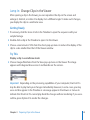
Jump In: Change Clips in the Viewer
After opening a clip in the Viewer, you can reposition the clip on the screen and
enlarge it, shrink it, or rotate it to display it at a different angle. To make such changes,
you display the clip in a wireframe view.
Getting Ready
1 If necessary, click the Scene 2 tab in the Timeline to open the sequence with your
sample footage.
2 Double-click a clip in the Timeline to open it in the Viewer.
3 Choose a zoom level of 25% from the Zoom pop-up menu to reduce the display of the
clip to a size smaller than that of the Viewer window.
Try This
Display a clip in a wireframe mode:
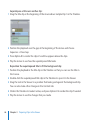
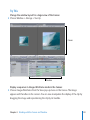
mm Choose Image+Wireframe from the View pop-up menu in the Viewer. The image
appears with diagonal lines across it and handles on the corners.
Important: Depending on the processing capabilities of your computer, Final Cut Pro
may be able to play back your changes immediately. However, in some cases, you may
see a red line appear in the Timeline or a message appear in the Viewer or Canvas to
indicate that Final Cut Pro cannot play back the changes without rendering. If you see a
red line, press Option-R to render the changes.
Chapter 3    Preparing Clips in the Viewer
61
Reposition the clip on the screen:
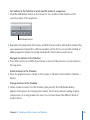
mm Position the pointer on the image in the Viewer and drag left or right to reposition the
image. Play the clip to see the effect of repositioning it.
Scale the display of the clip up or down on the screen:
mm Drag a corner of the clip to resize the clip larger or smaller. Changing the size effectively
zooms in to or out of the clip. Reposition the clip to adjust the focal point. Play the clip
to see the effect of your changes. Experiment with enlarging or shrinking the clip and
repositioning it for display.
Rotate a clip to a different viewing angle:
mm Position the pointer over the blue line in the corner of a clip until a curved pointer
appears. When the pointer changes, drag the corner of the clip slightly to rotate the clip.
Experiment with rotating and repositioning the clip to change its display on the screen.
Jump In: Create a Title Clip
You can display titles in your movie, superimposing them on your clips if you wish. You
can choose from many different types of fonts, font sizes, and styles, as well as colors
and many other display details.
62
Chapter 3    Preparing Clips in the Viewer
Try This
Create a title clip in the Viewer:
mm Choose Text > Text from the Generator pop-up menu.
Generator pop-up menu
Sample text appears in the Viewer. You can now change the text using the titling controls.
Get to know the titling controls:
mm Click the Controls tab in the Viewer to reveal the titling controls.
mm Select the sample text in the Text field and type “At the Pipe” or text of your own.
mm Choose a font from the Font pop-up menu.
mm Set a font size using the Size controls.
Chapter 3    Preparing Clips in the Viewer
63
mm Choose a text color by double-clicking the Font Color color picker. Select a color from
the color wheel and then click OK. Click the Video tab to see the sample text onscreen.
Font Color color picker
mm Enter “03:00” in the Timecode Duration field at the top-left corner of the Viewer to set
the length of the title clip to 3 seconds.
Insert a title clip in your sequence:
mm Click in the Timeline and press Home to position the playhead at the beginning of the
sequence. Drag the title clip in the Viewer to the Insert section of the Canvas Edit Overlay.
If there happen to be any gaps in your sequence, delete them by clicking each gap to
select it and pressing Delete. Press Home and play the sequence to see the new title.
Note: If a red line appears in the Timeline over clips in your sequence, press Option-R
to render the clips for playback.
64
Chapter 3    Preparing Clips in the Viewer
Reposition a title on the screen:
1 Double-click the title clip in the Timeline to open it in the Viewer.
2 In the Viewer, drag the title text to a different position. Experiment with repositioning
the text on the screen. You can also experiment with changing the look of the title
using the controls in the Controls tab.
Chapter 3    Preparing Clips in the Viewer
65
Superimpose a title over another clip:
1 Drag the title clip at the beginning of the movie above Sample Clip 1 in the Timeline.
2 Position the playhead over the gap at the beginning of the movie and choose
Sequence > Close Gap.
3 Press Option-R to render the clips if a red line appears above the clips.
4 Play the movie to see how the superimposed title looks.
Reposition the superimposed title to fit the background clip:
1 Position the playhead in the title clip in the Timeline so that you can see the title in
the Canvas.
2 Double-click the superimposed title clip in the Timeline to open it in the Viewer.
3 Drag the text in the Viewer to a position that looks good against the background clip.
You can also make other changes in the Controls tab.
4 Click in the Timeline to make it active, and press Option-R to render the clip if needed.
5 Play the movie to see the changes that you made.
66
Chapter 3    Preparing Clips in the Viewer
Arrange a title and clip to appear side by side:
1 Place the playhead in the title clip in the Timeline.
2 In the Timeline, double-click Sample Clip 1, the background clip, to open it in the Viewer.
3 Drag the corner of Sample Clip 1 to reduce the clip size so that it is smaller than the
screen size, as in the illustration below.
4 Reposition the clip by dragging it left or right to leave a blank space on the screen.
5 Double-click the superimposed title clip in the Timeline to open it in the Viewer.
6 Drag the text in the Viewer to a good position next to the background clip. Resize the
text to match the space available on the screen.
7 Press Option-R to render the changed clips, if needed.
8 Play the movie in the Timeline to see the title change. Experiment with repositioning
and resizing the title and the background clip.
Chapter 3    Preparing Clips in the Viewer
67
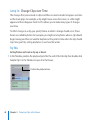
Jump In: Change Clips over Time
The changes that you’ve made to clips and titles can also be made to happen over time
as the movie plays. For example, a clip might move across the screen, or a title might
appear and then disappear. Final Cut Pro allows you to make many types of changes
over time.
To effect changes in a clip, you specify frames at which a change should occur. These
frames are called keyframes. For example, you might set a keyframe where a clip should
begin moving and then set another keyframe at the point in time when the clip should
stop. Next, you’ll try setting keyframes to see how this works.
Try This
Set keyframes and scale a clip up or down:
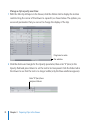
1 In the Timeline, position the playhead just after the end of the title clip, then double-click
Sample Clip 1 in the Timeline to open it in the Viewer.
Position the playhead here.
68
Chapter 3    Preparing Clips in the Viewer
2 Click the Add Motion Keyframe button. In this case, the keyframe marks where the clips
will begin to change size.
Add Motion
Keyframe button
Note that the wireframe and handles of the clip in the Viewer turn green to identify the
new keyframe.
Chapter 3    Preparing Clips in the Viewer
69
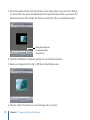
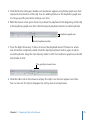
3 Move the playhead ahead in the Viewer to the frame where you want the change
to end. In this case, place the playhead at the approximate position you see in the
illustration below. This will be the frame at which the clip is completely resized.
Move the playhead
to approximately
this position.
4 Click the Add Motion Keyframe button to set another keyframe.
5 Resize and reposition the clip to fill the normal display area.
6 Play the clip in the Viewer to see it change size over time.
70
Chapter 3    Preparing Clips in the Viewer
Navigate between keyframes in the Viewer:
mm With the Viewer active, press Shift-K and Option-K to move the playhead from one
keyframe to another. You can use these keyboard shortcuts to quickly find and move
between keyframes.
Move a clip over time:
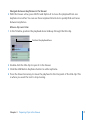
1 In the Timeline, position the playhead about midway through the title clip.
Position the playhead here.
2 Double-click the title clip to open it in the Viewer.
3 Click the Add Motion Keyframe button to add a keyframe.
4 Press the Down Arrow key to move the playhead to the Out point of the title clip. This
is where you want the text to stop moving.
Chapter 3    Preparing Clips in the Viewer
71
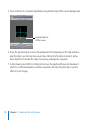
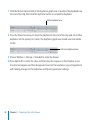
5 Press Control-K to set another keyframe. Drag the title clip off the screen background.
Drag the title clip
off the screen.
6 Press the Up Arrow key to move the playhead to the beginning of the clip, and then
play the clip to see the text move over time. Click in the Timeline to make it active,
press Option-R to render the clips, if necessary, and play the sequence.
7 In the Viewer, press Shift-K or Option-K to move the playhead forward or backward
until it is on the last keyframe, and then reposition the text. Play the clip to see the
effect of your change.
72
Chapter 3    Preparing Clips in the Viewer
Rotate a clip over time:
1 With the title clip still open in the Viewer and the Viewer active, press Shift-K or Option-K
as necessary to move the playhead to the last keyframe, where the text stops moving.
2 Position the Selection tool pointer near a corner of the wireframe for the title clip. When
the pointer changes to a curved pointer, drag to rotate the clip to a different angle.
Drag to rotate
the wireframe.
3 Click in the Timeline to make it active, press Home, render the clips, if necessary, and
play the sequence to see the clip rotate over time.
4 Experiment by positioning the playhead on the last keyframe and rotating the clip to
different angles. Play the clip.
Chapter 3    Preparing Clips in the Viewer
73
Change a clip’s opacity over time:
1 With the title clip still open in the Viewer, click the Motion tab to display the motion
controls. Drag the corner of the Viewer to expand it, as shown below. The options you
see are all parameters that you can set to change the display of the clip.
Drag here to resize
the window.
2 Click the disclosure triangle for the Opacity parameter, then enter “0” (zero) in the
Opacity field and press Return to set the text to be transparent. Click the Video tab in
the Viewer to see that the text is no longer visible (only the blue wireframe appears).
Enter “0” (zero) here
and press Return.
74
Chapter 3    Preparing Clips in the Viewer
3 Click the Motion tab again. Beside each parameter appears a keyframe graph area that
represents the duration of the clip. You can add keyframes to this keyframe graph area
to change specific parameter settings over time.
4 With the Viewer active, press Home to position the playhead at the beginning of the clip
in the keyframe graph area, then click the Opacity keyframe button to add a keyframe.
Keyframe graph area
Opacity keyframe button
5 Press the Right Arrow key 15 times to move the playhead ahead 15 frames to where
text should be completely visible. Click the Opacity keyframe button again to add a
second keyframe. Drag the clip’s Opacity slider to 100. Your keyframe graph area should
look similar to this:
The opacity increases here.
6 Click the Video tab in the Viewer and play the clip to see the text appear over time.
You can also set the clip to disappear by setting two more keyframes.
Chapter 3    Preparing Clips in the Viewer
75
7 Click the Motion tab and click in the keyframe graph area to position the playhead near
the end of the clip, then click the keyframe button to set another keyframe.
Add a keyframe here.
8 Press the Down Arrow key to move the playhead to the end of the clip, and set another
keyframe. Set the opacity to 0 (zero). The keyframe graph area should now look similar
to this:
Add a last keyframe here.
9 Choose Window > Arrange > Standard to resize the Viewer.
10 Press Option-R to render the clips, and then play the sequence in the Timeline to see
how the text appears and then disappears based on the keyframes you set. Experiment
with making changes to the keyframes and Opacity parameter settings.
76
Chapter 3    Preparing Clips in the Viewer
Learning About Motion Parameters
You’ve had a brief introduction to some of the changes you can make using the Viewer,
but many more are possible using the Motion tab.
By adjusting a clip’s motion settings, you can change its geometry to move, shrink,
enlarge, rotate, and distort in nearly any way you like. You can change any of these
options independently over time using keyframes, allowing you to create professional
effects and impressive changes to your clips.
As a general rule, you set keyframes in pairs, one at the beginning of a change
(as an anchor) and one at the end of the change (at which you specify a changed
parameter value).
Chapter 3    Preparing Clips in the Viewer
77
You can add keyframes in the keyframe graph area by clicking the keyframe button for
a parameter.
Keyframe navigation
buttons
Keyframe button
If the playhead is currently on a keyframe, clicking the button removes the keyframe.
The buttons on either side of the keyframe button move the playhead forward or
backward to the next keyframe.
When keyframes are added to a clip, small diamonds appear in the keyframe graph
area to mark the location of the keyframes. You can drag these diamonds to different
positions in the keyframe graph area to change the effect.
As you add keyframes, the number of frames between two keyframes determines the
speed of a change. Hence, the more frames between two keyframes, the longer the
change takes. Keyframes that are a small number of frames apart create quick changes.
78
Chapter 3    Preparing Clips in the Viewer
Key Concepts
ÂÂ Image mode: A Viewer display mode that shows the video content of a clip as it plays
back. You can change the display to show the clip at reduced or expanded sizes as
you work with the clip.
ÂÂ Image+Wireframe mode: A Viewer display mode that shows the video content of
the clip surrounded by a wireframe and handles. In this viewing mode, you can
change the display of the clip, repositioning it onscreen, rotating it, and even adding
keyframes and animating the clip’s parameters.
ÂÂ Title safe overlay: This Viewer display mode places borders on a clip that show the
area where title content will safely appear on the average video monitor. If you put
text within the title safe boundary, you can be sure that it will not be clipped when
viewed on most screens.
ÂÂ Keyframe: A frame within a clip that has been marked as a key point at which a
change will occur. To effect changes over time, you add keyframes to a clip to identify
specific frames where a change should begin or end.
ÂÂ Motion tab: A tab in the Viewer that provides options that allow you to change a clip.
For example, you can specify the exact location of a clip, scale the clip up or down,
rotate it, change its opacity, and more. The Motion tab allows you to specify precisely
the changes you want by changing parameter settings (as opposed to manually
dragging or changing the clip in the Image+Wireframe mode).
Next, you’ll explore using the Canvas to view sequences in the Timeline.
Chapter 3    Preparing Clips in the Viewer
79
Working with the Canvas
and Timeline
4
You use the Canvas and Timeline to build your project’s
sequences, adding, removing, rearranging, and trimming clips
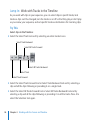
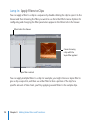
as you like.
Next, you’ll use the Canvas to learn its basic video editing functions, and then you’ll
explore working with clips in a sequence in the Timeline.
Jump In: Work with the Canvas
As you’ve seen, the Canvas provides a view of a sequence in the Timeline. You can use
the Canvas to edit clips into your sequence.
Getting Ready
1 Choose File > New > Sequence to create a new sequence. Name the sequence “Tracks”
and press Return.
2 Double-click the Tracks sequence icon in the Browser to open the empty sequence in
the Timeline.
81
During this section, feel free to place your clips in the Timeline repeatedly to build a
longer sequence to experiment with, or place Sample Clip 1, Sample Clip 2, Sample
Clip 3, and Audio Clip 1 in the Timeline as shown in the following illustration:
To add Audio Clip 1 to the sequence, drag the audio clip from the Browser to the Timeline
below Sample Clip 1 and release the mouse button when the downward-pointing arrow
appears. Final Cut Pro automatically adds two audio tracks.
82
Chapter 4    Working with the Canvas and Timeline
Try This
Change the window layout for a larger view of the Canvas:
mm Choose Window > Arrange > Two Up.
Canvas
Timeline
Display a sequence in Image+Wireframe mode in the Canvas:
mm Choose Image+Wireframe from the View pop-up menu in the Canvas. The image
appears with handles on the corners. You can now manipulate the display of the clip by
dragging the image and repositioning the clip by its handles.
Chapter 4    Working with the Canvas and Timeline
83
Update the Viewer to show the current frame in the Canvas:
mm Play the sequence, and notice that the frame displayed in the Viewer is different from
the one displayed in the Canvas. Click the Show Match Frame button in the Canvas. The
Viewer changes to show the same frame as the Canvas.
Show Match Frame button
Keep the Viewer and Canvas in sync for easy editing:
1 Choose Open from the Playhead Sync pop-up menu in the Canvas.
Playhead Sync
pop-up menu
2 Play the sequence.
When you stop playing the sequence, the Viewer display automatically changes to
show the same frame as the Canvas. Now, whenever the playhead stops on a clip in the
Timeline, Final Cut Pro opens that clip in the Viewer for edits. Changes you make in the
Viewer or Canvas are updated in the Timeline immediately.
3 Make changes to the clip in the Viewer or in the Canvas, and play the sequence to see
how this works.
84
Chapter 4    Working with the Canvas and Timeline
Set markers in the Timeline to mark specific points in a sequence:
1 Click the Add Marker button in the Canvas to set a marker in the Timeline at the
current position of the playhead.
Add Marker button
2 Reposition the playhead in the Canvas, and this time press M to add another marker. Play
your sequence and press M to add more markers on the fly. You can use this method of
adding sequence markers to quickly mark specific frames where events occur.
Navigate to markers in the Timeline:
mm Press Shift–Up Arrow or Shift–Down Arrow to move to the previous or next marker in
the sequence.
Delete markers in the Timeline:
mm Place the playhead over a marker in the Canvas or Timeline. Choose Mark > Markers >
Delete.
Change markers in the Timeline:
mm Click a marker to select it in the Timeline, then press M. The Edit Marker dialog
appears with options for changing the marker. (Don’t worry about creating chapter,
compression, or scoring markers for now. You can learn about the different kinds of
markers later.)
Chapter 4    Working with the Canvas and Timeline
85
Jump In: Work with Tracks in the Timeline
As you work with clips in your sequence, you can select clips in specific tracks, lock
tracks so clips can’t be changed, turn the tracks on or off so that they play or don’t play
as you review your sequence, and set specific tracks as destinations for incoming clips.
Try This
Select clips in the Timeline:
mm Select the Select Track tool and try selecting an entire track at once.
Select Track Backward
Select All Tracks Forward
Select All Tracks Backward
Select Track
Select Track Forward
mm Select the Select Track Forward tool or Select Track Backward tool and try selecting a
clip and all the clips following or preceding it on a single track.
mm Select the Select All Tracks Forward tool or Select All Tracks Backward tool and try
selecting a clip and all the clips following or preceding it on all the tracks. Press A to
select the Selection tool again.
86
Chapter 4    Working with the Canvas and Timeline
Lock a track to keep it from changing:
mm Click the Lock Track control for a track to prevent changes to that track. You can lock
a track anytime that you want to make sure the timing and positioning of items on
a track won’t change while making edits on other tracks. Click the Lock Track control
again to unlock the track.
Track Visibility control
Lock Track Control
Auto Select control
Destination control
Source control
Turn a video track on or off:
mm Click the Track Visibility control for a video track to prevent the track’s video from
appearing when you play back the sequence. Play the sequence to see that the track
has been turned off. Click the Track Visibility control again to turn the track back on.
Turn an audio track on or off:
mm Click the Track Visibility controls for the audio tracks that hold Audio Clip 1 to prevent
the audio clip from playing during sequence playback. Play the sequence to hear that
the audio tracks have been turned off. Click the Track Visibility controls again to turn
the tracks back on.
Chapter 4    Working with the Canvas and Timeline
87
Place only the video portion of a clip in a sequence:
1 Click the a1 and a2 Source controls for the audio tracks to disconnect them from their
Destination controls.
This disconnects the audio tracks as destination tracks and prevents the audio portions
of a clip from being placed in the sequence.
Disconnected
Source controls
2 Double-click Sample Clip 1 in the Browser to open it in the Viewer.
3 Position the playhead in Sample Clip 3 in the Timeline.
4 Drag Sample Clip 1 from the Viewer to the Overwrite section of the Canvas Edit Overlay
to see that only the video is placed in the Timeline.
88
Chapter 4    Working with the Canvas and Timeline
Place only the audio portion of a clip in a sequence:
1 Click the a1 and a2 Source controls for the audio tracks again to reconnect them to their
Destination controls. This allows the audio portion of a clip to be placed in the sequence.
2 Click the v1 Source control to disconnect it from the V1 Destination control.
Disconnected
v1 Source control
3 Press the End key to move the playhead to the end of the sequence.
4 Drag Sample Clip 1 from the Viewer to the Overwrite section of the Canvas Edit Overlay
to see that only the clip’s audio is placed in the Timeline.
Chapter 4    Working with the Canvas and Timeline
89
Add new tracks to a sequence:
1 Choose Sequence > Insert Tracks.
2 Type “1” in the Insert N Video Tracks field to add a new video track, type “2” in the Insert
N Audio Tracks field to add two audio tracks, then click OK. Scroll in the Timeline to see
the new tracks that were added.
90
Chapter 4    Working with the Canvas and Timeline
Set a video destination track before placing clips in a sequence:
1 Drag the v1 Source control to the V2 Destination control to specify that the V2 track
should be the destination track. Click the Source control to connect it to the V2
Destination control, if necessary.
Connect the v1 Source
control to the V2
Destination control.
2 Press End to move the playhead to the end of the sequence. Drag a clip from the
Viewer to the Overwrite section of the Canvas Edit Overlay.
The clip’s video item is placed in the video track you selected.
Chapter 4    Working with the Canvas and Timeline
91
Set audio destination tracks before placing clips in a sequence:
1 Drag the a1 and a2 Source controls to the A3 and A4 audio Destination controls.
Drag the a1 and a2 Source
controls to the A3 and
A4 Destination controls.
2 Drag a clip from the Viewer to the Overwrite section of the Canvas Edit Overlay. The
clip’s audio is placed in the audio tracks you selected.
92
Chapter 4    Working with the Canvas and Timeline
Jump In: Edit Clips into a Sequence in the Timeline
After building a sequence, you may need to make changes, such as replacing one clip
with another, adding cutaways, and adding music or sound effects. In this section, you’ll
try out some of the basic methods for placing clips in a sequence. These methods
include steps for 3-point editing in which you to place clips in the Timeline by specifying
three In or Out points in your Viewer and Timeline.
Getting Ready
mm Drag the v1 Source control to the V1 Destination control, drag the a1 Source control to
the A1 Destination control, and drag the a2 Source control to the A2 Destination control.
Chapter 4    Working with the Canvas and Timeline
93
Mark a clip in the sequence and replace it:
1 Move the playhead to a clip in the Timeline that you want to replace.
2 Choose Mark > Mark Clip. The sequence clip is marked with In and Out points on both
ends in the Timeline.
Sequence In and Out
points marking a clip that
you want to replace
3 Double-click Sample Clip 3 to open it in the Viewer. Drag Sample Clip 3 from the Viewer
to the Overwrite section of the Canvas Edit Overlay to replace the clip marked in the
sequence. The clip you dragged replaces the clip marked in the sequence.
94
Chapter 4    Working with the Canvas and Timeline
Place a clip so that it starts at a specific point in a sequence:
1 Place the playhead on a frame in the sequence where you would like to add a clip.
(Anywhere will do.)
2 Press I to set an In point for the sequence in the Timeline.
Sequence In point marking
where an incoming clip
should start
3 In the Viewer, set In and Out points in a clip that you want to place in the Timeline.
4 Drag the clip from the Viewer to the Overwrite section of the Canvas Edit Overlay
to place the clip at the sequence In point. The clip replaces the one in the Timeline
starting at the In point that you set.
Chapter 4    Working with the Canvas and Timeline
95
Place a clip so that it ends at a specific point in a sequence:
1 Place the playhead on a frame in the sequence where you would like the incoming clip
to end.
2 Press O to set an Out point for the sequence in the Timeline.
Sequence Out point
marking where an
incoming clip should end
3 In the Viewer, set In and Out points in a clip.
4 Drag the clip from the Viewer to the Overwrite section of the Canvas Edit Overlay.
Final Cut Pro places the Out point of the incoming clip at the sequence Out point.
Fill a specific segment of a sequence with a clip:
1 Place the playhead on a frame in the sequence where you would like an incoming clip
to start.
2 Press I to set an In point in the sequence.
3 Move the playhead ahead to a frame where you would like the clip to end. (For now,
just move the playhead ahead about 10 frames.)
4 Press O to set an Out point in the sequence.
96
Chapter 4    Working with the Canvas and Timeline
5 In the Viewer, set an In point in a clip. You only need to set an In point. (If there is an
Out point already set, choose Mark > Clear Out to remove the Out point. Final Cut Pro
is then free to use as much of the clip as is available to fill the duration between the
sequence In point and the sequence Out point.)
6 Drag the clip from the Viewer to the Overwrite section of the Canvas Edit Overlay to have
the clip fill the duration between the sequence In point and the sequence Out point.
Key Concepts
ÂÂ Playhead sync: You can choose Open from the Playhead Sync pop-up menu to have
Final Cut Pro always display the same frames in the Viewer and Canvas windows,
allowing you to quickly open and make edits to specific clips in the Viewer.
ÂÂ Overwrite edit: An overwrite edit replaces a clip or clips in the Timeline with the
incoming clip that you are adding to the sequence.
ÂÂ Sequence markers: Markers placed in a sequence in the Timeline or Canvas.
ÂÂ Sequence In and Out points: In point and Out point markers set in the Timeline. You
can use these markers to specify where an edit should occur when you perform an
insert or overwrite edit in the Timeline.
Next, you’ll explore basic editing techniques in Final Cut Pro.
Chapter 4    Working with the Canvas and Timeline
97
Basic Editing
5
The heart of video editing involves arranging and trimming
clips in a sequence. Final Cut Pro provides easy-to-use tools
and editing procedures for efficient editing.
Next, you’ll try out basic video editing methods and use simple tools to select and
trim clips.
Jump In: Trim Clips
Once you’ve ordered clips in a sequence, you may need to adjust the clips, shortening,
lengthening, or repositioning them in the Timeline. Final Cut Pro provides editing and
trimming tools that allow you to change clips in a sequence without creating gaps. In
this section, you’ll try using some of these tools.
99
Getting Ready
1 Press Control-U to choose the Standard window layout.
2 Choose File > New > Sequence to create a new sequence. Name the sequence
“Trimming” and press Return.
3 In the Browser, double-click the Trimming sequence icon to open the sequence in
the Timeline.
4 Choose 50% from the Zoom pop-up menu in the Viewer.
Zoom pop-up menu
5 Choose Image from the View pop-up menu in the Viewer.
100
Chapter 5    Basic Editing
6 Drag Sample Clip 1 into the Viewer and set In and Out points at the approximate
locations shown below. These In and Out points ensure that there are extra unused
frames on each end of the clip.
Set In and Out points
approximately here.
7 Drag Sample Clip 1 to the Insert section of the Canvas Edit Overlay.
8 Drag Sample Clip 2 into the Viewer and set In and Out points at the approximate
locations shown below.
Set In and Out points
approximately here.
Chapter 5    Basic Editing
101
9 Drag Sample Clip 2 to the Insert section of the Canvas Edit Overlay so that it is placed
in the Timeline after Sample Clip 1.
10 Drag Sample Clip 3 into the Viewer and set In and Out points at the approximate
locations shown below.
Set In and Out points
approximately here.
11 Drag Sample Clip 3 to the Insert section of the Canvas Edit Overlay so that it is placed
in the Timeline after Sample Clip 2. You now have three clips in the Timeline, one after
the other.
102
Chapter 5    Basic Editing
Try This
Drag with snapping on or off:
mm Press A to select the Selection tool, if necessary. Drag Sample Clip 3 right and left
and notice that the clip automatically snaps to the end of Sample Clip 2 to facilitate
dragging clips into the correct position.
mm Press N to turn snapping off. Drag Sample Clip 3 right and left and notice that the clip
now moves smoothly as you drag, not snapping to the next likely edit point. Press N to
turn on snapping again. Drag Sample Clip 3 to align it with the end of Sample Clip 2.
Slide a clip left or right in the sequence:
1 Select the Slide tool in the Tool palette.
Slide tool
You use the Slide tool to change a clip’s position between two other clips in the Timeline.
A
A
C
B
B
C
Before edit
After edit
2 Press N to turn snapping off so that you can make fine adjustments.
Chapter 5    Basic Editing
103
3 Position the pointer over Sample Clip 2 in the sequence.
4 Drag Sample Clip 2 left or right. Notice that the clip moves left or right without its
duration changing. After you slide the clip, the sequence adjusts, leaving no gaps.
Important: You can slide the clip left or right only when the surrounding clips have In
and Out points that leave extra media on the ends of the clip.
Move an edit point between clips to change where a cut occurs:
1 Select the Roll tool in the Tool palette.
Roll tool
You use the Roll tool to move an edit point forward or backward.
A
B
A
B
C
C
Before edit
After edit
2 Click an edit point on either end of Sample Clip 2 to select it.
3 Drag the edit point left or right. Notice that the edit point moves (changing the
preceding clip’s Out point and the following clip’s In point simultaneously). As you
change the edit point, the cut rolls forward or backward, leaving no gap.
104
Chapter 5    Basic Editing
Change a clip’s In or Out point without leaving gaps:
1 Select the Ripple tool in the Tool palette.
Ripple tool
You use the Ripple tool to move the In point or Out point of a clip, shortening or
lengthening that clip.
A
C
B
A
B
C
Before edit
After edit
2 Position the pointer over an edit point in the middle of the sequence. Notice that as you
move the pointer left or right slightly, the pointer changes to indicate whether you’re
selecting the Out point of the preceding clip or the In point of the following clip. Click
the left or right side of the edit point to see how selecting an edit boundary works.
3 Drag the edit boundary left or right. Notice that following clips move, or “ripple”,
leaving no gap.
Chapter 5    Basic Editing
105
Slip a clip’s content within the current sequence In and Out points:
1 Select the Slip tool in the Tool palette.
Slip tool
The Slip tool allows you to change the contents of a clip (the portion of the clip’s media
that is shown) without changing the clip’s position or duration in the sequence. Try
using the Slip tool to see how this works.
00:00:30:00
00:00:10:00
B
A
00:00:17:00
A
C
Before edit
00:00:37:00
B
C
After edit
2 Position the pointer over Sample Clip 2 in the middle of the sequence.
3 Drag left or right within the clip. Notice that the media between the In and Out points
changes, but the position and length of the clip remain the same in the sequence.
As you drag, the Canvas shows you the changing clip In and Out points in a two-up
display. After the slip edit, no gaps appear in the Timeline.
Important: You can slip the clip left or right only when the clip has In and Out points
that leave extra media on the ends of the clip.
106
Chapter 5    Basic Editing
Jump In: Make Simple Split Edits and Cutaways
You can create split edits in a clip to have the audio begin playing before the video or
have the video appear before the clip’s audio starts. To create a split edit, you give a
clip’s audio and video items different In points or Out points.
For example, during a clip of a person talking, you might have a clip of a person listening
appear as the first person continues talking. To do that, you create an L-cut in which the
In point of the video of the person listening is before the clip’s audio In point.
Video In point before
the clip’s audio In point
Likewise, another split edit, called a J-cut, is frequently used in video dialogue to begin
the audio of a clip before the video appears. Using a J-cut, for example, you might
have a person’s dialogue begin before the speaker appears onscreen. The following
illustration shows a J-cut, in which the audio In point is before the video In point.
Audio In point before
the clip’s video In point
Chapter 5    Basic Editing
107
By default, the video item and audio items of a clip are linked together. When you select
the video item and change it, the audio items change also. To make a split edit, you
unlink the video and audio items of a clip so that you can change them independently.
In this section, you’ll also make a simple cutaway by overwriting a short section of a
video clip with another shot.
Cutaway clip
Getting Ready
1 Choose File > New > Sequence to create a new sequence. Name the sequence “Split
Edits” and press Return.
2 Double-click the Split Edits sequence in the Browser to open the sequence in the Timeline.
3 Place Sample Clip 1, Sample Clip 2, and Sample Clip 3 in the Timeline one after the other.
108
Chapter 5    Basic Editing
Try This
Create a J-cut, in which the audio precedes the video:
1 Click the Linked Selection button in the Timeline button bar to turn linked selection off.
You can now change the audio and video items of a clip separately.
Linked Selection button
2 Press R to select the Roll tool.
Roll tool
3 Drag the video edit point at the beginning of Sample Clip 2 forward in the Timeline, as
you see in the illustration below.
Drag here with
the Roll tool.
Now the clip’s audio starts before the video.
Chapter 5    Basic Editing
109
4 Click the Play Around Current Frame button in the Canvas to see how the split edit works.
Play Around Current
Frame button
When you click the Play Around Current Frame button, playback begins just before the
current playhead position and continues just past the playhead. This provides an easy
way to check your work.
Create an L-cut, in which the video precedes the audio:
1 Make sure linked selection is still off. (If linked selection is on, click the Linked Selection
button to turn it off.)
2 Press R to select the Roll tool, if it’s not already selected.
3 Drag the video edit point between Sample Clip 2 and Sample Clip 3 backward in the
Timeline, as you see in the illustration below.
Now the clip’s video starts before the audio.
4 Click the Play Around Current Frame button in the Canvas to see how the split edit
works. You can also make split edits by rolling the edit points on audio tracks forward
or backward.
110
Chapter 5    Basic Editing
5 Experiment with setting up split edits.
6 Click the Linked Selection button to link the video and audio tracks again.
Add a short cutaway shot to a sequence:
1 Position the playhead in Sample Clip 3 in the Timeline at the approximate position
shown below, and press I to set an In point.
Place a sequence In point
approximately here.
2 Press the Right Arrow key 15 times to move the playhead ahead 15 frames, then press O
to set an Out point at the approximate position shown below.
Sequence Out point
Chapter 5    Basic Editing
111
3 Double-click Sample Clip 2 in the Browser to open it in the Viewer. Position the
playhead at the approximate position shown below, and press I to set an In point.
Set an In point here.
4 Click the a1 and a2 audio Source controls to disconnect them from their Destination
controls, so that only the clip’s video is placed in the Timeline.
Disconnected
a1 and a2 Source controls
5 Drag Sample Clip 2 from the Viewer to the Overwrite section of the Canvas Edit Overlay.
6 Play the sequence to see the result of the cutaway that you added.
112
Chapter 5    Basic Editing
Learning About the Trim Edit Window
Once you’ve finalized or nearly finalized a sequence, you can begin the polishing
process of trimming clips using the Trim Edit window.
To open the Trim Edit window, you choose Sequence > Trim Edit or double-click an edit
point in a sequence with the Selection tool. The Trim Edit window appears, displaying
the outgoing and incoming clips of the selected edit point or the next edit point.
Outgoing clip’s Out point
Incoming clip’s In point
Mark Out button
Mark In button
The Trim Edit window provides a special side-by-side view of outgoing and incoming
clips and enables to you make fine adjustments to how one shot leads into another.
An easy way to conceptualize the display of the Trim Edit window is to think of it as
showing the edit point where two clips meet in a sequence.
Chapter 5    Basic Editing
113
The left side of the window shows the Out point of the outgoing clip. The In point of
the incoming clip appears on the right side of the window. You can drag the In point or
Out point markers to change them. You can also move the playheads on either side of
the Trim Edit window and click the Mark In and Mark Out buttons to move the In and
Out points to the location you want.
Click in the left side of the window to select it, and a green outline appears, indicating
that you’re editing the Out point. Any change to an Out point ripples the following
clips forward or backward without creating a gap. Click in the right side of the window
to change the In point of the incoming clip, rippling the clips so that no gap is created.
You can also click the center of the window to select both sides of the Trim Edit
window at once. You can then change both the Out and In points by the same amount,
rolling the edit point left or right.
Feel free to experiment and familiarize yourself with the Trim Edit window. After you’ve
used it some and are acquainted with how it works, you’ll find it an ideal way to move
through a sequence and apply final trimming decisions.
114
Chapter 5    Basic Editing
Key Concepts
ÂÂ Slip edit: Changes the portion of the clip’s media seen in the sequence, but the
position and length of the clip remain the same in the sequence.
ÂÂ Slide edit: Moves a clip left or right in the sequence without changing the duration of
the clip.
ÂÂ Roll edit: Moves an edit point left or right in the sequence (changing the preceding
clip’s Out point and the following clip’s In point simultaneously).
ÂÂ Ripple edit: Changes a clip’s In or Out point, and the following clips move, or “ripple”,
leaving no gap.
ÂÂ Linked Selection button: Turns the linking between the video and audio items of a clip
on or off so that you can work with them together or separately.
Next, you’ll explore working with audio in Final Cut Pro.
Chapter 5    Basic Editing
115
Working with Audio
6
Final Cut Pro provides easy methods for editing and changing
the audio associated with your footage.
In this chapter you’ll learn to adjust a clip’s audio and work with audio tracks
in the Timeline.
Audio tab
Level Keyframe button
Drag hand for moving
the clip
Stereo waveforms
117
Jump In: Work with a Clip’s Audio in the Viewer
You can adjust an individual clip’s audio in the Viewer. Final Cut Pro provides an Audio
Mixer that allows you to easily adjust the audio level of your clip and the pan of stereo
clip items to change the balance between speakers.
Audio Mixer
Master fader
Track level faders
118
Chapter 6    Working with Audio
You can also use the controls in the Viewer’s Audio tab to make changes to specific
portions of a clip’s audio.
Drag the Level slider
to change the audio level.
Level field
Pan field
Audio level overlays
Pan overlay
Getting Ready
1 Choose File > New > Sequence to create a new empty sequence in your project.
2 Name the sequence “Adjusting Audio” and press Return.
3 Double-click the Adjusting Audio sequence icon to open the sequence in the Timeline.
4 Drag Sample Clip 1 into the Timeline.
5 Drag Audio Clip 1 into the Viewer.
Chapter 6    Working with Audio
119
Try This
Set up for working with audio:
mm Choose Window > Arrange > Audio Mixing to set up your windows in a convenient
arrangement for working with audio. Notice that the Audio Mixer appears in the Tool
Bench window in the upper-right corner of this window layout. The Viewer appears at
the top left.
Audio tab
Canvas
Audio Mixer
Browser
120
Chapter 6    Working with Audio
Timeline
Play an audio clip in the Viewer:
mm With the Viewer active, play some of the clip and watch the progress of the playhead
through the audio.
Audio tab
Scrub audio forward or backward:
1 Choose View > Audio Scrubbing to turn on audio scrubbing.
2 Drag the jog control back and forth to scrub and listen to a specific portion of the audio.
Shuttle control
Jog control
3 Drag the shuttle control to carefully control the forward and backward playback
of the audio.
Chapter 6    Working with Audio
121
Change a clip’s audio level using the Audio Mixer:
mm Drag the A1 or A2 fader slider up or down in the Audio Mixer to change the clip’s audio
level. Play the clip to hear the differences as you change the audio level. Both faders
work together because the stereo clip items are linked. Press the J and L keys to play
the audio backward and forward, and press K to stop playback.
A1 and A2 fader sliders
122
Chapter 6    Working with Audio
Change a clip’s audio level using the Level slider in the Viewer:
mm Drag the Level slider in the Viewer’s Audio tab left or right to change the audio level.
Level slider
Pan slider
Change a clip’s pan using the Viewer’s Pan slider:
mm Drag the Pan slider in the Viewer left or right to change how the clip’s audio channels
are output to speakers. Play the clip to hear the differences as you change the pan level
of your clip.
Add markers to specific audio points:
mm Position the playhead at a specific point in the audio clip and click the Add Marker
button to add a marker. Try adding more markers. You can add markers this way to help
sync specific video frames or sound effects to the markers. You can also add markers as
you play your audio clip.
Add Marker button
Chapter 6    Working with Audio
123
Add markers during playback:
mm Play the audio track. As the clip plays back, press the M key whenever you want to add
a marker. You can add markers on the fly this way to mark significant sounds or video
frames. This method works in the Viewer, Canvas, and Timeline, whichever is active.
Remove all audio changes from a clip:
mm Click the Reset button in the Audio tab to remove audio level and pan changes that
you’ve made.
Reset button
Remove all markers from a clip:
mm Choose Mark > Markers > Delete All to delete the markers that you’ve added to the clip.
124
Chapter 6    Working with Audio
Jump In: Change Audio Levels over Time
You can adjust a clip’s audio so that the audio level and pan change over time. To make
audio level or pan changes during a clip, you set keyframes at specific frames where
the audio should change. Next, you’ll use keyframes to edit the audio level values in a
clip to increase or decrease over time.
Increase in audio level
Chapter 6    Working with Audio
125
Try This
Increase a clip’s audio level over time using keyframes:
1 With Audio Clip 1 open in the Audio tab of the Viewer, drag the fader sliders in the
Audio Mixer all the way to the bottom to set the audio level at the lowest level possible.
2 Press Home to position the playhead at the beginning of the clip.
3 Click the Level Keyframe button in the Viewer to add an audio level keyframe to the
first frame of the clip.
Level Keyframe button
4 Position the playhead in the Viewer where you want the audio to reach the maximum
level, similar to the playhead position shown below.
Position the playhead here.
126
Chapter 6    Working with Audio
5 Click the Level Keyframe button to add an audio level keyframe to the clip at the
position of the playhead.
6 Drag the Level slider in the Viewer’s Audio tab to 0 (zero) to increase the audio over time.
Drag the slider until the
Level field displays 0 (zero).
7 Press the Home key and play the clip from the beginning to hear how the audio level
increases.
8 Position the pointer over the pink audio level overlay line in the Audio tab and drag up
or down to change the audio level.
Chapter 6    Working with Audio
127
Decrease the audio level over time using keyframes:
1 Position the playhead where you want the audio level to begin to decrease,
somewhere near the end of the clip.
Position the playhead here.
2 Click the Level Keyframe button to add a keyframe to the clip at the position of the
playhead.
3 Press End to position the playhead at the end of the clip, where you want the audio to
reach a minimum level.
4 Click the Level Keyframe button to add a keyframe to the clip.
128
Chapter 6    Working with Audio
5 Drag the Level slider to the left to decrease the audio level all the way.
Drag the Level slider to
decrease the audio level.
6 Play the clip to hear how the audio fades over time.
7 Experiment with dragging the keyframes and audio segments up and down to
familiarize yourself with changing the audio level using keyframes.
Chapter 6    Working with Audio
129
Edit a sound using keyframes:
1 Position the playhead at the beginning of a sound, such as a click or pop, that you want
to eliminate. For now, just pick the beginning of the second whistle in Audio Clip 1.
Position the playhead
at the beginning
of the sound.
2 Click the Level Keyframe button to add a keyframe to the clip at the position of
the playhead.
130
Chapter 6    Working with Audio
3 Press the Right Arrow key once to move the playhead forward one frame, then click
the Level Keyframe button to add a keyframe. Position the playhead at the end of the
sound and click the Level Keyframe button to add a keyframe at that point.
Place a keyframe
at the end of the sound.
4 Press the Right Arrow key once to move the playhead forward one frame, then click the
Level Keyframe button to add a keyframe.
Chapter 6    Working with Audio
131
5 Position the pointer in the middle of the four keyframes that you just added, and drag
the audio level overlay (the pink line) down to decrease the audio level. You’ve now
isolated a sound in the audio clip and decreased the sound’s audio level.
Drag the audio level
overlay segment down.
6 Play the clip from the beginning to hear how the audio drops out.
7 Experiment with dragging the keyframes and segments of the audio level overlay up
and down to familiarize yourself with changing the audio level using keyframes.
Quickly add keyframes:
mm Position the playhead where you want to make an audio level change, and drag the
Level slider. Once there are keyframes in a clip, moving the Level slider adds a new
keyframe at the position of the playhead. Experiment with positioning the playhead
and dragging the Level slider to change the audio level.
132
Chapter 6    Working with Audio
mm Position the playhead where you want to make an audio level change, and drag a fader
slider in the Audio Mixer. Once again, moving the fader slider adds a new keyframe at
the position of the playhead.
Quickly navigate between keyframes:
mm Click the left or right keyframe navigation button to move from keyframe to keyframe.
Keyframe navigation
buttons
Quickly delete keyframes:
mm Click the left or right keyframe navigation button to move to the keyframe you want to
delete, then click the Level Keyframe button to delete the keyframe.
Level Keyframe button
Chapter 6    Working with Audio
133
Jump In: Work with Audio Tracks in the Timeline
Next you’ll add clips to a sequence in the Timeline and try out some of the Timeline
audio track options and controls.
Audio level overlay in pink
134
Chapter 6    Working with Audio
Getting Ready
1 Click in the Timeline to make it active, then press Home.
2 With Audio Clip 1 open in the Viewer, drag the drag hand in the Viewer window down
to tracks A3 and A4 in the Timeline. When you release the mouse button, the audio clip
items appear in tracks in the Timeline.
Drag hand
Try This
Select a clip’s audio items:
mm Press A to select the Selection tool, and click Sample Clip 1 to see that both the video
and audio clip items are selected. Now click the Linked Selection button to unlink the
video and audio clip items. Deselect the clip and then click a green audio clip item in
Sample Clip 1 to select just the audio clip items.
Linked Selection button
Chapter 6    Working with Audio
135
Delete a clip’s audio:
mm With the audio clip items selected, press Delete. You’ve now removed the clip’s audio,
leaving only the video. You could now add a voiceover, a different audio clip, or a music
clip to the silent video footage. For now, restore the clip’s audio by choosing Edit > Undo.
Display audio waveforms:
1 Choose Medium from the Track Layout pop-up menu to enlarge the display of tracks in
the Timeline.
Track Layout pop-up menu
2 Choose Show Audio Waveforms from the Track Layout pop-up menu.
Audio waveforms
136
Chapter 6    Working with Audio
Display audio level overlays:
mm Click the Clip Overlays control in the Timeline to display the audio level keyframes
applied to the clip.
Clip Overlays control
Trim an audio clip:
1 Select the Razor Blade tool in the Tool palette. Position the tool over the audio clip and
click to make a cut. Red triangles appear.
2 Select the Selection tool and click the end segment of the audio clip to select it, then
press Delete to delete that portion of audio.
3 Position the tool over the end of the audio clip and drag left or right to change the
Out point.
Move an audio clip in the Timeline:
mm Select the audio clip and press Option–Right Arrow or Option–Left Arrow to move the
clip in the Timeline. You can move any selected clip this way as long as there’s room for
the clip to move.
Chapter 6    Working with Audio
137
Change audio over time by adjusting keyframes in the Timeline:
mm Position the Selection tool over the audio level overlay in an audio track and drag to
change the audio level. Experiment with changing audio level keyframes in the Timeline.
Drag the audio level
overlay to change
the audio level.
Balance the audio level of clips in the Timeline:
1 Position the Timeline playhead over the audio clip items. Examine the Audio Mixer to
see that there are now four faders, one for each audio track in the sequence.
2 Position the playhead where you want to make a change, then drag the fader slider up
or down to balance and adjust the audio output levels of the tracks.
138
Chapter 6    Working with Audio
Balance the overall audio level of a sequence in the Timeline:
1 Position the Timeline playhead over the audio clip items.
2 Drag the slider of the Audio Mixer’s Master fader up or down to adjust the overall audio
output level of the entire sequence. You can use the Master fader to adjust the general
audio level of all the tracks in your sequence at once.
Master fader
Chapter 6    Working with Audio
139
Key Concepts
ÂÂ Clip Overlays control: Displays audio level overlays on clips in the audio tracks of the
Timeline. With the overlays displayed, you can work with audio level keyframes in the
Timeline, changing audio levels for specific portions of a clip.
ÂÂ Audio Mixer: The Audio Mixer appears as a tab in the Tool Bench window and allows
you to adjust the levels of the audio clip items under the playhead. The Audio
Mixer provides easy-to-use controls that allow you to mix the audio of a sequence,
balancing the audio levels of tracks against each other.
ÂÂ Master audio level controls: The controls in the Master area of the Audio Mixer allow
you to increase or decrease the overall audio level of the sequence.
Next, you’ll explore creating voiceovers with the Voice Over tool.
140
Chapter 6    Working with Audio
Creating Voiceovers
7
Final Cut Pro provides the Voice Over tool for recording
voiceovers for documentaries, shorts, and any other kind
of movie using narration.
In this section, you’ll use the Voice Over tool to add a narrative track to your video.
Jump In: Add Voiceover Clips
The Voice Over tool appears in the Tool Bench window and provides the following
options for recording speech and audio.
Record/Stop button
Status area
Audio File area
Input area
Headphones area
141
To use the Voice Over tool, you need a microphone built in or attached to your
computer, and optionally you can use headphones to monitor your recording. If you
don’t have a microphone, you can skip this section for now, or just read it over to
familiarize yourself with recording features without actually recording any audio clips.
Although there are instructions for using headphones, you don’t need headphones to
complete the exercises in this section.
Getting Ready
1 Connect your microphone to the computer using the microphone’s USB cable or
FireWire cable or through a preamplifier connected to your computer. (See your
microphone or preamplifier documentation for instructions, if you need them.)
2 If you have headphones, connect them to your computer. (If you don’t have
headphones, you can skip the headphone instructions.)
3 In the Finder, choose Apple menu > System Preferences to open System Preferences.
4 Click Sound to open the Sound pane, then click Input to view the Input options. Select
your microphone in the list of audio input devices. Select an input volume level to set
the base recording level of the microphone.
5 If you have headphones, click Output to view the Output options, then choose your
headphones in the audio output device list. You can set the output volume of your
headphones using the “Output volume” slider.
6 Choose File > New > Sequence to create a new empty sequence in your project. Name
the sequence “Voiceover” and press Return.
7 Double-click the Voiceover sequence in the Browser to open it in the Timeline.
142
Chapter 7    Creating Voiceovers
8 If you haven’t already, you can choose Window > Arrange > Audio Mixing to choose a
window layout convenient for using the Voice Over tool.
9 Drag Sample Clip 1 and Sample Clip 2 into the Timeline, one after the other.
Try This
Open the Voice Over tool:
mm Choose Tools > Voice Over to open the Voice Over tool.
Enter an audio clip
name here.
Source pop-up menu
Rate pop-up menu
Specify microphone settings in the Voice Over tool:
1 Choose your microphone or audio interface from the Source pop-up menu.
2 From the Rate pop-up menu, choose a sample rate that matches your sequence sample
rate. For the sample clip, choose 48000 Hz. (If your clips are in a different format, you
can see the sequence audio sample rate by choosing Sequence > Settings and then
viewing the setting in the Rate pop-up menu in the Audio Settings area.)
Chapter 7    Creating Voiceovers
143
Specify a clip name for the first voiceover clip:
mm Type a name for your voiceover audio clip in the Name field.
Set an audio destination track for your voiceover clip:
mm Drag the a2 audio Source control to the A3 Destination control to set track A3 as the
destination track for your voiceover clips.
Drag the a2 Source
control here.
Final Cut Pro places a newly recorded voiceover clip in the audio track specified by the
a2 Source control.
Note: You actually need to move the a2 Source control only when you want to select a
specific voiceover track destination. Otherwise, Final Cut Pro automatically places your
voiceover audio either in the audio track connected to the a2 Source control or in the
first empty track below that track.
144
Chapter 7    Creating Voiceovers
Turn off audio playback for the sample clip in the Timeline:
mm Click the Track Visibility buttons for the A1 and A2 audio tracks of the Timeline to turn
off audio playback for these tracks. This prevents the clip’s audio from being picked
up in the background as you record your voiceover. If you have headphones, you
don’t need to turn off the audio tracks because these tracks will play through the
headphones and won’t be picked up by your microphone.
Track Visibility button
Record a voiceover audio clip at the position of the playhead in the Timeline:
1 In the Timeline, move the playhead to where you’d like to begin your voiceover.
2 Think of what you’re going to say and, when ready, click the Record button. The Voice
Over tool moves the playhead back 5 seconds and begins a 5-second countdown.
When the red Recording message appears, speak your lines. Click the Record button
again or press Esc (Escape) to stop the recording. Your voiceover clip appears in the
audio destination track in the Timeline.
Chapter 7    Creating Voiceovers
145
Listen to the new voiceover clip:
mm Click the Review button to hear the clip. Click the Review button again to stop playing
the clip. You can replay the clip repeatedly using the Review button.
Review button
Discard a new voiceover audio clip that isn’t acceptable:
mm Click the Discard Last Recording button and then click OK to delete the clip. You can
use this button to immediately remove a clip in which a mistake occurs that’s serious
enough to warrant starting over.
Discard Last Recording
button
Adjust the recording level with the Gain slider in the Voice Over tool:
mm Drag the Gain slider to adjust the recording level of the microphone, if needed. You can
increase the gain when the recording level is too soft, or decrease it when it is too loud.
146
Chapter 7    Creating Voiceovers
Specify headphone settings in the Voice Over tool (if you’re using headphones):
mm Adjust the Volume slider to set your headphones to a comfortable listening level.
Record multiple voiceover clips, one after another:
1 Position the playhead in the Timeline where you want the first voiceover clip to start.
2 Click the Record button and record a clip.
3 Click Record or press the Esc key to stop recording.
4 Move the playhead to where you want to start recording the next clip.
5 Click Record and record another clip.
Voiceover clips
Chapter 7    Creating Voiceovers
147
Record multiple takes of a voiceover clip:
1 Position the playhead in the Timeline where you want recording to start.
2 Click the Record button and record a clip.
3 Click Record or press the Esc key to stop recording.
4 Click the Review button to listen to the clip. Click the Review button again to stop
playback.
5 To record a second take, position the playhead at the beginning of the first take, then
click the Record button again and record the second take.
6 Click Record or press the Esc key to stop recording.
A new version of the voiceover clip appears in the destination track in the Timeline, and
the previous version is moved to the audio track below it. You can record multiple takes
and keep the one you want, deleting the rest. You can even trim and edit different takes
together to assemble the best portions of your recordings into an audio sequence.
Multiple takes
of a voiceover clip
148
Chapter 7    Creating Voiceovers
Delete takes that you don’t want:
mm Click a take to select it in the Timeline, then press Delete.
Record a voiceover clip within a specific interval of your sequence:
1 Position the playhead in the Timeline where you want recording to start, then press I to
set an In point.
Sequence In and Out points
set the duration for the
voiceover clip.
2 Position the playhead in the Timeline where you want recording to stop, then press O
to set an Out point. You’ve now set the location and duration for the next voiceover
clip that you’ll record.
3 Click the Record button and record a clip.
4 After recording your lines, let the recording finish by itself. Final Cut Pro continues
recording for 2 seconds after the Out point to make sure your last words are recorded,
and then the new audio clip appears in the Timeline.
5 Click the Review button to listen to the clip.
Chapter 7    Creating Voiceovers
149
6 To record a second take, click the Record button again and record the second take.
Multiple takes appear stacked in the audio tracks, aligned with the In and Out points
you set. Experiment with creating multiple takes of a recording within a set duration.
7 To remove the In and Out points, choose Mark > Clear In and Out.
Key Concepts
ÂÂ Voice Over tool: You can use the Voice Over tool to record narration or sounds to
accompany your sequence. You can connect a microphone to your computer or use a
built-in microphone and record clips in your sequence.
ÂÂ Audio sample rate: The audio sample rate is the number of times an analog signal is
measured—or sampled—per second. You can also think of the sample rate as the
number of electronic snapshots made of the sound wave per second. Higher sample
rates result in higher sound quality because the analog waveform is more closely
approximated by the discrete samples.
Next, you’ll explore placing video transitions in between clips and applying video filters
that create special effects and change the look of clips.
150
Chapter 7    Creating Voiceovers
Adding Video Filters and Transitions
8
You can add professional touches to your movie by applying
filters to clips to create special looks or effects and adding
transitions between your clips.
Applying filters to a clip can allow you to change a clip’s overall appearance, such as
blurring an image over time, adjusting color, or even creating sophisticated green-screen
or blue-screen composite images.
You can use transitions to smooth the change between clips, as you might by applying
a quick cross dissolve, or you can create eye-catching effects, such as a page-turn effect,
to call attention to changes.
Final Cut Pro provides a large selection of video filters and transitions that you can use
with your clips. In this section, you’ll explore using some of the basic filters and transitions.
151
Jump In: Apply Filters to Clips
You can apply a filter to a clip in a sequence by double-clicking the clip to open it in the
Viewer and then choosing the filter you want to use from the Effects menu. Options for
configuring and changing the filter parameters appear in the Filters tab in the Viewer.
Filters tab in the Viewer
Canvas showing
a clip with the
Sepia filter applied
Sepia filter controls
You can apply multiple filters to a clip. For example, you might choose a Sepia filter to
give a clip a sepia tint, and then use a Blur filter to blur a portion of the clip for a
specific amount of time. Next, you’ll try applying several filters to the sample clips.
152
Chapter 8    Adding Video Filters and Transitions
Getting Ready
1 Choose Window > Arrange > Two Up.
2 Choose File > New > Sequence to create a new empty sequence in your project.
3 Name the sequence “Filters” and press Return.
4 In the Browser, double-click the Filters sequence to open it in the Timeline.
5 Place Sample Clip 1 in the Timeline.
6 Double-click Sample Clip 1 in the Timeline to open it in the Viewer.
Try This
Apply a Sepia filter to a clip in a sequence:
mm Choose Effects > Video Filters > Image Control > Sepia. Click the Filters tab in the
Viewer to see the Sepia filter controls.
Sepia filter checkbox
Amount slider
Color picker
Highlight slider
Chapter 8    Adding Video Filters and Transitions
153
Adjust the Sepia filter for a clip:
mm Drag the Amount slider to change the amount of sepia color applied to the clip.
Note: If a red line appears in the Timeline over clips in your sequence, press Option-R
to render the clips for playback.
mm Drag the Highlight slider to lighten or darken the effect. Play the clip to see the result.
mm Click the color picker for the Tint Color parameter, then click the color you want in the
color wheel and click OK.
mm Click the checkbox beside the Sepia filter name to turn the filter on or off.
Remove a filter from a clip:
mm Click the Sepia filter name in the Name column to select it, then press Delete.
154
Chapter 8    Adding Video Filters and Transitions
Apply a Color Tint filter to a clip:
1 Choose Effects > Video Filters > QuickTime > Color Tint.
“Tint type” pop-up menu
Reset button
2 Choose different tint styles from the “Tint type” pop-up menu to see their effect on
the clip.
3 Choose Other from the “Tint type” pop-up menu and then adjust the options in the
“Other options” section of the filter controls to see their effect on the clip.
4 Experiment with changing the Color Tint parameter settings to see how they affect the
look of the clip.
5 Click the Reset button to return the Color Tint filter to its initial settings.
Chapter 8    Adding Video Filters and Transitions
155
Change a filter over time using keyframes:
1 With Black and White chosen in the “Tint type” pop-up menu for the Color Tint filter, click
in the Timeline and press Home to position the playhead at the beginning of the clip.
2 Click the Keyframe button for the “Tint amount” parameter.
Keyframe button
3 Press Shift–Right Arrow twice to move the playhead ahead 2 seconds in the clip.
4 Click the Keyframe button to add another keyframe.
5 Drag the “Tint amount” slider to 0 (zero) to make the clip change to its original color.
6 If necessary, press Option-R to render the clip, then play it to see the tint of the clip
change over time.
Experiment with applying different filters and adding keyframes:
mm Try adding different filters to Sample Clip 1 (using the Video Filters submenu of the
Effects menu) and keyframing their effects.
156
Chapter 8    Adding Video Filters and Transitions
Jump In: Make Simple Color Corrections
When you have color or exposure problems with a clip, you can apply a color
correction filter to make basic corrections. (If you need to make sophisticated color
grading corrections, you can use the Color application to grade your clips with
professional tools and controls.)
Adjusting and grading the color in clips can be a complex process requiring an indepth understanding of color components such as luma, saturation, and tonality as
well as an understanding of the use of video scopes and color wheels. Although
teaching expert color corrections is beyond the scope of this book, you can try using
the Color Corrector 3-way filter to see the types of simple changes that are possible.
When you apply the Color Corrector 3-way filter to a clip, you see the following controls
in the Color Corrector 3-way tab in the Viewer.
Color Corrector 3-way tab
Whites slider
Saturation slider
Blacks slider
Chapter 8    Adding Video Filters and Transitions
157
Getting Ready
mm Drag Sample Clip 2 into the Timeline and then double-click it to open it in the Viewer.
Try This
Apply the Color Corrector 3-way filter to a clip in a sequence:
1 Choose Effects > Video Filters > Color Correction > Color Corrector 3-way.
2 Click the Color Corrector 3-way tab in the Viewer window to see the Color Corrector
3-way options.
Change a clip’s saturation:
mm Drag the Saturation (Sat) slider left or right to see the effect of changing the clip’s
saturation level.
Change a clip’s dark tones:
mm Drag the Blacks slider left or right to see the effect of changing the clip’s black level.
Change a clip’s midtones:
mm Drag the Mids slider left or right to see the effect of changing the clip’s midtones.
Change a clip’s light tones:
mm Drag the Whites slider left or right to see the effect of changing the clip’s light tones.
Experiment with changing the look of a clip:
mm Try using the different Color Corrector 3-way settings in combination to familiarize
yourself with how they work and explore the different looks that you can achieve for
a clip.
158
Chapter 8    Adding Video Filters and Transitions
Jump In: Add Transitions Between Clips
You can use video transitions to make visually effective changes between clips. Next,
you’ll try adding transitions to the sample clips and get acquainted with the variety of
transitions you can use. When you add a transition to a cut between clips, the transition
looks similar to this in the Timeline:
Transition between clips
Getting Ready
1 Choose File > New > Sequence to create a new empty sequence in your project.
2 Name the sequence “Transitions” and press Return.
3 Double-click the Transitions sequence to open it in the Timeline.
4 Double-click Sample Clip 1 in the Browser to open it in the Viewer.
Chapter 8    Adding Video Filters and Transitions
159
5 Set In and Out points similar to the ones you see in the illustration.
Leave about 2 seconds of unused footage at the end of the clip. Final Cut Pro requires
these unused frames, called a handle, to create a transition.
Place an In point here.
Place an Out point here.
6 Drag Sample Clip 1 to the Insert section of the Canvas Edit Overlay.
7 In the Browser, double-click Sample Clip 2 to open it in the Viewer.
160
Chapter 8    Adding Video Filters and Transitions
8 Create handles at the beginning and end of the clip by setting an In point and an Out
point similar to the ones you see in the illustration.
Leave about 2 seconds of unused footage at the beginning of the clip.
Place an In point here.
Place an Out point here.
9 Make sure the Linked Selection button is light green to show that linked selection is
turned on.
Linked Selection button
Chapter 8    Adding Video Filters and Transitions
161
Try This
Add a clip with a transition to a sequence:
1 Drag Sample Clip 2 from the Viewer to the Insert with Transition section of the Canvas
Edit Overlay.
Drag Sample Clip 2 here.
Final Cut Pro adds the clip to the sequence, placing a default cross dissolve transition at
the edit point.
The default cross dissolve
transition is added
between the clips.
2 Play the sequence to see the transition that you added.
162
Chapter 8    Adding Video Filters and Transitions
Delete a transition:
1 Click the transition in the Timeline to select it.
2 Press Delete.
Add a transition to an edit point:
1 Click the line between two clips in the Timeline to select the edit point.
2 With the edit point selected, choose Effects > Default - Cross Dissolve to apply a cross
dissolve to the selected edit point.
3 Position the playhead before the transition and play the sequence to see the transition.
Change the duration of a transition:
1 Position the pointer over either side of the transition and drag to lengthen or shorten
the transition.
Lengthening the transition slows it down, and shortening the transition speeds it up.
2 Play the sequence to see the transition.
Apply a different transition to a cut:
1 Click the cross dissolve transition to select it.
2 Choose Effects > Video Transitions > 3D Simulation > Cube Spin.
3 Play the sequence to see the transition.
Chapter 8    Adding Video Filters and Transitions
163
Get to know the available video transitions:
1 Select the transition in the Timeline.
2 Try applying different transitions by doing any of the following:
ÂÂ Choose Effects > Video Transitions > 3D Simulation > Zoom.
ÂÂ Choose Effects > Video Transitions > Dissolve > Ripple Dissolve.
ÂÂ Choose Effects > Video Transitions > Iris > Diamond Iris.
ÂÂ Choose Effects > Video Transitions > Page Peel > Page Peel.
Note: If you see a red line appear over a transition in the Timeline, press Option-R to
render the transition for play back.
3 Explore applying any of the transitions you like from those found in the Video
Transitions submenus.
Apply transitions from the Effects tab:
1 Click the Effects tab in the Browser window.
2 Double-click the Video Transitions folder to open it.
3 Click the disclosure triangles beside the folder names to see the available transitions.
4 Drag a transition from the Video Transitions folder to an edit point in your sequence in
the Timeline.
5 Explore dragging other transitions to the Timeline to apply them to edit points.
164
Chapter 8    Adding Video Filters and Transitions
Learning About Transitions
When you add a transition between clips, the length of your clips and the sequence
length don’t change. The transition takes up time between the outgoing and incoming
clips. It doesn’t lengthen them.
The duration of the clips
remains the same when
a transition is added.
Chapter 8    Adding Video Filters and Transitions
165
If you want to use transitions between clips, you should plan the In and Out points of
your clips to allow a transition to occur without affecting the content you want shown.
The content you want to appear before and after the transition must be located as
shown below.
Last complete frame
of the outgoing clip
First complete frame
of the incoming clip
166
Chapter 8    Adding Video Filters and Transitions
You can lengthen or shorten a transition by dragging its edges. But keep in mind that
changing the length of the transition also changes what content appears just before or
after the transition. For example, increasing the duration of a transition might clip vital
footage that you want seen before the transition.
The last full frame to be seen
is now earlier in the clip.
Chapter 8    Adding Video Filters and Transitions
167
When you initially ingest your clips, you should include some extra footage around the
scene or event that a clip shows. Final Cut Pro requires extra footage before an In point
or after an Out point to create a transition. The extra frames on the ends of clips are
called handles. When you use transitions, your clips must have handles in order for the
transitions to work.
Handle before the In point
Handle after the Out point
If there are no handles between two clips, Final Cut Pro has no extra frames to work
with to create a transition. In this case, Final Cut Pro may prevent you from adding a
transition. Or, if clip handles are short, the transition that Final Cut Pro creates will be
short as well. To ensure that your transitions are the duration you want, make sure your
clips have handles long enough to allow the specific transition. Keep in mind that as
you initially capture or transfer clips, you must include enough extra frames around a
scene to allow for the handles that transitions require.
168
Chapter 8    Adding Video Filters and Transitions
Key Concepts
ÂÂ Filter: A filter can change the look of a clip or be used to eliminate or mask out portions
of a clip. Filters allow you to create subtle or dramatic changes to a clip and, in the case
of color correction, make fine adjustments to give your movie a polished look.
ÂÂ Transition: A transition is a special effect used to give the change between two clips a
certain appearance. Final Cut Pro provides a variety of transitions that you can apply
to give your sequence visual appeal and continuity.
ÂÂ Handles: To create a transition, which requires Final Cut Pro to render or mix the frames
from two clips together, an outgoing clip must have extra unused frames at the end,
and the incoming clip must have extra unused frames at the beginning. Final Cut Pro
can then use these extra frames to create the effect that the transition requires.
Next, you’ll explore methods of outputting your movie for users to view.
Chapter 8    Adding Video Filters and Transitions
169
Outputting Your Finished Movie
9
After you’ve completed editing your movie, you have
numerous options for delivering your work.
You can send your completed movie, a sequence, or even a single clip to another
Final Cut Studio application for further work. For example, you can send your movie to
Color to grade your sequences, to Motion for inclusion in a motion graphics project, or
to Soundtrack Pro for audio editing. You can also send your movie to Compressor for
eventual output in a specific format or using a specific type of codec or compression.
You can output your movie to a master tape using a professional VTR tape deck or
your camera, or output your movie as a QuickTime file that you can easily share with
others. You can also export your movie ready for viewing on standard definition or
high definition monitors, mobile devices such as iPod and iPhone, and websites such
as YouTube. Whether you need a simple QuickTime movie or professionally mastered
output in a specific format for a broadcast, Final Cut Pro provides the options you need.
In this chapter, you’ll explore exporting a movie as a QuickTime file, as well as exporting
your movie in formats compatible with iPod and iPhone devices, or in formats suitable
for viewing on YouTube or other websites.
171
Jump In: Create a QuickTime Movie
You can export a sequence or clip as a self-contained QuickTime movie that can be
viewed on many computers and in applications that are compatible with QuickTime. A
self-contained QuickTime movie includes all files and media necessary for playback in a
single file, making the movie easy to transfer and use elsewhere.
Getting Ready
mm Open a project that has a clip or sequence in the Timeline that you want to export. If
you like, open one of the sequences that you created in one of the previous chapters.
Try This
Export your sequence as a QuickTime movie:
1 With the Timeline active, Choose File > Export > QuickTime Movie.
2 Type a filename for your movie in the Save As field.
3 Select a location for the QuickTime movie file. For example, select your Movies folder.
4 Make sure the Include pop-up menu is set to Audio and Video so that both the audio
and video of your movie are output. You could also choose to export just the audio or
just the video of your movie.
5 Make sure the Make Movie Self-Contained checkbox is selected so that Final Cut Pro
creates a single file that is easy to transfer and play.
6 Click Save.
7 In the Finder, double-click the QuickTime file that you just created to open it in
QuickTime Player. Play the movie.
172
Chapter 9    Outputting Your Finished Movie
Jump In: Export a Movie in a Specific File Format
If you need to convert your movie to a specific format, Final Cut Pro provides many
format options. One of the simplest methods is to use the Share feature to export your
movie in a format compatible for use with iPod, Apple TV, or iPhone, among other
options. You can also export clips from the Browser or Viewer and export movies for a
specific format or use, such as for streaming from a website.
Getting Ready
mm Open a project that has a clip or sequence in the Timeline that you want to export. If
you like, open one of the sequences that you created in one of the previous chapters.
Chapter 9    Outputting Your Finished Movie
173
Try This
Export your sequence for display on iPod:
1 With your sequence open in the Timeline and the Timeline active, choose File > Share.
Output Type pop-up menu
2 Choose Movies from the Destination Folder pop-up menu to set that folder as the
destination for the output media file.
3 Choose iPod as the output type in the Output Type pop-up menu.
4 Enter a filename in the Filename field.
5 Click Export.
6 After Final Cut Pro has finished outputting the file, open the Movies folder in the Finder,
and double-click the iPod file that you just created to open it in iTunes. Play the movie.
174
Chapter 9    Outputting Your Finished Movie
Export your sequence for display on YouTube:
1 With your sequence open in the Timeline and the Timeline active, choose File > Share.
2 Leave the Movies folder set as the destination folder in the Destination Folder
pop-up menu.
3 Choose YouTube as the output type in the Output Type pop-up menu.
4 Type a filename in the Filename field.
5 Click Export.
6 In the Finder, open the Movies folder and double-click the YouTube file that you
just created to open it in QuickTime Player. Play the movie. This movie is ready for
uploading to YouTube.
Export a clip from the Browser or Viewer for viewing in a MobileMe Gallery:
1 In the Browser, select a single clip that you’d like to export, or double-click a clip to
open it in the Viewer.
2 Choose File > Share.
3 Choose Movies from the Destination Folder pop-up menu to set that folder as the
destination for the output media file.
4 Choose MobileMe as the output type in the Output Type pop-up menu.
5 Enter a filename in the Filename field.
6 Click Export.
7 After Final Cut Pro has finished outputting the file, open the Movies folder in the
Finder and double-click the MobileMe file that you just created to open it in iTunes.
Play the movie.
Chapter 9    Outputting Your Finished Movie
175
Export a streaming sequence suitable for viewing on a website:
1 Open a sequence in the Timeline that you’d like to export for viewing on a website.
2 Choose File > Export > Using QuickTime Conversion.
3 Type a filename for your movie in the Save As field.
4 Select a location for the movie file. For example, select your Movies folder.
5 Choose MPEG-4 from the Format pop-up menu. The Format pop-up menu lists the file
formats available for you to use.
6 Choose Streaming-Low from the Use pop-up menu to create a small streaming video
for website viewing.
7 Click Save.
8 In the Finder, open the destination folder and double-click the file that you just created
to open it in QuickTime Player. Play the movie.
Key Concepts
ÂÂ Self-contained QuickTime movie: A self-contained QuickTime movie includes all the
media required to play a movie in a single QuickTime file. You can then easily transfer
the QuickTime movie file to others.
ÂÂ Share: The Final Cut Pro Share feature provides an easy-to-use method of outputting
your files in any of several commonly used formats. You can configure the Share
window to quickly output multiple copies of a sequence, each in a different format.
Next, you’ll briefly review the Final Cut Pro Help available to you when you need help.
176
Chapter 9    Outputting Your Finished Movie
Getting Answers
10
Now that you’ve been introduced to Final Cut Pro, you probably
have further questions about how to set up Final Cut Pro to
match your editing style and use its features effectively.
Use Final Cut Pro Help to find the answers you need.
Jump In: Explore Final Cut Pro Help
Final Cut Pro Help provides comprehensive explanations and instructions for using
Final Cut Pro features.
Try This
Open the Final Cut Pro User Manual:
mm In Final Cut Pro, choose Help > Final Cut Pro Help, then click Final Cut Pro 7: User
Manual. Browse topics that interest you.
Search for a specific topic that interests you:
mm Enter the topic of your choice in the search field at the top of the Help Viewer window.
Select topics from the search results list that you want to know more about.
177
Learn about working with high definition video formats and specific types of media
supported by Final Cut Pro:
mm In Final Cut Pro, choose Help > Final Cut Pro Help, then click Final Cut Pro 7: Professional
Formats and Workflows. Browse topics that interest you.
Search for Apple service and support information:
mm In Final Cut Pro, choose Help > Final Cut Pro Support. Browse topics that interest you.
Review discussions on Final Cut Pro discussion forums:
mm In Final Cut Pro, choose Help > Final Cut Pro Help, then click Final Cut Pro Discussions in
the list of additional resources. Browse topics that interest you.
What’s Next?
You’ve now had a brief introduction to Final Cut Pro and a selection of its features. You
can continue to experiment with the sample project files on your own, or you can delete
them and start work with your own clips. Refer to Final Cut Pro Help for the in-depth
information you need.
178
Chapter 10    Getting Answers