1
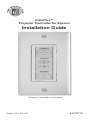
PixiePlus™
Projector Controller for Epson®
Installation Guide
(Decora™ wall plate not included)
Patent US 7,334,067
ELPSP10
Important Safety Instructions
1) Read these instructions.
2) Keep these instructions.
3) Heed all warnings.
4) Follow all instructions.
5) Do not use this apparatus near water.
6) Clean only with dry cloth.
7) Do not block any ventilation openings. Install in accordance
with the manufacturer's instructions.
8) Do not install near any heat sources such as radiators, heat
registers, stoves, or other apparatus (including amplifiers) that
produce heat.
9) Do not defeat the safety purpose of the polarized or
grounding type plug. A polarized plug has two blades with one
wider than the other. A grounding type plug has two blades and
a third grounding prong. The wide blade or the third prong is
provided for your safety. When the provided plug does not fit
into your outlet, consult an electrician for replacement of the
obsolete outlet.
10) Protect the power cord from being walked on or pinched
particularly at plugs, convenience receptacles, and the point
where they exit from the apparatus.
11) Only use attachments/accessories specified by the
manufacturer.
12) Use only with a cart, stand, tripod, bracket, or table
specified by the manufacturer, or sold with the apparatus.
When a cart is used, use caution when moving the
cart/apparatus combination to avoid injury from tip-over.
13) Unplug this apparatus during lightning storms or when
unused for long periods of time.
14) Refer all servicing to qualified service personnel. Servicing
is required when the apparatus has been damaged in any way,
such as power-supply cord or plug is damaged, liquid has been
spilled or objects have fallen into the apparatus, the apparatus
has been exposed to rain or moisture, does not operate
normally, or has been dropped.
WARNING - To Reduce the Risk of Fire Or Electric Shock, Do
Not Expose This Apparatus To Rain Or Moisture. Apparatus
shall not be exposed to dripping or splashing and no objects
filled with liquids, such as vases, shall be placed on the
apparatus.
Electrical Warning
The PXE-DCM+ is a low-voltage device. Never install the
PixiePlus in an electrical back box containing high-voltage
wiring. This would cause a serious electrical danger and violate
United States national electrical codes.
1
I. Introduction
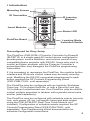
Mounting Screws
IR Transmitter
IR Learning
Window
Insert Modules
Status LED
PixiePlus Board
Learning Mode
Activation Switch
Preconfigured for Easy Setup
The PixiePlus (PXE-DCM+) Projector Controller for Epson®
(ELPSP10) is a single-gang AV control device configured to
provide power, source selection, and volume control of any
compatible Epson projector with RS-232. Users who wish to
control an Epson projector with the Projector Controller’s
preconfiguration may disregard the PixiePlus programming
instructions.
If it is necessary to reprogram the PixiePlus, the modular button
interface and IR device control codes may be easily reconfigured. Modifying the RS-232 commands programmed to each
button requires the SP Controls Programming Wand
(PXE-PGM-TOOL, sold separately).
The PixiePlus may be configured with an Inactivity Shutdown
Timer (pg. 15) to protect bulb life, or with a Security Lock (pg.
16) to prevent unauthorized use. One PixiePlus may be used to
control multiple projectors in tandem with a parallel wired extra
emitter (sold separately).
The PixiePlus may be configured with schedule events (security
lock, auto power off, etc.) at specific times and date ranges
using the PXE-DCM-RTC Real Time Clock Module (not
included). Configuration of schedule events requires the SP
Controls Programming Wand (PXE-PGM-TOOL, sold
separately). See Programming Wand documentation for
schedule configuration instructions.
2
The PixiePlus is designed for use with a Leviton Decora™ wall
plate (not included). The PixiePlus may be installed in a
single-gang back box (not included). Bezels are available in
black (PXE-BEZEL-BL) and gray (PXE-BEZEL-GR), sold
separately.
II. Installation Overview
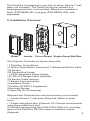
Bezel
Inserts Circuit Board Single-Gang Wall Box
The Projector Controller for Epson ships with:
• 1 PixiePlus Circuit Board
• 6 White Plastic Button Inserts and 7 Rubberized Button Pads
• IR Emitter
• IR Emitter Bud Holder
• 1 6VDC Regulated Power Supply
• 50’ RS-232 Dongle Cable Assembly
• IR Emitter Cable Anchors
• 2 Bezels (ivory and white)
• Installation Guide
• PixiePlus ELPSP10 Supplement
• Mounting Screws
• Paper Clip (for IR-learning)
Required and Optional parts and accessories (not included):
• 1 Leviton Decora™ wall plate (Required. Match to bezel
color.)
• 1 Single-Gang Back Box (Optional. SP Controls recommends
using a grounded back box)
• PixiePlus programming tool (PXE-PGM-TOOL) for reconfiguration of the PixiePlus RS-232 codes or schedule events
(Optional)
3
III. PixiePlus Installation
The Projector Controller for Epson is preconfigured to use the
Discrete Power, 4-Button Source, and Volume Control button
modules. To function with the PixiePlus preconfiguration codes,
these button modules must be used.
If you wish to reconfigure the PixiePlus with alternate controls,
you may replace those button modules as needed with buttons
that match the control codes you wish to use. Select the button
insert modules that match the design of your remote control.
For example, if your remote control has a single toggling power
button, select the Toggling Power module.
Reprogramming the PixiePlus RS-232 commands requires use
of the PixiePlus programming tool (PXE-PGM-TOOL).
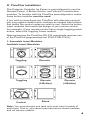
1. Assemble Insert Modules
Available Insert Moodules
POWER
POWER
ON
Toggling
SOURCE
Toggling
OFF
Discrete
SOURCE
SOURCE
VIDEO
comp
COMP
audio
Discrete
(2-Button)
video
Discrete
(4-Button)
VOLUME
Control
Blank
Note: You must choose one (and only one) insert module of
each type. That is, you cannot use two source insert modules
and no volume module.
4
III. PixiePlus Installation cont’d
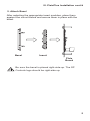
2. Attach Bezel
After selecting the appropriate insert modules, place them
against the curcuit board and secure them in place with the
bezel.
Bezel
Insert
Pixie
Board
Be sure the bezel is placed right-side-up. The SP
Controls logo should be right-side up.
5
IV. Wiring PixiePlus to Display Device
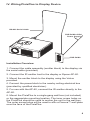
RS-232 Serial Cable
PXE-DCM+ 6VDC
Power Supply
PXE-DCM+
Installation Overview
1. Connect the cable assembly (emitter block) to the display via
the serial cable (provided).
2. Connect the IR emitter bud to the display or Epson AP-60.
3. Mount the emitter block to the display using the Velcro
provided.
4. Connect the power block to the nearby ceiling electrical box
(provided by qualified electrician).
5. For use with the AP-60, connect the IR emitter directly to the
AP-60.
6. Mount the PixiePlus to a single-gang wall box (not included)
or the appropriate mounting location. The inner screw holes on
the PixiePlus should be used to anchor the unit to the wall box.
The outer screw holes will be used to affix a Decora™ wall plate
over the face of the PixiePlus.
6
IV. Wiring PixiePlus to Display Device cont’d
7. Once all the connections are made, plug in the PixiePlus
power supply wall wart to the electrical box.
The PXE-DCM+ is a low-voltage device. Never
install the PixiePlus in an electrical back box containing
high-voltage wiring. This would cause serious electrical danger
and violate United States national electrical codes.
V. Reprogram PixiePlus
This section describes how to reprogram the PixiePlus control
codes, which will not be necessary for most installations.
The Projector Controller for Epson is preconfigured with
RS-232 codes that control any compatible Epson projector. The
default codes are:
Button
Power ON
Power OFF
COMP
VIDEO
AUDIO
BLANK
VOLUME Up
VOLUME Down
Default Codes
Power On (RS-232)
Power Off (RS-232)
Computer 1/Computer 2 (toggle)
(RS-232)
Video (toggle) (RS-232)
Epson AP-60 Power Toggle (IR)
Projector A/V Mute Toggle (RS-232)
Volume Up (RS-232)
Volume Down (RS-232)
Programming Overview
The PixiePlus controls AV devices by learning and duplicating
the IR codes of their remote controls. A single button may be
programmed with as many as four codes. Multiple codes may
be sent as macros or round robin.
To program the PixiePlus you will set it to learning mode, arm
each key for IR learning, and squirt it with the appropriate
remote control commands.
Any button may be programmed with any code—it does not
have to be the same as the label silk-screened on the button.
RS-232 Programming
RS-232 commands may be reprogrammed on the PixiePlus
with the SP Controls Programming Wand (PXE-PGM-TOOL).
See Programming Wand documentation for further instructions.
7
V. Reprogram PixiePlus cont’d
Toggling Source Module Between 2-Button and 4-Button
Mode (optional)
By default, the PixiePlus is configured to work with a four-button
source module. To use a one- or two-button source module, you
must disable four-button mode.
To disable four-button mode:
Assemble the PixiePlus, including the one- or two-button
source module, as described in Section IV above. Press and
hold any single source button while inserting a paper clip into
the programming aperture. The PixiePlus should beep three
times to indicate that four-button mode is now disabled.
The PixiePlus will now be in learning mode. You may program
the PixiePlus or, to exit learning mode, remove the paper clip.
While the four-button mode is disabled, both the left and right
sides of any one- or two-button module button should illuminate
together when the button is pressed. If only one side of a button
on the two-button pad illuminates, the unit is still in four-button
mode.
To re-enable four-button mode:
Assemble the PixiePlus, including the four-botton module, as
described in Section III above. Press and hold any single button
in the source selection module while inserting a paper clip into
the programming aperture. The PixiePlus should beep three
times to indicate that four-button mode is now active.
When four-button mode is enabled, both the left and right sides
of any one- or two-button module button should illuminate
separately when a source button is pressed, not in unison. If
two neighboring buttons on the four-button pad illuminate
simultaneously, the unit is NOT in four button mode.
The PixiePlus will now be in learning mode. You may program
the PixiePlus or, to exit learning mode, remove the paper clip.
To learn a remote control:
The PixiePlus may be reprogrammed to reproduce different IR
control codes. To control a device through IR, an IR emitter
must be wired from the PixiePlus to the device under control
(see page 7 for more information).
8
V. Reprogram PixiePlus cont’d
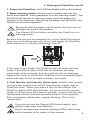
1. Power the PixiePlus: the LED backlights will be illuminated.
2. Enter learning mode: Gently insert a paper clip into the
small hole labeled “insert paperclip to enter learning mode.” The
PixiePlus will remain in learning mode while the paper clip
remains in the aperture. Removing the paper clip will return the
PixiePlus to normal operation.
Be gentle with the paper clip to ensure that you do not
damage the switch mechanism.
The Status LED will blink red while the PixiePlus is in
learning mode.
Be sure that you are not pressing any of the PixiePlus buttons
when you insert the paper clip, or you will toggle the PixiePlus
Audio Mode on or off (see Section IV, Part 5).
If the room is too bright, the PixiePlus will not enter learning
mode. The LED will glow solid red, the buttons will beep
continually when pressed, and they will not arm for learning.
Darken the room or shield the PixiePlus from the ambient light
while learning. Direct sunlight is always too bright.
3. Test Remote and Identify Sweet Spot: Position the remote
control a few inches from the IR learning eye (upper right of
PixiePlus front). When you press a key on the remote, the
PixiePlus status LED should flicker. As you move the remote
closer or farther from the receiver window, or move off axis the
red flashes will dim and become intermittent. Find a position
that consistently yields clear, regular blinking. This is the
"sweet spot."
If you do not see the Status LED flicker rapidly, your
remote may need new batteries.
Some remotes have several emitting LEDs, which may
not be located in the center of the remote.
9
V. Reprogram PixiePlus cont’d
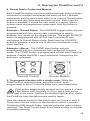
4. Round Robin Codes and Macros
Each PixiePlus button may be programmed with either a single
command or multiple commands (as many as four). Multiple
commands may be sent round robin or as macros. Round robin
buttons send one command per button press. Each time the
button is pressed, it sends the next code in a series. Macro
buttons send all programmed codes each time the button is
pressed.
Example—Round Robin: The SOURCE toggle button may be
programmed with four round robin commands to switch
between four inputs on the display device. The single SOURCE
button is programmed with all four input commands, and
configured to Round Robin mode. Each time the SOURCE
button is pressed, it sends one of the four commands, in the
order learned.
Example—Macro: The COMP input button may be
programmed with two commands and configured to macro
mode. The COMP button is programmed so that each time it is
pressed it sends the RGB1 input command, followed by the
auto-sync command.
SOURCE
RGB1
RGB
Video
Video
Remote Control
VIDEO
COMP
Source Module
5. To program a button with a single code: While the
PixiePlus is in learning mode, press the button to be
programmed to arm it. It should beep once and slowly blink.
If the button beeps loudly as soon as you press it, check
if the Status LED is solidly lit. If it is, there may be too
much light in the room. Reduce the ambient light level or shield
the PixiePlus from the light source and try again.
Hold the remote control in the sweet spot you found in step 3.
Press and hold the button on the remote for about a second.
The status LED should flicker, indicating that the code is being
received. The PixiePlus will beep three times quickly to indicate
successful learning.
10
V. Reprogram PixiePlus cont’d
You may press a different button for learning at any time,
including buttons that have already been programmed. If you
press a button that is already armed for learning a second time,
it will be disarmed.
If the PixiePlus learns the code, the button will begin flashing
rapidly in Verification Mode. Go to step 7, Verify Learned Keys.
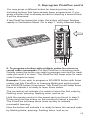
6. To program a button with multiple codes for macro or
round robin commands: Put the PixiePlus in learning mode.
Quickly press the button you wish to program one time for each
code you want it to learn. The PixiePlus will beep once for each
code it expects to learn.
Example: If you wish to program a SOURCE button with three
codes, set thte PixiePlus to Learning Mode and quickly press
the SOURCE button three times. The PixiePlus will beep three
times to indicate it is ready to learn three codes.
The armed key wil indicate it is ready to learn the first code by
flashing once, pausing, flashing once, and so on.
Hold the remote control in the sweet spot you found in step 3.
Press and hold the button on the remote for about a second.
The PixiePlus will beep three times quickly to indicate
successful learning.
Now the button will indicate it is ready to learn the second code
by flashing twice, pausing, flashing twice, and so on.
11
V. Reprogram PixiePlus cont’d
Program the button, and it will again beep three times to
indicate if the code was successfully learned. Repeat as many
times as necessary.
When you have programmed the last code in the series, the
PixiePlus will beep quickly three times to indicate the code is
successfully learned, and then beep slowly three more times to
indicate that the button has been fully programmed.
Arming will eventually time out if no IR code is received. You
may select a different key for learning at any time, including
keys that are already learned.
If the PixiePlus successfully learns the code, the key will begin
flashing quickly to indicate it is in Verification Mode.
You cannot add a new code to a key that is already
programmed. You must reprogram it entirely. If any code fails,
the learning sequence for that key is started over.
By default, any button that has been programmed with multiple
codes will send them round robin. To set a button to macro
mode, first verify the code, then go to step 8.
7. Verify learned keys
If the PixiePlus is wired to
control the display device
before programming, you can
verify each code was
successfully learned
immediately after programming it. Each button will
remain in verificaton mode for
20 seconds before timing out.
After learning, each button will blink rapidly to indicate that it is
ready for verification. Press the button, and the PixiePlus will
emit the code. The display device should respond appropriately.
If the key is set to round robin or macro, it will send the multiple
codes as configured.
Verification is particularly useful for verifying that
repeating codes work properly (e.g., volume ramping).
12
V. Reprogram PixiePlus cont’d
If the button did not seem to learn correctly, press any other
button on the PixiePlus, then press the target button again to
rearm it, and repeat the learning procedure.
8. Repeat for each button: While still in learning mode,
program and verify each button.
9. Set a button to macro mode: If a button has been
programmed with multiple commands, the button may be
configured to send all commands with a single button press. By
default, buttons are configured to Round Robin mode.
After verification, and while still in learning mode, press and
hold the button you wish to set to macro mode for approximately five seconds. The PixiePlus will beep three times to
indicate that it has now been set to macro mode.
Each button must be independently set to macro mode.
If a button is reprogrammed the code will automatically default
back to round robin mode.
Press-and-hold repeat commands (such as volume ramping)
are not available for buttons set to macro mode. A Macro button
can send one and only one instance of each code with a single
button press. There is a 300 millisecond delay between each
code in the series. Some devices may not be able to respond to
multiple commands sent at this frequency.
10. To control multiple units of the same device: One
PixiePlus may send identical codes to multiple units of the same
device without any additional configuration. For example, you
may control two identical projectors with a single PixiePlus by
adding an additional IR emitter and wiring it from the PixiePlus
to a second projector. A single button press on the PixiePlus will
send identical codes to both devices, and the PixiePlus will
control them in tandem.
11. To control multiple devices: Different buttons on a single
PixiePlus may be programmed with codes from different remote
controls.
Example: You wish to control power and source selection on a
projector, and volume on an IR-controllable amplifier.
To do so, wire one IR emitter to the LCD monitor and the
second IR emitter to the amplifier. Program the PixiePlus power
and source buttons with the codes from the LCD monitor
remote control. Program the PixiePlus volume buttons with the
volume control codes from the amplifier remote control.
13
V. Reprogram PixiePlus cont’d
One PixiePlus may learn IR commands from remote controls
from different devices. Each button can be configured to send a
single command (normal operation) or multiple commands
(macro mode) with a single button press.
Example: You wish to configure the PixiePlus to send a power
command to a projector and a separate power command to an
amplifier with a single press of the PixiePlus POWER ON
button.
To do so, program the PixiePlus POWER ON button with two
commands, Power On from the projector remote, and Power
On from the amplifier remote. Then configure the PixiePlus
POWER ON button to macro mode.
12. To restore the PixiePlus to its default preconfiguration:
Set the device to learning mode by inserting the paper clip.
Then press and hold any two buttons while the device is in
learning mode. The whole keypad will blink, first slowly, then
quickly. The PixiePlus will beep four times, indicating that it has
been restored to its default configuration.
13. To exit learning mode: Gently remove the paper clip to exit
learning mode. Be sure not to hold any buttons while removing
the paper clip, or the unit will be set to cloning mode.
14. To test learned codes: Verify that the IR emitter bud has
been placed directly over the IR detector on the device the
PixiePlus controls. Press the PixiePlus button that you wish to
test. A red LED labeled “IR Activity” will blink when the code is
being sent, but the emitter bud does not illuminate.
15. Troubleshooting: If you cannot control the device, be sure
that the emitter bud is positioned correctly. If some buttons work
but others do not, try re-programming the buttons that do not
work. Make sure you press the button on the remote for at lest
one second during learning.
Fluorescent lights can interfere with IR signals. Check if the
projector is close to a fluorescent light source. If so, try turning
off the lights. If this restores control, cover the IR emitter bud
and display device IR receiver window with an IR-opaque
shield, such as gaffer’s tape.
See Section X. Troubleshooting beginning on page 21 for more
tips.
14
VI. Configuring Special Features
1. Inactivity Shutdown timer
The Inactivity Shutdown Timer will automatically shut the
display device down if it is not used for a configurable length of
time.
Example: The PixiePlus Inactivity Shutdown Timer is set to
three hours. If no button is pressed on the PixiePlus for three
hours, it will begin to beep and flash in warning 120 seconds
before three hours has elapsed. If no button is pressed, at three
hours the PixiePlus will send all codes programmed to the
POWER OFF button.
Use of the Inactivity Shutdown Timer requires the DISCRETE
POWER ON/POWER OFF keypad module.
Configuration of the Inactivity Shutdown Timer requres the
VOLUME UP and VOLUME DOWN keypad module to be
inserted. The volume module can be replaced with a blank after
the feature is configured.
What the Timer does
• The timer begins counting down immediately after the
PixiePlus powers on a display device. Pressing any button
except POWER OFF resets the timer and it begins timing down
again. Pressing POWER OFF stops the timer. There is no
visible behavior when the timer is counting down, until two
minutes before it expires.
• If the timer counts down to 120 seconds, the PixiePlus will
begin beeping and the POWER OFF button flashes to warn
users that it is preparing to shut down.
• If the timer expires, the system shuts itself down exactly as if
the user had pressed the POWER OFF key. Any macro
programmed for POWER OFF is executed. If the Security
Keylock feature is enabled, the PixiePlus will also lock.
Set the Inactivity Shutdown Timer
Press and hold both volume keys while gently inserting a paper
clip in the programming aperture of the PixiePlus.
Be gentle with the paper clip to ensure that you do not
damage the switch mechanism.
The PixiePlus will begin beeping to communicate the current
Timer setting (described in the table on page 16).
15
VI. Configuring Special Features cont’d
To change the active setting: Press VOLUME UP or
VOLUME DOWN to cycle to the next setting. The PixiePlus will
indicate the new setting with a pattern of beeps, and update its
Red LED blinking.
When you have reached the desired setting, remove the paper
clip to return to normal operation.
Inactivity Shutdown Timer Settings
PixiePlus Audio
One long beep
One quick beep
Two quick beeps
Three quick beeps
Four quick beeps
Five quick beeps
Six quick beeps
Seven quick beeps
Eight quick beeps
*Default setting
PixiePlus Status LED
LED dark
LED blinks once
LED blinks twice
LED blinks three times
LED blinks four times
LED blinks five times
LED blinks six times
LED blinks seven times
LED blinks eight times
Timer Setting
Timer DISABLED*
One-hour shutoff
Two-hour shutoff
Three-hour shutoff
Four-hour shutoff
Five-hour shutoff
Six-hour shutoff
Seven-hour shutoff
Eight-hour shutoff
2. Security Keylock
The Security Keylock locks the PixiePlus during disuse to
prevent unauthorized use. It disables the keys on the PixiePlus
after POWER OFF is pressed, until a Security Keycode is
entered on the standard PixiePlus keypad. If the proper code is
not entered, the system cannot be turned on or used.
Use of the Security Keylock feature requires the DISCRETE
POWER ON and POWER OFF keypad module to be inserted.
If your device remote has only a “toggling power” key, you may
still use this module if you program both POWER ON and
POWER OFF with the same (toggle) code.
How the Security Keylock works
When POWER OFF is pressed, the PixiePlus enters a “locked”
state and all keypad buttons go dark.
When the system is locked, any button press other than
POWER ON is understood as a Security Keycode entry. A soft
chirp is emitted, but the key does not illuminate, and no control
operation is performed. If the correct code sequence is entered,
the system unlocks, the interface illuminates, and normal
operation is restored, until the next time POWER OFF is
pushed and the system locks again.
16
VI. Configuring Special Features cont’d
If the entered code is not correct, the system emits a long beep
and remains locked.
Security Keycodes may be one to six button presses long.
Codes can use any key on the keypad other than POWER ON.
By default the Security Keylock feature is off, and the default
Security Keycode is OFF-OFF-OFF.
Configure the Security Keylock
1. Press and hold both POWER ON and POWER OFF while
gently inserting a paper clip into the PixiePlus programming
aperture. The PixiePlus will enter “Security Keylock configuration mode” and communicate the current Security Keylock
settings as follows:
• The Red Status LED indicates whether the Security Keylock
feature is enabled (LED is on) or disabled (LED is off).
• The PixiePlus will show the existing Security Keycode by
illuminating each button in the code in sequence, pausing
briefly, then repeating the code.
2. To enable or disable the Security Keycode feature, press
POWER ON to toggle between enabled/disabled.
3. To change the Security Keycode, enter a new code by
pressing a sequence of up to six keys, using any keys in any
combination, except POWER ON. After the code is entered, the
PixiePlus will immediately show the new Security Keycode.
If more than six keys are entered, the PixiePlus will beep and
reset to the previously configured code.
4. After the new Security Keylock has been reconfigured, its
new settings must be confirmed. If you do not follow this
sequence to store the new settings, any changes you make will
be discarded when you leave Security Keylock configuration
mode.
To confirm the new settings, press POWER ON and hold it
down until the PixiePlus beeps three times.
5. After the new code is set and confirmed, carefully remove the
paper clip as usual to return to normal operation.
If the Security Keycode is forgotten, you can retrieve
it by putting the PixiePlus back in Security Keycode
configuration mode—it will then display the currently-configured
code.
17
VI. Configuring Special Features cont’d
3. PixiePlus Audio Feedback
By default, the PixiePlus clicks when a button is pressed. To
mute, press and hold any button while inserting a paper clip into
the programming aperture. The PixiePlus will beep quickly three
times to indicate that AUDIO has been set to OFF.
VII. Cloning
Any PixiePlus may quickly and easily copy all the codes from
any other PixiePlus. the PixiePlus cannot clone a Pixie.
In cloning there is a donor unit and a recipient unit. The donor
unit must already be programmed with the appropriate codes
(see Section V). The recipient will copy the donor unit’s codes.
Both units must have the same button insert types, though they
may be different colors.
Both units must be powered. The donor unit should be installed
before beginning.
To power the recipient, you may wish to temporarily
daisy-chain power from the terminal block of the donor
unit with a short length of cable.
Cloning Procedure
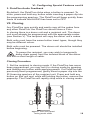
1. Set the recipient to cloning mode. If the PixiePlus has never
been programmed, you may set it to cloning mode by pressing
and holding any button while applying power. If a PixiePlus has
previously been programmed, gently insert a paper clip into the
IR lLearning aperture of the recipient unit. Press and hold any
button on that unit and, while still holding the button, remove the
paperclip. The PixiePlus will rapidly chirp while in cloning mode.
approx. one inch apart
facing each other
18
VI. Configuring Special Features cont’d
It will time out of cloning mode in about 15 seconds, so have
both devices on hand. If the PixiePlus times out of cloning
mode, repeat this procedure to return it to cloning mode.
2. Position the two units face to face with both units held
upright, approximately one inch apart. They should be directly
across from each other with the bezels lined up. This will
position the IR receiver window of the cloning PixiePlus directly
across from the IR transmitter in the donor PixiePlus.
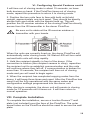
Be sure not to obstruct the IR receiver window or
transmitter with your hands.
When the units are correctly lined up, the donor PixiePlus will
automatically enter cloning mode. Its Status LED will turn solid
red and both units will chirp rapidly.
3. Hold the recipient steadily in front of the donor. If the
connection is broken (the recipient ceases to chirp), reposition
the recipient unit to re-establish communication and the units
will continue where they left off. If communication is broken for
more than 15 seconds, the recipient will time out of cloning
mode and you will need to begin again.
4. When the recipient has completed copying codes from the
donor, it will beep three times and reset. After the PixiePlus has
reset it will be fully operational with the same codes and
configuration settings programmed into the donor unit.
After cloning is complete, the donor unit will remain in cloning
mode for 15 seconds until it times out. It will then return to
normal operation.
VIII. Complete Installation
To complete the installation, secure a Leviton Decora™ wall
plate (not included) over the face of the PixiePlus. The outer
screw holes on the PixiePlus should be used to secure the wall
plate.
19
IX. Operation
Power
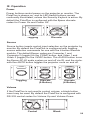
Power buttons control power on the projector or monitor. The
PixiePlus is always on, and its LED backlit buttons remain
continually illuminated, unless the Security Keylock is active. By
default the PixiePlus is configured with the Epson discrete
codes for Power On and Power Off.
POWER
POWER
ON
Toggling
OFF
Discrete
Source
Source button inserts control input selection on the projector by
monitor. By default the PixiePlus is configured with toggling
source selection commands for use with the 4-button discrete
module. The default Epson codes are Computer 1 and
Computer 2 (toggle) for the COMP button, and Video 1 and
Video 2 (toggle) for the VIDEO button. The AUDIO button turns
the Epson AP-60 audio system on and off via IR, and the circlewith-line MUTE button toggles the projector mute on and off.
SOURCE
SOURCE
SOURCE
Toggling
VIDEO
comp
COMP
audio
Discrete
(2-Button)
video
Discrete
(4-Button)
Volume
If the PixiePlus is not used to control volume, a blank button
insert may be used. By default the PixiePlus is configured with
RS-232 control codes for Volume Up and Volume Down.
VOLUME
Control
Blank
20
X. Troubleshooting
Programming Problems
Verify that the PixiePlus is in learning mode for programming.
The Status LED continually blinks red when the PixiePlus is in
learning mode.
The Status LED is solid red and the PixiePlus beeps loudly
each time you try to arm a key for learning.
The ambient light is too bright. Shield the PixiePlus from
ambient light sources and try to re-program.
If the buttons appear to program properly but do not control the
device, verify each code is correctly learned immediately after it
has been programmed. The button will blink rapidly to indicate it
is in verification mode. Push the button and the IR emitter will
emit the corresponding code.
When the PixiePlus is emitting a code in verification mode, you
should see the Status LED flicker at a consistent strength and
frequency. If the flickering seems uneven, verify that you are
holding the remote control in the correct sweet spot as
described in Section V, Part 3.
If the status LED does not flicker rapidly when the remote
control is emitting a code, verify that the batteries in your
remote control are fresh.
The PixiePlus beeps three times as soon as the paper clip is
inserted into the programming aperture.
The PixiePlus beeps three times when it is toggled between
two-button and four-button Source Selection modes. This is
done by pressing and holding any button while inserting the
paper clip. Is one of the buttons being activated while the paper
clip is being inserted?
This can happen if a button is stuck. Check all buttons to make
sure they are not caught in a depressed position. If not, it is
possible that the button contacts on the PixiePlus circuit board
are being shorted. Remove the bezel, and check for solder or
bits of wire that could bridge the button contacts. Then reset the
buttons, re-attach the bezel and try entering programming mode
again. If this does not correct the problem, please contact SP
Controls Technical Support.
Operation Problems
The PixiePlus does not power the projector/monitor on.
21
X. Troubleshooting cont’d
Is the PixiePlus display dark, and does it chirp when any button
is pressed? If so, the PixiePlus Security Keylock is active. See
page 16 for information on how to configure and/or retrieve the
Security Keylock code.
If the Security Keylock is not set, verify that the projector or
monitor powers on normally with its own remote control or
settop controls. If it does not, it may not be plugged in or may
require service.
The PixiePlus does not control the projector/monitor.
Confirm that the IR emitter bud is positioned directly over the
receiver on the IR window of the device you are controlling.
Some devices are sensitive to accurate placement.
Fluorescent lights can interfere with IR signals. Check if the
projector is close to a fluorescent light source. If so, try turning
off the lights. If this restores control, cover the IR emitter bud
and display device IR receiver window with an IR-opaque
shield, such as gaffer’s tape. Some opaque tapes do not block
IR.
Some commands work but others do not.
Power and Source Selection commands are sent by RS-232
and Volume commands are sent by IR. If some commands
work but others are not working, check the wiring type that
matches the codes that are not working.
Control is intermittent
If you are learning a device manufactured by Philips,
Magnavox, or Koss, consult the SP Controls PXE-DCM Philips
Protocol Application Note for additional programming
instructions.
If you are still unable to control your device, please contact SP
Controls Technical Support for further assistance.
XI. Technical Specifications
Package Type
Dimensions
Weight (PCB with bezel
and 3 insert modules)
Power Supply
Output Type
Recommended Wire
Single-Gang Decora™ Mounting
4.130” (h) x 1.745” (w) x .90” (d)
2.5 oz
6VDC, 300mA
IR Emitter/RS-232 (preconfigured;
re-programming RS-232 requires
PXE-PGM-TOOL sold separately)
Male-female RS-232 straight serial
The PixiePlus is UL Listed and CE Certified.
22
Warranty
SP Controls warrants all PixiePlus products and accessories against
defects in materials and workmanship for a period of five years from
the date of purchase. Although SP Controls thoroughly tested and
reviewed this documentation, there is no warranty, express or implied,
with respect to quality, merchantability, or fitness for a particular
purpose. Therefore the PixiePlus and accessories are provided "as-is"
and the purchaser assumes the entire risk as to quality and
performance.
There are no obligations or liabilities on the part of the SP Controls
Corporation for consequential damages arising out of or in conjunction
with the use or performance of these products or other indirect
damages with respect to loss of profit, revenue, or cost of removal
and/or replacement. Some states do not allow the exclusion or
limitation of incidental or consequential damages, so the above
limitation or exclusion may not apply to you. This warranty gives you
specific legal rights, and you may also have other rights that vary from
state to state. SP Controls’ maximum liability shall not exceed the price
paid by the user.
All implied warranties, including warranties for merchantability and/or
fitness, are limited in duration to (5) years from date of purchase. Proof
of purchase must be provided with any claim.
FCC Compliance
This equipment generates radio frequency energy and if not installed
inaccordance with the manufacturer's instructions may cause radio
interference.This equipment complies with part 15, Subpart J of the
FCC rules for a Class A computing device. This equipment also
complies with the Class A limits for radio noise emission from digital
apparatus set out in the Radio Interference Regulation of the Canadian
Department of Communications. These above rules are designed to
provide reasonable protection against such interference when
operating the equipment in a commercial environment. If operation of
this equipment in a residential area causes radio frequency
interference, the user and not SP Controls, Inc., will be responsible.
Copyright
Pixie™, PixiePlus™, and the SP Controls switch logo are trademarks
of SP Controls, Inc. Epson® is a registered trademark of Seiko Epson
Corporation. Decora™ is a registered trademark of Leviton
Manufacturing Co. All other trademarks mentioned in this manual are
the properties of their respective owners. No part of this document may
be reproduced or transmitted in any form or by any means, electronic
or mechanical, for any purpose, without express written permission of
SP Controls, Inc.
© 2014 SP Controls, Inc. All rights reserved.
Changes or modifications made to this equipment not expressly
approved by SP Controls, Inc., could void the user's authority to
operate the equipment.
SP Controls, Inc. assumes no responsibility for any errors that appear
in this document. Information in this document is subject to change
without notice.
23