1
SHARP ELECTRONICS CORPORATION
Sharp Plaza, Mahwah, New Jersey 07430-2135
SHARP CORPORATION
OPERATION MANUAL
MODE D’EMPLOI
MANUAL DE MANEJO
MANUAL DE OPERAÇÃO
POWER
U
EN
M
Printed on post-consumer recycled paper.
Imprimé sur du papier recyclé.
Impreso en papel reciclado.
Impresso em papel reciclado pós utilização.
Printed in Japan
Imprimé au Japon
Impreso en Japón
Impresso no Japão
TINS-A181WJZZ
02P04-JKK
SLEEP
FRANÇAIS
ESPAÑOL
LIQUID CRYSTAL TELEVISION
TÉLÉVISEUR ACL
TELEVISOR CON PANTALLA
DE CRISTAL LIQUIDO
TELEVISOR DE CRISTAL
LÍQUIDO
PORTUGUÊS
LC-13B2UB/LC-15B2UB/LC-20B2UB
LC-13B2UB
LC-15B2UB
LC-20B2UB
ENGLISH
20B2UBCover 02.02.14
ENGLISH
LC-13B2UB
LC-15B2UB
LC-20B2UB
LIQUID CRYSTAL TELEVISION
ENGLISH
OPERATION MANUAL
IMPORTANT INFORMATION
WARNING:
TO REDUCE THE RISK OF FIRE OR ELECTRIC SHOCK, DO
NOT EXPOSE THIS PRODUCT TO RAIN OR MOISTURE.
CAUTION
RISK OF ELECTRIC SHOCK.
DO NOT OPEN.
CAUTION: TO REDUCE THE RISK OF ELECTRIC SHOCK,
DO NOT REMOVE COVER (OR BACK).
NO USER-SERVICEABLE PARTS INSIDE.
REFER SERVICING TO QUALIFIED SERVICE
PERSONNEL.
The lightning flash with arrowhead symbol, within an equilateral triangle, is intended to alert
the user to the presence of
uninsulated “dangerous voltage”
within the product’s enclosure
that may be of sufficient
magnitude to constitute a risk of
electric shock to persons.
The exclamation point within a
triangle is intended to alert the
user to the presence of important operating and maintenance
(servicing) instructions in the
literature accompanying the
product.
IMPORTANT INFORMATION
WARNING: FCC Regulations state that any unauthorized changes or modifications to this equipment
not expressly approved by the manufacturer could void the user’s authority to operate this equipment.
U.S.A. ONLY
CAUTION: TO PREVENT ELECTRIC SHOCK, MATCH WIDE BLADE OF
PLUG TO WIDE SLOT, FULLY INSERT.
“Note to CATV system installer: This reminder is provided to call the CATV system installer’s attention to Article 820-40
of the National Electrical Code that provides guidelines for proper grounding and, in particular, specifies that the cable
ground shall be connected to the grounding system of the building, as close to the point of cable entry as practical.”
This product utilizes tin-lead solder, and fluorescent lamp containing a small amount of mercury.
Disposal of these materials may be regulated due to environmental considerations. For disposal or
recycling information, please contact your local authorities or the Electronic Industries Alliance:
www.eia.org
IMPORTANT:
To aid reporting in case of loss or theft, please
record the TV’s model and serial numbers in the
space provided. The numbers are located at the
rear of the TV.
Model No.:
Serial No.:
U.S.A. ONLY
2
DEAR SHARP CUSTOMER
Thank you for your purchase of the Sharp LCD Color TV product. To ensure safety and
many years of trouble-free operation of your product, please read the Safety Precautions carefully before using this product.
IMPORTANT SAFETY PRECAUTIONS
Electricity is used to perform many useful functions, but it can also cause personal injuries and property
damage if improperly handled. This product has been engineered and manufactured with the highest
priority on safety. However, improper use can result in electric shock and/or fire. In order to prevent
potential danger, please observe the following instructions when installing, operating and cleaning the
product. To ensure your safety and prolong the service life of your LCD color TV product, please read
the following precautions carefully before using the product.
■ Read instructions—All operating instructions must be read and understood before the product is
operated.
■ Keep this manual in a safe place—These safety and operating instructions must be kept in a
safe place for future reference.
■ Observe warnings—All warnings on the product and in the instructions must be observed
closely.
■ Follow instructions—All operating instructions must be followed.
■ Attachments—Do not use attachments not recommended by the manufacturer. Use of inadequate attachments can result in accidents.
■ Power source—This product must operate on a power source specified on the specification
label. If you are not sure of the type of power supply used in your home, consult your dealer or
local power company. For units designed to operate on batteries or another power source, refer
to the operating instructions.
■ Power cord protection—The power cords must be routed properly to prevent people from
stepping on them or objects from resting on them. Check the cords at the plugs and product.
■ If the AC adapter is misplaced or needs to be replaced, obtain the same type of adapter from a
SHARP service center or your dealer.
■ Overloading—Do not overload AC outlets or extension cords.
Overloading can cause fire or electric shock.
■ Entering of objects and liquids—Never insert an object into the product through vents or openings. High voltage flows in the product, and inserting an object can cause electric shock and/or
short internal parts. For the same reason, do not spill water or liquid on the product.
■ Servicing—Do not attempt to service the product yourself. Removing covers can expose you to
high voltage and other dangerous conditions. Request a qualified service person to perform
servicing.
■ Repair—If any of the following conditions occurs, unplug the power cord from the AC outlet, and
request a qualified service person to perform repairs.
a.When the power cord or plug is damaged.
b.When a liquid was spilled on the product or when objects have fallen into the product.
c. When the product has been exposed to rain or water.
d.When the product does not operate properly as described in the operating instructions.
Do not touch the controls other than those described in the operating instructions. Improper
adjustment of controls not described in the instructions can cause damage, which often
requires extensive adjustment work by a qualified technician.
e.When the product has been dropped or damaged.
f. When the product displays an abnormal condition. Any noticeable abnormality in the product
indicates that the product needs servicing.
■ Replacement parts—In case the product needs replacement parts, make sure that the service
person uses replacement parts specified by the manufacturer, or those with the same characteristics and performance as the original parts. Use of unauthorized parts can result in fire, electric
shock and/or other danger.
■ Safety checks—Upon completion of service or repair work, request the service technician to
perform safety checks to ensure that the product is in proper operating condition.
■ Wall or ceiling mounting—When mounting the product on a wall or ceiling, be sure to install the
product according to the method recommended by the manufacturer.
■ Polarization—This AC adapter may be equipped with a polarized alternating current line plug (a
plug having one blade wider than the other). This plug will fit into the power outlet only one way.
This is a safety feature. If you are unable to insert the plug fully into the outlet, try reversing the
plug. If the plug should still fail to fit, contact your electrician to replace your obsolete outlet.
Do not defeat the safety purpose of the polarized plug.
3
IMPORTANT SAFETY PRECAUTIONS (Continued)
■ Cleaning—Unplug the power cord from the AC outlet before
cleaning the product. Use a damp cloth to clean the product.
Do not use liquid cleaners or aerosol cleaners.
■ Water and moisture—Do not use the product near water,
such as bathtub, washbasin, kitchen sink and laundry tub,
swimming pool and in a wet basement.
■ Stand—Do not place the product on an unstable cart, stand,
tripod or table. Placing the product on an unstable base can
cause the product to fall, resulting in serious personal injuries as well as damage to the product. Use only a cart,
stand, tripod, bracket or table recommended by the manufacturer or sold with the product. When mounting the product
on a wall, be sure to follow the manufacturer’s instructions.
Use only the mounting hardware recommended by the
manufacturer.
■ When relocating the product placed on a cart, it must be
moved with utmost care. Sudden stops, excessive force and
uneven floor surface can cause the product to fall from the
cart.
■ Ventilation—The vents and other openings in the cabinet are
designed for ventilation. Do not cover or block these vents
and openings since insufficient ventilation can cause overheating and/or shorten the life of the product. Do not place
the product on a bed, sofa, rug or other similar surface,
since they can block ventilation openings. This product is not
designed for built-in installation; do not place the product in
an enclosed place such as a bookcase or rack, unless
proper ventilation is provided or the manufacturer’s instructions are followed.
■ The LCD panel used in this product is made of glass. Therefore, it can break when the product is dropped or applied
with impact. Be careful not to be injured by broken glass
pieces in case the LCD panel breaks.
■ Heat sources—Keep the product away from heat sources
such as radiators, heaters, stoves and other heat-generating
products (including amplifiers).
■ The LCD panel is a very high technology product with 921,600 thin film transistors, giving you fine
picture details.
Occasionally, a few non-active pixels may appear on the screen as a fixed point of blue, green or red.
Please note that this does not affect the performance of your product.
4
IMPORTANT SAFETY PRECAUTIONS (Continued)
■ If an outside antenna is connected to the television equipment, be sure the antenna system is
grounded so as to provide some protection against voltage surges and built-up static charges.
Section 810 of the National Electrical Code provides information with respect to proper grounding
of the mast and supporting structure, grounding of the lead-in wire to an antenna discharge unit,
size of grounding conductors, Iocation of antenna-discharge unit, connection to grounding electrodes, and requirements for the grounding electrode.
EXAMPLE OF ANTENNA GROUNDING AS PER
NATIONAL ELECTRICAL CODE
ANTENNA
LEAD IN
WIRE
GROUND
CLAMP
ELECTRIC
SERVICE
EQUIPMENT
NEC—NATIONAL ELECTRICAL CODE
ANTENNA
DISCHARGE UNIT
(NEC SECTION 810-20)
GROUNDING CONDUCTORS
(NEC SECTION 810-21)
GROUND CLAMPS
POWER SERVICE GROUNDING
ELECTRODE SYSTEM
(NEC ART 250, PART H)
■ For added protection for this television equipment during a
lightning storm, or when it is left unattended and unused for
long periods of time, unplug it from the wall outlet and disconnect the antenna. This will prevent damage to the equipment due to lightning and power-line surges.
■ An outside antenna system should not be located in the vicinity of overhead power lines or other electric light or power
circuits, or where it can fall into such power lines or circuits.
When installing an outside antenna system, extreme care
should be taken to keep from touching such power lines or
circuits as contact with them might be fatal.
5
CONTENTS
Page
DEAR SHARP CUSTOMER ............................................................................................................. 3
IMPORTANT SAFETY PRECAUTIONS ....................................................................................... 3-5
SUPPLIED ACCESSORIES ............................................................................................................. 7
PREPARATION ............................................................................................................................8-10
Using the Remote Control ......................................................................................................... 8
Batteries for the Remote Control .............................................................................................. 8
Power Connection ...................................................................................................................... 9
Antenna Connection ............................................................................................................. 9, 10
FRONT AND REAR CONTROL OPTIONS ............................................................................. 11-13
Removing the Back Cover ....................................................................................................... 13
Listening with Headphones ..................................................................................................... 13
REMOTE CONTROL ...................................................................................................................... 14
BASIC OPERATION ................................................................................................................. 15-18
Turning on POWER ................................................................................................................... 16
Switching TV/VIDEO [AV1/AV2/COMPONENT/TV] Modes ................................................... 16
Sound Volume ........................................................................................................................... 17
ON/OFF Standby ....................................................................................................................... 17
Changing the Channels ............................................................................................................ 18
SELECTING MENU ITEMS ............................................................................................................ 19
ADJUSTMENT .......................................................................................................................... 20-36
Adjusting the SLEEP TIMER Settings .................................................................................... 20
Adjusting the BRIGHTNESS Settings ..................................................................................... 21
Adjusting the LANGUAGE Settings ........................................................................................ 22
Adjusting the VIDEO ADJUST Settings ........................................................................... 23, 24
Adjusting the PRESET Settings .............................................................................................. 25
SET UP ................................................................................................................................. 26-28
Adjusting the BLUE SCREEN Settings .................................................................................. 29
Adjusting the CLOSED CAPTION Settings ............................................................................ 30
Adjusting the V-CHIP Settings .......................................................................................... 31-36
CONNECTING WITH EXTERNAL DEVICES .......................................................................... 37-39
TROUBLESHOOTING .............................................................................................................. 40, 41
SPECIFICATIONS (LC-13B2UB) ................................................................................................... 42
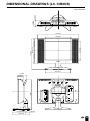
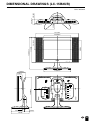
DIMENSIONAL DRAWINGS (LC-13B2UB) ................................................................................... 43
SPECIFICATIONS (LC-15B2UB) ................................................................................................... 44
DIMENSIONAL DRAWINGS (LC-15B2UB) ................................................................................... 45
SPECIFICATIONS (LC-20B2UB) ................................................................................................... 46
DIMENSIONAL DRAWINGS (LC-20B2UB) ................................................................................... 47
6
SUPPLIED ACCESSORIES
Make sure the following accessories are provided with the product.
Remote Control
“AAA” Size (UM/SUM-4) Dry Battery (×2)
RRMCG1664CESB
UBATU0038CEZZ
Antenna Cable (2m)
AC Cord
QCNWG0003CEPA
LIQUID CRYSTAL TELEVISION
TÉLÉVISER ACL
TELEVISOR CON PANTALLA
DE CRISTAL LIQUIDO
TELEVISOR DE CRISTAL
LÍQUIDO
FRANÇAIS
ESPAÑOL
LC-13B2UB
LC-15B2UB
LC-20B2UB
Cable Clamp (×2)
ENGLISH
Operation Manual
PORTUGUÊS
AC Adapter
QACCD3097CEPA
OPERATION MANUAL
MODE D’EMPLOI
MANUAL DE MANEJO
MANUAL DE OPERAÇÃO
POWER
SLEEP
MENU
UADP-0242CEPZ (LC-13B2UB/LC-15B2UB)
UADP-0243CEPZ (LC-20B2UB)
TINS-A181WJZZ
LHLDW0109CESB
7
PREPARATION
Using the Remote Control
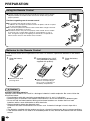
■ Use the remote control by pointing it towards the remote sensor window.
Objects between the remote control and sensor window may prevent
proper operation.
Cautions regarding use of remote control
■ Do not expose the remote control to shock.
In addition, do not expose the remote control to liquids, and do not place
in an area with high humidity.
■ Do not install or place the remote control under direct sunlight. The heat
may cause deformation of the unit.
■ The remote control may not work properly if the remote sensor window
of the main unit is under direct sunlight or strong lighting. In such a
case, change the angle of the lighting or LCD TV set, or operate the
remote control closer to the remote sensor window.
Batteries for the Remote Control
If the remote control fails to operate the LCD color TV functions, replace the batteries in the remote
control.
1
Open the battery
cover.
2
Insert batteries (two “AAA”
size (UM/SUM-4) batteries,
supplied with product).
3
Close the battery
cover.
ー
+
+
ー
■ Slide the cover while
pressing down.
■ Place the batteries with their
terminals corresponding to
the (+) and (–) indications in
the battery compartment.
Caution!
Cautions regarding batteries
Improper use of batteries can result in a leakage of chemicals and/or explosion. Be sure to follow the
instructions below.
• Place batteries with their terminals corresponding to the (+) and (–) indications.
• Different types of batteries have different characteristics. Do not mix batteries of different types.
• Do not mix old and new batteries. Mixing old and new batteries can shorten the life of new
batteries and/or cause old batteries to leak chemicals.
• Remove batteries when they become weak.
Chemicals that leak from batteries can cause a rash. If chemical leakage is found, wipe with a
cloth.
• The batteries supplied with the product may have a shorter life expectancy due to storage conditions.
• If the remote control is not used for an extended period of time, remove the batteries from the remote
control.
8
PREPARATION (Continued)
Power Connection
CH
MENU TV/VIDE
O
MAIN POWER
VOL
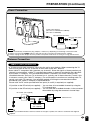
To DC input terminal
(DC 12V: LC-13B2UB/LC-15B2UB)
(DC 13V: LC-20B2UB)
Household power outlet
Plug into AC outlet.
AC adapter
AC cord
Note
Use a commercially available AC plug adapter, if necessary, depending on the design of the wall outlet.
Always turn the main POWER switch of the LCD TV set to off when connecting the AC adapter.
Always unplug the AC adapter from the product and power outlet when not using for a long period of time.
●
●
●
Antenna Connection
CABLE TV (CATV) CONNECTION
• A 75-ohm coaxial cable connector is built into the set for easy hookup. When connecting the 75ohm coaxial cable to the set, screw the 75-ohm cable to the ANT. terminal.
• Some cable TV companies offer “premium pay channels”. Since the signals of these premium pay
channels are scrambled, a cable TV converter/descrambler is generally provided to the subscriber
by the cable TV company. This converter/descrambler is necessary for normal viewing of the
scrambled channels. (Set your TV to channel 3 or 4, typically one of these channels is used. If this
is unknown, consult your cable TV company.) For more specific instructions on installing cable TV,
consult your cable TV company. One possible method of utilizing the converter/descrambler
provided by your cable TV company is explained below.
Please note: An RF switch provided with two inputs (A and B) is required (not supplied).
“A” position on the RF switch (not supplied) : You can view all unscrambled channels by using the
TV’s channel keys.
“B” position on the RF switch (not supplied) : You can view the scrambled channels via the converter/
descrambler by using the converter’s channel keys.
RF switch (not supplied)
Two-set
signal
splitter
(not
supplied)
OUT
Cable TV Line
IN
Cable TV converter/
descrambler
(not supplied)
Note
●
Consult your SHARP Dealer or Service Center for the type of splitter, RF switch or combiner that might be
required.
9
PREPARATION (Continued)
Antenna Connection (Continued)
ANTENNAS
• The antenna requirements for good color television reception are more important than those for black & white
television reception. For this reason, a good quality outdoor antenna is strongly recommended.
The following is a brief explanation of the type of connections that are provided with the various antenna
systems.
F-type connector
1. A 75-ohm system is generally a round cable with F-type
connector that can easily be attached to a terminal without
tools (not supplied).
75-ohm coaxial cable (round)
2. A 300-ohm system is a flat “twin-lead” cable that can be
attached to a 75-ohm terminal through a 300-75-ohm
adapter (not supplied).
300-ohm twin-lead cable (flat)
OUTDOOR ANTENNA CONNECTION
• Use one of the following two diagrams if you connect an outdoor antenna.
A: Using a VHF/UHF combination outdoor antenna.
B: Using separate VHF and/or UHF outdoor antennas.
• Connect the outdoor antenna cable lead-in to the ANT. terminal on the rear of the TV set.
A. Combination VHF/UHF Antenna
300/75-ohm
adapter
(not supplied)
CH
MENU TV/VIDE
O MAIN POWER
VOL
VHF/UHF
antenna
VHF/UHF
antenna
or
300-ohm
twin-lead
75-ohm
coaxial cable
To antenna input
terminal
Antenna cable (supplied)
B. Separate VHF and/or
UHF Antennas
UHF
antenna
VHF
antenna
300-ohm
twin-lead
Combiner
(not supplied)
OUT
300-ohm
twin-lead
IN
75-ohm
coaxial cable
10
or
FRONT AND REAR CONTROL OPTIONS
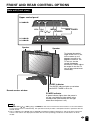
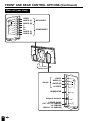
Main unit (front view)
Upper control panel
VOL
MENU TV/VIDEO
CH
MAIN POWER
LC-20B2UB
VOL (–)/(+)
CH (
LC-13B2UB
LC-15B2UB
VOL
)/(
MENU
)
TV/VIDEO
CH
MENU TV/VIDEO
Speaker
MAIN POWER
MAIN POWER
Speaker
To change the vertical
angle of the LCD TV set,
tilt the screen up to 5
degrees forward or 10
degrees backward. The
TV set can also be
rotated 50 degrees
horizontally. Please adjust
the angle so that the TV
set can be watched most
comfortably.
POWER
SLEEP
SLEEP indicator
The SLEEP indicator lights up red when
the SLEEP TIMER is set to on.
Remote sensor window
POWER indicator
A green indicator lights when the power is
on and a red indicator lights when in the
standby mode (the indicator will not light
when the main power is off).
Note
●
●
TV/VIDEO, CH ( )/( ), VOL (–)/(+), and MENU on the main unit have the same functions as the same buttons
on the remote control. Fundamentally, this operation manual provides a description based on operation with the
remote control.
The LC-13B2UB, LC-15B2UB and LC-20B2UB have different external dimensions and the positions where the
names of the buttons are displayed also differ but the same operating procedures are followed for all three
models.
11
FRONT AND REAR CONTROL OPTIONS (Continued)
Main unit (rear view)
COM
Y
PB
PR
L
AUDIO
R
(L)
(R)
AV-IN2/OUT
COMPONENT
(L)
(R)
MENU TV/VIDEO
L
AUDIO
R
PONENT
VIDEO
AUDIO
AUDIO
Y
PB
PR
AUDIO
AUDIO
CH
VIDEO
OUT
AV-IN2/
MAIN POWER
VOL
VIDEO
AV-IN1
AUDIO (L)
AUDIO (R)
S-VIDEO
HEADPHONE
Antenna terminal
POWER INPUT
(DC 12V: LC-13B2UB/
LC-15B2UB)
(DC13V: LC-20B2UB)
12
VIDEO
AV-IN
1
L
AUDIO
R
S-VID
EO
HEAD
PHON
E
ANT.
POWER
INPUT
DC12V
FRONT AND REAR CONTROL OPTIONS (Continued)
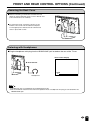
Removing the Back Cover
CH
MENU TV/VIDEO
■ Before connecting a connection cord into the rear
terminal, remove the back cover. Push in the tab and
pull out the back cover carefully.
MAIN POWER
VOL
■ To mount the cover, insert the 2 hooks on the
bottom of the cover into the cabinet and press
on the upper part of the back cover until the tab
locks in place with a click.
Listening with Headphones
■ Plug the headphone mini-plug into the HEADPHONE jack located on the rear of the TV set.
CH
MENU TV/VIDEO
VOL
▼ On-screen display
< Rear terminal
VOLUME
60
Headphones
Note
●
●
Headphones are not included in the supplied accessories.
No sound will be heard from the main unit speakers when a headphone mini-plug is connected into the
HEADPHONE jack.
13
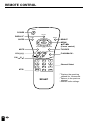
REMOTE CONTROL
POWER
POWER
DISPLAY
DISPLAY*1
SLEEP
BRIGHT
SLEEP
BRIGHT
MENU
MUTE
TV/VIDEO
MUTE
MENU/
]/[/</>
(Cursor control)
TV/VIDEO
FLASHBACK
VOL(+)/(–)
CH (
)/(
VOL
CH
FLASHBACK*2
)
MTS*3
1
2
3
4
5
6
7
8
9
MTS
0
100
Channel Select
*1 Displays the receiving
channel for 10 seconds.
*2 Returns to the previous
channel.
*3 Selects audio settings.
14
BASIC OPERATION
This product is factory set to comply with the TV broadcasting system in the United States. For Brazil,
Argentina and Uruguay, set the color system according to the country before using this product by
following the table below.
■ LC-13B2UB, LC-15B2UB
The VIDEO INPUT mode is compatible with color systems worldwide and is
automatically set.
Country
TV broadcasting
system
Factory setting of color system
User setting
TV
Video
TV
U.S.A.
Color: NTSC
TV ch: US ch
NTSC (N358)
US ch
World Multi
Auto System
Not required
or N/A
Canada, Mexico,
Latin America
Color: NTSC
TV ch: US ch
NTSC (N358)
US ch
World Multi
Auto System
Not required or N/A
Brazil
Color: PAL-M
TV ch: US ch
NTSC (N358)
US ch
World Multi
Auto System
Set color system to
PAL-M (see page 24)
Argentina,
Uruguay
Color: PAL-N
TV ch: US ch
NTSC (N358)
US ch
World Multi
Auto System
Set color system to
PAL-N (see page 24)
* The World Multi Auto System
is compatible with all color
systems indicated below.
1
2
3
4
5
6
7
N358
N443
PAL
PAL-M
PAL-N
SECAM
PAL-60
■ LC-20B2UB
Country
TV broadcasting
system
Factory setting of color system
User setting
TV
Video
TV/Video
U.S.A.
Color: NTSC
TV ch: US ch
NTSC (N358)
US ch
NTSC (N358)
US ch
Not required
or N/A
Canada, Mexico,
Latin America
Color: NTSC
TV ch: US ch
NTSC (N358)
US ch
NTSC (N358)
US ch
Not required or N/A
Brazil
Color: PAL-M
TV ch: US ch
NTSC (N358)
US ch
NTSC (N358)
US ch
Set color system to
PAL-M (see page 24)
Argentina,
Uruguay
Color: PAL-N
TV ch: US ch
NTSC (N358)
US ch
NTSC (N358)
US ch
Set color system to
PAL-N (see page 24)
Note
● The 3 Dimensional Y/C separation circuit* only works when the color system is set to N358 in
TV mode and Video mode.
*The 3 Dimensional Y/C separation circuit is used to remove flickering and color bleeding.
15
BASIC OPERATION (Continued)
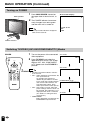
Turning on POWER
1
Press MAIN POWER, located on
the upper side of the main unit, to
on.
MAIN POWER
2
2
The POWER indicator instantaneously changes from red to green
and the main unit is turned on.
Note
●
POWER
▼ On-screen display
SLEEP
The input mode indication disappears
after several seconds.
STEREO < ON A I R
SAP
MONO
Notes:
POWER indicator
Switching TV/VIDEO [AV1/AV2/COMPONENT/TV] Modes
POWER
POWER
1
Turn on the power of the connected
video equipment.
2
Press TV/VIDEO and select the
applicable input source. The screen
displays AV1, AV2, COMPONENT
or TV mode each time TV/VIDEO is
pressed.
DISPLAY
SLEEP
BRIGHT
MENU
MUTE
Note
CH
TV/VIDEO
16
1
2
3
4
5
6
7
8
9
MTS
0
100
AV 1
AV2 mode
TV/VIDEO
FLASHBACK
VOL
AV1 mode
AV 2
The AV input mode indication remains
for 3 seconds.
• AV1: Video equipment connected to the
AV1 input terminals.
An S-Video input terminal is
additionally provided for the AV1 COMPONENT mode
input. If both the S-Video terminal
COMPONE N T
and normal video terminals are
connected with cables, the SVideo input terminal takes priority.
• AV2: AV2 mode is used to adjust the
preset settings and IN or OUT can
be selected. AV2 indication is not
displayed when OUT is selected. TV mode
(For details on setting AV-OUT,
see page 25.)
12
• COMPONENT:
Video equipment connected to the
COMPONENT input terminals.
●
BASIC OPERATION (Continued)
Sound Volume
1
Press VOL (+) to increase the sound
volume. The segment of the indicator
increases.
POWER
VOLUME
50
DISPLAY
SLEEP
BRIGHT
2
MENU
MUTE
Press VOL (–) to decrease the sound
volume. The segment of the indicator
decreases.
TV/VIDEO
FLASHBACK
VOL
VOLUME
10
MUTE
CH
1
2
3
4
5
6
7
8
9
MTS
0
100
VOL
(+)/(–)
To mute the sound
1
Press MUTE to temporarily turn off
the sound.
The MUTE mark
is displayed for
4 seconds.
2
Press MUTE or VOL (+)/(–) to turn
the sound back to the previous level.
The mute function is automatically
turned off when any of the following
buttons are pressed: POWER,
VOL (+)/(–), or MTS.
MTS
VOLUME
30
To select MTS (Multi ch TV Sound)
1
Press MTS to display the MTS
screen.
2
Press MTS
settings.
[STEREO]:
[SAP]:
[MONO]:
to select the MTS
stereo audio
second audio program
monophonic audio
Note
●
2
STEREO < ON A I R
SAP
MONO
<ON AIR appears when a STEREO or
SAP broadcast is being aired.
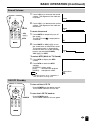
ON/OFF Standby
To turn off the LCD TV
POWER
Press POWER on the remote control.
The POWER indicator will turn red.
DISPLAY
SLEEP
BRIGHT
MENU
MUTE
To turn the LCD TV back on
TV/VIDEO
FLASHBACK
VOL
CH
POWER
1
2
3
4
5
6
7
8
9
MTS
0
100
Press POWER again.
The POWER indicator will turn green.
17
BASIC OPERATION (Continued)
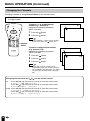
Changing the Channels
Changing channels by using Channel Select on the remote control
• This LCD TV set allows you to select up to 125 channels (1 to 125). To select a channel, enter a 2or 3-digit number.
To select a 1- or 2-digit channel
number (e.g., Channel 5):
Complete the following procedure
within 4 seconds.
POWER
DISPLAY
SLEEP
BRIGHT
MENU
MUTE
1
2
TV/VIDEO
FLASHBACK
VOL
Press the
Press the
5
button.
CH
1
2
3
4
5
6
7
8
9
MTS
0
100
Note
● When selecting a 1-digit channel number,
do not fail to press the
button first.
Channel
Select
1
2
3
Press the
button.
Press the
button.
Press the
5
button.
Note
●
The 3 -digit channel number can be
selected only when the receiving mode is
set to CABLE in CH-SETTING. (For details
on setting the receiving mode, see page
26.)
Changing channels with CH ( )/( ) on the remote control
Press CH ( ) and the channels change in the
2 → 3 → . . . → 68 → 69 → 2 → 3 → . . .
Press CH ( ) and the channels change in the
3 → 2 → 69 → 68 → . . . → 3 → 2 → . . .
Cable Press CH ( ) and the channels change in the
1 → 2 → 3 → . . . → 125 →1 → 2 → 3 → . . .
Press CH ( ) and the channels change in the
3 → 2 → 1 → 125 → . . . → 3 → 2 → 1 → . . .
18
5
button.
To select a 3-digit channel number
(e.g., Channel 115):
Complete the following procedure
within 4 seconds.
Air
0–
order shown below:
order shown below:
order shown below:
order shown below:
1––
1 1–
1 15
SELECTING MENU ITEMS
Selecting Menu Items
• This LCD TV set allows you to adjust the various settings using the menu screen. Select the desired
menu item by following the steps below and then refer to the indicated page for details.
POWER
DISPLAY
SLEEP
BRIGHT
Press MENU to display the MENU
screen.
2
Press ]/[ to select the desired
menu item.
3
4
Press </ > to enter.
MENU
MUTE
TV/VIDEO
FLASHBACK
VOL
CH
1
2
3
4
5
6
7
8
9
MTS
0
100
MENU/
]/[/
</ >
(Page 20)
1
Press MENU to exit.
SLEEP T IMER
RETURN
SLEEP T IMER [ ––– REMA I N ]
SELECT :
ADJUST :
EX I T : MENU
(Pages 23, 24)
V I DEO ADJUST ( TV )
RETURN
P I CTURE
[
30 ]
[
0]
T I NT
[
0]
COLOR
0]
BLACK LEVEL [
SHARPNESS
[
0]
COLOR SYSTEM [ N358 ]
RESET
MENU
SLEEP T IMER
V I DEO ADJUST
PRESET
CLOSED CAPT I ON
V–CH I P BLOCK
SET UP
SELECT :
SELECT :
ENTER :
EX I T : MENU
Note
●
●
●
●
●
●
■
●
■
●
●
The displayed items differ depending
on the setting conditions.
The selected item changes to yellow.
Items in magenta cannot be selected.
TV mode
This product is factory set to comply
with the color system in the United
States (NTSC-N358). For Brazil
(PAL-M), Argentina (PAL-N) and
Uruguay (PAL-N), set the color
system before using this product.
To return to the previous screen,
select RETURN.
You can adjust some settings with the
special buttons: SLEEP and BRIGHT
(see page 20 and page 21).
LC-20B2UB
The TINT display only appears when
the color system is set to N358 or
N443 in the NTSC mode.
LC-13B2UB/LC-15B2UB
The TINT display only appears when
the color system is set to N358 or
N443 or AUTO in the NTSC mode.
COLOR SYSTEM
When you set COLOR SYSTEM to
AUTO, the AUTO mode automatically
detects the receiving signal system
and adjusts the reception system of
the TV set.
When the picture or sound is not
stable, set a specific COLOR
SYSTEM (not AUTO). The picture
and sound may be improved.
ENTER :
EX I T : MENU
(Pages 21, 25)
PRESET
RETURN
BR I GHTNESS
[ BR I GHT ]
]
AUTO POWER OFF [ OFF
UPS I DE
[ NORMAL ]
R I GHT / LEF T
[ NORMAL ]
AV2 I N / OUT
[ IN
]
SELECT :
ADJUST :
EX I T : MENU
(Page 30)
CLOSED CAPT I ON
RETURN
]
MODE [ OFF
]
DATA [ CH 1
SELECT :
ADJUST :
EX I T : MENU
(Pages 33–36)
I NPUT SECRET NO .
– – – –
EX I T : MENU
(Pages 22, 26–29)
SET UP
RETURN
BLUE SCREEN [ OFF ]
LANGUAGE
CH–SETT I NG
SELECT :
ADJUST :
EX I T : MENU
* The screen indications shown above are larger than actual for easy reading.
19
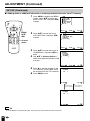
ADJUSTMENT
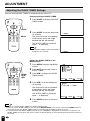
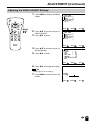
Adjusting the SLEEP TIMER Settings
You can set the SLEEP TIMER to automatically turn off the TV.
Directly setting the SLEEP TIMER
POWER
1
Press SLEEP to display the SLEEP
TIMER screen.
2
Press SLEEP to set the sleep timer
(in minutes).
DISPLAY
SLEEP
BRIGHT
MENU
MUTE
TV/VIDEO
SLEEP
FLASHBACK
VOL
CH
1
2
3
4
5
6
7
8
9
MTS
0
100
MENU
––– REMA I N
The time can be set in increments
of 30 minutes and in the range
between 30 and 120 minutes.
The SLEEP TIMER is turned off
when --- is displayed.
Note
●
The SLEEP TIMER screen automatically
disappears in 3 seconds.
60 REMA I N
Setting the SLEEP TIMER on the
MENU screen
POWER
1
Press MENU to display the MENU
screen.
2
Press ]/[ to move the cursor to
SLEEP TIMER.
3
Press </ > to display the SLEEP
TIMER screen.
DISPLAY
SLEEP
BRIGHT
MENU
MUTE
TV/VIDEO
FLASHBACK
VOL
CH
1
2
3
4
5
6
7
8
9
MTS
0
100
MENU/
]/[/
</ >
MENU
SLEEP T IMER
V I DEO ADJUST
PRESET
CLOSED CAPT I ON
V–CH I P BLOCK
SET UP
SELECT :
4
Press </ > to set the sleep timer
(in minutes).
ENTER :
EX I T : MENU
SLEEP T IMER
RETURN
SLEEP T IMER [ ––– REMA I N ]
The time can be set in increments
of 30 minutes and in the range
between 30 and 120 minutes.
The SLEEP TIMER is turned off
when --- is displayed.
5
SELECT :
ADJUST :
EX I T : MENU
Press MENU to return to the main
screen.
Note
●
●
●
20
When you set the SLEEP TIMER, the SLEEP indicator lights.
After you set the SLEEP TIMER, if you turn off the MAIN POWER on the TV set or press the POWER button on
the remote control, the SLEEP TIMER setting is canceled and the SLEEP indicator goes out.
5 minutes before the SLEEP TIMER turns off the TV, 5 REMAIN is displayed on the screen for 4 seconds. The
SLEEP TIMER counts down and shows a similar 4-second display for each remaining minute until the timer turns
off the TV.
ADJUSTMENT (Continued)
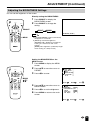
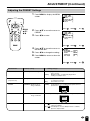
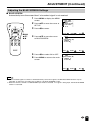
Adjusting the BRIGHTNESS Settings
You can set the brightness of the screen.
Directly setting the BRIGHTNESS
POWER
DISPLAY
SLEEP
BRIGHT
1
Press BRIGHT to display the
BRIGHTNESS screen.
2
Press BRIGHT to change the
setting.
MENU
MUTE
TV/VIDEO
BRIGHT
BRIGHT
FLASHBACK
VOL
NORMAL
DARK
CH
BR I GHTNESS [ BR I GHT ]
Note
1
2
3
4
5
6
7
8
9
MTS
0
100
MENU
●
●
The BRIGHTNESS screen automatically
disappears in 3 seconds.
[BRIGHT]: maximum brightness
[NORMAL]: 60% brightness (suitable for
viewing in a well-lit area and saves
energy)
[DARK]: 20% brightness (sufficiently bright
when viewing in a dimly lit area)
Setting the BRIGHTNESS on the
MENU screen
POWER
1
Press MENU to display the MENU
screen.
2
Press ]/[ to move the cursor to
PRESET.
3
Press </ > to enter.
DISPLAY
SLEEP
BRIGHT
MENU
MUTE
TV/VIDEO
FLASHBACK
VOL
MENU
SLEEP T IMER
V I DEO ADJUST
PRESET
CLOSED CAPT I ON
V–CH I P BLOCK
SET UP
CH
1
2
3
4
5
6
7
8
9
MTS
0
100
MENU/
]/[/
</ >
SELECT :
4
Press ]/[ to move the cursor to
BRIGHTNESS.
5
6
Press </ > to set the brightness.
Press MENU to return to the main
screen.
ENTER :
EX I T : MENU
PRESET
RETURN
BR I GHTNESS
[ BR I GHT ]
AUTO POWER OFF [ OFF
]
UPS I DE
[ NORMAL ]
R I GHT / LEF T
[ NORMAL ]
AV2 I N / OUT
[ IN
]
SELECT :
ADJUST :
EX I T : MENU
21
ADJUSTMENT (Continued)
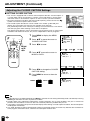
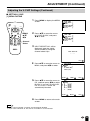
Adjusting the LANGUAGE Settings
The language for the On-Screen Display can be ENGLISH, SPANISH or FRENCH.
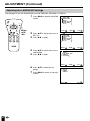
1
Press MENU to display the MENU
screen.
POWER
DISPLAY
SLEEP
BRIGHT
MENU
SLEEP T IMER
V I DEO ADJUST
PRESET
CLOSED CAPT I ON
V–CH I P BLOCK
SET UP
MENU
MUTE
TV/VIDEO
FLASHBACK
VOL
CH
1
2
3
4
5
6
7
8
9
MTS
0
100
MENU/
]/[/
</ >
SELECT :
2
Press ]/[ to move the cursor to
SET UP.
3
Press </ > to enter.
Press ]/[ to move the cursor to
LANGUAGE.
5
Press </ > to enter.
Press ]/[ to select the language.
7
Press MENU to return to the main
screen.
EX I T : MENU
ENTER :
EX I T : MENU
LANGUAGE
ENGL I SH
ESPAÑOL
FRANCA I S
SELECT :
22
ENTER :
SET UP
RETURN
BLUE SCREEN [ OFF ]
LANGUAGE
CH–SETT I NG
SELECT :
6
EX I T : MENU
MENU
SLEEP T IMER
V I DEO ADJUST
PRESET
CLOSED CAPT I ON
V–CH I P BLOCK
SET UP
SELECT :
4
ENTER :
EX I T : MENU
ADJUSTMENT (Continued)
Adjusting the VIDEO ADJUST Settings
1
Press MENU to display the MENU
screen.
POWER
DISPLAY
SLEEP
MENU
SLEEP T IMER
V I DEO ADJUST
PRESET
CLOSED CAPT I ON
V–CH I P BLOCK
SET UP
BRIGHT
MENU
MUTE
TV/VIDEO
FLASHBACK
VOL
CH
1
2
3
4
5
6
7
8
9
MTS
0
100
MENU/
]/[/
</ >
SELECT :
2
Press ]/[ to move the cursor to
VIDEO ADJUST.
3
Press </ > to enter.
ENTER :
MENU
SLEEP T IMER
V I DEO ADJUST
PRESET
CLOSED CAPT I ON
V–CH I P BLOCK
SET UP
SELECT :
4
Press ]/[ to move the cursor to
the desired item.
5
Press </ > to enter.
ENTER :
EX I T : MENU
V I DEO ADJUST ( TV )
RETURN
P I CTURE
[
30 ]
[
0]
T I NT
COLOR
[
0]
0]
BLACK LEVEL [
SHARPNESS
[
0]
COLOR SYSTEM [ N358 ]
RESET
SELECT :
6
EX I T : MENU
ENTER :
EX I T : MENU
Press </ > to change the setting.
Note
●
7
See page 24 for the settings.
Press MENU to return to the main
screen.
RETURN
P I CTURE
30
–
SELECT :
+
ADJUST :
EX I T : MENU
23
ADJUSTMENT (Continued)
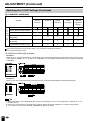
Adjusting the VIDEO ADJUST Settings (Continued)
TV mode
Selected item
Press <.
Press >.
PICTURE
Decrease contrast
Increase contrast
TINT
Toward purple
Toward green
COLOR
Lower color intensity
Higher color intensity
BLACK LEVEL
Less bright
More bright
SHARPNESS
Soft picture
Sharp picture
Selected item
Press <.
Press >.
PICTURE
Decrease contrast
Increase contrast
TINT
Toward purple
Toward green
COLOR
Lower color intensity
Higher color intensity
BLACK LEVEL
Less bright
More bright
SHARPNESS
Soft picture
Hard picture
RED-BLUE
More red level
More blue level
GREEN
Less green level
More green level
■ LC-13B2UB/LC-15B2UB
Press </ > to select the COLOR SYSTEM.
COLOR SYSTEM
AV mode
COLOR SYSTEM
■
■ LC-20B2UB
When the COMPONENT mode is selected
Press </ > to select the COLOR SYSTEM.
COLOR SYSTEM
■
When the COMPONENT mode is selected
Note
24
●
●
●
●
TINT is displayed only when N358 or N443 is selected.
In BLUE SCREEN, PICTURE setting displayed in magenta cannot be selected.
Selecting RESET will return all settings to the factory settings.
TV mode
This product is factory set to comply with the color system in the United States (NTSC-N358). For Brazil (PAL-M),
Argentina (PAL-N) or Uruguay (PAL-N), adjust the color system before using this product.
■
●
LC-13B2UB/LC-15B2UB
COLOR SYSTEM
When you set COLOR SYSTEM to AUTO, the AUTO mode automatically detects the receiving signal system and
adjusts the reception system of the TV set.
When the picture or sound is not stable, set a specific COLOR SYSTEM (not AUTO). The picture and sound may
be improved.
ADJUSTMENT (Continued)
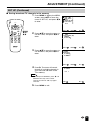
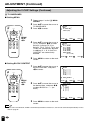
Adjusting the PRESET Settings
1
Press MENU to display the MENU
screen.
POWER
DISPLAY
SLEEP
MENU
SLEEP T IMER
V I DEO ADJUST
PRESET
CLOSED CAPT I ON
V–CH I P BLOCK
SET UP
BRIGHT
MENU
MUTE
FLASHBACK
VOL
SELECT :
TV/VIDEO
CH
1
2
3
4
5
6
7
8
9
MTS
0
100
MENU/
]/[/
</ >
2
Press ]/[ to move the cursor to
PRESET.
3
Press </ > to enter.
Press ]/[ to move the cursor to
the desired item.
5
6
Press </ > to change the setting.
Press MENU to return to the main
screen.
Factory setting
BRIGHTNESS
[BRIGHT]
AUTO POWER OFF
(only TV mode)
[OFF]
Maximum brightness
ENTER :
EX I T : MENU
PRESET
RETURN
BR I GHTNESS
[ BR I GHT ]
AUTO POWER OFF [ OFF
]
UPS I DE
[ NORMAL ]
R I GHT / LEF T
[ NORMAL ]
AV2 I N / OUT
[ IN
]
SELECT :
Selected item
EX I T : MENU
MENU
SLEEP T IMER
V I DEO ADJUST
PRESET
CLOSED CAPT I ON
V–CH I P BLOCK
SET UP
SELECT :
4
ENTER :
ADJUST :
EX I T : MENU
Setting change
[NORMAL] Brightness 60% → Suitable for viewing in a well-lit area.
Saves energy.
[DARK]
Brightness 20% → Sufficiently bright when
viewing in a dimly lit area.
[ON]
[OFF]
The power of the LCD TV set is turned off when there is
no signal for 5 minutes.
This feature is inactive.
Inverted image → To display images upside down for
special uses.
UPSIDE
[NORMAL] Normal vertical
image orientation
[DOWN]
RIGHT/LEFT
[NORMAL] Normal horizontal
image orientation
[MIRROR] Mirror image
ABC
→ To display mirror images for special uses.
CBA
AV2 IN/OUT
[IN]
[OUT
[OUT
] Line Output is selected, Output volume is fixed, Speaker
output is available.
] Line Output is selected, Output volume is variable,
Speaker output is Mute.
25
ADJUSTMENT (Continued)
SET UP
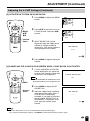
■ CHANNEL SETTING
It is necessary to set the receiving mode to AIR or CABLE channels to receive locally broadcast TV
programs.
POWER
1
Press MENU to display the MENU
screen.
2
Press ]/[ to move the cursor to
SET UP.
3
Press </ > to enter.
DISPLAY
SLEEP
BRIGHT
MENU
SLEEP T IMER
V I DEO ADJUST
PRESET
CLOSED CAPT I ON
V–CH I P BLOCK
SET UP
MENU
MUTE
FLASHBACK
VOL
SELECT :
TV/VIDEO
CH
1
2
3
4
5
6
7
8
9
MTS
0
100
MENU/
]/[/
</ >
4
Press ]/[ to move the cursor to
CH-SETTING.
5
Press </ > to enter.
Press ]/[ to move the cursor to
AIR/CABLE.
7
Press </ > to enter.
Press ]/[ to move the cursor to
the desired mode.
9
Press MENU to return to the main
screen.
Note
26
Receivable channels of your TV set are:
AIR channels:
VHF: 2 through 13.
UHF: 14 through 69.
EX I T : MENU
ENTER :
EX I T : MENU
A I R / CABLE
AIR
CABLE
SELECT :
●
ENTER :
CH–SETT I NG
RETURN
A I R/ CABLE
CH SEARCH
CH MEMORY
SELECT :
8
EX I T : MENU
SET UP
RETURN
BLUE SCREEN [ OFF ]
LANGUAGE
CH–SETT I NG
SELECT :
6
ENTER :
CABLE channels:
1 (HRC and IRC mode only)
2 through 125 (STD, HRC and IRC)
EX I T : MENU
ADJUSTMENT (Continued)
SET UP (Continued)
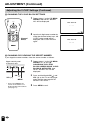
■ Saving broadcast TV channels in the memory
1
POWER
Press MENU to display the MENU
screen, press ]/[ to move the
cursor to SET UP, and press </ >
to enter.
DISPLAY
SLEEP
MENU
SLEEP T IMER
V I DEO ADJUST
PRESET
CLOSED CAPT I ON
V–CH I P BLOCK
SET UP
BRIGHT
MENU
MUTE
TV/VIDEO
FLASHBACK
VOL
CH
1
2
3
4
5
6
7
8
9
MTS
0
100
MENU/
]/[/
</ >
SELECT :
2
Press ]/[ to move the cursor to
CH-SETTING, and press </ > to
enter.
ENTER :
SET UP
RETURN
BLUE SCREEN [ OFF ]
LANGUAGE
CH–SETT I NG
SELECT :
3
Press ]/[ to move the cursor to
CH SEARCH, and press </ > to
enter.
Press >. The tuner will search
through all available channels in
your area and add them to the
TV’s memory.
ENTER :
EX I T : MENU
ENTER :
EX I T : MENU
CH–SETT I NG
RETURN
A I R/ CABLE
CH SEARCH
CH MEMORY
SELECT :
4
EX I T : MENU
CH SEARCH
AIR
2
Note
●
To interrupt CH SEARCH, press <. CH
SEARCH will stop at the current
channel and will not add any higher
channels.
5
START :
EX I T : MENU
Press MENU to exit.
27
ADJUSTMENT (Continued)
SET UP (Continued)
■ Adding weak or additional channels or erasing unwanted channels from TV memory
1
POWER
Press MENU to display the MENU
screen, press ]/[ to move the
cursor to SET UP, and press </ >
to enter.
MENU
SLEEP T IMER
V I DEO ADJUST
PRESET
CLOSED CAPT I ON
V–CH I P BLOCK
SET UP
DISPLAY
SLEEP
BRIGHT
MENU
MUTE
FLASHBACK
VOL
SELECT :
TV/VIDEO
CH
1
2
3
4
5
6
7
8
9
MTS
0
100
MENU/
]/[/
</ >
2
Press ]/[ to move the cursor
to CH-SETTING, and press </ >
to enter.
ENTER :
EX I T : MENU
SET UP
RETURN
BLUE SCREEN [ OFF ]
LANGUAGE
CH–SETT I NG
Channel
Select
SELECT :
3
Press ]/[ to move the cursor to
CH MEMORY, and press </ > to
enter.
4
Use ]/[ or Channel Select to
select each desired channel to add
or erase.
ENTER :
EX I T : MENU
ENTER :
EX I T : MENU
>
to add channel 2
to the TV memory
<
to erase channel 2
to the TV memory
CH–SETT I NG
RETURN
A I R/ CABLE
CH SEARCH
CH MEMORY
SELECT :
5
6
Press > to add the channel to the
TV’s memory or press < to erase
the channel from the TV’s memory.
CH MEMORY
AIR
2
Press MENU to exit.
TO ADD :
EX I T : MENU
CH MEMORY
AIR
TO ERASE :
Note
●
28
If CH SEARCH is performed again, the previously memorized channels will be lost.
2
EX I T : MENU
ADJUSTMENT (Continued)
Adjusting the BLUE SCREEN Settings
■ BLUE SCREEN
Automatically turns the screen blue if a broadcast signal is not received.
POWER
1
Press MENU to display the MENU
screen.
2
Press ]/[ to move the cursor to
SET UP.
3
Press </ > to enter.
DISPLAY
SLEEP
BRIGHT
MENU
SLEEP T IMER
V I DEO ADJUST
PRESET
CLOSED CAPT I ON
V–CH I P BLOCK
SET UP
MENU
MUTE
FLASHBACK
VOL
SELECT :
TV/VIDEO
CH
1
2
3
4
5
6
7
8
9
MTS
0
100
MENU/
]/[/
</ >
4
Press ]/[ to move the cursor
to BLUE SCREEN.
Press </ > to select ON or OFF.
Press MENU to return to the main
screen.
EX I T : MENU
SET UP
RETURN
BLUE SCREEN [ OFF ]
LANGUAGE
CH–SETT I NG
SELECT :
5
6
ENTER :
ADJUST :
EX I T : MENU
SET UP
RETURN
BLUE SCREEN [ ON ]
LANGUAGE
CH–SETT I NG
SELECT :
ADJUST :
EX I T : MENU
Note
●
●
When received signals are weak or interfered with by some other signals, the BLUE SCREEN function may be
activated. To watch the TV under such conditions, set BLUE SCREEN to OFF.
When the AV-IN1, AV-IN2 or COMPONENT input mode is selected, if no signal is being input, the BLUE SCREEN
function is activated.
29
ADJUSTMENT (Continued)
Adjusting the CLOSED CAPTION Settings
■ SETTING CLOSED CAPTION
• This TV set is equipped with an internal Closed Caption decoder. “Closed Caption” is
a system which allows conversations, narration, and sound effects in TV programs
and home videos to be viewed as captions on the TV screen (see the illustration).
• Not all the programs and videos will offer closed captioning. Please look for the “ ”
symbol to ensure that captions will be shown.
• The Closed Caption broadcasts can be viewed in two modes: [CAPTION] and
[TEXT]. For each mode, two channels are available: CH1 and CH2.
The [CAPTION] mode shows subscripts of dialogs and commentaries of TV dramas
and news programs while allowing a clear view of the picture.
The [TEXT] mode displays various information over the picture (such as TV program
schedules and weather forecasts, etc.) that is independent of the TV programs.
POWER
DISPLAY
SLEEP
BRIGHT
1
Press MENU to display the MENU
screen.
2
Press ]/[ to move the cursor to
CLOSED CAPTION.
3
Press </ > to enter.
MENU
MUTE
TV/VIDEO
FLASHBACK
VOL
CH
1
2
3
4
5
6
7
8
9
MTS
0
100
MENU/
]/[/
</ >
MENU
SLEEP T IMER
V I DEO ADJUST
PRESET
CLOSED CAPT I ON
V–CH I P BLOCK
SET UP
SELECT :
4
Press ]/[ to move the cursor to
MODE or DATA.
Press </ > to change the CLOSED
CAPTION setting.
6
Press MENU to return to the main
screen.
MODE:
CAPTION
TEXT
DATA:
CH 1
CH 2
EX I T : MENU
CLOSED CAPT I ON
RETURN
]
MODE [ OFF
DATA [ CH 1
]
SELECT :
5
ENTER :
ADJUST :
EX I T : MENU
CLOSED CAPT I ON
RETURN
]
MODE [ OFF
DATA [ CH 1
]
CLOSED CAPT I ON
RETURN
MODE [ CAPT I ON ]
DATA [ CH 2
]
OFF
Note
●
●
●
●
30
If a broadcast has CLOSED CAPTION and MUTE is pressed, the set enters [CAPTION] mode automatically. Pressing
MUTE again will return the set to its previous condition.
Closed Caption may malfunction (white blocks, strange characters, etc.) if signal conditions are poor or if there are
problems at the broadcast source. This does not necessarily indicate a problem with your set.
If any button is pressed to call up the On-Screen Display while viewing a Closed Caption broadcast, the closed captions
will disappear momentarily.
If no TEXT broadcast is being received while viewing in the [TEXT] mode, the screen may become dark and blank for
some programs. Should this occur, switch the Closed Caption mode to OFF.
ADJUSTMENT (Continued)
Adjusting the V-CHIP Settings
■ V-CHIP
• This function allows TV programs to be restricted and TV usage to be controlled based on FCC data. It prevents
children from watching violent or sexual scenes that may be harmful.
• Restriction of TV programs includes two ratings that contain information about the program: the MPAA rating and
the TV Parental Guidelines. The MPAA rating is restricted by age. TV Parental Guidelines are restricted by age
and content.
• Since a TV program may use either the MPAA rating or the TV Guidelines, both should be adjusted for complete
control.
[1] MPAA RATING
RATING
age
base
G
GENERAL AUDIENCES. All ages admitted.
PG
PARENTAL GUIDANCE SUGGESTED. Some material may not be suitable for children.
PG-13
PARENTAL STRONGLY CAUTIONED. Some material may be inappropriate for children under 13.
R
RESTRICTED. Under 17 requires accompanying parent or adult guardian.
NC-17
NO ONE 17 AND UNDER ADMITTED.
X
X is an older rating that is unified with NC-17 but may be encoded in the data of older movies.:
MPAA RATING (examples)
Example 1:
PG-13 in the age-based rating is
blocked, this will also automatically
block the higher ratings R, NC-17
and X.
Example 2:
R in the age-based rating is
blocked, this will also automatically
block the higher ratings NC-17 and
X.
ote:
Note
●
The MPAA rating is only age-based.
31
ADJUSTMENT (Continued)
Adjusting the V-CHIP Settings (Continued)
[2] TV PARENTAL GUIDELINES
⇐ content base ⇒
V
(Violence)
S
(Sexual
Situation)
L
(Adult
Language)
D
(Sexually
Suggestive
Dialog)
xxx
✕
✕
✕
✕
TV-14 (Parents Strongly
Cautioned)
X
✕
✕
✕
✕
TV-MA (Mature Audience Only)
X
✕
✕
✕
RATING
FV
(Fantasy
Violence)
TV-Y (All children)
⇑
TV-Y7 (Direct to Older Children)
TV-G (General Audience)
age
base TV-PG (Parental Guidance
Suggested)
⇓
✕
X
: The content rating can be set, but this rating is not normally broadcast by TV stations.
✕ : The content rating can be set.
TV PARENTAL GUIDELINES (examples)
Example 1:
When TV-Y7 in the age-based rating is set to BLOCK, this will automatically block the higher ratings: TV-G, TV-PG, TV-14
and TV-MA. In addition, D, L, S, V and FV in CONTENT are automatically blocked unless you manually set BLOCK
CONTENT.
Example 2:
When no item in the age-based rating is blocked, D in the content-based rating will be automatically blocked.
Note
●
●
●
32
Age-based ratings can be modified by the content-based ratings, but only in the combinations indicated by an X in
the table above.
Choosing a lower age-based rating blocks the higher age-based ratings regardless of content rating settings.
If you set TV-Y and TV-Y7 to BLOCK, CONTENT will display all items.
ADJUSTMENT (Continued)
Adjusting the V-CHIP Settings (Continued)
■ SETTING V-CHIP
[1] MPAA RATING
1
Press MENU to display the MENU
screen.
2
Press ]/[ to move the cursor
to V-CHIP BLOCK, and press
</ > to enter.
3
INPUT SECRET NO. will be
displayed. Input the 4-digit
secret number by using the
channel select keys.
POWER
DISPLAY
SLEEP
BRIGHT
MENU
SLEEP T IMER
V I DEO ADJUST
PRESET
CLOSED CAPT I ON
V–CH I P BLOCK
SET UP
MENU
MUTE
TV/VIDEO
FLASHBACK
VOL
CH
1
2
3
4
5
6
7
8
9
MTS
0
100
MENU/
]/[/
</ >
Channel
Select
MENU
SLEEP T IMER
V I DEO ADJUST
PRESET
CLOSED CAPT I ON
V–CH I P BLOCK
SET UP
I NPUT SECRET NO .
– – – –
EX I T : MENU
4
Press ]/[ to move the cursor to
MPAA, and press </ > to enter.
V–CH I P BLOCK
RETURN
MPAA
TV GU I DEL I NES
STATUS [ OFF ]
SELECT :
5
Press ]/[ to move the cursor to
PG, and then press </ > to select
BLOCK. If you set PG to BLOCK,
PG-13, R, NC-17 and X are
automatically blocked.
EX I T : MENU
MPAA
RETURN
G
[ ––––– ]
PG
[ BLOCK ]
PG–13 [ BLOCK ]
R
[ BLOCK ]
NC– 17 [ BLOCK ]
X
[ BLOCK ]
SELECT :
6
ENTER :
ADJUST :
EX I T : MENU
Press MENU to return to the main
screen.
Note
●
●
If you set G to BLOCK, all ratings are automatically blocked.
If you set X to BLOCK, G, PG, PG-13, R and NC-17 are not blocked.
33
ADJUSTMENT (Continued)
Parent Control
(V-CHIP
Operation
Continued)
Adjusting
the V-CHIP
Settings
(Continued)
[2] TV GUIDELINES
■ Setting MPAA
POWER
DISPLAY
SLEEP
1
Repeat steps 1 to 3 of [1] MPAA
RATING.
2
3
Press ]/[ to move the cursor to
TV GUIDELINES.
Press </ > to enter.
BRIGHT
V–CH I P BLOCK
RETURN
MPAA
TV GU I DEL I NES
STATUS [ OFF ]
MENU
MUTE
TV/VIDEO
FLASHBACK
VOL
CH
1
2
3
4
5
6
7
8
9
MTS
0
100
MENU/
]/[/
</ >
SELECT :
4
Press ]/[ to move the cursor to
TV-Y7, and press </ > to select
BLOCK. If you set TV-Y7 to
BLOCK, TV-G, TV-PG, TV-14 and
TV-MA are automatically blocked.
In addition, D, L, S, V and FV in
CONTENT are automatically
blocked.
Press MENU to return to the main
screen.
1
Press ]/[ to move the cursor to
BLOCK CONTENT, and press
</ > to enter.
EX I T : MENU
TV GU I DEL I NES
RETURN
TV–Y [ ––––– ]
TV–Y7 [ BLOCK ]
TV–G [ BLOCK ]
TV–PG [ BLOCK ]
TV– 14 [ BLOCK ]
TV–MA [ BLOCK ]
BLOCK CONTENT
[ D L S V FV ]
SELECT :
5
ENTER :
ADJUST :
EX I T : MENU
■ Setting BLOCK CONTENT
POWER
DISPLAY
SLEEP
BRIGHT
MENU
MUTE
BLOCK CONTENT
[
]
TV/VIDEO
FLASHBACK
VOL
TV GU I DEL I NES
RETURN
TV–Y [ ––––– ]
TV–Y7 [ ––––– ]
TV–G [ ––––– ]
TV–PG [ ––––– ]
TV– 14 [ ––––– ]
TV–MA [ ––––– ]
CH
1
2
3
4
5
6
7
8
9
MTS
0
100
MENU/
]/[/
</ >
SELECT :
2
Press ]/[ to move the cursor to
the desired item, and press </ >
to select BLOCK or ----- (unblock).
EX I T : MENU
BLOCK CONTENT
RETURN
D [ ––––– ]
L [ BLOCK ]
S [ ––––– ]
V [ ––––– ]
FV [ ––––– ]
SELECT :
3
ENTER :
ADJUST :
EX I T : MENU
Press MENU to return to the main
screen.
Note
●
34
If you set TV-14 to BLOCK, TV-MA is automatically blocked. Contents D, L, S and V are automatically blocked by X in the
table on page 32.
ADJUSTMENT (Continued)
Adjusting the V-CHIP Settings (Continued)
[3] ACTIVATE ON TO TURN ON V-CHIP BLOCK
1
Press MENU to display the MENU
screen.
2
Press ]/[ to move the cursor to
V-CHIP BLOCK, and press </ >
to enter.
3
INPUT SECRET NO. will be
displayed. Input the 4-digit secret
number by using the channel
select keys. (The secret number is
not displayed on the screen.)
POWER
DISPLAY
SLEEP
BRIGHT
MENU
SLEEP T IMER
V I DEO ADJUST
PRESET
CLOSED CAPT I ON
V–CH I P BLOCK
SET UP
MENU
MUTE
TV/VIDEO
FLASHBACK
VOL
CH
1
2
3
4
5
6
7
8
9
MTS
0
100
MENU/
]/[/
</ >
Channel
Select
MENU
SLEEP T IMER
V I DEO ADJUST
PRESET
CLOSED CAPT I ON
V–CH I P BLOCK
SET UP
I NPUT SECRET NO .
0 1 2 3
ENTER : MENU
4
Press MENU to register the secret
number.
[4] CANCELING THE V-CHIP BLOCK SCREEN WHILE V-CHIP BLOCK IS ACTIVATED
1
POWER
DISPLAY
SLEEP
BRIGHT
●
TV/VIDEO
FLASHBACK
VOL
V–CH I P HAS BEEN ACT I VATED
TV–Y
Note
MENU
MUTE
V-CHIP HAS BEEN ACTIVATED
will be displayed if you watch the
program with Program Rating data
as same as you configured.
MENU
V-CHIP HAS BEEN ACTIVATED will not be
displayed if STATUS is not configured to ON.
CH
1
2
3
4
5
6
7
8
9
MTS
0
100
Channel
Select
2
Press MENU to display INPUT
SECRET NO.
3
Input the 4-digit secret number by
using the channel select keys; VCHIP BLOCK is temporarily
canceled. If you input an incorrect
secret number, SECRET NO. IS
INCORRECT is displayed. In this
case, input the correct secret
number.
I NPUT SECRET NO .
– – – –
EX I T : MENU
Note
●
If you turn the power on from off, V-CHIP BLOCK will be activated again.
If you select V-CHIP BLOCK again by using MENU, V-CHIP BLOCK will be turned on again.
35
ADJUSTMENT (Continued)
Adjusting the V-CHIP Settings (Continued)
[5] CHANGING THE V-CHIP BLOCK SETTINGS
1
POWER
DISPLAY
SLEEP
Repeat steps 1 to 3 of [1] MPAA
RATING, then INPUT SECRET
NO. will be displayed.
I NPUT SECRET NO .
BRIGHT
– – – –
MENU
MUTE
TV/VIDEO
FLASHBACK
VOL
EX I T : MENU
CH
1
2
3
4
5
6
7
8
9
MTS
0
100
2
Channel
Select
Input the 4-digit secret number by
using the channel select keys; the
V-CHIP select mode will be
displayed. Set V-CHIP BLOCK
again.
I NPUT SECRET NO .
****
EX I T : MENU
[6] CHANGING OR CLEARING THE SECRET NUMBER
If you forget the secret number, clear the secret number as follows.
Upper control panel
of the main unit
VOL
CH
1
Repeat steps 1 to 3 of [1] MPAA
RATING, or 1 to 2 of [4]
CANCELING THE V-CHIP
BLOCK SCREEN WHILE V-CHIP
BLOCK IS ACTIVATED, then
INPUT SECRET NO. will be
displayed.
2
Press and hold both CH ( ) and
VOL (+) on the TV set simultaneously until the message INPUT
SECRET NO. blinks.
3
Press MENU to exit.
MENU
CH ( )
VOL (+)
MENU
• On the LC-20B2UB, the
names of the buttons are
displayed above the buttons
(see page 11).
36
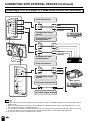
CONNECTING WITH EXTERNAL DEVICES
You can enjoy picture and sound by connecting a VCR or a home video game system to the terminals
located on the rear of the TV set.
When connecting an external device, turn off the power of the main unit first to prevent any possible
damage.
Example of external devices that can be connected
External devices that can be connected
to AV-IN2 terminal
<Example>
• VCR
• Laser disc player
External devices that can be connected
to AV-IN1 terminal
<Example>
• Video camera
• Home video game system
* If your external device has an
S-Video terminal, S-VIDEO
connection is recommended.
* If your external device has an S-Video terminal,
S-VIDEO connection is recommended.
External devices that can be connected
to COMPONENT terminal
CH
MENU TV/VIDEO
MAIN POWER
VOL
<Example>
• DVD, etc.
DVD TUNER/BAND AUX 1
AUX 2
AUX 3
SURROUND
ON/OFF
* If your external device has a component
terminal, COMPONENT connection is
recommended (you can view high-quality
pictures). If your external device does not
have a component terminal, S-VIDEO
connection is recommended.
Note
:
● PC connection is not possible.
● For the cable, use a commercially available audio/video cord.
● Only connect audio/video signals to AV-IN1 and 2 terminals. Connecting other signals may result in a malfunction.
● AV-IN1 has 2 video input terminals: VIDEO and S-VIDEO. When you connect external devices to both terminals
(and if you select AV-IN1), you can only view pictures from the S-VIDEO terminal. To view the picture from the
VIDEO terminal, do not connect any external device to the S-VIDEO terminal.
● For more information about external device connections, see the manuals of your external devices.
37
CONNECTING WITH EXTERNAL DEVICES (Continued)
Connecting a VCR, DVD player or a video camera (AV-IN1/2/COMPONENT)
To AV-IN2 terminal
VIDEO
UT
AV-IN2/O
L
AUDIO
R
Video
ONENT
Y
COMP
Audio (L)
PB
Audio (R)
PR
L
To audio/video output
terminal
AUDIO
R
VCR
To component input
(Video) terminal
Y
CH
MENU TV/VIDEO
MAIN POWER
VOL
PB
PR
Audio (L)
Audio (R)
To component input
(Audio) terminal
DVD TUNER/BAND AUX 1
AUX 2
AUX 3
SURROUND
ON/OFF
DVD Player
To AV-IN1 terminal
Video
VIDEO
AV-IN
Audio (L)
1
L
AUDIO
Audio (R)
R
S-VIDE
O
HEAD
PHON
E
To audio/video output
terminal
Video camera
To S-video input terminal
ANT.
S-Video
VCR
POWER
INPUT
DC12V
To S-video output terminal
Note
●
●
●
●
38
If your VCR (or other external devices) has an S-Video terminal, S-VIDEO connection is recommended. (Use an
S-video cord.)
When you connect external devices to both S-VIDEO and VIDEO terminals (and if you select AV-IN1), you can
only view pictures from the S-VIDEO terminal.
You cannot view multiple or synthesized pictures by connecting two or more external devices. When connecting
an external device, use care to connect the video and audio cables to the corresponding terminals.
Do not connect antennas or headphones to AV-IN2.
CONNECTING WITH EXTERNAL DEVICES (Continued)
Outputting video and audio (video output)
You can output video and audio data from the TV set through the AV output terminals (AV-OUT).
MENU TV/VIDEO
MAIN POWER
AUDIO
R
T
PONEN
Connect a VCR,
Audio amplifier,
etc.
CH
L
VOL
VIDEO
OUT
AV-IN2/
COM
Y
PB
PR
L
AUDIO
R
Note
AV2 has 2 OUT modes (see page 25).
When using the S-Video input for AV-IN1, no video output will be made to the AV output terminal, but audio
output will be made for connection to external audio systems.
Note:
●
●
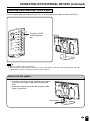
How to fix the cables
CH
VOL
MENU TV/VIDEO
MAIN POWER
• Fix cables and cords with the attached cable clamps
so that they do not get caught when mounting the
cover.
• Connect the cables and cords after fixing the cable
clamps (2 positions).
Cable clamps
39
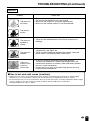
TROUBLESHOOTING
■ Before calling for repair service, check the following items for possible remedies to
the encountered symptoms.
TV set
Problem
Sound
Picture
Picture
There is no
picture or
sound.
There is no
picture.
There is no
picture from
AV-IN 1.
There is no
sound.
There is no
picture or
sound, just
noise.
Picture is not
clear.
Picture is light
or improperly
tinted.
The picture is
too dark.
Remote control does not work.
40
Check item
• Make sure the AC adapter is properly inserted in the
power outlet.
• Reception other than those of broadcasting stations
can be considered.
• Make sure the input mode is set to TV.
• Make sure the main power switch of the main unit is
on.
• Make sure the BLACK LEVEL is properly adjusted.
• Fluorescent lamp may have reached the end of
service life.
• Make sure the S-Video terminal is free of connections.
Reference
Pages
9
16
16
23, 24
–
38
• Make sure the volume is not set to minimum.
• Make sure the sound is not set to mute.
• Make sure that headphones are not connected.
17
17
13
• Make sure the antenna cable is properly connected.
• Consider whether TV signals are being properly
received.
9
–
• Make sure the antenna cable is properly connected.
• Consider whether TV signals are being properly
received.
9
–
• Check color adjustment.
• Check color system setting.
• Press the Brightness button.
• Check PICTURE and BLACK LEVEL adjustment.
• Fluorescent lamp may have reached the end of
service life.
• Check the batteries of the remote controller.
• Make sure the remote sensor window is not under
strong fluorescent lighting.
23, 24
23, 24
42, 44, 46
8
8
TROUBLESHOOTING (Continued)
Antenna
Problem
The picture is
not sharp.
Check item
•
•
•
•
The reception may be weak.
The state of the broadcast may also be bad.
Make sure the antenna is facing the right direction.
Make sure the outside antenna is not disconnected.
The picture
moves.
The picture is
doubled or
tripled.
The picture is
spotted.
There are
stripes on the
screen or
colors fade.
• Make sure the antenna is facing the right direction.
• There may be reflected electric waves from mountains or
buildings.
• There may be interference from automobiles, trains, high
voltage lines, neon lights, etc.
• There may be interference between the antenna cable and
power cable. Try positioning them further apart.
• Is the unit receiving interference from other devices?
Transmission antennas of radio broadcasting stations and
transmission antennas of amateur radios and cellular phones
may also cause interference.
• Use the unit as far apart as possible from devices that may
cause possible interference.
■ Use in hot and cold rooms (locations)
• When the unit is used in a low temperature rooms (location), the picture may leave trails or appear slightly
delayed. This is not a malfunction, and the unit will recover when the temperature returns to normal.
• Do not leave the unit in a hot or cold location. Also, do not leave the unit in a location exposed to direct sunlight
or near a heater, as this may cause the cabinet to deform and the LCD panel to malfunction.
(Storage temperature: –20°C to +60°C)
41
SPECIFICATIONS (LC-13B2UB)
Items
LCD panel
Number of dots
Video color systems
Destination
TV Standard (CCIR)
TV function
TV Tuning System
STEREO
CATV
4-LINE COMB FILTER
Brightness
Lamp life
Viewing angles
Audio amplifier
Speakers
AV1
AV2
Terminals
COMPONENT
Antenna
Headphone
OSD language
Power supply
Weight
Accessories
Model
LC-13B2UB
13” Advanced Super View & BLACK TFT LCD
921,600 dots VGA
N358, N443, PAL, PAL-M, PAL-N, SECAM, PAL-60
USA/Latin A/Twn
NTSC/PAL-M/PAL-N
PLL 181 ch.
MTS+SAP
125 ch.
Yes
430 cd/m2
60,000 hours
H: 170° V: 170°
2.1 W × 2
1-37/64 × 2-3/4 in. (4 × 7 cm), 2 pcs.
AV-IN1, S-VIDEO-IN
AV-IN2/AV-OUT
COMPONENT-IN, AUDIO-IN
F-Type
Mini-jack for stereo (3.5 ø)
English/French/Spanish
DC 12 V, AC 110–240 V, 50/60 Hz
9.5 lbs (4.3 kg), w/o accessories
Remote control, Batteries, Antenna cable 2m,
AC adapter, AC cord, Cable clamps
As a part of policy of continuous improvement, SHARP reserves the right to make design and specification changes for
product improvement without prior notice. The performance specification figures indicated are nominal values of
production units. There may be some deviations from these values in individual units.
42
DIMENSIONAL DRAWINGS (LC-13B2UB)
2.4/60.5
2.2/56.5
Unit: inch/mm
VOL
CH
MENU TV/VIDEO MAIN POWER
16.9/429
7.8/198.7
13.3/338
10.7/271.5
5.4/138
5.3/133.5
10.4/265
10.7/271.2
VIDEO
13/331
AV-IN 2/OUT
L
AUDIO
R
39.4/100
39.4/100
0.7/17
3.7/95.1
2.4/60.5
VIDEO
AV-IN1
L
AUDIO
R
S-VIDEO
HEAD
PHONE
Y
PB
PR
ANT.
COMPONENT
L
AUDIO
R
1.1/27
5.4/137.3
7.0/177.8
POWER
INPUT
DC12V
1.6/40.5
43
SPECIFICATIONS (LC-15B2UB)
Items
LCD panel
Number of dots
Video color systems
Destination
TV Standard (CCIR)
TV function
TV Tuning System
STEREO
CATV
4-LINE COMB FILTER
Brightness
Lamp life
Viewing angles
Audio amplifier
Speakers
AV1
AV2
Terminals
COMPONENT
Antenna
Headphone
OSD language
Power supply
Weight
Accessories
Model
LC-15B2UB
15” Advanced Super View & BLACK TFT LCD
921,600 dots VGA
N358, N443, PAL, PAL-M, PAL-N, SECAM, PAL-60
USA/Latin A/Twn
NTSC/PAL-M/PAL-N
PLL 181 ch.
MTS+SAP
125 ch.
Yes
430 cd/m2
60,000 hours
H: 170° V: 170°
2.1 W × 2
1-37/64 × 2-3/4 in. (4 × 7 cm), 2 pcs.
AV-IN1, S-VIDEO-IN
AV-IN2/AV-OUT
COMPONENT-IN, AUDIO-IN
F-Type
Mini-jack for stereo (3.5 ø)
English/French/Spanish
DC 12 V, AC 110–240 V, 50/60 Hz
11.5 lbs (5.2 kg), w/o accessories
Remote control, Batteries, Antenna cable 2m,
AC adapter, AC cord, Cable clamps
As a part of policy of continuous improvement, SHARP reserves the right to make design and specification changes for
product improvement without prior notice. The performance specification figures indicated are nominal values of
production units. There may be some deviations from these values in individual units.
44
DIMENSIONAL DRAWINGS (LC-15B2UB)
2.41/61.1
2.22/56.5
Unit: inch/mm
CH
MENU TV/VIDEO MAIN POWER
2.59/66
VOL
19.1/484
9.0/229
11.9/303
15.0/381.7
5.9/149.5
12.0/305.3
11.9/301.6
3.9/98.8
VIDEO
14.4/366.2
AV-IN 2/OUT
L
AUDIO
R
COMPONENT
39.4/100
39.4/100
0.47/11.8
2.4/61.1
VIDEO
AV-IN1
L
AUDIO
R
S-VIDEO
HEAD
PHONE
Y
PB
PR
ANT.
L
AUDIO
R
POWER
INPUT
DC12V
1.1/27
5.9/149.5
1.9/48.5
7.8/198
45
SPECIFICATIONS (LC-20B2UB)
Items
LCD panel
Number of dots
Video color systems
Destination
TV Standard (CCIR)
TV function
TV Tuning System
STEREO
CATV
3 Dimensional Y/C separation circuit
Digital comb filter
Brightness
Lamp life
Viewing angles
Audio amplifier
Speakers
AV1
AV2
Terminals
COMPONENT
Antenna
Headphone
OSD language
Power supply
Weight
Accessories
Model
LC-20B2UB
19.7” Advanced Super View & BLACK TFT LCD
921,600 dots VGA
N358, N443, PAL, PAL-M, PAL-N, SECAM, PAL-60
USA/Latin A/Twn
NTSC/PAL-M/PAL-N
PLL 181 ch.
MTS+SAP
125 ch.
Yes (N358 only)
Yes
430 cd/m2
60,000 hours
H: 170° V: 170°
2.5 W × 2
ø 2 in. (5 cm), 2 pcs.
AV-IN1, S-VIDEO-IN
AV-IN2/AV-OUT
COMPONENT-IN, AUDIO-IN
F-Type
Mini-jack for stereo (3.5 ø)
English/French/Spanish
DC 13 V, AC 110–240 V, 50/60 Hz
18.5 lbs (8.4 kg), w/o accessories
Remote control, Batteries, Antenna cable, AC adapter,
AC cord, Cable clamps
As a part of policy of continuous improvement, SHARP reserves the right to make design and specification changes for
product improvement without prior notice. The performance specification figures indicated are nominal values of
production units. There may be some deviations from these values in individual units.
46
DIMENSIONAL DRAWINGS (LC-20B2UB)
2.62/66.6
2.86/72.6
Unit: inch/mm
VOL
CH
MENU TV/VIDEO
MAIN POWER
12.6/319
24.8/630
11.8/298.8
7.6/193.5
15.0/381.5
18.6/473.5
7.4/188
15.8/401.3
14.9/379
4.2/107.3
18.5/468.8
L
AUDIO
R
Y
0.06/1.5
VIDEO
AV-IN 2/OUT
COMPONENT
3.94/100
2.9/72.6
VIDEO
AV-IN1
L
AUDIO
R
S-VIDEO
HEAD
PHONE
PB
ANT.
PR
L
AUDIO
R
3.94/100
POWER
INPUT
DC12V
1.2/30.5
6.5/163.9
2.6/65.5
9.0/229.4
47
CALLING FOR SERVICE
For location of the nearest Sharp Authorized Service, or to obtain product literature, accessories, supplies, or customer
assistance, please call 1-800-BE-SHARP.
LIMITED WARRANTY
END-USER LIMITED WARRANTY
SHARP ELECTRONICS CORPORATION warrants to the first end user purchaser that this Sharp brand product (the
“Product”), when shipped in its original container, will be free from defective workmanship and materials, and agrees that it
will, at its option, either repair the defect or replace the defective Product or part thereof with a new or remanufactured
equivalent at no charge to the purchaser for parts or labor for the period(s) set forth below.
This warranty does not apply to any appearance items of the Product nor to the additional excluded item(s) set forth below
nor to any Product the exterior of which has been damaged or defaced, which has been subjected to improper voltage or
other misuse, abnormal service or handling, or which has been altered or modified in design or construction.
In order to enforce the rights under this limited warranty, the purchaser should follow the steps set forth below and provide
proof of purchase to the servicer.
To the extent permitted by applicable state law, the warranties set forth herein are in lieu of, and exclusive of, all other
warranties, express or implied. Specifically, ALL OTHER WARRANTIES OTHER THAN THOSE SET FORTH ABOVE ARE
EXCLUDED. ALL EXPRESS AND IMPLIED WARRANTIES INCLUDING THE WARRANTIES OF MERCHANTABILITY,
FITNESS FOR USE, AND FITNESS FOR A PARTICULAR PURPOSE ARE SPECIFICALLY EXCLUDED. If, under
applicable state law, implied warranties may not validly be disclaimed or excluded, the duration of such implied warranties is
limited to the period(s) from the date of purchase set forth below.
Neither the sales personnel of the seller nor any other person is authorized to make any warranties other than those
described herein, or to extend the duration of any warranties beyond the time period described herein on behalf of Sharp.
The warranties described herein shall be the sole and exclusive warranties granted by Sharp and shall be the sole and
exclusive remedy available to the purchaser. Correction of defects, in the manner and for the period of time described
herein, shall constitute complete fulfillment of all liabilities and responsibilities of Sharp to the purchaser with respect to the
Product, and shall constitute full satisfaction of all claims, whether based on contract, negligence, strict liability or otherwise.
In no event shall Sharp be liable, or in any way responsible, for any damages or defects in the Product which were caused
by repairs or attempted repairs performed by anyone other than an authorized servicer. Nor shall Sharp be liable or in any
way responsible for any incidental or consequential economic or property damage. Some states do not allow limits on
warranties or on remedies for breach in certain transactions; in such states, the limits herein may not apply.
Model Specific Section
Your Product Model Number & Description:
LC-13B2UB LCD Color Television
LC-15B2UB LCD Color Television
LC-20B2UB LCD Color Television
(Be sure to have this information available when you need service for
your Product.)
Warranty Period for this Product:
One (1) year parts and labor from the date of purchase.
Additional Item(s) Excluded from
Warranty Coverage (if any):
None
Where to Obtain Service:
From a Sharp Authorized Servicer located in the United States.
To find the location of the nearest Sharp Authorized Servicer, call
Sharp toll free at 1-800-BE-SHARP.
What to do to Obtain Service:
Ship prepaid or carry in your Product to a Sharp Authorized Servicer.
Be sure to have Proof of Purchase available. If you ship the Product,
be sure it is insured and packaged securely.
TO OBTAIN PRODUCT INFORMATION, CALL 1-888-LCD-SHARP.
SHARP ELECTRONICS CORPORATION
Sharp Plaza, Mahwah, New Jersey 07430-2135
SHARP CORPORATION
48
VALID IN CANADA ONLY
LIMITED WARRANTY
Consumer Electronics Products
Congratulations on your purchase!
Sharp Electronics of Canada Ltd. (hereinafter called “Sharp”) gives the following express warranty to the first consumer purchaser for this
Sharp brand product, when shipped in its original container and sold or distributed in Canada by Sharp or by an Authorized Sharp Dealer:
Sharp warrants that this product is free, under normal use and maintenance, from any defects in material and workmanship. If any such
defects should be found in this product within the applicable warranty period, Sharp shall, at its option, repair or replace the product as
specified herein.
This warranty shall not apply to:
(a) Any defects caused or repairs required as a result of abusive operation, negligence, accident, improper installation or inappropriate
use as outlined in the owner’s manual.
(b) Any Sharp product tampered with, modified, adjusted or repaired by any party other than Sharp, Sharp’s Authorized Service Centres
or Sharp’s Authorized Servicing Dealers.
(c) Damage caused or repairs required as a result of the use with items not specified or approved by Sharp, including but not limited to
head cleaning tapes and chemical cleaning agents.
(d) Any replacement of accessories, glassware, consumable or peripheral items required through normal use of the product including but
not limited to earphones, remote controls, AC adapters, batteries, temperature probe, stylus, trays, filters, belts, ribbons, cables and
paper.
(e) Any cosmetic damage to the surface or exterior that has been defaced or caused by normal wear and tear.
(f) Any damage caused by external or environmental conditions, including but not limited to transmission line/power line voltage or liquid
spillage.
(g) Any product received without appropriate model, serial number and CSA/cUL markings.
(h) Any products used for rental or commercial purposes.
(i) Any installation, setup and/or programming charges.
Should this Sharp product fail to operate during the warranty period, warranty service may be obtained upon delivery of the Sharp product
together with proof of purchase and a copy of this LIMITED WARRANTY statement to an Authorized Sharp Service Centre or an
Authorized Sharp Servicing Dealer. In home warranty service may be provided at Sharp’s discretion on any Sharp television with the
screen size of 27” or larger and on any Sharp Over-the-Range Microwave Oven.
This warranty constitutes the entire express warranty granted by Sharp and no other dealer, service centre or their agent or employee is
authorized to extend, enlarge or transfer this warranty on behalf of Sharp. To the extent the law permits, Sharp disclaims any and all
liability for direct or indirect damages or losses or for any incidental, special or consequential damages or loss of profits resulting from a
defect in material or workmanship relating to the product, including damages for the loss of time or use of this Sharp product or the loss
of information. The purchaser will be responsible for any removal, reinstallation, transportation and insurance costs incurred. Correction of
defects, in the manner and period of time described herein, constitute complete fulfillment of all obligations and responsibilities of Sharp
to the purchaser with respect to the product and shall constitute full satisfaction of all claims, whether based on contract, negligence, strict
liability or otherwise.
WARRANTY PERIODS:
Audio Products
Camcorder
DVD Products
LCD Projector
LCD TV
Microwave Oven
Television Products
VCR Product
Vacuum Cleaner
Parts &
1 year
1 year
1 year
1 year
1 year
2 years
1 year
1 year
1 year
Labour (exceptions noted)
(lamp 90 days)
(magnetron component-3 additional years)
(picture tube component-1 additional year)
To obtain the name and address of the nearest Authorized Sharp Service Centre or Dealer, please contact:
SHARP ELECTRONICS OF CANADA LTD. 335 Britannia Road East Mississauga, Ontario L4Z 1W9
For more information on this Warranty, Sharp Extended Warranty
Offers, Sharp Canada Products, Accessory Sales, Dealer or Service
Locations, Tronto please call (905) 568-7140
Visit our Web site: www.sharp.ca