1
ADJUSTMENT
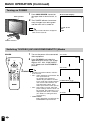
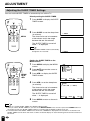
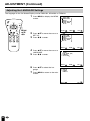
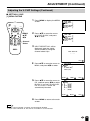
Adjusting the SLEEP TIMER Settings
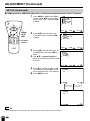
You can set the SLEEP TIMER to automatically turn off the TV.
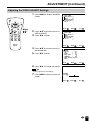
Directly setting the SLEEP TIMER
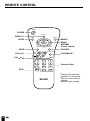
POWER
1
Press SLEEP to display the SLEEP
TIMER screen.
2
Press SLEEP to set the sleep timer
(in minutes).
DISPLAY
SLEEP
BRIGHT
MENU
MUTE
TV/VIDEO
SLEEP
FLASHBACK
VOL
CH
1
2
3
4
5
6
7
8
9
MTS
0
100
MENU
––– REMA I N
The time can be set in increments
of 30 minutes and in the range
between 30 and 120 minutes.
The SLEEP TIMER is turned off
when --- is displayed.
Note
●
The SLEEP TIMER screen automatically
disappears in 3 seconds.
60 REMA I N
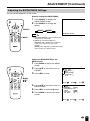
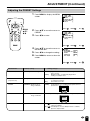
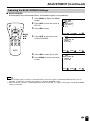
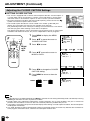
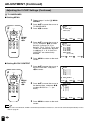
Setting the SLEEP TIMER on the
MENU screen
POWER
1
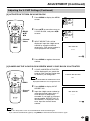
Press MENU to display the MENU
screen.
2
Press ]/[ to move the cursor to
SLEEP TIMER.
3
Press </ > to display the SLEEP
TIMER screen.
DISPLAY
SLEEP
BRIGHT
MENU
MUTE
TV/VIDEO
FLASHBACK
VOL
CH
1
2
3
4
5
6
7
8
9
MTS
0
100
MENU/
]/[/
</ >
MENU
SLEEP T IMER
V I DEO ADJUST
PRESET
CLOSED CAPT I ON
V–CH I P BLOCK
SET UP
SELECT :
4
Press </ > to set the sleep timer
(in minutes).
ENTER :
EX I T : MENU
SLEEP T IMER
RETURN
SLEEP T IMER [ ––– REMA I N ]
The time can be set in increments
of 30 minutes and in the range
between 30 and 120 minutes.
The SLEEP TIMER is turned off
when --- is displayed.
5
SELECT :
ADJUST :
EX I T : MENU
Press MENU to return to the main
screen.
Note
●
●
●
20
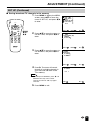
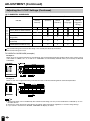
When you set the SLEEP TIMER, the SLEEP indicator lights.
After you set the SLEEP TIMER, if you turn off the MAIN POWER on the TV set or press the POWER button on
the remote control, the SLEEP TIMER setting is canceled and the SLEEP indicator goes out.
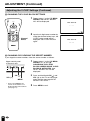
5 minutes before the SLEEP TIMER turns off the TV, 5 REMAIN is displayed on the screen for 4 seconds. The
SLEEP TIMER counts down and shows a similar 4-second display for each remaining minute until the timer turns
off the TV.