1
basics.book Page i Tuesday, October 24, 2000 9:53 AM
EPSON Perfection 1240U
EPSON Perfection 1240U PHOTO
Scanner Basics
basics.book Page ii Tuesday, October 24, 2000 9:53 AM
Copyright Notice
All rights reserved. No part of this publication may be reproduced, stored in a retrieval system, or transmitted in
any form or by any means, electronic, mechanical, photocopying, recording, or otherwise, without the prior
written permission of SEIKO EPSON CORPORATION. The information contained herein is designed only for
use with this EPSON scanner. EPSON is not responsible for any use of this information as applied to other
scanners.
Neither SEIKO EPSON CORPORATION nor its affiliates shall be liable to the purchaser of this product or third
parties for damages, losses, costs, or expenses incurred by purchaser or third parties as a result of: accident, misuse,
or abuse of this product or unauthorized modifications, repairs, or alterations to this product, or (excluding the
U.S.) failure to strictly comply with SEIKO EPSON CORPORATION’s operating and maintenance instructions.
SEIKO EPSON CORPORATION shall not be liable for any damages or problems arising from the use of any
options or any consumable products other than those designated as Original EPSON Products or EPSON
Approved Products by SEIKO EPSON CORPORATION.
A Note Concerning Responsible Use of Copyrighted Materials
Digital cameras and scanners, like photocopiers and conventional cameras, can be misused by improper copying of
copyrighted material. While some countries’ laws permit limited copying of copyrighted material in certain
circumstances, those circumstances may not be as broad as some people assume. EPSON encourages each user to
be responsible and respectful of the copyright laws when using digital cameras and scanners.
Trademarks
EPSON and EPSON Stylus are registered trademarks and EPSON Smart Panel is a trademark of SEIKO EPSON
CORPORATION.
ColorTrue and EPSON Perfection are registered trademarks, and EPSON Software, EPSON Store, and Micro
Step Drive are trademarks of Epson America, Inc.
General Notice: Other product names used herein are for identification purposes only and may be trademarks of
their respective owners. EPSON disclaims any and all rights in those marks.
The ENERGY STAR emblem does not represent EPA endorsement of any product or service.
Printed on recycled paper
Copyright © 2000 by Epson America, Inc.
ii
CPD-10861
10/00
basics.book Page iii Tuesday, October 24, 2000 9:53 AM
Contents
A Complete Scanning Solution
1
Getting More Information
Cautions, Notes, and Tips
1
2
Setting Up Your Scanner
3
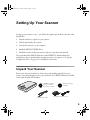
Unpack Your Scanner
Choose a Good Place for Your Scanner
Unlock and Initialize the Scanner
Connect the Scanner to Your Computer
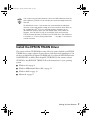
Install the EPSON TWAIN Driver
If You’re Running Windows 98 . . .
If You’re Running Windows Millennium Edition . . .
If You’re Running Windows 2000 . . .
If You’re Using a Macintosh . . .
Install the Scanner Software and Bonus Software
Install Adobe PhotoDeluxe
Viewing Your Electronic Manuals
Viewing Your HTML Reference Guide
Viewing Your EPSON Smart Panel PDF Manual
3
4
5
6
7
8
11
13
17
19
22
23
23
25
Scanning from Start to Finish
27
Placing Your Original Document
Using the Scanner Buttons
Using EPSON Smart Panel
27
28
29
Contents
iii
basics.book Page iv Tuesday, October 24, 2000 9:53 AM
iv
Scanning Projects
Scanning and Converting a Text Document
Scanning a Document to E-mail
Scanning and Copying
Scanning for Creativity
Scanning with EPSON TWAIN
Selecting TWAIN from Your Application
Using EPSON TWAIN
Selecting TWAIN Settings
Tips for Getting the Best Scan
Recommended Settings
Selecting Resolution
Scanning Something That Doesn’t Fit Under the Document Cover
30
30
34
35
36
37
37
38
41
42
42
43
44
Using the Transparency Unit
45
Installing the Transparency Unit
Loading Transparencies
Loading 35 mm Negative or Positive Film
Loading Slides and Film Directly on the Document Table
Selecting Settings
Scanning Reflective Documents or Photographs
Removing the Transparency Unit
45
46
47
49
51
51
52
Scanner Maintenance
53
Cleaning the Scanner
Transporting the Scanner
53
54
Contents
basics.book Page v Tuesday, October 24, 2000 9:53 AM
Problem Solving
55
Scanner Light and Buttons
Problems and Solutions
Setup Problems
Scanner Problems
Software Problems
Scanning Problems
Where To Get Help
EPSON Technical Support
Bonus Software Technical Support
55
57
57
57
59
61
67
67
68
Requirements and Notices
69
System Requirements
Windows
Macintosh
Important Safety Instructions
ENERGY STAR Compliance
FCC Compliance Statement
Declaration of Conformity
Warranty
69
69
70
70
72
72
73
73
Index
75
Contents
v
basics.book Page 1 Tuesday, October 24, 2000 9:53 AM
A Complete Scanning Solution
Your EPSON Perfection® 1240U scanner is a professional-quality, 42-bit scanner
packed with easy-to-use scanning features for business, home, or school. The “plug &
play” USB connection is fast and easy with no extra hardware to install. Using
EPSON’s ColorTrue® II Imaging System, the scanner captures your images with
amazing detail and accurate colors. Your scanner can achieve up to 1200 × 2400 dpi
hardware resolution with EPSON’s proprietary Micro Step Drive™ technology,
delivering crisp, precise images.
The EPSON Perfection 1240U PHOTO includes a transparency unit to make
scanning slides, negatives, and positives simple.
References to the EPSON Perfection 1240U also apply to the EPSON
Perfection 1240U PHOTO.
Getting More Information
There are several sources of information for your scanner, including printed materials,
help utilities and electronic manuals. In addition to this Scanner Basics guide, here’s
where to look for help:
■
Electronic EPSON Perfection 1240U Reference Guide
Check this HTML manual for detailed information about your scanner,
including how to use EPSON TWAIN, assigning applications to your scanner
buttons, troubleshooting, and technical specifications. See page 23 for
instructions on accessing and viewing this manual.
■
On-screen Help
Whenever you’re working with EPSON Smart Panel™ or any of the other
software that came with your scanner, you can click the Help button or Help
menu.
1
basics.book Page 2 Tuesday, October 24, 2000 9:53 AM
■
Other Electronic Documents
EPSON Smart Panel includes an electronic manual in the Adobe® Acrobat® PDF
format. See page 25 for instructions on accessing and reading this manual. Your
scanner or bonus software may also include electronic manuals or online help.
If you need more information or have questions not covered in these resources, please
see “Where To Get Help” on page 67.
For a list of software included with your scanner, see the inside front cover of this
manual.
Cautions, Notes, and Tips
Please follow these guidelines as you read your documentation:
Cautions must be observed to avoid damage to your equipment.
Notes contain important information about your scanner.
Tips contain additional information for better scanning.
2
A Complete Scanning Solution
basics.book Page 3 Tuesday, October 24, 2000 9:53 AM
Setting Up Your Scanner
Setting up your scanner is easy—just follow the simple steps in this book in the order
listed below.
1. Unpack and choose a place for your scanner.
2. Unlock and initialize the scanner.
3. Connect the scanner to your computer.
4. Install the EPSON TWAIN driver.
5. Install the scanner and bonus software and view your electronic manuals.
If you purchased the EPSON Perfection 1240U PHOTO, which includes the
transparency unit, or purchased the transparency unit as an option, see “Using the
Transparency Unit” on page 45 for installation instructions.
Unpack Your Scanner
Remove the scanner from the box, then remove the packing material from your
scanner. Save the packaging in case you need it later. Your EPSON Perfection 1240U
comes with the items shown below.
CD-ROM with driver,
electronic manuals,
and creative software
Adobe PhotoDeluxe
CD-ROM
scanner
USB interface cable
AC adapter and power cord
3
basics.book Page 4 Tuesday, October 24, 2000 9:53 AM
Your EPSON Perfection 1240U
PHOTO also includes the items
shown here. You can store the
transparency unit in the packing
materials when you are not
scanning transparencies.
transparency unit and film holders
Adobe Photoshop LE
CD-ROM
Choose a Good Place for Your Scanner
Here are some points to consider:
■
Place the scanner on a flat, stable surface. If the scanner is tilted, it can’t operate
properly.
■
Be sure to place the scanner and AC adapter where you can easily unplug the
power cord, and where the USB cable can reach your computer.
■
Keep the scanner away from direct sunlight and strong light sources.
■
Avoid places subject to shocks and vibrations, or high or rapidly changing
temperatures and humidity.
■
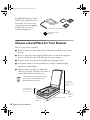
Make sure there’s enough room behind the
scanner for the cables, and above the scanner so
you can fully raise the document cover.
If you attach the transparency unit to
your scanner, the dimensions will
differ from the ones listed.
18.5 inches
(47 cm) when
document cover
is open
3.7 inches (9.3 cm)
when document
cover is closed
at least
3.9 inches
(10 cm)
10.6 inches
(26.9 cm)
4
Setting Up Your Scanner
17.1 inches (43.5 cm)
basics.book Page 5 Tuesday, October 24, 2000 9:53 AM
Unlock and Initialize the Scanner
Before connecting the scanner to a power source, you must release the transportation
lock on the back of the scanner. Before connecting the scanner to your computer,
follow the steps below to make sure the scanner is operating properly.
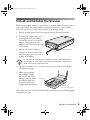
1. Slide the transportation lock to the right; this releases the scanner carriage.
2. Locate the AC adapter and power
cord supplied with your scanner.
Connect the power cord to the AC
adapter. Then connect the AC
adapter to the DC inlet on the back
of the scanner.
3. Plug the other end of the power
cord into an electrical outlet. The
indicator light on the front of the
scanner starts flashing.
transportation lock
DC inlet
It is not possible to change the AC adapter’s voltage. If the label on the AC
adapter does not show the correct voltage for your country, contact your
dealer. Do not plug in the power cord.
4. Open the document cover so you can see the operation of the scanner during
initialization (startup).
5. Make sure the carriage
moves slightly and the
fluorescent lamp on the
carriage comes on. When
the indicator light stays
green, the scanner has
completed its initialization.
indicator light
carriage
(in the home position)
If the scanner does not work as described, make sure the power cord is firmly plugged
in, and then try again.
Setting Up Your Scanner
5
basics.book Page 6 Tuesday, October 24, 2000 9:53 AM
The scanner lamp comes on when it is plugged in, but goes into sleep
mode when it has not been used for 15 minutes. The lamp comes back on
when you scan.
Unplug the scanner when you have finished using it.
If you need to plug the scanner back in after unplugging it, wait at least 10
seconds before plugging it back in. Rapidly plugging in and unplugging the
scanner can damage it.
Always lock the scanner carriage with the transportation lock before
moving it; otherwise, the scanner may be damaged. Make sure the
scanner lamp is in the home position (toward the back of the scanner)
before locking the carriage. See “Transporting the Scanner” on page 54.
Connect the Scanner to Your Computer
Make sure your computer meets the system requirements listed on page 69 or 70. If
you are connecting to a PC, Windows® must be factory preinstalled on your system
and a built-in USB port must be available.
1. Locate the USB cable that came with your scanner.
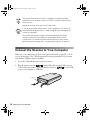
2. Plug the square connector
on the USB cable into the USB connector
on the back of the scanner. Then plug the flat connector
into the USB
port on your computer or USB hub.
USB port
6
Setting Up Your Scanner
basics.book Page 7 Tuesday, October 24, 2000 9:53 AM
Your system may not work correctly if you use a USB cable other than the
one supplied by EPSON or if you connect your scanner through more than
one hub.
For Macintosh® users: If you connect the scanner before installing the
software, a message appears telling you that the scanner driver needs to
be installed (Mac OS® 8.X), or a message appears to prompt you to
download the scanner driver from the Internet (Mac OS 9). When this
happens, click OK (Mac OS 8.X) or Cancel (Mac OS 9) and insert the
EPSON Scanner Software CD-ROM in the CD-ROM drive. Then follow the
instructions in “If You’re Using a Macintosh . . .” on page 17 to install the
scanner software.
Install the EPSON TWAIN Driver
The scanner software CD-ROM that comes with your scanner includes your EPSON
TWAIN driver, scanner software, bonus software, and electronic documentation. You
also have an Adobe PhotoDeluxe® CD-ROM and, if you have the EPSON Perfection
1240U PHOTO, an Adobe Photoshop® LE CD-ROM. Use the scanner software
CD-ROM to install EPSON TWAIN. Follow the instructions for your operating
system:
■
Windows 98 on page 8
■
Windows Millennium Edition (Me) on page 11
■
Windows 2000 on page 13
■
Macintosh on page 17
Setting Up Your Scanner
7
basics.book Page 8 Tuesday, October 24, 2000 9:53 AM
If You’re Running Windows 98 . . .
You may be asked to insert your Windows 98 operating system CD-ROM during the
scanner installation. Please have this CD-ROM handy, in case it is needed. If you
don’t have your Windows CD-ROM, see page 57 in “Problem Solving.”
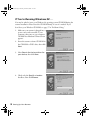
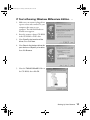
1. Make sure your scanner is plugged into a
power source and connected to your
computer; then turn on your computer.
The Add New Hardware Wizard screen
appears.
2. Insert the scanner software CD-ROM in
the CD-ROM or DVD drive, then click
Next.
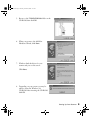
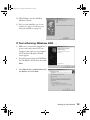
3. Select Search for the best driver for
your device, then click Next.
4. Check only the Specify a location
checkbox, then click Browse.
8
Setting Up Your Scanner
basics.book Page 9 Tuesday, October 24, 2000 9:53 AM
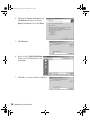
5. Browse to the \TWAIN 5\Win98 folder on the
CD-ROM, then click OK.
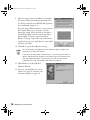
6. When you return to the Add New
Hardware Wizard, click Next.
7. Windows finds the driver for your
scanner and you see this screen:
Click Next.
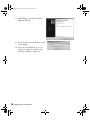
8. Depending on your system, you may be
asked to insert the Windows 98
CD-ROM. After inserting the CD-ROM,
click OK.
Setting Up Your Scanner
9
basics.book Page 10 Tuesday, October 24, 2000 9:53 AM
9. After the scanner software installation is complete,
the Screen Calibration utility automatically starts.
For the best results from an EPSON ink jet printer,
leave the default setting of 1.8.
If you are using a different printer or your printouts
don’t match what you see on screen, you can
change the setting. Move the slider to the right or
left until the shades of the horizontal gray stripes
appear similar. View the screen from a short
distance. The gray stripes will not perfectly blend
together; however, try to make the two tones match
as closely as possible.
10. Click OK to register the calibration setting.
You will not need to change the screen calibration again as long as you
continue to use the same monitor.
If you don’t see the Screen Calibration utility, you can access the utility as
follows: Double-click the Scanners and Cameras icon in the Control Panel.
Click the Properties button. Click the Utility tab, then click the Screen
Calibration utility icon. The Screen Calibration utility appears.
11. Click Finish to exit the Add New
Hardware Wizard.
12. Now you can install the rest of your
software (see page 19) and view your
electronic manuals (see page 23).
10
Setting Up Your Scanner
basics.book Page 11 Tuesday, October 24, 2000 9:53 AM
If You’re Running Windows Millennium Edition . . .
1. Make sure your scanner is plugged into
a power source and connected to your
computer; then turn on your
computer. The Add New Hardware
Wizard screen appears.
2. Insert the scanner software CD-ROM
in the CD-ROM or DVD drive.
3. Select Specify the location of the
driver, then click Next.
4. Select Search for the best driver for
your device and Specify a location,
then click Browse.
5. Select the TWAIN 5\WinME folder on
the CD-ROM, then click OK.
Setting Up Your Scanner
11
basics.book Page 12 Tuesday, October 24, 2000 9:53 AM
6. When you return to the Add New
Hardware Wizard, click Next.
7. Windows finds the driver for your
scanner and you see this screen:
Click Next.
8. After the scanner software installation is complete, the
Screen Calibration utility automatically starts. For the
best results from an EPSON ink jet printer, leave the
default setting of 1.8.
If you are using a different printer or your printouts
don’t match what you see on screen, you can change the
setting. Move the slider to the right or left until the
shades of the horizontal gray stripes appear similar. View
the screen from a short distance. The gray stripes will not
perfectly blend together; however, try to make the two
tones match as closely as possible.
9. Click OK to register the calibration setting.
You will not need to change the screen calibration again as long as you
continue to use the same monitor. If you need to recalibrate your screen,
see your electronic Reference Guide for instructions.
12
Setting Up Your Scanner
basics.book Page 13 Tuesday, October 24, 2000 9:53 AM
10. Click Finish to exit the Add New
Hardware Wizard.
11. Now you can install the rest of your
software (see page 19) and view your
electronic manuals (see page 23).
If You’re Running Windows 2000 . . .
1. Make sure your scanner is plugged into a
power source and connected to your
computer; then turn on your computer.
The Found New Hardware Wizard
screen appears.
2. Insert the scanner software CD-ROM in
the CD-ROM or DVD drive, then click
Next.
3. Select Search for a suitable driver for
my device, then click Next.
Setting Up Your Scanner
13
basics.book Page 14 Tuesday, October 24, 2000 9:53 AM
4. Uncheck the Floppy disk drives and
CD-ROM drive options and check
Specify a location. Then click Next.
5. Click Browse.
6. Browse to the \TWAIN 5\WIN2000
folder on the CD-ROM drive; then
click Open.
7. Click OK to continue with the installation.
14
Setting Up Your Scanner
basics.book Page 15 Tuesday, October 24, 2000 9:53 AM
8. Then click Next.
9. When this screen appears, click Yes.
10. After the scanner software installation is complete, the
Screen Calibration utility automatically starts. For the
best results from an EPSON ink jet printer, leave the
default setting of 1.8.
If you are using a different printer or your printouts
don’t match what you see on screen, you can change
the setting. Move the slider to the right or left until the
shades of the horizontal gray stripes appear similar.
View the screen from a short distance. The gray stripes
will not perfectly blend together; however, try to make
the two tones match as closely as possible.
11. Click OK to register the calibration setting.
You will not need to change the screen calibration again as long as you
continue to use the same monitor. If you need to recalibrate your screen,
see your electronic Reference Guide for instructions.
Setting Up Your Scanner
15
basics.book Page 16 Tuesday, October 24, 2000 9:53 AM
12. Click Finish to exit the Found New
Hardware Wizard.
13. If you see this screen, click Yes to restart
your computer.
14. Now you can install the rest of your
software (see page 19) and view your
electronic manuals (see page 23).
16
Setting Up Your Scanner
basics.book Page 17 Tuesday, October 24, 2000 9:53 AM
If You’re Using a Macintosh . . .
Before installing any software, check the Apple® web site for any updates
to your operating system.
1. Make sure your scanner is plugged into a power source and connected to the
computer. Then turn on your Macintosh and turn off any virus protection
programs.
If you see a message stating that you need to install the software for your scanner,
click Cancel and continue with step 2 (if you are using OS 8.6, or earlier, click
OK).
2. Insert the scanner software CD-ROM in the CD-ROM or DVD drive. (If
necessary, double-click the EPSON CD-ROM icon to open it.)
3. Double-click the
EPSON icon.
4. The software License Agreement screen appears. After reading the license
agreement, click Agree to continue with the installation.
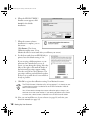
5. When the Install TWAIN Driver screen
appears, click Install.
Setting Up Your Scanner
17
basics.book Page 18 Tuesday, October 24, 2000 9:53 AM
6. When the EPSON TWAIN 5
Installer screen appears, click
Install for the default
installation.
7. When the scanner software
installation is complete, you see
this screen:
Click Restart. The Screen
Calibration utility starts. (Your
Macintosh will not restart until after you calibrate your screen.)
8. For the best results from an EPSON ink jet
printer, leave the default setting of 1.8.
If you are using a different printer or your
printouts don’t match what you see on
screen, you can change the setting. Move the
slider to the right or left until the shades of
the horizontal gray stripes appear similar.
View the screen from a short distance. The
gray stripes will not perfectly blend together;
however, try to make the two tones match as
closely as possible.
9. Click OK to register the calibration setting. Your Macintosh restarts.
The EPSON Screen Calibration utility will not appear if it is already on your
system from a previous installation of the EPSON Perfection 1240U or
other EPSON scanner.
You will not need to change the screen calibration again as long as you
continue to use the same monitor. If you need to recalibrate your screen
at a later time, select Screen Calibration in the EPSON Scanner folder.
10. Now you can install the rest of your software (see page 19) and view your
electronic manuals (see page 23).
18
Setting Up Your Scanner
basics.book Page 19 Tuesday, October 24, 2000 9:53 AM
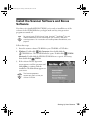
Install the Scanner Software and Bonus
Software
Now that you’ve installed EPSON TWAIN, you’re ready to install the rest of the
software on the CD-ROM. Before you begin, make sure any virus protection
programs are turned off.
Be sure to install EPSON Smart Panel, ScanSoft™ TextBridge® Pro, and
Adobe PhotoDeluxe to take advantage of your scanner’s one-touch
scanning buttons. For instructions on installing Adobe PhotoDeluxe, see
page 22.
Follow these steps:
1. Insert the scanner software CD-ROM in your CD-ROM or DVD drive.
2. Windows: Double-click
My Computer, then double-click the
CD-ROM icon. The CD-ROM window opens. Double-click
EPSON.
Macintosh: Double-click the EPSON CD-ROM icon to open it, if necessary,
then double-click
EPSON.
3. If the software License Agreement
screen appears, read the agreement and
click Agree to continue with the
installation.The Main Menu appears on
your screen.
The licence agreement
appears only the first time you
use the CD-ROM.
Setting Up Your Scanner
19
basics.book Page 20 Tuesday, October 24, 2000 9:53 AM
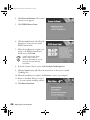
4. Click Scanner Software. The Scanner
Software screen appears.
5. Click EPSON Smart Panel.
6. Click the Install button and follow the
instructions on the screen to install
EPSON Smart Panel.
7. When the installation is complete, you
return to the EPSON Smart Panel
install screen. Click Back.
If the EPSON Smart Panel
folder is open, close or
minimize the folder so you can
continue with the software
installation.
8. From the Scanner Software screen, click ScanSoft TextBridge Pro.
9. Click the Install button and follow the instructions on the screen to install
TextBridge Pro.
10. When the installation is complete, click Restart to restart your computer.
11. Return to the Main Menu (see step 2)
so you can continue installing software.
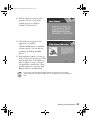
12. Click Bonus Software.
20
Setting Up Your Scanner
basics.book Page 21 Tuesday, October 24, 2000 9:53 AM
13. Click the application name for the
program you want to install (the
example shown is for EPSON
Software™ Film Factory™).
14. The install screen appears for the
application you selected.
Click the Install button to install the
selected software. (You can skip the
installation by clicking the Back
button.)
15. If the application requires a restart, go
back to step 12 after restarting to install
another application. If the application
did not require a restart, you return to
the application’s install screen. Select
another application to install or click
Back to return to the Main Menu.
If any of the software you installed requires a restart and you did not
restart when you installed the software, you should restart your computer
now.
Setting Up Your Scanner
21
basics.book Page 22 Tuesday, October 24, 2000 9:53 AM
Install Adobe PhotoDeluxe
Adobe PhotoDeluxe is included on a separate CD-ROM. Follow these steps to install
PhotoDeluxe.
Windows
1. Insert the PhotoDeluxe CD-ROM in your CD-ROM or DVD drive.
2. Double-click
My Computer, then double-click the
CD-ROM icon.
3. Open the English\Install folder and double-click Setup.exe.
4. Follow the instructions on the screen and then restart your computer.
Macintosh
1. Insert the PhotoDeluxe CD-ROM in your CD-ROM or DVD drive and
double-click the CD-ROM icon, if necessary.
2. Double-click the English icon, then double-click the Adobe PhotoDeluxe
Installer icon.
3. Follow the steps on the screen and then restart your computer.
22
Setting Up Your Scanner
basics.book Page 23 Tuesday, October 24, 2000 9:53 AM
Viewing Your Electronic Manuals
You always have easy access to your
electronic manuals—just go to the Main
Menu screen on your scanner software
CD-ROM and click Electronic
Documentation.
Viewing Your HTML Reference Guide
Your scanner software CD-ROM includes an electronic Reference Guide for your
scanner. The manual is in HTML format, so you need a browser—such as Internet
Explorer 3.0 or later or Netscape Navigator™ 3.0 or later—to view it. If you are using
a different browser, the pages may not display correctly. (A browser is not included on
the CD-ROM.)
You can view your electronic Reference Guide from the CD-ROM or copy it to your
hard drive and view it from there. Follow these steps:
1. Insert your scanner software CD-ROM.
2. Windows: Double-click
My Computer, double-click your
CD-ROM icon, then double-click the
EPSON icon.
EPSON
Macintosh: Double-click the EPSON CD-ROM icon, if necessary.
Setting Up Your Scanner
23
basics.book Page 24 Tuesday, October 24, 2000 9:53 AM
3. The Main Menu appears. Click
Electronic Documentation.
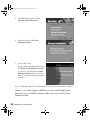
4. At the next screen, click View
Reference Guide.
5. You see this screen:
You can either view the guide from the
CD-ROM (View Reference Guide)
or copy it to your hard drive (Install
Reference Guide) and view it from
there. For details on viewing the guide,
see below.
If you copied the manual to your hard drive, you can access it at any time, as follows:
Windows: Select Start, Programs, EPSON, and double-click PF1240U Guide.
Macintosh: Open the EPSON Perfection 1240U folder and double-click View
Reference Guide.
24
Setting Up Your Scanner
basics.book Page 25 Tuesday, October 24, 2000 9:53 AM
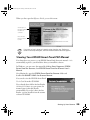
When you first open the Reference Guide, you see this screen:
Click a topic on
the left to expand
the table of
contents . . .
then click the
topic you want
to view.
If you see an icon in place of a graphic when viewing your Reference
Guide in Netscape Navigator, click the Reload button to load the graphic.
Viewing Your EPSON Smart Panel PDF Manual
You always have easy access to your EPSON Smart Panel electronic manual—it is
automatically copied to your hard drive when you install the software.
In Windows, you can access the manual by clicking Start, Programs, EPSON
Smart Panel for Scanner, then EPSON Smart Panel for Scanner User’s
Manual.
On a Macintosh, open the EPSON Smart Panel for Scanner folder and
double-click SMART PANEL for Scanner Manual.
You can also view the EPSON Smart Panel
User’s Guide from the CD-ROM.
If you already have Adobe Acrobat Reader
(version 3.0 or later) on your system, the
manual opens in Acrobat Reader
automatically. If you don’t have Acrobat
Reader, you can install it from the scanner
software CD-ROM.
Setting Up Your Scanner
25
basics.book Page 26 Tuesday, October 24, 2000 9:53 AM
For guidelines on viewing your electronic manuals using Acrobat Reader, see
“Navigating a PDF Manual” below.
Your Bonus software may also include electronic manuals in PDF format.
After installing the software, check its program folder to see if an
electronic manual is available.
Navigating a PDF Manual
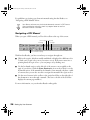
When you open a PDF manual, you’ll see this toolbar at the top of the screen:
previous page next page
first page
last page
show bookmarks and page
With Acrobat Reader, you have several ways to navigate through text:
■
Click on hot topics, which are usually underlined or displayed in a different color.
To find out if a topic is hot, move your cursor over it. If the cursor turns into a
pointing hand, the topic is hot—you can jump to it by clicking once.
■
Use the bookmark section on the left side of the screen to move quickly to the
topic of your choice. Click the Show Bookmarks icon on the toolbar to see the
bookmark section, if the manual has bookmarks. Some manuals only have a table
of contents, but you can also use this to navigate the manual if the topics are hot.
■
Use the arrow buttons in the toolbar or the vertical scroll bar on the right side of
the document to move through a manual. (The box to the left of the scroll bar
displays the current page number.)
For more information, see your Acrobat Reader online guide.
26
Setting Up Your Scanner
basics.book Page 27 Tuesday, October 24, 2000 9:53 AM
Scanning from Start to Finish
Scanning with the EPSON Perfection 1240U lets you turn pictures and text into
digital files on your computer just by pressing the ] Start, t Copy, or s Scan button
on your scanner. You can use the buttons in conjunction with the EPSON Smart
Panel, which has a convenient on-screen control panel. Then you can e-mail the files,
display them on your web site, or use them to create projects that you can print out.
If you’re experienced with scanning, you can use EPSON TWAIN to scan with
applications like Adobe PhotoDeluxe or any other TWAIN-compliant program. See
“Scanning with EPSON TWAIN” on page 37 for instructions.
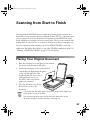
Placing Your Original Document
1. Raise the document cover and place your document
face down on the document table glass.
2. Position the document so the horizontal and
vertical edges are aligned with the guides
on the top and right side of the
document table. Be sure to leave a
small gap because an area of
0.2 inch (5 mm) out from the
guides is not scanned.
3. Close the document cover slowly.
Be careful not to move the
document.
unscanned
area
If you place your document against the guides, the document edges next
to the guides will not be scanned.
The self-adjusting cover allows you to place thick documents on the
document table glass without removing it (see page 44).
27
basics.book Page 28 Tuesday, October 24, 2000 9:53 AM
Using the Scanner Buttons
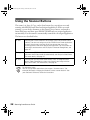
The scanner’s ] Start, t Copy, and s Scan buttons let you perform one-touch
scanning with EPSON Smart Panel and assigned applications. With one-touch
scanning, you can load a document on the scanner, press a button, and watch as
Smart Panel starts and then opens EPSON TWAIN and your assigned application
automatically. Your document is automatically scanned into the assigned application.
The buttons are described below:
] Start
Pressing the ] Start button on the scanner starts EPSON Smart Panel
(default). You also can assign any of the EPSON Smart Panel applications
to the ] Start button; pressing the ] Start button then starts the
scanning process and sends data to the application. For instructions on
scanning a text document to OCR (Optical Character Recognition), see
page 30.
t Copy
If you have an EPSON ink jet printer connected to your computer, you
can press the t Copy button to automatically scan and print a document.
For more details, see page 35.
s Scan
Pressing the s Scan button automatically scans an image and then
opens Adobe PhotoDeluxe, where you can edit your image with the
easy-to-use tools. For more details, see page 36.
For Windows users:
You can assign other applications that support “Scanner events” (for
example, Microsoft® Imaging for Windows) to the scanner buttons. See
your electronic Reference Guide for instructions.
28
Scanning from Start to Finish
basics.book Page 29 Tuesday, October 24, 2000 9:53 AM
Using EPSON Smart Panel
Follow these steps to use EPSON Smart Panel to scan your document or photo:
1. Place your original document face down on the document table, as described on
page 27.
2. Do one of the following to open the EPSON Smart Panel:
■
Press the ] Start button on your scanner.
■
In Windows, click the
■
On a Macintosh, open the Apple menu and select EPSON SMART PANEL.
Smart Panel icon on the Windows taskbar.
The ] Start button is set to open the Smart Panel by default. However,
you can assign the ] Start button to automatically open any of the Smart
Panel applications.
EPSON Smart Panel opens:
send photos or documents
by e-mail (requires a
modem and e-mail service)
Optical Character
Recognition (OCR) converts
a scanned text image into
text that you can edit in a
word processing program
reprint your photos in
any size—create
enlargements or
combine several
prints on one sheet
make copies of
printed pages and
photos
automatically scans
your image and then
opens it in any
supported application
program on your
computer
scans your image
automatically and
then opens it in
Adobe PhotoDeluxe
select EPSON Smart Panel or
a Smart Panel application to
use with the ] Start button
Scanning from Start to Finish
29
basics.book Page 30 Tuesday, October 24, 2000 9:53 AM
3. Click the icon for your desired scanning application. The window for that
application appears and lets you adjust settings for your scan. Follow the
on-screen steps for each application.
If you select Copy or Photo Print, make sure your printer is turned on and
the correct paper type and size is loaded in your printer. You can use
Photo Print only with an EPSON Stylus® Color or EPSON Stylus Photo
printer.
For detailed instructions on using each of the Smart Panel applications, read your
electronic manual for EPSON Smart Panel, as described on page 25.
Scanning Projects
This section gives examples for four of the Smart Panel scanning applications:
■
Scan and convert a text document using Scan to OCR and the ] Start button
below
■
Scan to E-mail on page 34
■
Scan and Copy using the t Copy button on page 35
■
Scan for Creativity using the s Scan button on page 36
The steps for the other Smart Panel applications are similar. For detailed instructions,
see your electronic manual for EPSON Smart Panel.
Scanning and Converting a Text Document
This project begins by assigning Scan to OCR to the ] Start button. After selecting
your settings in Smart Panel and scanning one page, you can continue scanning with
the same settings by placing additional pages on the document table and pressing the
] Start button. Follow the steps below:
1. Place your document face down on the document table; then close the scanner
cover.
30
Scanning from Start to Finish
basics.book Page 31 Tuesday, October 24, 2000 9:53 AM
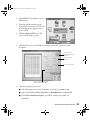
2. Open EPSON Smart Panel, if it isn’t
already open.
3. From the pull-down menu in the
bottom left, select Scan to OCR. The
] Start button icon appears next to
Scan to OCR.
4. Click the Scan to OCR icon. The
Scan to OCR window opens.
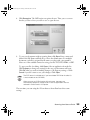
5. Click Preview. You see the OCR scan settings screen with a preview of your
document:
click here to use
EPSON TWAIN; see
page 37
select the source
Paper Size
select a Scan Mode
click to scan multiple pages
from the document table
6. Select the settings for your scan:
■
Select the paper size for your document: you can choose Letter or A4.
■
Select a Scan Mode: Color, Grayscale, or Black&White (recommended).
■
Check Scan Multiple Images if you will be scanning more than one
document.
Scanning from Start to Finish
31
basics.book Page 32 Tuesday, October 24, 2000 9:53 AM
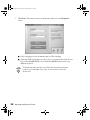
7. Click Scan. The scanner scans your document and you see the Recognize
screen.
■
Select a language for the documents that you’ll be scanning.
■
Select the OCR engine that you want to use to recognize and convert the text.
If you select Presto! OCR, you can click the Options button and set up
additional options.
TextBridge Pro does not work with EPSON Smart Panel on Macintosh
systems. Use TextBridge Pro by itself, or use the Smart Panel with
Presto! OCR.
32
Scanning from Start to Finish
basics.book Page 33 Tuesday, October 24, 2000 9:53 AM
8. Click Recognize. The OCR engine recognizes the text. Then you see a screen
that lets you choose how you want to save or open the text.
9. To save your documents without opening them, click Save. Enter a name and
folder in the File Name and Path box, or leave the default name. For multiple
documents, each file is assigned the file name you select with a new number.
Select one of the available formats for saving your file: TXT, RTF, HTML, or PDF.
To open your files for editing, click Open. Select an application from the list.
Click Property to change any settings for the way your documents will open.
Click OK when you are done making changes to the Property settings, or click
Cancel if you don’t want to save your changes. Click Open.
The PDF format is available only if you have Adobe PDF Writer installed. (It
is not included on the CD-ROM.)
When you scan to OCR using the ] Start button, the pages are
automatically opened as individual files in the last application that was
selected in Smart Panel’s OCR option.
The next time you scan using the ] Start button, Smart Panel uses these same
settings.
Scanning from Start to Finish
33
basics.book Page 34 Tuesday, October 24, 2000 9:53 AM
Scanning a Document to E-mail
You can scan photos or documents and then attach the resulting files to an e-mail
message. Follow these steps to scan to e-mail:
1. Open the EPSON Smart Panel:
In Windows, click the
Smart Panel icon on the Windows taskbar.
On a Macintosh, click the Apple menu icon, then click EPSON SMART PANEL.
2. Click the Scan to E-mail icon.
3. Select the document settings for your scans:
■
Select the document type for your source image.
■
Select a destination setting.
4. Click Scan. The scanner scans your image(s).
5. Click Specify Name and Format. You see the following:
6. Choose a format for your file(s).
If you save your file in the JPEG format, you can
select a compression application from the
Options list. If you select RTF, your scan is saved
as an image in an RTF file; it is not converted to
editable text.
7. Click Apply and then click Finish. A screen appears
showing any available e-mail programs on your system.
Your e-mail program must be MAPI-compliant, for example, Microsoft
Exchange or Outlook. See your e-mail documentation for details. AOL® is
not a MAPI-compliant e-mail application.
8. Select your e-mail program and click Send E-mail. Enter the e-mail address, type
in a message and subject, then send your e-mail.
34
Scanning from Start to Finish
basics.book Page 35 Tuesday, October 24, 2000 9:53 AM
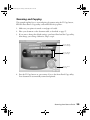
Scanning and Copying
This example explains how to scan and print a document using the t Copy button,
EPSON Smart Panel’s Copy utility, and an EPSON ink jet printer.
1. Make sure your printer is turned on and paper is loaded.
2. Place your document on the document table, as described on page 27.
3. If you want to change the default settings, open Smart Panel and the Copy utility,
then change your settings. Otherwise, skip to step 4.
click to change
printer settings
click to change
copy settings
click to cancel
scanning
4. Press the t Copy button on your scanner. You see the Smart Panel Copy utility.
Your document is automatically scanned and printed.
Scanning from Start to Finish
35
basics.book Page 36 Tuesday, October 24, 2000 9:53 AM
Scanning for Creativity
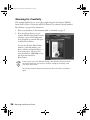
This example explains how to scan a photograph using the Scan button, EPSON
Smart Panel’s Scan for Creativity, and PhotoDeluxe. If you haven’t already installed
PhotoDeluxe, see page 22 for instructions.
1. Place your document on the document table, as described on page 27.
2. Press the s Scan button on your
scanner. EPSON Smart Panel Scan for
Creativity opens in the background.
Your document is scanned and opens
in Adobe PhotoDeluxe.
You can use all of the PhotoDeluxe
features to edit and enhance your
photo, add text and special effects, or
create many types of projects. For
more information, click Help or view
the electronic manual for
PhotoDeluxe.
If you want to scan with different settings, for example in Grayscale, open
the Smart Panel Scan for Creativity window, change your settings, then
scan from Smart Panel.
You cannot use the s Scan button when the Scan for Creativity window is
open.
36
Scanning from Start to Finish
basics.book Page 37 Tuesday, October 24, 2000 9:53 AM
Scanning with EPSON TWAIN
Scans are performed from within a host application—the application into which you
plan to import the scanned image or document, such as Adobe PhotoDeluxe or other
TWAIN-compliant program. You have to start this application before you can access
EPSON TWAIN, your scanner software.
Once you’ve started your application, you need to select the scanner “source” you
want to scan with. Your EPSON Perfection 1240U scanner comes with the EPSON
TWAIN 5 driver. You need to select this driver as the source in your application.
This section contains step-by-step instructions for doing this. Since Adobe
PhotoDeluxe comes with your scanner, this section uses it as an example, but you can
perform the same steps with most TWAIN-compliant graphics programs, such as
Adobe Photoshop® or CorelDRAW.® The electronic Reference Guide on your
CD-ROM has detailed instructions on how to use the EPSON TWAIN driver (see
page 23). For instructions on using a creative software application, see its electronic
manual or online help.
Selecting TWAIN from Your Application
Once the document is placed on the scanner and the scanner is turned on, you can
start EPSON TWAIN to capture the image into your graphics application.
Follow these steps (the steps may vary, depending on your application):
1. Start your application.
2. Select the scanner source. Open the File menu and choose Select Source,
Import, or Acquire, and then select either Select TWAIN_32 Source
(Windows) or TWAIN Select (Macintosh).
click to select the
scanner source
Scanning from Start to Finish
37
basics.book Page 38 Tuesday, October 24, 2000 9:53 AM
3. Make sure EPSON TWAIN 5 is
highlighted and click Select or OK.
You can also access EPSON
TWAIN from EPSON Smart
Panel; click the TWAIN
button on the scan settings
screen.
Using EPSON TWAIN
Once EPSON TWAIN 5 is selected, you can start scanning from your application.
Follow these steps to make manual settings in EPSON TWAIN:
1. Start EPSON TWAIN for scanning. Open the File menu and choose
Import or Acquire and if necessary, select either TWAIN_32 (Windows) or
TWAIN Acquire (Macintosh).
click to open
EPSON TWAIN
If your computer fails to recognize the scanner, you won’t see the EPSON
TWAIN driver when you try to select a scanner source from your host
application. In addition, an error message may appear. If this happens, turn
off your computer and scanner, and then turn the scanner back on. Then
restart the computer.
2. You see the automatic scanning
window.
If you want, you can let the
TWAIN driver automatically
scan your document. It detects
what type of document you’re
scanning and automatically
chooses the optimum settings
for your scan.
To scan in manual mode and adjust your scan settings, click Cancel.
38
Scanning from Start to Finish
basics.book Page 39 Tuesday, October 24, 2000 9:53 AM
You see the following window:
3. Click Manual Mode. The EPSON TWAIN 5 window opens:
4. Select the type of image (such as Color Photo or Line Art) and final output
destination (such as Screen/Web or Laser Printer) from the Image Type and
Destination menus.
Scanning from Start to Finish
39
basics.book Page 40 Tuesday, October 24, 2000 9:53 AM
5. Click the
Preview icon to preview your scan. You see a preview of your scan in
the preview area on the right side of your screen.
6. Click the Scan button to scan your image.
The indicator light on the top of the scanner blinks for several seconds while it’s
scanning. In a few moments, the scanned image is imported into your application.
7. Click Close to close the EPSON TWAIN window.
See “Selecting TWAIN Settings” on page 41 for a summary of EPSON TWAIN
settings, or your electronic Reference Guide for a complete description.
If the indicator light continues to blink, it may indicate an error condition. See
“Scanner Light and Buttons” on page 55 for more information.
Don’t leave documents, especially photographs, on the document table or
in the transparency unit for long periods of time. They may stick to the
glass or deteriorate from the warmth of the scanner.
40
Scanning from Start to Finish
basics.book Page 41 Tuesday, October 24, 2000 9:53 AM
Selecting TWAIN Settings
The illustration below shows the different settings you can adjust in the EPSON
TWAIN window, and the preferred order you should adjust them in. Detailed
descriptions are given in your electronic Reference Guide.
Manually adjust settings in the EPSON TWAIN window in the following order:
3 Automatically set the
scan area for your image
using Auto Locate
1 Select the basic settings:
Document Source
Image Type
Destination
4 Size or scale the image
(be sure to increase the
Resolution if you
increase the size or
scale)
5 Customize your settings
and configuration, and
use color management
2 Preview your image
6 Scan the image into your
application
7 Close the EPSON TWAIN window
The most important thing to remember when scanning is to select the
correct image type and best resolution for your scan. For tips on selecting
the best resolution, see “Selecting Resolution” on page 43. For more
detailed information on making settings in your EPSON TWAIN driver, see
your electronic Reference Guide, as described on page 23.
Scanning from Start to Finish
41
basics.book Page 42 Tuesday, October 24, 2000 9:53 AM
Tips for Getting the Best Scan
Getting the best scan possible depends on several factors, including the quality of your
original and the resolution you select. The better your original is, the better your scan
will be. While you can make some corrections in your scanning software, you’ll need
to do major photo retouching in a program such as Adobe PhotoDeluxe or Adobe
Photoshop to correct or mask problems such as a coffee stain on the original image.
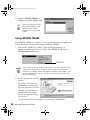
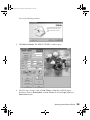
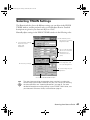
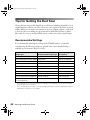
Recommended Settings
If you are manually adjusting the settings in the TWAIN window, you should
consider using the following settings for optimal scans (a more detailed listing is
available in your electronic Reference Guide):
Image type
Recommended Image Type
Scanning resolution
for printing 1, 2
Photograph
Color Photo
300 dpi
Small photograph to be enlarged Color Photo
300 dpi to 3200 dpi
Magazine
Color Photo
300 dpi
Newspaper (text only)
Text (Background Removal)
400 dpi
Text for OCR
Text (Background Removal)
400 dpi
Text with images
Color Document
400 dpi
Line art
Line Art
300 to 3200 dpi
35 mm film (negative)
TPU for neg.Film
300 to 3200 dpi
4 x 5 or Brownie film (negative)
TPU for neg.Film
300 to 3200 dpi
35 mm slide or
4 x 5 transparency
TPU for pos.Film
300 to 3200 dpi
1
2
42
If your final file is for on-screen viewing (for example, on a web page or in an e-mail message),
select 72 dpi for your resolution.
If you are enlarging your image, you must manually increase the resolution (dpi) proportionally to
maintain the resolution of your original.
Scanning from Start to Finish
basics.book Page 43 Tuesday, October 24, 2000 9:53 AM
Selecting Resolution
Resolution refers to how many dots per inch (dpi) or dots per centimeter (dpcm) your
image contains. The best resolution for a scanned image depends on the type of image
you’re scanning and your final output device.
As a rule of thumb for most images except line art, use a scanning resolution that is
approximately one third of your output resolution. For example, use a scanning
resolution up to 100 dpi with a 300 dpi laser printer, and up to 200 dpi with a
600 dpi laser printer. For 1440 dpi ink jet printers, such as the EPSON Stylus® Color
or Photo series, use a scanning resolution of approximately 300 dpi. Try a scanning
resolution of 240 dpi for 720 dpi printing.
Keep the following in mind when you choose a resolution:
■
Higher resolution settings result in larger file sizes. For example, an 8.5 × 11-inch
original scanned at 300 dpi can produce a 26MB file. The same original scanned
at 72 dpi creates only a 1.4MB file. Large files take longer to process and print, so
consider the practical limitations of your computer system when selecting a
resolution. To keep your file size manageable, select the lowest possible resolution
that gives acceptable quality.
■
If you need to scan at a higher resolution, you can reduce the size of the image file
by scanning only part of the image. For information about selecting part of an
image, see “Previewing Images” in your electronic Reference Guide.
■
If you will be enlarging a file in your image editing software, scan at a higher
resolution to maintain the image quality.
■
If your final file is for on-screen viewing (for example, on a web page or in an
e-mail message), select 72 dpi for your resolution.
Scanning from Start to Finish
43
basics.book Page 44 Tuesday, October 24, 2000 9:53 AM
Scanning Something That Doesn’t Fit
Under the Document Cover
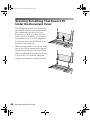
The self-adjusting scanner cover allows you to
place thick documents on the document table
glass without removing the cover. If your
document is too thick to fit under the cover—
such as a photo in an album—you can remove
the document cover. To do this, simply raise
the document cover, then lift the back of the
document cover straight up.
When scanning with the cover removed, make
sure no area of the document table is exposed.
This prevents interference from external light.
When reattaching the document cover, be sure
to position the cover as shown. Then push
straight down until the cover clicks into place.
44
Scanning from Start to Finish
basics.book Page 45 Tuesday, October 24, 2000 9:53 AM
Using the Transparency Unit
This section includes basic information on installing and using the transparency unit
(B813172) for the EPSON Perfection 1240U. The transparency unit, also referred to
as the film adapter, lets you scan negative or positive film strips and slides on your
scanner.
The transparency unit is included with the EPSON Perfection 1240U PHOTO
scanner. If you have the EPSON Perfection 1240U, you can purchase the
transparency unit from the EPSON Store™ at (800) 873-7766 or visit our web site at
www.epsonstore.com (U.S. sales only). In Canada, please call (800) 873-7766 for
dealer referral.
Installing the Transparency Unit
Follow the steps below to install the transparency unit on the scanner.
1. Make sure the scanner is not connected to a power
source.
2. Remove the document cover from the scanner by
opening it to an upright position and lifting it
straight up.
3. Make sure the document table glass is clean and
dust free.
45
basics.book Page 46 Tuesday, October 24, 2000 9:53 AM
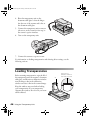
4. Place the transparency unit on the
document table glass so that the hinges
face the rear of the scanner and it fits on
the document table glass.
5. Connect the transparency unit connector
(the arrow on the connector faces up) to
the scanner’s option interface.
6. Turn on the transparency unit.
7. Connect the scanner to a power source.
For information on loading transparencies and selecting driver settings, see the
following sections.
Loading Transparencies
Before scanning transparencies, wipe the lid of
the transparency unit, the scanner’s document
table glass, and the narrow calibration window
near the hinges; dust in the calibration
window can cause a line in the scanned image.
Keep the window uncovered when loading
your transparencies. If your transparency
obstructs the window, the colors in your scans
will be affected.
46
Using the Transparency Unit
lid
make sure the
calibration window is
clean and uncovered
basics.book Page 47 Tuesday, October 24, 2000 9:53 AM
You can load transparencies in the film holders or you can place them directly on the
document table, as described in the following sections.
Three film holders are included with the transparency unit. To place film in the
holders, see the instructions for the type of film you’re scanning. To remove a film
holder from the document table, lift it out by its tab.
Hold the film by the edges or use gloves. Touching the film surface with
bare hands can leave fingerprints or other marks on the film.
Film has two sides, a base side that is shiny and an emulsion side that is dull. The base
side of the film has the film maker’s name and film ID numbers printed on it.
Whether you load film in a film holder or place it directly on the document table,
always place the base side down.
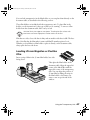
Loading 35 mm Negative or Positive
Film
Insert a strip of film in the 35 mm film holder, base side
facing down.
Then place the film holder on the
document table. Align the upper left
corner of the film holder with the
upper left corner of the transparency
unit. You can adjust the position of
35 mm film by sliding the strips in
the film holder so the frames you
want to scan are positioned in the
window.
Using the Transparency Unit
47
basics.book Page 48 Tuesday, October 24, 2000 9:53 AM
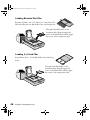
Loading Brownie Size Film
Brownie size film is 2.4 × 3.5 inches (6 × 9 cm). Insert the
film in the Brownie size film holder, base side facing down.
Then place the film holder on the
document table. Align the upper left
corner of the film holder with the upper
left corner of the transparency unit.
Loading 4 x 5 inch Film
Insert film in the 4 × 5 inch film holder, base side facing
down.
Then place the film holder on the
document table. Align the upper left
corner of the film holder with the upper
left corner of the transparency unit.
48
Using the Transparency Unit
basics.book Page 49 Tuesday, October 24, 2000 9:53 AM
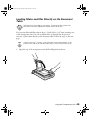
Loading Slides and Film Directly on the Document
Table
Hold the film by the edges or use gloves. Touching the film surface with
bare hands can leave fingerprints or other marks on the film.
You can scan slides and film strips in the 4 × 5-inch (101.6 × 127 mm) scanning area
of the transparency unit. You can use film holders (as described in the previous
sections) or place them directly on the document table. Follow the steps on the next
page.
If the film size is 4 × 5 inches, it may be easier to use the film holder. If you
place the film directly on the document table, it may be difficult to pick up.
1. Open the top of the transparency unit while holding the base down.
Using the Transparency Unit
49
basics.book Page 50 Tuesday, October 24, 2000 9:53 AM
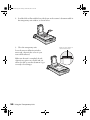
2. Load the slide or film with the base side down on the scanner’s document table in
the transparency unit window, as shown below.
3. Close the transparency unit.
Leave the narrow calibration window
uncovered, otherwise the colors in your
scans will be affected.
Make sure the unit is completely closed,
otherwise an option error results and you
will not be able to scan the document or get
correctly colored images.
50
Using the Transparency Unit
make sure this window is
clean and uncovered
basics.book Page 51 Tuesday, October 24, 2000 9:53 AM
Selecting Settings
In EPSON TWAIN, select TPU - neg. Film or TPU - pos. Film as the Document
Source setting, depending on the type of film (35 mm film strips or slides) you are
scanning. When previewing images of negatives scanned using a film holder, the color
may appear odd. To see the correct color, click and drag the mouse over the image
area, then click the
Zoom Preview button. For details on scanner software settings,
see your electronic Reference Guide.
Scanning Reflective Documents or
Photographs
When you return to scanning normal reflective documents (non-transparent
documents such as memos or photographs), you can turn off the transparency unit,
then place documents between it and the document table. Remember to change the
Document Source setting to Flatbed in EPSON TWAIN.
Be aware that the entire document table will be scanned so you will scan not only your
document, but also the underside of the transparency unit. To prevent scanning the
underside of the transparency unit, you can place a white piece of paper between your
document and the transparency unit.
When scanning thin documents, you may see an impression of the underside of the
transparency unit in your scans. If so, remove the transparency unit and re-install the
document cover as described in the next section.
If you don’t plan to scan transparencies for a while, you can remove the transparency
unit and re-install the document cover as described in the next section.
Using the Transparency Unit
51
basics.book Page 52 Tuesday, October 24, 2000 9:53 AM
Removing the Transparency Unit
Follow these steps to remove the transparency unit:
1. Turn off the transparency unit.
2. Remove any film holders or film from the document table.
3. Unplug the transparency unit connector from the scanner’s option interface.
4. Store the transparency unit and film holders in their original packaging.
5. Reattach the document cover as described on page 44.
52
Using the Transparency Unit
basics.book Page 53 Tuesday, October 24, 2000 9:53 AM
Scanner Maintenance
This section gives you basic maintenance instructions and tells you how to transport
your scanner safely.
Cleaning the Scanner
To keep your scanner operating at its best, you should clean it periodically. Before
cleaning, unplug the power cord.
Use a soft cloth to clean the outer case with mild detergent dissolved in water.
If the document table glass gets dirty, clean it with a soft, dry cloth that is free of lint.
Paper towels are not recommended for cleaning the glass. If the glass is stained with
grease or other hard-to-remove material, use a small amount of glass cleaner on a soft
cloth to remove it. Wipe off any remaining liquid with a dry cloth.
Be sure there’s no dust on your document table. Dust can cause white spots to appear
in your scanned image.
Never use a harsh or abrasive brush or cleaning product to clean the
document table. A damaged glass surface can decrease the scanning
quality.
Never use alcohol, thinner, or corrosive solvent to clean the scanner.
These chemicals can damage the scanner components as well as the
case.
Be careful not to spill liquid into the scanner mechanism or electronic
components. This could permanently damage them.
Never open the scanner case. Don’t spray lubricants inside the scanner. If
you think repairs or adjustments are necessary, consult your dealer or
contact EPSON.
53
basics.book Page 54 Tuesday, October 24, 2000 9:53 AM
Transporting the Scanner
When you transport the scanner a long distance or store it for an extended time,
follow the steps below to secure the carriage.
1. Remove any optional equipment and replace the document cover.
2. Plug in the scanner and AC adapter and wait until the carriage moves to the home
position (toward the back of the scanner).
home position
3. Disconnect the USB cable from the scanner.
4. Disconnect the AC adapter and then slide the transportation lock to the left.
54
Scanner Maintenance
basics.book Page 55 Tuesday, October 24, 2000 9:53 AM
Problem Solving
This chapter gives you the basics for diagnosing and solving scanner problems. For
illustrations identifying the scanner parts, see the inside back cover of this manual.
For more troubleshooting tips, see the “Troubleshooting” section of your electronic
Reference Guide.
Scanner Light and Buttons
The scanner has one light and three buttons. The tables on the next page provide
details about the light status and button functions.
Start button
indicator light
Copy button
Scan button
55
basics.book Page 56 Tuesday, October 24, 2000 9:53 AM
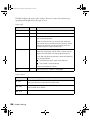
The light indicates the status of the scanner. If an error occurs, the scanner stops
operating and the light shows the type of error.
Scanner light
Light
Color
Status
Slowly flashing
Green
The scanner is initializing or is busy scanning.
On
Green
The scanner is ready to scan images.
On
Red
The scanner has received incorrect commands from
your scanning software.
When this error occurs, try to rescan the document.
The scanner returns to normal when it receives correct
commands. Normally you do not need to reset the
scanner when this type of error occurs.
Flashing
Red
The scanner may not be properly connected to the
computer. Unplug the scanner from its power source,
remove the USB cable, and then plug them back in.
If this does not eliminate the error, one of the following
may be the problem:
■
The fluorescent lamp needs to be replaced.
■
The scanner is malfunctioning.
Consult your dealer or EPSON.
Off
—
The scanner or AC adapter is unplugged.
Scanner buttons
56
Button
Function
] Start
Scan directly to EPSON Smart Panel or a Smart Panel application.
See your Reference Guide for more information.
t Copy
Scan directly to the Copy utility in EPSON Smart Panel and print on
your EPSON ink jet printer.
s Scan
Scan directly to Adobe PhotoDeluxe.
Problem Solving
basics.book Page 57 Tuesday, October 24, 2000 9:53 AM
Problems and Solutions
If you’re having problems, this section answers some of the most common questions.
Setup Problems
Your system doesn’t recognize the
scanner.
■
Make sure your scanner is
plugged into a power source. If
you opened your host
application before you plugged
in your scanner, close your
application and reopen it.
■
Check the cable connection or
try using another USB cable.
■
If you get the message, “No
push button scanner found,”
unplug your scanner, shut down
your computer, plug in your
scanner, and then turn on your
computer.
You are unable to install EPSON
TWAIN in Windows.
■
■
In Windows 2000, don’t select
Block under Control Panel,
System, Hardware, Driver
Signing; select Ignore or
Warn instead.
If you see an error message or
the software doesn’t install
correctly on Windows 2000,
you may not have software
installation privileges. See your
system administrator.
■
If you are installing EPSON
TWAIN in Windows 98, you
may be prompted for the
Windows 98 CD-ROM. If you
are prompted and don’t have
your Windows 98 CD-ROM,
browse to the Sys folder on the
scanner software CD-ROM to
continue the installation.
Scanner Problems
The indicator light doesn’t
come on or blinks slowly.
Make sure the power cord is
connected to the scanner and
plugged into a power outlet. Also,
check that the power outlet is
working and provides sufficient
power for the scanner.
The fluorescent lamp isn’t on.
■
Make sure the power cord is
connected to the scanner and
plugged into a power outlet.
Problem Solving
57
basics.book Page 58 Tuesday, October 24, 2000 9:53 AM
■
This may also be due to the
power saving function (sleep
mode); if the scanner doesn’t
receive any commands after ten
minutes, it turns off the lamp.
The lamp comes back on when
you scan.
The scanner doesn’t scan.
58
■
Make sure you selected EPSON
TWAIN 5 as your scanner
source.
■
Wait until the fluorescent lamp
stays on (ready for scanning).
You may need to preview your
scan to make the lamp come on.
■
If you are using a USB hub, try
connecting the scanner directly
to the computer’s USB port.
Use only the USB cable that
came with your scanner.
■
If you see your scanner in the
Windows Control Panel, but
you can’t scan, uninstall and
reinstall your scanner as
described on page 59.
Problem Solving
You see the message “Scanner Not
Ready” (Windows) or “Cannot
find the scanner on the bus”
(Macintosh).
■
Make sure the scanner is
plugged in. You may need to
restart your computer after
plugging in your scanner.
■
Make sure your USB cable is
securely connected. If you still
see the message, unplug your
scanner, then plug it in again,
and restart your system.
The scanner lid seems “loose.”
This is normal. Your scanner has a
self-adjusting cover that allows you
to place thick documents on the
document table glass without
removing the cover.
You’re having trouble scanning
while using the transparency unit.
■
Make sure the transparency unit
is correctly installed, connected
to the scanner’s option
interface, and turned on.
■
Make sure you select the correct
Document Source setting for
the option and your image:
TPU for neg.Film, or TPU for
pos.Film.
■
Make sure the transparency lid
is closed.
basics.book Page 59 Tuesday, October 24, 2000 9:53 AM
Software Problems
any open applications,
including screen savers and virus
protection programs. If you are
scanning a large image or
scanning at a high resolution,
your computer may not have
enough memory to process the
image.
You can’t open the EPSON
TWAIN driver.
■
Check the cable connection.
Also, make sure the scanner’s
light is on. Try restarting your
computer.
■
Check that your system
recognizes your scanner. Check
System Device Manager in the
Windows Control Panel.
■
If you aren’t using EPSON
Smart Panel, check your scanner
source setting in your
application. Make sure you
selected EPSON TWAIN 5.
The scanner software doesn’t
work properly.
■
■
Make sure your computer meets
the system requirements listed
on page 69, and supports the
software applications you’re
using.
Check if your computer has
enough memory for your
software. If you’re running
other software at the same time,
using RAM resident programs,
or have many device drivers, the
computer may not have enough
memory. (See your software and
computer manuals.) Try closing
■
Check your software
installation. Make sure that
your software is correctly
installed and set up. If all else
fails, uninstall your software,
then reinstall it, as described
below.
You need to uninstall your
scanner in Windows.
1. Make sure your scanner is
connected to your computer.
2. Click Start, point to Settings,
then click Control Panel.
Double-click the Scanners
and Cameras icon.
3. On the devices tab, select
EPSON Perfection 1240U.
4. Click Remove. (In Windows
Millennium, select Delete from
the File menu.) Then click OK
to close the window.
Problem Solving
59
basics.book Page 60 Tuesday, October 24, 2000 9:53 AM
You need to reinstall EPSON
TWAIN in Windows.
You must first uninstall your
scanner as described above.
1. Insert your scanner CD-ROM
in your CD-ROM drive.
2. Double-click
My
Computer, then double-click
the
CD-ROM icon. The
CD-ROM window opens.
Double-click
EPSON.
You’ve uninstalled and reinstalled
EPSON TWAIN in Windows, but
you get error messages when you
scan.
Be sure you uninstalled and
reinstalled your scanner as described
above. If you still get error messages,
uninstall both your scanner and
EPSON Smart Panel, and then
reinstall them.
You need to reinstall your scanner
software on a Macintosh.
3. On the Main Menu, select
Reinstall TWAIN Driver.
1. Insert your scanner CD-ROM
in your CD-ROM drive.
4. On the Re-install screen, click
the Reinstall button.
2. Double-click the
icon.
5. At the restart message, click Yes
or OK.
3. On the Main Menu, select
6. Restart your system if it doesn’t
automatically restart.
4. On the Reinstall window, click
the Reinstall button.
7. After you restart, follow the
installation instructions for your
operating system (see page 7).
5. Read the next message, then
click Yes.
EPSON
Reinstall Scanner Software.
6. On the TWAIN Installer
screen, make sure Easy Install
is selected for the default
installation, then click Install.
7. After the installation is
complete, click Restart. If
necessary, calibrate your screen.
Then your Macintosh
automatically restarts.
60
Problem Solving
basics.book Page 61 Tuesday, October 24, 2000 9:53 AM
Scanning Problems
The file size is too big.
Adjust your scan settings. Try
selecting a lower resolution (dpi), or
scan only part of the image.
Your scanned image is faint or has
gaps.
■
Check the brightness setting.
Decrease the software or driver’s
brightness setting.
■
Try adjusting the Gamma
setting.
■
Check the condition of your
original. If the document is
damaged, dirty, or wrinkled,
these imperfections will show
up in your scan.
■
Check that the document is
placed flush against the
document table.
Problem Solving
61
basics.book Page 62 Tuesday, October 24, 2000 9:53 AM
Your scanned image is blurred or
distorted.
62
■
Check the position and
condition of your document.
Make sure the document is
placed flat against the scanner’s
document table glass. If only
part of the image is blurred, part
of your document may be
wrinkled or warped.
■
Make sure the document table
glass is clean.
■
Make sure the scanner is not
tilted or placed on an unstable
or uneven surface.
Problem Solving
Your image scans at an angle.
Check the position of your source
document. It may be placed at an
angle on the document table. Align
it so the horizontal and vertical
edges are carefully aligned with the
guides on the top and side of the
document table.
basics.book Page 63 Tuesday, October 24, 2000 9:53 AM
The edges of the document are
not scanned.
■
■
■
Check the position of your
source document. Adjust your
document’s position so that the
image is within the glass area.
The document table has
non-readable areas around the
edges. If part of your document
extends beyond the maximum
limits marked on the document
table edge guides, you may have
to reposition your document so
that the image you want to scan
is within the readable area.
Make sure the marquee (the
frame showing the selected area)
has selected the entire image.
Your image is too dark.
■
Make sure your software
settings are correct for your
document type.
■
Try adjusting the brightness
with your application software.
Also check the brightness and
contrast values of your display
screen.
■
If you are using the
transparency unit, make sure
the rectangular window near the
hinges on the base is uncovered,
or make sure the top of the
transparency unit is closed when
scanning.
Problem Solving
63
basics.book Page 64 Tuesday, October 24, 2000 9:53 AM
■
The dark area around film, such
as the frame of the film holder,
is perceived as white—altering
the exposure of the scanning
area and causing your scans to
appear darker. Set the correct
color by adjusting the marquee
or frame border and then
adjusting the exposure. See your
electronic Reference Guide for
details.
The color is patchy or distorted at
the edges of the image.
64
■
Make sure your document if
flat. If the document is thick or
warped at the edges, the scan
may appear discolored from too
much outside light. Try
covering the edges of the
document with paper to block
outside light.
■
If your document is too large,
part of the document extends
beyond the document table, and
that edge may not be in contact
with the document table.
Change the position of the
document.
Problem Solving
Color of negative film preview
images looks odd.
■
Check that your scanner
software settings are correct. See
your electronic Reference Guide
for details.
■
Make sure the narrow
calibration window at the top of
the transparency unit is not
covered.
■
Remember that the dark area
around the film, such as the
frame of the film holder, is
perceived as white—altering the
exposure of the scanning area
and causing your scans to
appear darker. Set the correct
color by adjusting the marquee
or frame border and then
adjusting the exposure. See your
electronic Reference Guide for
details.
The image does not look the same
as the original.
■
Your software settings are not
correct for your document type.
Try different combinations of
image settings using your
scanner software.
■
The colors displayed on your
monitor don’t match the
original or printed colors. Try
increasing your monitor’s color
palette to 16 bit or 24 bit.
basics.book Page 65 Tuesday, October 24, 2000 9:53 AM
■
Because your monitor and
printer use different
technologies to represent colors,
your printed colors cannot
exactly match the colors you see
on your monitor screen.
Your software may not have
sufficient color matching and
color management features, or
these components of your
software may not be correctly
installed. (See your software,
monitor, and computer manuals
for information on color
matching and calibration.)
■
■
If you are importing an image
file into your application
software, make sure the file
format is one your software can
read. Also check that the image
settings in your application are
appropriate for the type of
image you want to scan. (See
your software manual.)
Check the image settings in
your scanner software, especially
data format, gamma correction,
and color correction. Try a
different combination of these
settings.
Straight lines in the image are
jagged.
The document may have been
placed at an angle on the document
table. Align it so that the horizontal
and vertical lines are carefully
aligned with the scales on the top
and side of the document table.
A line of dots is always missing in
the scanned image.
■
If you are printing, your printer
may be running out of ink or
toner and you need to replace
the cartridge. For an EPSON
ink jet printer, try cleaning the
print head as described in your
documentation.
■
If this happens on both your
screen and printout, the
scanner’s sensor may be
malfunctioning. Consult your
dealer.
A line of dots always appears in
the scanned image.
If this happens on both your screen
and printout, the document table
glass may be dusty or scratched.
Clean the document table glass as
described on page 53.
Problem Solving
65
basics.book Page 66 Tuesday, October 24, 2000 9:53 AM
Lines appear in the scanned image
when using the transparency unit.
You cannot print your image or
the printout is garbled.
Dust in the transparency unit’s
calibration window will result in a
vertical line in the scanned image.
■
Your image file size may be too
large. Confirm that the
computer has enough memory
for your software. If your
computer has many device
drivers, or if you are running
other software at the same time,
or using RAM-resident
programs, the computer may
not have enough memory
available. (See your software and
computer documentation.)
■
Check that the printer is
properly connected to the
computer and is correctly set
up. (See your printer manual.)
■
Check that your software is
properly installed and set up for
your printer. (See your software
manual.)
Clean the scanner document glass,
especially in the calibration window
area on your scanner.
The printed image is larger or
smaller than the original size.
You have changed the resolution or
scaled your image. The image size
settings in your software determine
the size of the printed image. Do
not use the size of the image on your
monitor to judge the printed size.
66
Problem Solving
basics.book Page 67 Tuesday, October 24, 2000 9:53 AM
Where To Get Help
EPSON Technical Support
EPSON provides technical assistance 24 hours a day through the electronic support
services and automated telephone services listed in the following table:
Service
Access
World Wide Web
From the Internet, you can reach EPSON Support at
http://support.epson.com. At this site, you can download
drivers and other files, look at documentation such as product
brochures and user manuals, and access troubleshooting
information.
EPSON Internet
FTP Site
If you have Internet FTP capability, use your Web browser (or
other software for FTP downloading) to log onto ftp.epson.com
with the user name anonymous and your e-mail address as the
password.
EPSON E-mail
Technical Support
To receive technical advice through e-mail, go to
http://support.epson.com and complete the form under the
troubleshooting tab, as requested.
Automated
Telephone Services
A variety of automated help services are available 24 hours a
day, seven days a week. To use these services, you must have a
touch tone telephone and call (800) 922-8911.
To speak to a technical support representative, dial (562) 276-4382 (U.S.) or
(905) 709-3839 (Canada), 6 AM to 6 PM, Pacific Time, Monday through Friday. Toll
or long distance charges may apply.
Before you call, please have the following information ready:
■
Product name (EPSON Perfection 1240U or EPSON Perfection 1240U
PHOTO)
■
Product serial number (located on the back of the scanner)
■
Proof of purchase (such as a store receipt) and date of purchase
■
Computer configuration
■
Description of the problem
Problem Solving
67
basics.book Page 68 Tuesday, October 24, 2000 9:53 AM
You can purchase genuine EPSON supplies and accessories from the EPSON Store at
(800) 873-7766 or visit our web site at www.epsonstore.com (U.S. sales only). In
Canada, please call (800) 873-7766 for dealer referral.
If you need help using another manufacturer’s software with an EPSON
product, see the documentation for that software for technical support
information.
Bonus Software Technical Support
Software
Telephone
Fax
Online and E-mail
EPSON TWAIN driver
U.S.
(562) 276-4382
(800) 922-8911
fax-on-demand
system
support.epson.com
ScanSoft
TextBridge Pro
EPSON Software Film
Factory
Canada
(905) 709-3839
EPSON Smart Panel
(510) 445-8616
(510) 445-8601
[email protected]
Adobe PhotoDeluxe
(206) 675-6126
6:00 AM to 5:00 PM,
PST, Monday through
Friday (pay support)
(206) 675-6137
fax-on-demand
system
www.adobe.com/support
(510) 440-9901
8:30 AM to 5:30 PM,
PST, Monday through
Friday
(510) 440-1270
www.arcsoft.com
(978) 749-9944
9:00 AM to 5:00 PM,
EST, Monday through
Friday
—
Adobe Photoshop LE
ArcSoft PhotoPrinter
2000 Pro
ArcSoft Panorama
Maker 2000
Monaco Systems
MonacoEZcolor*
[email protected]
[email protected]
www.ezcolor.com/faq.html
[email protected]
* Software offer available at a discounted price for EPSON Perfection 1240U/1240U PHOTO
owners, for a limited time. Call (978) 749-9944 to order from Monaco Systems. The color
management package includes software, a target print, and a corresponding target file. You can
install the software and target file from your scanner CD-ROM. However, you won’t be able to
use the software until you obtain the target print, available by mail when you purchase the color
management package for $149 (U.S.)—that’s half off the retail price of $299. The offer expires
12/31/01.
68
Problem Solving
basics.book Page 69 Tuesday, October 24, 2000 9:53 AM
Requirements and Notices
This chapter includes system requirements, safety instructions, and other important information about
your EPSON Perfection 1240U.
System Requirements
The minimum system requirements for Windows and Macintosh are listed below. For optimum
performance, a faster processor and more memory are recommended. If you are scanning
high-resolution images, you need more than the minimum available hard disk space and memory
listed.
Windows
■
An IBM-compatible PC with a Pentium® or faster processor
■
Microsoft Windows 98, Windows Millennium Edition (Me), or Windows 2000, preinstalled
■
32MB RAM (64MB RAM recommended)
■
50MB available hard disk space
■
CD-ROM or DVD drive
■
Built-in USB port or self-powered hub connection
■
Mouse or pointing device
■
VGA color monitor with 640 × 480 or higher resolution (a color monitor with a resolution of
800 × 600 or higher recommended)
■
8-bit, 256-color display adapter card (24-bit display adapter card with millions of colors
recommended).
On-screen color and tone reproduction are subject to the display capability of your
computer system, including the video card, monitor, and software. See the
documentation for these products for details.
69
basics.book Page 70 Tuesday, October 24, 2000 9:53 AM
Macintosh
You cannot use a serial interface to connect the scanner.
■
Available USB port or self-powered hub connection
■
Apple® Macintosh computer (G3, G4, or iMac™) with built-in USB port, running Mac® OS
8.5.1 or later
Check the Apple website for any updates to your operating system.
■
32MB RAM (64MB recommended)
■
50MB available hard disk space
■
CD-ROM or DVD drive
■
Built-in USB port or self-powered hub connection
■
Mouse or pointing device
■
VGA color monitor with 640 × 480 screen resolution (or higher recommended) and 256 colors
(millions of colors recommended)
Color and tone reproduction are subject to the display capability of your computer
system, including the video card, monitor, and software. See the documentation for
these products for details.
EPSON TWAIN supports the Apple ColorSync™ 2.× color management system and QuickTime.™
These extensions are automatically installed during EPSON TWAIN installation.
Important Safety Instructions
Read all of these instructions and save them for later reference. Follow all warnings and instructions
marked on the scanner.
70
■
Use only the AC adapter that comes with your scanner. Using any other adapter could cause fire,
electrical shock, or injury.
■
The AC adapter is designed for use with the scanner with which it was included. Do not attempt
to use it with other electronic devices unless specified.
■
Do not use the scanner or AC adapter near water, outdoors, or handle either device with wet
hands. Do not expose to excess humidity. Never insert or disconnect the power plug with wet
hands.
■
Use only the type of power source indicated on the AC adapter’s label, and always supply power
directly from a standard domestic electrical outlet.
Requirements and Notices
basics.book Page 71 Tuesday, October 24, 2000 9:53 AM
■
If you are not going to use the scanner, be sure to unplug the AC adapter from the electrical outlet.
■
Be sure your AC power cord meets the relevant local safety standards.
■
Power-supply cords should be protected from abrasion, cuts, crimping and kinking. Be sure to
place your cords to avoid any damage. Do not place objects on top of the power cord and the AC
adapter or allow the power cord to be stepped on or run over. You should take special care to try to
keep the power cord straight at the ends and the points where it enters and leaves the transformer.
■
Do not place multiple loads on the electrical outlet.
■
Beware of electrical shock hazards.
■
Keep out of reach of children.
■
For US and Canadian users:
Use the included power cord or a 6 to 10 feet long UL-approved type NISPT-2, 2 x 18 AWG cord
with a 125 V 10 A polarized plug and 125 V 7 A connector.
The AC adapter is equipped with a polarized alternating-current line plug (a plug having one
blade wider than the other) and polarized power inlet. These plugs only fit into a power outlet and
your equipment in one way. This is a safety feature. If you are unable to insert the plug properly,
try reversing the plug. If the plug still fails to fit, contact an electrician to replace your outlet. Be
sure to use only the polarized AC cord that comes with the scanner.
■
Unplug the scanner and AC adapter before cleaning. Clean with a damp cloth only. Do not use
liquid or aerosol cleaners.
■
Do not place the scanner or AC adapter on an unstable surface, near a radiator, or near a heat
source.
■
Do not block or cover the openings in the scanner’s cabinet. Do not insert objects into any
openings as they may touch dangerous voltage points or short out parts.
■
Connect all equipment to properly grounded power outlets. Avoid using outlets on the same
circuit as photocopiers or air control systems that regularly switch on and off.
■
Do not let the power cord become damaged or frayed.
■
If you use an extension cord with the scanner, make sure the total ampere rating of the devices
plugged into the extension cord does not exceed the cord’s ampere rating. Also, make sure the total
ampere rating of all devices plugged into the wall outlet does not exceed the wall outlet’s ampere
rating.
■
Do not attempt to service the scanner and the power cord yourself.
■
Never disassemble, modify, or attempt to repair the AC adapter.
■
Never disassemble or attempt to repair the scanner or optional equipment.
■
Unplug the scanner and refer servicing to qualified service personnel under the following
conditions:
If the power cord or plug is damaged; if liquid has entered the scanner; if the scanner has been
dropped or the case damaged; if the scanner does not operate normally or exhibits a distinct
change in performance. (Do not adjust controls that are not covered by the operating
instructions.)
Requirements and Notices
71
basics.book Page 72 Tuesday, October 24, 2000 9:53 AM
ENERGY STAR Compliance
As an ENERGY STAR Partner, EPSON has determined that this product
meets the ENERGY STAR guidelines for energy efficiency. The EPA
ENERGY STAR office equipment program is a voluntary partnership with
the computer and office equipment industry to promote the introduction
of energy-efficient personal computers, monitors, printers, fax machines,
and copiers in an effort to reduce air pollution caused by power generation.
FCC Compliance Statement
For United States Users
This equipment has been tested and found to comply with the limits for a Class B digital device,
pursuant to Part 15 of the FCC Rules. These limits are designed to provide reasonable protection
against harmful interference in a residential installation. This equipment generates, uses, and can
radiate radio frequency energy and, if not installed and used in accordance with the instructions, may
cause harmful interference to radio or television reception. However, there is no guarantee that
interference will not occur in a particular installation. If this equipment does cause interference to radio
and television reception, which can be determined by turning the equipment off and on, the user is
encouraged to try to correct the interference by one or more of the following measures:
■
Reorient or relocate the receiving antenna.
■
Increase the separation between the equipment and receiver.
■
Connect the equipment into an outlet on a circuit different from that to which the receiver is
connected.
■
Consult the dealer or an experienced radio/TV technician for help.
WARNING: The connection of a non-shielded equipment interface cable to this equipment will
invalidate the FCC Certification of this device and may cause interference levels which exceed the
limits established by the FCC for this equipment. It is the responsibility of the user to obtain and use a
shielded equipment interface cable with this device. If this equipment has more than one interface
connector, do not leave cables connected to unused interfaces. Changes or modifications not expressly
approved by the manufacturer could void the user’s authority to operate the equipment.
For Canadian Users
This Class B digital apparatus meets all requirements of the Canadian Interference-Causing Equipment
Regulations.
Cet appareil numérique de la classe B respecte toutes les exigences du Règlement sur le materiel brouilleur du
Canada.
72
Requirements and Notices
basics.book Page 73 Tuesday, October 24, 2000 9:53 AM
Declaration of Conformity
According to 47CFR, Part 2 and 15 for Class B Personal Computers and Peripherals; and/or CPU
Boards and Power Supplies used with Class B Personal Computers:
We:
EPSON America, Inc.
Located at:
MS 6-43
3840 Kilroy Airport Way
Long Beach, CA 90806-2469
Declare under sole responsibility that the product identified herein, complies with 47CFR Part 2 and
15 of the FCC rules as a Class B digital device. Each product marketed, is identical to the representative
unit tested and found to be compliant with the standards. Records maintained continue to reflect the
equipment being produced can be expected to be within the variation accepted, due to quantity
production and testing on a statistical basis as required by 47CFR §2.909. Operation is subject to the
following two conditions: (1) this device may not cause harmful interference, and (2) this device must
accept any interference received, including interference that may cause undesired operation.
Trade Name:
EPSON
Type of Product: Image Scanner
Model:
G810A
Warranty
Epson America, Inc. Limited Warranty
What Is Covered: Epson America, Inc. (“EPSON”) warrants to the first end user customer of the
EPSON product enclosed with this limited warranty statement, that the product if purchased and used
in the United States or Canada, conforms to the manufacturer’s specifications and will be free from
defects in workmanship and materials for a period of one year from the date of original purchase.
EPSON warrants that the EPSON product is manufactured from new components and parts, or if you
have purchased a refurbished product, like-new components and parts which perform like new and
meet the EPSON standard of quality.
What EPSON Will Do To Correct Problems: Should your EPSON product prove defective during the
warranty period, please bring the product securely packaged in its original container or an equivalent,
along with proof of the date of original purchase, to your EPSON Dealer or EPSON Customer Care
Center. You are responsible for all costs (shipping, insurance, travel time) in getting the product to the
service location. EPSON will, at its option, repair or replace on an exchange basis the defective unit,
without charge for parts or labor. When warranty service involves the exchange of the product or of a
Requirements and Notices
73
basics.book Page 74 Tuesday, October 24, 2000 9:53 AM
part, the item replaced becomes EPSON property. The replacement unit may be new or refurbished to
the Epson standard of quality, and at Epson’s option, the replacement may be another model of like
kind and quality. Epson’s liability for replacement of the covered product will not exceed the original
retail selling price of the covered product. Exchange or replacement products or parts assume the
remaining warranty period of the product covered by this limited warranty.
What This Warranty Does Not Cover: This warranty covers only normal use in the United States and
Canada. This warranty does not cover damage to the EPSON product caused by parts or supplies not
manufactured, distributed or certified by EPSON. This warranty does not cover third party parts,
components or peripheral devices added to the EPSON product after its shipment from EPSON, e.g.,
dealer-added boards, chips or drives. EPSON is not responsible for warranty service should the
EPSON label or logo or the rating label or serial number be removed or should the product fail to be
properly maintained or fail to function properly as a result of misuse, abuse, improper installation,
neglect, improper shipping, damage caused by disasters such as fire, flood, and lightning, improper
electrical current, software problems, interaction with non-EPSON products, or service other than by
an EPSON Authorized Servicer. If a claimed defect cannot be identified or reproduced in service, you
will be held responsible for costs incurred.
THE WARRANTY AND REMEDY PROVIDED ABOVE ARE EXCLUSIVE AND IN LIEU OF
ALL OTHER EXPRESS OR IMPLIED WARRANTIES INCLUDING, BUT NOT LIMITED TO,
THE IMPLIED WARRANTIES OF MERCHANTABILITY OR FITNESS FOR A PARTICULAR
PURPOSE. SOME LAWS DO NOT ALLOW THE EXCLUSION OF IMPLIED WARRANTIES.
IF THESE LAWS APPLY, THEN ALL EXPRESS AND IMPLIED WARRANTIES ARE LIMITED
TO THE WARRANTY PERIOD IDENTIFIED ABOVE. UNLESS STATED HEREIN, ANY
STATEMENTS OR REPRESENTATIONS MADE BY ANY OTHER PERSON OR FIRM ARE
VOID. IN THE EVENT THE REMEDIES ABOVE FAIL, EPSON’S ENTIRE LIABILITY SHALL
BE LIMITED TO A REFUND OF THE PRICE PAID FOR THE EPSON PRODUCT
COVERED BY THIS LIMITED WARRANTY. EXCEPT AS PROVIDED IN THIS WRITTEN
WARRANTY, NEITHER EPSON AMERICA, INC. NOR ITS AFFILIATES SHALL BE LIABLE
FOR ANY LOSS, INCONVENIENCE, OR DAMAGE, INCLUDING DIRECT, SPECIAL,
INCIDENTAL, OR CONSEQUENTIAL DAMAGES, RESULTING FROM THE USE OR
INABILITY TO USE THE EPSON PRODUCT, WHETHER RESULTING FROM BREACH OF
WARRANTY OR ANY OTHER LEGAL THEORY.
In Canada, warranties include both warranties and conditions.
Some jurisdictions do not allow limitations on how long an implied warranty lasts and some
jurisdictions do not allow certain exclusions or limitations on damages, so the above limitations and
exclusions may not apply to you. This warranty gives you specific legal rights, and you may also have
other rights which vary from jurisdiction to jurisdiction.
To locate the EPSON Authorized Reseller or EPSON Customer Care Center nearest you call:
(800) 922-8911 or write to: Epson America, Inc., P.O. Box 93008, Long Beach, CA 90809-9985.
74
Requirements and Notices
basics.book Page 75 Tuesday, October 24, 2000 9:53 AM
Index
Numerics
D
35 mm film, loading, 47
4 × 5 inch film, loading, 48
Dark images, 63 to 64
Document cover, removing, 44
Document position, 62, 63
Documentation, how to use, 1 to 2, 23 to 26
A
Accessories, 45, 68
Adobe Acrobat Reader, 25 to 26
Adobe PhotoDeluxe, 36
Advanced settings, TWAIN, 38 to 41
B
Base side, film, 47
Blurred image, 62
Brightness problems, 63 to 64
Brownie size film, loading, 48
Browser, 23
Buttons, 55 to 56
C
Carriage, 5
Cleaning scanner, 53
Command error, 56
Connecting the scanner to computer, 6 to 7
Copy button, 55 to 56
Copy utility, 29
Copying, 35
Correcting color, 63 to 64
E
Electronic manuals, 23 to 26
E-mail, scanning to, 34
Emulsion side, film, 47
ENERGY STAR, 72
EPSON
help, 67 to 68
Store, 45, 68
Error, 56
F
File size, 61
Film holder
35 mm film, 47
4 × 5 inch film, 48
Brownie size film, 48
removing, 47
Fluorescent lamp, 6, 57
H
Help
EPSON, 67 to 68
software, 68
75
basics.book Page 76 Tuesday, October 24, 2000 9:53 AM
I
P
Image quality problems, 61 to 66
Incorrect colors, 63 to 65
Initialization, 5
Installing
scanner software, 7 to 18
scanner software and bonus software, 19 to
21
transparency unit, 45 to 46
Photo Print, 29
Photographs, scanning, 42
Placement of scanner, 4
Power on/off, 6
L
Lamp, fluorescent, 6, 57
Lid, 58
Light, scanner, 55 to 56, 57
Lines in image, 66
Loading slides and film
on document table, 49 to 50
using film holders, 47 to 48
M
Macintosh
installing software, 17 to 21
reinstalling software, 60
screen calibration, 18
Maintenance, 53
Manual mode, TWAIN, 38 to 41
Manuals, viewing electronic, 23 to 26
Moving the scanner, 54
O
OCR, scanning to, 30 to 33
Optical character recognition (OCR), 28
Option, transparency unit, 45 to 52, 58
76
Index
R
Recommended settings, 42
Reference Guide, 23 to 25
Reflective documents, 51
Removing document cover, 44
Requirements, system, 69 to 70
Resolution, choosing, 42 to 43
S
Safety instructions, 4, 70 to 71
Scan button, 55 to 56
Scan for Creativity, 29
Scan to Application, 29
Scan to E-mail, 29
Scan to OCR, 29
Scanner
troubleshooting, 57 to 58
turning on/off, 6
Scanning
advanced, 37 to 43
basic, 28 to 36
photos, 42
problems, 61 to 66
projects, 30 to 36
to e-mail, 34
to OCR, 30 to 33
TWAIN, 37 to 43
Screen calibration
Macintosh, 18
Windows 98, 10, 12, 15
basics.book Page 77 Tuesday, October 24, 2000 9:53 AM
Service, 67 to 68
Setting tips, 42
Settings, software, 39, 41, 42
Setup problems, 57
Slides, loading, 49 to 50
Smart Panel
copying, 35
documentation, 25 to 26
electronic manual, 25 to 26
overview, 29 to 30
scanning for creativity, 36
scanning from, 29 to 30
scanning to e-mail, 34
scanning to OCR, 30 to 33
Software
problems, 59 to 60
reinstalling, 60
Software installation
Macintosh, 17 to 21
Windows, 7 to 16, 19 to 21, 57
Software settings, 39, 41, 42
Software, uninstalling, 59, 60
Space requirements, 4
Start button
scanner, 55 to 56
using, 30
Support, 67 to 68
System requirements, 69 to 70
Troubleshooting
image quality, 61 to 66
scanner, 57 to 58
setup, 57
software, 59 to 60
transparency unit, 58, 66
TWAIN
advanced scanning, 38 to 41
automatic scanning, 38
installing, 7
instructions, 37 to 43
manual scanning, 38 to 41
selecting in application, 37 to 38
TWAIN installation
Macintosh, 17 to 18
Windows 2000, 13 to 16
Windows 98, 8 to 10
Windows Me, 11 to 13
U
Unpacking the scanner, 3 to 4
USB, 69, 70
V
Viewing electronic manuals, 23 to 26
T
Technical support, 67 to 68
Text, scanning, 42
Thick documents, 44
Transparency unit
installing, 45 to 46
removing, 52
troubleshooting, 58, 66
using, 46 to 51
Transparency, scanning, 42, 46 to 51
Transportation lock, 5
Transporting the scanner, 54
W
Warranty, 73 to 74
Windows
installing software, 7 to 16, 19 to 21, 57
reinstalling software, 59, 60
screen calibration, 10, 12, 15
troubleshooting, 57
uninstalling software, 59, 60
World Wide Web, 67
Index
77
basics.book Page 78 Tuesday, October 24, 2000 9:53 AM
78
Index