1
Step 2: Connecting this camera to your computer
Before connecting this camera to your computer, make sure “PC CAMERA” in the SETUP menu is
selected and confirmed.
E
1. Power on the camera.
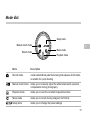
2. Set the mode dial to the
mode and SETUP menu
appears.
3. Select USB MODE with the
/
button.
4. Select PC CAMERA with the
/
button and press the
button to confirm.
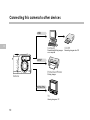
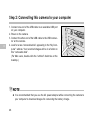
5. Connect one end of the USB cable to an available USB port
on your computer.
6. Connect the other end of the USB cable to the USB connector on the camera.
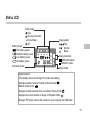
(“PC” is displayed on the status LCD of this camera.)
(You will find “USB PC Camera” displayed on the Device
Manager list by going to Start ➔ Settings ➔ Control Panel
➔ System ➔ Hardware ➔ Device Manager ➔ Imaging devices)
7. Position the camera steadily on top of your computer monitor or use a tripod.
56