1
EPSON EPL-5700i
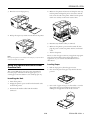
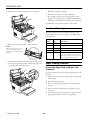
4. Insert the paper tray in the paper cassette.
The printer is factory set for face-down output. To switch the
paper path from face-down to face-up, use the selector located
on the right side of the printer near the back.
Using the Optional Face-up Tray
Using an Optional Memory Module
The printer normally outputs paper face down on top of the
printer. If you want face-up output, you can install the
optional face-up tray (C812861). This tray gives you
immediate viewing of your printed output and is
recommended for printing on media such as labels and
transparencies that require a straight-through paper path.
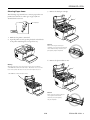
1. Turn off the printer.
By installing a Single In-line Memory Module (SIMM), you
can increase printer memory up to 13MB. You may want to
add additional memory if you are having difficulty printing
complex graphics or if you regularly use numerous
downloaded fonts.
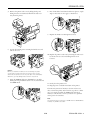
2. Install the face-up tray by inserting the mounting pins into
the corresponding holes, one at a time. Do not force both
sides in at once.
Note:
The maximum amount of memory is 13MB. Even if a 16MB SIMM is
installed, only 13MB is accessible.
You can purchase SIMMs from many vendors. Be sure that
the SIMM you purchase meets the following requirements:
❏ 72-pin, EDO or FPM type
❏ Capacity of 4, 8, or 16MB
❏ Access speed of 60 ns (nanoseconds) or less
❏ Dimensions within 4.25 inches (108 mm) × 1.5 inches
(38 mm), with a thickness of 0.4 inch (10 mm)
Follow these steps to install a memory module:
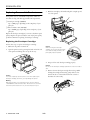
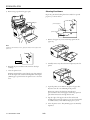
1. Turn off the printer.
Warning:
To avoid electrical shock, do not attempt to install a SIMM unless
the printer is turned off.
2. Unplug the power cord from the electrical outlet.
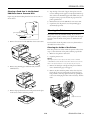
3. Turn the printer so that its right side faces you.
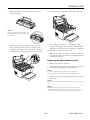
4. Open the printer cover by pressing the latch on the left side
of the printer.
4 - EPSON EPL-5700i
9/99