1
Set Up (Continued)
6
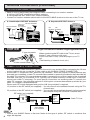
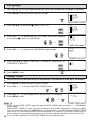
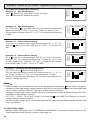
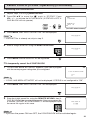
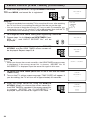
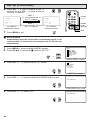
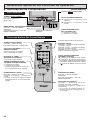
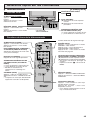
Press VOL k to add a channel to the TV
memory or press VOL l to erase a channel
from the TV memory.
VOL k
To add channel 10 to
the TV memory
CH MEMORY
A IR 10
ERASE
VOLUME
(k)/(l)
CH MEMORY
A IR 10
ADD
(CH MEMORY
unmemorized channel)
VOL l
To erase channel 10 from
the TV memory
ERASE
ADD
CHANNEL
UP (a)/
DOWN (s)
(CH MEMORY
memorized channel)
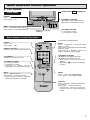
MENU
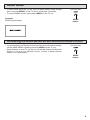
7
Press MENU to exit.
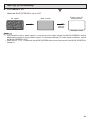
H BLUE SCREEN
Automatically turns the screen blue if a broadcast signal is not
received. After 15 minutes of non-reception, the TV will turn off
automatically.
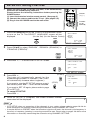
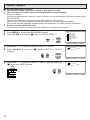
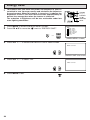
1
2
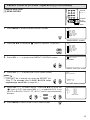
Press MENU to access the MAIN MENU screen.
Press CH a/s to move the “E” mark to “SET UP”.
MENU
→
SLEEP T I MER
V I DEO ADJ UST
AUD I O SEL ECT
CC CLOSED CAPT I ON
PARENT CONTROL
ES ENERGY SAVE
SET UP
(MAIN MENU screen)
3
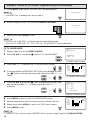
Press VOL k/l to access the SET UP screen.
SET UP
BLUE SCREEN
L ANGUAGE
CH SET T I NG
AUTO I NPUT
(SET UP screen)
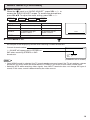
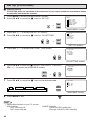
4
Press VOL k/l to access the BLUE SCREEN select screen.
BLUE SCREEN : OFF
(BLUE SCREEN select screen)
5
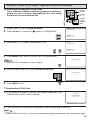
Press VOL k/l to select “ON”.
BLUE SCREEN : ON
30