1
R-590BK
R-590BW
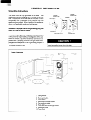
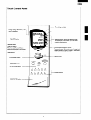
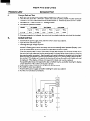
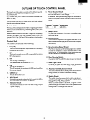
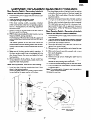
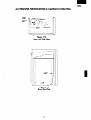
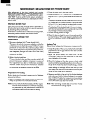
Touch Control Panel
Time of day and date
During setting “Reminder “, this
mark is displayed
1
Big LCD display
Selection button: When the selection arrow
are displayed on the screen, you can select
pressing these buttons.
---I
Reminder mark:
Page turn button:
When forward/ Rewind/ Return
arrows are displayed on the screen,
-.Foreword/Rewind/Return
arrows:
Foreword arrows-Go to next screen (1 page turn
Rewind arrows-Go back to screen (1 page back)
Return arrows-Go back to screen
you can turn pages by pressing
these buttons
BOOK MARK button
INDEX button
--IPOPCORN
POPCORN
STOP/CLEAR
MINUTE
button
PLUS
START/MINUTE
button
_I---
Number buttons
DOOR OPEN button
5
PLUS button