1
5. Press the left soft key
for Send Msg.
6. Highlight the contact and press
to check/uncheck it.
Repeat for any additional contacts that you wish to add.
7. Press the left soft key
for Next.
8. Create the text message to send. See "Text and Multimedia
Messages" on page 53.
Group Options
To add, delete or rename groups:
1. Press the left soft key
2. Press
3. Press
1. _ ’
1. _ ’
3 def
for Menu.
for Contacts.
for Groups.
4. Highlight the desired group, if applicable.
5. Press the right soft key
for Options.
6. Select an option:
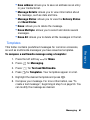
• Add New Group: you can enter the new group name and
press the left soft key
for Done.
• Rename Group: you can rename existing groups. Use
to delete the text. After entering the new name, press the
left soft key
for Done.
• Erase Group: you can delete only the groups that you
have created, not the preprogrammed ones.
Speed Dials
You can assign up to 98 phone numbers from the Contacts list that
you use most frequently to the number keys (2 to 99). You can then
dial them simply by pressing and holding the associated number key.
44 Contacts