1
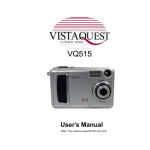
User's Manual
Note: The camera supports SD card only
Downloaded from www.Manualslib.com manuals search engine
250208
For customers in North and South America
For customers in USA
This device complies with Part 15 of the FCC rules. Operation is subject to the following two
conditions:
(1) This device may not cause harmful interference.
(2) This device must accept any interference
received, including interference that may cause
undesired operation.
For customers in Canada
This Class B digital apparatus meets all requirements of the Canadian
Interference-Causing Equipment Regulations.
For customers in Europe
“CE” mark indicates that this product complies with the European
requirements for safety, health, environment and customer protection.
“CE” mark cameras are intended for sales in Europe.
Downloaded from www.Manualslib.com manuals search engine
Table of Contents
Page
1. System Requirements ---------------------------------------------------------------------2. Package Contents --------------------------------------------------------------------------3. Quick Start -------------------------------------------------------------------------------------4. Name of Parts ---------------------------------------------------------------------------------5. Display Information -------------------------------------------------------------------------6. Getting Started -------------------------------------------------------------------------------• Installing Camera Batteries -------------------------------------------------------------• Inserting SD Card (Optional) -----------------------------------------------------------• Turning On the Camera ------------------------------------------------------------------• Setting the Date, Time and Date Stamp ---------------------------------------------• Power Saving -------------------------------------------------------------------------------7. Taking Pictures ------------------------------------------------------------------------------• Taking a Picture ----------------------------------------------------------------------------• Taking Continuous Pictures -------------------------------------------------------------• Using Digital Zoom ------------------------------------------------------------------------• Using Flash Light --------------------------------------------------------------------------• Setting Picture Quality --------------------------------------------------------------------• Putting Yourself in the Picture ----------------------------------------------------------8. Taking Videos ---------------------------------------------------------------------------------• Taking a Video ------------------------------------------------------------------------------9. Reviewing Pictures and Videos --------------------------------------------------------• Reviewing Pictures and Videos --------------------------------------------------------• Viewing Six Pictures ----------------------------------------------------------------------• Using Slide Show --------------------------------------------------------------------------• Magnifying Pictures -----------------------------------------------------------------------• Selecting Pictures for Printing (DPOF Print Settings) -----------------------------
Downloaded from www.Manualslib.com manuals search engine
1
1
2
4
6
8
8
9
9
10
10
11
11
11
12
12
13
14
14
14
15
15
15
16
16
16
Table of Contents
Page
10. Deleting Pictures and Videos ----------------------------------------------------------• Deleting Single Picture or Video -------------------------------------------------------• Deleting All Pictures and Videos -------------------------------------------------------• Formatting Internal Memory or SD Card ---------------------------------------------11. Customizing Your Camera Settings -------------------------------------------------* Capture Function Menu -----------------------------------------------------------------* Playback Function Menu ---------------------------------------------------------------12. Installing Your Camera Driver and Software --------------------------------------13. Uninstalling Software --------------------------------------------------------------------• Uninstalling Software ---------------------------------------------------------------------• Uninstall Camera's Driver ----------------------------------------------------------------14. Downing Images to Your Computer --------------------------------------------------15. ArcSoft PhotoImpression 5 ------------------------------------------------------------16. ArcSoft VideoImpression 2 -------------------------------------------------------------17. Using the Camera in PC Cam Mode -------------------------------------------------18. Checking the Connection of Your Camera ----------------------------------------19. Internet Video Conference --------------------------------------------------------------Appendix ------------------------------------------------------------------------------------------Specifications ----------------------------------------------------------------------------------
17
17
17
18
19
19
24
25
26
26
26
27
28
29
32
33
34
35
35
FAQ -----------------------------------------------------------------------------------------------
36
Troubleshooting -------------------------------------------------------------------------------
37
39
Safety Precautions ---------------------------------------------------------------------
Downloaded from www.Manualslib.com manuals search engine
1. System Requirements
• Personal computer, laptop, desktop, or IBM compatible with Pentium 166 MHz minimum, and
with an active USB (Universal Serial Bus) port.
• Windows 98 SE / ME / 2000 / XP / Vista, CD ROM drive, color monitor, mouse and keyboard.
• Color printer for printing color pictures.
• For transferring still images via the Internet, or for video conferencing, your computer must
have modem and communication software for Internet connection.
2. Package Contents
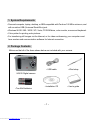
Make sure that all of the items shown below are included with your camera.
• USB cable
• Wrist strap
• Installation CD
• User’s guide
•VQ515 Digital camera
• Two AAA batteries
-1-
Downloaded from www.Manualslib.com manuals search engine
3. Quick Start
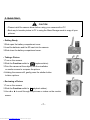
CAUTION
• Please install the camera driver before using your camera with a PC.
• Best way to transfer picture to PC is using the Mass Storage mode to copy all your
pictures.
• Getting Ready
1.Slide open the battery compartment cover
2.Load the batteries and the SD card into the camera.
3.Slide close the battery compartment cover.
• Taking a Picture
1.Turn on the camera.
2.Slide the Function switch to
(capture status).
3.Point the camera at the subject, use the viewfinder
or monitor screen to compose the picture.
4.Holding the camera still, gently press the shutter button
to take a picture.
• Reviewing a Picture
1.Turn on the camera.
2.Slide the Function switch to ► (playback status).
3.Use ◄ or ► to scroll through the pictures or videos on the monitor
screen.
-2-
Downloaded from www.Manualslib.com manuals search engine
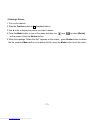
• Deleting a Picture
1.Turn on the camera.
2.Slide the Function switch to ► (playback status).
3.Use ◄ or ► to display the picture you want to delete.
4.Press the Mode button to turn on the menu and then use
on the screen. Press the Shutter button.
and
to select [Delete]
5.When the message “Delete this file?” appears on the screen,press Shutter button to delete
the file; press the Menu button not to delete this file; press the Mode button to exit the menu.
-3-
Downloaded from www.Manualslib.com manuals search engine
4. Name of Parts
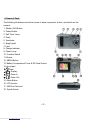
The following illustrations show the names of each component, button, and switch on the
camera.
1. Shutter (OK) Button
2. Power Button
3. Self Timer Lamp
4. Flash
5. Viewfinder
6. Strap Eyelet
7. Lens
8. Charge Indicator
9. Power Lamp
10. Function Switch
11. Buzzer
12. MENU Button
13. Battery Compartment Cover & SD Card Socket
14. Arrow pad
/ : Flash
/
: Display
/
: Zoom In
/
: Zoom Out
15. Mode Button
16. LCD monitor
17. USB Port Terminal
18. Tripod Socket
-4-
Downloaded from www.Manualslib.com manuals search engine
Indicators
1.Indicator Lamp (Green)
2.Self-Timer Lamp (Red)
3.Power Lamp
Digital Interface:
USB 1.1
DIGITAL ZOOM
During shooting, user can push
and
to zoom in and zoom out.
Display Button
Press the Right button and the current information on the LCD monitor will be displayed.
Menu Button
You can turn the menu ON or OFF by pressing the Menu button. As menu turn on, the items
appear, use the ▲ and ▼button to select and press the ◄ or ► button to enter each menu
item.
-5-
Downloaded from www.Manualslib.com manuals search engine
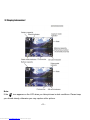
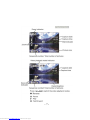
5. Display Information
Note:
If the
icon appears on the LCD when you take pictures in dark conditions. Please keep
your hands steady, otherwise you may capture a blur picture.
-6-
Downloaded from www.Manualslib.com manuals search engine
-7-
Downloaded from www.Manualslib.com manuals search engine
6. Getting Started
• Installing Camera Batteries:
1.Slide open the battery compartment cover.
2.Insert batteries. Be sure to load batteries with + and – terminals as shown on the camera.
3.Slide close the battery compartment cover.
-8-
Downloaded from www.Manualslib.com manuals search engine
• Inserting SD Card:
The camera requires SD card for storing pictures and videos:
SD Card – The SD cards provide removable, reusable storage for pictures and videos. Store
as many pictures as you like, depending on the size of the card.
CAUTION:
The card can only be inserted one way; forcing it may damage the camera or card. Do
not insert or remove a card when power is on.
To insert an SD card:
1. Turn off the camera and open the battery compartment cover.
2. Orient the card as shown. Push the card into the slot to the connector.
3. Firmly to remove the card, push it in, and then release it.
When the card is partially ejected, pull it out.
4. Close the battery compartment cover.
Note: If the “MEMORY FULL” warning message appears on the LCD monitor, it means the SD
card is full. Please remove the memory and insert a new one or move/store all
picture/video in memory to your computer.
• Turning On the Camera:
1.Press the ON/OFF button on as shown in the illustration.
2.Buzzer will beep and indicator lamp will light. The LCD monitor will be
turned on.
3.Press the ON/OFF button again to shutdown the camera.
-9-
Downloaded from www.Manualslib.com manuals search engine
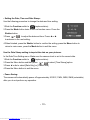
• Setting the Date, Time and Date Stamp:
Use the following procedure to change the date and time setting.
1.Slide the Function switch to
(capture status).
2.Press the Mode button twice to turn on function menu. Press the
Shutter button.
3.Press
or
to adjust the date and time. Press ◄ or ►
to advance to the next setting.
4.When finished, press the Shutter button to confirm the setting; press the Menu button to
return to main menu, press the Mode button to exit the menu.
Use the Date Stamp setting to imprint the date on your pictures.
In the Date Time Setting menu. Make sure the camera clock is set to the correct date.
1.Slide the Function switch to
(capture status).
2.Press the Menu button and then press
or
to select [Time Stamp] option.
3.Press ◄ or ► to select [Date Only] or [ Date&Time]
4.Press the Menu button to exit the menu.
• Power Saving:
The camera will automatically power off approximately 30 SEC, 1MIN, 3MIN, 5MIN (selectable)
after you do not perform any operation.
- 10 -
Downloaded from www.Manualslib.com manuals search engine
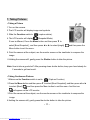
7. Taking Pictures
• Taking a Picture
1.Turn on the camera.
2.The LCD monitor will display image and symbols.
3. Slide the Function switch to
(capture status).
4. The LCD monitor will display
(Snapshot Mode).
If icon is different, Press the Menu button and then press ▼ to
select [Burst Snapshot ], and then press ◄ or ► to select [single]
and then press the
Menu button to exit the menu.
5. Point the camera at the subject; use the monitor screen or the viewfinder to compose the
image.
6.Holding the camera still, gently press the Shutter button to take the picture.
Note: How to take a good shot? After pressing down shutter button, keep your hand steady for
2 seconds to get best result.
• Taking Continuous Pictures
1.Make sure the Function switch is set to
. (Capture Function)
2.Press the Menu button and then press ▼ to select [Burst Snapshot], and then press ◄ or ►
to select [Burst]
and then press the Menu button to exit the menu. And the icon
will appear on the LCD monitor.
3.Point the camera at the subject; use the monitor screen or the viewfinder to compose the
image.
4.Holding the camera still, gently press the shutter button to take the picture.
- 11 -
Downloaded from www.Manualslib.com manuals search engine
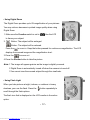
• Using Digital Zoom
The Digital Zoom provides up to 8X magnification of your pictures.
You may notice a decrease in printed image quality when using
Digital Zoom.
1. Make sure the Function switch is set to
. Use the LCD
to frame your subject.
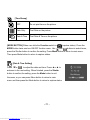
2.
Button: The subject will be enlarged.
Button: The subject will be reduced.
Press the
to zoom in. Keep the button pressed for continuous magnification. The LCD
displays the zoomed image and the magnification level.
3.Press the
to zoom out.
4.Press the Shutter button to take the picture.
Note: 1.The image will appear grainier as the image is digitally zoomed.
2.Digital Zoom is automatically turned off when the camera is turned off.
3.You cannot view the zoomed subject through the viewfinder.
• Using Flash Light
When you take pictures at night, indoors, or outdoors in heavy
shadows, your use the flash. Press the
button repeatedly to
scroll through the flash options.
The flash icon that is displayed on the LCD monitor is the active
option.
- 12 -
Downloaded from www.Manualslib.com manuals search engine
Off—flash never fires. (Default)
Auto Flash—flash fires when the lighting conditions require it.
Force Flash—flash fires every time you take a picture, regardless of the lighting
conditions.
• Setting Picture Quality
Use the Quality setting to select a picture resolution:
1.Make sure the Function switch is set to
, and then press the Menu button.
2.Select an option with ◄ or ►:
5M (2560x1920) — for enlarged picture size; produces higher picture resolution and larger
file size.
3M (2048x1536) — for standard picture size; produces normal picture resolution and middle
file size.
2M (1600x1200) — for small picture size; pictures are of lower resolution and file size is
smaller.
3.Press the Menu button to confirm to return to capture status and you will see the icon 5M/3M
/2M on the LCD.
Note: 1.This setting remains until you change it.
2.Movies can be shot with the CIF (320 x 240) or VGA (640 x 480) resolution.
- 13 -
Downloaded from www.Manualslib.com manuals search engine
• Putting Yourself in the Picture
The Self Timer creates a default delay between the time you press the Shutter button and the
time the picture is taken. This setting is ideal when you want to include yourself in the picture.
1.Make sure the Function switch is set to
.
2.Press the Menu button Press the Menu button and then press ▼ to select [Selftimer].
3.Press ◄ or ► to select [10SEC], [15SEC], [20SEC]. Press the Menu button to return to
capture status.
3.Place the camera on a flat surface or use a tripod.
4.Compose the picture, then press the Shutter button all the way down.
5.The red Self Timer light, located on the front of the camera, blinks for 10,15,20 seconds
(selectable) and you will see the counter on the LCD before the picture is taken.
8. Taking Videos
• Taking a Video
1.Turn on the camera.
2. The LCD monitor will display image and symbols.
3. Slide the Function switch to
(Capture Function).
4. Press the Mode button once, the icon
appears
on the LCD monitor. (Video Mode)
5. Frame your subject on the LCD or viewfinder, then press the Shutter
button to take the video.
6.Press the Shutter button again to stop recording.
Note: 1. During recording, user can press the
/
button for zoom in/out.
2. The video resolution is CIF (320 x240) and VGA (640 X 480). It’s will show icon
“
” or “
” on LCD in Video mode.
3. You can select video resolution use the [Video Resolution] .
- 14 -
Downloaded from www.Manualslib.com manuals search engine
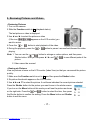
9. Reviewing Pictures and Videos
• Reviewing Pictures
1.Turn on the camera.
2.Slide the Function switch to ► (playback status).
The last picture or video is displayed.
3.Use ◄ and ► to select the picture or video
(If the icon
appears on the LCD monitor) you
want to review.
4.Press the
or
button to start playback of the video.
5.During the playback, press the
or
button to pause / resume/back/forward the video
playing.
Note: 1. You can use the
or
button to enlarge or reduce picture, and then press
Shutter button. Now you can press ◄ / ► and
/
to see different parts of the
picture.
2. Video cannot be zoomed.
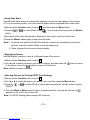
• Viewing six Pictures
View six pictures at once on the LCD monitor (Index View) so that you can search the picture
quickly.
1.Make sure the Function switch is set to ►, and then press the Shutter button.
2.Six picture thumbnails appear on the LCD monitor.
3.Use ◄ ►or▲ ▼ to select the picture. A red-frame indicates the current picture selected.
Press the Shutter button for the picture you want to see in the whole screen.
If you turn on the Menu button at this mode you will see the picture as shown
on the right side. Press the
and
button to select the item, then press
the Shutter button to confirm the setting. Press the Menu button and Shutter
button to exit the menu.
- 15 -
Downloaded from www.Manualslib.com manuals search engine
• Using Slide Show
Use the Slide Show feature to sequentially display your pictures and videos on the camera
LCD, on a television screen, or on any external display device equipped with a video input.
1.Make sure the Function switch is set to ►, and then press the Menu button.
2.Press the
or
to select [Slide Show]
on the screen and then press the Shutter
button.
3.Each picture and video thumbnails is displayed in the order in which you took them.
4.Press the Shutter button again to stop the slide show.
Note: 1. Once the user selects the Slide Show Mode, camera will automatically play all the
pictures. Press the shutter button to stop the slide show.
2. Video is played like the way of playing option.
• Magnifying Pictures
Use the Magnify feature to zoom in to different areas of the picture.
1.Make sure the Function switch is set to ►.
2.Use ◄ or ► to select the picture you want to enlarge, and then press the
in the picture; press the
button to zoom out the picture.
button to zoom
Note: Videos cannot be enlarged.
• Selecting Pictures for Printing (DPOF Print Settings)
1.Make sure the Function switch is set to ►.
2.Use ◄ or ► to select the picture you want to print, and then press the Menu button.
3.Press the
ON/OFF.
or
to select [Print] on the screen and press the ◄ or ► button to select
4. Press the Mode or Menu button to return to playback status. And you will see the icon
appears on the LCD if you choose ON.
Note: The DPOF printing feature support SD card only.
- 16 -
Downloaded from www.Manualslib.com manuals search engine
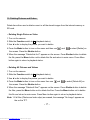
10. Deleting Pictures and Videos
Delete item allow user to delete current or all the stored images from the internal memory or
SD card.
• Deleting Single Picture or Video
1.Turn on the camera.
2.Slide the Function switch to ► (playback status).
3.Use ◄ or ► to display the picture you want to delete.
4.Press the Mode button to turn on the menu and then use
the screen. Press the Shutter button.
and
to select [Delete] on
5.When the message “Delete this fire?” appears on the screen. Press Shutter button to delete
the file; press the Menu button not to delete this file and return to main menu. Press Menu
button again to return to playback status.
• Deleting All Pictures and Videos
1.Turn on the camera.
2.Slide the Function switch to ► (playback status).
3.Use ◄ or ► to display the picture you want to delete.
4.Press the Mode button to turn on the menu then use
the screen. Press the Shutter button.
and
to select [Delete All] on
5.When the message “Delete all files?” appears on the screen. Press Shutter button to delete
the files; press the Menu button not to delete the files. Press the Menu button not to delete
this file and return to main menu. Press Menu button again to return to playback status.
Note: 1.If all files (Photos and video clips) are erased, the message “No Image” appears on
the on the TFT.
- 17 -
Downloaded from www.Manualslib.com manuals search engine
2.Files that are erased cannot be recovered. Make sure you have selected the
images you want to erase.
3.Files that have been protected (see the following section) cannot be erased even if
“Delete All” is selected.
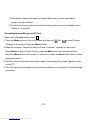
• Formatting Internal Memory or SD Card
1.Make sure the Function switch is set to ►.
2. Press the Mode button to turn on the menu and then use
and
to select [Format
Storage] on the screen. Press the Shutter button.
3.When the message “Format will destroy all data. Continue?” appears on the screen.
Press Shutter button to format the files; press the Menu button not to format the files.
(press the Menu button once to return to main menu, press the Menu button twice to return
to playback status.)
4.If all files (Photos and video clips) are formatted, the message “No Image” appears on the
on the TFT.
5.Files that have been protected (see the following section) can be erased if “Format Storage”
is selected.
- 18 -
Downloaded from www.Manualslib.com manuals search engine
11. Customizing Your Camera Settings
* Capture Status Menu
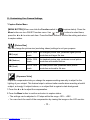
[MENU BUTTON] When user slide the Function switch to
(capture status). Press the
Menu button can turn ON/OFF function menu. Use
and
buttons to select items,
press the ◄ or ► to enter each item. Press the Menu button to confirm the setting and return
to capture status.
[Picture Size]
You can change the picture size (excluding videos) settings to suit your purpose.
5M (Large)
2560 x 1920
pixels
for enlarged picture size; produces higher picture
resolution and larger file size.
3M (Medium)
2048 x 1536
pixels
for standard picture size; produces normal picture
resolution and middle file size.
2M (Small)
1600 x 1200
pixels
for small picture size; produces lower picture
resolution and smaller file size.
[Exposure Value]
Exposure compensation lets you change the exposure setting manually to adjust for the
lighting of your subject. This feature helps to achieve better results when recording a backlit
subject, a strongly lit subject indoors, or a subject that is against a dark background.
1.Press the ◄ or ► to adjust the compensation.
2.Press the Menu button to confirm and return to capture status..
• The settings can be adjusted in 1/2 steps within the range –2EV ~ +2EV.
• You can check the result of the compensation by viewing the image on the LCD monitor.
- 19 -
Downloaded from www.Manualslib.com manuals search engine
[White Balance]
When the white balance is set to match the light source, the camera can take picture more
accurately.
Auto
The camera sets the white balance automatically according to
shooting conditions.
Sunny
Use when shooting at outdoors in sunlight on a clear day.
Cloudy
Use when shooting at outdoors and the sunlight is not enough
such as under cloudy skies, in shade or at dusk.
Tungsten
For recording under tungsten fluorescent lighting.
Fluorescent1
For recording under fluorescent lighting.
Fluorescent2
For recording under fluorescent lighting.
[Burst Snapshot]
Single
Take one picture once.
Burst
Take three pictures once.
[Selftimer]
OFF
Setting the timer off.
10 SEC
Setting the timer in self-timer to 10 second.
15 SEC
Setting the timer in self-timer to 15 second.
20 SEC
Setting the timer in self-timer to 20 second.
- 20 -
Downloaded from www.Manualslib.com manuals search engine
[Time Stamp]
OFF
Do not print time on the picture.
Date Only
Print Date on the picture.
Date & Time
Print Date & Time on the picture.
[MODE BUTTON] When user slide the Function switch to
MODE button twice can turn ON/OFF function menu. Use
(capture status). Press the
and
buttons to select items,
press the Shutter button to confirm the setting. Press Menu button to return to main menu.
Then press Mode button to return to capture status.
[Date & Time Setting]
Press
or
to adjust the date and time. Press ◄ or ► to
advance to the next setting. When finished, press the Shutter
button to confirm the setting; press the Mode button to exit
the menu, or you can press Menu button to return to main
menu and then press the Mode button to return to capture status.
- 21 -
Downloaded from www.Manualslib.com manuals search engine
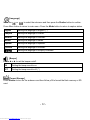
[Language]
Press the
or
to select the submenu and then press the Shutter button to confirm.
Press Menu button to return to main menu. Press the Mode button to return to capture status.
English
Setting the language to English. (*)
Français
Setting the language to French.
Deutsch
Setting the language to German.
Italiano
Setting the language to Italian.
Español
Setting the language to Spanish.
Русский
Setting the language to Russian.
简体中文
Setting the language to Simplify Chinease.
[Beeper]
Press ◄ or ► to set the beeper on/off .
ON
Setting the beep sound to on.
OFF
Setting the beep sound to off. (*)
[Format Storage]
Press Shutter to turn on the submenu and then follow p18 to format the flash memory or SD
card.
- 22 -
Downloaded from www.Manualslib.com manuals search engine
[Auto Power Off]
Press ◄ or ► to set the time of auto power off .
30SEC
Setting the camera automatically powers off approximately 30 seconds.
1MIN
Setting the camera automatically powers off approximately 1 minute.
3MIN
Setting the camera automatically powers off approximately 3 minutes.
5MIN
Setting the camera automatically powers off approximately 5 minutes.
[Light Freq.]
Setting the flicker frequency to 50 Hz.
Setting the flicker frequency to 60 Hz. (*)
[Default Setting]
Press Shutter to turn on the submenu and then press Shutter button again to confirm or press
Menu button not to return to default setting.
[System Info.]
Press Shutter to see the version and then press Menu button return to main menu.
- 23 -
Downloaded from www.Manualslib.com manuals search engine
* Playback Status Menu
[Menu Button] When you slide the Function switch to ► (Playback Status), pressing Menu
button can turn ON/OFF Playback status menu. Press
and
to select the item.
Press the shutter button to start/stop slide show.
Use ◄ or ► button to set Protect and Print to On/OFF.
Slide Show
to Slide Show.
Protect
to protect picture. (on-lock/off-unlock)
print
to print picture. (on-print/off-not print)
[Mode Button] When you slide the Function switch to ► (Playback Status), pressing Mode
button can turn ON/OFF Delete menu. Press
and
to select the item.
Press the shutter button to turn on the submenu of delete/format and then press the shutter or
menu button to delete/format or not to delete/format the pictures.
[Delete]:
Delete item allow user to delete current or all the stored images from the memory.
Delete One
to delete (erase) current picture or video.
Delete All
to delete (erase) all pictures or videos.
Format
to format the flash memory or SD card.
- 24 -
Downloaded from www.Manualslib.com manuals search engine
12. Installing Your Camera Driver and Software
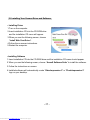
• Installing Driver
1.Turn on the computer.
2.Insert installation CD into the CD-ROM drive
and the installation CD menu will appear.
3.When you see the following screen, choose
“Install Web Cam Driver”.
4.Follow the on-screen instructions.
5.Restart the computer.
• Installing Software
1.Insert installation CD into the CD-ROM drive and the installation CD menu should appear.
2.When you see the following screen, choose “Arcsoft Software Suite” to install the software.
3.Follow the instructions on screen.
4.Installed software will automatically create “VideoImpression 2” or “PhotoImpression 5”
logo on your desktop.
- 25 -
Downloaded from www.Manualslib.com manuals search engine
13. Uninstalling Software
Following instruction will guide you to uninstall (remove) software from computer.
• Uninstalling Software
1.Click "Start" from the task bar and choose "Settings" -> "Control Panel". (For Windows XP:
"Start" -> "Control Panels")
2.Double click "Add/Remove Programs".
3.Select the program to be uninstalled: "Arcsoft Software Suite".
4.Click on "Remove Program" (For Windows 2000/XP: "Change/Remove") and then "OK".
• Uninstall Camera's Driver
1.Click "Start" from the task bar and choose "Settings" -> "Control Panel". (For Windows XP:
"Start" -> "Control Panels").
2.Double click "Add/Remove Programs".
3.Select the program to be uninstalled "STK02N 2.0".
4.Click on "Remove Program" (For Windows 2000/XP: "Change/Remove") and then "OK".
- 26 -
Downloaded from www.Manualslib.com manuals search engine
14. Downloading Images to You Computer
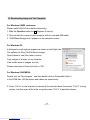
For Windows 98/ME customers:
Please install VQ3015 drive before connecting.
1. Slide the Function switch to ► (Playback Function).
2. Then connect the camera to the computer with the included USB cable.
3. “USB Mass Storage drive” appears on the computer screen.
For Windows XP:
A dialogue box with options appears as shown on the Right side.
The options are Play, Find/Fix/Share Images.
Open folders to view files, take no action,
Copy images to a folder on my computer,
View a slide show of images, and etc.
Please select one of them and click on “OK”.
For Windows 2000/ME/98:
Double click on “My computer”, and then double click on Removable Disk (i:)
in the DCIM files. (All the photos and videos are stored here).
3. Press “Ctrl+A” on the keyboard to choose all the photos/videos, then press “Ctrl+C” to copy
photos, and then open a file in the computer, press “Ctrl+V” to paste the photos.
- 27 -
Downloaded from www.Manualslib.com manuals search engine
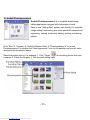
15. ArcSoft PhotoImpression 5
ArcSoft PhotoImpression 5 is a complete digital image
editing application designed with real people in mind.
Easy-to-use “Getting Start” guides, user-friendly UI, complete
image editing functionality, give users wonderful experience to
organizing, viewing, enhancing, editing, printing and sharing
photos.
Click “Start”Æ “Program”Æ “ArcSoft Software Suite“Æ “PhotoImpression 5” to launch
PhotoImpression 5 or double click PhotoImpression 5 icon on the desktop and you will see a
window as the screenshot above.
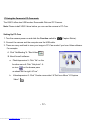
Select the picture source. For example: 1. Click “Folder”
for acquiring photos from your
computer 2. Select the file path. 3. You can start editing them.
- 28 -
Downloaded from www.Manualslib.com manuals search engine
1.
Get Photo – Choose how to view or acquire photos.
2.
Enhance – Crop, brighten, rotate, resize and modify photos.
3.
Create – Add clip art, special effects, frames and more.
4.
Project – Make calendars, photo books and greeting cards.
5.
6.
Print – Print multiple images per page and multiple pages at one time.
Send – Email photos or upload them to online photo sharing accounts.
Note﹕For more detailed information, please refer to the Help of the program.
16. ArcSoft VideoImpression 2
ArcSoft VideoImpression 2 creates home movies
and slide shows by combining existing videos, still
images, exciting scene transitions, and multiple
audio tracks. Though simple to use, the program
provides intense and broad video editing and export
options perfect for owners of digital still cameras,
desktop and digital video cameras, and camcorders.
Click “Start”Æ “Program”Æ “ArcSoft Software Suite“Æ “VideoImpression 2” to launch
VideoImpression 2 or double click VideoImpression 2 icon on the desktop and you will see a
window as the screenshot above.
Open a Project – Let you browse the project files in the VideoImpression system folder. By
“project,” we mean to say a file that contains all of the settings and each individual
component on the Storyboard. When you save your work as a project, you can go back and
swap components, add and remove them, alter audio, etc.
- 29 -
Downloaded from www.Manualslib.com manuals search engine
Create a Video – Create a new video project. You can retrieve media materials from the
device connected or choose media files from system folder. You can choose video materials
from your photo album as well.
Create a Slide Show – Create a slide show project. You can retrieve media materials from
the device connected or choose media files from system folder. You can choose slide show
materials from your photo album as well.
If the box “Always show this wizard when VideoImpression starts.” at the bottom of the
wizard is checked, the wizard will appear each time you run the program. If you'd like to skip
the wizard the next time, uncheck the box.
Select the item you desire and the picture and videos you need then you will enter the
editing interface as below.
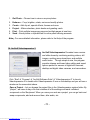
You can use the six steps in the Function Menu to create video clips and slide shows.
1. Media - Select the videos and images that will comprise your final movie or slide show.
2. Edit - Modify video and image color and adjust the duration of each movie component. Only
available for video projects.
- 30 -
Downloaded from www.Manualslib.com manuals search engine
3. Effects - Add neat special effect transitions between each component, or apply a pre-made
theme.
4. Text - Place animated text on any movie component.
Only available for video projects.
5. Narrate - Record audio directly from the program and add it to your movie.
6. Produce - Combine all components to create your final video; save it in a variety of ways or
email it to friends.
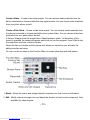
The Storyboard - The backbone of the creation process, it's where you assemble your movie.
The Player - Preview and modify your movies in this area.
Working with Albums - Albums let you organize your media for easy access.
Note: For more detailed information, please refer to the [Help] of the program.
- 31 -
Downloaded from www.Manualslib.com manuals search engine
17.Using the Camera in PC-Cam mode
The VQ515 offers two USB modes: Removable Disk and PC Camera.
Note: Please install VQ515 drive before you can use the camera in PC-Cam.
Setting Up PC-Cam
1. Turn the camera power on and slide the Function switch to
(Capture Status).
2. Connect the camera and the computer use the USB cable.
3. There are many methods to view your image in PC-Cam mode if you have Video software.
For example:
A. Click “NetMeeting”Æ “Start Video”.
B. About Arcsoft software:
a. PhotoImpression 5: Click “file” on the
function menuÆ Click “Get photo” Æ
an icon
on the browse pane
as shown on the right Æ“Live”.
b.
VideoImpression 2: Click “Create a new video”Æ“Get from Album”Æ“Capture
Video”.
- 32 -
Downloaded from www.Manualslib.com manuals search engine
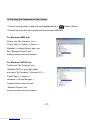
18.Checking the Connection of Your Camera
*Turn the camera power on and slide the Function switch to
*Connect the camera to the computer with the included USB cable.
For Windows 98/ME only
Double click “My Computer” icon ->
Control Panel -> System -> Device ->
Manager -> Imaging Device; when you
See “Standard Camera” that
means now the camera is installed.
For Windows 2000/XP only
Double click “My Computer” icon
(Windows 2000) or go to Start button
and select “My Computer” (Windows XP) ->
Control Panel -> System ->
Hardware -> Device Manager ->
Imaging Device; when you see
“Standard Camera” that
means now the camera is installed.
- 33 -
Downloaded from www.Manualslib.com manuals search engine
(Capture Status).
19. Internet Video Conferencing
To run a video conference with another person, you and the other person must have the
computer station configured with web camera, microphone, speakers, modem and have
access to the Internet.
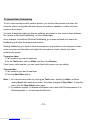
You have to download video conference software, purchased or free, such as basic software
like I-phone or Microsoft NetMeeting, or Yahoo Messenger.
As an example: to download Windows NetMeeting, go to www.microsoft.com search for
NetMeeting and follow the download procedure.
Starting NetMeeting, you have to follow the simple set up procedure on the computer screen,
enter your personal information and adjust the microphone volume. Here's how video
conferencing works:
To receive video:
1.Call someone you want to see/hear.
2.On the Tools menu, point to Video, and then click Receive.
If you have a video camera, you can send video to the person you are calling.
To send video
1.Call someone you want to see/hear.
2.Click the Start Video button.
Note: 1. You can also send video by clicking the Tools menu, pointing to Video, and then
clicking Send. After starting the video, the button changes to Stop Video. To stop the
video, click the Stop Video button again.
2. For software support, or detailed information how to work with PhotoImpression 5 or
VideoImpression 2 – contact www.ArcSoft.com.
- 34 -
Downloaded from www.Manualslib.com manuals search engine
Appendix:
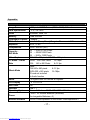
Specifications
Image Sensor
Lens Specification
Flash
Memory
Continuous Capture
White Balance
Exposure
Compression
Capacity –
Still Mode
Video Capture
PC Mode – Frame
Rate
Movie Mode
Zoom
LCD Display
Self-Timer
Interface
Operating System
Power
Bundled Software
3.2M pixels CMOS Sensor (2048 x 1536), 1/2-inch
F 2.8, f =9.3 mm
Automatic, force, Off
16MB SDRAM
3 Images
Automatic/Sunny/Cloudy/Tungsten/Fluorescent 1/ Fluorescent 2
-2 EV ~ 2 EV
JPEG / MJPEG (AVI)
5M --- 2560 x 1920 Pixels
3M --- 2048X1536 Pixels
2M ---1600 x 1200 Pixels
VGA 640 x 480 pixels; CIF 320 x 240 pixels
QVGA 320 x 240 Pixels
15~18fps
VGA
640 x 480 Pixels
8~12 fps
Video :
VGA 640 x 480 pixels
8~12 fps
QVGA 320 x 240 pixels
15~18fps
SD card not included
No Audio function
8 x Digital Zoom for Preview & Playback
1.5” LTPS LCD
Yes
USB 1.1
Microsoft Windows 98 SE / ME / 2000 / XP / Vista
2 AAA 1.5V Alkaline Batteries (included)/
Re-chargeable Batteries x 2)
ArcSoft PhotoImpression 5 and Arcsoft VideoImpression 2
- 35 -
Downloaded from www.Manualslib.com manuals search engine
FAQ
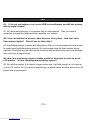
Q1: If I do not use batteries, can I use an USB cord and Adaptor and still take pictures
with my digital camera?
A1: No, when taking pictures, it is important that you use batteries.
remember to charge the batteries before operating your camera.
Also, you have to
Q2: I have noticed that the pictures I have taken are all very dark.
these pictures lighter? Should I use the flash often?
How can I make
A2: Avoid taking pictures in places with little lighting. When it is cloudy, please use other means
to create more light before taking pictures. We recommend using the flash function during
nighttime. During the day, the flash may be too strong and the picture may come out too bright,
thus use it only during the night.
Q3: After I am done taking a picture, it takes a while for the picture to come up on the
LCD monitor. Is there something wrong with my camera?
A3: No, with the camera, if you select a larger picture size, it will take longer for it to come up
on the LCD monitor. So if you want to speed things up, please select a smaller picture size. (M
picture size is recommend)
- 36 -
Downloaded from www.Manualslib.com manuals search engine
Troubleshooting
Problem
Source
Solution
The camera is not
running
The power is not on
• Press the ON/OFF button to turn the
camera on.
The batteries were not
inserted properly
• The correct direction to insert the AAA
batteries is indicated on the camera.
Batteries are depleted
• Replace with unused alkaline or fully
recharged batteries (two AAA-size
batteries).
The SD card slot/battery
cover is not closed
properly
• Close the cover correctly and securely.
The camera is in the
Playback Function mode
• Slide the function switch to Capture
status.
The flash is charging
• Wait until the flash charges. You can
press the shutter button when the
indicator glows a steady green.
The SD card or internal
memory is already full
• Obtain a new SD card and insert it.
The SD card is not
formatted correctly
• Ask SD card manufacturer for
assistance.
The camera is not
taking pictures.
- 37 -
Downloaded from www.Manualslib.com manuals search engine
• Download images to your computer,
and then erase them from the card to
free up more space.
Problem
Source
Solution
Picture is not clear
The lens is dirty
• Clean the lens.
The pictures are
blurred
Hands were not steady
when taking the picture
• Ensure hands are steady when taking
picture and remain steady one minute
after clicking the Shutter button.
The picture subject was
not in the focus range of
the camera
• Keep a minimum distance of 60 inches
between the picture subject and the
camera lens to stay in the focus range
of the camera.
The flash doesn't
fire
The flash mode is set to
Off
• Set the flash to any other mode except
Off.
The computer
cannot
communicate with
the camera
Camera power is off
• Turn on the camera.
USB cable is not securely
connected
• Connect cable to camera and computer
port.
Driver is not installed (for
Windows 98 user)
• Install the camera driver.
Camera power is off
• Turn on the camera.
USB cable is not securely
connected
• Connect cable to camera and computer
port.
Driver is not installed
• Install the camera driver.
The PC Camera
doesn't work
- 38 -
Downloaded from www.Manualslib.com manuals search engine
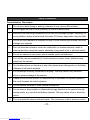
Safety Precautions
Precautions for The camera
1
Do not shoot while driving or walking, otherwise it may cause traffic accident.
2
Do not trigger the flash in close proximity to human or animal eyes.
3
Expose to the intense light produced by the flash may damage eyesight, especially for
young children, please shoot at least one meter (39 inches) away when using the flash.
4
Do not use the viewfinder to compose the sun or other intense light sources that could
damage your eyesight.
5
Don not allow the camera to come into contact with, or became immerse, water or
other liquids when using the camera, otherwise it may result in fire or electrical shock.
6
Do not use camera in rain, snow, and at seaside, pond, and bathroom.
7
Turn off the camera immediately if it emits smoke or noxious fumes, and then keep
away from the camera.
8
Do not take pictures on the plane or any other places where taking picture is forbidden,
otherwise it will lead to accident.
9
Do not attempt to modify this camera in anyway. This may cause a fire, electronic
shock or severe damage to the camera.
10
Please do not use this product in close proximity to flammable or explosive gases as
this could increase the risk of explosion.
11
Do not swallow batteries or small camera accessories.
12
Do not insert or drop metallic or inflammable foreign objects into the camera through
access points, e.g. card slot and battery chamber. This may cause a fire or electronic
shock.
13
Do not operate this camera with wet hands. This could pose a risk of electronic shock.
- 39 -
Downloaded from www.Manualslib.com manuals search engine
14
Under the environment with electrostatic discharge, the camera may malfunction and
require the user to reset the camera.
15
Under the environment with electrical fast transient (EFT), the camera may lose
function and require user to reset the camera.
16
Shield cables must be used with unit to ensure complies with the Class B FCC limits.
17
It is normal that the temperature of the camera body rises after being in use for a long
period.
18
Do not leave the camera in places subject to extremely high temperature, such as in a
sealed vehicle, under direct sunlight, or in other places with extremely variances in
temperature. Exposure to extremely temperature may adversely affect the camera’s
internal components and could cause a fire.
19
Always use the camera and its accessories in a well-ventilated area.
20
Allowing dust to accumulate in the camera over a long period of time is hazardous and
in extreme prior to seasonal periods of high humidity.
- 40 -
Downloaded from www.Manualslib.com manuals search engine
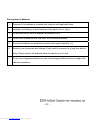
Precautions for Batteries
1
Dispose of the batteries in a manner that complies with applicable laws.
2
Leakage, overheating, or burst batteries could result in fire or injury.
3
Do not short circuit, heat or dispose the batteries on fire.
4
Do not use old batteries with new ones, or mix brands of battery.
5
Ensure the batteries are positioned correctly with regard to polarity (+/-).
6
Batteries may lose power and leakage if kept inside the camera for a long time without
using. Please remove the batteries while the camera is not in use.
7
Do not use manganese batteries as they cannot supply sufficient power to support the
camera’s operations.
- 41 -
Downloaded from www.Manualslib.com manuals search engine