1
Appendices
Playing Movie
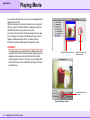
If your camera can shoot movie, you can use ImageBrowser to
handle the movie files.
After shooting movie, connect your camera to your computer.
When you open the Camera Window, it displays a thumbnail
(the first frame of the movie) and a movie mark.
You can import movie files in the Browser Area the same way
you do images. In this case, a thumbnail and a movie mark
appear in the Browser Area. When you double-click the
thumbnail, QuickTime Player starts and plays the movie.
REFERENCE
If you drag a movie for importation in the Browser Area from
a window other than the Camera Window, depending on the
computer environment and movie format, the thumbnail
might not appear at once. In this case, you can double-click
the QuickTime movie icon and QuickTime Player starts and
plays the movie.
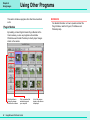
Thumbnail with movie mark
QuickTime movie icon
with movie mark
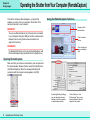
Use this button to play
the movie.
QuickTime Player window
70
ImageBrowser Software Guide