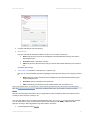
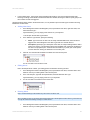
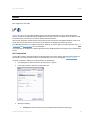
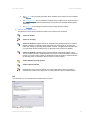
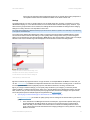
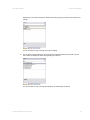
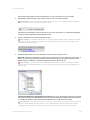
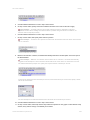
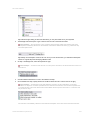
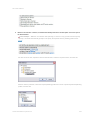
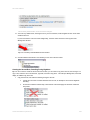
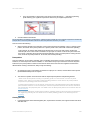
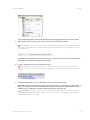
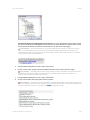
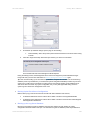
1
Recording Component (RC-E) User Manual i © 2012 On-Net Surveillance Systems Inc. On-Net Surveillance Systems, Inc. One Blue Hill Plaza, 7th Floor, PO Box 1555 Pearl River, NY 10965 Phone: (845) 732-7900 | Fax: (845) 732-7999 Web: www.onssi.com 000042012-1147-RC-E4.0-OC2.0.2 Legal Notice This product manual is intended for general information purposes only, and due care has been taken in its preparation. Any risk arising from the use of this information rests with the recipient, and nothing herein should be construed as constituting any kind of warranty. © 2002-2012 On-Net Surveillance Systems, Inc. All rights reserved. OnSSI and the ‘Eye’ logo are registered trademarks of On-Net Surveillance Systems, Inc. Ocularis, Ocularis Client, Ocularis Client Lite, Ocularis Video Synopsis, NetEVS, NetDVMS, NetDVR, ProSight, NetGuard, NetGuard-EVS, NetSwitcher, NetMatrix, NetCentral, NetTransact, NetPDA and NetCell are trademarks of On-Net Surveillance Systems, Inc. All other trademarks are property of their respective owners. On-Net Surveillance Systems, Inc. reserves the right to change product specifications without prior notice. Patents Applied For in the U.S. and Abroad ii RC-E User Manual Table of Contents Table of Contents Introduction ..................................................................................................1 Updates ...............................................................................................................................................................................2 System Requirements ...................................................................................3 Ports ....................................................................................................................................................................................4 Tokens.................................................................................................................................................................................6 Installation ...................................................................................................7 Prerequisites....................................................................................................................................................................7 Installing the Management Server ...................................................................................................................................8 Installing the Recording Server......................................................................................................................................12 Installing a Failover Server ............................................................................................................................................14 Installing the Management Client ..................................................................................................................................16 Virtualization......................................................................................................................................................................19 Multiple Server Instances ..................................................................................................................................................19 Troubleshooting.................................................................................................................................................................22 Upgrading..........................................................................................................................................................................25 Server Services Administration ...................................................................28 Download Manager: Components Availability..............................................36 Download Manager's Tree Structure Explained ............................................................................................................37 Installing New Components on Management Server ....................................................................................................38 Management Client: System Administration................................................39 Management Client's Menus .............................................................................................................................................42 Federated Architecture......................................................................................................................................................47 What is a Federated Site? .............................................................................................................................................47 Working with Federated Architecture.............................................................................................................................52 Alerts .................................................................................................................................................................................57 Archiving.....................................................................................................60 Back Up Archives Rather than Camera Databases.......................................................................................................62 Knowing Archive Structure Lets You Target Backups ...................................................................................................62 Viewing Backed-Up Archives.........................................................................................................................................62 Back Up Archives Rather than Camera Databases.......................................................................................................67 Knowing Archive Structure Lets You Target Backups ...................................................................................................67 Viewing Backed-Up Archives.........................................................................................................................................67 Audio...........................................................................................................69 AVI Compression ..............................................................................................................................................................69 Cameras ......................................................................................................71 Info.................................................................................................................................................................................72 Settings..........................................................................................................................................................................74 Streams .........................................................................................................................................................................76 Recording ......................................................................................................................................................................78 How Does Prebuffering Work? ......................................................................................................................................79 Enabling and Disabling Prebuffering .............................................................................................................................80 Specifying Prebuffer Size ..............................................................................................................................................80 Using Prebuffering in Rules ...........................................................................................................................................80 PTZ ................................................................................................................................................................................81 Events............................................................................................................................................................................88 Client..............................................................................................................................................................................91 Motion Detection............................................................................................................................................................92 Defining Exclude Regions..............................................................................................................................................93 Privacy Masking.............................................................................................................................................................95 Device Groups...................................................................................................................................................................96 Events .........................................................................................................99 User-defined Events ......................................................................................................................................................99 Hardware Configurable Events......................................................................................................................................99 User-defined Events ....................................................................................................................................................105 Failover Servers ........................................................................................107 Overview of Failover Servers in Management Client...................................................................................................109 Failover Servers Are Grouped .....................................................................................................................................109 Creating Failover Groups.............................................................................................................................................109 Adding Failover Servers to a Group ............................................................................................................................109 Editing Failover Group Properties................................................................................................................................110 Hardware Detection Wizard ......................................................................115 Assisted Hardware Detection ..........................................................................................................................................117 Help System ....................................................................................................................................................................118 On-Net Surveillance Systems, Inc. iii RC-E User Manual Table of Contents Input ................................................................................................................................................................................118 Inputs .......................................................................................................122 Layout .......................................................................................................124 Licensing ...................................................................................................129 SLC Registration..........................................................................................................................................................130 License Activation........................................................................................................................................................131 Additional Licenses......................................................................................................................................................131 Local IP Address Ranges................................................................................................................................................132 Logging .....................................................................................................133 Logs .............................................................................................................................................................................134 Export ..........................................................................................................................................................................142 NetMatrix ..................................................................................................144 Microphones..............................................................................................145 Info...............................................................................................................................................................................147 Settings........................................................................................................................................................................147 Recording ....................................................................................................................................................................148 How Does Prebuffering Work? ....................................................................................................................................148 Enabling and Disabling Prebuffering ...........................................................................................................................149 Specifying Prebuffer Size ............................................................................................................................................149 Using Prebuffering in Rules .........................................................................................................................................149 Events..........................................................................................................................................................................150 Multicasting ..............................................................................................152 Multi-streaming................................................................................................................................................................154 NAT ...........................................................................................................157 Notification Profiles (E-Mail) .....................................................................159 Outgoing SMTP Mail Server ........................................................................................................................................159 AVI Compression.........................................................................................................................................................159 Options ............................................................................................................................................................................162 Output.......................................................................................................165 Public Addresses.............................................................................................................................................................169 Recording Servers .....................................................................................171 How to Verify/Change which Management Server a Recording Server Connects to..................................................173 Recording Server Properties .......................................................................................................................................175 Storage .....................................................................................................177 Benefit of Using Failover Groups.................................................................................................................................182 Primary and Secondary Failover Group ......................................................................................................................182 How to Select Required Failover Groups ....................................................................................................................182 Adding Hardware (Cameras, etc.) ...............................................................................................................................185 Managing Added Hardware .........................................................................................................................................188 Disabling ......................................................................................................................................................................191 Enabling.......................................................................................................................................................................191 Enabling.......................................................................................................................................................................193 Disabling ......................................................................................................................................................................193 Hardware Properties .................................................................................194 Archiving ......................................................................................................................................................................196 Back Up Archives Rather than Camera Databases.....................................................................................................199 Knowing Archive Structure Lets You Target Backups .................................................................................................199 Viewing Backed-Up Archives.......................................................................................................................................199 Registered Services ........................................................................................................................................................201 Roles (Users & Rights) ..............................................................................203 Roles............................................................................................................................................................................203 Users & Groups ...........................................................................................................................................................214 Prerequisites................................................................................................................................................................215 Users ...........................................................................................................................................................................215 Groups .........................................................................................................................................................................215 Rules .........................................................................................................221 Deactivating a Rule......................................................................................................................................................229 Activating a Rule..........................................................................................................................................................230 How to Create Typical Rules .......................................................................................................................................245 Basic Rules..................................................................................................................................................................245 PTZ-Related Rules ......................................................................................................................................................245 Prerequisites................................................................................................................................................................245 Creating the Rule.........................................................................................................................................................246 Prerequisites................................................................................................................................................................250 Creating the Rule.........................................................................................................................................................250 On-Net Surveillance Systems, Inc. iv RC-E User Manual Table of Contents Prerequisites................................................................................................................................................................255 Creating the First Rule; Patrolling During Daytime ......................................................................................................256 Creating the Second Rule; Patrolling During Nighttime...............................................................................................259 Prerequisites................................................................................................................................................................260 Creating the Rule.........................................................................................................................................................260 SMTP Mail Server ......................................................................................267 Speakers ...................................................................................................268 Info...............................................................................................................................................................................270 Settings........................................................................................................................................................................270 Recording ....................................................................................................................................................................271 Enabling and Disabling Prebuffering ...........................................................................................................................272 Specifying Prebuffer Size ............................................................................................................................................272 Using Prebuffering in Rules .........................................................................................................................................272 Storage and Archiving .....................................................................................................................................................273 Back Up Archives Rather than Camera Databases.....................................................................................................275 Knowing Archive Structure Lets You Target Backups .................................................................................................275 Viewing Backed-Up Archives.......................................................................................................................................276 Storage Overview............................................................................................................................................................277 Time Profiles .............................................................................................279 User-Defined Events .......................................................................................................................................................283 View Groups....................................................................................................................................................................284 RC-C Servers ..................................................................................................................................................................286 Video Device Drivers .................................................................................289 Ocularis Clients .........................................................................................291 Daylight Saving Time ................................................................................292 Server-side Handling ...................................................................................................................................................292 Client-side Handling.....................................................................................................................................................292 Viewing DST Change Hour Recordings in Access Clients ..........................................................................................292 Backup, Move & Restore............................................................................294 Database Protection ..................................................................................303 SNMP.........................................................................................................304 Virus Scanning ..........................................................................................305 Removal ....................................................................................................306 Contact Information..................................................................................309 On-Net Surveillance Systems, Inc. v RC=E User Manual Introductions Introduction Ocularis ES contains the Recording Component RC-E. RC-E consists of the following main elements: The Management Server is the center of your RC-E installation. o Stores the surveillance system's configuration in a relational database, either on the management server computer itself or on a separate SQL Server on the network. o Runs as a service, and is typically installed on a dedicated server. o Referred to as the RC-E Server (Management Server). The Recording Server o Used for recording video and for communicating with cameras and other devices. In large installations, more than one recording server is often used on the surveillance system. Failover servers can be set up to take over if a recording server becomes temporarily unavailable. o Recording servers as well as failover servers run as services, and are typically installed on separate servers rather than on the management server itself. o Referred to as the RC-E Recorder. The Management Client o Feature-rich administration client for configuration of the system. o Typically installed on the surveillance system administrator's workstation or similar. o Referred to as the RC-E Manager or Management Client. The Download Manager o Lets surveillance system administrators manage which RC-E -related components (e.g. particular language versions of clients) your organization's users will be able to access from a targeted web page generated by the management server. o Automatically installed on the management server during RC-E installation process. o Referred to as the NVR Download Manager. RC-E handles an unlimited number of cameras, servers, and users— across multiple sites if required. On-Net Surveillance Systems Inc. 1 RC=E User Manual Introductions Example of an RC-E solution. The number of cameras and recording servers, as well as the number of connected access clients, can be as high as you require. Legend: 1. Recording Server(s) 2. Failover Server(s) 3. SQL Server 4. Management Server 5. Ocularis Client 6. Ocularis Client 7. Ocularis Client 8. Analog Cameras 9. IP Video Encoder 10. IP Video Cameras 11. Management Client(s) Also, the system offers a standalone Viewer application when exporting video evidence from the Ocularis Client . The Viewer allows recipients of video evidence (such as police officers, internal or external investigators, etc.) to browse and play back the exported recordings without having to install any software on their computers. Updates On-Net Surveillance Systems, Inc. regularly release service updates for our products, offering improved functionality and support for new devices. If you are an RC-E system administrator, it is recommended that you check the OnSSI website www.onssi.com for updates at regular intervals in order to make sure you are using the most recent version of RC-E. On-Net Surveillance Systems Inc. 2 RC-E User Manual System Requirements System Requirements The following are minimum requirements for the computers used with RC-E in an Ocularis ES solution: Computer Running Management Server CPU: Intel® Xeon® , minimum 2.0 GHz (Dual Core recommended) RAM: Minimum 2 GB (4 GB recommended) Hard Disk Type: E-IDE, PATA, SATA, SCSI, SAS (7200 RPM or faster) Operating System: Microsoft® Windows® Server 2008 R2 (64 bit), Microsoft® Windows® Server 2008 (32 or 64 bit), Microsoft® Windows® Server 2003 (32 or 64 bit). Furthermore, to run clustering/failover servers, a Microsoft® Windows® Server 2003/2008 Enterprise or Data Center edition is needed. Software: Microsoft .NET 3.5 SP1 and .NET 4.0 and Internet Information Services (IIS) 5.1 or newer. Computer Running Recording Server or Failover Server CPU: Dual Core Intel Xeon, minimum 2.0 GHz (Quad Core recommended) RAM: Minimum 2 GB (4 GB recommended) Hard Disk Type: E-IDE, PATA, SATA, SCSI, SAS (7200 RPM or faster) Hard Disk Space: Minimum 100 GB free (depends on number of cameras and recording settings; refer to the OnSSI Hardware Calculator) Operating System: Microsoft® Windows® 7 Ultimate (32 bit or 64 bit*), Microsoft® Windows® 7 Enterprise (32 bit or 64 bit*), Microsoft® Windows® 7 Professional (32 bit or 64 bit*), Microsoft® Windows® Server 2008 R2 (64 bit), Microsoft® Windows® Server 2008 (32 or 64 bit*), Microsoft® Windows® Vista® Business (32 or 64 bit*), Microsoft® Windows® Vista Enterprise (32 or 64 bit*), Microsoft® Windows® Vista Ultimate (32 or 64 bit*), Microsoft® Windows® XP Professional (32 or 64 bit*)** or Microsoft® Windows® Server 2003 (32 or 64 bit*) * Note that recording servers will always run 32-bit **Limited by Windows operating system to ten concurrent, incomplete outbound TCP connection attempts Tip: You can run multiple instances of the 32-bit recording server service on servers with 64-bit operating systems and sufficient RAM; see Multiple Recording Server Instances. Software: Microsoft .NET 4.0 Framework. IMPORTANT: When formatting the hard disk of a recording/failover server device, it is important to change its Allocation unit size setting from 4 to 64 kilobytes. This is to significantly improve recording performance of the hard disk. You can read more about allocating unit sizes and find help at http://support.microsoft.com/kb/140365/en-us. Computer Running Management Client CPU: Intel Core2™ Duo RAM: Minimum 2 GB (4GB recommended) Graphics Adapter: AGP or PCI-Express, minimum 1024×768 (1280×1024 recommended), 16 bit colors Hard Disk Space: Minimum 100 MB free On-Net Surveillance Systems Inc. 3 RC-E User Manual System Requirements Operating System: Microsoft® Windows® 7 Professional (32 bit or 64 bit*), Microsoft® Windows® 7 Enterprise (32 bit or 64 bit*), Microsoft® Windows® 7 Ultimate (32 bit or 64 bit*), Microsoft® Windows® Vista Ultimate (32 bit or 64 bit*), Microsoft® Windows® Vista Enterprise (32 bit or 64 bit*), Microsoft® Windows® Vista Business (32 bit or 64 bit*), Microsoft® Windows® Server 2008 (32 bit or 64 bit*), Microsoft® Windows® Server 2008 R2 (64 bit), Microsoft® Windows® Server 2003 (32 bit or 64 bit*), Microsoft® Windows® XP Professional (32 bit or 64 bit*) * Running as a 32 bit service/application Software: Microsoft .NET 4.0 Framework, DirectX 9.0 or newer, and Windows Help (WinHlp32.exe) which you can download from http:// www.microsoft.com/downloads/. Active Directory (Recommended) RC-E users are normally added from Active Directory, although users can also be added without Active Directory. Active Directory is a distributed directory service included with several Windows Server operating systems; it identifies resources on a network in order for users or applications to access them. If wishing to add users through the Active Directory service, a server with Active Directory installed, and acting as domain controller, must be available on your network. Other Ocularis Components For system requirements on other Ocularis components, see the www.onssi.com website for the most up-todate specifications. RC-E uses particular ports when communicating with other computers, cameras, etc. Ports What is a port? A port is a logical endpoint for data traffic. Networks use different ports for different types of data traffic. Therefore it is sometimes, but not always, necessary to specify which port to use for particular data communication. Most ports are used automatically based on the types of data included in the communication. On TCP/IP networks, port numbers range from 0 to 65536, but only ports 0 to 1024 are reserved for particular purposes. For example, port 80 is used for HTTP traffic which is used when viewing web pages. When using RC-E , make sure that the following ports are open for data traffic on your network: Port 20 and 21 (inbound and outbound): Used by recording servers to listen for FTP information; some devices use FTP for sending event messages. FTP (File Transfer Protocol) is a standard for exchanging files across networks. Port 25 (inbound and outbound): Used by recording servers to listen for SMTP information. Also, some devices use SMTP (e-mail) for sending event messages and /or for sending images to the surveillance system server via e-mail. SMTP (Simple Mail Transfer Protocol) is a standard for sending e-mail messages between servers. Port 80 (inbound and outbound): While not directly used by RC-E , but by management servers, port 80 is typically used by the IIS (Internet Information Services) Default Web Site for running the RC-E Management Server service. Port 554 (inbound and outbound): Used by recording servers for RTSP traffic in connection with H.264 video streaming. On-Net Surveillance Systems Inc. 4 RC-E User Manual System Requirements Port 1024 and above (outbound only (except ports listed below)): Used by recording servers for HTTP traffic between cameras and servers. Port 1249 (inbound and outbound): Used for communication between Event Server and Management Client. Port 5210 (inbound and outbound): Used for communication between recording servers and failover servers when databases are merged after a failover server has been running. Port 5432 (inbound and outbound): Used by recording servers to listen for alert socket/TCP information; some devices use TCP for sending event messages. Port 7008: Used for Push Video communication with Ocularis Base. Port 7563 (inbound and outbound): Used by recording servers and Ocularis Client for handling PTZ camera control commands and for communicating. Port 8844 (inbound and outbound): Used for communication between failover servers. Port 9000 (inbound and outbound): Used by management servers for communication. Port 9993 (inbound and outbound): Used for communication between recording servers and management servers. Port 11000 (inbound and outbound): Used by failover servers for polling (i.e. regularly checking) the state of recording servers. Port 12345 (inbound and outbound): Used by management servers and Ocularis Client for communicating between RC-E and NetMatrix recipients. Port 22331 (inbound and outbound): Used for communication between Event Server and Ocularis Client . Port 65101 (inbound and outbound): Used by recording servers for communication between recording servers and drivers (internally, used for example when SMTP events are received). Any other port numbers you may have selected to use. Examples: If you have changed the IIS Default Web Site port from its default port number (80) to another port number, or if you have integrated RC-C servers into your RC-E solution, in which case a port must be allocated for use by RC-C 's Image Server service. The port numbers can be changed. Different port numbers may therefore be used in your organization. See Recording Server Service Administration for information about changing the recording server-related port numbers. Tip: Consult the administrator of your organization's firewall if in doubt about how to open ports for traffic. On-Net Surveillance Systems Inc. 5 RC-E User Manual System Requirements Tokens Part of the security surrounding the use of remote access clients with RC-E is based on tokens. When a client logs in to the surveillance system, the client receives a token from the management server. The token contains important security-related time information. The management server also sends a similar token to the required recording server(s). This is partly due to the fact that recording servers may be located all around the world; each recording server thus uses the token to validate the client's token against the local time in the recording server's own time zone. The validity of a token expires after a while. It is therefore important that time on your management server and all of your organization's recording servers is synchronized (minute and second-wise; hours may of course be different in different locations around the world). If time on the servers is not synchronized, you may experience that a recording server is ahead of the management server's time. When a recording server is ahead of the management server's time, it may result in a client's token expiring on the recording server earlier than intended by the management server. Under unfortunate circumstances you might even experience that a recording server claims that a client's token has already expired when it receives it; effectively preventing the client from viewing recordings from the recording server. How to synchronize time on your organization's servers depends on your network configuration, internet access, use of domain controllers, etc. Often, servers on a domain are already time-synchronized against the domain controller. If so, you should be fine as long as all required servers belong to the domain in question. If your servers are not already time-synchronized, it will be necessary to synchronize the servers' time against a time server, preferably the same time server. The following articles from Microsoft describe what to do in different situations: How to configure an authoritative time server in Windows Server 2003 How to synchronize the time with the Windows Time service in Windows XP Registry entries for the W32Time service If the above links do not work for you, try searching www.microsoft.com for time server, time service, synchronize servers or similar. Therefore, it is very important that Ocularis Client machines are time-synchronized with the management server. Because configuration communication is facilitated by the Service Channel, it is advantageous that Ocularis Client s are also time-synchronized with the management server and the computer running the Service Channel service. A time difference of five minutes between Ocularis Client and servers is tolerated. If a Ocularis Client is not time-synchronized with the management server and the computer running the Service Channel service, the Ocularis Client is not updated with information about configuration changes made by other users in the Ocularis Client ’s Setup tab. This means that users risk overwriting each others’ configuration changes. On-Net Surveillance Systems Inc. 6 RC-E User Manual Installation Installation If upgrading from a previous version of RC-E , make sure you read the upgrade information. Tip: It is possible to install RC-E on virtual servers, see Installation on Virtual Servers for details. Your RC-E installation process begins with the installation of the management server software. The Management Server is the center of your RC-E installation. It is typically installed on a dedicated server. See Management Server Installation for further information. Once the management server is installed, you are able to install key components required by the management server: The Recording Server, which is used for recording video feeds, and for communicating with cameras and other devices. The recording server is typically installed on one or more separate computers, rather than on the management server itself. See Recording Server Installation for further information. The Management Client, which is used for configuration and day-to-day management of the system. The Management Client is typically installed on the system administrator's workstation or similar. See Management Client Installation for further information. Finally, you are able to install client software for access to the RC-E system: The Ocularis Client is the feature-rich client used for access to live and recorded video and other features from the surveillance system. The Ocularis Client software application must be installed on users' computers. See Ocularis Client Introduction for more information. Tip: Video device drivers are small programs used for controlling/communicating with the cameras connected to a recording server. You get the drivers automatically during the initial installation of your RC-E system. However, new versions of the drivers are released from time to time; see Video Device Drivers. If upgrading from a previous version of RC-E , make sure you read the upgrade information. Read the License Terms on the Product License Sheet (enclosed with the software CD) before installing any part of RC-E . Your OnSSI RC-E installation process begins with the installation of the OnSSI RC-E management server software. The management server is the center of your RC-E installation. Prerequisites Windows Installer 4.5 - only on Windows Server 2003 Before installing OnSSI RC-E , it is important that you install Windows Installer 4.5. You can download the Windows Installer 4.5 from this link: http://www.microsoft.com/downloads. SQL Server The management server requires access to a relational database. Later in this installation process you must choose between using an existing SQL Server on the network or setting up a SQL Server Express Edition (a lightweight, yet powerful, version of a full SQL server) on the management server computer itself. Whatever SQL solution you choose, make sure to have Microsoft .NET Framework 3.5 Service Pack 1 installed on the management server computer running the SQL Server Express Edition (even though Microsoft .NET Framework 4.0 is already installed) or the separate server running the existing SQL Server. See also System Requirements for details. Which SQL Server type is right for our organization? The SQL Server Express Edition is easy to install and prepare for use, and will often suffice for systems with less than 500 cameras. However, if you plan to perform frequent/regular On-Net Surveillance Systems Inc. 7 RC-E User Manual Installation backups of your database, using an existing SQL Server on the network is recommended. For large installations, such as installations with 500 cameras or more, using an existing SQL Server on the network is always recommended. Windows Server 2003 Fix If you use Windows Server 2003 it is recommended to install this supported fix for Windows Server 2003 before starting: http://support.microsoft.com/kb/925336. Otherwise, the installation of your management server might fail due to Microsoft Windows Installer process having insufficient contiguous virtual memory to verify that the .msi package or the .msp package is correctly signed. Installing the Management Server 1. Shut down any OnSSI software running. If upgrading, it is highly recommended that you remove any previous versions of the management server before upgrading. Note, however, that you may not want to remove the management server database, as it contains your OnSSI RC-E configuration. 2. Insert the OnSSI RC-E software CD. If the OnSSI RC-E Management Server Installation window does not open automatically upon inserting the CD, run the following file from the CD: setup.exe Tip: Alternatively, if you are installing a version downloaded from the internet, run the setup.exe file from the location you have saved it to. 3. The OnSSI RC-E Management Server Installation window will open, listing the steps involved in the installation . 4. Complete the steps outlined in the OnSSI RC-E Management Server Installation window. Tip: Depending on what is already installed on the computer which is going to act as management server, you may not need to complete all of the window's three steps. The step that currently requires your attention will be highlighted. Step 1: Internet Information Services OnSSI RC-E Management Server Installation automatically detects if Internet Information Services (IIS) is already installed. If this step is not available, it is simply because IIS is already installed. Internet Information Services includes a range of administrative features for managing web servers and web applications, and is required in order to run a OnSSI RC-E management server. If installing on a server running Windows 2008 Server, IIS is automatically installed once you click the Internet Information Services step (should the automatic installation fail, see Installation Troubleshooting). On Windows Server 2003, clicking the Internet Information Services step opens Windows' built-in Windows Components Wizard: On-Net Surveillance Systems Inc. 8 RC-E User Manual Installation In the wizard's Components list, select Application Server. Click the Details... button, and select Internet Information Services (IIS). Click the Details... button and verify that all IIS subcomponents are selected. Click OK to return to the Windows Components Wizard. In the Windows Components Wizard, click Next and follow the wizard. Tip: It is a good idea to have your Windows installation CD ready; it may be required during the process. When IIS is installed, you will be returned to the OnSSI RC-E Management Server Installation window for the next step of the installation. Step 2: RC-E Management Server Database Before completing this step, click the View Microsoft SQL Server 2008 Express End-user License Agreement link to read the license agreement for the software. On-Net Surveillance Systems Inc. 9 RC-E User Manual Installation This step opens the Database Setup Wizard, which will guide you through the process of preparing a database for use with the management server. In the Database Setup Wizard you will get the choice of using an existing SQL Server on the network or setting up a SQL Server Express Edition (a lightweight, yet powerful, version of a full SQL server) on the management server computer itself. Follow the wizard's steps by clicking the Next button. IMPORTANT: We recommend that you install the database on a dedicated hard disk drive that is not used for anything else but the database. Installing the database on its own drive will prevent low disk performance. IMPORTANT: During the database preparation process, you will be asked whether you want to create a new database, use an existing database, or overwrite an existing database. For a new installation, you would typically select the default option Create new database. However, if you are installing the database as part of upgrading to a newer version of OnSSI RC-E , and you want to use your existing database, make sure you select Use existing database. When you have prepared the database, you will be returned to the RC-E Management Server Installation window for the last step in the management server installation. Step 3: RC-E Management Server This step opens a wizard, which will guide you through the process of installing the management server software itself. Follow the wizard's steps by clicking the Next If you select Typical installation, the wizard will install all the management server components at their default location and with other default settings. A Typical installation is recommended for most users. If you select Custom installation, you get the option to select where to install each individual Management Server component. A Custom installation is recommended for advanced users. On one of the wizard's steps you will be asked to select an IIS (Internet Information Services) web site for the management server service: Select one of the listed web sites, and make sure the selected web site is started, then click Next a. Select This predefined account. b. Select Network Service. c. Click OK. d. Select This account. e. Click the Browse... button. This will open the Select User window. On-Net Surveillance Systems Inc. 10 RC-E User Manual Installation f. In the Select User window, verify that the required domain is specified in the From this location field. If not, click the Locations... button to browse for the required domain. g. In the Enter the object names to select box, type the required user name. Tip: Typing part of a name is often enough. Use the Check Names feature to verify that the name you have entered is recognized. h. Click OK. i. Specify the password for the user account in the Password field, and confirm the password in the Confirm password field. The password fields must not be empty; the password for the account must contain one or more characters and/or digits. j. Click OK. Tip: When the management server software is installed, you are able to check the state of the management server by looking at the management server icon in the management server computer's notification area. See Management Server Service Administration for more information. What's next? Upon installation of the management server software, the management server's built-in web page automatically opens in a browser. The web page lets you install key components required by the management server, among these: One or more Recording Servers (for recording video feeds and for communicating with cameras and other devices) A Management Client (for configuration and day-to-day management of the system) Even though the web page opens automatically on the management server computer, you will in most cases want to install the key components on other computers than the management server itself. This is no problem since installation takes place through the web page, which can easily be accessed from other computers. See Recording Server Installation and Management Client Installation for further information. On-Net Surveillance Systems Inc. 11 RC-E User Manual Installation Installing the Recording Server If upgrading from a previous version of RC-E , make sure you read the upgrade information. The RC-E recording server is used for recording video feeds, and for communicating with cameras and other devices. The recording server is typically installed on one or more separate computers, rather than on the RC-E management server itself. 1. On the computer on which you will install the recording server, shut down any software running. If upgrading, it is highly recommended that you remove any previous versions of the recording server before upgrading. 2. With an Internet Explorer browser, connect to the RC-E management server at the following address: http://[management server address]:[port]/installation/admin/ where [management server address] is the IP address or host name of the management server, and [port] is the port number which IIS has been set up to use on the management server. This will open the management server's built-in web page. If not accessing the web page on the management server itself, log in with an account which has administrator rights on the Management Server. 3. The web page is available in a number of different languages. In this example, we assume that you view the web page in English, and that you want to install English versions of the OnSSI RC-E components. On the web page find the Recording Server Installer section, and then click the English link under the required recording server version (often, only one version will be available). Depending on your security settings, one or more Windows security warnings may appear after you click the link. If such security warnings appear, accept security warnings by clicking Run or similar (exact button text depends on your browser version). This will open the OnSSI RC-E Recording Server Setup wizard, which will guide you through the installation 4. On the first step of the wizard, click Next. 5. Select installation method: Typical The Typical option installs the OnSSI RC-E recording server with default settings. A Typical installation is recommended for most users. Specify recording server setup parameters: o Name: A name for the recording server. If required, you can later change the name through the RC-E Management Client. o OnSSI RC-E management server: The IP address (example: 123.123.123.123) or host name (example: ourserver) of the management server to which the recording server should be connected. If required, you can later change the management server IP address/host name as part of the basic administration on the Recording Server service. o MediaDB: The path to the recording server's media database. The media database is the recording server's default storage area, i.e. the default location in which recordings from connected cameras are stored in individual camera databases. If required, you can later change the path, and/or add paths to more storage area locations, from the RC-E Management Client. Click Next. -or- On-Net Surveillance Systems Inc. 12 RC-E User Manual Installation Custom The Custom option lets you select where to install the OnSSI RC-E recording server components. A Custom installation is recommended for advanced users. a. Select required installation folder, then click Next. b. When asked which type of server to install, click the Standard recording server... icon. This lets you install a regular recording server. c. Specify recording server setup parameters: Name: A name for the recording server. If required, you can later change the name through the RC-E Management Client. OnSSI RC-E management server: The IP address (example: 123.123.123.123) or host name (example: ourserver) of the management server to which the recording server should be connected. If required, you can later change the management server IP address/host name as part of the basic administration on the Recording Server service. MediaDB: The path to the recording server's media database. The media database is the recording server's default storage area, i.e. the default location in which recordings from connected cameras are stored in individual camera databases. If required, you can later change the path, and/or add paths to more storage area locations, from the RC-E Management Client. Click Next. d. The wizard will ask you to select a user account under which the RC-E Recording Server service will run. You will be able to select either a predefined system account or a particular user account (in which case the service will use the specified user account to log in to the computer acting as recording server). Tip: If the computer acting as recording server is a member of a domain, select the predefined account Local System or make sure you specify a user account which belongs to the domain in question. If using network drives, you should always specify a particular user account (which has access to the network drives in question), as the Recording Server service will not be able handle the network drives otherwise. On-Net Surveillance Systems Inc. How to Select a Predefined System Account a. Select This predefined account. b. Select Local System, Local Service, or Network Service as applicable. c. Click OK. How to Select a Particular User Account a. Select This account. b. Click the Browse... button. This will open the Select User window. c. In the Select User window, verify that the required domain is specified in the From this location field. If not, click the Locations... button to browse for the required domain. d. In the Enter the object names to select box, type the required user name. 13 RC-E User Manual Installation Tip: Typing part of a name is often enough. Use the Check Names feature to verify that the name you have entered is recognized. e. Click OK. f. Specify the password for the user account in the Password field, and confirm the password in the Confirm password field. The password must contain one or more characters and/or digits. g. Click OK. h. Click Next. e. In some cases it can be advantageous to install more than one instance of the recording server on the same physical server (see Multiple Recording Server Instances). Specify the required number of instances (default is 1), then click Next. f. Only relevant if installing more than one instance of the recording server on the same physical server: For each instance, specify the IP address to use for the instance in question. Note that the IP addresses you specify must be assigned to the physical server. Tip: Provided enough IP addresses are assigned to the server, the fields will be prefilled. Click Next. 6. Click Install. 7. On the last step of the wizard, click Finish. The recording server is now installed. The recording server has no user interface as such; it is accessed and managed through the Management Client. If required, repeat the process on other computers to be used as recording servers. Tip: When the recording server software is installed, you are able to check the state of the recording server by looking at the recording server icon in the recording server computer's notification area. See Recording Server Service Administration for more information. Installing a Failover Server A failover server is a spare recording server which can take over if a regular recording server becomes unavailable. A failover server is therefore always installed on a separate computer. See more information in Managing Failover Servers. Important prerequisite: During the installation process you will be asked to specify a user account under which the Failover Server service will run. For the failover solution to work, the user account you specify must have access to your RC-E system with administrator rights. To verify whether the user account has administrator access to your RC-E system, do the following: a. In the Management Client's Site Navigation pane, expand Security and select Roles. In the overview pane's roles list, select the Administrators role. b. In the properties pane's role settings list, verify that the required user is listed. c. If the user is not listed, add the required user to the Administrators role by clicking the Add... button below the role settings list. For more information, see Assigning Users & Groups to a Role. 1. On the computer on which you will install the failover server, shut down any software running. If upgrading, it is highly recommended that you remove any previous versions of the failover server before upgrading. 2. With an Internet Explorer browser, connect to the RC-E management server at the following address: http://[management server address]:[port]/installation/admin/ On-Net Surveillance Systems Inc. 14 RC-E User Manual Installation where [management server address] is the IP address or host name of the management server, and [port] is the port number which IIS has been set up to use on the management server. This will open the management server's built-in web page. If not accessing the web page on the management server itself, log in with an account which has administrator rights on the Management Server. 3. The web page is available in a number of different languages. In this example, we assume that you view the web page in English, and that you want to install English versions of the RC-E components. On the web page find the Recording Server Installer section, and then click the English link under the required recording server version (often, only one version will be available). Depending on your security settings, one or more Windows security warnings may appear after you click the link. If such security warnings appear, accept security warnings by clicking Run or similar (exact button text depends on your browser version). This will open the RC-E Recording Server Setup wizard, which will guide you through the installation . 4. On the first step of the wizard, click Next. 5. Select installation method Custom. 6. Select required installation folder, and then click Next. 7. When asked which type of server to install, click the Failover recording server for temporary ... icon. 8. Specify failover server setup parameters: Name: A name for the failover server. If required, you can later change the name through the RC-E Management Client. RC-E management server: The IP address (example: 123.123.123.123) or host name (example: ourserver) of the management server to which the failover server should connect when required. If required, you can later change the management server IP address/host name as part of the basic administration on the Recording Server service. MediaDB: The path to the failover server's media database. The media database is the failover server's default storage area, i.e. the default location in which recordings from connected cameras are stored in individual camera databases. Once the regular recording server is up and running again, recordings from the failover server will be merged into the relevant databases on the regular recording server. Click Next. 9. A failover server has two services: A Failover Server service, which handles the processes of taking over from the regular recording server. A Recording Server service, which enables the failover server to act as a recording server while the regular recording server is unavailable. The wizard will ask you to select a user account under which the services will run: How to Select a User Account a. Click the Browse... button. This will open the Select User window. b. In the Select User window, verify that the required domain is specified in the From this location field. If not, click the Locations... button to browse for the required domain. c. In the Enter the object names to select box, type the required user name. Tip: Typing part of a name is often enough. Use the Check Names feature to verify that the name you have entered is recognized. On-Net Surveillance Systems Inc. 15 RC-E User Manual Installation d. Click OK. e. Specify the password for the user account in the Password field, and confirm the password in the Confirm password field. The password must contain one or more characters and/or digits. f. Click OK. For the failover solution to work, the user account you specify must have access to your RC-E system with administrator rights. If the computer acting as failover server is a member of a domain, make sure you specify a user account which belongs to the domain in question. If using network drives, always specify a user account which has access to the network drives in question. 10. Click Install. 11. On the last step of the wizard, click Finish. The failover server is now installed. The failover server has no user interface as such; it is accessed and managed through the Management Client. If required, repeat the process on other computers to be used as failover servers. Tip: When the failover server software is installed, you are able to check the state of the failover server's services. See Failover Server Service Administration and Recording Server Service Administration for more information. Installing the Management Client The Management Client is used for configuration and day-to-day management of the RC-E system. The Management Client is typically installed on the system administrator's workstation or similar. 1. On the computer on which you will install the Management Client, shut down any software running. If upgrading, it is highly recommended that you remove any previous versions of the Management Client before upgrading. 2. With an Internet Explorer browser, connect to the RC-E management server at the following address: http://[management server address]:[port]/installation/admin/ where [management server address] is the IP address or host name of the management server, and [port] is the port number which IIS has been set up to use on the management server. This will open the management server's built-in web page. If not accessing the web page on the management server itself, log in with an account which has administrator rights on the Management Server. 3. The web page is available in a number of different languages. In this example, we assume that you view the web page in English, and that you want to install English versions of the RC-E components. On the web page find the Management Client Installer section, and then click the English link under the required Management Client version (often, only one version will be available). Depending on your security settings, one or more Windows security warnings may appear after you click the link. If such security warnings appear, accept security warnings by clicking Run or similar (exact button text depends on your browser version). 4. In the Select installer language drop down box, select language to use during the installation. In this example, we assume that you prefer English. 5. Next to appear is the RC-E Management Client Setup wizard, which will guide you through the installation process . On the first step of the wizard, click Next. 6. Select required installation folder, then click Next. 7. Click Install to begin installation; wait while the required components are installed. On-Net Surveillance Systems Inc. 16 RC-E User Manual 8. Installation When ready, click Finish. If wanted, select Launch RC-E Management Client to launch the Management Client right away. Tip: For an introduction to the Management Client, see Management Client Overview. The following issues may occasionally occur during or upon installation of the RC-E management server or recording servers. For each issue, one or more solutions are available. Issue: Automatic IIS Installation for Management Server Fails If installing the management server software on a server running Windows 2008 Server, Internet Information Services (IIS) is under normal circumstances automatically installed. This happens when you click the Internet Information Services step in the RC-E Management Server Installation window. If the automatic installation fails, you can install IIS manually. Solution: Install IIS Manually 1. If automatic IIS installation fails, you will see an error message asking you to install IIS manually. In the error message box, click the Install IIS Manually button. 2. You will now see the Server Manager window. In the left side of the window, select Roles, then the Roles Summary. 3. Now select Add Roles to start a wizard. 4. In the wizard, click Next, select Web Server (IIS), and follow the wizard's steps. 5. When you reach the wizard's Select Role Services step, you will see that some role services are selected by default. However, you should select some additional role services: Under Security, select Basic Authentication and Windows authentication. Under Management Tools, select IIS 6 Management Console, expand it, and select IIS 6 Metabase Compatibility, IIS 6 WMI Compatibility, IIS 6 Scripting Tools, and IIS 6 Management Console. When ready, the relevant part of the Role services tree should look like this: 6. Complete the wizard by following the remaining steps. On-Net Surveillance Systems Inc. 17 RC-E User Manual Installation Issue: Recording Server Startup Fails due to Port Conflict This is an issue if either the Simple Mail Transfer Protocol (SMTP) Service or an existing installation of RC-C is running. Both use port 25. If port 25 is already in use, it may not be possible to start the RC-E Recording Server service. It is important that port number 25 is available for the recording server's SMTP service since many cameras are only capable of communicating via this port. SMTP Service: Verification and Solutions To verify whether SMTP Service is installed, do the following: 1. From Windows' Start menu, select Control Panel. 2. In the Control Panel, double-click Add or Remove Programs. 3. In the left side of the Add or Remove Programs window, click Add/Remove Windows Components. 4. In the Windows Components Wizard, select the Internet Information Services (IIS) item, and click the Details… button. 5. In the Internet Information Services (IIS) window, verify whether the SMTP Service check box is selected. If it is, SMTP Service is installed. If SMTP Service is installed, select one of the following solutions: Solution 1: Disable SMTP Service, or set it to manual startup This solution lets you start the recording server without having to stop the SMTP Service every time: 1. From Windows' Start menu, select Control Panel. 2. In the Control Panel, double-click Administrative Tools. 3. In the Administrative Tools window, double-click Services. 4. In the Services window, double-click the Simple Mail Transfer Protocol (SMTP) item. 5. In the Simple Mail Transfer Protocol (SMTP) Properties window, click Stop, and then set Startup type to either Manual or Disabled. Tip: When set to Manual, the SMTP Service can be started manually from the Services window, or from a command prompt using the command “ net start SMTPSVC”. 6. Click OK. Solution 2: Remove SMTP Service Note that removing the SMTP Service may affect other applications using the SMTP service. 1. From Windows' Start menu, select Control Panel. 2. In the Control Panel, double-click Add or Remove Programs. 3. In the left side of the Add or Remove Programs window, click Add/Remove Windows Components. 4. In the Windows Components Wizard, select the Internet Information Services (IIS) item, and click the Details… button. 5. In the Internet Information Services (IIS) window, clear the SMTP Service check box. 6. Click OK, Next, and Finish. On-Net Surveillance Systems Inc. 18 RC-E User Manual Installation Issue: Changes to SQL Server Location Prevents Database Access This is an issue if using an MS SQL Server database as the RC-E management server database: If the location of the SQL Server is changed, for example by changing the host name of the computer running the SQL Server, access to the database will be lost. Solution: Run Management Server Database Installation Step Again See management server Installation. When running the database installation, you will— during the database preparation process— be asked whether you want to create a new database, use an existing database, or overwrite an existing database: Pointing to the new location of the SQL Server, select to use an existing database. This will update the SQL connection string used by the management server, and it will again be possible to access the database. Issue (Windows Server 2003 only): Installation Fails Due to Insufficient Continuous Virtual Memory The following is only relevant if you use Windows Server 2003. If you try to install a large Windows Installer package or patch package in Windows Server 2003, this problem might occur if the Windows Installer process has insufficient continuous virtual memory to verify that the .msi package or the .msp package is correctly signed. Solution: A supported fix is available for Windows Server 2003. See http://support.microsoft.com/kb/925336. Issue: Multi-domain Environments with One-way Trusts not Working See Configuring Multi-domain Environments with One-way Trust for details. Virtualization It is possible to run RC-E on virtualized Windows® servers, such as—for example—VMware® and Microsoft Hyper-V®. Contact your IT department for more information. Tip: Virtualization is often preferred to better utilize hardware resources. Normally, virtual servers running on the hardware host server does not load the virtual server to a great extent, and often not at the same time. However, RCE Recording Server service records all cameras and streaming video. This puts high load on CPU, memory, network, and storage system. Thus when run on a virtual server, the normal gain of virtualization disappears to a large extent, since—in many cases—it will use all available resources. If run in a virtual environment, it is important that the hardware host has the same amount of physical memory as allocated for the virtual servers and that the virtual server running the Recording Server is allocated enough CPU and memory—which it is not by default. Typically, the recording server needs 2-4 GB depending on configuration. Another bottleneck is network adaptor allocation and hard disk performance. Consider allocating a physical network adaptor on the host server of the virtual server running the Recording Server. This makes it easier to ensure that the network adaptor is not overloaded with traffic to other virtual servers. If the network adaptor is used for several virtual servers, the network traffic might result in the Recording Server not retrieving and recording the configured amount of images. Multiple Server Instances RC-E Federated Architecture allows multiple individual RC-E systems to interconnect in a parent/child hierarchy of federated sites. Each individual site in the federated hierarchy is a standard RC-E system, complete with management server, SQL server, one or more recording server(s), failover server(s) and a number of cameras as well as users and administrators. Once several RC-E systems are added into a federated hierarchy, they appear as one big system to administrators and users, while still being individually manageable. Based on user rights on each system, federated architecture offers users access to video, audio and other resources across all individual sites in the federated hierarchy. Furthermore, it offers administrators access to remote management of all sites from only one login—again based on administration rights on the individual systems. On-Net Surveillance Systems Inc. 19 RC-E User Manual Installation In principle, there is no limit to the number of sites you can add to a federated hierarchy and how they can be linked, offering you unlimited scaling, flexibility and accessibility. The RC-E management server can be installed on multiple servers within a cluster of servers. This ensures that RC-E has very little down-time: if a server in the cluster fails, another server in the cluster will automatically take over the failed server's job running the RC-E management server. The automatic process of switching over the RC-E server service to run on another server in the cluster only takes a very short time (up to 30 seconds). Prerequisites for Installing RC-E in a Cluster Two or more servers installed in a cluster. Tip: You can find information about failover clusters on Microsoft's web site. -Regarding clusters in Windows 2003, see Deploying Exchange Server 2003 in a Cluster. (http://technet.microsoft.com/en-us/library/bb123612(EXCHG.65).aspx) -Regarding clusters in Windows 2008, see Failover Clusters. (http://technet.microsoft.com/en-us/library/cc732488(WS.10).aspx) Either an external SQL database installed outside the server cluster or an internal SQL service within the server cluster. A Microsoft® Windows® Server 2003/2008 Enterprise or Data Center edition. Installing RC-E in a Cluster The section is based on Windows 2008. So, if you are using Windows 2003, descriptions and illustrations might differ from what your see on your screen. 1. Install the RC-E management server and all its subcomponents on the first server in the cluster by following the procedures described in the relevant topics. The management server must be installed with a specific user and not as a Network Service. The specific user must have access to the shared network drive. The Service Channel and the IIS should both be installed normally with the exact same user, and not as cluster services. 2. After you have installed the management server and the Management Client on the first server in the cluster, open the Management Client, then from the Tools menu select Registered Services... a. In the Add/Remove Registered Services window, select the Log Service in the list, then click Edit... b. In the Edit Registered Service window, change the URL address of the log service to the URL address of the cluster. c. Repeat steps a and b for all services listed in the Add/Remove Registered Services window. d. In the Add/Remove Registered Services window, click Network... e. In the Network Configuration window, change the URL address of the server to the URL address of the cluster. (This step only applies to the first server in the cluster.) Click OK. On-Net Surveillance Systems Inc. 20 RC-E User Manual Installation 3. Click Close in the Add/Remove Registered Services window, then exit the Management Client. 4. Stop the management server service. 5. Repeat steps 1-4 for all subsequent servers in the cluster, this time pointing to the existing SQL database, but for the last server in the cluster you install the management server on, do not stop the management server service. The management server service must be configured as a generic service in the failover cluster in order to take effect: 1. On the last server you have installed the Management Server on, open Windows' Failover Cluster Management, found under Administrative Tools in the Start menu. 2. In the Failover Cluster Management window, expand your cluster, right-click Services and Applications, then select Configure a Service or Application... 3. On the first page of the High Availability Wizard click Next, then on the second page of the wizard select Generic Service in the list, and click Next. 4. Do not specify anything on the third page of the wizard, click Next. 5. Select the OnSSI RC-E management server service from the list, then click Next. 6. Specify the name that clients will use when accessing the service, then click Next. 7. No storage is required for the service, click Next. 8. No registry settings should be replicated, click Next. 9. Verify that the cluster service is configured according to your needs, then click Next. 10. The OnSSI RC-E management server has now been configured as a generic service in the failover cluster. Click Finish to exit the wizard. Note that the allowed number of failovers is limited to two within a six hour period—this might be relevant especially in a testing scenario. If exceeded, Management Server services are not automatically started by the clustering service. On-Net Surveillance Systems Inc. 21 RC-E User Manual Installation Is clustering the same as federated architecture? No, clustering is not the same as federated architecture. Clustering is a method to obtain failover support for a management server on a site. With clustering, it is only possible to have one active management server per surveillance setup, but other management servers may be set up to take over in case of failure. On the other hand, federated architecture, is a method to combine multiple independent corporate sites into one large setup, offering flexibility and unlimited possibilities. 32-bit programs, such as the Recording Server service, can use up to 2 GB of virtual memory. On 32-bit operating systems, this is fine: the operating system kernel reserves 2 GB for itself, and each individual running process is allowed to address up to another 2 GB. However, if you have a 64-bit operating system and plenty of virtual memory, say 16 GB of RAM, on a server running a single Recording Server service, you will be under-utilizing the server's resources, since the single 32-bit service will still only be able to use up to 4 GB of RAM. To facilitate better use of virtual memory on servers with 64-bit operating systems and large amounts of RAM, it is therefore possible to install more than one instance of the Recording Server service on the same server. During the recording server installation, you simply select the required number of instances. By installing several instances of the Recording Server service on a single server, you will be able to make better use of the server's virtual memory—provided that the server runs a 64-bit operating system and that the server is rich on RAM. Example: On a server with 16 GB of RAM, you would, in theory, provided that all the hardware on the server has the necessary capacity, be able to run up to three instances of the Recording Server service. Of the 16 GB, two GB would be used by the operating system itself, leaving 14 GB for three instances of the Recording Server service, each instance using 4 GB, a total of 12 GB. Note, however, that other processes may also run on the server, in practice leaving less RAM for Recording Server service instances. The number of Recording Server service instances you will be able to run in practice may therefore be lower than the theoretical maximum. A maximum of 99 recording server instances is allowed on a single server. Using multiple recording server instances does not require additional licenses. When using multiple instances of recording servers, you will note a few differences in the Management Client and when managing basic properties of the Recording Server service on the server itself: In the Management Client, each recording server instance will be displayed separately, allowing you to configure each instance separately When managing the Recording Server service by right-clicking its icon in the notification area on the server itself, you can: o Stop and start each instance individually o View status messages for each instance individually, grouped on tabs Troubleshooting The following issues may occasionally occur during or upon installation of the RC-E management server or recording servers. For each issue, one or more solutions are available. Issue: Automatic IIS Installation for Management Server Fails If installing the management server software on a server running Windows 2008 Server, Internet Information Services (IIS) is under normal circumstances automatically installed. This happens when you click the Internet Information Services step in the RC-E Management Server Installation window. If the automatic installation fails, you can install IIS manually. Solution: Install IIS Manually 1. If automatic IIS installation fails, you will see an error message asking you to install IIS manually. In the error message box, click the Install IIS Manually button. On-Net Surveillance Systems Inc. 22 RC-E User Manual Installation 2. You will now see the Server Manager window. In the left side of the window, select Roles, then the Roles Summary. 3. Now select Add Roles to start a wizard. 4. In the wizard, click Next, select Web Server (IIS), and follow the wizard's steps. 5. When you reach the wizard's Select Role Services step, you will see that some role services are selected by default. However, you should select some additional role services: Under Security, select Basic Authentication and Windows authentication. Under Management Tools, select IIS 6 Management Console, expand it, and select IIS 6 Metabase Compatibility, IIS 6 WMI Compatibility, IIS 6 Scripting Tools, and IIS 6 Management Console. When ready, the relevant part of the Role services tree should look like this: 6. Complete the wizard by following the remaining steps. Issue: Recording Server Startup Fails due to Port Conflict This is an issue if either the Simple Mail Transfer Protocol (SMTP) Service or an existing installation of RC-E is running. Both use port 25. If port 25 is already in use, it may not be possible to start the RC-E Recording Server service. It is important that port number 25 is available for the recording server's SMTP service since many cameras are only capable of communicating via this port. SMTP Service: Verification and Solutions To verify whether SMTP Service is installed, do the following: 1. From Windows' Start menu, select Control Panel. 2. In the Control Panel, double-click Add or Remove Programs. 3. In the left side of the Add or Remove Programs window, click Add/Remove Windows Components. 4. In the Windows Components Wizard, select the Internet Information Services (IIS) item, and click the Details… button. On-Net Surveillance Systems Inc. 23 RC-E User Manual 5. Installation In the Internet Information Services (IIS) window, verify whether the SMTP Service check box is selected. If it is, SMTP Service is installed. If SMTP Service is installed, select one of the following solutions: Solution 1: Disable SMTP Service, or set it to manual startup This solution lets you start the recording server without having to stop the SMTP Service every time: 1. From Windows' Start menu, select Control Panel. 2. In the Control Panel, double-click Administrative Tools. 3. In the Administrative Tools window, double-click Services. 4. In the Services window, double-click the Simple Mail Transfer Protocol (SMTP) item. 5. In the Simple Mail Transfer Protocol (SMTP) Properties window, click Stop, and then set Startup type to either Manual or Disabled. Tip: When set to Manual, the SMTP Service can be started manually from the Services window, or from a command prompt using the command “ net start SMTPSVC”. 6. Click OK. Solution 2: Remove SMTP Service Note that removing the SMTP Service may affect other applications using the SMTP service. 1. From Windows' Start menu, select Control Panel. 2. In the Control Panel, double-click Add or Remove Programs. 3. In the left side of the Add or Remove Programs window, click Add/Remove Windows Components. 4. In the Windows Components Wizard, select the Internet Information Services (IIS) item, and click the Details… button. 5. In the Internet Information Services (IIS) window, clear the SMTP Service check box. 6. Click OK, Next, and Finish. Issue: Changes to SQL Server Location Prevents Database Access This is an issue if using an MS SQL Server database as the RC-E management server database: If the location of the SQL Server is changed, for example by changing the host name of the computer running the SQL Server, access to the database will be lost. Solution: Run Management Server Database Installation Step Again See management server Installation. When running the database installation, you will— during the database preparation process— be asked whether you want to create a new database, use an existing database, or overwrite an existing database: Pointing to the new location of the SQL Server, select to use an existing database. This will update the SQL connection string used by the management server, and it will again be possible to access the database. Issue (Windows Server 2003 only): Installation Fails Due to Insufficient Continuous Virtual Memory The following is only relevant if you use Windows Server 2003. If you try to install a large Windows Installer package or patch package in Windows Server 2003, this problem might occur if the Windows Installer process has insufficient continuous virtual memory to verify that the .msi package or the .msp package is correctly signed. Solution: A supported fix is available for Windows Server 2003.. On-Net Surveillance Systems Inc. 24 RC-E User Manual Installation Upgrading This information is only relevant if you are migrating from an installation of NetEVS or earlier version of RC-E. IMPORTANT: RC-E management server no longer supports Microsoft Windows XP Professional. See System Requirements. The process of upgrading to RC-E involves removing all of its components except the Database Server. The Database Server is one of the management server's components, it contains the entire system configuration (recording server configurations, camera configurations, rules, etc.). As long as you do not remove the Database Server, you will not need to reconfigure your surveillance system configuration in any way (although you may of course want to configure some of the new features in the new version). Compatibility with recording servers from NetEVS versions older than 3.0 is limited. You can still access recordings on such older recording servers; but in order for you to be able to change their configuration, they must be of version 3.0 or later. It is thus highly recommended that you migrate all recording servers in your RC-E system. Prerequisites Have your temporary license (.lic) file ready. The license file will change when your SLC changes, so you are likely to have received a new license file when purchasing the new version. When you install the management server installation, the wizard will ask you to specify the location of your license (.lic) file, and the system will verify both before you will be able to continue. If you do not have your license file, contact OnSSI. Have the new RC-E version ready. The management server stores your RC-E system's configuration in a database. The system configuration database can be stored in two different ways: 1) In a SQL Server Express Edition database on the management server itself, or 2) in a database on an existing SQL Server on your network. If using 2), Administrator rights on the SQL Server are required whenever you need to create, move or upgrade the management server's system configuration database on the SQL Server. Once you are done creating, moving or updating, being database owner of the management server's system configuration database on the SQL Server will suffice. Upgrading the Management Server The management server has several components. In the following, we will walk through the process of removing the old components—except the Database Server—and installing the new ones: 1. On the management server, stop the management server service by right-clicking the Management Server Icon in the computer's notification area (also known as the system tray), then selecting Stop Management Server Service. 2. In Windows' Start menu, select Control Panel, and then ... o If using Category view, find the Programs category, and click Uninstall a program. o If using Small icons or Large icons view, select Programs and Features. 3. In the list of currently installed programs, right-click Management Server, select Uninstall, and follow the removal instructions. 4. Similarly, remove the NetEVS or early RC-E Windows components. 5. If the RC-E Management Client (in NetEVS versions called the Manager) is installed on the management server itself, remove the Management Client/Manager too. 6. Run the installation file for the new version of RC-E . After as short while the installation window will open. Out of the three installation steps for the management server, you will be asked to address step 3 (RC-E management server). 7. Click the installation window's step 3, and complete the RC-E management server installation. During this process you will be asked to specify the path to your license (.lic) file. On-Net Surveillance Systems Inc. 25 RC-E User Manual 8. Installation When the management server is installed, the management server's web page will appear in a browser. If you want to install the Management Client software (in earlier versions called the Manager) on the management server itself, you can do if from the management server's web page. Upgrading Recording Servers Once the new management server is installed, you can remove the old recording server version, and install the new one: What happens to the recording server's recordings? During the removal process, you will be asked whether you want to keep the recording server's recordings. 1. On the recording server, stop the Recording Server service by right-clicking the recording server icon in the computer's notification area (also known as the system tray), then selecting Stop Recording Server Service. 2. In Windows' Start menu, select Control Panel, and then ... o If using Category view, find the Programs category, and click Uninstall a program. o If using Small icons or Large icons view, select Programs and Features. 3. In the list of currently installed programs, right-click RC-E or NetEVS Recording Server, select Uninstall, and follow the removal instructions. 4. Now open a browser and connect to the management server's web page at the following address: http://[management server address]:[port]/installation/admin/ where [management server address] is the IP address or host name of the management server, and [port] is the port number which IIS has been set up to use on the management server. If not accessing the web page on the management server itself, log in with an account which has administrator rights on the management server. 5. From the web page, install the new version of the recording server software. 6. Repeat for each recording server on your RC-E system. When updating your recording servers, you automatically update your Video Device Drivers as well. After restarting your recording servers, it might take several minutes for your hardware devices to make contact with the new Video Device Drivers, so have patience. This is due to several internal checks being performed on the newly installed drivers. Upgrading the Manager/Management Client If the Management Client (in NetEVS versions called the Manager) is installed on separate computers, such as the surveillance system administrator's workstation or similar, you should now remove the old version and install the new one: 1. In Windows' Start menu, select Control Panel, and then ... o If using Category view, find the Programs category, and click Uninstall a program. o If using Small icons or Large icons view, select Programs and Features. 2. In the list of currently installed programs, right-click RC-E/NetEVS Management Client/Manager, select Uninstall, and follow the removal instructions. 3. Now open a browser and connect to the management server's web page at the following address: http://[management server address]:[port]/installation/admin/ On-Net Surveillance Systems Inc. 26 RC-E User Manual Installation where [management server address] is the IP address or host name of the management server, and [port] is the port number which IIS has been set up to use on the management server. If not accessing the web page on the management server itself, log in with an account which has administrator rights on the management server. 4. From the web page, install the new version of the Management Client. Upgrading Video Device Drivers Before upgrading Video Device Drivers, you must remove old Video Device Drivers. See Video Device Drivers Removal. For information on how to upgrade/install Video Device Drivers, see Managing Video Device Drivers. When doing an update of your system which includes an update of your recording servers, you automatically update your Video Device Drivers as well. In this case, after restarting your system, it might take several minutes for your hardware devices to make contact with the new Video Device Drivers, so have patience. This is due to several internal checks being performed on the newly installed drivers. On-Net Surveillance Systems Inc. 27 RC-E User Manual Server Services Administration Server Services Administration When the RC-E management server software is installed, you are able to check the state of the OnSSI Management Server Service by looking at the OnSSI Management Server Service icon in the notification area of the computer running the management server. The notification area icon also lets you start and stop the Management Server Service, view status messages, etc. Tip: The notification area is occasionally also known as the system tray, it is located at the far right of the management server computer's Windows taskbar. Example: Management Server Service Icon in notification area Management Server Service State Icons The following notification area icons represent the states of the OnSSI Management Server Service: Management server service is running. To stop a running Management Server Service, right-click the icon and select Stop Management Server Service. Management server service is stopped. To start the Management Server Service, rightclick the icon and select Start Management Server Service. Management server service is starting. Appears when the Management Server service is in the process of starting. Under normal circumstances, the icon will after a short while change to Management server is running. Management server service is stopping. Appears when the Management Server Service is in the process of stopping. Under normal circumstances, the icon will after a short while change to Management server is stopped. Starting the Management Server Service 1. Right-click the notification area's OnSSI Management Server Service icon. 2. From the menu that appears, select Start Management Server Service. Stopping the Management Server Service You cannot use the RC-E Management Client while the OnSSI Management Server Service is stopped. 1. Right-click the notification area's OnSSI Management Server Service icon. 2. From the menu that appears, select Stop Management Server Service. Viewing Status Messages 1. Right-click the notification area's OnSSI Management Server Service icon. 2. From the menu that appears, select Show Status Messages. The Management Server Status Messages window appears, listing time-stamped status messages: On-Net Surveillance Systems Inc. 28 RC-E User Manual Server Services Administration Example only Viewing Version Information Knowing the exact version of your OnSSI Management Server Service is an advantage if you need to contact product support. 1. Right-click the notification area's OnSSI Management Server Service icon. 2. From the menu that appears, select About... 3. A small dialog opens. The dialog will show the exact version of your Management Server Service. When the RC-E recording server software is installed, you are able to check the state of the Recording Server Service by looking at the OnSSI Recording Server Service icon in the notification area of the computer running the recording server in question. The notification area icon also lets you start and stop the Recording Server Service, view status messages, etc. Tip: The notification area is occasionally also known as the system tray, it is located at the far right of the recording server's Windows taskbar. Example: Recording Server Service icon in notification area Recording Server Service State Icons The following icons represent the states of the OnSSI Recording Server Service: Recording Server Service is running. To stop a running Recording Server Service, rightclick the icon and select Stop Recording Server Service. Recording Server Service is stopped. To start the Recording Server Service, right-click the icon and select Start Recording Server Service. Recording Server Service is starting. Appears when the Recording Server Service is in the process of starting. Under normal circumstances, the icon will after a short while change to Recording server is running. On-Net Surveillance Systems Inc. 29 RC-E User Manual Server Services Administration Recording Server Service is stopping. Appears when the Recording Server Service is in the process of stopping. Under normal circumstances, the icon will after a short while change to Recording server is stopped. Indeterminate state. Appears when the Recording Server Service is initially loaded and until the first state information is received, upon which the icon will under normal circumstances change to the Recording server is starting icon, and subsequently to the Recording server is running icon. Recording Server Service is running offline. Typically appears when the Recording Server Service is running but the Management Server Service is not. Recording Server must be authorized by administrator. Appears when the Recording Server Service is loaded for the first time. Administrators authorize the recording server through the RC-E Management Client: In the Management Client's Site Navigation pane, expand the Servers list, select the Recording Server node then in the overview pane rightclick the required recording server and select Authorize Recording Server. Starting the Recording Server Service 1. Right-click the notification area's recording server icon. 2. From the menu that appears, select Start Recording Server Service: If using multiple instances of the Recording Server Service, a sub-menu lets you select whether you want to start a particular instance or all instances. Stopping the Recording Server Service While the OnSSI Recording Server Service is stopped, RC-E will not be able to interact with devices connected to the recording server. Consequently, no live viewing or recording will be possible. 1. Right-click the notification area's recording server icon. 2. From the menu that appears, select Stop Recording Server Service: If using multiple instances of the Recording Server Service, a sub-menu lets you select whether you want to stop a particular instance or all instances. On-Net Surveillance Systems Inc. 30 RC-E User Manual Server Services Administration Changing Basic Recording Server Settings To change basic settings for the OnSSI Recording Server Service, such as which port numbers to use, do the following: In order to be able to change settings, the OnSSI Recording Server Service must be stopped. While the Recording Server Service is stopped, RC-E will not be able to interact with devices connected to the recording server. Consequently, no live viewing or recording will be possible. 1. Right-click the notification area's recording server icon. 2. From the menu that appears, select Stop Recording Server Service: 3. Right-click the notification area's recording server icon again. 4. From the menu that appears, select Change Settings...: The Recording Server Settings window appears. You are able to change the following settings: Management server hostname / IP address: Lets you specify the IP address (example: 123.123.123.123) or host name (example: ourserver) of the RC-E management server to which the recording server should be connected. This information is necessary in order for the recording server to be able to communicate with the management server. Management server port: Lets you specify the port number to be used when communicating with the RC-E management server. Default is port 9993, although you are able to change this if required. Web server port: Lets you specify the port number to be used for handling web server requests, for example for handling PTZ camera control commands and for browse and live requests from Ocularis Client s. Default is port 7563, although you are able to change this if required. Alert server port: Lets you specify the port number to be used when the recording server listens for alert socket/TCP information (some devices use TCP (alert socket) for sending event messages). Default is port 5432, although you are able to change this if required. SMTP server port: Lets you specify the port number to be used when the recording server listens for SMTP information (some devices use SMTP (e-mail) for sending event messages). Default is port 25, although you are able to change this if required. On-Net Surveillance Systems Inc. 31 RC-E User Manual Server Services Administration FTP server port: Lets you specify the port number to be used when the recording server listens for FTP information (some devices use FTP for sending event messages. Default is port 21, although you are able to change this if required. Viewing Status Messages 1. Right-click the notification area's recording server icon. 2. From the menu that appears, select Show Status Messages: The Recording Server Status Messages window appears, listing time-stamped status messages: Example only If using multiple instances of the Recording Server Service, status messages for individual instances are grouped on tabs. Viewing Version Information Knowing the exact version of your OnSSI Recording Server Service is an advantage if you need to contact product support. 1. Right-click the notification area's recording server icon. 2. From the menu that appears, select About...: 3. A small dialog opens. The dialog will show the exact version of your Recording Server Service. On-Net Surveillance Systems Inc. 32 RC-E User Manual Server Services Administration When you have installed a failover server, you are able to check the state of the OnSSI Failover Server Service by looking at the OnSSI Failover Server Service icon in the notification area of the computer running the failover server. The notification area icon also lets you start and stop the Failover Server Service, view status messages, etc. Tip: The notification area is occasionally also known as the system tray, it is located at the far right of the management server computer's Windows taskbar. Example: Failover Server Service icon in notification area; note that failover servers also have a Recording Server Service (other icon) Failover Server Service State Icons The following icons represent the states of the Failover Server Service: Failover Server is enabled and started. The failover server must be enabled through the Management Client (see Managing Failover Servers), and the service must be started, in order for the failover server to be able to take over from regular recording servers. Failover Server is stopped. To start the Failover Server Service, right-click the icon and select Start Failover Server Service. Failover Server is starting. Appears when the Failover Server Service is in the process of starting. Under normal circumstances, the icon will after a short while change to Failover Server Service is enabled and started. Failover Server is disabled or running offline. Typically appears if: the failover server is not enabled through the Management Client; see Managing Failover Servers. the Failover Server Service is running but the Management Server Service is not the failover server's information about the management server address is incorrect (see Changing the Management Server Address below for more information) the user account under which the Failover Server Service runs has no access to your RC-E system. How to troubleshoot this ... During installation of the failover server, you specified a user account under which the Failover Server Service should run. For the failover server to work, it is important that the user account in question has access to your RC-E system with administrator rights. To verify whether the user account has access to your RC-E system, do the following: 1. In the Management Client's site navigation pane, expand Security and select Roles. 2. In the overview pane's roles list, select the Administrators role. 3. In the properties pane's role settings list, verify that the required user is listed. On-Net Surveillance Systems Inc. 33 RC-E User Manual Server Services Administration If the user is not listed, add the required user to the Administrators role by clicking the Add... button below the role settings list. For more information, see Assigning Users & Groups to a Role. Starting the Failover Server Service The Failover Server Service starts automatically. If you have stopped the service manually, you can start it the following way: 1. Right-click the notification area's failover server icon. 2. From the menu that appears, select Start Failover Server Service: Stopping the Failover Server Service While the Failover Server Service is stopped, the failover server will not be able to take over from regular recording servers. 1. Right-click the notification area's OnSSI Failover Server Service icon. 2. From the menu that appears, select Stop Failover Server Service. Changing the Management Server Address The failover server must be able to communicate with your RC-E system's management server. You therefore specify the IP address/hostname of the management server during the installation of the failover server. Should you later need to change the address of the management server, you do it the following way: In order to be able to change the management server address, the Failover Server Service must be stopped. While the Failover Server Service is stopped, the failover server will not be able to take over from regular recording servers. 1. Right-click the notification area's OnSSI Failover Server Service icon. 2. From the menu that appears, select Stop Failover Server Service. 3. Right-click the notification area's OnSSI Failover Server Service icon again. 4. From the menu that appears, select Change Settings... The Failover Recording Server Settings window appears. You are able to change the following setting: Management server hostname / IP address: Lets you specify the IP address (example: 123.123.123.123) or host name (example: ourserver) of the RC-E management server with which the failover server should be able to communicate. Viewing Status Messages 1. Right-click the notification area's OnSSI Failover Server Service icon. On-Net Surveillance Systems Inc. 34 RC-E User Manual 2. Server Services Administration From the menu that appears, select Show Status Messages. The Failover Recording Server Status Messages window appears, listing time-stamped status messages. Viewing Version Information Knowing the exact version of your Failover Server Service is an advantage if you need to contact product support. 1. Right-click the notification area's OnSSI Failover Server Service icon. 2. From the menu that appears, select About... 3. A small dialog opens. The dialog will show the exact version of your Failover Server Service. When you purchase RC-E , you receive a Software License Code (SLC). But often you run your installation on a trial SLC during the first period. When the trial period is over, and it is time to change the trial SLC to the permanent SLC, you can do this without any un- or reinstall action. It is important to note however, that this must be done locally on the management server in question; you cannot do it from the Management Client. 1. On the management server, go to the notification area of the taskbar (a.k.a. System tray). 2. Right-click the RC-E Management Server icon, select Change License.... 3. Click Import License... On-Net Surveillance Systems Inc. 35 RC-E User Manual Download Manager: Components Availability Download Manager: Components Availability The management server has a built-in web page. The web page enables administrators and end users to download and install required surveillance system components from any location, locally or remotely. The web page is capable of displaying two sets of content: One targeted at system administrators, enabling them to download and install key RC-E components, such as recording servers and the Management Client. This is the content you see during the RC-E installation process. One targeted at end users, providing them with access to client applications, such as the Ocularis Client, as well as various drivers, plugins, language packs, etc. The web page automatically has some content; this is why you can use it straight away during the RC-E installation process. However, as a system administrator, you can customize what should be displayed on the web page, for example if particular language versions of the Ocularis Client are required in your organization. For this purpose you use the Download Manager. Accessing the Download Manager You access the Download Manager on the server running the Management Server software: In Windows' Start menu, select All Programs > Download Manager > Download Manager. Download Manager Is Not User Rights Management Tool The Download Manager lets you control which components users are able to download and install. However, it is important to know that the Download Manager cannot be used for managing users' rights to use the components. Default Configuration of Download Manager and Web Page The Download Manager has a default configuration. This ensures that your organization's users can access standard features without you having to set up anything. The default configuration provides administrators with access to downloading recording servers, the Management Client, the Event Server service, as well as video device drivers. This content is displayed when the web page is automatically loaded at the end of the management server installation as well as when the web page is accessed by entering the URL http://[management server address]:[port]/installation/admin/ where [management server address] is the IP address or host name of the management server, and [port] is the port number which IIS has been set up to use on the management server. If not accessing the web page on the management server itself, log in with an account which has administrator rights on the management server. The default configuration provides end users with access to downloading a Ocularis Client as well as to running a Ocularis Client (which does not need to be downloaded). Both applications will by default be available in a language version matching the language version of your RC-E installation. This content is displayed when the web page is accessed by entering the URL http://[management server address]:[port]/installation/ On-Net Surveillance Systems Inc. 36 RC-E User Manual Download Manager: Components Availability where [management server address] is the IP address or host name of the management server, and [port] is the port number which IIS has been set up to use on the management server. The Download Manager's configuration is represented in a tree structure. Example: With an English version of RC-E , the Download Manager's default configuration would be represented in a tree structure like this: Download Manager's Tree Structure Explained The first level of the tree structure (• in the example illustration) simply indicates that you are working with RC-E . The second level (••) refers to the two targeted versions of the web page. Default refers to the web page version viewed by end users. Admin refers to the web page version viewed by surveillance system administrators. The third level (•••) refers to the languages in which the web page is available. In the example, the welcome page is available in a dozen languages (English, Arabic, Chinese, Czech, Danish, etc.). The fourth level (••••) refers to the components which are—or can be made—available to users. In the example, these components include the Ocularis Client and Ocularis Client for end users. For system administrators, the components include recording server and Management Client. The fifth level (•••••) refers to particular versions of each component, which are—or can be made—available to users. Example: version 3.5d of the Ocularis Client The sixth level (••••••) refers to the language versions of the components which are—or can be made— available to users. In the example, RC-E has been installed in an English-language version. If we expand one of the other languages in the tree structure's third level, for example Arabic, we will see that users who select the Arabic version of the web page will initially also only have access to English versions of the Ocularis Client and, potentially, the Ocularis Client . The fact that only standard components are initially available—and only in the same language version as the surveillance system itself—helps reduce installation time and save space on the server. There is no need to have a component or language version available on the server if nobody is going to use it. You can, however, make more components and/or languages available as required. See Making New Components Available below for more information. Likewise, you can hide or remove unwanted components Examples of Components You Can Control Through the Download Manager Recording servers (including failover servers; failover servers are initially downloaded and installed as recording servers, during the installation process you specify that you want a failover server) Management Client Video device drivers (for use on recording servers) Ocularis Client Various plugins (downloading such plugins can be relevant if your organization uses add-on products (such as video analytics or transaction management solutions) with RC-E . More options may be available in your organization Making New Components Available Making new components—including new language versions—available to your organization's users involves two procedures: First you install the required components on the management server. You then use the Download Manager to fine-tune which components should be available in the various language versions of the web page. On-Net Surveillance Systems Inc. 37 RC-E User Manual Download Manager: Components Availability Installing New Components on Management Server If the Download Manager is open, close it before installing new components on the management server. Installation files for additional components, for example Ocularis Client language versions, language packs, etc., are by default available on your management server in a folder called Installers. The Installers folder is located in the management server software installation folder. To install a component from the Installers folder you may—depending on the type of component—need to select the required language sub-folder. Then you double-click the required installation (.exe) file. Hiding and Removing Components You have three options: You can hide components from the web page by clearing check boxes in the Download Manager's tree structure. In that case, the components will still be installed on the management server, and by selecting check boxes in the Download Manager's tree structure you can quickly make the components available again. You can remove components which have previously been made available through the Download Manager. This will remove the installation of the components on the management server. The components will disappear from the Download Manager, but installation files for the components will be kept in the Managements Server's Installers folder, so you can re-install them later if required. 1. In the Download Manager, click the Remove features... button. 2. In the Remove Features window, select the features you want to remove. In the following example, we have selected to remove a Spanish Ocularis Client installer and a Spanish Ocularis Client . 3. Click OK. You will be asked to confirm that you want to remove the selected features. If you are sure, click the Yes button. You can remove installation files for non-required features from the Management Server. This can help you save disk space on the server if you know that your organization is not going to use certain features—typically non-relevant language versions. See Non-Required Components Removal from management server for more information. Virus Scanning Information If you are using virus scanning software on the management server, it is likely that the virus scanning will use a considerable amount of system resources on scanning data from the Download Manager. If allowed in your organization, disable virus scanning on the management server. For more information see Virus Scanning Information. On-Net Surveillance Systems Inc. 38 RC-E User Manual Management Client: System Administration Management Client: System Administration The Management Client is the feature-rich administration client used for configuration and day-to-day administration of your RC-E system. The Management Client software is typically installed on the surveillance system administrator's workstation or similar. Management Client's Elements The Management Client window is divided into a number of panes. The number of panes will change depending on your task: The following illustrations outline the Management Client window's default layout; the window layout can be customized, and may therefore be different on your computer. When working with recording servers and devices (cameras, inputs, outputs), the Management Client window will contain a menu bar and four panes: When working with rules, time and notification profiles, users, roles, etc., the Management Client window typically contains a menu bar and three panes: When viewing logs, the Management Client window typically contains only the menu bar and two panes: On-Net Surveillance Systems Inc. 39 RC-E User Manual Management Client: System Administration Site Navigation Pane and Federated Site Hierarchy Pane This area of the Management Client consists of two different panes/tab's, the Site Navigation pane and the Federated Site Hierarchy pane. Per default, the Site Navigation pane is located on top. Site Navigation pane The main navigation element in the Management Client. Name, settings and configurations of the site your are logged into is reflected here (site-name is visible at the top of the pane). The Management Client's features are grouped into the following categories: o Basics: General information, for example about licenses in your RC-E system o Servers: Management of recording servers and failover servers (spare recording servers) connected to your RC-E system o Devices: Management of cameras, microphones, speakers, inputs, and outputs o Client: Management of view groups, Ocularis Client profiles and NetMatrix recipients o Rules and Alerts: Management of rules, time profiles, notification profiles, and alerts o Security: Management of roles, users, and groups. o System Dashboard: Overview of recording servers' databases and archives o Server Logs: Access to the various logs of your RC-E system o Alarms: Management of alarm definitions, alarm's time profiles and alarm-related settings and logs Tip: Right-clicking items in the Site Navigation pane gives quick access to management features. Federated Site Hierarchy pane Navigation element dedicated to displaying RC-E Federated Architecture sites and their parent/child links. The parent server you are logged in to, a.k.a your home-site, will always be at top, and adopting its point of view, you can view all its linked children and downwards in the parent/child hierarchy. What if I only have one server and don't run RC-E Federated Architecture ? Your user interface looks the same, but you will only see the one server in your setup. On-Net Surveillance Systems Inc. 40 RC-E User Manual Management Client: System Administration Menu Bar The Management Client's menu bar features the following menus: File Menu Edit Menu View Menu Action Menu Tools Menu Help Menu Toolbar The Management Client's toolbar features the following options: Save: Lets you save changes to your settings. Undo: Lets you undo your latest change. Help...: Lets you access a help topic relevant to your task Contents...: Lets you access the help system's table of contents. Search...: Lets you access the help system's search feature. Tip: Read more about the Management Client's built-in help system in Using the Built-in Help System. Memory Indicator The memory indicator located in the lower left corner of the Management Client states how much memory is available for working with the Management Client. When you expand items in the Site Navigation pane the Management Client uses memory to treat data stored in the individual items. Expanded items keep processing even when you expand other items in the Site Navigation pane, thus letting you access already-expanded items faster. When available memory drops to 300 MB the memory indicator numbers turn red: On-Net Surveillance Systems Inc. 41 RC-E User Manual Management Client: System Administration When the memory indicator drops to 0 MB, meaning there is no more memory available for the Management Client, you cannot expand any more items and you will see a warning dialog. To free up memory, refresh the Management Client: Click OK to exit the dialog, then press F5 on your keyboard or select Refresh from the Action menu. Access to the RC-E Management Client requires certain user rights. Consult your surveillance system administrator if in doubt. 1. Select RC-E Management Client, either from Windows' Start menu or by clicking the desktop icon. This will open the Management Client login window. 2. The login window's Server type field will in many cases appear dimmed and pre-filled with the required information. If not, select RC-E . Tip: If you have logged in before, you can select previously used server IP addresses or host names from the list. 3. By default, you will log in to the management server with your active Windows account. This means that if you are currently logged in as, for example, JohnSmith, you will by default log in to the management server as JohnSmith field. Tip: If you have logged in with Windows Authentication before, you can select previously entered user names from the list. Tip: When using Windows Authentication, you have the option of selecting Remember password, in which case you will not have to type the password at subsequent logins. 4. Click the Connect button to open Management Client. Management Client's Menus The File menu features three commands: Save: Lets you save your current configuration. Tip: As an alternative to selecting File > Save, press CTRL+S on your keyboard. Logoff...: Lets you log out of the Management Client, and log in with another user account if necessary. Exit: Lets you close down and exit the Management Client. The Edit menu features a single command: Undo lets you cancel your latest action. Tip: As an alternative to selecting Edit > Undo, press CTRL+Z on your keyboard. On-Net Surveillance Systems Inc. 42 RC-E User Manual Management Client: System Administration The View menu features up to five commands, depending on context: Reset Application Layout: Lets you reset the layout of the different panes in the Management Client to their default settings. This is useful if you have moved, resized, or auto-hidden panes and want to return to the standard layout. After selecting Reset Application Layout you must restart the application to restore the standard layout. Preview Window: Lets you toggle the preview pane on and off when working with recording servers and devices. Tip: If the preview pane displays images from many cameras at a high frame rate, it may slow down performance. To specify the number of preview images you want in your preview pane, as well as their frame rate, select Options > General from the Tools menu. Show Recording Streams: By default, the information shown with preview images in the preview pane will concern cameras' live streams (shown in green text). If you want information about recording streams instead, select Show Recording Streams. Recording stream information will be shown in red text. Federated Site Hierarchy: By default, the Federated Sites Hierarchy pane is enabled, and this command lets you toggle it on and off. The pane shows all sites in a federated hierarchy and is especially helpful when working with federated hierarchies. By default, the Federated Site Hierarchy pane is located beneath the Site Navigation pane. Site Navigation: By default, the Site Navigation pane is enabled, and this command lets you toggle it on and off. The pane is the main navigation element and shows name, settings and configurations of the site you are logged into (site-name is visible at the top of the pane). By default, the Site Navigation pane is located on top of the Federated Site Hierarchy pane. Example only; Action menu changes depending on context. The Action menu's content depends on your selection in the Sites Navigation pane or the Federated Sites Hierarchy pane and therefore the type of work you are doing. The content of the Action menu corresponds to the menu shown when you right-click an element in the Sites Navigation pane or the Federated Sites Hierarchy pane. Refresh is always available and reloads the requested information from the management server. Especially useful when two or more administrators are working with the surveillance system at the same time. Expand (or Collapse) is available when working with Federated architecture, Servers, Devices, Client, Rules and Alerts and System Dashboard. Commands available when working with... Federated Architecture The Action menu commands concerning federated architecture. Since you must be able to delete a site without being connected to it, right-clicking a site does not select it, but offers a context menu. Because of this, some context menu items may be disabled if you are not connected to the site and some are only available on the home-site, i.e. the site you are logged in to. On-Net Surveillance Systems Inc. 43 RC-E User Manual Management Client: System Administration Add Site to Hierarchy... Lets you add a link to a child site. See Adding a Site to Hierarchy for details. Detach Site from Hierarchy... Lets you remove the link to a site or to the entire hierarchy— depending on which site is active. From your home site, it will detach the entire hierarchy from the rest of the federated site. From any other site, it will detach the selected site from the hierarchy. See Detaching Site from Hierarchy for details. Accept Inclusion in Hierarchy... Lets you authorize a child site. Available only if the child site needs to be authorized. See Accepting Inclusion in Hierarchy for details. Rename Site... Lets your rename the selected site. See Renaming Site for details. Properties... Lets you set relevant properties for the active site. See Setting Properties for details. Refresh Site Hierarchy... Lets you refresh the site tree. Available only at your home site, i.e. the site you are logged into. See Refreshing Site Hierarchy for details. Licensing The Action menu features commands concerning license activation. Activate License Online lets you activate and update your license through the internet. Activate License Offline lets you activate and update you license by exporting a license request file and afterwards importing an updated license file. Recording Servers The Action menu commands concerning recording servers. Detect Hardware wizard helps you detect IP hardware devices, such as cameras, on your network and add them to your RC-E system. See Detect Hardware for more information. Delete All Hardware lets you quickly delete all hardware on a selected recording server. See Managing Recording Servers for more information. Rename Recording Server lets you change the name of a selected recording server. See Managing Recording Servers for more information. Remove Recording Server lets you remove a selected recording server from the Management Client. The configuration of the cameras connected to the removed recording server will be removed as well. See Managing Recording Servers for more information. Authorize Recording Server lets you authorize newly added recording servers prior to first use. See Managing Recording Servers for more information. Cameras, Microphones, Speakers, Input & Output The Action menu commands concerning devices. Add Device Group... lets you define a new group of devices for group-based management. Edit Device Group Members... lets you specify and edit which devices are members of a device group. Delete Device Group lets you delete an existing device group. Rename Device Group lets you change the name of an existing device group. Go To Hardware... lets you see the properties and a preview of the selected device. See Managing Recording Servers for more information. View Groups The Action menu commands concerning view groups. On-Net Surveillance Systems Inc. 44 RC-E User Manual Add View Group... lets you create a new view group. Delete View Group lets you delete a view group. Rename View Group lets you rename a view group. Management Client: System Administration Rules The Action menu commands concerning rules. Add Rule... lets you create a new rule. Edit Rule... lets you edit an existing rule. Delete Rule lets you delete a rule. Rename Rule lets you rename a rule. Copy Rule... lets you copy a rule so you can re-use the content of the rule. Validate Rule lets you validate the content of an individual rule. Validate All Rules lets you validate the content of all existing rules. Time Profiles The Action menu commands concerning time profiles. Add Time Profile... lets you create a new time profile. Edit Time Profile... lets you edit an existing time profile. Delete Time Profile lets you delete a time profile. Rename Time Profile lets you rename an existing time profile. Notification Profiles The Action menu commands concerning notification profiles. Add Notification Profile... lets you create a new notification profile, for instance for sending out notification e-mails if certain events occur. Delete Notification lets you delete a notification profile. Rename Notification lets you rename an existing notification profile. Alerts The Action menu commands concerning alerts. Add Alert Type... lets you create an alert. Delete Alert Type lets you delete a alert type. Rename Alert Type lets you rename an existing alert type. User-defined Events The Action menu commands concerning user-defined events. Add User-defined Event... lets you create a new user-defined event. Delete User-defined Event lets you delete a user-defined event. Rename User-defined Event lets you rename a user-defined event. On-Net Surveillance Systems Inc. 45 RC-E User Manual Management Client: System Administration Roles The Action commands concerning roles. Add Role... lets you create a new role. Roles define which rights users and groups have on the surveillance system. Delete Role lets you delete a role. Effective Roles... lets you view all roles of a selected user or group. This is especially convenient if you have imported groups of users; in fact it is the only way of viewing the roles of individual group members. For more information, see Viewing Effective Roles. Rename Role lets you rename an existing role. Copy Role... lets you copy an existing role and give it a unique name and description. System Dashboard The Action menu features commands concerning system dashboard viewing. Go To Hardware... lets you go directly to the hardware device's Info tab on the Properties pane of the relevant recording server. Logs The Action menu features commands concerning logs. Go To... lets you jump to a selected page in the log. Go To Time... lets you jump to a selected time in the log. Export Log... lets you export the log to a file-type and -name of your choice and furthermore specify log-range if needed. Alarm Definitions The Action menu features commands concerning alarm definitions. Add New... lets you create a new alarm definition. Delete... lets you delete an alarm definition. Rename... lets you rename an alarm definition. (Alarm) Time Profiles The Action menu features commands concerning Alarm's time profiles. Add New... lets you create a new time profile. Delete... lets you delete a time profile. Rename... lets you delete a time profile. RC-C Servers... lets you add RC-C surveillance system servers specifically, and receive data from them in your RC-E system. See Integrating RC-C Servers for more information. Effective Roles... lets you view all roles of a selected user or group. This is especially convenient if you have imported groups of users; in fact it is the only way of viewing the roles of individual group members. For more information, see Viewing Effective Roles. Options... opens the Options dialog, which lets you define and edit several global RC-E settings. There are settings for logs, user-defined events, and general settings for the preview pane. If you want to use notification profiles, you are also able to define settings for the outgoing SMTP mail server and for AVI generation. On-Net Surveillance Systems Inc. 46 RC-E User Manual Management Client: System Administration Help... lets you access a help topic relevant to your task. Contents... lets you access the help system's table of contents. Search... lets you access the help system's search feature. About... opens a dialog displaying information about the version of your Management Client. The version information is useful if you need to contact customer support. Federated Architecture RC-E Federated Architecture allows multiple individual RC-E systems to interconnect in a parent/child hierarchy of federated sites. Each individual site in the federated hierarchy is a standard RC-E system, complete with management server, SQL server, one or more recording server(s), failover server(s) and a number of cameras as well as users and administrators. Once several RC-E systems are added into a federated hierarchy, they appear as one big system to administrators and users, while still being individually manageable. Based on user rights on each system, federated architecture offers users access to video, audio and other resources across all individual sites in the federated hierarchy. Furthermore, it offers administrators access to remote management of all sites from only one login—again based on administration rights on the individual systems. In principle, there is no limit to the number of sites you can add to a federated hierarchy and how they can be linked, offering you unlimited scaling, flexibility and accessibility. If you have more than one RC-E site in your surveillance setup, you can choose to connect these sites. If doing so, you will make use of the principle of RC-E Federated Architecture which is in reality a parent/child setup of similar management servers. In that case, so, each independent site will still work as a standard stand-alone RC-E system, which is tied together in a hierarchy giving access to easy management of all sites from one place. In this documentation, the term parent refers to a parent site and child to a child site. Linking individual RC-E systems to work like one big system offers unlimited flexibility and possibilities and only few constrains. And each site in the federated hierarchy will still be configured as a standard stand-alone system with rules, time schedules, users, and user rights—for both user and administrators. Making use of RC-E Federated Architecture , you can have any number of parents per federated hierarchy, who can have as many children as your surveillance needs require. Furthermore, your parents and their children may be linked to each other in any way required. It is only relevant to speak of parent/child setup for management servers—not for recording servers. However, due to their relations to management servers, recording servers will automatically become part of the parent/child setup. Federated Sites What is a Federated Site? A federated site is basically just an individual RC-E system, complete with management server, SQL server, one or more recording server(s), failover server(s) and cameras. To make use of federated architecture, you must connect at least two individual RC-E systems. The Management Client is used to configure federated hierarchies. In principle, it lets you connect to any site in the federated hierarchy at any given time (if user rights permit) using the log in credentials used at your On-Net Surveillance Systems Inc. 47 RC-E User Manual Management Client: System Administration home-site. This offers you central overview, and, at the same time, lets you zoom in on selected sites—when relevant—by connecting to that specific site to have a closer look, do configurations or maintenance. Note however, that the Management Client is only able to see other sites from the level of the site you are logged into and downwards in the hierarchy. Basic Rules of Federated Sites One Parent—Many Children A child can only have one parent, but a parent can have an unlimited number of children. Parent Requests Child A new parent/child link is always requested by the parent, and if needed, authorized by the child. See Accepting Inclusion in Hierarchy for details. Can a site be both parent and child at the same time? Yes, a parent with children attached, can easily be child to another site, and vice versa. This is due to the fact that the parent/child concept is relative and used only in respect to other specific servers. So when looking at the federated architecture illustration (see earlier link), site 7 is parent to site 8, but child to site 6. One Level at the Time A parent knows about all its children, children's children, etc., but only controls them one level down. Furthermore a child only knows about and answers to its parent one level up. Synchronization of Hierarchy A parent always contains an updated list of all its currently attached children, children's children, etc. But when distant communication is needed, it takes place level by level, each level forwarding and returning communication, until it reaches the server requesting the information: Depending on the number of levels that must be updated, changes to a hierarchy might take a little time to become visible in the Federated Sites Hierarchy pane, see Federated Architecture Administration for details. The federated hierarchy has a regularly scheduled synchronization between the sites, as well as management triggered synchronization every time a site is added or removed. This synchronization only contains site configuration data and will each time send less than 1MB. In addition to the data sent during synchronization, video or configuration data will be sent when a user or administrator views live or recorded video or configures the system. The amount of data in this case depends on what and how much is being viewed. It is not possible to schedule your own synchronizations. When is Acceptance of Link Requests Needed? Whether the administrator of a child must accept a link request or not (or the link request is accepted automatically) depends on administrator settings. See Administrator Role and Federated Sites section described later on for details. Key Issues of Federated Sites Some of the key issues to understand when working with RC-E Federated Architecture are: What is a Top-site? Your top-site is the top level management server of your entire federated architecture setup. An example could be an organization having a top-level server called MyCorp. Second level servers are called MyCorp/RegionalServers. Third level servers are called MyCorp/ReginalServers/CityNames. Etc. In this case, MyCorp is your top-level server. There can/will only be one top-level server. Tip: In a federated hierarchy, it is always a good idea to name your servers in a very recognizable way, for example, using regional names or otherwise names implying where/in what context the On-Net Surveillance Systems Inc. 48 RC-E User Manual Management Client: System Administration server is located. Using, for example, consecutive numbers only, might be very confusing if you have many servers. What is a Home-site? Your home-site is the site to which you are logged in. Since you may be logged in far down in the hierarchy, this is not necessarily the same as your top-site—but it may be. You are only able to see children from the point at which you are logged in and downwards. What is the Difference Between Logging into and Connecting to a Site? To work with federated architecture you must always be logged in to a site via the Management Client. You can log in to any site if you have administrator rights to that particular site. When doing so, this is called your home-site. When logged in to your home-site, you can see all its children (if user rights permit). From your home-site you can also connect to its children (if user rights permit). Embedded in the connection process is an automated and seamless log-in, using the same credentials as your home-site log in. Connecting to a child allows you to see and work with that site (if user rights permit). However, even though you technically log out of your home-site when connecting to another site, you will still see the world as your (former) home-site sees it. This means, that any changes you make to a child might not be visible until it reaches your home-site via scheduled synchronization. So changes you make in your hierarchy might not be reflected until later in the Federated Site Hierarchy pane. For more details, see Basic Rules of Federated Sites section, Synchronization of Hierarchy described earlier in this topic. Refreshing cannot be done via a connection to a child but must take place directly from the home-site. Where is Federated Architecture Configured & Managed? Setting up and configuring RC-E Federated Architecture takes place from the Management Client. See also links at the bottom of this topic for details on working with RC-E Federated Architecture . Setting up Federated Sites When working with RC-E Federated Architecture, the link between management servers is established from the management server wishing to become parent to another management server. Theoretically, establishment of a parent/child establishment happens as follows: 1. The parent sends a link request to the potential child. 2. Depending on administrator settings the child might have to authorize the link request. For more details, see Administrator Role and Federated Sites section, described later in this topic. 3. If needed, the child authorizes the link request. 4. Relevant info is exchanged. 5. The new parent/child link is established. Federated Sites and RC-C Servers Can I somehow include RC-C slave(s) in my federated hierarchy? Yes, that is possible, but only as slave(s) to an RC-E management server. In that case, the relationship with the RC-C server will work as described in Integration of RC-C Servers and Managing RC-C Servers. See also Setting Up Alarms Using RC-C Slaves for details on working with alarms in a federated setup. Administrator Role and Federated Sites Administrator vs. Non-administrator In general, you must be administrator to work with federated architecture. However, by requesting the adding of children to a top-site (to which you have administrator rights), you can (without administrator rights to the On-Net Surveillance Systems Inc. 49 RC-E User Manual Management Client: System Administration other sites) create the overall initial infrastructure of a federation. But, as described in Accepting Inclusion in Hierarchy, the administrator of each individual child must later authorize the connection before it takes effect. Two Possible Administrator Scenarios—Management Server Service How to become the administrator of a federated architecture setup depends upon how the management server is installed. If the management server is installed as Network Service: Both computers involved must be added as users to each other's RC-E administrator role before a parent/child link can be established without acceptance from the administrator of the child. See Assigning Users and Groups to a Role for details. This type of setup is primarily recommended if all sites in the hierarchy are not a member of the same Domain. If the management server is installed as a user account: This user account must be a member of the administrator group of the server being linked to before a parent/child link can be established without acceptance from the administrator of the child. This type of user right setup is primarily recommended if the number of sites in a hierarchy is large. If these criteria are not met, the administrator of a child must accept requests for inclusion in the hierarchy manually before links can be established. One or more Administrators? A federated architecture setup can have many administrators working on it at the same time. Furthermore, the Site Navigation pane is dynamic and reflects changes to the federated site made both by you and possibly other administrators. This means that you might see changes here caused by other users. You might also experience that a site you are connected to, is removed from the federated site by another user. In this case, your site will be removed from the Federated Site Hierarchy pane, but nothing will change in the Site Navigation pane or elsewhere, allowing you to continue working. Viewing Video from Federated Sites Viewing video from federated sites is handled from any Ocularis Client , i.e. no need for a one-to-one relationship between sites and Ocularis Clients. You will always get the view, i.e. frame of reference, of the parent you are currently logged in to. Federated Sites Example Scenario—Limestone City. The following is an example of how several RC-E systems can be integrated into each other – in this case in a City Surveillance scenario. Many surveillance integrators wish to integrate several independent surveillance entities into a large scale system, where each site can still be used and managed locally and users and administrators can be given access to the entire large scale installation. In this example, several governmental and business installations must be tied together in a large scale system offering the different entities local access and management of the system, as well as governmental (police etc.) access in case of crimes and emergencies. On-Net Surveillance Systems Inc. 50 RC-E User Manual Management Client: System Administration 1. Downtown Residential 2. City Hall - public places 3. Residential area shops 4. A.C.M.E Industries Inc & branch offices 5. Limestone Transportation Ltd. 6. MB Industries 7. Police Headquarters 8. Limestone Centre Shopping Mall All entities must be connected to the city’s video surveillance so that City Hall officials and police officers can access video from their business or residential area to monitor live video or investigate recorded video in case of brake-ins, thefts, vandalism, emergencies, terror etc. In addition to being connected to the city’s video surveillance, A.C.M.E Industries Inc, Downtown Residential and Limestone Centre Shopping Mall also wish to segment their installation in several sites as they have several physical locations they want to monitor. The segmented architecture offers them greater flexibility during installation and daily usage. The city uses RC-E Federated Architecture , allowing the entities independent video surveillance while being tied into the city wide surveillance system at the same time. Since the police have installations that City Hall should not have access to, the Police Headquarter is selected as top-site in the city’s federated surveillance hierarchy. Each site is then tied into Limestone city’s federated hierarchy as follows: Level 1: Police Headquarter. o Level 2: Limestone City. o Level 3: City Hall and MB Industries as one group. o o On-Net Surveillance Systems Inc. Level 4: Central Station, Streets & Intersections and Parks as one group under City Hall. Level 3: Limestone Center Shopping, Downtown Residential, Limestone Transportation Ltd and A.C.M.E Industries Inc. as one group. 51 RC-E User Manual Management Client: System Administration o Level 4: Shops, Branch Malls and Residential area shops as one group under Limestone Center Shopping. o Level 4: Branch Office 1 and Branch Office 2 as one group under A.C.M.E Industries Inc. Is federated architecture the same as multiple management servers, a.k.a. clustering? No, federated architecture is not the same as clustering. Clustering is a method to obtain failover support for a management server on a site. With clustering, it is only possible to have one active management server per surveillance setup, but other management servers may be set up to take over in case of failure. On the other hand, federated architecture, is a method to combine multiple independent corporate sites into one large setup, offering flexibility and unlimited possibilities. Working with Federated Architecture The RC-E Management Client has a Federated Sites Hierarchy pane dedicated to displaying federated sites and their parent/child links. From the View menu, it is possible to hide or show the Federated Sites Hierarchy pane. The pane is located underneath the Site Navigation pane in the left side of the Management Client window. The parent server you are logged in to, a.k.a your home-site, will always be at top of the site hierarchy. Adopting its point of view, you can view all its linked children and downwards in the parent/child hierarchy. Settings and configurations of your home-site is always reflected in the Overview and Properties panes and its site-name visible at the top of the Site Navigation pane. What if I only have one server and don't run RC-E Federated Architecture ? Your user interface looks the same, but when you view the Federated Sites Hierarchy pane you will only see the one server in your setup. Federated Icons There are a number of icons in RC-E Federated Architecture , each symbolizing the different states a site can be in: Top-site in entire hierarchy: Normal site (not top-site) which is operational: Site awaiting acceptance of inclusion in hierarchy: Site attaching, not yet operating: Expand/Collapse You can expand and collapse the different sites in the Site Navigation pane, to see its children, if any. On-Net Surveillance Systems Inc. 52 RC-E User Manual Management Client: System Administration Site Navigation Pane The name, settings and configurations of the highlighted site are reflected in the Site Navigation pane (red arrow). Right-clicking is not Selecting! Since you must be able to delete a site without being connected to it, right-clicking a site does not select it, but offers a context menu, which differs depending on where in the hierarchy you are. See Action Menu for details. Context Menu From the Federated Site Hierarchy pane, a context menu enables you to add sites to hierarchy, accept inclusion in hierarchy, rename sites in hierarchy, detach sites from hierarchy, work with site properties and refresh site hierarchy. Due to the nature of federated sites, when the menu is activated from a parent, it is not possible to accept inclusion in hierarchy. And when it is activated from a child, it is not possible to refresh site hierarchy. In your RC-E Federated Architecture , you can add children to both your home-site and its children when connected to them. Prerequisites To add a child site to a parent in your hierarchy, one of the following two administrator scenarios must be true: If the management server is installed as Network Service: Both computers involved must be added as users to each other's RC-E administrator role before a parent/child link can be established without acceptance from the administrator of the child. See Assigning Users and Groups to a Role for details. If the management server is installed as a user account: This user account must be a member of the administrator group of the server being linked to before a parent/child link can be established without acceptance from the administrator of the child. Otherwise the administrator of the child needs to accept the request for inclusion in the hierarchy before the link can be established. To Add a Site to Hierarchy 1. In the Management Client window, in the Federated Sites Hierarchy pane, select the needed site, right-click, select Add Site to Hierarchy. On-Net Surveillance Systems Inc. 53 RC-E User Manual Management Client: System Administration 2. Insert the URL of the requested child in the Add Site to Hierarchy window. 3. Click OK. 4. A link to the new child site is added to the Federated Sites Hierarchy pane. 5. If it is possible to establish the new child link without having to request acceptance from its administrator (see Preconditions described earlier), skip to step 7. If not, the new child has the awaiting acceptance icon and its administrator must authorize the link request. See Accepting Inclusion in Hierarchy for details. 6. Make sure the administrator of the child authorizes the link request (this is done from the child site). 7. The new parent/child link is established and the Federated Sites Hierarchy pane is updated with the for the new child. icon Due to synchronization issues, any changes done to children located far from your home-site might take some time to be reflected in the Federated Sites Hierarchy pane. Tip: As an alternative to using the menu, press the CTRL+N keys on your keyboard. You can connect to all sites in your RC-E Federated Architecture if administrator settings are correct. Prerequisites To connect from one site in your hierarchy to another, one of the following two administrator scenarios must be true: If the management server is installed as Network Service: Both computers involved must be added as users to each other's RC-E administrator role. If the management server is installed as a user account: This user account must be a member of the administrator group of the server being linked to. To Connect to another Site in Hierarchy Simply click the wanted site in the Federated Site Hierarchy pane. A brief dialog informs you that you are being connected to the new site. When connection is complete, your view in the Federated Sites Hierarchy pane will change to reflect that you are connected to a different site. In the following example, the user was logged into the home-site Rome Server and next connects to the child Paris Server: On-Net Surveillance Systems Inc. 54 RC-E User Manual Management Client: System Administration Do I log out of my home-site when I connect to another site in the hierarchy? Both yes and no. Embedded in your home-site log-in is an automated and seamless log-in to its children as well, using the same credentials as your home-site log-in. However, even though you technically log out of your home-site when connecting to one of its children, you still see the world as your (former) home-site sees it. What if I only have one server and don't run RC-E Federated Architecture ? Your user interface looks the same, but when you view the Federated Sites Hierarchy pane you will only see the one server in your setup. This functionality carries out two different actions depending on where in the RC-E Federated Architecture you are located. If located anywhere in your hierarchy—except your home-site—this will detach the selected site from the rest of the hierarchy. You will no longer be able to see the detached site. If, on the other hand, located at your home-site, it will detach your home-site and any sites located under your homesite from the rest of the hierarchy. Your home-site becomes the new top-site. Detach Child-site from Hierarchy (Location: Any site) Preconditions The site you are detaching is any site, except your home-site. To Detach Child-site from Hierarchy 1. In the Management Client window, in the Federated Sites Hierarchy pane, right-click the site you wish to detach—except the home-site—select Detach Site from Hierarchy. 2. Click Yes. 3. The detached site is removed and the Federated Sites Hierarchy pane is updated. Due to synchronization issues, any changes done to remote children might take some time to be reflected in the Federated Sites Hierarchy pane. See Federated Architecture Overview, Basic Rules of Federated Sites section, Synchronization of Hierarchy for details. Tip: You do not have to connect to a site to detach it. Just point your mouse to the wanted site and right click, select Detach Site from Hierarchy. Tip: As an alternative to using the menu, press the DELETE key on your keyboard. Detach Home-site from Parent Hierarchy (Location: Home-site, which has a parent) Prerequisite Your home-site must be the child of another site, i.e. have a parent. To Detach Home-site from Parent Hierarchy 1. In the Management Client window, in the Federated Sites Hierarchy pane, right-click the home-site, select Detach Site from Hierarchy. 2. Click Yes. 3. The Federated Sites Hierarchy pane is updated, your home-site becomes the new top-site, and the normal site icon 4. is changed into the top-site icon. Click OK. Due to synchronization issues, changes might take a little time to be reflected in the Federated Sites Hierarchy pane. See Federated Architecture Overview, Basic Rules of Federated Sites section, Synchronization of Hierarchy for details. Tip: As an alternative to using the menu, press the DELETE key on your keyboard. In your RC-E Federated Architecture , you can rename both your home-site and its children when connected to them. On-Net Surveillance Systems Inc. 55 RC-E User Manual Management Client: System Administration 1. In the Management Client, in the Federated Sites Hierarchy pane, select the needed site, right-click, select Rename Site. 2. You are now able to overwrite the name of the site in the Federated Sites Hierarchy pane. 3. The Federated Sites Hierarchy pane is updated, reflecting the name-change. Due to synchronization issues, any changes done to remote children might take some time to be reflected in the Federated Sites Hierarchy pane. See Federated Architecture Overview, Basic Rules of Federated Sites section, Synchronization of Hierarchy for details. Tip: As an alternative to using the menu, press the F2 key on your keyboard. In RC-E Federated Architecture , you must accept a child link request manually if administrator settings require so. If the management server is installed as Network Service: Computers involved must not be added as users to each other's RC-E administrator role, but should be added as another RC-E non-administrator role. See Assigning Users and Groups to a Role for details. If the management server is installed as a user account: This user account must not be a member of the administrator role of the server being linked to. Otherwise inclusion will take place automatically Preconditions The potential child must have received a link request from the potential parent. As a result, the child has the awaiting acceptance icon. To Accept Inclusion in Hierarchy 1. In the Management Client window (of the potential child), in the Federated Sites Hierarchy pane, select the needed site, right-click, select Accept Inclusion in Hierarchy. Click Yes. 3. The new parent/child link is established and the Federated Sites Hierarchy pane is updated with the for the selected site. icon Due to synchronization issues, any changes done to children located far from your home-site might take some time to be reflected in the Federated Sites Hierarchy pane. See Federated Architecture Overview, Basic Rules of Federated Sites section, Synchronization of Hierarchy for details. In your RC-E Federated Architecture , automatic synchronizations through all steps of the parent/child setup happen regularly. But if you want a current overview of things, and do not wish to wait for the next automatic synchronization, a refresh is possible. When refreshing, the home-site will return a current overview of the state of things from its point-of-view. Note that only changes saved by the home-site since last synchronization will be reflected—changes further down in the hierarchy, not yet having reached the home-site, will not be reflected. For this, a full scheduled synchronization is needed. 1. In the Management Client window, in the Federated Sites Hierarchy pane, right-click the home-site, select Refresh Site Hierarchy. 2. The Federated Sites Hierarchy pane is refreshed, reflecting any relevant changes. It is not possible to schedule your own synchronizations. In your RC-E Federated Architecture , you can set properties both on your home-site and its children when connected to them. 1. In the Management Client, in the Federated Sites Hierarchy pane, select the needed site, right-click, select Properties. On-Net Surveillance Systems Inc. 56 RC-E User Manual 2. If needed, edit settings under the following: General Tab Management Client: System Administration Here you enter and edit information related to the site you are currently connected to: Name: Enter the name of the site to be displayed in the Federated Sites Hierarchy pane and the Site Navigation pane. Description: Enter a description of the site. URLs: Use the list to add and remove URL(s) for this site and indicate whether they are external or not. Click OK to save changes. Parent Site Tab (available on child sites only—marked in red) Here you can view non-editable information regarding the parent site of the child you are currently connected to: Name: Shows the name of the parent site to be displayed in the Federated Sites Hierarchy pane and Site Navigation pane. Description: Shows a description of the parent site. URLs: Lists URL(s) for this parent site and indicates whether they are external or not. Due to synchronization issues, any changes done to remote children might take some time to be reflected in the Site Navigation pane. See Federated Architecture Overview, Basic Rules of Federated Sites section, Synchronization of Hierarchy for details. Alerts Alerts are short messages customized to suit your organization's needs. Examples of alerts: Panic Button Pressed, Fire Exit 23 Open, Employee Clocking In, etc. Once you have added one or more alerts in the Management Client, you can use rules to trigger the alerts. Example of a rule: When there is motion on Staff entrance camera, start recording on that camera, and generate alert Employee Clocking In. Alerts triggered this way will be visible in two places: In the Management Client's alert log. On-Net Surveillance Systems Inc. 57 RC-E User Manual Management Client: System Administration In the Ocularis Client , where users (rights permitting) will be able to view a list of triggered alerts while browsing recordings. Alerts listed in the Ocularis Client are clickable, allowing the users to quickly jump to the time at which an alert was triggered. All triggered alerts will be visible in the Ocularis Client ; it is not possible to prevent certain types of alerts from being listed in the Ocularis Client . Adding New Alerts 1. In the Management Client's Site Navigation pane, expand Rules and Alerts, right-click Alerts, and select Add Alert Type... Tip: Alternatively, you may simply press CTRL+N on your keyboard. This will open the Add Alert Type window. 2. 3. In the Add Alert Type window, specify the following: Name: Type a name for the alert. Use an easily understandable name; when the alert is triggered, the name will appear in the Alert Log as well as in Ocularis Client s. Description: (Optional) Type a description of the alert, for example stating what the alert is meant to be used for. The description will become available when viewing the properties of the alert in the properties pane. It will also become visible if you pause your mouse pointer over the alert when viewing the alerts list in the overview pane. Click OK. The new alert will be added to the alerts list in the overview pane: You are now able to use the alert in rules. Editing Alerts Due to the simple nature of alerts, your editing options are limited to renaming the alert. 1. In the Management Client's Site Navigation pane, expand Rules and Alerts, and select Alerts. This will show a list of your existing alerts in the overview pane. 2. In the overview pane, right-click the required alert, and select Rename Alert Type. Tip: Alternatively, you may simply press F2 on your keyboard. 3. You are now able to overwrite the name of the alert: Deleting Alerts Keep in mind that deleting an alert will affect any rules in which the alert is used. When you delete an alert, any log entries about the alert will be kept in the Management Client's Alert Log, but the alert will no longer be visible when browsing recordings in Ocularis Client s. 1. In the Management Client's Site Navigation pane, expand Rules and Alerts, and select Alerts. This will show a list of your existing alerts in the overview pane. On-Net Surveillance Systems Inc. 58 RC-E User Manual 2. Management Client: System Administration In the overview pane, right-click the unwanted alert, and select Delete Alert Type. Tip: Alternatively, you may simply press DELETE on your keyboard. 3. You will be asked to confirm that you want to delete the selected alert. If you are sure, click the Yes button. On-Net Surveillance Systems Inc. 59 RC-E User Manual Archiving Archiving When a camera or device records video and/or audio, all specified recordings are per default stored in the storage defined for the device. More precisely in the storage's default recording database named Recording. A storage has no default archive(s), but these can easily be created. Depending on recording settings, the storage's recording database will most likely run full at some point and its contents need to be archived in order to be saved. It is therefore possible to create archives within the default storage and start an archiving process. Furthermore, it is possible to create alternative storage(s) and configure that selected video/audio recordings must be stored/archived here. Archiving is the automatic transfer of recordings from a camera's or device's default database to another location. This way, the amount of recordings you are able to store will not be limited by the size of the device's recording database. Archiving also makes it possible to back up your recordings on backup media of your choice. Storage and archiving is configured on a per-recording server basis. To ease explanations, the following mostly mentions cameras and video, but al is true about speakers and microphones and audio and sound as well. IMPORTANT: We recommend that you use a dedicated hard disk drive for the recording server database. Using a dedicated hard disk drive for the database will prevent low disk performance. Furthermore, when formatting the hard disk, it is important to change its Allocation unit size setting from 4 to 64 kilobytes. This is to significantly improve recording performance of the hard disk. You can read more about allocating unit sizes and find help at http://support.microsoft.com/kb/140365/en-us. IMPORTANT: The oldest data in a database will always be auto-archived (or deleted if no next archive is defined) when less than 5GB of space is free. If less than 1GB space is free, data will be deleted. A database always requires 250MB of free space; if this limit is reached (if data is not deleted fast enough), no more data will be written to the database until enough space has been freed. The actual maximum size of your database will thus be the amount of gigabytes you specify, minus 5GB. Attaching Devices to a Recording Server Once you have configured the storage and archiving settings for a recording server (where to store recordings, archives, how often to transfer recordings to archives, etc.), you can enable storage and archiving for individual cameras or a group of cameras. This is done from the individual devices or from the device group, see Attaching Individual Devices or a Group of Devices to a Storage section later in this topic. Effective Archiving When archiving is enabled for a camera or a group of cameras, the contents of the camera(s)' database will automatically be moved to an archive at regular intervals. Depending on your requirements, you are able to configure one or more archives for each of your databases. Archives can be located either on the recording server computer itself, or at another location which can be reached by RC-E , for example on a network drive. By setting up your archiving in an effective way, you can prune and groom your database storage usage significantly if needed. Often, it is desired to make archived recordings take up as little space as possible—especially on a long-term basis, where it is perhaps even possible to slacken image and sound quality a bit. Effective pruning and grooming can help ensure this and can be handled from the Storage tab of a recording server by adjusting several interdependent settings such as: Recording database retention Recording database size Archive retention Archive size Archive schedule Encryption Frames Per Second (FPS). On-Net Surveillance Systems Inc. 60 RC-E User Manual Archiving The size fields define the size of the camera's database, exemplified by the cylinder in the following, and its archive(s) respectively: Recordings' way from recording database to archive to deletion By means of retention time and size setting for the recording database, exemplified by the white area in the cylinder, you define how old recordings must be before they are archived. In our illustrated example, recordings are archived when they have "sifted" down into the green area of the database cylinder, or in other words: when they are old enough to be archived. The retention time and size setting for archives define how long the recordings remain in the archive; recordings remain in the archive for the time specified, or until the archive has reached the specified size limit. When these settings are met, RC-E begins to overwrite old recordings in the archive. The archiving schedule defines how often and at what times archiving takes place. Encryption and FPS determine the size of the data in the databases. To have recordings archived, all these parameters must be set up in accordance with each other. This means that the retention period of a next coming archive must always be longer than the retention period of a current archive or recording database. This is due to the fact that the number of retention days stated for an archive includes all retention stated earlier in the process. Furthermore, archiving must always take place more frequently than the retention period is set to, otherwise you risk losing data. If you have a retention time of 24 hours, any data older than 24 hours will be deleted. Therefore, to get your data safely moved to the next archive, it is important to run archiving more often than every 24 hours. Example: The storage below (image to the left) has a retention time of 4 days and the following archive (image to the right) a retention time of 10 days. Furthermore, archiving is set to occur every day at 23:30, ensuring a much more frequent archiving than retention time is set to. On-Net Surveillance Systems Inc. 61 RC-E User Manual Archiving Attaching Individual Devices or a Group of Devices to a Storage Once a storage is configured for a recording server, you can enable it for individual devices (cameras, microphones or speakers) or a group of devices. You can also select which of a recording server's storages should be used for the individual device or the group. 1. In the Site Navigation pane, expand Devices and select either Cameras, Microphones or Speakers as required. 2. In the Overview pane, select the required device or a device group. 3. In the Properties pane, select the Record tab. 4. In the Storage area, select Select... 5. In the dialog that appears, select the wanted database, click OK. 6. When done, click Save. Viewing Archived Recordings You view archived recordings in the Ocularis Client . As long as the archived recordings are stored locally or on accessible network drives, you can use the Ocularis Client 's many features (timeline browser, smart search, evidence export, etc.) when browsing archived recordings; just like you would with recordings stored in a cameras' regular databases. The fact that you are viewing archived recordings will be completely transparent. Remember that individual user rights may prevent particular users from viewing recordings from particular cameras— just as is the case when browsing recordings from cameras' regular databases. Backing Up Archived Recordings Many organizations want to back up their recordings, using tape drives or similar. Exactly how you do this is highly individual, depending on the backup media used in your organization. However, the following is worth bearing in mind: Back Up Archives Rather than Camera Databases Always create backups based on the content of archives, not based on individual camera databases. Creating backups based on the content of individual camera databases may cause sharing violations or other malfunctions. When scheduling a backup, make sure the backup job does not overlap with your specified archiving times. Tip: You are able to view each recording server's archiving schedule in each of a recording server's archives, on the Storage tab. Knowing Archive Structure Lets You Target Backups When recordings are archived, they are stored in a certain sub-directory structure within the archive. During all regular use of your RC-E system, the sub-directory structure will be completely transparent to the system's users, as they browse all recordings with the Ocularis Client regardless of whether the recordings are archived or not. Knowing the sub-directory structure is thus primarily interesting if you want to back up your archived recordings. See Archive Structure later in this topic. Viewing Backed-Up Archives If you need to view your backed-up recordings, you cannot view them directly from the backup media. Instead, copy the backed-up archiving directories into their original place in your RC-E system's archiving directory structure. This way, you will able to use all of Ocularis Client 's features (timeline browser, smart search, evidence export, etc.) when browsing the recordings. Archive Structure When recordings are archived, they are stored in a certain sub-directory structure within the archive. On-Net Surveillance Systems Inc. 62 RC-E User Manual Archiving During all regular use of your RC-E system, the sub-directory structure will be completely transparent to the system's users, as they browse all recordings with the Ocularis Client regardless of whether the recordings are archived or not. Knowing the sub-directory structure is thus primarily interesting if you want to back up your archived recordings. In each of the recording server's archive directories, separate sub-directories are automatically created. These sub-directories are named after the GUID of the recording server. What is a GUID? A GUID is a Globally Unique IDentifier; a unique 128-bit number used to identify components on a Windows system. Example of a GUID: 469c37e4-28ad-487b-bcb7-e5fd7e5a609a. Since you are able to store recordings from different cameras in the same archive, and since archiving for each camera is likely to be performed at regular intervals, further sub-directories are also automatically added. These sub-directories each represent approximately an hour's worth of recordings. The one-hour split makes it possible to remove only relatively small parts of an archive's data if the maximum allowed size of the archive is reached. The sub-directories are named after the GUID of each camera plus the date and time of the most recent database record contained in the sub-directory. Naming structure: ...[Archive Name]\[Recording Server GUID]\[Camera GUID plus date and time of most recent recording]\ Real life example: ...OurArchive\b82e691f-67cf-4177-a0b9-e69077d4d75a\469c37e4-28ad-487b-bcb7-e5fd7e5a609a_2007-04-30_1430-20\ In the example, the latest recording contained in the sub-directory is from 20 seconds past half past 2 in the afternoon on April 30th 2007. Even further sub-directories are automatically added. The amount and nature of these sub-directories depend on the nature of the actual recordings. For example, several different such sub-directories will be added if the recordings are technically divided into sequences; something which is often the case if motion detection has been used to trigger recordings. If you want to back up your archives, knowing the basics of the sub-directory structure enables you to target your backups. Examples: o If wishing to back up the content of an entire archive, back up the required archive directory and all of its content; for example everything under: ...OurArchive\ o If wishing to only back up the recordings from a particular camera from a particular period of time, back up the contents of the relevant sub-directories only; for example everything under: ...OurArchive\b82e691f-67cf-4177-a0b9-e69077d4d75a\469c37e4-28ad-487b-bcb7e5fd7e5a609a_2007-04-30_14-30-20\ Archiving and Virus Scanning If you are using virus scanning software on the computer on which the camera databases you want to archive are located, or on a computer to which data is archived, it is likely that the virus scanning will use a considerable amount of system resources on scanning all the data which is being archived. This may affect system performance negatively. Also, virus scanning software may temporarily lock each file it scans, which may further impact system performance negatively. If possible, you should therefore disable any virus scanning of camera databases and archiving locations. Frequently Asked Questions about Archiving What happens if a storage area becomes unavailable? If a storage area becomes unavailable— for example if the storage area is located on a network drive, and On-Net Surveillance Systems Inc. 63 RC-E User Manual Archiving the connection to the drive is lost— it will not be possible to store recordings in the storage area. RC-E registers the availability of its recording servers' storage areas. This means that when a storage area becomes available again, it will again be possible to save recordings in the storage area. However, any recordings from the period in which the storage area was unavailable will be lost. When creating rules, you can use the events Database Storage Area Unavailable and Database Storage Area Available to trigger actions, such as the automatic sending of e-mail alerts to relevant people in your organization (see Events Overview for more information). Furthermore, information about a storage area becoming unavailable/available will be logged. How do I ensure that archiving is set up correctly? Archives are set up by adjusting several interdependent parameters correctly as described previously. Can I create an archive on a network drive? Archives can be located either on the recording server computer itself, or at another location which can be reached by RC-E , for example on a network drive. What happens when the maximum size of an archive is reached? When you create archives from the Storage tab, you specify a maximum size limit for the archive, in days and gigabytes. When either of the two maximum limits is reached, recordings in excess of the specified number of days/gigabytes will be removed. However, in order not to remove more recordings than necessary, excess recordings will be removed in chunks of approximately one hour's worth of recordings. What happens if a scheduled archiving fails? If a scheduled archiving fails, for example because the archive is located on a network drive which is temporarily unavailable, RC-E will retry archiving after an hour. If that fails, another retry will take place after yet another hour, and so forth. If the time of the next scheduled archiving is reached between two retries, an archiving attempt will be made at the scheduled time; if that attempt fails, RC-E will retry archiving after an hour, and so forth. What happens if archiving is not finished before the next scheduled archiving? RC-E inserts a compulsory period of archiving-free time after each finished archiving job. This ensures that archiving jobs do not overlap in time. See also the answer to the previous question How long does it take to complete a scheduled archiving? Tip: You can also control archiving by use of rules and events. For more details, see About Rules and Alerts and Events Overview. When a camera or device records video and/or audio, all specified recordings are per default stored in the storage defined for the device. More precisely in the storage's default recording database named Recording. A storage has no default archive(s), but these can easily be created. Depending on recording settings, the storage's recording database will most likely run full at some point and its contents need to be archived in order to be saved. It is therefore possible to create archives within the default storage and start an archiving process. Furthermore, it is possible to create alternative storage(s) and configure that selected video/audio recordings must be stored/archived here. Archiving is the automatic transfer of recordings from a camera's or device's default database to another location. This way, the amount of recordings you are able to store will not be limited by the size of the device's recording database. Archiving also makes it possible to back up your recordings on backup media of your choice. Storage and archiving is configured on a per-recording server basis. To ease explanations, the following mostly mentions cameras and video, but al is true about speakers and microphones and audio and sound as well. IMPORTANT: We recommend that you use a dedicated hard disk drive for the recording server database. Using a dedicated hard disk drive for the database will prevent low disk performance. Furthermore, when formatting the hard disk, it is important to change its Allocation unit size setting from 4 to 64 kilobytes. This is to significantly improve recording performance of the hard disk. You can read more about allocating unit sizes and find help at http://support.microsoft.com/kb/140365/en-us. IMPORTANT: The oldest data in a database will always be auto-archived (or deleted if no next archive is defined) when less than 5GB of space is free. If less than 1GB space is free, data will be deleted. A database always requires 250MB of free space; if this limit is reached (if data is not deleted fast enough), no more data will be written to the database until enough space has been freed. The actual maximum size of your database will thus be the amount of gigabytes you specify, minus 5GB. On-Net Surveillance Systems Inc. 64 RC-E User Manual Archiving Attaching Devices to a Recording Server Once you have configured the storage and archiving settings for a recording server (where to store recordings, archives, how often to transfer recordings to archives, etc.), you can enable storage and archiving for individual cameras or a group of cameras. This is done from the individual devices or from the device group, see Attaching Individual Devices or a Group of Devices to a Storage section later in this topic. Effective Archiving When archiving is enabled for a camera or a group of cameras, the contents of the camera(s)' database will automatically be moved to an archive at regular intervals. Depending on your requirements, you are able to configure one or more archives for each of your databases. Archives can be located either on the recording server computer itself, or at another location which can be reached by RC-E , for example on a network drive. By setting up your archiving in an effective way, you can prune and groom your database storage usage significantly if needed. Often, it is desired to make archived recordings take up as little space as possible—especially on a long-term basis, where it is perhaps even possible to slacken image and sound quality a bit. Effective pruning and grooming can help ensure this and can be handled from the Storage tab of a recording server by adjusting several interdependent settings such as: Recording database retention Recording database size Archive retention Archive size Archive schedule Encryption Frames Per Second (FPS). The size fields define the size of the camera's database, exemplified by the cylinder in the following, and its archive(s) respectively: Recordings' way from recording database to archive to deletion By means of retention time and size setting for the recording database, exemplified by the white area in the cylinder, you define how old recordings must be before they are archived. In our illustrated example, recordings are archived when they have "sifted" down into the green area of the database cylinder, or in other words: when they are old enough to be archived. The retention time and size setting for archives define how long the recordings remain in the archive; recordings remain in the archive for the time specified, or until the archive has reached the specified size limit. When these settings are met, RC-E begins to overwrite old recordings in the archive. On-Net Surveillance Systems Inc. 65 RC-E User Manual Archiving The archiving schedule defines how often and at what times archiving takes place. Encryption and FPS determine the size of the data in the databases. To have recordings archived, all these parameters must be set up in accordance with each other. This means that the retention period of a next coming archive must always be longer than the retention period of a current archive or recording database. This is due to the fact that the number of retention days stated for an archive includes all retention stated earlier in the process. Furthermore, archiving must always take place more frequently than the retention period is set to, otherwise you risk losing data. If you have a retention time of 24 hours, any data older than 24 hours will be deleted. Therefore, to get your data safely moved to the next archive, it is important to run archiving more often than every 24 hours. Example: The storage below (image to the left) has a retention time of 4 days and the following archive (image to the right) a retention time of 10 days. Furthermore, archiving is set to occur every day at 23:30, ensuring a much more frequent archiving than retention time is set to. Attaching Individual Devices or a Group of Devices to a Storage Once a storage is configured for a recording server, you can enable it for individual devices (cameras, microphones or speakers) or a group of devices. You can also select which of a recording server's storages should be used for the individual device or the group. 1. In the Site Navigation pane, expand Devices and select either Cameras, Microphones or Speakers as required. 2. In the Overview pane, select the required device or a device group. 3. In the Properties pane, select the Record tab. 4. In the Storage area, select Select... 5. In the dialog that appears, select the wanted database, click OK. 6. When done, click Save. Viewing Archived Recordings You view archived recordings in the Ocularis Client . As long as the archived recordings are stored locally or on accessible network drives, you can use the Ocularis Client 's many features (timeline browser, smart search, evidence export, etc.) when browsing archived recordings; just like you would with recordings stored in a cameras' regular databases. The fact that you are viewing archived recordings will be completely transparent. Remember that individual user rights may prevent particular users from viewing recordings from particular cameras— just as is the case when browsing recordings from cameras' regular databases. Backing Up Archived Recordings Many organizations want to back up their recordings, using tape drives or similar. Exactly how you do this is highly individual, depending on the backup media used in your organization. However, the following is worth bearing in mind: On-Net Surveillance Systems Inc. 66 RC-E User Manual Archiving Back Up Archives Rather than Camera Databases Always create backups based on the content of archives, not based on individual camera databases. Creating backups based on the content of individual camera databases may cause sharing violations or other malfunctions. When scheduling a backup, make sure the backup job does not overlap with your specified archiving times. Tip: You are able to view each recording server's archiving schedule in each of a recording server's archives, on the Storage tab. Knowing Archive Structure Lets You Target Backups When recordings are archived, they are stored in a certain sub-directory structure within the archive. During all regular use of your RC-E system, the sub-directory structure will be completely transparent to the system's users, as they browse all recordings with the Ocularis Client regardless of whether the recordings are archived or not. Knowing the sub-directory structure is thus primarily interesting if you want to back up your archived recordings. See Archive Structure later in this topic. Viewing Backed-Up Archives If you need to view your backed-up recordings, you cannot view them directly from the backup media. Instead, copy the backed-up archiving directories into their original place in your RC-E system's archiving directory structure. This way, you will able to use all of Ocularis Client 's features (timeline browser, smart search, evidence export, etc.) when browsing the recordings. Archive Structure When recordings are archived, they are stored in a certain sub-directory structure within the archive. During all regular use of your RC-E system, the sub-directory structure will be completely transparent to the system's users, as they browse all recordings with the Ocularis Client regardless of whether the recordings are archived or not. Knowing the sub-directory structure is thus primarily interesting if you want to back up your archived recordings. In each of the recording server's archive directories, separate sub-directories are automatically created. These sub-directories are named after the GUID of the recording server. What is a GUID? A GUID is a Globally Unique IDentifier; a unique 128-bit number used to identify components on a Windows system. Example of a GUID: 469c37e4-28ad-487b-bcb7-e5fd7e5a609a. Since you are able to store recordings from different cameras in the same archive, and since archiving for each camera is likely to be performed at regular intervals, further sub-directories are also automatically added. These sub-directories each represent approximately an hour's worth of recordings. The one-hour split makes it possible to remove only relatively small parts of an archive's data if the maximum allowed size of the archive is reached. The sub-directories are named after the GUID of each camera plus the date and time of the most recent database record contained in the sub-directory. Naming structure: ...[Archive Name]\[Recording Server GUID]\[Camera GUID plus date and time of most recent recording]\ Real life example: ...OurArchive\b82e691f-67cf-4177-a0b9-e69077d4d75a\469c37e4-28ad-487b-bcb7-e5fd7e5a609a_2007-04-30_1430-20\ In the example, the latest recording contained in the sub-directory is from 20 seconds past half past 2 in the afternoon on April 30th 2007. Even further sub-directories are automatically added. The amount and nature of these sub-directories depend on the nature of the actual recordings. For example, several different such sub-directories will be On-Net Surveillance Systems Inc. 67 RC-E User Manual Archiving added if the recordings are technically divided into sequences; something which is often the case if motion detection has been used to trigger recordings. If you want to back up your archives, knowing the basics of the sub-directory structure enables you to target your backups. Examples: o If wishing to back up the content of an entire archive, back up the required archive directory and all of its content; for example everything under: ...OurArchive\ o If wishing to only back up the recordings from a particular camera from a particular period of time, back up the contents of the relevant sub-directories only; for example everything under: ...OurArchive\b82e691f-67cf-4177-a0b9-e69077d4d75a\469c37e4-28ad-487b-bcb7e5fd7e5a609a_2007-04-30_14-30-20\ Archiving and Virus Scanning If you are using virus scanning software on the computer on which the camera databases you want to archive are located, or on a computer to which data is archived, it is likely that the virus scanning will use a considerable amount of system resources on scanning all the data which is being archived. This may affect system performance negatively. Also, virus scanning software may temporarily lock each file it scans, which may further impact system performance negatively. If possible, you should therefore disable any virus scanning of camera databases and archiving locations. Frequently Asked Questions about Archiving What happens if a storage area becomes unavailable? If a storage area becomes unavailable— for example if the storage area is located on a network drive, and the connection to the drive is lost— it will not be possible to store recordings in the storage area. RC-E registers the availability of its recording servers' storage areas. This means that when a storage area becomes available again, it will again be possible to save recordings in the storage area. However, any recordings from the period in which the storage area was unavailable will be lost. When creating rules, you can use the events Database Storage Area Unavailable and Database Storage Area Available to trigger actions, such as the automatic sending of e-mail alerts to relevant people in your organization (see Events Overview for more information). Furthermore, information about a storage area becoming unavailable/available will be logged. How do I ensure that archiving is set up correctly? Archives are set up by adjusting several interdependent parameters correctly as described previously. Can I create an archive on a network drive? Archives can be located either on the recording server computer itself, or at another location which can be reached by RC-E , for example on a network drive. What happens when the maximum size of an archive is reached? When you create archives from the Storage tab, you specify a maximum size limit for the archive, in days and gigabytes. When either of the two maximum limits is reached, recordings in excess of the specified number of days/gigabytes will be removed. However, in order not to remove more recordings than necessary, excess recordings will be removed in chunks of approximately one hour's worth of recordings. What happens if a scheduled archiving fails? If a scheduled archiving fails, for example because the archive is located on a network drive which is temporarily unavailable, RC-E will retry archiving after an hour. If that fails, another retry will take place after yet another hour, and so forth. If the time of the next scheduled archiving is reached between two retries, an archiving attempt will be made at the scheduled time; if that attempt fails, RC-E will retry archiving after an hour, and so forth. What happens if archiving is not finished before the next scheduled archiving? RC-E inserts a compulsory period of archiving-free time after each finished archiving job. This ensures that archiving jobs do not overlap in time. See also the answer to the previous question How long does it take to complete a scheduled archiving? On-Net Surveillance Systems Inc. 68 RC-E User Manual Audio Audio RC-E supports two-way audio. Ocularis Client users can (user rights permitting) listen to live and recorded audio from microphones attached to devices, and talk live to audiences through loudspeakers connected to devices. If required, users can listen and talk live simultaneously. This way they can interact directly with their audiences. Such two-way interaction requires that the involved devices have microphones and speakers attached. Users can of course also use one-way audio in cases where only microphones or speakers are attached to devices. In the Management Client, you configure microphones, speakers, and users' rights to use them separately. See About Microphones and About Speakers for more information. You cannot listen to microphones or talk through speakers from the Management Client; always use a Ocularis Client for that. AVI Compression You are able to specify compression settings for the generation of AVI video clip files. Specifying these settings is a prerequisite if you want to include AVI files in e-mail notifications sent out by rule-triggered notification profiles. To specify compression settings for AVI file generation, do the following: 1. Go to Management Client's menu bar, and select Tools > Options... 2. In the Options window, select the AVI Generation tab: 3. Specify the following: Compressor: Select the required codec (compression/decompression technology). On-Net Surveillance Systems Inc. 69 RC-E User Manual Audio Tip: If in doubt about which codec to select, try using Indeo® 5.10 (if available). This codec generally provides a good compromise between quality and file size. Tip: For some— but not all— codecs you are able to configure the codec by clicking the Configure... button. Configuration options are entirely codec-specific. Tip: For some— but not all— codecs you are able to view detailed information about version number etc. by clicking the About... button. Compression quality: (Not available for all codecs). Use the slider to select the required degree of compression (0-100) to be performed by the codec. 0 means no compression, generally resulting in high image quality and large file size. 100 means maximum compression, generally resulting in low image quality and small file size. If the slider is not available, compression quality will be determined entirely by the selected codec. Key frame every: (Not available for all codecs). If you want to use key frames, select the check box and specify the required number of seconds between keyframes in the neighboring field. A keyframe is a single frame stored at specified intervals. The keyframe contains the entire view of the camera, whereas the following frames contain only the pixels that change. This helps greatly reduce the size of files. If the check box is not available, or not selected, every frame will contain the entire view of the camera. Data rate: (Not available for all codecs). If you want to use a particular data rate, select the check box and specify the required number of kilobytes per second in the neighboring field. If the check box is not available, or not selected, date rate will be determined entirely by the selected codec. 4. Click OK. On-Net Surveillance Systems Inc. 70 RC-E User Manual Camera Configuration Cameras You add cameras through the Management Client's Detect Hardware. Enabling/disabling as well as renaming of individual cameras takes place on the recording server hardware management level; see Managing Hardware. For all other configuration and management of cameras, expand Devices in the Management Client's Site Navigation pane, then select Cameras. In the overview pane, you group your cameras for an easy overview of your cameras. Grouping also lets you specify common properties for all cameras within a group in one step. See Using Device Groups for information about creating groups as well as adding cameras to your groups. Device groups are used for grouping cameras Once you have placed your cameras in groups, configuration can begin: Configuring Individual Cameras You configure individual cameras by selecting the required camera in the list, then specifying the camera's required settings on the tabs in the Properties pane: The Info tab for managing the selected camera's name, etc. The Settings tab for managing the selected camera's general settings. The Streams tab for managing the selected camera's video streams. The Record tab for managing the selected camera's recording, database and archiving storage settings. Archiving is the automatic transfer of recordings from the camera's default database to another location. This way, the amount of recordings you are able to store will not be limited by the size of the camera's default database. Archiving also makes it possible to back up your recordings on backup media of your choice. The Presets tab for managing the selected camera's preset positions (tab is only available if the selected camera is a PTZ camera; PTZ is short for Pan/Tilt/Zoom). The Patrolling tab for managing the selected camera's patrolling profiles (tab is only available if the selected camera is a PTZ camera). The Events tab for managing hardware configurable events. On-Net Surveillance Systems Inc. 71 RC-E User Manual Camera Configuration The Client tab lets you specify information which will affect access client's use of the selected camera. The Privacy Mask tab lets you enable and configure privacy masking for the selected camera. Among other things, if and how selected areas of a camera's view should be masked before distribution. The Motion tab for managing the selected camera's motion detection settings. Camera List's Status Icons The following icons are used to indicate the status of each camera in the camera list: Camera is enabled Camera is recording Camera is stopped: A stopped camera can be started automatically through a rule. When a camera is stopped, no information is transferred from the camera to RC-E , in which case neither live viewing nor recording will be possible. However, a stopped device will still be able to communicate with the recording server, as opposed to when the device is disabled. Camera is disabled: A disabled camera cannot be started automatically through a rule; it must be enabled manually in the Management Client. When a camera is disabled, neither live viewing nor recording will be possible. A disabled device will not be able to communicate with the recording server, as opposed to when the device is merely stopped. Camera database is being repaired Camera requires attention Note that some icons may be combined, as in this example where Camera is enabled is combined with Camera is recording (since a recording camera is also an enabled camera) Info The Info tab lets you view and edit basic information about a camera. On-Net Surveillance Systems Inc. 72 RC-E User Manual Camera Configuration Info Tab's Fields The Info tab contains the following fields: Name: Name of the camera. The name will be used whenever the camera is listed in RC-E and access clients. A name is not compulsory, but highly recommended. The name does not have to be unique. To change the name, overwrite the existing name and click the Save button in the Management Client's toolbar. Tip: If you change the name, it will be updated throughout RC-E . This means that if the name is used in, for example, a rule, the name will automatically change in the rule as well. Description: Description of the camera. A description is not compulsory. The description will appear in a number of listings within RC-E . For example, the description will appear when pausing the mouse pointer over the camera's name in the overview pane: To specify a description, type the description and click the Save button in the Management Client's toolbar. Hardware name: Name of the hardware with which the camera is connected. The field is noneditable. However, the hardware name can be changed by clicking the Go To button next to the field. Clicking the Go To button will take you to the hardware information, where the name is editable. Unit number: Non-editable field, displaying the unit on which the camera is attached on the hardware. For single-device hardware, the unit number will typically be 1. For multi-device hardware, such as video servers with several channels, the unit number will typically indicate the channel on which the camera is attached, e.g. 3. Shortcut: Users of the Ocularis Client can take advantage of a range of keyboard shortcuts, some of which let the users toggle between viewing different cameras. Such shortcuts include numbers, which are used to identify each camera. In the Management Client, each camera's shortcut number is specified in the Shortcut field. A camera shortcut number must not contain any letters or special characters, and must be no longer than four digits. Examples of correct camera shortcut numbers: 3, 1234. Examples of incorrect camera shortcut numbers: A*3, 12345. It is highly recommended that you use a unique camera shortcut number for each camera. On-Net Surveillance Systems Inc. 73 RC-E User Manual Camera Configuration Tip: Find more information about keyboard shortcuts from an Ocularis Client user's perspective in the separate Ocularis Client documentation available on the RC-E software CD . Settings The Settings tab lets you verify or edit key settings, such as default frame rate, resolution, compression, on-screen date/time/text display, etc., for a selected camera, or for all cameras within a selected device group. However, if you select a device group with 400 or more cameras, the Settings tab will not be available for editing because changing settings for so many devices in one step takes too much time. The content of the Settings tab is determined entirely by the drivers for the cameras in question, and is thus likely to vary depending on the types of cameras selected. The content of the Settings tab is displayed in a table, in which the first column lists the available settings, and the second column lists the value of each setting. You are typically able to change values; when you have changed a setting to a non-default value, the value will appear in bold. When a value must be within a certain range, for example between 0 and 100, the allowed range will be displayed in the information box below the settings table: Settings tab. Red arrow indicates allowed range; in this example the value used to specify compression must be a number between 0 and 100. Content of Settings tab varies depending on selected cameras. Tip: Some cameras may support more than one type of stream, for example MPEG4 and MJPEG. In that case, you can use multi-streaming to establish two independent streams from the camera to the recording server—a stream for live viewing and another stream for playback purposes, with different resolution, encoding, and frame rate. Tip: If you change a camera's settings, you can quickly verify the effect of your change if you have the preview window enabled. To enable the preview pane, select View > Preview Window in the Management Client's menu bar. Note, however, that you cannot use the preview pane to judge the effect of frame rate changes, as a special frame rate for the preview pane's thumbnail images is used (defined in the Options dialog). Specifying Common Settings for All Cameras in a Device Group If using device groups, you are able to quickly specify common settings for all cameras within a given device group: 1. In the camera list in the Management Client's overview pane, right-click the required device group. On the Settings tab, all settings which are common to all of the device group's cameras will be listed. Note that you are unable to view and/or edit the contents of the Settings tab if the device group contains more than 400 cameras because changing settings for so many devices in one step takes too much time. On-Net Surveillance Systems Inc. 74 RC-E User Manual Camera Configuration Depending on the amount and type of cameras in the device group, the list may only contain a few settings: You are now able to verify or change the common settings. 2. You are able to specify settings for the device group's individual camera types as well. From the menu above the settings list, select the required type of camera: You are now able to verify or change the settings of the selected type of camera: On-Net Surveillance Systems Inc. 75 RC-E User Manual 3. Camera Configuration If you have made changes to the settings, save your changes by clicking the Save button in the Management Client's toolbar: Streams Some cameras support multi-streaming, with which you can establish two independent streams to the recording server—a stream for live viewing and another stream for playback purposes, with different resolution, encoding, and frame rate. Only some cameras support multi-streaming. Even when cameras support multi-streaming, individual multi-streaming capabilities may vary considerably between different cameras. Refer to the documentation for your cameras for exact information. To see if a camera offers different types of streams, you can also view the Settings tab. You manage multi-streaming on the Streams tab. The tab is only available when the selected camera or device group supports multi-streaming. However, if you select a device group with 400 or more cameras, the Streams tab will not be available for viewing and editing because changing settings for so many devices in one step takes too much time. To access the Streams tab, expand Devices in the Management Client's Site Navigation pane, expand the relevant camera folder in the overview pane, select the required camera and then select the Streams tab in the properties pane. On-Net Surveillance Systems Inc. 76 RC-E User Manual Camera Configuration The tab will by default list a single stream—the selected camera's default stream, used for live video as well as for video which is being recorded for playback purposes. How to Add a Second Stream 1. On the Streams tab, click the Add button. This will add a second stream to the list (you cannot have more than two streams). 2. In the Stream column, select the required type of stream. 3. If you want to use the stream for live video, select the check box in the Live column. Leave the check box cleared if you only want to use the stream for video which will be recorded. You can use the same stream for both live and recorded video if required. You cannot use two different streams for the same purpose, for example for live video. 4. If you want to use the stream for recorded video, select the check box in the Record column. Leave the check box cleared if you only want to use the stream for live video. Note how the selection in the Plug-ins column always follows the stream you have selected for recorded video. This is because the integrated plug-in which RC-E uses for motion detection is always applied on the video stream which will be recorded. The Edge Recording column indicates whether the selected stream supports edge recording or not. 5. Click the Save button in the Management Client's toolbar: How to Edit Already Added Streams 1. On the Streams tab, select the stream you want to edit. 2. Make the required changes. 3. Click the Save button in the Management Client's toolbar. On-Net Surveillance Systems Inc. 77 RC-E User Manual Camera Configuration How to Remove a Previously Added Stream 1. On the Streams tab, select the unwanted stream. 2. Click the Delete button. 3. Click the Save button in the Management Client's toolbar. Recording The Record tab lets you specify recording and storage settings for the selected camera. What does recording mean? In IP video surveillance systems, the term recording means saving video from a camera in the camera's database on the surveillance system. In many IP video surveillance systems, all of the video received from cameras is not necessarily saved. Instead, saving of video in a camera's database, i.e. recording, is started only when there is a reason to do so: For example when motion is detected, when an event occurs, or when a specific period of time begins. Recording is then stopped after a specified amount of time, when motion is no longer detected, when an event occurs, when a time period ends, or similar. The term recording originates from the analog video era, when video was taped only when the record button was pressed. Recordings from a camera will only be saved in the camera's database when recording is enabled and recording-related rule criteria are met. Record tab Enabling and Disabling Recording Recording is enabled by default To enable/disable recording for the selected camera, select/clear the Record tab's Recording check box. Recording must be enabled for the camera before you are able to record (i.e. save) video from the camera. A rule specifying that a camera should record under particular circumstances will not work if recording is disabled for the camera in question. Recording Settings The Record tab's Recording settings specify the required recording frame rate for the camera as well as any prebuffering settings: Recording Frame Rate On-Net Surveillance Systems Inc. 78 RC-E User Manual Camera Configuration Specifying recording frame rate is only possible for MJPEG, a video codec (technology for compressing and decompressing data) with which each frame is separately compressed into a JPEG image. Select or type the required recording frame rate (in FPS, Frames Per Second) in the Recording frame rate box. Clicking the Recording frame rate box' up/down arrows will increase/reduce the value in increments of 1 FPS. Tip: If you click inside the Recording frame rate box, two decimals will be added to the value. By selecting the number before or after the separator, you are able to increase/reduce the numbers in increments of 1 unit. This way you are able to specify a very specific recording frame rate average over time, for example of 20.15 FPS: Specifying a specific recording frame rate Prebuffering Prebuffering is essentially the ability to save video in the camera's database before the initial boundaries of a recording. Use of prebuffering can be highly advantageous: It allows you to save video from before the events or times used to start recordings. If, for example, you have created a rule specifying that recording should start when a door is opened, being able to see what happened immediately prior to the door being opened may also be important. How Does Prebuffering Work? Prebuffering is possible since RC-E continuously receives streams of video from connected cameras (unless the transfer of video from cameras has in some way been disabled). Storing video from before the initial boundaries of a recording is therefore not a problem: video passes through RC-E anyway. When prebuffering is enabled for a camera, RC-E continuously records video from the camera's stream and provisionally stores it in the database for a specified number of seconds before automatically deleting it— unless the provisionally stored video turns out to be required for a recording, in which case it is automatically added to the recording. The following example illustrates how prebuffered video is added to a recording: This is the stream received by RC-E : These are the initial boundaries of a recording, as defined, for example, by start and stop events: However, a rule specifies that recording should start 5 seconds prior to the start event, so 5 seconds of prebuffered video is added: This is what is actually recorded: On-Net Surveillance Systems Inc. 79 RC-E User Manual Camera Configuration Enabling and Disabling Prebuffering Prebuffering is by default enabled; with a prebuffer size of 3 seconds. To enable/disable prebuffering, select/clear the Enable prebuffering check box. When enabling, remember to specify a prebuffer size. Specifying Prebuffer Size Select or type the required prebuffer size (in seconds) in the Prebuffer size box. Clicking the Prebuffer size box' up/down arrows will increase/reduce the value in increments of 1 second. The number of seconds you specify in the Prebuffer size box must be sufficiently large to accommodate your requirements. Example: If, like in the following rule example, you plan to be able to save video from 5 seconds prior to detected motion, the prebuffer size must be at least 5 seconds. Using Prebuffering in Rules The use of prebuffering enables you to create rules specifying that recording should begin prior to the event or time triggering the rule. Example: Your ability to use the below rule— specifying that recording should start on a camera 5 seconds before motion is detected on the camera— depends on prebuffering being enabled for the camera in question. Detail from a rule relying on prebuffering Storage Handling In the Storage area you can monitor and edit database settings for the selected camera. At the top of the Storage area, the selected database for the camera in question and its status is stated. In this example, the selected database is Local Default and its status is Active. Possible Statuses for Selected Database o Active - database is active and running. o Archives also located in old storage - database is active and running and has archives located in other storages as well. o Data for some of the devices chosen is currently moving to another location database is active and running and moving data from one or more selected devices from one location to another. o Data for the device is currently moving to another location - database is active and running and moving data from the selected device is currently moving from one location to another. Information unavailable in failover mode - status information about the database cannot be collected when database is in failover mode. See About Failover Servers for details. On-Net Surveillance Systems Inc. 80 RC-E User Manual Camera Configuration Further down in the Storage area it is also possible to see which archive(s) are associated with the selected database, their individual status (OK or Old Storage), location and how much space they each use. In the Total used space field, the total spaced used for the entire storage is indicated. o Selecting a Different Storage 1. In the upper part of the Storage area, click the Select... button to change database for the camera in question. 2. In the Select Storage dialog that follows, select the wanted database. 3. Click OK. 4. Next, in the Recordings Action dialog, select whether already existing—non-archived— recordings should be moved along to the new storage or deleted. 5. After selecting, click OK. Deleting All Recordings 1. To delete all recordings for the selected camera, click the Delete All Recordings button at the bottom of the Storage area. 2. Click Yes. Edge Recording The Edge recording area will only be enabled if the selected camera supports edge recording. If disenabled, select the Enable edge recording check box to enable edge recording. IMPORTANT: Edge recording cannot coexist with pre-alarm image functionality. So if a camera is setup to do edge recording, it is not possible to export pre-alarm images from that camera, and vice versa. What is edge recording? Some cameras are capable of edge recording. This means, that to minimize loss in case connection between the camera and the recording server is lost or broken unexpectedly, they are able to use their own local storage to store recorded video and audio. In that case, cameras with edge recording capabilities can record on their own storage and when communication is re-established, recordings are transferred from the camera to the surveillance system. PTZ Preset positions can be used in rules, for example, for making a PTZ (Pan/Tilt/Zoom) camera move to a specific preset position when an event occurs, as well as in patrolling, the automatic movement of a PTZ camera between a number of preset positions. You manage preset positions on the Presets tab, which is available only when the selected camera is a PTZ (Pan/Tilt/Zoom) camera. The Presets tab will not be available if the selected PTZ camera does not support preset positions. Adding a Preset Position As an alternative to defining preset positions in RC-E , preset positions may for some PTZ cameras also be defined on the camera device itself (typically by accessing a device-specific configuration web page) and imported into RC-E by selecting Use presets from device. To add a preset position for the camera in RC-E , do the following: 1. Click the Add... button. This will open the Add Preset window. 2. The Add Preset window displays a preview image from the camera; use the navigation buttons and/or sliders to move the camera to the required preset position. While you do this, you are able to verify the position of the camera through the preview image. Tip: Use of the navigation buttons and sliders is described below this list. 3. Specify a name or number for the preset position in the Name field. On-Net Surveillance Systems Inc. 81 RC-E User Manual Camera Configuration Tip: If typing a name, use a descriptive name; the name of the preset position may later be used in situations where you will not have access to a preview image from the preset position, e.g. when using the preset in a rule. 4. Optionally, type a description of the preset position in the Description field. 5. Click OK. This will close the Add Preset window, and add the preset position to the Presets tab's list of available preset positions for the camera. How to Use the Navigation Buttons The navigation buttons let you move the camera as follows: Moves the camera up and to the left Moves the camera up Moves the camera up and to the right Moves the camera to the left Moves the camera to its default position Moves the camera to the right Moves the camera down and to the left Moves the camera down Moves the camera down and to the right Zoom in (one zoom level per click) Zoom out (one zoom level per click) How to Use the Axes Navigation Sliders The navigation sliders let you to move the camera along each of its axes. Click inside the sliders to move the sliders' red handles to the required positions. The slider for the X-axis (allowing you to pan left/right) is located immediately below the preview image. The slider for the Y-axis (allowing you to tilt the camera up/down) is located immediately to the left of the preview image. On-Net Surveillance Systems Inc. 82 RC-E User Manual Camera Configuration The slider for the Z-axis (allowing you to zoom in and out) is located immediately above the preview image. The camera will zoom in when you move the slider towards Tele, and zoom out when you move the slider towards Wide. Example: Add Preset window's X-axis slider How to Use the Iris Slider Iris settings are only available for some cameras. Iris settings control the amount of light in images. The higher the iris setting, the lighter images will appear. Click inside the slider to move the slider's red handle to the required position. How to Use the Focus Slider Focus settings are only available for some cameras. Click inside the slider to move the slider's red handle to the required position. Using Preset Positions from Device As an alternative to specifying preset positions in RC-E , preset positions may for some PTZ cameras also be defined on the camera device itself (typically by accessing a device-specific configuration web page. Such device-defined presets can subsequently be imported into RC-E by selecting Use presets from device. If importing presets from the camera device, any presets you have previously defined for the camera in RC-E will be removed; this will affect any patrolling profiles in which these presets are used, as well as any rules in which the affected patrolling profiles are used. If you later wish to edit such device-defined presets, editing should take place on the camera device. Assigning a Default Preset Position If required, you are able to assign one of a PTZ camera's preset positions at the camera's default preset position. Having a default preset position can be useful because it allows you to define rules specifying that the PTZ camera should go to the default preset position under particular circumstances, for example after the PTZ camera has been operated manually. To assign a preset position as the default, select the required preset in your list of defined preset positions, then select the default preset box below the list. Only one preset position can be the default preset position. Editing a Preset Position To edit an existing preset position defined in RC-E (presets imported from a device should be edited on the device itself), do the following: 1. Select the required preset position in the Presets tab's list of available preset positions for the camera. 2. Click the Edit... button. This will open the Edit Preset window: 3. The Edit Preset window displays a preview image from the preset position in question; use the navigation buttons and/or sliders to change the preset position as required. 4. Change the name/number and description of the preset position as required. Tip: If using a name, make sure it is descriptive; the name of the preset position may later be used in situations where you will not have access to a preview image from the preset position, e.g. when using the preset in a rule. On-Net Surveillance Systems Inc. 83 RC-E User Manual 5. Camera Configuration Click OK. Removing a Preset Position To remove a preset position defined in RC-E (presets imported from a device should be removed on the device itself), do the following: 1. Select the required preset position in the Presets tab's list of available preset positions for the camera. 2. Click the Remove button. 3. You will be asked to confirm that you want to remove the selected preset. Verify that you are indeed removing the correct preset, then click Yes. 4. The preset is removed from the Presets tab's list of available preset positions for the camera. Testing a Preset Position 1. Select the required preset position in the Presets tab's list of available preset positions for the camera. 2. Click the Test button. 3. The Presets tab's preview image will move to the selected preset position. Tip: If the preview image does not appear to move to the selected preset position when you click the Test button, verify that preview image does not already show the selected preset position. In that case, try testing another preset position first. Patrolling is the automatic movement of a PTZ (Pan/Tilt/Zoom) camera between a number of preset positions. Before you are able to work with patrolling, you must have specified at least two preset positions for the camera. You manage patrolling on the Patrolling tab, which is available only when the selected camera is a PTZ camera. Patrolling profiles are the definitions of how patrolling should take place. This includes the order in which the camera should move between preset positions, how long it should remain at each position for, etc. You are able to create an unlimited number of such patrolling profiles and use them in your rules. For example, you may create a rule specifying that one patrolling profile should be used during daytime opening hours, and another during nights. Patrolling tab, displaying a patrolling profile with customized transitions Adding a New Patrolling Profile 1. Click the New button. This will open the Add Profile dialog. On-Net Surveillance Systems Inc. 84 RC-E User Manual 2. Camera Configuration In the Add Profile dialog, specify a name for the patrolling profile: Tip: Use a descriptive name; the name of the patrolling profile may later be used in situations where you will not have access to details about the patrolling profile, e.g. when using the patrolling profile in a rule. 3. Click OK. The new patrolling profile will be added to the Patrolling tab's Profile list. You are now able to specify required preset positions and other settings for the patrolling profile. Specifying Preset Positions for Use in a Patrolling Profile 1. Select the required patrolling profile in the Profile list: 2. Click the Add button. This will open the Select Preset dialog. 3. In the Select Preset dialog, select the preset positions required for your patrolling profile: 4. Click OK. The selected preset positions are added to the list of preset positions for the patrolling profile: 5. The preset position at the top of the list will be used as the first stop when the camera patrols according to the patrolling profile, the preset position in second position from the top will be the second stop, and so forth. If required, change the sequence by selecting the required preset position and using the up/down buttons: Tip: If required, you can easily add more preset positions to the list by clicking the Add button, or remove unwanted preset positions from the list by selecting the unwanted preset position, then clicking the Remove button. On-Net Surveillance Systems Inc. 85 RC-E User Manual Camera Configuration Specifying How Long to Stay at Each Preset Position for When patrolling, the PTZ camera will by default remain for 5 seconds at each preset position specified in the patrolling profile before it moves on to the next preset position. To change the number of seconds for which the PTZ camera will remain at a specific preset position, do the following: 1. Select the required patrolling profile in the Profile list. 2. In the list of preset positions for the selected patrolling profile, select the preset position for which you want to change the time: 3. Specify the required time (in number of seconds) in the Wait time (secs.) field: 4. If required, repeat for other preset positions. Customizing Transitions By default, the time required for moving the camera from one preset position to another, known as transition, is estimated to be 3 seconds. During this time, motion detection is by default disabled on the camera, as irrelevant motion is otherwise likely to be detected while the camera moves between the preset positions. Transitions are also known as PTZ scanning. Customizing speed for transitions is only supported if your camera supports PTZ scanning and is of the type where preset positions are configured and stored on the RC-E server (type 1 PTZ camera). Otherwise the Speed slider is grayed out. You can customize the transitions between each of the preset positions in a patrolling profile. You are able to customize the following: The estimated transition time The speed with which the camera will move during a transition Which plug-ins to disable during transition To customize transitions between preset positions in a patrolling profile, do the following: 1. Select the required patrolling profile in the Profile list. 2. Select the Customize transitions check box: This will add transition indications to the list of preset positions for the selected patrolling profile. On-Net Surveillance Systems Inc. 86 RC-E User Manual Camera Configuration 3. In the list, select the required transition: 4. Specify the estimated transition time (in number of seconds) in the Expected time (secs.) field: 5. Use the Speed slider to specify the required transition speed. When the slider is in its rightmost position, the camera will move with its default speed. The more you move the slider to the left, the slower the camera will move during the selected transition. Tip: A number indicating the exact speed is displayed near the top right corner of the slider. When required, the number (from 0.0001 (very slow) to 1.0000 (default speed)) allows you to define exactly the same custom speed across transitions. 6. In the Plug-ins to disable list, specify any plug-ins you want to disable during the selected transition. By default, the plug-in used for motion detection on the camera (MotionDetectionPlugin) is disabled in order to avoid irrelevant motion being detected during transition. To add a plug-in to the list, click the Add... button, and select the required plug-in. This requires that one or more other plug-ins are available, and that they can be disabled. To remove a plug-in from the list, for example if you do not want motion detection to be disabled during the transition, select the plug-in and click the remove button. 7. Repeat as required for other transitions. Specifying an End Position You are able to specify that the camera should move to a specific preset position when patrolling according to the selected patrolling profile ends. 1. Select the required patrolling profile in the Profile list. 2. Select the Go to specific preset on finish check box: This will open the Select Preset dialog. 3. In the Select Preset dialog, select the required end position, and click OK. Tip: You can select any of the camera's preset positions as the end position, you are not limited to the preset positions used in the patrolling profile. 4. The selected end position is added to the list of preset positions for the selected patrolling profile. When patrolling according to the selected patrolling profile ends, the camera will go to the specified end position. Renaming an Existing Patrolling Profile 1. Select the required patrolling profile in the Profile list. 2. Click the Rename button. This will open the Rename Profile dialog. 3. In the Rename Profile dialog, type a new name for the patrolling profile. On-Net Surveillance Systems Inc. 87 RC-E User Manual Camera Configuration Tip: Use a descriptive name; the name of the patrolling profile may later be used in situations where you will not have access to details about the patrolling profile, e.g. when using the patrolling profile in a rule. 4. Click OK. Deleting an Existing Patrolling Profile 1. Select the required patrolling profile in the Profile list. 2. Click the Delete button. 3. You will be asked to confirm that you want to delete the selected patrolling profile. Verify that you have selected the correct patrolling profile, then click Yes. Specifying Manual PTZ Session Timeout Patrolling of PTZ cameras may be interrupted manually by Ocularis Client users with the necessary user rights. You are able to specify how much time should pass before regular patrolling is resumed after a manual interruption: 1. In the Management Client's menu bar, select Tools > Options. This will open the Options window. 2. On the Options window's General tab, select the required amount of time in the PTZ manual session timeout list (default is 15 seconds). The setting will apply for all PTZ cameras on your RC-E system. If you are going to use a PTZ camera on a video encoder, you must first enable PTZ on the required video encoder channel. Not all video encoders support the use of PTZ cameras. Even video encoders which support the use of PTZ cameras may require configuration, such as installation of additional drivers (typically through accessing a browser-based configuration interface on the device's IP address) before PTZ cameras can be used. To enable PTZ on a video encoder's channels, select the required recording server in the Management Client's Site Navigation pane or overview pane, then select the PTZ tab in the properties pane. In order to use PTZ cameras' features, including the ability to pan, tilt, and zoom, operators must have role which gives them the necessary rights. See About Roles for more information, including step-by-step descriptions of how to assign users to roles and how to specify the rights of roles. Events In addition to RC-E 's motion detection, some cameras can themselves be configured to detect motion. If a camera is capable of such detection, the camera's detections can be used as events. Such events can in turn be used when creating event-based rules in RC-E . Events from such cameras are called hardware configurable events, as they technically occur on the actual camera hardware rather than on the surveillance system. For such cameras, you are able to manage the hardware configurable events on the Events tab. To access the Events tab, select the required camera in the overview pane, then select the Events tab in the properties pane. The Events tab will only be available if the selected camera supports hardware configurable events. Even though events based on signals from input and/or output units connected to camera devices are technically also hardware configurable events, they are managed elsewhere. See About Inputs and About Outputs for more information. On-Net Surveillance Systems Inc. 88 RC-E User Manual Camera Configuration Even when a camera supports hardware configurable events, it is always your decision whether you want to use such events on your RC-E system. Therefore, you simply add each hardware configurable event you want to be able to use on each camera. Adding a Hardware Configurable Event 1. Click the Add... button. This will open the Select Driver Event window. 2. In the Select Driver Event window, select the required hardware configurable event: You can only select one hardware configurable event at a time. 3. Click OK. The selected event will be added to the Events tab's list of configured events. 4. Click the Save button in the Management Client's toolbar: Specifying Hardware Configurable Event Properties For each hardware configurable event you have added, you are able to specify properties. The number of properties you are able to specify depends on the camera in question. In order to work as intended, some or all of the properties must be specified identically on the camera device as well as on RCE. On-Net Surveillance Systems Inc. 89 RC-E User Manual Camera Configuration Even though the following list is not exhaustive, you may often be able to specify the following properties: Enabled: Determines whether use of the hardware configurable event is enabled. Select True to enable; select False to disable. Include Images: Determines whether video should be sent from the camera to RC-E when the event occurs. Select True if video is required; select False if video is not required. Motion Window: Many cameras capable of detecting motion can be configured with different motion detection settings for different parts the camera's images. For example, if a camera covers a 2-lane road, different motion detection settings may have been defined for the right lane and left lane area of the camera's images. Such areas are generally known as motion windows. Provided one or more motion windows have been defined on the camera device, the Motion Window setting lets you specify which motion window to use for the event. When the camera detects motion within the specified motion window, the event will occur. When specifying use of a motion window, make sure you type the name of the motion window, exactly as it has been specified on the camera. You can only specify one motion window in the field. However, you are able to add more than one instance of an event; see Using Several Instances in the following for more information. Using Several Instances of a Hardware Configurable Event You are able to add a hardware configurable event, for example Motion Started (HW), more than once. The reason for this is that you are able to specify different properties for each instance of the event (see also Specifying Hardware Configurable Event Properties). Example: The camera in question has been configured with two motion windows, called A1, and A2. You have added two instances of the Motion Started (HW) event. In the properties of one instance, you have specified use of motion window A1; in the properties of the other instance, you have specified use of motion window A2. When you use the hardware configurable event in a rule, you are able to specify that the event should be based on motion detected in a specific motion window in order for the rule to be triggered: Example: Specifying specific motion window as part of a rule's conditions Deleting a Hardware Configurable Event Keep in mind that deleting a hardware configurable event will affect any rules in which the event is used. To delete a hardware configurable event on the Events tab, do the following: 1. In the Events tab's Configured Events list, select the no longer required event. Tip: If there are several instances of the same event, use the properties list in the right side of the tab to verify that you have selected the correct event. 2. Click the Delete button. The selected event will be deleted without further warning. On-Net Surveillance Systems Inc. 90 RC-E User Manual 3. Camera Configuration Click the Save button in the Management Client's toolbar: Client The Client tab lets you specify information which will affect access clients' use of the selected camera. To access the Client tab, select the required camera in the overview pane, then select the Client tab in the properties pane. Client Settings Live multicast: RC-E supports multicasting (sending of single data packets to multiple recipients within a group, thereby saving bandwidth and system resources) of live streams from recording servers to the Ocularis Client. To enable multicasting of live streams from the selected camera, select the check box. Remember that for the feature to work, multicasting must also be configured for the recording server; see Managing Multicasting. If multicasting is not possible, for example due to restrictions on the network or on individual clients, RC-E will revert to unicasting (sending of separate data packets to separates recipients). Default microphone: By defining a default microphone, you can determine from which microphone Ocularis Client users should hear recordings when they select the camera in question by default. The users can subsequently select another microphone if they require so. Keep in mind that although you have defined a default microphone for a camera, it cannot be guaranteed that all Ocularis Client users will hear audio from the microphone in question: Some users may not have speakers attached, some users may not have the rights required to listen to audio, etc. Default Speaker: By defining a default speaker, you can determine through which microphone Ocularis Client users should be able to speak when they select the camera in question. The users can subsequently select another speaker if they require so. Keep in mind that although you have defined a default speaker for a camera, it cannot be guaranteed that all Ocularis Client users will be able to talk through the speaker in question: Some users may not have a microphone attached, some users may not have the rights required to talk through speakers, etc. On-Net Surveillance Systems Inc. 91 RC-E User Manual Camera Configuration Motion Detection The Motion tab lets you enable and configure motion detection for the selected camera. Motion detection configuration is a key element in your RC-E surveillance solution: Your motion detection configuration may determine when video is recorded, when alerts are generated, when external output (such as lights or sirens) is triggered, etc. Time spent on finding the best possible motion detection configuration for each camera may therefore help you later avoid unnecessary alerts, etc. Depending on the physical location of the camera, it may be a very good idea to test motion detection settings under different physical conditions (day/night, windy/calm weather, etc.). Before you configure motion detection for a camera, it is highly recommended that you have configured the camera's image quality settings, such as resolution, compression, etc., on the Settings tab. If you later change image quality settings, you should always test any motion detection configuration afterwards. Enabling and Disabling Motion Detection Motion detection is enabled by default. To enable/disable motion detection for a camera, select/clear the Motion tab's Motion detection check box. When motion detection is disabled for a camera, any motion detection-related rules for the camera will not work. Motion Detection Settings You are able to specify settings relating to the amount of change required in a camera's video in order for the change to be regarded as motion. You are also able to specify intervals between motion detection analyses, any areas of an image in which motion should be ignored, etc. Sensitivity Slider The Sensitivity slider determines how much each pixel in the camera's images must change before it is regarded as motion. Drag the slider to the left for a higher sensitivity level, and to the right for a lower sensitivity level. The higher the sensitivity level, the less change will be allowed in each pixel before it is regarded as motion. The lower the sensitivity level, the more change in each pixel will be allowed before it is regarded as motion. This way you are able to allow insignificant changes, which should not be regarded as motion. Pixels in which motion is detected are highlighted in green in the preview image. Select a slider position in which only detections you consider motion are highlighted. Tip: Your exact sensitivity slider setting is indicated by a number from 0-300 in the right side of the slider. This way you are able to compare the exact sensitivity slider setting between cameras. Tip: If you find the concept of motion detection sensitivity difficult to grasp, try dragging the slider to the left towards the highest possible sensitivity (0) position: The more you drag the slider towards the highest possible sensitivity position, the more of the preview image becomes highlighted in green. This is because with a very high sensitivity level even the slightest change in each pixel will be regarded as motion. Motion Slider The Motion slider determines how many pixels in the camera's images image must change before it is regarded as motion. The selected motion level is indicated by the black vertical line in the motion indication bar above the sliders. The black vertical line in the motion indication serves as a threshold: When detected motion is above the selected sensitivity level, the bar changes color from green to red, indicating a positive detection. On-Net Surveillance Systems Inc. 92 RC-E User Manual Camera Configuration Motion indication bar deflection changes color from green to red when above the threshold, indicating a positive motion detection Tip: Your exact motion slider setting is indicated by a number from 0-10.000 in the right side of the slider. This way you are able to compare the exact motion slider setting between cameras. Keyframes Settings A keyframe is a single frame stored at specified intervals. The keyframe contains the entire view of the camera, whereas the following frames contain only the pixels that change. This helps greatly reduce the size of files. If the check box is not available, or not selected, every frame will contain the entire view of the camera. Image Processing Interval You are able to select how often motion detection analysis should be carried out on video from the camera. From the Process image every (msec): list, select the required interval: every 100 milliseconds (i.e. once every tenth of a second), every 250 milliseconds, every 500 milliseconds, every 750 milliseconds, or every 1000 milliseconds (i.e. once every second). Default is every 500 milliseconds. The interval is applied regardless of the camera's frame rate settings. Detection Method You are able to optimize motion detection performance by analyzing only a selected percentage of the image, for example 25%. By analyzing 25%, only every fourth pixel in the image is analyzed instead of all pixels. Using optimized detection will reduce the amount of processing power used to carry out the analysis, but will also mean a less accurate motion detection. In the Detection method drop down-box, select the wanted detection method. Ignoring Motion Detection in Parts of Images The Exclude Regions settings in the lower part of the Motion tab lets you disable motion detection in specific areas of a camera's images. Parts of images in which motion should be ignored this way are called exclude regions. Disabling motion detection in specific areas may help you avoid detection of irrelevant motion, for example if the camera covers an area where a tree is swaying in the wind or where cars regularly pass by in the background. When exclude regions are used with PTZ cameras and you pan/tilt/zoom the camera, the excluded area will not move accordingly. This might mean that objects originally excluded will be included. This is due to the fact that the exclude region is locked according to the camera's view, not the excluded region. Consequently, it is not recommended to use exclude regions with PTZ cameras. To use exclude regions, select the Use exclude regions check box. Defining Exclude Regions When you select the Use Exclude regions check box, the preview image will be divided into selectable sections by a grid. To define exclude regions, drag the mouse pointer over the required areas in the preview image. Pressing down the left mouse button selects a grid section; right mouse button clears a grid section. On-Net Surveillance Systems Inc. 93 RC-E User Manual Camera Configuration You are able to define as many exclude regions as you require. Excluded regions are shown in blue. The blue exclude area indications will only appear in the preview image on the Motion tab, not in any other preview images in the Management Client or access clients. Grid Size The value selected in the Grid size list determines the density of the grid, regardless whether the grid is shown or not. Select between the values 8×8 (i.e. a grid dividing the image into eight sections along the X-axis and eight sections along the Y-axis), 16×16, 32×32 or 64×64. With a grid of 8×8, the image will be divided into relatively few sections for you to select for exclude regions. Each section will be relatively large; you will not be able to define very detailed exclude regions. With a grid size of 64×64, the image will be divided into relatively many sections for you to select for exclude regions. Each section will be relatively small, enabling you to define more detailed exclude regions. Show Grid The grid may be visible or hidden, depending on whether the Show grid check box is selected or not. When the Show grid check box is selected (default), the preview image will feature a grid indicating the division of the preview image into selectable sections. The grid may help you when selecting exclude regions in the preview image. The density of the grid is determined by the value selected in the Grid size list. Showing the grid is not a requirement for selecting exclude regions; even without the grid you are able to select exclude regions as described above. Hiding the grid may provide a less obscured view of the preview image. Show Regions When the Show regions check box is selected (default), exclude regions will be highlighted in blue in the preview image. Hiding exclude regions may provide a less obscured view of the preview image. However, under normal circumstances it is highly recommended that you keep the Show regions box selected; otherwise exclude regions may exist without you or your colleagues being aware of it. The blue exclude area indications will only appear in the preview image on the Motion tab, not in any other preview images in the Management Client or access clients. Pen size Use the Pen size slider to indicate the size of the selections you wish to make when clicking and dragging the grid to select regions for privacy masking. Default is set to small, which is equivalent to one square in the grid. Tip: If using device groups (see Managing Cameras), you can configure motion detection for all cameras in a device group in one step. Note, however, that some motion detection settings must be configured individually for each camera. This is the case with exclude regions (areas in which not to use motion detection), as these are very likely to vary from camera to camera. On-Net Surveillance Systems Inc. 94 RC-E User Manual Camera Configuration Privacy Masking The Privacy Mask tab lets you enable and configure privacy masking for the selected camera. Among other things, you can define if and how selected areas of a camera's view should be masked before distribution. For example, if a surveillance camera films a street, in order to protect residents privacy, you can mask certain areas of a building (could be windows and doors) with privacy masking. This is even needed in some countries to comply with national legislation. As Administrator you are also able to see through privacy masked areas, and can turn showing of privacy masked areas on and off. When viewed with the Ocularis Client, privacy masked areas will be represented as black areas and it is impossible to see behind the privacy masking or in any way remove it. When privacy masks are used with PTZ cameras and you pan/tilt/zoom the camera, the selected area masked for privacy will not move accordingly. This might mean that objects masked for privacy become visible. This is due to the fact that the masked area is locked according to the camera's view, not the masked object. Consequently, it is not recommended to use privacy masking with PTZ cameras. Enabling and Disabling Privacy Masking The privacy masking feature is enabled by default. To enable/disable the privacy masking feature for a camera, select/clear the Privacy Mask tab's Privacy masking check box. Privacy Masking Settings When you enable privacy masking, the preview image is divided into selectable sections by a grid. To define privacy mask regions, drag the mouse pointer over the required areas in the preview image. Pressing down left mouse button selects a grid section; right mouse button clears a grid section. You are able to define as many privacy mask regions as you require. Privacy mask regions are shown in red. Red privacy mask indications will also appear in the preview image on the Motion tab. Grid Size The value selected in the Grid size list determines the density of the grid, regardless whether the grid is shown or not. Select between the values 8×8 (i.e. a grid dividing the image into eight sections along the X-axis and eight sections along the Y-axis), 16×16, 32×32 or 64×64. With a grid of 8×8, the image will be divided into relatively few sections for you to select for privacy mask regions. Each section will be relatively large; you will not be able to define very detailed privacy mask regions. With a grid size of 64×64, the image will be divided into relatively many sections for you to select for privacy mask regions. Each section will be relatively small, enabling you to define more detailed privacy mask regions. Show Grid The grid may be visible or hidden, depending on whether the Show grid check box is selected or not. When the Show grid check box is selected (default), the preview image will feature a grid indicating the division of the preview image into selectable sections. The grid may help you when selecting privacy mask regions in the preview image. Showing the grid is not a requirement for selecting privacy mask regions; even without the grid you are able to select privacy mask regions as described above. Hiding the grid may provide a less obscured view of the preview image. Show Privacy Masks When the Show privacy masks check box is selected (default), privacy mask regions will be highlighted in red in the preview image. Hiding privacy mask regions may provide a less obscured view of the preview image. On-Net Surveillance Systems Inc. 95 RC-E User Manual Camera Configuration However, under normal circumstances it is highly recommended that you keep the Show privacy masks box selected; otherwise exclude privacy mask regions may exist without you or your colleagues being aware of it. Pen size Use the Pen size slider to indicate the size of the selections you wish to make when clicking and dragging the grid to select regions for privacy masking. Default is set to small, which is equivalent to one square in the grid. Device Groups You are able to group different types of devices (cameras, microphones, speakers, inputs, outputs) on your RC-E system by using device groups. The use of device groups has several benefits: Device groups help you maintain an intuitive overview of devices on your system You are able to specify common properties for all devices within a device group in one step When dealing with roles, you are able to specify common security settings for all devices within a device group in one step When dealing with rules, you are able to apply a rule for all devices within a device group in one step You can add as many device groups as required; you are completely free to decide which devices to include. The only restriction is that you cannot mix different types of devices (for example cameras and speakers) in a device group. If a device group contains 400 devices or more, the Settings tab is unavailable for viewing and editing. For camera groups, the Streams tab is also unavailable for editing and viewing if the group contains 400 cameras or more. When you click the plus sign next to the device folder, your RC-E system will load the contents of the device folder, which may take a few seconds. While expanding, the text (expanding...) is displayed next to the folder name. The examples below are based on grouping cameras into device groups, but the principle applies for microphones, speakers, inputs and outputs as well. Adding a Device Group 1. In the overview pane, right-click the item under which you wish to create the new device group. 2. Select Add Device Group: Tip: You may also simply press CTRL+N on your keyboard. The Add Device Group dialog will appear. 3. In the Add Device Group dialog, specify a name and description of the new device group: On-Net Surveillance Systems Inc. 96 RC-E User Manual Camera Configuration The description will later appear when pausing the mouse pointer over the device group in the device list. 4. Click OK. A folder representing the new device group is added to the list. You are now able to specify which devices should belong in the device group. Tip: If required, you are able to add device groups as subgroups under other device groups, as illustrated in the following example: Specifying Which Devices to Include in a Device Group 1. In the overview pane's device list, right-click the required device group folder. 2. Select Edit Device Group Members. The Select Group Members window will appear. 3. In the Select Group Members window, select either ...: The Device Groups tab, which lists devices based on existing device groups. Tip: A device can be a member of more than one device group. 4. The Recording Servers tab, which lists devices based on which recording servers the devices belong on. Select the devices you wish to include, and click the Add button. This will copy the selected devices to the Selected box: On-Net Surveillance Systems Inc. 97 RC-E User Manual Camera Configuration Tip: You may also double-click a device to copy it from one box to the other, or you may simply drag devices between the two boxes. Tip: To select several devices in one step, press the CTRL key on your keyboard while selecting. 5. Click OK. The selected devices will be added to your device group on the device list. Specifying Common Settings for All Devices in a Device Group When using device groups, you are able to quickly specify common properties for all devices within a given device group: 1. In the overview pane's device list, click the required device group. In the properties pane, all properties which are available on all of the device group's devices will be listed, grouped on tabs. 2. Specify the required common properties. Properties not available on all of the devices in the device group will not be listed; such properties must still be configured individually for each device. If the device group contains 400 or more devices the Settings tab is unavailable for viewing and editing. For camera groups the Streams tab is also unavailable for viewing and editing if the group contains 400 cameras or more. Tip: The Settings tab has convenient functionality for quickly switching between settings for the device group and settings for individual devices. Deleting a Device Group 1. In the overview pane's device list, right-click the unwanted device group folder. 2. Select Delete Group. Tip: You may also simply press DELETE on your keyboard. 3. You will be asked to confirm that you want to delete the device group. Verify that you are deleting the correct device group, then click Yes. Remember that you have only deleted the device group itself. If you wish to delete IP hardware—such as a camera—from your RC-E system, do so on a recording server level (see Managing Hardware). On-Net Surveillance Systems Inc. 98 RC-E User Manual Events Events Events are a central element in RC-E . Events are primarily used for triggering actions; you configure this through rules . Example: You create a rule which specifies that in the event of detected motion, the surveillance system should take the action of starting recording of video from a particular camera. For a list of the events you are able to use in rules, see the Events Overview. User-defined Events If the event you require is not on the list, you can create your own user-defined events. Such user-defined events can be useful if you want to integrate other systems with your surveillance system. Example: With user-defined events, you can use data received from a third-party access control system as events in RC-E ; the events can subsequently trigger actions. This way, you can, for example, begin recording video from relevant cameras when somebody enters a building. User-defined events can also be used for making it possible for end users to manually trigger events while viewing live video in the Ocularis Client . Hardware Configurable Events Some hardware is capable of creating events themselves. For example, some cameras are themselves able to detect motion or static/moving objects, and their detections can be used as events in RC-E . Such events must obviously be configured on the hardware before they can be used in RC-E , therefore they are called hardware configurable events. Read more about hardware configurable events for cameras, inputs and microphones respectively. When creating an event-based rule in the Manage Rule wizard (see About Rules and Managing Rules), you are able to select between a number of different events. Select an Event dialog from Manage Rule In order for you to get a good overview, selectable events are listed in groups according to whether they are: Related to plug-ins: Dependent on hardware configuration: Built into RC-E itself: Related to recording servers: User-defined events: Each type of event is described below: On-Net Surveillance Systems Inc. 99 RC-E User Manual Event Events Description Events Related to Plug-ins Motion Started Occurs when RC-E detects motion in video received from cameras. This type of event requires that RC-E 's motion detection is enabled for the cameras to which the event will be linked. Exactly what constitutes motion depends on the motion detection settings specified for individual cameras in RC-E . In addition to RC-E 's motion detection, some cameras are— depending on configuration of the camera hardware— themselves able to detect motion. Such camera-detected motion detection can also be used in RC-E rules. Such events are called Hardware Configurable, as they do not work until configured on the camera hardware itself. See Events dependent on hardware configuration below. Motion Stopped Occurs when motion is no longer detected in received video. See also the notes in the description of the Motion Started event above. Events Dependent on Hardware Configuration The configuration on which these events depend may only be possible all some hardware. For example, only selected cameras may be able to detect tampering or temperature changes. Audio Falling Occurs when the audio signal on an audio-enabled device is falling. For exact information about what constitutes a falling and a rising signal respectively, refer to documentation for the device in question. This type of event requires that at least one device on your system has an audio unit connected. The event will not work until configured on the hardware itself. Audio Passing Occurs when the state of an audio-enabled device is changed, regardless of which state the device is changed to. This type of event requires that at least one device on your system has an audio unit connected. The event will not work until configured on the hardware itself. Audio Rising Occurs when the audio signal on an audio-enabled device is rising. For exact information about what constitutes a falling and a rising signal respectively, refer to documentation for the device in question. This type of event requires that at least one device on your system has an audio unit connected. The event will not work until configured on the hardware itself. On-Net Surveillance Systems Inc. 100 RC-E User Manual Images Received Events Occurs when pre-alarm images are received from a camera (using the Include Images option in Send notification to <profile> action). Pre-alarm images are available for selected cameras only; such cameras are capable of sending of one or more single still images from immediately before an event took place to the surveillance system via SMTP e-mail. This type of event requires that at least one camera on your system supports pre-alarm images. The event will not work until configured on the hardware itself. IMPORTANT: Pre-alarm images functionality cannot coexist with edge recording. So if a camera is setup to export pre-alarm images it is not possible to enable edge recording on that camera, and vice versa. Tip: Consider using prebuffering, defined on the Record tab, as an alternative to pre-alarm images. Input Activated Occurs when an external input unit connected to an input port on a device is activated. This type of event requires that at least one device on your system has an external input unit connected to an input port. The event will not work until configured on the hardware itself. Input Changed Occurs when the state of an external input unit connected to an input port on a device is changed, regardless of which state the external input unit is changed to. This type of event requires that at least one device on your system has an external input unit connected to an input port. The event will not work until configured on the hardware itself. Input Deactivated Occurs when an external input unit connected to an input port on a device is deactivated. This type of event requires that at least one device on your system has an external input unit connected to an input port. The event will not work until configured on the hardware itself. Motion Started (HW) Occurs when a camera detects motion in its video stream. In addition to RC-E 's motion detection, some cameras are— depending on configuration of the camera hardware— themselves able to detect motion. Such camera-detected motion detection can also be used in RC-E rules. The event will not work until configured on the camera hardware itself. Exact use of camerabased motion detection depends on the configuration of the cameras in question. Motion Stopped (HW) Occurs when a camera no longer detects motion in its video stream. See also the description of the Motion Started event above. The event will not work until configured on the camera hardware itself. Exact use of camerabased motion detection depends on the configuration of the cameras in question. Tampering Occurs when a device detects that it is being tampered with. The event will not work until configured on the hardware itself. Exact use of tampering detection depends on the configuration of the devices in question. On-Net Surveillance Systems Inc. 101 RC-E User Manual Temperature Events Occurs when a device detects a temperature change, that a certain temperature is exceeded, or similar. The event will not work until configured on the hardware itself. Exact use of temperature detection depends on the configuration of the devices in question. Video Lost Occurs when a device detects that a video signal is lost. The event will not work until configured on the hardware itself. Exact use of this type of detection depends on the configuration of the devices in question. Events Built into RC-E Itself Communication Error Occurs when a connection to a device is lost; or when an attempt is made to communicate with a device, and the attempt is unsuccessful. Communication Started Occurs when communication with a device is successfully established. Communication Stopped Occurs when communication with a device is successfully stopped. Feed Overflow Started Feed overflow occurs when a recording server is unable to process received video as quickly as specified in the configuration, and therefore is forced to discard some of the images. Tip: This rare event can be used for triggering actions that will help you avoid the problem, e.g. for lowering the recording frame rate. Feed Overflow Stopped Occurs when feed overflow (see description of the Feed Overflow Started event) ends. Live Client Feed Requested Occurs when a user of the Ocularis Client or Ocularis Client requests a live stream from a device. Output Activated Occurs when an external output unit connected to an output port on a device is activated. The event occurs upon the request— even if the client user's request subsequently turns out to be unsuccessful, for example because the client user does not have the rights required for viewing the requested live feed or because the feed is for some reason stopped. This type of event requires that at least one device on your system has an external input unit connected to an output port. On-Net Surveillance Systems Inc. 102 RC-E User Manual Output Changed Events Occurs when the state of an external output unit connected to an output port on a device is changed, regardless of which state the external input unit is changed to. This type of event requires that at least one device on your system has an external input unit connected to an output port. Output Deactivated Occurs when an external output unit connected to an output port on a device is deactivated. This type of event requires that at least one device on your system has an external input unit connected to an output port. Live Client Feed Terminated Occurs when a user of the Ocularis Client or Ocularis Client no longer requests a live stream from a device. Manual PTZ Session Started Occurs when a manually operated PTZ session (as opposed to a PTZ session based on scheduled patrolling or automatically triggered by an event) is started on a camera. This type of event requires that the cameras to which the event will be linked are PTZ (Pan/Tilt/Zoom) cameras. Manual PTZ Session Stopped Occurs when a manually operated PTZ session (as opposed to a PTZ session based on scheduled patrolling or automatically triggered by an event) is stopped on a camera. This type of event requires that the cameras to which the event will be linked are PTZ (Pan/Tilt/Zoom) cameras. Recording Started Occurs when recording is started. Recording Stopped Occurs when recording is stopped. Settings Changed Occurs when settings on a device are successfully changed. Settings Changed Error Occurs when an attempt is made to change settings on a device, and the attempt is unsuccessful. Events Related to Recording Servers On-Net Surveillance Systems Inc. 103 RC-E User Manual Events Archive Available Occurs when an archive for a recording server becomes available after having been unavailable (see Archive Unavailable below). Archive Unavailable Occurs when an archive for a recording server becomes unavailable, for example if the connection to an archive located on a network drive is lost. When this is the case, it will not be possible to archive recordings. You can use the event to, for example, trigger a notification profile so an e-mail notification is automatically sent to relevant people in your organization. Archive Not Finished Occurs when an archive for a recording server is not finished with the last archiving round when the next is scheduled to start. Database Disk Full Occurs when a database disk is full. A database disk is considered to be full when there is less than 500 MB of space is left on the disk: In order to prevent operating system failures due to insufficient disk space, the oldest records in the database will automatically be deleted for all cameras recording on the disk in question when less than 500 MB of space is left on the disk containing the database, regardless of any time or size limits specified for the database. This will help ensure that at least 500 MB of disk space will be available for operating system use. Database Full Auto Archive Occurs when an archive for a recording server is full and needs to auto-archive to an archive in the hierarchy. Database Repair Occurs if a database becomes corrupted, in which case RC-E will automatically attempt two different database repair methods: a fast repair and a thorough repair. Database Storage Area Available Occurs when a storage area for a recording server becomes available after having been unavailable (see Database Storage Area Unavailable below). Database Storage Area Unavailable Occurs when a storage area for a recording server becomes unavailable, for example if the connection to a storage area located on a network drive is lost. When this is the case, it will not be possible to store recordings. You can, for example, use the event to start recording if it has been stopped by a Database Storage Area Unavailable event (see below). You can use the event to, for example, stop recording and trigger a notification profile so an e-mail notification is automatically sent to relevant people in your organization. On-Net Surveillance Systems Inc. 104 RC-E User Manual Events Failover Started Occurs when a failover server takes over from a recording server. A failover server is a spare recording server which can take over if a regular recording server becomes unavailable. Failover Stopped Occurs when a recording server becomes available again, and is able to take over from a failover server. User-defined Events A number of events custom made to suit your system may also be selectable. Such user-defined events can be used for: Making it possible for end users to manually trigger events while viewing live video in the Ocularis Client. Countless other purposes. For example, you may create user-defined events which will occur if a particular type of data is received from a device. For information about how to define user-defined events in the Management Client, see Managing Userdefined Events. User-defined Events User-defined events are events which are custom made to suit your system. Like other events, user-defined events can be used in rules in order to trigger actions. Thus, when a user-defined event occurs, a rule can trigger that one or more actions should take place on the RC-E system. Example: When user-defined event 37 occurs, PTZ camera 224 should stop patrolling and go to preset position 18. Through roles, you define which of your users should be able to trigger the user-defined events; see Specifying the Rights of a Role for more information. User-defined events can be used in two ways, simultaneously if required: For Providing the Ability to Manually Trigger Events in the Ocularis Client In this case, user-defined events make it possible for end users to manually trigger events while viewing live video in the Ocularis Client . Thus, when a user-defined event occurs because it is manually triggered by a Ocularis Client user, a rule can trigger that one or more actions should take place on the RC-E system. For Providing the Ability to Trigger Events through API In this case, user-defined events can be triggered from outside the surveillance system. Using user-defined events this way requires that a separate API (Application Program Interface; a set of building blocks for creating or customizing software applications) is used when triggering the user-defined event. Authentication through Active Directory is required for using user-defined events this way. This ensures that even though the user-defined events can be triggered from outside the surveillance system, only authorized users will be able to do it. Also, user-defined events can via API be associated with meta-data, defining certain devices or device groups. This is highly usable when using user-defined events to trigger rules: you avoid having a rule for each device, basically doing the same thing. Example: A company uses access control, having 35 entrances, each with an access control device. When an access control device is activated, a user-defined event is triggered in RC-E . This user-defined event is used in a rule to start recording on a camera associated with the activated access control device. It is defined in the meta-data which camera is associated with what rule. This way the company does not need to have 35 user-defined events and 35 rules triggered by the userdefined events; a single user-defined event and a single rule are enough. On-Net Surveillance Systems Inc. 105 RC-E User Manual Events When user-defined events are used this way, you may not always want them to be available for manual triggering in the Ocularis Client . You can use roles to define which user-defined events should be visible in the Ocularis Client ; see Specifying the Rights of a Role for more information. Whichever way you choose to use user-defined events, each user-defined event must first be added through the Management Client: Adding a New User-defined Event 1. In the Management Client's Site Navigation pane, expand Rules and Alerts, and select User-defined Events. 2. In the overview pane, right click Events and select Add User-defined Event... 3. Type a name for the new user-defined event, and click OK. The newly added user-defined event will now appear in the list in the overview pane. User rights permitting (see roles), the user-defined event can now be manually triggered from Ocularis Client s. Already connected Ocularis Client users must log out and log in again before the user-defined event will be visible. Remember to create one or more rules specifying what should take place when the custom event occurs. Editing the Name of an Existing User-defined Event 1. In the Management Client's Site Navigation pane, expand Rules and Alerts, and select User-defined Events. 2. In the overview pane, select the required user-defined event. 3. In the properties pane, overwrite the existing name. 4. Click the Save button in the Management Client's toolbar. Already connected Ocularis Client users must log out and log in again before the name change will be visible. Deleting an Existing User-defined Event Keep in mind that deleting a user-defined event will affect any rules in which the user-defined event is used. A deleted user-defined event will not disappear from Ocularis Client s immediately; only after Ocularis Client users log out. 1. In the Management Client's Site Navigation pane, expand Rules and Alerts, and select User-defined Events. 2. In the overview pane, right click the unwanted user-defined event, and select Delete New Userdefined Event... 3. You will be asked to confirm that you want to delete the user-defined event; if you are sure, click the Yes button. On-Net Surveillance Systems Inc. 106 RC-E User Manual Failover Servers Failover Servers A failover server is a spare recording server which can take over if a regular recording server becomes unavailable. It should therefore always be installed on a separate computer. A failover server has two services: A Failover Server service, which handles the processes of taking over from the regular recording server. By default, this service is always running since it constantly checks the state of relevant recording servers. A Recording Server service, which enables the failover server to act as a recording server while the regular recording server is unavailable. This service is only started when required, i.e. when the failover server should take over from the regular recording server. Starting this service typically takes a couple of seconds, but may take longer depending on local security settings, etc. A failover server must be able to communicate with all cameras of the recording server(s) from which it should be able to take over. Installing Failover Servers For information about installing failover servers, see Failover Server Installation. Configuring Failover Servers in the Management Client For information about configuring failover servers in the Management Client, see Managing Failover Servers. Once failover servers are configured, you can assign them to recording servers on the Failover Tab. How Does a Failover Server Know when to Take Over? Failover servers poll (i.e. regularly check the state of) relevant recording servers every 0.5 seconds. If a recording server does not reply within 5 seconds after it was polled, the recording server is considered to be unavailable, and the failover server will take over. How Long Does it Take for a Failover Server to Take Over? It will take 5 seconds plus the time it takes for the failover server's Recording Server service to start. What Happens when a Recording Server Becomes Available Again? When a recording server becomes available again, it will automatically take over from the failover server, and recordings stored by the failover server will automatically be merged into the regular recording server's databases. How long the merging process takes will depend on the amount of recordings to merge, on network capacity, etc. During the merging process, it will not be possible to browse recordings from the period during which the failover server took over. What if the failover server must take over from another recording server during the merging process? In that case, it will postpone the merging process with recording server A, and take over from recording server B. When recording server B becomes available again, the failover server will take up the merging process with recording server A, after which it will begin merging with recording server B. Will We Lose Recordings? A failover solution does not provide complete redundancy. It is, however, a very reliable way of minimizing downtime. Starting a failover server takes 5 seconds plus the time it takes for the failover server's Recording Server service to start. During this period it will not be possible to store recordings, neither will it be possible to view live video from affected cameras. On-Net Surveillance Systems Inc. 107 RC-E User Manual Failover Servers When the regular recording server becomes available again, the Failover Server service will make sure that the recording server is ready to store recordings again. Only then is the responsibility for storing recordings handed back to the regular recording server. Thus, loss of recordings at this stage of the process is negligible. How Will Clients Experience Failover? Clients should hardly notice that a failover server is taking over, although there will be a short period—usually only some seconds—with no access to video from the affected recording server while the failover server is taking over. Clients will be able to view live video as soon as the failover server has taken over. Clients will be able to play back recent recordings, i.e. recordings from after the failover server took over, since those recordings will be stored on the failover server. Clients will not be able to play back older recordings stored only on the affected recording server until that recording server is functioning again, and has taken over from the failover server. Clients will, however, be able to access archived recordings stored at accessible locations, such as on available network drives, but clients will not be able to access archived recordings stored at inaccessible locations, such as on the unavailable recording server itself or on an unavailable network drive. When the recording server is functioning again, there will usually be a merging process during which recordings made by the failover server are merged back into the recording server's database. During that merging process, clients will not be able to play back recordings from the period during which the failover server took over. Is there a Failover Solution for Failover Servers? Setting up one failover server as backup for another failover server is not necessary. This is because you do not allocate particular failover servers to take over from a regular recording server; rather you allocate failover groups. A failover group must contain at least one failover server, but you can add as many failover servers as required to a failover group. Provided a failover group contains more than one failover server, there will be more than one failover server capable of taking over from the regular recording server. For more information about configuring failover groups, see Managing Failover Servers. For more information about selecting the failover groups you require for a recording server, see the description of the Management Client's Failover Tab. Will Archiving Work while a Failover Server Has Taken Over? Any archiving will work even when a failover server has taken over from a regular recording server, provided the archiving destination is on a network location which is accessible by the failover server. If the archiving destination is at an inaccessible location—such as on the unavailable recording server itself or on an unavailable network drive—archiving will not work as long as the destination is unavailable. Failover-Related Events RC-E features two failover-related events, Failover Started and Failover Stopped, which you can use when creating rules. The two events are further described in the Events Overview. A failover server is a spare recording server which can take over if a regular recording server becomes unavailable. A failover server is therefore always installed on a separate computer. Adding and Grouping Failover Servers Failover servers are installed through an installation wizard, just like regular recording servers; see Failover Server Installation for more information. On-Net Surveillance Systems Inc. 108 RC-E User Manual Failover Servers Overview of Failover Servers in Management Client Once failover servers are installed, they become visible in the Management Client: In the Site Navigation pane, select Servers, then Failover Servers and view a list of installed failover servers in the overview pane. Tip: If a failover server does not become visible in the Management Client, verify that the failover server has been configured with the correct IP address/hostname of the management server. Also verify that the user account under which the Failover Server service runs has access to your RC-E system with administrator rights. Failover Servers Are Grouped Failover servers are always grouped; a group can contain one or more failover servers. Grouping has a clear benefit: When you later specify which failover servers should be able to take over from a recording server, you do not select a particular failover server; rather you select a group of failover servers. If the selected group contains more than one failover server, this gives you the security of being able to have more than just one failover server ready to take over if the recording server becomes unavailable. Initially, your failover servers will all appear in the group Unused Failover Servers . A red x on a failover server icon indicates that the failover server in question is currently not in use. Creating Failover Groups You can create as many new failover groups as required: In the overview pane, right-click Failover Groups and select Add Group from the menu that appears: Specify a name and a description (optional) of your new group, then click OK. Adding Failover Servers to a Group In the overview pane, right-click the group to which you want to add one or more failover servers, then select Edit Group Members from the menu that appears. This will open the Select Group Members window. From the Available box in window's left side, select the required failover servers(s), then click the Add button to move the selected failover server(s) to the Selected box in the right side of the window: Tip: Alternatively, drag and drop failover servers between the two boxes. When ready, click OK. The required failover servers now belong to the group: On-Net Surveillance Systems Inc. 109 RC-E User Manual Failover Servers A failover server can only be a member of one group at a time. Editing Failover Group Properties Select the required failover group in the overview pane. On the Info tab, you can edit the name and description of the selected failover group. On the Sequence tab, you can edit the sequence in which failover servers within the group should take over from unavailable recording servers. Enabling Failover Servers A failover server must be enabled before it will be able to take over from regular recording servers: 1. In the overview pane, select the required failover server. 2. In the properties pane, select Enable this failover server. Editing Failover Server Properties 1. In the overview pane, select the required failover server. 2. On the Info tab in the properties pane, you are able to edit the following: On-Net Surveillance Systems Inc. 110 RC-E User Manual Failover Servers Name: Name of the failover server, as it will appear in the Management Client, in logs, etc. Description: Optional description of the failover server, for example a description of the server's physical location. Host name: Non-editable field displaying the network address of the failover server. UDP port: The port number used for communication between failover servers. By default, port 8844 is used. Tip: The port used by the failover server for polling (i.e. regularly checking) the state of relevant recording servers is by default port number 11000. If required, you can change that port number on the recording server's Failover Tab. Database location: This field specifies the path to the database which the failover server should use for storing recordings while taking over from a regular recording server. When the regular recording server becomes available again, recordings stored by the failover server will be transferred to the regular recording server, and merged with recordings there. The database path cannot be changed while the failover server is taking over from a regular recording server. Changes you make will be applied when the failover server is no longer taking over from a regular recording server. Enable this failover server: A failover server must be enabled before it will be able to take over from regular recording servers. Select box to enable the failover server, clear box to disable it. IMPORTANT: A disabled failover server will not be able to take over from regular recording servers. On the Network tab, you are able to define the failover server's public IP address, etc. This is relevant especially if using NAT (Network Address Translation) and port forwarding. See the description of the Network tab for a regular recording server for more information. 3. If you have made changes to the properties, save your changes by clicking the Save button in the Management Client's toolbar: On-Net Surveillance Systems Inc. 111 RC-E User Manual Failover Servers Assigning Failover Servers to Recording Servers In the Management Client, you select a recording server, then use the Failover tab to specify which failover group(s) should take over from the recording server in question. On the Failover tab, you even have the flexibility of being able to assign a primary and a secondary failover group to each recording server. When you have installed a failover server, you are able to check the state of the OnSSI Failover Server Service by looking at the OnSSI Failover Server Service icon in the notification area of the computer running the failover server. The notification area icon also lets you start and stop the Failover Server Service, view status messages, etc. Tip: The notification area is occasionally also known as the system tray, it is located at the far right of the management server computer's Windows taskbar. Example: Failover Server Service icon in notification area; note that failover servers also have a Recording Server Service (other icon) Failover Server Service State Icons The following icons represent the states of the Failover Server Service: Failover Server is enabled and started. The failover server must be enabled through the Management Client (see Managing Failover Servers), and the service must be started, in order for the failover server to be able to take over from regular recording servers. Failover Server is stopped. To start the Failover Server Service, right-click the icon and select Start Failover Server Service. Failover Server is starting. Appears when the Failover Server Service is in the process of starting. Under normal circumstances, the icon will after a short while change to Failover Server Service is enabled and started. Failover Server is disabled or running offline. Typically appears if: the failover server is not enabled through the Management Client; see Managing Failover Servers. the Failover Server Service is running but the Management Server Service is not the failover server's information about the management server address is incorrect (see Changing the Management Server Address below for more information) the user account under which the Failover Server Service runs has no access to your RC-E system. During installation of the failover server, you specified a user account under which the Failover Server Service should run. For the failover server to work, it is important that the user account in question has access to your RC-E system with administrator On-Net Surveillance Systems Inc. 112 RC-E User Manual Failover Servers rights. To verify whether the user account has access to your RC-E system, do the following: 1. In the Management Client's site navigation pane, expand Security and select Roles. 2. In the overview pane's roles list, select the Administrators role. 3. In the properties pane's role settings list, verify that the required user is listed. If the user is not listed, add the required user to the Administrators role by clicking the Add... button below the role settings list. For more information, see Assigning Users & Groups to a Role. Starting the Failover Server Service The Failover Server Service starts automatically. If you have stopped the service manually, you can start it the following way: 1. Right-click the notification area's failover server icon. 2. From the menu that appears, select Start Failover Server Service: Stopping the Failover Server Service While the Failover Server Service is stopped, the failover server will not be able to take over from regular recording servers. 1. Right-click the notification area's OnSSI Failover Server Service icon. From the menu that appears, select Stop Failover Server Service. Changing the Management Server Address The failover server must be able to communicate with your RC-E system's management server. You therefore specify the IP address/hostname of the management server during the installation of the failover server. Should you later need to change the address of the management server, you do it the following way: In order to be able to change the management server address, the Failover Server Service must be stopped. While the Failover Server Service is stopped, the failover server will not be able to take over from regular recording servers. 1. Right-click the notification area's OnSSI Failover Server Service icon. 2. From the menu that appears, select Stop Failover Server Service. 3. Right-click the notification area's OnSSI Failover Server Service icon again. 4. From the menu that appears, select Change Settings... The Failover Recording Server Settings window appears. You are able to change the following setting: On-Net Surveillance Systems Inc. 113 RC-E User Manual Failover Servers Management server hostname / IP address: Lets you specify the IP address (example: 123.123.123.123) or host name (example: ourserver) of the RC-E management server with which the failover server should be able to communicate. Viewing Status Messages 1. Right-click the notification area's OnSSI Failover Server Service icon. 2. From the menu that appears, select Show Status Messages. The Failover Recording Server Status Messages window appears, listing time-stamped status messages. Viewing Version Information Knowing the exact version of your Failover Server Service is an advantage if you need to contact product support. 1. Right-click the notification area's OnSSI Failover Server Service icon. 2. From the menu that appears, select About... 3. A small dialog opens. The dialog will show the exact version of your Failover Server Service. On-Net Surveillance Systems Inc. 114 RC-E User Manual Hardware Detection Wizard Hardware Detection Wizard Detect Hardware helps you detect IP hardware devices, such as cameras and video encoders, on your network and add them to recording servers on your RC-E system. To access Detect Hardware, expand the Servers folder in the Management Client's Site Navigation pane and select the Recording Server node, then in the overview pane right-click the required recording server and select Detect Hardware... 1. On the first step of the Detect Hardware, select Automatic Hardware Detection and click Next. 2. The wizard will then suggest one or more IP address ranges on which to detect devices. The number of suggested ranges will depend on the number of network interface cards on the recording server. By default, RC-E will scan the IP address range(s) for devices on port 80. If the suggested IP address ranges are acceptable, simply go to step 3. Occasionally, you may want to remove or edit the suggested IP address ranges, change the default port number, or add further IP address ranges: Removing an Unwanted IP Address Range To remove an IP address range, select the unwanted IP address range and click the Remove button. You will be asked to confirm that you want to remove the IP address range in question. Editing an IP Address Range To edit an IP address range, select the required range and click the Edit button. This will open the Add IP Range to Scan dialog, which lets you edit the IP address range by changing the beginning and end of the IP address range as required. Tip: The beginning and end IP address may be identical, allowing you to only scan for a single device, if required. If scanning for devices which support TCP/HTTP—most devices do—keep the Use TCP port scanning box selected. You are also able to change the port number to scan (default is port 80). When RC-E detects a device, it will automatically access the device with the device's factory default user name and password. If one or more devices within the specified IP address range require a non-factory default user name and/or password, specify such user names and passwords one at a time by clicking the Add... button. On-Net Surveillance Systems Inc. 115 RC-E User Manual Hardware Detection Wizard Example: IP address range and additional user name and password defined Click OK to return to the wizard. Adding an IP Address Range To add a new IP address range, click the Add button. This will open the Add IP Range to Scan dialog, which lets you edit the IP address range by changing the beginning and end of the IP address range as required. Tip: The beginning and end IP address may be identical, allowing you to only scan for a single device, if required. You are also able to specify which port number to scan (default is port 80). If scanning for devices which support TCP/HTTP—most devices do—keep the Use TCP port scanning box selected. When RC-E detects a device, it will automatically access the device with the device's factory default user name and password. If one or more devices within the specified IP address range require a non-factory default user name and/or password, specify such user names and passwords one at a time by clicking the Add... button. On-Net Surveillance Systems Inc. 116 RC-E User Manual Hardware Detection Wizard Example: IP address range and additional user name and password defined When ready, click OK to return to the wizard. 3. Note that you cannot add more than 100 devices to a recording server at a time. If you need to add more than 100 devices, simply scan several times. When ready, the wizard lists all the IP address ranges you want to scan. Click Next. 4. The wizard searches for devices within the defined IP address ranges. Depending on the size of the IP address ranges, and whether they are on the local network or not, this may take a while. While searching, the wizard generates a list of the cameras it detects. Tip: Detection may take a while, especially if large IP ranges must be searched. You can interrupt the search at any time by clicking the Stop Scan button. Any cameras detected up to this point will be remembered by the wizard. 5. When the wizard has finished searching, it will list detected devices. Initially, the list will only contain known hardware, i.e. devices for which the wizard is automatically able to detect a hardware driver. The wizard is able to automatically detect hardware drives for a very large number of devices. Tip: For a preview image from camera devices in the list, click the browser button to access the camera's default web page. You may be asked to provide the user name and password for the device when accessing it this way. 6. Optional: To see any devices for which the wizard has not automatically been able to detect a hardware driver, select the Show unknown hardware check box. This will include any unknown hardware in the list. Such unknown devices will be indicated by question mark icon: . For such devices, you are able to manually specify user name, password and hardware driver. Assisted Hardware Detection 1. On the first step of Detect Hardware, select Assisted Hardware Detection and click Next. 2. The wizard will then ask you to enter information about the required hardware. For each required device, specify IP address, port number (if other than the default port 80), user name, password, and hardware driver. Tip: If you do not specify a user name and password, the factory default user name and password for the device will automatically be added when you make your selection in the Hardware Driver column. Remember to select the Include check box for each required device. Tip: Provided you have specified a valid user name and password, hardware drivers can often be automatically detected: Simply click the Auto Detect button. If the driver is detected, a check mark will appear in the second column. If the driver cannot be detected, a question mark will appear, in which case you should manually select the required driver. Example: For the first device, a driver could automatically be detected; for the second device, a driver could not be automatically detected, and must be selected manually On-Net Surveillance Systems Inc. 117 RC-E User Manual Hardware Detection Wizard Tip: For a preview image from a camera device in the list, click the browser button to access the camera's default web page. You may be asked to provide user name and password for the device when accessing it this way. 3. Repeat for each required device. Click Next. 4. On the last step of the wizard, wait for the status fields to update, then click Finish. 5. The required devices are added to the recording server, and will appear in the Management Client's lists. Help System The RC-E Management Client features a comprehensive built-in help system. To use the built-in help system, simply press the F1 key on your keyboard. When you press F1, the built-in help system will open in a separate browser window, allowing you to easily switch between help and the Management Client itself. As an alternative to pressing the F1 key, click the toolbar's Help... button: The built-in help system is context sensitive. This means that when you press F1 or click the Help... button while working in a particular part of the Management Client, the help system automatically displays a help topic describing that part, or a task related to that part. Input On many devices you are able to attach external units to input ports on the device. Input units are typically external sensors. Such external sensors may, for example, be used for detecting if doors, windows, or gates are opened. Input from such external input units is treated as events by RC-E . Such events can be used in rules. For example, you could create a rule specifying that a camera should begin recording when an input is activated, and stop recording 30 seconds after the input is deactivated. Devices' input ports are automatically detected when you add the devices to your RC-E system through the Management Client's Detect Hardware, regardless of which of the wizard's detection options you use. Read more about input management in Managing Input. You have two entry points for managing input: In the Management Client's Site Navigation pane, expand Devices, select Inputs, expand the required device group, and select the required input. If no device groups are available, you must first group your input: See Using Device Groups for information about creating groups as well as adding input to your groups. In the Management Client's Site Navigation pane, expand Servers and select the Recording Server node, then expand the required recording server in the overview pane and select the required input. Before you specify use of external input and output units on a device, verify that sensor operation is recognized by the device. Most devices are capable of showing this in their configuration interfaces, or via CGI script commands. Also check the RC-E release notes to verify that input- and output-controlled operations are supported for the devices and firmware used. Enabling Input When inputs are detected with the Detect Hardware process, they are by default disabled. You can activate inputs when needed. If a device has several inputs you can enable one, some, or all of them as required. 1. In the Site Navigation pane, expand Servers and select Recording Servers. 2. In the overview pane expand the relevant recording server, and find the device on which the input is placed. On-Net Surveillance Systems Inc. 118 RC-E User Manual 3. Hardware Detection Wizard Right-click the required input, and select Enabled. Specifying Input Properties Each input typically has several properties. You can access these properties in two ways: In the Site Navigation pane, expand Devices, and select Inputs. Then in the overview pane expand the required inputs folder and select the required input. - or - In the overview pane, select a device group to define settings for all inputs in the group, or expand a device group, and select the required input. The properties of the selected input, or the common properties for all inputs in a selected device group, will be displayed on the following tabs: Info Tab The Info tab lets you view and edit basic information about an input. The Info tab contains the following fields: Name: Name of the input. The name will be used whenever the input is listed in RC-E and access clients. A name is not compulsory, but highly recommended. The name does not have to be unique. To change the name, overwrite the existing name and click the Save button in the Management Client's toolbar. Tip: If you change the name, it will be updated throughout RC-E . This means that if the name is used in, for example, a rule, the name will automatically change in the rule as well. Description: Description of the input. A description is not compulsory. The description will appear in a number of listings within RC-E . For example, the description will appear when placing the mouse pointer over the input's name in the overview pane. To specify a description, type the description and click the Save button in the Management Client's toolbar. Hardware name: Name of the hardware to which the input unit is attached. The field is non-editable. However, the hardware name can be changed by clicking the Go To button next to the field. Clicking the Go To button will take you to the hardware information, where the name is editable. Unit number: Non-editable field, displaying the unit on which the input can be found on the hardware. For hardware capable of having more than one input unit attached, the unit number will typically indicate the number of the input port to which the input is attached. For hardware with, for example, four input ports, the numbers will typically range from 0 to 3. Settings Tab The Settings tab lets you verify or edit key input settings, for a selected input, or for all inputs within a selected device group. If the selected device group contains 400 or more inputs, the Settings tab will be unavailable for viewing and editing because changing settings for so many devices in one step takes too much time. On-Net Surveillance Systems Inc. 119 RC-E User Manual Hardware Detection Wizard The content of the Settings tab is determined entirely by the devices in question, and is thus likely to vary depending on the input selected. The content of the Settings tab may vary, but you will typically see the following property: Input rises on: Lets you define whether the input signal should be considered rising on Circuit closed or Circuit open. The value of this setting is used on the input's Events tab, where you define properties for input events: Input Rising event, Input Falling event, and Input Changed event. See the description of the Events tab in the following. The content of the Settings tab is displayed in a table, in which the first column lists the available settings, and the second column lists the value of each setting. You are typically able to change the values: 1. Select the row with the property you want to change 2. Click the 3. Change the value of the property. 4. In the Management Client's toolbar, click the Save button. button to the right of the properties column. When you have changed a setting to a non-default value, the value will appear in bold. When a value must be within a certain range, for example between 0 and 100, the allowed range will be displayed in the grey information box below the settings table. Events Tab On the Events tab you define events based on changes of the input's state, from circuit opened to circuit closed or the reverse order. The events you define can subsequently be used in rules. You can define events for a selected input, but not for all inputs in a device group. 1. In the Site Navigation pane, expand Devices, and select Inputs. 2. In the overview pane, select the required input. 3. Select the Events tab, and click the Add... button. 4. In the Select Driver Event dialog, select the appropriate option (Input Rising event, Input Falling event, or Input Changed event). On-Net Surveillance Systems Inc. 120 RC-E User Manual Hardware Detection Wizard 5. Click OK. Your selected type of input event will now appear in the Events tab's Configured events list. To the right of the list, settings for the selected input event are displayed in a table. The table's first column lists available settings, the second column lists the value of each setting. The settings on the Events tab is determined entirely by the devices in question, and is thus likely to vary depending on the input selected. The content of the table may vary, but you will typically see the following property: Enabled: Select between True (enabled), or False (disabled). You are typically able to change the values: 1. Select the row with the property you want to change. 2. Click the 3. Change the value of the property. 4. In the Management Client's toolbar, click the Save button. button to the right of the properties column. When you have changed a setting to a non-default value, the value will appear in bold. When a value must be within a certain range, for example between 0 and 100, the allowed range will be displayed in the grey information box below the settings table. On-Net Surveillance Systems Inc. 121 RC-E User Manual Inputs Inputs Viewing the Current State of an Input The change of an input's state is regarded as an event by RC-E . Events can be used in rules and hereby trigger actions when the state of an input is changed. See Defining Input-Related Rules for more information about how to include an input event in a rule. To view the current state of an input in the Management Client, do the following: 1. In the Site Navigation pane, expand Devices, and select Inputs. 2. In the overview pane, expand the required inputs folder and select the required input. Tip: You may select a group of inputs to view the current status of all inputs in the group. 3. Information about the current status of the selected input is presented in the preview pane. When an input is deactivated, it is shown by a gray indicator: When the input is activated, the indicator lights up green: Input List's Status Icons The following icons are used to indicate the status of each input in the input list: Input is enabled: An enabled input can communicate with the recording server and can be activated automatically through a rule. Input is communicating Input is temporarily stopped: Often shown when the input is communicating with RC-E while the input is being disabled or enabled. Input is disabled: A disabled input cannot be started automatically through a rule and will not be able to communicate with the recording server. Input requires attention On-Net Surveillance Systems Inc. 122 RC-E User Manual Inputs Status unknown To be able to automatically trigger an action activated by an input, you must— after you have enabled the input and created an event based on the input— include the input in a rule. See Managing Inputs for more information. For example, you may create a rule specifying that a camera should record if a particular input is activated. For the following example to be useful to you, you should have a general knowledge about how to manage rules. See also About Rules for an introduction to rules, or How to Create Typical Rules for other step-by-step descriptions of how to create rules. Defining a Rule where an Input Triggers an Action In the Rules feature, all registered external input (activation, deactivation, or change) is treated as an event. Based on an event, you are able to specify a wide variety of actions to take. To define a rule specifying that an input should result in one or more actions (for example the starting of recording on a certain camera), do the following: 1. Start Managing Rules. 2. In Managing Rule’s step 1 (Step 1: Type of rule) select the Perform an action on <event > option. 3. Click the event link in the initial rule description. 4. In the Select an Event dialog's Hardware Configurable group, select the appropriate option for your rule: Input Activated, Input Changed, or Input Deactivated. Click OK to confirm your selection. 5. Click the devices/recording servers/management servers link in the initial rule description. 6. In the Select Devices and Groups dialog select the required input. Click OK to confirm your selection. 7. Click Next to continue to Managing Rule’s step 2 (Step 2: Conditions) and select, if necessary, a condition. 8. Continue to step 3 (Step 3: Actions) and select one or more actions. 9. Click Next to continue to step 4 (Step 4: Stop criteria), and select a stop criteria. 10. Click Next to continue to step 5 (Step 5: Stop actions), and select a stop action. 11. Click Finish to save the rule. Tip: When you create a rule based on an input event, the actions you specify in the rule do not have to relate to the device on which the external input was changed; you can easily specify that the actions should take place on one or more different devices— even across recording servers. On-Net Surveillance Systems Inc. 123 RC-E User Manual Layout Layout You can rearrange panes in the Management Client, and thus customize its look to suit your needs. If you rearrange the panes, you can always reset the entire layout to the Management Client's default layout. Resizing Panes You can resize panes by dragging the borders of the panes: 1. Place your mouse pointer over a border. 2. When the pointer becomes a double-headed arrow, drag the border in the required direction. The size of the content inside the panes stays the same regardless of the size of the panes, with one exception: the larger the preview pane is, the larger preview images and state information will appear. Moving Panes You can move a pane to a different position either as a floating pane or to a docked position, by clicking on a pane's title bar and dragging it with the mouse. The position and whether the pane becomes a floating pane or docked depend on where you release the mouse button. See the topics below for more information. The Management Client offers some layout elements that help you control the new position of the pane. The layout elements are available when you drag a pane. Outer lay elements illustrated with green Inner layout elements illustrated with blue Center layout element illustrated with red For more information about how you use the layout elements when moving panes see the topics below: Floating Panes To move a pane to a floating pane, drag the pane to its new position without using one of the layout elements. On-Net Surveillance Systems Inc. 124 RC-E User Manual Layout Dragging a pane to a position without using a layout element Result: A floating pane Moving a Pane to a Docked Outer Position If you move a pane to a docked outer position, it fills the area with a horizontal or vertical split that goes from top to bottom or left to right. 1. Drag the pane to one of the outer layout elements. Tip: Before you release the mouse, the pane's new position is indicated by a gray area. 2. Release the mouse to dock the pane at its current position. Dragging a pane to the right outer layout element On-Net Surveillance Systems Inc. 125 RC-E User Manual Layout Result: The pane is docked to the right Moving a Pane to a Docked Inner Position If you drag the pane to one of the inner layout elements, the pane will be positioned along one side of one of the other panes. 1. Drag the pane to one of the inner layout elements. Tip: Before you release the mouse, the pane's new position is indicated by a gray area. 2. Release the mouse to dock the pane at its current position. Dragging a pane to the right inner layout element of the overview pane Result: The pane is docked to the right of the overview pane Moving a Pane to a Shared Position You can move a pane into another pane's position so two or more panes share the same position: 1. Drag the pane to the center layout element of the pane which position you want to share. On-Net Surveillance Systems Inc. 126 RC-E User Manual Layout The center layout element Tip: Before you release the mouse, the pane's new position is indicated by a gray area. 2. Release the mouse to dock the pane at its current position. Tip: To view the content of the panes, click the tabs on the bottom of the shared position. Dragging a pane to the inner center layout element of another pane Result: The pane shares the same position as the other pane Splitting Shared Positions If you do not want a pane to share a position with another pane, do this: 1. Click the tab of the relevant pane and drag it to a new position. The pane's new position can be a docked position or a floating pane. 2. Release the mouse to place the pane at its current position. Using Auto-Hide You can auto-hide panes. An auto-hidden pane is available as a tab to the right or left of the previous position of the pane. When you place your mouse pointer over the tab, the content of the pane slides out. As soon the cursor is positioned outside the pane, it slides back. To auto-hide a pane click the Auto Hide pushpin in the title bar of the pane you want to auto-hide. On-Net Surveillance Systems Inc. 127 RC-E User Manual Layout Default appearance and position of the overview pane. The overview pane is hidden and available through a tab to the left. Do the following to show and open an auto-hidden pane again: 1. Place your mouse pointer over the tab of the auto-hidden pane to show the pane. 2. Click the Auto Hide pushpin in the title bar of the pane to dock the pane. Resetting to Default Layout If you have moved, resized and auto-hidden panes and now want to reset the entire layout of the panes in the Management Client to their default settings, do the following: 1. From the Management Client's View menu, select Reset Application Layout. 2. Restart the application. Toggling Preview Pane On and Off You can close the preview pane when working with recorders and devices by clicking the Close button in the right side of the preview pane's title bar. To reopen the preview pane select Preview Window from the Management Client's View menu. Tip: If the preview pane displays images from many cameras at a high frame rate, it may slow down performance. To specify the number of preview images you want in your preview pane, as well as their frame rate, select Options > General from the Tools menu. Tip: When the preview pane is closed, it uses no resources and improves therefore the computer's performance. On-Net Surveillance Systems Inc. 128 RC-E User Manual Licensing Licensing When you purchase RC-E , you also purchase a certain number of licenses for device channels. Device channels are typically cameras but could also be dedicated input/output boxes. At first, when you have installed the various RC-E components, configured the system, and added recording servers and cameras through the Management Client, the surveillance system runs on temporary licenses which need to be activated before a certain period ends. This is the so-called grace day period. When the new surveillance system is working, we recommend that you activate your licenses before you make the final adjustments. The reason is that you must activate your licenses before the grace day period expires, since all recording servers and cameras for which no licenses have been activated will not be able to send data to the surveillance system if the grace day period is expired. Where Can I See How Many Grace Days Are Left? You can see how many grace days are left before you will have to activate your license when you expand Basics in the Management Client's Site Navigation pane, and select License Information. Here you can also see how many licenses you have purchased and used, or if you need to get more licenses so all added cameras can deliver data to RC-E . When you add a new camera for which you have a license, you are granted a new full grace day period for the camera in question from the date you added the camera. Therefore the end date of the grace day period displayed on the License information page is for the first added but not activated camera. Which Devices Require a License? You need licenses for the number of device channels—typically cameras but it could also be dedicated input/out boxes—you want to run on the RC-E system. One device channel license enables you to run one camera or one dedicated input/output box. You can use and define an unlimited number of recording servers, microphones, speakers, inputs and outputs. You can always get more licenses as your surveillance system grows. See Getting Additional Licenses for more information. Replacing Cameras You can replace a camera licensed in the RC-E system with a new camera, and have the new camera activated and licensed instead. The total number of purchased device channels corresponds to the total number of cameras that are able to run on the surveillance system simultaneously. If you remove a camera from a recording server, you also free a license. If you replace a camera with a similar camera (manufacturer, brand, and model), and give the new camera the same IP address as the old one, you will maintain full access to all the camera's databases. In this case, you simply move the network cable from the old camera to the new one without changing any settings in the Management Client, and then activate the license. If replacing a camera with a different model, you must use the Management Client's Replace Hardware wizard to map all relevant databases of cameras, microphones, inputs, outputs, etc. When done, remember to activate the license. For details on Replace Hardware, see Managing Hardware and expand the Replacing Hardware topic for details. You can replace a maximum of 20% of the total number of cameras per quarter of a year. You get an excellent overview of the licenses in your RC-E system if you expand Basics in the Management Client's Site Navigation pane, and then select License Information. This will bring up the License Information page, on which you can see: Your software license code On-Net Surveillance Systems Inc. 129 RC-E User Manual Licensing The total number of available device channels (typically cameras but it could also be dedicated input/output boxes) you are licensed to run How many licenses you have used, both the number of activated licenses and the number of temporary (not activated) licenses Whether you need to get additional licenses in order to have enough licenses for all of your cameras Any other installed products used with RC-E , and—if applicable—their Software License Code Example only; numbers and dates may be different on your system Any expiry dates listed on the page are in the management server's local time. Since you are not necessarily located in the same time zone as the management server, the management server's current local time is displayed in the bottom right corner of the page. You can activate licenses online or offline, by expanding Basics in the Site Navigation pane, and right-clicking License Information. The cameras (or dedicated input/output boxes) for which you do not have a license will not send data to the surveillance system. Cameras added after all available licenses are used are unavailable. Cameras without licenses will be identified by an exclamation mark symbol when listed in the Management Client's overview pane. Tip: In the short period until you have obtained additional licenses, you can disable some less important cameras to allow some of the new cameras to run instead. Note, however, that you can replace a maximum of 20% of the total number of cameras a per quarter of a year. See Managing Hardware for more information. When you purchase RC-E , you receive a Software License Code (SLC). But often you run your installation on a trial SLC during the first period. When the trial period is over, and it is time to change the trial SLC to the permanent SLC, you can do this without any un- or reinstall action. It is important to note however, that this must be done locally on the management server in question; you cannot do it from the Management Client. 1. On the management server, go to the notification area of the taskbar (a.k.a. System tray). 2. Right-click the RC-E Management Server icon, select Change License.... 3. Click Import License... SLC Registration When you purchase RC-E , you receive a Software License Code (SLC). But often you run your installation on a trial SLC during the first period. When the trial period is over, and it is time to change the trial SLC to the permanent SLC, you can do this without any un- or reinstall action. It is important to note however, that this must be done locally on the management server in question; you cannot do it from the Management Client. On-Net Surveillance Systems Inc. 130 RC-E User Manual Licensing 1. On the management server, go to the notification area of the taskbar (a.k.a. System tray). 2. Right-click the RC-E Management Server icon, select Change License.... 3. Click Import License... License Activation Licenses are activate offline. Activate Licenses Offline 1. In the Management Client's Site Navigation pane, expand Basics, right-click License Information, and select Activate License Offline > Export License For Activation to export a file with your currently added recording servers and cameras. 2. Specify a file name and a location for the license request (.lrq) file. 3. Send the license request file by e-mail to [email protected]. How long will this process take? Your license request will be verified and activated and an updated license file will be sent back to you by email. This process typically takes less than 24 hours. However, during busy periods or during weekends or holidays, the process may take 48 hours or more. Please plan ahead. 4. When you have received the updated license file (.lic), save it at a location accessible from the Management Client. 5. In the Management Client's Site Navigation pane, expand Basics. 6. Right-click License Information, select Activate License Offline > Import Activated License, and select the .lic file to import it. 7. Click Finish to end the activation process. You cannot activate more licenses than you have bought. To view your total number of licenses, expand Basics in the Management Client's Site Navigation pane, and select License Information. If you have added more cameras than you have licenses for, you must get additional licenses before you can activate them. Activating Licenses after the Grace Day Period If the grace day period is exceeded before activation, all cameras which are not activated within the given period will become unavailable, and will not be able to send data to the surveillance system. If you exceed the grace day period before you activate a license, the license is not lost. You can activate the license as usual. Configuration, added cameras, defined recording servers, and other settings will not be removed from the Management Client if a license is activated too late. Additional Licenses What if you want to add—or if you already have added—more device channels (cameras or dedicated input/output boxes) than you currently have licenses for? In that case, you must buy additional licenses before the cameras will be able to send data to your RC-E system. To get additional licenses for your RC-E system, contact your RC-E vendor . When you have received an updated license file (.lic) with the new licenses, you can activate your licenses. See Activating Licenses for more information. On-Net Surveillance Systems Inc. 131 RC-E User Manual Licensing Tip: In the short period until you get the additional licenses, you can disable some less important cameras to allow some of the new cameras to run instead. Note, however, that you can replace a maximum of 20% of the total number of cameras per quarter of a year. To disable or enable a camera, expand Recording Servers in Management Client's Site Navigation pane, then select the required recording server, right-click the required camera, and select Enable. Local IP Address Ranges When an access client, such as a Ocularis Client , connects to a surveillance system, an amount of initial data communication, including the exchange of contact addresses goes on in the background. This happens automatically, and is completely transparent to users. Access clients may connect from the local network as well as from the internet, and in each case the surveillance system should be able to provide suitable addresses so the clients can get access to live and recorded video from the recording servers: When access clients connect locally, the surveillance system should reply with local addresses and port numbers. When access clients connect from the internet, the surveillance system should reply with the recording servers' public addresses, i.e. the address of the firewall or NAT (Network Address Translation) router, and often also a different port number (which is then forwarded to recording servers). The surveillance system must therefore be able to determine whether an access client belongs on a local IP range or on the internet. For this purpose, you are able to define a list of IP ranges which the surveillance system should recognize as coming from a local network: Defining Local IP Address Ranges 1. In the Management Client's menu bar, select Tools > Options. This will open the Options dialog. Tip: You can also access the Options dialog from the Network tab; this can be handy if you are also configuring the public IP address of a recording server. 2. In the Options dialog, select the Network tab. 3. On the Network tab, click the Add button. 4. In the Range Start column, specify the first IP address in the required range. Then specify the last IP address in the range in the Range End column. Tip: If required, a range may include only one IP address (example: 192.168.10.1-192.168.10.1). 5. If more ranges are required, repeat steps 3-4. 6. Click OK. Editing Local IP Address Ranges 1. In the Management Client's menu bar, select Tools > Options. This will open the Options dialog. 2. In the Options dialog, select the Network tab. 3. Overwrite the existing information in the Range Start and Range End columns as required. 4. Click OK. Removing Local IP Address Ranges 1. In the Management Client's menu bar, select Tools > Options. This will open the Options dialog. 2. In the Options dialog, select the Network tab. 3. Select the unwanted IP address range. 4. Click the Remove button. 5. Click OK. On-Net Surveillance Systems Inc. 132 RC-E User Manual Logging Logging In the Management Client, you are able to view five different logs related to the management server: The System Log records system-related information The Audit Log records remote user activity The Alert Log records alerts triggered by rules The Event Log records event-related information The Rule Log records rules in which the Make new <log entry> action has been specified RC-E has a number of default settings related to its five different logs. For information about how to verify or change these settings, see Logging Settings. You are able to view logs in a number of different languages, export them, and save the exported logs as tab delimited text (.txt) files at a location of your choice; see Exporting Logs for more information. You can choose from the following log languages: Danish English French German Italian Japanese Portuguese Russian Simplified Chinese Spanish Traditional Chinese. To verify or change these settings, do the following: 1. Go to the Management Client's menu bar, and select Tools > Options... 2. In the Options window, select the General tab. One of the tab's settings applies for all types of logs: 3. Number of log rows to retrieve per page: Lets you specify the number of log rows you want to view on a single log page. If a log contains more than the specified number of rows, you will be able view the remaining rows on subsequent log pages. Go to the Options window's Management Server Logs tab: On-Net Surveillance Systems Inc. 133 RC-E User Manual Logging In the tab's left box, select the required log. The selected log's settings are displayed in the tab's right box: Log enabled: Lets you enable/disable the selected log. By default, all logs are enabled. The System Log and Audit Log cannot be disabled by clearing the box. Days to keep log entries: Lets you specify how many days the log's information should be kept for. Default is 365 days. Excess log content will be deleted if the log reaches its maximum allowed size (see Maximum number of entries) before the specified number of days is reached. Maximum number of entries: Lets you specify the maximum size of the log. Default is one million entries. Excess log content will be deleted if it reaches its maximum allowed age (see Days to keep log entries) before the specified number of entries is reached. For the Audit Log, you will furthermore see: 4. Enable user access logging: Lets you include detailed information about specific user actions in the audit log, e.g. about users' viewing of live video (and associated audio), PTZ actions, activation of output and events, export, playback of video and audio, use of playback features, any denied access to features, etc. Playback sequence logging length: Lets you specify the number of seconds to pass for viewed images to be considered to be within the same sequence. Specifying a high number of seconds may help limit the number of viewed sequences logged, and thus reduce the size of the audit log. Records seen before logging: Lets you specify the number of records to be viewed before logging the sequence. Click OK. Logs The System Log records system-related information. Viewing the System Log To view the System Log, expand the Management Server Logs item in the Management Client's Site Navigation pane, then select System Log. System Log Content Each row in the System Log represents a log entry. Each row contains the following information: On-Net Surveillance Systems Inc. 134 RC-E User Manual Logging Level: Displays an icon indicating the level of the log entry: indicates info indicates error indicates warning UTC Time: Timestamp in coordinated universal time (UTC), an international high-precision time standard. Local Time: Timestamp in the local time of the RC-E management server. Description: Description of the logged incident. ID: Identification number of the logged incident. Source Type: Type of equipment on which the logged incident occurred, for example Management Server or Device. Source Name: Name of the management server, device, etc. on which the logged incident occurred. Event Type: Type of event represented by the logged incident. Tip: For more information about event types, see also the list of events in the events overview. Navigating the System Log If the System Log contains more than one page of information, you are able to navigate between the log's pages by clicking the buttons in the bottom right corner of the log pane: lets you move one step towards the log page containing the most recent log entries. indicates which page you are currently viewing (e.g. page 1 of 171). By clicking the button, you are able specify a page number and go straight to that page. lets you move one step towards the log page containing the oldest log entries. Furthermore, log. in the lower left corner lets you jump to a specific date and time in the Changing Language in the System Log 1. In the bottom part of the log pane, in the Show log in drop down-box, select the wanted language. On-Net Surveillance Systems Inc. 135 RC-E User Manual 2. Logging The log is displayed in the selected language. Next time your open the System Log, it is reset to the default language. Searching the System Log To search the System Log, use the Search criteria box in the top part of the log pane: 1. Specify your search criteria by selecting the required logging level, source, etc. from the lists. Tip: You can combine selections, or make no selection in certain lists, as required. The more search criteria you combine, the less search results you will typically get. 2. Click the Refresh button to make the log page reflect your search criteria. Tip: To clear your search criteria, and return to viewing all of the log's content, click the Clear button. The Audit Log records remote user activity. Viewing the Audit Log To view the Audit Log, expand the Server Logs item in the Management Client's Site Navigation pane, then select Audit Log. Audit Log Content Each row in the Audit Log represents a log entry. Each row contains the following information: Level: Displays an icon indicating the level of the log entry: indicates info indicates error indicates warning UTC Time: Timestamp in coordinated universal time (UTC), an international high-precision time standard. Local Time: Timestamp in the local time of the RC-E server. Description: Description of the logged incident. Audit Type: Type of logged incident. Granted: Information about whether the remote user action was allowed (granted) or not. ID: Identification number of the logged incident. User: User name of the remote user causing the logged incident. Location: IP address or host name of the computer from which the remote user caused the logged incident. Source Type: Type of equipment on which the logged incident occurred. Since remote user access is handled by the RC-E management server, source type will typically be Server. Source Name: Name of the Management Server on which the logged incident occurred. Navigating the Audit Log If the Audit Log contains more than one page of information, you are able to navigate between the log's pages by clicking the buttons in the bottom right corner of the log pane: On-Net Surveillance Systems Inc. 136 RC-E User Manual Logging lets you move one step towards the log page containing the most recent log entries. indicates which page you are currently viewing (e.g. page 1 of 171). By clicking the button, you are able specify a page number and go straight to that page. lets you move one step towards the log page containing the oldest log entries. Furthermore, log. in the lower left corner lets you jump to a specific date and time in the Changing Language in the Audit Log 1. In the bottom part of the log pane, in the Show log in: drop down-box, select the wanted language. 2. The log is displayed in the selected language. Next time your open the Audit Log, it is reset to the default language. Searching the Audit Log To search the Audit Log, use the Search criteria box in the top part of the log pane: 1. Specify your search criteria by selecting the required user name, location, etc. from the lists. Tip: You can combine selections, or make no selection in certain lists, as required. The more search criteria you combine, the less search results you will typically get. 2. Click the Refresh button to make the log page reflect your search criteria. Tip: To clear your search criteria, and return to viewing all of the log's content, click the Clear button. The Alert Log records rule-triggered alerts. Viewing the Alert Log To view the Alert Log, expand the Management Server Logs item in the Management Client's Site Navigation pane, then select Alert Log. Alert Log Content Each row in the Alert Log represents a log entry. Each row contains the following information: Level: Displays an icon indicating the level of the log entry: indicates info, the only level available in the Alert Log On-Net Surveillance Systems Inc. 137 RC-E User Manual Logging UTC Time: Timestamp in coordinated universal time (UTC), an international high-precision time standard. Local Time: Timestamp in the local time of the RC-E management server. Alert Type: Type of logged incident. Description: Description of the logged incident (if a description is available). Source Type: Type of equipment on which the logged incident occurred. Since alerts are administrator-defined and relate to incidents on the RC-E system, source type will normally be System. Source Name: Name of the source on which the logged incident occurred, normally System. Event Type: Type of event represented by the logged incident. Navigating the Alert Log If the Alert Log contains more than one page of information, you are able to navigate between the log's pages by clicking the buttons in the bottom right corner of the log pane: lets you move one step towards the log page containing the most recent log entries. indicates which page you are currently viewing (e.g. page 1 of 171). By clicking the button, you are able specify a page number and go straight to that page. lets you move one step towards the log page containing the oldest log entries. Furthermore, log. in the lower left corner lets you jump to a specific date and time in the Changing Language in the Alert Log 1. In the bottom part of the log pane, in the Show log in drop down-box, select the wanted language. 2. The log is displayed in the selected language. Next time your open the Alert Log, it is reset to the default language. Searching the Alert Log To search the Alert Log, use the Search criteria box in the top part of the log pane: 1. Specify your search criteria by selecting the required alert type, source, etc. from the lists. Tip: You can combine selections, or make no selection in certain lists, as required. The more search criteria you combine, the less search results you will typically get. On-Net Surveillance Systems Inc. 138 RC-E User Manual 2. Logging Click the Refresh button to make the log page reflect your search criteria. Tip: To clear your search criteria, and return to viewing all of the log's content, click the Clear button. The Event Log records event-related information. Viewing the Event Log To view the Event Log, expand the Management Server Logs item in the Management Client's Site Navigation pane, then select Event Log. Event Log Content Each row in the Event Log represents a log entry. Each row contains the following information: Level: Displays an icon indicating the level of the log entry: indicates info indicates error indicates warning UTC Time: Timestamp in coordinated universal time (UTC), an international high-precision time standard. Local Time: Timestamp in the local time of the RC-E management server. Description: Description of the logged incident. ID: Identification number of the logged incident. Event Type: Type of event represented by the logged incident. Service Name: Name of service on which the logged incident occurred. Source Type: Type of equipment on which the logged incident occurred, for example Management Server or Device. Source Name: Name of the management server, device, etc. on which the logged incident occurred. Navigating the Event Log If the Event Log contains more than one page of information, you are able to navigate between the log's pages by clicking the buttons in the bottom right corner of the log pane: lets you move one step towards the log page containing the most recent log entries. indicates which page you are currently viewing (e.g. page 1 of 171). By clicking the button, you are able specify a page number and go straight to that page. On-Net Surveillance Systems Inc. 139 RC-E User Manual Logging lets you move one step towards the log page containing the oldest log entries. Furthermore, log. in the lower left corner lets you jump to a specific date and time in the Changing Language in the Event Log 1. In the bottom part of the log pane, in the Show log in: drop down-box, select the wanted language. 2. The log is displayed in the selected language. Next time your open the Event Log, it is reset to the default language. Searching the Event Log To search the Event Log, use the Search criteria box in the top part of the log pane: 1. Specify your search criteria by selecting the required service name, source, etc. from the lists. Tip: You can combine selections, or make no selection in certain lists, as required. The more search criteria you combine, the less search results you will typically get. 2. Click the Refresh button to make the log page reflect your search criteria. Tip: To clear your search criteria, and return to viewing all of the log's content, click the Clear button. The Rule Log records rules in which the Make new <log entry> action has been specified. Viewing the Rule Log To view the Rule Log, expand the Management Server Logs item in the Management Client's Site Navigation pane, then select Rule Log. Rule Log Content Each row in the Rule Log represents a log entry. Each row contains the following information: Level: Displays an icon indicating the level of the log entry: indicates info indicates error indicates warning UTC Time: Timestamp in coordinated universal time (UTC), an international high-precision time standard. Local Time: Timestamp in the local time of the RC-E management server. ID: Identification number of the logged incident. Service Name: Name of service on which the logged incident occurred. Rule Name: Name of the rule triggering the log entry. Source Type: Type of equipment on which the logged incident occurred. Since the log entries are administrator-defined and relate to incidents on the RC-E system, source type will normally be System. Source Name: Name of the source on which the logged incident occurred, normally System. Event Type: Type of event represented by the logged incident. On-Net Surveillance Systems Inc. 140 RC-E User Manual Logging Generator Type: Type of equipment on which the logged incident was generated. Since the log entries are administrator-defined and relate to incidents on the RC-E system, generator type will normally be System. Generator Name: Name (if any) of the equipment on which the logged incident was generated. Description: Description of the logged incident (if a description is available). Navigating the Rule Log If the Rule Log contains more than one page of information, you are able to navigate between the log's pages by clicking the buttons in the bottom right corner of the log pane: lets you move one step towards the log page containing the most recent log entries. indicates which page you are currently viewing (e.g. page 1 of 171). By clicking the button, you are able specify a page number and go straight to that page. lets you move one step towards the log page containing the oldest log entries. Furthermore, log. in the lower left corner lets you jump to a specific date and time in the Changing Language in the Rule Log 1. In the bottom part of the log pane, in the Show log in: drop down-box, select the wanted language. 2. The log is displayed in the selected language. Next time your open the Rule Log, it is reset to the default language. Searching the Rule Log To search the Rule Log, use the Search criteria box in the top part of the log pane: 1. Specify your search criteria by selecting the required rule name, etc. from the lists. Tip: You can combine selections, or make no selection in certain lists, as required. The more search criteria you combine, the less search results you will typically get. 2. Click the Refresh button to make the log page reflect your search criteria. Tip: To clear your search criteria, and return to viewing all of the log's content, click the Clear button. On-Net Surveillance Systems Inc. 141 RC-E User Manual Logging Export You are able to export logs, and save the exported logs as tab delimited text (.txt) files at a location of your choice. Example of an exported log .txt file viewed in Notepad: You are able to target the exported log content by specifying which log, which log elements, and which time range to include in the export. For example, you are able to specify that only the System Log's error-related log messages from between January 2nd 2007 15:00:00 and January 4th 2007 14:59:59 should be included in your export. To export a log, do the following: 1. Expand the Management Server Logs item in the Management Client's Site Navigation pane, and select the required log. 2. If you want to target the exported log's content, select the required criteria in the Search criteria section above the log. For example, you may select that your export should only contain log messages at a particular level, such as errors or warnings. Remember to click the Refresh button to make the log page reflect your selected criteria. 3. In the Management Client's menu bar, select Action > Export Log... This will open the Export Log window: 4. In the Export Log window's Filename field, specify a name for the exported log file. By default, exported log files will be saved in your My Documents folder. However, you are able to specify a next to the field. different location by clicking the browse button 5. Any criteria you have selected in order to target the content of the exported log will be listed in the Filters field. The field is non-editable; if you find that you need to change your criteria, close the window, and repeat steps 2-4. 6. Specify the time period you want the export to cover. You do this by specifying the required boundaries in the Start date and time and End date and time fields respectively. By clicking the arrow, you are able to select the required date from a calendar: On-Net Surveillance Systems Inc. 142 RC-E User Manual Logging To specify an exact time, overwrite the required time elements (hours:minutes:seconds) with the required values. In the following example, the hours element is being overwritten: Tip: When you have selected time elements in order to overwrite them, you are also able to use your keyboard's UP ARROW and DOWN ARROW keys to increase/reduce the numbers in increments of one unit. 7. Click the Export button to export the required log content to the required location. On-Net Surveillance Systems Inc. 143 RC-E User Manual NetMatrix NetMatrix With NetMatrix — RC-E 's integrated solution for distributed viewing of video— you can send video from any camera on a network operating RC-E to NetMatrix recipients. NetMatrix is not used when working with Ocularis ES and is only included here for informational purposes. A NetMatrix recipient is basically a computer capable of displaying NetMatrix -triggered video. There are two kinds of NetMatrix recipients: computers running a dedicated NetMatrix Monitor application and computers running the Ocularis Client . To see a list of NetMatrix recipients configured in the Management Client, expand the Client node in the Management Client's Site Navigation pane, then select NetMatrix . A list of NetMatrix configurations is displayed in the Management Client's properties pane. Each NetMatrix recipient, regardless whether it is a computer with the NetMatrix Monitor or the Ocularis Client , must be configured to receive NetMatrix -triggered video. See the NetMatrix Monitor and Ocularis Client documentation for more information. Adding NetMatrix Recipients To add an existing NetMatrix recipient— i.e. an existing NetMatrix Monitor or Ocularis Client installation— through the Management Client, do the following: 1. In the Management Client's Site Navigation pane, expand the Clients node, then select NetMatrix . 2. In the Management Client's overview pane, right-click NetMatrix Configurations and select Add Matrix... This opens the Add NetMatrix dialog. 3. In the Name field, enter a descriptive name for the NetMatrix recipient. 4. In the Description field, enter a description of the NetMatrix recipient. 5. In the Address field enter the IP address or the host name of the required NetMatrix recipient 6. In the Port field enter the port number used by the NetMatrix recipient installation. 7. In the Password field enter the NetMatrix recipient's password. Remember that passwords are case sensitive, i.e. there is a difference between typing amanda and Amanda. Tip: If in doubt, you can find the port number (default 12345) and password this way: For a NetMatrix Monitor application, go to the NetMatrix Monitor 's Configuration dialog. For an Ocularis Client , go to the Ocularis Client 's Setup tab. See the separate NetMatrix Monitor or Ocularis Client documentation for more information. 8. In the Type field select the type of NetMatrix recipient you are adding—a NetMatrix Monitor or an Ocularis Client . RC-E does not verify that the specified port number or password is correct or that the specified port number, password, or type corresponds with the actual NetMatrix recipient. Therefore, make sure that you enter the information correctly. 9. Click OK to save the settings. You are now able to use the NetMatrix recipient in rules. See Defining Rules Sending Images to NetMatrix Recipients for more information about including NetMatrix recipients in rules. Deleting NetMatrix Recipients If you delete a NetMatrix recipient, any rule that includes the NetMatrix recipient will stop working. 1. In the Management Client's Site Navigation pane, expand the Clients node, then select NetMatrix . 2. Right-click the required NetMatrix recipient in the list, and select Delete Matrix. 3. Click Yes to confirm that you want to delete the NetMatrix recipient. On-Net Surveillance Systems Inc. 144 RC-E User Manual Microphones Microphones On many devices you are able to attach external microphones; some devices even have built-in microphones. Devices' microphones are automatically detected when you add the devices to your RC-E system through the Management Client's Detect Hardware, regardless of which of the wizard's detection options you use. Microphones do not require separate licenses; you can use as many microphones as required on your system. You can use microphones completely independently of cameras. Who is able to listen to audio recorded by microphones? Users of the Ocularis Client can—provided microphones are available, and the users have the rights to use them—listen to audio from microphones. Roles determine users' right to listen to microphones. You cannot listen to microphones from the Management Client. Tip: RC-E comes with a default rule which ensures that audio feeds from all connected microphones and speakers are automatically fed to the RC-E system. Like other rules, the default rule can be deactivated and/or modified as required. You have two entry points for managing microphones: In the Management Client's Site Navigation pane, expand Devices, select Microphones, expand the required device group, and select the required microphone. If no device groups are available, you must first group your microphones: See Using Device Groups for information about creating groups as well as adding microphones to your groups. In the Management Client's Site Navigation pane, expand Servers and select Recording Servers, then in the overview pane expand the required recording server, expand the required device and select the required microphone. Check the RC-E release notes to verify that microphones are supported for the devices and firmware used. Enabling Microphones When microphones are detected with the Detect Hardware they are by default disabled. You can enable microphones when needed. If a device has several microphones you can enable one, some, or all of them as required. 1. In the Site Navigation pane, expand Servers and select Recording Servers. 2. In the overview pane, expand the relevant recording server, and find the device on which the microphone is placed. 3. Right-click the required microphone, and select Enabled. On some devices, a microphone can also be enabled/disabled on the device itself, typically through the device's own configuration web page. If a microphone does not work after enabling it in the Management Client, you should thus verify whether the problem may be due to the microphone being disabled on the device itself. Configuring Individual Microphones You configure individual microphones by selecting the required microphone in the list, then specifying the microphone's required settings on the tabs in the Properties pane: The Info tab for managing the selected microphone's name, etc. The Settings tab for managing the selected microphone's general settings. The Record tab for managing the selected microphone's recording, database and archiving storage settings. Archiving is the automatic transfer of recordings from the microphone's default database to another location. This way, the amount of recordings you are able to store will not be limited by the size of the microphone's default database. Archiving also makes it possible to back up your recordings on backup media of your choice. On-Net Surveillance Systems Inc. 145 RC-E User Manual Microphones The Events tab for managing hardware configurable events. Viewing the Current State of a Microphone When you have selected a microphone in the Management Client, information about the current status of the selected microphone is presented in the preview pane. When a microphone is not active, it is shown as: When the microphone is active, it is shown as: Microphone List's Status Icons The following icons are used to indicate the status of each microphone: Microphone is enabled: An enabled microphone can communicate with the recording server, and can if required be started/stopped automatically through a rule. Microphone is recording Microphone is communicating with RC-E . Microphone is temporarily stopped or has no feed: Often shown when the microphone is communicating with RC-E while the microphone is being disabled or enabled. Also shown if the Default Start Audio Feed Rule is not active; see Managing Rules. Microphone is disabled: A disabled microphone cannot be started automatically through a rule and will not be able to communicate with the recording server. Microphone database is being repaired Microphone requires attention Status unknown Note that some icons may be combined, as in this example where Microphone is enabled is combined with Microphone is recording (since a recording microphone is also an enabled microphone). On-Net Surveillance Systems Inc. 146 RC-E User Manual Microphones Info The Info tab lets you view and edit basic information about a selected microphone. The Info tab contains the following fields: Name: Name of the microphone. The name will be used whenever the microphone is listed in RC-E and access clients. A name is not compulsory, but highly recommended. The name does not have to be unique. To change the name, overwrite the existing name and click the Save button in the Management Client's toolbar. Tip: If you change the name, it will be updated throughout RC-E . This means that if the name is used in, for example, a rule, the name will automatically change in the rule as well. Description: Description of the microphone. A description is not compulsory. The description will appear in a number of listings within RC-E . For example, the description will appear when pausing the mouse pointer over the microphone's name in the Management Client's overview pane. To specify a description, type the description and click the Save button in the Management Client's toolbar. Hardware name: Name of the hardware with which the microphone is connected. The field is non-editable. However, the hardware name can be changed by clicking the Go To button next to the field. Clicking the Go To button will take you to the hardware information, where the name is editable. Unit number: Non-editable field, displaying the unit on which the microphone is attached on the hardware. Settings The Settings tab lets you verify or edit basic settings for a selected microphone, or for all microphones within a selected device group. However if the selected device group contains more than 400 microphones the Settings tab is unavailable for viewing and editing because changing settings for so many devices in one step takes too much time. Content of the Settings tab may vary depending on the types of microphones selected. The content of the Settings tab is displayed in a table, in which the first column lists the available settings, and the second column lists the value of each setting. You are typically able to change values; when you have changed a setting to a non-default value, the value will appear in bold. When a value must be within a certain range, for example between 0 and 100, the allowed range will be displayed in the information box below the settings table. Specifying Common Settings for All Microphones in a Device Group If using device groups (see Managing Microphones), you are able to quickly specify common settings for all microphones within a given device group: 1. In the microphone list in the Management Client's overview pane, click the required device group. On the Settings tab, all settings which are common to all of the device group's microphones will be listed. Depending on the amount and type of microphones in the device group, the list may only contain a few settings. If the device group contains more than 400 microphones the Settings tab is unavailable for viewing and editing because changing settings for so many devices in one step takes too much time. You are now able to verify or change the common settings. 2. If required, you are able to specify settings for the device group's individual microphone types as well. From the menu above the settings list, select the required type of microphone to verify or change the settings of the selected type of microphone. On-Net Surveillance Systems Inc. 147 RC-E User Manual 3. Microphones If you have made changes to the settings, save your changes by clicking the Save button in the Management Client's toolbar: Recording The Record tab lets you specify recording and storage settings for the selected microphone. Microphones' recording and storage settings are completely independent of cameras and speakers. Recordings from a microphone will only be saved in the microphone's database when recording is enabled and recording-related rule criteria are met. Enabling and Disabling Recording Recording is by default enabled. To enable/disable recording for the selected microphone, select/clear the Record tab's Recording check box. Recording must be enabled for the microphone before you are able to record (i.e. save) audio from the microphone. A rule specifying that a microphone should record under particular circumstances will not work if recording is disabled for the microphone in question. Recording Settings Prebuffering is essentially the ability to save audio in the microphone's database before the initial boundaries of a recording. Use of prebuffering can be highly advantageous: It allows you to save audio from before the events or times used to start recordings. How Does Prebuffering Work? Prebuffering is possible since RC-E continuously receives streams of audio from connected microphones (unless the transfer of audio from microphones has in some way been disabled). Storing audio from before the initial boundaries of a recording is therefore not a problem: audio passes through RC-E anyway. When prebuffering is enabled for a microphone, RC-E continuously records audio from the microphone's stream and provisionally stores it in the database for a specified number of seconds before automatically deleting it— unless the provisionally stored audio turns out to be required for a recording, in which case it is automatically added to the recording. The following example illustrates how prebuffered audio is added to a recording: This is the stream received by RC-E : These are the initial boundaries of a recording, as defined, for example, by start and stop events: However, a rule specifies that recording should start 5 seconds prior to the start event, so 5 seconds of prebuffered audio is added: This is what is actually recorded: On-Net Surveillance Systems Inc. 148 RC-E User Manual Microphones Enabling and Disabling Prebuffering Prebuffering is by default enabled; with a prebuffer size of 3 seconds. To enable/disable prebuffering, select/clear the Enable prebuffering check box. When enabling, remember to specify a prebuffer size. Specifying Prebuffer Size Select or type the required prebuffer size (in seconds) in the Prebuffer size box. Clicking the Prebuffer size box' up/down arrows will increase/reduce the value in increments of one second. The number of seconds you specify in the Prebuffer size box must be sufficiently large to accommodate your requirements. Using Prebuffering in Rules The use of prebuffering enables you to create rules specifying that recording should begin prior to the event or time triggering the rule. Storage Handling In the Storage area you can monitor and edit database settings for the selected microphone. At the top of the Storage area, the selected database for the microphone in question and its status is stated. In this example, the selected database is Local Default and its status is Active. Possible Statuses for Selected Database o Active - database is active and running. o Archives also located in old storage - database is active and running and has archives located in other storages as well. o Data for some of the devices chosen is currently moving to another location database is active and running and moving data from one or more selected devices from one location to another. o Data for the device is currently moving to another location - database is active and running and moving data from the selected device is currently moving from one location to another. o Information unavailable in failover mode - status information about the database cannot be collected when database is in failover mode. See About Failover Servers for details. Further down in the Storage area it is also possible to see which archive(s) are associated with the selected database, their individual status (OK or Old Storage), location and how much space they each use. In the Total used space field, the total spaced used for the entire storage is indicated. Selecting a Different Storage 1. In the upper part of the Storage area, click the Select... button to change database for the microphone in question. 2. In the Select Storage dialog that follows, select the wanted database. Click OK. 3. Next, in the Recordings Action dialog, select whether already existing—non-archived— recordings should be moved along to the new storage or deleted. On-Net Surveillance Systems Inc. 149 RC-E User Manual Microphones 4. o After selecting, click OK. Deleting All Recordings 1. To delete all recordings for the selected microphone, click the Delete All Recordings button at the bottom of the Storage area. 2. Click Yes. Events Some devices are capable of creating events themselves. Such events can in be used when creating event-based rules in RC-E . Events from such devices are called hardware configurable events, as they technically occur on the actual camera hardware rather than on the surveillance system. For microphones supporting events, you are able to manage the hardware configurable events on the Events tab. To access the Events tab, select the required microphone in the overview pane, then select the Events tab in the properties pane. The Events tab will only be available if the selected microphone supports hardware configurable events. Even when a microphone supports hardware configurable events, it is always your decision whether you want to use such events on your RC-E system. Therefore, you simply add each hardware configurable event you want to be able to use on each microphone. Adding a Hardware Configurable Event 1. Click the Add... button. This will open the Select Driver Event window. 2. In the Select Driver Event window, select the required hardware configurable event. You can only select one hardware configurable event at a time. 3. Click OK. The selected event will be added to the Events tab's list of configured events. 4. Click the Save button in the Management Client's toolbar: Specifying Hardware Configurable Event Properties For each hardware configurable event you have added, you are able to specify properties. The number of properties you are able to specify depends on the microphone in question. In order to work as intended, some or all of the properties must be specified identically on the microphone device as well as on RC-E . One property you will always see is: Enabled: Determines whether use of the hardware configurable event is enabled. Select True to enable; select False to disable. Using Several Instances of a Hardware Configurable Event You are able to add a hardware configurable event more than once. The reason for this is that you are able to specify different properties for each instance of the event. Deleting a Hardware Configurable Event Keep in mind that deleting a hardware configurable event will affect any rules in which the event is used. 1. In the Events tab's Configured Events list, select the no longer required event. Tip: If there are several instances of the same event, use the properties list in the right side of the tab to verify that you have selected the correct event. On-Net Surveillance Systems Inc. 150 RC-E User Manual 2. Microphones Click the Delete button. The selected event will be deleted without further warning. 3. Click the Save button in the Management Client's toolbar: On-Net Surveillance Systems Inc. 151 RC-E User Manual Multicasting Multicasting RC-E supports multicasting of live streams from recording servers. In cases when many Ocularis Client users want to view live video from the same camera, multicasting can help save considerable system resources. Multicasting is thus particularly useful if using Ocularis Client s' NetMatrix functionality, where multiple Ocularis Client s often require live video from the same camera. Multicasting is only possible for live streams; not for recorded video/audio. What Is Multicasting? In regular network communication, each data packet is sent from a single sender to a single recipient—a process known as unicasting. With multicasting, however, it is possible to send a single data packet to multiple recipients within a group. Multicasting can thus help save bandwidth. When using unicasting, the source must transmit one data stream for each recipient. When using multicasting, however, only a single data stream is required on each network segment. Multicasting is therefore an interesting option for streaming live video from recording servers to Ocularis Client s since video streams will not be duplicated on each network segment. With multicasting, you work with a clearly defined group of recipients, based on options such as IP address ranges, the ability to enable/disable multicast for individual cameras, the ability to define largest acceptable data packet size (MTU), the maximum number of routers a data packet must be forwarded between (TTL), etc. Thus, multicasting should not be confused with the much more primitive method broadcasting, which would send data to everyone connected to the network, even if the data is perhaps not relevant for everyone: Unicasting sends data from a single source to a single recipient Multicasting sends data from a single source to multiple recipients within a clearly defined group Broadcasting sends data from a single source to everyone on a network; broadcasting can thus significantly slow down network communication The successful implementation of multicasting also requires that your network equipment (switches, etc.) has been set up to relay multicast data packets to the required group of recipients only. If not; multicasting may not be different from broadcasting. The Internet Assigned Numbers Authority (IANA), the organization responsible for the global coordination of IP addressing, has set aside certain IP address ranges for multicasting. For a complete list of valid multicast addresses, see www.iana.org/assignments/multicast-addresses (if using IPv4) or www.iana.org/assignments/ipv6-multicast-addresses (if using IPv6). What Are the Requirements? In order to use multicasting, your network infrastructure must support IGMP (Internet Group Management Protocol, an IP multicasting standard). Furthermore, multicasting must be configured through the Management Client as described in Managing Multicasting. If a recording server has more than one network interface card, it is only possible to multicast on one of them. Through the Management Client you are able to specify which one to use. You specify multicasting settings for a recording server on the Multicast tab. To access the Multicast tab, expand Recording Servers in the Management Client's Site Navigation pane, select the required recording server, then select the Multicast tab in the properties pane. Multicasting is only possible for live streams; not for recorded video/audio. On-Net Surveillance Systems Inc. 152 RC-E User Manual Multicasting The successful implementation of multicasting also requires that your network equipment (switches, etc.) has been set up to relay multicast data packets to the required group of recipients only. If not; multicasting may not be different from broadcasting, which can significantly slow down network communication. See also About Multicasting. Enabling Multicasting On the Multicast tab, select the Live multicast check box. If the entire IP address range for multicast (see below) is already in use on one or more other recording servers, you cannot enable multicasting on further recording servers without freeing up some multicasting IP addresses first. Address Range In this section you specify the range from which you want to assign addresses for multicast streams from the selected recording server. Access clients will connect to these addresses when viewing multicast video from the recording server in question. For each multicast camera feed, the IP address/port combination (IPv4 example: 232.0.1.0:6000) must be unique. You can thus either use one IP address and many ports, or many IP addresses and fewer ports. By default, RC-E suggests a single IP address and a range of 1000 ports, but you can change this as required. Example: If you want multicast for 1000 cameras, you would need either: 1 IP address and a range of 1000 different ports, OR a range of two IP addresses and a range of 500 different ports (or any matching combination), OR a range of 1000 IP addresses and a single port You specify this information in the following fields: IP address: In the Start field, specify the first IP address in the required range. Then specify the last IP address in the range in the End field. Tip: If required, a range may include only one IP address (IPv4 example: 232.0.1.0-232.0.1.0). Tip: IP addresses for multicasting must be within a special range set aside for dynamic host allocation by IANA (the authority overseeing global IP address allocation). If using IPv4, you can read more about the range, which goes from 232.0.1.0 to 232.255.255.255, at On-Net Surveillance Systems Inc. 153 RC-E User Manual Multicasting www.iana.org/assignments/multicast-addresses. If using IPv6, the range is different; see www.iana.org/assignments/ipv6-multicast-addresses. Port: In the Start field, specify the first port number in the required range. Then specify the last port number in the range in the End field. Source IP address for all multicast streams: If a recording server has more than one network interface card, it is only possible to multicast on one of them. This field is therefore relevant if your recording server has more than one network interface card—or if it has a network interface card with more than one IP address. To use the recording server's default interface, leave the value 0.0.0.0 (IPv4) or :: (IPv6) in the field. If you want to use another network interface card, or a different IP address on the same network interface card, specify the IP address of the required interface. Datagram Options In this section you specify settings for data packets (datagrams) transmitted through multicasting. MTU: Maximum Transmission Unit, the largest allowed physical data packet size (measured in bytes). Messages larger than the specified MTU will be split into smaller packets before being sent. Default value is 1500, which is also the default on most Windows computers and Ethernet networks. TTL: Time To Live, the largest allowed number of hops a data packet should be able to travel before it is discarded or returned. A hop is a point between two network devices, typically a router. Default value is 128. Enabling Multicasting for Individual Cameras Even when you have specified multicasting settings for the selected recording server, multicasting will not work until you enable it for required cameras: Select the required recording server in the Management Client's Site Navigation pane, select the required camera in the overview pane, then select Live multicast on the Client tab in the properties pane. Repeat for all required cameras under the recording server in question. Multi-streaming Viewing of live video and playing back of recorded video does not necessarily require the same settings in order to achieve the best result. Example: For viewing live video, your organization may prefer MPEG4 at a high frame rate. For playing back recorded video, your organization may prefer MJPEG at a lower frame rate because this will help preserve disk space. Some cameras therefore support multi-streaming, with which you can establish two independent streams—a stream for live viewing and another stream for playback purposes. Only some cameras support multi-streaming. Even when cameras support multi-streaming, individual multi-streaming capabilities may vary considerably between different cameras. Refer to the documentation for your cameras for exact information. RC-E supports such multi-streaming so cameras can establish two independent streams to the recording server, with different resolution, encoding, and frame rate. Some cameras support multi-streaming, with which you can establish two independent streams to the recording server—a stream for live viewing and another stream for playback purposes, with different resolution, encoding, and frame rate. Only some cameras support multi-streaming. Even when cameras support multi-streaming, individual multi-streaming capabilities may vary considerably between different cameras. Refer to the documentation for your cameras for exact information. To see if a camera offers different types of streams, you can also view the Settings tab. You manage multi-streaming on the Streams tab. The tab is only available when the selected camera or device group supports multi-streaming. However, if you select a device group with 400 or more cameras, the Streams tab will not On-Net Surveillance Systems Inc. 154 RC-E User Manual Multicasting be available for viewing and editing because changing settings for so many devices in one step takes too much time. To access the Streams tab, expand Devices in the Management Client's Site Navigation pane, expand the relevant camera folder in the overview pane, select the required camera and then select the Streams tab in the properties pane. The tab will by default list a single stream—the selected camera's default stream, used for live video as well as for video which is being recorded for playback purposes. How to Add a Second Stream 1. On the Streams tab, click the Add button. This will add a second stream to the list (you cannot have more than two streams). 2. In the Stream column, select the required type of stream. 3. If you want to use the stream for live video, select the check box in the Live column. Leave the check box cleared if you only want to use the stream for video which will be recorded. You can use the same stream for both live and recorded video if required. You cannot use two different streams for the same purpose, for example for live video. 4. If you want to use the stream for recorded video, select the check box in the Record column. Leave the check box cleared if you only want to use the stream for live video. Note how the selection in the Plug-ins column always follows the stream you have selected for recorded video. This is because the integrated plug-in which RC-E uses for motion detection is always applied on the video stream which will be recorded. The Edge Recording column indicates whether the selected stream supports edge recording or not. 5. Click the Save button in the Management Client's toolbar: How to Edit Already Added Streams 1. On the Streams tab, select the stream you want to edit. 2. Make the required changes. On-Net Surveillance Systems Inc. 155 RC-E User Manual 3. Multicasting Click the Save button in the Management Client's toolbar. How to Remove a Previously Added Stream 1. On the Streams tab, select the unwanted stream. 2. Click the Delete button. 3. Click the Save button in the Management Client's toolbar. On-Net Surveillance Systems Inc. 156 RC-E User Manual NAT NAT You define a recording server's public IP address on the Network tab. To access the Network tab, select the required recording server in the overview pane, then select the Network tab in the properties pane. Why Use a Public Address? When an access client, such as a Ocularis Client , connects to a surveillance system, an amount of initial data communication, including the exchange of contact addresses goes on in the background. This happens automatically, and is completely transparent to users. Access clients may connect from the local network as well as from the internet, and in each case the surveillance system should be able to provide suitable addresses so the clients can get access to live and recorded video from the recording servers: When access clients connect locally, the surveillance system should reply with local addresses and port numbers. See also Managing Local IP Address Ranges. When access clients connect from the internet, the surveillance system should reply with the recording server's public address, i.e. the address of the firewall or NAT (Network Address Translation) router, and often also a different port number (which is then forwarded to recording servers). To provide access to the surveillance system from outside a NAT (Network Address Translation) firewall, RC-E lets you use public addresses and port forwarding. This will allow access clients from outside the firewall to connect to recording servers without using VPN (Virtual Private Network). Each recording server (and failover server) can be mapped to a specific port and the port can be forwarded through the firewall to the server's internal address. See more about defining the public address below. Enabling Public Access To enable public access, select the Network tab's Enable public access box. Defining Public Address and Port When public access is enabled, you are able to define the recording server's public address and public port number in the Public address and Public port fields respectively. As public address, use the address of the firewall or NAT router which clients accessing the surveillance system from the internet must go through in order to reach recording servers. Specifying a public port number is compulsory; it is always a good idea that port numbers used on the firewall or NAT router are different from the ones used locally. When using public access, the firewall or NAT router used must be configured so requests sent to the public address and port are forwarded to the local address and port of relevant recording servers. Local IP Ranges There are cases when the recording server's public address should not be used: When access clients connect from the local network, the surveillance system should reply with local addresses and port numbers. The surveillance system must therefore be able to determine whether an access client belongs on a local IP range or on the internet. For this purpose, you are able to define a list of IP ranges which the surveillance system should recognize as coming from a local network. You do this by clicking the Network tab's Configure... button. See Managing Local IP Address Ranges for more information. On-Net Surveillance Systems Inc. 157 RC-E User Manual NAT When an access client, such as a Ocularis Client , connects to a surveillance system, an amount of initial data communication, including the exchange of contact addresses goes on in the background. This happens automatically, and is completely transparent to users. Access clients may connect from the local network as well as from the internet, and in each case the surveillance system should be able to provide suitable addresses so the clients can get access to live and recorded video from the recording servers: When access clients connect locally, the surveillance system should reply with local addresses and port numbers. When access clients connect from the internet, the surveillance system should reply with the recording servers' public addresses, i.e. the address of the firewall or NAT (Network Address Translation) router, and often also a different port number (which is then forwarded to recording servers). The surveillance system must therefore be able to determine whether an access client belongs on a local IP range or on the internet. For this purpose, you are able to define a list of IP ranges which the surveillance system should recognize as coming from a local network: Defining Local IP Address Ranges 1. In the Management Client's menu bar, select Tools > Options. This will open the Options dialog. Tip: You can also access the Options dialog from the Network tab; this can be handy if you are also configuring the public IP address of a recording server. 2. In the Options dialog, select the Network tab. 3. On the Network tab, click the Add button. 4. In the Range Start column, specify the first IP address in the required range. Then specify the last IP address in the range in the Range End column. Tip: If required, a range may include only one IP address (example: 192.168.10.1-192.168.10.1). 5. If more ranges are required, repeat steps 3-4. 6. Click OK. Editing Local IP Address Ranges 1. In the Management Client's menu bar, select Tools > Options. This will open the Options dialog. 2. In the Options dialog, select the Network tab. 3. Overwrite the existing information in the Range Start and Range End columns as required. 4. Click OK. Removing Local IP Address Ranges 1. In the Management Client's menu bar, select Tools > Options. This will open the Options dialog. 2. In the Options dialog, select the Network tab. 3. Select the unwanted IP address range. 4. Click the Remove button. 5. Click OK. On-Net Surveillance Systems Inc. 158 RC-E User Manual Notification Profiles Notification Profiles (E-Mail) With notification profiles you can set up ready-made e-mail notifications, which can automatically be triggered by a rule, for example when a particular event occurs. You are even able to include still images and AVI video clips in the e-mail notifications. Note that when using the SMTP Service with .NET 4.0, it is not possible to send attachments over 3 MB. However a hotfix from Microsoft can be found at: http://connect.microsoft.com/VisualStudio/Downloads/DownloadDetails.aspx?DownloadID=30226 TLS (Transport Layer Security) and its predecessor SSL (Secure Socket Layer) is not supported; if the sender belongs on a server that requires TLS or SSL, e-mail notifications will not work properly. Also, you may be required to disable any e-mail scanners that could prevent the application sending the e-mail notifications. Prerequisites Before you can create notification profiles, you must specify settings for the outgoing SMTP mail server you are going to use for the e-mail notifications. Optionally, if you want the notification profile's e-mail notifications to be able to contain AVI video clips, the compression settings for use when generating the AVI files must also be specified. Outgoing SMTP Mail Server 1. Go to the Management Client's menu bar, and select Tools > Options...: 2. In the Options window, specify settings for the outgoing SMTP mail server on the Mail Server tab. For more information, see Outgoing SMTP Mail Server Settings. AVI Compression 1. Go to the Management Client's menu bar, and select Tools > Options... 2. In the Options window, specify compression settings the AVI Generation tab. For more information, see AVI Compression Settings. Adding New Notification Profiles 1. In the Management Client's Site Navigation pane, expand Rules and Alerts, right-click Notification Profiles, and select Add Notification Profile... This will open the Add Notification Profile wizard. 2. On the wizard's first step, specify the following: Name: (Compulsory) Type a descriptive name for the notification profile. The name will later appear whenever you select the notification profile during the process of creating a rule. Description: (Optional) Type a description of the notification profile. The description will, among other places, appear when you pause your mouse pointer over the notification profile in the overview pane's Notification Profiles list: Click Next. 3. On the wizard's second step, verify that Email is selected, then click Next. On-Net Surveillance Systems Inc. 159 RC-E User Manual 4. Notification Profiles On the wizard's third step, specify the following: Recipients: Type the e-mail addresses to which the notification profile's e-mail notifications should be sent. If typing more than one e-mail address, separate addresses with a semicolon. Example: [email protected];[email protected];[email protected] Subject: Type the text you want to appear as the subject of the e-mail notifications. Tip: You can insert system variables, such as Device name, in the subject field. To insert variables, click the required variable links in the box below the Message text field. Message text: Type the text you want to appear in the body of the e-mail notifications. In addition to the message text, the body of each e-mail notification will automatically contain this information: o What triggered the e-mail notification. o The source of any attached still images or AVI video clips Tip: You can insert system variables, such as Device name, in the message text field. To insert variables, click the required variable links in the box below the field. Time btw. e-mail: Specify required minimum time (in seconds) to pass between the sending of each e-mail notification. Examples: o If specifying a value of 120, a minimum of 2 minutes will pass between the sending of each e-mail notification, even if the notification profile is triggered again by a rule before the 2 minutes have passed. o If specifying a value of 0, e-mail notifications will be sent each time the notification profile is triggered by a rule. This can potentially result in a very large number of e-mail notifications being sent. If using the value 0, you should therefore carefully consider whether you want to use the notification profile in rules which are likely to be triggered frequently. On-Net Surveillance Systems Inc. 160 RC-E User Manual Notification Profiles 5. If you want send a test e-mail notification to the specified recipients, click the Test E-mail button. 6. If you want to include pre-alarm still images in e-mail notifications under the notification profile, select Include images, and specify the following: Number of images: Specify the maximum number of still images you want to include in each of the notification profile's e-mail notifications. Default is five images. Time btw. images (ms): Specify the number of milliseconds you want between the recordings presented on the included images. Example: With the default value of 500 milliseconds, the included images will show recordings with half a second between them. Embed images in e-mail: If selected (default), images will be inserted in the body of email notifications. If not, images will be included in e-mail notifications as attached files. 7. 8. If you want to include AVI video clips in e-mail notifications under the notification profile, select Include images, and specify the following: Time before event (secs.): This setting is used to specify the start of the AVI file. By default the AVI file will contain recordings from 2 seconds before the notification profile is triggered; you are able to change this to the number of seconds you require. Time after event (secs.): This setting is used to specify the end of the AVI file. By default the AVI file will end 4 seconds after the notification profile is triggered; you are able to change this to the number of seconds you require. Frame rate: Specify the number of frames per second you want the AVI file to contain. Default is five frames per second. The higher the frame rate, the higher the image quality and AVI file size. Click the Finish button. IMPORTANT: Pre-alarm images functionality cannot coexist with edge recording. So if a camera is setup to export pre-alarm images it is not possible to enable edge recording on that camera, and vice versa. Deleting Notification Profiles 1. In the Management Client's Site Navigation pane, expand Rules and Alerts, and select Notification Profiles. This will show a list of your existing notification profiles in the overview pane. 2. In the overview pane, right-click the unwanted notification profile, and select Delete Notification. 3. You will be asked to confirm that you want to delete the selected notification profile. In you are sure, click the Yes button. Using Rules to Trigger E-mail Notifications You use the Manage Rule for creating rules. The wizard takes you through all required steps. You specify the use of a notification profile during the step on which you specify the rule's actions: When selecting the action Send notification to <profile>, you get the option of selecting the required notification profile. You also get the option of selecting which cameras any recordings to be included in the notification profile's e-mail notifications should come from: On-Net Surveillance Systems Inc. 161 RC-E User Manual Notification Profiles Example only; in Manage Rule, you click the links to make your selections Keep in mind that recordings cannot be included in the notification profile's e-mail notifications unless something is actually being recorded. If still images or AVI video clips are required in the notification profile's e-mail notifications, you should therefore verify that the rule you are creating— or another existing rule— specifies that recording should take place. The following example is from a rule which includes both a Start recording action and a Send notification to ... action: Options The Management Client's Options dialog lets you specify a number of settings related to the appearance of the application, to logging, to mail server configuration, etc. You access the Options dialog from the Management Client's menu bar, by selecting Tools > Options. The Options dialog features the following tabs: General The General tab lets you specify the following: Number of log rows to retrieve per page: Lets you select the number of log rows you want to view on a single log page. Default is 50 rows. If a log contains more than the specified number of rows, you will be able view the remaining rows on subsequent log pages. Default preview frame rate: Lets you select which frame rate to use for the thumbnail camera images displayed in the preview pane. Default is 1 frame per second. Refreshing the Management Client' layout (by pressing F5 on your keyboard or selecting Action > Refresh from the menu bar) is required for a change to take effect. Note that a high frame rate (i.e. a high image quality) in combination with a large number of thumbnail images in the preview pane may slow the system down. You are able to limit the number of thumbnail images with the Max. number of previews setting. Max. number of previews: Lets you select the maximum number of thumbnail images displayed in the preview pane. Default is 64 thumbnail images. Refreshing the Management Client' layout (by pressing F5 on your keyboard or selecting Action > Refresh from the menu bar) is required for a change to take effect. Note that a large number of thumbnail images in combination with a high frame rate (i.e. a high image quality) may slow the system down. You are able to limit the frame rate used for the thumbnail images with the Default preview frame rate setting. Motion detection 'on' when adding camera devices: Lets you select whether motion detection should be enabled while cameras are being added to a recording server through Detect Hardware. On-Net Surveillance Systems Inc. 162 RC-E User Manual Notification Profiles Select check box to enable motion detection while using the wizard (default). Note that this setting only applies while Detect Hardware is in use. When the wizard is not in use, motion detection will be active for all cameras for which it has been enabled, regardless of this setting. Why would I want to disable motion detection while using Detect Hardware? Motion detection is a key element in the surveillance system, and is thus by default enabled for all cameras on the system. However, motion detection uses a relatively large amount of computing resources. If your system features a very large number of cameras, and motion detection is enabled on all cameras, the system may thus be slowed down slightly, and adding of new cameras may take longer than usual. In order to be able to add new cameras as quickly as possible, you therefore have the option or disabling motion detection while Detect Hardware is used. Enable multicast live when adding camera devices: Lets you select whether multicast should be enabled while cameras are being added to a recording server through Detect Hardware. Select check box to enable multicast while using the wizard (default). Note that this setting only applies while Detect Hardware is in use. When the wizard is not in use, multicast will be active for all cameras for which it has been enabled, regardless of this setting. Language: Lets you select which language your Management Client system should run. You can chose from the following languages: o Danish o English o French o German o Italian o Japanese o Portuguese o Russian o Simplified Chinese o Spanish o Traditional Chinese. IMPORTANT: A restart of the Management Client is required for language changes to take effect. Timeout for PTZ sessions: Handling of PTZ cameras may be interrupted manually by Ocularis Client users with the necessary user rights. This setting lets you select how much time should pass before regular patrolling is resumed after a manual interruption. The setting will apply for all PTZ cameras on your RC-E system. Ignore device communication errors if communication reestablished before: Lets you select how long a communication error may last without being logged by the system log—or in other words, when it is brief enough to be ignored. Management Server Logs The Management Server Log tab lets you specify settings for RC-E 's five different management server logs. See Logging Settings for more information. On-Net Surveillance Systems Inc. 163 RC-E User Manual Notification Profiles Mail Server The Mail Server tab lets you specify settings for the outgoing SMTP mail server you are going to use with your RC-E system. See Outgoing SMTP Mail Server Settings for more information. AVI Generation The AVI Generation tab lets you specify compression settings for the generation of AVI video clip files. Specifying these settings is a prerequisite if you want to include AVI files in e-mail notifications sent out by rule-triggered notification profiles. See AVI Compression Settings for more information. Network The Network tab lets you specify local IP address ranges. See Managing Local IP Address Ranges for more information. Bookmarks The Bookmarks tab lets you specify settings for how bookmarks should be ID'ed and function in the Ocularis Client . See Specifying the Rights of a Role, Device Rights section and Ocularis Client documentation for more details. User Settings The User Settings tab lets you specify settings for user preference, such as whether a message should be shown when edge recording is enabled. See Record Tab (Camera Properties), Record Tab (Microphone Properties) and Record Tab (Speaker Properties) for more information. On-Net Surveillance Systems Inc. 164 RC-E User Manual Output Output On many devices you are able to attach external units to output ports on the device. This allows you to activate/deactivate lights, sirens, etc. through RC-E. Output may be used when creating rules. You can create rules that automatically activate or deactivate outputs, and rules that trigger actions when the state of an output is changed. Output can also be triggered manually from the Management Client and the Ocularis Client . Devices' output ports are automatically detected when you add the devices to RC-E through the Management Client's Detect Hardware, regardless of which of the wizard's detection options you use. By default, output are disabled. You can enable output when needed. Read more about output management in Managing Output. You have two entry points for managing outputs: In the Management Client's Site Navigation pane, expand Devices, select Outputs, expand the required device group, and select the required output. If no device groups are available, you must first group your output: See Using Device Groups for information about creating groups as well as adding output to your groups. In the Management Client's Site Navigation pane, expand Servers and select Recording Servers, then in the overview pane expand the required recording server and select the required output. Before you specify use of external input and output units on a device, verify that sensor operation is recognized by the device. Most devices are capable of showing this in their configuration interfaces, or via CGI script commands. Also check the RC-E release notes to verify that input- and output-controlled operations are supported for the devices and firmware used. Enabling Output When outputs are detected with the Detect Hardware process, they are by default disabled. You can activate outputs when needed. If a device has several outputs you can enable one, some, or all of them as required. 1. In the Site Navigation pane, expand Servers and select Recording Servers. 2. In the overview pane select the relevant recording server, and find the device on which the output is placed. 3. Right-click the required output, and select Enabled. Specifying Output Properties Each output has several properties which can be found on the output's Settings and Info tabs. You can access these tabs in two ways: In the Site Navigation pane, expand Devices and select Outputs, then in the overview pane expand the required outputs folder and select the required output. - or - In the overview pane, select a device group to change the settings for all outputs in this group, or expand a device group and select the required output. The properties of the selected output, or the common properties for all outputs in a selected device group, will be displayed on the following tabs: Info Tab The Info tab lets you view and edit basic information about an output: On-Net Surveillance Systems Inc. 165 RC-E User Manual Output Name: Name of the output. The name will be used whenever the output is listed in RC-E and access clients. A name is not compulsory, but highly recommended. The name does not have to be unique. To change the name, overwrite the existing name and click the Save button in the Management Client's toolbar. Tip: If you change the name, it will be updated throughout RC-E . This means that if the name is used in, for example, a rule, the name will automatically change in the rule as well. Description: Description of the output. A description is not compulsory. The description will appear in a number of listings within RC-E . For example, the description will appear when placing the mouse pointer over the output's name in the overview pane. To specify a description, type the description and click the Save button in the Management Client's toolbar. Hardware name: Name of the hardware on which the output is situated. The field is noneditable. However, the hardware name can be changed by clicking the Go To button next to the field. Clicking the Go To button will take you to the hardware information, where the name is editable. Unit number: Non-editable field, displaying the unit on which the output can be found on the hardware. For hardware capable of having more than one output unit attached, the unit number will typically indicate the number of the output port to which the output is attached. For hardware with, for example, four output ports, the numbers will typically range from 0 to 3. Settings Tab The Settings tab lets you verify or edit key output settings, such as active output state, output trigger time, etc., for a selected output, or for all outputs within a selected device group. However, if the device group contains 400 cameras or more the Settings tab will not be available for viewing and editing because changing settings for so many devices in one step takes too much time. The content of the Settings tab is determined entirely by the drivers for the cameras in question, and is thus likely to vary depending on the output selected. Some devices are only able to apply outputs for a relatively short time, for example max. 5 seconds. Refer to the documentation for the device in question for exact information. The content of the Settings tab is displayed in a table, in which the first column lists the available settings, and the second column lists the value of each setting. You are typically able to change the values: 1. Select the row with the property you want to change 2. Click the 3. Change the value of the property. 4. In the Management Client's toolbar, click the Save button. On-Net Surveillance Systems Inc. button to the right of the properties column. 166 RC-E User Manual Output When you have changed a setting to a non-default value, the value will appear in bold. When a value must be within a certain range, for example between 0 and 100, the allowed range will be displayed in the grey information box below the settings table. Automatic and Manual Activation of Output Output can be activated automatically or manually: Automatic Activation of Output With the Management Client's rules feature, you are able to create rules that automatically activate or deactivate output, and rules that trigger actions when the state of an output is changed. For example, you may create a rule specifying that a siren should sound if motion is detected on a particular camera, or you may create a rule specifying that a camera should start recording if a siren sounds. See Defining Rules Including Outputs for more information Manual Activation of Output Output may be activated manually from the Management Client and the Ocularis Client : 1. In the Site Navigation pane, expand Devices and select Outputs. 2. In the overview pane, expand the required outputs folder and select the required output. Tip: You may select a group of outputs, for example All Outputs, to manually activate all outputs in the group. The availability of features for manually activating an output depends entirely on the device in question, and may thus vary. Typically, the following elements are shown for each output in the preview pane: 3. to activate/deactivate the selected output. When an output is Select/clear the check box activated, the indicator lights up green: to activate the output for the duration defined in Alternatively, click the rectangular button the Output Trigger Time setting on the Settings tab (this feature/setting may not be available for all outputs). After the defined duration, the output is automatically deactivated. Output List's Status Icons The following icons are used to indicate the status of each output in the output list: Output is enabled: An enabled output can communicate with the recording server and can be activated automatically through a rule. On-Net Surveillance Systems Inc. 167 RC-E User Manual Output Output is communicating Output is temporarily disabled: Often shown when the output is communicating with RC-E while the output is being disabled or enabled. Output is disabled: A disabled output cannot be activated automatically through a rule; it must be enabled manually in the Management Client. A disabled output will not be able to communicate with the recording server. Output requires attention Status unknown To be able to automatically activate an output or trigger an event activated by an output, you must— after you have enabled an output— include the output in a rule. For example, you may create a rule specifying that a siren should sound if motion is detected on a particular camera, or you may create a rule specifying that a camera should start recording if a siren sounds. For the following examples to be useful to you, you should have a general knowledge about how to manage rules. See also About Rules for an introduction to rules, or How to Create Typical Rules for other step-by-step descriptions of how to create rules. Defining a Rule that Activates/Deactivates an Output 1. Start the Manage Rule and in step 1 select a rule type and, if necessary, a condition in step 2. 2. In Manage Rule's step 3 (Step 3: Actions) select the Set device output to <state> action. 3. If you like the output to be activated/deactivated immediately, skip this step. If you do not want to activate or deactivate the output immediately after the event, click the immediately link in the initial rule description, and select an interval between the event and the activation/deactivation of the output. Click OK to confirm your selection. 4. Click the state link in the initial rule description, and select whether you want to activate or deactivate the output. Click OK to confirm your selection. 5. Click the devices link in the initial rule description, and select which output you want to activate or deactivate. Click OK to confirm your selection. 6. If wanted you can select more actions in the Manage Rule's step 3 (Step 3: Actions). Do so or simply click Next to continue to the next step. 7. In Manage Rule's step 4 (Step 4: Stop criteria) select one of the stop actions, for instance to deactivate the output after a certain time or event. 8. Click Finish to save the rule. Defining a Rule where an Output Triggers an Action In the Rules feature, all registered external output (activation, deactivation or change) is treated as an event. Based on an event, you are able to specify a wide variety of actions to take. To define a rule where an output activates an action, do the following: 1. Start the Manage Rule. 2. In Manage Rule's step 1 (Step 1: Type of rule) select the Perform an action on <event > option. 3. Click the event link in the initial rule description. On-Net Surveillance Systems Inc. 168 RC-E User Manual Output 4. In the Select an Event dialog's Built-in group, select the appropriate option for your rule: Output Activated, Output Changed or Output Deactivated. Click OK to confirm your selection. 5. Click the devices/recorders/servers link in the initial rule description. 6. In the Select Devices and Groups dialog select the required output. Click OK to confirm your selection. 7. Click Next to continue to the Manage Rule's step 2 (Step 2: Conditions) and select, if necessary, a condition. 8. Continue to step 3 (Step 3: Actions) and select one or more actions. 9. If you do not want to define a stop action, skip this step. If you want to define a stop action— for instance to deactivate the output again— click Next to continue to step 4 (Step 4: Stop criteria), and select a stop action. 10. Click Finish to save the rule. Tip: When you create a rule based on an output event, the actions you specify in the rule do not have to relate to the device on which the external output was activated; you can easily specify that the actions should take place on one or more different devices— even across recording servers. Public Addresses You define a recording server's public IP address on the Network tab. To access the Network tab, select the required recording server in the overview pane, then select the Network tab in the properties pane. Why Use a Public Address? When an access client, such as a Ocularis Client , connects to a surveillance system, an amount of initial data communication, including the exchange of contact addresses goes on in the background. This happens automatically, and is completely transparent to users. Access clients may connect from the local network as well as from the internet, and in each case the surveillance system should be able to provide suitable addresses so the clients can get access to live and recorded video from the recording servers: When access clients connect locally, the surveillance system should reply with local addresses and port numbers. See also Managing Local IP Address Ranges. When access clients connect from the internet, the surveillance system should reply with the recording server's public address, i.e. the address of the firewall or NAT (Network Address Translation) router, and often also a different port number (which is then forwarded to recording servers). To provide access to the surveillance system from outside a NAT (Network Address Translation) firewall, RC-E lets you use public addresses and port forwarding. This will allow access clients from outside the firewall to connect to recording servers without using VPN (Virtual Private Network). Each recording server (and failover server) can be mapped to a specific port and the port can be forwarded through the firewall to the server's internal address. See more about defining the public address below. Enabling Public Access To enable public access, select the Network tab's Enable public access box. Defining Public Address and Port When public access is enabled, you are able to define the recording server's public address and public port number in the Public address and Public port fields respectively. As public address, use the address of the firewall or NAT router which clients accessing the surveillance system from the internet must go through in order to reach recording servers. On-Net Surveillance Systems Inc. 169 RC-E User Manual Output Specifying a public port number is compulsory; it is always a good idea that port numbers used on the firewall or NAT router are different from the ones used locally. When using public access, the firewall or NAT router used must be configured so requests sent to the public address and port are forwarded to the local address and port of relevant recording servers. Local IP Ranges There are cases when the recording server's public address should not be used: When access clients connect from the local network, the surveillance system should reply with local addresses and port numbers. The surveillance system must therefore be able to determine whether an access client belongs on a local IP range or on the internet. For this purpose, you are able to define a list of IP ranges which the surveillance system should recognize as coming from a local network. You do this by clicking the Network tab's Configure... button. See Managing Local IP Address Ranges for more information. On-Net Surveillance Systems Inc. 170 RC-E User Manual Recording Servers Recording Servers RC-E recording servers are used for recording video feeds, and for communicating with cameras and other devices. A RC-E surveillance system will typically contain several recording servers, although only a single recording server is required for the system to work. Recording servers on your system— i.e. computers with the RC-E recording server software installed, and configured to communicate with an RC-E management server— will be listed in the Management Client's overview pane when you expand the Servers folder in the Site Navigation pane and then select the Recording Servers node. Backward compatibility with recording servers from RC-E versions older than 3.0 is limited. You can still access recordings on such older recording servers; but in order for you to be able to change their configuration, they must be of version 3.0 or later. It is thus highly recommended that all recording servers in your RC-E system are upgraded to the latest possible version. Authorizing a Recording Server When first using the system, or when new recording servers have been added to the system, you must authorize the new recording servers. Why must I authorize recording servers? In an RC-E system, recording servers point to management servers, not the other way round. In theory, recording servers which you do not want to include in your surveillance system could thus be configured to connect to your management servers. By authorizing recording servers before they can be used, surveillance system administrators have full control over which recording servers are able to send information to which management servers. 1. Expand the Servers folder in the Management Client's Site Navigation pane and select the Recording Servers node. 2. Right-click the required recording server in the overview pane. 3. From the menu that appears, select Authorize Recording Server: After a short moment, the recording server will be authorized and ready for further configuration. Viewing/Editing a Recording Server's Properties When a recording server is authorized, you are able to view/edit the recording server's properties, including its database storage area settings: When you select the required recording server in the Management Client's overview pane, the recording server's properties are displayed in the properties pane. Expand the required recording server to see which devices are connected to the recording server. While the Management Client loads information about the recording server, the text (... expanding) is displayed next to that recording server: On-Net Surveillance Systems Inc. 171 RC-E User Manual Recording Servers Adding Hardware (Cameras, etc.) to a Recording Server You add IP hardware, such as cameras, video encoders, etc., to recording servers on your RC-E system through Detect Hardware. The wizard helps you scan your network for relevant hardware. See Detect Hardware for more information. Managing Hardware on a Recording Server You have several options for managing IP hardware, such as cameras, video encoders, etc., on recording servers on your RC-E system. See Managing IP Hardware. Recording Server Icons and what they Signify The following icons are used in the Management Client to indicate the state of individual recording servers: Recording server is running Recording server is communicating Recording server requires attention: This icon will typically appear because the recording server service has been stopped. Tip: You can verify whether the recording server is stopped by looking at the recording server icon in the notification area of the computer running the recording server. Right-clicking the recording server icon in the notification area opens a menu with which you can start/stop the recording server service, view recording server status messages, etc. See Recording Server Service Administration for more information. Recording server must be authorized: Appears when the recording server is loaded for the first time. When first using a recording server, you must authorize it: 1. Right-click the required recording server icon. 2. From the menu that appears, select Authorize Recording Server. After a short moment, the recording server will be authorized and ready for further configuration. Ongoing database repair: Appears when databases have become corrupted, and the recording server is repairing them. The repair process may take considerable time if the databases are large. IMPORTANT: During the database repair it is not possible to record video from cameras connected to the recording server in question. Live video viewing will still be possible. How can databases become corrupted? Databases typically become corrupted if the recording server is shut down abruptly, for example due to a power failure or similar. See Protecting Databases from Corruption for useful information about how to avoid corrupt databases. Renaming a Recording Server 1. Expand the Servers folder in the Management Client's Site Navigation pane and select the Recording Servers node. 2. Right-click the required recording server listed in the overview pane. 3. From the menu that appears, select Rename Recording Server. Tip: As an alternative to using the menu, press the F2 key on your keyboard. 4. You are now able to overwrite the name of the recording server in the overview pane. On-Net Surveillance Systems Inc. 172 RC-E User Manual Recording Servers Removing a Recording Server IMPORTANT: Removing a recording server will remove all configuration specified for the recording server through the Management Client, including all of the recording server's associated hardware (cameras, input devices, etc.). 1. Expand the Servers folder in the Management Client's Site Navigation pane and select the Recording Servers node. 2. Right-click the no longer required recording server in the overview pane. 3. From the menu that appears, select Remove Recording Server. 4. You will be asked to confirm that you want to remove the recording server and all of its associated hardware from the RC-E system. If you are sure, click Yes. 5. The recording server and all of its associated hardware will be removed. Troubleshooting: Missing Recording Servers If you have installed several recording servers on your surveillance system, the recording servers should automatically be listed in the Management Client. If your Management Client does not list all the recording servers you have installed, the most likely reason is that the missing recording servers have not been correctly configured to connect to a management server (in a RC-E system, recording servers point to management servers, not the other way round). The configuration normally takes place during one of the steps in the recording server installation process. Show me which step ... During installation of the recording server, you specified recording server setup parameters, among these the IP address or host name of the management server to which the recording server should be connected: Fortunately, you do not have to re-install recording servers in order to specify which management servers they should connect to. Once a recording server is installed, you can verify/change its basic configuration the following way: How to Verify/Change which Management Server a Recording Server Connects to In order to verify/change a recording server's basic configuration, the recording server service must be stopped. This means that recording and live viewing will not be possible while you verify/change the recording server's basic configuration. 1. On the computer running the recording server, right-click the recording server icon in the notification area: Tip: The notification area is occasionally also known as the system tray, it is located at the far right of the recording server computer's Windows taskbar. 2. From the menu that appears, select Stop Recording Server Service: On-Net Surveillance Systems Inc. 173 RC-E User Manual Recording Servers 3. Right-click the notification area's recording server icon again. 4. From the menu that appears, select Change Settings...: The Recording Server Settings window appears. Verify/change the following settings: Management server hostname/IP address: Lets you specify the IP address (example: 123.123.123.123) or host name (example: ourserver) of the management server to which the recording server should be connected. This information is necessary in order for the recording server to be able to communicate with the management server. Management server port: Lets you specify the port number to be used when communicating with the management server. Default is port 9993, although you are able to change this if required. 5. Click OK. 6. To start the recording server service again, right-click the notification area's recording server icon, and select Start Recording Server Service: If a recording server is malfunctioning and you want to replace it with a new server, while letting the new server inherit the settings of the old, malfunctioning recording server, do the following: 1. Retrieve the Recording Server ID from the old recording server; a. Open the Management Client. b. In the Management Client's Site Navigation pane select Recording Servers, then in the Overview Pane select the required, old recording server. c. In the Management Client's Properties Pane, select the Storage tab. d. Press and hold down the CTRL key on your keyboard while selecting the Info tab. On-Net Surveillance Systems Inc. 174 RC-E User Manual 2. Recording Servers e. Copy the recording server ID found in the lower part of the Info tab. Do not copy ID = but only the ID itself. f. IMPORTANT: Stop the Recording Server service on the old recording server, then in Windows' Services set the service's Startup type to Disabled. Replace recording server ID on the new recording server: a. Make sure that the Recording Server service is stopped and disabled on the old recording server. It is very important that you do not start two recording servers with identical IDs at the same time. b. On the new recording server, open an explorer and go to the path where your recording server is located. c. Open the file RecorderConfig.xml. d. Delete the ID stated in between the tags <id> and </id>. e. Paste the copied recording server ID in between the tags <id> and </id>. Save the RecorderConfig.xml file. f. Restart the recording server service. When the new recording server service starts up, the recording server has inherited all settings on the old recording server. Tip: The procedure described above also applies if you re-install Windows on the computer running the recording server, even if you do not replace the computer running the recording server. Recording Server Properties You are able to verify or edit the name and description of a selected recording server on the Info tab. To access the Info tab, select the required recording server in the overview pane, then select the Info tab in the properties pane. On-Net Surveillance Systems Inc. 175 RC-E User Manual Recording Servers Info tab, displaying information about a recording server Info Tab's Fields Name: Name of the recording server. The name will be used whenever the recording server is listed in RC-E and access clients. A name is not compulsory, but highly recommended. The name does not have to be unique. To change the name, simply overwrite the existing name and click the Save button in the Management Client's toolbar. Tip: If you change the name, it will be updated throughout RC-E . This means that if the name is used in, for example, a rule, the name will automatically change in the rule as well. Description: Description of the recording server. The description will appear in a number of listings within RC-E . For example, the description will appear when pausing the mouse pointer over the recording server's name in the overview pane. A description is not compulsory. To specify a description, simply type the description and click the Save button in the Management Client's toolbar. Host name: Non-editable field, displaying the recording server's host name. Web server URL: Non-editable field, displaying the URL of the recording server's web server. The web server is used, for example, for handling PTZ camera control commands, and for handling browse and live requests from Ocularis Client s. The URL will include the port number used for web server communication (typically port 7563). Time zone: Non-editable field, displaying the time zone in which the recording server is located. On-Net Surveillance Systems Inc. 176 RC-E User Manual Storage Storage On the Storage tab, you are able to setup, manage and view storages areas for selected recording servers. What is a storage area? A storage area is a directory in which database content— primarily recordings from the cameras connected to the recording server— is stored in at least a recording database and possibly archived in a number of archiving databases. A default storage area with a default recording database is automatically created for each recording server when the recording server is installed on the system. Unless you specifically define that another storage area should be used for particular cameras, recordings from connected cameras are stored in individual camera databases in the recording server's default storage area. Archives can be added to a storage at any time convenient. To access the Storage tab, select the required recording server on the Overview pane, then select the Storage tab in the Properties pane. It is not possible to add databases or edit a storage if the recording server is offline. Storage Tab's Elements Storage configuration list contents: o Name: Indicates the name of the storage area. Click it to edit it. o Device Usage: Indicates how many devises use the storage. Click the number link to see device details: o Default: Indicates the default storage, i.e. the storage area in which database content is automatically stored unless you specifically define other storage areas for particular cameras. Only one storage at the time can be default. Recording and archiving configuration list content: 1. Database name 2. Maximum size of the database (and usage; also represented graphically by a proportional filling of the database) 3. Database location On-Net Surveillance Systems Inc. 177 RC-E User Manual Storage 4. Archiving schedule for archiving to the next archive in the list. Note that the number of retention days stated for an archive includes all retention stated earlier in the process. Tip: Pausing the mouse pointer over a database will show detailed database information. Creating a New Storage A storage is always created with at predefined recording database named Recording, which cannot be renamed. Besides a recording database, a storage can contain a number of archives, see Creating an Archive within an Existing Storage section later in this topic. 1. To add an extra storage to a selected recording server, click the Storage configuration list. button located below the 2. This opens the Storage and Recording Settings dialog where you must specify the following: o Name: Rename the storage if needed; use a descriptive and unique name. o Path: Type or use the browser link next to the field to specify the path to the directory in which to save the storage. The storage does not necessarily have to be located on the recording server computer itself. Tip: If the directory you plan to use does not already exist, you can create it using the browser dialog. Network drives must be specified using UNC (Universal Naming Convention) format, example: \\server\volume\directory\. o Retention time: Select a number of units and select either Days or Hours to specify how long recordings should stay in the recording database before being deleted or archived (depending on archive settings). This is useful if you do not want your most recent recordings to be archived (or deleted) straight away even though archiving may be scheduled to take place before the specified number of hours. Who determines the schedule? You do. You must specify the intervals with which the archiving process will start. Example: If you specify 24 hours, recordings must be at least a day old before they will be archived. If archiving is scheduled to take place before the 24 hours have passed, only recordings older than 24 hours will be archived. Keep in mind that the archive's scheduling may mean that recordings will be older than the specified number of hours before they are archived. This may especially be the case if you specify an archiving schedule with long time spans between archiving. Archiving is set up by adjusting several interdependent settings, see About Storage and Archiving for more information. o Maximum size: Select the maximum number of gigabytes of recording data to save in the recording database. Example: If you want to store up to 100 gigabytes of recording data in the database, select 100. Recording data in excess of the specified number of gigabytes will be auto-moved to the first archive in the list—if any is specified— or deleted. IMPORTANT: This is one of two maximum size settings for the recording database. The Retention Time setting specified earlier may mean that recordings are removed from the recording database before the specified number of gigabytes is reached. IMPORTANT: The oldest data in a database will always be auto-archived (or deleted if no next archive is defined) when less than 5GB of space is free. If less than 1GB space is free, data will be deleted. A database always requires 250MB of free space. If this limit is reached (if data is not deleted fast enough), no more data will be written to the database until enough space has been freed. The actual maximum size of your database will thus be the amount of gigabytes you specify, minus 5GB. On-Net Surveillance Systems Inc. 178 RC-E User Manual Storage o Encryption: Select the appropriate level of encryption for the recording database by selecting either None, Light or Strong. Note that the stronger the encryption, the more CPU usage it will cause. o 3. Password (mandatory only if you selected Light or Strong in the Encryption field mentioned earlier): Click Set... to set a password. Click OK. If needed, you are now ready to create archive(s) within your new storage, see Creating an Archive within an Existing Storage section later in this topic. Creating an Archive within an Existing Storage A storage has no default archive when it is created. 1. To create an archive, select the wanted storage by clicking it in the Recording and archiving configuration list. 2. Next, click the 3. This opens the Archive Settings dialog where you must specify the following: button located below the Recording and archiving configuration list. o Name: Rename if needed; use a descriptive and unique name. o Path: Type or use the browser link next to the field to specify the path to the directory in which to save the archive. The archive does not necessarily have to be located on the recording server computer itself. Tip: If the directory you plan to use does not already exist, you can create it using the browser dialog. Network drives must be specified using UNC (Universal Naming Convention) format, example: \\server\volume\directory\. o Retention time: Select a number of units and select either Days or Hours to specify how long recordings should stay in the archive before being moved to another archive or deleted (depending on archive settings). The retention time must always be longer than the retention time of the last archive or the recording database. This is due to the fact that the number of retention days stated for an archive includes all retention stated earlier in the process. Who determines the schedule? You do. You must specify the intervals with which the archiving process will start. Example: If you specify 24 hours, recordings must be at least a day old before they will be archived. If archiving is scheduled to take place before the 24 hours have passed, only recordings older than 24 hours will be archived. Keep in mind that the archive's scheduling may mean that recordings will be older than the specified number of hours before they are archived. This may especially be the case if you specify an archiving schedule with long time spans between archiving. Archiving is set up by adjusting several interdependent settings, see About Storage and Archiving for more information. o Maximum size: Select the maximum number of gigabytes of recording data to save in the archive. Example: If you want to store up to 100 gigabytes of recording data in the archive, select 100. Recording data in excess of the specified number of gigabytes will be auto-moved to the next archive in the list—if any is specified—or deleted. IMPORTANT: The oldest data in a database will always be auto-archived (or deleted if no next archive is defined) when less than 5GB of space is free. If less than 1GB space is free, data will be deleted. A database always requires 250MB of free space. If this limit is reached (if data is not deleted fast enough), no more data will be written to the database until enough space has been On-Net Surveillance Systems Inc. 179 RC-E User Manual Storage freed. The actual maximum size of your database will thus be the amount of gigabytes you specify, minus 5GB. IMPORTANT: This is one of two maximum size settings for the storage. The Retention Time setting specified earlier may mean that recordings are removed from the archive before the specified number of gigabytes is reached. o Schedule: Click the schedule icon next to the Schedule field to specify an archiving schedule, i.e. the intervals with which the archiving process should start. If required you are able to make archiving take place very frequently (in principle every minute all year round), or very infrequently (for example, every first Monday of every 36 months). What is the ideal interval? The ideal interval to use between each archiving process depends entirely upon your organization's needs. Consider your system's recording settings, make an estimate of the amount of data you expect to record within, for example, a day, a week, or a month, then decide on a suitable interval. Keep in mind that your organization's needs may change over time; it is thus a good idea to regularly monitor your archiving settings, and adjust them if required. Tip: The effect of your selections is summed up in the lower part of the dialog. Use the summary to verify that your selections reflect your intentions. Tip: If required, you can always adjust the archive's settings—including its scheduling— once the archive has been created. o Reduce frame rate: Select the Reduce frame rate check box and set a frame per second (FPS) in order to reduce FPS when archiving. Reducing frame rates by a selected number of FPS's will make your recordings take up less space in the archive. On the other hand, it also reduces quality since a number of frames are erased, leaving only FPS corresponding to the number of FPS selected in the dialog. MPEG/H.264 will be reduced to minimum key-frames. Tip: It is possible to reduce to frame rates to less than 1 FPS, for example as low as 0.1 FPS which means 1 frame every 10 seconds. 4. Click OK. Deleting an Archive from within an Existing Storage 1. To delete an archive, select the wanted archive from the Recording and archiving configuration list by clicking it. A selected archive is marked by a dark frame. It is only possible to delete the last archive in the list. The archive does not have to empty. 2. Click the 3. Click Yes. button located below the Recording and archiving configuration list. Deleting an Entire Storage Prerequisites The storage you want to delete must not be set as default storage. Furthermore, it cannot be used by any devices to hold recordings. This means that you must possibly move devices and their not yet archived recordings to another storage before you are allowed to delete the storage, see Moving Non-archived Recordings from One Storage to Another section later in this topic. To Delete an Entire Storage 1. To delete a storage, select the wanted storage by clicking it. On-Net Surveillance Systems Inc. 180 RC-E User Manual Storage 2. Click the 3. Click Yes. button located below the Storage configuration list. Editing Settings for a Selected Storage or Archive 1. In the Recording and archiving configuration list, to edit a storage, select its recording database. To edit an archive, select the archive database. Tip: A selected database is marked by a dark frame. 2. Click the 3. For editing a recording database, see Creating a New Storage section and for editing an archive, see Creating a New Archive within an Existing Storage section—both described earlier in this topic. button located below the Recording and archiving configuration list. If you change the maximum size of a database, recordings that exceed the new limit are auto-archived to the next archive or deleted—depending on archiving settings. Moving Non-archived Recordings from One Storage to Another Moving of contents from one recording database to another is done from the Record tab of the device in question. 1. In the Management Client's Site Navigation pane, expand Devices, select the wanted device type. In the Overview pane, select the wanted device. 2. In the Properties pane, click the Record tab. In the upper part of the Storage area, click Select... . 3. In the Select Storage dialog that follows, select the wanted database. 4. Click OK. 5. In the Recordings Action dialog that follows, select whether already existing—but non-archived— recordings should be moved along to the new storage or deleted. 6. After selecting, click OK. See also Record Tab (Camera Properties), Record Tab (Microphone Properties) and Record Tab (Speaker Properties) for details. If your system is upgraded to RC-E 4.0 (or future versions), you might experience that you end up with a lot more storages than before upgrade. This is due to the fact that from RC-E 4.0 and forwards, database structure is somewhat different than it used to be and during the update process, the system creates a number of extra databases. However, since your original naming-convention is respected, you are able to reconstruct your former database structure with only little moving about of devices and deletion of obsolete storages or databases. A failover server is a spare recording server which can take over if a regular recording server becomes unavailable; see also About Failover Servers. If your organization uses failover servers, use the Failover tab to select which groups of failover servers should take over from a regular recording server if the recording server in question becomes unavailable. To access the Failover tab, select the required recording server in the overview pane, then select the Failover tab in the properties pane. On-Net Surveillance Systems Inc. 181 RC-E User Manual Storage Selecting Required Failover Groups Failover servers are always grouped; a group can contain one or more failover servers. Benefit of Using Failover Groups Grouping has a clear benefit: When you specify which failover servers should be able to take over from a recording server, you do not select a particular failover server; rather you select a failover group. If the selected group contains more than one failover server, this gives you the security of being able to have more than just one failover server ready to take over if the recording server becomes unavailable. For information about configuring failover groups, see Managing Failover Servers. Primary and Secondary Failover Group For each recording server, you are able to select a primary and an optional secondary failover group. If the recording server becomes unavailable, a failover server from the primary failover group will take over. If you have also selected a secondary failover group, a failover server from the secondary group will take over in case all failover servers in the primary failover group are busy. This way, you only risk not having a failover solution in the rare case when all failover servers in the primary as well as in the secondary failover group are busy. How to Select Required Failover Groups 1. Select the required failover group from the Primary failover group list. 2. If you also want a secondary failover group for the recording server, repeat the process in the Secondary failover group list. You cannot select the same failover group for use as both primary and secondary failover group. Failover Service Communication Port By default, TCP port 11000 is used for communication between recording servers and failover servers. Such communication is primarily about the configuration of the recording server from which the failover server should take over. If required, you can change the port number. Note that if you change the port number, you must restart the Recording Server service on the recording server in question. You specify multicasting settings for a recording server on the Multicast tab. To access the Multicast tab, expand Recording Servers in the Management Client's Site Navigation pane, select the required recording server, then select the Multicast tab in the properties pane. Multicasting is only possible for live streams; not for recorded video/audio. On-Net Surveillance Systems Inc. 182 RC-E User Manual Storage The successful implementation of multicasting also requires that your network equipment (switches, etc.) has been set up to relay multicast data packets to the required group of recipients only. If not; multicasting may not be different from broadcasting, which can significantly slow down network communication. See also About Multicasting. Enabling Multicasting On the Multicast tab, select the Live multicast check box. If the entire IP address range for multicast (see below) is already in use on one or more other recording servers, you cannot enable multicasting on further recording servers without freeing up some multicasting IP addresses first. Address Range In this section you specify the range from which you want to assign addresses for multicast streams from the selected recording server. Access clients will connect to these addresses when viewing multicast video from the recording server in question. For each multicast camera feed, the IP address/port combination (IPv4 example: 232.0.1.0:6000) must be unique. You can thus either use one IP address and many ports, or many IP addresses and fewer ports. By default, RC-E suggests a single IP address and a range of 1000 ports, but you can change this as required. Example: If you want multicast for 1000 cameras, you would need either: 1 IP address and a range of 1000 different ports, OR a range of two IP addresses and a range of 500 different ports (or any matching combination), OR a range of 1000 IP addresses and a single port You specify this information in the following fields: IP address: In the Start field, specify the first IP address in the required range. Then specify the last IP address in the range in the End field. Tip: If required, a range may include only one IP address (IPv4 example: 232.0.1.0-232.0.1.0). Tip: IP addresses for multicasting must be within a special range set aside for dynamic host allocation by IANA (the authority overseeing global IP address allocation). If using IPv4, you can read more about the range, which goes from 232.0.1.0 to 232.255.255.255, at www.iana.org/assignments/multicast-addresses. If using IPv6, the range is different; see www.iana.org/assignments/ipv6-multicast-addresses. On-Net Surveillance Systems Inc. 183 RC-E User Manual Storage Port: In the Start field, specify the first port number in the required range. Then specify the last port number in the range in the End field. Source IP address for all multicast streams: If a recording server has more than one network interface card, it is only possible to multicast on one of them. This field is therefore relevant if your recording server has more than one network interface card—or if it has a network interface card with more than one IP address. To use the recording server's default interface, leave the value 0.0.0.0 (IPv4) or :: (IPv6) in the field. If you want to use another network interface card, or a different IP address on the same network interface card, specify the IP address of the required interface. Datagram Options In this section you specify settings for data packets (datagrams) transmitted through multicasting. MTU: Maximum Transmission Unit, the largest allowed physical data packet size (measured in bytes). Messages larger than the specified MTU will be split into smaller packets before being sent. Default value is 1500, which is also the default on most Windows computers and Ethernet networks. TTL: Time To Live, the largest allowed number of hops a data packet should be able to travel before it is discarded or returned. A hop is a point between two network devices, typically a router. Default value is 128. Enabling Multicasting for Individual Cameras Even when you have specified multicasting settings for the selected recording server, multicasting will not work until you enable it for required cameras: Select the required recording server in the Management Client's Site Navigation pane, select the required camera in the overview pane, then select Live multicast on the Client tab in the properties pane. Repeat for all required cameras under the recording server in question. You define a recording server's public IP address on the Network tab. To access the Network tab, select the required recording server in the overview pane, then select the Network tab in the properties pane. Why Use a Public Address? When an access client, such as a Ocularis Client , connects to a surveillance system, an amount of initial data communication, including the exchange of contact addresses goes on in the background. This happens automatically, and is completely transparent to users. Access clients may connect from the local network as well as from the internet, and in each case the surveillance system should be able to provide suitable addresses so the clients can get access to live and recorded video from the recording servers: When access clients connect locally, the surveillance system should reply with local addresses and port numbers. See also Managing Local IP Address Ranges. When access clients connect from the internet, the surveillance system should reply with the recording server's public address, i.e. the address of the firewall or NAT (Network Address Translation) router, and often also a different port number (which is then forwarded to recording servers). To provide access to the surveillance system from outside a NAT (Network Address Translation) firewall, RC-E lets you use public addresses and port forwarding. This will allow access clients from outside the firewall to connect to recording servers without using VPN (Virtual Private Network). Each recording server (and failover server) can be mapped to a specific port and the port can be forwarded through the firewall to the server's internal address. See more about defining the public address below. On-Net Surveillance Systems Inc. 184 RC-E User Manual Storage Enabling Public Access To enable public access, select the Network tab's Enable public access box. Defining Public Address and Port When public access is enabled, you are able to define the recording server's public address and public port number in the Public address and Public port fields respectively. As public address, use the address of the firewall or NAT router which clients accessing the surveillance system from the internet must go through in order to reach recording servers. Specifying a public port number is compulsory; it is always a good idea that port numbers used on the firewall or NAT router are different from the ones used locally. When using public access, the firewall or NAT router used must be configured so requests sent to the public address and port are forwarded to the local address and port of relevant recording servers. Local IP Ranges There are cases when the recording server's public address should not be used: When access clients connect from the local network, the surveillance system should reply with local addresses and port numbers. The surveillance system must therefore be able to determine whether an access client belongs on a local IP range or on the internet. For this purpose, you are able to define a list of IP ranges which the surveillance system should recognize as coming from a local network. You do this by clicking the Network tab's Configure... button. See Managing Local IP Address Ranges for more information. Adding Hardware (Cameras, etc.) Detect Hardware helps you detect IP hardware devices, such as cameras and video encoders, on your network and add them to recording servers on your RC-E system. To access Detect Hardware, expand the Servers folder in the Management Client's Site Navigation pane and select the Recording Server node, then in the overview pane right-click the required recording server and select Detect Hardware... 1. On the first step of the Detect Hardware, select Automatic Hardware Detection and click Next. 2. The wizard will then suggest one or more IP address ranges on which to detect devices. The number of suggested ranges will depend on the number of network interface cards on the recording server. By default, RC-E will scan the IP address range(s) for devices on port 80. If the suggested IP address ranges are acceptable, simply go to step 3. Occasionally, you may want to remove or edit the suggested IP address ranges, change the default port number, or add further IP address ranges: Removing an Unwanted IP Address Range To remove an IP address range, select the unwanted IP address range and click the Remove button. You will be asked to confirm that you want to remove the IP address range in question. Editing an IP Address Range To edit an IP address range, select the required range and click the Edit button. This will open the Add IP Range to Scan dialog, which lets you edit the IP address range by changing the beginning and end of the IP address range as required. Tip: The beginning and end IP address may be identical, allowing you to only scan for a single device, if required. If scanning for devices which support TCP/HTTP—most devices do—keep the Use TCP port scanning box selected. On-Net Surveillance Systems Inc. 185 RC-E User Manual Storage You are also able to change the port number to scan (default is port 80). When RC-E detects a device, it will automatically access the device with the device's factory default user name and password. If one or more devices within the specified IP address range require a non-factory default user name and/or password, specify such user names and passwords one at a time by clicking the Add... button. Example: IP address range and additional user name and password defined Click OK to return to the wizard. Adding an IP Address Range To add a new IP address range, click the Add button. This will open the Add IP Range to Scan dialog, which lets you edit the IP address range by changing the beginning and end of the IP address range as required. Tip: The beginning and end IP address may be identical, allowing you to only scan for a single device, if required. You are also able to specify which port number to scan (default is port 80). If scanning for devices which support TCP/HTTP—most devices do—keep the Use TCP port scanning box selected. When RC-E detects a device, it will automatically access the device with the device's factory default user name and password. If one or more devices within the specified IP address range require a non-factory default user name and/or password, specify such user names and passwords one at a time by clicking the Add... button. On-Net Surveillance Systems Inc. 186 RC-E User Manual Storage Example: IP address range and additional user name and password defined When ready, click OK to return to the wizard. 3. Note that you cannot add more than 100 devices to a recording server at a time. If you need to add more than 100 devices, simply scan several times. When ready, the wizard lists all the IP address ranges you want to scan. Click Next. 4. The wizard searches for devices within the defined IP address ranges. Depending on the size of the IP address ranges, and whether they are on the local network or not, this may take a while. While searching, the wizard generates a list of the cameras it detects. Tip: Detection may take a while, especially if large IP ranges must be searched. You can interrupt the search at any time by clicking the Stop Scan button. Any cameras detected up to this point will be remembered by the wizard. 5. When the wizard has finished searching, it will list detected devices. Initially, the list will only contain known hardware, i.e. devices for which the wizard is automatically able to detect a hardware driver. The wizard is able to automatically detect hardware drives for a very large number of devices. Tip: For a preview image from camera devices in the list, click the browser button to access the camera's default web page. You may be asked to provide the user name and password for the device when accessing it this way. 6. Optional: To see any devices for which the wizard has not automatically been able to detect a hardware driver, select the Show unknown hardware check box. This will include any unknown hardware in the list. Such unknown devices will be indicated by question mark icon: . For such devices, you are able to manually specify user name, password and hardware driver. Assisted Hardware Detection 1. On the first step of Detect Hardware, select Assisted Hardware Detection and click Next. 2. The wizard will then ask you to enter information about the required hardware. For each required device, specify IP address, port number (if other than the default port 80), user name, password, and hardware driver. On-Net Surveillance Systems Inc. 187 RC-E User Manual Storage Tip: If you do not specify a user name and password, the factory default user name and password for the device will automatically be added when you make your selection in the Hardware Driver column. Remember to select the Include check box for each required device. Tip: Provided you have specified a valid user name and password, hardware drivers can often be automatically detected: Simply click the Auto Detect button. If the driver is detected, a check mark will appear in the second column. If the driver cannot be detected, a question mark will appear, in which case you should manually select the required driver. Example: For the first device, a driver could automatically be detected; for the second device, a driver could not be automatically detected, and must be selected manually Tip: For a preview image from a camera device in the list, click the browser button to access the camera's default web page. You may be asked to provide user name and password for the device when accessing it this way. 3. Repeat for each required device. Click Next. 4. On the last step of the wizard, wait for the status fields to update, then click Finish. 5. The required devices are added to the recording server, and will appear in the Management Client's lists. Managing Added Hardware For each recording server on your system, you have several options for managing added IP hardware. Most configuration and management of individual camera settings (such as a camera's recording settings), input settings, and output settings takes place on a more detailed level; see Managing Cameras, Managing Inputs, and Managing Outputs. Editing Basic Hardware Settings (IP, etc.) You are able to edit basic settings, such as IP address/host name, for added hardware: 1. In the overview pane, expand the required recording server, right-click the hardware device you wish to edit. 2. From the menu that appears, select Edit IP Hardware...: This opens the Edit Hardware window, in which you can edit the following: Name: The name of the hardware in the Management Client's lists, etc. On-Net Surveillance Systems Inc. 188 RC-E User Manual Storage Tip: You can also quickly change the name of a hardware device by selecting Rename IP Hardware... from the menu. 3. Description: (Optional) A description or other information about the hardware device. It will, among other places, appear when you pause your mouse pointer over the hardware device in the overview pane. Hardware URL: URL, IP address, or host name of the hardware device. User name: Required to access and use the hardware device. Password: Required to access and use the hardware device. Type: Non-editable field indicating the hardware driver used for the hardware device. Click OK. Deleting Individual Hardware IMPORTANT: When deleting a hardware device, all its recordings are deleted permanently. 1. In the overview pane, expand the required recording server, right-click the no longer needed hardware device. 2. From the menu that appears, select Delete IP Hardware: Tip: As an alternative, press DELETE on your keyboard. 3. Confirm that you want to delete the hardware device. 4. The hardware device is removed from the recording server's listings in the Management Client. Tip: If you ever need to add the hardware device to a recording server again, select the required recording server and Detect Hardware. Replacing Hardware When you replace a physical camera (hardware device) on your network with another hardware device, you must know the IP address, port, user name and password of the new hardware device. Furthermore, when replacing hardware devices, note that your system might be affected by license limitations. Using the Activate Online wizard, you must reactivate your licenses after replacing hardware devices. Also note, that if the new number of cameras, microphones, inputs, outputs, etc. exceeds the old number of cameras, microphones, inputs, outputs, etc. you might also have to buy new licenses. See your License Information page for details. On-Net Surveillance Systems Inc. 189 RC-E User Manual Storage 1. In the overview pane, expand the required recording server, right-click the hardware device you wish to replace. 2. From the menu that appears, select Replace Hardware: 3. Replace Hardware appears. Click Next. 4. In the wizard, in the Address field , enter the IP address of the new hardware. If known, select relevant hardware device driver from the Hardware Driver drop-down list . Otherwise select (Auto Detect). If port, user name or/and password data is different for the new device, also correct this before starting the auto detect process (if needed). Tip: The wizard is pre-filled with data from the existing hardware device. If you replace it with a similar hardware device, you can reuse some of this data—for example, port and driver information. 5. 6. Do one of the following: If you selected the required hardware device driver directly from the list, click Next. If you selected (Auto Detect) in the list, click the Auto Detect button, wait for this process to be successful (marked by a to the far left), click Next. This step is designed to help you map devices and their databases, depending on the number of individual cameras, microphones, inputs, outputs, etc., attached to the old hardware device and the new respectively. It is important to consider how to map databases from the old hardware device to databases of the new hardware device. You do the actual mapping of individual cameras, microphones, inputs, outputs, etc. by selecting a corresponding camera, microphone, input, output or None in the rightside column. IMPORTANT: Make sure to map all cameras, microphones, inputs, outputs, etc. Contents stored in databases belonging to cameras, microphones, inputs, outputs, etc. mapped to None, will be lost. Click Next Renaming Hardware 1. In the overview pane, expand the required recording server, right-click the hardware device you wish to rename. 2. From the menu that appears, select Rename IP Hardware: On-Net Surveillance Systems Inc. 190 RC-E User Manual Storage Tip: As an alternative, press F2 on your keyboard. 3. Overwrite the name of the hardware. Disabling/Enabling Hardware Added hardware is by default enabled. In the overview pane, under the required recording server, enabled/disabled hardware devices are indicated in the following way: Enabled Disabled Disabling Disable added hardware, for example, for licensing or performance purposes: 1. In the overview pane, expand the required recording server, right-click the hardware device you wish to disable. 2. From the menu that appears, select Enabled to clear it: Enabling To enable a previously disabled hardware device, re-select Enabled. Deleting All Hardware on a Recording Server IMPORTANT: When deleting hardware devices, all recordings from the hardware devices in question will be deleted permanently. On-Net Surveillance Systems Inc. 191 RC-E User Manual Storage 1. In the overview pane, right-click the required recording server where you want to delete all hardware. 2. From the menu that appears, select Delete All Hardware: 3. Confirm that you want to delete all hardware on the selected recording server. Renaming Individual Devices 1. In the overview pane, expand the required recording server and the required hardware device. Right-click the camera, input, or output you wish to rename. 2. From the menu that appears, select Rename Device: Tip: As an alternative, press F2 on your keyboard. 3. Overwrite the name of the selected device. Enabling/Disabling Individual Devices Cameras are by default enabled. Microphones, speakers, inputs and outputs are by default disabled. This means that microphones, speakers, inputs and outputs must be individually enabled before they can be used on the RC-E system. The reason for this is that surveillance systems inherently rely on cameras, whereas the use of microphones, etc. is highly individual depending on organizations' needs. In the overview pane, under the required server, enabled/disabled devices are indicated the following way (examples show indications for an output): Disabled Enabled The same method for enabling/disabling is used for cameras, microphones, speakers, inputs, and outputs. On-Net Surveillance Systems Inc. 192 RC-E User Manual Storage Enabling 1. In the overview pane, expand the required recording server and the required hardware device. Right-click the camera, input, or output you wish to enable. 2. From the menu that appears, select Enabled: Disabling To disable a device, for example, for licensing or performance purposes, re-select Enabled to clear it. On-Net Surveillance Systems Inc. 193 RC-E User Manual Hardware Properties Hardware Properties The Info tab displays information about the hardware selected under a recording server. Info Tab's Fields Name: Name of the hardware. The name will be used whenever the hardware is listed in RC-E and remote access clients. A name is not compulsory, but highly recommended. The name does not have to be unique. To change the name, overwrite the existing name and click the Save button in the Management Client's toolbar. Tip: If you change the name, it will be updated throughout RC-E . This means that if the name is used in, for example, a rule, the name will automatically change in the rule as well. Description: Description of the hardware. The description will appear in a number of listings within RC-E . For example, the description will appear when pausing the mouse pointer over the hardware device's name in the overview pane. A description is not compulsory. To specify a description, type the description and click the Save button in the Management Client's toolbar. Serial Number: Serial number of the hardware, as specified by the manufacturer. The serial number is often, but not always, identical to the MAC address. Firmware version: Firmware version, as specified by the manufacturer. MAC address: MAC address of the hardware. A MAC (Media Access Control) address is a 12character hexadecimal number uniquely identifying each device on a network. Product ID: Product identifier. Hardware host name: Host name or IP address of the hardware. Tip: By clicking the button next to the field, you are able to connect to the hardware's own configuration page. The page opens in a separate window. The Settings tab lets you verify or edit settings for the hardware selected under a recording server: Selecting hardware under a recording server The content of the Settings tab is determined entirely by hardware in question, and may thus vary depending on the type of hardware selected. For some types of hardware, the settings tab may display no content at all. The content of the Settings tab is displayed in a table, in which the first column lists the available settings, and the second column lists the value of each setting. You are typically able to change values; when you have changed a setting to a non-default value, the value will appear in bold. When a value must be within a certain range, for example between 0 and 15, the allowed range will be displayed in the information box below the settings table. On-Net Surveillance Systems Inc. 194 RC-E User Manual Hardware Properties The PTZ tab is only available if the selected hardware is a video encoder. What is a video encoder? A video encoder, also known as video server, is a piece of hardware which is able to stream video from a number of connected cameras. Video encoders contain image digitizers, making it possible to connect analog cameras to a network. For video encoders, the use of PTZ (Pan/Tilt/Zoom) must be enabled on the hardware level before you can use the PTZ features of PTZ cameras attached to the video encoder. The Settings tab lets you enable the use of PTZ separately for each of the video encoder's channels. To access the PTZ tab, select the required hardware in the overview pane, then select the PTZ tab in the properties pane. Not all video encoders support the use of PTZ cameras. Even video encoders which support the use of PTZ cameras may require configuration, such as installation of additional drivers (typically through accessing a browser-based configuration interface on the device's IP address) before PTZ cameras can be used. PTZ tab, with PTZ enabled for two of a video encoder's channels Enabling PTZ on a Video Encoder To enable the use of PTZ cameras on a video encoder, do the following on the PTZ tab: 1. In the list of devices connected to the video encoder, select the Enable PTZ box for the camera(s) on which you want to use PTZ: 2. In the PTZ Device ID column, verify the ID of the PTZ camera(s) in question. 3. In the COM Port column, select which of the video encoder's COM (serial communications) ports should be used for controlling PTZ functionality on each required PTZ camera: 4. In the PTZ Protocol column, select which positioning scheme to use for each required PTZ camera: On-Net Surveillance Systems Inc. 195 RC-E User Manual Hardware Properties Absolute: When operators use Pan/Tilt/Zoom controls for the camera, the camera is adjusted relative to a fixed position, often referred to as the camera's home position Relative: When operators use Pan/Tilt/Zoom controls for the camera, the camera is adjusted relative to its current position Refer to the camera's documentation if in doubt. 4. Save your changes by clicking the Save button in the Management Client's toolbar. You are now able to configure preset positions and patrolling for the PTZ camera(s) in question. Disabling PTZ on a Video Encoder To disable the use of PTZ cameras on a video encoder, do the following on the PTZ tab: 1. In the list of devices connected to the video encoder, clear the Enable PTZ box for the camera(s) on which you no longer want to use PTZ: 2. Save your changes by clicking the Save button in the Management Client's toolbar. Archiving When a camera or device records video and/or audio, all specified recordings are per default stored in the storage defined for the device. More precisely in the storage's default recording database named Recording. A storage has no default archive(s), but these can easily be created. Depending on recording settings, the storage's recording database will most likely run full at some point and its contents need to be archived in order to be saved. It is therefore possible to create archives within the default storage and start an archiving process. Furthermore, it is possible to create alternative storage(s) and configure that selected video/audio recordings must be stored/archived here. Archiving is the automatic transfer of recordings from a camera's or device's default database to another location. This way, the amount of recordings you are able to store will not be limited by the size of the device's recording database. Archiving also makes it possible to back up your recordings on backup media of your choice. Storage and archiving is configured on a per-recording server basis. To ease explanations, the following mostly mentions cameras and video, but al is true about speakers and microphones and audio and sound as well. IMPORTANT: We recommend that you use a dedicated hard disk drive for the recording server database. Using a dedicated hard disk drive for the database will prevent low disk performance. Furthermore, when formatting the hard disk, it is important to change its Allocation unit size setting from 4 to 64 kilobytes. This is to significantly improve recording performance of the hard disk. You can read more about allocating unit sizes and find help at http://support.microsoft.com/kb/140365/en-us. IMPORTANT: The oldest data in a database will always be auto-archived (or deleted if no next archive is defined) when less than 5GB of space is free. If less than 1GB space is free, data will be deleted. A database always requires 250MB of free space; if this limit is reached (if data is not deleted fast enough), no more data will be written to the database until enough space has been freed. The actual maximum size of your database will thus be the amount of gigabytes you specify, minus 5GB. On-Net Surveillance Systems Inc. 196 RC-E User Manual Hardware Properties Attaching Devices to a Recording Server Once you have configured the storage and archiving settings for a recording server (where to store recordings, archives, how often to transfer recordings to archives, etc.), you can enable storage and archiving for individual cameras or a group of cameras. This is done from the individual devices or from the device group, see Attaching Individual Devices or a Group of Devices to a Storage section later in this topic. Effective Archiving When archiving is enabled for a camera or a group of cameras, the contents of the camera(s)' database will automatically be moved to an archive at regular intervals. Depending on your requirements, you are able to configure one or more archives for each of your databases. Archives can be located either on the recording server computer itself, or at another location which can be reached by RC-E , for example on a network drive. By setting up your archiving in an effective way, you can prune and groom your database storage usage significantly if needed. Often, it is desired to make archived recordings take up as little space as possible—especially on a long-term basis, where it is perhaps even possible to slacken image and sound quality a bit. Effective pruning and grooming can help ensure this and can be handled from the Storage tab of a recording server by adjusting several interdependent settings such as: Recording database retention Recording database size Archive retention Archive size Archive schedule Encryption Frames Per Second (FPS). The size fields define the size of the camera's database, exemplified by the cylinder in the following, and its archive(s) respectively: Recordings' way from recording database to archive to deletion By means of retention time and size setting for the recording database, exemplified by the white area in the cylinder, you define how old recordings must be before they are archived. In our illustrated example, recordings are archived when they have "sifted" down into the green area of the database cylinder, or in other words: when they are old enough to be archived. The retention time and size setting for archives define how long the recordings remain in the archive; recordings remain in the archive for the time specified, or until the archive has reached the specified size limit. When these settings are met, RC-E begins to overwrite old recordings in the archive. On-Net Surveillance Systems Inc. 197 RC-E User Manual Hardware Properties The archiving schedule defines how often and at what times archiving takes place. Encryption and FPS determine the size of the data in the databases. To have recordings archived, all these parameters must be set up in accordance with each other. This means that the retention period of a next coming archive must always be longer than the retention period of a current archive or recording database. This is due to the fact that the number of retention days stated for an archive includes all retention stated earlier in the process. Furthermore, archiving must always take place more frequently than the retention period is set to, otherwise you risk losing data. If you have a retention time of 24 hours, any data older than 24 hours will be deleted. Therefore, to get your data safely moved to the next archive, it is important to run archiving more often than every 24 hours. Example: The storage below (image to the left) has a retention time of 4 days and the following archive (image to the right) a retention time of 10 days. Furthermore, archiving is set to occur every day at 23:30, ensuring a much more frequent archiving than retention time is set to. Attaching Individual Devices or a Group of Devices to a Storage Once a storage is configured for a recording server, you can enable it for individual devices (cameras, microphones or speakers) or a group of devices. You can also select which of a recording server's storages should be used for the individual device or the group. 1. In the Site Navigation pane, expand Devices and select either Cameras, Microphones or Speakers as required. 2. In the Overview pane, select the required device or a device group. 3. In the Properties pane, select the Record tab. 4. In the Storage area, select Select... 5. In the dialog that appears, select the wanted database, click OK. 6. When done, click Save. Viewing Archived Recordings You view archived recordings in the Ocularis Client . As long as the archived recordings are stored locally or on accessible network drives, you can use the Ocularis Client 's many features (timeline browser, smart search, evidence export, etc.) when browsing archived recordings; just like you would with recordings stored in a cameras' regular databases. The fact that you are viewing archived recordings will be completely transparent. Remember that individual user rights may prevent particular users from viewing recordings from particular cameras— just as is the case when browsing recordings from cameras' regular databases. Backing Up Archived Recordings Many organizations want to back up their recordings, using tape drives or similar. Exactly how you do this is highly individual, depending on the backup media used in your organization. However, the following is worth bearing in mind: On-Net Surveillance Systems Inc. 198 RC-E User Manual Hardware Properties Back Up Archives Rather than Camera Databases Always create backups based on the content of archives, not based on individual camera databases. Creating backups based on the content of individual camera databases may cause sharing violations or other malfunctions. When scheduling a backup, make sure the backup job does not overlap with your specified archiving times. Tip: You are able to view each recording server's archiving schedule in each of a recording server's archives, on the Storage tab. Knowing Archive Structure Lets You Target Backups When recordings are archived, they are stored in a certain sub-directory structure within the archive. During all regular use of your RC-E system, the sub-directory structure will be completely transparent to the system's users, as they browse all recordings with the Ocularis Client regardless of whether the recordings are archived or not. Knowing the sub-directory structure is thus primarily interesting if you want to back up your archived recordings. See Archive Structure later in this topic. Viewing Backed-Up Archives If you need to view your backed-up recordings, you cannot view them directly from the backup media. Instead, copy the backed-up archiving directories into their original place in your RC-E system's archiving directory structure. This way, you will able to use all of Ocularis Client 's features (timeline browser, smart search, evidence export, etc.) when browsing the recordings. Archive Structure When recordings are archived, they are stored in a certain sub-directory structure within the archive. During all regular use of your RC-E system, the sub-directory structure will be completely transparent to the system's users, as they browse all recordings with the Ocularis Client regardless of whether the recordings are archived or not. Knowing the sub-directory structure is thus primarily interesting if you want to back up your archived recordings. In each of the recording server's archive directories, separate sub-directories are automatically created. These sub-directories are named after the GUID of the recording server. What is a GUID? A GUID is a Globally Unique IDentifier; a unique 128-bit number used to identify components on a Windows system. Example of a GUID: 469c37e4-28ad-487b-bcb7-e5fd7e5a609a. Since you are able to store recordings from different cameras in the same archive, and since archiving for each camera is likely to be performed at regular intervals, further sub-directories are also automatically added. These sub-directories each represent approximately an hour's worth of recordings. The one-hour split makes it possible to remove only relatively small parts of an archive's data if the maximum allowed size of the archive is reached. The sub-directories are named after the GUID of each camera plus the date and time of the most recent database record contained in the sub-directory. Naming structure: ...[Archive Name]\[Recording Server GUID]\[Camera GUID plus date and time of most recent recording]\ Real life example: ...OurArchive\b82e691f-67cf-4177-a0b9-e69077d4d75a\469c37e4-28ad-487b-bcb7-e5fd7e5a609a_2007-04-30_1430-20\ In the example, the latest recording contained in the sub-directory is from 20 seconds past half past 2 in the afternoon on April 30th 2007. On-Net Surveillance Systems Inc. 199 RC-E User Manual Hardware Properties Even further sub-directories are automatically added. The amount and nature of these sub-directories depend on the nature of the actual recordings. For example, several different such sub-directories will be added if the recordings are technically divided into sequences; something which is often the case if motion detection has been used to trigger recordings. If you want to back up your archives, knowing the basics of the sub-directory structure enables you to target your backups. Examples: o If wishing to back up the content of an entire archive, back up the required archive directory and all of its content; for example everything under: ...OurArchive\ o If wishing to only back up the recordings from a particular camera from a particular period of time, back up the contents of the relevant sub-directories only; for example everything under: ...OurArchive\b82e691f-67cf-4177-a0b9-e69077d4d75a\469c37e4-28ad-487b-bcb7e5fd7e5a609a_2007-04-30_14-30-20\ Archiving and Virus Scanning If you are using virus scanning software on the computer on which the camera databases you want to archive are located, or on a computer to which data is archived, it is likely that the virus scanning will use a considerable amount of system resources on scanning all the data which is being archived. This may affect system performance negatively. Also, virus scanning software may temporarily lock each file it scans, which may further impact system performance negatively. If possible, you should therefore disable any virus scanning of camera databases and archiving locations. Frequently Asked Questions about Archiving What happens if a storage area becomes unavailable? If a storage area becomes unavailable— for example if the storage area is located on a network drive, and the connection to the drive is lost— it will not be possible to store recordings in the storage area. RC-E registers the availability of its recording servers' storage areas. This means that when a storage area becomes available again, it will again be possible to save recordings in the storage area. However, any recordings from the period in which the storage area was unavailable will be lost. When creating rules, you can use the events Database Storage Area Unavailable and Database Storage Area Available to trigger actions, such as the automatic sending of e-mail alerts to relevant people in your organization (see Events Overview for more information). Furthermore, information about a storage area becoming unavailable/available will be logged. How do I ensure that archiving is set up correctly? Archives are set up by adjusting several interdependent parameters correctly as described previously. Can I create an archive on a network drive? Archives can be located either on the recording server computer itself, or at another location which can be reached by RC-E , for example on a network drive. What happens when the maximum size of an archive is reached? When you create archives from the Storage tab, you specify a maximum size limit for the archive, in days and gigabytes. When either of the two maximum limits is reached, recordings in excess of the specified number of days/gigabytes will be removed. However, in order not to remove more recordings than necessary, excess recordings will be removed in chunks of approximately one hour's worth of recordings. What happens if a scheduled archiving fails? If a scheduled archiving fails, for example because the archive is located on a network drive which is temporarily unavailable, RC-E will retry archiving after an hour. If that fails, another retry will take place after yet another hour, and so forth. If the time of the next scheduled archiving is reached between two retries, an archiving attempt will be made at the scheduled time; if that attempt fails, RC-E will retry archiving after an hour, and so forth. What happens if archiving is not finished before the next scheduled archiving? RC-E inserts a compulsory period of archiving-free time after each finished archiving job. This ensures that archiving jobs do On-Net Surveillance Systems Inc. 200 RC-E User Manual Hardware Properties not overlap in time. See also the answer to the previous question How long does it take to complete a scheduled archiving? Tip: You can also control archiving by use of rules and events. For more details, see About Rules and Alerts and Events Overview. Registered Services Occasionally, you have servers and/or services which should be able to communicate with RC-E even though they are not directly part of the RC-E surveillance system. Some services, but not all, can register themselves automatically in RC-E . Services that can automatically be registered are: Event Server service Log service Automatically registered services are displayed in the list of registered services. You can manually specify servers/services as registered services in the Management Client: Accessing Registered Services Configuration 1. In the Management Client's menu bar, select Tools > Registered Services... 2. The Add/Remove Registered Services window opens. From this window you can manage registered services. Adding Registered Services 1. In the Add/Remove Registered Services window, click the Add... button. 2. In the Add Registered Service window, specify the following: Service type: Pre-filled field. Name: Name of the registered service; the name is only used for display purposes in the Management Client. Description: Description of the registered service; the description is only used for display purposes in the Management Client. URLs: Click the Add button to add the IP address or hostname of the registered service in question. If specifying a hostname as part of a URL, the host in question must exist and be available on the network. URLs must begin with http:// or https:// and must not contain any of the following characters: < > & ' " * ? | [ ] " Example of a typical URL format: http://ipaddress:port/directory (where port and directory On-Net Surveillance Systems Inc. 201 RC-E User Manual Hardware Properties are optional). Note that you can add more than one URL if required. External: Select if the registered service connects to the management server with a public IP address. Trusted: Select if the registered service should be trusted immediately (this is often the case, but the option gives you the flexibility to add the registered service and then mark it as trusted by editing the registered service later). Note that changing the trusted state will also change the state of other registered services sharing one or more of the URLs defined for the registered service in question. 3. Click OK. If more registered services are required, repeat steps 1-3. Network Configuration With the network configuration settings you specify the RC-E management server's server LAN and WAN addresses in order for the RC-E management server and the trusted servers to be able to communicate. 1. In the Add/Remove Registered Services window, click Network... 2. Specify the LAN and/or WAN IP address of the RC-E management server. If all involved servers (both the RC-E management server and the trusted servers) are on your local network, you can simply specify the LAN address. If one or more involved servers access the system through an internet connection, you must also specify the WAN address. 3. Click OK. Editing Registered Service Information 1. In the Add/Remove Registered Services window's Server list, select the required service, then click the Edit... button. 2. In the Edit Registered Service window, make the required changes. If specifying a hostname as part of a URL, the host in question must exist and be available on the network. URLs must begin with http:// or https:// and must not contain any of the following characters: < > & ' " * ? | [ ] " If changing the trusted state, note that changing the trusted state will also change the state of other registered services sharing one or more of the URLs defined for the registered service in question. 3. Click OK. Removing Registered Services 1. In the Add/Remove Registered Services window's Service list, select the no longer required service, then click the Remove... button. 2. You will be asked to confirm that you want to remove the selected service. If you are sure, click the Yes button. On-Net Surveillance Systems Inc. 202 RC-E User Manual Roles (Users & Rights) Roles (Users & Rights) Roles Roles determine which of your RC-E solution's features users and groups are able to use. In other words, roles determine rights and handles security within the application. You define roles first, then you add users/groups and a Ocularis Client profile and a time profile to each role. See also Working with Ocularis Client Profiles, Roles and Time Profiles to learn more about their relationship. One role is predefined in RC-E , and cannot be deleted: the Administrators role. In addition to the Administrators role, you are able to add as many roles as required in your organization. To manage roles in RC-E , expand the Security folder in the Management Client's Site Navigation pane, and select Roles. For more information see: Administrators Role Adding a Role Assigning Users and Groups to a Role Specifying the Rights of a Role Renaming a Role Copying a Role Deleting a Role Viewing Effective Roles. Note that roles may also determine access to views in access clients; see Managing View Groups. The Administrators role is predefined, and cannot be deleted. Users and groups with the Administrators role have complete and unrestricted access to the entire RC-E system. For this reason it is not necessary to specify role settings for the Administrators role. Because the Administrators role has complete and unrestricted access, it does not have a time profile. You add users and groups to the Administrators role just as with any other role; see Assigning Users & Groups to a Role. Role settings tabs are not available for Administrators role as users and groups with this role have unrestricted access to the system IMPORTANT: Users with local machine administrator rights on the computer running the management server will automatically have administrator rights on the management server. It is therefore important that you verify which users have local machine administrator rights on the computer running the management server: Only users whom you trust as administrators of your RC-E system should have local machine administrator rights on the computer running the management server. On-Net Surveillance Systems Inc. 203 RC-E User Manual Roles (Users & Rights) Managing Roles Added Roles Become View Groups By default, each role you define is also created as a view group: when you add a role in the Management Client, the role will appear by default as a view group within Ocularis Client Lite. What is a view group? The way in which video from one or more cameras is presented in the access clients is called a view. A view group is basically a container for one or more such views for use in the Ocularis Client. In the Ocularis Client and Ocularis Client Lite, a view group is presented as an expandable folder from which users can select the view they want to see. How to Add a Role and Manage its Time Profiles 1. In the Management Client's Site Navigation pane, expand Security, and right-click Roles. 2. Select Add Role. This will open the Add Role dialog. 3. In the Add Role dialog, type a name and description of the new role: Then click OK. 4. The new role is added to the Roles list in the overview pane. By default, a new role does not have any users/groups associated with it, but it does have the default profile Default Ocularis Client Profile and the default time profile Always associated. 5. To change the default Ocularis Client or time profiles, in the Properties pane, click the wanted drop down dialog. You are now able to assign users/groups to the role, and to specify which of RC-E 's features they should be able to access. See Assigning Users and Groups to a Role and Specifying the Rights of a Role for more information. Assign Groups to a Role 1. In the Management Client's Site Navigation pane, expand Security, and select Roles. Then select the required role in the overview pane: On-Net Surveillance Systems Inc. 204 RC-E User Manual Roles (Users & Rights) 2. In the properties pane, select the Users & Groups tab: 3. On the Users & Groups tab, click the Add... button. This will open the Select Users, Computers and Groups dialog: 4. In the Select Users, Computers or Groups window, verify that the required object type is specified. If, for example, you need to add a computer, click Object Types and mark Computer. Furthermore, verify that the required domain is specified in the From this location field. If not, click the Locations... button to browse for the required domain. 5. In the Enter the object names to select box, type the required user names, initials, or other types of identifier which Active Directory will be able to recognize. Tip: Typing part of a name is often enough. Use the Check Names feature to verify that the names, initials, etc. you have typed are recognized by Active Directory. 6. Click OK. The selected users/groups are now added to the Users & Groups tab's list of users who have been assigned the selected role: Role Settings 1. In the Management Client's Site Navigation pane, expand Security, and select Roles. Then select the required role in the overview pane: 2. In the properties pane, specify required rights for the role on the relevant tabs: On-Net Surveillance Systems Inc. 205 RC-E User Manual Roles (Users & Rights) Device Rights The Device tab lets you specify which features users/groups with the selected role should be able to use for each device (e.g. a camera) or device group. The tab is divided into two halves: In the upper half you select the device or device group for which you want to specify role rights. In the lower half you then specify which of the selected device's or device group's features users/groups with the selected role should have the right to access. Remember to repeat for each required device/device group. Device tab, with role rights for a selected device, in this case a camera. Note that you can also select a device group, and specify role rights for the entire device group in one step. Camera-Related Rights AUX Commands: Determines whether it will be possible to use auxiliary commands from the Ocularis Client . What are AUX Commands? AUX is short for Auxiliary. Such commands offer the user control of, for example, wipers on a camera connected via a video server. Camera-associated devices connected via auxiliary connections are controlled from the Ocularis Client. View live within time profile: Determines whether live viewing of video from the selected camera(s) will be possible in access clients. Export video as AVI/JPEG: Determines whether the AVI and JPEG export feature can be used when browsing recorded video from the selected camera(s) in access clients. Export video in database format: Determines whether the database export feature can be used when browsing recorded video from the selected camera(s) in the Ocularis Client. On-Net Surveillance Systems Inc. 206 RC-E User Manual Roles (Users & Rights) Get sequences: Determines whether the Sequences feature can be used when browsing recorded video from the selected camera(s) in access clients. Playback Video: Determines whether playing back of recorded video from the selected camera(s) will be possible in access clients. Smart Search: Determines whether the Smart Search feature can be used when browsing recorded video from the selected camera(s) in the Ocularis Client. Visible: Determines whether the selected camera(s) will be visible in access clients. The View live right also requires that the role has been granted the right to view the access clients' Live tab. This right is granted as part of the application rights. The Browse video, Export video as AVI/JPEG, Export video in database format, Get sequences, and Smart search rights also require that the role has been granted the right to view the access clients' Browse tab. This right is granted as part of the application rights. Microphone-Related Rights Visible: Determines whether the selected microphone(s) will be visible in the Ocularis Client. Listen to live audio: Determines whether listening to live audio from the selected microphone(s) will be possible in the Ocularis Client. Browse audio: Determines whether browsing of recorded audio from the selected microphone(s) will be possible in the Ocularis Client. Export audio: Determines whether the export feature can be used when browsing recorded audio from the selected microphone(s) in the Ocularis Client. Get sequences: This feature is currently not supported Determines whether the Sequences feature can be used when browsing recorded audio from the selected microphone(s) in the Ocularis Client. Speaker-Related Rights Visible: Determines whether the selected speaker(s) will be visible in the Ocularis Client. Listen to live audio: Determines whether listening to live audio from the selected speaker(s) will be possible in the Ocularis Client. Browse audio: Determines whether browsing of recorded audio from the selected speaker(s) will be possible in the Ocularis Client. Export audio: Determines whether the export feature can be used when browsing recorded audio from the selected speaker(s) in the Ocularis Client. Get sequences: This feature is currently not supported Determines whether the Sequences feature can be used when browsing recorded audio from the selected speaker(s) in the Ocularis Client. IMPORTANT: Although what is being said through a speaker can be recorded and archived, there is currently no way of playing back or exporting such recorded outgoing audio. Therefore, some of the speaker-related rights currently have no effect. Features for playing back and exporting recorded outgoing audio, etc. will be available in subsequent releases as soon as possible. Input-Related Rights On-Net Surveillance Systems Inc. Visible: Determines whether information about the selected input(s) will be visible to users of the Ocularis Client as well as users of NetCentral, an add-on product for providing complete overview of surveillance system status and alarms. 207 RC-E User Manual Roles (Users & Rights) Output-Related Rights Visible: Determines whether the selected output(s) will be visible in the Ocularis Client . If visible, the output will be selectable on a list in the Ocularis Client. Activate output: Determines whether the selected output(s) can be activated from the Ocularis Client Outputs are selected and activated on the Ocularis Client 's Live mode. Both rights thus require that the role has been granted the right to view the Ocularis Client 's Live mode; this right is granted as part of the application security rights. Why are some check boxes filled with squares? Square-filled check boxes can only appear if you are specifying role rights for a device group, in which case they indicate that the right in question currently applies for some, but not all, devices within the device group. Square-filled check boxes indicate that settings currently apply for some, but not all, devices within a device group You can still select or clear such square-filled check boxes, but note that your choice will in that case apply for all devices within the device group. Alternatively, select the individual devices in the device group to verify exactly which devices the right in question applies for. PTZ Rights Relevant only if PTZ (Pan/Tilt/Zoom) cameras are available on your RC-E system, the PTZ tab lets you specify which features users/groups with the selected role should be able to use. The PTZ tab is divided into two halves: In the upper half you select the PTZ camera or device group for which you want to specify settings— note that only PTZ cameras and device groups containing PTZ cameras are available for selection. In the lower half you then specify what users/groups with the selected role should be able to do when operating the selected PTZ cameras in the Ocularis Client . On-Net Surveillance Systems Inc. 208 RC-E User Manual Roles (Users & Rights) The following rights are available: Allow PTZ Control: Determines whether users/groups with the selected role are able to use the pan, tilt and zoom features of the selected PTZ camera(s). o False: Users/groups with the selected role will not be able to use the pan, tilt and zoom features of the selected PTZ camera(s) o True: Users/groups with the selected role will be able to use the pan, tilt and zoom features of the selected PTZ camera(s) PTZ Priority: When several users on a surveillance system wish to control the same PTZ camera at the same time, conflicts may occur. This setting lets you alleviate the problem by specifying a priority for use of the selected PTZ camera(s) by users/groups with the selected role. Specify a priority from 1 to 32.000, where 1 is the lowest priority. Default PTZ priority is 3000. Example: You specify that the role Security Manager should have very high priority when using a PTZ camera, whereas the role Security Assistant should have low priority when using the PTZ camera. Now, if a user with the role Security Manager and a user with the role Security Assistant want to control the PTZ camera at the same time, the user with the role Security Manager will win the ability to control the camera. If your system is upgraded from an older version of RC-E, the old values (Very Low, Low, Medium, High and Very High) have been translated as follows: On-Net Surveillance Systems Inc. Very Low = 1000 Low = 2000 Medium = 3000 High = 4000 Very High = 5000 209 RC-E User Manual Roles (Users & Rights) Users of the Ocularis Client are able to stop/resume a patrolling PTZ camera's patrolling through a context menu in the Ocularis Client view. This PTZ feature is not regulated by PTZ priority. Allow activation of PTZ presets: Determines whether users/groups with the selected role are able to move the selected PTZ camera(s) to preset positions. o False: Users/groups with the selected role will not be able to move the selected PTZ camera(s) to preset positions o True: Users/groups with the selected role will be able to move the selected PTZ camera(s) to preset positions For the rights to work, the role must also be granted the right to view the Ocularis Client 's Live tab. This right is granted as part of the application rights. Furthermore, the PTZ camera(s) must be visible in the Ocularis Client; you determine as part of the device rights. Speech Rights Relevant only if speakers are available on your RC-E system, the Speech tab is divided into two halves: In the upper half you select the speaker or device group for which you want to specify settings. In the lower half you then specify what users/groups with the selected role should be able to do when operating the selected speaker(s) in the Ocularis Client . The following rights are available: Speak live: Determines whether users with the selected role will be able talk through the selected speaker(s). Speak priority: When several Ocularis Client users want to talk through the same speaker at the same time, conflicts may occur. This setting lets you alleviate the problem by specifying a priority for use of the selected speaker(s) by users/groups with the selected role. Specify a priority from Very low to Very high. Example: You specify that the role Security Manager should have very high priority when talking through a speaker, whereas the role Security Assistant should have low priority when talking through the speaker. Now, if a user with the role Security Manager and a user with the role Security Assistant want to talk through the speaker at the same time, the user with the role Security Manager will win the ability to talk. If two users with the same role want to speak at the same time, the first-come first-served principle applies. For the right to work, the role must also be granted the right to view the Ocularis Client 's Live tab. This right is granted as part of the application rights. Furthermore, the speaker(s) must be visible in the Ocularis Client; you determine as part of the device rights. Application Rights The Application tab lets you specify which applications in your RC-E system users/groups with the selected role should be able to use. Users must be a member of the Administrator role to have access to the Management Client. Simply select the required applications: Browse: Determines whether users/groups with the selected role are able to use Browse mode in the Ocularis Client. Live: Determines whether users/groups with the selected role are able to view Live mode in the Ocularis Client. Setup: Determines whether users/groups with the selected role are able to use Setup mode when using Ocularis Client Lite. Status API: Determines whether users/groups with the selected role are able to use the Status API (Application Program Interface). The Status API is used in connection with On-Net Surveillance Systems Inc. 210 RC-E User Manual Roles (Users & Rights) NetCentral, an add-on product that provides complete overview of surveillance system status and alarms. Service Registration API: Determines whether users/groups with the selected role are able to use the Service Registration API. RC-E User-defined Event Rights Relevant only if user-defined events are available on your RC-E system, the User-defined Events tab is divided into two halves: In the upper half you select the user-defined event for which you want to specify settings. In the lower half you then specify what users/groups with the selected role should be able to do with the selected user-defined event in the Ocularis Client. The following right is available: Trigger user-defined event: Within Ocularis Client 's Live mode, it is possible to manually trigger your surveillance system's user-defined events. This right determines whether users with the selected role should be able to trigger the selected user-defined event in their Ocularis Client application. For the right to work, the role must also be granted the right to view the Ocularis Client 's Live mode. This right is granted as part of the application rights. View Group Rights The View Group tab lets you specify which view groups (i.e. groups of views in access clients; see Managing View Groups for more information) users/groups with the selected role should be able to use. The tab is divided into two halves: In the upper half you select the view group for which you want to specify role rights. In the lower half you then specify how users/groups with the selected role should be able to access the selected view group. Visible: Determines whether users/groups with the selected role will be able to see the selected view group (and any views contained in the view group) in access clients. Modify: Determines whether users/groups with the selected role will be able to make changes to the selected view group (and any views contained in the view group) in access clients. Delete: Determines whether users/groups with the selected role will be able to delete the selected view group (and any views contained in the view group) in access clients. Create subgroups and views: Determines whether users/groups with the selected role will be able to create subgroups and views in the selected view group. RC-C Server Rights Specifying role rights on the RC-C Servers tab is only relevant if you have integrated RC-C servers into your RC-E solution; see Integrating RC-C Servers for more information. The tab is divided into two halves: In the upper half you select the RC-C server for which you want to specify role rights. In the lower half you then specify which authentication settings should apply for users/groups with the selected role. The process is described in detail in Defining Roles with Access to RC-C Servers. NetMatrix Rights Specifying role rights on the NetMatrix tab is only relevant if you have configured NetMatrix recipients on your RC-E system. From the Ocularis Client it is possible to send video to selected NetMatrix recipients. The NetMatrix tab lets you specify which NetMatrix recipients should be selectable for this purpose in the Ocularis Client. On-Net Surveillance Systems Inc. 211 RC-E User Manual Roles (Users & Rights) The tab is divided into two halves: In the upper half you select the NetMatrix recipient for which you want to specify role rights. In the lower half you then specify if users/groups with the selected role should be able to select the NetMatrix recipient in the Ocularis Client. Visible: Determines whether users/groups with the selected role will be able to select and send video to the NetMatrix recipient from the Ocularis Client. Alarms Specifying role rights on the Alarms tab is only relevant if your use alarms in your system setup to provide central overview and control of your federated RC-C and RC-E installation. See About Alarms, for more details The Alarms tab lets you specify which alarm rights (i.e. how alarms can be handled in the Ocularis Client , see Alarms for more information) users/groups with the selected role should have. The tab is divided into two halves: In the upper half you select the alarm role for which you want to specify alarm role rights. In the lower half you then specify how users/groups with the selected role should be able to handle the selected alarms. The following rights are available: Manage: Determines whether users/groups with the selected role will be able to do the following in the Ocularis Client: o Manage alarms (for example change priorities of alarms and re-delegate alarms to other users) o Acknowledge alarms o Change state (for example from New to Assigned) of several alarms simultaneously (otherwise state must be changed on a per-alarm basis) View: Determines whether users/groups with the selected role will be able to do the following in the Ocularis Client: o View alerts o Print alarms reports Renaming a role will not change the name of a view group based upon the role. For information about renaming view groups, see Managing View Groups. 1. In the Management Client's Site Navigation pane, expand Security, and right-click Roles. 2. Right-click required role in the overview pane, and select Rename Role... Tip: Alternatively, press F2 on your keyboard. 3. In the dialog that opens, change the name of the role. Tip: You are also able to change the description of the role. 4. Click OK. Before deleting a role, keep in mind that you are able to delete a role even when users and/or groups have been assigned to the role. It is therefore often a good idea to verify if any users/groups are assigned to the role before deleting it. Verifying if Any Users/Groups Are Assigned to a Role 1. In the Management Client's Site Navigation pane, expand Security, and right-click Roles. 2. Select the required role in the overview pane, then select the Users and Groups tab in the properties pane. Any users and/or groups assigned to the role will be listed on the Users and Groups tab. On-Net Surveillance Systems Inc. 212 RC-E User Manual Roles (Users & Rights) How to Delete a Role Deleting a role will not delete a view group based upon the role. For information about deleting view groups, see Managing View Groups. 1. In the Management Client's Site Navigation pane, expand Security, and right-click Roles. 2. Right-click the unwanted role in the overview pane, and select Delete Role. Tip: Alternatively, press DELETE on your keyboard. 3. You will be asked to confirm that you want to delete the selected role. If you are sure, click Yes. With the Effective Roles feature, you are able to view all roles of a selected user or group. This ability is especially convenient if you are using groups; in fact it is the only way of viewing the roles of individual group members. 1. 2. Open the Effective Roles window. There are three ways in which you can open the Effective Roles window: From the Management Client's menu bar, by selecting Tools > Effective Roles... From the overview pane (when working with roles), by right-clicking anywhere inside the pane, then selecting Effective Roles... From the Site Navigation pane, by expanding Security, then right-clicking Roles, then selecting Effective Roles... In the Effective Roles window's User name field, type the user name of the required user. Tip: By clicking the browse button to the right of the field, you are able to browse for the user in question, using Active Directory. 3. If you typed the user name directly into the User name, click the Refresh button in the lower part of the window to display the roles of the user. If you used Active Directory to browse for the user, the user's roles will be displayed automatically. Trusted Domains Prerequisites RC-E is installed on the Trusting domain and users log in from Trusting and Trusted domains. To Configure RC-E in Multi-domain Environments with One-way Trust 1. Create a service account in the Trusted domain. It can be named anything you want, for example, svcOnSSI. 2. Add svcOnSSI (example name only) to the following local Windows user groups on the server running RC-E , in the Trusting domain: On-Net Surveillance Systems Inc. 213 RC-E User Manual Roles (Users & Rights) Administrators IIS_IUSRS (Windows Server 2008, necessary for Internet Information Services (IIS) Application Pools) IIS_WPG (Windows Server 2003, necessary for IIS Application Pools). 3. Ensure that the svcOnSSI (example name only) account has system administrator rights on your SQL Database or SQL Server Express, either directly or through the BUILTIN\Administrators group. 4. Set the identity of the ManagementServerAppPool Application Pool in the IIS to the svcOnSSI (example name only) account. 5. Reboot the server to ensure all group membership and permission changes take effect. Example illustration of Multi-domain Environments with One-way Trust. Legend: 1. One-way Outgoing Domain Trust 2. MyDomain.local 3. OtherDomain.edu 4. Trusting Domain User 5. RC-E Management Server 6. OnSSI Service Account 7. Trusted Domain User IMPORTANT: To add Trusted domain users to new or existing RC-E roles, login to Windows as a Trusted domain user. Next, launch the Management Client and login as user of either the Trusting domain or the Trusted domain. If you login to Windows as a Trusting domain user, you will be asked for credentials for the Trusted domain in order to browse for users. Users & Groups Add Roles Before Users and Groups In RC-E , you define roles first, then you add users/groups to the roles. Roles determine which of RC-E 's features users and groups are able to use. In other words, roles determine rights. Once you have defined roles, you can add users and groups; see Assigning Users & Groups to a Role. Users and Groups Normally Added through Active Directory Users and groups are normally added from Active Directory, although users can also be added without Active Directory. What is Active Directory? Active Directory is a distributed directory service included with several Windows Server operating systems; it identifies resources on a network in order for users or applications to access them. Users as well as groups are specified centrally in Active Directory. On-Net Surveillance Systems Inc. 214 RC-E User Manual Roles (Users & Rights) Using Active Directory for adding existing user and group information to RC-E has several benefits: The fact that users as well as groups are specified centrally in Active Directory means that you will not have to create any user accounts from scratch in RC-E . It also means that you will not have to configure any authentication of users on RC-E ; authentication is handled by Active Directory. Prerequisites In order to be able to add users and groups through the Active Directory service, a server with Active Directory installed, and acting as domain controller, must be available on your network. Consult your network administrator if in doubt. Active Directory User and Group Concepts Active Directory uses the concepts of users and groups. Users Users are Active Directory objects representing individuals with a user account. Example: Groups Groups are Active Directory objects capable of containing several users. In this example, the Management Group has three members (i.e. it contains three users): Groups can contain any number of users. By adding a group to RC-E , you add all of its members in one step. Once the group has been added to RC-E , any changes subsequently made to the group in Active Directory (such as new members added or old members removed) will immediately be reflected in RC-E . Note that a user can be a member of more than one group at a time. If Not Wishing to Use Active Directory While adding of users and groups through Active Directory is the primary way of adding users in RC-E , it is also possible to add users to RC-E without Active Directory. See Adding Users without Active Directory. Users 1. In the Management Client's Site Navigation pane, expand Security, and select Roles. Then select the required role in the overview pane: On-Net Surveillance Systems Inc. 215 RC-E User Manual Roles (Users & Rights) 2. In the properties pane, select the Users & Groups tab: 3. On the Users & Groups tab, click the Add... button. This will open the Select Users, Computers and Groups dialog: 4. In the Select Users, Computers or Groups window, verify that the required object type is specified. If, for example, you need to add a computer, click Object Types and mark Computer. Furthermore, verify that the required domain is specified in the From this location field. If not, click the Locations... button to browse for the required domain. 5. In the Enter the object names to select box, type the required user names, initials, or other types of identifier which Active Directory will be able to recognize. Tip: Typing part of a name is often enough. Use the Check Names feature to verify that the names, initials, etc. you have typed are recognized by Active Directory. 6. Click OK. The selected users/groups are now added to the Users & Groups tab's list of users who have been assigned the selected role: With the Effective Roles feature, you are able to view all roles of a selected user or group. This ability is especially convenient if you are using groups; in fact it is the only way of viewing the roles of individual group members. 1. Open the Effective Roles window. There are three ways in which you can open the Effective Roles window: From the Management Client's menu bar, by selecting Tools > Effective Roles... From the overview pane (when working with roles), by right-clicking anywhere inside the pane, then selecting Effective Roles... From the Site Navigation pane, by expanding Security, then right-clicking Roles, then selecting Effective Roles... On-Net Surveillance Systems Inc. 216 RC-E User Manual 2. Roles (Users & Rights) In the Effective Roles window's User name field, type the user name of the required user. Tip: By clicking the browse button to the right of the field, you are able to browse for the user in question, using Active Directory. 3. If you typed the user name directly into the User name, click the Refresh button in the lower part of the window to display the roles of the user. If you used Active Directory to browse for the user, the user's roles will be displayed automatically. Tip: To find out which roles a user has, use the Effective Roles feature. Keep in mind that a user may also have roles through group memberships. When that is the case, you cannot remove the individual user from the role. 1. In the Management Client's Site Navigation pane, expand Security, then select Roles. This will list current roles in the overview pane. 2. In the overview pane, select the role from which you want to remove the user, then select the Users or Groups tab in the properties pane. 3. On the Users or Groups tab, select the user you want to remove, then click the Remove button in the lower part of the tab. Tip: You can select more than one user if required. 4. You will be asked to confirm that you want to remove the selected user(s). If you are sure, click Yes. Groups 1. In the Management Client's Site Navigation pane, expand Security, and select Roles. Then select the required role in the overview pane: 2. In the properties pane, select the Users & Groups tab: On-Net Surveillance Systems Inc. 217 RC-E User Manual Roles (Users & Rights) 3. On the Users & Groups tab, click the Add... button. This will open the Select Users, Computers and Groups dialog: 4. In the Select Users, Computers or Groups window, verify that the required object type is specified. If, for example, you need to add a computer, click Object Types and mark Computer. Furthermore, verify that the required domain is specified in the From this location field. If not, click the Locations... button to browse for the required domain. 5. In the Enter the object names to select box, type the required user names, initials, or other types of identifier which Active Directory will be able to recognize. Tip: Typing part of a name is often enough. Use the Check Names feature to verify that the names, initials, etc. you have typed are recognized by Active Directory. 6. Click OK. The selected users/groups are now added to the Users & Groups tab's list of users who have been assigned the selected role: With the Effective Roles feature, you are able to view all roles of a selected user or group. This ability is especially convenient if you are using groups; in fact it is the only way of viewing the roles of individual group members. 1. 2. Open the Effective Roles window. There are three ways in which you can open the Effective Roles window: From the Management Client's menu bar, by selecting Tools > Effective Roles... From the overview pane (when working with roles), by right-clicking anywhere inside the pane, then selecting Effective Roles... From the Site Navigation pane, by expanding Security, then right-clicking Roles, then selecting Effective Roles... In the Effective Roles window's User name field, type the user name of the required user. Tip: By clicking the browse button to the right of the field, you are able to browse for the user in question, using Active Directory. On-Net Surveillance Systems Inc. 218 RC-E User Manual 3. Roles (Users & Rights) If you typed the user name directly into the User name, click the Refresh button in the lower part of the window to display the roles of the user. If you used Active Directory to browse for the user, the user's roles will be displayed automatically. Tip: To find out which roles are held by a group, or by individual group members, use the Effective Roles feature. Keep in mind that group members may also hold roles as individuals. 1. In the Management Client's Site Navigation pane, expand Security, then select Roles. This will list current roles in the overview pane. 2. In the overview pane, select the role from which you want to remove the group, then select the Users or Groups tab in the properties pane. 3. On the Users or Groups tab, select the group you want to remove, then click the Remove button in the lower part of the tab. Tip: You can select more than one group, or a combination of groups and individual users, if required. 4. You will be asked to confirm that you want to remove the selected group(s)/user(s). If you are sure, click Yes. Not Using Active Directory While you primarily add RC-E users and groups to roles through Active Directory, it is also possible to add individual users—but not groups—without Active Directory. If not using Active Directory, note the following: When installing the management server, the user under which the management server service runs must be a local PC user on the server. See also Management server Installation. On the computer running the management server, simple file sharing must be disabled the following way: 1. On the computer running management server, right-click the Start button, and select Explore. 2. In the window that opens, select the Tools menu, then select Folder Options... 3. Select the View tab. 4. Scroll to the bottom of the Advanced settings list, and make sure that the Use simple file sharing (Recommended) check box is cleared. 5. Click OK, and close the window. You add users to roles through the Management Client almost as when adding users from Active Directory (see Assigning Users & Groups to a Role). However, when adding users, you must refer to particular users on particular computers, as in the following example where the user USER001 on the computer PC001 is added: On-Net Surveillance Systems Inc. 219 RC-E User Manual Roles (Users & Rights) When users added this way log in to RC-E , the user must not specify any server name, PC name, or IP address as part of their user names. Example of a correctly specified user name: USER001. Example of an incorrectly specified user name: PC001/USER001. The users should of course still specify their passwords, etc.. On-Net Surveillance Systems Inc. 220 RC-E User Manual Rules) Rules Rules are a central element in RC-E . The behavior of a RC-E surveillance system is to a very large extent determined by rules. Rules determine highly important settings, such as when cameras should record, when PTZ (Pan/Tilt/Zoom) cameras should patrol, when notifications should be sent, etc. Example: A rule specifying that a particular camera should begin recording when it detects motion What You Can Do with Rules In short, rules specify actions which should be carried out under particular conditions. Example: When motion is detected (condition), a camera should begin recording (action). The following are examples of what you can do with rules: Start and stop recording Set non-default live frame rate Set non-default recording frame rate Start and stop PTZ patrolling Pause and resume PTZ patrolling Move PTZ cameras to specific positions Set output to activated/deactivated state Send notifications via e-mail Generate log entries Generate alerts Apply new device settings, for example a different resolution on a camera Make video appear in NetMatrix recipients (NetMatrix is an integrated system for viewing of video from any camera on any monitor on a network operating with RC-E ) Start and stop plug-ins Start and stop feeds from devices How is stopping the feed from a device different from manually disabling the device? Stopping a device means that video will no longer be transferred from the device to RC-E , in which case neither live viewing nor recording will be possible. However, a device on which the feed has been stopped will still be able to communicate with the recording server, and the feed from device can be started automatically through a rule, as opposed to when the device is manually disabled in the Management Client. On-Net Surveillance Systems Inc. 221 RC-E User Manual Rules) IMPORTANT: Some rule content may require that certain features are enabled for the devices in question. For example, a rule specifying that a camera should record will not work as intended if recording is not enabled for the camera in question. Before creating a rule it is therefore highly recommended that you verify that the devices involved will be able to perform as intended. For a number of typically required rules, such prerequisites are described in How to Create Typical Rules. How a Rule Is Triggered Rules can be triggered by two types of conditions: Events: When events occur on the surveillance system (for example when motion is detected, when the system receives input from external sensors, etc.) Time: When specific periods of time are entered (for example Thursday 16th August 2007 from 07.00 to 07.59, or every Saturday and Sunday) What You Can Cover in a Rule Your exact number of options depends on the type of rule you want to create, and on the number of devices available on your system. Rules, however, provide a high degree of flexibility: You are able to combine event and time conditions, you are able to specify several actions in a single rule, and very often you are able to create rules covering several or all of the devices on your system. You can make your rules as simple or complex as required. For example, you can create very simple timebased rules: Example Very Simple Time-Based Rule: On Mondays between 08.30 and 11.30 (time condition), Camera 1 and Camera 2 should start recording (action) when the time period begins and stop recording (stop action) when the time period ends. And you can create very simple event-based rules, involving events on one device only: Example Very Simple Event-Based Rule: When motion is detected (event condition) on Camera 1, Camera 1 should start recording (action) immediately, then stop recording (stop action) after 10 seconds. However, even though an event-based rule is activated by an event on one device, you can specify that actions should take place on one or more other devices. Example Rule Involving Several Devices: When motion is detected (event condition) on Camera 1, Camera 2 should start recording (action) immediately, and the siren connected to Output 3 should sound (action) immediately; then, after 60 seconds, Camera 2 should stop recording (stop action), and the siren connected to Output 3 should stop sounding (stop action). You can of course also combine events and scheduled times in a rule: Example Rule Combining Time, Events, and Devices: When motion is detected (event condition) on Camera 1, and the day of the week is Saturday or Sunday (time condition), Camera 1 and Camera 2 should start recording (action) immediately, and a notification should be sent to the security manager (action); then, 5 seconds after motion is no longer detected on Camera 1 or Camera 2, the 2 cameras should stop recording (stop action). The required complexity of rules will vary from organization to organization: Some may require only a number of simple rules; some may require a mix of simple and complex rules. Create Many Simple or a Few Complex Rules? Depending on your organization's requirements, it is often a good idea to create many simple rules rather than a few complex rules. Even though this will lead to you having more rules, it will generally make it much easier for you to maintain an overview of what your rules do. Keeping your rules simple also means that you will have much more flexibility when it comes to deactivating/activating individual rule elements— with simple rules, you can deactivate/activate entire rules when required. On-Net Surveillance Systems Inc. 222 RC-E User Manual Rules) Wizard Guides You through Creating Rules You create and manage your rules in the Management Client: In the Navigation pane, expand the Rules and Alerts folder, then select Rules. When you create rules, you will be guided by Manage Rule: Example of Manage Rule during the creation of a rule The Manage Rule provides a highly intuitive approach: It helps you stay focused by listing only relevant options. It ensures that a rule will not contain missing elements. Based on your rule's content, it automatically suggests suitable stop actions (i.e. what should take place when the rule no longer applies), ensuring that you will not unintentionally create a neverending rule. Tip: To view step-by-step examples of how to create typically required rules, see How to Create Typical Rules. Default Rules RC-E comes with a number of default rules, ensuring that basic features work without any user intervention being required. See Default Rules. RC-E comes with a number of default rules, ensuring that basic features work without any user intervention being required. IMPORTANT: Like other rules, default rules can be deactivated and/or modified as required. The fact that default rules are present does therefore not in itself guarantee that your RC-E system will work, as the default rules may subsequently have been deactivated or modified. Default Start Feed Rule The default start feed rule ensures that video feeds from all connected cameras are automatically fed to the RC-E system. On-Net Surveillance Systems Inc. 223 RC-E User Manual Rules) IMPORTANT: While the default rule enables access to connected cameras' video feeds immediately upon installing the system, it does not guarantee that video will be recorded, as cameras' recording settings must be specified separately. IMPORTANT: Like other rules, the default rule can be deactivated and/or modified as required. The fact that the default rule is present does therefore not in itself guarantee that video feeds will automatically be fed to the RC-E system, as the default rule may subsequently have been deactivated or modified. In case you accidentally delete the default start feed rule, you can recreate it with the following content: Perform an action in a time interval always start feed on All Cameras Perform an action when time interval ends stop feed immediately Default Start Audio Feed Rule The default start audio feed rule ensures that audio feeds from all connected microphones and speakers are automatically fed to the RC-E system. IMPORTANT: Like other rules, the default rule can be deactivated and/or modified as required. The fact that the default rule is present does therefore not in itself guarantee that audio feeds will automatically be fed to the RC-E system, as the default rule may subsequently have been deactivated or modified. IMPORTANT: While the default rule enables access to connected microphones' and speakers' audio feeds immediately upon installing the system, it does not guarantee that audio will be recorded, as recording settings must be specified separately. In case you accidentally delete the default start audio feed rule, you can recreate it with the following content: Perform an action in a time interval always start feed on All Microphones, All Speakers Perform an action when time interval ends stop feed immediately Default Record on Motion Rule The default record on motion rule ensures that as long as motion is detected in video from cameras, the video will be recorded, provided recording is enabled for the cameras in question (recording is by default enabled). IMPORTANT: While the default rule specifies recording based on detected motion, it does not guarantee that video will be recorded, as individual cameras' recording may have been disabled for one or more cameras. Even when recording is enabled, keep in mind that the quality of recordings may be affected by individual camera's recording settings. IMPORTANT: Like other rules, the default rule can be deactivated and/or modified as required. The fact that the default rule is present does therefore not in itself guarantee that video will be recorded upon detected motion, as the default rule may subsequently have been deactivated or modified. In case you accidentally delete the default record on motion rule, you can recreate it with the following content: Perform an action on Motion Started from All Cameras start recording 3 seconds before on the device on which event occurred Perform stop action on Motion Stopped from All Cameras stop recording 3 seconds after Default Goto Preset when PTZ Is Done Rule The default goto preset when PTZ is done rule ensures that PTZ (Pan/Tilt/zoom) cameras will go to their respective default preset positions after they have been operated manually. IMPORTANT: This rule is by default not enabled. Even when the rule is enabled, you must have defined default preset positions for the required PTZ cameras in order for the rule to work; you do this on the Presets tab. In case you accidentally delete the default goto preset when PTZ is done rule, you can recreate it with the following content: Perform an action on PTZ Manual Session Stopped from All Cameras Move immediately to default preset on the device on which event occurred On-Net Surveillance Systems Inc. 224 RC-E User Manual Rules) You create and manage rules in the Management Client: In the Management Client's Navigation pane, expand the Rules and Alerts folder, then select Rules. A Rules list will appear in the overview pane. The Rules list provides an overview of all existing rules on your system. From the Rules list, you are able to create rules, edit rules, copy rules, validate rules, etc. Tip: To view step-by-step descriptions of how to create typically required rules, see How to Create Typical Rules. Creating a New Rule 1. In the overview pane, right-click the Rules item, and select Add Rule...: Tip: Instead of right-clicking to select Add Rule, you can press CTRL+N on your keyboard. This will open the Manage Rule: The wizard will guide you through the process of specifying the content of your rule. The wizard makes the process interactive, yet intuitive: based on your main selections, it will ask you to specify your exact requirements for the rule. On-Net Surveillance Systems Inc. 225 RC-E User Manual 2. Rules) Begin by specifying a name (compulsory) and a description (optional) of the new rule in the Name and Description fields respectively. Tip: Always use a descriptive name for the rule. Once you have several rules, you will find that descriptive names are a great help when identifying individual rules. 3. Then select the required type of condition for the rule: either a rule which performs one or more actions when a particular event occurs, or a rule which performs one or more actions when a specific period of time is entered: Perform an action on <event> If you select an event-based rule, the lower part of the wizard window will display an initial rule description: Click the underlined items in the rule description in order to specify its exact content: Event: Clicking the event link lets you select the event which must occur in order for the rule to apply (for example Motion Started). Devices/recording server/management server: When you have selected the required event, clicking the devices/recording server/management server link lets you specify the devices on which the event should occur in order for the rule to apply. Depending on your event specification, you may be able to select from a list of cameras, inputs, outputs, etc. In the following example illustration, the selectable devices are all cameras: You specify the required devices by moving them from the Available devices list to the Selected devices list. On-Net Surveillance Systems Inc. 226 RC-E User Manual Rules) To move a device from the Available devices list to the Selected devices list, either select the device and click the Add button, double-click the device, or simply drag the device from one list to the other. Tip: When devices are grouped into so-called device groups, you can quickly move all devices in a group simply by moving the group folder. When the required devices are listed in the Selected devices list, click OK. You have now specified the exact content of the first part of the rule description: Example only; your selections may be different Perform an action in a time interval If you select a time-based rule, no more information is required on the wizard's first step. 4. Click the wizard's Next button to go to the wizard's second step. On the wizard's second step you are able to define further conditions for the rule. 5. Select one or more conditions, for example Day of week is <day>: Example only; your selections may be different Depending on your selections, the lower part of the wizard window lets you edit the rule description: Example only; your selections may be different Click the underlined items in bold italics to specify their exact content. For example, clicking the days link in our example would let you select one or more days of the week on which the rule should apply. 6. Having specified your exact conditions, click the wizard's Next button to move to the next step of the wizard and select which actions should be covered by the rule. Depending on the content and complexity of your rule, further wizard steps may let you define further information, such as stop events and stop actions. For example, if a rule specifies that a device should perform a particular action during a time interval (for example Thursday between 08.00 and 10.30), the wizard may ask you to specify what should happen when that time interval ends. 7. Your rule is by default active, meaning that once you have created it, it will be applied as soon as the rule's conditions are met. If you do not want the rule to be active straight away, clear the Active check box: On-Net Surveillance Systems Inc. 227 RC-E User Manual Rules) Tip: You can always activate/deactivate the rule later. 8. Click the wizard's Finish button. Tip: To view step-by-step descriptions of how to create typically required rules, see How to Create Typical Rules. Editing a Rule 1. In the overview pane, right-click the required rule, and select Edit Rule...: The Manage Rule opens. 2. In the Manage Rule, change the rule as required. 3. Click the Manage Rule's Finish button. Copying a Rule The Management Client conveniently lets you copy and re-use the content of rules. This way you can avoid having to create near-identical rules from scratch. 1. In the overview pane, right-click the rule you wish to copy, and select Copy Rule...: On-Net Surveillance Systems Inc. 228 RC-E User Manual Rules) The Manage Rule opens, displaying a copy of the selected rule. 2. In the Manage Rule, rename and change the rule as required. 3. Click the Manage Rule's Finish button. Deactivating and Activating a Rule A rule is by default active, meaning that RC-E will apply the rule as soon as the rule's conditions apply. If you do not want a rule to be active, you can deactivate the rule. When the rule is deactivated, RC-E will not apply the rule, even if the rule's conditions apply. A deactivated rule can easily be activated later. Deactivating a Rule 1. In the overview pane, select the required rule. 2. Clear the Active check box in the properties pane: Arrow indicates Active check box 3. Save the setting by clicking the Save button in the Management Client's toolbar. 4. The deactivated rule will be indicated by a different icon in the Rules list: Example: Different icon indicates that third rule is deactivated On-Net Surveillance Systems Inc. 229 RC-E User Manual Rules) Activating a Rule When you want to activate the rule again, simply select the required rule, select the Activate check box, and save the setting. Deleting a Rule Tip: You do not necessarily have to delete an unwanted rule; you may also just temporarily deactivate the rule by clearing the Active check box in the Rule Information pane for the rule in question, then saving the setting by selecting the Management Client's File menu. Show me where to find the Active check box ... If you wish to delete an existing rule, do the following: 4. In the overview pane, right-click the rule you wish to delete, and select Delete Rule...: Tip: Instead of right-clicking to select Delete Rule, you may simply press the DELETE key on your keyboard. 2. You will be asked to confirm that you wish to delete the rule. If you are sure that you wish to delete the rule, click the Yes button. 3. The rule will be removed from the overview pane's Rules list. Renaming a Rule There are two ways of renaming a rule: With the Manage Rule, or in the Rule Information pane. To rename a rule using the Manage Rule, do the following: On-Net Surveillance Systems Inc. 230 RC-E User Manual Rules) 1. In the overview pane, right-click the required rule, and select Edit Rule. This will open the selected rule in the Manage Rule. 2. In the wizard's Name field, edit the name as required. 3. Click the wizard's Finish button. To rename a rule in the properties pane, do the following: 4. In the overview pane, select the required rule. Information about the rule will be displayed in the properties pane. 5. In the Name field, edit the name as required. 6. Save the setting by clicking the Management Client's Save button: Validating an Individual Rule You are able to validate the content of an individual rule. Why would I need to validate the content of rules? When you create a rule, the Manage Rule ensures that all of the rule's elements make sense. However, when a rule has existed for some time, one or more of the rule's elements may have been affected by other configuration, and the rule may no longer work. For example, if a rule is triggered by a particular time profile, the rule will not work if the time profile in question has subsequently been deleted. Such unintended effects of configuration may be hard to keep an overview of; rule validation helps you keep track of which rules have been affected. IMPORTANT: Validation takes place on a per-rule basis; each rule is validated in isolation. It is currently not possible to validate rules against each other (for example in order to see whether one rule conflicts with another rule), not even if using the Validate All Rules feature. Furthermore, it is not possible to validate whether configuration of prerequisites outside the rule itself may prevent the rule from working. For example, a rule specifying that recording should take place when motion is detected by a particular camera will validate OK if the elements in the rule itself are correct, even though motion detection (which is enabled on a camera level, not through rules) has not been enabled for the camera in question. To validate an individual rule, do the following in the Management Client: 1. In the overview pane, right-click the rule you wish to validate, and select Validate Rule: 2. A simple dialog will inform you whether the rule validated or not: On-Net Surveillance Systems Inc. 231 RC-E User Manual Rules) Validating All Rules in one step You are able to validate the content of all rules in one step. Why would I need to validate the content of rules? When you create a rule, the Rules Wizard ensures that all of the rule's elements make sense. However, when a rule has existed for some time, one or more of the rule's elements may have been affected by other configuration, and the rule may no longer work. For example, if a rule is triggered by a particular time profile, the rule will not work if the time profile in question has subsequently been deleted. Such unintended effects of configuration may be hard to keep an overview of; rule validation helps you keep track of which rules have been affected. IMPORTANT: Validation takes place on a per-rule basis; each rule is validated in isolation. It is currently not possible to validate rules against each other (for example in order to see whether one rule conflicts with another rule), not even if using the Validate All Rules feature. Furthermore, it is not possible to validate whether configuration of prerequisites outside the rule itself may prevent the rule from working. For example, a rule specifying that recording should take place when motion is detected by a particular camera will validate OK if the elements in the rule itself are correct, even though motion detection (which is enabled on a camera level, not through rules) has not been enabled for the camera in question. To validate all rules in one step, do the following in the Management Client: 1. In the overview pane, right-click the rule you wish to validate, and select Validate All Rules: 2. A simple dialog will inform you whether the rule validated or not. If one or more rules did not validate , the dialog will list the names of affected rules: On-Net Surveillance Systems Inc. 232 RC-E User Manual Rules) When creating an event-based rule in the Manage Rule wizard (see About Rules and Managing Rules), you are able to select between a number of different events. Select an Event dialog from Manage Rule In order for you to get a good overview, selectable events are listed in groups according to whether they are: Related to plug-ins: Dependent on hardware configuration: Built into RC-E itself: Related to recording servers: User-defined events: Each type of event is described below: Event Description Events Related to Plug-ins Motion Started Occurs when RC-E detects motion in video received from cameras. This type of event requires that RC-E 's motion detection is enabled for the cameras to which the event will be linked. Exactly what constitutes motion depends on the motion detection settings specified for individual cameras in RC-E . In addition to RC-E 's motion detection, some cameras are— depending on configuration of the camera hardware— themselves able to detect motion. Such camera-detected motion detection can also be used in RC-E rules. Such events are called Hardware Configurable, as they do not work until configured on the camera hardware itself. See Events dependent on hardware configuration below. Motion Stopped Occurs when motion is no longer detected in received video. See also the notes in the description of the Motion Started event above. Events Dependent on Hardware Configuration The configuration on which these events depend may only be possible all some hardware. For example, only selected cameras may be able to detect tampering or temperature changes. On-Net Surveillance Systems Inc. 233 RC-E User Manual Audio Falling Rules) Occurs when the audio signal on an audio-enabled device is falling. For exact information about what constitutes a falling and a rising signal respectively, refer to documentation for the device in question. This type of event requires that at least one device on your system has an audio unit connected. The event will not work until configured on the hardware itself. Audio Passing Occurs when the state of an audio-enabled device is changed, regardless of which state the device is changed to. This type of event requires that at least one device on your system has an audio unit connected. The event will not work until configured on the hardware itself. Audio Rising Occurs when the audio signal on an audio-enabled device is rising. For exact information about what constitutes a falling and a rising signal respectively, refer to documentation for the device in question. This type of event requires that at least one device on your system has an audio unit connected. The event will not work until configured on the hardware itself. Images Received Occurs when pre-alarm images are received from a camera (using the Include Images option in Send notification to <profile> action). Pre-alarm images are available for selected cameras only; such cameras are capable of sending of one or more single still images from immediately before an event took place to the surveillance system via SMTP e-mail. This type of event requires that at least one camera on your system supports pre-alarm images. The event will not work until configured on the hardware itself. IMPORTANT: Pre-alarm images functionality cannot coexist with edge recording. So if a camera is setup to export pre-alarm images it is not possible to enable edge recording on that camera, and vice versa. Tip: Consider using prebuffering, defined on the Record tab, as an alternative to pre-alarm images. Input Activated Occurs when an external input unit connected to an input port on a device is activated. This type of event requires that at least one device on your system has an external input unit connected to an input port. The event will not work until configured on the hardware itself. Input Changed Occurs when the state of an external input unit connected to an input port on a device is changed, regardless of which state the external input unit is changed to. This type of event requires that at least one device on your system has an external input unit connected to an input port. The event will not work until configured on the hardware itself. Input Deactivated Occurs when an external input unit connected to an input port on a device is deactivated. This type of event requires that at least one device on your system has an external input unit connected to an input port. The event will not work until configured on the hardware itself. On-Net Surveillance Systems Inc. 234 RC-E User Manual Motion Started (HW) Rules) Occurs when a camera detects motion in its video stream. In addition to RC-E 's motion detection, some cameras are— depending on configuration of the camera hardware— themselves able to detect motion. Such camera-detected motion detection can also be used in RC-E rules. The event will not work until configured on the camera hardware itself. Exact use of camerabased motion detection depends on the configuration of the cameras in question. Motion Stopped (HW) Occurs when a camera no longer detects motion in its video stream. See also the description of the Motion Started event above. The event will not work until configured on the camera hardware itself. Exact use of camerabased motion detection depends on the configuration of the cameras in question. Tampering Occurs when a device detects that it is being tampered with. The event will not work until configured on the hardware itself. Exact use of tampering detection depends on the configuration of the devices in question. Temperature Occurs when a device detects a temperature change, that a certain temperature is exceeded, or similar. The event will not work until configured on the hardware itself. Exact use of temperature detection depends on the configuration of the devices in question. Video Lost Occurs when a device detects that a video signal is lost. The event will not work until configured on the hardware itself. Exact use of this type of detection depends on the configuration of the devices in question. Events Built into RC-E Itself Communication Error Occurs when a connection to a device is lost; or when an attempt is made to communicate with a device, and the attempt is unsuccessful. Communication Started Occurs when communication with a device is successfully established. Communication Stopped Occurs when communication with a device is successfully stopped. Feed Overflow Started Feed overflow occurs when a recording server is unable to process received video as quickly as specified in the configuration, and therefore is forced to discard some of the images. Tip: This rare event can be used for triggering actions that will help you avoid the problem, e.g. for lowering the recording frame rate. On-Net Surveillance Systems Inc. 235 RC-E User Manual Rules) Feed Overflow Stopped Occurs when feed overflow (see description of the Feed Overflow Started event) ends. Live Client Feed Requested Occurs when a user of the Ocularis Client or Ocularis Client requests a live stream from a device. Output Activated Occurs when an external output unit connected to an output port on a device is activated. The event occurs upon the request— even if the client user's request subsequently turns out to be unsuccessful, for example because the client user does not have the rights required for viewing the requested live feed or because the feed is for some reason stopped. This type of event requires that at least one device on your system has an external input unit connected to an output port. Output Changed Occurs when the state of an external output unit connected to an output port on a device is changed, regardless of which state the external input unit is changed to. This type of event requires that at least one device on your system has an external input unit connected to an output port. Output Deactivated Occurs when an external output unit connected to an output port on a device is deactivated. This type of event requires that at least one device on your system has an external input unit connected to an output port. Live Client Feed Terminated Occurs when a user of the Ocularis Client or Ocularis Client no longer requests a live stream from a device. Manual PTZ Session Started Occurs when a manually operated PTZ session (as opposed to a PTZ session based on scheduled patrolling or automatically triggered by an event) is started on a camera. This type of event requires that the cameras to which the event will be linked are PTZ (Pan/Tilt/Zoom) cameras. Manual PTZ Session Stopped Occurs when a manually operated PTZ session (as opposed to a PTZ session based on scheduled patrolling or automatically triggered by an event) is stopped on a camera. This type of event requires that the cameras to which the event will be linked are PTZ (Pan/Tilt/Zoom) cameras. Recording Started Occurs when recording is started. On-Net Surveillance Systems Inc. 236 RC-E User Manual Rules) Recording Stopped Occurs when recording is stopped. Settings Changed Occurs when settings on a device are successfully changed. Settings Changed Error Occurs when an attempt is made to change settings on a device, and the attempt is unsuccessful. Events Related to Recording Servers Archive Available Occurs when an archive for a recording server becomes available after having been unavailable (see Archive Unavailable below). Archive Unavailable Occurs when an archive for a recording server becomes unavailable, for example if the connection to an archive located on a network drive is lost. When this is the case, it will not be possible to archive recordings. You can use the event to, for example, trigger a notification profile so an e-mail notification is automatically sent to relevant people in your organization. Archive Not Finished Occurs when an archive for a recording server is not finished with the last archiving round when the next is scheduled to start. Database Disk Full Occurs when a database disk is full. A database disk is considered to be full when there is less than 500 MB of space is left on the disk: In order to prevent operating system failures due to insufficient disk space, the oldest records in the database will automatically be deleted for all cameras recording on the disk in question when less than 500 MB of space is left on the disk containing the database, regardless of any time or size limits specified for the database. This will help ensure that at least 500 MB of disk space will be available for operating system use. Database Full Auto Archive Occurs when an archive for a recording server is full and needs to auto-archive to an archive in the hierarchy. Database Repair Occurs if a database becomes corrupted, in which case RC-E will automatically attempt two different database repair methods: a fast repair and a thorough repair. Database Storage Area Available Occurs when a storage area for a recording server becomes available after having been unavailable (see Database Storage Area Unavailable below). You can, for example, use the event to start recording if it has been stopped by a On-Net Surveillance Systems Inc. 237 RC-E User Manual Rules) Database Storage Area Unavailable event (see below). Database Storage Area Unavailable Occurs when a storage area for a recording server becomes unavailable, for example if the connection to a storage area located on a network drive is lost. When this is the case, it will not be possible to store recordings. You can use the event to, for example, stop recording and trigger a notification profile so an e-mail notification is automatically sent to relevant people in your organization. Failover Started Occurs when a failover server takes over from a recording server. A failover server is a spare recording server which can take over if a regular recording server becomes unavailable. Failover Stopped Occurs when a recording server becomes available again, and is able to take over from a failover server. User-defined Events A number of events custom made to suit your system may also be selectable. Such user-defined events can be used for: Making it possible for end users to manually trigger events while viewing live video in the Ocularis Client. Countless other purposes. For example, you may create user-defined events which will occur if a particular type of data is received from a device. For information about how to define user-defined events in the Management Client, see Managing Userdefined Events. When creating rules in the Manage Rule wizard (see About Rules and Managing Rules), you are able to select between a number of different actions: Example: Selecting actions Some of these actions will require a subsequent stop action. Example: If you select the action Start recording, recording will start and potentially continue indefinitely. Therefore, the action Start recording has a compulsory stop action called Stop recording. Manage Rule makes sure you specify such stop actions when necessary; stop actions are typically specified on one of the last steps of the wizard: On-Net Surveillance Systems Inc. 238 RC-E User Manual Rules) Selecting stop actions. In the example, note the compulsory stop action (selected, dimmed), the non-relevant stop actions (dimmed) and the optional stop actions (selectable). Each type of action is described in the following (additional actions may, however, be available if your RC-E installation uses add-on products, special plug-ins, etc.). For each type of action, stop action information is listed as well: Action Description Start recording Begin recording, i.e. begin saving video in the database of the selected camera. When selecting this type of action, Manage Rule will prompt you to specify when recording should start (either immediately or a number of seconds before the triggering event/beginning of the triggering time interval) as well as on which devices the action should take place. This type of action requires that recording has been enabled on the cameras to which the action will be linked. Being able to save video from before an event or time interval is only possible if prebuffering is enabled for the cameras in question. You enable recording and specify prebuffering settings for a camera on the Record tab. Stop action required: This type of action requires one or more stop actions. Depending on how the action was triggered, the stop action may be performed either on an event or after a period of time. In one of the subsequent steps of Manage Rule, the wizard will automatically prompt you to specify the stop action Stop recording. Without this stop action, recording would potentially continue indefinitely. You will also have the option of specifying further stop actions. Start feed on <devices> Begin video feed from camera devices to RC-E . When the feed from a device is started, video will be transferred from the device to RC-E , in which case live viewing and recording of video will be possible. IMPORTANT: While this type of action enables access to selected cameras' video feeds, it does not guarantee that video will be recorded, as cameras' recording settings must be specified separately. When selecting this type of action, Manage Rule will prompt you to specify on which devices feeds should be started. Tip: RC-E has a default rule ensuring that feeds are always started on all cameras. Note however, that the default rule may have been manually deactivated or modified. See About Rules for more information. Stop action required: This type of action requires one or more stop actions. Depending on how the action was triggered, the stop action may be performed either on an event or after a On-Net Surveillance Systems Inc. 239 RC-E User Manual Rules) period of time. In one of the subsequent steps of Manage Rule, the wizard will automatically prompt you to specify the stop action Stop feed. You will also have the option of specifying further stop actions. Note that using the compulsory stop action Stop feed to stop the feed from a device means that video will no longer be transferred from the device to RC-E , in which case live viewing and recording of video will no longer be possible. However, a device on which the feed has been stopped will still be able to communicate with the recording server, and the feed can be started again automatically through a rule, as opposed to when the device has been manually disabled in the Management Client. Set live frame rate on <devices> Sets a particular frame rate to be used when displaying live video from the selected cameras, instead of the cameras' default frame rate. Tip: The default live frame rate of a camera is specified on the Settings tab. When selecting this type of action, Manage Rule will prompt you to specify which frame rate to set, and on which devices. Always verify that the frame rate (number of frames per second) you specify is available on the cameras in question. Stop action required: This type of action requires one or more stop actions. Depending on how the action was triggered, the stop action may be performed either on an event or after a period of time. In one of the subsequent steps of Manage Rule, the wizard will automatically prompt you to specify the stop action Restore default live frame rate. Without this stop action, the default frame rate would potentially never be restored. You will also have the option of specifying further stop actions. Set recording frame rate on <devices> Sets a particular frame rate to be used when saving recorded video from the selected cameras in the database, instead of the cameras' default recording frame rate. When selecting this type of action, Manage Rule will prompt you to specify which recording frame rate to set, and on which cameras. Specifying recording frame rate is only possible for MJPEG, a video codec (technology for compressing and decompressing data) with which each frame is separately compressed into a JPEG image. This type of action also requires that recording has been enabled on the cameras to which the action will be linked. You enable recording for a camera on the Record tab. The maximum frame rate you will be able to specify will depend on the camera types in question, and on their selected image resolution. Stop action required: This type of action requires one or more stop actions. Depending on how the action was triggered, the stop action may be performed either on an event or after a period of time. In one of the subsequent steps of Manage Rule, the wizard will automatically prompt you to specify the stop action Restore default recording frame rate. Without this stop action, the default recording frame rate would potentially never be restored. You will also have the option of specifying further stop actions. Start patrolling on <device> using <profile> with PTZ priority <priority> Begins PTZ patrolling (the continuous moving of a camera between a number of preset positions) according to a particular patrolling profile (the exact definition of how patrolling should be carried out, including the sequence of preset positions, timing settings, etc.) for a particular PTZ camera with a particular priority. Tip: What is Priority? When several users on a surveillance system wish to control the same PTZ camera at the same time, conflicts may occur. PTZ priority lets you alleviate the problem by specifying a priority for use of the selected PTZ camera(s) by users/groups with the selected role. Specify a priority from 1 to 32.000, where 1 On-Net Surveillance Systems Inc. 240 RC-E User Manual Rules) is the lowest priority. Default PTZ priority is 3000. If your system is upgraded from an older version of RC-E, the old values (Very Low, Low, Medium, High and Very High) have been translated as follows: Very Low = 1000 Low = 2000 Medium = 3000 High = 4000 Very High = 5000 If your system is upgraded to RC-E 4.0 (or future versions), rule priority settings is a new feature. Existing rules (created without priority) automatically get priority 1. It is strongly recommended to reconsider this lowest possible priority for all affected rules. When selecting this type of action, Manage Rule will prompt you to select a patrolling profile. Only one patrolling profile on one device can be selected; it is not possible to select several patrolling profiles. This type of action requires that the device to which the action will be linked is a PTZ (Pan/Tilt/Zoom) device, and that at least one patrolling profile has been defined for the device. You define patrolling profiles for a PTZ camera on the Patrolling tab. Stop action required: This type of action requires one or more stop actions. Depending on how the action was triggered, the stop action may be performed either on an event or after a period of time. In one of the subsequent steps of Manage Rule, the wizard will automatically prompt you to specify the stop action Stop patrolling. Without this stop action, patrolling would potentially never stop. You will also have the option of specifying further stop actions. Pause patrolling on <devices> Pauses PTZ patrolling (the continuous moving of a camera between a number of preset positions). When selecting this type of action, Manage Rule will prompt you to specify the devices on which patrolling should be paused. This type of action requires that the devices to which the action will be linked are PTZ (Pan/Tilt/Zoom) devices, and that at least one patrolling profile has been defined for those devices. You define patrolling profiles for a PTZ camera on the Patrolling tab. Stop action required: This type of action requires one or more stop actions. Depending on how the action was triggered, the stop action may be performed either on an event or after a period of time. In one of the subsequent steps of Manage Rule, the wizard will automatically prompt you to specify the stop action Resume patrolling. Without this stop action, patrolling would potentially pause indefinitely. You will also have the option of specifying further stop actions. Move <device> to <preset> position with PTZ priority <priority> Moves a particular camera to a particular preset position - however always according to priority (see tip above for a definition of rules). When selecting this type of action, Manage Rule will prompt you to select a preset position. Only one preset position on one camera can be selected; it is not possible to select several preset positions. If your system is upgraded to RC-E 4.0 (or future versions), rule priority settings is a new feature. Existing rules (created without priority) automatically get priority 1. It is strongly recommended to reconsider this lowest possible priority for all affected rules. This type of action requires that the devices to which the action will be linked are PTZ (Pan/Tilt/Zoom) devices, and that at least one preset position has been defined for those On-Net Surveillance Systems Inc. 241 RC-E User Manual Rules) devices. You define preset positions for a PTZ camera on the Presets tab. No compulsory stop action: This type of action does not require a stop action; although it will be possible to specify optional stop actions to be performed on either an event or after a period of time. Move to default preset on <devices> with PTZ priority <priority> Moves one or more particular cameras to their respective default preset positions however always according to priority (see tip above for a definition of rules). When selecting this type of action, Manage Rule will prompt you to select which devices the action should apply for. If your system is upgraded to RC-E 4.0 (or future versions), rule priority settings is a new feature. Existing rules (created without priority) automatically get priority 1. It is strongly recommended to reconsider this lowest possible priority for all affected rules. This type of action requires that the devices to which the action will be linked are PTZ (Pan/Tilt/Zoom) devices, and that default preset positions have been defined for those devices. You define default preset positions for a PTZ camera on the Presets tab. No compulsory stop action: This type of action does not require a stop action; although it will be possible to specify optional stop actions to be performed on either an event or after a period of time. Set device output to <state> Sets an output on a device to a particular state (activated or deactivated). When selecting this type of action, Manage Rule will prompt you to specify which state to set, and on which devices. This type of action requires that the devices to which the action will be linked each have at least one external output unit connected to an output port. No compulsory stop action: This type of action does not require a stop action; although it will be possible to specify optional stop actions to be performed on either an event or after a period of time. Create bookmark on <device> Creates a bookmark on live streaming or recordings from a selected device. A bookmark makes it easy to retrace a certain event or period in time. Bookmark settings are controlled from the Options dialog. When selecting this type of action, Manage Rule will prompt you to specify bookmark details and select device. No compulsory stop action: This type of action does not require a stop action; although it will be possible to specify optional stop actions to be performed on either an event or after a period of time. Send notification to <profile> Sends a notification, using a particular notification profile. When selecting this type of action, Manage Rule will prompt you to select a notification profile, and which devices to include pre-alarm images from. Only one notification profile can be selected; it is not possible to select several notification profiles. Tip: Even though you are only able to select a single notification profile, keep in mind that a single notification profile may contain several recipients. This type of action requires that at least one notification profile has been set up. Pre-alarm images will only be included if e-mail notification is used and the Include images option has been enabled for the notification profile in question. IMPORTANT: Pre-alarm images functionality cannot coexist with edge recording. So if a camera is setup to export pre-alarm images it is not possible to enable edge recording on that On-Net Surveillance Systems Inc. 242 RC-E User Manual Rules) camera, and vice versa. No compulsory stop action: This type of action does not require a stop action; although it will be possible to specify optional stop actions to be performed on either an event or after a period of time. Make new <log entry> Generates an entry in the rule log. When selecting this type of action, Manage Rule will prompt you to specify a text for the log entry. Tip: When specifying the log text, you will be able to quickly insert variables, such as $DeviceName$, $EventName$, etc. into the log message wording. No compulsory stop action: This type of action does not require a stop action; although it will be possible to specify optional stop actions to be performed on either an event or after a period of time. Generate alert <alert type> Generates an alert. Alerts will be 1) logged in the alert log, and 2) selectable (user rights permitting) when browsing recordings in the Ocularis Client . When selecting this type of action, Manage Rule will prompt you to select an alert. Only one alert can be selected; it is not possible to select several alerts. This type of action requires that at least one alert has been defined; see Managing Alerts. No compulsory stop action: This type of action does not require a stop action; although it will be possible to specify optional stop actions to be performed on either an event or after a period of time. Start plug-in on <devices> Starts one or more plug-ins. When selecting this type of action, Manage Rule will prompt you to select required plug-ins, and on which devices to start the plug-ins. This type of action requires that at one or more plug-ins are available on your system. No compulsory stop action: This type of action does not require a stop action; although it will be possible to specify optional stop actions to be performed on either an event or after a period of time. Stop plug-in on <devices> Stops one or more plug-ins. When selecting this type of action, Manage Rule will prompt you to select required plug-ins, and on which devices to stop the plug-ins. This type of action requires that at one or more plug-ins are available on your system. No compulsory stop action: This type of action does not require a stop action; although it will be possible to specify optional stop actions to be performed on either an event or after a period of time. Apply new settings on <devices> Changes device settings. When you select this type of action, Manage Rule will prompt you to select required devices, and you will be able to define required settings on the devices you have specified. If defining settings for more than one device, you will only be able to change settings that are available for all of the specified devices. Example: You specify that the action should be linked to Device 1 and Device 2. Device 1 has the settings A, B and C, and Device 2 has the settings B, C and D. In this case, you will only be able to change the settings that are On-Net Surveillance Systems Inc. 243 RC-E User Manual Rules) available for both devices, namely settings B and C. No compulsory stop action: This type of action does not require a stop action; although it will be possible to specify optional stop actions to be performed on either an event or after a period of time. Set NetMatrix to view <devices> Makes video from the selected cameras appear on a computer capable of displaying NetMatrix -triggered video, i.e. a computer on which either a Ocularis Client or a NetMatrix Monitor application is installed. When you select this type of action, Manage Rule will prompt you to select a NetMatrix recipient, and one or more devices from which to display video on the selected NetMatrix recipient. This type of action lets you select only a single NetMatrix recipient at a time. If you want to make video from the selected devices appear on more than one NetMatrix recipient, you should create a rule for each required NetMatrix recipient. Tip: By right-clicking a rule in the Rules list you are able to copy and re-use the content of rules. This way you can avoid having to create near-identical rules from scratch. As part of the configuration on the NetMatrix recipients themselves, users must specify the port number and password required for the NetMatrix communication. Make sure that the users have access to this information. The users must typically also define the IP addresses of allowed hosts, i.e. hosts from which commands regarding display of NetMatrix -triggered video will be accepted. In that case the users must also know the IP address of the RC-E management server (or any router or firewall used). Activate archiving on <archives> Starts archiving on one or more archives. When you select this type of action, Manage Rule will prompt you to select required archives. On-Net Surveillance Systems Inc. 244 RC-E User Manual Rules) How to Create Typical Rules The following examples provide step-by-step descriptions of how to create a number of rules typically required by RCE administrators. The descriptions are examples only. If wishing to base real-life rules on the examples, be prepared to substitute the examples' device names and parameters with device names and parameters relevant to your system. Numerous other rule configurations are possible. If the rule you require is not listed among the examples, it by no means indicates that the rule you require cannot be created in RC-E . Basic Rules Use Higher Live Frame Rate on Motion Ensures that when motion is detected on a specific camera, RC-E will use a higher than default live frame rate for the camera, and return to using the camera's default live frame rate when motion is no longer detected. The effect is higher quality live video whenever there is motion. PTZ-Related Rules Use Specific PTZ Patrolling Profile During Specific Part of Day Ensures the following: During a specific part of the day, a PTZ (Pan/Tilt/Zoom) camera will patrol according to a specific patrolling profile (i.e. a definition of the points between which the PTZ camera should move). When the specified part of the day ends, the PTZ camera will stop patrolling. Use Different PTZ Patrolling Profiles for Day/Night Ensures the following: During daytime, a PTZ camera will patrol according to a specific patrolling profile. During nights, the PTZ camera will patrol according to another patrolling profile. This requires two nearidentical rules; one for each patrolling profile. When you have created the first rule, you can make a copy of it, and quickly create the second rule based on the copy. Both rules are covered in this example. Pause PTZ Patrolling and Go to PTZ Preset on Input Ensures the following: When a specific external input is activated, a PTZ camera will pause its patrolling, move to a specific preset position, and remain at the preset position for a specific period of time, after which it will resume patrolling. Examples: Basic Rules The rule described in the following is an example only. If wishing to base a real-life rule on the example, be prepared to substitute the example's device names and parameters with device names and parameters relevant to your system. This rule ensures the following: When motion is detected on a specific camera, RC-E will use a different live frame rate than the camera's default live frame rate, and return to using the default live frame rate when motion is no longer detected. In this example, the camera has a default live frame rate of 10 frames per second (FPS), and the rule will increase the live frame rate to 25 FPS when applied. The effect will be a higher quality live video for as long as motion is detected on the camera. Note that recording frame rate (the frame rate with which video sequences will be saved) is specified separately, and will not be affected by this rule. Tip: If you want to permanently change the default frame rate for a camera, do not use a rule. Change the camera's default frame rate on the Settings tab instead. Motion is normally detected by RC-E when video received from cameras is analyzed. This is the type of motion detection dealt with in this example. However, some cameras are— depending on configuration of the camera hardware— themselves able to detect motion. Such hardware-configurable motion detection can also be used in RC-E rules, although that is beyond the scope of this example. Prerequisites This rule is based on motion detection on a specific camera. Therefore, motion detection must be enabled on the camera in order for the rule to work as intended. Before creating a rule like this, always verify the following: On-Net Surveillance Systems Inc. 245 RC-E User Manual Rules) Motion detection is enabled for the camera in question. To verify that motion detection has been enabled for a camera, expand Devices in the Management Client's Site Navigation pane, and select Cameras. This will display a list of cameras in the overview pane. Select the required camera from the list, and select the Motion tab in the properties pane. On the Motion tab, verify that the Enable motion detection check box is selected. Arrow indicates position of Enable motion detection check box Note that other settings on the Motion tab, such as Sensitivity, will determine what will be interpreted as motion. Merely enabling motion detection may thus not be sufficient to meet your requirements. Time spent on finding the best possible balance of motion detection settings under different conditions (day/night, calm/windy weather, etc.) will help you later avoid unnecessary recordings, etc. Motion is typically detected by RC-E when video received from cameras is analyzed. This is the type of motion detection dealt with in this example. However, some cameras are— depending on configuration of the camera hardware— themselves able to detect motion. Such hardware-configurable motion detection can also be used in RC-E rules, although that is beyond the scope of this example. Creating the Rule 1. In the Management Client's Site Navigation pane, expand Rules and Alerts, then right-click Rules and select Add New Rule...: On-Net Surveillance Systems Inc. 246 RC-E User Manual Rules) Tip: Instead of right-clicking to select Add New Rule, you can press CTRL+N on your keyboard. 2. The Manage Rule wizard opens. Type a name for the new rule in the Rule name field. In this example ... the rule will cover a specific camera, Camera 1. We therefore overwrite the default rule name (e.g. New Rule 001) with a descriptive name: Tip: Always use a descriptive name for the rule. Once you have several rules, you will find that descriptive names are a great help when identifying individual rules. 3. On Step 1 of Manage Rule, select the required rule type. In this example ... we want to base the rule on an event, namely detected motion. Therefore, we select Perform an action on <event>. Our selection is immediately reflected in the initial rule description in the lower half of the wizard window: 4. Click the underlined items in the rule description in order to specify its exact content: Event link: Clicking the event link lets you select the event which must occur in order for the rule to apply. In order for you to get a good overview, selectable events are listed in groups according to whether they are related to plug-ins, dependent on hardware configuration, built into RC-E itself, etc. In this example ... we want the event to be detected motion. Motion detection events are technically related to RC-E 's motion detection plug-in, so we go to the Plug-ins group, select the event Motion Start, and click OK: Devices/recording server/management server link: When you have selected the required event, clicking the devices/recording server/management server link opens the Select Group Members window, which lets you specify the devices on which device the event should occur in order for the rule to apply. In this example ... the event should occur on Camera 1 in order for the rule to apply. In the Select Group Members window we therefore drag Camera 1 to the Selected list and click OK. By doing this we have specified the exact content of the first part of the wizard's rule description, which now looks like this: On-Net Surveillance Systems Inc. 247 RC-E User Manual 5. Click the wizard's Next button to move to step 2 of the wizard. 6. On step 2 of the wizard, specify which time conditions should be met in order for the rule to apply. Rules) In this example ... we simply want the rule to apply whenever motion is detected on Camera 1, regardless of time. When creating event-based rules it is possible to bypass the time conditions; we therefore want to skip step 2 entirely. 7. Click the wizard's Next button to move to step 3 of the wizard. 8. On step 3 of the wizard, first specify which actions to perform. In this example ... we want to set a specific live frame rate. We therefore select the action Set live frame rate on <devices>: 9. Based on the selection of actions, the wizard automatically extends the rule description in the lower part of the wizard window. In this example ... Based on our selection Set live frame rate on <devices>, the wizard automatically suggests a rule description in which the frame rate should be set on the device on which event occurred. The wizard furthermore prompts us to specify the required number of frames per second: To specify the required number of frames per second, we click the frames per second link, specify a frame rate of 25, and click OK: The rule description now indicates that the frame rate will be set to 25 frames per second. 10. Click the wizard's Next button to move to step 4 of the wizard. 11. On step 4 of the wizard, select stop criteria. Stop criteria are important in many types of rules. Without a stop criterion, many actions could go on indefinitely once started. On-Net Surveillance Systems Inc. 248 RC-E User Manual Rules) In this example ... Without a stop criterion, the rule in this example would set the frame rate for the camera to 25 FPS indefinitely upon motion detection. Based on the elements in our rule description, the wizard therefore automatically suggests the stop criterion Perform stop action on <event>: Note that the stop criterion No actions performed on rule end is not available: a stop criterion must be defined for this type of rule. In the rule description, the wizard furthermore automatically suggests that the stop action is performed when motion is no longer detected on Camera 1: This is just what we want; we do not need to change any of the wizard's suggestions. However, we still need to define exactly which kind of stop action should take place when motion ends on Camera 1. 12. Click Next to move to the next step of the wizard. 13. In this step, the wizard suggests one or more stop actions based on the previously selected start actions. In this example ... Based on the start action set frame rate in our rule description, the wizard automatically suggests the stop action restore default frame rate. It furthermore suggests that the default frame rate should be restored immediately after the last detected motion: This is also just what we want; we do not need to change it, although by clicking the immediately link we could have specified a delay of e.g. 3 seconds. 14. Your rule is by default active, meaning that once you have created it, it will be applied as soon as the rule's conditions are met. If you do not want the rule to be active straight away, clear the Active check box in the top part of the Manage Rule window: On-Net Surveillance Systems Inc. 249 RC-E User Manual Rules) Tip: You can always activate/deactivate the rule later. 15. Click the wizard's Finish button. This will add your new rule to the list of rules: Examples: PTZ-Related Rules The rule described in the following is an example only. If wishing to base a real-life rule on the example, be prepared to substitute the example's device names and parameters with device names and parameters relevant to your system. This rule ensures the following: During a specific part of a specific day, a specific PTZ (Pan/Tilt/Zoom) camera will patrol according to a specific patrolling profile. A patrolling profile is the exact definition of how patrolling should be carried out, including the sequence for moving between preset positions, timing settings, etc. When the specified part of the day ends, the PTZ camera will stop patrolling. Tip: If, when patrolling stops, you want the PTZ camera to immediately start patrolling according to another patrolling profile, use the principle described in the example Use Different Patrolling Profiles for Day/Night. Prerequisites When a PTZ camera patrols according to a patrolling profile, it continuously moves between different preset positions. Therefore, the required preset positions and at least one patrolling scheme must be defined for the PTZ camera in question. Before creating a rule like this, always verify the following: The camera in question is a PTZ camera At least two preset positions are defined for the camera To define preset positions for a PTZ camera, expand Devices in the Management Client's Site Navigation pane and select Cameras. In the overview pane, select the required PTZ camera from the list, then select the Presets tab in the properties pane. For descriptions of the exact functionality of the Presets tab, see Preset Positions. At least one patrolling profile is defined for the camera To define patrolling profiles for a PTZ camera, expand Devices in the Management Client's Site Navigation pane and select Cameras. In the overview pane, select the required PTZ camera from the list, then select the Patrolling tab in the properties pane. For descriptions of the exact functionality of the Patrolling tab, see Patrolling. Creating the Rule 1. In the Management Client's Site Navigation pane, expand Rules and Alerts, then right-click Rules and select Add New Rule...: On-Net Surveillance Systems Inc. 250 RC-E User Manual Rules) Tip: Instead of right-clicking to select Add New Rule, you can press CTRL+N on your keyboard. 2. The Manage Rule wizard opens. Type a name for the new rule in the Rule name field. In this example ... the rule will only cover a specific camera (simply called PTZ Camera) and how it should patrol on Saturday afternoons. We therefore overwrite the default rule name (e.g. New Rule 001) with a descriptive name: Tip: Always use a descriptive name for the rule. Once you have several rules, you will find that descriptive names are a great help when identifying individual rules. 3. On Step 1 of Manage Rule, select the required rule type. In this example ... we want to base the rule on a time period. Therefore, we select Perform an action in a time interval: 4. Click the wizard's Next button to move to the wizard's next step. 5. On the wizard's next step, specify which time conditions should be met in order for the rule to apply. In this example ... we want the rule to apply between 13.00 and 17.00 on Saturdays, so two time conditions are required: one which specifies use of a start time and end time, and one which specifies use on a particular day of the week. We therefore select Within the time period <start time> to <end time> and Day of week is <day>: Our selection is immediately reflected in the initial rule description in the lower half of the wizard window: On-Net Surveillance Systems Inc. 251 RC-E User Manual Rules) Tip: If we had previously created a suitable time profile covering the required period of time, we could have just selected the time condition Within selected time in <time profile>, then pointed to the time profile in question. Read more about time profiles under Managing Time Profiles. 6. Click the underlined items in the rule description in order to specify its exact content: start time: Clicking the start time link lets you specify required start time. In this example ... we want the start time to be one o'clock in the afternoon, so we specify 13:00, and click OK: end time: The end time link works just like the start time link. We specify 18.00. days: Clicking the days link lets you specify required days of the week. In this example ... our rule should only apply on Saturdays, so we select Saturday, and click OK: By doing this, we have specified the exact content of the first part of the wizard's rule description, which now looks like this: 7. Click the wizard's Next button to move to step 3 of the wizard. 8. On step 3 of the wizard, first specify which actions to perform. In this example ... we want to start patrolling according to a specific patrolling profile. We therefore select the action Start patrolling on <device> using <profile> with PTZ priority <priority>: On-Net Surveillance Systems Inc. 252 RC-E User Manual 9. Rules) Based on the selection of actions, the wizard automatically extends the rule description in the lower part of the wizard window. In this example ... Based on our selection Start patrolling on <device> using <profile> with PTZ priority <priority>, the wizard automatically prompts us to specify the required camera, patrolling profile and its priority: We click the device link, expand the relevant camera folder, select the required camera, and click OK: Next we click the profile link, select the required patrolling profile from our list of previously defined patrolling profiles, and click OK: On-Net Surveillance Systems Inc. 253 RC-E User Manual Rules) Finally, we click the priority link to set the priority of the patrolling profile. By doing this, we have further specified the content of the wizard's rule description, which now looks like this: 10. Click the wizard's Next button to move to step 4 of the wizard. 11. On step 4 of the wizard, select stop criteria. Stop criteria are important in many types of rules. Without a stop criterion, many actions could go on indefinitely once started. In this example ... Without a stop criterion, the rule in this example would start patrolling within the specified time period, but never stop it. Based on the elements in our rule description, the wizard therefore automatically suggests the stop criterion Perform stop action when time interval ends: Note that the stop criterion No actions performed on rule end is not available: a stop criterion must be defined for this type of rule. We still need to define exactly which kind of stop action should take place when the time period ends. 12. Click Next to move to the next step of the wizard. 13. In this step, the wizard suggests one or more stop actions based on the previously selected start actions. In this example ... Based on the start action start patrolling in our rule description, the wizard automatically suggests the stop action Stop patrolling. It furthermore suggests that patrolling is stopped immediately when the time period ends: This is just what we want; we do not need to change it, although by clicking the immediately link we could have specified a delay of e.g. 60 seconds. 14. Your rule is by default active, meaning that once you have created it, it will be applied as soon as the rule's conditions are met. If you do not want the rule to be active straight away, clear the Active check box in the top part of the Manage Rule window: On-Net Surveillance Systems Inc. 254 RC-E User Manual Rules) Tip: You can always activate/deactivate the rule later. 15. Click the wizard's Finish button. This will add your new rule to the list of rules: This requires two near-identical rules; one for each patrolling profile. When you have created the first rule, you can make a copy of it, and quickly create the second rule based on the copy. Both rules are covered in this example. The rules described in the following are examples only. If wishing to base real-life rules on the examples, be prepared to substitute the examples' device names and parameters with device names and parameters relevant to your system. These rules ensure the following: During daytime, a specific PTZ camera will patrol according to a specific patrolling profile. In this example daytime is defined by a time profile covering the period between 08.00 and 20.00 on all days of the week. During nights, the PTZ camera will patrol according to another patrolling profile. In this example nights are defined as periods not covered by the daytime time profile. Prerequisites This rule is based on a PTZ camera being able to patrol according to two different patrolling profiles, and a time profile being used to determine which patrolling profile should be used. Before creating a rule like this, always verify the following: You have specified a time profile covering at least one of the time periods you want to differentiate between. You could specify time profiles covering both time periods, but it will not be necessary since rules can be set up to apply within as well as outside a time profile. To specify a time profile, expand Rules and Alerts in the Management Client's Site Navigation pane, then select Time Profiles. The Time Profiles list will appear. In the Time Profiles list, right-click Time Profiles, and select Add Time Profile... For detailed information about specifying time profiles, see Managing Time Profiles. The camera in question is a PTZ camera. Preset positions and at least two patrolling profiles are defined for the camera. When a PTZ camera patrols according to a patrolling profile, it moves between a number of preset positions. Thus, before you able to define patrolling profiles for a PTZ camera, the preset positions required for the patrolling profiles must be defined. To define preset positions for a PTZ camera, expand Devices in the Management Client's Site Navigation pane and select Cameras. This will display a list of cameras in the overview pane. Select the required PTZ camera from the list, and select the Presets tab in the properties pane. For details of how to define preset positions on the Presets tab, see Preset Positions. Once you have defined the required preset positions, patrolling profiles for the PTZ camera are defined on the neighboring Patrolling tab. For details of how to define patrolling profiles on the Patrolling tab, see Patrolling. On-Net Surveillance Systems Inc. 255 RC-E User Manual Rules) Creating the First Rule; Patrolling During Daytime 1. In the Management Client's Site Navigation pane, expand Rules and Alerts, then right-click Rules and select Add Rule...: Tip: Instead of right-clicking to select Add Rule, you can press CTRL+N on your keyboard. 2. The Manage Rule wizard opens. Type a name for the new rule in the Rule name field. In this example ... the rule will cover a specific camera and how it should patrol during daytime. We therefore overwrite the default rule name (e.g. New Rule 001) with a descriptive name: Tip: Always use a descriptive name for the rule. Once you have several rules, you will find that descriptive names are a great help when identifying individual rules. 3. On Step 1 of Manage Rule, select the required rule type. In this example ... we want to base the rule on a time period. Therefore, we select Perform an action in a time interval: 4. Click the Next button to go to step 2 of the wizard. 5. On step 2 of the wizard, specify which time conditions should be met in order for the rule to apply. In this example ... we want the rule to apply within a specific time profile, so we select the time condition Within selected time in <time profile>: Based on our selection, the wizard prompts us to specify the required time profile in the rule description: On-Net Surveillance Systems Inc. 256 RC-E User Manual 6. Rules) Click the underlined item to specify the exact content of the rule description. In this example ... we click the time profile link, select the time profile Daytime, and click OK: The rule description now reflects our selection: 7. Click the wizard's Next button to move to step 3 of the wizard. 8. On step 3 of the wizard, first specify which actions to perform. In this example ... we want patrolling according to a specific patrolling profile. We therefore select the action Start patrolling on <device> using <profile> with PTZ priority <priority>: Based on the selection of actions, the wizard extends the rule description, and prompts us to specify the required device, patrolling profile and its priority: 9. Click the underlined items in the extension of the rule description in order to specify their exact contents: In this example ... we first click the device link and in the Select device dialog opening we select a device and click OK: On-Net Surveillance Systems Inc. 257 RC-E User Manual Rules) Then we click the profile link and select a patrolling profile in the dialog opening and then click OK. Finally, click the priority link to set the priority of the patrolling profile. The rule description now reflects our selection: 10. Click the wizard's Next button to move to step 4 of the wizard. 11. On step 4 of the wizard, select stop criteria. Stop criteria are important in many types of rules. Without a stop criterion, many actions could go on indefinitely once started. In this example ... Without a stop criterion, the rule in this example would make the PTZ camera start patrolling according to the selected patrolling profile, but it would never stop. Based on the elements in our rule description, we therefore must select a stop criterion. Since our rule is triggered when a time period starts, the wizard automatically suggests that stop action is performed when the time period ends: The suggestion is also reflected in the rule description. However, we still need to specify exactly which stop action we want performed. 12. Click Next to move to the next step of the wizard. 13. In this step, the wizard suggests one or more stop actions based on the previously selected start actions. In this example ... Based on the start action start patrolling in our rule description, the wizard automatically suggests the stop action stop patrolling. It furthermore suggests that patrolling is stopped immediately when the time period ends: On-Net Surveillance Systems Inc. 258 RC-E User Manual Rules) This is exactly what we want; we do not need to change it. 14. Your rule is by default active, meaning that once you have created it, it will be applied as soon as the rule's conditions are met. If you do not want the rule to be active straight away, clear the Active check box in the top part of the Manage Rule window: Tip: You can always activate/deactivate the rule later. 15. Click the wizard's Finish button. This will add your new rule to the list of rules: Creating the Second Rule; Patrolling During Nighttime Tip: You do not have to create the second rule from scratch; you can make a copy of the first rule, then change it. To copy a rule, select the rule in the Rules list, right-click, and select Copy Rule... This will open Manage Rule, which will display an editable copy of the rule. 1. Copy the first rule, then make the following changes to the rule: Change the rule name so it better describes the new rule, for example to PTZ Camera Nighttime Patrolling. On the time conditions selection step, select that the rule should apply not within but outside the time profile: On-Net Surveillance Systems Inc. 259 RC-E User Manual 2. Rules) In the rule description, click the link in the sentence Start patrolling on ..., and select a patrolling profile matching your nighttime requirements rather than your daytime requirements: Click the wizard's Finish button. The rule described in the following is an example only. If wishing to base a real-life rule on the example, be prepared to substitute the example's device names and parameters with device names and parameters relevant to your system. This rule ensures the following: When a specific external input is activated, a PTZ camera will pause its patrolling, move to a specific preset position, and remain at the preset position for a specific period of time, after which it will resume patrolling. In this example, we assume that patrolling has already been set up for the PTZ camera, and that the external input unit is a door sensor connected to an input port on a device on the RC-E system: When the door sensor is activated, the PTZ camera will pause patrolling, move to a preset position covering the door area, remain at the preset position for 15 seconds, then resume patrolling. Prerequisites This rule is based on an input being activated, and on a patrolling PTZ camera moving to a specific preset position. Therefore, an external input unit must be available, i.e. connected to the input port of a device on the RC-E system. Furthermore, the preset position to which the PTZ camera should move when the rule is applied must have been defined. Before creating a rule like this, always verify the following: An external input unit is successfully connected to an input port on a device, and the states of the input unit (activated/deactivated) work as required. The camera in question is a PTZ camera with the required preset positions and patrolling defined. When a PTZ camera patrols according to a patrolling profile, it moves between a number of preset positions. Thus, before you are able to define patrolling profiles for a PTZ camera, the preset positions required for the patrolling profiles must be defined. To define preset positions for a PTZ camera, expand Devices in the Management Client's Site Navigation pane and select Cameras. In the overview pane, select the required PTZ camera from the list, then select the Presets tab in the properties pane. For details of how to define preset positions on the Presets tab, see Preset Positions. Once you have defined the required preset positions, patrolling profiles for the PTZ camera are defined on the neighboring Patrolling tab. For details of how to define patrolling profiles on the Patrolling tab, see Patrolling. Creating the Rule 1. In the Management Client's Site Navigation pane, expand Rules and Alerts, then right-click Rules and select Add New Rule...: On-Net Surveillance Systems Inc. 260 RC-E User Manual Rules) Tip: Instead of right-clicking to select Add New Rule, you may simply press CTRL+N on your keyboard. 2. The Manage Rule wizard opens. Type a name for the new rule in the Rule name field. In this example ... the rule will cover a specific camera (simply called PTZ Camera) and how it should behave upon an activated input. We therefore overwrite the default rule name (e.g. New Rule 001) with a descriptive name: Tip: Always use a descriptive name for the rule. Once you have several rules, you will find that descriptive names are a great help when identifying individual rules. 3. On Step 1 of Manage Rule, select the required rule type. In this example ... we want to base the rule on an event. Therefore, we select Perform an action on <event>. Our selection is immediately reflected in the initial rule description in the lower half or the wizard window: 4. Click the underlined items in the rule description in order to specify its exact content: Event link: Clicking the event link lets you select the event which must occur in order for the rule to apply. In order for you to get a good overview, selectable events are listed in groups according to whether they are related to plug-ins, dependent on hardware configuration, built into RC-E itself, etc. In this example ... we want the event to be activated input. Input comes from— and is configured on— separate hardware rather than on RC-E itself, so we go to the Hardware Configurable group, select the event Input Activated, and click OK: On-Net Surveillance Systems Inc. 261 RC-E User Manual Rules) Devices/recording server/management server link: When you have selected the required event, clicking the devices/recording server/management server link opens the Select Devices and Groups window, which lets you specify the devices on which the event should occur in order for the rule to apply. In this example ... the event should occur on an input called Back Door Sensor in order for the rule to apply. In the Select Devices and Groups window we therefore drag the input Back Door Sensor to the Selected list and click OK. By doing this we have specified the exact content of the first part of the wizard's rule description, which now looks like this: 5. Click the wizard's Next button to move to step 2 of the wizard. 6. On step 2 of the wizard, specify which time conditions should be met in order for the rule to apply. In this example ... we simply want the rule to apply whenever input is activated on the back door sensor, regardless of time. When creating event-based rules it is possible to bypass the time conditions; we therefore want to skip the wizard's step 2 entirely. 7. Click the wizard's Next button to move to step 3 of the wizard. 8. On step 3 of the wizard, first specify which actions to perform. In this example ... we want to two things to happen: patrolling should pause, and the PTZ camera should move to a specific preset position with a specific priority. We therefore select the actions Pause patrolling on <devices> and Move <device> to <preset> position with PTZ priority <priority>. On-Net Surveillance Systems Inc. 262 RC-E User Manual Rules) Based on the selection of actions, the wizard automatically extends the rule description in the lower part of the wizard window. In this example ... Based on our selections Pause patrolling on <devices> and Move <device> to <preset> position with PTZ priority <priority> the wizard automatically suggests an extension to the existing rule description: 9. Click the underlined items in the extension of the rule description in order to specify its exact content: devices: Clicking the devices link lets you select the devices on which patrolling should be paused. Only PTZ cameras will be selectable. In this example ... patrolling should be paused on our PTZ camera. In the Select Group Members window we therefore drag PTZ Camera to the Selected list and click OK. device: Clicking the device link lets you select to move another device than the device(s) on which patrolling was paused. You are also able to select to move the device on which patrolling was paused. In this example ... we select to move the same PTZ camera on which patrolling was paused, and click OK: preset: Clicking the preset link lets you select which preset position the PTZ camera should move to. You will be able to select from a list of preset positions defined for the PTZ camera you selected before. In this example ... we select a preset position called Back Door, and click OK: On-Net Surveillance Systems Inc. 263 RC-E User Manual Rules) immediately: The wizard automatically suggests that the camera moves to the preset position immediately after it has paused patrolling. Clicking the immediately link lets you specify a delay, if required. priority: Clicking the priority link lets you specify the priority of the camera position. In this example ... the wizard's suggestion immediately suits us fine, so we simply leave it as it is. The rule description now indicates which camera will pause patrolling, which preset position it will move to, and how soon: 10. Click the wizard's Next button to move to step 4 of the wizard. 11. On step 4 of the wizard, select stop criteria. Stop criteria are important in many types of rules. Without a stop criterion, many actions could go on indefinitely once started. In this example ... Without a stop criterion, the rule in this example would make the camera pause patrolling, then move to the preset position and remain there indefinitely. Based on the elements in our rule description, we therefore must select a stop criterion. Since our rule is triggered by an event, the wizard automatically suggests that we base our stop action on an event as well. In the rule description, the wizard even suggests that the stop action is performed when input is deactivated on the back door sensor. However, we want something different, so we select Perform stop action after <time>: In the rule description, the wizard now prompts us to specify the required time: We click the time link, specify 15 seconds, and click OK: On-Net Surveillance Systems Inc. 264 RC-E User Manual Rules) The rule description now indicates the 15 seconds selected above. Based on the start action pause patrolling in our rule description, the wizard automatically suggests the stop action resume patrolling. It furthermore suggests that patrolling is resumed immediately after the 15 second pause: This is exactly what we want; we do not need to change it, although by clicking the immediately link we could have specified a delay of e.g. 3 seconds. 12. Your rule is by default active, meaning that once you have created it, it will be applied as soon as the rule's conditions are met. If you do not want the rule to be active straight away, clear the Active check box in the top part of the Manage Rule window: Tip: You can always activate/deactivate the rule later. 13. Click the wizard's Finish button. This will add your new rule to the list of rules: On-Net Surveillance Systems Inc. 265 RC-E User Manual On-Net Surveillance Systems Inc. Rules) 266 RC-E User Manual SMTP Mail Server SMTP Mail Server You are able to specify settings for the outgoing SMTP mail server you are going to use with your RC-E system. Specifying these settings is a prerequisite for using rule-triggered notification profiles to send out e-mail notifications on events, etc. Note that when using the SMTP Service with .NET 4.0, it is not possible to send attachments over 3 MB. However a hotfix from Microsoft can be found at: http://connect.microsoft.com/VisualStudio/Downloads/DownloadDetails.aspx?DownloadID=30226 1. Go to the Management Client's menu bar, and select Tools > Options... 2. In the Options window, select the Mail Server tab: 3. Specify the following: Sender e-mail address: Type the e-mail address you want to appear as the sender of e-mail notifications for all notification profiles. Example: [email protected]. Outgoing mail (SMTP) server name: Type the name of the SMTP mail server which will be used for sending e-mail notifications for all notification profiles. Example: mailserver.organization.org. Furthermore, if the SMTP mail server requires login, select Server requires login, and type the required user name and password. 4. Click OK. TLS (Transport Layer Security) and its predecessor SSL (Secure Socket Layer) is not supported; if the sender belongs on a server that requires TLS or SSL, e-mail notifications will not work properly. Also, you may be required to disable any e-mail scanners that could prevent the application sending the e-mail notifications. Tip: When you add new notification profiles, you will be able to send test e-mails and thus verify that your SMTP mail server settings are correct. On-Net Surveillance Systems Inc. 267 RC-E User Manual Speakers Speakers On many devices you are able to attach external loudspeakers; some devices even have built-in speakers. Devices' speakers are automatically detected when you add the devices to your RC-E system through the Management Client's Detect Speakers, regardless of which of the wizard's detection options you use. Speakers do not require separate licenses; you can use as many speakers as required on your system. You can use speakers completely independently of cameras. Who is able to talk through speakers? Users of the Ocularis Client can—provided speakers are available, and the users have the rights to use them—click a button to talk through speakers. Roles determine users' right to talk through speakers. You cannot talk through speakers from the Management Client. What happens if two users want to speak at the same time? Roles determine users' right to talk through speakers. As part of the roles definition, you are able to specify a speaker priority from very high to very low. If two users want to speak at the same time, the user whose role has the highest priority will win the ability to speak. If two users with the same role want to speak at the same time, the first-come first-served principle applies. Tip: RC-E comes with a default rule which ensures that audio feeds from all connected microphones and speakers are automatically fed to the RC-E system. Like other rules, the default rule can be deactivated and/or modified as required. Read more about speaker management through the Management Client in Managing Speakers. IMPORTANT: Although what is being said through a speaker can be recorded and archived, there is currently no way of playing back or exporting such recorded outgoing audio. Features for playing back and exporting recorded outgoing audio will be available in subsequent releases as soon as possible. You have two entry points for managing speakers: In the Management Client's Site Navigation pane, expand Devices, select Speakers, expand the required device group, and select the required speaker. If no device groups are available, you must first group your speakers: See Using Device Groups for information about creating groups as well as adding speakers to your groups. In the Management Client's Site Navigation pane, expand Servers and select Recording Servers. In the overview pane, expand the required recording server and select the required speaker. Check the RC-E release notes to verify that speakers are supported for the devices and firmware used. Enabling Speakers When speakers are detected with the Detect Hardware, they are by default disabled. You can enable speakers when needed. If a device has several speakers you can enable one, some, or all of them as required. 1. In the Site Navigation pane, expand Servers and select Recording Servers. 2. In the overview pane, expand the relevant recording server, and find the device on which the speaker is placed. 3. Right-click the required speaker, and select Enabled. On some devices, a speaker can also be enabled/disabled on the device itself, typically through the device's own configuration web page. If a speaker does not work after enabling it in the Management Client, you should thus verify whether the problem may be due to the speaker being disabled on the device itself. Configuring Individual Speakers You configure individual speakers by selecting the required speaker in the list, then specifying the speaker's required settings on the tabs in the Properties pane: The Info tab for managing the selected speaker's name, etc. On-Net Surveillance Systems Inc. 268 RC-E User Manual Speakers The Settings tab for managing the selected speaker's general settings. The Record tab for managing the selected speaker's recording, database and archiving storage settings. Archiving is the automatic transfer of recordings from the speaker's default database to another location. This way, the amount of recordings you are able to store will not be limited by the size of the speaker's default database. Archiving also makes it possible to back up your recordings on backup media of your choice. Viewing the Current State of a Speaker When you have selected a speaker in the Management Client, information about the current status of the selected speaker is presented in the preview pane. When a speaker is not active, it is shown as: When the speaker active, it is shown as: Speaker List's Status Icons The following icons are used to indicate the status of each speaker: Speaker is enabled: An enabled speaker can communicate with the recording server, and can if required be started/stopped automatically through a rule. Speaker is being recorded: Note that what is being said through the speaker can be recorded, but cannot subsequently be played back or exported (for example to prove that a warning was given). Speaker is communicating with RC-E . Speaker is temporarily stopped or has no feed: Often shown when the speaker is communicating with RC-E while the speaker is being disabled or enabled. Also shown if the Default Start Audio Feed Rule is not active; see Managing Rules. Speaker is disabled: A disabled speaker cannot be started automatically through a rule and will not be able to communicate with the recording server. Speaker database is being repaired Speaker requires attention On-Net Surveillance Systems Inc. 269 RC-E User Manual Speakers Status unknown Note that some icons may be combined, as in this example where Speaker is enabled is combined with Speaker is being recorded (since a speaker being recorded is also an enabled speaker). Info The Info tab lets you view and edit basic information about a selected speaker. The Info tab contains the following fields: Name: Name of the speaker. The name will be used whenever the speaker is listed in RC-E and access clients. A name is not compulsory, but highly recommended. The name does not have to be unique. To change the name, overwrite the existing name and click the Save button in the Management Client's toolbar. Tip: If you change the name, it will be updated throughout RC-E . This means that if the name is used in, for example, a rule, the name will automatically change in the rule as well. Description: Description of the speaker. A description is not compulsory. The description will appear in a number of listings within RC-E . For example, the description will appear when pausing the mouse pointer over the speaker's name in the Management Client's overview pane. To specify a description, type the description and click the Save button in the Management Client's toolbar. Hardware name: Name of the hardware with which the speaker is connected. The field is non-editable. However, the hardware name can be changed by clicking the Go To button next to the field. Clicking the Go To button will take you to the hardware information, where the name is editable. Unit number: Non-editable field, displaying the unit on which the speaker is attached on the hardware. Settings The Settings tab lets you verify or edit basic settings for a selected speaker, or for all speakers within a selected device group. However, if the selected device group contains 400 speakers or more the Settings tab is unavailable for viewing and editing because changing settings for so many devices in one step takes too much time. Content of the Settings tab may vary depending on the types of speakers selected. The content of the Settings tab is displayed in a table, in which the first column lists the available settings, and the second column lists the value of each setting. You are typically able to change values; when you have changed a setting to a non-default value, the value will appear in bold. When a value must be within a certain range, for example between 0 and 100, the allowed range will be displayed in the information box below the settings table. Specifying Common Settings for All Speakers in a Device Group If using device groups (see Managing Speakers), you are able to quickly specify common settings for all speakers within a given device group: 1. In the speaker list in the Management Client's overview pane, click the required device group. On the Settings tab, all settings which are common to all of the device group's speakers will be listed. Depending on the amount and type of speakers in the device group, the list may only contain a few settings. If the device group contains more than 400 speakers the Settings tab is unavailable On-Net Surveillance Systems Inc. 270 RC-E User Manual Speakers for viewing and editing because changing settings for so many devices in one step takes too much time. You are now able to verify or change the common settings. 2. If required, you are able to specify settings for the device group's individual speaker types as well. From the menu above the settings list, select the required type of speaker to verify or change the settings of the selected type of speaker. 3. If you have made changes to the settings, save your changes by clicking the Save button in the Management Client's toolbar: Recording The Record tab lets you specify recording and storage settings for the selected speaker. Recordings of what is being said through a speaker will only be saved in the speaker's database when recording is enabled and recording-related rule criteria are met. Enabling and Disabling Recording Recording is by default enabled. To enable/disable recording for the selected speaker, select/clear the Record tab's Enable recording check box. Recording must be enabled for the speaker before you are able to record (i.e. save) audio from the speaker. A rule specifying that outgoing audio from the speaker should be recorded under particular circumstances will not work if recording is disabled for the speaker in question. Recording Settings Prebuffering is essentially the ability to save audio in the speaker's database before the initial boundaries of a recording. Use of prebuffering in this context can occasionally be advantageous: It allows you to save audio from before the events or times used to start recordings. Unlike video and incoming audio, which RC-E continuously receives from connected cameras and microphones, outgoing audio is only transmitted when Ocularis Client users press a button to talk through speakers. This can, depending on which events or times are used to start recordings, mean that there will be very little or no outgoing audio available for prebuffering. The following example illustrates how prebuffered audio is added to a recording: This is the stream received by RC-E : These are the initial boundaries of a recording, as defined, for example, by start and stop events: However, a rule specifies that recording should start 5 seconds prior to the start event, so 5 seconds of prebuffered audio is added: This is what is actually recorded: On-Net Surveillance Systems Inc. 271 RC-E User Manual Speakers Enabling and Disabling Prebuffering Prebuffering is by default enabled; with a prebuffer size of 3 seconds. To enable/disable prebuffering, select/clear the Enable prebuffering check box. When enabling, remember to specify a prebuffer size. Specifying Prebuffer Size Select or type the required prebuffer size (in seconds) in the Prebuffer size box. Clicking the Prebuffer size box' up/down arrows will increase/reduce the value in increments of one second. The number of seconds you specify in the Prebuffer size box must be sufficiently large to accommodate your requirements. Using Prebuffering in Rules The use of prebuffering enables you to create rules specifying that recording should begin prior to the event or time triggering the rule. Storage Handling In the Storage area you can monitor and edit database settings for the selected speaker. At the top of the Storage area, the selected database for the speaker in question and its status is stated. In this example, the selected database is Local Default and its status is Active. Possible Statuses for Selected Database o Active - database is active and running. o Archives also located in old storage - database is active and running and has archives located in other storages as well. o Data for some of the devices chosen is currently moving to another location database is active and running and moving data from one or more selected devices from one location to another. o Data for the device is currently moving to another location - database is active and running and moving data from the selected device is currently moving from one location to another. o Information unavailable in failover mode - status information about the database cannot be collected when database is in failover mode. See About Failover Servers for details. Further down in the Storage area it is also possible to see which archive(s) are associated with the selected database, their individual status (OK or Old Storage), location and how much space they each use. In the Total used space field, the total spaced used for the entire storage is indicated. Selecting a Different Storage 1. In the upper part of the Storage area, click the Select... button to change database for the speaker in question. 2. In the Select Storage dialog that follows, select the wanted database. 3. Click OK. 4. Next, in the Recordings Action dialog, select whether already existing—non-archived— recordings should be moved along to the new storage or deleted. On-Net Surveillance Systems Inc. 272 RC-E User Manual Speakers 5. o After selecting, click OK. Deleting All Recordings 1. To delete all recordings for the selected speaker, click the Delete All Recordings button at the bottom of the Storage area. 2. Click Yes. Storage and Archiving When a camera or device records video and/or audio, all specified recordings are per default stored in the storage defined for the device. More precisely in the storage's default recording database named Recording. A storage has no default archive(s), but these can easily be created. Depending on recording settings, the storage's recording database will most likely run full at some point and its contents need to be archived in order to be saved. It is therefore possible to create archives within the default storage and start an archiving process. Furthermore, it is possible to create alternative storage(s) and configure that selected video/audio recordings must be stored/archived here. Archiving is the automatic transfer of recordings from a camera's or device's default database to another location. This way, the amount of recordings you are able to store will not be limited by the size of the device's recording database. Archiving also makes it possible to back up your recordings on backup media of your choice. Storage and archiving is configured on a per-recording server basis. To ease explanations, the following mostly mentions cameras and video, but al is true about speakers and microphones and audio and sound as well. IMPORTANT: We recommend that you use a dedicated hard disk drive for the recording server database. Using a dedicated hard disk drive for the database will prevent low disk performance. Furthermore, when formatting the hard disk, it is important to change its Allocation unit size setting from 4 to 64 kilobytes. This is to significantly improve recording performance of the hard disk. You can read more about allocating unit sizes and find help at http://support.microsoft.com/kb/140365/en-us. IMPORTANT: The oldest data in a database will always be auto-archived (or deleted if no next archive is defined) when less than 5GB of space is free. If less than 1GB space is free, data will be deleted. A database always requires 250MB of free space; if this limit is reached (if data is not deleted fast enough), no more data will be written to the database until enough space has been freed. The actual maximum size of your database will thus be the amount of gigabytes you specify, minus 5GB. Attaching Devices to a Recording Server Once you have configured the storage and archiving settings for a recording server (where to store recordings, archives, how often to transfer recordings to archives, etc.), you can enable storage and archiving for individual cameras or a group of cameras. This is done from the individual devices or from the device group, see Attaching Individual Devices or a Group of Devices to a Storage section later in this topic. Effective Archiving When archiving is enabled for a camera or a group of cameras, the contents of the camera(s)' database will automatically be moved to an archive at regular intervals. Depending on your requirements, you are able to configure one or more archives for each of your databases. Archives can be located either on the recording server computer itself, or at another location which can be reached by RC-E , for example on a network drive. By setting up your archiving in an effective way, you can prune and groom your database storage usage significantly if needed. Often, it is desired to make archived recordings take up as little space as possible—especially on a long-term basis, where it is perhaps even possible to slacken image and sound quality a bit. Effective pruning and grooming can help ensure this and can be handled from the Storage tab of a recording server by adjusting several interdependent settings such as: Recording database retention Recording database size Archive retention On-Net Surveillance Systems Inc. 273 RC-E User Manual Archive size Archive schedule Encryption Frames Per Second (FPS). Speakers The size fields define the size of the camera's database, exemplified by the cylinder in the following, and its archive(s) respectively: Recordings' way from recording database to archive to deletion By means of retention time and size setting for the recording database, exemplified by the white area in the cylinder, you define how old recordings must be before they are archived. In our illustrated example, recordings are archived when they have "sifted" down into the green area of the database cylinder, or in other words: when they are old enough to be archived. The retention time and size setting for archives define how long the recordings remain in the archive; recordings remain in the archive for the time specified, or until the archive has reached the specified size limit. When these settings are met, RC-E begins to overwrite old recordings in the archive. The archiving schedule defines how often and at what times archiving takes place. Encryption and FPS determine the size of the data in the databases. To have recordings archived, all these parameters must be set up in accordance with each other. This means that the retention period of a next coming archive must always be longer than the retention period of a current archive or recording database. This is due to the fact that the number of retention days stated for an archive includes all retention stated earlier in the process. Furthermore, archiving must always take place more frequently than the retention period is set to, otherwise you risk losing data. If you have a retention time of 24 hours, any data older than 24 hours will be deleted. Therefore, to get your data safely moved to the next archive, it is important to run archiving more often than every 24 hours. Example: The storage below (image to the left) has a retention time of 4 days and the following archive (image to the right) a retention time of 10 days. Furthermore, archiving is set to occur every day at 23:30, ensuring a much more frequent archiving than retention time is set to. On-Net Surveillance Systems Inc. 274 RC-E User Manual Speakers Attaching Individual Devices or a Group of Devices to a Storage Once a storage is configured for a recording server, you can enable it for individual devices (cameras, microphones or speakers) or a group of devices. You can also select which of a recording server's storages should be used for the individual device or the group. 1. In the Site Navigation pane, expand Devices and select either Cameras, Microphones or Speakers as required. 2. In the Overview pane, select the required device or a device group. 3. In the Properties pane, select the Record tab. 4. In the Storage area, select Select... 5. In the dialog that appears, select the wanted database, click OK. 6. When done, click Save. Viewing Archived Recordings You view archived recordings in the Ocularis Client . As long as the archived recordings are stored locally or on accessible network drives, you can use the Ocularis Client 's many features (timeline browser, smart search, evidence export, etc.) when browsing archived recordings; just like you would with recordings stored in a cameras' regular databases. The fact that you are viewing archived recordings will be completely transparent. Remember that individual user rights may prevent particular users from viewing recordings from particular cameras— just as is the case when browsing recordings from cameras' regular databases. Backing Up Archived Recordings Many organizations want to back up their recordings, using tape drives or similar. Exactly how you do this is highly individual, depending on the backup media used in your organization. However, the following is worth bearing in mind: Back Up Archives Rather than Camera Databases Always create backups based on the content of archives, not based on individual camera databases. Creating backups based on the content of individual camera databases may cause sharing violations or other malfunctions. When scheduling a backup, make sure the backup job does not overlap with your specified archiving times. Tip: You are able to view each recording server's archiving schedule in each of a recording server's archives, on the Storage tab. Knowing Archive Structure Lets You Target Backups When recordings are archived, they are stored in a certain sub-directory structure within the archive. During all regular use of your RC-E system, the sub-directory structure will be completely transparent to the system's users, as they browse all recordings with the Ocularis Client regardless of whether the recordings are archived or not. Knowing the sub-directory structure is thus primarily interesting if you want to back up your archived recordings. See Archive Structure later in this topic. On-Net Surveillance Systems Inc. 275 RC-E User Manual Speakers Viewing Backed-Up Archives If you need to view your backed-up recordings, you cannot view them directly from the backup media. Instead, copy the backed-up archiving directories into their original place in your RC-E system's archiving directory structure. This way, you will able to use all of Ocularis Client 's features (timeline browser, smart search, evidence export, etc.) when browsing the recordings. Archive Structure When recordings are archived, they are stored in a certain sub-directory structure within the archive. During all regular use of your RC-E system, the sub-directory structure will be completely transparent to the system's users, as they browse all recordings with the Ocularis Client regardless of whether the recordings are archived or not. Knowing the sub-directory structure is thus primarily interesting if you want to back up your archived recordings. In each of the recording server's archive directories, separate sub-directories are automatically created. These sub-directories are named after the GUID of the recording server. What is a GUID? A GUID is a Globally Unique IDentifier; a unique 128-bit number used to identify components on a Windows system. Example of a GUID: 469c37e4-28ad-487b-bcb7-e5fd7e5a609a. Since you are able to store recordings from different cameras in the same archive, and since archiving for each camera is likely to be performed at regular intervals, further sub-directories are also automatically added. These sub-directories each represent approximately an hour's worth of recordings. The one-hour split makes it possible to remove only relatively small parts of an archive's data if the maximum allowed size of the archive is reached. The sub-directories are named after the GUID of each camera plus the date and time of the most recent database record contained in the sub-directory. Naming structure: ...[Archive Name]\[Recording Server GUID]\[Camera GUID plus date and time of most recent recording]\ Real life example: ...OurArchive\b82e691f-67cf-4177-a0b9-e69077d4d75a\469c37e4-28ad-487b-bcb7-e5fd7e5a609a_2007-04-30_1430-20\ In the example, the latest recording contained in the sub-directory is from 20 seconds past half past 2 in the afternoon on April 30th 2007. Even further sub-directories are automatically added. The amount and nature of these sub-directories depend on the nature of the actual recordings. For example, several different such sub-directories will be added if the recordings are technically divided into sequences; something which is often the case if motion detection has been used to trigger recordings. If you want to back up your archives, knowing the basics of the sub-directory structure enables you to target your backups. Examples: o If wishing to back up the content of an entire archive, back up the required archive directory and all of its content; for example everything under: ...OurArchive\ o If wishing to only back up the recordings from a particular camera from a particular period of time, back up the contents of the relevant sub-directories only; for example everything under: ...OurArchive\b82e691f-67cf-4177-a0b9-e69077d4d75a\469c37e4-28ad-487b-bcb7e5fd7e5a609a_2007-04-30_14-30-20\ Archiving and Virus Scanning If you are using virus scanning software on the computer on which the camera databases you want to archive are located, or on a computer to which data is archived, it is likely that the virus scanning will use a considerable amount of system resources on scanning all the data which is being archived. On-Net Surveillance Systems Inc. 276 RC-E User Manual Speakers This may affect system performance negatively. Also, virus scanning software may temporarily lock each file it scans, which may further impact system performance negatively. If possible, you should therefore disable any virus scanning of camera databases and archiving locations. Frequently Asked Questions about Archiving What happens if a storage area becomes unavailable? If a storage area becomes unavailable— for example if the storage area is located on a network drive, and the connection to the drive is lost— it will not be possible to store recordings in the storage area. RC-E registers the availability of its recording servers' storage areas. This means that when a storage area becomes available again, it will again be possible to save recordings in the storage area. However, any recordings from the period in which the storage area was unavailable will be lost. When creating rules, you can use the events Database Storage Area Unavailable and Database Storage Area Available to trigger actions, such as the automatic sending of e-mail alerts to relevant people in your organization (see Events Overview for more information). Furthermore, information about a storage area becoming unavailable/available will be logged. How do I ensure that archiving is set up correctly? Archives are set up by adjusting several interdependent parameters correctly as described previously. Can I create an archive on a network drive? Archives can be located either on the recording server computer itself, or at another location which can be reached by RC-E , for example on a network drive. What happens when the maximum size of an archive is reached? When you create archives from the Storage tab, you specify a maximum size limit for the archive, in days and gigabytes. When either of the two maximum limits is reached, recordings in excess of the specified number of days/gigabytes will be removed. However, in order not to remove more recordings than necessary, excess recordings will be removed in chunks of approximately one hour's worth of recordings. What happens if a scheduled archiving fails? If a scheduled archiving fails, for example because the archive is located on a network drive which is temporarily unavailable, RC-E will retry archiving after an hour. If that fails, another retry will take place after yet another hour, and so forth. If the time of the next scheduled archiving is reached between two retries, an archiving attempt will be made at the scheduled time; if that attempt fails, RC-E will retry archiving after an hour, and so forth. What happens if archiving is not finished before the next scheduled archiving? RC-E inserts a compulsory period of archiving-free time after each finished archiving job. This ensures that archiving jobs do not overlap in time. See also the answer to the previous question How long does it take to complete a scheduled archiving? Tip: You can also control archiving by use of rules and events. For more details, see About Rules and Alerts and Events Overview. Storage Overview To view detailed storage (database and archiving) information about recording servers, cameras, speakers and microphones, do the following. From the Site Navigation pane, expand System Dashboard, click Storage Overview. Expand the wanted recording server node in the Overview pane, select the wanted entity. In general, all information are snapshots and is refreshed by clicking on the refresh button in the lower right corner of the Properties pane . Recording Server Database An overview of the selected databases. Each database is represented by a pie chart and a legend with the actual numbers. The pie chart shows: Video recordings and archives (blue) Other data, including video archives from other recording server (network drives with archives) (red) On-Net Surveillance Systems Inc. 277 RC-E User Manual Speakers Free space (green) Under each legend, the disk size is noted. Example of pie-charts showing database usage for a recording server. About Current Tasks An overview of the tasks of the selected database, their begin time, estimated end time and progress. Storage Database An overview of selected storage and the database(s) in it. Basically works as on the Storage tab on a recording server. However, it only displays database and archive information, device usage and if the selected storage is the default storage. Camera/Microphone/Speaker Group Database A table containing all devices in the selected group, showing their names, storage, the space used in the storage and the database status. Camera/Microphone/Speaker Database A table containing the selected device, showing its name, storage, the space used in the storage and the database status. On-Net Surveillance Systems Inc. 278 RC-E User Manual Time Profiles Time Profiles These time profiles are general time profiles. To learn about the time profiles used in Alarms, see About Alarms and Defining a New Alarms Time Profile. Time profiles are periods of time defined by the administrator. Time profiles can be used when creating rules, for example, a rule specifying that a certain action should take place within a certain time period. Time profiles are also assigned to roles. Per default, all roles are assigned the default time profile Always. This means that members of roles with this default time profile attached has no time-based limits to their user rights in the RC-E system. An alternative time profile can easily be assigned to a role, see Adding a Role, How to Add a Role and Manage its Ocularis Client and Time Profiles section, for details. See also Roles and Time Profiles to learn more about their relationship. Time profiles are highly flexible: they can be based on one or more single periods of time, on one or more recurring periods of time, or a combination of single and recurring times. Many users will be familiar with the concepts of single and recurring time periods from calendar applications, such as the one in Microsoft Outlook. Time profiles always apply in local time. This means that if your system has recording servers placed in different time zones, any actions (e.g. recording on cameras) associated with time profiles will be carried out in each recording server's local time. Example: If you have a time profile covering the period 14.30 to 15.30, any associated actions on a recording server placed in New York will be carried out when the local time is 14.30 to 15.30 in New York, while the same actions on a recording server placed in Los Angeles will be carried out some hours later, when the local time is 14.30 to 15.30 in Los Angeles. Are these time profiles the same as the Time Profiles found in Alarms? No, Alarms' Time Profiles are used for defining new alarms or editing existing alarm definitions only. Can I create a time profile which is identical to an existing Alarm Time Profile (give it the same name, same description, etc.)? Yes, you can do that. You create and manage time profiles in the Management Client by expanding the Site Navigation pane's Rules and Alerts folder, then selecting Time Profiles. A Time Profiles list will appear in the overview pane: Example only Specifying a Time Profile 1. In the Time Profiles list, right-click Time Profiles, and select Add Time Profile...: On-Net Surveillance Systems Inc. 279 RC-E User Manual Time Profiles Tip: Instead of right-clicking to select Add Time Profile..., you can press CTRL+N on your keyboard. This will open the Time Profile window: Time and date format may be different on your system 2. In the Time Profile window, type a name for the new time profile in the Name field. Optionally, type a description of the new time profile in the Description field. 3. In the Time Profile window's calendar, select either Day View, Week View or Month View, then right-click inside the calendar and select either Add Single Time... or Add Recurrence Time... Tip: If you select a time period by dragging in the calendar before right-clicking, the selected period will automatically be used in the dialog that appears when you select Add Single Time... or Add Recurring Time... Specifying a Single Time When you select Add Single Time..., the Select Time window appears: Time and date format may be different on your system In the Select Time window, specify Start time and End time. If the time is to cover whole days, select the All day event box. Then click OK. On-Net Surveillance Systems Inc. 280 RC-E User Manual Time Profiles Tip: A time profile is able to contain several periods of time. If you want your time profile to contain further periods of time, add more single times or recurring times. Specifying a Recurring Time When you select Add Recurring Time..., the Select Recurring Time window appears: Time and date format may be different on your system In the Select Time window, specify time range, recurrence pattern and range of recurrence. Click OK. Tip: A time profile is able to contain several periods of time. If you want your time profile to contain further periods of time, add more single times or recurring times. 4. When you have specified the required time periods for your time profile, click the Time Profile window's OK button. Your new time profile is added to the Time Profiles list in the overview pane: New time profile appearing in Time Profiles list If at a later stage you wish to edit or delete the time profile, you can do that from the Time Profiles list. Editing a Time Profile 1. In the overview pane's Time Profiles list, right-click the required time profile, and select Edit Time Profile...: On-Net Surveillance Systems Inc. 281 RC-E User Manual Time Profiles Tip: Instead of right-clicking to select Edit Time Profile, you can select the required time profile and press F2 on your keyboard. This will open the Time Profile window. 2. In the Time Profile window, edit the time profile as required. Remember that a time profile may contain more than one time period, and that time periods may be recurring. Tip: The small month overview in the top right corner of the Time Profile window can help you get a quick overview of the time periods covered by the time profile, as dates containing specified times are highlighted in bold. In the following example, the bold dates indicate that time periods have been specified on a number of days, and that a recurring time may have been specified on Mondays: Bold dates in month overview indicate that times have been specified on those dates. You browse months by clicking the small back/forward buttons. 3. When you have made the required changes to the time profile, click the Time Profile window's OK button. You will be returned to the overview pane's Time Profiles list. Deleting a Time Profile 1. In the overview pane's Time Profiles list, right-click the required time profile, and select Delete Time Profile...: On-Net Surveillance Systems Inc. 282 RC-E User Manual Time Profiles Tip: Instead of right-clicking to select Delete Time Profile, you can select the required time profile and press the DELETE key on your keyboard. 2. You will be asked to confirm that you wish to delete the time profile. If you are sure that you wish to delete the time profile, click the Yes button. 3. The time profile will be removed from the overview pane's Time Profiles list. User-Defined Events User-defined events are events which are custom made to suit your system. Like other events, user-defined events can be used in rules in order to trigger actions. Thus, when a user-defined event occurs, a rule can trigger that one or more actions should take place on the RC-E system. Example: When user-defined event 37 occurs, PTZ camera 224 should stop patrolling and go to preset position 18. Through roles, you define which of your users should be able to trigger the user-defined events; see Specifying the Rights of a Role for more information. User-defined events can be used in two ways, simultaneously if required: For Providing the Ability to Manually Trigger Events in the Ocularis Client In this case, user-defined events make it possible for end users to manually trigger events while viewing live video in the Ocularis Client . Thus, when a user-defined event occurs because it is manually triggered by a Ocularis Client user, a rule can trigger that one or more actions should take place on the RC-E system. For Providing the Ability to Trigger Events through API In this case, user-defined events can be triggered from outside the surveillance system. Using user-defined events this way requires that a separate API (Application Program Interface; a set of building blocks for creating or customizing software applications) is used when triggering the user-defined event. Authentication through Active Directory is required for using user-defined events this way. This ensures that even though the user-defined events can be triggered from outside the surveillance system, only authorized users will be able to do it. Also, user-defined events can via API be associated with meta-data, defining certain devices or device groups. This is highly usable when using user-defined events to trigger rules: you avoid having a rule for each device, basically doing the same thing. Example: A company uses access control, having 35 entrances, each with an access control device. When an access control device is activated, a user-defined event is triggered in RC-E . This user-defined event is used in a rule to start recording on a camera associated with the activated access control device. It is defined in the meta-data which camera is associated with what rule. This way the company does not need to have 35 user-defined events and 35 rules triggered by the userdefined events; a single user-defined event and a single rule are enough. When user-defined events are used this way, you may not always want them to be available for manual triggering in the Ocularis Client . You can use roles to define which user-defined events should be visible in the Ocularis Client ; see Specifying the Rights of a Role for more information. On-Net Surveillance Systems Inc. 283 RC-E User Manual Time Profiles Whichever way you choose to use user-defined events, each user-defined event must first be added through the Management Client: Adding a New User-defined Event 1. In the Management Client's Site Navigation pane, expand Rules and Alerts, and select User-defined Events. 2. In the overview pane, right click Events and select Add User-defined Event... 3. Type a name (do not use any special characters)for the new user-defined event, and click OK. The newly added user-defined event will now appear in the list in the overview pane. User rights permitting (see roles), the user-defined event can now be manually triggered from Ocularis Client s. Already connected Ocularis Client users must log out and log in again before the user-defined event will be visible. Remember to create one or more rules specifying what should take place when the custom event occurs. Editing the Name of an Existing User-defined Event 1. In the Management Client's Site Navigation pane, expand Rules and Alerts, and select User-defined Events. 2. In the overview pane, select the required user-defined event. 3. In the properties pane, overwrite the existing name. 4. Click the Save button in the Management Client's toolbar. Already connected Ocularis Client users must log out and log in again before the name change will be visible. Deleting an Existing User-defined Event Keep in mind that deleting a user-defined event will affect any rules in which the user-defined event is used. A deleted user-defined event will not disappear from Ocularis Client s immediately; only after Ocularis Client users log out. 1. In the Management Client's Site Navigation pane, expand Rules and Alerts, and select User-defined Events. 2. In the overview pane, right click the unwanted user-defined event, and select Delete New Userdefined Event... 3. You will be asked to confirm that you want to delete the user-defined event; if you are sure, click the Yes button. View Groups What Is a View Group? The way in which video from one or more cameras is presented in the Ocularis Client is called a view. A view group is basically a container for one or more logical groups of such views. In the Ocularis Client a view group is presented as an expandable folder from which users can select the group, and subsequently the view they want to see. When using Ocularis, views are created and controlled from within the Ocularis Administrator application. On-Net Surveillance Systems Inc. 284 RC-E User Manual Time Profiles By default, each role you define in the Management Client is also created as a view group: when you add a role in the RC-E Management Client, the role will by default appear as a view group. This view group will be visible only in Ocularis Client Lite and may be used for troubleshooting purposes. A view group based on a role will by default only be available to users/groups who have been assigned to the role in question. You are able to change this; see View Group Rights in Specifying the Rights of a Role. A view group based on a role will by default carry the role's name. Example: If you create a role with the name Building A Security Staff, it will by default appear in the Ocularis Client as a view group called Building A Security Staff. You are able to change the name; see the following for more information. In addition to the view groups you get when you add roles, you are able to create as many other view groups as you require. You can also delete view groups which you do not want to use, including those automatically created when adding roles. Adding a View Group Even though by default a view group is created each time you add a role, view groups do not have to correspond to roles. You are therefore able to add any number of view groups if required. 1. In the Management Client's Site Navigation pane, expand the Clients node, right-click View Groups, and select Add View Group. This opens the Add View Group dialog. 2. Type the name of the new view group, then click OK. 3. Optionally; in the Management Client's overview pane, select the added view group, then in the properties pane add a description of the view group. Note that no roles will have the right to use the newly added view group until you have specified such rights; see View Group Rights in Specifying the Rights of a Role for more information. Also note that even when you have specified which roles should be able to use the newly added view group, already connected access client users with the relevant roles must log out and log in again before they will be able to see the view group. Lastly, note that this feature is not necessary when using Ocularis as view groups are created within the Ocularis Administrator application. Renaming a View Group To Rename an RC-E View Group: 1. In the Management Client's Site Navigation pane, expand Clients, and select View Groups. 2. In the Management Client's overview pane, right-click the required view group and select Rename View Group. 3. Change the view group's name as required, then press the return key on your keyboard. Removing a View Group To Remove an RC-E View Group: 1. In the Management Client's Site Navigation pane, expand Clients and select View Groups. 2. In the Management Client's overview pane, right-click the required view group and select Delete View Group. 3. You will be asked to confirm that you want to remove the selected view group. If you are sure, click Yes. View Groups from an Access Client User's Perspective For more information about views from an access client user's perspective, see the separate Ocularis Client and Ocularis Client documentation available on the RC-E software CD . On-Net Surveillance Systems Inc. 285 RC-E User Manual Time Profiles RC-C Servers If your organization has RC-C installations, you can integrate RC-C servers into your RC-E solution. You do this by adding the RC-C servers through the RC-E Management Client. Integration only works with RC-C servers running RC-C version 6.0 or later. Integration is not possible if your RC-E system uses IPv6. When added, such RC-C servers will then send data and video to the RC-E surveillance system. You can compare added RC-C servers with recording servers will be available for viewing in access clients. However there are a few limitations to how RC-C servers will work when added as slaves to the RC-E surveillance system. They will provide operational status and status details on cameras and RC-C servers but not on any other device types. Furthermore, when adding RC-C slaves, the list of servers in the Management Client will not be updated until the Management Client is restarted. Also, you cannot define cameras, user rights, scheduling, or other settings for the RC-C installation, or see previews of the cameras in RC-E . All necessary RC-C settings must be made in RC-C 's Administrator application or other relevant RC-C applications. See the RC-C documentation for more information. For access client users, it will be completely transparent whether feeds come from an RC-C server or from an RC-E recording server. The users have access to cameras depending on their roles defined in the RC-E Management Client. If a role has borrowed user rights from an added RC-C server, users with that role have access to data from the RC-C server according to the borrowed user rights. See Managing Roles and Defining Roles with Access to RC-C Servers for more information. RC-C servers added in the RC-E Management Client have many similarities to RC-E recording servers. They record video feeds, and communicate with cameras and other devices. RC-C servers added in the RC-E Management Client will be listed in the Add/Remove RC-C Servers dialog which you can open by selecting RC-C Servers... from the Tools menu. RC-C 's Recording Server Service must be running in order for RC-E to receive data from the RC-C installation. See the RC-C documentation for more information. Adding RC-C Servers To add an existing RC-C installation to your RC-E system, do the following: 1. From the RC-E Management Client's Tools menu select RC-C Servers... 2. In the Add/Remove RC-C Servers dialog click the Add... button. 3. Enter the IP address or the host name of the required RC-C server in the RC-C server IP / Host name field. 4. Enter the port number used by the RC-C server's Image Server in the Port number field. - or - Select Basic and enter the RC-C administrator's user name and password in the Username and Password fields. The reason why it is important that you enter the RC-C administrator information, is that you as administrator then will have unlimited rights to data from both RC-E and the RC-C installation. The connection to the RC-C server is now established, but no roles in the RC-E Management Client—except the Administrator role—have been given access to data from the RC-C server. See Defining Roles with Access to RC-C Servers for more information about giving users access to data from added RC-C servers. Remember to define the network configuration settings, so the RC-E management server will be able to handle the token authentication of clients for added RC-C severs. In the RC-E Management Client, you must add all RC-C servers you would like to receive data from. The RC-C system's internal master/slave setup cannot be reused by RC-E . Network Configuration On-Net Surveillance Systems Inc. 286 RC-E User Manual Time Profiles With the network configuration settings you specify the RC-E management server's server address so that the RC-E management server can handle the token authentication of clients for added RC-C servers. 1. From the Management Client's menu bar, select Tools > RC-C Servers... 2. In the Add/Remove RC-C Servers window, click Network... 3. Specify the LAN and/or WAN IP address of the RC-E management server. If all involved servers (both the RC-E management server and the required RC-C servers) are on your local network, you can simply specify the LAN address. If one or more involved servers access the system through an internet connection, you must also specify the WAN address. 4. Click OK. 5. Click Close to close the Add/Remove RC-C Servers dialog. Editing RC-C Servers 1. From the RC-E Management Client's Tools menu select RC-C Servers... 2. Select an RC-C server from the list, and click the Edit... button in the Add/Remove RC-C Servers dialog. 3. Edit the relevant settings and click OK to save your changes. Removing RC-C Servers To remove an RC-C server from your RC-E system, do the following: 1. From the RC-E Management Client's Tools menu select RC-C Servers... 2. Select an RC-C server from the list, and click the Remove... button in the Add/Remove RC-C Servers dialog. 3. Click Yes to confirm that you want to remove the server. Roles defined in RC-E 's Management Client can be given access to data from RC-C servers. This is done by coupling RC-E roles with RC-C user rights. Prerequisites On the RC-C server, open the Image Server Administrator window to see if one of the RC-C users has user rights that can be used in connection with an RC-E role. Write the RC-C user's user name and password or Windows account down. You will need this information when you use RC-E 's Management Client to define roles with access to RC-C servers. Note that user names and passwords are case sensitive. You can also create a new user in RC-C , and assign the required user rights in RC-C , so they match the RC-E role. See the RC-C documentation for more information about creating new users in RC-C . Before you are able to give roles access to RC-C servers, the servers must be added through RC-E 's Management Client. See Managing RC-C Servers for more information. Process of Defining Roles On-Net Surveillance Systems Inc. 287 RC-E User Manual Time Profiles To give access to data from RC-C servers, do the following in the RC-E Management Client: 1. In the Management Client's Site Navigation pane, expand Security, and select Roles. 2. Select the required role from the list. If you want to define a new role, see About Roles for more information. 3. At the bottom of the Role Settings pane select the RC-C Servers tab. 4. Select the RC-C server to which you want to assign the role. 5. Select a user with the RC-C user rights that represent the correct user rights for the RC-E role you are assigning it to. You can do this in two ways: In the Basic Authentication section, enter the user name and password for a user which is defined as basic authenticated user in RC-C . - or - In the Windows Authentication section, enter the Windows account name for a user which is defined as a Windows authenticated user in RC-C . Tip: If in doubt whether a user is defined as a Basic or Windows authenticated user in RC-C , open the Image Server Administrator window on the RC-C server, and click the User Setup... button. See the RC-C documentation for more information The selected RC-C user has not automatically been assigned to the role in question through RC-E 's Management Client. The user's RC-C user rights have just been borrowed by the role, but the actual user has not been assigned to the role. RC-E does not verify that the specified user name or password is correct or that the specified user name, password or Windows account name correspond to a defined user in RC-C . Therefore, make sure that you enter the information correctly. Note also that user names and passwords are case sensitive. 6. From the File menu, select Save On-Net Surveillance Systems Inc. 288 RC-E User Manual Video Device Drivers Video Device Drivers Video device drivers are small programs used for controlling/communicating with the camera devices connected to a recording server. The video device drivers should therefore be installed on each recording server on your RC-E system. Video device drivers are installed automatically during the initial installation of your RC-E system. However, new versions of video device drivers are released and made available on the OnSSI website from time to time. Making New Video Device Driver Versions Available for Installation The latest version of video device drivers are available for download from www.onssi.com. Once you have downloaded the latest version of video device drivers, you are able to make the latest version available for download to recording servers through the Download Manager. Once the video device drivers have been made available for download, administrators of recording servers are able to connect to the management server's web page, and download the drivers from there. Installing Video Device Drivers IMPORTANT: During the installation process, the recording server service must be stopped (see Recording Server Service Administration). 1. On the computer running the recording server, shut down any OnSSI software, including the recording server service. 2. With an Internet Explorer browser, connect to the RC-E management server at the following address: http://[management server address]:[port]/installation/admin/ where [management server address] is the IP address or host name of the management server, and [port] is the port number which IIS has been set up to use on the management server. This will open the management server's web page. If not accessing the web page on the management server itself, log in with an account which has administrator rights on the management server. 3. On the web page, click the required video device drivers link. Depending on your security settings, one or more Windows security warnings may appear after you click the link. If such security warnings appear, accept security warnings by clicking Run or similar (exact button text depends on your browser version). 4. Select required language, and click OK. This will open the Video Device Driver Setup Wizard, which will guide you through the installation. 5. On the wizard's first step, click the Next button. 6. On the wizard's second step, an installation path is automatically suggested. Click Next. 7. On the wizard's third step, select Device drivers for RC-E systems from the menu, and click Next. 8. The wizard is now ready to install the video device drivers. Click the Install button to complete the installation of the video device drivers. 9. When ready, start the Recording Server service again. After restarting the Recording Server service, it might take several minutes for your hardware devices to make contact with the new drivers, so have patience. This is due to several internal checks being performed on the newly installed drivers. On-Net Surveillance Systems Inc. 289 RC-E User Manual Video Device Drivers Removing Video Device Drivers For information about how to remove video device drivers from a recording server, see Video Device Drivers Removal. On-Net Surveillance Systems Inc. 290 RC-E User Manual Clients Ocularis Clients Users can access an RC-E surveillance system with the Ocularis Client. This is a very feature-rich and flexible application for viewing video as well as managing alerts, viewing maps and much more. The Ocularis Client must be installed on users' computers. Part of the security surrounding the use of remote access clients with RC-E is based on tokens. When a client logs in to the surveillance system, the client receives a token from the management server. The token contains important security-related time information. The management server also sends a similar token to the required recording server(s). This is partly due to the fact that recording servers may be located all around the world; each recording server thus uses the token to validate the client's token against the local time in the recording server's own time zone. The validity of a token expires after a while. It is therefore important that time on your management server and all of your organization's recording servers is synchronized (minute and second-wise; hours may of course be different in different locations around the world). If time on the servers is not synchronized, you may experience that a recording server is ahead of the management server's time. When a recording server is ahead of the management server's time, it may result in a client's token expiring on the recording server earlier than intended by the management server. Under unfortunate circumstances you might even experience that a recording server claims that a client's token has already expired when it receives it; effectively preventing the client from viewing recordings from the recording server. How to synchronize time on your organization's servers depends on your network configuration, internet access, use of domain controllers, etc. Often, servers on a domain are already time-synchronized against the domain controller. If so, you should be fine as long as all required servers belong to the domain in question. If your servers are not already time-synchronized, it will be necessary to synchronize the servers' time against a time server, preferably the same time server. The following articles from Microsoft describe what to do in different situations: How to configure an authoritative time server in Windows Server 2003 How to synchronize the time with the Windows Time service in Windows XP Registry entries for the W32Time service If the above links do not work for you, try searching www.microsoft.com for time server, time service, synchronize servers or similar. Therefore, it is very important that Ocularis Client machines are time-synchronized with the management server. Where can I find more information about the Ocularis Client ? Once installed, the Ocularis Client User's Manual is available from the software, on the software CD as well as from www.onssi.com . For Ocularis Client system requirements, see System Requirements. On-Net Surveillance Systems Inc. 291 RC-E User Manual Daylight Saving Time Daylight Saving Time Daylight saving time (DST, also known as summer time) is the practice of advancing clocks in order for evenings to have more daylight and mornings to have less. Typically, clocks are adjusted forward one hour sometime during the spring season and adjusted backward sometime during the fall season, hence the saying spring forward, fall back. Note that use of DST varies between countries/regions. Clocks are adjusted forward when DST starts When working with a surveillance system, which is inherently time-sensitive, it is important to know how the system handles DST. Spring: Switch from Standard Time to DST The change from standard time to DST is not much of an issue since you jump one hour forward. Typically, the clock jumps forward from 02:00 standard time to 03:00 DST, and the day thus has 23 hours. In that case, there is simply no data between 02:00 and 03:00 in the morning since that hour, for that day, did not exist. Fall: Switch from DST to Standard Time When you switch from DST to standard time in the fall, you jump one hour back. Typically, the clock jumps backward from 02:00 DST to 01:00 standard time, repeating that hour, and the day thus has 25 hours. Server-side Handling RC-E uses Coordinated Universal Time (UTC), which is the official world reference for time. UTC is not adjusted to reflect switches either to or from DST. Since RC-E uses UTC, no RC-E recordings are ever stored with the same timestamp twice, not even during the DST change hour. Client-side Handling The Ocularis Client also uses UTC when displaying recordings. The client simply takes local time settings (time zone and any DST) from the computer on which the client is used, and converts those time settings to UTC. This means that there is a very simple solution for viewing recordings from the DST change hour. Viewing DST Change Hour Recordings in Access Clients When you want to view recordings from the last (most recent) hour of the DST change hour, simply go ahead and view them. When you want to view recordings from the first hour of the DST change hour, do the following: 1. On the computer on which the access client is used, go to Windows' Start menu, and select Control Panel. On-Net Surveillance Systems Inc. 292 RC-E User Manual Daylight Saving Time 2. In the Control Panel, double-click Date and Time. 3. In the Date and Time Properties window, select the Time Zone tab. Make sure the Automatically adjust clock for daylight saving changes box is cleared, then click OK. When the Automatically adjust clock for daylight saving changes check box is cleared, recordings from the entire DST period will be Standard Time (or one hour off compared to DST). This means that recordings from the first hour of the DST change hour can now be viewed. IMPORTANT: When you are done viewing recordings from the first hour of the DST change hour, select the Automatically adjust clock for daylight saving changes check box again to avoid confusion. We recommend not to clear the Automatically adjust clock for daylight saving changes check box unless you specifically need to view recordings from the first hour of the DST change hour. On-Net Surveillance Systems Inc. 293 RC-E User Manual Backup, Move & Restore Backup, Move & Restore It can sometimes be necessary to move the RC-E management server installation from one physical server to another. The management server stores your RC-E system's configuration in a database. If moving the management server from one physical server to another, it is vital that you make sure that your new management server also gets access to this database. The system configuration database can be stored in two different ways: Network SQL Server: If you are storing your RC-E system's configuration in a database on an existing SQL 2005 or 2008 Server on your network, you can simply point to the database's location on that SQL Server when installing the management server software on your new management server. In that case, you can skip much of the information in the following. SQL Server Express Edition: If you are storing your RC-E system's configuration in a SQL Server Express Edition database on the management server itself, it is important that you back up the existing management server's system configuration database before the move. By backing up the database, and subsequently restoring it on the new server, you will not have to reconfigure your cameras, rules, time profiles, alerts, etc. after the move. Furthermore, regularly backing up your RC-E database is always recommended: Having a backup gives you the ability to restore your RC-E data in a disaster recovery scenario. However, backing up also has the added benefit that it flushes the SQL Server’s transaction log. Tell me what the SQL Server Transaction Log Is and why it Needs to be Flushed... Each time a change in the RC-E data occurs, the SQL Server will log the change in its transaction log—regardless whether it is a SQL Server on your network or a SQL Server Express edition. The transaction log is essentially a security feature that makes it possible to roll back and undo changes to the SQL Server database. The SQL Server by default stores its transaction log indefinitely, and therefore the transaction log will over time build up more and more entries. The SQL Server’s transaction log is by default located on the system drive, and if the transaction log just grows and grows, it may in the end prevent Windows from running properly. Flushing the SQL Server’s transaction log from time to time is thus a good idea; flushing it does not in itself make the transaction log file smaller, but it prevents it from growing out of control. RC-E does not, however, automatically flush the SQL Server’s transaction log at specific intervals. This is because users have different needs. Some want to be able to undo changes for a very long time, others do not care; what would suit one organization’s needs could be problematic for others. You can do several things on the SQL Server itself to keep the size of the transaction log down, including truncating and/or shrinking the transaction log (for numerous articles on this topic, go to support.microsoft.com and search for SQL Server transaction log). However, backing up RC-E ’s database is generally a better option since it flushes the SQL Server’s transaction log and gives you the security of being able to restore your RC-E data in case something unexpected happens. Some of the prerequisites information in the following—and all of the information about backing up and restoring your system configuration—is only relevant for users of SQL Server Express Edition. If you use any other SQL setup, ask your IT department for backup details. What Happens while the Management Server Is Unavailable? Recording servers will still be able to record: Any currently working recording servers will have received a copy of their configuration from the management server, so they will be able to work and store recordings on their own while the management server is down. Scheduled and motiontriggered recording will therefore work, and event-triggered recording will also work unless based on events related to the Management Server. Recording servers will store log data locally: They will automatically send log data to the management server when the management server becomes available again. Access clients will not be able to log in: Client access is authorized through the management server. Without the management server, clients will not be able to log in. On-Net Surveillance Systems Inc. 294 RC-E User Manual Backup, Move & Restore Already logged in access clients can remain logged in for up to an hour: When clients log in, they are authorized by the management server. Technically, the management server gives each client a token, which allows the clients to communicate with recording servers for up to one hour. Should the clients need to communicate with recording servers for longer than one hour, the management server automatically renews the tokens. When the management server is down, however, tokens cannot be renewed, and the clients will lose their connections to recording servers when their tokens expire. If you can get the new management server up and running within a hour, there is a good chance that many of your users will not be affected. No ability to configure the system: Without the management server, you will not be able to change system configuration through the Management Client. We recommend that you inform your users about the possibility of losing contact with the surveillance system while the management server is down, even though some users might not experience loss of contact at all. Prerequisites Your RC-E software installation file for installation on the new management server. Your initial license (.lic) file, i.e. the one you used when initially installing RC-E , not the .lic file which is the result of your license activation. License activation is, among other things, based on the specific hardware on which the activation took place; therefore an activated .lic file cannot be reused when moving to a new server. Note that if you are also upgrading your RC-E software in connection with the move, you will have received a new initial .lic file together with your new Software License Code (SLC). If you activated RC-E on the old server, and you are installing the same software version on the new server: Contact OnSSI; notify them that the software is being moved, and ask for your computer information to be reset: Why? An already activated license (.lic) file cannot be reused on a new server. How? Send an e-mail ; including your Software License Code (SLC). You should preferably send the e-mail from the e-mail address with which you previously registered your SLC. Network SQL Server users only: Administrator rights on the SQL Server are required whenever you need to create, move or upgrade the management server's system configuration database on the SQL Server. Once you are done creating, moving or updating, being database owner of the management server's system configuration database on the SQL Server will suffice. ® SQL Server Express Edition users only: Microsoft SQL Server Management Studio Express. Among its many features for managing SQL Server Express databases are some easyto-use backup and restoration features. Download and install the tool on your existing management server and on the server which will be your future management server (you will need it for backup as well as restoration). Backing Up the System Configuration The following only applies if you are storing your RC-E system's configuration in a SQL Server Express Edition database on the management server itself. Prerequisite: Stop the Management Server Service to prevent configuration changes being made. This is important since any changes made to the RC-E configuration between the time you create a backup and the time you restore it on your new management server will be lost. If changes are made after the backup, you will have to make a new backup. Note that RC-E basically will not work while the Management Server service is stopped; it is thus important to remember to start the service again once you have finished backing up the database. 1. Open Microsoft SQL Server Management Studio Express from Windows' Start menu by selecting All Programs > Microsoft SQL Server 2008 > SQL Server Management Studio Express. Tip: If you do not have SQL Server Management Studio Express, it can be downloaded for free from www.microsoft.com/downloads. When you open the tool, you are prompted to connect to a server. Specify the name of the required SQL Server (in the example, the server is called MM01232), and connect with the user account under which the database was created: On-Net Surveillance Systems Inc. 295 RC-E User Manual Backup, Move & Restore Tip: You do not have to type the name of the SQL server: If you click inside the Server name field and select <Browse for more...>, you can select the required SQL Server from a list instead. 2. Once connected, you will see a tree structure in the Object Explorer in the left part of the window. Expand the SQL Server item, then the Databases item. We are primarily interested in the Surveillance database: The Surveillance database contains your entire RC-E system configuration, including recording servers, cameras, inputs, outputs, users, rules, alerts, patrolling profiles, etc. No Surveillance database? Surveillance is the default name of the database containing the system configuration. If you can find the database, but it is not called Surveillance, it could be because you gave the database another name during the management server installation. In the following, we will assume that the database uses the default name. On-Net Surveillance Systems Inc. 296 RC-E User Manual Backup, Move & Restore Example: During management server installation it is possible to change the database name from the default name Surveillance to another name 3. Right-click the Surveillance database, and select Tasks > Back Up... 4. On the Back Up Database dialog's General page, do the following: Under Source: Verify that the selected database is Surveillance and that the backup type is Full. Under Destination: A destination path for the backup is automatically suggested. Verify that the path is satisfactory. If not, remove the suggested path, and add another path of your choice. On-Net Surveillance Systems Inc. 297 RC-E User Manual 5. Backup, Move & Restore On the Back Up Database dialog's Options page, do the following: 6. Under Reliability: Select Verify backup when finished and Perform checksum before writing to media. Click OK to begin the backup. When backup is finished, you will see a confirmation: Then exit Microsoft SQL Server Management Studio Express. During the backup process, the Management Server service was stopped to prevent database changes being made until you were done. Remember to start the Management Server service again. Tip: Also consider backing up the SurveillanceLog database, using the same method. The SurveillanceLog database (name may be different if you renamed the system configuration database) contains all your RC-E system logs, including errors reported by recording servers and cameras. Backing up this database is not vital since it does not contain any system configuration, but you may later appreciate having access to system logs from before the management server move. Backing Up the Event Server Configuration Make a backup copy of the RC-E Event Server folder with all its subfolders and contents; on Windows 2008 Server the RC-E Event Server folder is located in C:\ProgramData\OnSSI on Windows Server 2003 the RC-E Event Server folder is located in C:\Documents and Settings\All Users\Application Data\OnSSI Backing up the Log Server Database Back up the SurveillanceLogServer database using the same method as when backing up system configuration described earlier in this topic. The SurveillanceLogServer database (name may be different if On-Net Surveillance Systems Inc. 298 RC-E User Manual Backup, Move & Restore you renamed the system configuration database) contains all your RC-E system logs, including errors reported by recording servers and cameras. The database is located where the RC-E Log Server service is installed, typically the same place as your management server. New Database when Installing New Management Server The following only applies if you are storing your RC-E system's configuration in a SQL Server Express Edition database on the management server itself. Management server installation is divided into three steps. During step 2 of the installation on your new management server, make sure you select Create a new database for the system configuration database, even though you have a backup of the database from your old management server. In the following, we will overwrite the new and empty database by restoring the backup we just created. Since we are going to overwrite the new and empty database, it is important that it has the same name as the backed-up database (if your backed-up database has the default name Surveillance, just use the default name Surveillance when creating the new database too). The password for the database is not significant in this backup/restore context, but we recommend that you just use the default setting Allow server to control password. Restoring the System Configuration The following only applies if you are storing your RC-E system's configuration in a SQL Server Express Edition database on the management server itself. Luckily, most users never need to restore their backed-up RC-E configuration database, but if you ever have the need, use the following process: Prerequisite: Stop the Management Server Service on the new management server to prevent configuration changes being made until you have restored the system configuration database. Note that RC-E basically will not work while the Management Server service is stopped; it is thus important to remember to start the service again once you have finished restoring the database. 1. Open Microsoft SQL Server Management Studio Express from Windows' Start menu by selecting All Programs > Microsoft SQL Server 2008 > SQL Server Management Studio Express. Tip: If you do not have SQL Server Management Studio Express, it can be downloaded for free from www.microsoft.com/downloads. When you open the tool, you are prompted to connect to a server. Specify the name of the required SQL Server (in the example, the server is called MM01232), and connect with the user account under which the database was created:. Tip: You do not have to type the name of the SQL server: If you click inside the Server name field and select <Browse for more...>, you can select the required SQL Server from a list instead. 2. Once connected, you will see a tree structure in the Object Explorer in the left part of the window. Expand the SQL Server item, then the Databases item. 3. Right-click the Surveillance database, and select Tasks > Restore > Database... No Surveillance database? Surveillance is the default name of the database containing the system configuration. If you can find the database, but it is not called Surveillance, it could be because you gave the database another name during the Management Server installation. In the following, we will assume that the database uses the default name. On-Net Surveillance Systems Inc. 299 RC-E User Manual Backup, Move & Restore Example: During management server installation it is possible to change the database name from the default name Surveillance to another name 4. The Restore Database dialog's General page, do the following: Under Source for restore: Select From device and click the field. button to the right of the 5. In the Specify Backup dialog, make sure that File is selected in the Backup media list. Then click the Add button: 6. In the Locate Backup File dialog, locate and select your backup file Surveillance.bak. Then click OK: 7. Back in the Specify Backup dialog, the path to your backup file is now listed. Click OK. On-Net Surveillance Systems Inc. 300 RC-E User Manual Backup, Move & Restore 8. Back on the Restore Database dialog's General page, your backup is now listed under Select the backup sets to restore. Make sure you select the backup by selecting the check box in the Restore column: 9. Now go to the Restore Database dialog's Options page, and select Overwrite the existing database. Leave the other options as they are. 10. Click OK to begin the restoration. When the restore is finished, you will see a confirmation: Tip: If you get an error message telling you that the database is in use, try exiting Microsoft SQL Server Management Studio Express completely, then repeat steps 1-10. Then exit Microsoft SQL Server Management Studio Express. If you also backed up the SurveillanceLog database from the old management server, restore it on the new Management Server using the same method. During the restore process, the Management Server service was stopped to prevent configuration changes being made until you were done. Remember to start the Management Server service again. On-Net Surveillance Systems Inc. 301 RC-E User Manual Backup, Move & Restore Restoring the Event Server Configuration Prerequisite: Make sure to have a copy of the RC-E Event Server folder with all its subfolders and contents. On Windows 2008 Server, the Event Server folder is located in C:\ProgramData\OnSSI On Windows Server 2003, the Event Server folder is located in C:\Documents and Settings\All Users\Application Data\OnSSI How to Restore the Event Server Configuration: 1. Install RC-E and the Event Server on a new server: 2. On the new server running the Event Server , click Start > Control Panel > Administrative Tools > Services. 3. Right-click the OnSSI RC-E Event Server , click Stop. 4. Paste the Event Server folder with all it subfolders and contents into: 5. C:\ProgramData\OnSSI on Windows 2008 Server C:\Documents and Settings\All Users\Application Data\OnSSI on Windows Server 2003. Restart the Event Server Service by repeating steps 2 & 3. Instead of Stop, click Restart. On-Net Surveillance Systems Inc. 302 RC-E User Manual Database Protection Database Protection If a recording server's databases become corrupted, the recording server is in many cases able to repair the corrupt databases. While the ability to repair corrupt databases is highly valuable, it is of course even better to take steps to ensure that your databases do not become corrupted: Power Outages: Use a UPS The single biggest reason for corrupt databases is the recording server being shut down abruptly, without files being saved and without the operating system being closed down properly. This may happen due to power outages, due to somebody accidentally pulling out the server's power cable, or similar. The best way of protecting your recording servers from being shut down abruptly is to equip each of your recording servers with a UPS (Uninterruptible Power Supply). The UPS works as a battery-driven secondary power source, providing the necessary power for saving open files and safely powering down your system in the event of power irregularities. UPSs vary in sophistication, but many UPSs include software for automatically saving open files, for alerting system administrators, etc. Selecting the right type of UPS for your organization's environment is an individual process. When assessing your needs, however, remember to account for the amount of runtime you will require the UPS to be able to provide if the power fails; saving open files and shutting down an operating system properly may take several minutes. Windows Task Manager: Be Careful when Ending Processes When working in Windows Task Manager, be careful not to end any processes which affect the surveillance system. If you end an application or system service by clicking End Process in the Windows Task Manager, the process in question will not be given the chance to save its state or data before it is terminated. This may in turn lead to corrupt camera databases. Windows Task Manager will typically display a warning if you attempt to end a process. Unless you are absolutely sure that ending the process will not affect the surveillance system, make sure you click the No button when the warning message asks you if you really want to terminate the process. Hard Disk Failure: Protect Your Drives Hard disk drives are mechanical devices, and as such they are vulnerable to external factors. The following are examples of external factors which may damage hard disk drives and lead to corrupt camera databases: Vibration (make sure the surveillance system server and its surroundings are stable) Strong heat (make sure the server has adequate ventilation) Strong magnetic fields (avoid) Power outages (make sure you use a UPS; see more information in the previous) Static electricity (make sure you ground yourself if you are going to handle a hard disk drive). Fire, water, etc. (avoid) On-Net Surveillance Systems Inc. 303 RC-E User Manual SNMP SNMP RC-E supports SNMP (Simple Network Management Protocol), a standard protocol for monitoring and controlling network devices, for managing their configuration, or collecting statistics, etc. RC-E will act as an SNMP agent, which can generate an SNMP trap as a result of a triggered rule. A third party SNMP management console can then receive information about the rule-triggering event, and operators of the SNMP management console can configure their system for further action as required. The implementation uses Microsoft Windows SNMP Service for triggering SNMP traps. The SNMP Service must therefore be installed on recording servers. This will—when the SNMP Service has been configured through its own user interface—enable recording servers to send .mib (Management Information Base) files to the SNMP management console. Installing the SNMP Service 1. On the required recording servers, open Windows' Add or Remove Programs dialog (Start > Control Panel > Add or Remove Programs). 2. In the left side of the Add or Remove Programs dialog click Add/Remove Windows Components. This will open the Windows Components Wizard. 3. In the wizard, select the check box next to Management and Monitoring Tools, then click the Details... button to open the Management and Monitoring Tools dialog. 4. In the Management and Monitoring Tools dialog, select the check box next to Simple Network Management Protocol, then click OK. 5. Back in the Windows Components Wizard, click Next and follow the wizard's further steps. Configuring the SNMP Service 1. On the required recording servers, select Start > Control Panel > Administrative Tools > Services. 2. Double-click the SNMP Service. 3. Select the Traps tab. 4. Specify a community name, and click the Add to list button. 5. Select the Destinations tab. 6. Click the Add button, and specify the IP address or host name of the server running your third party SNMP management station software. 7. Click OK. On-Net Surveillance Systems Inc. 304 RC-E User Manual Virus Scanning Virus Scanning Virus scanning should in some cases be avoided—if allowed in your organization: If you are using virus scanning software on a recording server, it is likely that it will use a considerable amount of system resources on scanning data in the databases containing recordings. If you are using virus scanning software on an archiving location, it is likely that it will use a considerable amount of system resources on scanning all the data being archived. If you are using virus scanning software on the management server, it is likely that the virus scanning will use a considerable amount of system resources on scanning data from the Download Manager. This may affect system performance negatively, notably data in databases containing recordings. Some virus scanning software may furthermore temporarily lock each file it scans, which may further impact system performance negatively. Virus scanning may even corrupt recording databases, and render your surveillance system recordings useless. Therefore: Do not use virus scanning on recording server directories containing recording databases (by default C:\MediaDatabase\ and all folders under that location, but note that different recording paths may have been specified in your organization). Do not use virus scanning on archiving locations. Do not use virus scanning on files with the following file extensions (which are all surveillance systemrelated): o .blk o .idx o .pic o .pqz o .sts o .ts Do not use virus scanning on the management server. Virus scanning may use a considerable amount of system resources on scanning data from the RC-E system’s Download Manager Your organization may have strict guidelines reg. virus scanning, but it is important that the above locations and files are exempt from virus scanning. If allowed, you should therefore disable any virus scanning of recording servers' databases, of any archiving locations as well as on the management server. Consult your organization’s IT system administrator if in doubt. On-Net Surveillance Systems Inc. 305 RC-E User Manual Removal Removal The Download Manager, which is installed on the management server, is removed separately from the management server software. If you are not an RC-E system administrator, do not attempt to remove the management software. The following procedure describes removal in recent Windows versions; the procedure may be slightly different in older Windows versions: 1. 2. 1. In Windows' Start menu, select Control Panel, and then ... If using Category view, find the Programs category, and click Uninstall a program. If using Small icons or Large icons view, select Programs and Features. In the list of currently installed programs, right-click Download Manager, select Uninstall, and follow the removal instructions. To remove the RC-E Management Client software, use the following procedure on the computer on which the Management Client is installed: If you are not an RC-E system administrator, do not attempt to remove the management software. The following procedure describes removal in recent Windows versions; the procedure may be slightly different in older Windows versions: 1. 2. In Windows' Start menu, select Control Panel, and then ... If using Category view, find the Programs category, and click Uninstall a program. If using Small icons or Large icons view, select Programs and Features. In the list of currently installed programs, right-click RC-E Management Client software, select Uninstall, and follow the removal instructions. Entirely removing your RC-E management server includes removing the management server software itself as well as the management server database and RC-E Windows components. Removing the Management Server Software To remove your management server software, use the following procedure on the computer on which the management server software is installed: If you are not an RC-E system administrator, do not attempt to remove the software. 1. Stop the management server by right-clicking the Management Server icon in the computer's notification area (also known as the system tray), then selecting Stop Management Server Service. Example: Management Server icon in notification area The following procedure describes removal in recent Windows versions; the procedure may be slightly different in older Windows versions: 2. In Windows' Start menu, select Control Panel, and then ... o If using Category view, find the Programs category, and click Uninstall a program. o If using Small icons or Large icons view, select Programs and Features. On-Net Surveillance Systems Inc. 306 RC-E User Manual 3. Removal In the list of currently installed programs, right-click OnSSI RC-E Management Server entry, select Uninstall, and follow the removal instructions. Removing the Management Server Database To remove your management server database, use the following procedure on the computer on which management server is/was installed: If you are not an RC-E system administrator, do not attempt to remove the management server database. IMPORTANT: The database stores the configuration you have made through the RC-E Management Client, i.e. important settings relating to cameras, rules, etc. If you are removing software in preparation of upgrading to a newer version of RCE , you should therefore typically not remove the database. When installing the newer version, you will get the option of using the existing database. The following procedure describes removal in recent Windows versions; the procedure may be slightly different in older Windows versions: 1. 2. In Windows' Start menu, select Control Panel, and then ... o If using Category view, find the Programs category, and click Uninstall a program. o If using Small icons or Large icons view, select Programs and Features. In the list of currently installed programs, right-click OnSSI RC-E Database Server entry, select Uninstall, and follow the removal instructions. Upon installation, your management server by default contains installation files for a number of components, such as additional language versions of the Ocularis Client . The installation files lets you install the components on the management server, and make them available to your organization's users through the Download Manager. You can remove installation files for non-required features from the Management Server. This can help you save disk space on the server if you know that your organization is not going to use certain features, for example non-relevant language versions. 1. Open the Installers folder located in the management server software installation folder . 2. You may—depending on the type of component—need to select the required language sub-folder. Then you delete the unwanted installation (.exe) file. To remove an RC-E recording server, use the following procedure on the computer on which the recording server is installed: If you are not an RC-E system administrator, do not attempt to remove a recording server. What happens to the recording server's recordings? During the removal process, you will be asked whether you want to keep the recording server's recordings. 1. Stop the recording server service by right-clicking the recording server icon in the computer's notification area (also known as the system tray), then selecting Stop Recording Server Service. Example: recording server notification area icon The following procedure describes removal in recent Windows versions; the procedure may be slightly different in older Windows versions: 2. In Windows' Start menu, select Control Panel, and then ... If using Category view, find the Programs category, and click Uninstall a program. If using Small icons or Large icons view, select Programs and Features. On-Net Surveillance Systems Inc. 307 RC-E User Manual 3. Removal In the list of currently installed programs, right-click RC-E Recording Server entry, select Uninstall, and follow the removal instructions. To remove the RC-E Service Channel , use the following procedure on the computer on which the OnSSI RC-E Service Channel is installed: If you are not an RC-E system administrator, do not attempt to remove the management software. The following procedure describes removal in recent Windows versions; the procedure may be slightly different in older Windows versions: 1. 2. In Windows' Start menu, select Control Panel, and then ... If using Category view, find the Programs category, and click Uninstall a program. If using Small icons or Large icons view, select Programs and Features. In the list of currently installed programs, right-click RC-E Service Channel , select Uninstall, and follow the removal instructions. To remove Ocularis Client , do the following on the computer on which the Ocularis Client is installed: 1. In Windows' Start menu, select Control Panel, and select Add or Remove Programs or Programs and Features. This will open the Add or Remove Programs window. 2. In the Add or Remove Programs window's list of currently installed programs, select Ocularis Client. 3. Click the Remove/Uninstall button, and follow the removal instructions. Video device drivers are small programs used for controlling/communicating with the camera devices connected to a recording server. When the video device drivers are removed, communication between the recording server and the camera devices will no longer be possible. To remove video device drivers— typically prior to installing a later version of the drivers— use the following procedure on the recording server computer on which the video device drivers are installed: 1. Open Windows' Control Panel, and select Add or Remove Programs. This will open the Add or Remove Programs window. 2. In the Add or Remove Programs window, select the Video Device Driver Vx.x entry (where x.x indicates the relevant version number), and click the Remove button. 3. You will be asked to confirm that you want to remove the video device drivers. Click OK to remove them. On-Net Surveillance Systems Inc. 308 RC-E User Manual Contact Information Contact Information On-Net Surveillance Systems (OnSSI) One Blue Plaza 7th Floor P.O. Box 1555 Pearl River, NY 10965 Website: www.onssi.com General: [email protected] Fax: 845.732.7900 845.732.7999 Sales Support: [email protected] 845.732.7900 x 1 PreSales Support [email protected] 845.732.7900 x 2 Technical Support: [email protected] 845.732.7900 x 3 Training: [email protected] 845.732.7900 x 4 Marketing: [email protected] 845.732.7900 x 5 On-Net Surveillance Systems Inc. 309