1
Contents
Cautions
Safety Precautions
A Note on Memory Cards
Other Cautions
Overview
DIGITAL CAMERA
COOLPIX 900
Reference Manual
Parts and Accessories
What’s in this Package
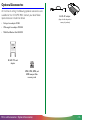
Optional Accessories
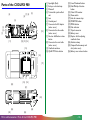
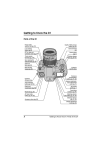
Parts of the COOLPIX 900
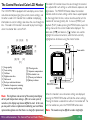
The Control Panel and Color LCD Monitor
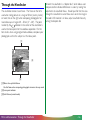
Through the Viewfinder
First Steps
Attaching the Camera Strap
Putting Batteries in Your Camera
Using the AC Adapter
Inserting and Removing Memory Cards
Checking the Battery Level
Choosing a Language for the Menus
Setting the Time and Date
Basic Photography (A-REC)
Basic Photography: Reference
Using the Flash
Focus Settings
Using the Self-Timer
Image Quality
-1-
Advanced Settings (M-REC)
The Shooting Menu
Exposure Compensation
Metering Method
Continuous (Digital Motor Drive)
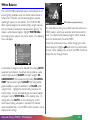
White Balance
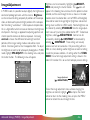
Image Adjustment
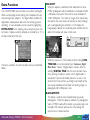
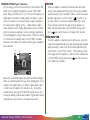
Extra Functions
LCD Brightness
Auto Off
Formatting Memory Cards
LCD On/Off
Restoring Default Settings
Specifications
Playback
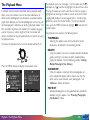
The Playback Menu
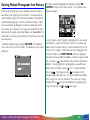
Deleting Multiple Photographs from Memory
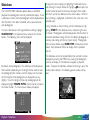
Slideshow
Protecting Photographs from Deletion
Hiding Photographs
Auto Off
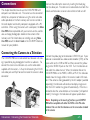
Connections
Connecting the Camera to a Television
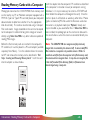
Reading Memory Cards with a Computer
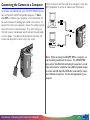
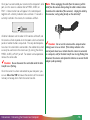
Connecting the Camera to a Computer
Caring for Your Camera
Cleaning
Storage
Troubleshooting
General Problems
Error Messages
Contents
-2-
Cautions
Symbol
• The reproduction of this manual in whole or in part is
prohibited save in cases in which Nikon’s prior permission
has been obtained.
The
symbols in this manual signify important safety precautions. All passages marked with this indication should be read
prior to installation to prevent injury to yourself or to others.
• The information contained in this manual is subject to change These indications are also placed in the table of contents to
without notice.
mark passages that should be read before use.
• Nikon has made every effort to produce a perfect manual,
but should you find any mistakes, we would be grateful if you
Symbol
would kindly let us know. The address of Nikon’s
representative in your area is provided separately.
The ✔ symbols in this manual signify the need for caution when
✔
• Nikon is not liable for damages resulting from the use of this
product.
using the product. These indications are placed in sections that
should be read before operation to prevent damage to the
product.
Trademark Information
Macintosh is a registered trademark of Apple Computer Inc.
Microsoft is a registered trademark, and Windows a trademark, of Microsoft
corporation.
IBM PC/AT is a trademark of International Business Machines Corporation.
CompactFlash is a trademark of SanDisk Corporation.
Adobe and Acrobat are registered trademarks of Adobe Systems Inc.
All other trade names mentioned in this manual are trademarks or registered
trademarks of their respective holders.
Cautions
-3-
Federal Communications Commission (FCC)
Radio Frequency Interference Statement
CAUTIONS
Modifications
This equipment has been tested and found to comply with the
The FCC requires the user to be notified that any changes or
limits for a Class B digital device, pursuant to Part 15 of the FCC modifications made to this device that are not expressly apRules. These limits are designed to provide reasonable protec- proved by Nikon Corporation may void the user's authority to
tion against harmful interference in a residential installation. This operate the equipment.
equipment generates, uses, and can radiate radio frequency
Serial Cables
energy and, if not installed and used in accordance with the
instructions, may cause harmful interference to radio communi- Use the serial cables provided with your COOLPIX 900 (see
page 12 of this manual). Using other interface cables may
cations. However, there is no guarantee that interference will
exceed the limits of Class B Part 15 of the FCC rules.
not occur in a particular installation. If this equipment does
cause harmful interference to radio or television reception,
which can be determined by turning the equipment off and on, Notice for customers in Canada
the user is encouraged to try to correct the interference by one CAUTION
or more of the following measures:
This class B digital apparatus meets all requirements of the
• Reorient or relocate the receiving antenna.
Canadian Interference Causing Equipment Regulations.
• Increase the separation between the equipment and
ATTENTION
receiver.
Cet appareil numérique de la classe B respecte toutes les
• Connect the equipment into an outlet on a circuit different
exigences du Règlement sur le matériel brouilleur du Canada.
from that to which the receiver is connected.
• Consult the dealer or an experienced radio/television
technician for help.
Notice for customers in European countries
ACHTUNG
Dieses Gerät entspricht den Bestimmungen der EG-Direktive
87/308/EEC zur Störungsunterdrückung. Lärmemission kleiner
70 dBA.
Cautions
-4-
Safety Precautions
Be sure to observe the following safety precautions when using
and storing your COOLPIX 900.
• Observe proper precautions when handling batteries
Batteries may leak or explode if improperly handled. Observe
the following precautions when handling batteries for use in
this camera.
• Do not look directly at the sun through the viewfinder • Turn the selector dial to OFF before replacing the batteries.
If you are using the AC adapter, be sure to unplug the
Viewing the sun or other strong light source through the
camera.
viewfinder could cause permanent visual impairment.
• Use only 1.5V AA (LR6) batteries. Alkaline batteries are
• Turn off immediately in the event of malfunction
recommended, but nickel-cadmium (NiCd), nickel metalShould you notice smoke or an unusual smell coming from
hydride (NiMH), and lithium batteries may also be used.
the camera or the AC adapter (available separately), unplug
Note however that the battery indicator may not function
the AC adapter and remove the batteries immediately,
properly with these types. Because of their short life-span,
taking care to avoid burns. Continued operation could result
the use of manganese batteries is not recommended. Using
in injury. After removing the batteries, take the camera to an
other types of battery could cause fire.
authorized Nikon service center for repairs.
• When inserting batteries, align their positive (+) and negative
• Do not use in the presence of flammable gas
(-) poles as shown in the label at the entry to the battery
Do not use electronic equipment in the presence of
chamber.
flammable gas, as this could result in explosion or fire.
• Do not place camera strap around neck
Placing the camera strap around your neck could result in
strangulation. Special care should be taken to avoid placing
the strap around the neck of an infant or child.
• Do not disassemble
Touching the camera’s internal parts could result in injury. In
the event of a malfunction, the camera should be repaired
only by a qualified technician. Should the camera break open
as the result of a fall or other accident, remove the batteries
and/or AC adapter and then take the camera to an
authorized Nikon service center for repairs.
Safety Precautions
-5-
• When replacing the main batteries, replace all batteries at
the same time using only one type of battery. Do not mix
batteries of different types or use old batteries together with
new.
• The adapter is for indoor use only. Use batteries when
operating your COOLPIX 900 out of doors.
• When the camera is used continuously for a long time on
battery power, the batteries may become hot. Due caution
should be observed when removing the batteries.
• Do not expose the adapter to heat or flame.
• Be careful not to damage the power cord’s protective
insulation. Do not cut or abrade the cord, expose the cord
to heat or flame, or place heavy objects on the cord. When
• Do not attempt to recharge, short, or disassemble the
removing the cord from a power outlet, pull on the adapter;
batteries.
never pull directly on the cord itself. Should the cord be
• Do not expose the batteries to flame or to excessive heat or
damaged, return it to your retailer for a replacement.
moisture.
Continued use could result in fire or electric shock.
• Batteries are prone to leakage when fully discharged. To
• Do not use the AC adapter near water, or expose the cord
avoid damage to the camera, be sure to remove the
to steam or moisture. Do not handle the AC adapter when
batteries when no charge remains.
your hands are wet.
• Use appropriate cables
When connecting cables to the serial and video jacks, be
sure to use only the cables provided for the purpose.
• Observe proper precautions when using the AC adapter
An AC adapter for the COOLPIX 900 is available for
separate purchase. Improper use of this adapter could result
in fire or electric shock. Observe the following precautions
when using the AC adapter with your camera.
• Use only the adapter and cable sold for the COOLPIX 900 in
your region. Using any other adapter or cable could result in
fire or electric shock.
• Be sure to use a voltage appropriate to the cable provided
with your adaptor. Depending on the country of purchase,
the cable provided will be rated for 100–120V or 220–240.
Safety Precautions
• Do not disassemble.
• Unplug the adapter when not in use, when replacing the
batteries, and when cleaning the adapter or putting it away.
• Keep out of reach of children
Particular care should be taken to prevent infants from
putting the camera’s batteries or other small parts into their
mouths.
• Do not walk while looking through viewfinder
Walking while looking through the camera’s viewfinder or
color LCD monitor could result in a fall or other injury.
• Observe caution when operating the flash
Using the flash close to your subject’s eyes could cause
temporary visual impairment.
-6-
• Do not put fingers or clothing into the camera hinge
The COOLPIX 900 features a hinged body which allows the
lens and viewfinder to rotate 270º. Be careful not to catch
your fingers, hair, or clothing in the hinge.
• When using the viewfinder
When operating the selector dial with your eye to the
viewfinder, care should be taken not to put your finger in
your eye accidentally.
A Note on Memory Cards
The COOLPIX 900 uses Compact Flash flash-memory cards to
store photographs. While the COOLPIX 900 can be used with
any make of compact flash-memory that conforms to Compact
Flash specifications, it does not perform equally well with all
makes of card. The use of Nikon compact flash-memory cards
is recommended.
Other Cautions
To ensure that you can continue to enjoy the use of your
COOLPIX 900, you should observe the following precautions.
✔ Do not touch the lens with your fingers
The proper procedure for cleaning the camera’s lens is
described in “Caring for Your Camera.”
✔ Handle the lens and moving parts with care
Do not apply force to the lens or to the battery, card, or
connector covers. These parts are especially susceptible to
damage. Do not attempt to rotate the lens and viewfinder past
the limits of the hinge. When carrying the camera, do not pick
the camera up by the lens.
Safety Precautions
-7-
✔ Do not cut power when the camera is on
Do not unplug the camera or remove the batteries while the
camera is on, or while data are being recorded or items deleted
from memory. Forcibly cutting power to the camera in these
circumstances could result in loss of data or in damage to the
camera’s internal circuitry or memory. For this reason, it would
not be advisable to carry the camera from one place to another
while it is connected to the AC adapter, as this could result in
the camera becoming unplugged accidentally.
✔ Turn the camera off before connecting the AC
adapter
Be sure the camera is off before connecting the AC adapter.
✔ Do not drop
Your camera may malfunction if subjected to strong shocks or
vibration.
✔ Keep away from strong magnetic fields
Do not use or store your camera in the vicinity of equipment
that produces strong electromagnetic radiation or magnetic
fields. The magnetic fields produced by equipment such as
radio transmitters or household television sets could cause
interference on the color LCD monitor, damage data stored on
the flash memory card, or affect the camera’s internal circuitry.
✔ Keep dry
The COOLPIX 900 is not waterproof, and may malfunction if
immersed in water or exposed to high levels of humidity.
Other Cautions
✔ Keep free of salt, sand, and dust
After using your camera at the beach or seaside, wipe off any
sand or salt with a lightly dampened cloth and then dry your
camera thoroughly.
✔ Avoid sudden changes in temperature
Sudden changes in temperature, such as occur when entering or
leaving a heated building on a cold day, can cause condensation
inside the camera. To prevent condensation, place the camera
in its carrying case or a plastic bag before exposing it to sudden
changes in temperature.
✔ Batteries
When you turn the camera on, check the battery level
displayed in the control panel to determine whether the
batteries need to be replaced. See “Checking the Battery Level”
for a description of the battery level indicator.
Use only 1.5V AA (LR6) batteries. Alkaline batteries are
recommended, but nickel-cadmium (NiCd), nickel metalhydride (NiMH), and lithium batteries may also be used. Note
however that the battery indicator may not function properly
with these types of battery.
On cold days, the capacity of batteries tends to
decrease. When taking pictures outside in cold weather, keep a
spare set of warm batteries on hand.
-8-
Notice concerning prohibition of copying or
reproduction
Note that simply being in possession of material which has been
copied or reproduced by means of a digital camera may be
punishable by law.
• Items prohibited by law from being copied or reproduced
Do not copy or reproduce paper money, coins, securities,
government bonds, or local government bonds, even if such
copies or reproductions are stamped “Sample”.
• Comply with copyright notices
The copying or reproduction of copyrighted creative works
such as books, music, paintings, woodcut prints, maps, drawings, movies, and photographs is prohibited except when it is
done for personal use at home or for similar restricted and
non-commercial use.
The copying or reproduction of paper money, coins, or
securities which are circulated in a foreign country is
prohibited.
Unless the prior permission of the government has been
obtained, the copying or reproduction of unused postage
stamps or post cards issued by the government is prohibited.
The copying or reproduction of stamps issued by the
government and certified documents stipulated by law is
prohibited.
• Cautions on certain copies and reproductions
The government has issued cautions on copies or reproductions of securities issued by private companies (shares, bills,
checks, gift certificates, etc.), commuter passes, or coupon
tickets, except when a minimum of necessary copies are to
be provided for business use by a company. Also, do not
copy or reproduce passports issued by the government,
licenses issued by public agencies and private groups, ID
cards, and tickets, such as passes and meal coupons.
Other Cautions
-9-
Overview
Thank you for buying a Nikon COOLPIX 900 digital camera.
The COOLPIX 900 is a full-featured digital camera with optical
and digital zoom and a built-in flash. In automatic mode the
camera’s programmed autofocus, autoexposure, auto whitebalance, and matrix metering allow for “point-and-shoot”
photography that produces excellent results in a variety conditions. The menu-driven manual mode offers a choice of metering methods, exposure compensation, and white balance programs in addition to a variety of digital effects. Photographs
taken in either mode can be played back instantly on the camera’s
color LCD monitor, or the camera can be connected to a
television for demonstration or playback to an audience. The
COOLPIX 900 can also be attached to a computer, where your
images and recordings can be viewed using the Nikon View
software provided with your camera, or edited for use in other
applications.
The COOLPIX 900 offers the following features:
• The COOLPIX 900’s charge-coupled device, or CCD, which
serves as the camera’s digital film and shutter, offers a resolution of 1,280 × 960 pixels (1,228,800 pixels). The camera is
also equipped with a VGA mode for recording images with a
resolution of 640 × 480 pixels, which allows more photographs to be stored and reduces the time needed to record
each photograph.
Overview
• Photographs are stored on removable compact flash-memory
cards. With JPEG compression, the four-megabyte card
provided with the camera can store up to twelve photographs of 1,280 × 960 pixels with little loss of detail, up to six
higher-quality photographs, and up to twenty-four photographs at the camera’s maximum compression ratio.
• The camera’s motor-driven optical zoom and autofocus
make it possible to create high-resolution photographs with
magnifications of up to ×3. A focus setting of macro closeup is provided for taking photographs at ranges as close as
8 cm (3″).
This manual explains how to use and care for your COOLPIX
900. The next chapter, “Parts and Accessories,” introduces you
to the parts of the camera. This is followed by “First Steps,”
which outlines the steps you will take after you remove the
camera from the box, from inserting the batteries to taking your
first photographs and playing them back. “Basic Photography:
Reference” explains basic image-quality, focus, and flash settings,
while “Advanced Settings” describes the more advanced settings
available when the selector dial is set to M-REC. The “Playback” chapter details the camera’s playback function, which
allows you to view and delete the photographs stored in memory.
Information on connecting your camera to a computer or
television set may be found in “Connections.” The final sections,
“Caring for Your Camera” and “Troubleshooting,” describe how
to take care of your COOLPIX 900 and what to do when
things go wrong. Please read all instructions carefully to ensure
that you get the most from your camera.
- 10 -
Note: The illustrations in this manual are composites. Photographs taken with the COOLPIX 900 may differ from those shown
here.
Note: The illustrations in this manual show the color LCD monitor used in the NTSC-compatible model of the COOLPIX 900.
Owing to differences in video standards, the PAL-compatible model
will display items in positions slightly different from those shown
here.
Overview
- 11 -
Parts and Accessories
This chapter identifies the parts of the COOLPIX 900 and lists
the items packaged with your camera or available separately as
options.
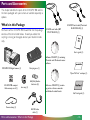
What’s in this Package
Purchasers of the COOLPIX 900 should find that the package
contains all the items listed below. Should you notice that
anything is missing or damaged, contact your retailer immediately.
SC-E900 serial cable (IBM
PC/AT RS-232C) (1)
SC-E900M serial cable (Macintosh
RS-232C/RS-422) (1)
A
PLAY
OFF
M REC
QUALITY
User’s guide (1)
DIGTAL
CAM
Software CD-ROM (1) containing
Macintosh and Windows browser
software
ERA
COOLPIX 900 digital camera (1)
Carrying case (1)
“Open Me First” envelope (1)
EC-8CF 8MB compact
flash-memory card (1)
AA (LR6) alkaline
batteries (4)
Lens cap (1)
Reference CD-ROM (1) containing on-line reference manuals
and Adobe Acrobat Reader
Fast Track guide (1)
Camera strap (1)
EG-900 video
cable (1)
Parts and Accessories: What’s in this Package
- 12 -
Optional Accessories
At the time of writing, the following optional accessories were
available for the COOLPIX 900. Contact your local Nikon
representative or retailer for details.
• Fish-eye lens-adapter FC-E8
EH-30 AC adapter
(shape of cable depends on
country of purchase)
• Wide-angle lens-adapter WC-E24
•
Multi-Flash Bracket Unit SK-E900
EC-AD1 PC-card
adapter
8MB, 15MB, 30MB, and
48MB compact flashmemory cards
Parts and Accessories: Optional Accessories
- 13 -
[ 1]
[ 2]
[ 3]
[ 4]
Parts of the COOLPIX 900
[9]
[7] [8]
[4]
[6]
[5]
1
.6
5. 8 -
17
.
m
4m
3
.4:2
[3]
[2]
[1]
FINE
NORMAL
BASIC
AUTO
SLOW
PLAY
M REC
CARD
A REC
[10]
OFF
OM NIKKO
ZO
R
[11]
[12] [13] [14]
[15]
W
Speedlight (flash)
Red-eye reduction lamp
Photocell
Terminal for synchro-flash
unit
[ 5] Lens
[ 6] Control panel
[ 7] Connector for AC adapter
(under cover)
[ 8] Connector for video cable
(under cover)
[ 9] Selector dial/Shutter-release
button
[10] Connector for serial cable
(under cover)
[11] Viewfinder window
[12] QUALITY/Delete button
[13] Focus/Thumbnail button
[14] Flash/Multiple Selection
button
[15] Color LCD monitor
[16] Zoom switch
[17] Hole for camera strap
[18] MONITOR button
[19] MENU button
[20] Flash indicator
[21] Tripod connector
[22] Battery cover
[23] Diopter dial for adjusting
viewfinder focus
[24] Autofocus lamp
[25] Compact flash memory card
slot (under cover)
[26] Battery cover release button
[16]
T
[17]
[18]
[19]
[20]
[21]
NIKON CORP.
BATT.
MADE IN JAPAN
N150
PUSH
Nikon DIGITAL CAMERA E900S
4.8V/6V = 0.9A/0.8A (PAL)
AF
[22]
CARD
[24]
[23]
[26]
[25]
Parts and Accessories: Parts of the COOLPIX 900
- 14 -
The Control Panel and Color LCD Monitor
The COOLPIX 900 is equipped with two displays, one a blackand-white control panel giving the current camera settings, and
the other a color LCD monitor that in addition to displaying
information on current settings also shows the view through the
lens. The color LCD monitor is also used to play back images
when the selector dial is set to PLAY.
[2]
[3] [4]
[5]
[1]
[6]
[8]
[7]
[9] [10]
The color LCD monitor shows the view through the camera’s
lens, adjusted for such settings as white balance, exposure, and
digital zoom. The MONITOR button below the monitor
controls whether camera settings will be shown superimposed
on the image from the lens, and can also be used to turn the
monitor off, increasing battery life. In manual (M-REC) and
playback (PLAY) modes, pressing the MENU button causes the
settings menus for the current mode to be displayed. The
zoom-out (W/▼) and zoom-in (T/▲) buttons are used to
highlight the various menu items, while the item currently
highlighted can be chosen using the shutter button.
W
T
Zoom switch
[12]
[11]
[ 1]
[ 2]
[ 3]
[ 4]
[ 5]
[ 6]
[ 7]
Image quality
Focus setting
Self-timer
Digital motor-drive
Flash mode
Red-eye reduction indicator
Number of exposures remaining
at current image quality setting
[ 8]
[ 9]
[10]
[11]
[12]
Metering mode
Exposure compensation
Data transfer icon
Memory card indicator
Battery indicator
Note: The brightness and contrast of the control panel display
will vary with temperature and age. After six to seven years of
normal use, the display may become difficult to read. In this case,
you may wish to have a replacement installed by your local Nikon
representative (please note that there is a charge for replacement).
Parts and Accessories: The Control Panel and Color Monitor
MONITOR button
MENU button
When the monitor is on and camera settings are displayed,
pressing the MONITOR button will hide the camera settings.
Pressing the button a second time will turn the monitor off. To
turn the monitor on, press the MONITOR button once.
Note: The monitor may be difficult to read in bright light.
- 15 -
Through the Viewfinder
The viewfinder contains two frames. The frame on the left is
used when taking pictures at a range of 50 cm (twenty inches)
or more, that on the right when composing photographs for
macro close-up at ranges of 8 – 50 cm (3˝ – 20˝). The point
marked by the
indicator in the center of the viewfinder is
used as the focus point for the autofocus operation. For the
best results when using programmed autofocus, compose your
photographs so that the subject is at the focus point.
Beneath the viewfinder is a “diopter dial,” which allows users
compensate for individual differences in vision by making fine
adjustments to viewfinder focus. Should you find that the view
through the viewfinder is out of focus even when the image in
the color LCD monitor is in focus, adjust viewfinder focus by
turning the diopter dial.
[1]
[2]
[3]
[1] Macro close-up field-of-view
Use this frame when composing photographs in macro close-up mode
[2] Focus point indicator
[3] Field of view (normal mode)
Parts and Accessories: Through the Viewfinder
- 16 -
First Steps
This chapter guides you through the steps you will take after
removing the camera from the box, from inserting the batteries
to making your first photographs and playing them back. Before
you will be able to use your camera, you will need to:
• attach the camera strap
• insert batteries or connect the AC adapter
• insert the compact flash memory card
• choose the language to be used in the setting and playback menus
• set the camera’s clock-calendar to the current date and
time
These tasks are detailed on the pages that follow. Once these
steps have been completed, your camera will be ready to take
photographs and play them back as described at the end of this
chapter. More detailed information on camera settings and on
playing images back may be found in the chapters following.
First Steps
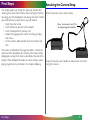
Attaching the Camera Strap
Attach the camera strap as shown below.
Note: Feed at least 5 cm (2″) of
the strap through the final hole.
Keep the strap over your shoulder or around your wrist when
carrying the camera.
- 17 -
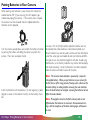
Putting Batteries in Your Camera
When putting new batteries in your camera, first rotate the
selector dial to OFF (if you are using the AC adapter, you
should also unplug the camera). If the camera is on a tripod,
the camera must be removed from the tripod before the
batteries can be replaced.
Turn the camera upside down and unlatch the battery chamber
by pushing the button and sliding the cover away from the
camera. Then raise and open the lid.
Insert the batteries with the positive (+) and negative (-) poles
aligned as shown in the label at the entry to the battery chamber.
First Steps: Putting Batteries in Your Camera
Use only 1.5V AA (LR-6) batteries (alkaline batteries are recommended, but nickel-cadmium, nickel metal-hydride, and
lithium batteries may also be used) and be sure that all batteries
are of the same type and model; do not mix batteries of different types or use new batteries together with old. Avoid using
old batteries, as the battery indicator may not be able to display
their level accurately. Once the batteries have been replaced,
close the cover and slide it back until it latches.
Note: The camera’s clock-calendar is powered by a separate
rechargable battery. When you put batteries in your camera for
the first time or after a long period of storage, wait a few hours for
the clock battery to recharge before removing the main batteries.
Once the clock battery has charged, removing the batteries will not
affect the clock-calendar.
Note: Photographs stored on the flash memory card are not
affected when the batteries are removed. All manual-mode settings, with the exceptions of the date and language, will however
be reset.
- 18 -
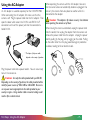
Using the AC Adapter
An AC adapter is available separately for the COOLPIX 900.
When connecting the AC adapter, first make sure that the
camera is off. Plug the power cable into the AC adapter. Then
open the door which covers the DC IN and VIDEO OUT
connectors and insert the power jack into the connector labeled DC IN.
A
PLAY
OFF
M REC
ITY
VIDEO
OUT
DC IN 6.5V
QUAL
2
3
DIGT
AL CAM
ERA
When operating the camera with the AC adapter, take care
that the camera does not accidentally become unplugged. Do
not carry the camera from one place to another while it is
connected to the adapter.
Caution: The adapter is for indoor use only. Use batteries
when operating the camera out of doors.
When leaving the camera unattended, unplug the power cord
from the outlet, then unplug the adapter from the camera and
remove the power cable from the adapter. Unplug the power
cord by pulling by the plug, not by tugging on the cable. Pulling
on the cable rather than the plug could damage its protective
insulation, leading to fire or electric shock.
* The shape of the power cable
1
depends on the country of purchase
Plug the power cable into a power outlet. You are now ready
to turn the camera on.
Caution: Use only the cable provided with your EH-30.
Depending on the country of purchase, the cable provided will be
rated for power sources of 100–120V or 220–240V. Be sure to
use a power source appropriate to the cable provided in your
country or region. Using another cable or incorrect voltage could
result in fire or electric shock.
First Steps: Using the AC Adapter
- 19 -
Inserting and Removing Memory Cards
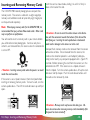
Insert the card as shown below, sliding it in until it is firmly in
place at the back of the slot.
The COOLPIX 900 records photographs on compact flashmemory cards. The camera is sold with an eight-megabyte
memory card; additional cards of up to forty-eight megabytes
can be purchased separately.
Note: When buying memory cards for the COOLPIX 900, it is
recommended that you purchase Nikon-made cards. Other cards
may not perform to specifications.
You will need to insert a memory card in your camera before
you will be able to take photographs. Cards can only be inserted in, and removed from, the camera when the selector dial
is set to OFF.
✔Caution: Inserting memory cards when the power is on could
render the card unusable.
If the camera is on a tripod, remove it from the tripod before
inserting or removing memory cards. To insert a card, turn the
camera upside down. Then lift the card-slot cover up and flip it
open.
Nikon
First Steps: Inserting and Removing Memory Cards
✔Caution: Be sure to insert the card as shown in the illustration, with the connectors towards the bottom of the slot and the
label facing out. Inserting the card upside-down or backwards
could result in damage to the camera or to the card.
Compact flash memory cards can be removed from the camera
without loss of data. Once removed from the camera, the
cards can be stored or placed in a card adapter (sold separately) to be read by any computer equipped with a Type II PC
card slot. Before removing the card from the camera, turn the
selector dial to OFF. If the camera is on a tripod, remove it
from the tripod. Turn the camera upside down, lift up the cardslot cover and flip it open. Push the card-release button until
the card can be removed by hand.
✔Caution: Memory cards may become hot during use. Observe due caution when removing memory cards immediately after
the power has been turned off.
- 20 -
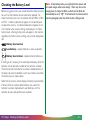
Checking the Battery Level
Before using your camera, you should check the battery level to
be sure that the batteries do not need to be replaced. To
check the battery level, turn the selector dial to M-REC, A-REC,
or PLAY. A battery indicator will appear in the control panel
on top of the camera. An identical indicator will appear in the
LCD monitor when camera settings are displayed. At critical
battery levels, a flashing battery icon will appear in the monitor
regardless of whether camera settings are currently displayed or
not.
Note: At low battery levels, you may find that the camera will
not record images under some settings. There may also not be
enough power to charge the flash, in which case the flash will
automatically be set to “Off.” At critical levels, the camera will not
record a photograph when the shutter button is fully pressed.
Battery level normal
Low battery—replace batteries as soon as possible
Battery level critical—replace batteries before use
If nothing at all is showing in the control panel display, either the
batteries are not correctly installed or the batteries are dead.
Check to see that the batteries have been installed correctly. If
this does not solve the problem, insert new batteries and check
the battery level as shown above.
Note that the camera will not display the battery level correctly
if lithium, NiCd, or nickel hydride batteries are used, if the
batteries have been replaced with used batteries, or if the
batteries do not meet performance standards.
First Steps: Checking the Battery Level
- 21 -
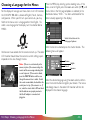
Choosing a Language for the Menus
For the display of messages and menu items in its LCD monitor,
the COOLPIX 900 offers a choice of English, French, German,
and Japanese. When you first turn your camera on, you may
find that the menus are in a language other than English. To
select a new language for the display, turn the selector dial to
M-REC.
Wait one or two seconds for the camera to start up. The color
LCD monitor should show the camera’s current settings superimposed on the view through the lens.
Note: If there is no card currently in the
camera, in place of the camera settings the
monitor will show a message indicating that
no card is present. If the monitor is blank,
press the MONITOR button until the view
through the camera’s lens is visible. Should
the monitor remain blank, check whether the
control panel on top of the camera is on. If
not, rotate the selector dial to OFF and check
that the batteries are properly inserted or
that the AC adapter is connected and
plugged in.
First Steps: Choosing a Language for the Menus
Press the MENU key to bring up the shooting menu. If the
menu is not in English, press the zoom-out switch (W/▼) until
the last item in the first page of options is selected (in the
illustrations below, “XXX…” has been substituted for the
letters actually appearing in the display).
XX
XXXXXXXX
XXXXXXXXXX
XXXXXXXXXX
XXXXXXXXXX
XXXXXXXXXX
XXXXXXXXXX
XXXXXXXXXX
X
XX X XX X XXX XX
Select the last item in the
first page of options
With the last item selected, press the shutter button. The
following menu will appear.
German
English
French
Japanese
Select the desired language using the zoom switch and then
press the shutter button to register your choice. The menus
and dialogs shown in the color LCD monitor will then be
displayed in the chosen language.
- 22 -
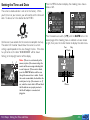
Setting the Time and Date
The camera’s clock-calendar is not set at the factory. When
you first turn on your camera, you will need to set the time and
date. To do so, turn the selector dial to M-REC.
Wait one or two seconds for the camera to complete start-up.
The color LCD monitor should show the camera’s current
settings superimposed on the view through the lens. If the date
has yet to be set, the date “00.00.00/00:00” will be shown
flashing at the top right corner of the display.
Note: If there is no card currently in the
camera, in place of the camera settings the
monitor will show a message indicating that
no card is present. If the monitor is blank,
press the MONITOR button until the view
through the camera’s lens is visible. Should
the monitor remain blank, check whether the
control panel on top of the camera is on. If
not, rotate the selector dial to OFF and check
that the batteries are properly inserted or
that the AC adapter is connected and
plugged in.
First Steps: Setting the Time and Date
Press the MENU button to display the shooting menu shown
below at left.
BK
S HOO T I NG
EX T R A FUNC
L C D B R I GH T
3 0 s AUTO OF F
C A R D F ORMA T
ON
L C D ON / O F F
DA T E
C
RE S E T A L L
B K S E T➔S H U T T E R
E XP. + / –
ME T E R I NG
CO N T I N UOU S
WH I T E B A L
I MG A D J U S T
L A NG U A G E
E
S E T➔S H U T T E R
Press the zoom-out switch (W/▼) until the DATE item in the
second page of the shooting menu is selected as shown above
at right, then press the shutter button to display the date menu.
Day
Year
Month
DA T E
Y
M
D
▲
1998 . 01 . 01
▼
00 : 00
A D J . ➔ Z OOM SW▼▲
S E T ➔S H U T T E R
Hour
Minute
- 23 -
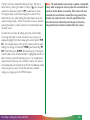
The item currently selected for editing will flash. Edit the selected item by pressing the zoom-in switch (T/▲) to increase its
value or the zoom-out switch (W/▼) to decrease its value.
Pressing the zoom switch once changes the value of the selected item by one, while holding the switch down causes the
value to change rapidly. When the maximum value is reached,
pressing the zoom-in switch will return the selected item to its
minimum value.
Note: The clock-calendar is powered by a separate, rechargeable
battery, which is charged as necessary when the main batteries are
in place or the AC adapter is connected. If the camera has been
stored with the main batteries removed for a long period of time,
the clock may need to be reset. Once the main batteries have
been reinserted, the clock battery will recharge in a few hours,
during which time the batteries should be left in the camera.
To select the next item for editing, press the shutter button.
To change the order in which the month, day, and year are
displayed, highlight the letters showing the current order (Y M
D in the example above), then press the zoom switch to cycle
through the settings in the order Y M D (year/month/day) M
D Y (month/day/year), D M Y (day/month/year). Pressing the
shutter button when the desired order is highlighted will set the
date and return you to the previous menu. If an invalid combination of month and day, such as 02/30, is chosen, the camera
will automatically set the date to the first of the following month
when changes are saved. To exit the date menu without
making any changes, press the MENU button.
First Steps: Setting the Time and Date
- 24 -
Basic Photography (A-REC)
Step 2—Turn the selector dial to A-REC
The COOLPIX 900 offers a choice of two shooting modes,
automatic (A-REC) and manual (M-REC). In automatic mode,
the user can control flash settings, image quality, focus, and
optical zoom. Exposure compensation, metering method, and
white balance are all set automatically by the camera. Manual
mode allows the user to adjust all the above settings and to
experiment with a variety of digital effects. The present section
provides a brief overview of how to use the camera in automatic mode. The settings available in automatic and manual
modes are described in greater detail in the following chapters.
Select automatic mode by turning the selector dial to A-REC.
After a one- to two-second pause while the camera starts up,
current settings will be displayed in the control panel and color
LCD monitor (if not visible in the monitor, settings can be
displayed by pressing the MONITOR button until they appear).
Step 1—Remove the lens cap
Remove the lens cap as shown below.
A
PL
OFF AY
M RE
C
QUAL
ITY
2. Remove
cap
Note: To save battery power, the camera will automatically turn
the color LCD monitor off if no operations are performed for thirty
seconds (three minutes when menus are displayed). Press the
MONITOR button to turn the monitor back on (if the monitor has
not been turned off manually, the monitor will come on when the
shutter button is half pressed).
DIGTA
L CA
MER
A
1. Release latch
First Steps: Basic Photography (A-REC)
Note: The camera may become warm during use, but this does
not indicate a malfunction.
- 25 -
Step 3—Check the number of exposures remaining
Step 4—Check the camera’s settings
The control panel and color LCD monitor show the number of
exposures remaining at the current image quality setting.
In automatic mode, the user can adjust image-quality, flash, and
focus settings. The default settings, which produce the best
results in most circumstances, are autofocus, automatic flash,
and an image quality of “normal.”
Flash (auto)
Number of exposures remaining
When this number reaches zero, an “out of memory” message
will be displayed in the color LCD monitor (see “Troubleshooting,” below). Before more photographs can be taken at the
current image quality setting, you will need to insert a new
memory card or delete items already in memory (see “Connections” and “Deleting Photographs from Memory,” below). It may
be possible to record more photographs at a different image
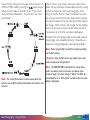
quality setting.
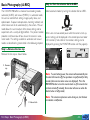
Note: When more than 999 exposures remain, the exposure
count will show 999.
First Steps: Basic Photography (A-REC)
Image quality (normal)
Under these settings, the camera will choose the shutter speed
and aperture best suited to record subjects at distances of 50
cm (20˝) or more and the flash will be fired whenever lighting is
inadequate. Different settings can be chosen depending on
your needs using the buttons next to the control panel. A
detailed description of the settings available in automatic mode
may be found in the following chapter, “Basic Photography:
Reference.”
- 26 -
Step 5—Ready the camera
The COOLPIX 900’s color LCD monitor is joined to the lens
by a rotating hinge, allowing the user to hold the camera at
almost any angle while making photographs. When framing
photographs in the monitor, the camera can be held as shown
below.
Framing photographs in
the monitor
The color LCD monitor gives an accurate indication of how the
final photograph will turn out, adjusted for exposure, focus, and
zoom. In order to save power, you may however wish to turn
the monitor off when not using the camera’s menus. In this
case, hold the camera as shown below to frame photographs in
the viewfinder.
Self-portrait mode
Note: Be sure that the lens and flash window are not obstructed
by your fingers, hair, the camera strap, power cord, or video cable.
Note: In self-portrait mode (with the lens rotated to point at the
user), a mirror image of the view through the lens will be shown in
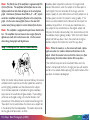
the monitor and camera settings will be hidden. Photographs
taken in this mode will not however be reversed.
First Steps: Basic Photography (A-REC)
- 27 -
Step 6—Compose a photograph
Frame your subject in the viewfinder or the color LCD monitor.
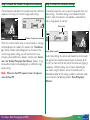
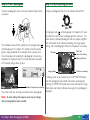
Press the zoom-in switch (T/▲) to magnify the subject so that
only a portion of it fills the frame, or use the zoom-out switch
(W/▼) to expand the field-of-view so that more of the subject
is visible. While the zoom switch is pressed, an indicator showing the amount of zoom is displayed in the color LCD monitor.
Wide angle
(minimum zoom)
Zoom indicator
At maximum zoom, the subject can be further magnified by
holding the zoom-in switch down for two seconds. If the color
LCD monitor is on or the camera is connected to a television
set, the camera will enter digital-zoom mode, magnifying the
subject digitally by two times (note that unlike optical zoom,
digital zoom does not increase the amount of detail visible in the
photograph; details visible at maximum zoom are simply enlarged, producing a slightly “grainy” image). While the camera is
in digital-zoom mode, the zoom indicator and AF lamp will blink.
Digital zoom
(2× magnification)
Telephoto
(maximum zoom)
The focus point for autofocus operations is shown by the
square in the center of the viewfinder (
).
Note: Wait a moment for the camera to focus after zooming in
or out.
First Steps: Basic Photography (A-REC)
- 28 -
Note: The field of view of the viewfinder is approximately 85%
of that of the lens. The viewfinder will therefore show an area
slightly smaller than that which will appear in the actual photograph. At distances of between 8 and 50 cm (3˝ – 20˝), objects
centered in viewfinder will appear off-center in the actual photograph. Use the macro close-up field of view or the color LCD
monitor when framing subjects at a short distance from the lens.
Note: The viewfinder is equipped with optical zoom linked to the
lens. The viewfinder does not however show images framed in
digital-zoom mode at the actual zoom ratio. Use the monitor
when taking photographs with digital zoom.
Step 7—Half-press the shutter-release button
Autofocus does not perform well when the image framed
contains little contrast, when the subject at the focus point is
much brighter than the remainder of the image, when the
subject is poorly lit, when both distant and nearby objects are at
the focus point, or when the subject is moving rapidly. If the
camera is unable to determine the distance to the subject, the
autofocus lamp will flash. In this case you should focus on a
new subject at the same distance as the original subject and
half-press the shutter-release button, then check to be sure that
the autofocus lamp is glowing steadily. With the shutter release
button held half-way down, return the camera to its original
position and press the button the rest of the way down.
Note: When the monitor is on, the camera will record a photograph even when it is unable to determine the distance to the
subject. Check the monitor to be sure that the camera is in focus
before pressing the shutter-release button all the way down.
If the red flash lamp next to the viewfinder blinks when the
shutter is half-pressed, the flash is charging and you will need to
wait for a few seconds before pressing the shutter button all the
way down to record a photograph.
When the shutter-release button is pressed halfway, the camera
will determine the aperture and shutter speed best suited to
current lighting conditions and the distance to the subject.
Once the focus operation is complete, the green autofocus
lamp next to the viewfinder will glow steadily. These settings
will remain unchanged as long as the shutter button is halfpressed, even if the distance to the subject should change; this
“focus lock” can be used to focus the camera on a subject not
in the center of the final composition. The zoom ratio cannot
be changed while focus lock is in effect.
First Steps: Basic Photography (A-REC)
- 29 -
Step 8—Take a photograph
Step 9—Play the photograph back
To take a photograph, press the shutter-release button all the
way down.
To play a photograph back, turn the selector dial to PLAY.
The autofocus lamp will flash rapidly and an hourglass icon ( )
will be displayed in the color LCD monitor while the photograph is being recorded to the compact flash memory card.
Once the process of recording the photograph to memory is
complete, the exposure count in the control panel and color
LCD monitor will go down by one.
An hourglass icon ( ) will be displayed in the color LCD monitor while the camera reads a photograph from memory. The
most recently recorded photograph will then appear, together
with information on the date of recording, the image quality
setting, and the photograph’s filename and position in memory.
Filename
Date and
time of recording
Battery indicator
Image quality
Position in memory
If nothing shows in the monitor, press the MONITOR button
until the photograph and related information are displayed;
pressing the MONITOR button once more will hide the image
Number of exposures remaining information and battery indicator, leaving only the photograph
displayed.
The camera will then be ready to shoot another photograph.
Note: At some settings, the exposure count may not change
when a photograph has been recorded.
First Steps: Basic Photography (A-REC)
- 30 -
Other photographs in memory, if any, can be reviewed by
pressing the zoom-in switch (T/▲) to page through the photographs one at a time in the order in which they were recorded,
or the zoom-out (W/▼) switch to page through the photographs in reverse order. To delete the photograph currently on
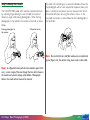
view, press the QUALITY/ button. The following dialog will
be displayed.
When you have finished using the camera, be sure to turn the
selector dial to OFF.
DE L E T E
For more information on playing back and deleting photographs,
refer to the chapter “Playback,” below.
Step 11—Replace the lens cap
Replace the lens cap as shown below.
PLAY
OFF
Press the zoom-in switch once to select YES and then press
the shutter button to delete the photograph. Select NO or
press the MENU button to return to playback mode without
deleting the photograph.
2. Replace
cap
DIGTA
1. Raise
latch
First Steps: Basic Photography (A-REC)
A
S E T➔S H U T T E R
M REC
YES
N O
The camera is off when the control panel display is blank; if the
monitor is off but the control panel is on, the camera has not
been turned off. Check that the camera is off before putting it
away.
TY
DE L E T E
1 I MA G E
L CA
ME
QUALI
BK
Step 10—Turn the camera off
RA
3. Release
latch
- 31 -
Basic Photography: Reference
This chapter describes the most frequently used techniques and
camera settings: flash, focus, and image-quality settings.
Using the Flash
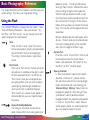
The COOLPIX 900 offers a choice of five flash modes: “Auto,”
“Auto with Red-Eye Reduction,” “Slow Synchronized,” “Anytime Flash,” and “Flash Cancel.” An icon showing the current
mode is displayed in the control panel.
Auto
When the flash is set to “Auto,” the camera’s
internal auto exposure circuitry will automatically
activate the flash if there is not enough light.
This setting is the best choice in most circumstances.
Flash Cancel
When set to “Flash Cancel,” the flash will not be
activated even in conditions of low light in which
the flash would normally fire. Set the flash to
“Flash Cancel” when you have prepared your
own lighting effects, when you wish to capture
natural lighting under low light conditions, or
where use of a flash is prohibited. Because
“Flash Cancel” uses a slower shutter speed, it is
recommended that you use a tripod to steady
the camera.
Auto with Red-Eye Reduction
This setting can be used to minimize the socalled “red-eye effect” when making portraits of
Basic Photography: Using the Flash
people or animals. The red-eye effect occurs
when light from the flash is reflected from within
the eye, making the pupils seem to glow red.
When the red-eye reduction function is used,
the red-eye lamp will be activated whenever the
flash is to be fired. Pressing the shutter release
button all the way down will activate the red-eye
lamp. The main flash will fire approximately one
second later.
Red-eye reduction does not work equally well in
all cases. The best results can be achieved when
the subject is looking directly at the viewfinder
and is not at the edge of the flash’s range.
Anytime Flash
If the flash is set to “Anytime Flash,” the flash will
be activated whenever the shutter-release
button is fully depressed. Set the flash to “Anytime Flash” to “fill-in” a back-lit subject.
Slow synchronized
In “Slow Synchronized” mode, shutter speed is
slowed to a minimum of 1/4 seconds and the
flash will activate when there is not enough light.
Used in combination with multi-metering (see
“Advanced Settings: Metering,” below) when the
background is poorly lit, a flash setting of “Slow
Synchronized” makes it possible to capture
background details that would be underexposed
in “Auto” or “Anytime Flash” modes. Because
shutter speed is slowed, it is recommended that
you use a tripod to steady the camera.
- 32 -
The current flash setting can be changed when the camera is in
A-REC or M-REC modes by pressing the
button to cycle
through the flash modes in the order “Auto,” “Flash Cancel,”
“Auto with Red-Eye Reduction,” “Anytime Flash,” and “Slow
Synchronized.”
When the flash is set to “Auto”, pressing the shutter release
button half-way will activate the auto exposure circuitry, causing
the flash to charge when there is not enough light. A flash
setting of “Anytime Flash” or “Slow Synchronized” causes the
flash to charge each time the shutter release button is pressed.
The red flash indicator next to the viewfinder will blink while the
flash charges. When the flash is fully charged, the flash indicator
will turn off, and you can press the shutter button the rest of
the way down to fire the flash and record a photograph.
Remember that when lighting is poor, shutter speed is slowed,
making images more susceptible to blurring. If possible, use a
tripod when making photographs in poor lighting conditions.
Note: When using the flash, be careful not to place your finger
over the flash window.
✔Caution: Using the flash close to your subject’s eyes could
produce temporary visual impairment.
Note: The current flash mode is stored in memory when the
camera is turned off and will be restored when the camera is next
turned on.
Basic Photography: Using the Flash
Note: The COOLPIX 900’s built-in flash has a range of two
meters at maximum zoom, three meters at minimum zoom
(maximum angle). At a focus setting of “Infinity,” the flash will
automatically be set to “Flash Cancel” and will not fire even when
lighting is inadequate.
- 33 -
Once the external flash unit has been mounted on the flash
bracket and the bracket’s lead connected to the camera’s
A flash bracket (the SK-E900 Multi-Flash Bracket Unit) is availsynchro-flash terminal, you are ready to use the external flash
able separately for connecting external flash units to the COOLPIX for synchro-flash photography. Turn the flash unit on (do not
900. When the bracket is connected to the camera’s synchroset the flash to “stand-by”—STBY—as the flash may turn off
flash terminal, external flash units mounted on the bracket are
unexpectedly) and set the metering mode to TTL. The intensynchronized with the camera’s built-in flash, increasing the size
sity of the light produced by the flash will be controlled by the
of the area illuminated and allowing sophisticated flash techcamera’s built-in photocell.
niques such as bounce-flash photography. Flash settings such as
“Auto,” “Slow Synchro,” and “Anytime Flash” apply to both the
external and built-in flash units. When the flash is fired, the
combined brightness of the external and built-in flash units is
controlled by the camera.
Using an External Flash
Instructions for attaching the optional SK-E900 flash bracket and
connecting external flash units may be found in the SK-E900
instruction manual. When the SK-E900 is in place, the following
Nikon flash units (available separately) can be used: SB-28, SB26, SB-25, SB-24, SB-22S, and SB-22.
✔Caution: The use of non-Nikon flash units is not recommended with the COOLPIX 900. Using non-Nikon flash units may
result in damage to the synchro-flash circuitry in the camera or the
external flash.
Basic Photography: Using the Flash
- 34 -
Focus Settings
The COOLPIX 900 offers three focus settings: autofocus,
infinity, and macro close-up. At settings of “Infinity” and “Macro
Close-Up,” the current focus setting is shown in the control
panel and, if set to display camera settings, the color LCD
monitor.
Autofocus
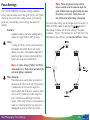
Autofocus mode is used when photographing
subjects at ranges of 50 cm (20″) or more.
Note: When using macro close-up with the
camera zoomed out to the maximum angle, the
green autofocus lamp may glow steadily even when
the camera is not in focus. Check focus in the
color LCD monitor before taking a photograph.
The current focus setting can be changed when the camera is in
A-REC or M-REC modes by pressing the
button to
cycle through the focus and self-timer settings in the order
“Autofocus,” “Infinity,” “Macro Close-Up,” and “Self-Timer” (for
information on the self-timer, see “Using the Self-Timer,” below).
Infinity
A setting of “Infinity” can be used to maximize
focal depth so that both distant and nearby
objects are in focus. No autofocus operation is
performed; focus is fixed at a distance of thirty
meters (just under one hundred feet).
Note: At a focus setting of “Infinity,” the flash is
automatically set to “Flash Cancel” and will not fire
even when lighting is inadequate.
Macro Close-Up
Macro close-up is used to focus on subjects at
distances of 20–50 cm, or 8˝–20˝ (if the camera
is zoomed out to the maximum angle, the
camera will be able to focus on subjects as close
as 8 cm, or 3˝). Note that at close range the
flash is sometimes unable to light the entire
subject. When using the flash in macro close-up
mode, it is recommended that you take a test
photograph to verify the effects of the flash.
Basic Photography: Focus Settings
- 35 -
Focus Lock
If the color LCD monitor is on when the camera is set to
“Autofocus” or “Macro Close-Up,” focus will be continually
adjusted according to the distance to the subject (if the LCD
monitor is off, focus settings will be adjusted only when the
shutter button is pressed half-way). Pressing the shutter-release
button half-way “locks” focus at the current position. Focus will
remain unchanged as long as the shutter button is held in this
position, even if the distance to the subject should change. This
is known as “focus lock” and can be used to manually adjust
focal depth.
To create the same composition at a lower focal depth, so that
only objects in the foreground or middle distance are in focus,
focus the camera on a nearby object and then press the shutter
button half-way. Without removing your finger from the shutter button, return the camera to its original position and then
press the shutter button the rest of the way down. Objects at
the original focus distance will remain in focus, but other objects
may not be in focus, depending on the relative distance to the
original focus point.
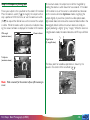
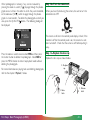
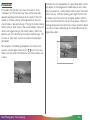
For example, in the following composition, the camera is focused on a distant point (shown by the
mark in the viewfinder), with the result that both distant and nearby objects are
in focus.
Basic Photography: Focus Settings
- 36 -
Using the Self-Timer
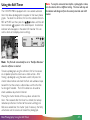
The COOLPIX 900 is equipped with a ten-second automatic
timer that allows photographers to appear in their own photographs. To select this self-timer, first turn the selector dial to AREC or M-REC and then press the
button until the selftimer indicator ( ) appears in the control panel. An identical
indicator will also appear in the color LCD monitor if it is on
and has been set to display camera settings.
Note: To stop the automatic timer before a photograph is taken,
turn the selector dial to a different setting. The timer will stop and
the indicator will disappear from the control panel and color LCD
monitor.
Note: The flash will automatically be set to “Red-Eye Reduction”
when the self-timer is selected.
To take a photograph using the self-timer, first fix the camera
on a tripod or place the camera on a stable surface. After
framing a photograph using the zoom switch, half-press the
shutter release button and check the flash and autofocus lamps
to confirm that the camera is able to focus and that the flash
has charged if needed. The LCD monitor can be used to
check autofocus adjustment if desired.
Pressing the shutter button all the way down activates the
timer. Nine seconds after the timer has started, the red-eye
reduction pre-flash on the front of the camera will begin to
blink; one second later, the shutter (and, if necessary, the flash)
will activate and the camera will record the photograph.
Basic Photography: Using the Self-Timer
- 37 -
Image Quality
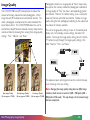
The COOLPIX 900 uses JPEG compression to reduce the
amount of memory required to store photographs. When
image data are JPEG-compressed, some details are lost. The
more a photograph is compressed, the more noticeable this
loss of detail will be. The COOLPIX 900 allows the user to
control the trade-off between reduced memory requirements
and loss of detail by choosing from among three image quality
settings: “Fine,” “Normal,” and “Basic.”
Photographs stored at an image quality of “Basic” require only
one quarter the memory needed for photographs recorded at
an image quality of “Fine” but show a correspondingly greater
loss of detail. “Normal,” the default setting, saves a substantial
amount of memory with little loss of detail. Choose an image
quality setting for each photograph according to the subject and
the amount of memory available.
The current image quality setting is shown in the control panel
display and, if set to display camera settings, the color LCD
monitor. To change the image quality setting, press the QUALITY button to cycle through the image quality settings in the
order “Normal,” “Fine,” and “Basic.”
The exposure count will change to show the number of exposures remaining at the new setting.
Basic Image Quality
(file size approx. 175KB)
Normal Image Quality
(file size approx. 350KB)
Basic Photography: Image Quality
Fine Image Quality
(file size approx. 750KB)
Note: Changing the image quality setting does not affect image
resolution, which remains a constant 1,280 × 960 pixels (640 ×
480 pixels in VGA mode). The only change is in the amount image
data are compressed.
- 38 -
Advanced Settings (M-REC)
This chapter explores the camera settings that can be accessed
and used only when the selector dial is set to M-REC. These
settings include exposure compensation, metering, digital motor-drive, white-balance, and a variety of digital effects. In MREC mode one can also set the date and time, choose a language for the camera’s menus and messages, format memory
cards, and adjust the brightness of the color LCD monitor.
The Shooting Menu
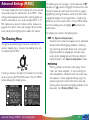
The shooting menu has two pages. Use the zoom-out (W/▼)
and zoom-in (T/▲) switches to highlight the desired menu item.
Pressing the zoom-out switch when the last item on a page is
highlighted (or pressing the zoom-in switch when the first item
is highlighted) displays the next page of items. To edit a highlighted item, press the shutter button. Press the MENU button
to exit the shooting menu, or highlight BK and press the
shutter button.
The shooting menu contains the following items.
Changes to advanced settings can only be made from the
camera’s shooting menu. To access the shooting menu, turn
the selector dial to M-REC.
EXP. +/- (Exposure Compensation)
Greater or lesser amounts of exposure can be selected to
compensate for difficult lighting conditions. Selecting a
high value brings out backlit objects while “washing out”
brightly-lit portions of a photograph, while low values
result in darker photographs which bring out details of
brightly-lit objects. See “Exposure Compensation,” below.
If nothing is showing in the color LCD monitor, turn the monitor on by pressing the MONITOR button. Press the MENU
button to display the shooting menu.
METERING
Metering method can be chosen from among “matrix,”
“spot,” and “center-weighted.” In matrix metering the
entire composition is considered when the camera calculates exposure. Center-weighted metering assigns the
greatest weight to the center of the frame, while spot
metering takes into account only lighting conditions at the
focus point. See “Metering Method,” below.
BK
S HOO T I NG
E XP. + / –
ME T E R I NG
CO N T I N UOU S
WH I T E B A L
I MG A D J U S T
L A NG U A G E
E
S E T➔S H U T T E R
30s
ON
C
BK
EX T R A FUNC
L C D BR I GH T
AUTO OF F
C A R D F O RM A T
L C D ON / O F F
DA T E
RE S E T A L L
S E T➔S H U T T E R
Advanced Settings (M-REC): The Shooting Menu
- 39 -
CONTINUOUS (Digital Motor-Drive)
A choice of three drive settings is offered: single-shot,
continuous, and VGA sequence. In single-shot mode, one
photograph is taken each time the shutter button is fully
pressed. In continuous and VGA-sequence modes, the
camera will continue to record photographs as long as the
shutter button is held down. See “Continuous (Digital
Motor-Drive)” for details.
WHITE BAL (White Balance)
White balance can be adjusted for different lighting conditions by choosing from among settings for exterior (bright
sunlight, overcast) or interior (incandescent, fluorescent,
flash) lighting. See “White Balance,” below.
IMG ADJUST (Image Adjustment)
Brightness and contrast can be adjusted digitally to compensate for difficult lighting conditions. See “Image Adjustment,” below.
LANGUAGE
The language used in the camera’s menus and messages
can be chosen from among English, French, German, and
Japanese. See “First Steps: Choosing a Language for the
Menus,” above.
EXTRA FUNC (Extra Functions)
This item offers a range of digital effects, including digital
zoom, conversion to grayscale (black and white) or VGA,
and autoexposure lock. It also provides special settings
for the optional fish-eye and wide-angle lens adapters. See
“Extra Functions,” below.
Advanced Settings (M-REC): The Shooting Menu
LCD BRIGHT (LCD Brightness)
This item allows the user to adjust the brightness of the
color LCD monitor. This setting only affects the monitor,
not photographs taken with the camera. See “LCD Brightness,” below.
AUTO OFF
By default, the color monitor turns off automatically if no
operation is performed for thirty seconds. AUTO OFF
allows the user to choose how long the monitor will
remain on in A-REC or M-REC modes (a separate AUTO
OFF function is available for playback mode). See “Auto
Off,” below.
CARDFORMAT
Choose CARDFORMAT to format compact flashmemory cards for use in the COOLPIX 900 as described
in “Formatting Memory Cards,” below.
LCD ON/OFF
This setting controls whether the color LCD monitor
comes on automatically or remains off to save battery
power when the camera is turned on. See “LCD On/Off,”
below.
DATE
Choose DATE to set the camera’s clock-calendar as
described in “First Steps: Setting the Time and Date.”
RESET ALL
Resets exposure, metering, motor-drive, white-balance,
brightness/contrast, monitor brightness, extra functions
and LCD ON/OFF settings to their factory default
values as described in “Restoring Default Settings,” below.
- 40 -
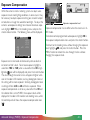
Exposure Compensation
While the camera’s matrix metering system can adjust autoexposure to suit most lighting conditions, in some cases it may
be necessary to adjust exposure to bring out a back-lit subject
or to darken an image that would be too bright. To adjust the
camera’s autoexposure settings to increase or decrease exposure, highlight EXP. +/- in the shooting menu and press the
shutter-release button. The following menu will be displayed.
BK
E X P. + / –
+ 2.0
+ 1.5
+ 1.0
+ 0.5
±0
– 0.5
– 1.0
– 1.5
– 2.0
S E T➔S H U T T E R
Exposure compensation level
Exposure compensation has no effect when the camera is in AREC mode.
To restore normal programmed autoexposure, highlight ±0 in
the exposure compensation menu and press the shutter button.
To return to the shooting menu without changing the exposure
level, highlight BK and press the shutter button. Press the
MENU button to restore the view through the lens without
changing the exposure level.
Exposure can be increased or decreased up to two levels in
increments of half a level. To increase exposure, highlight a
value from +0.5 to +2.0 (when a value other than ±0 is highlighted a
icon will be displayed) and press the shutter button.
The view through the camera’s lens will appear brighter when
seen in the color LCD monitor, and any photographs taken at
this setting will be more exposed. Similarly, photographs taken
at settings of from -0.5 to -2.0 will be less exposed. When
exposure compensation is set to any value other than ±0 and
the selector dial is set to M-REC, the exposure level will be
displayed in the color LCD monitor and shooting menu, while
the control panel will show the exposure-compensation icon
( ).
Advanced Settings (M-REC): Exposure Compensation
- 41 -
Metering Method
In determining autoexposure and shutter speed, the camera
uses one of three light-metering methods: matrix, spot, or
center-weighted. In matrix metering light is measured in sixtyfour different areas of the frame and exposure adjusted to a
level that in most conditions best captures both brightly-lit and
shaded portions of the image. Spot metering measures only
the light at the center of the frame. Where there is contrast
between different portions of the image, spot metering can be
used to throw a subject into high relief. When spot metering is
used, both focus and autoexposure settings will be locked when
the shutter-release button is half-pressed. Center-weighted
metering measures the amount of light in the entire frame while
assigning the greatest weight to an area in the center of the
frame equal to one quarter of the total. Use this setting when
you would like autoexposure to be based on lighting conditions
in the center quarter of the frame.
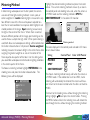
To choose a metering method, highlight METERING in the
shooting menu and press the shutter-release button. The
following menu will be displayed.
B K ME T E R I N G
MA T R I X
S POT
C E N T E RWE I GH T
S E T➔S H U T T E R
Advanced Settings (M-REC): Metering Method
Highlight the desired metering method and press the shutter
button. The current metering method is shown by an icon in
the control panel and shooting menu and, when the camera is
in M-REC mode and the metering method is SPOT or
CENTERWEIGHT, in the color LCD monitor.
Metering method
The icons displayed in the control panel and color LCD monitor are shown below.
Setting
Control Panel
MATRIX
SPOT
CENTERWEIGHT
Color LCD Monitor
None
The chosen metering method is only valid when the camera is
in M-REC mode. If the selector dial is set to A-REC, matrix
metering will automatically be restored; the camera will however return to the chosen method when the dial is set back to
M-REC.
To return to the shooting menu without changing the metering
setting, highlight BK and press the shutter button. Pressing
the MENU button while in the metering menu will restore the
view through the lens without changing the metering method.
- 42 -
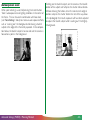
Autoexposure Lock
When spot metering is used, half-pressing the shutter button
“locks” autoexposure to suit lighting conditions in the center of
the frame. This can be used in combination with focus lock
(see “Focus Settings,” above) to create unusual exposure effects,
such as “washing out” the background while leaving a back-lit
subject at the edge of the frame fully exposed. In the composition below, the back-lit subject is to one side and the camera is
focused on a point in the background.
Advanced Settings (M-REC): Metering Method
To bring out the back-lit subject, aim the camera at the back-lit
portion of the subject and half-press the shutter-release button.
Without releasing the button, return the camera to its original
position and press the shutter button the rest of the way down.
In the photograph that results, exposure will have been adjusted
to capture the back-lit subject while “washing out” the brightlylit background.
- 43 -
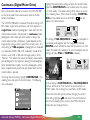
Continuous (Digital Motor Drive)
Like a conventional motor-drive camera, the COOLPIX 900
can be set to shoot frames continuously while the shutter
button is held down.
The COOLPIX 900 offers a choice of three drive settings in MREC mode: single frame, continuous, and VGA sequence. In
single-frame mode, one photograph is taken each time the
shutter-release button is fully pressed. In continuous mode,
photographs will be taken one after another as long as the
shutter-release button is held down. Speed depends on the
image-quality setting and the type of flash memory used. At a
drive setting of “VGA sequence,” photographs are recorded
at a resolution of 640 × 480 (VGA resolution) instead of the
camera’s usual 1,280 × 960, and the image quality is set to
“Normal.” This reduces the amount of memory consumed by
each photograph in the sequence, allowing more photographs
to be recorded more rapidly. Up to ten photographs will be
taken at approximately two frames per second each time the
shutter button is pressed.
To change the drive setting, highlight CONTINUOUS in the
shooting menu and press the shutter button. The following
menu will appear.
BK
CON T . MOD E
S I NG L E
C O N T I N UOU S
V G A S E QU E N C E
Highlight the desired drive setting and press the shutter button
(note that CONTINUOUS is not available when the camera
is in VGA mode). The chosen setting will be shown as an icon
in the shooting menu. When the drive setting is CONTINUOUS and the selector dial is set to M-REC, a
icon will
appear in the control panel.
At a setting of VGA SEQUENCE, the
icon will appear in
the control panel together with the image-quality indicator
NORMAL, which will blink to show that the camera is in VGA
mode. The color LCD monitor, if on and set to display camera
settings, will show VGA and NORMAL indicators.
At drive settings of CONTINUOUS and VGA SEQUENCE,
the flash will be set to “Flash Cancel” when the camera is in
M-REC mode. Drive settings have no effect in A-REC mode.
To exit the drive-setting menu without changing the current
drive setting, highlight BK and press the shutter button to
return to the shooting menu, or press the MENU button to
restore the view through the lens.
S E T➔S H U T T E R
Advanced Settings (M-REC): Continuous (Digital Motor Drive)
- 44 -
White Balance
The COOLPIX 900 automatically adjusts white balance to suit
current lighting conditions when the shutter-release button is
half-pressed. If desired, a white-balance program suited to
specific light sources can be selected. The COOLPIX 900
offers separate programs for exterior (bright sunlight and overcast) and interior (incandescent and fluorescent) lighting. To
choose a white-balance program, highlight WHITE BAL in
the shooting menu and press the shutter button. The following
menu will appear.
B K WH I T E B A L
AU TO
S U NN Y
I N CA ND E SC E N T
F L UO R E S C E N T
C L OU D Y
F L ASH
S E T➔S H U T T E R
White balance program (sunny)
The white-balance setting has no effect when the camera is in
A-REC mode, in which case automatic white balance will be
used. The selected white-balance program will be restored
when the selector dial is turned to M-REC.
To exit the white-balance menu without changing the whitebalance program, highlight BK and press the shutter button
to return to the shooting menu, or press the MENU button to
restore the view through the lens.
A white-balance program can be selected from among AUTO
(automatic white balance, the default setting suited to a wide
variety of light sources), SUNNY (for bright sunlight), INCANDESCENT (for incandescent light-bulbs), FLUORESCENT (for fluorescent light), CLOUDY (for taking photographs outdoors in overcast conditions), and FLASH (when
using the flash). Highlight the desired setting and press the
shutter button. An icon corresponding to the chosen program
will appear next to WHITE BAL in the shooting menu. At
settings other than AUTO, an icon indicating the current
white-balance setting will appear in the color LCD monitor
when the selector dial is set to M-REC and the monitor is set to
display camera settings.
Advanced Settings (M-REC): White Balance
- 45 -
Brightness can be increased by highlighting
BRIGHTNESS and pressing the shutter button. The
icon will
In M-REC mode, it is possible to adjust digitally the brightness or appear in the shooting menu to show that this option has been
selected, and the view through the lens as shown in the color
contrast of photographs taken with the camera. Brightness
can be increased to bring out poorly-lit portions of the compo- monitor when the selector dial is set to M-REC will be digitally
enhanced to make the image brighter (brightness and contrast
sition, or decreased to prevent bright portions of the composition from being “washed out.” Unlike exposure compensation, settings have no effect in A-REC mode). Normal brightness can
this is a digital effect which increases or decreases the brightness be restored by selecting STANDARD from the image adjustment menu or by turning the selector dial to OFF. To decrease
of all pixels in the image, as opposed to adjusting aperture and
BRIGHTNESS. Contrast can be
brightness, select
shutter speed to increase or decrease exposure. Increasing
increased by selecting
CONTRAST, or decreased by
contrast increases the difference between light and dark
CONTRAST.
These settings are mutually
selecting
portions of the image, making shadows and outlines more
distinct. Decreasing contrast has the opposite effect. To adjust exclusive and are not cumulative. Only one setting will be in
the brightness or contrast of subsequent photographs in M-REC effect at a time; selecting another brightness or contrast setting
mode, highlight IMG ADJUST in the shooting menu and press cancels the previous selection. At settings other than STANDARD, the current image adjustment setting is shown in the
the shutter button. The following menu will appear.
color LCD monitor if it is on and set to display camera settings.
Image Adjustment
BK
I MG A D J U S T
S T ANDARD
B R I GH T N E S S
B R I GH T N E S S
C ON T R A S T
C ON T R A S T
S E T➔S H U T T E R
(
Image adjustment
BRIGHTNESS)
To exit the image adjustment menu without changing the
brightness or contrast, highlight BK and press the shutter
button to return to the shooting menu, or press the MENU
button to restore the view through the lens.
Advanced Settings (M-REC): Image Adjustment
- 46 -
Extra Functions
The COOLPIX 900’s extra functions menu offers both digital
effects and pre-programmed settings for the optional fish-eye
and wide-angle lens adapters. The digital effects available are
digital zoom, autoexposure lock, and VGA and/or grayscale
recording. A menu of options can be viewed by highlighting
EXTRA FUNC in the shooting menu and pressing the shutter button. Options currently selected are marked by an “X” in
the box to the left of the item.
B K E X T R A F UN C
E X ECU T E
VGA S HO T
B L A C K &WH I T E
D I G I TAL TELE
F I SHEYE
W I DEADAP T ER
A E L OC K
S E T➔S H U T T E R
The items available in the extra functions menu are described
below.
VGA SHOT
When this option is selected and the selector dial is set to
M-REC, photographs will be recorded at a resolution of 640
× 480 pixels, one-quarter the camera’s usual resolution of
1,280 × 960 pixels. This results in images which require only
one quarter the usual amount of memory to store, although
with a corresponding loss of detail. In VGA mode, the
image-quality indicator in the control panel will blink and the
color LCD monitor will show a VGA mark.
While the camera is in VGA mode, the drive setting CONTINUOUS can not be selected (see “Continuous (Digital
Motor Drive),” above). If digital zoom is chosen, either by
selecting DIGITAL TELE from the extra functions menu
or by pressing the zoom-in switch until 2× digital zoom is
activated, the camera will record pictures in an area in the
center of the frame half the usual height and breadth of the
area usually recorded and will store the resulting image as a
photograph 640 × 480 pixels in size.
BLACK&WHITE
This option is used to create monochrome (grayscale)
photographs. While this option is selected, any photographs
taken in M-REC mode will be stored as grayscale images and
the color LCD monitor will show the view through the
camera’s lens in black-and-white.
Advanced Settings (M-REC): Extra Functions
- 47 -
DIGITAL TELE (Digital Telephoto)
FISHEYE
At this setting, an area in the center of the frame 640 × 480
When this option is selected, the combination of camera
pixels in size is digitally enlarged to a size of 1,280 × 960
settings most appropriate for using the fish-eye lens adapter
pixels, filling the entire frame. As is the case with ordinary ×2
(sold separately) is put into effect: zoom is set to the widest
digital zoom, activated by holding down the zoom-in switch
possible angle, focus is set to “Infinity” ( ) the flash is set
when the camera is at maximum zoom, images recorded at
to “Flash Cancel,” and center-weighted metering is used.
this setting will be slightly “grainy.” Unlike ordinary digital
These settings cannot be changed while this option is in
zoom, however, at this setting digital zoom remains in effect
effect and the selector dial is set to M-REC, during which
while the camera is zoomed in or out, making it possible to
icon will be shown in the color LCD monitor.
time a
frame photographs using the zoom switch. While this setting WIDEADAPTER
is in effect and the selector dial is set to M-REC, the zoom
When this option is selected, camera settings are set to the
indicator in the color LCD monitor and the green autofocus
values most appropriate for using the wide-angle lens adapter
lamp will blink.
(sold separately): zoom is set to the widest possible angle
and the flash is set to “Flash Cancel.” These settings cannot
be changed while this option is in effect and the selector dial
is set to M-REC, during which time a
icon will be shown
in the color LCD monitor.
Because the viewfinder does not reflect the effects of digital
zoom, it is recommended that you frame photographs in the
monitor when digital zoom is in effect. Digital zoom is only
in effect when the color LCD monitor is on. Turning the
monitor off by pressing the MONITOR button returns the
camera to ordinary optical zoom mode. Digital zoom will be
restored when the monitor is turned on once more.
Advanced Settings (M-REC): Extra Functions
- 48 -
AE LOCK (Autoexposure Lock)
Autoexposure lock is used to make a series of photographs
with consistent exposure and white balance, as for example
when making a sequence of photographs that will later used
in creating a 360-degree panorama. If autoexposure lock is
used, the autoexposure (shutter speed and aperture) and
white-balance settings for the first photograph in the series
will be used for all subsequent photographs, allowing the
photographs to be joined seamlessly into a single image.
To take a series of photographs using autoexposure lock,
select AE LOCK in the extra functions menu as described
below and turn the selector dial to M-REC. Compose the
first photograph in the series and press the shutter button all
the way down to record the image. Autoexposure and
white balance settings for M-REC mode will be locked at the
values the camera chose for this photograph. Take the
remaining photographs in the series (you may wish to use a
tripod to ensure that the photographs are taken from a
consistent height and angle), then deselect AE LOCK in the
extra functions menu to restore normal autoexposure and
white balance.
While autoexposure lock is in effect and the camera is in MREC mode, AE-L (autoexposure lock) and WB-L (whitebalance lock) indicators will be shown in the color monitor.
Note: When autoexposure lock is in effect, the flash will
automatically by set to “Flash Cancel” and will not fire even
when lighting is inadequate.
Note: White-balance settings will only be locked if auto white
balance is selected (see “White Balance,” above). At other
settings only autoexposure will be locked; the current whitebalance setting will remain in effect but cannot be changed.
Advanced Settings (M-REC): Extra Functions
- 49 -
The above settings can be used in combination. For example, it
is possible to use VGA SHOT together with any combination
of DIGITAL TELE and AE LOCK. Note however that
digital zoom cannot be used in combination with either FISHEYE
or WIDEADAPTER; nor can FISHEYE be used at the same
time as WIDEADAPTER. Similarly, BLACK&WHITE
cannot be used together with VGA SHOT.
LCD Brightness
low). Individual effects can be turned off by opening the extra
functions menu and deselecting the item.
To exit the LCD brightness window without changing monitor
brightness, highlight BK and press the shutter button to
return to the shooting menu, or press the MENU button to
restore the view through the lens.
It is possible to adjust the brightness of the color LCD monitor,
making the image in the monitor easier to see, without affecting
the brightness of photographs taken with the camera (to adjust
the brightness of photographs, use the image adjustment settings discussed above under “Image Adjustment”). To adjust the
brightness of the color monitor, highlight LCD BRIGHT in the
To use the settings in the extra functions menu, highlight the
shooting
menu and press the shutter button. The following
desired effect and press the shutter button. An “X” will appear
in the box to the left of the item. You can then select additional window will appear.
items if desired. If mutually exclusive items, such as FISHEYE
and WIDEADAPTER, are selected, only the item most
recently chosen will be selected. To deselect an item, highlight
it and press the shutter button. To put the selected items into
effect, highlight EXECUTE and press the shutter button.
When any of the items in the extra function menu are in effect,
an “X” will appear in the box next to EXTRA FUNC in the
shooting menu. To exit the extra functions menu without
Using the zoom switch, select the desired setting by highlighting
putting the selected items into effect, highlight BK and press
–, 0, or + and pressing the shutter button. A setting of – will
the shutter button to return to the shooting menu, or press the
darken the display slightly, while + results in a slightly brighter
MENU button to restore the view through the lens.
display. These settings are not cumulative; selecting – twice in a
row will only darken the display by the same amount as selectExtra function settings are only effective when the selector dial
ing – once. LCD brightness settings remain in effect even when
is set to M-REC and will be ignored when the camera is in Athe selector dial is set to A-REC or PLAY. Select 0 in the
REC mode. To restore default settings, select RESET ALL
window above to restore normal brightness.
from the shooting menu (see “Restoring Default Settings,” be-
Advanced Settings (M-REC): Extra Functions
- 50 -
Auto Off
When the camera is operating on battery power, the monitor
turns off automatically if no action is performed for thirty seconds (three minutes when menus are displayed). To change
the time until the monitor turns off automatically in A-REC or
M-REC modes, highlight AUTO OFF in the shooting menu
and press the shutter button. The following menu will appear.
BK
Note: The AUTO OFF function in the shooting menu affects only
A-REC and M-REC modes. A separate AUTO OFF function, accessed from the playback menu, is available for playback mode.
See “Playback: Auto Off,” below.
AUTO OF F
3
3
0 s
1 m
5 m
0 m
S E T➔S H U T T E R
Settings of thirty seconds, one minute, five minutes, and thirty
minutes are available. Highlight the desired setting and press
the shutter button to put the change into effect, or highlight
BK and press the shutter button to discard any changes and
return to the shooting menu. Pressing the MENU button will
return you to M-REC mode.
Note: When the monitor goes off automatically, all other camera
functions are deactivated and the camera itself is effectively off,
consuming almost no power. The camera can be reactivated by
pressing the MONITOR button or by pressing the shutter button
half-way.
Advanced Settings (M-REC): Auto Off
- 51 -
Formatting Memory Cards
Compact flash memory cards must be formatted before they
can be used in the camera (unformatted cards can be formatted
when inserted, as is described in “Troubleshooting,” below). You
can also format cards to remove all data from the card. Formatting memory cards permanently deletes all photographs that
may be stored on the card; be sure to copy any photographs
and other data you wish to keep to a computer (see “Connections,” below). To format a memory card from the shooting
menu, highlight CARDFORMAT and press the shutter button. The following window will appear.
BK
To exit the format window without formatting the memory
card, highlight NO or BK and press the shutter button,
which will return you to the shooting menu, or press the MENU
button to restore the view through the lens.
F ORMA T
WA R N I N G ! A L L
I MA G E S W I L L
BE DE L E T ED!
F OR M A T
N O
S E T➔S H U T T E R
Press the zoom-in switch (T/▲) to highlight FORMAT, then
press the shutter button. The following message will be displayed while the memory card is being formatted.
✔Caution: Do not remove memory
cards from the camera while formatting is in progress. This could render
the card inoperable.
Advanced Settings (M-REC): Formatting Memory Cards
- 52 -
LCD On/Off
By default, the color LCD monitor comes on when the camera
is turned on and must be turned off by pressing the MONITOR
switch. To save power, however, the monitor can be set to
turn off when the selector dial is turned to M-REC mode, to be
turned on as desired using the MONITOR switch. To change
this setting, highlight LCD ON/OFF in the shooting menu and
press the shutter button. The following window will appear.
BK
This setting affects M-REC mode only. The LCD monitor will
always come on when the selector dial is turned from OFF to
A-REC or PLAY, regardless of the setting chosen in the LCD
ON/OFF window.
To return to the shooting menu without changing the monitor’s
on/off settings, highlight BK and press the shutter button, or
press the MENU button to restore the view through the lens.
L CD O / I
T U R N S MO N I T OR
ON A T S T A R T U P
YES
N O
S E T➔S H U T T E R
To have the monitor turn off when the selector dial is set to MREC, highlight NO and press the shutter button. The word
OFF will appear in the shooting menu next to LCD ON/
OFF, indicating that the monitor will not come on the next
time M-REC is selected after turning the camera off. The
monitor can be set to remain on in M-REC mode by highlighting YES and pressing the shutter button, in which case ON will
appear in the shooting menu next to LCD ON/OFF. Note
that even when YES is chosen, setting the selector dial to MREC will not cause the monitor to come on if it has been
turned off using the MONITOR button. In this case the monitor must be turned on by pressing the MONITOR button again.
Advanced Settings (M-REC): LCD On/Off
- 53 -
Restoring Default Settings
Exposure adjustment, metering, continuous, white-balance,
brightness/contrast, monitor brightness, and extra functions
settings can be restored to their factory default values by highlighting RESTORE ALL in the shooting menu and pressing
the shutter button. The following window will be displayed.
BK
RESE T
To return to the shooting menu without changing settings,
highlight NO or BK and press the shutter button, or press
the MENU button to restore the view through the lens.
ALL
RESE T A L L
S E T T I NG S T O
DE F AU L T VA L UES ?
RESE T
N O
S E T➔S H U T T E R
Highlight RESET and press the shutter button to restore
settings to the following default values:
Setting
Exposure compensation
Metering
Continuous
White balance
Image adjustment
Extra functions
LCD brightness
Auto off
Default value
±0
matrix
single frame
automatic
standard (no adjustment)
all functions off
0 (no adjustment)
30 seconds
Date, language, and LCD on/off settings, together with flash,
focus, and image quality settings, are not affected when settings
are reset.
Advanced Settings (M-REC): Restoring Default Settings
- 54 -
Playback
This chapter describes how to view photographs stored in the
flash-memory card, how to create a slide show using these
photos, and how to delete unwanted photographs from memory.
These playback functions are available when the selector dial is
turned to PLAY.
Turning the selector dial to PLAY causes an hourglass icon ( )
to be displayed in the color LCD monitor while the camera
reads the most recently recorded photograph from memory
and displays it in the monitor (if there is no card in the camera
or the card currently in the camera contains no images or is not
formatted, an error message will be displayed; error messages
are described in “Troubleshooting,” below). The camera’s
playback display is shown below.
Filename
(the first four
letters of the
filename are
omitted)
Image quality
Playback
Date and
time of recording
Battery indicator
The filename, date-of-recording, and other indicators can be
hidden by pressing the MONITOR button. To view the indicators once more, press the MONITOR button until they reappear. If no operations are performed for thirty seconds, the
monitor will go off automatically to save power. To turn the
monitor on again, press the MONITOR or shutter button. The
length of time before the monitor goes off automatically during
playback can be set using the playback menu. See “Auto Off,”
below.
The photographs in memory can be viewed one at a time using
the zoom switch. Press the zoom-in switch (T/▲) to page
through the photographs one at a time in the order recorded,
or view the photographs in reverse order by pressing the
zoom-out (W/▼) switch. An hourglass icon ( ) will be displayed while each photograph is read from memory. If the
zoom switch is pressed before a photograph has been read
from memory, the camera will stop reading the current photograph and start reading the next photograph.
To select a particular photograph for viewing, press the thumbnail button ( ) located above the color LCD monitor at the
base of the control panel. Thumbnail images of the photographs currently in memory will be displayed.
Position in
memory
- 55 -
The numbers at the bottom right of each thumbnail give its
position in memory; the currently selected photograph is marked
by a yellow border. Select a photograph for viewing by pressing
the zoom-in switch to move forward through the thumbnails or
the zoom-out switch to go back. If there are more than nine
photographs in memory, pressing the zoom-in switch when the
last preview is selected, or pressing the zoom-out switch when
the first preview is selected, will cause the next three items in
memory to be displayed. Pressing the zoom-in switch when the
last item in memory is selected displays the first item in memory,
while pressing the zoom-out switch when the first item in
memory is selected displays the last item in memory.
Zoom out
(W/▼)
First (oldest) item
in memory
When displayed at full size, photographs can be further enlarged
by pressing the multiple-selection button (
). An area in the
center of the photograph, half the length and breadth of the
original, will be enlarged to fill the monitor.
Press the multiple-selection button a second time to view the
photograph in its entirety.
To delete the photograph currently displayed in the monitor, or
the photograph currently highlighted in the thumbnail list, press
the delete button ( ). The following dialog will be displayed.
BK
DE L E T E
DE L E T E
1 I MA G E
Last (newest)
item in memory
Zoom in
(T/▲)
YES
N O
S E T➔S H U T T E R
Once the desired photograph has been selected, press the
shutter button to view it at full size.
Playback
- 56 -
Pressing the shutter button with YES highlighted causes the
current photograph to be deleted. Once the photograph has
been erased from memory, the following message will be
displayed.
DON E
Note: Once deleted, photographs cannot be recovered; be sure
to make copies of any photographs you wish to keep before
deleting them from memory (see “Connections” for information
on transferring photographs from memory to a computer).
▲
To exit the delete dialog without deleting the currently selected
image, press the MENU button, or use the zoom switch to
highlight NO or BK and then press the shutter button.
Playback
- 57 -
The Playback Menu
In addition to the functions described above, playback mode
offers a menu that allows the user to create slideshows, to
delete several photographs simultaneously, to protect photographs from deletion, and to hide photographs so that they will
not be displayed in slideshows or ordinary playback mode. The
time and date, brightness of the color LCD monitor, language
used in the menus, and the length of time the monitor will
remain on before turning off automatically can also be set using
the playback menu.
To access the playback menu, turn the selector dial to PLAY.
Press the MENU button to display the playback menu.
BK
P L AY
BACK
T H UMB N A I L
DE L E T E
S L I D E S HOW
P RO T E C T
H I D E I MA G E
L A NGU A G E
E
S E T➔S H U T T E R
Playback: The Playback Menu
0
30s
BK
L C D B R I GH T
AUTO OF F
C A R D F O RM A T
DA T E
S E T➔S H U T T E R
The playback menu has two pages. Use the zoom-out (W/▼)
and zoom-in (T/▲) switches to highlight the desired menu item.
Pressing the zoom-out switch when the last item on a page is
highlighted (or pressing the zoom-in switch when the first item
is highlighted) displays the next page of items. To edit a highlighted item, press the shutter button. To exit the playback
menu, press the MENU button or highlight BK and press the
shutter button.
The playback menu contains the following items.
THUMBNAIL
Selecting this option causes the thumbnail list to be
displayed as described in the preceding section.
DELETE
Using this option, the user can choose to delete all photographs currently in memory or select multiple photographs for deletion. See the following section, “Deleting
Multiple Photographs from Memory.”
SLIDESHOW
When this option is selected, all the photographs currently selected for display will be shown one after the
other, with a pause between each photograph. See
“Slideshow,” below, for details.
PROTECT
Selected photographs can be protected from accidental
deletion using this option. See “Protecting Photographs
from Deletion,” below.
- 58 -
HIDE IMAGE
When displaying photographs to an audience, it may be
desirable to exclude some of the photographs in memory
from playback and deletion. This option can be used to
hide selected photographs as described in “Hiding Photographs,” below.
LANGUAGE
The language used in the camera’s menus and messages
can be chosen from among English, French, German, and
Japanese. See “First Steps: Choosing a Language for the
Menus,” above.
LCD BRIGHT (LCD Brightness)
This item allows the user to adjust the brightness of the
color LCD monitor as described in “Advanced Settings:
LCD Brightness,” above.
AUTO OFF
When the camera is operated on battery power, the
color LCD monitor will go off automatically if there is no
input for thirty seconds. AUTO OFF can be used to
extend this limit for playback as described in “Auto Off,”
below.
CARDFORMAT
Choose CARDFORMAT to format compact flashmemory cards for use in the COOLPIX 900 as described
in “Advanced Settings: Formatting Memory Cards,” above.
DATE
Choose DATE to set the camera’s clock-calendar as
described in “First Steps: Setting the Time and Date.”
Playback: The Playback Menu
- 59 -
Deleting Multiple Photographs from Memory
To select multiple photographs for deletion, highlight SELECTED and press the shutter button. The window shown
below will appear.
While single photographs can be deleted in playback mode as
described at the beginning of this chapter, it is also possible to
BK
DE L E T E
select multiple images for simultaneous deletion or to delete all
unprotected photographs currently selected for display. Note
that once deleted, photographs cannot be recovered; remember to copy to a computer any images you would like to keep
before using the options described below (see “Connections” for
S E T➔S H U T T E R
MU
L T I SE L . ➔
information on backing up the contents of the camera’s memory
to a computer).
Using the zoom switch, highlight a photograph that you would
like to delete. Images not currently visible in the window will
To delete multiple images, highlight DELETE in the playback
menu and press the shutter button. The following menu will be appear when the zoom switch is used to scroll past the first or
last item in the window. Note however that photographs that
displayed.
have been hidden with HIDE IMAGE will not be displayed
BK
DE L E T E
and hence are not available for deletion. Similarly, images marked
with a key icon ( ) are protected and cannot be selected for
SE L ECT ED
deletion. Having highlighted a photograph you would like to
delete, press the delete button ( ) or the multiple selection
ALL
button (
). A garbage-can icon ( ) will appear on the
selected image, indicating that it has been selected for deletion.
S E T➔S H U T T E R
Other images can then be selected in the same way. Images
marked with the icon can be deselected by highlighting the
image and pressing the or
button again.
Playback: Deleting Multiple Photographs from Memory
- 60 -
After highlighting the last of the images that are to be deleted,
press the shutter button to select this and all images marked
with a icon for deletion. A confirmation dialog will be displayed.
BK
To delete all photographs currently in memory that are neither
hidden nor protected, highlight ALL in the delete menu and
press the shutter button. The following dialog will appear.
BK
DE L E T E
DE L E T E
1 I MA G E
YES
N O
S E T➔S H U T T E R
Select YES and press the shutter button to delete all selected
images (if more than six images have been selected, only the
first six will be displayed in the confirmation dialog above; all
selected images will however be deleted, including those not
visible in the dialog). The following message will be displayed
and the camera will return to the playback menu, having deleted all selected images.
(
DE L E T E
D E L E T I NG
A L L I MA G E S
➔E X C L U D E D )
YES
N O
S E T➔S H U T T E R
Highlight YES and press the shutter button to delete all images
currently in memory with the exception of those which are
hidden or protected. The following message will be displayed
and the camera will return to the playback menu, having deleted all unprotected images.
DON E
DON E
Selecting NO will return you to the delete menu leaving all
photos intact.
To return to the playback menu without deleting the photographs, highlight NO and press the shutter button.
Playback: Deleting Multiple Photographs from Memory
To exit any of the above dialogs and windows without deleting
any images, press the MENU button, which will return you to
playback mode, or highlight BK and press the shutter button
to return to the previous display (note that the BK option is
only available in the multiple delete window when the first page
of thumbnails is displayed).
- 61 -
Slideshow
The COOLPIX 900’s slideshow option allows unattended
playback of all photographs currently selected for display. Once
a slideshow has been started, photographs will be displayed one
after the other in the order recorded, with a pause between
each photograph.
To start a slideshow or to change slideshow settings, highlight
SLIDESHOW in the playback menu and press the shutter
button. The following menu will be displayed.
BK
S L I D E S H OW
S T ART
F R AME
I NTV L
( T E M P. S U S P E N D
➔S H U T T E R )
S E T➔S H U T T E R
By default, each photograph in the slideshow will be displayed
three seconds (depending on the length of time need to read
the photograph from memory and first display it on the monitor, the length of time photographs are displayed may vary
slightly). To set the length of time each photograph will be
displayed, highlight FRAME INTVL (frame interval) and press
the shutter button. The menu shown below will appear.
BK
Change the interval setting by highlighting the desired interval
and pressing the shutter button, or highlight BK and press the
shutter button to leave the interval unchanged. Either action
will return you to the slideshow menu shown above. While an
interval setting is highlighted, it will blink at the same rate as the
selected value.
Having selected an interval setting, start the slideshow by highlighting START in the slideshow menu and pressing the shutter button. Photographs will be displayed one after the other in
the order recorded, starting with the first (oldest) photograph in
memory and ending with the last (most recent). Photographs
that have been hidden using HIDE ITEM will however not be
shown. Each photo will remain on display for the specified
interval.
The slideshow can be terminated before the last slide has been
displayed by pressing the MENU key, causing the photograph
currently on display in the slideshow to appear in playback
mode. To pause the slideshow without terminating it, press the
shutter-release button. The following pause window will appear.
BK
PAUSE
I NT ERVA L
2
3
5
10
s
s
s
s
RES T ART
F R AME I N T V L
S E T➔S H U T T E R
Playback: Slideshow
- 62 -
To exit the slideshow and return to the playback menu, highlight
BK and press the shutter button. Highlight RESTART and
press the shutter button to resume the slideshow at the point it
was interrupted. To adjust the length of time each photograph
is displayed, highlight FRAME INTVL and press the shutter
button. The interval menu shown on the previous page will
appear; highlight the desired interval and press the shutter
button to start the slideshow over again from the beginning at
the new interval setting, or highlight BK and press the shutter
button to return to the playback menu. Pressing the MENU
button while the slideshow is paused will end the slideshow and
display the current photograph in playback mode.
When the last photograph in memory has been displayed, the
slideshow will pause automatically and the pause window
shown above will appear. Highlight RESTART and press the
shutter button to begin the slideshow from the beginning, or
press the MENU button to display the last photograph in memory
in playback mode. Highlighting BK and pressing the shutter
button will return you to the playback menu, while selecting
FRAME INTVL will bring up the interval menu shown above.
To exit the slideshow menu and return to the playback menu
without starting a slideshow or adjusting the interval setting,
highlight BK in the slideshow menu and press the shutter
button. Pressing MENU while in the slideshow menu will return
you to playback mode.
Playback: Slideshow
- 63 -
After highlighting the last of the images you wish to protect,
press the shutter button to protect the currently selected image
icon. The following message
To protect selected photographs from deletion, highlight PRO- and all images marked with the
will
be
displayed
and
then
the
camera
will return to the playTECT in the playback menu and press the shutter button. The
back menu.
following window will be displayed.
Protecting Photographs from Deletion
BK
P RO T E C T
DON E
S E T➔S H U T T E R
MU L T I S E L . ➔
Using the zoom switch, highlight a photograph that you would
like to protect. Images not currently visible will appear when
the zoom switch is used to scroll past the first or last item in the
window. Photographs that have been hidden with HIDE
IMAGE will not be displayed and consequently cannot be
protected using this option. Hidden images however cannot be
selected and are thus protected from deletion.
Having highlighted a photograph you would like to protect,
). A key icon ( ) will
press the multiple-selection button (
appear superimposed on the selected image, indicating that it
has been selected for protection. Other images can then be
selected in the same way. Images already marked with the
icon can be deselected by highlighting the image and pressing
the
button again.
Playback: Protecting Photographs from Deletion
To return to the playback menu without changing the protection status of any photographs, highlight BK and press the
shutter button (note that the BK option is only available in
the protect window when the first page of thumbnails is displayed). Press the MENU button to return to playback mode
while leaving the protection status of all photographs unchanged.
Protected photographs cannot be deleted using the DELETE—SELECTED or DELETE—ALL options, nor can
they be erased from memory by pressing the button while in
playback mode. Formatting the memory card will however
permanently erase all protected photographs. When the card is
read by a computer equipped with a PC card drive (see “Connections,” below), protected images will appear as “read-only”
files that can be neither deleted nor overwritten.
- 64 -
Hiding Photographs
When creating a slideshow or playing back photographs for an
audience, you may wish to hide some of the photographs in
memory. This can be accomplished by highlighting HIDE
IMAGE in the playback menu and pressing the shutter button.
The following window will be displayed.
B K H I D E I MA G E
S E T➔S H U T T E R
MU L T I S E L . ➔
Using the zoom switch, highlight a photograph that you would
like to hide. Images not currently visible will appear when the
zoom switch is used to scroll past the first or last item in the
window. Having highlighted a photograph you would like to
hide, press the multiple-selection button (
). A
icon will
appear superimposed on the selected image, indicating that it
will be excluded from delete and protection dialogs and will not
appear in playback or slideshows. Other images can then be
selected in the same way. Images already marked with the
icon can be deselected by highlighting the image and pressing
button again.
the
After highlighting the last of the images you would like to hide,
press the shutter button to hide the currently selected image
icon. The following message
and all images marked with the
will be displayed and then the camera will return to the playback menu.
Playback: Hiding Photographs
DON E
To return to the playback menu without hiding or revealing any
photographs, highlight BK and press the shutter button (note
that the BK option is only available in the protect window
when the first page of thumbnails is displayed). Press the MENU
button to return to playback mode while leaving all photographs unchanged.
Hidden photographs are not displayed in slideshows or when
photographs are played back. Except in the hide image window, hidden items are not assigned an item number indicating
their position in memory. Hidden photographs cannot be
deleted using the DELETE—SELECTED or DELETE—
ALL options, nor can they be erased from memory by pressing
the button while in playback mode. Formatting the memory
card will however permanently erase all hidden photographs.
Hidden items will also not be displayed in the protection window. These images will also be hidden when the card is read
by a computer equipped with a PC card drive (see “Connections,” below). On computers running Windows or DOS, such
files will only be visible if the user chooses to display hidden
files.
- 65 -
Auto Off
When the camera is operating on battery power, the monitor
turns off automatically if no action is performed for thirty seconds (if a slideshow is in progress, the monitor will remain on
for thirty minutes). This limit can be extended for ordinary
playback. To change the time until the monitor turns off automatically, highlight AUTO OFF in the playback menu and
press the shutter button. The following menu will appear.
BK
AUTO OF F
3
3
0 s
1 m
5 m
0 m
S E T➔S H U T T E R
Settings of thirty seconds, one minute, five minutes, and thirty
minutes are available. Highlight the desired setting and press
the shutter button to put the change into effect, or highlight
BK and press the shutter button to discard any changes and
return to the playback menu. Pressing the MENU button will
return you to playback mode.
Note: When the monitor goes off automatically, all other camera
functions are deactivated and the camera itself is effectively off,
consuming almost no power. The camera can be reactivated by
pressing the MONITOR button or by pressing the shutter button
half-way.
Playback: Auto Off
- 66 -
Connections
This chapter describes how to use the COOLPIX 900 with
computers and television sets. The camera can be connected
directly to a computer or television using the serial and video
cables provided, or the flash-memory card can be inserted in
the card adapter and read by computers equipped with a PC
card drive. When using the camera with a computer, the Nikon
View 900 software provided with your camera can be used to
view and copy photographs stored on the camera’s flash
memory card. For information on installing and using Nikon
View 900, consult the User’s Guide or the CD-ROM reference
manual for your platform.
Connect the cable to the camera by inserting the black plug
into the video jack. The cable can be connected when both the
camera and television are on or when either or both are off.
Connecting the Camera to a Television
The COOLPIX 900 can be connected to a television set, making it possible to play photographs back for an audience. To
connect the camera to a television set, use the video cable
supplied with the camera. Lift up the lid covering the DC-IN
and video jacks and flip it forward to reveal the camera’s video
connector.
Connect the yellow plug to the television’s VIDEO IN jack. If your
television is connected to a video cassette recorder (VCR), set the
input switch on the VCR to LINE and then connect the yellow
plug to the VIDEO IN jack on the VCR. Turn the television on
and select the video channel. When the selector dial on the
COOLPIX 900 is set to M-REC, A-REC, or PLAY, the television
should show the image visible in the camera’s color LCD monitor. If the camera is being powered by the AC adapter (available
separately), the television will continue to display images even
after the LCD monitor has gone off automatically. If the lens is
rotated to face the same direction as the monitor (“self-portrait
mode”), the image in the television will appear upside down.
A
PL
OFF AY
M RE
C
TY
Note: Depending on the country of purchase, your COOLPIX
900 will be compatible with either the NTSC or the PAL video
standard. Be sure that the television uses the same video standard
as the camera.
Connections: Connecting the Camera to a Television
- 67 -
Insert the adapter into the computer’s PC-card slot as described
in the computer’s instruction manual (on computers running
Photographs stored on the COOLPIX 900’s flash-memory card Windows 3.1, it may be necessary to install an ATA RAM card
can be read by any PC or Macintosh computer equipped with a driver before the computer will recognize the card). Once the
PCMCIA Type II or Type III PC card slot (check your computer’s card is in place, it will function as would any other drive. Photographs are stored as JPEG files under the filenames used when
documentation to determine whether it has the appropriate
the camera is in playback mode (see “Playback,” above) and
kind of card slot). The card can also be read using a Compact
may be handled as you would other files. If Nikon View 900 has
Flash card-reader. Images recorded on the card can be copied
been installed, the photographs on the card can be browsed in
to the computer’s hard disk for long-term storage or viewed
the same fashion as when the camera is connected directly to a
directly using Nikon View 900 or any other software capable of
computer.
reading JPEG images.
Reading Memory Cards with a Computer
Before the flash memory card can inserted in the computer’s
PC card drive, it must be placed in a PC-card adapter (available
separately from Nikon) . Turn the selector dial on the camera
to OFF and remove the memory card as described in “First
Steps: Inserting and Removing Memory Cards.” Insert the card
into the adapter as shown below.
Connections: Reading Memory Cards with a Computer
Note: The COOLPIX 900 can recognize and play back only
images that are created by the camera itself. It cannot read JPEG
files created on a computer or by another camera. While it is
possible to write files from the computer to the flash memory card,
the camera will not recognize them. It may also not recognize files
it has itself recorded if the directory (folder) or filenames have
been changed using a computer.
- 68 -
REC
IBM compatibles
M
OFF
PLAY
Serial cables are provided with your COOLPIX 900 for connection to Macintosh and IBM-compatible computers. If Nikon
View 900 is installed on your computer, a serial connection can
be used to browse the photographs stored in the camera. To
connect the camera to a computer, remove the rubber cap that
covers the camera’s serial connector. Then, after making sure
that both camera and computer are off, connect the serial cable
as shown below. The cable can be connected when both the
camera and computer are on or when they are off.
Attach the other end of the cable to the computer’s serial port
(IBM compatibles) or printer or modem port (Macintosh).
ITY
QUAL
Connecting the Camera to a Computer
DIG
ITA
L
DIGT
AL
Macintosh
Note: When connecting the COOLPIX 900 to a computer, use
only the cables provided with the camera. The COOLPIX 900
comes with a 9-pin RS-232C serial cable for connection to a male
9-pin serial connector, standard on many IBM-compatible computers, and a mini DIN 8-pin RS-232/RS-422 serial cable for connection to Macintosh computers. Use the cable appropriate to your
computer.
Connections: Connecting the Camera to a Computer
- 69 -
Once you have connected your camera to the computer’s serial
port, turn the camera’s selector dial to M-REC, A-REC, or
PLAY. A data-transfer icon will appear in the control panel
together with a battery indicator and a card icon. If no card is
currently inserted in the camera, the card icon will flash.
All other indicators and the color LCD monitor will be off, and
the camera will not respond when the zoom switch and control
panel or monitor buttons are pushed. The only control operative when the serial cable is connected is the selector dial, which
can only be used to turn the camera on (by turning the dial to
M-REC, A-REC, or PLAY) or off. To restore normal operation,
remove the serial cable.
✔Caution: Do not disconnect the serial cable while the data
Note: When unplugging the cable from the camera, pull the
cable from the camera while pushing the cable’s release button
(located on the underside of the connector). Unplug the cable by
the connector, not by pulling directly on the cable itself.
✔Caution: Do not use the camera with a computer when
battery power is low or critical. If the battery indicator in the
control panel shows low or critical when the camera is connected
to a computer, wait for the data transfer icon to stop flashing, then
disconnect the camera and replace the batteries or connect the AC
adapter (sold separately).
transfer icon is flashing.
Once the camera has been connected to your computer, you
can use Nikon View 900 to browse the contents of the camera’s
memory or to copy items from the camera to disk.
Connections: Connecting the Camera to a Computer
- 70 -
Caring for Your Camera
Storage
To ensure that you continue to get the most from your camera,
you should observe the following precautions when cleaning
and storing your camera.
Store your camera in a dry, well-ventilated environment, away
from electronic equipment such as televisions or radios which
produce strong magnetic fields. Do not store your camera
where the temperature exceeds 50°C (122°F) or goes below 10°C (14°F), or where the humidity exceeds 60%. If you are
not going to use the camera for a long period of time, remove
the batteries before putting the camera away. Store the camera
with the lens in its original position (i.e., with the lens adjacent
to the control panel as shown below).
17
.
1
.6
Caring for Your Camera
m
4m
3
.4:2
Periodically dust the color LCD monitor with a soft, dry cloth.
You should also clean the viewfinder and the body of the
camera with a soft cloth after removing dust and dirt with a
blower. If necessary, the body of the camera may be cleaned
with a damp cloth, although you should be sure to dry the
camera immediately afterward. Do not apply alcohol, thinner,
or any other cleaning fluids to any part of the camera.
5. 8 -
The lens is covered by a clear plastic shield. You should avoid
touching this shield with your fingers. Use a blower to remove
dirt and dust from the lens shield. If you do get a fingerprint or
other stain on the shield, wipe it carefully with a soft cloth.
FINE
NORMAL
BASIC
AUTO
SLOW
PLAY
M REC
CARD
A REC
OFF
OM NIKKO
ZO
R
Cleaning
- 71 -
Troubleshooting
If you should notice any problems with your COOLPIX 900,
check the list below before consulting your retailer or Nikon
representative.
General Problems
No indicators are visible in the color monitor
Press the MONITOR button until indicators are visible. If a
slideshow is currently in progress, halt the slideshow first by
pressing the MENU key. If the monitor is showing an enlarged view of a photograph in playback mode, press the
) first to restore normal playback
multiple-select button (
display.
Nothing shows in the control panel
The color monitor is hard to read
Checklist:
• Is the selector dial set to OFF?
Turn the selector dial to A-REC, M-REC, or PLAY.
Indication: Monitor is too dark or too bright
• Adjust the brightness of monitor as described in “Advanced
Settings: LCD Brightness.”
• Are the batteries correctly inserted and the battery cover
closed?
The camera will not operate if the batteries are not inserted
in the correct direction or if the battery cover is not fully
closed. Insert the batteries as described in “Putting Batteries
in Your Camera.”
Indication: Display is dirty
• Clean the display with a soft, dry cloth as described in “Caring for Your Camera.”
• Is the AC adapter properly connected?
If you are using the camera with the AC adapter, be sure the
adapter is properly connected. See “Using the AC Adapter.”
Indication: The selector dial is set to OFF or PLAY
• Turn the selector dial to A-REC or M-REC when making
photographs.
• Are the batteries dead?
Put new batteries in the camera as described in “Putting
Batteries in Your Camera.”
Indication: The battery indicator in the monitor or control
panel is flashing
• There is no longer enough battery power to record photographs. Replace the batteries before using the camera.
The control panel is on but nothing shows in the color
monitor
The camera does not record an image when the
shutter button is fully pressed
Press the MONITOR button until the monitor comes on.
Troubleshooting: General Problems
- 72 -
Indication: The AF lamp is flickering
• The camera is unable to focus. Release the shutter button and
focus on a new subject at the same distance. Half-press the
shutter button and check that the AF lamp glows steadily,
then, with the shutter button held halfway down, frame the
original subject in the monitor or viewfinder. Press the shutter
button the rest of the way down to record the photograph.
Indication: Exposure count shows zero
• There is not enough memory to record photographs at
current settings. There may still be enough memory to
record photographs at a lower image-quality or in VGA
mode. You will not however be able make a photograph at
current settings until you have deleted one or more images
from memory as described in “Playback.”
Indication: The monitor shows “NO CARD PRESENT,”
“CARD IS NOT FORMATTED,” “IMAGE CANNOT BE
SAVED,” or “THIS CARD CANNOT BE USED.”
• Either no card is present in the camera or the card is not
currently capable of recording photographs. Follow the
steps given in “Error Messages,” below.
Indication: There are 999 photographs in memory
• The camera cannot store more than 999 images regardless
of their size or the size of the flash memory card. Replace
the card or delete some photographs.
Indication: The most recently recorded photograph has a
filename of “9999.JPG” when viewed in playback mode
• The camera cannot record images when the flash-memory
card contains a file ending in “9999.JPG”. The photograph
with a filename of “9999.JPG” must be deleted before more
photographs can be recorded.
Troubleshooting: General Problems
The flash doesn’t work or takes more than thirty
seconds to charge
Indication: The flash icon in the control panel shows that the
flash is set to “Flash Cancel” ( ).
• Choose another flash setting. See “Using the Flash”.
Indication: Battery level is low
• If the battery indicator in the control panel is flashing or
shows a low battery level, before using the flash you will
need to replace the batteries as described in “Putting Batteries in Your Camera.”
Indication: The focus icon in the control panel shows a
setting of “Infinity” ( )
• The flash will not work at a setting of “Infinity.” Choose
another focus setting before using the flash (see “Focus
Settings”).
icon or the color
Indication: The control panel shows a
LCD monitor shows “AE-L” (M-REC)
• The flash will not work when the camera is set to “Continuous,” “VGA Sequence,” or “AE Lock”. Set the selector dial
to A-REC or choose different settings before using the flash
(see “Advanced Settings”).
Images are over- or underexposed
• When using the flash, be sure that your subject is at an
appropriate distance (see “Using the Flash”).
• In M-REC mode, exposure can be adjusted by selecting a
different metering method (see “Metering Method”), by using
exposure adjustment (see “Exposure Adjustment”), or by adjusting brightness or contrast as described in “Image Adjustment.”
- 73 -
Your television will not show the view visible in the
color LCD monitor
Your computer can’t read photographs recorded on
the camera’s flash-memory card
Checklist:
• Is the camera correctly connected to the television set?
Connect the camera as described in “Connecting the Camera
to a Television.”
Checklist:
• Is the card correctly inserted in a PC-card adapter?
Insert the card as shown in “Reading Memory Cards with a
Computer.”
• Is the television tuned to the video channel?
Tune the television to the video channel.
• Is the card correctly installed in the computer?
Follow your computer’s documentation when inserting a
PCMCIA card adapter.
• Is your television compatible with the COOLPIX 900?
The COOLPIX 900 comes in a NTSC-compatible model for
use in countries that have adopted the NTSC standard and a
PAL-compatible model for use in countries that have adopted
the PAL standard. When using your COOLPIX 900 overseas, check to be sure that the local video standard matches
that of the camera.
Your camera does not display photographs stored on
a flash-memory card
• Have the files been written or renamed by a computer?
The COOLPIX 900 can only read files that have been recorded by the camera and are named according to the
conventions used by the camera.
• Does the computer have software capable of reading JPEG
files?
If you have no other JPEG-capable software, install Nikon
View to read files from the camera’s flash-memory card.
• Is your computer properly configured for an ATA RAM card
(Windows 3.1 only)?
Consult the manual for your computer’s card drive.
Nikon View 900 displays a communications error when
you attempt to view the camera’s photographs on
your computer
Checklist:
• Is the camera correctly connected to the computer?
Connect the camera to your computer’s serial port as described in “Connections.”
• Is Nikon View properly installed on your computer?
Consult the User’s Guide or reference manual for your
platform.
Troubleshooting: General Problems
- 74 -
function normally in all other respects,
it will not be possible to record or
playback photographs until the card
has been formatted or replaced.
Error Messages
When there is a problem with the flash-memory card or with
the camera’s internal programming and circuitry, an error message will appear superimposed on the image in the color LCD
monitor. Below is a list of error messages that may be displayed by the COOLPIX 900 and the steps that should be
taken to deal with them.
NO C A R D
PRESENT
The camera can not detect a flashmemory card. Turn the selector dial
to OFF and confirm that the flashmemory card has been correctly
inserted in the camera as described in
“First Steps: Inserting and Removing
Memory Cards.”
Use a Nikon compact flash-memory
card.
T H I S CARD
C A N NO T B E U S E D
C A R D I S NO T
F O R MA T T E D
F O R MA T T E D
N O
OU T O F MEMOR Y
CARD I S F U L L
I MA G E C A N NO T
BE SAVED
Either there is not enough memory
to record an image or the card
already contains the maximum of 999
photographs. No photographs can
be taken until some images have
been deleted from memory as described in “Playback.”
This error occurs when the card
contains a photograph with the
filename “9999.JPG.” The file
“9999.JPG” must be deleted before
more photographs can be taken. If
the error persists, transfer all photographs stored on the card to a computer and format the card as described in “Advanced Settings: Formatting Memory Cards.”
The card has not been formatted for
use by the COOLPIX 900. Highlight
FORMATTED and press the shutter button to format the current card
(this will permanently erase any data
on the card), or turn the camera off
and replace the card. If NO is selected, although the camera will
Troubleshooting: Error Messages
- 75 -
C A R D CON T A I N S
NO I MA G E S
A L L I MA G E S
ARE H I DDEN
F I L E CON T A I N S
N O I MA G E D A T A
This error appears when a card
containing no photographs is inserted
in the camera and the selector dial is
turned to PLAY. The camera cannot
be used to play back photographs
until at least one image has been
recorded on the card, but the menus
can still be used and the camera will
function normally in M-REC and AREC modes.
S Y S T EM E R ROR
An error has occurred in the camera’s
internal circuitry. Turn the selector
dial to OFF to clear the message
from the display, wait a few seconds,
and then turn the camera on once
more. If the message persists, contact your retailer or Nikon representative for servicing.
This error appears when all photographs on the memory card have
been hidden using HIDE IMAGE
and the selector dial is set to PLAY.
It will not be possible to play back or
delete images until HIDE IMAGE
has been used to allow at least one
image to be displayed (see “Playback:
Hiding Photographs”).
A computer has overwritten a photograph on the flash memory card
and the file can no longer be displayed by the camera in playback
mode. Delete the photograph as
described in “Playback” or reformat
the card (see “Advanced Settings:
Formatting Memory Cards”) after
backing up all photographs you
would like to keep.
Troubleshooting: Error Messages
- 76 -
Specifications
Optical viewfinder: real-image zoom viewfinder with diopter
adjustment
Type:
digital camera
Field of view:
approximately 85%
Recording modes: automatic (A-REC), custom (M-REC; offers Color LCD monitor*:
monochrome mode and allows manual
2˝ low-temperature polysiliconTFT LCD
adjustments to white balance, metering,
display
exposure compensation, brightness, and
Pixel count:
114,000 pixels
contrast)
Refresh rate:
30 frames per second
Image sensor:
high-density 1/2.7˝ CCD
Field of view:
approximately 90% (approximately 100%
Pixel count:
effective pixel count 1.25 million pixels
in playback mode)
(1,290 × 966 pixels), total pixel count 1.3
combined mechanical and charge-coupled
Shutter:
million pixels (1,300 × 1,034 pixels)
electronic shutter
1
Image size:
1,280 × 960 pixels
Speed:
/4 – 1/750 sec.
Lens:
3× zoom Nikkor aspherical glass lens
Aperture:
F2.4–F6.6, selected automatically
containing nine multi-coated elements in
Capture modes:
single-shot, continuous, VGA sequence
seven groups, f=5.8mm–17.4mm with
(approximately two frames recorded per
macro (35mm [135] format equivalent is
second in VGA sequence mode)
38mm–115mm), F2.4–F3.6; wide-angle and
Sensitivity:
ISO 64 equivalent
fish-eye lens adapters (sold separately) can
Exposure metering: three-mode TTL
be attached
Modes:
sixty-four–element matrix, center-weighted,
Range:
50cm (20˝)–∞; macro mode 8cm–50cm
spot
(3˝–20˝) at maximum angle
Focus modes:
continuous autofocus (color LCD monitor Exposure
Range (continuous):
on), single autofocus (color LCD monitor
EV4.0–15.4 (wide angle) EV5.2–16.4
off)
(telephoto), ISO 100 equivalent
Autofocus:
contrast-detect TTL autofocus with 945Control:
programmed autoexposure
step control
Compensation: -2.0EV–+2.0EV in increments of 0.5EV
Modes:
normal, forced ∞, macro
* The color LCD monitor may contain a few pixels that are always lit or that do not light.
This is a characteristic common to all LCD displays and does not indicate a malfunction.
The monitor also contains a fluorescent backlight. Should the display begin to dim or
flicker, contact your Nikon service representative.
Specifications
- 77 -
White balance:
automatic TTL homing system with manual
adjustment for sunny and overcast conditions and incandescent, fluorescent, and
flash lighting
Self-timer:
fixed-duration timer (10 sec.)
Built-in flash:
guide number 9 (at IS0 100, m)
Flash control:
sensor flash system
Range:
–3m (9.8´) at maximum angle (W), –2m
(6.6´) at maximum zoom (T)
Modes:
automatic, “Flash Cancel” (off), automatic
with red-eye reduction, “Anytime Flash”
(forced on), slow synchronized
Red-eye reduction pre-flash:
illuminates for 0.8 sec. before main flash
Storage:
removable Compact Flash memory
Format:
JPEG (EXIF 2.0)
Compression ratio:
approximately 1/4 in Fine mode, 1/8 in
Normal mode, 1/16 in Basic mode
Capacity (8MB card):
approximately twelve images in Fine mode,
twenty-four images in Normal mode,
forty-eight images in Basic mode
Playback
Modes:
single-frame, zoom, thumbnail (nine frames),
slide-show
Deletion: all frames or selected frames
Attributes: hidden and protected attributes can be set
for each image
Specifications
Supported platforms:
Mac OS System 7.5.1 or later, Windows
95 or later
Interface:
serial interface
Data transfer rate:115 kbps (Windows), 921kbps (Macintosh)
Video output:
separate models available for NTSC and
PAL standards
I/O ports:
DC, video, high-speed serial, synchro-flash
terminal for external flash unit
Power source:
four 1.5V AA (LR6) alkaline batteries (1.2V
NiCd, 1.5V NiMH, 1.5V lithium R6 [AA]
batteries may also be used)
Dimensions:
157mm (W) × 75 (H) mm × 35 (D) mm
(6.18˝ × 2.95˝ × 1.38˝)
Weight:
approximately 360 g (12.8 oz.) without
batteries
- 78 -
EC DECLARATION OF CONFORMITY
ERKLÄRUNG ÜBER EG-NORMENGERECHTHEIT
We
Wir
Name:
Address:
declare that the product
Product Name:
Manufacturer’s Name:
Manufacturer’s Address:
Nikon Europe BV
Schipholweg 321, 1171 PL Badhoevedorp, The Netherlands
Nikon Digital Camera E900S (PAL), AC Adapter EH-30
Nikon Corporation
Fuji Bldg., 2-3, Marunouchi 3-chome, Chiyoda-ku, Tokyo 100-8331,
Japan
is in conformity with the following Standards
Safety:
EN60950 (EH-30)
EMC:
EN55022 Class B
EN61000-3-2: 1995
EN61000-3-3: 1995
EN50082-1
IEC801-2: 1991 4kV (direct discharge), 8kV (air discharge)
IEC801-3: 1984 3V/m
IEC801-4: 1988 1kVAC, (0.5kV, I/O)
following the provisions of the Low Voltage Directive (73/23/EEC) and the EMC Directive (89/336/EEC)
Name:
Nikon Europe BV
Schipholweg 321, 1171 PL Badhoevedorp, The Netherlands
Anschrift:
erklären hiermit, daß das folgende Produkt
Produktbezeichnung:
Nikon Digital Camera E900S (PAL), AC Adapter EH-30
Name des Herstellers:
Nikon Corporation
Fuji Bldg., 2-3, Marunouchi 3-chome, Chiyoda-ku, Tokyo 100-8331,
Anschrift des Herstellers:
Japan
den nachstehend aufgeführten Normen genügt:
Sicherheit:
EN60950 (EH-30)
EMC:
EN55022 Klasse B
EN61000-3-2: 1995
EN61000-3-3: 1995
EN50082-1
IEC801-2: 1991 4kV (Direkt Entladung), 8kV (Raum Entladung)
IEC801-3: 1984 3V/m
IEC801-4: 1988 1kVAC, (0.5kV, I/O)
und zwar gemäß der Niederspannungs-Richtlinie (73/23/EEC) und den Bestimmungen der EMC-Richtlinie (89/336/EEC)
DECLARATION DE CONFORMITÉ DE LA CEE
Nous
Nom:
Adresse:
déclarons que ce produit
Nom du produit:
Nom du fabricant:
Adresse du fabricant:
Nikon Europe BV
Schipholweg 321, 1171 PL Badhoevedorp, The Netherlands
Nikon Digital Camera E900S (PAL), AC Adapter EH-30
Nikon Corporation
Fuji Bldg., 2-3, Marunouchi 3-chome, Chiyoda-ku, Tokyo 100-8331,
Japon
Badhoevedorp, The Netherlands
Place
Lieu
Ort
August 31, 1998
Date
Date
Datum
Signature/Managing Director
Signature/Directeur général
Unterschrift/Geschäftsführer
est conforme aux normes suivantes
Sécurité:
CEE:
EN60950 (EH-30)
EN55022 Classe B
EN61000-3-2: 1995
EN61000-3-3: 1995
EN50082-1
IEC801-2: 1991 4kV (décharge par court-circuit), 8kV
(décharge par amorçage)
IEC801-3: 1984 3V/m
IEC801-4: 1988 1kVAC, (0.5kV, I/O)
selon les dispositions de la directive Basse tension (73/23/EEC) et de la directive de la CEE (89/336/EEC)
- 79 -